steering AUDI RS5 COUPE 2015 User Guide
[x] Cancel search | Manufacturer: AUDI, Model Year: 2015, Model line: RS5 COUPE, Model: AUDI RS5 COUPE 2015Pages: 254, PDF Size: 64.12 MB
Page 74 of 254
Driving
Sw itching the ignition on /off
If you would like to switch the ignition o n wit h
out starting the engine, fo llow these steps:
• Inse rt the key into the ignition lock.
• Press the key brief ly
wi thout p ress ing the b rake
pedal.
• To sw itch the ignition off , press the key again.
When starting the engine, major e lectr ica l loads
are sw itched off temporar ily.
You ca n only remove the key with the ignition
sw itched off .
If the engine should not start immedia tely , the
starti ng process is automatically stopped after a
short time . Repeat sta rting procedure .
A WARNING
-Never allow the engine to run in confined
spaces - dange r of asp hyxiation.
- Never remove the ignition key from the ign i
t ion loo k while the vehicle is moving . Other
wise, the steering lock cou ld sudden ly en
gage and you would not be able to steer the
vehicle.
- Always ta ke the key with yo u wheneve r you
leave your vehi cle. Otherwise, the engine
could be started or electrical eq uipment
s uch as the power windows cou ld be operat
ed . T his can lead to ser ious injury.
- Never leave ch ildren or persons requiring as
sistance unattended in the vehicle. The
doors can be locked using the remote trans
mitter, preventing peop le from escap ing
from the vehicle on their own in the event of an emergency . Depending on the time of
year, people inside the vehicle can be ex posed to very high o r very low tempe ra
t ur es.
([) Note
Avoid high engine rpm, full throttle and heavy
eng ine loads until the eng ine has reached op
erati ng temperature - otherwise you risk en
gine dam age.
72
-
@) For the sake of the env ironment
Do not let the engine run while pa rked to
warm up. Begin dr iv ing immediately. Th is re
d uces unnecessary em iss ions .
@ Tips
-If the key cannot be removed from the igni
t ion lock, you have to pu ll the mechan ica l
key out of the master key in order to be able
to lock the vehicle
c::, page 33.
- After starting a co ld engine, there may be a
br ief per iod of increased noise because the
oil pressure must first build up in the hy
draulic valve adjusters. This is norma l and
not a cause fo r concern .
- If you leave the veh icle with the ignition
switched on, the ig nition w ill switch off af
ter a ce rtain period of t ime . Pleas e note tha t
ele ct rical eq uipme nt such as e xterior lights
w ill switch off a s well when that hap pens.
Starting the vehicle with the emergency
key
Applies to vehicles: with ignition lock
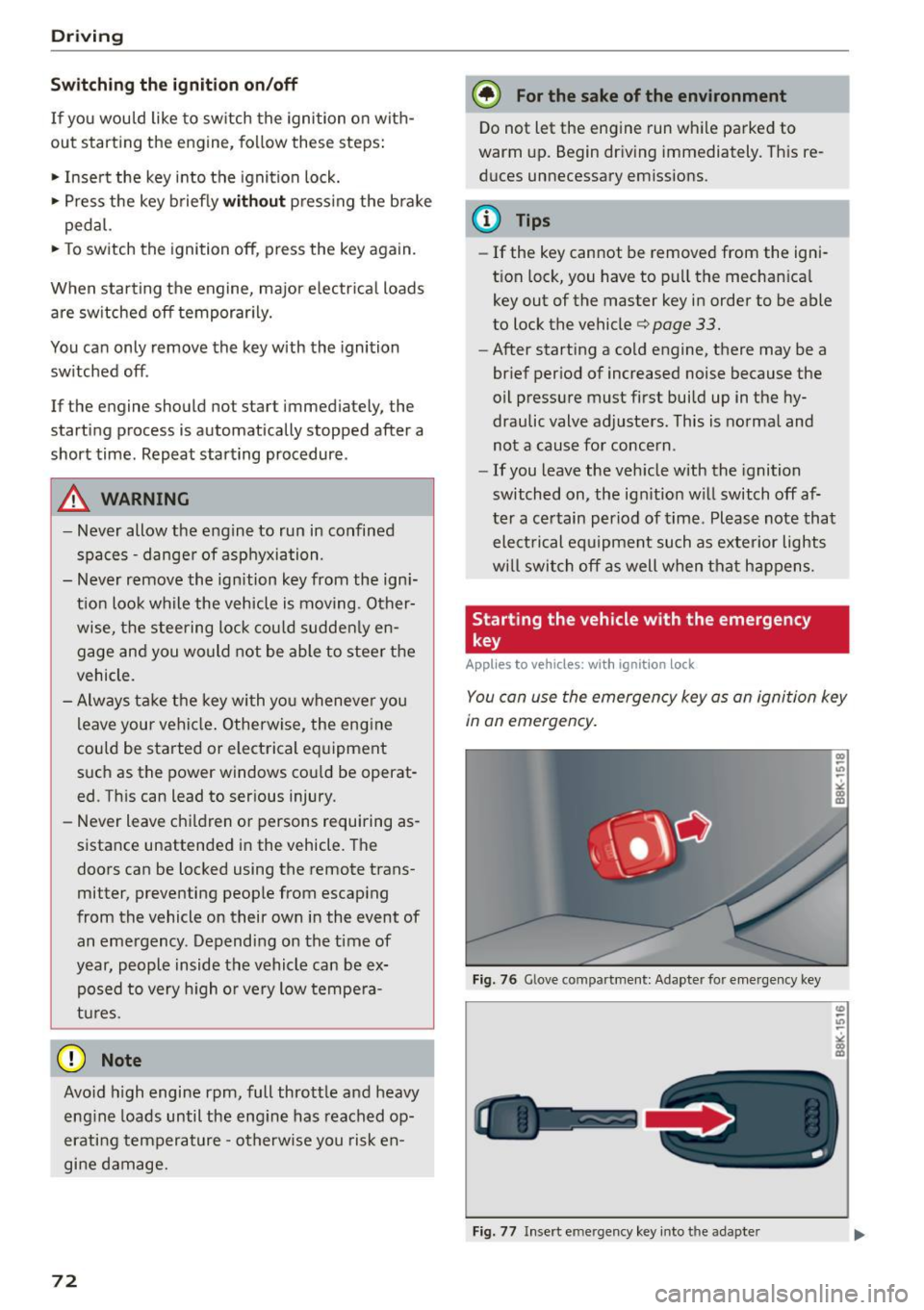
You can use the emergen cy key as an igni tion key
in an emergency.
F ig. 76 Glove co mp art men t: Adapte r fo r em erge ncy key
Fi g. 77 Insert e merg ency key into t he ad ap ter
Page 75 of 254
"' N
0:: loo
rl I.O
"' N
"' rl
.. Take the adapter for the emergency key out of
the glove compartment
r=:> fig. 76.
.. Push the emergency key
r=:> fig. 77fully into the
adapter. Make sure that the Audi rings are fac
ing up.
.. Press the emergency key in the adapter down
until it latches audibly.
.. Insert the adapter with the emergency key for
ward into the ignition switch. The engine can
now be started as usual.
Stopping the engine
Applies to vehicles: with ig ni tion lock
.. Bring the vehicle to a full stop.
.. Automatic transmission: Move the selector lev
er to the P or N position.
.. Press on the ignition key. The engine is turned
off .
.. You can now remove the key.
Steering lock
The steering locks when you remove the ignition
key. The locked steering helps prevent vehicle
theft.
Emergency off
If it is necessary in unusual circumstances, the
engine can be switched off while the vehicle is
moving. The engine will be switched off if you
press on the key for an extended period.
A WARNING
- Never turn off the engine before the vehicle
has come to a complete stop. The full func
tion of the brake booster and the power
steering is not guaranteed . You must use
more force to turn or brake if necessary. Be
cause you cannot steer and brake as you
usually would, this could lead to crashes
and serious injuries.
- For safety reasons, you should always park
your vehicle with the selector lever in P. Oth
erwise, the vehicle could inadvertently roll
away.
- The radiator fan can continue to run for up
to 10 minutes even after you have turned
off the engine and removed the ignition key.
Driving
The radiator fan can also turn on again if the
engine coolant heats up because of intense
sunlight or heat build-up in the engine com
partment.
- Always take the key with you whenever you
leave your vehicle. Otherwise, the engine
could be started or electrical equipment
such as the power windows could be operat
ed. This can lead to serious injury.
- Never leave children or persons requiring as
sistance unattended in the vehicle. The
doors can be locked using the remote trans
mitter, preventing people from escaping
from the veh icle on their own in the event of
an emergency. Depending on the time of
year, people inside the vehicle can be ex
posed to very high or very low tempera
tures.
(D Note
If the engine has been under heavy load for
an extended period, heat builds up in the en
gine compartment after the engine is switch
ed off -there is a risk of damaging the engine.
Allow the engine to run at idle for about two minutes before switching it off.
Convenience key
Starting the engine
Applies to vehicles: wi th convenience key
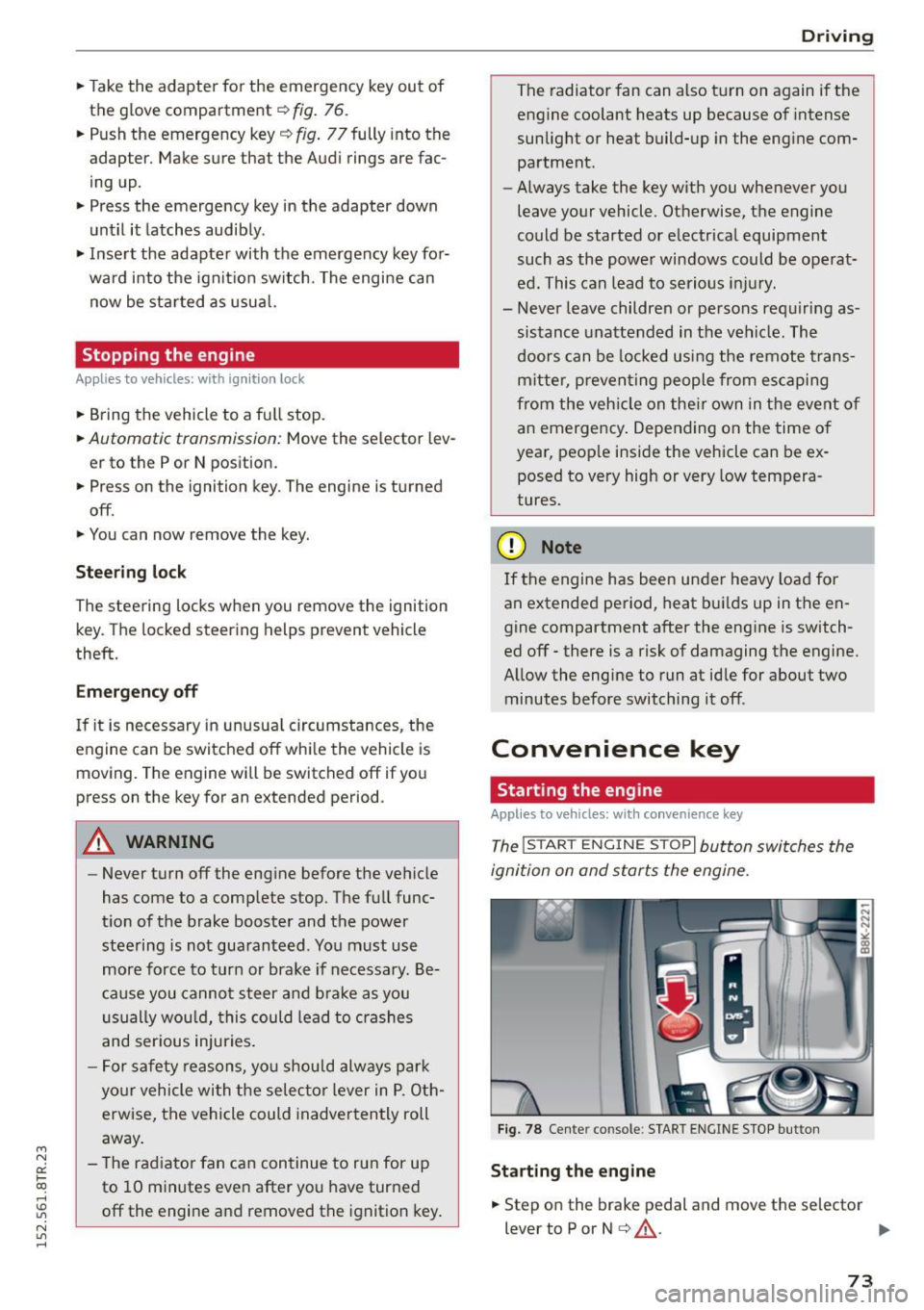
The !START ENGINE STOPI button switches the
ignition on and starts the engine.
Fig. 78 Center co nsole : START ENGINE STOP button
Starting the engine
.. Step on the brake pedal and move the selector
lever to P or N
¢ &_ . .,.
73
Page 76 of 254

Driving
"'Press on the I START ENGINE STOPI button
¢ fig. 78 -the engine wi ll start.
Switching the ignition on /off
If you would like to sw itch the ignition on with
out start ing the e ng ine, fo llow these steps:
"' Press the
!START ENGINE STOPI button with -
out pressing the brake pedal.
"'T o sw itch the ignition off, press the but to n
again.
If the engine sho uld not start immed iately, the
starting p rocess is a utomat ically stopped after a
short time. Repeat sta rting procedure.
When starting the engine, major e lectr ica l loads
are sw itched off temporar ily .
After a cold engine is started, there may be a brief period of increased noise because oil pres
sure must first build up in the hydraulic valve ad
justers. This is normal and not a cause for con
cern.
_& WARNING
- Never allow t he engine to ru n in co nfine d
spaces -dange r of asp hyxiation.
- Never turn off the engine unti l the vehicle
h as come to a comp lete stop.
- Always ta ke t he key with yo u w heneve r you
leave your vehi cle. Otherw ise, the eng ine
c ou ld be started or ele ct rical eq uipment
s u ch as the power w indows co uld be operat
ed. This can lead to serious injury.
- Never leave ch ild ren o r persons requ iring as
sistance unattended in the vehicle. The doo rs can be locked using the remote trans
mitter, preventing peop le from escap ing
from the vehicle on their own in the event of
an emergency. Depending on the time of
year, people inside the vehicle can be ex
posed to very high o r ve ry low tempe ra-
tu res.
(D Note
- Avoid high eng ine rpm, fu ll throttle and
heavy engine loads until the engine has
r eached operating tempe rat ure - otherwise
you r isk eng ine damage.
74
-
@ For the sake of the environment
Do not let the engine run while pa rked to
warm up. Begin dr iv ing immediately. Th is re
d uces unnecessary em issions.
(!} Tips
- After starting a col d en gine, t here may be a
br ie f per iod of increased noise because the
oil pressure must first bui ld up in the hy
draulic valve adjusters. This is norma l and
not a cause for concern.
- If you leave the veh icle with the ignition
switched on, the ig nition w ill switch off af
ter a ce rtain period of time. Please note that
e lect rical equipment such as exte rior lights
wi ll switch off as well when that happens.
Switching engine off
App lies to vehicles: wi th convenience key
"' Br ing your vehi cle to a comple te stop.
"' Move the se lector lever to the P o r N pos ition.
"' Press the
I START ENGINE STOP ! button
c::> page 73, fig. 78 .
Steering lock
The steer ing lo cks w hen yo u tur n the eng ine off
u sing the
I START ENGINE STOP I button a nd open
the d river's doo r. The loc ked steering helps pre
vent ve hicle theft .
Emergency off
If necessary, the e ngine can be switched off with
the se lec to r lever in the R or D/S posi tions. The
engine s tops if you press a nd ho ld the
I START ENGI NE STOP I button at speeds below
6 mph (10 km/ h) and press the brake peda l.
_& WARNING
-Never turn off the engine before the vehicle
has come to a complete stop. The full func
tion of the brake booster and the power
steer ing is not guaranteed. You must use
more force to turn or b rake if necessary. Be
caus e you cannot stee r and brake as you
usually wo uld, this cou ld lead to crashes
a nd se rio us in juries.
~
Page 78 of 254
Driving
"'Pu ll on the switch @ ¢fig. 79 to apply the
parking brake . The indicator lights in the switch
and . (USA models)/ . (Canada mode ls) in
the inst ru ment cluste r il lum inate.
"' With the ign ition switched on, step on the
brake pedal or the accelerator pedal and press
the switch @ at the same t ime to release the
parking b rake . The indicator lights in the switch
and . (USA models)/ . (Canada mode ls) in
the instr ument cluster go o ut.
Your veh icle is equipped w ith an electromechan i
cal parking b rake. The par king b rake is designed
to p revent the veh icle from rolling unintentional
ly and replaces the hand brake.
In addition to the norma l funct ions of a tradit ion
a l hand bra ke, the e lectromechan ical pa rking
b rake provides var ious convenience and safety
f u nctions.
When start ing f rom rest
- The integral starting assist helps you when
driv ing by automat ically releasing the parking
brake ¢
page 76, Starting from rest.
-When sta rting on inclines , the starting assist
prevents the vehicle from un intent ionally roll
ing back. The bra kin g for ce of the par kin g b rake
is no t released until sufficien t driv ing fo rce has
been built up at the wheels .
Emergency brake function
An emergency brake ensures that the vehicle ca n
be slowed down even if the
normal brakes fa il
¢ page 77, Emergency braking.
A WARNING
If a drive range is eng age d with the vehicle
stationary and the engine running, you mus t
in no instance accelerate careless ly . Otherwise
the vehicle will start to move immed iate ly
r isk of an accident.
(D Tips
- If the parking brake is applied with the igni
tion switched off, the indicator lights in the
switch and -(USA models) . (Cana
da models) in t he instrument cl uster will go
out after a certa in period of time.
76
- Occasional noises when the pa rking brake is
applied an d released a re norma l and are not
a cause for concern .
- Whe n the vehicle is pa rked, the park ing
brake goes through a self-test cycle at regu
lar intervals. Any associated noises are nor
ma l.
Parking
"'Press the brake pedal to stop the veh icle .
"' Pull the sw itch @¢
page 75, fig. 79 to set the
parking brake .
"' Move the se lector lever to P.
"' Tur n the engine off ¢_& .
"' When on inclines or de clines, turn the steering
wheel so that the veh icle will roll into the curb
if it begins to move.
A WARNING
-
- When you leave your vehicle -even if only
briefly - always remove the ignition key. This
applies pa rticularly when children remain in
the vehicle . Otherwise the ch ild ren could
start t he engine, release the parking b rake
or operate elect rical equipment (e.g. power
w indows). There is the risk of an acc ident.
- When the veh icle is locked, no one -part icu
larly no t chi ld ren shou ld remain in the ve hi
cle. Lo cked doors m ake it more d ifficul t for
emergency workers to get into the veh icle -
putting lives at risk.
Starting from rest
The star ting assist function ensures that the
parking brake is released automatically upon
starting .
Stopping and applying parking brake
"' Pull the sw itch @¢ page 75, fig. 79 to apply
the par kin g b rake.
Starting and automatically releasing the
parking brake
"' When you sta rt to dr ive as usual, the park ing
bra ke is automatically released and yo ur vehicle
beg ins to move. .,_
Page 87 of 254

"' N
0:: loo
rl I.O
"' N
"' rl
Manual shift program
Using the manual shift program you can man
ually select gears.
Fig. 86 Center conso le: shift in g th e gea rs manually
Fig. 87 S teerin g wh eel: shift paddl es
Gear selection with selector lever
The tiptronic mode can be selected either with
the vehicle stationary or on the move.
• Push the selector lever to the right from D/S.
An M appears in the instrumen t cluste r display
as soon as the transm ission has shifted.
• To upshift, push the selector lever forward to
the plus position
0 c::> fig. 86.
• To downshift, push the lever to the minus posi-
tion
0 .
Gear selection with shift paddles*
The shift padd les are activated when the selector
lever is in D/S or the tiptronic manual shift pro
gram.
• To upshift , touch the shift paddle on the right
(vc::>fig. 87.
• To downshift, touch the shift paddle on the left
0 -
• If you do not press a shift paddle within a short
time while in the D/S position, the transmission
will return to automatic mode . To keep shifting
Automatic transmission
using the shift padd les, move the selector lever
to the right out of the D/S position.
When accelerating, the transmission does
not
automatically shift to the next gear shortly be
fore the maximum permitted engine RPM is
reached .
If you have selected a lower gear than the current
one, the automatic transmission will shift down
only when the engine wi ll not be over-revved.
With kick-down , the transmission shifts into a
lower gear depending on speed and engine RPM.
@ Tips
Tiptronic is inoperative when the transmission
is in the fail-safe mode.
Kick-down
Kick-down enables maximum acceleration .
When you depress the accelerator peda l beyond
the resistance point, the automatic transmission downsh ifts into a lower gear, depending on vehi
cle speed and engine speed. The upshift into the
next higher gear takes place once the maximum
specified eng ine speed is reached .
& WARNING
Please note that the wheels can spin if kick
down is used on a smooth slippery road -
there is a risk of skidding .
Launch Control Program
The Launch Control Program provides the best
acceleration possible when starting from a stop.
Requirement: The engine must be at ope rat ing
temperature and the steering wheel must not be
turned .
• Press the
I.$ OFF ! button c::> page 170 while the
eng ine is running. The
II indicator l ight illumi
nates in the instr ument cluster and
Stabiliza
tion control (ESC): Sport. Warning! Restricted
stability
appears in the driver information sys -
tem display.
IJJ,,
85
Page 103 of 254
Audi drive select Driving settings
Introduction
App lies to vehicles: with Audi drive select
Drive select provides the possibi lity to experience
d ifferent types of vehicle settings in one vehicle.
F or instance, using the three
Comfort, Auto and
Dynamic modes, the driver can switch from a
sporty to a comfortable driving mode with the
press of a button.
Addit ionally, in vehicles with
MM I*, the vehicle
setup for
Individual* mode can be customized by
you. This makes it possib le to combine settings
such as a sporty engine tuning with comfortab le
steering .
A WARNING
-
Improper use of the Audi drive select can
cause collisions, other acc idents and serious
personal injury.
Description
App lies to vehicles: with Audi drive select
The vehicle setup in each mode depends on the
veh icle's featu res . However, the engine, automat
ic transmission and steering are always involved.
Engine and automatic transmission
Depending on the mode, the engine and the au
tomatic transmission respond quicker or in a
more balanced manner to accelerator pedal
movements. In the sporty dynamic mode, the au
tomatic transmission shifts at higher RPMs . Th e
engine sound is adjusted by opening or clos ing
the exhaust doors for the respective mode.
Steering
The steering adapts in te rms of steering effort
and steering ratios . Indirect steering that moves
eas ily, like the steering in comfort mode, is best
suited to long drives on a highway. In contrast,
~ dynamic mode provides sporty, direct steering.
0::
~ The follow ing applies to vehicles with dynamic ,....,
~ steering*: the steering ratio changes based on ve-
~ hicle speed in order to maintain optimum steer -,....,
Audi drive select
ing effort for the driver at all times. This sets the
steering to be less sensitive at higher speeds in
order to provide improved vehicle control. At re
duced speeds, however, steering is more direct in
order to keep the steering effort as minimal as
possible when the driver is maneuvering the vehi
cle. At low and average speeds, dynamic steer ing
additionally provides more responsive steering
performan ce.
Sport differential*
As a component of the all wheel drive system
(quattro)
<=> page 174, the sport differential* dis
tributes the driving power to the rear axle de
pend ing on the s ituation . The distribution of
power varies depending on the mode selected.
T he goal is a high level of agility and ability to ac
ce lerate on curves. The vehicle is very responsive
to steering .
Audi adaptive cruise control*
The behav ior when accelerating can be adjusted
from comfortable to sporty, depending on the
drive select mode. Adaptive cruise control also
responds to the driving behavior of the vehicle
ahead in a more conservative or sporty manner.
Engine sound*
T he sound of the eng ine is adapted to the select
ed mode and ranges from subtle to sporty.
(D Tips
-In some models, the maximum vehicle
speed can only be reached in the
Auto and
Dynamic modes.
- Selecting the
Dynamic mode results in spor
ty shifting characteristics. The S gear posi
tion engages automatically.
- In vehicles that have dynamic steering*, op
erating noise is heard when starting or stop
ping the engine. This does not indicate a
problem .
101
Page 104 of 254

Audi drive select
Selecting the driving mode
Applies to vehicles: with Audi drive select
You can choose between Comfort, Auto, Dynam
ic
and Individual * modes.
N
N
0
0
c:====::::· ~ ID
Fig. 106 Cente r console : Con trol fo r Aud i drive se lect
F ig . 107 MM!*: Audi dr ive se lec t
... To set the mode , press the ~:i:r. 1 button
¢fig. 106 multiple times until the desired
mode is displayed in the instrument cluster. Or
Adjusting the Individual mode
Applies to vehicles: with MMI and Audi drive select
.,. In the MMI*, select: ICARI function button >
Comfort, Auto, Dynamic or Individual *.
In vehicles withou t the MMI*, the ~:i:r.1 button is
f o und underneath the selecto r lever.
You can c hange the driving mode when the vehi
cl e is stationary or while dr iving . If traffic per
mits, after changing modes, briefly take your
foot
off the acce lerator pedal so that the recently
selected mode is also activated for the engine
and transmission.
Comfort -pro vides a comfort-oriented vehicle
setup and is suited for long drives on highways.
Auto -provides an overall comfortable yet dy
namic driv in g feel and is suited for every day use.
Dynamic -gives the driver a sporty driving feel
and is suited to a sporty driv ing style .
Individual * -<=> page 102.
A WARNING
Pay attention to traffic when operating drive
select to prevent potential risk of an accident.
You can personally specify the vehicle setup in the MMI" .
.,. Se lect the ICAR I function button > Set individu
al
control button. Once you select the menu ,
you w ill automatically drive in the
individual
mode.
Systems Comfort
Eng i ne/Tra nsm ission
ba lan ced
Steering comfortable
Dynamic steering* comfortable/ indirect
Sport differential * balanced
Adaptive cruise control* comfortable
Engine sound* subtle
102
The equipment in your vehicle will determine
wh ich sett ings you can adjust. The following ta
ble provides an overview of the characteristics of
ea ch driving mode.
Auto Dynamic
balanced sporty
balanced sporty
balanced/direct sporty/direct
agile sporty
balanced sporty
subt le sporty
Page 110 of 254

Parking System
Reverse Parking
Applies to vehicles: with parking system plus with rear view
camera
Parking mode 1 can be used when parking in a
garage or parking space.
Fig. 114 MMI Display: Aiming at a parking spot
Fig. 115 MMI Display: Align ing the vehicle
.,. Switch the MMI on and select the reverse gear.
.,. Turn the steering wheel until the orange orien
tation lines
(D appear in the parking spot
c::> fig. 114. Use the markings @to help you es
timate the distance from an obstacle. Each
marking corresponds to 3
ft (1 m). The blue
area represents an extension of the vehicle's
outline by approximately 16
ft (5 m) to the
rear .
.,. While driving in reverse gear, adjust the steer
ing wheel angle to fit the parking space with
the aid of the orange orientation lines
c::>@. @
marks the rear bumper. You should stop driving
in reverse as soon as and no later than when
the red orientation line@) abuts an object
c::> .&. !
108
A WARNING
- The rear view camera does not show the en
tire area behind the vehicle
c::> page 106,
fig . 112.
Watch out especially for small chil
dren and animals. The rear view camera can
not always detect them, posing risk of an
accident!
- Please note that objects not touching the
ground can appear to be further away than
they really are (for example, the bumper of
a parked vehicle, a trailer hitch, or the rear
of a truck). In this case, you should not use
the help lines to help with parking, which poses danger of an accident!
cg) Note
- Low obstacles already signaled by a warning can disappear from the system's detection
range as they are approached and will not
continue to be signaled. Objects such as
barrier chains, trailer draw bars, thin paint
ed vertical poles or fences may not be de
tected by the system, posing risk of dam age.
- In the MMI display, the direction of travel of the vehicle rear is represented depending on
the steering wheel angle. The vehicle front
swings out more than the vehicle rear. Main
tain plenty of distance from an obstacle so
that your outside mirror or a corner of your
vehicle does not collide with any obstacles -
danger of accident!
Page 113 of 254
M N
0:: loo ,...., \!) ..,.,
N ..,., ,....,
Driving safety
Basics
Safe driving habits
Please remember -safety first!
This chapter contains important information,
tips, instructions and warnings that you need to
read and observe for your own safety, the safety
of your passengers and others . We have summar
ized here what you need to know about safety
belts, airbags , chi ld restraints as well as child
safety. Your safety is for us
priority number 1. Al
ways observe the informat ion and warn ings in
this section - for your own safety as well as that
of your passengers .
The information in this section app lies to all
model ve rsions of your vehicle . Some of the fea
tures described in this sections may be standard
equipment on some models, or may be optional
eq uipment on others .
If you are not sure, ask
your authorized Audi dealer.
A WARNING
- Always make sure that you follow the in
struct ions and heed the WARNINGS in this
Manual. It is in your interest and in the in
terest of your passengers.
- Always keep the complete Owne r's Litera
ture in your Aud i when you lend or sell your
vehicle so that this important info rmation
will always be ava ilable to the driver and
passenge rs.
-
- Always keep the Owner's literature handy so
that you can find it easily if you have ques
tions.
Safety equipment
The safety features are part of the occupant re
straint system and work together to help reduce
the risk of injury in a wide variety of accident sit
uations.
Your safety and the safety of your passenge rs
should not be left to chance. Advances in tec h
nology have made a var iety of fea tures available
to help reduce the r isk o f injury in an accident.
Dr ivin g sa fet y
The following is a list of just a few of the sa fety
features in your A udi:
- sophisticated s afety be lts fo r drive r and a ll pas-
senger seat ing pos itions,
- be lt fo rce limi ters for the front seats,
- belt pretensioners for the seats,
- head restra ints for each seating posit ion,
- front airbags,
- side airbags in the front seats,
- side curtain a irbags,
- specia l LATCH anchorages for child rest raints,
- adjustab le steering colum n.
These ind iv idual safety features, can work to
gether as a system to help protect you and your
passengers in a w ide range of accidents . T hese
features cannot wo rk as a system if they are not
always cor rect ly adjusted and co rrectly used.
Saf ety is ev erybody' s re sponsibility!
Important th ings to do before driving
Safety is everybody 's job! Vehicle and occupant
safety always depends on the informed and care
ful driver .
For your safety and the safety of your passen
gers,
befor e driv ing alway s:
.. Make sure that all lights and signals are operat
ing correctly.
.. Make sure that the tire pressure is correct.
.. Make sure that all w indows are clean and afford
good vis ibility to the outs ide .
.. Secure all luggage and other items carefully
Q page59.
.. Ma ke s ure that nothing can interfere with the
pedals .
.. Adjust front seat, head restraint and mirrors
correctly for your height.
.. Instruct rear seat passengers to adjust the
head restra ints according to their he ight.
.. Make sure to use the r ight child restraint cor
rectly to protect ch ildren
Q page 150, Child
safety .
.. Sit p rope rly in your seat and make su re that
your passengers do the same
Q page 53, Seats
and storage. .,.
111
Page 114 of 254

Driving safet y
• Fasten your safety belt and wear it properly . Al
so instruct your passengers to fasten the ir safe
ty belts properly ¢
page 120 .
What impairs driving safety?
Safe driving is directly related to the condition of
the vehicle, the driver as well as the driver 's abili
ty to concentrate on the road without being dis
tracted .
The driver is responsible for the safety of the ve
hicle and all of its occupants. If your ability to
drive is impaired, safety risks for everybody in the
veh icle increase and you also become a hazard to
everyone else on the road ¢,&. .Therefore:
• Do not let yourself be distracted by passengers
or by using a cellular telephone .
• NEVER drive when your driv ing ability is im
paired (by medicat ions, alcohol, drugs, etc .).
• Observe all traffic laws, rules of the road and
speed limits and plain common sense .
• ALWAYS adjust your speed to road, t raff ic and
weather cond itions .
• Take frequent breaks on long trips . Do not dr ive
f or more than two hours at a stretch.
• Do NOT drive when you are tired, under pres
sure or when you are stressed.
A WARNING
Impaired driving safety increases the risk of
ser ious personal injury and death whenever a
vehicle is being used.
112
.
Correct passenger
seating positions
Proper seating position for the driver
The proper driver seating position is important
for safe, relaxed driving.
Fig. 118 Co rrect seat ing position
For your own safety and to reduce the risk of in
jury in the event of an accident, we recommend
that you adjust the driver's seat to the following pos ition:
• Adjust the driver 's seat so that you can easily
push the pedals all the way to the floor while
keeping your knee(s) slightly bent¢,&..
• Adjust the angle of the seatback so that it is in
an upright position so that your back comes in
full contact with it when you dr ive.
• Ad just the steering wheel so th at there is a dis
tance of at least 10 inches (25 cm) between the
steering whee l and your breast bone
¢ fig. 118.
If not possible, see your authorized A udi dealer
about adaptive equipment.
• Adjust the steering wheel so that the steering
wheel and airbag cover points at your chest and
not at your face.
• Grasp the top of the steer ing wheel with your
elbow(s) slightly bent.
• App lies to veh icles with adjustable head re
straints: Adjust the head res traint so the upper
edge is as even as possible with the top of your
head . If that is not possible, try to adjust the
head restraint so that it is as close to this posi
tion as possible.
• Fasten and wear safety belts correctly
¢page 123.
• Always keep both feet in the footwell so that
you are in control of the vehicle at all times .