engine oil AUDI RS5 COUPE 2015 Owners Manual
[x] Cancel search | Manufacturer: AUDI, Model Year: 2015, Model line: RS5 COUPE, Model: AUDI RS5 COUPE 2015Pages: 254, PDF Size: 64.12 MB
Page 5 of 254
M N
0:: loo ,....,
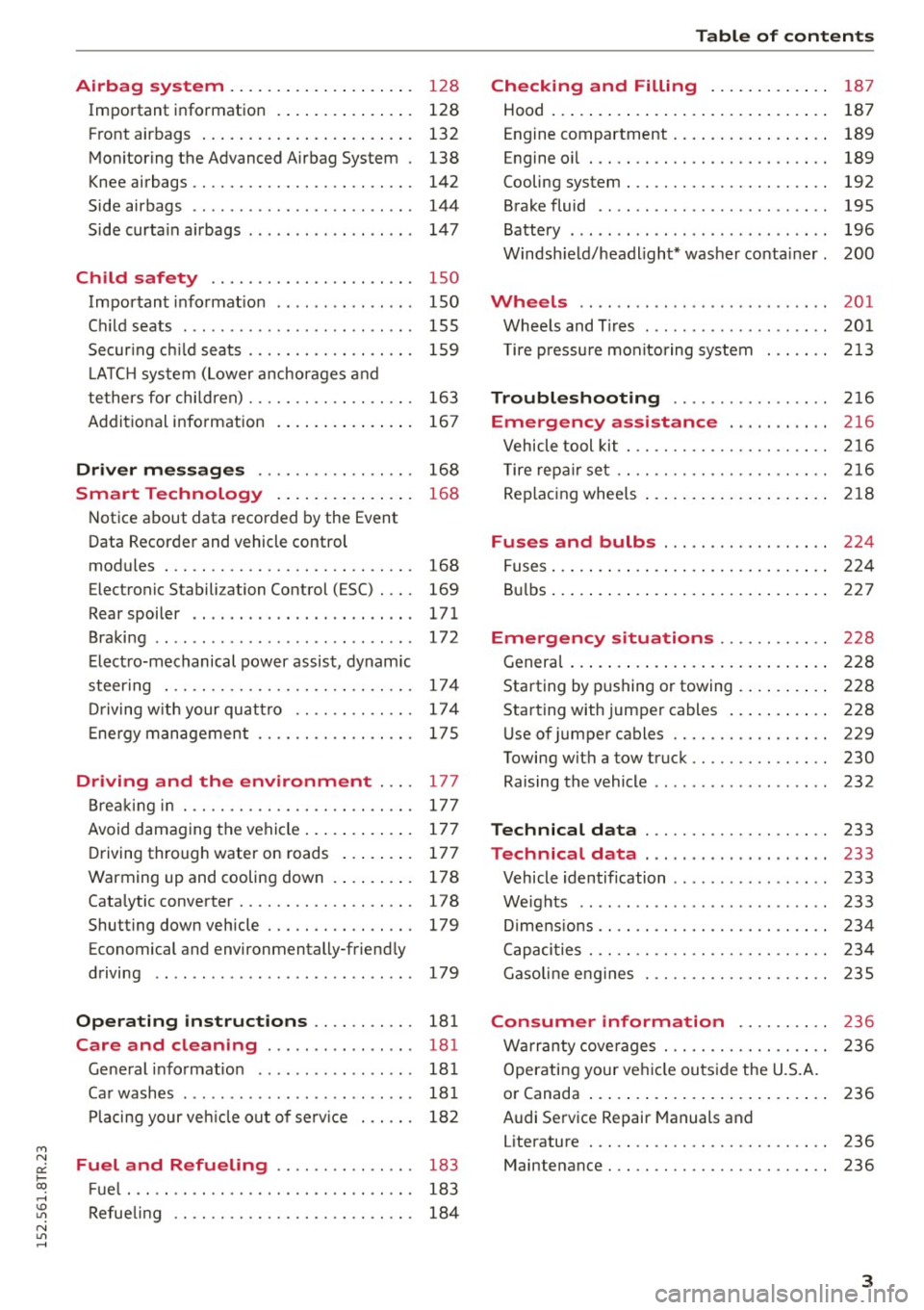
Airbag system . . . . . . . . . . . . . . . . . . . . 128
Important information . . . . . . . . . . . . . . . 128
Front ai rbags . . . . . . . . . . . . . . . . . . . . . . . 132
Mon ito ring the Advanced A irb ag Sys tem . 138
Knee airbags . . . . . . . . . . . . . . . . . . . . . . . . 142
Side airbags . . . . . . . . . . . . . . . . . . . . . . . . 144
Side curta in a irbags . . . . . . . . . . . . . . . . . . 1 47
Ch ild safety . . . . . . . . . . . . . . . . . . . . . . 150
Important informat ion . . . . . . . . . . . . . . . 150
Ch ild seats . . . . . . . . . . . . . . . . . . . . . . . . . 155
Secur ing c hild seats . . . . . . . . . . . . . . . . . . 159
L A TC H system (Lower anchorages and
tethers for chi ldren) . . . . . . . . . . . . . . . . . . 163
Addit ional info rmation
167
Driver messages . . . . . . . . . . . . . . . . . 168
Smart Technology . . . . . . . . . . . . . . . 16 8
N otice about data recorded by the Event
Data Recorder and vehicle cont rol
modules . . . . . . . . . . . . . . . . . . . . . . . . . . . 168
Electronic Stabili za tion Control (ESC) . . . . 169
Rear spoiler . . . . . . . . . . . . . . . . . . . . . . . . 171
Braking . . . . . . . . . . . . . . . . . . . . . . . . . . . . 172
Elect ro-mechanical power assist , dynamic
steer ing . . . . . . . . . . . . . . . . . . . . . . . . . . . 174
Dr iving w ith your quat tro . . . . . . . . . . . . . 17 4
E ne rgy management . . . . . . . . . . . . . . . . . 17 5
Driving and the environment . . . . 177
B rea kin g in . . . . . . . . . . . . . . . . . . . . . . . . . 177
Avoid damaging the vehi cle . . . . . . . . . . . . 17 7
D riving through water on roads . . . . . . . . 177
Warming up and cooling down . . . . . . . . . 178
Cata lytic converter........ .... .. .. .. . 17 8
Shutt ing down veh icle . . . . . . . . . . . . . . . . 179
Economical and environmentally-friend ly
driving . . . . . . . . . . . . . . . . . . . . . . . . . . . . 179
Operating instructions . . . . . . . . . . . 181
Care and cleaning . . . . . . . . . . . . . . . . 181
Ge ne ral i nfo rmat ion . . . . . . . . . . . . . . . . . 181
Ca r washes ............... ...... ... .
Pl acing your veh icle out of se rv ice 18
1
18 2
Fuel and Refueling . . . . . . . . . . . . . . . 183
F ue l... .. .. ................. .. .... . 183
~ Refue ling . . . . . . . . . . . . . . . . . . . . . . . . . . 184
N l/'I ,....,
Tab le of conten ts
Checking and Filling . . . . . . . . . . . . .
187
Hood . . . . . . . . . . . . . . . . . . . . . . . . . . . . . . 187
Engine compartment . . . . . . . . . . . . . . . . . 189
Engine oil . . . . . . . . . . . . . . . . . . . . . . . . . . 189
Cooling system . . . . . . . . . . . . . . . . . . . . . . 192
Brake fluid . . . . . . . . . . . . . . . . . . . . . . . . . 195
Battery . . . . . . . . . . . . . . . . . . . . . . . . . . . . 196
Windsh ie ld/headlight* washer conta iner. 200
Wheels .. .. .. .. .. ... .. ... ..... .. .. 201
Whee ls and T ires . . . . . . . . . . . . . . . . . . . . 201
T ire pressu re monito ring system 213
Troubleshoot ing .............. ... 216
Emergency assistance ... .. .. ... . 216
Vehicle tool kit . . . . . . . . . . . . . . . . . . . . . . 216
T ire repa ir set .. . .. .......... .... .. . . 216
Rep lac ing whee ls . . . . . . . . . . . . . . . . . . . . 2 18
Fuses and bulbs . . . . . . . . . . . . . . . . . . 224
F uses ... .. .. .. .. .. .... .... ... .. .. .. 224
B ul bs . . . . . . . . . . . . . . . . . . . . . . . . . . . . . . 2 27
Emergency situations . . . . . . . . . . . . 228
Genera l . . . . . . . . . . . . . . . . . . . . . . . . . . . . 2 28
Starting by pushing or towing . . . . . . . . . . 228
Starting with jumper cabl es . . . . . . . . . . . 228
U se of jumper cables . . . . . . . . . . . . . . . . . 229
Towing with a tow truck . . . . . . . . . . . . . . . 230
Raising the vehicle . . . . . . . . . . . . . . . . . . . 232
Technical data . . . . . . . . . . . . . . . . . . . . 233
Technical data . . . . . . . . . . . . . . . . . . . . 233
Vehicle identification . . . . . . . . . . . . . . . . . 233
Weights . . . . . . . . . . . . . . . . . . . . . . . . . . . 233
D imens io ns . . . . . . . . . . . . . . . . . . . . . . . . . 234
Capaci ties . . . . . . . . . . . . . . . . . . . . . . . . . . 234
Gasoli ne engines . . . . . . . . . . . . . . . . . . . . 235
Consumer information . . . . . . . . . . 236
W arranty cove rages . . . . . . . . . . . . . . . . . . 236
Operatin g your ve hicl e outs ide the U.S.A.
o r Canada . . . . . . . . . . . . . . . . . . . . . . . . . . 236
Audi Se rvice Repair Manuals and
Literature . . . . . . . . . . . . . . . . . . . . . . . . . . 236
Maintenance . . . . . . . . . . . . . . . . . . . . . . . . 236
3
Page 11 of 254
M N
0:: loo ,...., \!) ..,.,
N ..,., ,....,
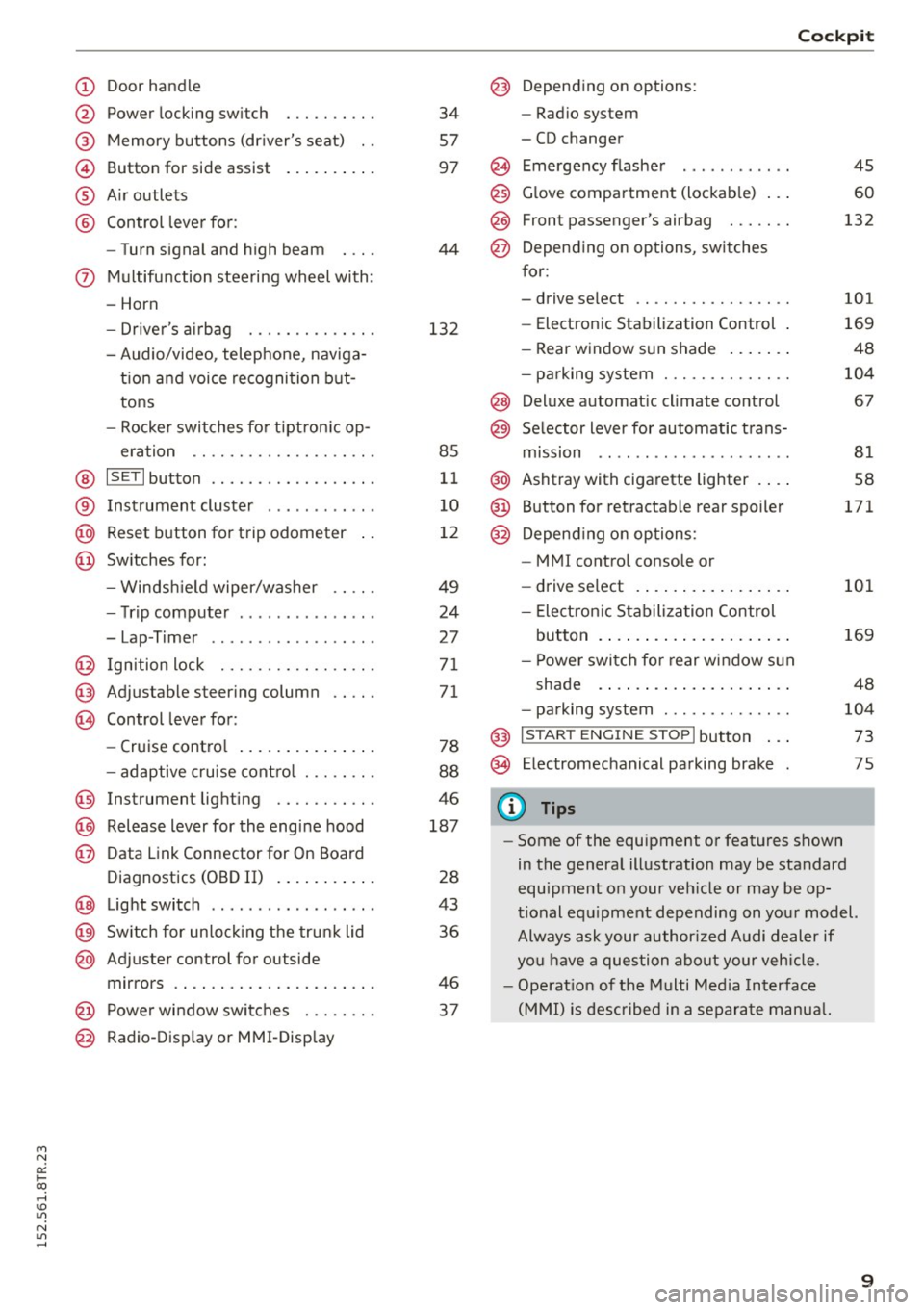
(!) Door handle
@
®
©
®
®
Power locking swi tch
Memory buttons (driver's seat) . .
Button for side assist
A ir outlets
Control lever for :
- Turn signal and high beam
0 Multifunction steering wheel with :
- Horn
- Driver 's airbag ....... .. .. .. .
- Audio/video , telephone, naviga -
t ion and voice recognition but
tons
- Rocker switches for tiptron ic op-
eration ...... .... ... .... .. .
@ ISETI button .... ..... .. .... .. .
® Instrument cluster ........... .
@ Reset button for trip odometer
@ Switches for:
- Windsh ield wiper/washer
- Trip computer .............. .
- Lap -Timer ............ ... .. .
@ Ignition lock ... .... ... .... .. .
@ Adju stable steering column
@ Control lever for:
- Cruise control .............. .
- adaptive cruise control ... .. .. .
@ Instrument lighting .... .. .. .. .
@ Release lever for the engine hood
@ Data Link Connector for On Board
Diagnostics (OBD II) ....... ... .
@ Light switch ................. .
@) Switch for unlock ing the trunk lid
@ Adjuster control for outside
mirrors .. .. .. ........... .. .. .
@ Power window switches . .. .. .. .
@ Radio-Display or MMI-Display 34
57
97
44
132
85
11
10
12
49
24
2 7
71
71
78
88
46
187
28
43
36
46
37
Cockpit
@) Depending on options:
- Radio system
- CD changer
@ Emergency flasher
@
@
@ Glove compartment (lockable) ...
F ront p assenger's airbag . .. .. . .
Depend ing on options, switches
for:
- drive select .. .... ... .... .. . .
- Electronic Stabilization Control .
- Rear window sun shade ...... .
- parking system ...... ..... .. .
@ Deluxe automat ic climate control
@ Selector lever for automatic trans-
mission .. .. .. ..... ......... .
@ Ashtray with cigarette lighter ... .
@ Button for retractable rear spoiler
@ Depend ing on options:
- MM I control console or
- drive select . ............... .
- Electron ic Stabilization Control
45
60
132
101
169
48
104
67
81
58
171
101
button . . . . . . . . . . . . . . . . . . . . . 169
- Power switch for rear window sun
shade . . . . . . . . . . . . . . . . . . . . . 48
- parking system . . . . . . . . . . . . . . 104
@ I S TAR T ENG INE ST OPI button . . . 73
@ Electromechanical parking brake 75
(D Tips
- Some of the equipment or features shown
in the general illustration may be standard
equipment on your vehicle or may be op
tional equipment depending on your model.
Always ask your author ized Audi dealer if
you have a question about your vehicle.
- Operat ion of the Multi Media Interface
(MMI) is described in a separate manual.
9
Page 15 of 254
M N
0:: loo ,...., \!) 1.1"1
N 1.1"1 ,....,
Indicator lights
Description
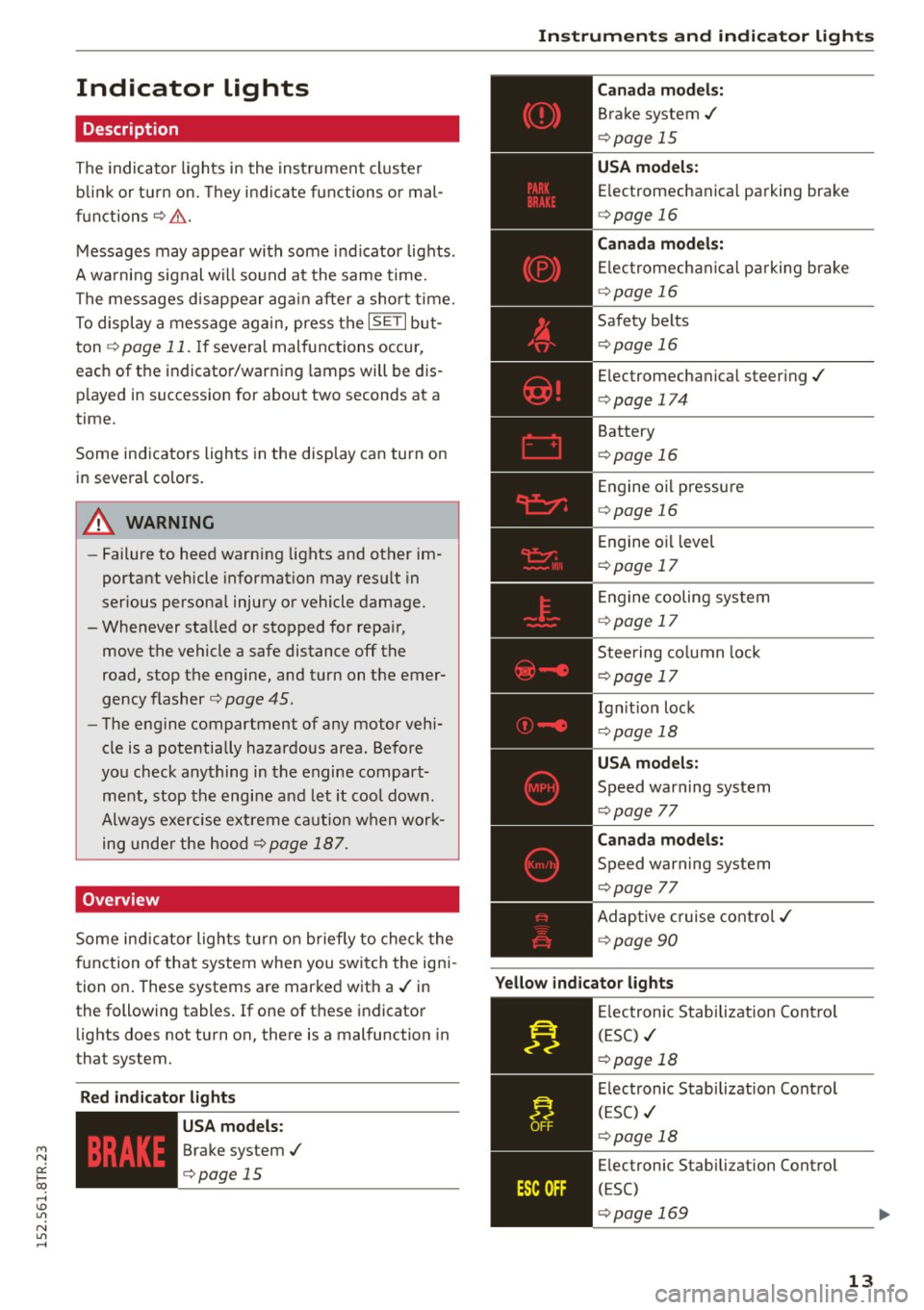
The indicator lights in the instrument cluster
blink or turn on. They indicate functions or mal
functions¢ &.
Messages may appear with some indicator lights .
A warning signal will sound at the same time.
The messages disappear again after a short time.
To display a message again, press the
I SE TI but
ton ¢
page 11. If several malfunctions occur,
each of the indicator/warning lamps will be dis
p layed in succession for about two seconds at a
time.
Some indicators lights in the display can turn on
in several colors.
8_ WARNING
- Failure to heed warning lights and other im
portant vehicle information may resu lt in
serious personal injury or vehicle damage.
- Whenever sta lled or stopped for repa ir,
move the vehicle a safe distance off the
road, stop the engine, and turn on the emer
gency flasher¢
page 45.
- The engine compartment of any motor vehi
cle is a potentially hazardous area. Before
you check anything in the engine compart
ment, stop the engine and let it cool down.
Always exercise extreme caution when work
ing under the hood¢
page 187.
Overview
Some indicator lights turn on briefly to check the
function of that system when you switch the igni
tion on . These systems are marked with a./ in
the following tables .
If one of these indicator
lights does not turn on, there is a malfunction in
that system.
Red indicator light s
--------------
US A models:
Brake system./
¢page 15 Instruments
and indicator lights
Canada models:
Brake system./
¢page 15
USA models:
Electromechanical parking brake
¢ page 16
Canada models:
Electromechanical parking brake
¢ page 16
Safety belts
¢page 16
Electromechanical steering./
¢page 174
Battery
¢page 16
Engine oil pressure
¢page 16
Engine oil level
¢page 17
Engine cooling system
¢page 17
Steering column lock
¢page 17
Ign it ion lock
¢ page 18
USA models:
Speed warning system
¢page 77
Canad a models:
Speed warning system
¢page 77
Adaptive cruise control./
¢page 90
Yellow indicator lights
--------------
Electronic Stabilization Contro l
(ESC) ./
¢page 18
Electronic Stabilization Contro l
(ESC) ./
¢page 18
Electronic Stabilization Control
(ESC)
¢page 169
13
Page 16 of 254
Instruments and indicator lights
"O~ I I ~ .,
TPMS
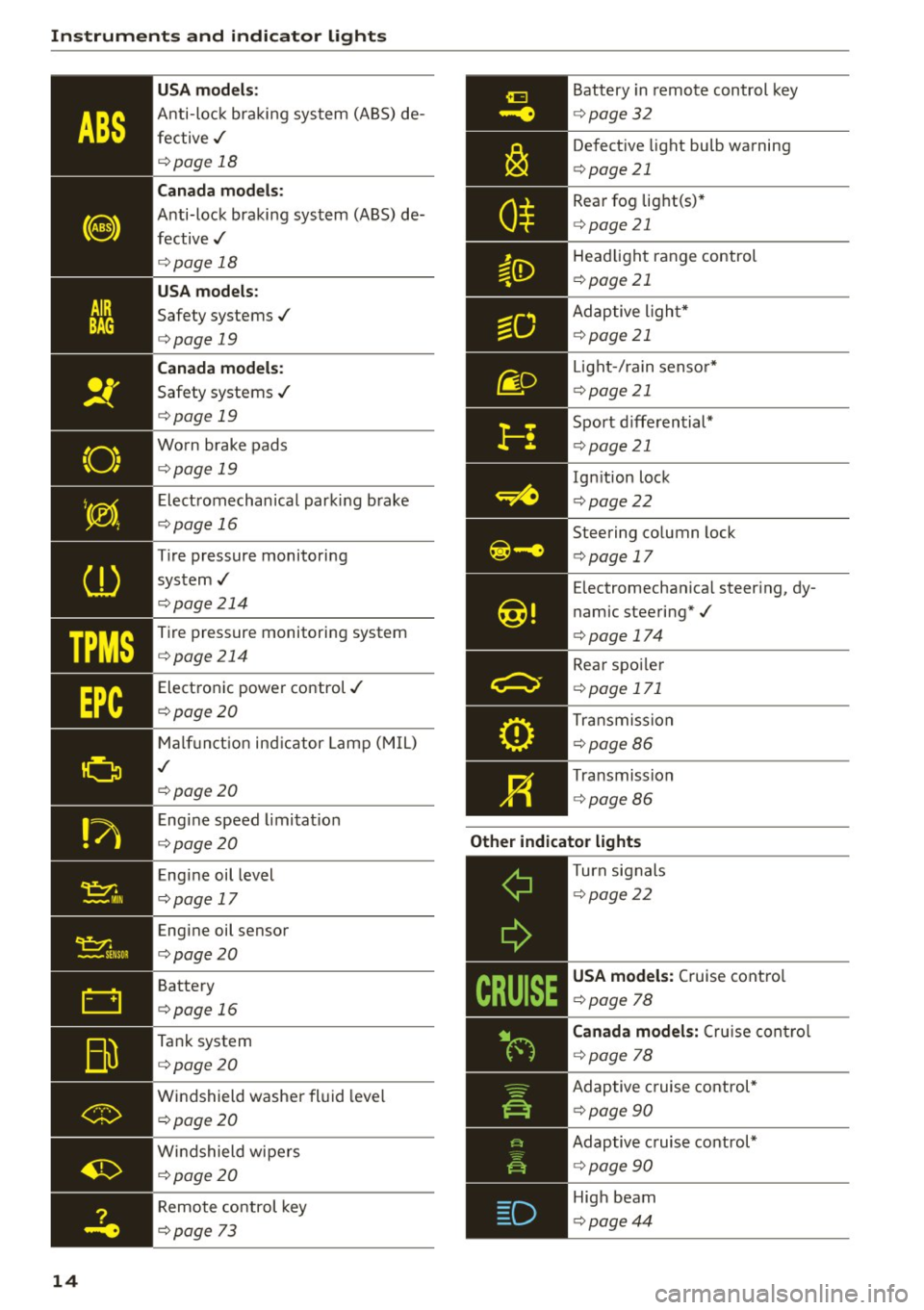
14 USA m
odel s:
Anti-loc k braking system (ABS) de
fective,/
¢ page 18
Canada mod els :
Anti-lock braking system (ABS) de
fective,/
¢ page 18
USA models :
Safety systems,/
¢page 19
Canada model s:
Safety systems ./
¢page 19
Worn brake pads
¢ page 19
Electromechanical parking b rake
¢page 16
Tire pressure monitoring
system,/
¢ page214
Tire pressure monitoring system
¢page214
Electronic power control./
¢page20
Malf unct ion ind icator Lamp (MIL)
,I
c::>page 20
Engine speed limitat ion
c::> page20
Engine oil level
c::> page 17
Engine oil sensor
c::>page20
Battery
c::>page 16
Tank system
c::>page20
Windshield washe r fl uid leve l
¢page20
Wi ndshield wipers
¢page20
Remote control key
c>page 73
Battery in remote control key
¢ page32
Defect ive light bulb warning
¢ page 21
Rear fog lig ht(s)*
<=> page 21
Headlight range control
¢page 21
Adaptive l ight*
c> page 21
Light -/ rain senso r*
c> page 21
Sport d iffe rential*
c> page 21
Ignition lock
c>page22
Steering co lumn lock
c> page 17
Electromechanica l steer ing, dy
namic steering*,/
c>page 174
Rear spo ile r
c> page 171
Transmission
c>page86
Transmission
c>page 86
Other indicator light s
--------------Turn signals
c>page22
USA models: Cruise contro l
c>page 78
Canad a model s: C ru ise contro l
c>page 78
Adaptive c ruise cont rol*
c> page 90
Adaptive c ruise control*
c> page 90
High beam
c>page44
Page 18 of 254
Instruments and indicator lights
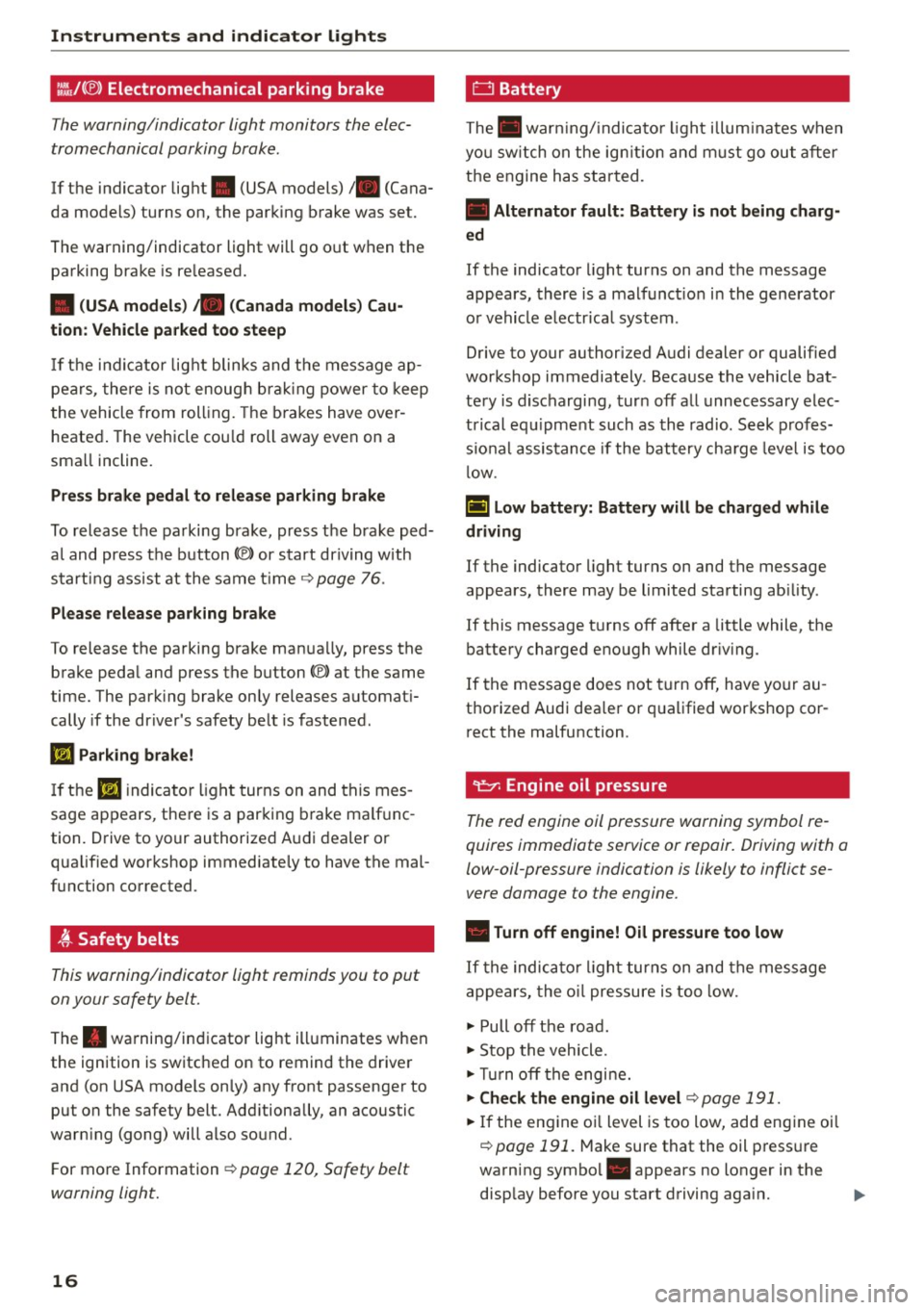
l:.'J,/(® ) Electromechanical parking brake
Th e w arning/indicator light monitors th e elec
tromechanical parking brake.
If the indicator light . (USA models)/ . (Cana
da models) turns on, the parking brake was set.
The warning/indicator light will go o ut when the
parking brake is re leased.
• (USA models) ;a (Canada model s) Ca u
tion : Vehicle parked too steep
If th e i nd ic ator lig ht blinks and t he message ap
pe ars, there is not enoug h brak ing power to keep
t he vehicle from roll ing. The b ra kes have over
heated . The vehicle cou ld roll away even on a
sma ll incline.
Press brake p edal to relea se parking brake
To release the parking brake, press t he brake ped
a l and press the button(®) or start driving with
start ing assist at the same time ~
page 76.
Ple ase release park ing brake
To release the parking brake man ua lly, press the
brake peda l and press the button(®) at the same
time. The park ing brake only releases automat i
cally if the driver's safety be lt is fastened.
l'iJ Parking brake!
If th e II indicator ligh t turns on and thi s mes
sage ap pears , the re is a parking b rake ma lf u nc
tion. D rive to your authorized A udi dealer o r
qualified wor kshop immediate ly to have the mal
function corrected .
t Safety belts
This warning/indicator light reminds you to put
on your safety belt.
The . warning/in dicator light ill uminates when
the ignition is switched on to remind the drive r
and (on USA models on ly) any front passenger to
put on the safety belt. Add itionally, an acoustic
warn ing (gong) will also sound.
F or mo re Information ~
page 120, Safety belt
warning light.
16
0 Battery
The . war ning/ indica to r li ght illum ina tes w hen
yo u sw itch on the ig nition and m ust go ou t aft er
the engine has star ted.
• Alternator fault : Battery is not being charg·
ed
If the indicato r light turns on and the message
appears, there is a malfunct io n in the gene rator
o r vehicle e lectr ica l system .
Drive to your authorized A udi dealer or qualified
workshop immediately . Beca use the vehicle bat
te ry is d ischarging, tur n off all unnecessary elec
t rical eq uipme nt such as th e radio. Se ek prof es
s io nal assis tance if the battery cha rge leve l is too
l ow .
(•) low battery: Battery will be charged while
driving
If the indicator light turns on and the message
appears , there may be limited starting ab ility .
If this message t urns off after a little while , the
battery charged eno ugh while dr iv ing .
If the message does not turn off, have yo ur au
thorized Audi dea ler or qualified workshop co r
r ect the malfunction .
~ Engine oil pressure
The red engine oil pressure warning symbol re
quires immediate service or repair. Driving with a
low-oil-pressure indication is likely to inflict se
vere damage to the engine .
• Turn off engine! Oil pressure too low
If the indic ator li ght turns on and the message
appe ars, the o il pressure is too low.
~ Pull off the road .
~ Stop the vehicle .
~Tur noff the engi ne.
~ Che ck the engine oil level~ page 191.
~ If the eng ine o il level is too low, add eng ine oil
~ page 191. M ake sure that the oil p ress ure
warning symbol. appears no longer in the
disp lay before you start driving aga in. ..,_
Page 19 of 254
M N
0:: loo ,...., \!) 1.1'1
N 1.1'1 ,....,
~ If the engine oil level is correct and the indica
tor light still turns on, turn the engine off and
do not continue driving. Seek profess ional as
sistance.
(D Tips
- The engine oil pressure symbol. is not
an indicator for a low engine oil level. Do
not rely on it. Instead, check the oil level in
your engine at regular intervals, preferably
each time you refuel, and always before
going on a long trip.
- The yellow oil level warning indication
Ill
requires oil refill or workshop service with
out delay. Do not wait until the red oil
pressure warning. starts to flash before
you respond to the low oil level warning
m. By then, your engine may already have
suffered serious damage.
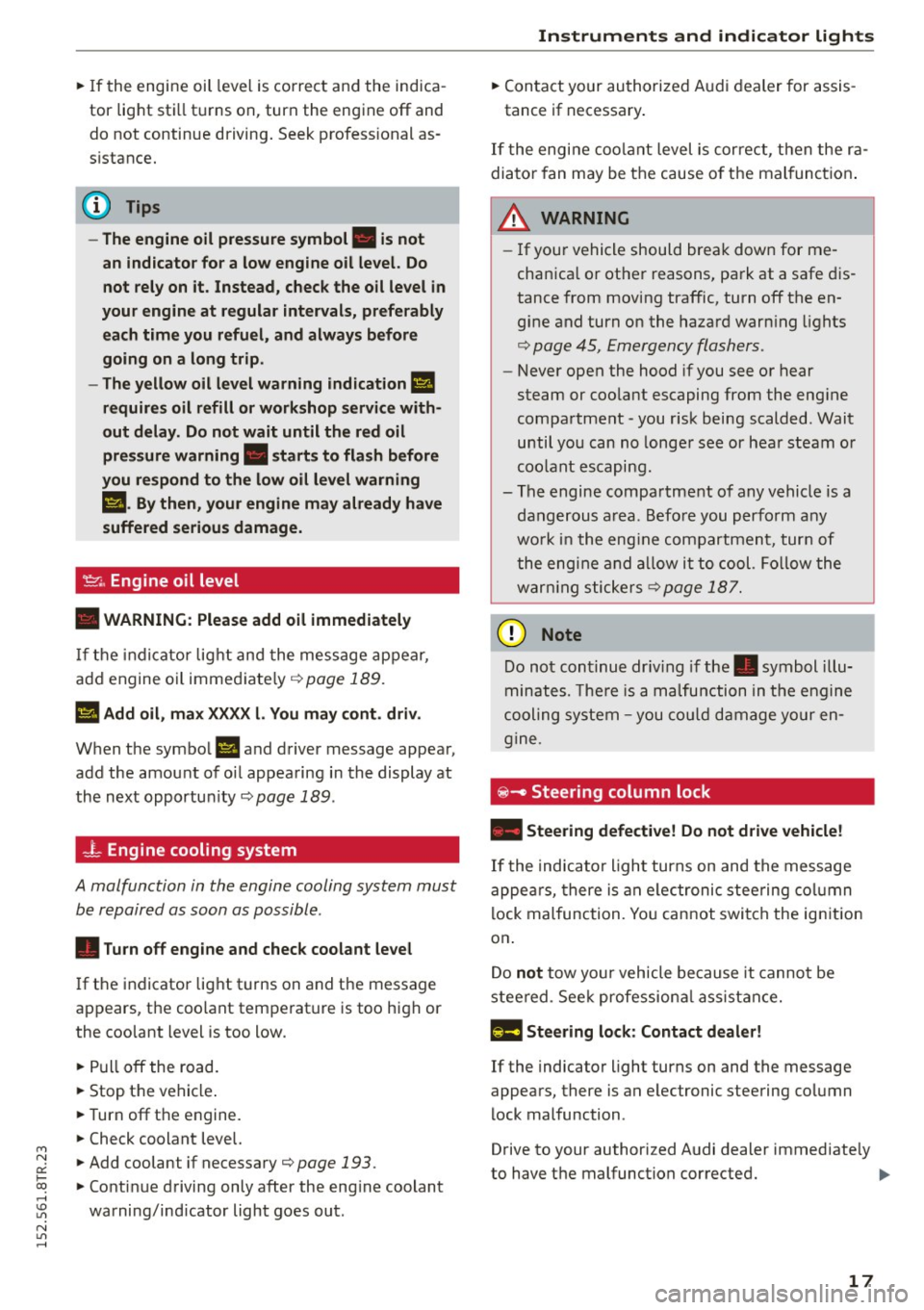
'1::1'., Engine oil level
• WARNING : Please add oil immediately
If the indicator light and the message appear,
add engine oil immediately ¢ page 189.
l!I Add oil, max XXXX l. You may cont . driv.
When the symbol Ill and driver message appea r,
add the amount of oil appearing in the display at
the next opportun ity ¢
page 189 .
-L Engine cooling system
A malfunction in the engine cooling system must
be repaired as soon as possible .
• Turn off engine and check coolant level
If the indicator light turns on and the message
appears , the coolant temperature is too high or
the coolant level is too low .
~ Pull off the road.
~ Stop the vehicle .
~T urnoff the engine.
~ Check coolant level.
~ Add coolant if necessary¢ page 193 .
~ Continue driving only after the eng ine coolant
warning/indicator light goes out .
Instruments and indicator lights
~ Contact your authorized Audi dealer for assis
tance if necessary .
If the engine coolant level is cor rect, then the ra
diator fan may be the cause o f the malfunction .
A WARNING
--If your vehicle should break down for me
chanica l or other reasons, park at a safe dis
tance from moving traffic, turn off the en
gine and turn on the hazard warn ing lights
¢ page 45, Emergency flashers .
-Never open the hood if you see or hear
steam or coolant escaping from the eng ine
compartment -you risk being scalded . Wait
until you can no longer see or hear steam or
coolant escaping.
- The engine compartment of any vehicle is a
dangerous area. Before you perform any
wo rk in the eng ine compartment, turn of
the engine and allow it to cool. Follow the
warn ing stickers
¢ page 187 .
d) Note
Do not continue dr iv in g if the . symbol illu
minates. There is a malfunction in the engine
cooling system -you could damage your en
gine.
iii! -Steering column lock
• Steering defective! Do not d rive vehicle!
If the indicator light turns on and the message
appea rs, there is an electronic steering column
lock malfunction. You cannot switch the ignition
on .
Do
not tow your vehicle because it cannot be
steered . Seek professiona l assistance.
1!;11 Steering lock : Contact dealer!
If the indicator light turns on and the message
appears, there is an elec tronic steering column
lock malfunction .
Drive to your authorized Audi dealer immediate ly
to have the malfunction corrected. ..,.
17
Page 22 of 254
Instruments and indicator lights
co mes on in the i nstrument cl uster display,
immediately contac t your author ized Audi
dealer or qualified workshop to have all
brake pads checked o r replaced if necessary.
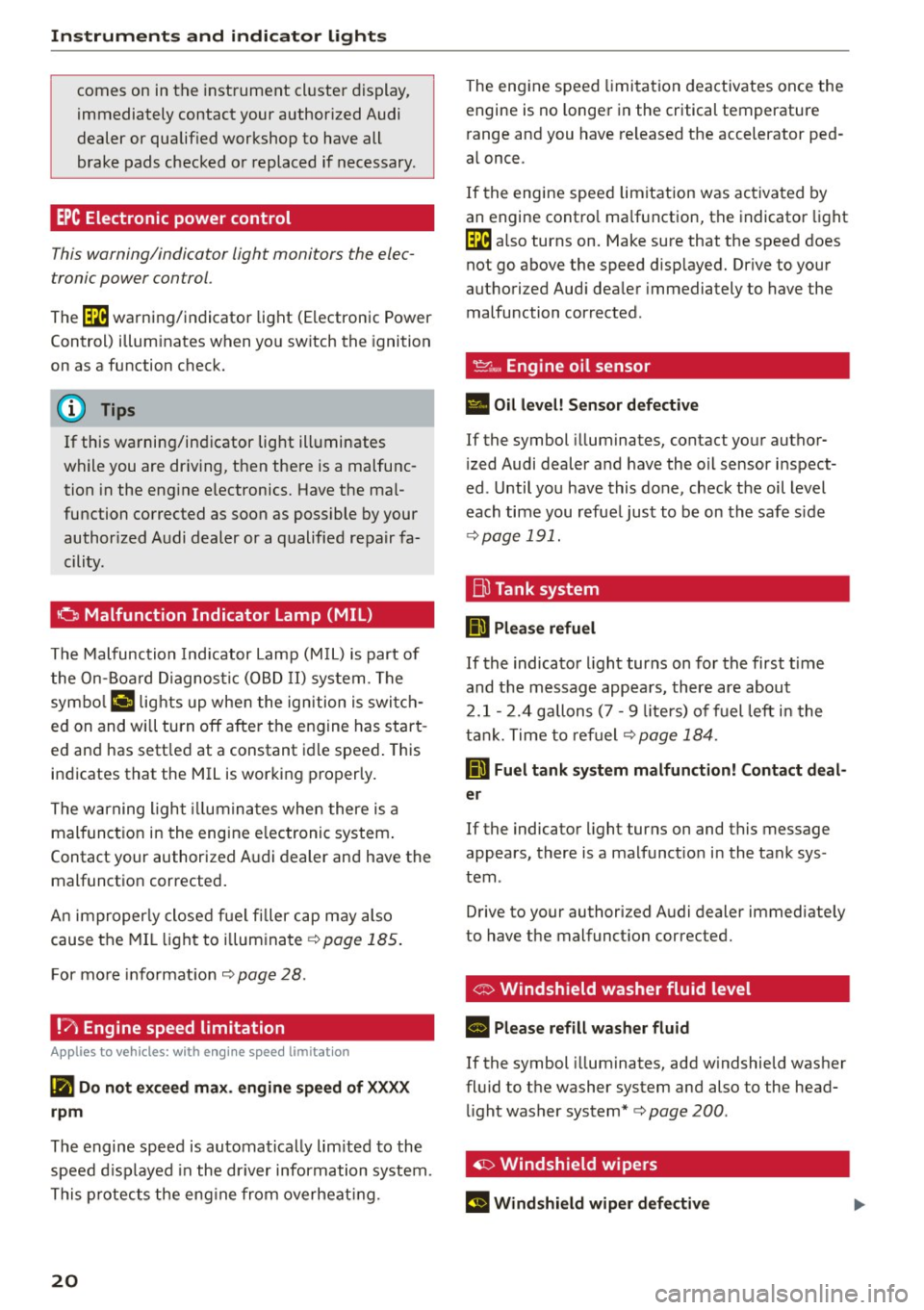
EPC Electronic power control
This warning/indicator light monitors the elec
tronic power control .
The (m warning/indicator light (Electronic Power
Control) i llum inates when yo u switch the ignition
on as a function check.
(D Tips
If this warning/indicator light ill uminates
while you are dr iv ing, then the re is a malfunc
tion in the eng ine electronics. Have the mal
fu nction corrected as soon as possible by your
author ized A udi dealer or a qualified repair fa
cility.
o Malfunction Indicator Lamp (MIL)
The Malfu nction Indicator Lamp (M IL) is part of
the On-Board Diagno stic (OB D II) system . The
symbo l
('4 lights up whe n the ign ition is switch
ed on and will turn off afte r th e engine has star t
ed an d has sett le d at a constant idle speed . This
indicates that the MIL is working proper ly.
The warning ligh t illumina tes when there is a
malfunct ion in the engine e lectronic system .
Contact your authorized A udi dealer and have the
malfunctio n corrected .
An improperly close d fu e l fi ller cap may also
cause the MIL li ght to il lum inate ¢
page 185 .
For mo re info rmat io n ¢page 28.
!?) Engine speed limitation
Applies to vehicles: with engine speed limitation
(Iii Do not ex ceed max. engine speed of XXXX
rpm
The engine speed is automatically lim ited to the
speed d isp layed in the dr iver information system.
T his protect s the eng ine from overheat ing.
20
The eng ine speed limita tion deactivates once the
engine is no longe r in the critical temperature
r ange and you have re leased t he accelerator ped
a l once .
I f the engine speed limitation was activated by
an engine contro l ma lf u nction, the indicato r light
(m also turns on. Make sure that the speed does
not g o above the speed disp layed. Dr ive to your
authorized Aud i dea ler immediately to have the
malfunction cor rected .
~~, Engine oil sensor
• Oil level! S ensor defective
If the symbol illuminates, contact yo ur author
i zed Audi dealer and have the oil sensor inspect
ed . Until you have this done, check the oil level
each time you refue l just to be on the safe s ide
¢ page 191.
ffi Tank system
IIJ Please refuel
If the indicato r light turns on for the first t ime
and t he m essage appea rs, there are about
2 .1- 2. 4 gallons (7 -9 liters) of fuel left i n the
t ank . T ime to re fuel
¢page 184.
D Fuel tank syst em malfunction! Contact deal
er
If the indicator light turns on and this message
appears , there is a malfunct io n in the tank sys
tem .
Drive to your authorized A udi dealer immediate ly
to have the malfunct ion corrected.
' G> Windshield washer fluid level
II Please refill washer fluid
If the symbol illuminates, add w indshield washer
fl uid to t he washer system and also to the head
li ght washer system*¢
page 200 .
~ Windshield wipers
El Windshield wiper defective
Page 25 of 254
"' N
0:: loo
rl I.O
"' N
"' rl
Driver information
system
Introduction
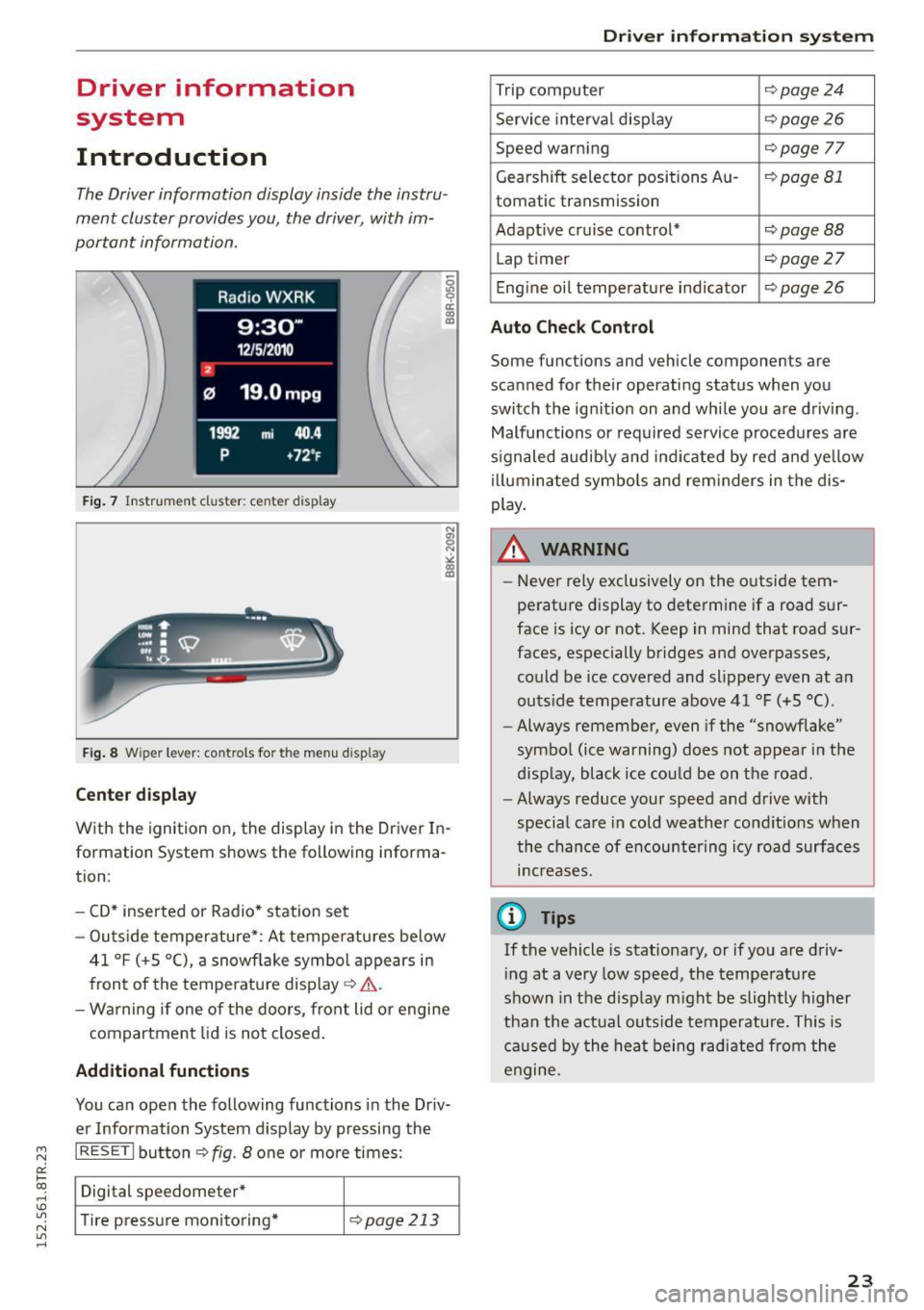
The Driver information display inside the instru
ment cluster provides you, the driver, with im
portant information.
Fig. 7 Instrument cluster: ce nter display
Fig . 8 Wipe r lever: controls fo r the men u display
Cent er dis play
With the ignition on, the display in the Driver In
formation System shows the following informa
tion :
- CD* inserted or Radio * station set
- Outs ide temperature* : At temperatures below
41 °F (+S °C), a snowflake symbol appears in
front of the temperature display¢&. .
- Wa rning if one of the doors, front lid o r engine
compartment lid is not closed.
Additional function s
You can open the following functions in the Driv
er Information System display by pressing the
I RESET I button ¢ fig. 8 one or more times:
Digital speedometer*
T ire pressure monitoring*
¢page213
Dr iver inform atio n sy stem
Trip computer Q page24
Service interval disp lay ¢page26
Speed warning Qpage 77
Gearshift selector positions Au-¢page 81
tomatic transmission
Adapt ive cruise control*
¢ page BB
Lap timer ¢page 27
Eng ine oil temperature indicator ¢ page 26
Auto Che ck Control
Some functions and vehicle components are
scanned for their operati ng status when you
switch the ign ition on and whi le you a re driving.
Malfunctions or required service procedures are
s ignaled audib ly and ind icated by red and yellow
illuminated symbols and rem inders in the dis
play.
A WARNING
-
- Never rely exclusively on the o utside tem
perature display to determine if a road sur
face is icy or not. Keep in mind that road sur
faces, especially bridges and overpasses, could be ice covered and slippery even at an
outs ide temperature above 41 °F (+5 °C).
- Always remember, even i f the "snowflake"
symbo l (ice warning) does not appea r in the
display, black ice could be on the road.
- Always reduce your speed and drive with
specia l care in cold weather cond itions when
the chance of encountering icy road surfaces
increases.
(D Tips
If the vehicle is stationary, or if you are driv
i ng at a very low speed, the temperature
shown in the disp lay m ight be slightly higher
than the act ual outs ide temperatu re. This is
caused by the heat being radiated from the
engine.
23
Page 28 of 254
Driver information system
Service interval display
The service interval display reminds you when
your next service is due.
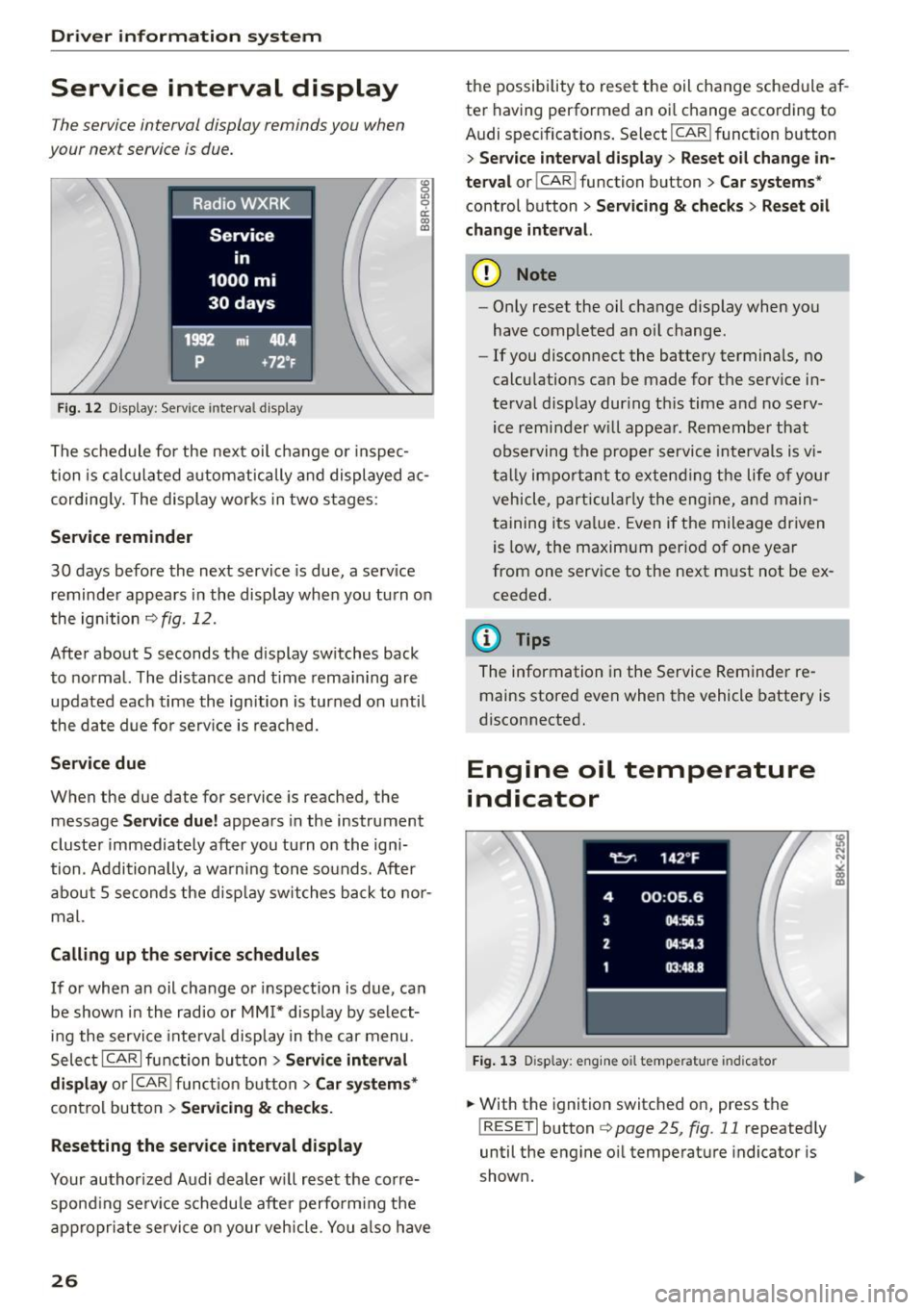
Fig. 12 Display: Service interva l display
"' 0 Ill 0 a: CX) (D
The schedule for the next oil change or inspec
tion is calculated automatically and displayed ac
cording ly. The display works in two stages :
Service reminder
30 days before the next service is due, a serv ice
reminder appears in the display when you turn on
the ignition
c> fig . 12.
After about 5 seconds the display switches back
to normal. The distance and time remaining are
updated each time the ignition is turned on unti l
the date due for serv ice is reached.
Service due
When the due date for service is reached, the
message
Service due! appears in the instrument
cluster immediately after you turn on the igni
tion . Additionally , a warning tone sounds. After
about 5 seconds the disp lay switches back to nor
mal.
Calling up the service schedules
If or when an oil change or inspection is due, can
be shown in the radio or
MM!* display by select
ing the service inte rval display in the car menu.
Select ICARI function button>
Service interval
display
or I CAR ! function button > Car systems*
control button > Servicing & checks.
Resetting the service interval display
Your authorized Audi dealer will reset the corre
spond ing serv ice schedule after perform ing the
appropriate service on your vehicle. You also have
26
the possibility to reset the oil change schedule af
ter having performed an oi l change according to
Audi specifications. Select
I CAR ! function button
> Service interval display> Reset oil change in
terval
o r! CAR i function button > Car systems *
control button > Servicing & checks > Reset oil
change interval.
(D Note
-Only reset the oil change display when you
have completed an oil change .
- If you disconnect the battery terminals, no
calculations can be made for the serv ice in
terval display during th is time and no serv
ice reminder will appear. Remember that
observing the proper service intervals is v i
tally impo rtant to extending the life of you r
vehicle, particularly the engine, and main
taining its value. Even if the mileage driven
is low, the maximum period of one year
from one service to the next must not be ex
ceeded.
(D Tips
The information in the Service Reminder re
mains stored
even when the vehicle battery is
disconnected.
Engine oil temperature
indicator
Fig. 13 Disp lay: eng ine o il temperature indicato r
.. With the ignition switched on, press the
! RESET! button
c> page 25, fig. 11 repeatedly
until the engine oil temperature indicator is
shown.
Page 29 of 254
"' N
0:: loo
rl I.O
"' N
"' rl
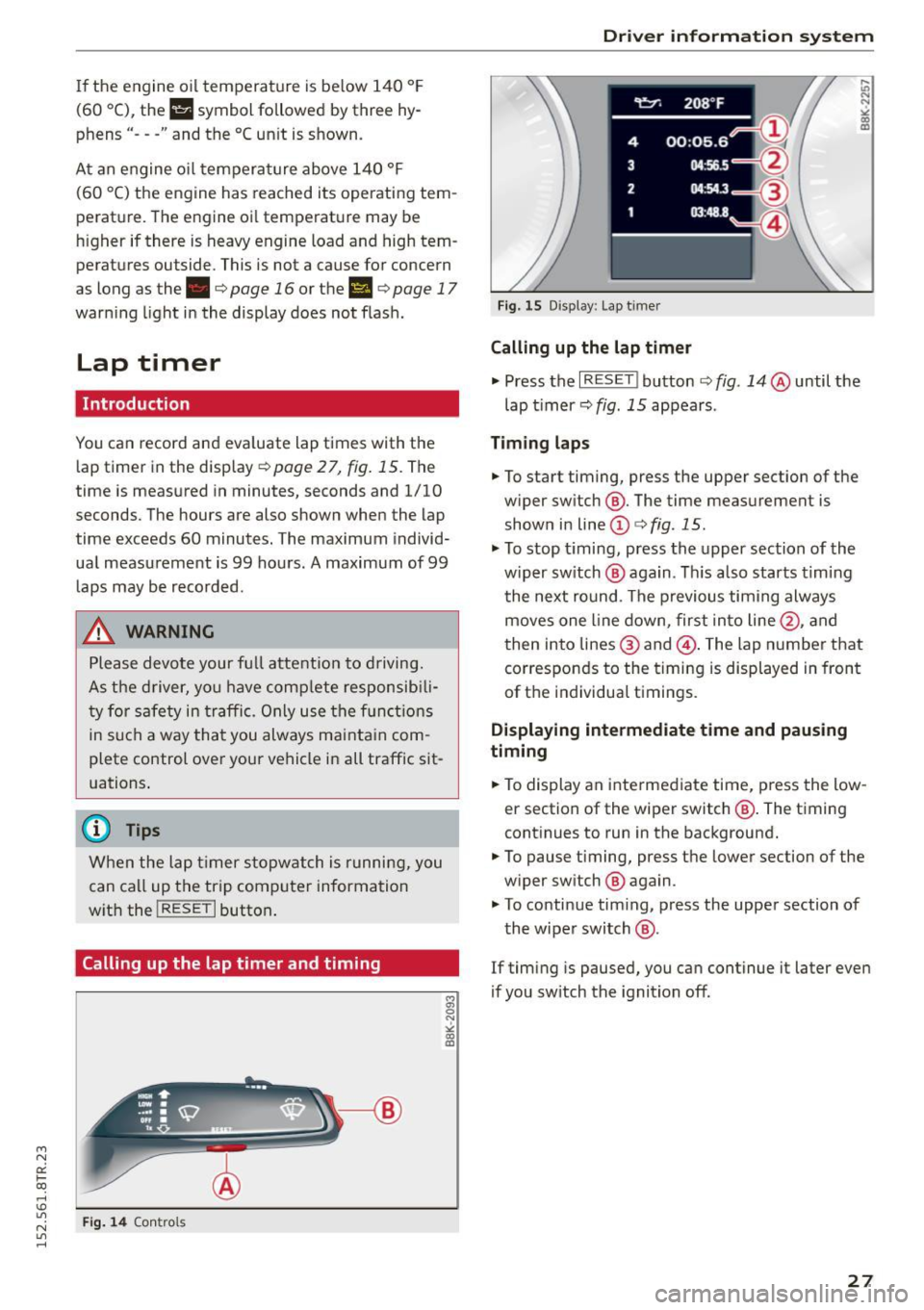
If the engine oil temperature is be low 140 ° F
(60 °C) , th <>
Ii symbol followed by three hy
phens"- --" and the °C un it is shown.
At an engine oil temperature above 140 °F
(60 °C) the engine has reached its operating tem
perature. The engine oil temperature may be
higher if there is heavy engine load and high tem
peratures outside. This is not a cause for concern
as long as the.
¢page 16 or the 1\1 ¢page 17
warn ing light in the display does not flash.
Lap timer
Introduction
You can record and evaluate lap times with the
lap timer in the display
¢page 27, fig. 15. The
time is measured in minutes, seconds and 1/10
seconds. The hou rs are also shown when the lap
time exceeds 60 minutes. The maximum individ
ual measurement is 99 hours. A maximum of 99 laps may be recorded.
A WARNING
Please devote your full a ttention to driving.
As the driver, you have comp lete responsib ili
ty for safety in traffic. Only use the functions
in such a way that you always ma inta in com
plete control over your vehicle in all traffic sit
uations .
(D Tips
When the lap timer stopwatch is running, you
can ca ll up the trip computer information
w ith the
! RESE T I button .
Calling up the lap timer and timing
Fig. 14 Contro ls
Dri ver information system
Fig. 15 Disp lay : Lap t imer
Calling up the lap timer
.,. Press the I RESET ! button ¢ fig. 14 @until the
lap timer ¢
fig. 15 appears .
Timing laps
.,. To start timing, press the upper section of the
w iper sw itch @. The time measurement is
shown in line
(D ¢ fig . 15.
.,. To stop timing, press the upper section of the
w iper sw itch @ aga in. This also starts timing
the next round. The previous timing always
moves one line down, first into line@, and
then into lines @ and @. The lap number that
corresponds to the timing is displayed in front
of the individual t imings.
Displaying intermediate time and pausing
timing
.,. To display an intermediate time, press the low
er section of the wiper switch @. The timing
continues to run in the background .
.,. To pause timing, press the lower section of the
w iper sw itch @ again .
.,. To continue tim ing, press the upper section of
the wiper switch @.
If timing is paused, you can continue it later even
if you sw itch the ignition off .
27