ESP AUDI RS7 SPORTBACK 2014 User Guide
[x] Cancel search | Manufacturer: AUDI, Model Year: 2014, Model line: RS7 SPORTBACK, Model: AUDI RS7 SPORTBACK 2014Pages: 292, PDF Size: 73.56 MB
Page 51 of 292
©-Single wipe. If you hold the lever in this
position longer, the wipers switch from slow
wiping to fast wiping.
® -Clean the windshield . The wipers wipe
one time after several seconds of driving to
remove water droplets. You can switch this
function off by moving the lever to position ®
within 10 seconds after the afterwipe. The af
terw ipe funct ion is reactivated the next time
you switch the ignition on.
Cleaning the headlights*. The headlight wash
er system * operates only when the headlights
are on. If you move the lever to position @,
the headlights and the night vision assistant
camera* are washed in intervals.
A WARNING
-The rain sensor is only designed to assist
and support the driver.
It remains entire
ly the driver's responsibility to monitor
outside weather conditions and to man
ually activate the wipers as soon as rain
or drizzle reduces visibility through the
windshield.
- The windshield must not be treated with
water-repellent materials. They can in
crease glare under poor visibility condi
tions such as wetness, darkness, or when
the sun is low on the horizon. In addi
tion, they can cause the windshield wip
ers to chatter.
- Properly functioning windshield wiper blades are required for a clear view and
safe driving~
page 49, Replacing
windshield wiper blades.
0 Note
- In the case of frost, check whether the
windshield wiper blades are frozen to
the windshield. Switching on the wind
shield wipers can damage the wiper blades!
- Prior to using a car wash, the windshield
wiper system must be switched off (lever in position @). This helps to prevent un
intentional switching on and damage to
the windshield wiper system.
Clear vision 49
-Do not use the wipers to clear a frosted
window. Using the wipers as a conven
ient ice scraper will destroy the wiper
blades.
(D Tips
- The windshield wipers are switched off
when the ignition is off. Activate the
windshield wipers after the ignition is
switched back on by moving the wind
shield wiper lever to any position.
- Worn or dirty windshield wiper blades
result in streaking. This can affect the
rain sensor function. Check your wind
shield wiper blades regularly.
- The washer fluid nozzles of the wind
shield washer system are heated at low
temperatures when the ignition is on.
- When stopping temporarily, e .g. at a
traffic light, the set speed of the wind
shield wipers is automatically reduced by
one speed.
Cleaning windshield wiper blades
Clean the windshield wiper blades when they
begin to leave streaks.
.,. Place the windshield wiper arms in the serv
ice position. Refer to~
page 50.
.,. Use a soft cloth and glass cleaner to clean
the windshield wiper blades.
A WARNING
Dirty windshield wiper blades can impair
your view. This can lead to accidents.
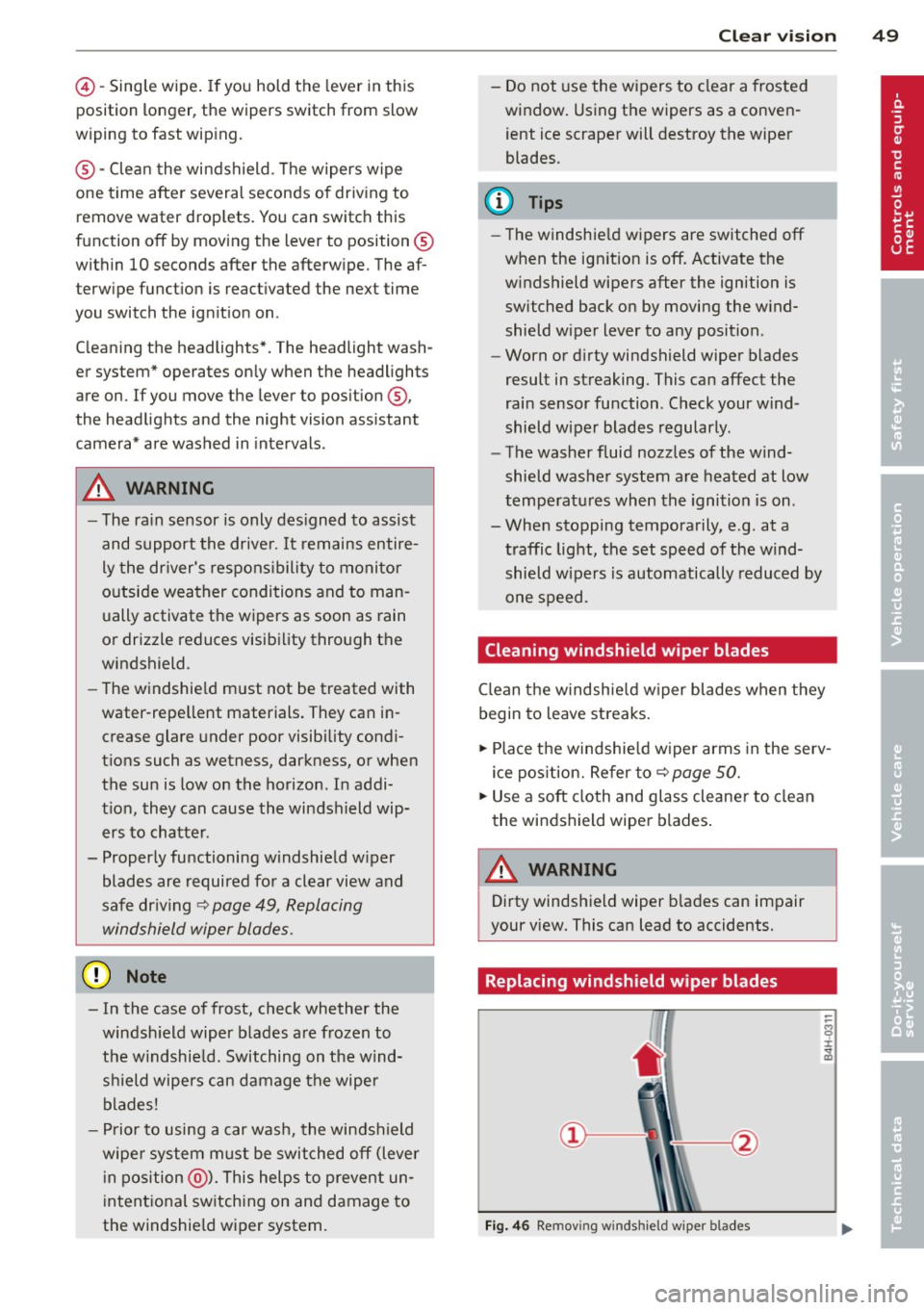
Replacing windshield wiper blades
Fig. 46 Remov ing windshie ld wiper blades
-
Page 53 of 292
8 - The exterior mirrors fold in. In the MMI,
you can select if the mirrors fold in automati
cally when you lock the vehicle ~
page 35.
Tilt function for the passenger's mirror
To help you see the curb when backing into a
parking space, the surface of the mirror tilts
slightly. The knob must be in the P position
for this to happen.
You can adjust the tilted mirror surface by
turning the knob in the desired direction.
When you move out of reverse and into anoth
er gear, the new mirror position is stored and
assigned to the key you are using.
The mirror goes back into its original position
once you drive forward faster than 9 mph (15
km/h) or switch the ignition off.
.&_ WARNING
- Curved (i.e. convex) mirror surfaces in
crease your field of view. Remember that
vehicles or other objects will appear
smaller and farther away than when seen in a flat mirror.
If you use this mirror to
estimate distances of following vehicles
when changing lanes, you could estimate
incorrectly and cause an accident.
(D Note
-If the mirror housing is moved uninten
tionally (for example, while parking your
vehicle), then you must first fold the mi r
ror electrically. Do not readjust the mir
ror housing manually. You could damage
the motor which controls the mirror.
- If you wash the vehicle in an automatic
car wash, you must fold the exterior mir
rors in to reduce the risk of damage to
the mirrors. Never fold power folding ex
terior mirrors* by hand. Only fold them in and out using the power controls.
@ Tips
-The exterior mirror settings are stored
with the memory function*
~ page S 7.
- If there is a malfunction in the electrical
system, you can still adjust the exterior
Clear vision S 1
mirrors by pressing the edge of the mir
ror.
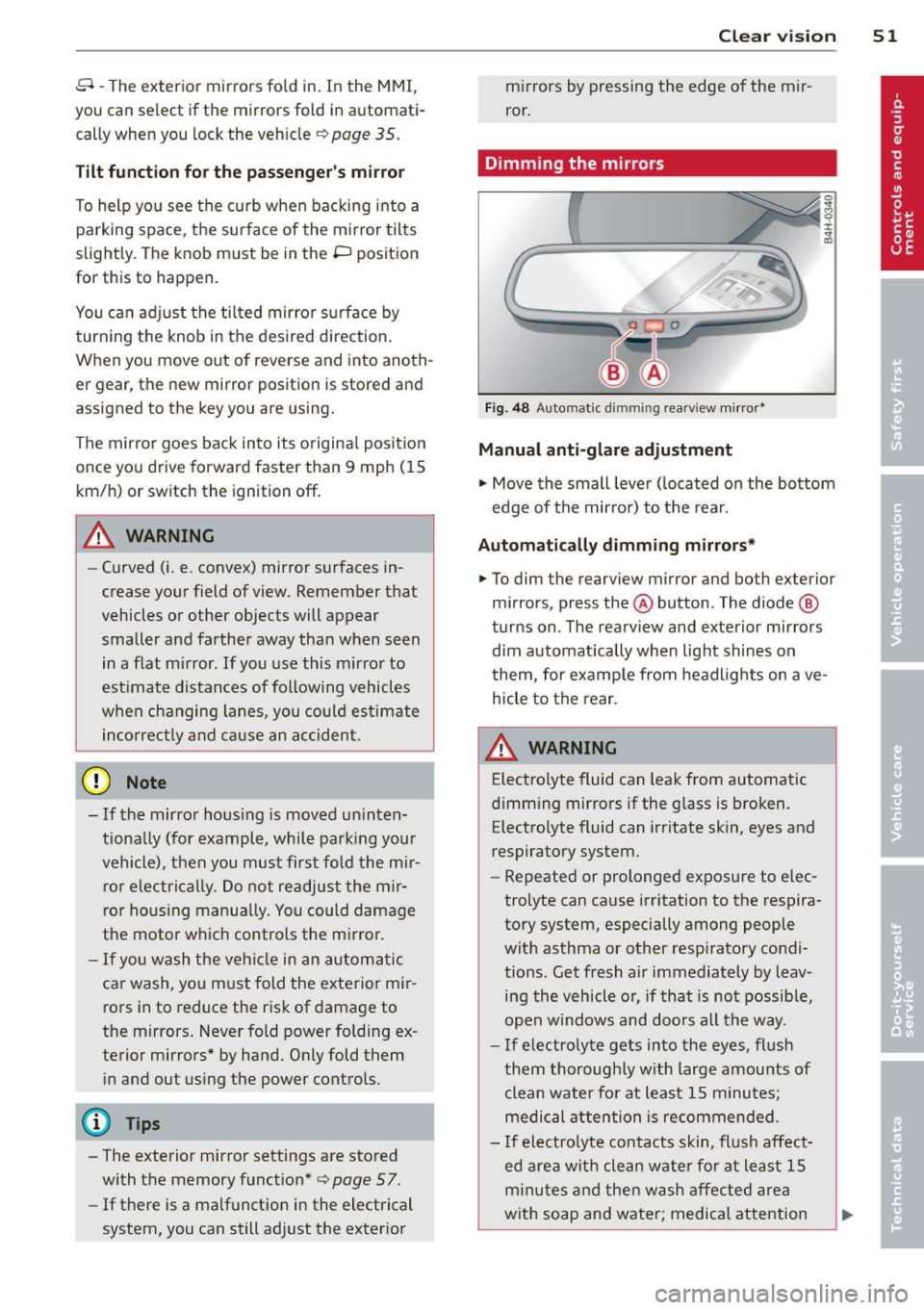
Dimming the mirrors
Fig. 48 Automatic dimming rea rview mirro r•
Manual anti-glare adjustment
"' Move the small lever (located on the bottom
edge of the mirror) to the rear.
Automatically dimming mirrors*
"'To dim the rearview mirror and both exterior
mirrors, press the@button. The diode @
turns on. The rearview and exterior mirrors
dim automatically when light shines on
them, for example from headlights on ave
hicle to the rear.
&_ WARNING
= Electrolyte fluid can leak from automatic
dimming mirrors if the glass is broken.
Electrolyte fluid can irritate skin, eyes and
respiratory system.
~
- Repeated or prolonged exposure to elec
trolyte can cause irritation to the respira
tory system, especially among people
with asthma or other respiratory condi
tions. Get fresh air immediately by leav
ing the vehicle or, if that is not possible,
open windows and doors all the way.
- If electrolyte gets into the eyes, flush
them thoroughly with large amounts of
clean water for at least 15 minutes·
'
medical attention is recommended.
- If electrolyte contacts skin, flush affect
ed area with clean water for at least 15 minutes and then wash affected area
with soap and water; medical attention
.___ ______ _:_ ____ _:_.::..:..:..._J ....
Page 55 of 292
Seats and storage
General recommen
dations
Why is your seat adjustment so important?
The safety belts and the airbag system can
only provide maximum protection if the front
seats are correctly adjusted.
There are various ways of adjusting the front
seats to provide safe and comfortable support
for the driver and the front passenger. Adjust
your seat properly so that :
- you can easily and quick ly reach all the
switches and controls in the instrument
panel
- your body is properly supported thus reduc ing physical stress and fatigue
- the safety belts and airbag system can offe r
maximum protection
¢ page 142.
In the following sections, you will see exactly
how you can best adjust your seats .
There are special regulations and instructions
for installing a child seat on the front pas
senger's seat. Always fo llow the information
regarding chi ld safety provided in
¢ page 168, Child Safety .
A WARNING
Incorrect seating position of the driver and
all other passengers can result in serious
personal injury.
- Always keep your feet on the f loor when
the vehicle is in motion -never put your
feet on top of the instrument panel, out
of the window or on top of the seat cush
ion. This applies especially to the passen
gers . If your seating position is incorrect,
you increase the r isk of injury in the case
of sudden braking or an acc ident. If the
airbag inflates and the seating position
is incorrect, this could result in persona l
injury or even death.
- It is important for both the driver and
front passenger to keep a distance of at
S eat s an d sto rage 53
least 10 inches (25 cm) between them
selves and the steering wheel and/or in
strument panel. If you're s itting any
closer than this, the airbag system can not protect you properly. In addition, the
front seats and head restraints must be
adjusted to your body height so that they
can give you maximum protect ion.
- Always try to keep as much distance as
possible between yourself and the s teer
ing wheel o r instrument pane l.
- Do not adjust the driver's or front pas
senger's seat whi le the vehicle is moving.
Your sea t may move unexpected ly, caus
ing sudden loss of vehicle cont rol and
personal injury . If you adjust yo ur seat
while the veh icle is moving, yo u are out
of posit ion.
Driver's seat
The correct seat position is important for safe
and relaxed driving.
We recommend that you adjus t the dr iver's
seat in the fo llowing manner:
.,. Adjust the seat in fore and aft direction so
that you can easily push the peda ls to the
floor wh ile keeping your knees s lightly bent
i:::> A in Why is your seat adjustment so im
portant? on page 53.
.,. Adjust the backrest so that when you sit
w ith your back against the backrest, you can
still grasp the top of the steering wheel.
.,. For adjustable head restra ints: adjust the
head restra int so the upper edge is as even
as poss ible with the top of your head . If that
is not poss ible, try to adjust the head re
straint so that it is as close to this position
as possible ¢
page 56. Move the head re
straint so that it is as close to the back of
the head as possib le .
A WARNING
-Never place any objects in the dr iver's foot-
well. An object could get into the pedal
area and interfere with pedal funct ion . In
Page 56 of 292
54 Seat s and storage
case of sudden braking or an accident, you
would not be ab le to brake or acce lerate.
Front passenger's seat
Always move the front passenger seat into
the rearmost position.
To avo id contact with the airbag wh ile i t is de
p loying, do not sit a ny closer to the inst ru
ment panel than necessary and always wear
the three-point safety belt provided adjusted
correctly. We recommend that you adjust the
passenger's seat in the following manner:
"' Bring the backrest up to an (almost) upright
position . Do not ride with the seat reclined.
"' For adjustable head restraints: adjust the
head restraint so the upper edge is as
even
as possible w ith the top of your head . If that
is not possible, try to adjust the head re
stra int so that it is as close to th is position
as possible ¢
page 56. Move t he head re
stra int so that it is as close to the back of
the head as possible.
"' Place your feet on the floor in front of the
passenger's seat .
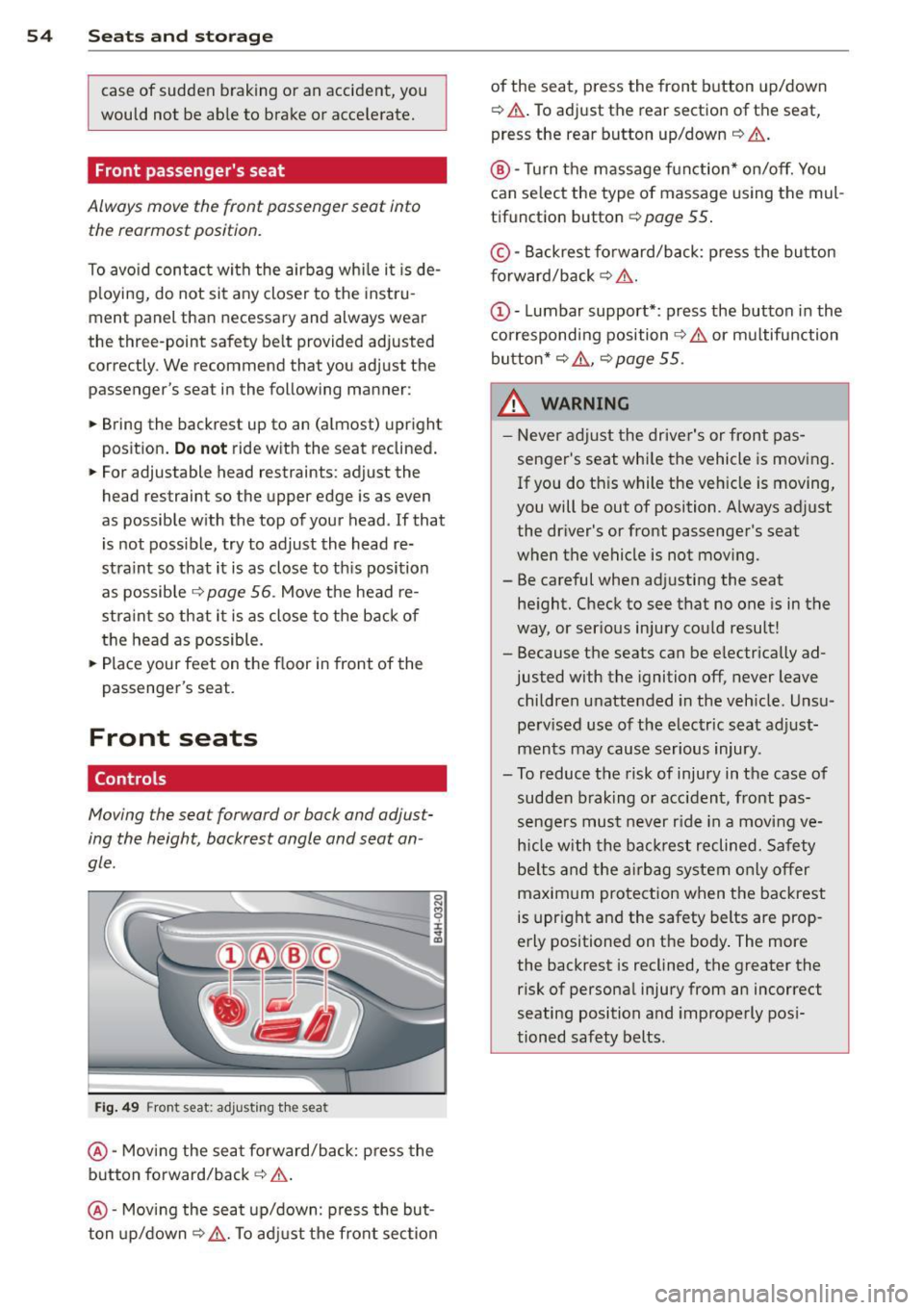
Front seats
Controls
Moving the seat forward or bock and adjust
ing the height, backrest angle and seat an
gle.
F ig. 49 Front seat: adjusting t he seat
@ -Moving the seat forward/back: press the
button fo rward/back
c:> .&. .
@ -Mov ing the seat up/down: press the but
ton up/down~ _&.. To ad just the fron t sec tion of the seat, press the front button up/down
¢
.&. .To adjust the rear sectio n of the seat
,
press the rear button up/down ¢ &..
®-Turn the massage function * on/off. You
can select the type of massage using the mul
tif unction button ¢
page 55 .
© -Backrest fo rward/back: p ress the bu tton
f orward/back
c:> &. .
c:> &. or multifunction
button*
c:> &. , c:> page 55 .
_& WARNING -
-Never adjust the driver's or front pas -
senger's seat whi le the vehicle is moving .
If you do th is while the veh icle is moving,
you will be out of position. A lways adjust
the driver's or front passenger's seat
when the ve hicle is not mov ing.
- Be careful when adj usting the seat
he ight. Check to see that no one is in t he
way, or ser ious injury cou ld result!
- Because the seats can be e lectrically ad
justed with the ignition off,
never leave
children unattended in the veh icle. Unsu
pe rv ised use of the electric seat adjust
ments may cause serious injury .
- To reduce the risk of injury in the case of sudden b raking or accident, front pas
sengers mus t never r ide in a moving
ve
h icle with the ba ck res t reclined. Safety
be lts and the airbag system o nly offer
maxim um protection when the backrest
is upr ight and the safety belts are prop
erly positioned on the body . The more
the backrest is reclined, the greater the risk of persona l injury from an incorrect
seating position and improperly pos i
tioned safety belts.
Page 57 of 292
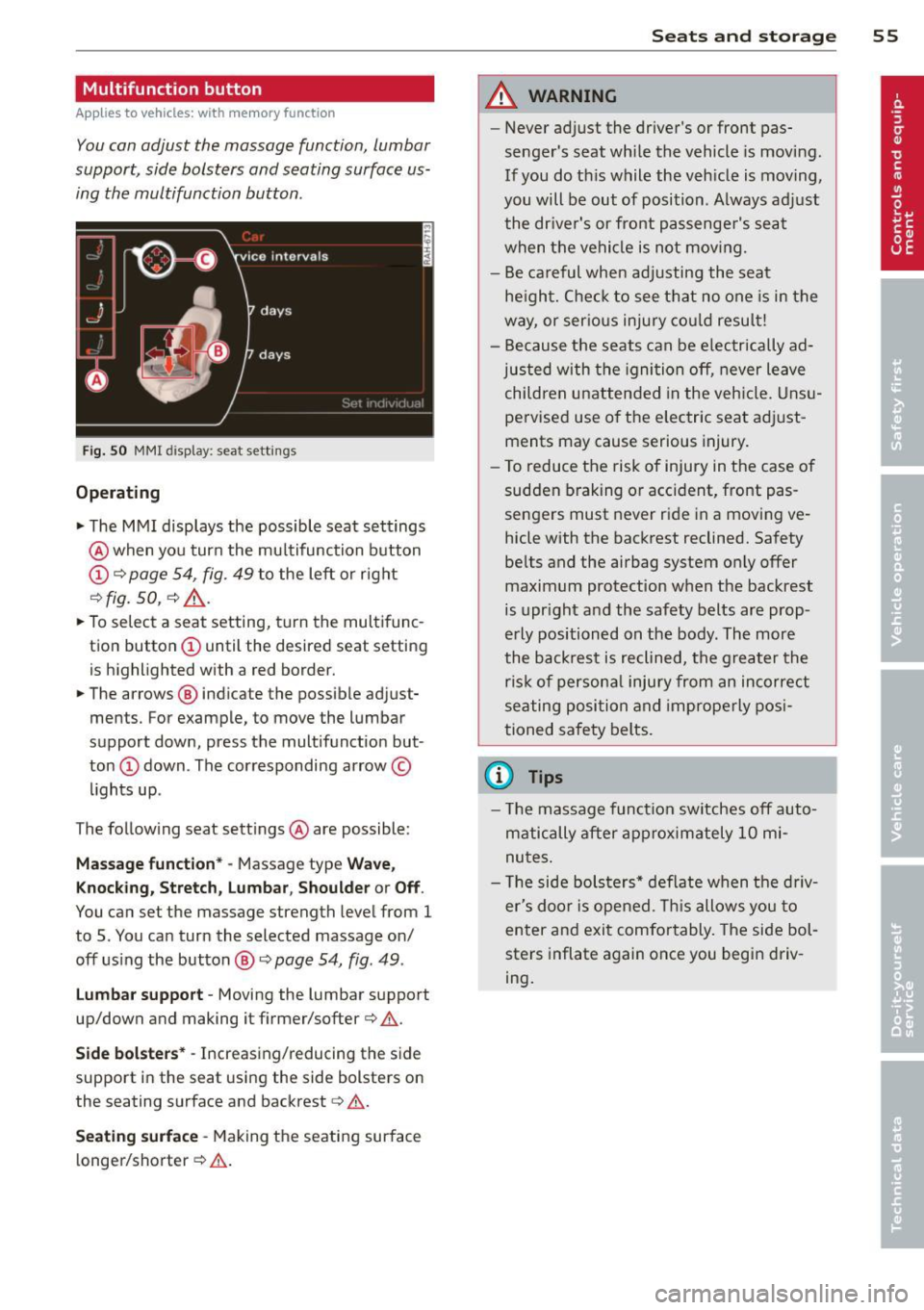
Multifunction button
Applies to vehicles: with memory function
You con adjust the massage function, Lumbar
support, side bolsters and seating surface us ing the multifunction button .
Fig. 50 MMI disp lay : sea t sett ings
Operating
.. The MMI displays the possible seat settings
@ when you turn the mu ltifunction button
(D c:> page 54, fig. 49 to the left or right
~ fig . 50 , c:> ,& .
.. To select a seat setting, turn the multifunc
tion button
(D until the desired seat setting
is highlighted with a red border.
• The arrows @ indicate the possible adjust
ments. For example, to move the lumbar
support down, press the multifunction but
ton
(D down . The corresponding arrow ©
lights up .
T he follow ing seat settings @ are possible:
Massag e fun ct ion * -Massage type Wav e,
Kn ock ing, S tretch, Lumb ar, Sho ulde r or Off.
You can set the massage strength level from 1
to 5. You can turn the selected massage on/
off us ing the button @~
page 54, fig . 49 .
Lu mba r support -Moving the lumbar support
up/down and making it firmer/softer
c:> .&. .
Side bol sters* -Increasing/reducing the side
support in the seat using the side bolsters on
the seating surface and backrest
c:> A .
Se ati ng surfac e -Making the seating surface
l onger/shorter
c:> .&. .
Sea ts a nd s to rage 55
A WARNING
-Never adjust the driver's or front pas
senger's seat while the vehicle is moving.
If you do th is while the veh icle is moving,
you will be out of position . A lways adjust
the dr iver's or front passenger's seat
when the vehicle is not moving.
- Be careful when adjusting the seat
he ight. Check to see that no one is in the
way, or ser ious injury cou ld resu lt!
- Because the seats can be electrically ad
justed with the igni tion off, never leave
children unattended in the veh icle. Unsu
pervised use o f the electric seat adjust
ments may cause serious injury.
- To reduce the risk of injury in the case of
sudden braking or accident, front pas
sengers must never ride in a moving ve
hicle with the backrest reclined. Safety
belts and the airbag system on ly offer
maximum protection when the backrest
is upr ight and the safety belts are prop
erly positioned on the body . The more
the backrest is reclined, the greater the
ris k of persona l inju ry from an incorrect
seating position and improperly posi
tioned safety belts.
(D Tips
- T he massage funct ion switches off auto
matically after approximately 10 mi
nutes.
- T he side bolsters* deflate when the driv
er's doo r is opened. This allows you to
enter and exit comfortably. The side bol
sters inflate again once you begin driv
ing.
Page 64 of 292
62 Seats and storage
-Compartments* on the back of the front
seat backrests
- Garment hooks on the sides of the pillars in
the rear of the vehicle and in the rear grab
handles
- Compartment in the rear center armrest
- Storage in the trim panels in the luggage
compartment
~ WARNING
-
- Always remove objects from the instru
ment panel. Any items not stored could
slide around inside the vehicle while driv
ing or when accelerating or when apply
ing the brakes or when driving around a
corner.
- When you are driving make sure that
anything you may have placed in the cen
ter console or other storage locations
cannot fall out into the footwells. In case
of sudden braking you would not be able
to brake or accelerate.
-Always keep the lid of the compartment
for (sun)glasses* closed while driving to
reduce the risk of injury during a sudden
braking maneuver or in the event of an
accident.
- Any articles of clothing that you have
hung up must not interfere with the driv
er's view. The coat hooks are designed
only for lightweight clothing. Never hang
any clothing with hard, pointed or heavy
objects in the pockets on the coat hooks.
During sudden braking or in an accident -
especially
If the airbag is deployed -
these objects could injure any passen
gers inside the vehicle.
- To reduce the risk of personal injury in an
accident or sudden stop, always keep the
glove compartment closed while driving.
- Read and follow all WARNINGS
~ page 164, Important safety instruc
tions on the side airbag system.
-Hang clothes in such a way that they do
not impair the driver's vision.
- The coat hooks must only be used for
lightweight clothing. Do not leave any
heavy or sharp edged objects in the pock- ets which may interfere with the side cur
tain airbag deployment and can cause
personal
injury in a crash.
- Do not use coat hangers for hanging
clothing on the coat hooks as this can in
terfere with proper deployment of the side curtain airbags in an accident.
- Do not hang heavy objects on the coat
hooks, as they could cause personal in
jury in a sudden stop.
(D Note
Objects located on the rear shelf that rub
against the rear window could damage the heating wires for the rear window defog-
ger .
Roof rack
Description and mounting locations
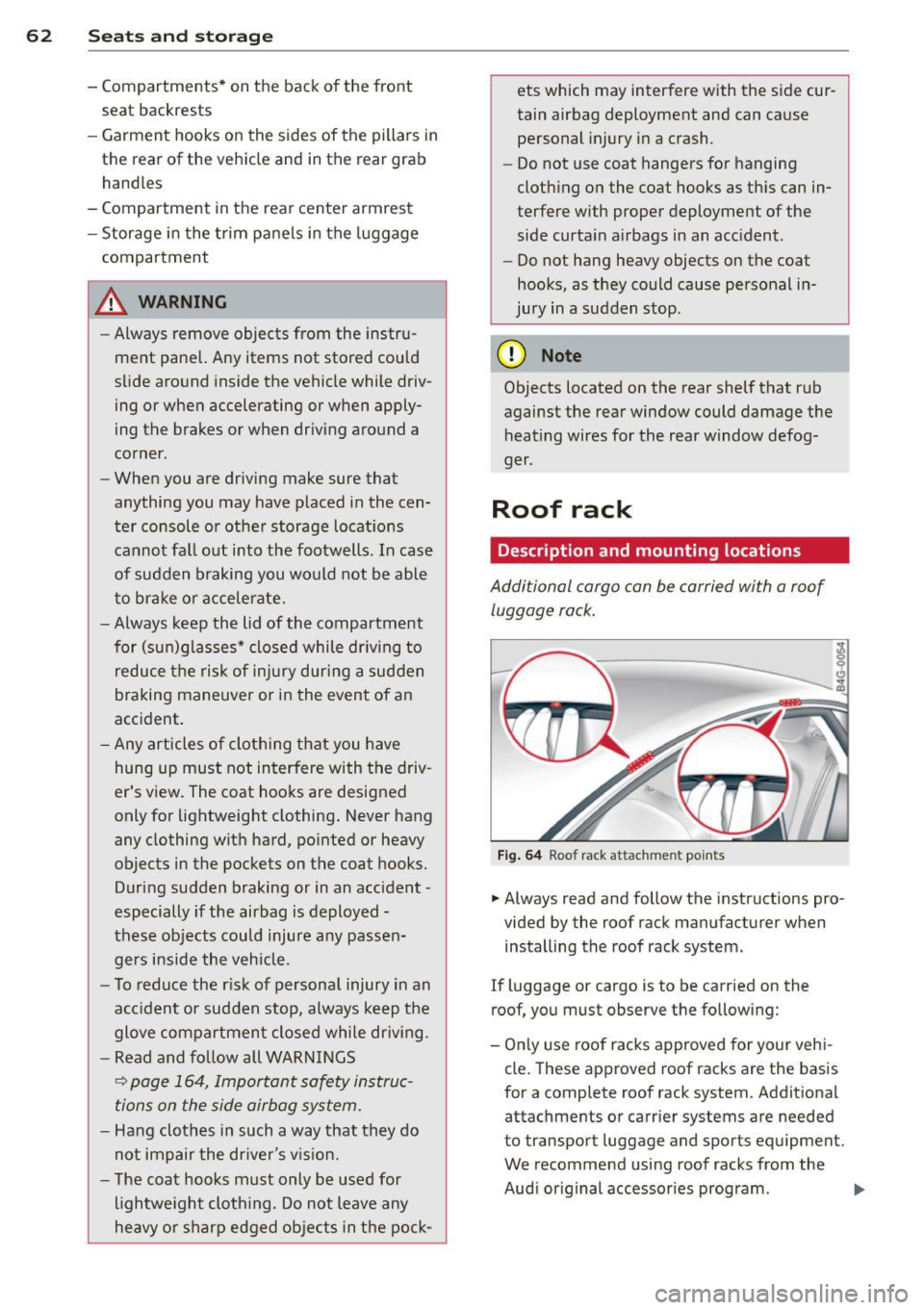
Additional cargo can be carried with a roof
luggage rack.
Fig. 64 Roof rack attachment po ints
... Always read and follow the instructions pro
vided by the roof rack manufacturer when installing the roof rack system.
If luggage or cargo is to be carried on the
roof, you must observe the following:
- Only use roof racks approved for your vehi
cle. These approved roof racks are the basis
for a complete roof rack system. Additional
attachments or carrier systems are needed
to transport luggage and sports equipment.
We recommend using roof racks from the
Audi original accessories program . .,..
Page 71 of 292
Warm and cold Four-zone automatic
climate control
Description
Applies to vehicles: with four-zone automat ic climate co n
tro l
The climate control system warms, cools and
adds humidity to the a ir in the veh icle inter io r.
It is the most effect ive when the windows and
sunroof* are closed.
If the temperature inside
the parked vehicle becomes very warm, open ing the window briefly will speed up the cool
ing process.
I n all heating mode functions except
defrost,
the blower on ly switches to a higher speed
once the engine coolant has reached a certain
temperature.
Condensation from the cooling system can
drip and form a puddle of water under the ve
hicle. This is normal and does not mean there
is a leak.
Pollutant filt er
The po llutant filter removes pollutants such
as dust and pollen from the air.
The air pollutants filter must be changed at
the intervals spec ified in your Wa rranty
&
Maintenance book let, so that the air condi
tioner can properly work.
I f you d rive your vehicle in an area with h igh
air po llution, the fi lter may need to be
changed more frequent ly than specified in
your Audi Warranty
& Maintenance booklet. If
in doubt, ask your authorized Audi Service Ad·
visor for advice.
Key coded setting s
The clima te control sett ings are a utomat ica lly
stored and assigned to the remote contro l key
that is in use .
Warm and c old 69
A WARNING
-
Reduced visibi lity is dangerous and can
cause acc idents .
- For safe driving it is very important that
all windows be free of ice, snow and con
densat ion.
- Comp letely fam il iarize yourse lf with the
proper use and funct ion of the heat ing
a nd ventilation system and especially
how to defog and defrost the w indows.
- Never use the windshield wiper/washer system in freez ing weathe r unt il you
have warmed the windshie ld first, using
the heating and ventilation system. The
washer sol ution may freeze on the wind
shie ld and red uce visibi lity.
CJ) Note
- If you s uspect that the air conditioner
has been damaged, switch the system
off to avoid furt her damage and have it
inspected by a qualified dea lership .
- Repairs to the Audi air conditioner re
quire specia l technical know ledge and
special tools. Contact an authorized Audi
dealer fo r ass istance.
@ For the sake of the envi ronment
By reducing the amount of f uel you use,
you also red uce the amount of pollutants
emitted into the air.
(D Tips
- Keep the air intake s lo ts ( in front of the
w indshield) free from ice, snow and de
bris in order to maintain the proper func
tion of the climate control system.
- The energy ma nagement system may
switch the seat heating* or rear window defroster off temporar ily. These systems
are available again as soon as the energy
balance has been restored .
- Air escapes through vents under the rear window. When plac ing items of cloth ing
on the luggage compartment cover, en
sure that the openings are not covered.
Page 81 of 292
even with ESC and its associated
components (ABS, ASR, EDL). In corners
and when road or weather conditions are
bad, a full brake application can cause the
vehicle to skid or the rear end to break
away· risking an accident.
Speed warning system
Introduction
The speed warning system helps you to stay
under a specified maximum speed.
The speed warning system wa rns you if you
are exceeding the maximum speed that you
have set. You will hear a warn ing tone when
your speed exceeds the stored value by ap
proximately 3 mph (3 km/h). An indicator
light . (USA models)/ . (Canada models) in
the instrument cluster display also turns on at
the same time. The indicator light ••
turns off when the speed decreases below the
stored maximum speed .
Setting a threshold is recommended if you
would like to be reminded when you reach a certain max imum speed . Situations where you
may want to do so include driving in a country
with a general speed limit or if there is a
specified maximum speed for winter tires.
@ Tips
Even though your vehicle is equipped with
a speed warning system, you should st ill
watch the speedometer to make sure you
are not driving faster than the speed limit.
Setting the threshold
You can set, change and delete the threshold
in the MMI.
.. Se lect : I CARI function button > (Car)* sys
tems
control button > Driver assist > Speed
warning .
You can set any threshold between 20 mph
(30 km/h) and lS0 mph (240 km/h) . Settings
can each be adjusted in inc rements of 6 mph
(10 km/h).
On the road 79
Cruise control
Switching on
Applies to veh icles: w ith cruise control
The cruise control system makes it possible to
drive at a constant speed starting at 20 mph (30km/h) .
0
f
®t
0
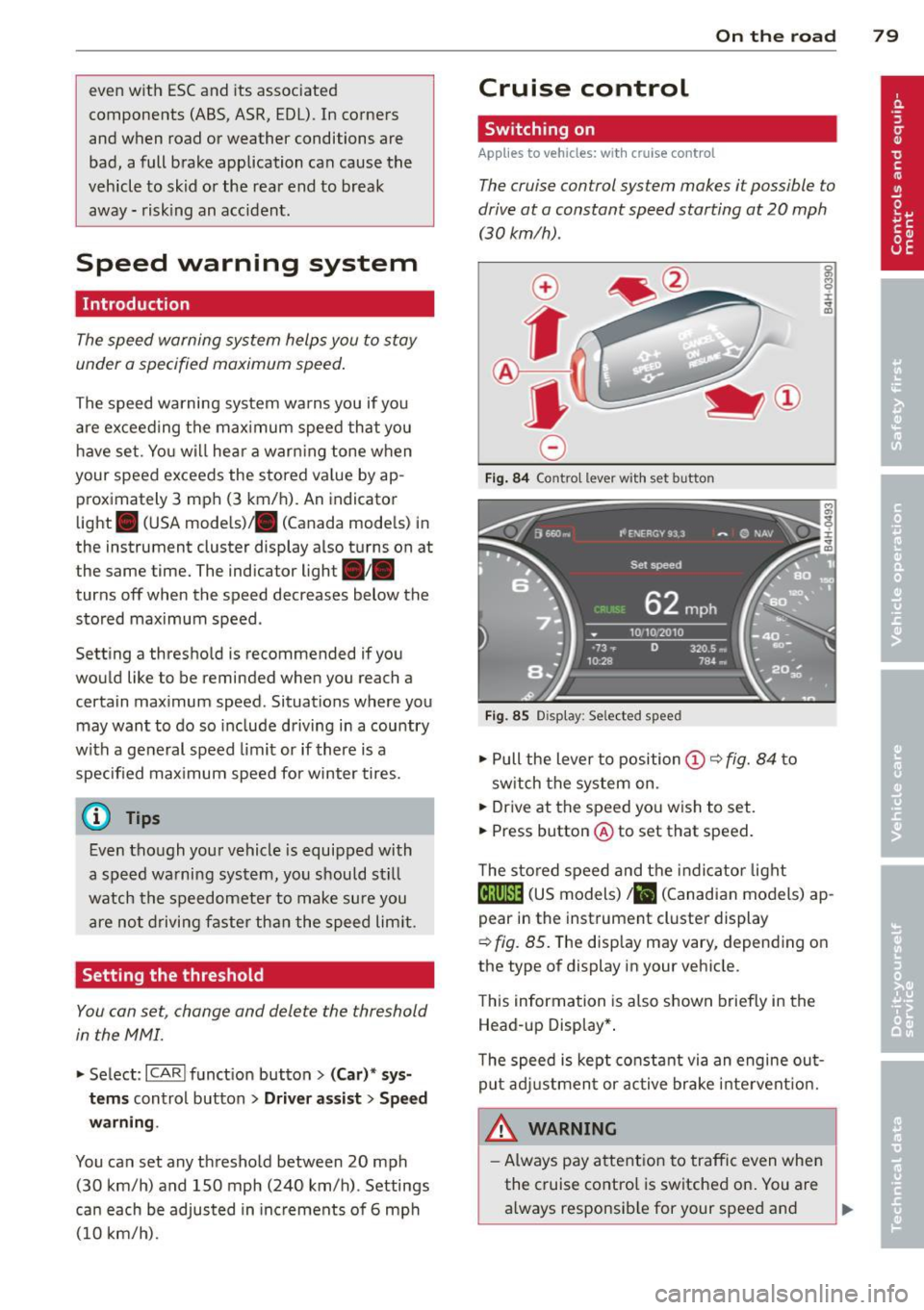
Fig. 84 Contro l lever w ith set b utto n
Fig. 85 Display: Se lected speed
.. Pull the lever to position@¢ fig. 84 to
sw itch the system on .
.. Drive at the speed you wish to set.
.. Press button @ to set that speed.
T he stored speed and the indicator light
@;\1)~14 (US models) Iii (Canadian models) ap
pear in the instrument cluster display
¢
fig. 85. The disp lay may vary, depending on
the type of display in your veh icle.
This information is also shown briefly in the
Head -up Display*.
T he speed is kept constant via an engine out
put adjustment or active brake intervent ion.
A WARNING .c
- Always pay attention to traffic even when
the cruise control is switched on. You are always responsib le for your speed and ...
Page 83 of 292
Audi adapt ive crui se c ontrol an d bra kin g guard 81
Audi adaptive cruise
control and braking
guard
Introduction
App lies to vehicles: with Audi adaptive cruise control
The adaptive cruise control system assists the
driver by regu lating vehicle speed and helping
to maintain a set distance to the vehicle
ahead, within the limits of the system . If the
system detects a moving vehicle up ahead,
adaptive cruise control can brake and then ac
celerate your vehicle. Th is he lps to make driv
ing more comfortable both on long highway
stretches and in stop-and-go traffic.
The braking guard system can warn you about
an impending collision and initiate braking
maneuvers¢
page 87.
Adaptive cruise control and braking guard
have technical limitations that you must
know, so please read this section carefully, un
derstand how the system works and use them
properly at all times.
General information
General information
Applies to vehicles: with Audi adaptive cruise control
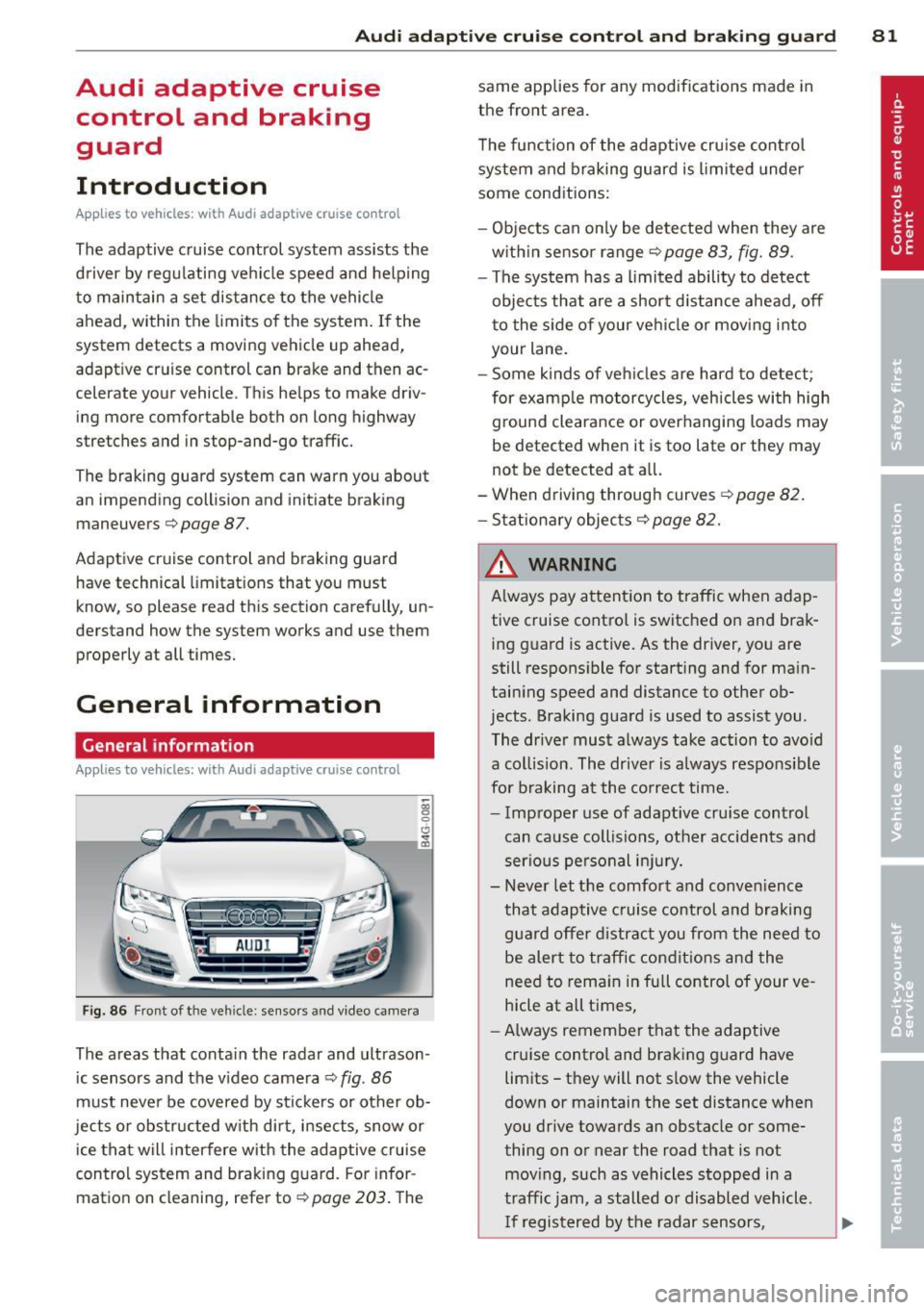
Fig. 86 Front of the vehicle: sensors and video came ra
The areas that contain the radar and ultrason
ic sensors and the v ideo camera ¢
fig. 86
must neve r be covered by stickers or other ob
jects or obstructed with dirt, insects, snow or
ice that will interfere with the adaptive cruise
control system and braking guard. For infor
mation on cleaning, refer to¢
page 203. The same applies for any modifications made in
the front area.
T he function of the adaptive cru ise contro l
system and braking guard is limited under
some conditions:
- Objects can on ly be detected when they are
w ith in sensor range
¢page 83, fig. 89 .
-The system has a limited ability to detect
objects that are a shor t distance ahead,
off
t o the side of your vehicle or moving into
your lane.
- Some kinds of ve hicles are hard to detect;
for examp le motorcycles, vehicles with high
ground clearance or overhanging loads may
be detected when it is too late or they may
not be detected at all.
- When driving through curves
¢page 82 .
- Stationary objects¢ page 82.
& WARNING
Always pay attent ion to traffic when adap
tive cruise control is switched on and brak ing g uard is active. As the driver, you are
still respons ible for starting and for ma in
taining speed and distance to other ob
jects . Braking guard is used to assist you .
The driver must always take action to avo id
a collision. The driver is always responsible
for braking at the co rrect time.
- Improper use of adaptive cru ise control
can cause collisions, other acc idents and
serious pe rsonal in jury.
- Never let the comfort and conven ience
that adaptive cruise control and braking
guard offer d istract you from the need to
be alert to traffic condit ions and the
need to rema in in full control of your ve
hicle at all times,
- Always remember that the adaptive
cruise control and braking guard have
limits -they will not s low the vehicle
down or maintain the set distance when
you drive towards an obstacle or some
thing on or near the road that is not
mov ing, such as vehicles stopped in a
traffic jam, a stalled or disabled vehicle .
I f registered by the radar sensors,
Page 84 of 292
82 Audi ad apti ve cruise contr ol a nd bra king gu ard
vehicles or obstacles that are not moving
can trigger a collision warning and if con
firmed by the v ideo camera, an acute col
lis ion warn ing .
- For safety reasons, do not use adaptive
cruise co ntrol when driving on roads with
many curves, when the road surface is in
poor condit ion and/or in bad weather
(such as ice, fog, gravel, heavy rain and
hydroplan ing) . Using the system under
these cond it ions cou ld result in a co lli
sion .
- Swi tch adap tive c ruise control off tempo
rar ily when driv ing in turning lanes, on
expressway exits or in construction
zones. This prevents the vehicle from ac
celerat ing to the set speed when in these
situations.
- The adapt ive cruise control system wi ll
not brake by itse lf if you put your foot on
the accelerator pedal. Doing so can over
ride the speed and distance regulation .
- When approaching stationary objects such as stopped traff ic, adaptive cruise
co ntrol will not respond and braking
guard w ill have limited function.
- The adapt ive cruise control system and
braking guard do not react to people, an
imals, objects c rossing the road or on
coming objects .
- The function of the radar senso rs can be
affected by reflective objects such as
guard rai ls , the entrance to a tunnel,
heavy rain or ice.
- Never follow a ve hicle so closely that you
cannot stop your vehicle safe ly. The
adaptive cruise contro l canno t slow or
brake the vehicle safely when you follow
another vehicle too closely. Always re
member that the automatic braking
function cannot br ing the vehicle to a
sudden or emergency stop under these condit ions.
- To prevent unintended operation, always switch ACC off when it is not being used. (D Note
The sensors can be displaced by impacts or
damage to the bumper, wheel housing and
underbody. That cou ld affect the adaptive
cruise control system and brak ing guard.
Have your authorized Aud i dea ler or au
thorized Audi Service Facility check their
funct ion .
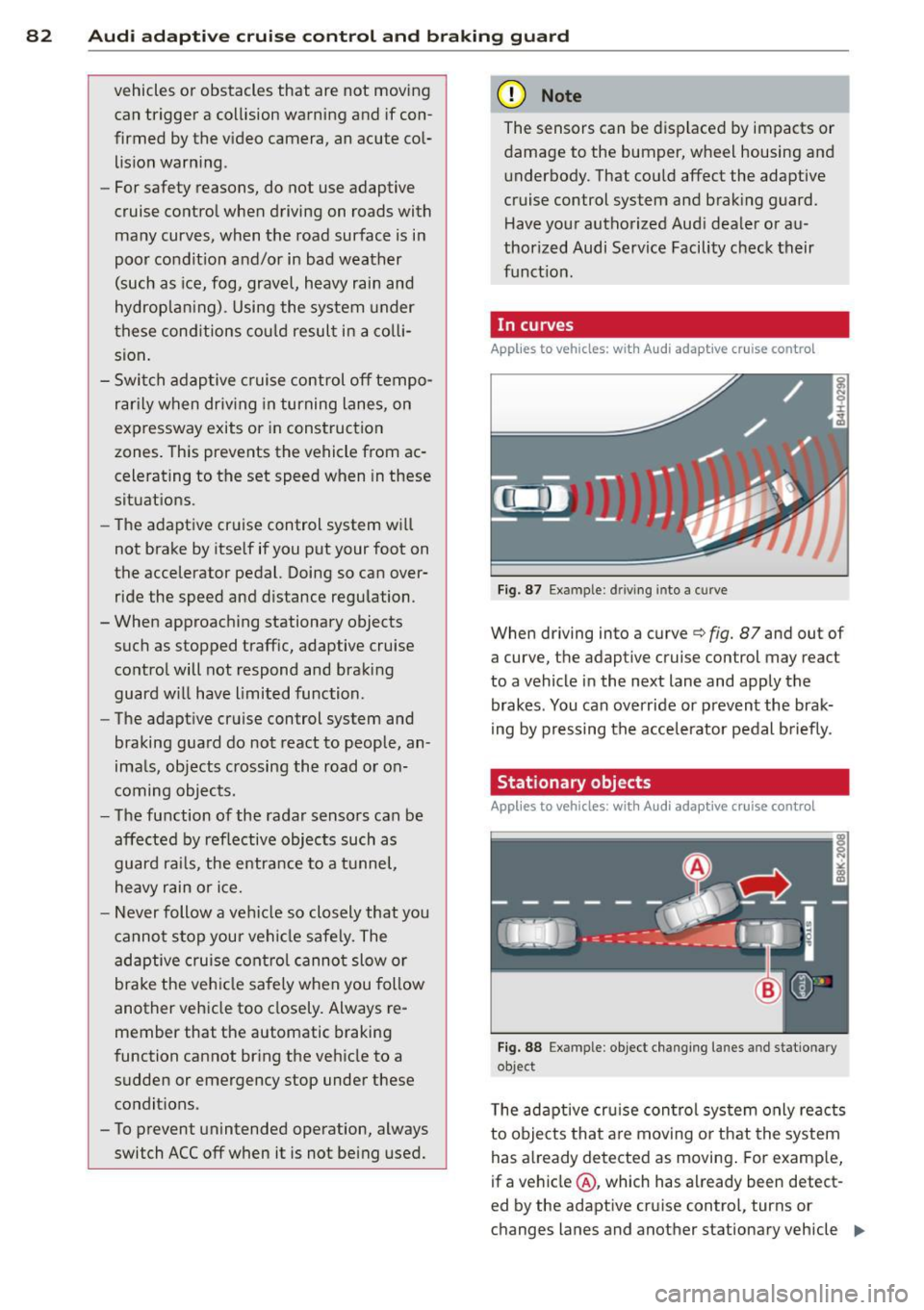
In curves
Applies to vehicles: with Audi adaptive cru ise contro l
I
Fig. 87 Ex ampl e: dri ving in to a curve
When d riving into a curve c> fig. 87 and out of
a curve, the ad aptive cruise control may react
to a vehicle in the next lane and apply the
brakes. You can override or prevent the brak
i ng by pressing the acce lerator pedal briefly .
' Stationary objects
Applies to vehicles: with Audi adaptive cruise control
Fig. 88 Exampl e: objec t ch anging l anes and sta tio nar y
object
T he adaptive cru ise control system only reacts
to objects that are mov ing o r that the system
has already detected as moving . For examp le,
if a vehicle @, which has already been detect-
ed by the adaptive c ruise contro l, tu rns or
ch anges lanes and another stationary vehicle .,.