brake AUDI RS7 SPORTBACK 2014 User Guide
[x] Cancel search | Manufacturer: AUDI, Model Year: 2014, Model line: RS7 SPORTBACK, Model: AUDI RS7 SPORTBACK 2014Pages: 292, PDF Size: 73.56 MB
Page 56 of 292
54 Seat s and storage
case of sudden braking or an accident, you
would not be ab le to brake or acce lerate.
Front passenger's seat
Always move the front passenger seat into
the rearmost position.
To avo id contact with the airbag wh ile i t is de
p loying, do not sit a ny closer to the inst ru
ment panel than necessary and always wear
the three-point safety belt provided adjusted
correctly. We recommend that you adjust the
passenger's seat in the following manner:
"' Bring the backrest up to an (almost) upright
position . Do not ride with the seat reclined.
"' For adjustable head restraints: adjust the
head restraint so the upper edge is as
even
as possible w ith the top of your head . If that
is not possible, try to adjust the head re
stra int so that it is as close to th is position
as possible ¢
page 56. Move t he head re
stra int so that it is as close to the back of
the head as possible.
"' Place your feet on the floor in front of the
passenger's seat .
Front seats
Controls
Moving the seat forward or bock and adjust
ing the height, backrest angle and seat an
gle.
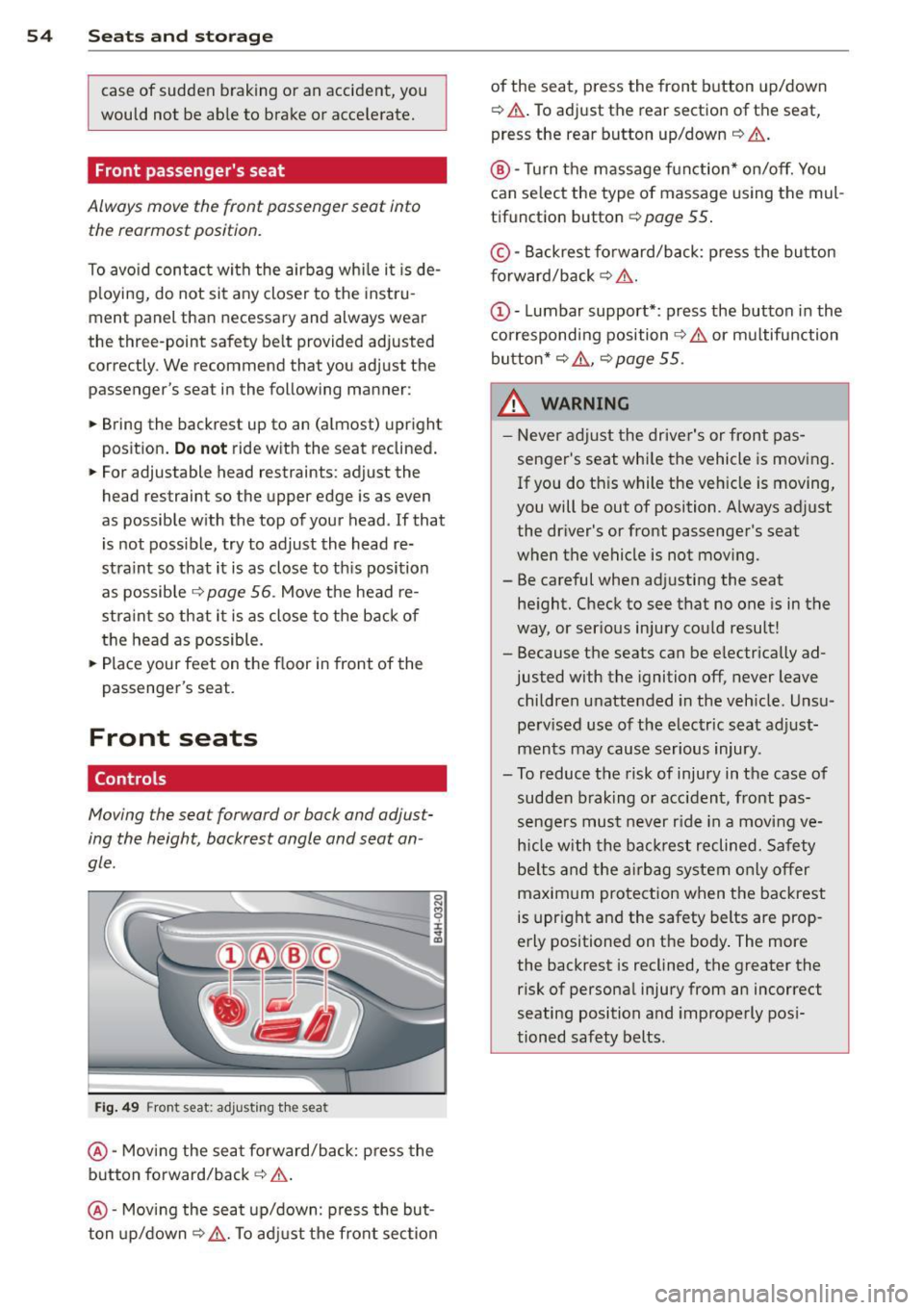
F ig. 49 Front seat: adjusting t he seat
@ -Moving the seat forward/back: press the
button fo rward/back
c:> .&. .
@ -Mov ing the seat up/down: press the but
ton up/down~ _&.. To ad just the fron t sec tion of the seat, press the front button up/down
¢
.&. .To adjust the rear sectio n of the seat
,
press the rear button up/down ¢ &..
®-Turn the massage function * on/off. You
can select the type of massage using the mul
tif unction button ¢
page 55 .
© -Backrest fo rward/back: p ress the bu tton
f orward/back
c:> &. .
c:> &. or multifunction
button*
c:> &. , c:> page 55 .
_& WARNING -
-Never adjust the driver's or front pas -
senger's seat whi le the vehicle is moving .
If you do th is while the veh icle is moving,
you will be out of position. A lways adjust
the driver's or front passenger's seat
when the ve hicle is not mov ing.
- Be careful when adj usting the seat
he ight. Check to see that no one is in t he
way, or ser ious injury cou ld result!
- Because the seats can be e lectrically ad
justed with the ignition off,
never leave
children unattended in the veh icle. Unsu
pe rv ised use of the electric seat adjust
ments may cause serious injury .
- To reduce the risk of injury in the case of sudden b raking or accident, front pas
sengers mus t never r ide in a moving
ve
h icle with the ba ck res t reclined. Safety
be lts and the airbag system o nly offer
maxim um protection when the backrest
is upr ight and the safety belts are prop
erly positioned on the body . The more
the backrest is reclined, the greater the risk of persona l injury from an incorrect
seating position and improperly pos i
tioned safety belts.
Page 64 of 292
62 Seats and storage
-Compartments* on the back of the front
seat backrests
- Garment hooks on the sides of the pillars in
the rear of the vehicle and in the rear grab
handles
- Compartment in the rear center armrest
- Storage in the trim panels in the luggage
compartment
~ WARNING
-
- Always remove objects from the instru
ment panel. Any items not stored could
slide around inside the vehicle while driv
ing or when accelerating or when apply
ing the brakes or when driving around a
corner.
- When you are driving make sure that
anything you may have placed in the cen
ter console or other storage locations
cannot fall out into the footwells. In case
of sudden braking you would not be able
to brake or accelerate.
-Always keep the lid of the compartment
for (sun)glasses* closed while driving to
reduce the risk of injury during a sudden
braking maneuver or in the event of an
accident.
- Any articles of clothing that you have
hung up must not interfere with the driv
er's view. The coat hooks are designed
only for lightweight clothing. Never hang
any clothing with hard, pointed or heavy
objects in the pockets on the coat hooks.
During sudden braking or in an accident -
especially
If the airbag is deployed -
these objects could injure any passen
gers inside the vehicle.
- To reduce the risk of personal injury in an
accident or sudden stop, always keep the
glove compartment closed while driving.
- Read and follow all WARNINGS
~ page 164, Important safety instruc
tions on the side airbag system.
-Hang clothes in such a way that they do
not impair the driver's vision.
- The coat hooks must only be used for
lightweight clothing. Do not leave any
heavy or sharp edged objects in the pock- ets which may interfere with the side cur
tain airbag deployment and can cause
personal
injury in a crash.
- Do not use coat hangers for hanging
clothing on the coat hooks as this can in
terfere with proper deployment of the side curtain airbags in an accident.
- Do not hang heavy objects on the coat
hooks, as they could cause personal in
jury in a sudden stop.
(D Note
Objects located on the rear shelf that rub
against the rear window could damage the heating wires for the rear window defog-
ger .
Roof rack
Description and mounting locations
Additional cargo can be carried with a roof
luggage rack.
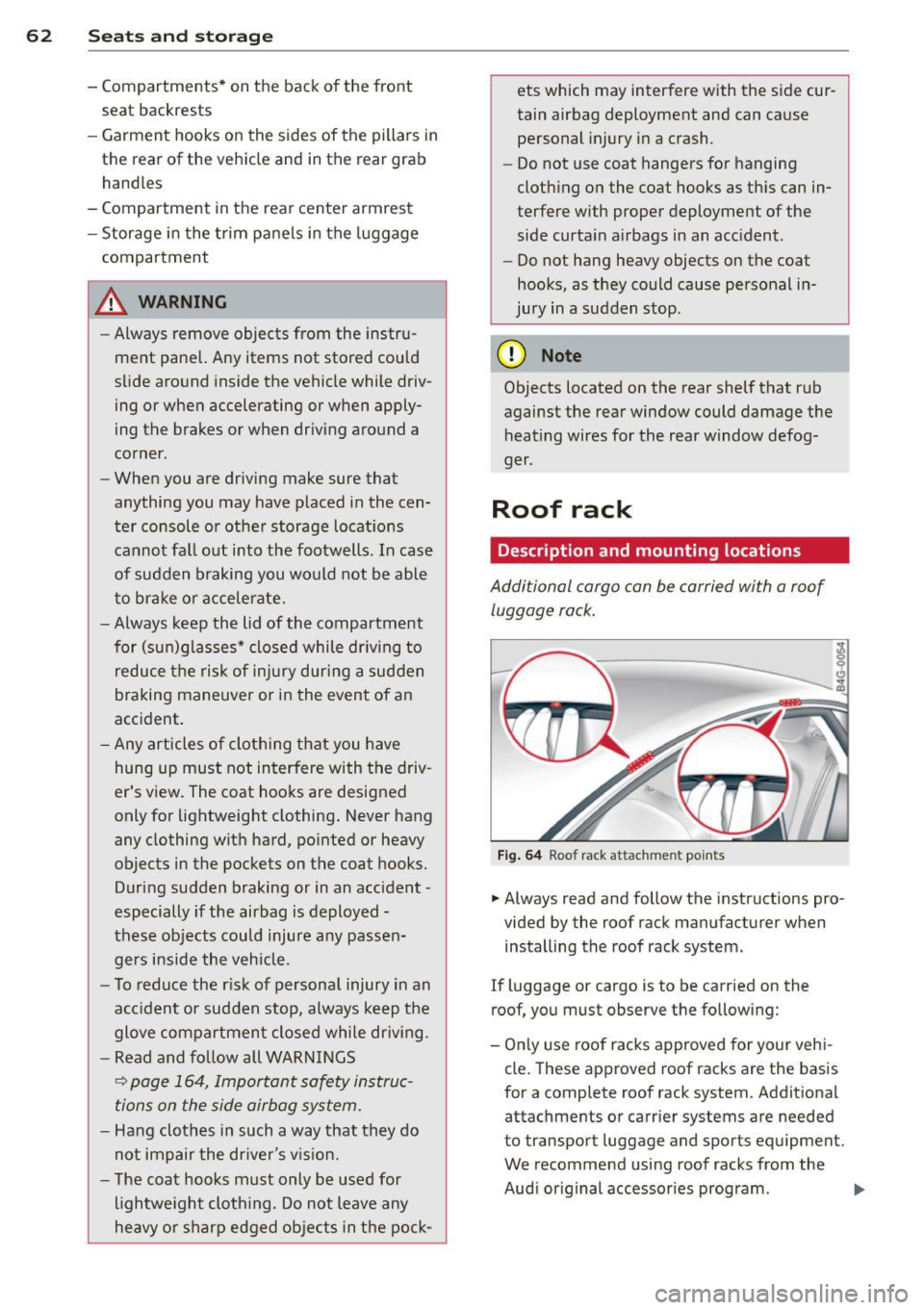
Fig. 64 Roof rack attachment po ints
... Always read and follow the instructions pro
vided by the roof rack manufacturer when installing the roof rack system.
If luggage or cargo is to be carried on the
roof, you must observe the following:
- Only use roof racks approved for your vehi
cle. These approved roof racks are the basis
for a complete roof rack system. Additional
attachments or carrier systems are needed
to transport luggage and sports equipment.
We recommend using roof racks from the
Audi original accessories program . .,..
Page 76 of 292
7 4 On the road
column will continue moving as long as you
are pressing the switch.
There must be at least 10 inc hes (25 cm) be
tween you r chest and the center of the steer
ing whee l.
If you cannot sit more than 10 in
ches (25 cm) from the steering whee l, see if
adaptive equipment is available to help you reach the pedals and increase the distance
from the steer ing wheel.
F or detai led information on how to adjust the
driver's seat, see
<::> page 54 .
In vehicles with the memory f unction* , the
steering column settings are stored together
with the seat position.
A WARNING
Improper use of steering wheel adjust
ment and improper seating position can
cause se rious personal injury.
- Adjust the steer ing whee l column on ly
when the vehicle is not moving to pre
vent loss of veh icle control.
-
- Adjust the driver's seat or steering wheel
so that the re is a min imum of 10 inches
(25 cm) between your chest and the
steering wheel ¢
page 124, fig. 146. If
you can not maintain this min imum dis
tan ce, the airbag system cannot protect
yo u properly.
- If phys ica l limi tations prevent you from
sitting 10 in ches (25 cm) o r more from
the steering wheel, check with yo ur au
tho rized Aud i dealer to see if adaptive
equipment is availab le .
- If the steering wheel is aligned with you r
face, the supp lemental drive r's airbag
cannot provide as much protect ion in an
acc ident. A lways make sure that the
steering wheel is aligned with your
chest.
- Always hold the steering wheel with your
hands at the 9 o'clock and 3 o'clock posi
t ions to reduce the risk of pe rsonal injury
if the d river 's airbag deploys.
- Never hold the steering whee l at the 12
o'clock posit ion or w ith your hands i nside the steering wheel rim or on the steering
wheel hub. Hold
ing the steer ing wheel
the wrong way can cause serious injuries
to the hands, arms and head if the driv
er 's airbag deploys.
Easy entry feature
Applies to vehicles: with electrically adjustable steering
wheel
The easy entry feature makes it easier to en
ter and exit the vehicle by automatically ad
justing the steering wheel.
.. Select in the MM I: ICARI function button>
(Car )* sys tem s control b utton > V ehicle set
ting s
> Seats > D rive r's seat > Easy entry >
On .
When the easy ent ry feature is turned on, the
steering wheel moves up to the park position
when you switch
off the ignition. After you en
ter the veh icle, the steering wheel moves to
the stored position as soon as you sw itch on
the ignit ion.
Starting and stopping
the engine
Starting the engine
This button switches on the ignition and
starts the engine.
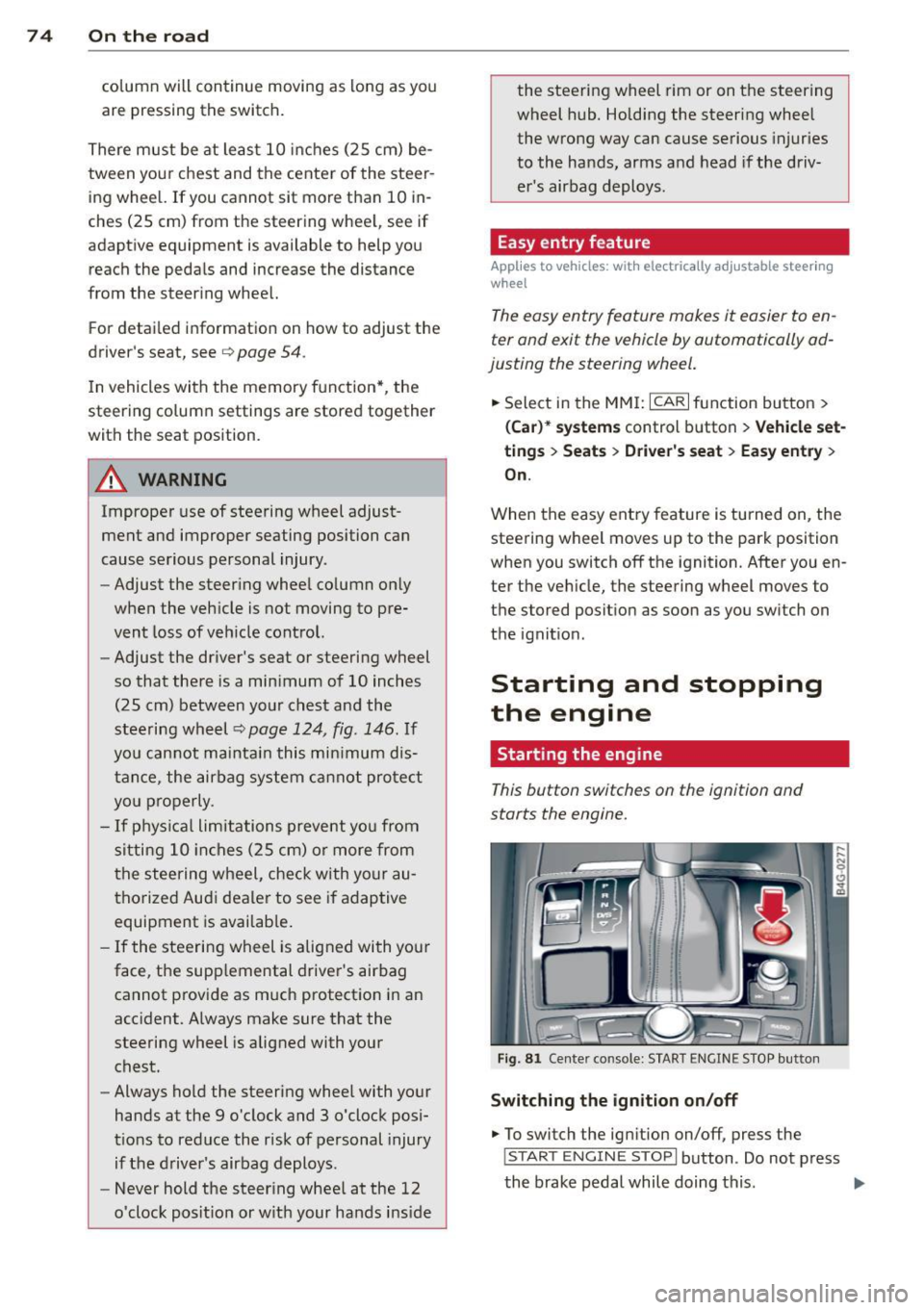
Fig . 81 Center console: S TART ENGINE S TOP butto n
Switching the ign ition on /off
.. To switch the ign ition on/off, press the
I STAR T ENGINE ST OPI button . Do not press
the brake pedal while doing this . .,.
Page 77 of 292
Starting th e engin e
"'Press the brake peda l r::!> _&..
"'Press the I START ENGINE STOP I button
r::!> fig. 81. The engine will start .
If the engine should not sta rt immediately ,
the sta rting process is automatically stopped
after a short time. Repeat starting procedure .
A WARNING
-Never allow the engine to run in confined
spaces -danger of asphyxiation .
- Never t urn off the engine unti l the vehi
cle has come to a complete stop.
- The brake booster and power steering
only work when the engine is running . If
the engine is off, you have to use more
force when steering or braking. Because
you cannot steer and brake as you usua l
ly would, this could lead to crashes and
ser ious injur ies .
(D Note
-Avoid high engine rpm, full throttle and
heavy engine loads unti l the engine has
reached operating temperature -other
wise yo u risk eng ine damage.
- The eng ine cannot be started by pushing
or tow ing the veh icle.
(D Tips
- After a cold engine is started, there may
be a brief period of increased noise be
ca use oil pressure mus t fi rst bu ild up in
the hyd raulic valve adjusters . This is nor
mal and not a ca use for concern.
- If you leave the vehicle with the ignit ion
switched on, the ignition will switch off
after a certai n pe riod of time. P lease
note tha t electr ica l equipment s uch as
exterior lights wi ll switch off as well
when that happens.
Stopping the engine
"' Bring your vehicle to a complete stop.
"' Move the selector lever to the P or N po si
t ion.
On th e ro ad 75
"'Press the I START ENGINE ST OP I button
r::!>poge 74, fig . 81.
Ste ering lock
T he s teering locks when yo u tur n the engine
off using t he
I S TA RT ENGINE STO P! bu tton
and open the d river 's doo r. The locked steer
ing helps prevent vehicle theft.
Emergency off
If necessary, the engine can be switched off
with the selector lever in the R or D/S posi
t ion. The engine stops if you press the
I S TAR T ENG IN E ST OP I button at speeds below
6 mph (10 km/ h) .
A WARNING
- Never turn off the engine until the vehi
cle has come to a complete stop.
- The brake booster and power stee ring
only work when the eng ine is r unning . If
the engine is off, you have to use more
force when steering or braking. Because
you cannot steer and brake as you usual
ly would, this co uld lead to crashes and
serious injuries .
- For safety reasons , you should a lways
pa rk your vehicle w it h the selector lever
in P. Otherwise, the vehicle could inad
ver ten tly roll away.
- After the eng ine has been switched off,
the radiator fa n can cont in ue to run for
up to 10 minu tes -even with the ignition
sw itche d off . It can also sw itch on again
after some time i f th e coolant tempera
ture rises as the result of a heat b uildup
or if the engine is hot and the engine
compartment is additionally heated by
the sun's rays.
(U) Note
Do not stop the engine immediately after
hard o r extended driving. Keep the engine
running for approximate ly two minutes to
prevent excess ive heat bu ild-up .
Page 78 of 292
76 On the road
Driver message in the instrument
cluster display
Turn off ignition befor e le a v ing car
This message appears and a warning tone
sounds if yo u open the dr iver's door when the
ignition is switched on.
Press brake p edal to start engin e
This message appears if you press the
I STAR T ENGINE ST OP ! button to start the en
g ine and do not depress the brake pedal. The
engine can on ly be started if the brake pedal
is depressed.
!I I s ke y in th e vehicle?
If the indicator light turns on and the mes
sage appears, the remote control key was re
moved from the vehicle while the engine was
running. If the ignit ion key is not in the vehi
cle you w ill not be able to sw itch on the ign i
tion or resta rt the engine after it has been
switched off. You w ill also not be ab le to lock
the veh icle from the outside.
Shift to P , oth erwise vehicl e can roll away.
Doors do not lo ck if lever i s not in P .
This message appears for safety reasons
along w ith an audib le warn ing tone if the P
selecto r lever posit io n is not engaged when
stopping the engine with the
I STAR T ENGINE ST OP ! button. Select the P se
lector lever pos it ion. Othe rwise the veh icle
could ro ll and it cannot be locked.
(I Key is n ot recogn iz e d . Ho ld b ack o f key
ag ain st marked ar ea . Se e owner's manual.
If the indicator light tu rns on and th is mes
sage appears, there is a malfunction
c::>page 76. Starting the engine if there is a
malfunction
It may not be possible to start the engine un
der certain circumstances, for example if the
battery in the vehicle key
is drained, if inter
ference has affected the key or if there
is a
system malfunction .
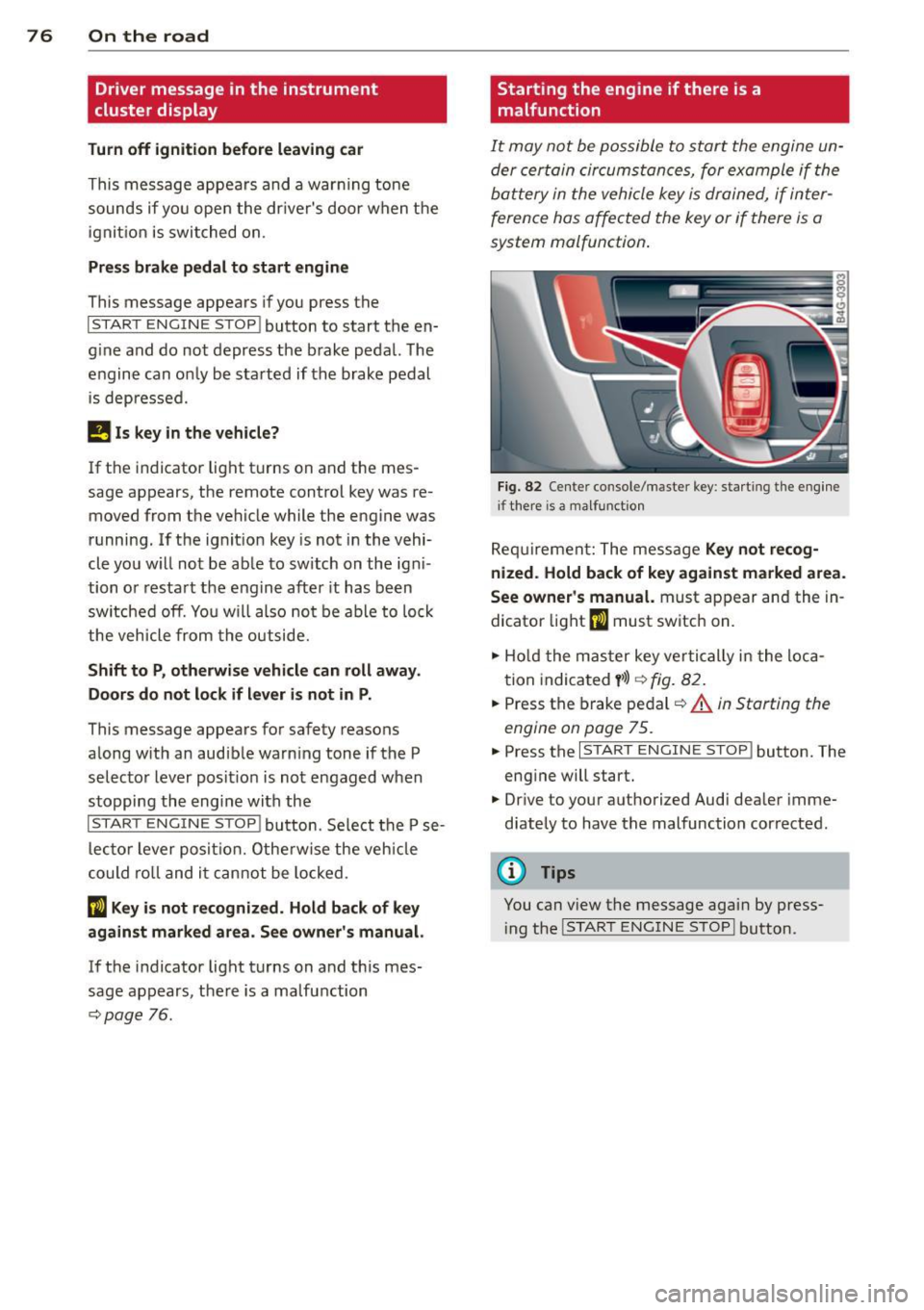
Fig . 82 Center console/master key: starting the eng ine
i f there is a malfunction
Req uirement: The message Ke y not r ecog
ni ze d. H old back of key aga inst ma rked are a.
Se e owne r's manual.
must appear and the in
dicator
light (I must switch on.
.,.. Ho ld the mas ter key vertically in the loca
tion indicated
y >l) r=:>fig. 82.
.,.. Press the brake pedal c::> A in Starting the
engine on page 75.
.,.. Press the I START ENGINE S T OP ! button. The
eng ine will start.
.,.. Dr ive to your authorized Audi dealer imme
diately to have the malfunction corrected.
(D Tips
You can v iew the message again by press
i ng the
I STAR T ENGINE STOP I button.
Page 79 of 292
Electromechanical
parking brake
Operation
The electromechanical parking brake replaces
the hand brake.
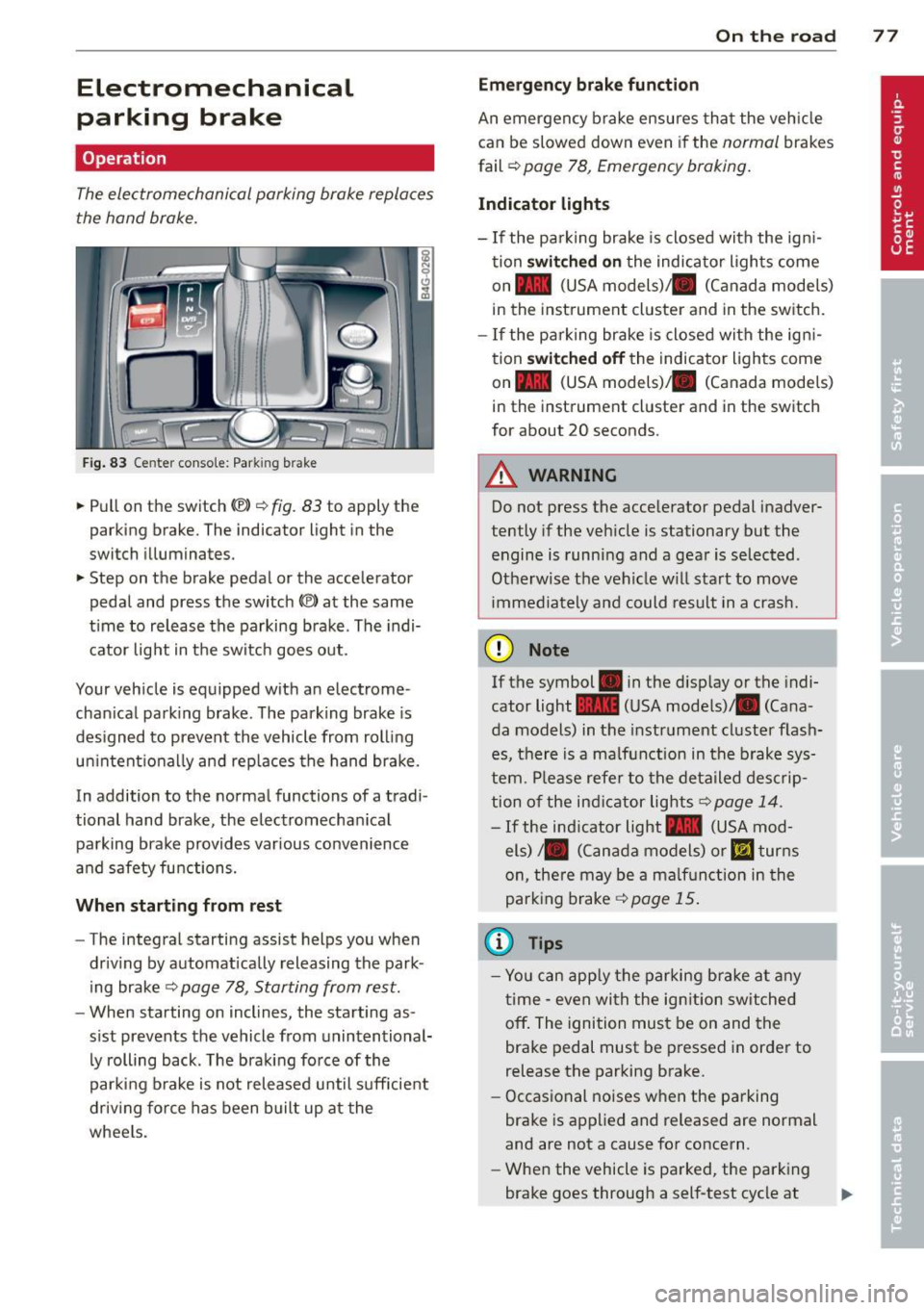
Fig. 83 Center conso le: Park in g brake
.. Pull on the switch (®) c:::> fig . 83 to apply the
parking brake. The indicator light in the
switch illuminates.
.. Step on the brake pedal or the accelerator
pedal and press the switch
(®) at the same
t ime to release the parking brake. The indi
cator light in the switch goes out.
Your vehicle is equipped with an electrome
chan ical park ing brake . The parking brake is
designed to prevent the vehicle from rolling
un intent ionally and rep laces the hand brake.
In addition to the normal functions of a tradi
tional hand brake, the electromechan ical
parking brake provides var ious convenience
and safety functions.
When starting from rest
-The integral starting assist helps you when
driving by automat ically releasing the park
ing brake ¢
page 78, Starting from rest.
- When starting on inclines, the starting as
sist prevents the vehicle from unintentional
ly rolling back . The braking force of the
parking brake is not released until suff icient
driv ing force has been built up at the
wheels.
On the road 77
Emergency brake function
An emergency brake ensures that the vehicle
can be slowed down even if the
normal brakes
fail ¢
page 78, Emergency braking.
Indicator lights
-If the parking brake is closed with the ign i
tion
switched on the indicator lights come
on - (USA
models) ,1111 (Canada models)
in the instrument cluster and in the switch.
- If the parking brake is closed with the ign i
tion
switched off the indicator lights come
on - (USA
models) ,1111 (Canada models)
in the instrument cluster and in the switch
for about 20 seconds.
A WARNING
Do not press the accelerator pedal inadver
tently if the veh icle is stationary but the
engine is running and a gear is selected .
Otherwise th e vehicle w ill start to move
immediately and could result in a crash.
(D Note
If the symbol . in the disp lay or the indi
cator light
1111 (USA models)/ . (Cana
da models) in the instrument cluster flash
es, there is a malfunction in the brake sys
tem. Please refer to the deta iled desc rip
tion of the indicat or lights
r::::>page 14.
-If the ind icator light - (USA mod-
els) /. (Canada models) or
mJ turns
on, there may be a malfunction in the
parking brake
c:::> page 15.
(0 Tips
-Yo u can apply the parking brake at any
time -even with the ignition switched
off. The ignition must be on and the
brake pedal must be pressed in order to
release the parking brake.
- Occasional noises when the parking
brake is applied and released are normal
and are not a cause for concern.
- When the vehicle is parked, the parking
brake goes through a self-test cycle at
Page 80 of 292
78 On the road
regular intervals . Any associated noises
are norma l.
Parking
• Press the brake peda l to stop the vehicle .
• Pull the switch(®) to set the parking brake .
• Move the selector lever to P.
• Turn the eng ine off ¢.&_ .
• When on incl ines or declines, turn the steer
i ng wheel so that your vehicle will roll into
the curb if it begins to move.
_& WARNING
- When you leave your veh icle - even if on
ly briefly - always take the ignition key
with you . This applies particu la rly when
children remain in the veh icle. Otherw ise
the ch ildren could start the engine, re
lease the parking brake or operate e lec
trical equipment (e.g . power windows) .
The re is the risk of an accident .
- When the vehicle is locked, no one - par
t icu la rly not children should remain in
the vehicle . Locked doo rs make it more
difficult for emergency wor kers to get in
to the vehicle - putt ing lives at risk.
Starting from rest
The starting assist function ensures that the
parking brake is released automatically upon
starting .
Stopping and applying park ing brake
• Pull the switch© to apply the park ing
brake .
Starting and automat ically releasing the
parking brake
• When you start to drive as usua l, the park
ing brake is automatically re leased and your
vehicle begins to move .
When stopp ing at a traff ic signa l or stopp ing
i n city traffic, the parking brake can be ap
plied . The veh icle does not have to be held
with the footbrake. The par king brake e limi
n ates the te ndency to creep with a drive ra nge engaged. As soon as yo
u drive off as usu a l,
the parking brake is re leased automatically
and the vehicle starts to move .
Starting on slopes
When starting on inclines, the starting assist
prevents the vehi cle from u nintent ionally roll
ing back . The braking force of the parking
brake is not re leased unti l sufficient driving
f orce has been built up at the wheels.
(D Tips
F o r safety reasons, the parking brake is re
l eased a utomatically on ly when t he d riv
er's safety belt is engaged in the buckle.
Emergency braking
In the event that the conventional brake sys
tem fails or locks.
• In an emergency, pu ll the switc h C®> and
continue to pull it to s low your vehicle down
with the parking b rake .
• As soon as you re lease the switch «:El) or ac -
celerate, the brak ing process stops.
If you pu ll the switch «:El) and hold it above a
speed of abo ut 5 mph (8 km/h), the eme rgen
cy brak ing f unct ion is initiated . The vehicle is
braked at all four whee ls by activating the hy
draulic brake system . The brake performa nce
i s sim ila r to making an emergency stop
c::> .&. .
In order not to act ivate the eme rgency brak
ing by mistake, an audib le warning tone (bu z
zer) sounds whe n the switch(®) is pulled . As
soon as the sw itch
®) is released, or the accel
erato r peda l is depressed, eme rgency b raking
stops.
_& WARNING
E mergency br aking should only be u sed in
a n emergency, when the norma l foot bra ke
has fai led or the brake pedal is obstruc ted.
Using the parking brake to pe rform eme r
gency b raking will s low your veh icle down
as if you had made a full brake application.
The laws of physics cannot be suspended
~
Page 81 of 292
even with ESC and its associated
components (ABS, ASR, EDL). In corners
and when road or weather conditions are
bad, a full brake application can cause the
vehicle to skid or the rear end to break
away· risking an accident.
Speed warning system
Introduction
The speed warning system helps you to stay
under a specified maximum speed.
The speed warning system wa rns you if you
are exceeding the maximum speed that you
have set. You will hear a warn ing tone when
your speed exceeds the stored value by ap
proximately 3 mph (3 km/h). An indicator
light . (USA models)/ . (Canada models) in
the instrument cluster display also turns on at
the same time. The indicator light ••
turns off when the speed decreases below the
stored maximum speed .
Setting a threshold is recommended if you
would like to be reminded when you reach a certain max imum speed . Situations where you
may want to do so include driving in a country
with a general speed limit or if there is a
specified maximum speed for winter tires.
@ Tips
Even though your vehicle is equipped with
a speed warning system, you should st ill
watch the speedometer to make sure you
are not driving faster than the speed limit.
Setting the threshold
You can set, change and delete the threshold
in the MMI.
.. Se lect : I CARI function button > (Car)* sys
tems
control button > Driver assist > Speed
warning .
You can set any threshold between 20 mph
(30 km/h) and lS0 mph (240 km/h) . Settings
can each be adjusted in inc rements of 6 mph
(10 km/h).
On the road 79
Cruise control
Switching on
Applies to veh icles: w ith cruise control
The cruise control system makes it possible to
drive at a constant speed starting at 20 mph (30km/h) .
0
f
®t
0
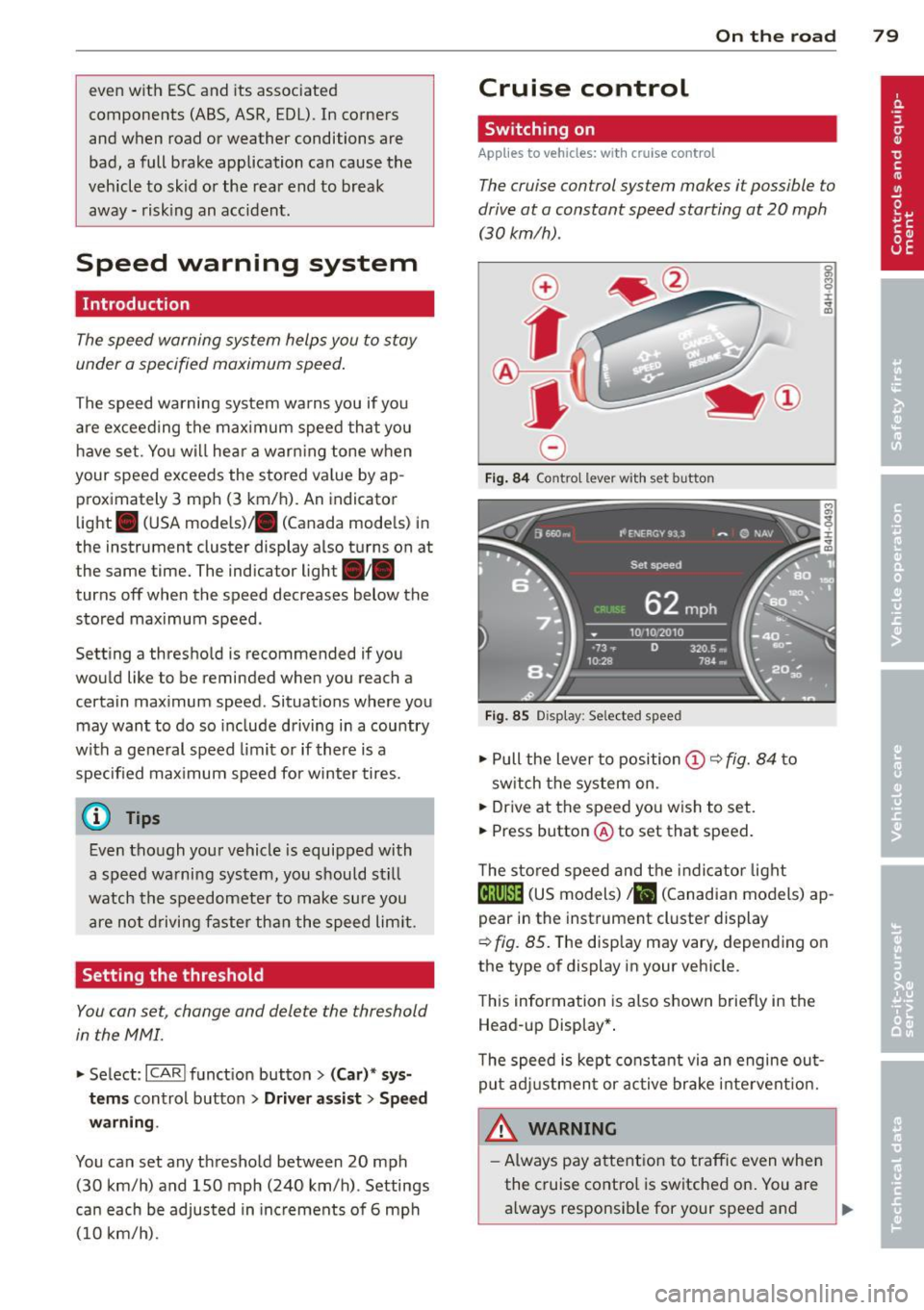
Fig. 84 Contro l lever w ith set b utto n
Fig. 85 Display: Se lected speed
.. Pull the lever to position@¢ fig. 84 to
sw itch the system on .
.. Drive at the speed you wish to set.
.. Press button @ to set that speed.
T he stored speed and the indicator light
@;\1)~14 (US models) Iii (Canadian models) ap
pear in the instrument cluster display
¢
fig. 85. The disp lay may vary, depending on
the type of display in your veh icle.
This information is also shown briefly in the
Head -up Display*.
T he speed is kept constant via an engine out
put adjustment or active brake intervent ion.
A WARNING .c
- Always pay attention to traffic even when
the cruise control is switched on. You are always responsib le for your speed and ...
Page 82 of 292
80 On the road
th e dista nce between yo ur vehicle and
other vehicles .
- For safet y rea son s, the cruise control
should not be used in the city, i n stop
and-go traff ic, on twist ing roads and
when road conditions are poor (such as ice, fog, gravel, heavy rain and hydro
planing) -risk of accident .
- Turn off the cruise control temporar ily
when ente ring turn lanes, highway exit
lanes or in construct ion zones.
- Please note that inadvertent ly "rest ing"
yo ur foot on the accelerator pedal causes
the cruise control not to brake. This is
because t he cr uise con trol is overridden
by the d river 's a cce le rat ion.
- If a bra ke system malfunction such as
overheat ing occurs when the cru ise con
t ro l system is sw itched on, the braking
f unction in the system may be switched
off. The other cruise control f unctions re
ma in active as long as the indicator light
[~ jrn~14 (US models) !El (Canad ian mod
els) is on.
The brake lights illuminate as soon as the brakes decelerate a utomat ica lly.
Changing speed
Applies to vehicles: with cru ise control
.,. To increase/decrease the speed in incre
me nts, tap the lever in t he
0 10 d irection
¢ page 79, fig . 84
.,. To increase/dec rease the speed qu ickly, hold
the leve r in the
010 direction until the de
s ir ed speed is d isplayed.
You can a lso p ress the accelerato r pedal down
to inc rease your speed, e .g . if you want to
pass someone. The speed yo u saved earlier
will resume as soon as you release the acceler
ator peda l.
I f, however, you exceed your saved speed by
6 mp h (1 0 km/h) fo r longe r th an 5 m inutes,
the cruise cont ro l w ill tu rn off tempora rily.
The green symbo l
@;\1)~14 (US models) !El
(Canadian mode ls) in the display will go out
but the saved speed remains the same .
Presetting your speed
Applies to vehicles: with cruise control
You can preset your desired speed while the
vehicle is not moving .
.,. Swi tch on the ign ition.
.,. Pull lever in to posi tion @¢
page 79,
fig. 84.
.,. Press the lever in the 0 or 0 direction to
increase or decrease your speed .
.,. Release the lever to save that speed.
This function makes it possib le, for examp le,
to save the speed you want before driving on
the highway. Once on the h ighway, act ivate
the cru ise control by pulling the lever toward
@ .
Switching the system off
Applies to vehicles: with cruise control
Temporary deactivation
.,. Press the brake pedal, or
.,. Press the lever into position @(not cl icked
into place)
~ page 79, fig . 84, or
.,. Dr ive fo r longer t han 5 m inutes at mo re
t han 5 mph (10 km/h) above the stored
spee d.
Switching off completely
.,. Press lever into position @ (clicked into
p lace), or
.,. Switch the ignit ion off .
The system retains t he saved speed if you de
activate the c ruise control temporar ily . To re
s u me the saved speed, re lease the brake ped
al a nd pull the leve r to pos it ion @.
Switch ing the ignition off erases the saved
speed .
A WARNING
-You sho ul d only ret urn to the saved speed
if it is no t too fast for the cur ren t traffi c
condi tions -ris k of an a cci dent!
Page 83 of 292
Audi adapt ive crui se c ontrol an d bra kin g guard 81
Audi adaptive cruise
control and braking
guard
Introduction
App lies to vehicles: with Audi adaptive cruise control
The adaptive cruise control system assists the
driver by regu lating vehicle speed and helping
to maintain a set distance to the vehicle
ahead, within the limits of the system . If the
system detects a moving vehicle up ahead,
adaptive cruise control can brake and then ac
celerate your vehicle. Th is he lps to make driv
ing more comfortable both on long highway
stretches and in stop-and-go traffic.
The braking guard system can warn you about
an impending collision and initiate braking
maneuvers¢
page 87.
Adaptive cruise control and braking guard
have technical limitations that you must
know, so please read this section carefully, un
derstand how the system works and use them
properly at all times.
General information
General information
Applies to vehicles: with Audi adaptive cruise control
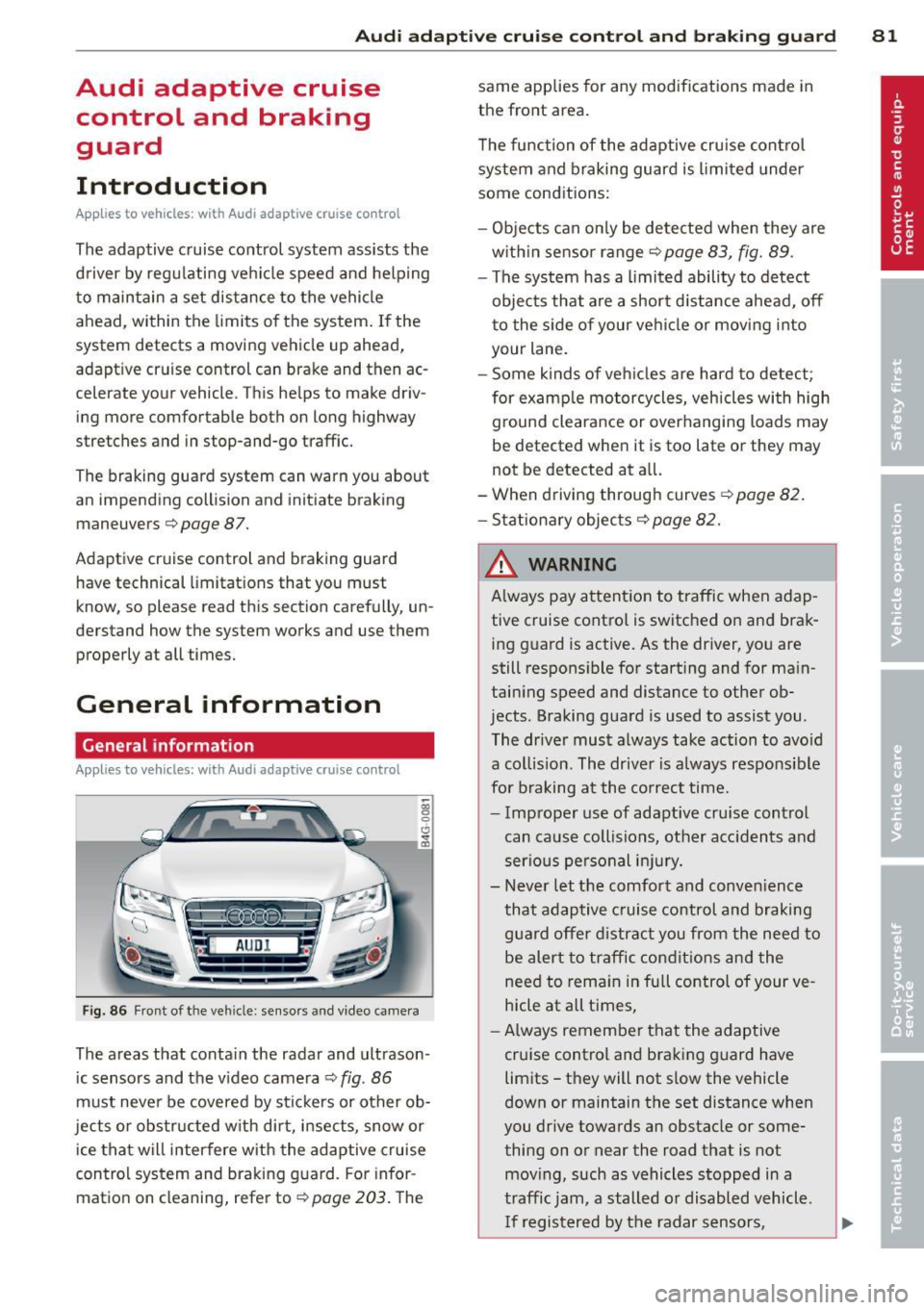
Fig. 86 Front of the vehicle: sensors and video came ra
The areas that contain the radar and ultrason
ic sensors and the v ideo camera ¢
fig. 86
must neve r be covered by stickers or other ob
jects or obstructed with dirt, insects, snow or
ice that will interfere with the adaptive cruise
control system and braking guard. For infor
mation on cleaning, refer to¢
page 203. The same applies for any modifications made in
the front area.
T he function of the adaptive cru ise contro l
system and braking guard is limited under
some conditions:
- Objects can on ly be detected when they are
w ith in sensor range
¢page 83, fig. 89 .
-The system has a limited ability to detect
objects that are a shor t distance ahead,
off
t o the side of your vehicle or moving into
your lane.
- Some kinds of ve hicles are hard to detect;
for examp le motorcycles, vehicles with high
ground clearance or overhanging loads may
be detected when it is too late or they may
not be detected at all.
- When driving through curves
¢page 82 .
- Stationary objects¢ page 82.
& WARNING
Always pay attent ion to traffic when adap
tive cruise control is switched on and brak ing g uard is active. As the driver, you are
still respons ible for starting and for ma in
taining speed and distance to other ob
jects . Braking guard is used to assist you .
The driver must always take action to avo id
a collision. The driver is always responsible
for braking at the co rrect time.
- Improper use of adaptive cru ise control
can cause collisions, other acc idents and
serious pe rsonal in jury.
- Never let the comfort and conven ience
that adaptive cruise control and braking
guard offer d istract you from the need to
be alert to traffic condit ions and the
need to rema in in full control of your ve
hicle at all times,
- Always remember that the adaptive
cruise control and braking guard have
limits -they will not s low the vehicle
down or maintain the set distance when
you drive towards an obstacle or some
thing on or near the road that is not
mov ing, such as vehicles stopped in a
traffic jam, a stalled or disabled vehicle .
I f registered by the radar sensors,