engine AUDI RS7 SPORTBACK 2014 Owner's Manual
[x] Cancel search | Manufacturer: AUDI, Model Year: 2014, Model line: RS7 SPORTBACK, Model: AUDI RS7 SPORTBACK 2014Pages: 292, PDF Size: 73.56 MB
Page 38 of 292
36 Openin g and clo sing
• Press button rfl (@ ) to lock the vehicle¢ &
in General description on page 34.
• Press button c:s (@ ) briefly to un lock the
rear lid.
• Push the red
IPANICI button( @) to activate
the panic function . The horn sounds and the
turn s ignals flash. Push the red
I PANIC I but
ton aga in to deact ivate the panic function.
If the vehicle is unlocked and no door, the rear lid or the hood is opened with in 60 seconds,
the vehicle locks itself again automatically .
This feature prevents the ve hicle from be ing
accidenta lly left unlocked ove r a long period
of time.
It depends on the sett ings in the MMI wheth
e r the enti re veh icle is un locked or on ly cer
tain doors ¢
page 35.
.&_ WARNING
Read and follow a ll WARNINGS¢ &. in
General description on page 34.
{D Tips
- In order to make sure the locking func
tion is working, you shou ld always keep
you r eye on the vehicle to make su re i t is
properly locked.
-
- Do not use the remote control if you are
i nside the car, o therwise you may unin
tentiona lly lock the vehicle, and then you
would set off the anti-theft alarm when
you try to start the engine or open a
door. In case this happens anyhow, push
the un lock button @.
- The vehicle can on ly be locked when the
se lector lever is in the P posit ion.
- Use the panic funct ion only i f you are in
an emergency situation.
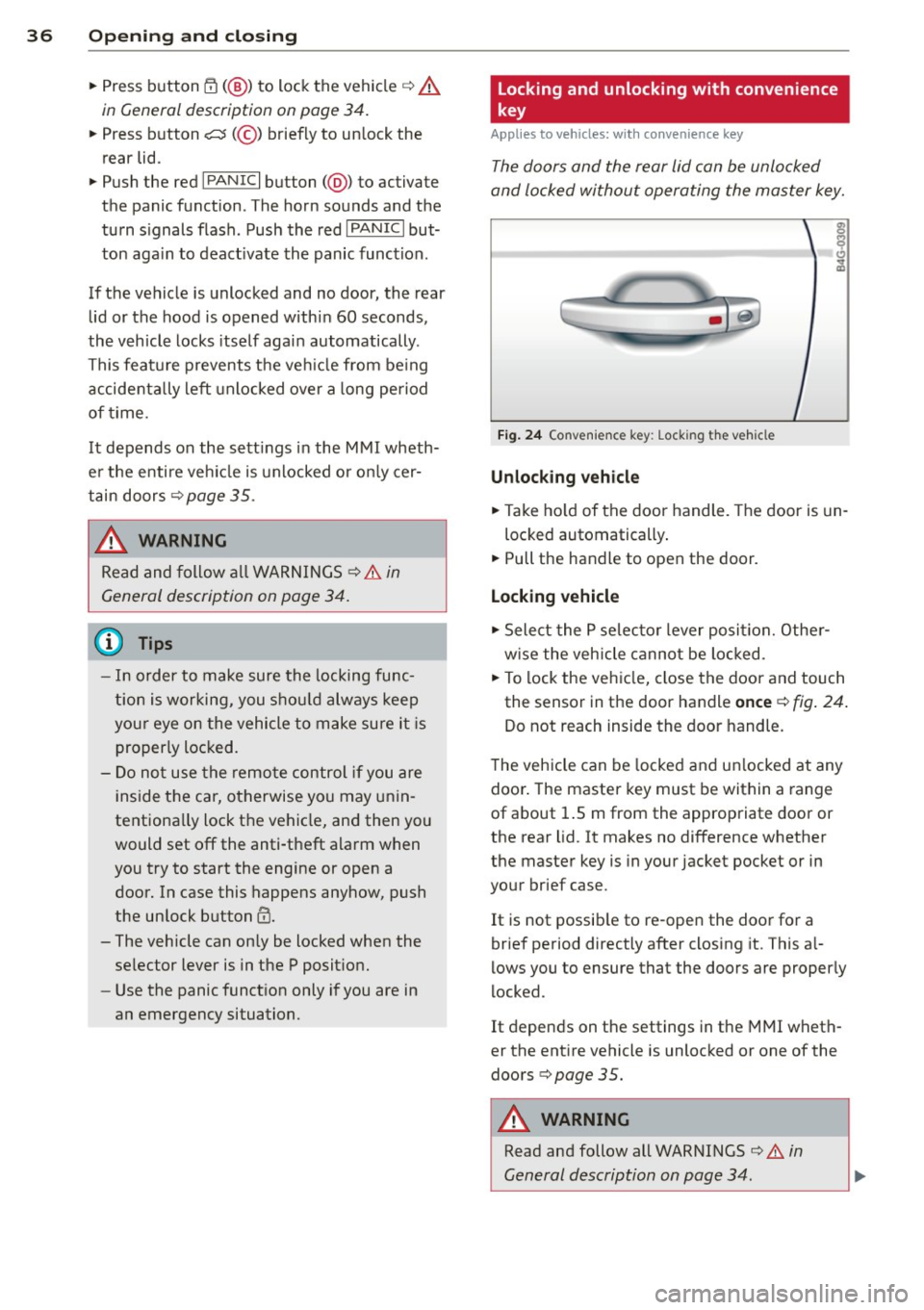
Locking and unlocking with convenience
key
Appl ies to vehicles : wi th convenience key
The doors and the rear lid can be unlocked
and locked without operating the master key.
Fi g. 24 Co nve nienc e key: Lock ing the vehicle
Unlocking vehicle
• Take ho ld of the door handle . T he door is un-
locked automatically .
• Pull the handle to open the door.
Locking vehicle
• Select the P se lec to r lever posit ion. Othe r
w ise the vehicle cannot be loc ked.
• To lock the veh icle, close the door and touch
the sensor in the door handle
once ¢ fig. 24 .
Do not reach inside the door handle.
T he vehicle can be locked and un locked at any
door . The master key must be within a range
of about 1.5 m from the appropriate door or
the rear lid. It makes no difference whether
the master key is in your jacket pocket or in
your brief case.
It is not possib le to re-open the door for a
brief period directly after closing it. This a l
l ows you to ensure that the doors are properly
locked.
It depends on the settings in t he MMI wheth
er the ent ire vehicle is unlocked or one of the
doors ¢
page 35 .
.&_ WARNING ~ -
Read and follow all WARNINGS ¢.&. in
General description on page 34 .
Page 43 of 292
![AUDI RS7 SPORTBACK 2014 Owners Manual .. To activate the child safety lock for the left/
right rear door, press the left/right button
Ii]
in the drivers door ¢ fig. 33. The light in the
button w ill turn on.
.. To](/img/6/57649/w960_57649-42.png "AUDI RS7 SPORTBACK 2014 Owners Manual .. To activate the child safety lock for the left/
right rear door, press the left/right button
Ii]
in the drivers door ¢ fig. 33. The light in the
button w ill turn on.
.. To")
.. To activate the child safety lock for the left/
right rear door, press the left/right button
Ii]
in the driver's door ¢ fig. 33. The light in the
button w ill turn on.
.. To deactivate the child safety lock for the
left/right rear door, press the left/r ight but
ton
1±1 in the driver's door. The light in the
button turns off.
The follow ing features are switched off:
- The interior door handles in the rear doors,
- The power windows in the rear doors.
I n order to activate the child safety lock on
the left and the right s ide, press the two safe
ty buttons
Ii] in succession.
Power windows
Controls
The driver can control all power windows.
Fig. 34 Section of the driver 's doo r: Cont rols
l(l 0 0 0
"' m
All power window switches are provided with
a two-position function :
Opening the windows
.. Press the switch to the first stop and hold it
until the window reaches the desired posi
tion.
.,. Press the switch br iefly to the
second stop
to automatically open the window.
Closing the windows
.. Pull the switch to the first stop and hold it
until the window reaches the desired posi
t ion.
.. Pull the switch briefly to the
second stop to
automatically close the window .
Opening and closing 41
Power window switches
@ Driver's door
® Passenger's door
© Left rear door
@ Right rear door
.,&_ WARNING
-When you leave your vehicle - even if on
ly briefly - always take the ignit ion key
with you. This applies particularly when children remain in the vehicle. Otherwise
the children could start the engine or op
erate electrical equipment (e.g. power
windows). The power windows are func
tional until the driver's door or passeng
er's doo r has been opened.
- Be careful when closing the w indows.
Check to see that no one is in the way, or
serio us injury could result!
- When locking the vehicle from outside,
the vehicle must be unoccupied since the
windows can no longer be opened in an
emergency .
{D Tips
-When you open the doors, the windows
automatically lower abo ut 10 mm.
- When the window in the driver's or pas
senger's door is complete ly open, it will
raise approximately 25 mm when the
door is opened. The window will lower
again when you close the door.
- After the ignition has been switched off,
the windows can sti ll be opened or
closed for about 10 minutes. The power
windows are not switched off until the
dr iver's door or passenger's door has
been opened .
What to do after a malfunction
The one-touch open and close function must
be reactivated if the battery has been discon
nected.
.. Pull and ho ld the power window switch until
the window is fully closed. .-
Page 62 of 292
60 Seats and st o rage
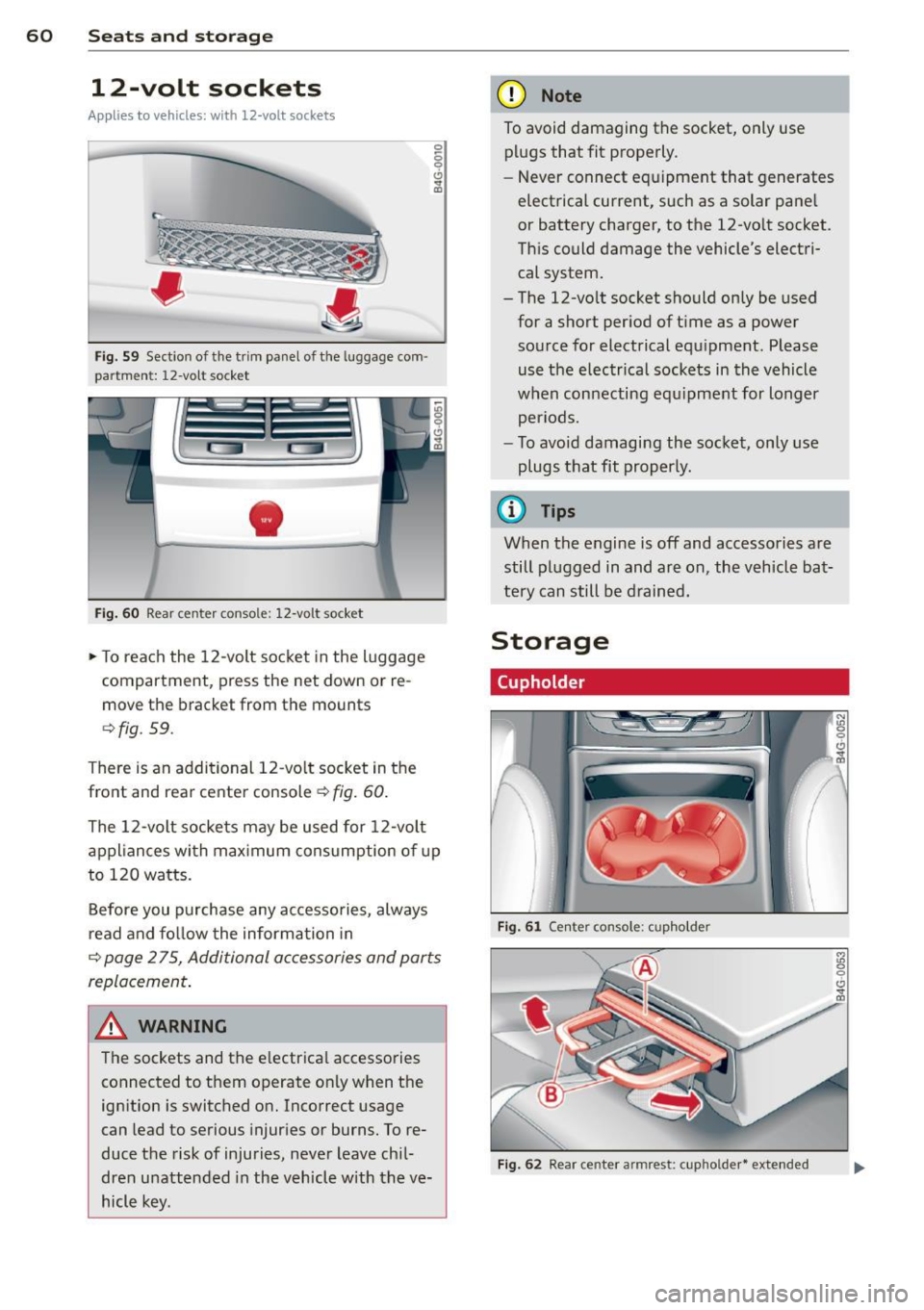
12-volt sockets
Appl ies to vehicles: wit h 12-volt sockets
Fig. 59 Sect ion of the trim panel o f th e luggage com ·
par tm ent: 12-vol t so cket
-
Fig. 60 R ear cente r co nso le: 12-vo lt socke t
,. To reach the 12-volt socket in the luggage
compartment, press the net down or re
move the bracket from the mounts
¢ fig . 59.
There is an additional 12-vo lt socket in the
front and rear center console~
fig. 60.
0 5 0 6
~
The 12-volt sockets may be used for 12-volt
appliances with maximum consumption of up
to 120 watts.
Before you purchase any accessories, always
read and fo llow the information in
¢ page 2 75, Additional accessories and parts
replacement .
A WARNING
The sockets and the e lectrical accessories
connected to them operate only when the
ign ition is switched on. Incorrect usage
can lead to serious injur ies or burns. To re·
duce the risk of injuries, never leave chi l
dren unattended in the vehicle w ith the ve
hicle key.
(D Note
To avoid damaging the socket, only use plugs that fit properly.
- Never connect equipment that generates
electrical current, such as a solar pane l
or battery charger, to the 12-vo lt socket.
This could damage the vehicle's electri cal system.
- The 12-vo lt socket should on ly be used
for a short period of ti me as a power
source for electrical equ ipment . Please
use the electrical sockets in the vehicle
when connecting equ ipment for longer
periods.
- To avoid damaging the socket , only use
plugs that fit properly.
(0 Tips
When the engine is off and accessories are
still plugged in and are on , the vehicle bat
tery can still be drained.
Storage
Cupholder
F ig. 6 1 Ce nter co ns ole: c upho lde r
Fig. 62 Rear ce nter a rmrest : cupho ld er* extend ed
Page 71 of 292
Warm and cold Four-zone automatic
climate control
Description
Applies to vehicles: with four-zone automat ic climate co n
tro l
The climate control system warms, cools and
adds humidity to the a ir in the veh icle inter io r.
It is the most effect ive when the windows and
sunroof* are closed.
If the temperature inside
the parked vehicle becomes very warm, open ing the window briefly will speed up the cool
ing process.
I n all heating mode functions except
defrost,
the blower on ly switches to a higher speed
once the engine coolant has reached a certain
temperature.
Condensation from the cooling system can
drip and form a puddle of water under the ve
hicle. This is normal and does not mean there
is a leak.
Pollutant filt er
The po llutant filter removes pollutants such
as dust and pollen from the air.
The air pollutants filter must be changed at
the intervals spec ified in your Wa rranty
&
Maintenance book let, so that the air condi
tioner can properly work.
I f you d rive your vehicle in an area with h igh
air po llution, the fi lter may need to be
changed more frequent ly than specified in
your Audi Warranty
& Maintenance booklet. If
in doubt, ask your authorized Audi Service Ad·
visor for advice.
Key coded setting s
The clima te control sett ings are a utomat ica lly
stored and assigned to the remote contro l key
that is in use .
Warm and c old 69
A WARNING
-
Reduced visibi lity is dangerous and can
cause acc idents .
- For safe driving it is very important that
all windows be free of ice, snow and con
densat ion.
- Comp letely fam il iarize yourse lf with the
proper use and funct ion of the heat ing
a nd ventilation system and especially
how to defog and defrost the w indows.
- Never use the windshield wiper/washer system in freez ing weathe r unt il you
have warmed the windshie ld first, using
the heating and ventilation system. The
washer sol ution may freeze on the wind
shie ld and red uce visibi lity.
CJ) Note
- If you s uspect that the air conditioner
has been damaged, switch the system
off to avoid furt her damage and have it
inspected by a qualified dea lership .
- Repairs to the Audi air conditioner re
quire specia l technical know ledge and
special tools. Contact an authorized Audi
dealer fo r ass istance.
@ For the sake of the envi ronment
By reducing the amount of f uel you use,
you also red uce the amount of pollutants
emitted into the air.
(D Tips
- Keep the air intake s lo ts ( in front of the
w indshield) free from ice, snow and de
bris in order to maintain the proper func
tion of the climate control system.
- The energy ma nagement system may
switch the seat heating* or rear window defroster off temporar ily. These systems
are available again as soon as the energy
balance has been restored .
- Air escapes through vents under the rear window. When plac ing items of cloth ing
on the luggage compartment cover, en
sure that the openings are not covered.
Page 73 of 292
IAUTO I Switching automatic mode on
Automatic mode mainta ins a constant tem
perature inside the vehicle. Air temperature,
airflow and air distribution are controlled au
tomatically.
Adjusting the temperature
Temperatu res between 60 °F (+16 °C) and
84 °F ( +28 °C) can be set. O uts ide of this
range,
lo or hi wi ll appear in the climate con
trol system disp lay. At both of these settings,
the climate control system runs continuously
at maximum cooling or heating power. There
is no temperature regu lation.
~ Adjusting the airflow
You can adjust the airf low manually to suit
your needs . To have the airf low regulated au
tomatically, press the
I AUTO j button.
li!J Adjusting the air distribution
You can manually se lect the vents where the
air will flow. To have the air distribution regu
lated automatically, press the
IAUTOI button .
~I~* Adjusting seat heating/
ventilation*
Pressing the button switches the seat heat
ing/ventilation on at the highest setting ( level
3). The LEDs indicate the heating/ventilation
level. To reduce the heating/venti lation, press
the button again. To switch the seat heating/
ventilation off, press the button repeatedly
until the LED turns off.
After 10 minutes, the seat heating automati
cally switches from level 3 to level 2.
l
ed or cleared of condensation as quickly as
possible. The maximum amount of air flows
mainly from the vents below the windshield.
Recirculation mode switches off . The tempera
ture should be set to 72 °F (22 °C) or higher.
The
IAU TOI button switches the defroster off.
Warm and cold 71
liiii REAR ! Switching rear window heater
on/off
The rear window heater only operates when
the engine is running. It switches off auto matically after 10 to 20 minutes, depending
o n the outside temperature.
To prevent the rear window heater from
switching off automatically, press and ho ld
the ~ button for more than 2 seconds. This
remains stored until the ignition is switched
off .
I SYNC I Synchronization*
When synchronization is switched on, the
same settings are applied to both the driver
and front passenger, except for the seat heat
ing/ventilation*. The rear zone is also
synchronized. Synchronization switches off
when the settings for the front passenger s ide
o r r ear are adjusted.
You can also switch synchronization on by pressing and holding a dial. For example, if
you press and hold the dial on the front pas
senger side, the settings for that side are
transferred to the driver side. The same ap
plies to the rear.
Air vents
You can open or close the center and outer
vents in the cockpit and the vents in the rear
cente r console and door pillars using the
ridged thumbwheels. The levers adjust the di
rection of the airflow from the vents.
&_ WARNING
-=
-Do not use the recirc ulation for extended
periods of time . The windows could fog
up since no fresh air can enter the vehi
cle . If the windows fog up, press the air
recirculation button aga in immediately
to switch off the air recirculation func
tion or se lect defrost.
- Individuals w ith reduced sensitivity to
pa in or temperature cou ld deve lop burns
when using the seat heating function . To
red uce the risk of injur y, these individu-
als should not use seat heating. ..,.
Page 76 of 292
7 4 On the road
column will continue moving as long as you
are pressing the switch.
There must be at least 10 inc hes (25 cm) be
tween you r chest and the center of the steer
ing whee l.
If you cannot sit more than 10 in
ches (25 cm) from the steering whee l, see if
adaptive equipment is available to help you reach the pedals and increase the distance
from the steer ing wheel.
F or detai led information on how to adjust the
driver's seat, see
<::> page 54 .
In vehicles with the memory f unction* , the
steering column settings are stored together
with the seat position.
A WARNING
Improper use of steering wheel adjust
ment and improper seating position can
cause se rious personal injury.
- Adjust the steer ing whee l column on ly
when the vehicle is not moving to pre
vent loss of veh icle control.
-
- Adjust the driver's seat or steering wheel
so that the re is a min imum of 10 inches
(25 cm) between your chest and the
steering wheel ¢
page 124, fig. 146. If
you can not maintain this min imum dis
tan ce, the airbag system cannot protect
yo u properly.
- If phys ica l limi tations prevent you from
sitting 10 in ches (25 cm) o r more from
the steering wheel, check with yo ur au
tho rized Aud i dealer to see if adaptive
equipment is availab le .
- If the steering wheel is aligned with you r
face, the supp lemental drive r's airbag
cannot provide as much protect ion in an
acc ident. A lways make sure that the
steering wheel is aligned with your
chest.
- Always hold the steering wheel with your
hands at the 9 o'clock and 3 o'clock posi
t ions to reduce the risk of pe rsonal injury
if the d river 's airbag deploys.
- Never hold the steering whee l at the 12
o'clock posit ion or w ith your hands i nside the steering wheel rim or on the steering
wheel hub. Hold
ing the steer ing wheel
the wrong way can cause serious injuries
to the hands, arms and head if the driv
er 's airbag deploys.
Easy entry feature
Applies to vehicles: with electrically adjustable steering
wheel
The easy entry feature makes it easier to en
ter and exit the vehicle by automatically ad
justing the steering wheel.
.. Select in the MM I: ICARI function button>
(Car )* sys tem s control b utton > V ehicle set
ting s
> Seats > D rive r's seat > Easy entry >
On .
When the easy ent ry feature is turned on, the
steering wheel moves up to the park position
when you switch
off the ignition. After you en
ter the veh icle, the steering wheel moves to
the stored position as soon as you sw itch on
the ignit ion.
Starting and stopping
the engine
Starting the engine
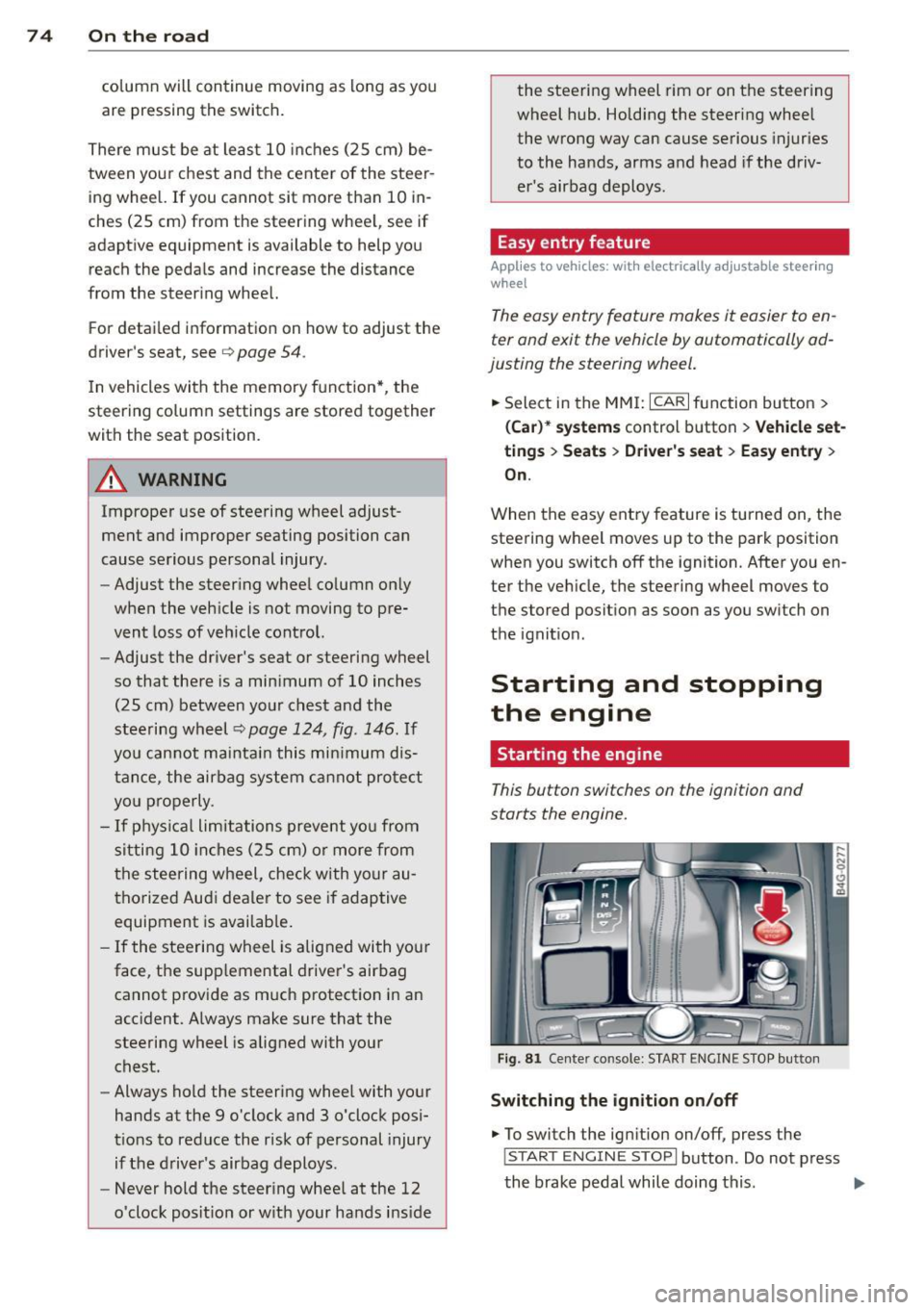
This button switches on the ignition and
starts the engine.
Fig . 81 Center console: S TART ENGINE S TOP butto n
Switching the ign ition on /off
.. To switch the ign ition on/off, press the
I STAR T ENGINE ST OPI button . Do not press
the brake pedal while doing this . .,.
Page 77 of 292
Starting th e engin e
"'Press the brake peda l r::!> _&..
"'Press the I START ENGINE STOP I button
r::!> fig. 81. The engine will start .
If the engine should not sta rt immediately ,
the sta rting process is automatically stopped
after a short time. Repeat starting procedure .
A WARNING
-Never allow the engine to run in confined
spaces -danger of asphyxiation .
- Never t urn off the engine unti l the vehi
cle has come to a complete stop.
- The brake booster and power steering
only work when the engine is running . If
the engine is off, you have to use more
force when steering or braking. Because
you cannot steer and brake as you usua l
ly would, this could lead to crashes and
ser ious injur ies .
(D Note
-Avoid high engine rpm, full throttle and
heavy engine loads unti l the engine has
reached operating temperature -other
wise yo u risk eng ine damage.
- The eng ine cannot be started by pushing
or tow ing the veh icle.
(D Tips
- After a cold engine is started, there may
be a brief period of increased noise be
ca use oil pressure mus t fi rst bu ild up in
the hyd raulic valve adjusters . This is nor
mal and not a ca use for concern.
- If you leave the vehicle with the ignit ion
switched on, the ignition will switch off
after a certai n pe riod of time. P lease
note tha t electr ica l equipment s uch as
exterior lights wi ll switch off as well
when that happens.
Stopping the engine
"' Bring your vehicle to a complete stop.
"' Move the selector lever to the P or N po si
t ion.
On th e ro ad 75
"'Press the I START ENGINE ST OP I button
r::!>poge 74, fig . 81.
Ste ering lock
T he s teering locks when yo u tur n the engine
off using t he
I S TA RT ENGINE STO P! bu tton
and open the d river 's doo r. The locked steer
ing helps prevent vehicle theft.
Emergency off
If necessary, the engine can be switched off
with the selector lever in the R or D/S posi
t ion. The engine stops if you press the
I S TAR T ENG IN E ST OP I button at speeds below
6 mph (10 km/ h) .
A WARNING
- Never turn off the engine until the vehi
cle has come to a complete stop.
- The brake booster and power stee ring
only work when the eng ine is r unning . If
the engine is off, you have to use more
force when steering or braking. Because
you cannot steer and brake as you usual
ly would, this co uld lead to crashes and
serious injuries .
- For safety reasons , you should a lways
pa rk your vehicle w it h the selector lever
in P. Otherwise, the vehicle could inad
ver ten tly roll away.
- After the eng ine has been switched off,
the radiator fa n can cont in ue to run for
up to 10 minu tes -even with the ignition
sw itche d off . It can also sw itch on again
after some time i f th e coolant tempera
ture rises as the result of a heat b uildup
or if the engine is hot and the engine
compartment is additionally heated by
the sun's rays.
(U) Note
Do not stop the engine immediately after
hard o r extended driving. Keep the engine
running for approximate ly two minutes to
prevent excess ive heat bu ild-up .
Page 78 of 292
76 On the road
Driver message in the instrument
cluster display
Turn off ignition befor e le a v ing car
This message appears and a warning tone
sounds if yo u open the dr iver's door when the
ignition is switched on.
Press brake p edal to start engin e
This message appears if you press the
I STAR T ENGINE ST OP ! button to start the en
g ine and do not depress the brake pedal. The
engine can on ly be started if the brake pedal
is depressed.
!I I s ke y in th e vehicle?
If the indicator light turns on and the mes
sage appears, the remote control key was re
moved from the vehicle while the engine was
running. If the ignit ion key is not in the vehi
cle you w ill not be able to sw itch on the ign i
tion or resta rt the engine after it has been
switched off. You w ill also not be ab le to lock
the veh icle from the outside.
Shift to P , oth erwise vehicl e can roll away.
Doors do not lo ck if lever i s not in P .
This message appears for safety reasons
along w ith an audib le warn ing tone if the P
selecto r lever posit io n is not engaged when
stopping the engine with the
I STAR T ENGINE ST OP ! button. Select the P se
lector lever pos it ion. Othe rwise the veh icle
could ro ll and it cannot be locked.
(I Key is n ot recogn iz e d . Ho ld b ack o f key
ag ain st marked ar ea . Se e owner's manual.
If the indicator light tu rns on and th is mes
sage appears, there is a malfunction
c::>page 76. Starting the engine if there is a
malfunction
It may not be possible to start the engine un
der certain circumstances, for example if the
battery in the vehicle key
is drained, if inter
ference has affected the key or if there
is a
system malfunction .
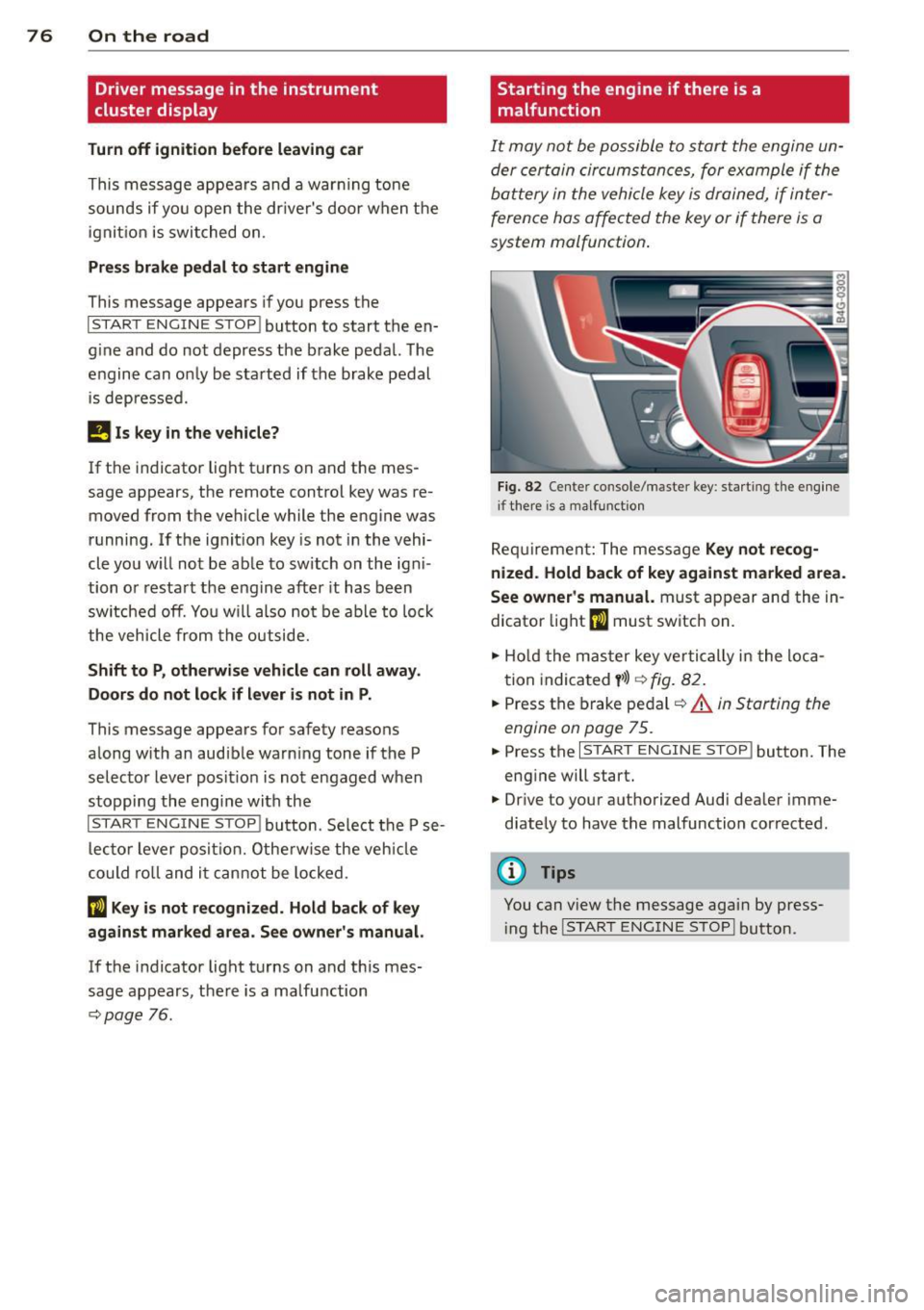
Fig . 82 Center console/master key: starting the eng ine
i f there is a malfunction
Req uirement: The message Ke y not r ecog
ni ze d. H old back of key aga inst ma rked are a.
Se e owne r's manual.
must appear and the in
dicator
light (I must switch on.
.,.. Ho ld the mas ter key vertically in the loca
tion indicated
y >l) r=:>fig. 82.
.,.. Press the brake pedal c::> A in Starting the
engine on page 75.
.,.. Press the I START ENGINE S T OP ! button. The
eng ine will start.
.,.. Dr ive to your authorized Audi dealer imme
diately to have the malfunction corrected.
(D Tips
You can v iew the message again by press
i ng the
I STAR T ENGINE STOP I button.
Page 79 of 292
Electromechanical
parking brake
Operation
The electromechanical parking brake replaces
the hand brake.
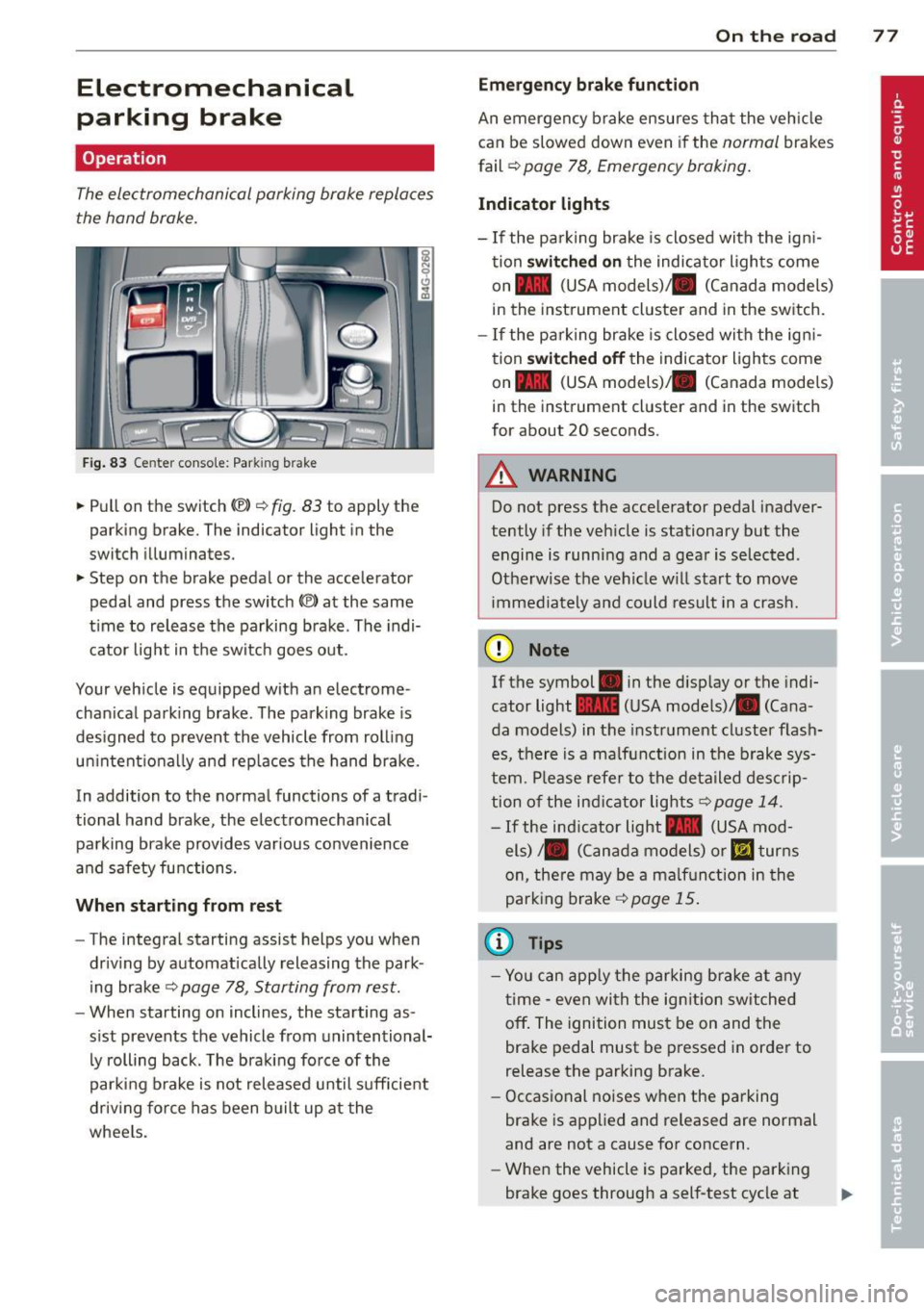
Fig. 83 Center conso le: Park in g brake
.. Pull on the switch (®) c:::> fig . 83 to apply the
parking brake. The indicator light in the
switch illuminates.
.. Step on the brake pedal or the accelerator
pedal and press the switch
(®) at the same
t ime to release the parking brake. The indi
cator light in the switch goes out.
Your vehicle is equipped with an electrome
chan ical park ing brake . The parking brake is
designed to prevent the vehicle from rolling
un intent ionally and rep laces the hand brake.
In addition to the normal functions of a tradi
tional hand brake, the electromechan ical
parking brake provides var ious convenience
and safety functions.
When starting from rest
-The integral starting assist helps you when
driving by automat ically releasing the park
ing brake ¢
page 78, Starting from rest.
- When starting on inclines, the starting as
sist prevents the vehicle from unintentional
ly rolling back . The braking force of the
parking brake is not released until suff icient
driv ing force has been built up at the
wheels.
On the road 77
Emergency brake function
An emergency brake ensures that the vehicle
can be slowed down even if the
normal brakes
fail ¢
page 78, Emergency braking.
Indicator lights
-If the parking brake is closed with the ign i
tion
switched on the indicator lights come
on - (USA
models) ,1111 (Canada models)
in the instrument cluster and in the switch.
- If the parking brake is closed with the ign i
tion
switched off the indicator lights come
on - (USA
models) ,1111 (Canada models)
in the instrument cluster and in the switch
for about 20 seconds.
A WARNING
Do not press the accelerator pedal inadver
tently if the veh icle is stationary but the
engine is running and a gear is selected .
Otherwise th e vehicle w ill start to move
immediately and could result in a crash.
(D Note
If the symbol . in the disp lay or the indi
cator light
1111 (USA models)/ . (Cana
da models) in the instrument cluster flash
es, there is a malfunction in the brake sys
tem. Please refer to the deta iled desc rip
tion of the indicat or lights
r::::>page 14.
-If the ind icator light - (USA mod-
els) /. (Canada models) or
mJ turns
on, there may be a malfunction in the
parking brake
c:::> page 15.
(0 Tips
-Yo u can apply the parking brake at any
time -even with the ignition switched
off. The ignition must be on and the
brake pedal must be pressed in order to
release the parking brake.
- Occasional noises when the parking
brake is applied and released are normal
and are not a cause for concern.
- When the vehicle is parked, the parking
brake goes through a self-test cycle at
Page 80 of 292
78 On the road
regular intervals . Any associated noises
are norma l.
Parking
• Press the brake peda l to stop the vehicle .
• Pull the switch(®) to set the parking brake .
• Move the selector lever to P.
• Turn the eng ine off ¢.&_ .
• When on incl ines or declines, turn the steer
i ng wheel so that your vehicle will roll into
the curb if it begins to move.
_& WARNING
- When you leave your veh icle - even if on
ly briefly - always take the ignition key
with you . This applies particu la rly when
children remain in the veh icle. Otherw ise
the ch ildren could start the engine, re
lease the parking brake or operate e lec
trical equipment (e.g . power windows) .
The re is the risk of an accident .
- When the vehicle is locked, no one - par
t icu la rly not children should remain in
the vehicle . Locked doo rs make it more
difficult for emergency wor kers to get in
to the vehicle - putt ing lives at risk.
Starting from rest
The starting assist function ensures that the
parking brake is released automatically upon
starting .
Stopping and applying park ing brake
• Pull the switch© to apply the park ing
brake .
Starting and automat ically releasing the
parking brake
• When you start to drive as usua l, the park
ing brake is automatically re leased and your
vehicle begins to move .
When stopp ing at a traff ic signa l or stopp ing
i n city traffic, the parking brake can be ap
plied . The veh icle does not have to be held
with the footbrake. The par king brake e limi
n ates the te ndency to creep with a drive ra nge engaged. As soon as yo
u drive off as usu a l,
the parking brake is re leased automatically
and the vehicle starts to move .
Starting on slopes
When starting on inclines, the starting assist
prevents the vehi cle from u nintent ionally roll
ing back . The braking force of the parking
brake is not re leased unti l sufficient driving
f orce has been built up at the wheels.
(D Tips
F o r safety reasons, the parking brake is re
l eased a utomatically on ly when t he d riv
er's safety belt is engaged in the buckle.
Emergency braking
In the event that the conventional brake sys
tem fails or locks.
• In an emergency, pu ll the switc h C®> and
continue to pull it to s low your vehicle down
with the parking b rake .
• As soon as you re lease the switch «:El) or ac -
celerate, the brak ing process stops.
If you pu ll the switch «:El) and hold it above a
speed of abo ut 5 mph (8 km/h), the eme rgen
cy brak ing f unct ion is initiated . The vehicle is
braked at all four whee ls by activating the hy
draulic brake system . The brake performa nce
i s sim ila r to making an emergency stop
c::> .&. .
In order not to act ivate the eme rgency brak
ing by mistake, an audib le warning tone (bu z
zer) sounds whe n the switch(®) is pulled . As
soon as the sw itch
®) is released, or the accel
erato r peda l is depressed, eme rgency b raking
stops.
_& WARNING
E mergency br aking should only be u sed in
a n emergency, when the norma l foot bra ke
has fai led or the brake pedal is obstruc ted.
Using the parking brake to pe rform eme r
gency b raking will s low your veh icle down
as if you had made a full brake application.
The laws of physics cannot be suspended
~