display AUDI RS7 SPORTBACK 2015 Owner's Manual
[x] Cancel search | Manufacturer: AUDI, Model Year: 2015, Model line: RS7 SPORTBACK, Model: AUDI RS7 SPORTBACK 2015Pages: 302, PDF Size: 74.76 MB
Page 72 of 302
70 Warm and cold
Operation
Applies to vehicles: with four-zone automatic climate control
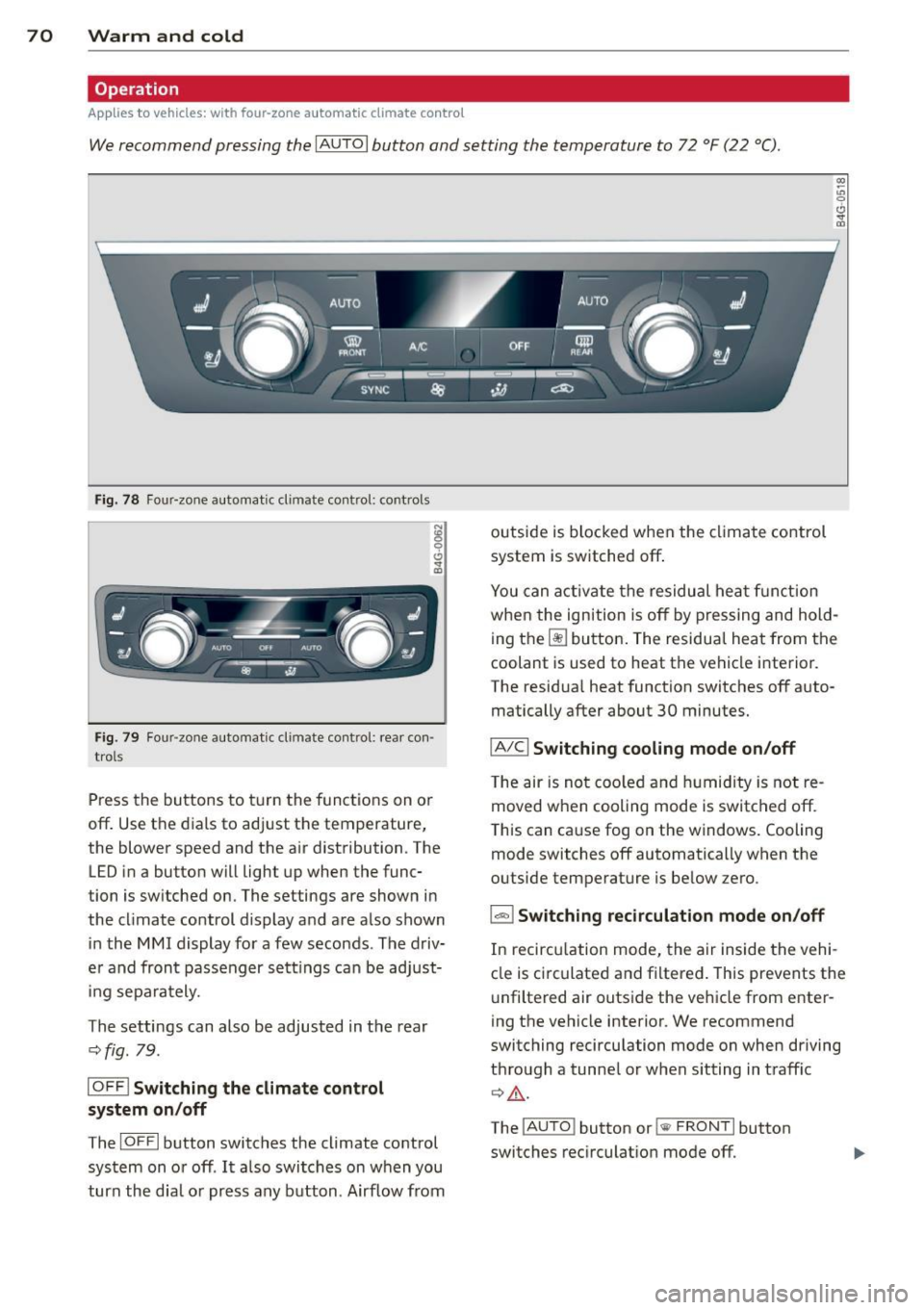
We recommend pressing the IAUTO I button and setting the temperature to 72 °F (22 °C) .
Fig. 78 Fo ur-zone automat ic climate control: contro ls
N :g
9 C)
"" m
Fig . 79 Four -zone automatic climate control: rear con
trols
Press the buttons to turn the functions on or
off . Use the dials to adj ust the temperature,
the blower speed and the a ir distribution. The
LED in a button will light up when the func
tion is switched on. The settings are shown in
the cl imate control display and are a lso shown
in the MMI display for a few seconds . The driv
e r and fron t passenger settings can be adjust
in g separately.
The settings can also be adjusted in the rear
c::>fig. 79.
IOFFl Switching the climate control
system on/off
The IO FFI button switches the climate control
system on or off .
It also switches on w hen you
turn the dia l or press any button . Airflow from outside is
blocked when the climate control
system is switched off.
(X) ~ u, 0 (!) ,,. a)
You can activate the residual heat function
when the ignition is off by pressing and hold
ing the ~ button. The residua l heat from the
coolant is used to heat the vehicle interior.
The residua l heat function switches off auto
matically after about 30 minutes.
IA/Cl Switching cooling mode on/off
T he air is not coo led and humidity is not re
moved when cooling mode is switched off .
This can cause fog on the windows. Cooling
mode switches off automatically when the
outside temperature is be low zero.
1-1 Switching recirculation mode on/off
In recircu lation mode, the air inside the vehi
cle is circulated and filtered . This prevents the
u nfiltered air outside the vehicle from enter
ing the vehicle interior. We recommend
switching recirculation mode on when driving
through a tunne l or when sitting in traff ic
c::> ,&. .
The
! A UT O! button or !sw FRONT! button
switches recirculation mode off.
Page 78 of 302
76 On the road
Driver message in the instrument
cluster display
Turn off ignition befor e le a v ing car
This message appears and a warning tone
sounds if yo u open the dr iver's door when the
ignition is switched on.
Press brake p edal to start engin e
This message appears if you press the
I STAR T ENGINE ST OP ! button to start the en
g ine and do not depress the brake pedal. The
engine can on ly be started if the brake pedal
is depressed.
II Is key in th e vehicle ?
If the indicator light turns on and the mes
sage appears, the remote control key was re
moved from the vehicle while the engine was
running. If the ig nit ion key is not in the vehi
cle you w ill not be able to sw itch on the ign i
tion or resta rt the engine after it has been
switched off. You w ill also not be ab le to lo ck
the veh icle from the outside.
Shift to P , otherwise vehicle can roll away .
Doors do not lo ck if lever i s not in P .
This message appears for safety reasons
along w ith an audib le warn ing tone if the P
selector lever posit io n is not engaged when
stopping the engine with the
I STAR T ENGINE ST OP ! button. Select the P se
lec tor lever po sition. Othe rwise the veh icle
could ro ll and it cannot be locked.
II Ke y is n ot r ecogniz ed . Hold ba ck of key
aga in st marked area . Se e owner' s manual.
If the indicator light turns on and th is mes
sage appears, there is a malfunction
c::> page 76.
Starting the engine if there is a
malfunction
It may not be possible to start the engine un
der certain circumstances, for example if the
battery in the vehicle key
is drained, if inter
ference has affected the key or if there
is a
system malfunction .
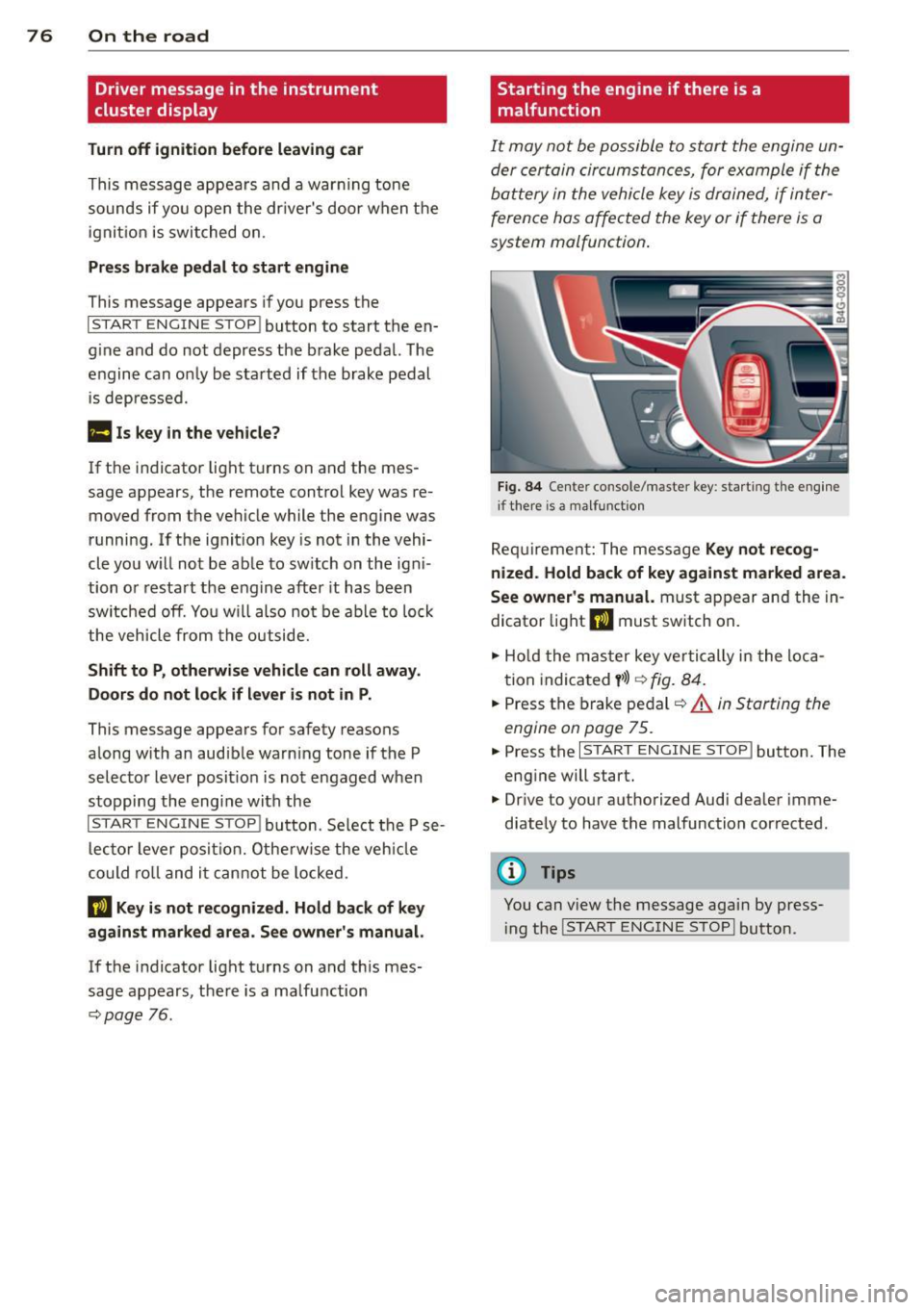
Fig . 8 4 Center console/master key: start ing the eng ine
i f there is a malfunction
Req uirement: The mess age Ke y not r ecog
ni ze d. H old back of ke y again st ma rked are a.
See owne r's manual.
must appear and the in
dicator light
II must sw itch on.
.,. Ho ld the mas ter key vertically in the loca
tion indicated
y >l) r=:> fig. 84 .
.,. Press the brake pedal c::> A in Starting the
engine on page 75 .
... Press the I S TART ENGINE S T OP ! button. The
eng ine will start.
.,. Dr ive to your authorized Audi dealer imme
diately to have the malfunction corrected .
(D Tips
You can view the message again by press
i ng the
I STAR T ENGINE STOP I button.
Page 81 of 302
"' N
a:: I.J "". rl I.O
"' rl
"' rl
your speed exceeds the stored value by ap
proximately 3 mph (3 km/h). An indicator
light . (USA models) . (Canada models) in
the instrument cluster display also turns on at
the same time. The indicator light. /.
turns off when the speed decreases below the
stored maximum speed.
Setting a thresho ld is recommended if you
would like to be reminded when you reach a
certain maximum speed . Situations where you
may want to do so include driving in a cou ntry
with a general speed Limit or if there is a
specified maximum speed for winter tires.
(D Tips
Even though your vehicle is equipped with
a speed warning system, you should still
watch the speedometer to make sure you
are not driving faster than the speed limit.
Setting the threshold
You can set, change and delete the threshold
in the MMI.
~ Select : I CARI function button > (Car )* sys
tems
control button > Driver assist > Speed
warning .
You can set any threshold between 20 mph
(30 km/h) and 150 mph (240 km/h) . Settings
can each be adjusted in incr ements of 6 mph
(10 km/h).
On the road 79
Cruise control
Switching on
Applies to vehicles: with cruise control
The cruise control system make s it possible to
drive at a constant speed starting at 20 mph (30km/h) .
0
f
®t
0
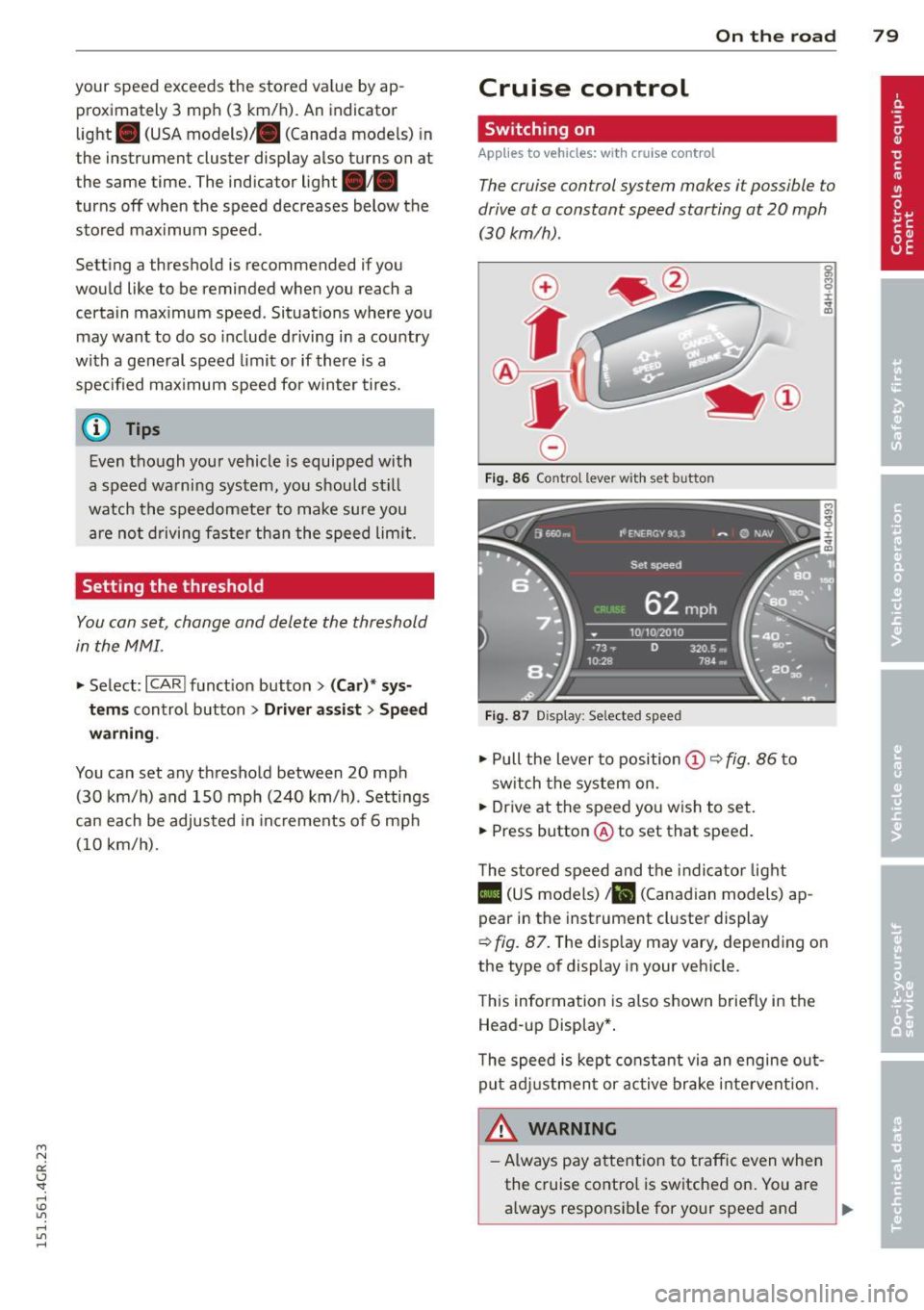
Fig. 86 Contro l lever w ith set butto n
Fig. 87 Display: Se lected speed
~ Pull the lever to position@¢ fig. 86 to
sw itch the system on .
~ Drive at the speed you wish to set.
~ Press button @ to set that speed.
T he stored speed and the indicator light
II (US models) a (Canadian models) ap
pear in the instrument cluster display
¢
fig. 87. The disp lay may vary, depending on
the type of display in your vehicle .
This information is also shown briefly in the
Head -up Display*.
T he speed is kept constant via an engine out
put adjustment or active brake intervent ion.
A WARNING
-
- Always pay attention to traffic even when
the cruise control is switched on. You are
always responsib le for your speed and .,.
Page 82 of 302
80 On the road
the distance between your vehicle and
other vehicles.
- For safety reasons, the cruise control
should not be used in the city, in stop and-go traffic, on twisting roads and
when road conditions are poor (such as
ice, fog, gravel, heavy rain and hydro
planing) -risk of accident .
- Turn off the cruise control temporarily
when entering turn lanes, highway exit
lanes or in construction zones.
- Please note that inadvertently "resting" your foot on the accelerator pedal causes
the cruise control not to brake. This is
because the cruise control is overridden
by the driver's acceleration.
- If a brake system malfunction such as
overheating occurs when the cruise con
trol system is switched on, the braking
function in the system may be switched
off. The other cruise control functions re
main active as long as the indicator light
II (US models) !Iii (Canadian models)
is on.
The brake lights illuminate as soon as the
brakes decelerate automatically.
Changing speed
Applies to vehicles: with cru ise control
.,. To increase/decrease the speed in incre
ments, tap the lever in the
010 direction
¢ page 79, fig . 86
.,. To increase/decrease the speed quickly, hold
the lever in the
010 direction until the de
sired speed is displayed.
You can also press the accelerator pedal down
to increase your speed, e.g . if you want to
pass someone. The speed you saved earlier
will resume as soon as you release the acceler
ator pedal.
If , however, you exceed your saved speed by
6 mph (10 km/h) for longer than 5 minutes,
the cruise control will turn off temporarily.
The green symbol
II (US models) !Iii (Cana- dian models) in the display will go out but the
saved speed remains the same.
Presetting your speed
Applies to vehicles: with cruise cont
rol
You can preset your desired speed while the
vehicle is not moving.
.,. Switch on the ignition.
.,. Pull lever into position@¢
page 79,
fig. 86.
.,. Press the lever in the 0 or 0 direction to
increase or decrease your speed.
.,. Release the lever to save that speed.
This function makes it possible, for example,
to save the speed you want before driving on
the highway. Once on the highway, activate
the cruise control by pulling the lever toward
@.
Switching the system off
Applies to vehicles: with cruise control
Temporary deactivation
.,. Press the brake pedal, or
.,. Press the lever into position@(not clicked
into place)
~ page 79, fig . 86, or
.,. Drive for longer than 5 minutes at more
than 5 mph (10 km/h) above the stored
speed.
Switching off completely
.,. Press lever into position @ (clicked into
place), or
.,. Switch the ignition off .
The system retains the saved speed if you de
activate the cruise control temporarily. To re
sume the saved speed, release the brake ped
al and pull the lever to position @.
Switching the ignition off erases the saved
speed .
A WARNING
-You should only return to the saved speed
if it is not too fast for the current traffic
conditions -risk of an accident!
Page 85 of 302
"' N
a:: I.J "". rl I.O
"' rl
"' rl
Audi adaptive cruise control and braking guard 83
@ is located in front of that vehicle, the sys
tem will not react to the stationary vehicle.
Audi adaptive cruise
control
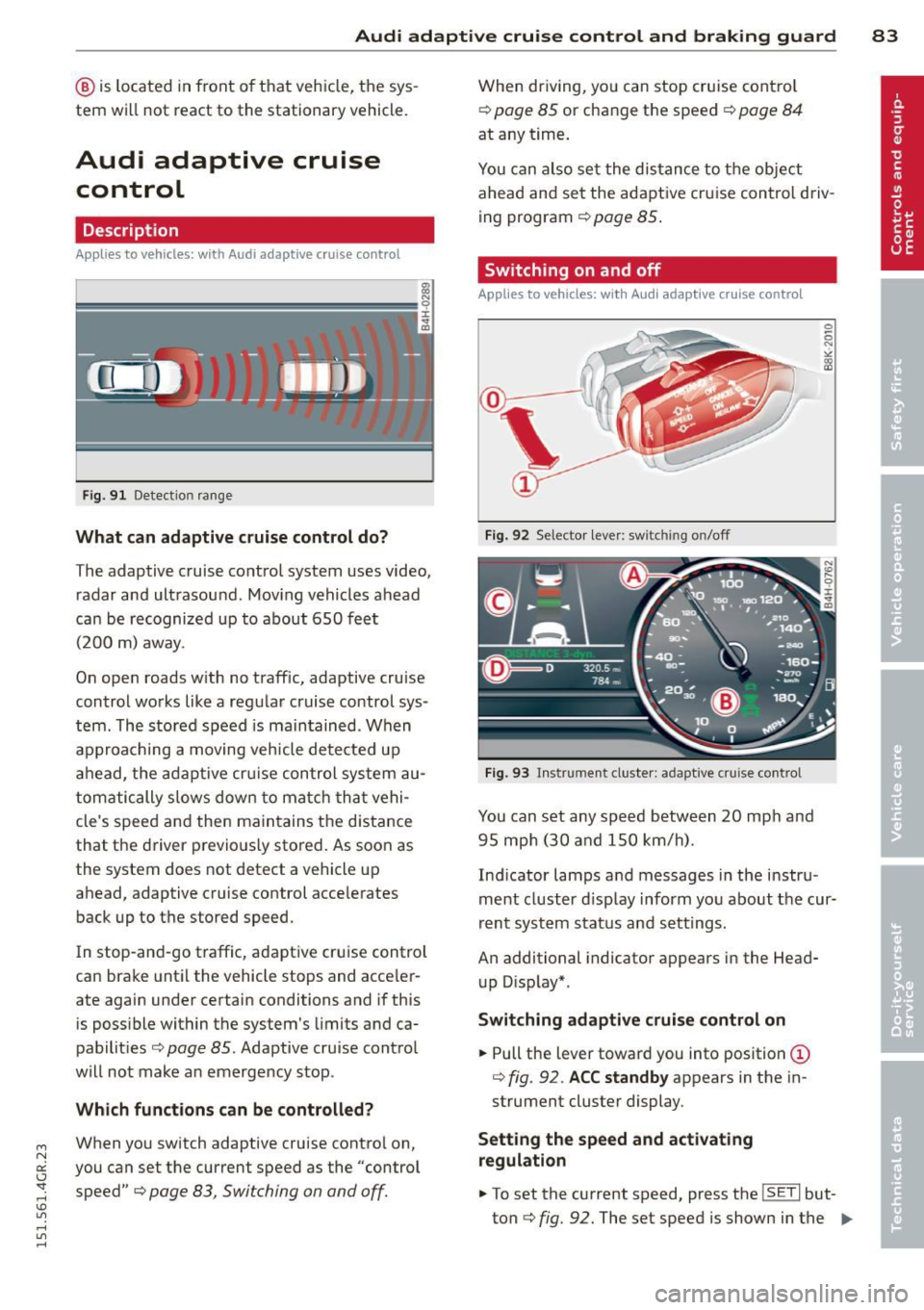
Description
Applies to vehicles: with Audi adaptive cruise co ntrol
Fig. 91 Detectio n range
What can adaptive cruise control do?
The adaptive cruise control system uses video,
radar and ultrasound . Moving vehicles ahead
can be recognized up to about 650 feet (200 m) away.
On open roads w ith no traff ic, adaptive cruise
control works like a regular cruise control sys
tem. The stored speed is maintained . When
approaching a moving vehicle detected up
ahead, the adaptive cruise control system au
tomatically slows down to match that vehi
cle's speed and then maintains the distance
that the driver previously stored. As soon as
the system does not detect a vehicle up
ahead, adaptive cruise control accelerates
back up to the stored speed.
In stop-and-go traffic, adaptive cruise control
can brake until the vehicle stops and acce ler
ate again under certain conditions and if this
is possible within the system 's limits and ca
pabilities
c> page 85. Adaptive cruise control
will not make an emergency stop .
Which functions can be controlled?
When you switch adaptive cruise contro l on,
you can set the current speed as the "control speed"
c> page 83, Switching on and off.
When driving, you can stop cruise control
c> page 85 or change the speed c> page 84
at any time.
You can also set the distance to the object
ahead and set the adaptive cruise control driv
ing program
c> page 85 .
Switching on and off
Applies to vehicles: with Audi adaptive cruise control
Fig. 92 Selector lever: sw itchin g on/off
Fig. 93 Instrumen t cl uster : ad apt ive crui se cont rol
You can set any speed between 20 mph and
95 mph (30 and 150 km/h).
Indicator lamps and messages in the instru
ment cluster d isplay inform you about the cur
rent system status and settings.
An additional indicator appears in the Head
up Display* .
Switching adaptive cruise control on
.,. Pull the lever toward you into position (D
c> fig. 92 . ACC standby appears in the in
strument cluster display .
Setting the speed and activating
regulation
.,. To set the current speed, press the ISETI but
ton
c> fig. 92. The set speed is shown in the IJJ,,
Page 86 of 302
84 Audi adaptive cruise control and braking guard
tachometer ® and is also shown briefly in
the dis play@¢
fig. 93 .
• You must also press the brake pedal when
the vehicle is stopped.
Switching adaptive cruise control off
• Push the lever away from you in to position
@ until it clicks into place. The message
ACC off appears.
@ Indicator lights
fl-Adaptive cru ise con trol is switched on.
No vehicles are detected up ahead. The stored
speed is ma intained.
• - A moving veh icle is detected up ahead.
The adaptive cruise control system regulates
the speed and distance to the moving vehicle
ahead and acce lerates/brakes automat ica lly.
$ -Adaptive cruise control is switched on. A
moving vehicle up ahead was detected. You r
vehicle remains stopped.
• -When automatic brak ing is not able to
keep enough distance to a previously detected
moving vehicle up ahead, you must take con
trol and brake ¢
page 86, Prompt for driver
intervention.
© Display
If adaptive cruise control is not shown in the
d isplay, you can call it up with the multifunc
tion steering wheel buttons¢
page 22.
Based on the symbols in the display, you can
determ ine if the system is maintaining a dis
tance to the vehicle ahead and what that dis
tance is.
No vehicle -No vehicle ahead was detected .
White vehicle -A vehicle ahead was detected.
Red vehicle -Prompt for the driver to take ac
tion
c:::> page 86.
Both arrows on the scale © indicate the dis
tance to the vehicle ahead. No arrow appears
when the vehicle is on an open road and there
is no object ahead . If an object is detected
ahead, the arrow moves on the scale . T
he green zone on the scale shows the stored
distance . For information on changing the
stored distance, refer to ¢
page 85. If the
distance se lected is too close or may soon be
come too close, the arrows move into the red
zone on the sca le .
_&. WARNING
Improper use of the adaptive cruise con
trol can cause collisions, other accidents
and serious personal injur ies.
- Pressing the
ISET ! button when driv ing at
speeds be low 20 mph (30 km/h), will au
tomatically accelerate the vehicle to 20
mph (30 km/h), which is the minimum
speed that can be set.
© Tips
-If you switch the ignit ion or the adaptive
cruise control off, the set speed is erased
from the system memory.
- Th e electronic stabilizat ion contro l (ESC)
and the anti-s lip-regulat ion (ASR) are a u
tomatically turned on when the adaptive
cruise control is turned on. Both systems
cannot be turned off if the adaptive
cruise contro l is turned on.
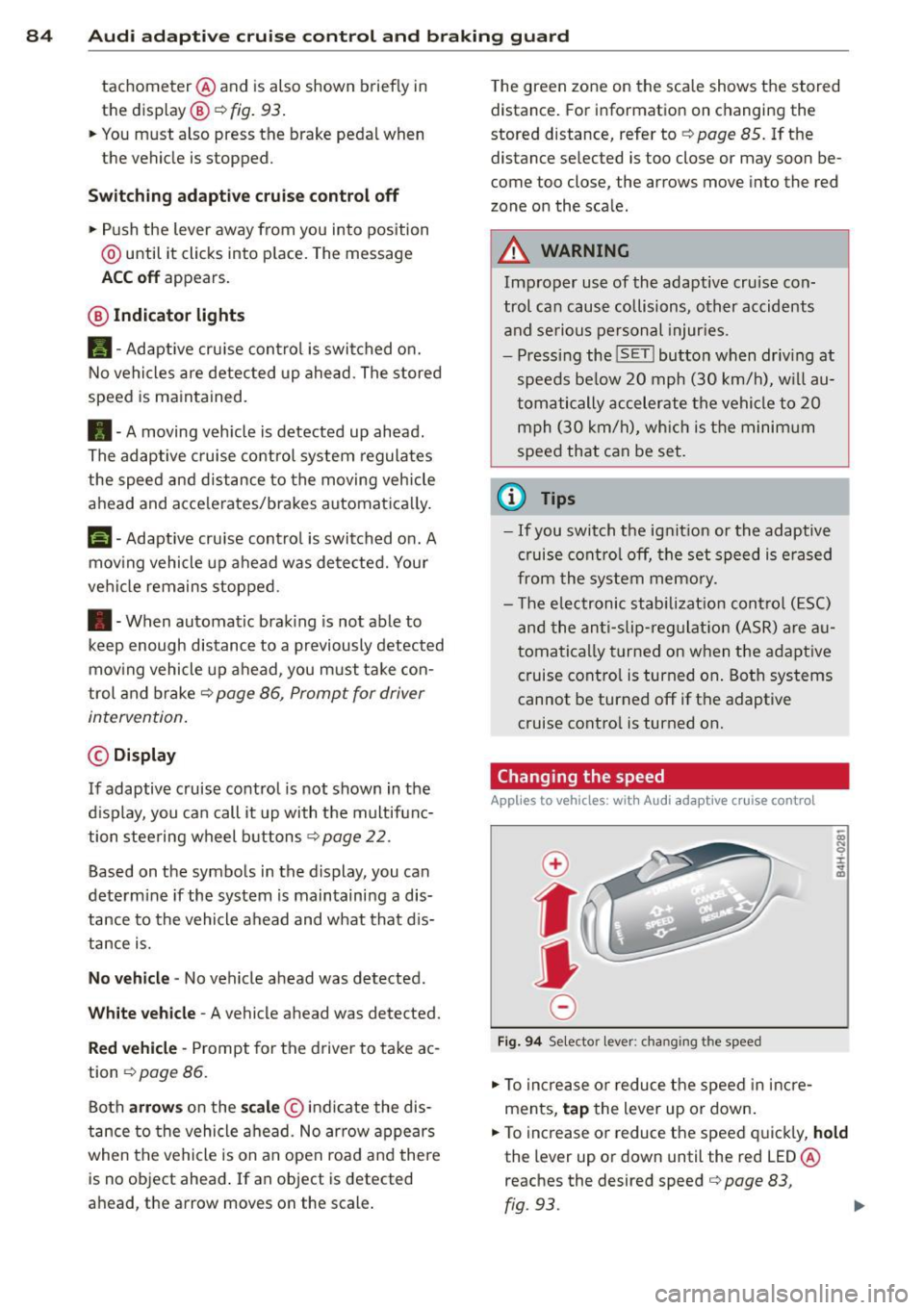
Changing the speed
Applies to veh icles: w ith Audi adaptive cruise control
0
f
jJ
0
Fig. 94 Se lecto r lever: chang ing t he speed
• To increase or reduce the speed in incre
ments,
tap the lever up or down.
• To increase or reduce the speed quickly,
hold
the lever up or down until the red LED ®
reaches the desired speed
c:::> page 83,
rg . 93. ~
Page 87 of 302
"' N
a:: I.J "". rl I.O
"' rl
"' rl
Audi adaptive cruise control and braking guard 85
Following any changes, the new stored speed
will be displayed briefly in the display @
r::!) page 83, fig. 93.
Driving in stop-and-go traffic
Applies to vehicles: with Audi adaptive cruise co ntrol
The adaptive cruise control system also as
sists you in stop-and-go traffic. If a previous
detected vehicle ahead stops, your vehicle will brake to a stop, within the limits of the sys
tem.
.,. To resume driv ing with adaptive cruise con
trol, tap the accelerator pedal or
.,. Pull the lever toward you into posit ion @
¢page 85, fig. 95 .
@ Tips
-If adaptive cru ise control is active and
your vehicle does not start driving as ex
pected after pulling the lever once, you
can start out again by tapping the accel
erator pedal.
-If an obstacle is detected when your ve
hicle sta rts driving, the system will
prompt you to take over¢
page 86.
Your vehicle will drive more slow ly when
starting. This may also happen in some
situations when no obstacle is apparent.
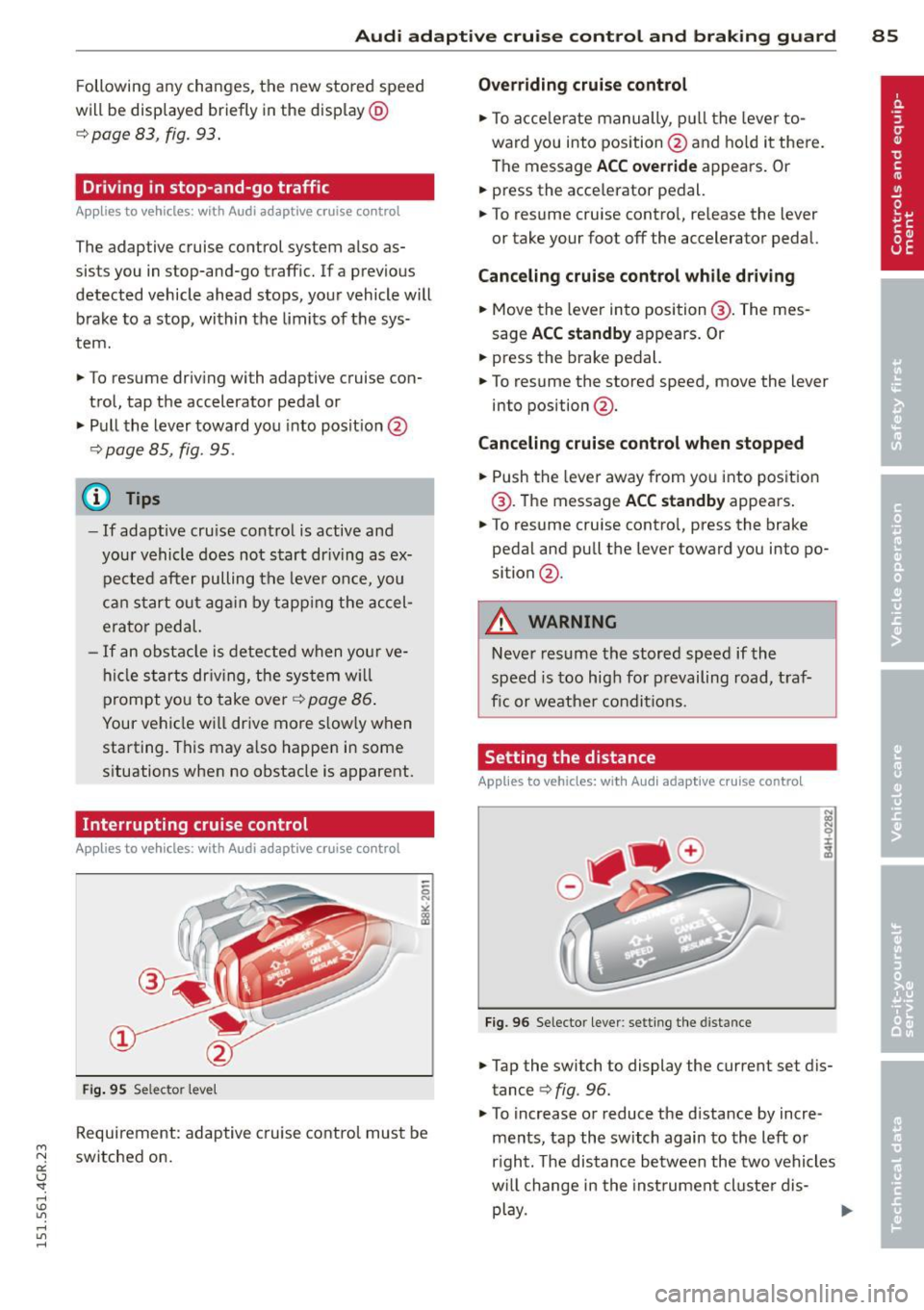
Interrupting cruise control
App lies to vehicles: with Audi adaptive cruise control
Fig . 95 Se lector leve l
Requirement: adaptive cruise control must be
switched on.
Overriding cruise control
.,. To acce lerate manually, p ull the lever to
ward you into position@and hold it there.
The message
ACC override appears. Or
.. press the acce lerator pedal.
.,. To resume cruise control, re lease the lever
or take your foot off the accelerator pedal.
Canceling cruise control while driving
.,. Move the lever into position @. The mes
sage
ACC standby appears. Or
.,. press the brake pedal.
.,. To resume the stored speed, move the lever
into position @ .
Canceling cruise control when stopped
.,. Push the lever away from you into position
@ . The message
ACC standby appears .
.,. To resume cruise contro l, press the brake
pedal and pu ll the lever toward you into po
sition @.
A WARNING
-
Never resume the stored speed if the
speed is too high for prevailing road, traf
fic or weather conditions.
Setting the distance
Applies to vehicles: wit h Audi adapt ive cr uise contro l
Fig. 96 Selector lever: setting the distance
.,. Tap the switch to display the current set dis
tance ¢
fig. 96.
.,. To increase or reduce the distance by incre
ments, tap the switch again to the left or
r ight. The distance between the two vehicles
w ill change in the instrument cluster dis-
play. ..,.
Page 88 of 302
86 Audi adaptive cruise control and braking guard
When approaching a moving vehicle up ahead,
the adaptive cruise control system automati
cally brakes to match that object's speed and
then maintains the stored distance. If the ve
h icle ahead accelerates, adaptive cruise con
trol will also accelerate up to the stored
speed.
The higher the speed , the greater the distance
in yards (meters)
c::> & . The Distance 3 setting
is recommended .
The distances prov ided are spec ified values .
Depending on the driving situation and the
how the vehicle ahead is driving, the actual
d istance may be more or less than these tar
get distances.
The various symbols for the time increments
appear briefly in the information line @
c::> page 83, fig . 93 when you change the set
tings .
~-~- --Distance 1 : This setting corre
sponds to a distance of 92 feet/28 meters
when traveling at 62 mph (100 km/h), or a
time interval of 1 second.
~--~- -Distance 2: This setting corre
sponds to a distance of 118 feet/36 meters
when traveling at 62 mph (100 km/h), or a
time inte rval of 1.3 seconds .
~--- ~-Distance 3: This setting corre
sponds to a distance of 164 feet/SO meters
when traveling at 62 mph (100 km/h), or a
time interval of 1.8 seconds .
~---- ~ Distance 4: This setting corre
sponds to a distance of 210 feet/64 meters
when traveling at 62 mph (100 km/h), or a
time interval of 2.3 seconds .
A WARNING ,. -
Following other vehicles too closely in
creases the risk of collisions and serious
personal inj ury.
- Setting short distances to the traffic
ahead reduces the time and distance
available to bring your vehicle to a safe
stop and makes it even more necessary
to pay close attention to traffic. -
Always obey applicable traffic laws, use
good judgment, and select a safe follow ing d istance for the traff ic, road and
weather conditions.
@ Tips
- Distance 3 is set automatically each time
you switch the ignition on.
- Your standard settings are automatically
stored and assigned to the remote con
trol key being used.
Selecting the driving mode
Applies to veh icles: w ith Audi adaptive cruise co ntrol
.,. Select the desired driving mode in drive se
lect
c::> page 96 .
(D Tips
Your settings are automatically stored and
ass igned to the remote control key being
used.
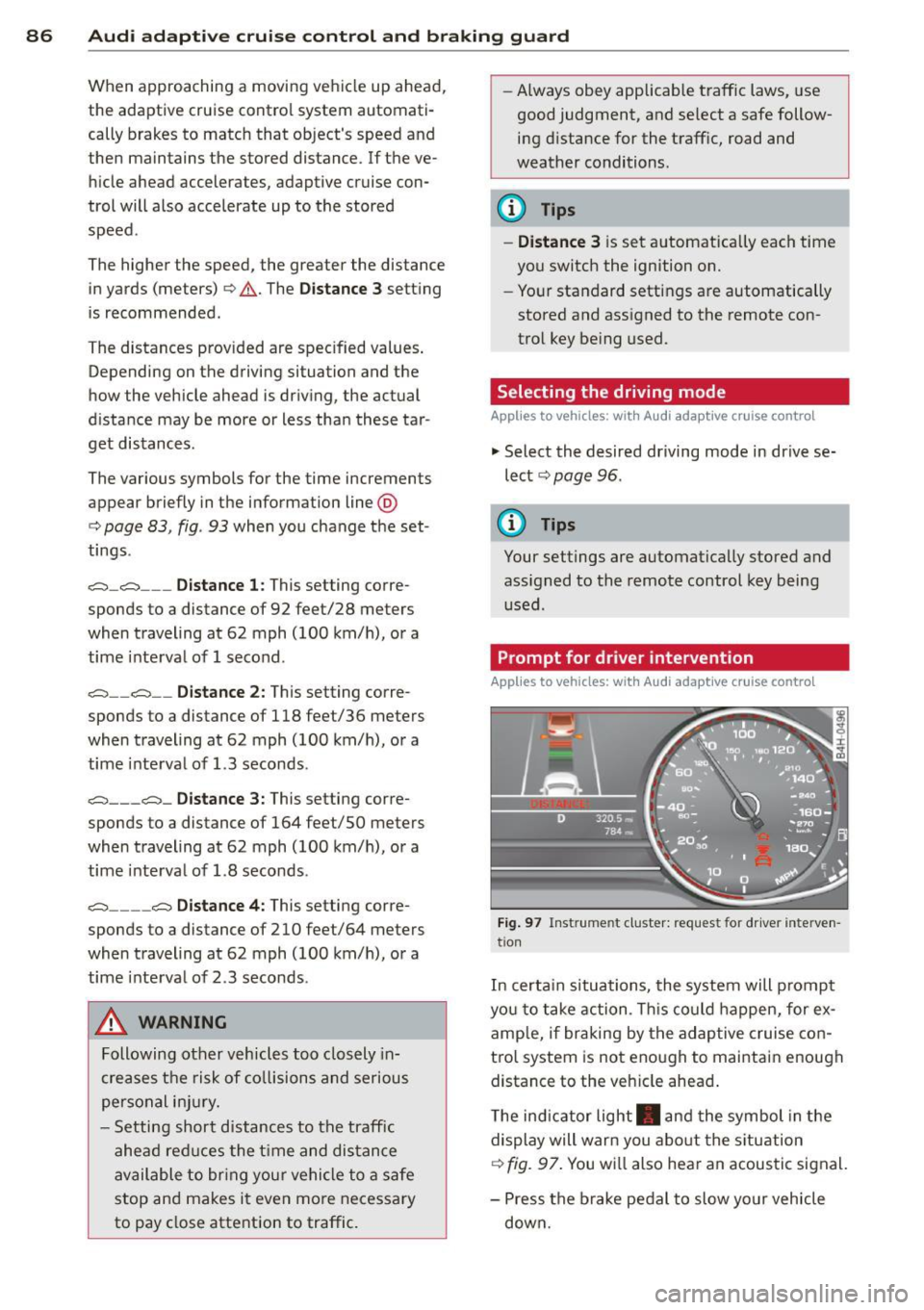
Prompt for dr iver intervention
Applies to veh icles: w ith Audi adaptive cruise co ntro l
Fig. 97 Instrume nt cluster: req uest fo r drive r inte rven
t ion
In certain situations, the system will prompt
yo u to take action . This could happen, for ex
amp le, if braking by the adap tive cruise con
tro l system is not enough to maintain enough
distance to the veh icle ahead .
T he indicator light . and the symbol in the
display will war n you abo ut the situat ion
c::> fig. 97. You wi ll also hear an acoustic signal.
- Press the brake pedal to slow yo ur vehicle
down.
Page 89 of 302
Audi adaptive cruise control and braking guard 87
"' N
a:: I.J "". rl I.O
Audi braking guard
Description
Applies to vehicles: with Audi adaptive cruise control
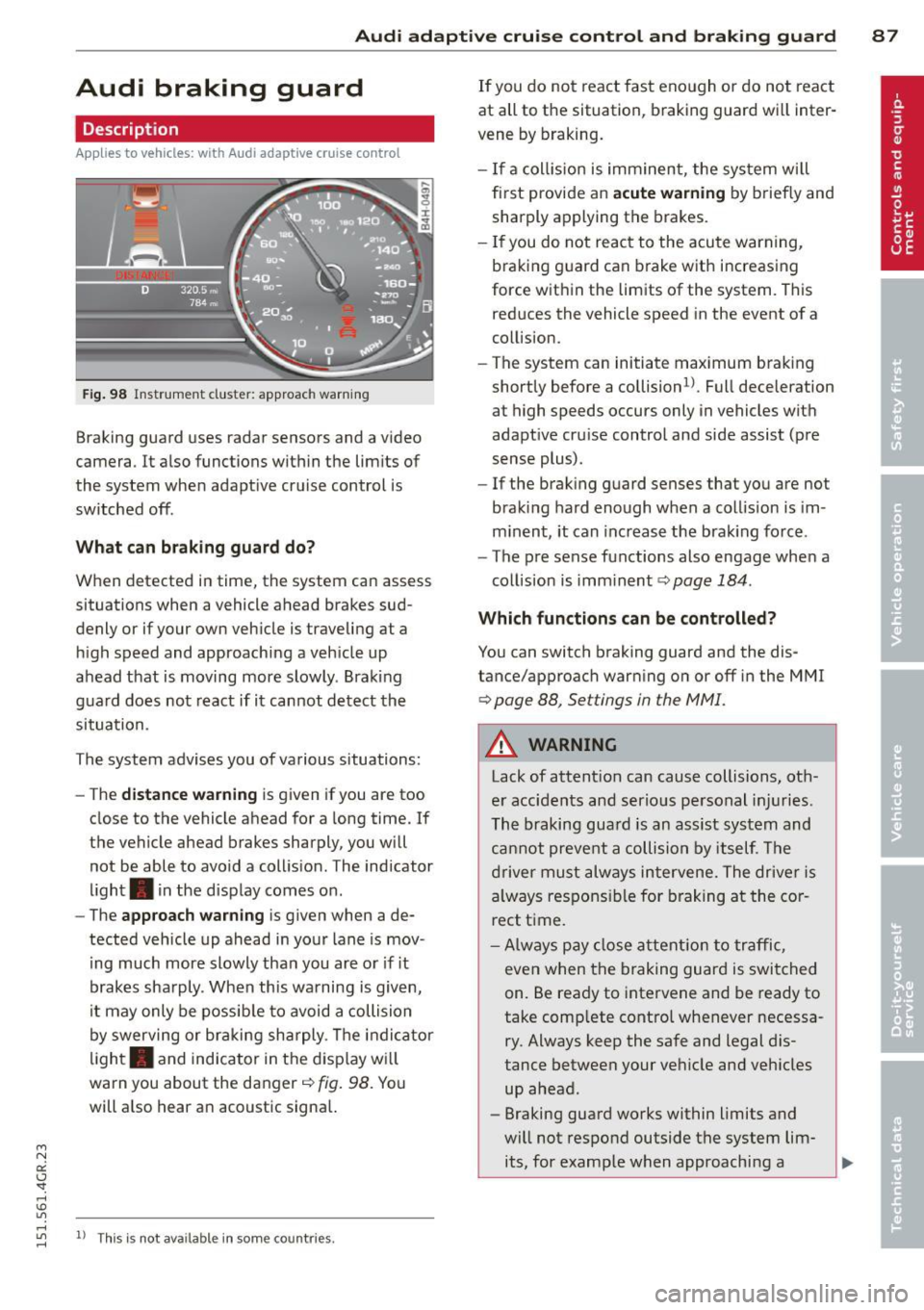
Fig. 98 Instrument cluster: approach warning
Braking guard uses radar sensors and a video
camera . It also functions within the limits of
the system when adaptive cruise control is
switched off .
What can braking guard do?
When detected in time, the system can assess
situations when a vehicle ahead brakes sud
denly or if your own vehicle is t raveling at a
high speed and approaching a vehicle up
ahead that is moving more slowly . Braking
guard does not react if it cannot detect the
situation.
The system advises you of various situations:
- The
distance warning is given if you are too
close to the vehicle ahead for a long time. If
the vehicle ahead brakes sharply, you will not be able to avoid a collision . The indicator
light. in the display comes on .
- The
approach warning is given when a de
tected vehicle up ahead in your lane is mov
i ng much more slowly than you are or if it
brakes sharply . When this warning is given,
it may only be possib le to avoid a collision
by swerving or braking sharply. The indicator
light. and indicator in the display will
warn you about the danger
c::> fig. 98. You
will also hear an acoustic signa l.
"' rl
"' 11
This is not ava ilable in som e coun tri es. rl
If you do not react fast enough or do not react
at all to the situation, braking guard will inter
vene by braking.
- If a col lision is imminent, the system will
first provide an
acute warning by brief ly and
sharply applying the brakes.
- If you do not react to the acute warning,
braking g uard can brake with increasing
force within the limits of the system . This
reduces the vehicle speed in the event of a
co llision.
- The system can initiate maximum braking
shortly before a collision
1 ) . Full deceleration
at high speeds occurs only in vehicles with
adaptive cru ise control and side assist (pre
sense plus) .
- If the braking guard senses that you are not
braking hard enough when a collision is im
minent, it can increase the brak ing force .
- The pre sense functions also engage when a
collision is imm inent
c::> page 184 .
Which function s can be controlled?
You can switch braking guard and the dis
tance/approach warning on or off in the MMI
c::> page 88, Settings in the MMI.
A WARNING
Lack of attention can cause collisions, oth
er accidents and serious personal injuries .
The braking guard is an assist system and
cannot prevent a collision by itself. The
driver must always intervene. The driver is
always responsible for braking at the cor
rect time.
- Always pay close attent ion to traffic,
even when the braking guard is switched
on. Be ready to intervene and be ready to
take comp lete control whenever necessa
ry . Always keep the safe and legal dis
tance between your vehicle and vehicles up ahead .
- Braking guard works within limits and
will not respond outside the system lim its, for example when approaching a
Page 90 of 302
88 Audi adaptive cruise control and braking guard
stopped vehicle or stationary obstacle (end of a traffic jam or vehicle that has
broken down in traffic).
- Always remember that the radar sensor
for the braking guard works only within
defined detection and range limits that
may prevent the proper detection of oth
er vehicles.
- The radar sensor's function and range
can be reduced by rain, snow and heavy
spray . Moving vehicles up ahead may not
be promptly detected or may not be de
tected at all.
- Reflective surfaces including crash barri
ers or tunnel entrances may impair the
function of the radar sensor.
({) Tips
-You can cancel the braking with increas
ing force that is initiated by the system
by braking yourself, by accelerating no
ticeably or by swerving.
- Braking guard error messages
¢page 88.
- Keep in mind that braking guard can
brake unexpectedly . Always secure any
cargo or objects that you are transport
ing to reduce the risk of damage or in
jury.
Settings in the MMI
Applies to vehicles: with Audi adaptive cruise co ntrol
.. Select : I CARI function button > (Car)* sys
tems
control button > Driver assist > Audi
braking guard.
System -
Switch braking guard On and Off.
When you switch the ignition on, the message
Audi braking guard off appears if the system
is switched off.
Early warning -The distance and approach
warnings in the display can be switched
On/
Off.
(D Tips
- Your settings are automatically stored
and assigned to the remote control key being used at the time the settings are
made.
- If you restrict or switch off the ESC, the
braking guard also switches itself off
¢page 189.
- Switch braking guard off when you are
loading the vehicle onto a vehicle carrier,
train, ship or other type of transporta
tion. This can prevent undesired warn
ings from the braking guard system.
Messages
Applies to vehicles: with Aud i adapt ive cru ise contro l
Braking guard: off
This driver message appears if the system is
turned off via the infotainment. Otherwise , if
the system is turned off, the information ap
pears every time shortly after the start of the
trip.
The driver message also appears if the system
is not available due to a malfunction or if the
ESC is not switched on¢
page 189. If this is
the case, the system will not provide warnings about a possible collision.
Braking guard: activated
This driver message appears if sharp brake
pressure was applied due to an acute warning.
ACC: Unavailable!
ACC and Audi braking guard: not available
The system cannot detect moving vehicles up
ahead correctly and is switched off. The sen
sors have been displaced or are not working
properly. The Audi pre sense functions may al
so be affected . Drive to your authorized Audi
dealer or authorized Audi service facility im
mediately to have the malfunction corrected.
ACC: currently unavailable. No sensor vision
ACC and braking guide: currently unavaila
ble. No sensor vision
This message appears if the sensor view is ob
structed, for example by leaves, snow, heavy
spray or dirt. Clean the sensors¢
page 81,
fig. 88. ll>-