sensor AUDI RS7 SPORTBACK 2015 Owners Manual
[x] Cancel search | Manufacturer: AUDI, Model Year: 2015, Model line: RS7 SPORTBACK, Model: AUDI RS7 SPORTBACK 2015Pages: 302, PDF Size: 74.76 MB
Page 15 of 302
M N
0:: <.J 'SI: ,...., \!) 1.1'1 ,...., 1.1'1 ,....,
Instrument s and warnin g/indic ator ligh ts 13
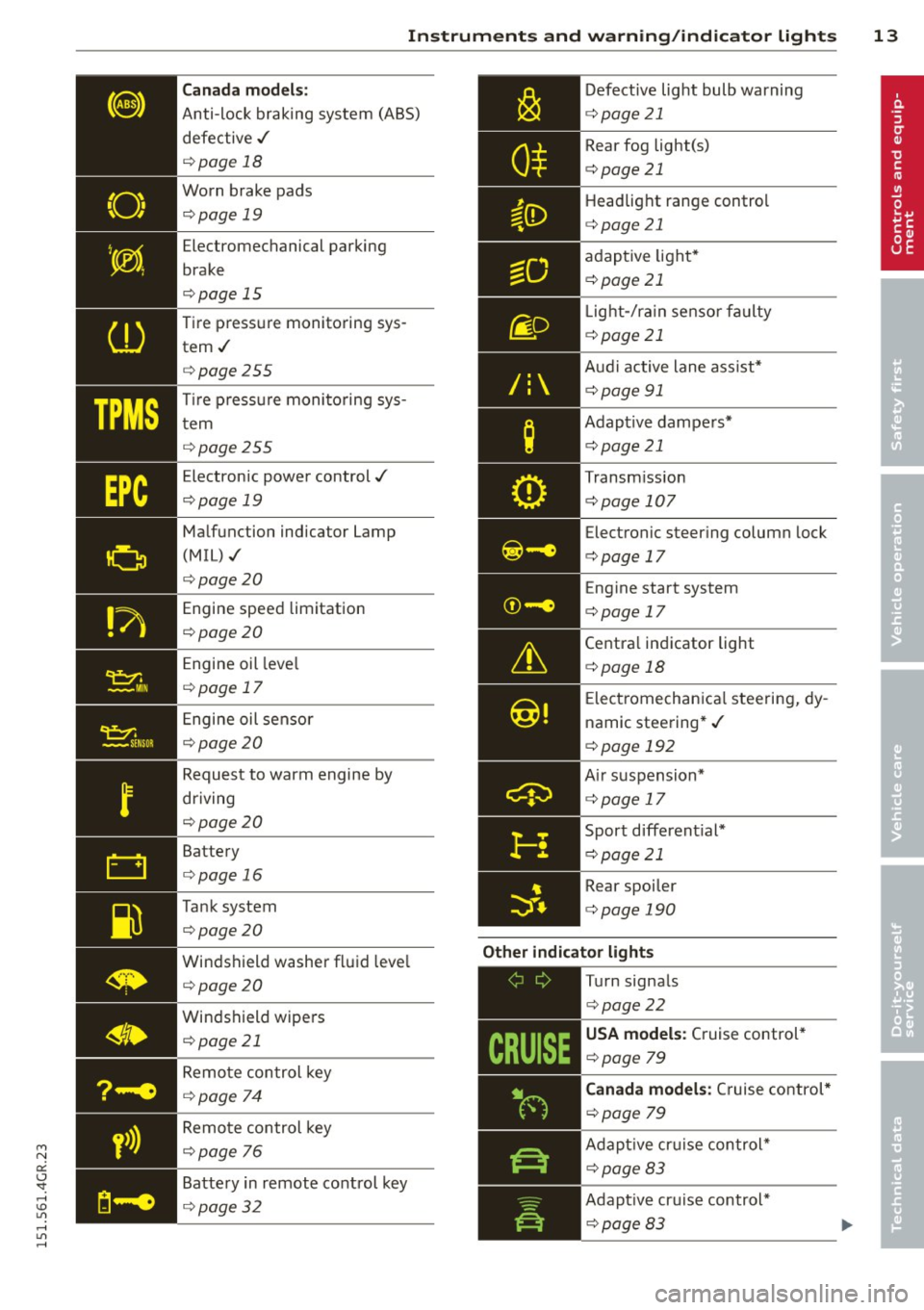
Canada m odel s:
Anti-lock braking system (ABS)
defective ,/
¢ page 18
Worn brake pads ¢page 19
Electromechanical parking
brake
¢ page 15
Tire pressure monitoring sys tem./
¢ page 255
Tir e p ress ure monitoring sys
tem
¢ page 255
Electronic power control./
¢ page 19
Malfunction indicator Lamp
(MIL),/
¢page 20
Engine speed limitation
¢ page 20
Engine oil leve l
¢ page 17
Engine oil sensor
¢ page 20
Request to warm engine by
driving
¢ page 20
Battery
¢ page 16
Tank system
¢page 20
Windshield washer fluid leve l
¢ page 20
Windshield wipers ¢ page 21
Remote control key
¢ page 74
Remote control key
¢ page 76
Battery in remote control key
¢ page 32
/:
Defective light bulb warning
c:::> page 21
Rear fog light(s)
c:::> page 21
Headlight range control
c:::> page 21
adaptive light*
c:::> page 21
L ight-/ra in sensor fa ulty
c:::>page 21
Aud i active lane ass ist*
c:::> page 91
Adapt ive dampers*
c:::>page 21
Transm iss ion
c:::> page 107
Electronic steering column lock
c:::> page 17
Eng ine start system
c:::>page 17
Centra l ind icator light
c:::> page 18
E lectromechanica l steering, dy
namic steering* ,/
c:::> page 192
A ir suspension*
c:::> page 17
Sport d ifferent ial*
c:::> page 21
Rear spoiler
c:::> page 190
Other indicator light s
-------------
Turn signals
c:::> page22
USA model s: Cruise control *
c:::> page 79
Canada models: C ruise control*
c:::> page 79
Adapt ive cr uise control*
c:::> page 83
Adapt ive cr uise control*
c:::> page 83
Page 22 of 302
20 Instruments and warning/indicator lights
If this warning/indicator light illuminates
while you are driving, then there is a mal
function in the engine electronics. Have the malfunction corrected as soon as pos
sible by your authorized Audi dealer or
qualified repair facility .
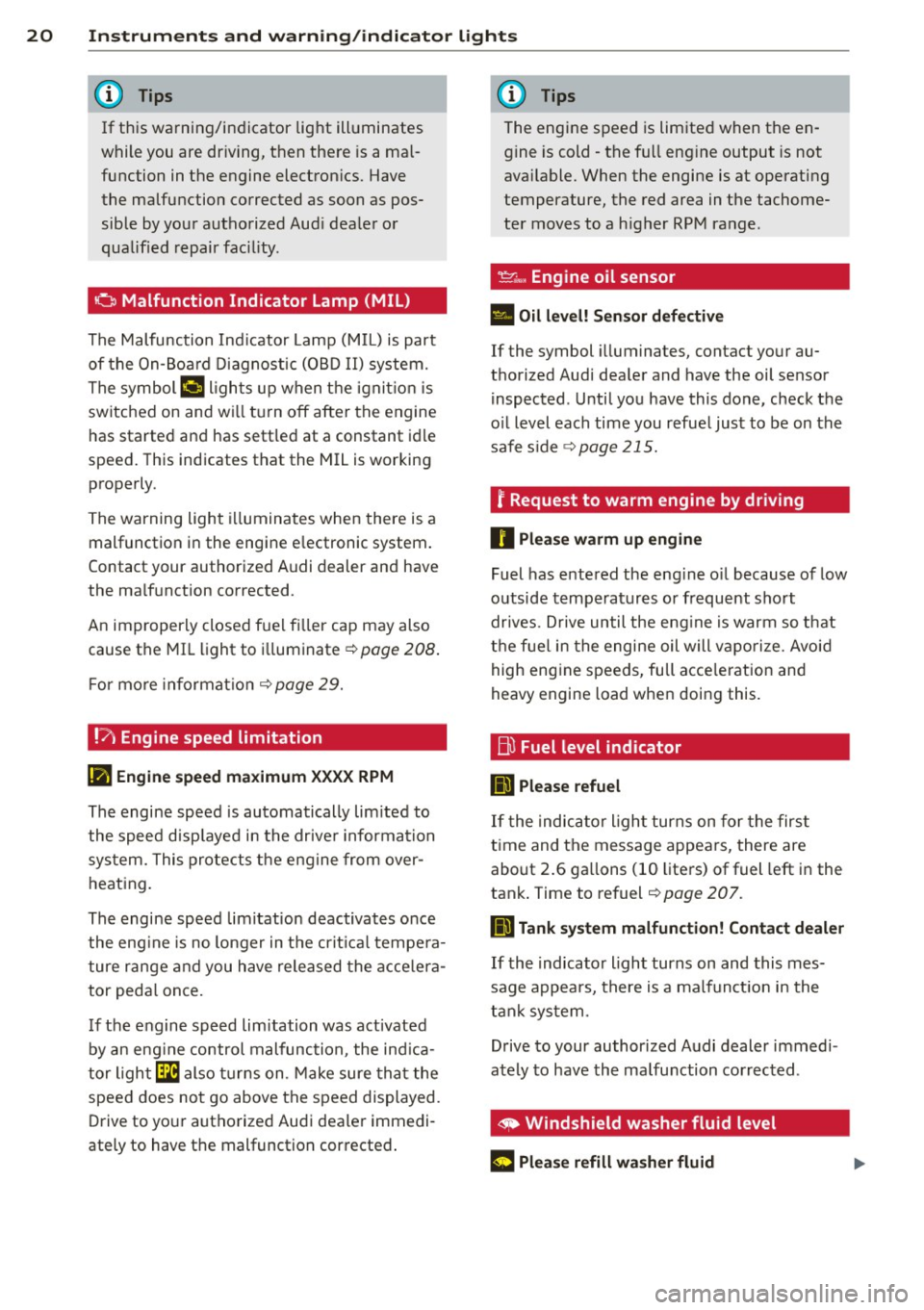
o Malfunction Indicator Lamp (MIL)
The Malfunction Indicator Lamp (MIL) is part
of the On-Board Diagnostic (OBD II) system.
The symbol
¢..j lights up when the ignition is
switched on and will turn off after the engine
has started and has settled at a constant idle
speed. This indicates that the MIL is working
properly.
The warning light illuminates when there is a
malfunction in the engine electronic system.
Contact your authorized Audi dealer and have
the malfunction corrected .
An improperly closed fuel filler cap may also
cause the MIL light to illuminate ¢ page 208.
For more information ¢ page 29.
!?) Engine speed limitation
II! Engine speed maximum XXXX RPM
The engine speed is automatically limited to
the speed displayed in the driver information
system. This protects the engine from over
heating.
The engine speed limitation deactivates once
the engine is no longer in the critical tempera
ture range and you have released the accelera
tor pedal once.
If the engine speed limitation was activated
by an engine control malfunction, the indica
tor light
Ga also turns on. Make sure that the
speed does not go above the speed displayed .
Drive to your authorized Audi dealer immedi
ately to have the malfunction corrected.
'
(!) Tips
The engine speed is limited when the en
gine is cold -the full engine output is not
available. When the engine is at operating
temperature, the red area in the tachome
ter moves to a higher RPM range .
~~, Engine oil sensor
• Oil level! Sensor defective
If the symbol illuminates, contact your au
thorized Audi dealer and have the oil sensor inspected . Until you have this done, check the
oil level each time you refuel just to be on the
safe side
¢ page 215.
? Request to warm engine by driving
0 Please warm up engine
Fuel has entered the engine oil because of low
outside temperatures or frequent short
drives . Drive until the engine is warm so that
the fuel in the engine oil will vaporize. Avoid
high engine speeds, full acceleration and
heavy engine load when doing this.
Bu Fuel level indicator
D Please refuel
If the indicator light turns on for the first
time and the message appears, there are
about 2.6 gallons (10 liters) of fuel left in the
tank. Time to refuel
¢ page 207.
D Tank system malfunction! Contact dealer
If the indicator light turns on and this mes
sage appears, there is a malfunction in the
tank system.
Drive to your authorized Audi dealer immedi
ately to have the malfunction corrected.
' ~ Windshield washer fluid level
(r5 iJlease refill washer fluid ...
Page 23 of 302
M N
0:: <.J 'SI: ,...., \!) 1.1'1 ,...., 1.1'1 ,....,
Instruments and warning/indicator lights 21
If the symbol illuminates, add windshield
washer fluid to the washer system/headlight
washer system* ~
page 224.
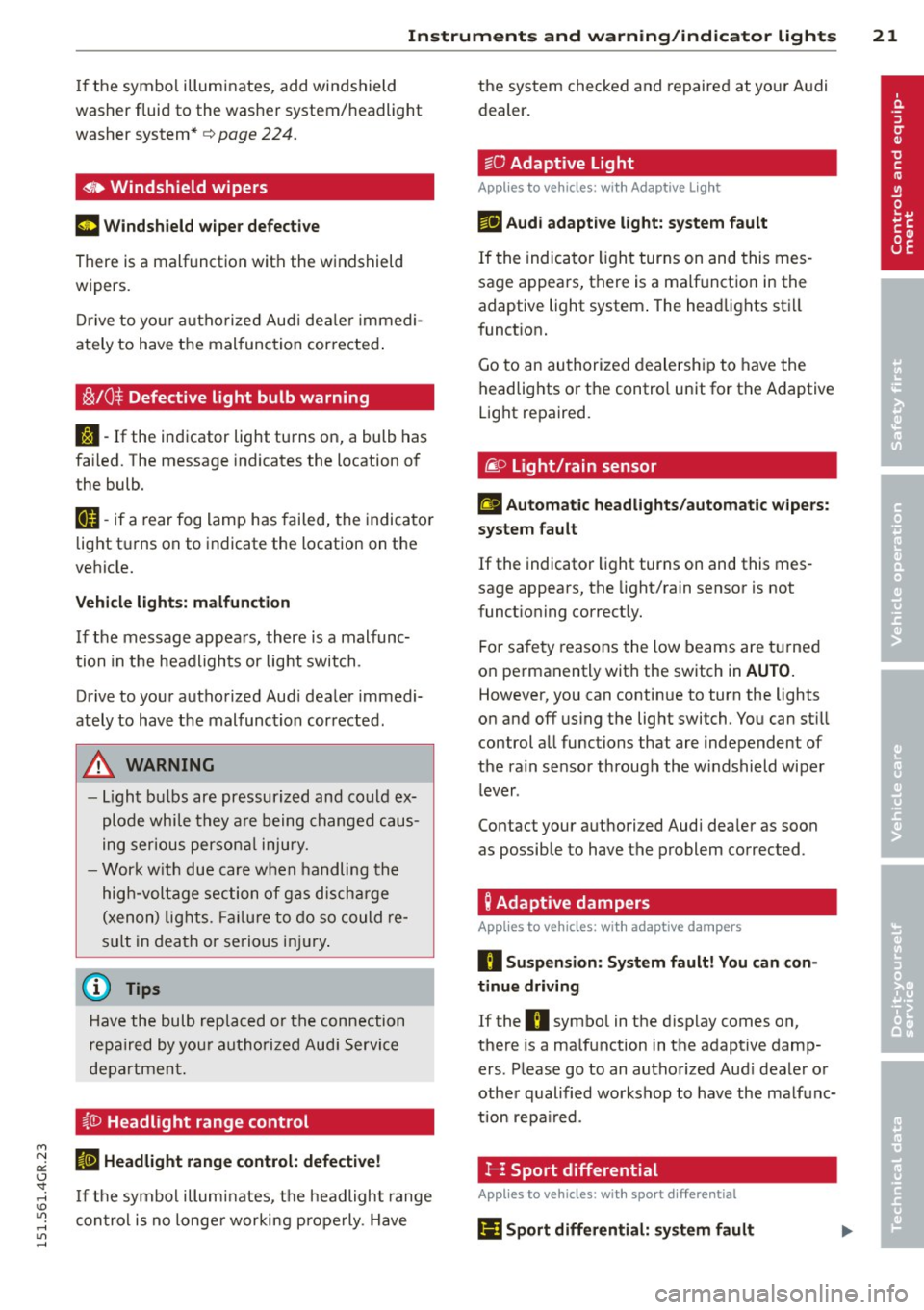
O Windshield wipers
m Windshield wiper defective
There is a malfunction with the windshield
wipers.
Drive to your authorized Aud i dea le r im medi
ately to have the mal function cor rected .
~/0$ Defective light bulb warning
J:i -If the ind icator light turns on, a bulb has
failed. The message indicates the location of
the bulb.
IJ-if a rear fog lamp has failed, the indicator
light t urns on to indicate the location on the
vehicle.
Vehicle lights: malfunction
If the message appears, there is a malfunc
tion in the headlights or lig ht switch.
Drive to you r authorized Aud i dealer immedi
ately to have the malfunction corrected.
A WARNING
- Light bulbs are pressurized and could ex
plode whi le they are being changed caus
ing serious personal injury.
- Work with due care when handling the
high-voltage section of gas discharge
(xenon) lights. Failure to do so could re
sult in death or serious injury.
(D Tips
Have the bulb replaced or the connection
repaired by you r aut horized Aud i Service
department.
~ID Headlight range control
II Headlight range control: defective!
If the symbol illuminates, the headlight range
control is no longer working properly . Have the system checked and
repaired at your A udi
dealer.
· go Adaptive Light
Applies to vehicles : with Adaptive Light
m;J Audi adaptive light: system fault
If the indicator light turns on and this mes
sage appears, there is a malfunction in the
adaptive light system . The headlights sti ll
function.
Go to an authorized dealership to have the
headlights or the control unit for the Adaptive
Light repaired.
/i.O Light/rain sensor
El Automatic headlights/automatic wipers:
system fault
If the indicator light turns on and this mes
sage appears, the light/rain sensor is not
funct ioning correct ly.
For safety reasons the low beams are tur ned
on permanently with the switch in
AUTO.
However, you can continue to turn the lights
on and off using the light switch. You can st ill
control all functions that are independent of
the ra in sensor through the w indshield wiper
lever .
Contact your authorized Audi dealer as soon
as possible to have the problem corrected .
; Adaptive dampers
Applies to vehicles: with adaptive dampers
II Suspension: System fault! You can con
tinue driving
If the II symbol in the d isplay comes on,
there is a malfunction in the adaptive damp
ers. Please go to an authorized Aud i dealer or
other qualified workshop to have the malfunc
tion repa ired .
1--! Sport differential
Applies to vehicles: with sport different ial
I'll Sport differential: system fault
Page 36 of 302
34 Openin g and clo sing
- Do not leave children inside the veh icle
unsupervised. In an emergency it would
be impossible to open the doors from
the outside without the key.
- Applies to vehicles with power side door
closer*:
- When closing a doo r, make sure noth
i ng can interfere w ith the door. This
could cause ser ious personal injury .
- You c an stop the door from closing at
any time by pulling on the inside or
outside door handle.
(DJ Tips
- In the event of a c rash with airbag de
ployment al l locked doors will be auto
matically un locked to g ive access to t he
vehicle occupants from t he outside.
- If the power lock ing system should ma l
function, you can lock the driver's door
u sing the mechanical key
¢ page 3 7.
- If the power loc king system should fail,
you can st ill open the fue l tank flap in an
emergency
¢ page 209 .
-You are well advised no t to keep valua
bles inside an unattended vehicle, visib le
or not. Even a properly locked vehicle
cannot provide the security of a safe.
- If the LED in the upper edge of the driv
er's door panel comes on for abo ut
30
seconds afte r the vehicle is locked, the re
i s a malfunction in the power locking or
the anti-theft warning system . Have the
malfunction corrected by an author ized
Audi dealersh ip or qua lified repai r fac ili
ty.
Setting power locking
The driver can determine the functions for
power locking in the MMI.
.. Select : I CARI funct io n button> (Car )* sy s
tem s
control button > V ehicle settings >
( Central lo ck ing) *.
Lo ck when dr iving -
If you se lec t On , the vehi
cle locks automatically when d riving. All of
the doors and rear lid lock .
Central locking
Unlock doors -
You can dec ide if All doors or
o nly the
Driv er shou ld unlock . The rear lid al
so unlocks when
All is selected . If you select
Driver in a vehicle with a convenience key*,
only the door whose hand le you pu ll will un
lock.
If you se lect
Driver , all the doors and rear lid
will unlock if you press them button on the re
mote control master key twice .
Lo ck exterior trunk handle -If you select On ,
the rear lid handle is locked . In this case the
rear lid can be opened with the b utton
c:s on
the master key or with the
c:s button in the
driver' s door . In veh icles with a convenience
key* , you can still open the rear lid using the
handle if an authorized master key is near the
proxim ity sensor .
Fold mirrors * -If yo u select On , the exterior
rearview mirrors fold in automatically when
you press the
{f) button on the remote control
master key or touch the sensor* in the handle.
Tone when lock ing -When you select On, a
confirmat io n tone sounds when you lock the
vehicle .
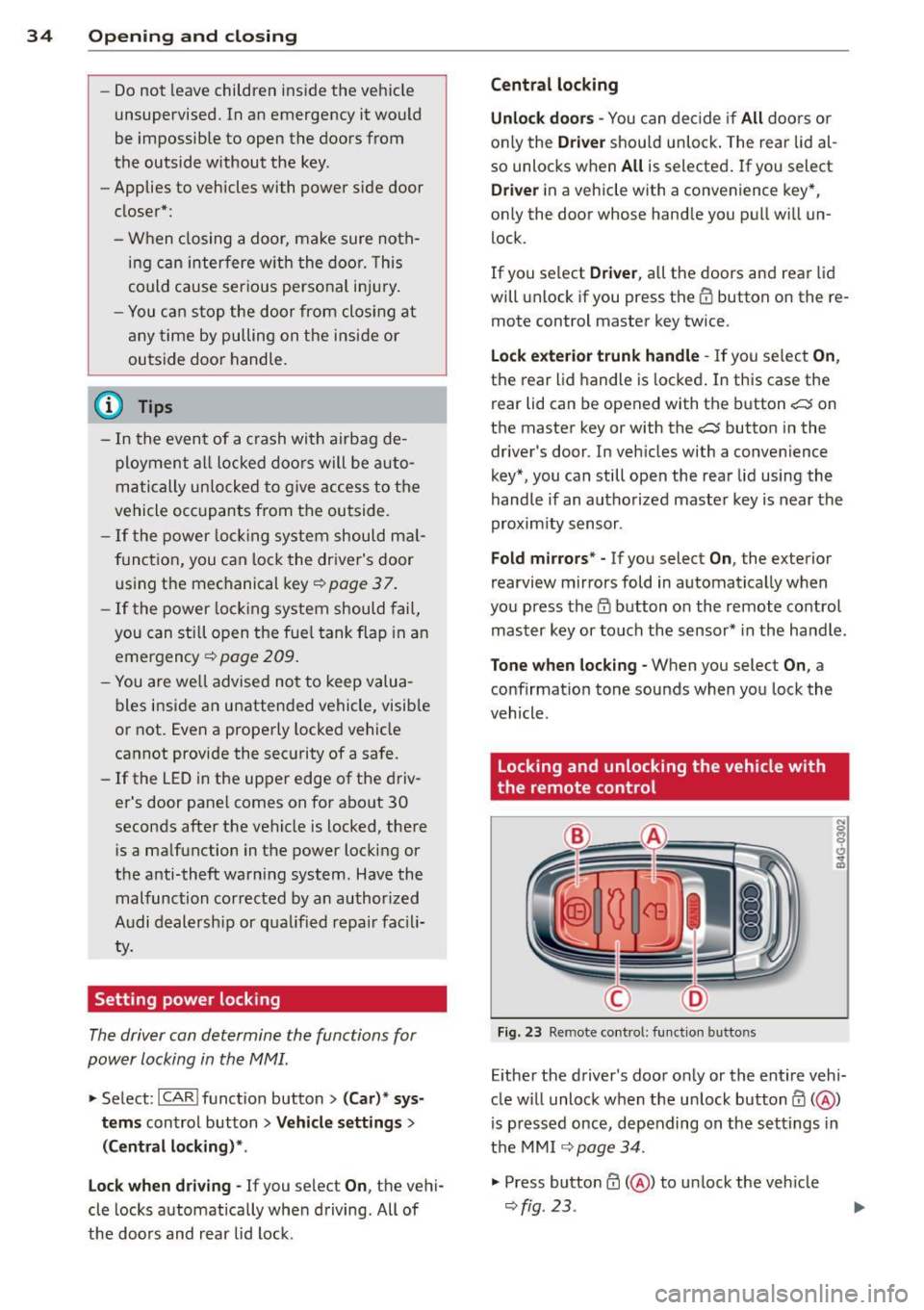
Locking and unlocking the vehicle with
, the remote control
Fi g. 23 Re mote co ntro l: fu nct io n buttons
N 0 q
Cl
~
E ither the driver's door only or the entire vehi
cle w ill unlock when the unlock button
0 ( @ )
is p ressed once, depending on the settings in
the MMI
¢ page 34 .
.. Press butto n 0 (@ ) to un lock the veh icle
¢ fig. 23 .
Page 38 of 302
36 Opening and clo sing
@ Tips
If your vehicle has been standing for an ex
tended period, please note the following:
- The proximity sensors are deactivated af-
ter a few days to save power. You then
have to pull on the door handle once to
unlock the vehicle and a second time to
open the vehicle.
- To prevent the battery from being dis
charged and to preserve your vehicle's
ability to start for as long as possible,
the ene rgy management system gradu
ally switches off unnecessary conven i ence functions.
It i s possible that you
will not be able to unlock your vehicle us
i ng these conven ience f unctions .
- For Declaration of Compliance to United
States FCC and Industry Canada regula
tions ¢
page 285.
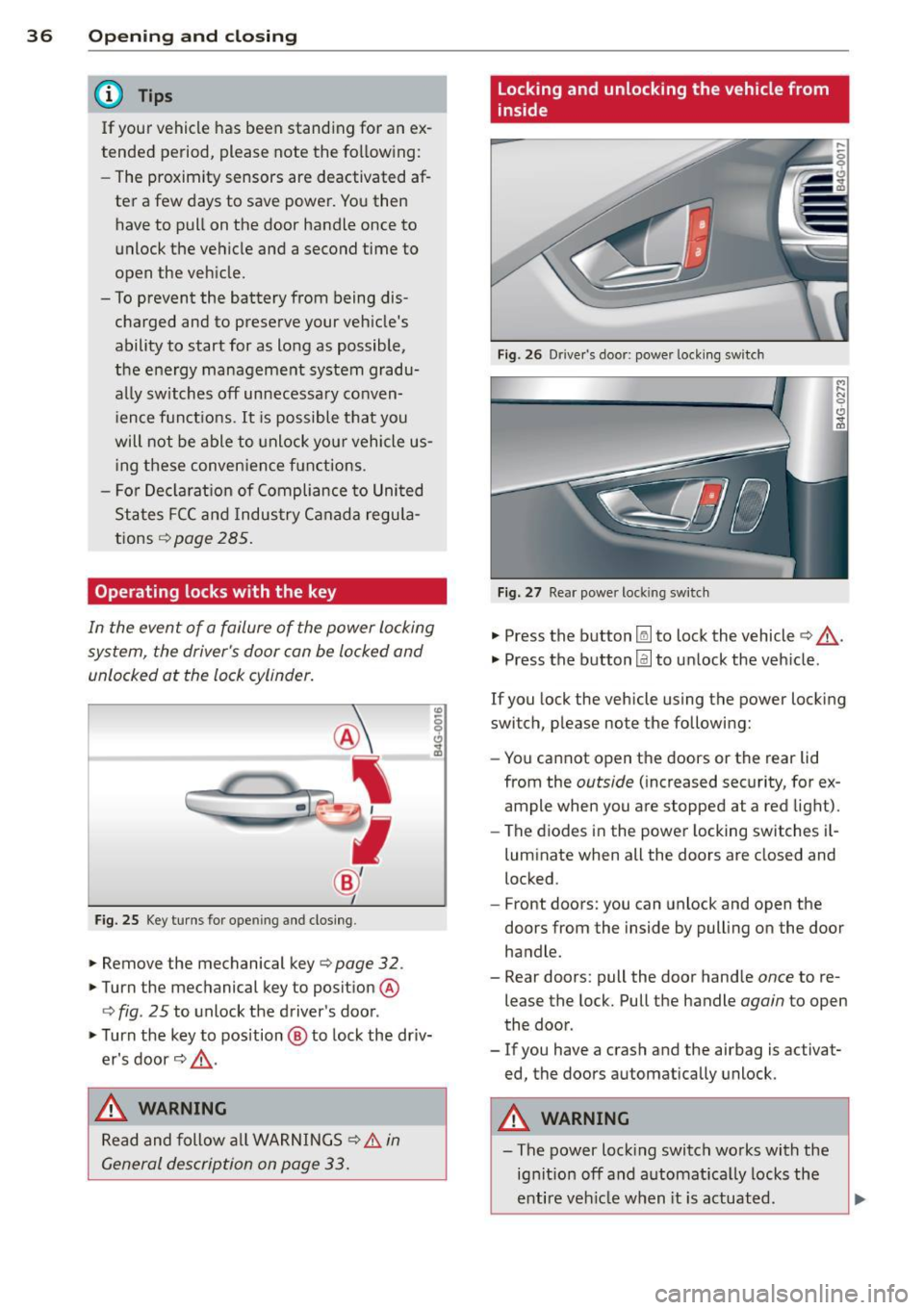
Operating locks with the key
In the event of a failure of the power locking
system, the driver 's door can be locked and
unlocked at the lock cylinder.
Fig. 25 Key turns for ope ning and closing .
.. Remove the mechanical key¢ page 32 .
.. Turn the mechanical key to position @
¢
fig . 25 to unlock the driver's door .
.. Turn the key to position @ to lock the driv
er's door ¢.&, .
_& WARNING
Read and follow all WARNINGS¢ & in
General description on page 33.
Locking and unlocking the vehicle from
inside
Fig. 26 Drive r's door; power locking sw itch
Fig. 27 Rear powe r lock ing switch
.. Press the button~ to lock the vehicle¢.&, .
.. Press the button@] to unlock the veh icle .
If you lock the vehicle using the power locking
switch, please note the following:
- You cannot open the doors or the rear lid
from the
outside (increased security, for ex
ample when you are stopped at a red light).
- The diodes in the power locking switches i l-
luminate when all the doors are closed and
locked .
- Front doors: you can unlock and open the
doors from the inside by pulling on the door
handle .
- Rear doors: pull the door handle
once to re
lease the lock. Pull the handle
again to open
the door .
- If you have a crash and the airbag is activat
ed, the doors automatically unlock.
A WARNING
-==
-The power lock ing switch works with the
ignition off and automatica lly locks the
entire veh icle when it is actuated .
Page 41 of 302
"' N
a:: I.J "". rl I.O
"' ....
"' rl
-The following applies to vehicles equip
ped with the Convenience key* feature: if
the remote control key is left in the lug
gage compartment, luggage compart
ment will automatically unlock itself af
ter you lock the vehicle . This prevents
you from un intent ionally locking your
key in the luggage compartment .
- When the vehicle is locked, the rear lid
can be unlocked separately by pressing
the button
las! on the master key. When
the rea r lid is closed aga in, it locks auto
matically.
Luggage compartment with movement
activated opening
Applies to vehicles: with conve nience key and sensor-con·
trolled luggage compartment lid
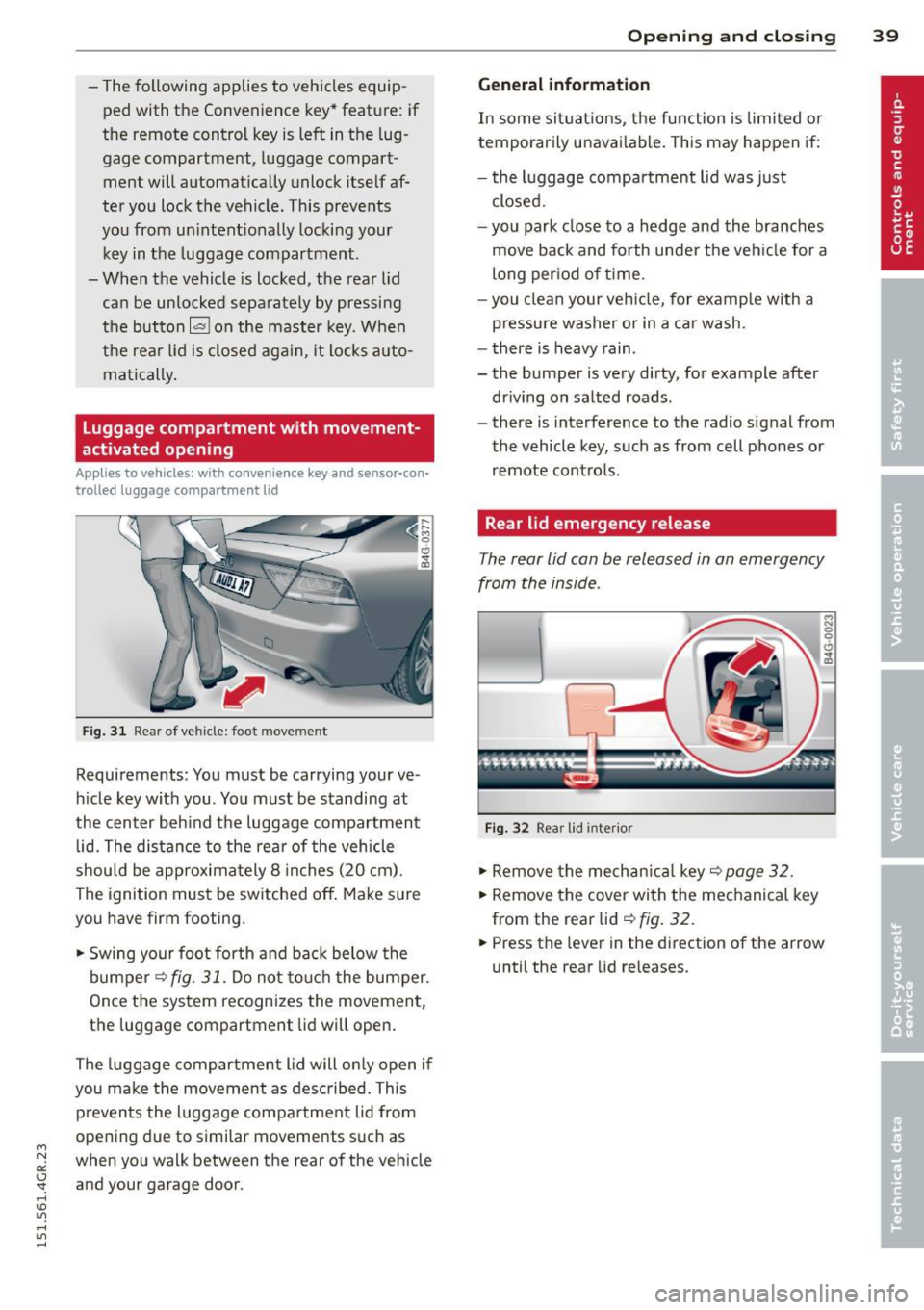
Fig. 31 Rear of ve hicle: foot move ment
Requirements : You must be carrying your ve
h icle key with you . You must be standing at
the center beh ind the luggage compartment
lid. The distance to the rea r of the vehicle
should be approxima tely 8 inches (20 cm).
The ignition must be switched off . Make sure
you have firm footing .
.. Swing your foot for th and back below the
bumper ¢
fig. 31. Do not to uch the bumper.
Once the system recognizes the movement,
the luggage compartment lid will open.
The luggage compartment lid will on ly open if
you make the movement as described . This
prevents the luggage compa rtment lid from
opening due to similar movements such as
when you walk between the rear of the vehicle
and your garage door.
Op enin g an d clos ing 39
Gen eral information
In some sit uatio ns, the function is limited or
temporarily unavai lable . This may happen if:
- the luggage compartment lid was just
closed.
- you park close to a hedge and the bra nches
move back and forth unde r the veh icle for a
long per iod of t ime .
- you clean your veh icle, for examp le with a
pressure washer or in a car wash .
- there is heavy rain .
- the bumper is very dirty, for example after
driving on salted roads .
- there is interference to the radio signal from
the vehicle key, such as from cell phones or
remote cont ro ls .
Rear lid emergency release
The rear lid con be released in on emergency
from the inside .
Fig . 32 Rea r lid inter ior
.. Remove the mechan ica l key ¢ page 32.
.. Remove the cover with the mechanical key
from the rear lid ¢
fig. 32 .
.. Press the leve r in the direction of the arrow
until the rear lid re leases.
Page 47 of 302
"' N
a:: I.J "". rl I.O
"' rl
"' rl
visibility conditions. For example, fog cannot be detected by the light sensors.
So always switch on the headlights 1§.D under these weather conditions and
when driving in the dark.
- Crashes can happen when you cannot see
the road ahead and when you cannot be
seen by other motorists . Always turn on
the headlights so that you can see ahead
and so that others can see your car from
the back.
- Please observe legal regulations when
using the light ing systems descr ibed .
(D Note
The rear fog lights should only be turned
on in accordance with traffic regulation, as
the lights are bright for following traffic.
@ Tips
- The light sensor* for automatic head light range control* is located in the rear
view mirror mount. You should therefore not apply any stickers to the windshield
in this area in order to prevent malfunc
tions or failures.
- In the event of a light sensor malfunc
tion, the driver is notified in the instru
ment cluster display ¢
page 21.
-You will hear a warning tone if you open
the driver door when the exterior lights
are switched on .
- In cool or damp weather, the inside of
the headlights, turn signals and tail
lights can fog over due to the tempera
ture difference between the inside and
outside. They will clear shortly after
switching them on. This does not affect
the service life of the lighting .
Clear vision 45
Emergency flasher
The emergency flasher makes other motorists
aware that you or your vehicle are in an emer
gency situation .
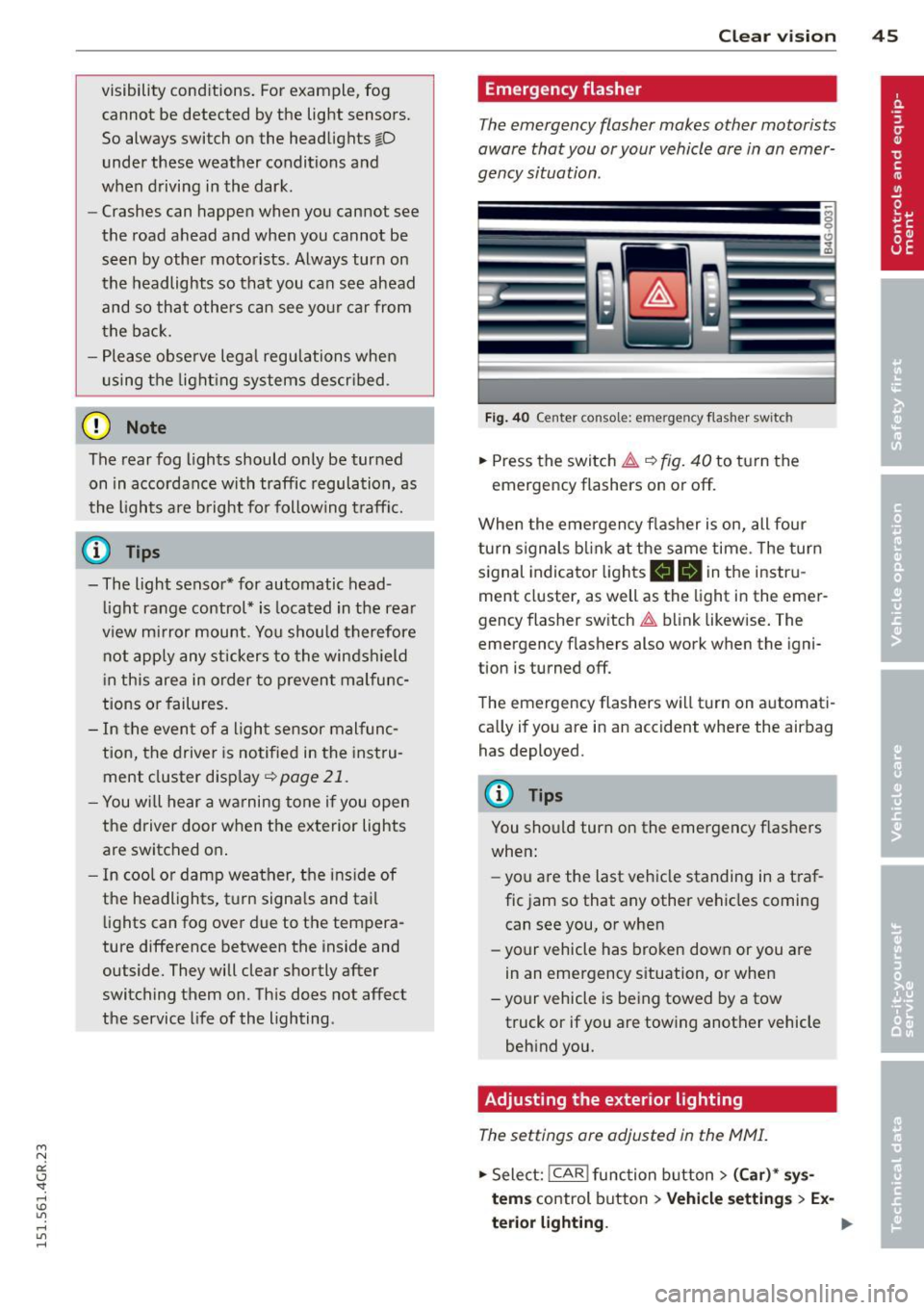
Fig. 40 Ce nt er co nsol e: em erge ncy flash er sw itc h
.,. Press the switch &..¢ fig. 40 to turn the
emergency flashers on or off.
When the emergency flasher is on, all four
turn signals blink at the same time . The turn
signal indicator lights
B DI in the instru
ment cluster, as well as the light in the emer
gency flasher switch &.. blink likewise. The
emergency flashers also work when the igni
tion is turned off.
The emergency flashers will turn on automati
cally if you are in an accident where the airbag has deployed.
@ Tips
You should turn on the emergency flashers
when:
- you a re the last vehicle standing in a traf
fic jam so that any other vehicles coming
can see you, or when
- your vehicle has broken down or you are
in an emergency situation, or when
- your vehicle is being towed by a tow
truck or if you are towing another vehicle
behind you.
Adjusting the exterior lighting
The settings are adjusted in the MMI.
.,. Select: !CAR ! function button> (Car)* sys
tem s
control button > Vehicle settings > Ex-
terior lighting. ..,.
Page 48 of 302
46 Clear vision
Automatic headlights
You can adjust the following settings in the
Automatic headlights menu:
Headlights a ctivation time -You can adjust if
the head lights switch on Early, Med. or Late
according to the sensitivity of the light sensor.
Audi adaptive light* -You can sw itch adaptive
light On and Off.
Daytime running lights
USA models : You can switc h the dayt ime run
ning lights on and off.
Canada models: The function cannot be
turned off . It is activated automatica lly each
time the ign ition is switched on. This menu
item is shown "greyed out".
Coming home, Leaving home
The coming home function illuminates the
area outside the vehicle when yo u switch the
ignition off and open the driver's door. To turn
the function on, select Lights when leaving
car> On .
The leaving home function illuminates the
area outside the vehicle when you un lock the
vehicle. To turn the funct ion on, select Lights
when unlocking car > On .
The coming home and leaving home functions
only operate when it is dark and the light
switch is in the AUTO position. Turn signals and high beam lever
The lever on the left side of the steering col
umn is used to operate the turn signals and
the high beam as well as the headlight flash
er.
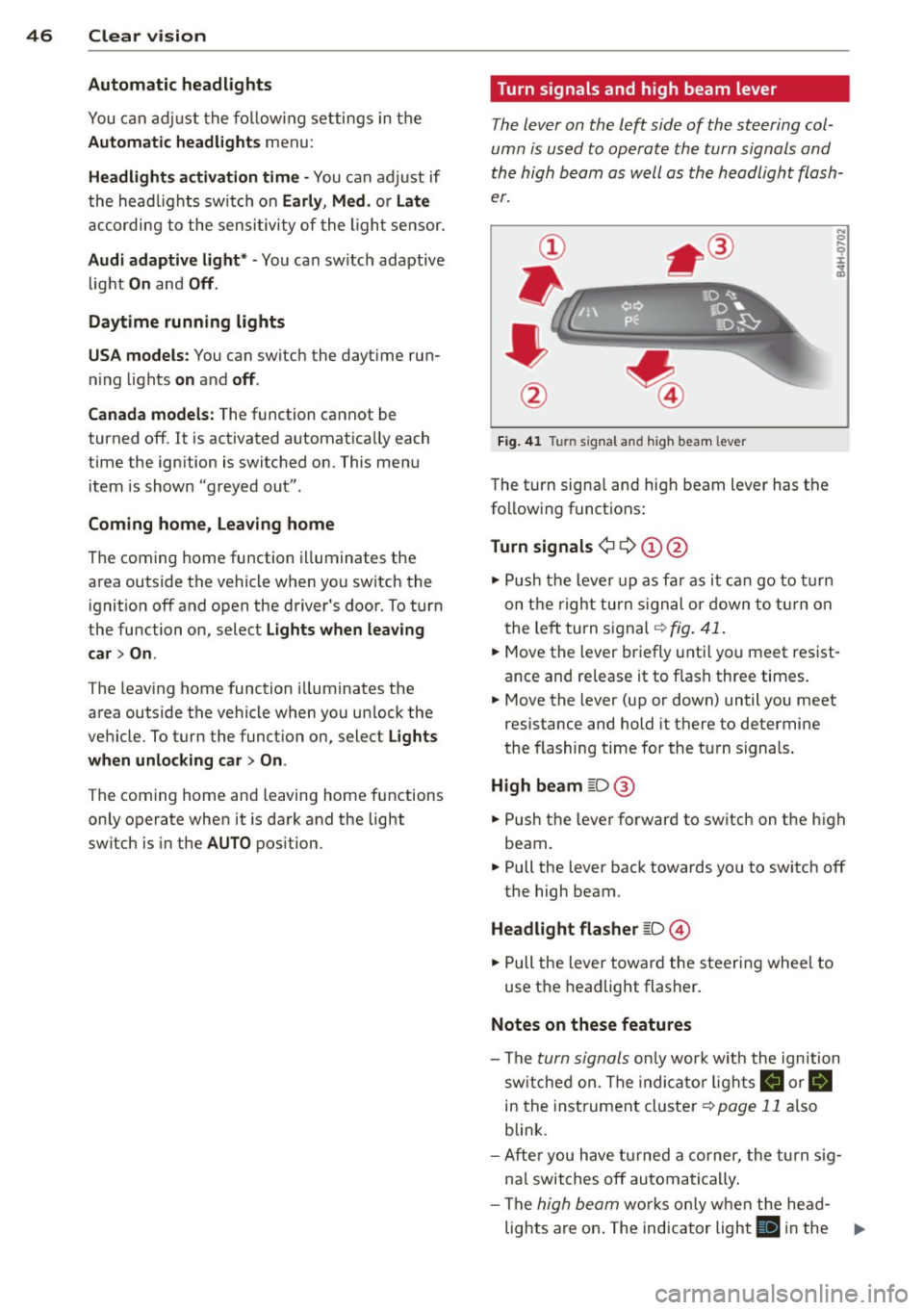
Fig. 41 Turn signal and high beam lever
The turn signa l and hig h beam lever has the
following functions:
Turn signals ¢
9 (D@
.. Push the lever up as far as it can go to turn
on the right turn signal or down to turn on
t he left turn signal ¢
fig. 41.
N 0 ... 'i' :r
~
.. Move the lever briefly unti l you meet res ist
ance and re lease it to flash three times.
.. Move the lever (up or down) until you meet
resistance and hold it there to determine
the flashing time for the turn signals.
High beam
[D @
.. Push the lever forward to switch on the high
beam.
.. Pull the lever back towards yo u to switch off
the high beam.
Headlight flasher
[D ©
.. Pull the lever toward the steering whee l to
use the headlight flasher.
Notes on these features
- The
turn signals only work w ith the ignition
switched on. The indicato r lights
B or B
in th e instrument cluster¢ page 11 also
blink.
- After you have turned a corner, the turn sig
na l switches off automatically.
- The
high beam works only when the head-
lights are on. The indicator light
El in the ..,.
Page 50 of 302
48 Clear vis ion
automatically and will go o ut comp letely
when the outside light is very low. This
feature is meant to remind you to switch on the headlights when outs ide light con
ditions become poor.
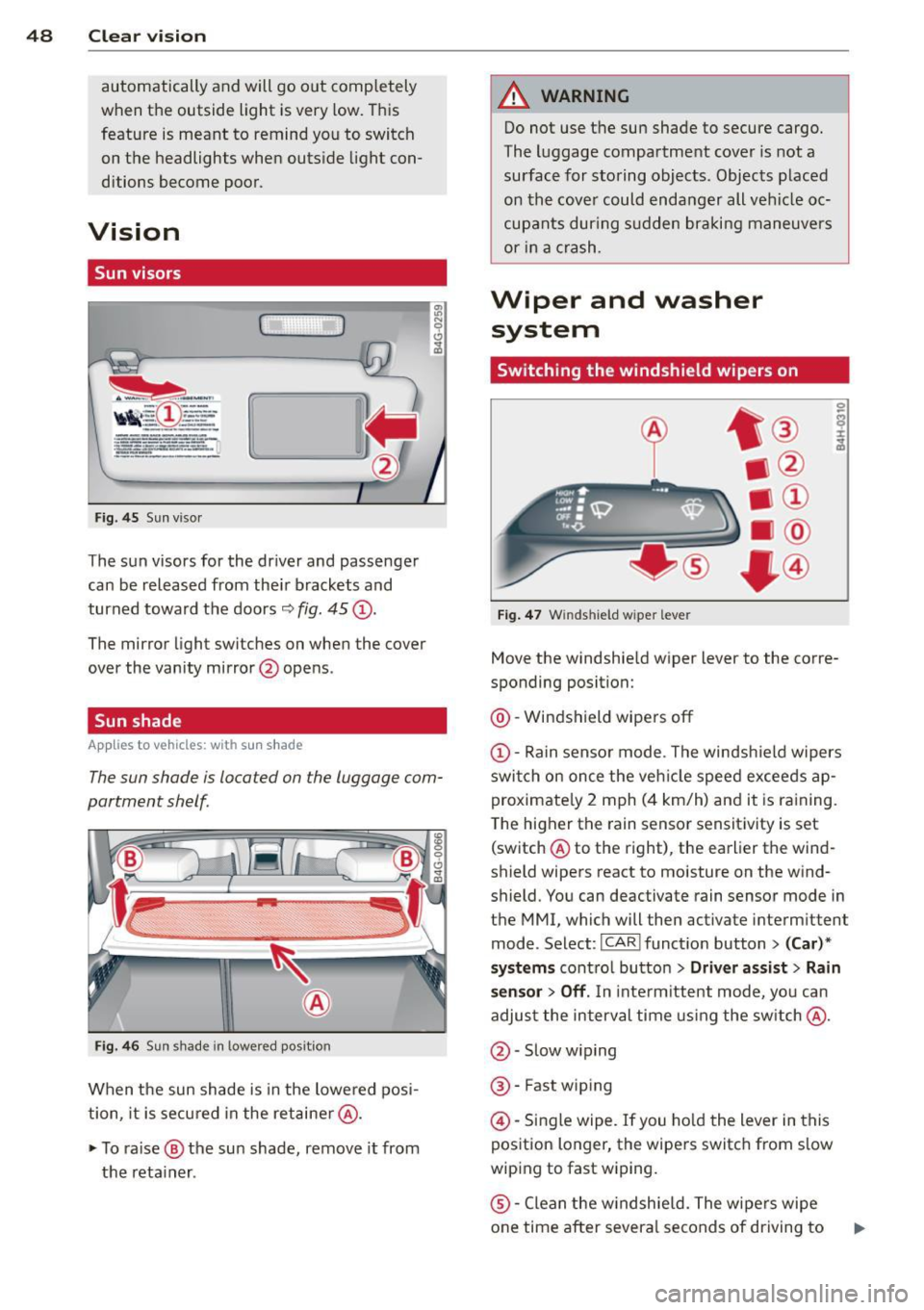
Vision
Sun visors
( )
Fig. 45 Sun viso r
The sun visors for the dr iver and passenge r
can be released from the ir brackets and
turned toward the doors
9 fig. 45 (D .
The mirror light switches on whe n the cover
over the vanity mirror @opens .
Sun shade
Applies to vehicles: with s un shade
The sun shade is located on the luggage com
partment shelf.
Fi g. 4 6 Sun s hade in lowered position
When the sun shade is in the lowe red posi
tion, it is secured in the retaine r@ .
~ To ra ise ® the su n shade, remove it from
the reta iner .
A WARNING
-Do not use t he sun shade to secure cargo.
The luggage compartme nt cover is not a
surface for storing objects. Objects p laced
on th e cove r could enda nger all vehi cle oc
cup ants dur ing s udden braki ng maneuvers
or i n a crash.
Wiper and washer
system
Switching the windshield wipers on
Fig. 47 Windshield wiper leve r
Move the windshie ld wiper lever to the corre
sponding position:
@ -Windshield wipers off
(D-Rain sensor mode . The windsh ie ld wipers
swi tch on once the veh icle speed exceeds ap
proximate ly 2 mph ( 4 km/h) and it is ra ining.
T he higher t he rain sensor sensit ivity is set
(switch @to the right), the earlier the wind
shield wipers react to moisture on the w ind
shield. You can deactivate rain sensor mode in
the MMI, which will then activate interm ittent
mode. Select:
I CAR ! funct ion button > (Car )*
systems
cont ro l butto n > Driver as sist > Rain
sensor > Off .
In inte rm ittent mode, yo u can
adjust the interval time using the sw itch @.
@ -Slow w iping
® -Fast wiping
@ -Single wipe. If you ho ld the lever in this
position longer, the wipe rs switch from s low
wiping to fast w iping.
® -Clean the w indshie ld. The wipe rs wipe
one time after severa l seconds of driving to
Page 51 of 302
M N
0:: <.J 'SI: ,...., \!) 1.1'1 ,...., 1.1'1 ,....,
remove water droplets . You can switch this
function off by moving the lever to position ®
within 10 seconds after the afterw ipe. The af
terw ipe funct ion is react ivated the next time
you switch the ignit ion on .
C lea ning the headlights *. The headlight wash
er system * operates on ly when the headlights
are on. If you move the lever to pos ition ®,
the headlights and the night vision assistant
camera* are washed in intervals .
.&_ WARNING
-The ra in sensor is only des igned to assist
and support the drive r.
It remains entire
ly the dr iver's respons ibility to monitor
o utside wea ther conditions and to man
ually activate the wipers as soon as rain
or drizzle reduces visibility through the
w indshield.
- The w indshie ld m ust not be treated with
water -repe llent materials. They can in
c rease glare under poor visibi lity condi
tions such as wetness, darkness, or when
the sun is low on the horizon. I n addi
tion, they can cause the windshield wip
ers to chatte r.
- Properly functioning windshie ld w iper
blades are required for a clear view and
safe dr iv ing ¢
page 49, Replacing
windshield wiper blades .
(D Note
-In the case of frost, check whether the
windsh ield wiper b lades a re frozen to
t h e windshie ld. Switching on the wind
s h ield wipers can damage the wiper
blades!
- Prior to using a car wash, the win dsh ield
wipe r system must be switched off (lever
i n position @). This helps to prevent un
i ntent ional sw itch ing on and damage to
the windshie ld w iper sys tem .
- Do no t use the wipe rs to cle ar a frosted
window. Using the wipers as a conven
i ent ice sc raper will destroy t he wiper
b lades .
Clear vis ion 49
(D Tips
- The windshie ld wipers are switched off
when the ign it ion is off. Activate the
w indshield wipers after the ignition is
switched back on by moving the w ind
shield wiper lever to any position .
- Worn or d irty windshield wiper blades
result in streaking. This ca n affect the
rai n sensor function. Check your wind
shield wiper blades regularly.
- The washer fluid nozz les of the wind
shield washe r system a re heated at low
tempe ratu res whe n the ignition is on.
- When stopping temporarily, e .g. at a
t raffic light, the set spe ed of the wind
shield wipers is automatically reduced by
one speed.
Cleaning windshield wiper blades
Clean the w indsh ie ld w iper blades when t hey
begin to leave st reaks. Use a soft clo th and
glass cleaner to clean the wi ndshield wipe r
blades.
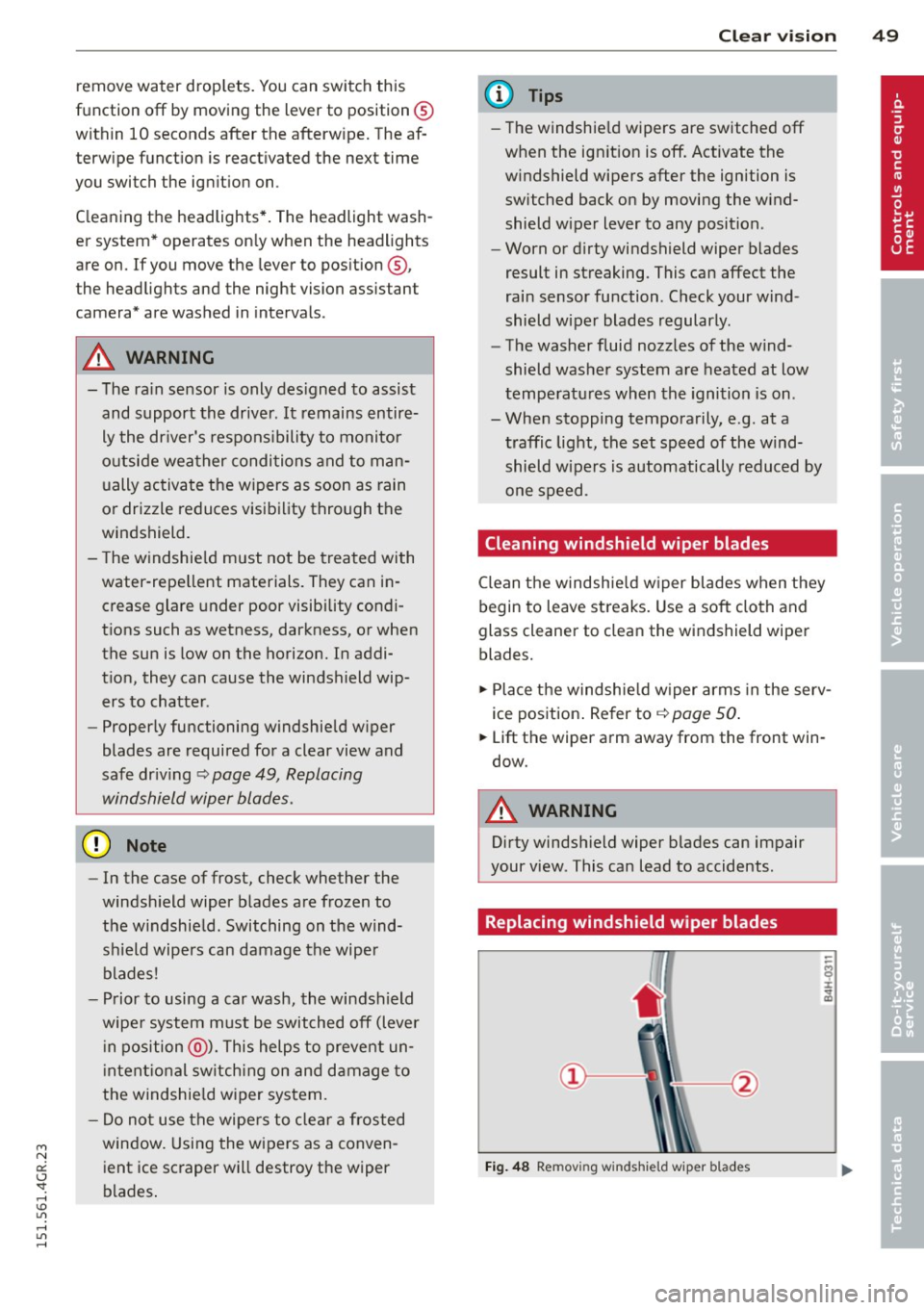
.,. Place t he windsh ie ld w iper arms in the serv
ice pos ition . Re fer to ¢
page 50 .
.,. Lift the wiper arm away from the front win
dow.
.&_ WARNING
Dirty windsh ield wiper b lades can impair
your view. This can lead to accidents .
Replacing windshield wiper blades
Fig. 48 Removing windshie ld wiper blades