lock AUDI RS7 SPORTBACK 2016 User Guide
[x] Cancel search | Manufacturer: AUDI, Model Year: 2016, Model line: RS7 SPORTBACK, Model: AUDI RS7 SPORTBACK 2016Pages: 282, PDF Size: 70.78 MB
Page 34 of 282
Opening and closing
-Remote master key¢ page 33,
-Door handles with convenience key*
¢page 34,
- Lock cylinder at the driver's door¢ page 35,
or
- Power locking switch inside¢
page 35.
Selective unlocking
When you lock the vehicle, the power locking sys
tem will lock the doors and the rear lid . When
unlocking, you can set in the MMI whether only
the driver's door or the entire vehicle should be unlocked
¢ page 33.
Automatic locking
The automatic locking feature locks all the vehi
cle doors and the rear lid when you drive faster
than 9 mph (15 km/h) .
The car is unlocked again, when the opening
function in the power locking system switch or at
one of the door levers is actuated. The Auto Lock
function can be turned on and off in the MMI
¢page 33.
Anti-theft alarm warning system
If the anti-theft alarm warning system detects a
break-in into the vehicle, acoustic and visual
warning signals are triggered .
The anti-theft warning system is activated auto matically when you lock the vehicle. It is deacti
vated when unlocking using the remote key, with
the mechanical key, and when you switch the ig nition on .
The alarm also turns off when the alarm cycle has
expired .
Turn signals When you unlock the vehicle, the turn signals
flash twice. When you lock the vehicle the turn
signals flash once. If they do not flash, one of the
doors, the rear lid or the hood is not locked.
Unintentionally locking yourself out
In the following cases there safeguards to pre
vent you locking your remote master key in the
vehicle:
32
- The vehicle does not lock with the central lock
ing switch ~
page 35 if the driver's door is
open.
- On vehicles with convenience key*, if the most
recently used master key is in the luggage com
partment, the rear lid is automatically unlocked
again after it is closed.
Do not lock your vehicle with the
remote master
key or convenience key*
until all doors and the
rear lid are closed . In this way you avoid locking
yourself out accidentally.
Power side door closer*
The vehicle doors are equipped with a power side door closer. When closing a door, you only have
to let it fall lightly into the latch. The door will
then automatically close by itself¢,&. .
A WARNING
-
-When you lock your vehicle from outside,
nobody - especially children - should remain
inside the vehicle . Remember, when you
lock the vehicle from the outside the win
dows cannot be opened from the inside.
- When you leave the vehicle, always take the
ignition key with you. This will prevent pas
sengers (children, for example) from acci
dentally being locked in the vehicle should
they accidentally press the power locking
switch in the doors.
- Do not leave children inside the vehicle un
supervised. In an emergency it would be im
possible to open the doors from the outside
without the key.
- Applies to vehicles with power side door
closer*:
- When closing a door, make sure nothing
can interfere with the door. This could
cause serious personal injury .
- You can stop the door from closing at any
time by pulling on the inside or outside
door handle.
(D Tips
- In the event of a crash with airbag deploy
ment all locked doors will be automatically
Page 35 of 282
unlocked to give access to the vehicle
occupants from the outside.
- If the power locking system should ma l
function, you can lock the driver's door us ing the mechanical key¢
page 36.
- If the power locking system should fail, you
can still open the fuel tank flap in an emer
gency ¢
page 201.
- You are well advised not to keep valuables
inside an unattended vehicle, visible or not.
Even a properly locked vehicle cannot pro
vide the security of a safe.
- If the LED in the upper edge of the driver's
door panel comes on for about 30 seconds
after the vehicle is locked, there is a mal
function in the power locking or the anti
theft warning system. Have the malfunction
corrected by an authorized Audi dealership
or qualified repair facility.
Setting central locking
In the Infotainment system, you can set which
doors the central locking system will unlock .
.. Select: the ICARI function button > (Car)* Sys
tems control button > Vehicle settings > Cen
tral locking*.
Door unlocking -
You can decide if All doors or
only the
Driver should unlock . The luggage com
partment lid also unlocks when
All is selected . If
you select
Driver in a vehicle with a convenience
key*, only the door whose handle you pull will un
lock.
If you select Driver, all the doors and luggage
compartment lid will unlock if you press the~
button on the remote control master key twice.
Disable tailgate handle -If you select On, the
luggage compartment lid handle is locked . In
this case the luggage compartment lid can be opened with the
! ""'I button on the master key or
with the
l=I button* in the driver's door. In
vehicles with a convenience key*, you can still
open the luggage compartment lid using the
handle if an authorized master key is near the
proximity sensor* .
Opening and closing
Fold mirrors when locking* -If you select On,
the exterior rearview mirrors fold in automatical
ly when you press the~ button on the remote
control master key or touch the sensor* in the
handle.
Lock when driving -If you select On, the vehicle
locks automatically when driving. All of the doors
and the luggage compartment lid lock.
Tone when locking -if you select On, a tone will
sound when you lock the vehicle.
Locking and unlocking the vehicle with the
remote control
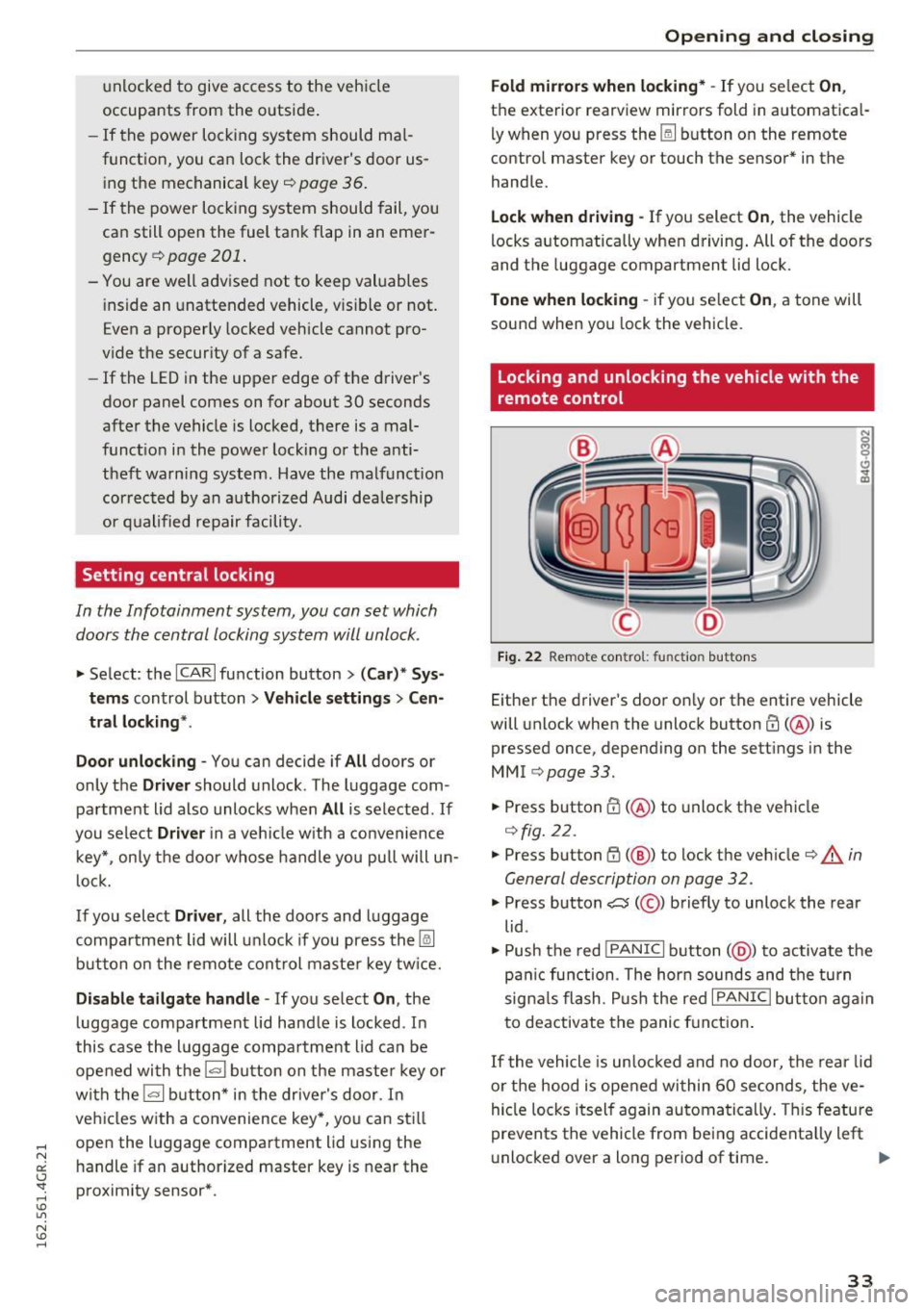
Fig. 22 Remote con trol: fu nct io n buttons
Either the driver's door only or the entire vehicle
will unlock when the unlock button
m (@ ) is
pressed once, depending on the settings in the
MMI ¢page33.
"'Press button CD(@ ) to unlock the vehicle
¢fig. 22.
.. Press button G'.l (@ ) to lock the vehicle ¢ & in
General description on page 32.
.,. Press button C:5 (@ ) briefly to unlock the rear
lid .
• Push the red
!PANIC I button( @) to activate the
panic function . The horn sounds and the turn
signals flash . Push the red
I PANIC I button again
to deactivate the panic function.
If the vehicle is unlocked and no door, the rear lid
or the hood is opened within 60 seconds, the ve
hicle locks itself again automatically. This feature
prevents the vehicle from being accidentally left
unlocked over a long period of time. ..,.
33
Page 36 of 282
Opening and closing
It
depends on the settings in the MMI whether
the entire vehicle is unlocked or only certain
doors
¢ page 33.
.&_ WARNING
Read and follow all WARNINGS c:> .&. in Gener
al description on page 32.
(D Tips
- In order to make sure the locking function is
working, you should always keep your eye
on the vehicle to make sure it is properly locked.
- Do not use the remote control if you are in
side the car, otherwise you may uninten
tionally lock the veh icle, and then you would
set off the anti-theft alarm when you try to
start the engine or open a door . In case this
happens anyhow, push the unlock button
m.
-The vehicle can only be locked when these
l ector lever is in the P posit ion .
- Use the panic funct ion only if you are in an
emergency s ituation.
Locking and unlocking with convenience
key
A pp lies to: ve hicles w ith conve nien ce key
The doors and the rear lid con be unlocked and
locked without operating the master key.
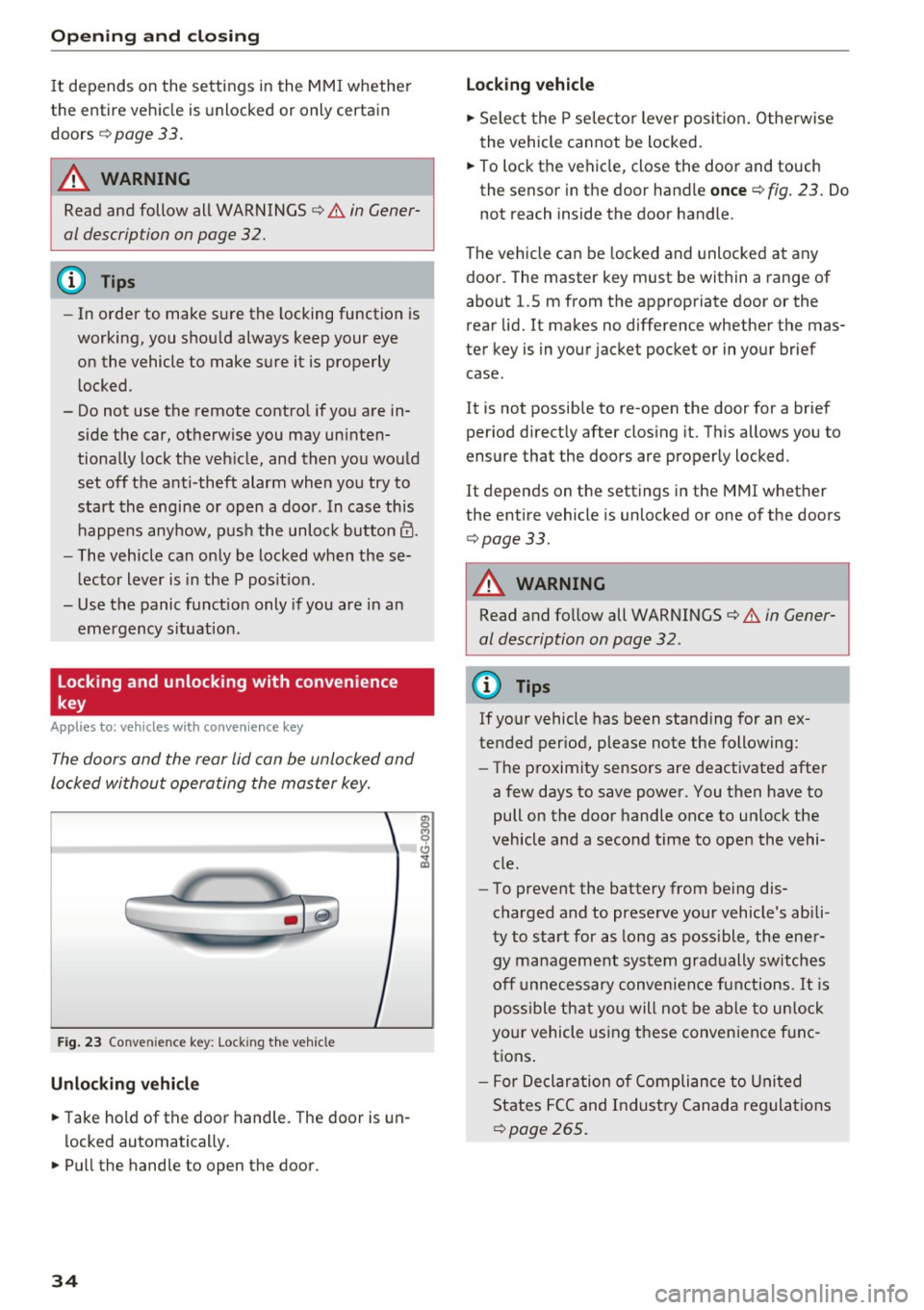
Fig. 23 Conve nien ce key: Lock ing the vehicle
Unlocking vehicle
~ Take hold of the door handle. The door is un
locked automatically.
~ Pull the handle to open the door.
34
Locking vehicle
~ Select the P selector lever position. Otherwise
the vehicle cannot be locked.
~ To lock the vehicle, close the door and touch
the sensor in the door handle
once ¢ fig. 23. Do
not reach inside the door handle .
The vehicle can be locked and unlocked at any
door. The master key must be within a range of
about 1.5 m from the appropriate door or the
rear lid. It makes no difference whether the mas
ter key is in your jacket pocket or in your brief
case .
It is not possible to re-open the door for a brief
period directly after closing it. This allows you to
ensure that the doors are properly locked.
It depends on the settings in the MMI whether
the entire vehicle is unlocked or one of the doors
¢ page 33.
.&_ WARNING
Read and follow all WARNINGS¢.&. in Gener
al description on page 32 .
{!) Tips
If your vehicle has been standing for an ex
tended period, please note the following:
- The proximity sensors are deactivated after
a few days to save power. You then have to
pull on the door handle once to un lock the
vehicle and a second time to open the vehi cle.
- To prevent the battery from being dis
charged and to preserve your vehicle's abili
ty to start for as long as poss ible, the ener
gy management system gradually sw itches
off unnecessary convenience functions.
It is
possible that you will not be able to unlock
your vehicle using these convenience func
tions .
- For Declaration of Compliance to United
States FCC and Industry Canada regulations
r:!>poge265.
Page 37 of 282
Operating locks with the key
In the event of a failure of the power locking system, the driver's door can be locked and un
locked at the lock cylinder.
• p.
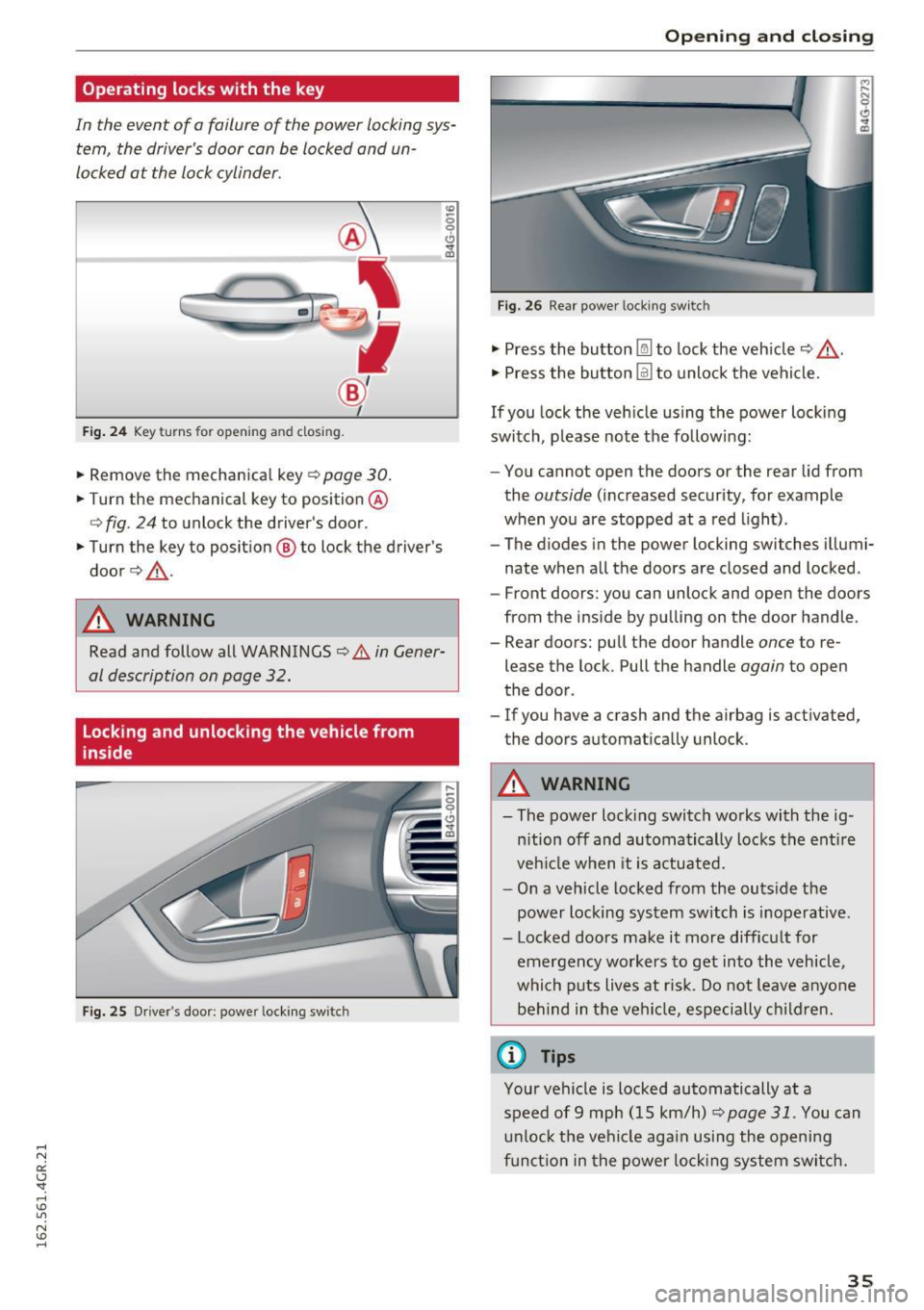
Fig . 24 Key turns fo r open ing a nd clos ing.
• Remove the mechanica l key c::> page 30.
• Turn the mechanical key to position @
<=>fig . 24 to unlock the driver's door .
• Turn the key to position ® to lock the driver's
door
c::> & -
A WARNING
co
0 9 (!)
" ID
Read and follow all WARNINGS c::> .&. in Gener
al description on page 32.
Locking and unlocking the vehicle from
inside
Fig. 25 Driver's doo r: powe r locking sw itc h
Open ing and closing
Fig. 26 Rear powe r lock ing switc h
• Press the button @l to lock the vehicle c::> ,&.
• Press the button @I to unlock the vehicle.
If you lock the veh icle using the power locking
switch, p lease note the follow ing:
- You cannot open the doors or the rear lid from
the
outside (increased security, for example
when you are stopped at a red light).
- The diodes in the power locking switches illumi
nate when all the doors are closed and locked .
- Front doors: you can unlock and open the doors
from the ins ide by pulling on the door handle.
- Rear doors: pull the door handle
once to re
lease the lock. Pull the handle
again to open
the door .
- If you have a crash and the airbag is activated,
the doors automatically unlock .
A WARNING
-- The power locking switch works with the ig-
n ition off and automatically locks the entire
veh icle when it is actuated.
- On a vehicle locked from the outs ide the
power locking system switch is inoperative.
- Locked doors make it more difficult for emergency workers to get into the vehicle,
which puts lives at ris k . Do not leave anyone
behind in the vehi cle, especially children.
(0 Tips
Your vehicle is locked automatically at a
speed of 9 mph (15 km/h)
~ page 31. You can
unlock the vehicle aga in usi ng the opening
function in the power locking system switch.
35
Page 38 of 282
Opening and closing
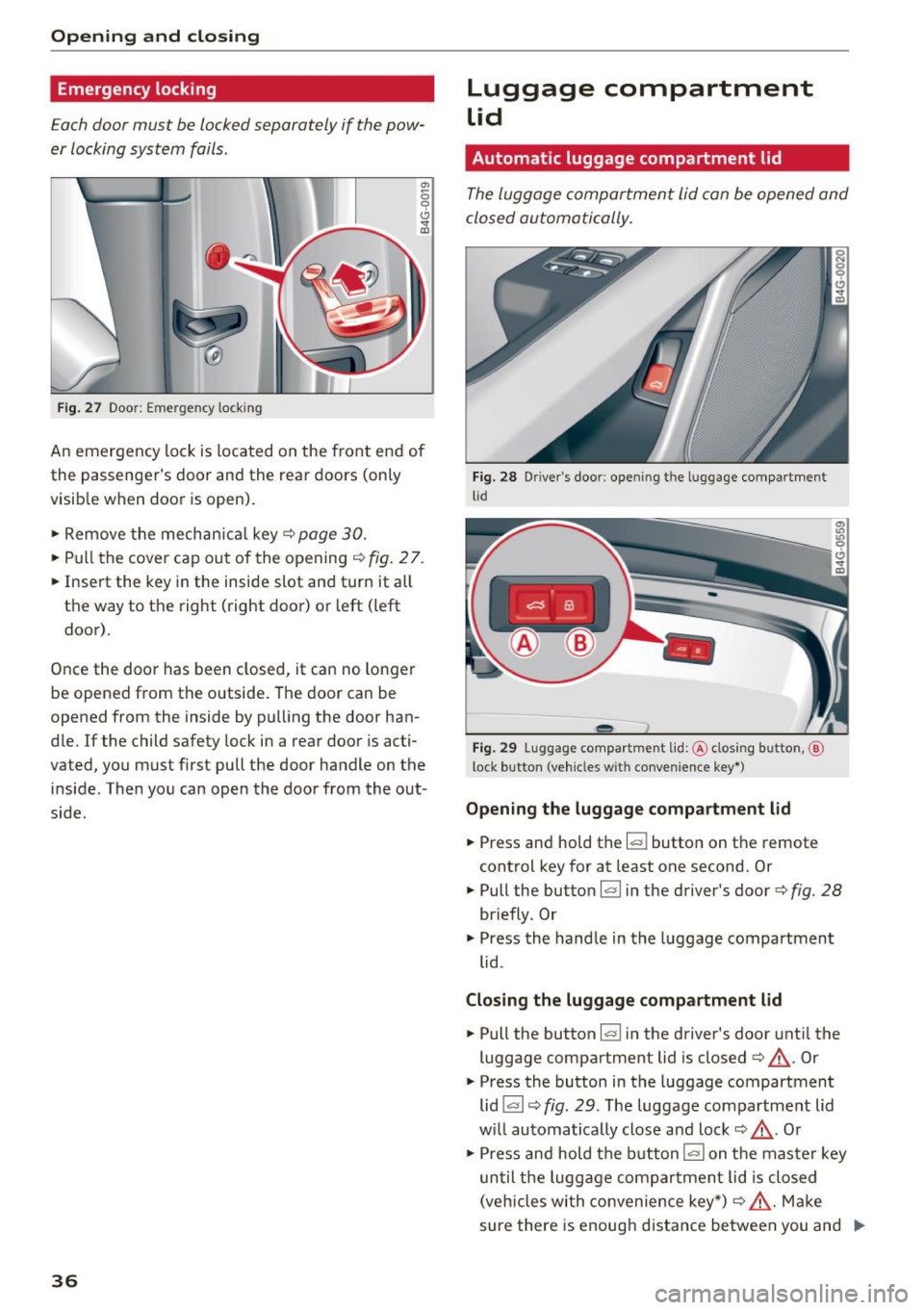
Emergency locking
Each door must be locked separately if the pow
er locking system fails.
Fig . 27 Door: Emergency lock ing
.,,
0 9 Cl
the passenger's door and the rear doors (only
visib le when door is open).
~ Remove the mechan ical key¢ page 30.
~ Pull the cover cap out of the opening ¢ fig. 2 7.
~ Insert the key in the inside slot and turn it a ll
the way to the right (right door) or left (left
door).
Once the door has been closed, it can no longer
be opened from the outside. The door can be
opened from the inside by pulling the door han
d le. If the child safety tock in a rear door is acti
vated, you must first pull the door handle on the
inside . Then you can open the door from the out
side.
36
Luggage compartment
Lid
Automatic luggage compartment lid
The luggage comportment lid can be opened and
closed automatically.
Fig. 28 Driver 's doo r: ope ning the lu ggage compartment
lid
-- -
' c::::s @
--
e,
Fig. 29 Luggage co mpartment lid : @ clos ing button ,@
lock butto n (veh icles w it h convenie nce key* )
Opening the luggage compartment lid
~ Press and hold the I<=:< ! button on the remote
control key for at least one second. Or
~ Putt the button~ in the driver's door¢ fig. 28
briefly . Or
~ Press the handle in the luggage compartment
lid .
Closing the luggage compartment lid
~ Pull the button~ in the driver's door until the
luggage compartment lid is closed ¢
_A. Or
~ Press the button in the luggage compartment
lid~ ¢
fig. 29. The luggage compartment lid
w ill automatically close and lock¢
_A. Or
~ Press and hold the button !""" I on the master key
un til the luggage compartment lid is closed
(veh icles wi th conv enience key*) ¢
_A. Make
sure there is enough distance between you and
Ill-
Page 39 of 282
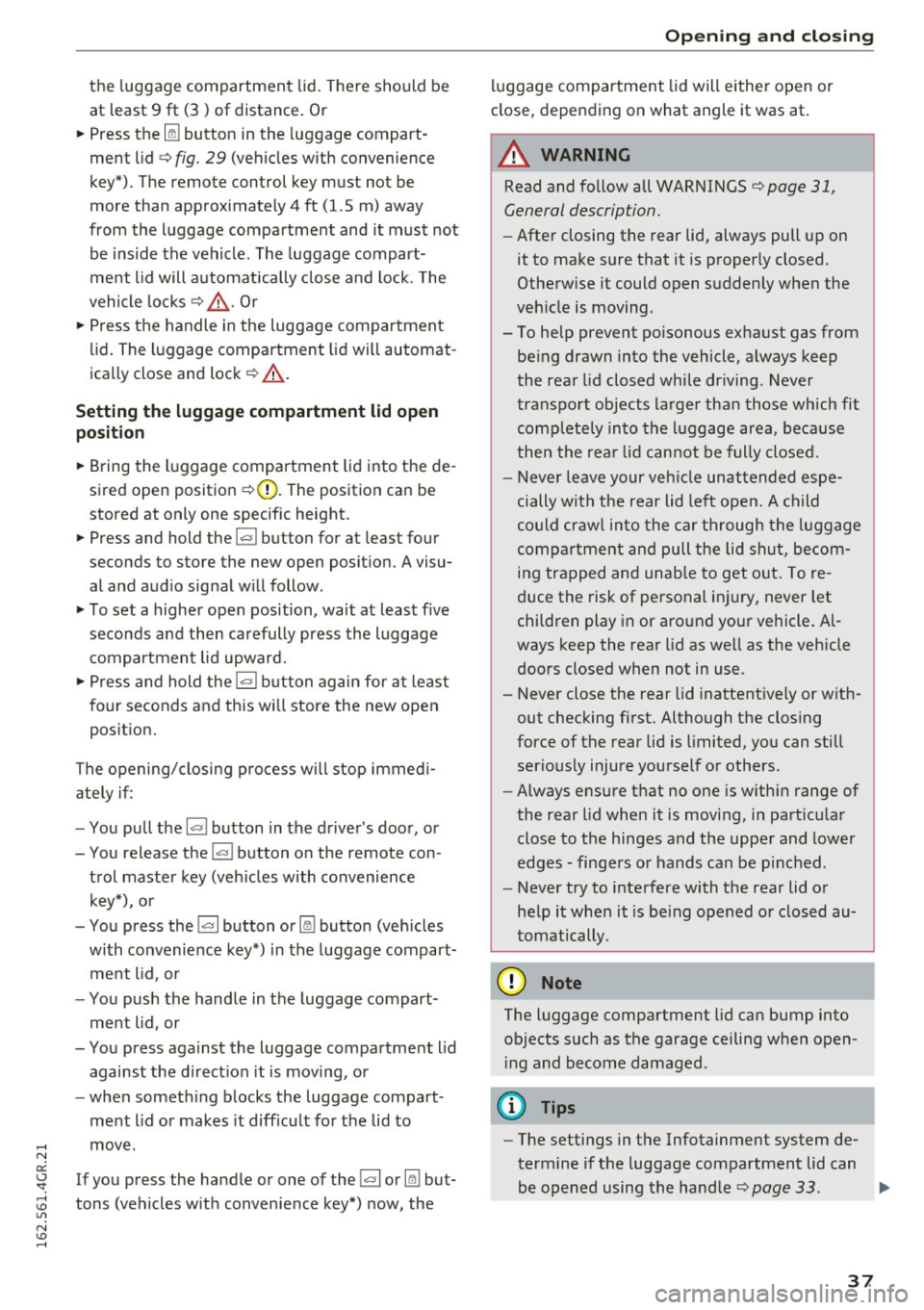
the luggage compartment lid. There should be
at least 9 ft (3) of distance. Or
~ Press the Im button in the luggage compart
ment lid
c> fig. 29 (vehicles with convenience
key*). The remote control key must not be
more than approximately 4 ft (1.5 m) away
from the luggage compartment and it must not
be inside the vehicle . The luggage compart
ment lid will automatically close and lock. The
vehicle locks
c> & . Or
~ Press the handle in the luggage compartment
lid . The luggage compartment lid will automat
ica lly close and lock¢.&, .
Setting the luggage compartment lid open
po sit ion
~ Bring the l uggage compartment lid into the de
sired open position
c> (D. The position can be
stored at only one specific height.
~ Press and hold the~ button for at least four
seconds to store the new open posit ion. A visu
al and audio signal w ill follow.
~ T o set a higher open position, wait at least five
seconds and then carefully press the luggage
compartmen t lid upward.
~ Press and hold the l= I button again for at least
f o ur seconds and this wi ll store the new open
position .
The opening/closing p rocess w ill stop immed i
ately if:
- You pull the~ button in the d river's doo r, o r
- You release the
l = I button on the remote con-
trol master key (veh icles with convenience
key*), or
- You press the~ button or
Im button (veh icles
with convenience key*) in the luggage compart
ment l id , or
- You push the hand le in the luggage compart
me nt l id, or
- You press against the luggage compartment l id
against the d irect ion it is mov ing, or
- when someth ing blocks the luggage compart
ment lid or makes it diff icult for the lid to
move .
If you press the handle or one of the~ or
Im but
tons (vehicles w it h convenience key *) now, the
Op ening and cl osing
luggage compartment lid will either open or
close, depending on what angle it was at .
A WARNING
-Read and follow all WARNINGS ¢ page 31,
General description.
- After closing the rear lid, always pull up on
it to make sure that it is p roperly closed.
Otherw ise it could open s uddenly when the
veh icle is moving.
- To help prevent po isonous exha ust gas from
be ing drawn into the vehicle, a lways keep
the rear lid closed whi le dr iving . Never
transport objects larger than those which fit
comp lete ly into the l uggage area, beca use
t hen the rea r lid can not be f ully closed.
- Never leave your ve hicle unattended espe
cially with t he rear lid left ope n. A c hild
could craw l in to the car th rough the luggage
compa rtment and pull the lid shut, becom
in g trapped and unab le to get o ut. To re
duce the risk of pe rsonal inj ury, never let
chi ldren play in or aro und yo ur vehicle . Al
ways keep the rea r lid as we ll as the veh icle
doors closed when not in use .
- Never close the rear lid inattentive ly or with
out checking first. Although the closing
force of the rear lid is limited, you can still
serio usly injure you rself or others .
- Always ensure t hat no one is w ith in range of
the rea r lid when it is moving, in part ic ul ar
close to the hi nges and the uppe r and lower
edges -finge rs or hands can be pinc hed.
- Never try to i nte rfere with the rear lid or
he lp it whe n it is be ing opened o r closed au
tomatically.
@ Note
The luggage compartment lid can bump into
objects s uch as the garage ceiling when open
i ng and become damaged .
(D Tips
-The settings in the Infotainment system de
termine if the luggage compartment lid can
-
be opened using the hand le ¢page 33. 11111-
37
Page 40 of 282
Opening and clo sin g
- There are audio si gnals when closing the
l uggage compartment lid with the remote
contro l key (veh icles w ith convenience key*)
or with the~ button in the driver's door.
- When the vehicle is locked, the luggage
compartment lid can be unlocked separately by pressing the button
!a l on the remote
control key. The luggage compartment lid locks automatically after it is closed aga in.
- You can close the luggage compartment lid
us ing the master key (veh icles with conven
i ence key*) up to a distance of approximate
l y 9 ft (3 m).
- The luggage compa rtment lid ca n be oper
ated by hand if the vehicle battery is low. It
i s necessary to use more fo rce whe n doing
th is. Move the lid slowly to red uce the
amoun t of force needed.
Luggage compartment with movement
activated opening
Applies to: vehicles with conven ience key and sensor-control·
led luggage compartmen t lid
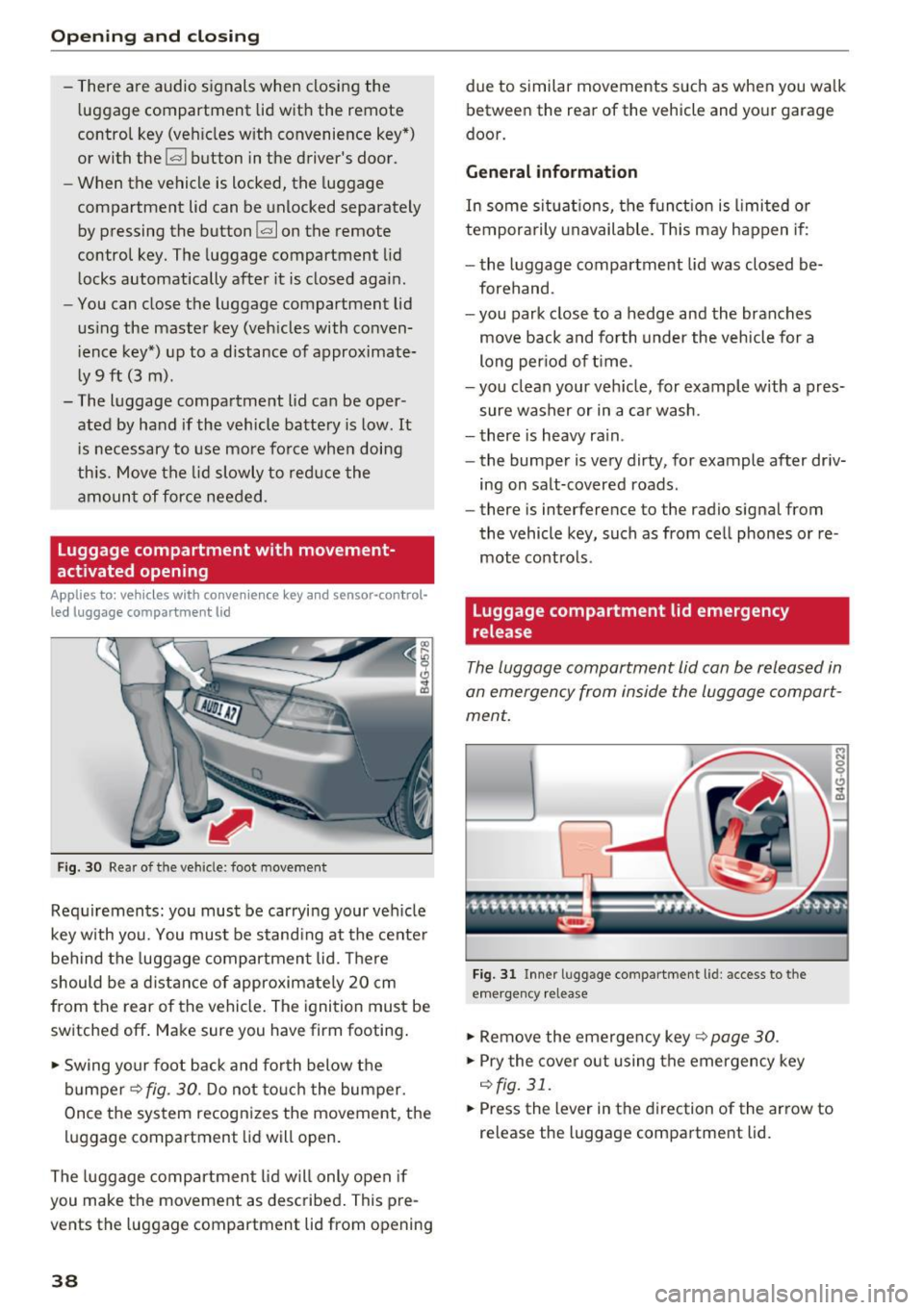
Fig . 30 Rear of the vehicle: foot movement
Req uirements: you must be carrying your ve hicle
key with you. You must be stand ing at the cente r
behind the luggage compartment lid. There
should be a d istance of approximate ly 20 cm
from the rear of the vehicle. The ignition must be
sw itched off . Make sure you have firm footing .
~ Swing your foot back and forth below the
bumper~
fig. 30. D o not to uc h the bumper.
Once the system recogni zes the movement, t he
l u ggage compartment lid will open .
The luggage compartment lid will only open if
you make the movement as described . This pre
vents the luggage compartment lid from opening
38
due to s imilar movements such as when you wa lk
between the rear of the vehicle and yo ur garage
door.
General information
In some situat io ns, the f un ct ion is limi ted or
tempora rily unavailable. Th is may happen if:
- the luggage compartment lid was closed be
forehand.
- you park close to a hedge and the branches
move back and fo rth under the veh icle for a
long per iod of t ime.
- you clean your ve hicle, for example w ith a pres
sure washer or in a c ar wash .
- there is heavy ra in .
- the bumper is very dirty, for example after dr iv-
ing on salt-covered roads .
- there is interference to the radio sig nal from
the vehicle key, such as from cel l phones or re
mote co ntrols.
Luggage compartment lid emergency
release
Th e luggage compartment lid can be released in
an emergen cy from inside the luggage compart
ment.
Fi g. 31 Inner luggage compartment lid: access to the
e m ergency release
~ Remove the emerge ncy key Q page 30 .
~ Pry the cove r out using the emerge ncy key
Q fig.31.
~ Press the lever in the direction of the arrow to
re lease the luggage compartment lid.
Page 41 of 282
Child safety lock
The child safety lock prevents the rear door from
being opened from the inside and the rear win
dows from be operated.
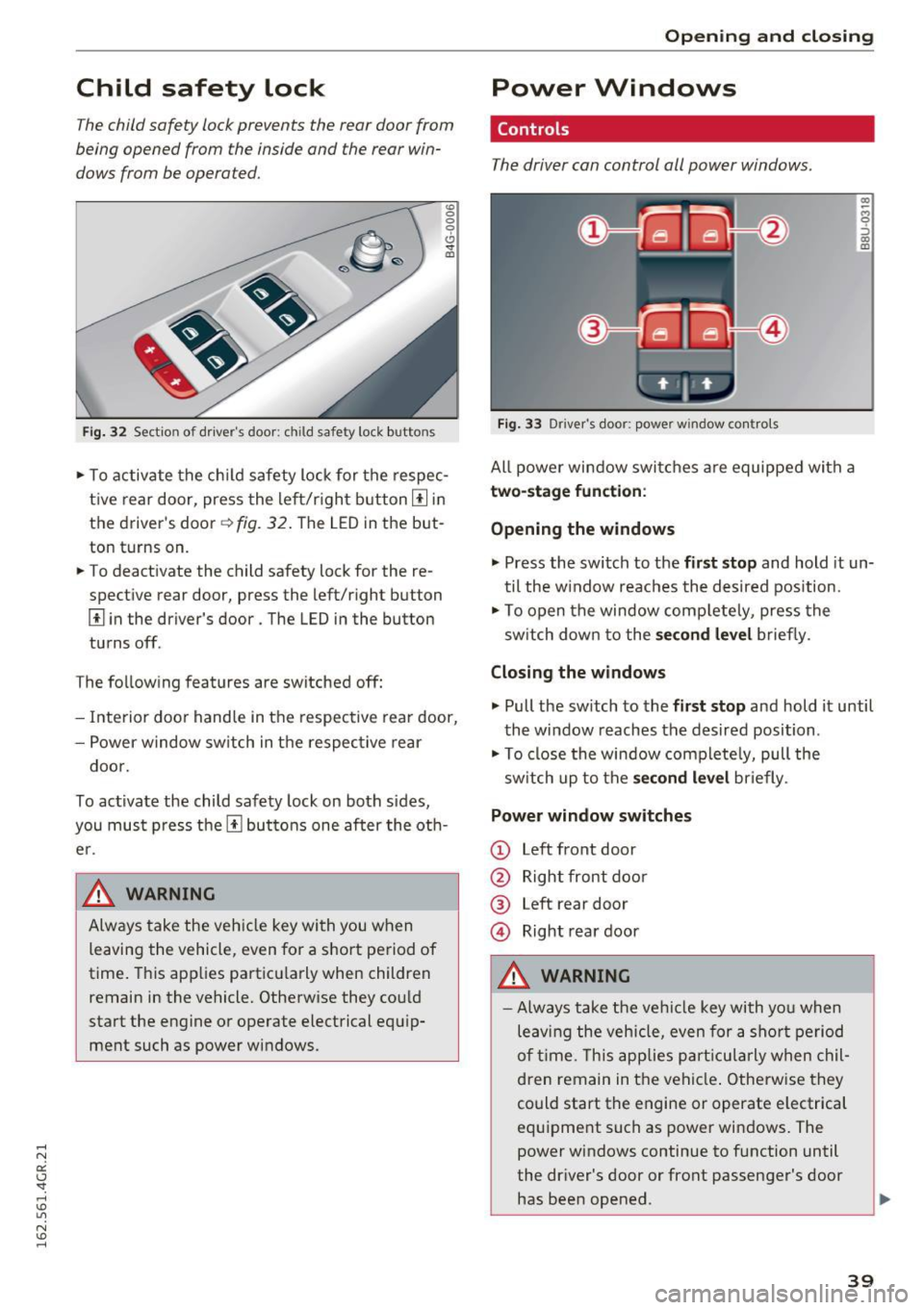
Fi g. 32 Section of d river's doo r: ch ild safety lock buttons
"' 0
0
0
0 ,,. !II
"'T o activate the ch ild safety lock for the respec
t ive rear door, press the le ft/r igh t button
III in
the driver's door~
fig. 32 . The LED in the but
ton turns on.
"' To deact ivate the child safety lock for the re
spect ive rear door, press the left/r ight button
III i n the driver's door . The LED in the button
tu rns off.
T he fo llow ing features are switched
off:
- Interior doo r hand le in t he respec tive rear door,
- Power w ind ow sw itch in t he respec tive rear
doo r.
To activate the child safe ty lock on both sides,
you mu st press the
III bu ttons one after the ot h
e r.
A WARNING ~
Alw ays take the veh icle key wi th you w hen
leaving the vehicle, even for
a s hort pe riod of
time . This app lies pa rt icu la rly when children
remain in the ve hicle. Otherw ise they co uld
sta rt the engine o r ope rate electrical equ ip
ment such as power wi ndows .
Open ing and closing
Power Windows
Controls
The driver can control all power windows .
Fig. 33 Driver 's door: power w indow co ntro ls
All powe r window swi tches are equipped with a
two-stage function :
Opening the windows
(0 ~ M 0 :::, (0 m
"' Press the switch to t he first stop and hold it un
t il the w indow reaches the desired position.
"' To op en the window comp letely, press the
sw itch dow n to the
second level briefly .
Closing the windows
"' Pull the sw itch to the first stop and hold it until
the window reaches the desired position .
"' To close the window com plete ly, pull the
sw itch up to the
second level briefly .
Power window switches
CD Left front door
@ Right front doo r
® Left rear door
@ Right rear door
A WARNING
=
- Always take the ve hicl e key with yo u when
le av in g the vehicle, even for a sh ort p eriod
o f time . T his app lies par tic ula rly whe n chil
d ren remain in t he ve hicl e. Otherwise they
could start the engine or operate e lectrical
equ ipment such as powe r windows . The
power wi ndows continue to f unction until
the dr iver's door or front passenge r's door
has bee n opened .
-
39
Page 42 of 282
Opening and closing
-Pay careful attention when closing the win
dows. It could cause injury by pinching.
- When locking the vehicle from outside, the
vehicle must be unoccupied since the win
dows can no longer be opened in an emer
gency.
(D Tips
- The windows will automatically lower ap
proximately 0.4 inches (10 mm) when you
open the doors.
- When the window in the driver's or front
passenger's door is comp letely open, it will
raise approximately 1 inch (25 mm) when
the door is opened. The w indow will lower
again when you close the door .
- After turning the ignition off you can still
open and close the windows for approxi mately 10 minutes. The power windows are
not switched off until the driver's door or
front passenger's door has been opened.
Convenience opening
All of the windows and the sunroof* can be
opened at once.
The settings in the Infotainment system specify
which windows w ill open.
Convenience opening
.,. Press and hold the~ button on the remote
control key until the windows reach the ir de
sired position and the sunroof* is tilted open.
Setting convenience opening in the
Infotainment system
.,. Select : the ICARI function button > (Car)* Sys
tems
control button > Vehicle settings > Cen
tral locking
> Long-press to open windows.
To enable convenience open ing of the windows
and the roof*, the
Front windows , Rear windows
and Roof functions must be switched On.
A WARNING
For security reasons, the windows and the
sunroof* can only be opened with the remote
40
control key at a maximum distance of approx
i mately 6 feet (2 m) from the veh icle.
Correcting power window malfunctions
After disconnecting the vehicle battery, the one
touch up and down feature must be activated
again.
.,. Pull the powe r window switch until the window
is completely raised.
.,. Release the switch and pull it again for at least
one second.
Sunroof
Description
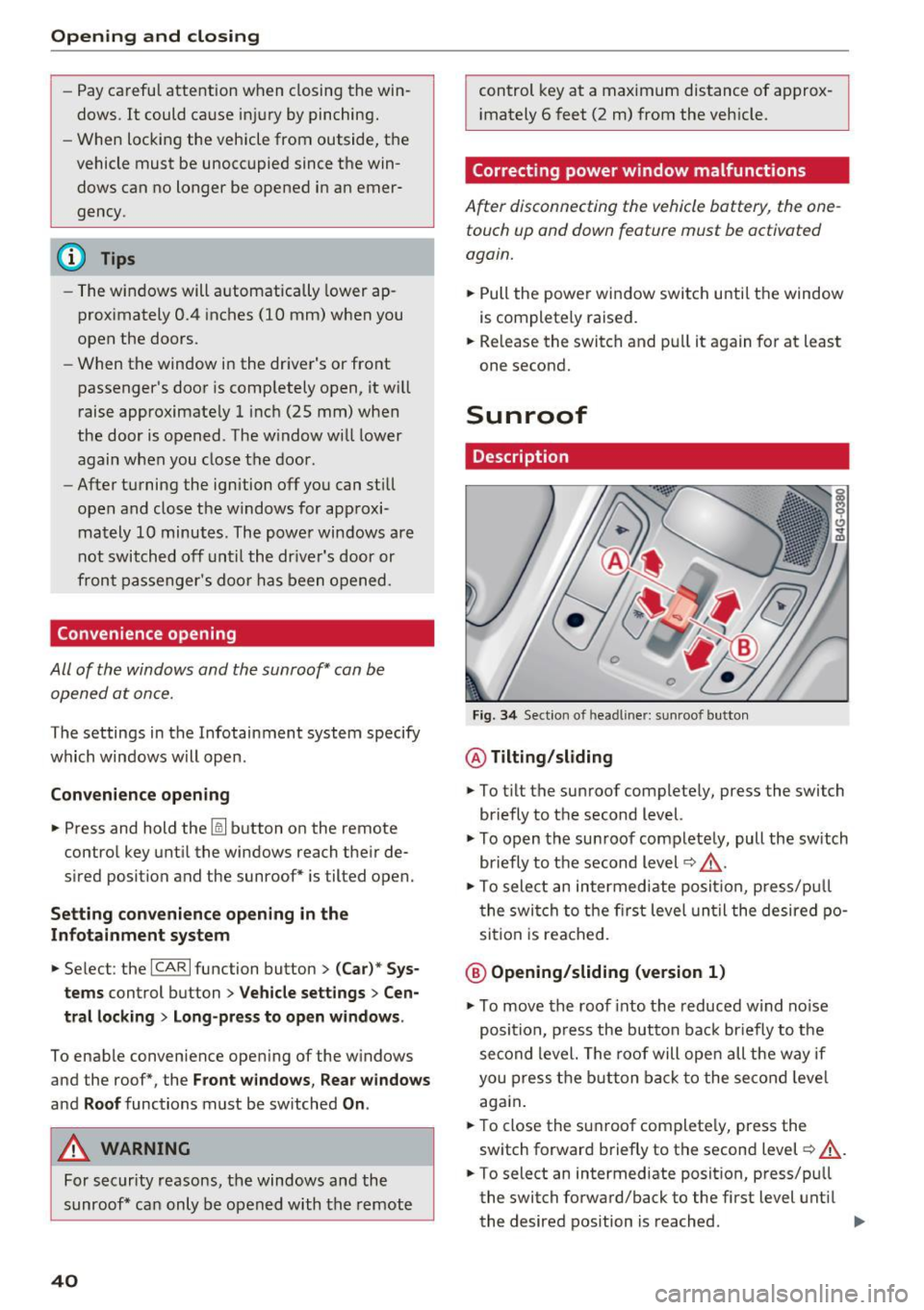
Fig. 34 Sect ion of head liner: sun roof button
@ Tilting/sliding
.,. To t ilt the sunroof complete ly, press the switch
briefly to the second level.
.,. To open the sunroof completely, pull the switch
briefly to the second level~.&_ .
.,. To select an intermediate posit ion, press/pu ll
the switch to the first level until the desired po
sition is reached .
@ Opening/sliding (version 1)
.,. To move the roof into the reduced w ind noise
position, press the but ton back briefly to the
second level. The roof will open all the way if
you press the button back to the second level
again.
.,. To close the sunroof complete ly, press the
switch forward briefly to the second level~.&_ .
.,. To select an intermediate posit ion, press/pu ll
the switch forward/back to the first level until
the desired position is reached . ..,.
Page 47 of 282
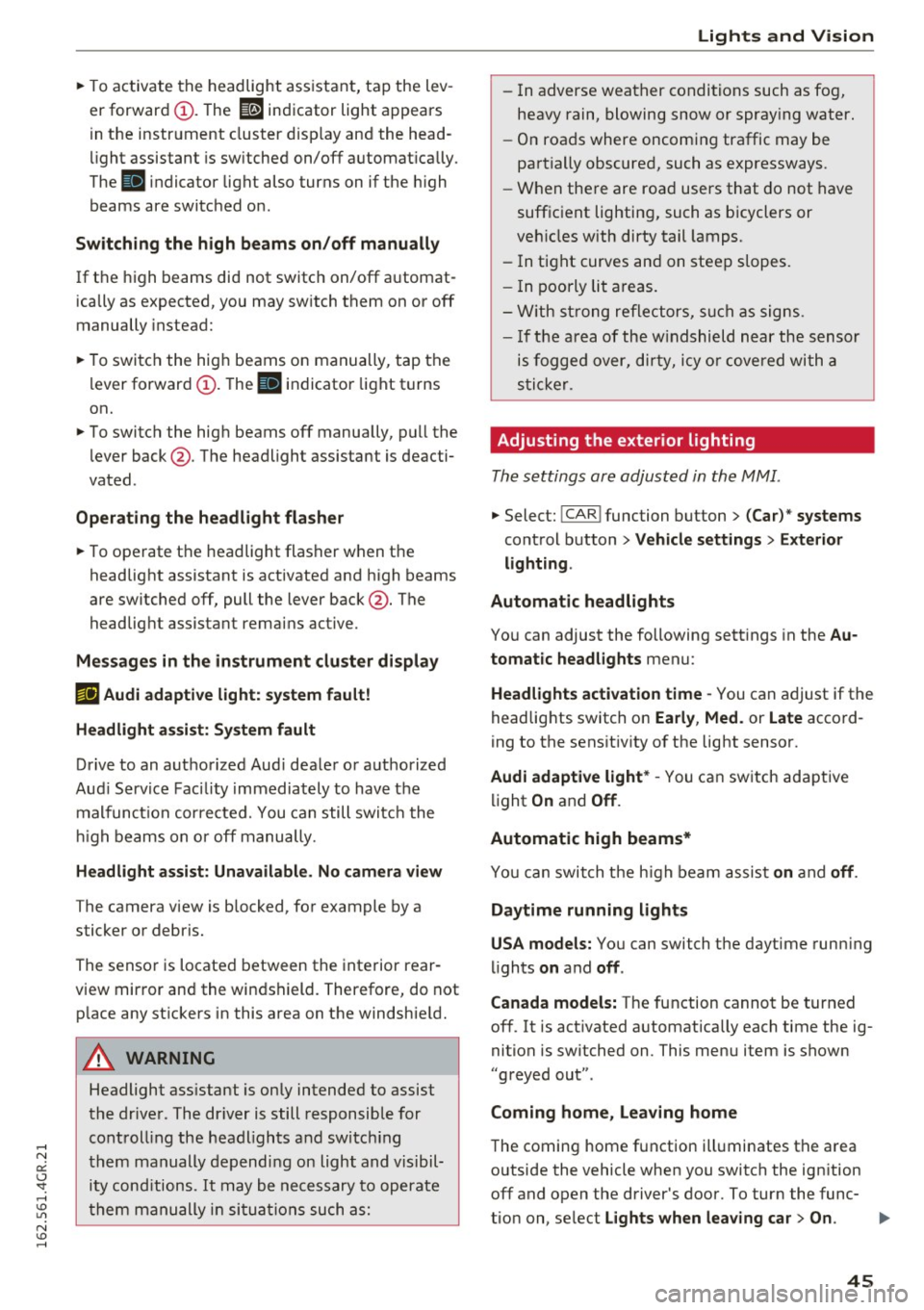
~ To activate the headlight assistant, tap the lev
er forward (!). The
112 indicator light appears
in the instrument cluster disp lay and the head
light assistant is switched on/off automatically .
The
El indicator light also turns on if the high
beams are switched on .
Switching the high beams on/off manually
If the high beams did not switch on/off automat
ically as expected, you may switch them on or off
manually instead:
~ To switch the high beams on manually, tap the
l ever forward (!). The
El indicator light turns
on.
~ To switch the high beams off manually, pull the
lever back@. The headlight assistant is deacti
vated .
Operating the headlight flasher
~ To operate the headlight flasher when the
headlight assistant is activated and h igh beams
are switched off, pull the lever back@. The
headlight assistant remains active .
Messages in the instrument cluster display
r!IJ Audi adaptive light: system fault!
Headlight assist: System fault
Drive to an authorized Aud i dealer or authorized
Aud i Service Facility immediately to have the
malfunction corrected. You can still switc h the
high beams on or off manually.
Headlight assist: Unavailable. No camera view
The camera view is blocked, for example by a
sticker or debris.
The sensor is located between the interior rear
view mirror and the windshield. Therefore, do not p lace any st ickers in this area on the windshie ld.
A WARNING
Headlight ass istant is only intended to assist
the driver . The dr iver is still responsible for
controll ing the headlights and switching
them manually depending on light and visibil
i t y cond itions.
It may be necessary to operate
them manually in situations such as:
Lights and Vision
-In adverse weather conditions such as fog,
heavy rain, blowing snow or spraying water.
- On roads where oncoming traffic may be
partially obscured, such as expressways.
- When there are road users that do not have
suff icient lighting, such as b icyclers or
veh icles with dirty tail lamps.
- In tight curves and on steep slopes.
- I n poorly lit areas.
- With strong reflectors, such as signs.
- If the area of the w indshield near the sensor
is fogged over, dirty, icy or covered with a
sticker.
Adjusting the exterior lighting
The settings are adjusted in the MMI .
~ Select: !CAR ! function button> (Car) " systems
control button > Vehicle settings> Exterior
lighting .
Automatic headlights
You can adjust the following settings in the Au
tomatic headlights
menu:
Headlights activation time -You can adjust if the
headlights switch on
Early , Med . or Late accord
ing to the sensit ivity of the light sensor.
Audi adaptive light* -You can switch adaptive
light
On and Off .
Automatic high beams*
You can switch t he h igh beam assist on and off.
Daytime running lights
USA models:
You can switch the daytime running
lights
on and off .
Canada models:
The function cannot be turned
off. It is activated automatically each time the ig
nition is switched on. This menu item is shown
"greyed out" .
Coming home, Leaving home
The coming home function illuminates the area
outside the vehicle when you switch the ignition
off and open the driver's door. To turn the func-
tion on, select
Lights when leaving car> On. .,.
45