service AUDI RS7 SPORTBACK 2016 User Guide
[x] Cancel search | Manufacturer: AUDI, Model Year: 2016, Model line: RS7 SPORTBACK, Model: AUDI RS7 SPORTBACK 2016Pages: 282, PDF Size: 70.78 MB
Page 46 of 282
Lights and Vision
-In cool or damp weather, the inside of the
headlights, turn signals and tail lights can
fog over due to the temperature difference between the inside and outs ide. They will
clear short ly after sw itching them on. This
does not affect the service life of the light i ng.
Turn signals and high beam lever
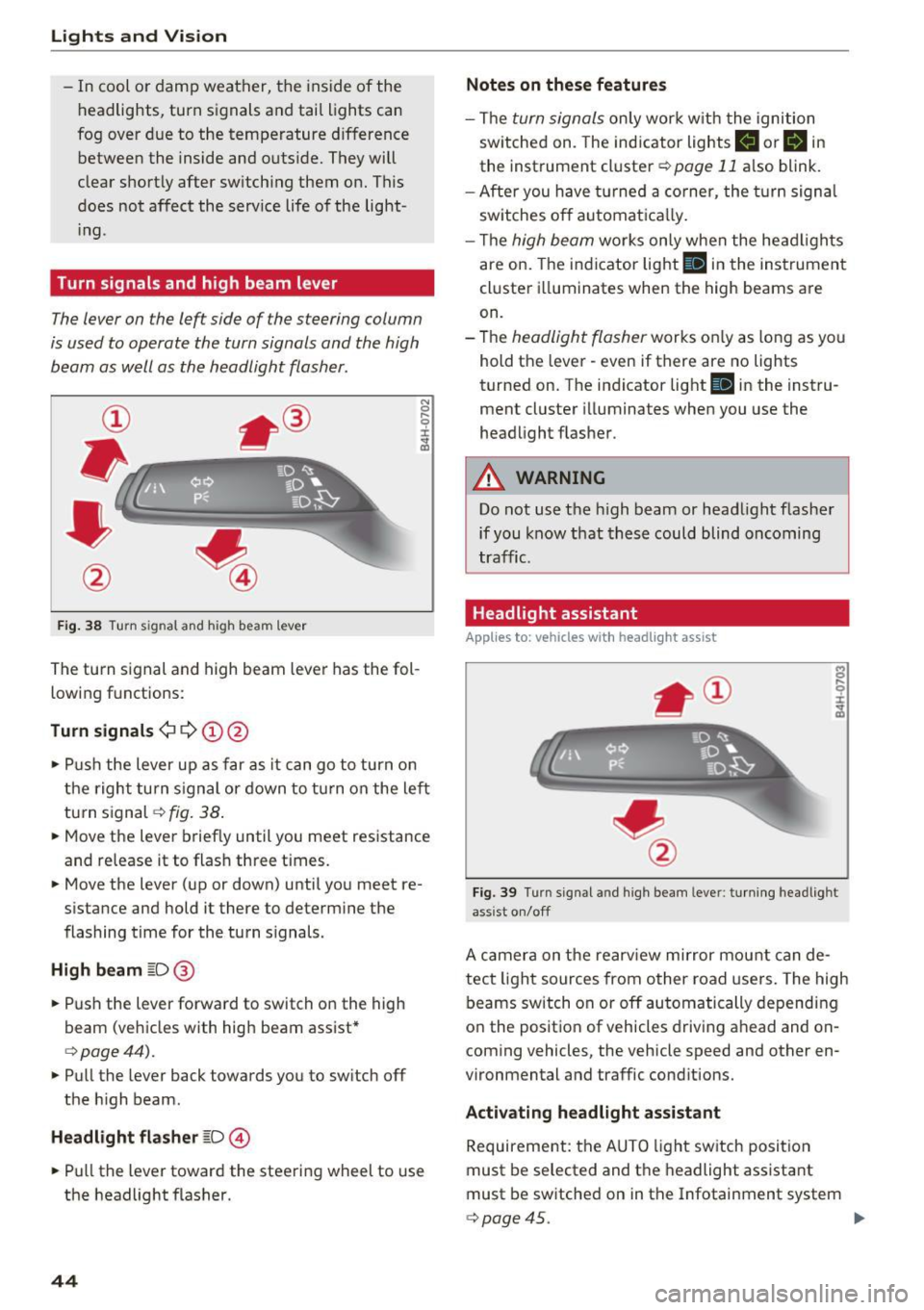
The lever on the left side of the steering column
is used to operate the turn signals and the high
beam as well as the headlight flasher.
F ig . 38 Turn signal and high beam lever
The turn s ignal and high beam lever has the fol
lowing f unctions:
Turn signals ¢¢@@
N
0 ,.._ 0 ±
~
• Pu sh the lever u p as far as it can go to turn on
t he righ t turn s ignal or down to t urn on the left
turn s ignal
c:> fig. 38 .
• Move the lever briefly until you meet resistance
and release it to flash three t imes.
• Move the lever (up or down) until you meet re
s istance and hold it there to determine the
flashing time for the tu rn signals.
High beam ~D @
• Push the lever forward to switch on the high
beam (veh icles with high beam assist*
c:> page44).
• Pull the lever back towards you to sw itch off
the h igh beam.
Headlight flasher ~D ©
• Pull the lever toward the steering wheel to use
the headlight flasher.
44
Notes on these features
- The turn signals on ly wor k w it h the ignition
sw itched on. The ind icator lights
II or B in
the instrument cluster c:> page 11 also blink.
- After you have turned a co rner, the turn signa l
sw itches o ff automat ica lly.
- Th e
high beam works only when the head ligh ts
are on. The indicator light
Bl in the instrumen t
cl uster illuminates when the high beams are
on.
- The
headlight flasher works o nly as long as yo u
hold the lever - even if there are no lights
turned on. T he indicator light
Bl in the instru
ment cluster i lluminates when you use the
headlight flas her .
A WARNING
Do not use the h igh beam or head light flasher
if you know that these could blind oncoming
traffic.
Headlight assistant
App lies to: vehicles with headlight assist
Fig. 39 Turn s ig nal and high beam leve r: turn ing headlight
ass ist o n/off
A camer a on the rearv iew mirror mou nt can de
tect light sources from other road users. The high
beams switch on or off automatically depending
o n the positio n of vehicles driving ahead and on
coming vehicles, the vehicle speed and other en
vironmental and traffic cond itions.
Activ ating headlight assistant
Requirement: the AUTO light sw itch posit ion
must be selected and t he headlight assistant
must be sw itched on in the Infotainment system
c:> page45. "'
Page 47 of 282
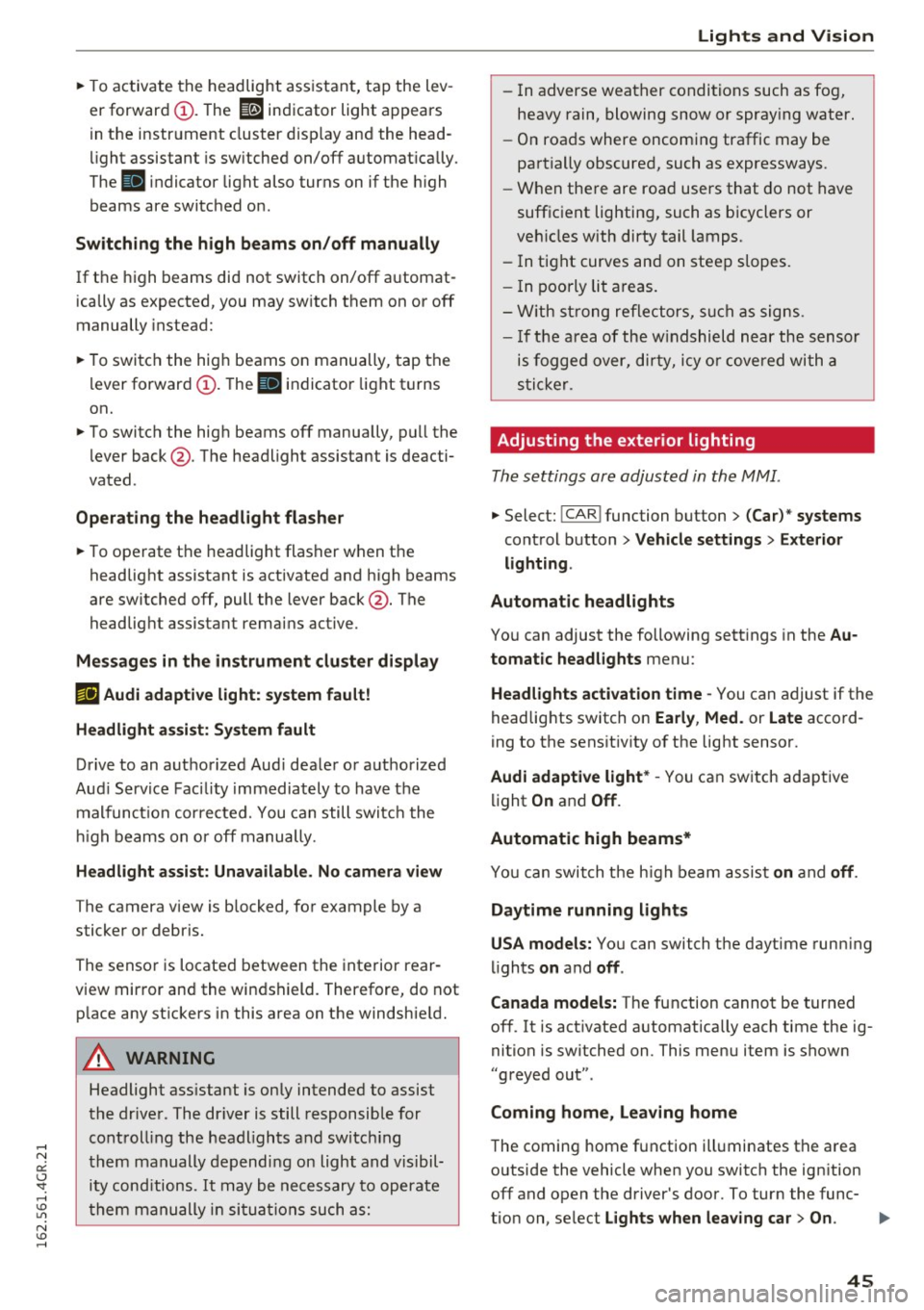
~ To activate the headlight assistant, tap the lev
er forward (!). The
112 indicator light appears
in the instrument cluster disp lay and the head
light assistant is switched on/off automatically .
The
El indicator light also turns on if the high
beams are switched on .
Switching the high beams on/off manually
If the high beams did not switch on/off automat
ically as expected, you may switch them on or off
manually instead:
~ To switch the high beams on manually, tap the
l ever forward (!). The
El indicator light turns
on.
~ To switch the high beams off manually, pull the
lever back@. The headlight assistant is deacti
vated .
Operating the headlight flasher
~ To operate the headlight flasher when the
headlight assistant is activated and h igh beams
are switched off, pull the lever back@. The
headlight assistant remains active .
Messages in the instrument cluster display
r!IJ Audi adaptive light: system fault!
Headlight assist: System fault
Drive to an authorized Aud i dealer or authorized
Aud i Service Facility immediately to have the
malfunction corrected. You can still switc h the
high beams on or off manually.
Headlight assist: Unavailable. No camera view
The camera view is blocked, for example by a
sticker or debris.
The sensor is located between the interior rear
view mirror and the windshield. Therefore, do not p lace any st ickers in this area on the windshie ld.
A WARNING
Headlight ass istant is only intended to assist
the driver . The dr iver is still responsible for
controll ing the headlights and switching
them manually depending on light and visibil
i t y cond itions.
It may be necessary to operate
them manually in situations such as:
Lights and Vision
-In adverse weather conditions such as fog,
heavy rain, blowing snow or spraying water.
- On roads where oncoming traffic may be
partially obscured, such as expressways.
- When there are road users that do not have
suff icient lighting, such as b icyclers or
veh icles with dirty tail lamps.
- In tight curves and on steep slopes.
- I n poorly lit areas.
- With strong reflectors, such as signs.
- If the area of the w indshield near the sensor
is fogged over, dirty, icy or covered with a
sticker.
Adjusting the exterior lighting
The settings are adjusted in the MMI .
~ Select: !CAR ! function button> (Car) " systems
control button > Vehicle settings> Exterior
lighting .
Automatic headlights
You can adjust the following settings in the Au
tomatic headlights
menu:
Headlights activation time -You can adjust if the
headlights switch on
Early , Med . or Late accord
ing to the sensit ivity of the light sensor.
Audi adaptive light* -You can switch adaptive
light
On and Off .
Automatic high beams*
You can switch t he h igh beam assist on and off.
Daytime running lights
USA models:
You can switch the daytime running
lights
on and off .
Canada models:
The function cannot be turned
off. It is activated automatically each time the ig
nition is switched on. This menu item is shown
"greyed out" .
Coming home, Leaving home
The coming home function illuminates the area
outside the vehicle when you switch the ignition
off and open the driver's door. To turn the func-
tion on, select
Lights when leaving car> On. .,.
45
Page 52 of 282
Lights and Vision
by moving the lever to position® within 10 sec
onds of the after-wipe. The after-wipe function is
react ivated the next time you switch the ignition
on.
Cleaning the headlights*. The headlight washer
system* operates only when the low beam head lights are on. If you move the lever to position
@ , the headlights and the night vision assist
camera* are washed in intervals.
A WARNING
-The rain sensor is only intended to assist the
driver . The driver is still responsible for
manually switching the wipers on according
to the visibility conditions.
- The windshield may not be treated with wa
ter-repelling windshield coating agents. Un
favorable conditions, such as wetness, dark
ness or low sun, can result in increased
glare, which increases the risk of an acci
dent. Wiper blade chatter is also possible.
- Properly functioning windshield wiper
blades are required for a clear view and safe
driving ~
page 50, Replacing windshield
wiper blades.
(Jd) Note
- If there is frost, make sure the windshield
wiper blades are not frozen to the wind
shield. Switching on the windshield wipers
when the blades are frozen to the wind
shield can damage the wiper blades.
- Prior to using a car wash, the windshield
wiper system must be switched off (lever in position 0). This prevents unintentional
switching on and damage to the windshield
wiper system.
(Di Tips
- The windshield wipers switch off when the
ignition is turned off. You can activate the
windshield wipers after the ignition is
switched back on by moving the windshield
wiper lever to any position.
- Worn or dirty windshield wiper blades result
in streaking . This can affect the rain sensor
so
function. Check your windshield wiper
blades regularly.
- The washer fluid nozzles of the windshield
washer system are heated at low tempera
tures when the ignition is on.
- When stopping temporarily, such as at a
traffic light, the speed of the windshield
wipers automatically reduces by one level.
Cleaning windshield wiper blades
Clean the wiper blades when you see wiper
streaks. Use a soft cloth and a glass cleaner.
.,. Place the windshield wiper arms in the service
position
c:> page 50.
.,. Fold the windshield wiper arms away from the
windshield.
A WARNING
Dirty windshield wiper blades can impair vi
sion, which increases the risk of an accident.
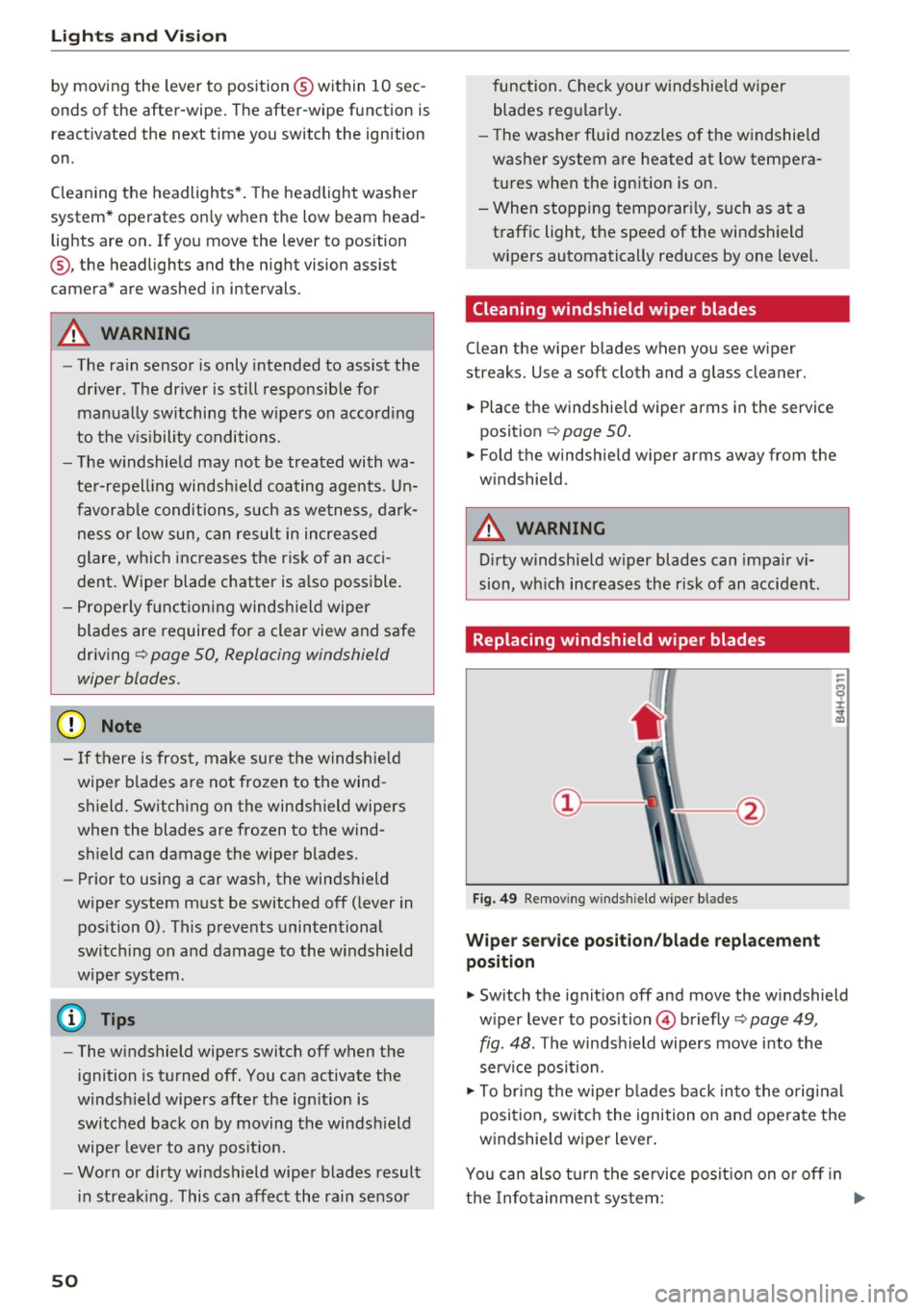
Replacing windshield wiper blades
Fig. 49 Removing windshield wiper blades
Wiper service position/blade replacement
position
.,. Switch the ignition off and move the windshield
wiper lever to position
@ briefly c:> page 49,
fig. 48. The windshield wipers move into the
service position.
.,. To bring the wiper blades back into the original
position, switch the ignition on and operate the
windshield wiper lever.
You can also turn the service position on or off in
the Infotainment system:
IJll-
Page 53 of 282
~ Switch the windshield wipers off (position@
¢page 49, fig. 48).
~ Se lect : the ICARI function button > (Car)* Sys
tems
control button > Service & control > Wip·
er change position
> On/Off.
Removing the wiper blade
~ Fold the windshield wiper arm away from the
windshield.
~ Press the locking knob(!)¢ fig. 49 on the wiper
blade . Hold the wiper blade firmly.
~ Remove the wiper blade in the direction of the
arrow .
Installing the wiper blade
~ Insert the new wiper blade into the mount on
the wiper arm@ until you hear it latch into
place.
~ Place the wiper arm back on the windshield.
~ Turn the serv ice position off .
A WARNING
-
For safety reasons, the windsh ield wiper
blades should be replaced once or twice each
year.
0 Note
- Only fold the windshield wipers away when
i t is in the serv ice position . Otherwise, you
r isk damaging the paint on the hood or the
windsh ield wipe r motor.
- You should not move your vehicle o r operate
the windshie ld wiper lever when the wiper
arms are folded away from the windshield.
The windshield wipers would move back in
to their original position and could damage
the hood and windshield.
(D Tips
- You can also use the service position, for ex
ample, if you want to protect the windshield
from icing by using a cover.
- You cannot activate the service position
when the hood is open.
Lights and Vision
51
Page 69 of 282
Warm and cold 4-zone deluxe automatic
climate control
Description
A pplies to: ve hicles with four -zone auto matic clim ate con trol
The climate control system warms, cools and
adds humidity to the air in the vehicle interior. It
is the most effective when the windows and sun
roof* are closed. If the temperature ins ide the
parked vehicle becomes very warm, opening the
window briefly will speed up the cooling process.
In a ll heating mode functions except
defrost, the
b lower only sw itches to a higher speed once the
engine coolant has reached a certain tempera
ture.
Condensation from the cooling system can drip
and form a puddle of water under the veh icle.
This is normal and does not mean there is a leak.
Pollutant filt er
The po llutant filter removes pollutants such as
dust and pollen from the air.
The air poll utants filter must be changed a t the
intervals specified in you r Warranty
& Mainte
nance booklet, so that the air conditioner can
properly work .
I f yo u drive you r vehicle in a n area with high air
pollu tion, the fil ter may need to be changed
more frequently than specified in your Audi War
ranty & Maintenance booklet . If in doubt, ask
your author ized Audi Service Advisor for advice.
Key coded settings
The clima te con trol settings are autom atically
stored and assigned to the remo te control key
that is in use.
A WARNING
Reduced visibi lity is dangerous and can ca use
accidents.
Warm and c old
- For safe driving it is very important t hat all
windows be free of ice, snow and condensa
tion.
- Complete ly familiar ize yourself with the
proper use and function of the heating and
ventilation system and especially how to de
fog and defrost the windows .
- Never use the windshield wiper/washer sys
tem in freezing weather until you have
warmed the windshield fi rst, using the heat
i n g and vent ilation system . The was he r so lu
tion may freeze on the w indshield and re
duce visibili ty.
(D Note
- If you suspect that the air conditioner has
been damaged, sw itch the system off to
avoid furthe r damage and have it inspected
by a qualified dea lership.
- Repa irs to the Aud i a ir cond itione r requ ire
special techn ica l know ledge and s pe ci al
t oo ls. Cont act an a uthorized Audi de aler fo r
assistance .
@ For the sake of the environment
By red ucing t he amo unt of fuel you use, yo u
also red uce the amount of pollu tan ts emitte d
i nto the air.
(D Tips
- K eep the air intake s lots (in fro nt of the
w indshield) free from i ce , sn ow and debr is
in orde r to maint ain the proper func tion of
the climate control system .
- Th e energy m anagemen t sys tem may switch
t he seat heating* or rear window defros ter
off temporarily. These systems are availab le
agai n as soon as t he energy ba lance has
been restored.
- Air escapes through vents under the rear
w indow . When placing items of clothing on
the luggage compartment cover, ensure
that the openings are not covered.
67
Page 82 of 282
Audi adapt ive crui se con trol a nd b rakin g guar d
-For safety reasons, do not use adaptive
cruise control when driving on roads with
many curves, when the road surface is in
poor condition and/or in bad weather (such
as ice, fog, gravel, heavy ra in and hydroplan
ing). Using the system under these condi·
tions co uld result in a collision.
- Switch adaptive cruise control off tempora
rily when driving in turn ing lanes, on ex
pressway exits or in construction zones. Th is
prevents the vehicle from accelerating to
the set speed when in these situat ions .
- The adapt ive cr uise control system will not
brake by itself if you put your foot on the ac
celerator peda l. Doing so can override the
speed and distance regu lation.
- When approaching stat ionary objects such
as stopped traffic, adaptive cruise control
will not respond and braking guard will have limited function.
- The adaptive cruise control system and
braking guard do not react to people, ani
mals, objects crossing the road or oncom ing
objects.
- The function of the radar sensors can be af
fected by reflective objects such as guard
rails, the entrance to a tunnel, heavy rain or
ice.
- Never follow a vehicle so closely that you
cannot stop your vehicle safely. The adap·
t ive cruise control cannot slow or brake the
vehicle safely when you fo llow another veh i
cle too close ly. Always remember that the
automatic braking function ca nnot br ing the
vehicle to a sudden o r emergency stop un
der these conditions .
- To prevent unintended operation, always
switch ACC off when it is not be ing used .
(D Note
The sensors can be displaced by impacts or
damage to the bumpe r, whee l housing and
unde rbody. That co uld affect the adaptive
cruise control system and braking guard .
Have your authorized Audi dealer or author
ized Audi Service Facility check their function.
80
In curves
Applies to: vehicles with A udi adaptive cruise control
Fig. 87 Example : dr iving into a curve
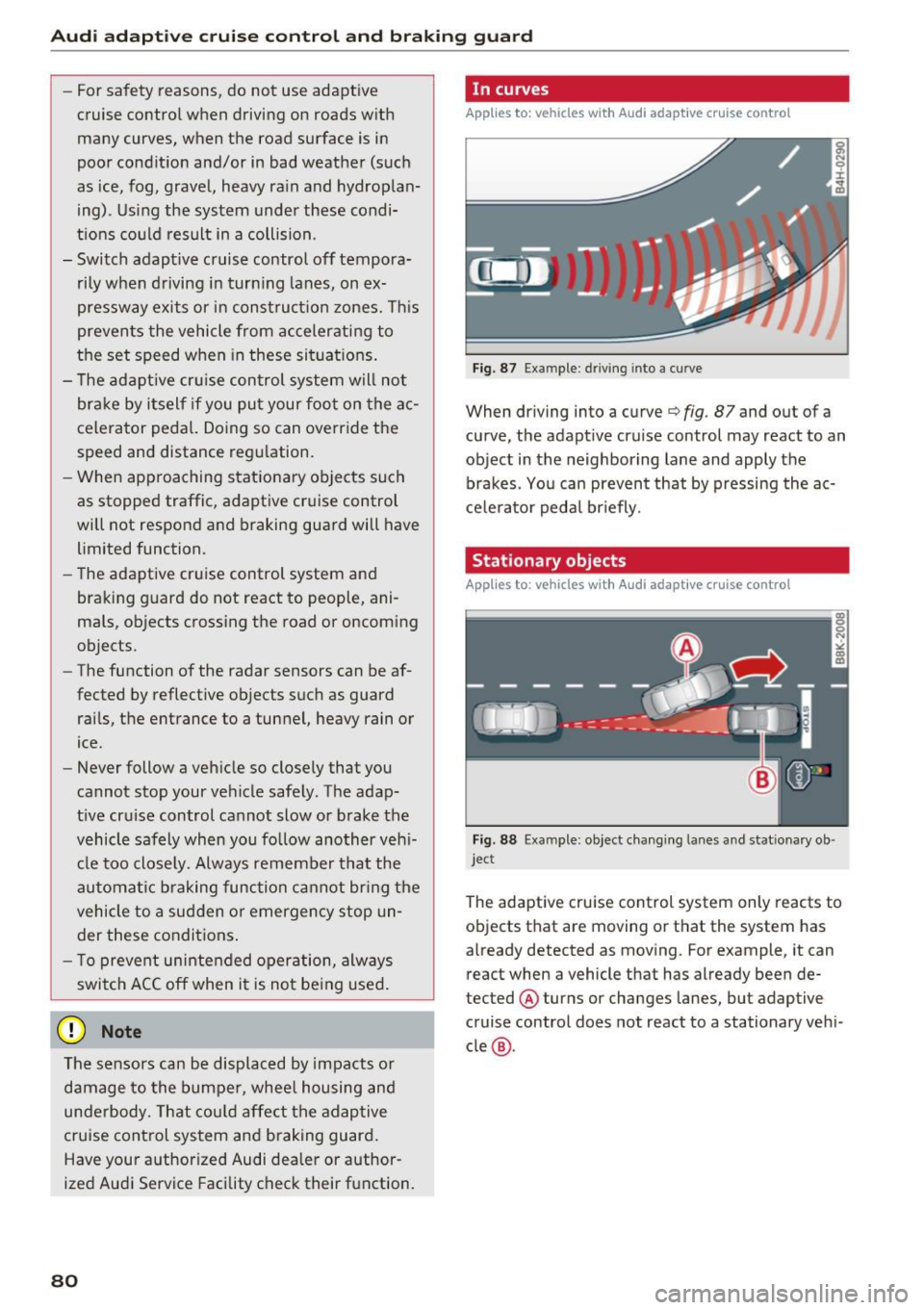
When driving into a curve c:::> fig. 87 and out of a
curve, the adapt ive cruise control may react to an
object in the neighboring lane and apply the
brakes . You can prevent that by pressing the ac
ce lerator pedal br iefly.
Stationary objects
Applies to: vehicles with Audi adaptive cruise control
Fig. 88 Example: object chang ing lanes and stat ionary ob ·
jec t
The adaptive cruise control system only reacts to
objects that are moving or that the system has
already detected as moving . For example, it can
react when a vehicle that has already been de·
tected @ turns or changes lanes, but adaptive
cruise control does not react to a stationary vehi
cle @.
Page 88 of 282
Audi adaptive cruise control and braking guard
detection and range limits that may prevent
the proper detection of other vehicles .
- The radar sensor's function and range can
be reduced by rain, snow and heavy spray.
Moving vehicles up ahead may not be
promptly detected or may not be detected
at all.
- Reflective surfaces including crash barriers
or tunnel entrances may impair the function
of the radar sensor.
@ Tips
- You can cancel the braking with increasing
force that is initiated by the system by brak
ing yourself, by accelerating noticeably or
by swerving .
- Braking guard error messages¢
page 86.
- Keep in mind that braking guard can brake
unexpectedly. Always secure any cargo or
objects that you are transporting to reduce
the risk of damage or injury.
Settings in the Infotainment system
Applies to: vehicles with Audi adapt ive cruise contro l
~ Select: the ICARI function button > (Car)* Sys
tems
control button > Driver assistance > Audi
braking guard.
System -
Switch the braking guard On/Off . When
you switch the ignition on, the message
Braking
guard: Off
appears if the system is switched off.
Early warning -The distance and approach warn
ings in the display can be switched
On/Off .
(D Tips
-Your settings are automatically stored and
assigned to the remote control key being
used.
- If you restrict or switch off the ESC, the braking guard also switches itself off
¢page 181 .
- Switch braking guard off when you are load
ing the vehicle onto a vehicle carrier, train,
ship or other type of transportation. This
can prevent undesired warnings from the
braking guard system.
86
Messages
Applies to: vehicles with Audi adapt ive c ru ise control
Braking guard: off
This driver message appears if the system is
turned off via the infotainment . Otherwise, if the
system is turned off, the information appears ev
ery time shortly after the start of the trip.
The driver message also appears if the system is
not available due to a malfunction or if the ESC is
not switched on¢
page 181. If this is the case,
the system will not provide warnings about a
possible collision.
Braking guard: activated
This driver message appears if sharp brake pres
sure was applied due to an acute warning .
ACC: Unavailable!
ACC and Audi braking guard: not available
The system cannot detect moving vehicles up
ahead correctly and is switched off. The sensors
have been displaced or are not working properly.
T he Audi pre sense funct ions may also be affect
e d. Dr ive to your authorized Audi dealer or au
thori zed Audi service facility immediately to have
the malfunction corrected.
ACC: currently unavailable. No sensor vision
ACC and braking guide: currently unavailable.
No sensor vision
This message appears if the sensor view is obstructed, for example by leaves, snow , heavy
spray or dirt. Clean the sensors ¢
page 79,
fig. 86.
ACC: Currently unavailable. Gradient too steep
The road exceeds the maximum possible angle
for proper adaptive cruise control operation .
Adaptive cruise control is switched off .
ACC: Only available in D, S or M
Select the D/S or M selector lever position.
ACC: currently unavailable. Parking brake ap
plied
Page 92 of 282
Audi active lane assist
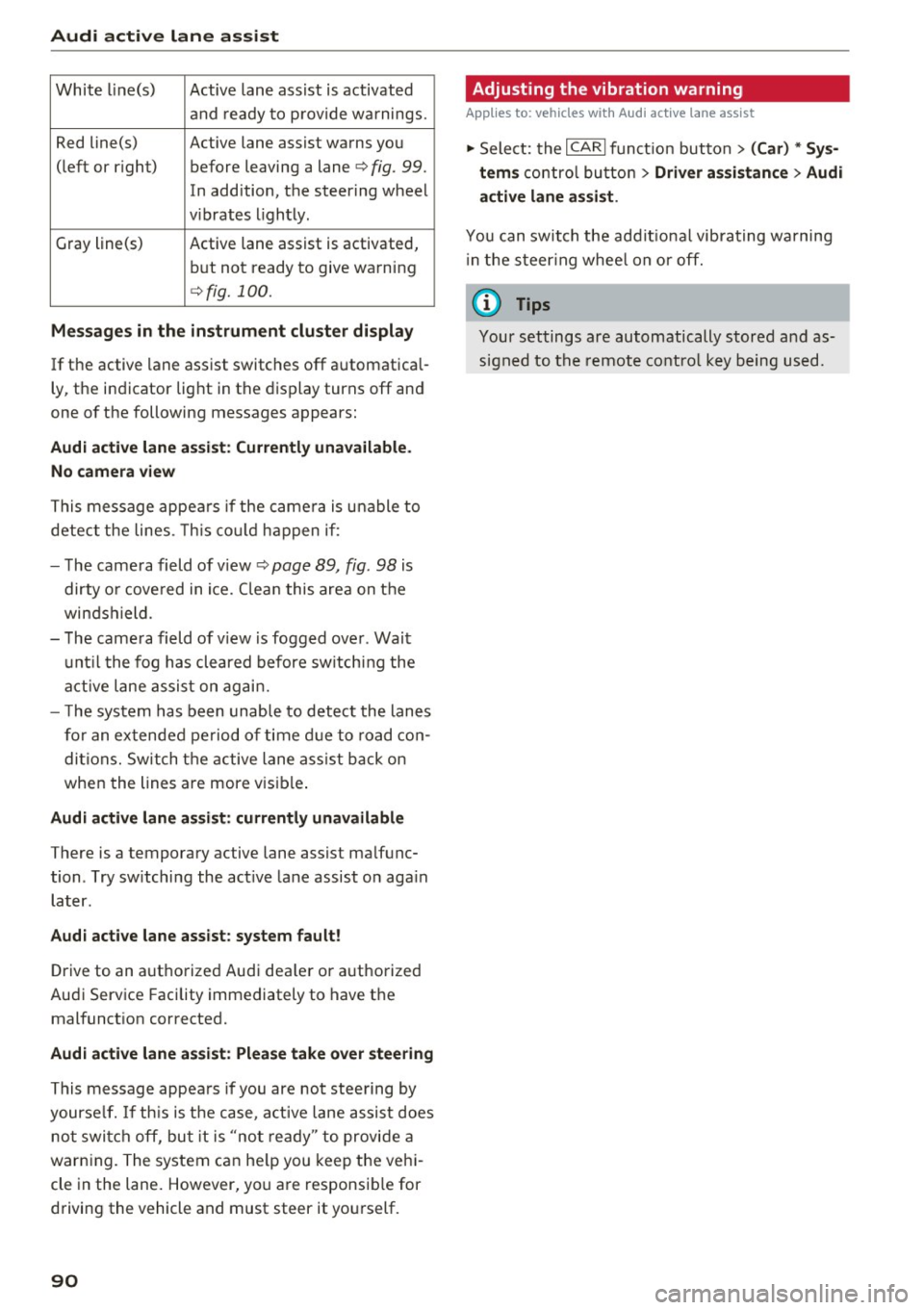
White line(s) Active lane assist is activated
and ready to provide warnings.
Red line(s) Active lane assist warns you
(left or r ig ht) before leaving a lane¢
fig. 99.
In addition, the steering wheel
v ib rates lightly.
Gray line(s)
Active lane assist is activated,
but not ready to give warning
¢fig. 100.
Messages in the instrument cluster display
If the active lane assist switches off automatical
ly, the indicator light in the display turns off and
one of the following messages appears:
Audi active lane a ssist: Currently unavailable.
No camera view
This message appears if the came ra is unable to
detect the lines. This could happen if:
- The camera field of view ¢
page 89, fig. 98 is
dirty o r covered in ice. Clean this area on the
windshield.
- The camera field of v iew is fogged over . Wait
until the fog has cleared before switching the
active lane assist on again.
- T he system has been unable to detect the lanes
for an extended period of time due to road con
ditions. Switch the active lane assist back on
when the lines are more vis ible.
Audi active lane assist: currently unavailable
There is a temporary active lane assist malfunc
tion . Try sw itching the act ive lane assist on aga in
later.
Audi active lane assist: system fault!
Drive to an authorized Aud i dea ler or authorized
Audi Service Facility immediately to have the
malfunct ion corrected.
Audi active lane assist: Please take over steering
This message appears if you are not steering by
yourse lf. If th is is the case, active lane assist does
not switch off, but it is "not ready" to provide a
warn ing. The system can he lp you keep the vehi
cle in the lane. However, you are responsib le for
driving the vehicle and must steer it yourself.
90
· Adjusting the vibration warning
Applies to: vehicles with Audi active lane assist
.,. Select: the I CARI function button > (Car) * Sys
tems
control button > Driver assistance > Audi
active lane assist .
You can switch the addit ional vibrating warning
i n the steer ing whee l on or off.
(D Tips
Your settings are automatically stored and as
signed to the remote control key being used.
Page 102 of 282
Night vision assist
-Night vision assist may not detect people or
wild animals and mark them if
- they are not in an upright posit ion, for ex
ample if they are sitting or lying down
and/or
- the silhouette in the display appears in
comp lete or interrupted, for example be
cause the person is partia lly covered by a
veh icle or an animal by tall grass. This
could increase the risk of an accident.
- Never try to swerve around animals if doing
so wi ll endanger you o r other road users, be
cause this increases the risk of an accident.
- Ev en though the system evaluat es the
shape and heat given off by all detected ob
j ects, there are limits to the system. There
may be false warnings.
- For technical reasons, the image pauses in
sp lit second intervals.
Switching on/off
Applies to: ve hicles w ith night visio n ass ist
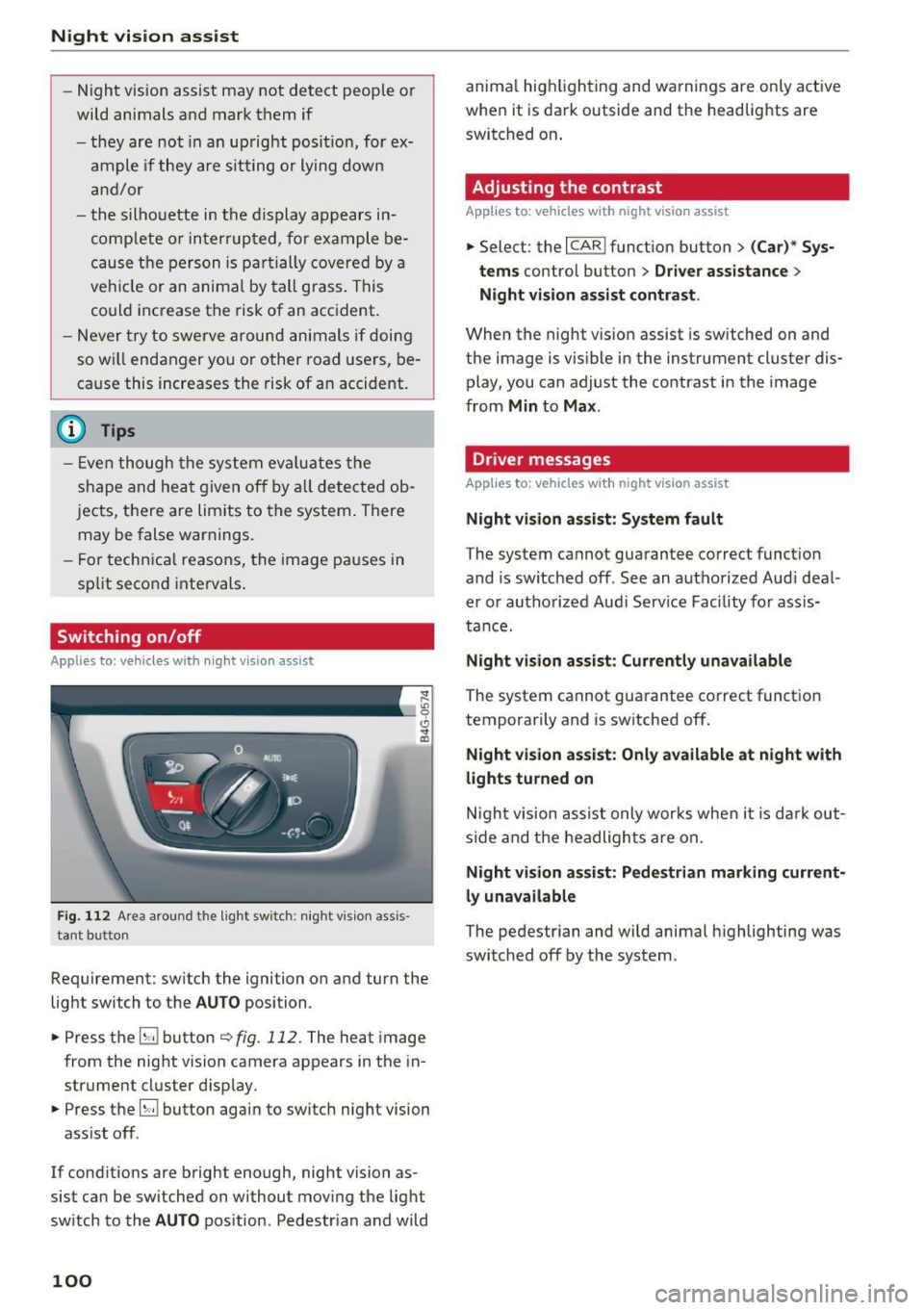
Fig. 112 Area arou nd th e light switch: nigh t v is ion ass is ·
tant bu tto n
Requirement: switch the ignition on and turn the
light switch to the
AUTO position .
.,. Press the
5J button ~ fig. 112. The heat image
from the night vision camera appears in the in
strument cluster display .
.,. Press the
B button again to switch night vision
ass ist off .
If cond itions are bright enough, night vision as
sist can be switched on without moving the light
switch to the
AUTO position . Pedestr ian and wild
100
anima l hig hlighting and warnings are only active
when it is dark outside and the headlights are
switched on .
Adjusting the contrast
Applies to : vehicles with night vision assist
.,. Select: the I CARI function button > (C ar)* Sys
tems
contro l button > Driver assistance >
Night vision assist contrast .
When the night vis ion assist is switched on and
the image is v is ib le in the instrument cluster dis
play, you can adjust the contrast in the image
from
Min to Max .
Dr iver messages
Applies to: vehicles with night vision assist
Night vision assist: System fault
The system cannot guarantee correct funct ion
and is switched off. See an authorized Audi deal
er or authorized Aud i Service Facility for assis
tance.
Night vision assist: Currently unavailable
The system cannot guarantee correct funct io n
temporarily and is switched off.
Night vision assist: Only available at night with
lights turned on
Night vision assist only works when it is dark out
side and the headlights are on.
Night vision assist: Pedestrian marking current
ly unavailable
The pedestrian and wild animal highlighting was
switched off by the system .
Page 119 of 282
@ Tips
-The warning tones can also be adjusted di
rectly by the visual disp lay or the picture
from the camera. Simply press the
S ettings
control button.
- Changed settings are activated when the
parking system is switched on aga in.
- The settings for volume and frequency are
automat ically saved and assigned to the re
mote control key be ing used.
Error messages
Applies to: vehicles with parking system plus/rearview cam·
era/peripheral camera
There is an error in the system if the LED in the
p ,"~ button is b link ing and you hear a continuous
a larm for a few seconds after switching on the
parking system or when the pa rk ing system is al
ready act ivated.
If the erro r is not corrected be
f ore you switch off the ignit ion, the LED in the
P, "~
button will blink the next t ime you sw itch on the
pa rking system by s hift ing into reverse .
Parking system plus
If a sensor is fau lty, the .I¾ symbol will appear in
front of/behind the vehicle in the Infotainment
d isp lay. If a rear sensor is faulty, only obstacles
that are in areas @and @ are shown
~ page 108, fig. 119 . If a front sensor is faulty,
on ly obstacles t hat are in areas © and @are
shown. There is also a system malfunction if a ll
segmen ts a round the vehicle a re red or if no seg
ments are displayed.
Peripheral cameras*
There is a system malfunct ion if the "t8J• • symbo l
appears and the correspo nd ing display area is
shown in b lue. The camera is not wor king in th is
a rea.
Dr ive to an autho rized Aud i dea le r or a uthorized
Aud i Service Faci lity immediately to have the
malfunct ion corrected.
Parking system s
117