brake AUDI S3 2009 Owner's Manual
[x] Cancel search | Manufacturer: AUDI, Model Year: 2009, Model line: S3, Model: AUDI S3 2009Pages: 324, PDF Size: 76.02 MB
Page 120 of 324

• ..__T_ r_a _n_ s_ m_ is_ s_io _ n ______________________________________________________ _
& WARNING
• Never p lace the selector lever in the R or P position while the
vehic le is moving -risk of an accident!
• With the eng ine running , it is necess ary to hold the vehicle w ith
the foot brake in all selector lever positions (except P and N },
because even at idle speed the transfer of power is never
c ompletely interrupted -the vehicle "creeps ". If the vehicle i s
stationary and the transmi ssion is engaged , the eng ine should
never be speeded up unintentionally (e.g . manually from under the
hood }. Otherwi se the vehicle will immediately start to move -
sometimes even if the parking brake is firmly applied -risk of an
accident !
• Before you or other persons open the hood and work on a
running engine , the selector lever mu st be moved to P and the
parking br ake applied firmly -risk of an accident! Follow the
warning stickers=>
page 217 , "Engine compartment ".
[ i J Tips
If you have inadvertent ly shift ing into N while the vehicle is mov ing,
you should remove your foot from the accelerator and wait unti l the
engin e speed ha s dropped to id le befor e shifting bac k to Dor S . •
Ap plies to vehicles: withs tro ni c®
Selector lever lock
The selector le ver l ock prevents a gear from being
en ga ged acc ide ntall y and unin ten tionally settin g the
v ehi cle in motion.
Fig . 1 21 Se lecto r l ever
l oc ks
T he sel ector lever loc k is released as follo ws:
Sw it c h t he igni tion on.
S tep on t he brake pedal
and sim ultaneous ly hold down
t h e release b utton.
Automatic select or lever lock 6ll
The selector lever is locked in the P and N positions when the igni
t io n is on . To move the lever fr om these positions th e driver must
depress the brake pedal. As a reminder to the driver , the following
wa rn ing appears in the instru ment cl uster display when the selecto r
is in P and N :
APPLY BRAKE WHEN ENGAGING GEAR WITH VEHICLE
S TATIONARY
In addition, the symbol~ for the automat ic selector lever lock illu -
mi nates in t he sh ift ga te . .,_
Page 121 of 324
_______________________________________________________ T_ r _a_ n_s_ m __ is_s_ io_ n _ __.1111111
The selector lever lock is effective only when the vehicle is
stationary and at speeds below 5 km/h. At higher speeds, the lock in
the N position is automatically switched off .
The selector lever is not locked when rapid shifts are made through
the N position (e.g. from R to Dl. This allows you to "rock" the vehicle
if it becomes stuck. If the lever is in the N position for more than
1 second with the brake pedal not depressed, the selector lock
engages automatically .
Release button
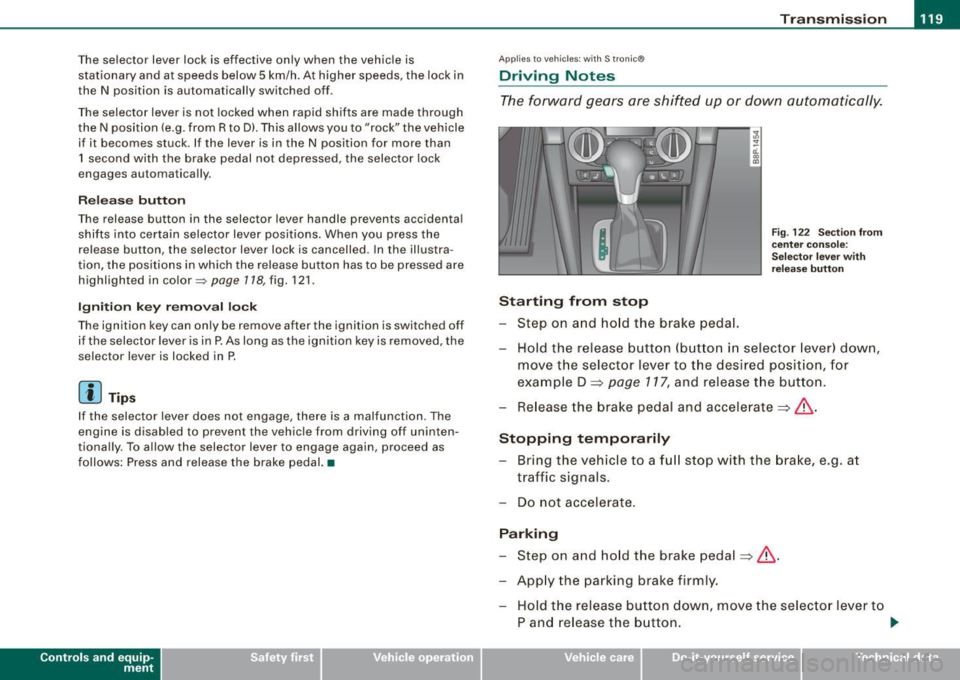
The release button in the selector lever handle prevents accidental
shifts into certain selector lever positions . When you press the
release button, the selector lever lock is cancelled . In the illustra
tion, the positions in which the release button has to be pressed are
highlighted in color~
page 718, fig. 121.
Ignition key removal lock
The ignition key can only be remove after the ignition is switched off
if the selector lever is in P. As long as the ignition key is removed, the
selector lever is locked in P.
[ i) Tips
If the selector lever does not engage, there is a malfunction . The
engine is disabled to prevent the vehicle from driving off uninten
tiona lly. To allow the selector lever to engage again, proceed as
follows: Press and release the brake pedal. •
Contro ls and eq uip
ment
Ap plies to vehic les: wit h S tron ic®
Driving Notes
The forward gears are shifted up or down automatically.
Starting from stop
Step on and hold the brake pedal.
Fig. 122 Section from
center console:
Selector lever with
release button
Hold the release button (button in selector lever) down,
move the selector lever to the desired position, for
example D =>
page 117, and release the button.
Release the brake pedal and accelerate => &, .
Stopping temporarily Bring the vehicle to a full stop with the brake, e.g. at
traffic signals.
Do not accelerate.
Parking Step on and hold the brake pedal=>&, .
Apply the parking brake firmly. Hold the release button down, move the selector lever to
P and release the button. .,.
Vehicle care I I irechnical data
Page 122 of 324

....... _T _r_a _ n_ s_m _ i_s _s _i_o _n ______________________________________________________ _
Stopping on an incline
- Always hold the vehicle wi th t he foot bra ke or parking
b rake in orde r to prevent "rollback"=> &. Do
not try to
preve nt the ve hicle f ro m rolling back by rewi ng the
e ngin e while it is in ge ar.
Starting on a hill
-App ly the hand bra ke firm ly .
- With th e en gin e in g ea r, gradua lly accelera te an d re le as e
th e han d brake .
The engine can only be started wi th th e selector lever i n P or N
=> pa ge 109. At low ambient temperatures (14 °F / -1 0 °C), it is only
po ss ibl e to s tart the e ng ine wi th the selec tor leve r in P .
Whe n pa rki ng on leve l g ro und, i t is su fficien t to plac e th e se lec tor
lever in P. On a steeply s lop ing road, you should first app ly the
pa rk in g br ake fi rmly and then p lace th e selec tor lever in P. T hi s w ay ,
you do not overload the pawl mechanism and it is easier to move
th e s elector lever out of P .
& WARNING
• Never leave your veh icle with the engine running while in gear .
If you must leave your vehicle with the engine running, set the
parking brake and engage the park lock.
• When the engine is running and the transmission is in gear (0 ,
S or R l or in "tiptronic " mode , it is essential that you stop the
vehicle with the footbrake . When idling , the transmission of power
does not stop completely -the vehicle "creeps ".
• Do not accelerate when you change the sele ctor lever position
with the vehicle stationary and the engine running -risk of an acci
dent!
• Never place the selector lever in the R or N po sition while the
vehicle is moving -risk of an accident !
& WARNING (continued)
• If you have to bring your vehicle to a stop while on an incline,
keep the foot brake depressed all the way down so that the vehicle
does not start to roll backward . You should never hold the vehicle
using the clutch pedal if you are going to be stopped on an incline .
If you do , the clutch will start to slip when it overheats caused by
the constant overload. This is dangerous because if the vehicle starts to roll backward , you could c ause an accident . If the clutch
should start to slip , you will feel the vehicle "jerk" and the selector
lever display will start blinking .
• Before driving down a steep slope , reduce your speed and shift
i nto a lower gear with "tiptronic ".
• Do not ride the brakes or apply the brake pedal too often or too
long . Constant braking causes the brakes to overheat and
substantially reduces braking performance, increa ses braking
distance or causes complete failure of the brake system . •
Ap plies to veh ic les: wit h S tronic tra nsmiss io n and Hi ll Desce nt Assis t
Hill Descent Assist
Hi ll D esce nt Ass ist help s the driv e r w hen driv ing down
i nc lin es .
Hill Descent Ass is t is activated by press ing th e brake wh ile
descending when the selector lever is in
D /S . The S tronic t ransmis
s io n auto mati ca lly s hifts dow n to a ge ar s uita ble for the incl in e. Hill
Descent Assist attempts to maintain the current vehicle speed when
th e br akin g occu rs, as far as phys ical an d techn ica l lim it s a llow . It
may be necessary to adjust the speed using the brakes .
H ill Descent As sist switc hes off when the inc line leve ls out or when
the gas pedal is pressed.
On vehicles with cruise control*=>
page 113, Hill Descent Assist is
a lso ac tiva ted wh en th e spe ed is s et.
~
Page 123 of 324

Transmission -_______________ ___.
& WARNING
Hill Descent Assist cannot overcome physical limitations, so it
may not be possible to maintain a constant vehicle speed under all
circumstances. Always be ready to apply the brakes. •
Applie s t o veh ic les : w iths tron ic @
tiptronic operation
Tiptronic allows the driver to shift gears manually.
Contro ls and eq uip
ment "'
"' ...
-a: ., m
Fig
. 123 Center
console: Manual
shifting (tiptronic)
Fig . 124 Display :
Manual shifting
(tiptronic)
Switching to manual
Push the selector lever to the right from D. As the trans
mission has switched, 6 5 4 3 2 1 appears in the display,
w ith the gear that is engaged highlighted.
Upshifting Tap the selector lever forward (in the tiptronic setting)
=> fig. 123 0-
Downshifting
Tap the selector lever backward (in the tiptronic setting)
o .
Switching to manual can be carried out with the vehicle stationary
as well as moving.
When accelerating, the transmission shifts into the next gear in
gears 1, 2, 3, 4 and 5 shortly before the maximum permissible
engine speed is reached.
If you have selected a lower gear than the current one, the transmis
sion will only shift down when the engine cannot be overspeeded .
If kick -down is actuated, the transmission shifts into a lower gear
independently of speed and engine rpm. •
Vehicle care
I I irechnical data
Page 124 of 324

-Tr
ansmi ssio n
..__ ______________ _
Applies to vehic les: with S Ironic® and with Tip tronic contro ls on the steering whee l
Steering wheel with Tiptronic ® controls
The selector paddles allow the driver to keep both hands
on the steering wheel when shifting gears.
Shifting up
Fig . 125 S port
s teer ing wheel w it h
se lector padd les
- Pu ll the right paddle, marked G) => fig . 125 briefly
towards you.
Shiftin g down
Pu ll the left paddle, marked O => fig. 125 briefly towards
you .
The selector paddles on the steering wheel are activated when the
selector lever on the center console is in
D, S, or in the manual posi
tion (Tiptronic mode).
You can also shift gears in the Tiptronic mode using the selector
lever on the center console.
[ i ] Tips
With the gear selector lever in either "D" or "S" the transmission wi ll
switch back to the automatic mode if you do not use the paddles
within approx . 30 seconds .•
Ap plies to vehicles: wi th S tronic®
Kick-down feature
The kick-down feature allows maximum acceleration .
If you depress the accelerator pedal fu lly beyond the full -throt tle
position, the transmission automatically downshifts one gear,
depending on vehic le speed and engine rpm. The upshift into the
next higher gear takes place as soon as the maximum specified
engine speed is reached.
& WARNING
Pleas e n ote t hat th e dr ive whee ls ca n sp in if th e kick -do wn i s used
o n a s mooth slipp ery road -ris k of skiddin g!•
Ap plies to vehic les: with S tron ic®
Launch Control Program
The Launch Control Program permits maximum accelera
tion.
In order to use Launch Control, the ASR (Anti-Slip Regu la
tion) must be disabled. When ASR is disabled, the ESP
warning/indicator light in the instrument cluster illumi
nates . So that Launch Control can be used, the engine must
be at operating temperature and the steering wheel must
not be turned.
- With the engine running, briefly press the ESP button.
The message "ASR off" appears in the instrument cluster
d isplay.
- Shift the gear lever to "S" or the tiptronic® position.
- Step on t he brake pedal with your left foot a nd keep the
brake pedal fully depressed fo r at least one second. _,,,
Page 125 of 324
Transmission -_______________ ___.
- With your right foot, step on the accelerator to the wide
open throttle position or Kickdown. The engine speed
settles at about 3,200 rpm.
Take your left foot off the brake.
The S tronic® in your vehicle is electronically controlled. A special
Launch Control Program provides the best acceleration from a
standing start.
& WARNING
• Always adapt your driving to the traffic flow.
• Only use Launch Control when road and traffic conditions allow
it and other drivers will not be endangered or annoyed by your
driving and the acceleration of the vehicle.
• Make sure that ESP remains enabled . With the ESP disabled,
the vehicle could brake away, particularly on a slick and slippery road -risk of skidding!
• Once acceleration is finished, switch ASR on again by briefly
pushing the ESP button. •
Applies to veh ic le s: w ith S t ron ic ®
Back -up program
In the event of a system ma/function, there is an back-up
program.
In the event of system malfunction, the automatic transmission
switches to the fail-safe mode. All of the selector lever position
displays for the automatic transmission are highlighted with a light
background in the instrument cluster display. In some cases you
cannot drive in the reverse gear any more.
If the transmission switches to fail-safe mode, you should take the
vehicle to an authorized Audi dealership as soon as possibl e to have
the condition corrected. •
Contro ls and eq uip
ment
Ap plies to vehic les: w ith S tron ic ®
Emergency release for selector lever
If the vehicle's power supply fails, the selector lever can
be released in an emergency.
~ ..
-ti. ., m
Fig. 126 Selector lever :
Remove selector lever
sleeve
Fig . 127 Selectorlever :
emergency release
from the Park position
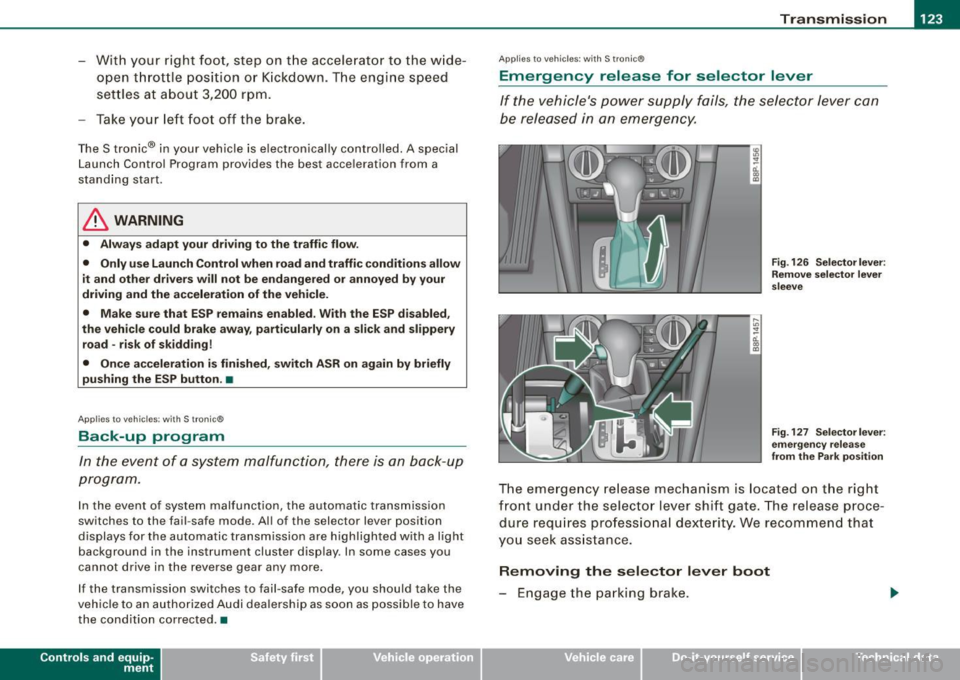
The emergency release mechanism is located on the right
front under the selector lever shift gate. The release proce
dure requires professional dexterity. We recommend that
you seek assistance.
Removing the selector lever boot
- Engage the parking brake.
Vehicle care I I Technical data
Page 126 of 324

• .___T_ r_a _n _ s_ m __ is_s_ i _o_ n ___________________________________________________ _
-Carefully pry the selector lever boot out of the trim using
a small screwdriver @.
- Pull both sides of the boot upward in the direction of the
arrows @.
- Fold the boot upward.
Emergency release for selector lever
-Press the release lever toward the center of the vehicle
with the screwdriver ~
page 123, fig. 127@ and hold it
in this position.
- Now press the lock button on the selector lever @and
move the selector lever to the N position.
- Clip the shift boot back into the shift gate.
If the vehicle has to be pushed or towed if the power supply fails
(e.g. battery is discharged), the selector lever must be moved to the
N position using the emergency locking device.
& WARNING
The selector must only be shifted from the P position if the hand
brake is firmly applied. Otherwise the vehicle would start moving
unexpectedly on a grade when the selector lever is shifted from
the P position -increasing the risk of an accident. •
Page 134 of 324

-L..___.:D=-:.. r.:....iv .:....i:..:. n..:.: g;a...: S=-= a:..:.f -=e :..:..IY !,__ ________________________________________________ _
examples will make you more aware of seating positions that are
dangerous.
Therefore, whenever the vehicle is moving:
• never stand up in the vehicle
• never stand on the seats
• never kneel on the seats
• never ride with the seatback reclined
• never lie down on the rear seat
• never lean up against the instrument panel
• never sit on the edge of the seat
• never sit sideways
• never lean out the window
• never put your feet out the window
• never put your feet on the instrument panel
• never rest your feet on the seat cushion or back of the seat
• never ride in the footwell
• never ride in the cargo area
& WARNING
Improper seating positions increase the risk of serious personal
injury and death whenever a vehicle is being used.
• Always make sure that all vehicle occupants stay in a proper
seating position and are properly restrained whenever the vehicle
is being used. •
Pedal area
Pedals
The pedals must always be free to move and must never
be interfered with by a floor mat or any other object.
Make sure that all pedals move freely without interference and that
nothing prevents them from returning to their original positions.
Only use floor mats that leave the pedal area free and can be
secured with floor mat fasteners.
If a brake circuit fails, increased brake pedal travel is required to
bring the vehicle to a full stop.
& WARNING
Pedals that cannot move freely can cause loss of vehicle control
and increase the risk of serious injury.
• Never place any objects in the driver's footwell. An object could
get into the pedal area and interfere with pedal function. In case
of sudden braking or an accident, you would not be able to brake
or accelerate!
• Always make sure that nothing can fall or move into the
driver's footwell. •
Floor mats on the dr iver side
Always use floor mats that can be securely attached to
the floor mat fasteners and do not interfere with the free
movement of the pedals.
-Make sure that the floor mats are properly secured and
cannot move and interfere with the pedals~
&- .,
Page 135 of 324
Use only floor mats that leave the pedal area unobstructed and that
are firmly secured so that they cannot slip out of position. You can
obtain suitable floor mats from your authorized Audi Dealer .
Floor mat fasteners are installed in your Audi.
Floor mats used in your vehicle must be attached to these fasteners .
Properly securing the floor mats will prevent them from sliding into
positions that could interfere with the pedals or impair safe opera
tion of your vehicle in other ways .
& WARNING
Pedals that cannot move freely can result in a loss of vehicle
control and increase the risk of serious personal injury.
• Always make sure that floor mats are properly secured.
• Never place or install floor mats or other floor coverings in the
vehicle that cannot be properly secured in place to prevent them
from slipping and interfering with the pedals or the ability to
control the vehicle .
• Never place or install floor mats or other floor coverings on top
of already installed floor mats. Additional floor mats and other
coverings will reduce the size of the pedal area and interfere with
the pedals.
• Always properly reinstall and secure floor mats that have been
taken out for cleaning.
• Always make sure that objects cannot fall into the driver foot·
well while the vehicle is moving. Objects can become trapped
under the brake pedal and accelerator pedal causing a loss of
vehicle control. •
Safety first
Driving Safely
Stowing luggage
Loading the luggage compartment
All luggage and other objects must be properly stowed
and secured in the luggage compartment.
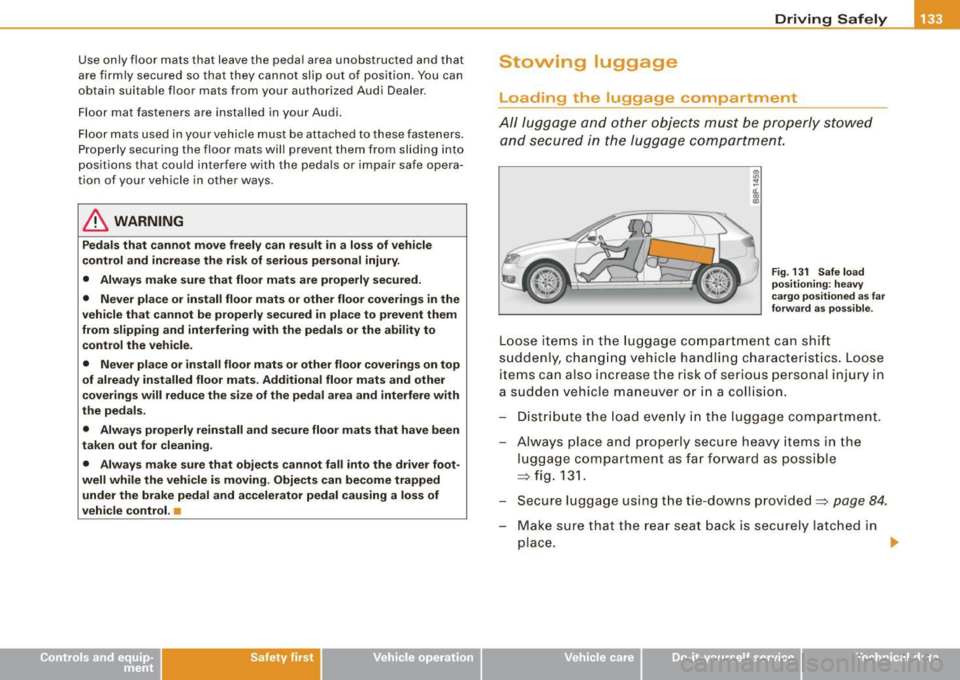
Fig. 131 Safe load
positioning: heavy
cargo positioned as far
forward as possible.
Loose items in the luggage compartment can shift
suddenly, changing vehicle handling characteristics. Loose
items can also increase the risk of serious personal injury in
a sudden vehicle maneuver or in a collision.
Distribute the load evenly in the luggage compartment.
Always place and properly secure heavy items in the
luggage compartment as far forward as possible
=> fig. 131.
Secure luggage using the tie-downs provided=> page 84.
Make sure that the rear seat back is securely latched in
place.
1iJ,,
Vehicle care I I irechnical data
Page 192 of 324

_1--_l_ n _t _ e _ll _,ig ,_,_ e_n _t _ t_ e_ c_ h_n _o_ l_ o ~g""- y.e- __________________________________________ _
Intelligent technology
Notice about data recorded by
vehicle control modules
Your vehicle is not equipped with an Event Data Recorder (EDR),
installed by some manufacturers for the express purpose of
capturing data for retrieval after an accident or crash event . EDR's
are sometimes called "crash recorders".
Some state laws restrict the retrieval or downloading of data stored
by EDR's that were insta lled in a vehicle for the express purpose of
retrieving data after an accident or crash event without the owner's
consent .
Although your vehicle is not equipped with an EDR, it is equipped
with a number of electronic control modules for various vehicle systems such as, for example, eng ine function, emission control, as
well as for the airbags and safety belts.
These electronic control modules also record vehic le -related data
during norma l vehicle operation for diagnostic and repair purposes .
The recording capacity of the electronic cont rol modules is limited
to data (no sound is recorded) and only a small amount of data is
actually recorded over a very limited period of time and stored when
a system fault or other condition is sensed by a control unit . Some
of the data then stored may relate to vehic le speed, direction,
braking as we ll as restraint system use and performance in the
event of a crash or other condition. Stored data can only be read and
downloaded with special equip men t.
Electronic Stabilization Program (ESP)
General
The Electronic Stabili ty Program increases driving
stability.
co ::,
_1, _ __ J"u. __ 11 ... _ ,.....u.,___,lli u.. _ .x,u _ _, r-u ~~ ~!' js:..~&c:',I
I
'
1 J
F ig . 16 3 Ce nte r
cons ole with E SP
sw itch
With ESP, control over the veh ic le is increased in situations when
the vehicle is close to the limits of grip, such as during acce leration
and in curves. ESP reduces the risk of skidding a nd improves vehicle
stability under all road conditions . It operates at all speeds .
The Anti-Lock Brake System (ABS), E lec tronic Differentia l Lock (EDS)
and Anti-Slip Regulation System (ASR) are integrated in the Elec
tronic Stability Program .
How ESP work s
The ESP control unit processes the fo llowing data from high-sensi
tive sensors : the rotational speed of the vehicle about its vertica l
axis, fore -and -aft and lateral acceleration forces, brake pressure and
steering angle.
Using steering ang le and vehicle speed, the direction the driver
wishes to travel is determined and continuously compared with
t,.