ignition AUDI S3 2009 Owner's Manual
[x] Cancel search | Manufacturer: AUDI, Model Year: 2009, Model line: S3, Model: AUDI S3 2009Pages: 324, PDF Size: 76.02 MB
Page 39 of 324
Master key battery replacement
Each master key contains a battery housed under the
cover.
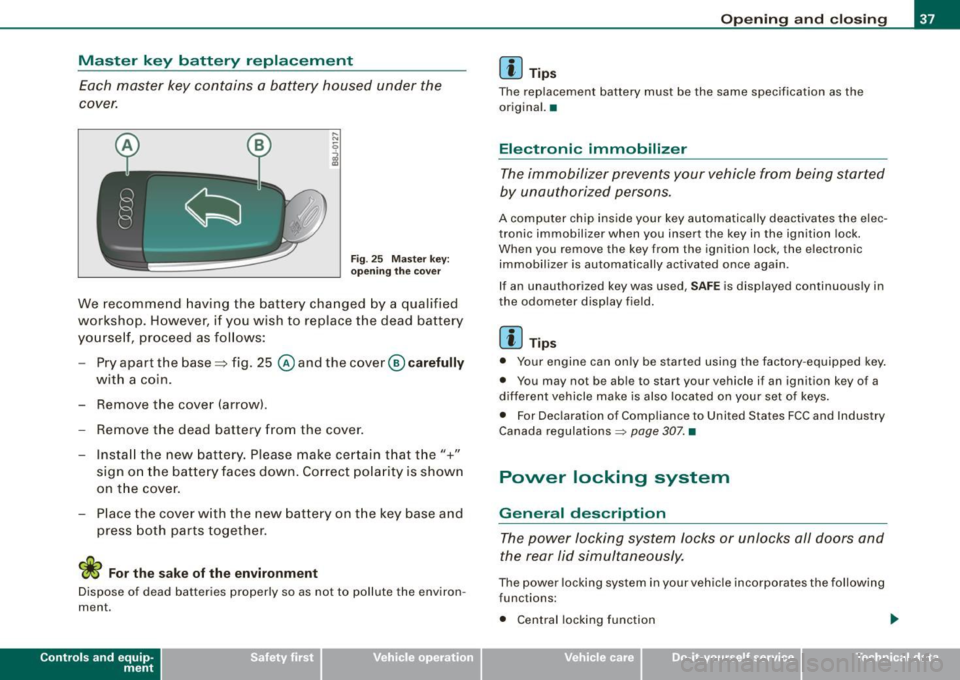
Fig . 25 Master key:
o peni ng the cover
We recommend having the battery cha nged by a qualified
workshop. H owever, if y ou wish to replace the dead ba ttery
yo urse lf, pr oceed as fol lows:
- Pry apart the base => fig. 25
@ and the cover@ carefully
with a coin.
- Remove the cove r (arrow) .
- Remove the dead battery from the cover .
- I nsta ll the new battery . Pl eas e mak e ce rtain t hat the" +"
sign on the batte ry faces down . Correct po la rity is shown
on t he cover .
- Place the cover w ith the new bat tery on t he key base and
press both parts together .
For the sake of the environment
Dispose of dead batteries proper ly so as not to pol lute the environ
men t.
Con tro ls and eq uip
ment
Op ening and clo sing
[ i ] Tip s
The replacement battery must be the same specification as the
origina l.•
Electronic immobilizer
The immobilizer prevents your vehicle from being started
by unauthorized persons.
A computer chip inside your key automatically deactivates the elec
tronic immobilizer when you insert the key in the ignition lock.
When you remove the key from the ign ition lock, the e lectronic
immobil izer is automatically activated once again.
If an unauthorized key was used ,
SA FE is displayed continuously in
the odometer display field .
[ i ] Tips
• Your engine can only be started using the fac tory -equipped key .
• You may no t be ab le to start your vehicle i f an ignition key of a
different vehicle make is a lso located on your set of keys .
• For Dec laration of Compliance to United States FCC and Industry
Canada regulations ~
page 307. •
Power locking system
General description
The power locking system locks or unlocks all doors and
the rear lid simultaneously.
The power locking system in your vehicle incorporates the following
func tions :
• Central locking function
Vehicle care
I I Technical data
Page 40 of 324
Openin g a nd clo sin g
• Remote control feature => page 36.
• Anti-theft alarm system=> page 45.
All the doors and the rear lid are locked by the central locking
system when you lock the vehicle.
U nlock ing th e vehic le
You can un lock the vehicle from outside either by using the remote
control
or by inserting and turning the key in the driver's door lock.
When you
unl ock your vehic le:
• The anti-theft alarm system is deactivated briefly .
• The vehicle interior lights i lluminate for approxima tely 30
seconds.
• All turn signal ligh ts will flash twice when the car is un locked .
• After unlocking the vehicle, you have 30 seconds to open a door
or the rear lid. After 30 seconds, the vehic le automatica lly locks and
the anti-theft alarm system activates again .
The rear lid can be locked or unlocked either by using the remote
control
o r by inserting and turning the key in the driver's door lock.
Un locking the vehicle with the remote control
c::::::5 wil l only unlock
the rear lid , to open it, the lid handle needs to be pressed.
Lo ckin g the vehicle
You can lock the vehicle from outside either by using the remote
control
or by inserting and turning the key in the drivers's door lock.
When you
lo ck the vehicle :
• All doors and the rear lid are locked .
• All turn signal lights will flash once when the car is locked.
• The anti -theft alarm system is activated . T he horn of the anti
theft alarm system will sound and the anti-theft alarm system readi ness l ight, located in the center of the instrument pane l below the
windshie ld on the right s ide of the air vent, will start to b link.
• The vehicle interior ligh ts turn off .
Automatic locking *
The automatic locking fea ture locks all the vehicle doors and the
rear lid when you drive faster than 9 mph (15 km/h).
You can unlock the vehicle from the inside by:
• removing the key from the ignition switch (the vehicle wi ll auto
matically un lock itself) or
• pressing the unlock part of the power lock switch
oc:"D or
• pulling the inside handle for that door (once - the front door is
unlocked and opened at the same time, twice to open the rear door).
If you wish, you can have an authorized Audi dealer convert your
powe r door lock sys te m to automatic locking.
& WARNING
• When you lock your vehicle from out side , nobody -esp ecia lly
c h ildr en - s hould r em ain in sid e the vehi cle . R emember , when you
lock the vehicle from the out side the window s ca nnot be opened
fr om t he in side .
• When you leave the vehicle , alway s remo ve the ignition key and
t a ke it with you . Thi s w ill pre vent p assengers (children , for
ex ampl e) from a ccidentall y being lock ed in the vehicle should they
a cc ident ally pre ss t he powe r lock ing switc h on t he center consol e.
• Do not leave children in side the vehicle un supe rvi se d. In an
emerg ency it w ould be impos sible t o ope n th e door s from the
out side without the key.
[ i ] T ips
• In the event of a crash with airbag deployment all locked doors
wi ll be automatical ly un locked to give access to the vehic le occu
pants from the outs ide .
• If the power locking system shou ld fai l, you can stil l open the
fue l tank flap in an emergency=>
page 223. ~
Page 45 of 324

Closing the rear lid
- Pull it down and shut it firmly~ &-There is a recess in
the interior trim of the lid to make it easier to pull down.
& WARNING
• After closing the rear lid, always pull up on it to make sure that
it is properly closed. Otherwise it could open suddenly when the
vehicle is moving.
• To help prevent poisonous exhaust gas from being drawn into
the vehicle, always keep the rear lid closed while driving. Never
transport objects larger than those fitting completely into the
luggage area, because then the rear lid cannot be fully closed.
• Never leave your vehicle unattended especially with the rear lid
left open. A child could crawl into the car through the luggage
compartment and pull the lid shut, becoming trapped and unable
to get out. To reduce the risk of personal injury, never let children play in or around your vehicle. Always keep the rear lid, as well as
the vehicle doors, closed when not in use.
[ i] Tips
• If the rear lid is open or not properly locked when the ignition is
turned on, the door and rear lid warning appears in the instrument
cluster display.
• If the rear lid on a locked vehicle is unlocked with the middle
button
c:::5 on the remote key, the rear lid is automatically locked
again immediately after closing. This is indicated by the turn signals
blinking. •
Contro ls and eq uip
ment
Opening and closing
Emergency release for rear lid
If the rear lid cannot be opened, an emergency release is
provided.
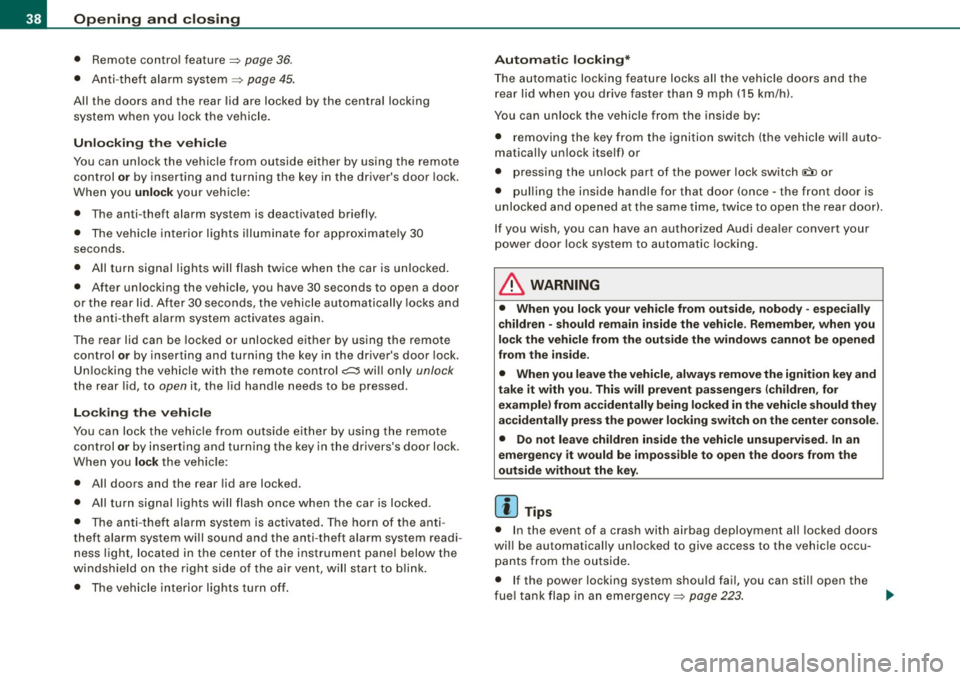
Fig . 32 Rear and trunk
section: Access to
emergency release
Fig . 33 Rear lid interior
section: Emergency
release
The emergency release is located on the inside of the rear
lid . To release the rear lid, proceed as follows:
Fold down the right rear seat back~ fig. 32.
Take your ignition key and move through the opening
until your head and shoulders are in the trunk .
Now insert the key bit into the slot in the cover as shown
in
~ fig. 33 (D and pry the cover up carefully. ~
Vehicle care I I irechnical data
Page 46 of 324

Opening and closing
- Place the key in the round opening behind the cover 0
and turn the key in the direction of the arrow. This
unlocks the lock and the rear lid opens a crack.
- Open the rear lid from the outside and put the ignition
key in a safe place.•
Manual door locking
If the power locking system fails (power failure), you will
need to lock the passenger door separately.
Fig. 34 Emergency
locking device in the
doors
An emergency door locking device is integrated in the rear
edge of the doors (only visible when the door is open) for
those doors w ithout a lock cylinder.
- Open the door.
- Remove the plastic cap using the vehicle key~ fig. 34.
- Stick the key into the internal slot and turn the key about
90 degrees as far as it can go to the right (right-side
doors) or to the left (left-side doors).
- Replace the plastic cap.
After you close the door, you will no longer be able to open it from
the outside.
You can open it from the inside , however , by pulling on the door
latch,
once for the front doors and twice for the rear doors. •
Child safety lock
The child safety lock prevents the rear doors from being
opened from the inside.
....
"' ::: d. co m
Fig. 35 Rear doors:
child safety lock
The rear doors are equipped with a child safety lock. It is
operated with the vehicle key. The child safety lock is only
visible when the door is open.
- To
switch on the child safety lock, turn the ignition key in
the direction of the arrow .
- To
switch off the child safety lock, turn the ignition key in
the opposite direction of the arrow.
Th e child safety lock prevents the doors from being opened from the
inside when you have small children sitting in the rear .•
Page 47 of 324
Anti-theft alarm system
The anti-theft alarm triggers an alarm if anyone attempts
to break into the vehicle.
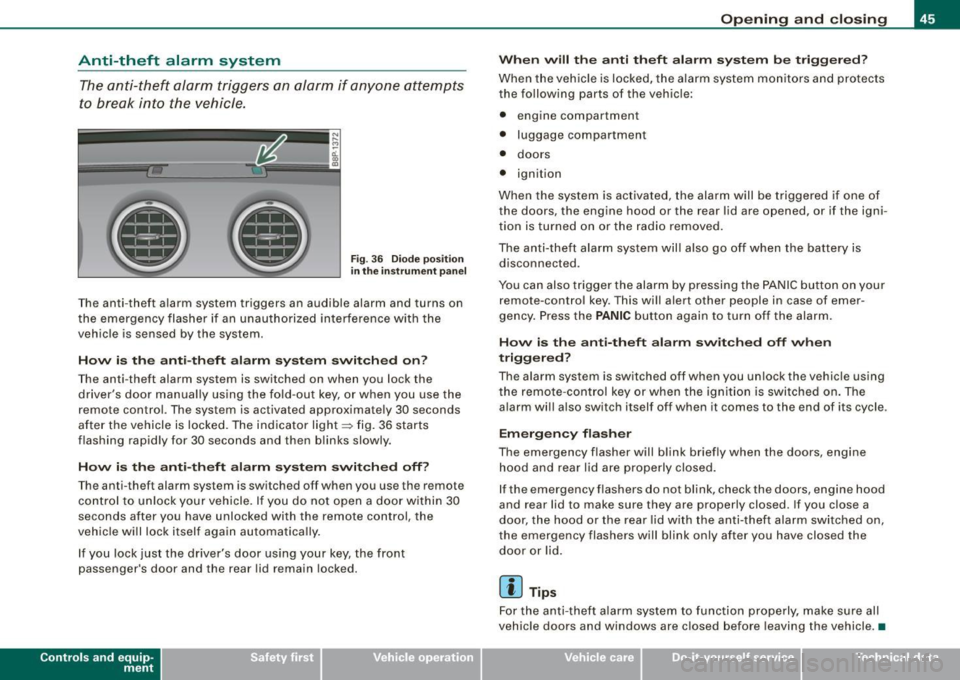
F ig . 3 6 D iod e posi tion
in th e instrum ent p an el
T he anti-theft alarm system triggers an audible alarm and turns on
the emergency flasher if an unau thorized interference with the
vehicle is sensed by the system .
How is the anti -theft alarm sy ste m switched on ?
The anti -theft alarm system is switched on when you lock the
driver's door manually using the fold -out key, or when you use the
remote control. The system is activated approximate ly 30 seconds
after the vehicle is locked. The indicator light~ fig. 36 starts
flashing rapid ly for 30 seconds and then b links slowly .
How i s the anti -theft alarm s yste m switch ed off?
The anti-theft alarm system is switched off when you use the remote
co ntrol to un lock your vehicle. I f you do not open a d oor within 30
seconds after you have unlocked with the remote control, the
vehicle will lock itself again automatically.
I f you lock just the driver's door using your key, the front
passenger's door and the rear lid remain locked.
Con tro ls and eq uip
ment
Op ening and clo sing
When will th e anti th eft alarm sy ste m b e trigg ere d ?
When the vehic le is locked, the a larm system monitors a nd protects
the following parts of the vehic le:
• engine compartment
• luggage compartment
• doors
• ignition
When the system is ac tivated, the alarm will be trigge red if one of
the doors, the engine hood or the rear lid are opened, or if the igni
t ion is turned on or the radio removed.
The anti-theft alarm sys tem will also go off when the battery is
disconnected .
You can also trigger the alarm by pressing the PA NIC button on your
remote-contro l key. This will alert other people in case of emer
gency. Press the
PANIC button again to turn off the alarm.
How is th e anti-th eft alarm sw itched off when
triggered ?
The alarm system is switched off when you unlock the vehic le using
the remote -cont rol key or when the ignition is switched on . The
alarm wi ll also switch itself off when it comes to the end of its cycle .
Emergency flasher
The emergency flasher will blink briefly when the doors, engine
h o od and rear lid are properly closed.
If the emergency flashers do not blink, check the doors, engine hood
and rear lid to make sure they are properly closed. If you close a
door, the hood or the rear lid with the anti -theft alarm switched on,
the emergency flashers will blink only after you have closed the
door or lid.
[ i ] Tips
For the anti -theft a larm sys tem to func tion properly, make su re all
vehicle doors and windows are closed before leaving the vehicle . •
Vehicle care I I irechnical data
Page 48 of 324
Opening and closing
Power windows
Controls
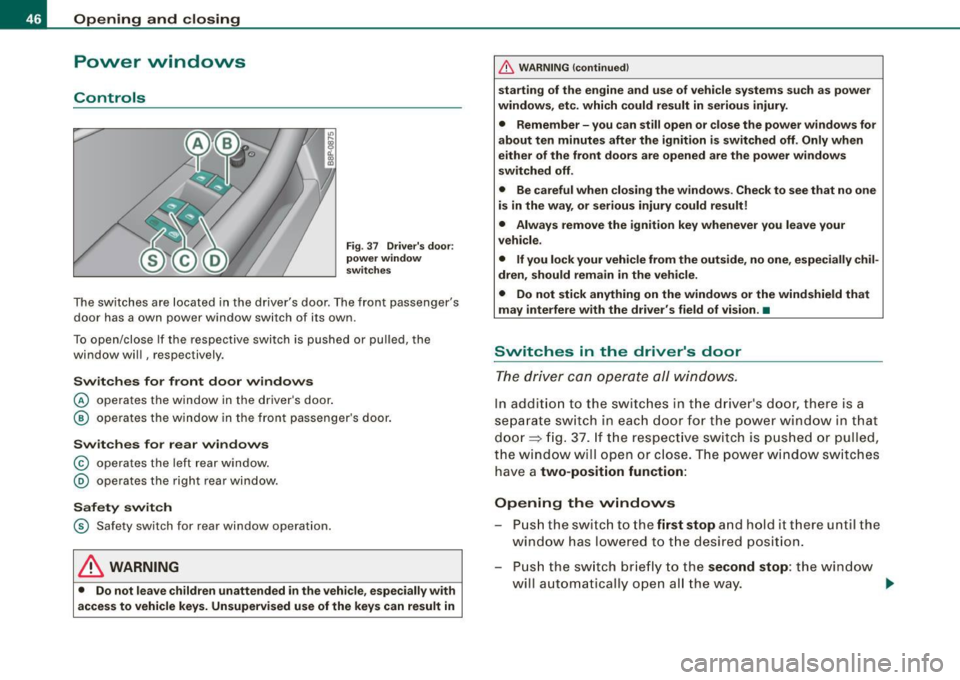
Fig. 37 Driver's door :
power window
switches
The switches are located in the driver's door . The front passenger's
door has a own power window switch of its own.
To open/close If the respective switch is pushed or pulled, the
window will , respectively.
Switches for front door windows
© operates the window in the driver's door.
@ operates the window in the front passenger's door.
Switches for rear windows
© operates the left rear window.
@ operates the right rear window.
Safety switch
© Safety switch for rear window operation.
LJ}. WARNING
• Do not leave children unattended in the vehicle, especially with
access to vehicle keys. Unsupervised use of the keys can result in
& WARNING (continued)
starting of the engine and use of vehicle systems such as power
windows, etc. which could result in serious injury.
• Remember -you can still open or close the power windows for
about ten minutes after the ignition is switched off. Only when
either of the front doors are opened are the power windows
switched off.
• Be careful when closing the windows. Check to see that no one
is in the way, or serious injury could result!
• Always remove the ignition key whenever you leave your
vehicle.
• If you lock your vehicle from the outside, no one, especially chil
dren, should remain in the vehicle.
• Do not stick anything on the windows or the windshield that
may interfere with the driver's field of vision.•
Switches in the driver's door
The driver can operate all windows.
In addition to the switches in the driver's door, there is a
separate switch in each door for the power window in that
door=> fig. 37. If the respective switch is pushed or pulled,
the window will open or close. The power window switches have a
two-position function:
Opening the windows
Push the switch to the first stop and hold it there until the
window has lowered to the desired position.
- Push the switch briefly to the
second stop: the window
w ill automatically open all the way. _.
Page 49 of 324
Closing th e window s
- Pull the switch up to the
first stop and hold it there until
the window has risen to the desired position.
- Pull the switch quickly to the
second pos iti on: the
window will automatically close all the way~
& in
"Controls".
A cti vating /d eacti va ting r ear window s
- Pu sh the switc h to the
depressed pos ition to a ctiv ate the
rear windows -the l ight in the sw itch wi ll go out.
- Briefly press t he switch to
de activat e the rear windows -
the switch will return to the sa fety position and the light
w ill illuminate.
The safety switch©=> page 46, fig. 37 in the armrest on the driver's
door turns off the rear power windows. Only when the safety switch
is depressed can the rear windows be opened or closed. The symbol
in the safety switch il lum inates when the power windows in the rear
doors are switched off (button NOT depressed). This feature has
been provided for the safety of small children riding in the rear of
the vehicle .
[ i J Tip s
The windows can still be opened and closed for about ten minutes
after the ignition has been turned off. The power windows are not
shut off until one of the front doors is opened. •
Contro ls and eq uip
ment
Op ening and clo sing
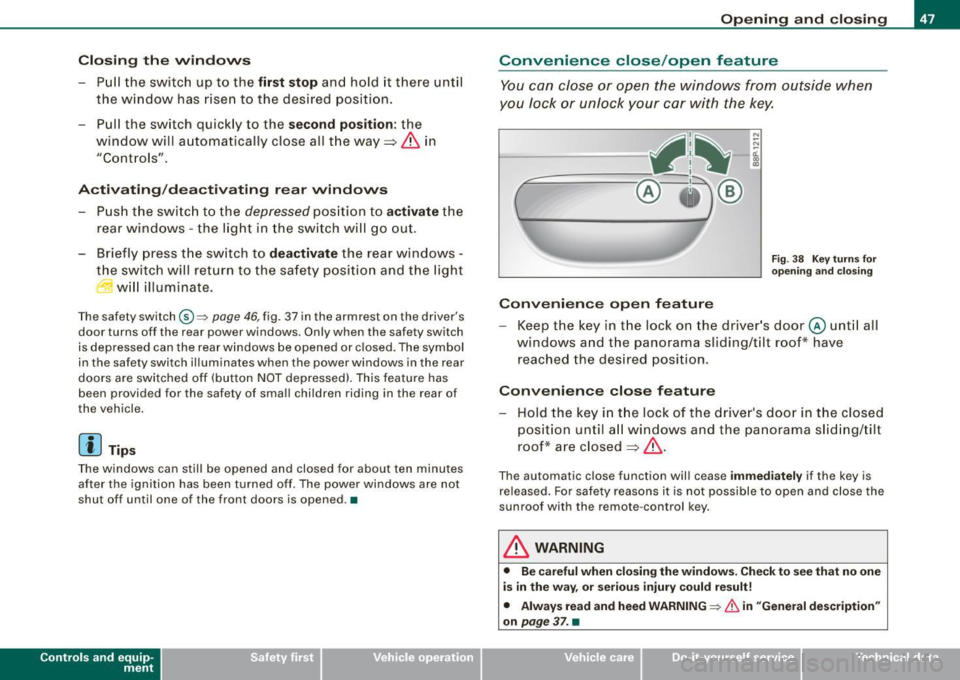
Convenience close /open feature
You can close or open the windows from outside when
you lock or unlock your c ar with the key.
---==- ~fit ~-:..--.:..-_-_-_-_- _-_- _-_-_-_--:-
c -= ® !)®
Conv eni ence open f eatur e
N ;:.
-0:. a, m
Fig . 38 Key turns for
o pen ing a nd clos ing
Keep the key in the lock on the driver 's door @ unt il all
windows and the panorama sliding/tilt roof* have
reached the desired position.
Con venience close feature
- Hold the key in t he lock of the driver's door in t he closed
position unti l a ll windows and the panorama s lid ing/tilt
roof* are closed
~ & .
The automatic close function will cease im me diat ely if the key is
re leased. For safe ty reasons it is not possible to open and c lose the
sunroof with the remote -control key.
& WARNING
• Be c are ful when clo sin g th e window s. Check to se e that no one
i s in the way, or se riou s inju ry could result!
• Alwa ys read and heed WARNIN G~
& in "Gen eral de scription "
o n
pa ge 3 7. •
Vehicle care I I Technical data
Page 50 of 324

Opening and closing
Reactivating the system after battery
disconnection
Reactivating the convenience close /open fea ture
If the vehicle battery is disconnected and then reco nnected,
the a utomatic clos ing and opening function will not work
until it is reactivated. To reactivate this feature, perform the
following steps :
Reactivating close/open feature
-Pull and hold the power window switch until the window
i s completely closed.
- Release the switch.
- Pull the switch again for one second. The automatic
closing/opening is now reactivated. •
Panoramic sliding sunroof
Applies 10 veh ic les : wi th pano ram ic sli ding sunr oof
Description
The panoramic sliding sun roof is operated with the toggle switch
~ fi g. 39 w hen th e i gn ition in on .
The panoramic sliding sunroof can still be op ened or closed for
a bout 1 O minu tes af ter the ignition has been sw itched off. However ,
as soon as the driver's or passenger 's doo r is opened, the switch fo r
the roof is inoperative. •
Applies to vehic le s : wi th p anorami c sli din g sunroo f
Opening and closing panoramic sliding
sunroof
....... : .............. : ...................... . ::::::::::::::::::::::, :::::::::::::::::::::: ..
'l~[ 1~ 1~miim= ·r~: ":'· j" '1111rnmrn1 ............... . ............ .
• •
Fig. 39 Section of the
roof liner Toggle switch
for the panoramic sliding sunroof
The panoram ic sliding sunroof is opened in two stages.
F irst , the roof lifts up and then it can be opened.
Lifting
- Tap the switch (D:::;, fig. 39 briefly, and the roof lifts auto
matically (pop-up pos it ion).
Opening automatically (independent operation)
-Tap the switch 0:::;, fig. 39 briefly, and the roof moves to
the
lift position.
- Tap the switch 0 briefly a second time , and the roof
moves to the
low wind noise comfort position .
-Press the switch 0 unt il the roof is fully open. In this
position increased wind noise may occur .
Opening manually (manual operation)
-Press the switch 0:::;, fig. 39, starting from the "lift pos i-
tion " unt il the roof has reached the desired position. .._
Page 54 of 324
Clear vision
Clear vision
Lights
Switching the headlights on and off ·t/.·
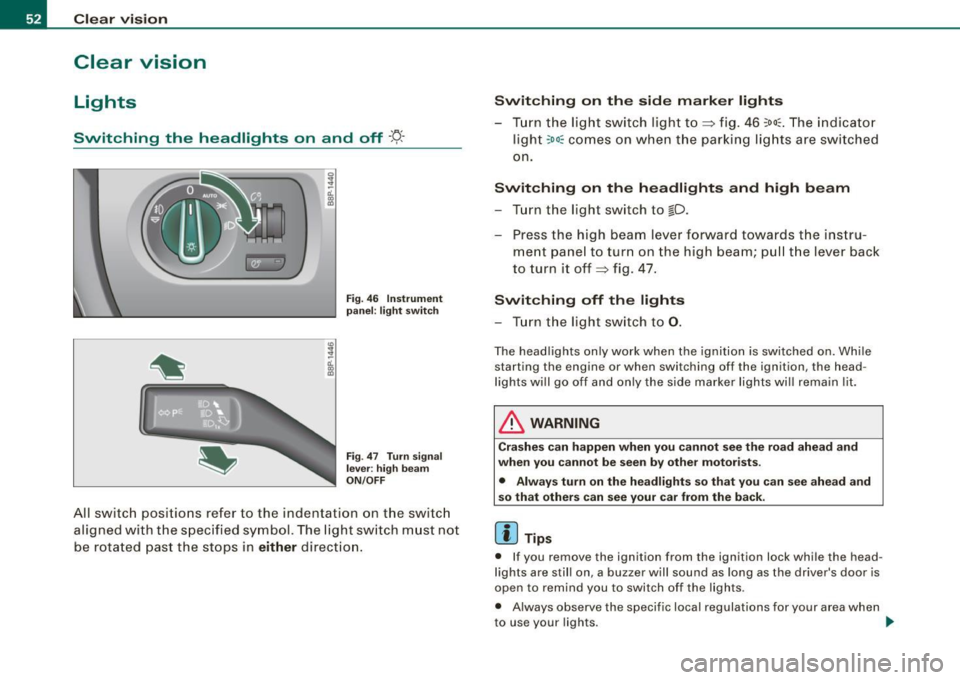
3
-ti. ID
pa nel: li ght switch
F ig .
47 T urn sign al
l e v er: high b eam
ON /OFF
All sw itch positions refer to the indentation on the sw itc h
aligned with the spec ified symbol. The light switch must not
be rotated past the stops in
either direction .
Switching on the side mark er lights
- Tur n the light switch light to~ fig . 46 ~oo~ . The indicator
ligh t
~oo~ comes on when the parking lig hts are switched
on .
Switching on th e he adl ights and high be am
- Turn the light switch to lD.
- Press the high beam lever forward towards t he instru-
ment panel to turn on the high beam; pul l th e lever back
to turn it off~ fig. 47.
Switching off th e lights
- Tu rn the light switch to 0.
The head lights on ly work when the ignition is switched on. Whi le
starting the engine or when switching off the ignition , the head
l ights wi ll go off and only the side marker lights wi ll remain lit.
& WARNING
Cr as hes c an happen when you cannot see the r oad ahe ad and
whe n you cannot be s een by other motor ists.
• Alwa ys tu rn on the headligh ts so th at you ca n see ahe ad an d
s o that others can see your car from the back .
[ i ] Tips
• If you remove the ignition from the ignition lock while the head
lights are still on, a buzzer will sound as long as the driver 's door is
open to remind you to switch off the lights .
• Always observe the specif ic local regulations for your area when
to use your lights .
~
Page 56 of 324
Clear vision
& W ARNIN G (con tinued )
Conseq uently , alwa ys swit ch the headl ights i o on under these
weather condition s and when driving in the da rk .
• Cra she s ca n happen when you c annot see the road ahe ad and
when you c annot be seen by other motori sts .
• Alway s turn on the headlights so that you c an see ahead and
s o that ot hers can see you r ca r from the back.
[ i ] Tips
• In the AUTO mode, the low beams are turned off when the igni
tion is turned off. The remaining l ights are turned off when the key
is taken out of the igni tion lock.
• Do not attach stickers to the windshie ld in front of the sensors as
this can disable the automatic head- and tail light control and the
automatic glare -dimming of the rearview mirror(s) .
• Always observe the specific local regulations for your area when
to use your lights .
• In the event of a light sensor malfunction , the driver information
display will show the symbol . If a ligh t sensor malfunction is indi
cated, you must use the light switch to turn the low beams on and
off. •
App lies to t he market: USA mode ls
Applies to vehicles: with daytime ru nni ng lights and bi-xeno n ligh ts
Daytime running lights (DRL)
The daytime running lights are turned on autom atically
when the ignition is switched on .
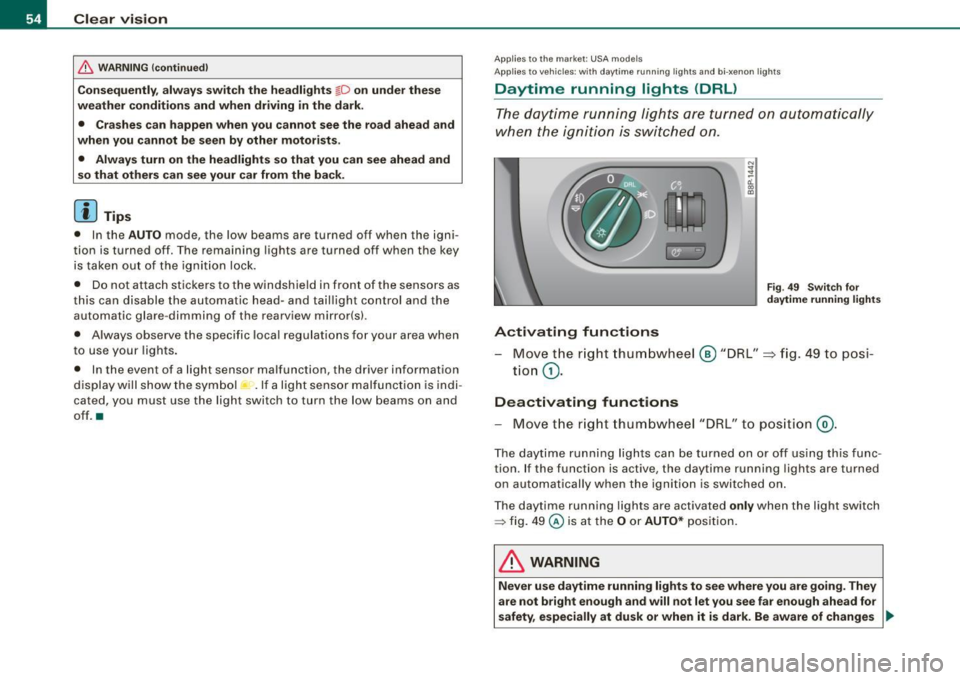
®r @'
Activating functions
F ig . 4 9 Swit ch for
d ayt ime running li ghts
- Move the r ight thum bwhe el @ "DRL" =} fig. 49 to posi-
tio n
G).
Deactivating functions
- Move t he r ig ht thum bwhee l "DRL" to po siti on @ .
The day time running lights ca n be turned on or off using this func
tion. If the function is active, the daytime running lights are turned
o n aut omatically when the ignition is switched on.
The daytime running lights are activated
only when the light switch
=> fig . 49 @ is at the O or AUTO* posi tion.
& WARNING
Never u se dayt ime running light s to see where you are goin g. They
are not bright enough and will not let you see far e nough ahead for
safety , especially at dusk or when it is dark. Be aware of change s _..