ignition AUDI S3 2009 Workshop Manual
[x] Cancel search | Manufacturer: AUDI, Model Year: 2009, Model line: S3, Model: AUDI S3 2009Pages: 324, PDF Size: 76.02 MB
Page 112 of 324

• ..__O_ n_ t_h _ e_ r_ o_ a_ d ____________________________________________________ _
0 Note
Do not stop the engine immediately after hard or extended driving.
Keep the engine running for approximately two minutes to prevent
excessive heat build-up. •
Parking brake
Parking brake
When the parking brake is set, it prevents the vehicle from
rolling away unintentionally.
Setting the parking brake
Fig . 114 Center
console: Parking brake
set
- Pull the parking brake lever all the way up.
Releasing the parking brake Pull the parking brake lever up slightly
and press the
release button at the same time=> fig. 114 -arrow-.
Keep the release button pressed and lower the parking
brake=>
& -
If you should drive off with the parking brake still set, a warning tone
will sound and the following will appear in the instrument cluster to remind you to release the parking brake:
Parking brake set
The parking brake warning comes on only after you have driven for longer than 3 seconds and faster than 5 mph (5 km/h).
The parking brake warning light Brake (USA)/
{CD) (CON) illuminates
when the parking brake is set and you switch on the ignition.
& WARNING
Always release the parking brake completely . A partially engaged
brake will overheat the rear brakes, reduce their effectiveness and
cause excessive wear. This could lead to brake failure and an acci
dent.
0 Note
Only after the vehicle has come to complete stop, should you firmly
set the parking brake and either move the gearshift lever into 1st .
gear (manual transmission) or move the selector lever into "P"
(Automatic transmission). •
Parking
To prevent a parked vehicle from rolling away, there are a
few things you should do.
When you park your vehicle, do the following:
- Stop the vehicle using the brake pedal.
- Set the parking brake firmly.
- Move the selector lever into the
P position (automatic
transmission)
or move the gearshift lever into 1st. gear
(manual transmission) => &. .,_
Page 114 of 324

-On th
e ro ad
..___ ______________ _
Audi parking system
Applies to vehicles: with the Audi parking system (8-channe l parking aid)
Description
The Audi parking system is an audible parking aid.
Sensors are located in the front and rear bumpers. If these detect an
obstac le, audible signals warn you. The range at which the sensors
start to measure is about:
front
rear side
cent
er
side
center 2
.9 feet !0,90 m)
3 .9 feet ( 1.20 m)
2 feet (0.60 ml 5 .2 feet ( 1.60 ml
The closer you get to the obstacle, the shorter the interval between
the audible signa ls . When driv ing in reverse, a continuous tone
sounds starting at a distance of 13 inches (0.35 ml and starting at
12 inches (0 .30 m) when driving forward!
If the distance to an obstacle remains constant, the vo lume of the
distance warning gradually drops after about four seconds (this is
not app ly in the con tinuous tone range).
Potential mal function s
If a warning buzzer sounds for a few seconds when the ignition is
switched on, there is a system malfunction with the acoustic park
assist. If the mal function pers ists unt il the ignition is switched o ff,
there will be no acoustic warning at the next attempt to activate the
system . Have the proble m cor rected .
There is no confirmation tone when reverse gear is engaged if there
is a system malfunction.
For the parking assist to operate, the sensors must be kept clean
and free of ice.
& WARNING
• Sensors have blind spots in which objects cannot be dete cted .
Pay spe cial attention to small children and animal s. They c annot
al w ays be dete cted by the sen sor s -danger of an a ccide nt!
• The parking a ssis t cannot replace the driver' s attention. The
dri ver alo ne i s re sponsible for parking and similar driving maneu
ver s. Always watch where you ar e driving.
0 Note
Low obstac les already signaled by a warning can disappear from
the system's detection range as they are approached and wi ll not
continue to be signaled . Objects such as barrier cha ins, trailer draw
bars, thin painted vertica l poles, or fences may not be de tected by
the system -risk of damage .•
Ap plies t o veh ic les: with the Audi parking system (8-channe l parking aid)
Switching on /off
Q l
Switching on
- Shift into reverse or
i
'
F ig . 11 5 Center
c o n so le: S w itc h fo r
parking aid
Page 115 of 324

On the road -
-------------------'
- Press the switch P111A in the center console ::::, page 112,
fig. 115. A short confirmation tone sounds and the diode
in the switch lights.
Switching off
-Drive forward faster than 10 mph (15 km/h), or
press the switch
P" 'A or
- switch off the ignition.
& WARNING
• The parking assist cannot replace the driver's attention. The
driver alone is responsible for parking and similar driving maneu
vers. Always watch where you are driving.
• Sensors have blind spots in which objects cannot be detected.
Pay special attention to small children and animals. They cannot
always be detected by the sensors -danger of an accident!
• Always pay attention to the area around the vehicle -using the
rearview mirror, too .
0 Note
Low obstacles already signaled by a warning can disappear from
the system's detection range as they are approached and will not
continue to be signaled. Objects such as barrier chains, trailer draw
bars, thin painted vertical poles, or fences may not be detected by
the system -risk of damage.
[ i] Tips
You can change the volume and pitch of the signals~ page 23. •
Con tro ls and eq uip
ment
Cruise control
Switching the system on
The cruise control system makes it possible to drive at a
constant speed starting at 20 mph (30 km/h).
A 1----....;
Fig. 116 Control lever
with set button
Fig . 117 Display:
Selected speed
- Pull the lever to position (D::::, fig. 116 to switch the
system on.
- Drive at the speed you wish to set.
- Press button
© to set that speed.
The display~ fig. 117 will show the set speed. The display may vary
depending on the type of display in your vehicle. The indicator light _.,
Vehicle care I I irechnical data
Page 116 of 324

• .___O_ n_ t_h _e _ r_o _a_ d __________________________________________________ _
CRUISE (US model)/ r,,f (Canadian model) will also light up in the
instrument cluster.
& WARNING
• Always pay attention to traffic even when the cruise control is
switched on. You are always responsible for your speed and the
distance between your vehicle and other vehicles.
• For safety reasons, the cruise control should not be used in the
city, in stop-and-go traffic, on twisting roads and when road condi
tions are poor (such as ice, fog, gravel, heavy rain and hydro
planing) -risk of accident.
• Turn off the cruise control temporarily when entering turn
lanes, highway exit lanes or in construction zones.
• Please note that inadvertently "resting" your foot on the accel
erator pedal causes the cruise control not to brake. This is because
the cruise control is overridden by the driver's acceleration.
[ i J Tips
• Vehicles with manual transmission : You can attain the set speed
only if the currently engaged gear allows it and the engine is not
stressed. Shifting to a higher or lower gear promptly will allow the
engine to run smoothly.
• The cruise control cannot maintain a constant speed when
driving downhill. The vehicle will accelerate under its own weight.
Downshift to a lower gear or use the brakes to slow down. •
Changing speed
- Press lever in the 0 or Q direction~ page 113, fig. 116
to increase or decrease your speed.
Release the lever to save that speed .
Change speed in increments of 1 mph (1 km/h) by lightly pressing
the lever. If you keep the lever pressed down, you will alter your
speed in 5 mph (10 km/h) increments.
You can also press the accelerator pedal down to increase your
speed, e .g. if you want to pass someone. The speed you saved
earlier will resume as soon as you release the accelerator pedal.
If, however, you exceed your saved speed by 5 mph (10 km/h) for
longer than 5 minutes, the cruise control will turn off temporarily.
The symbol will go out but the saved speed will be retained. •
Presetting your sp eed
You can preset your desired speed while the vehicle is not
moving.
- Turn on the ignition.
Pull lever into position
G) ~ page 113, fig. 116.
Press the lever in the
0 or Q direction to increase or
decrease your speed.
- Release the lever to save that speed.
This function makes it possible, for example, to save the speed you
want before driving on the highway. Once on the highway, activate
the cruise control by pulling the lever toward
G) . •
Switching th e system off
Temporary deactivation
Press the brake pedal, or
- Keep the clutch pedal pressed down
longer, or
Press the lever into position
0 (not clicked into place)
~ page 113, fig. 116, or ._
Page 117 of 324

On th e road 1111
--------------~:.:..--J
- Drive for longer than 5 minutes at more than 5 mp h
(10 km/h) above the stored speed .
Switchin g o ff compl ete ly
- Press lever into position@ (clicked into place), or
- Switch the ign ition of f.
The system retains the saved speed if you deactivate the cruise
control temporarily. To resume the saved speed, release the brake or
clutch pedal and pull the lever to position
G) .
Switching the ignition off erases the saved speed.
& WARNING
You s hould only return t o th e sa ved sp ee d if it i s not to o fast fo r
the curre nt traff ic condi tio ns -ris k of an a ccident! •
Applies to ve hic les: with m agn etic r id e
Audi magnetic ride
Damping can be adjusted to the driver's preference and it
adapts automatically to the curren t driving situation.
t 9 1 ] J
Fi g. 11 8 Ce nte r
co nso le: Sw itc h for
A ud i m agn etic rid e
Press the switch ~ fig. 118 to turn sport setting on or off.
Con tro ls and eq uip
ment
Audi magnetic ride is an e lectronically control led damping system.
This chassis system assists the driver by adapt ing to the particular
s ituation through imperceptible control processes . The
dampin g
provides individua l modulation of damping forces . For example,
with damping characteristics set to provide greater comfort ,
damping is set somewhat harder for a brief period on ly as required,
when rounding a curve and when braking.
Standard settin g
Select the standard setting if you prefer a suspension setting
emphasizing comfort .
Sp or t setting
Select the sport setting if you prefer a sporty suspension setting .
The LE D in the switch comes on to indicate sport setting .
[ i ] Tip s
The warning/indicator light in the instrumen t cluster comes on in
the event of a malfunction. Drive to the closest authorized Audi
dea le r as soon as possible and have the malfunction repaired .•
Vehicle care I I irechnical data
Page 118 of 324
• ..__T_ ra_ n_s_ m_ i_ s _s_ i_ o _n ___________________________________________________ _
Transmission
Manual transmission
Applies to vehicles: with manual transmission
Gearshift lever
The clutch pedal must be depressed all the way bef ore
you can start the engine .
The manual transmission in your Audi is equipped with an
interlock-feature .
-Depress the clutch pedal all the way.
- Start the engine w ith the gearsh ift lever in Neutral and
the clutch pedal depressed.
0 Note
Always depress the clutch pedal fully when changing gears. Do not
hold the vehicle on a hi ll with the c lu tch pedal par tia lly depressed.
This may cause premature clutch wear or damage .
[ i J Tip s
• Resting your hand on the gearshift lever knob while driving will
cause prematu re wear in the transmission .
• The back -up lights go on when you shift into Reverse with the
ignition on. •
Applies to vehicles: with 6-speed manual transmission
Gearshift pattern (6 -speed manual
transmission )
ra ...
-0:. ., m
Fig. 11 9 Gea rsh ift
p att er n: 6-s pee d
m anu al tran sm ission
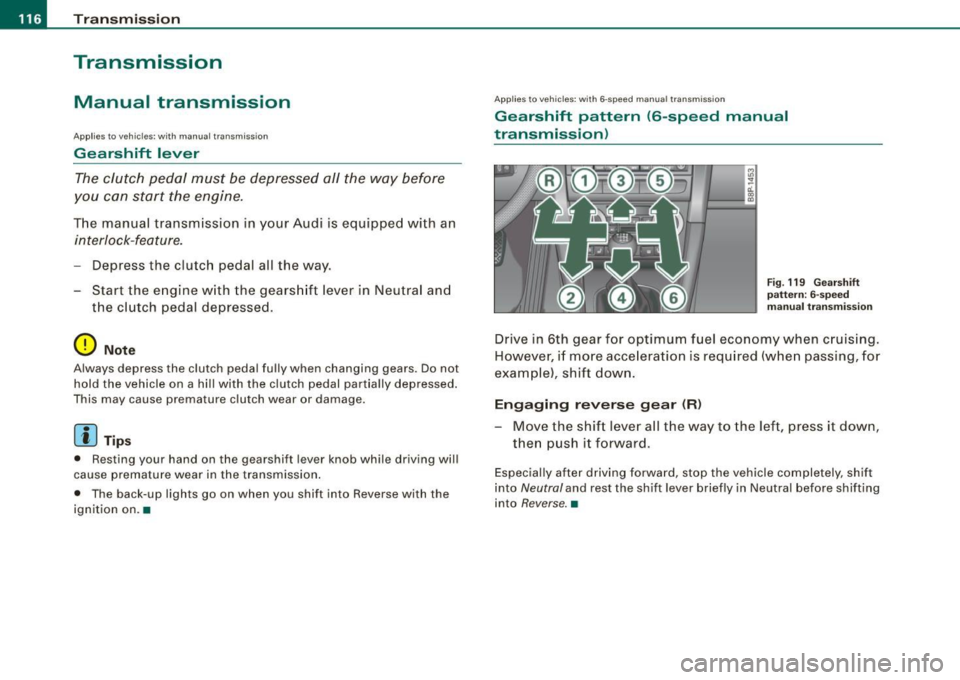
Drive in 6th gear for optimum fuel economy when cruising.
However, if more acce leration is required (when passing, for
example), shift down.
Engaging r evers e gear CR )
- Move the shift lever all the way to the left, press it down,
then push it forward.
Especial ly after driving forwa rd, stop the vehicle completely, shift
into
Neutral and rest the sh ift lever brief ly in Neutral before shifting
into
Reverse. •
Page 119 of 324

_______________________________________________________ T_ ra_ n_s_ m __ is_s_ io_ n __ ftllll
S tronic transmission
Ap plies to veh ic les: w ith S tronic®
Introduction
Your vehicle is equipped with a S tronic transmission, also called a
double -clutch system/transmission.
Power is transferred between the engine and the transmission by
means of two independent clutches. They replace the torque
~
converter of conventiona l automatic transmissions and allow the
vehic le to acce lerate without a noticeable break in the power flow.
With the aid of
tiptronic , the gears can optionally be shifted manu
ally => page 121. •
Ap plies to veh ic le s: w ith S troni c®
Selector lever positions
All the selector lever positions are explained in this
section.
Fig . 120 Display :
Selector lever posi
tion s
The se lector lever position is shown in the instrument cluster
display by highlighting the appropriate symbol.
Controls and equip
ment P
-Park lock
In this position the gears are mechanically locked .
The park lock must only be engaged with the veh icle
stationary
=> & .
To engage P and to remove the lever from this position, you must
depress the release button (button in the se lector lever handle)
and
simultaneously you must step on the brake pedal.
R -reverse
In this position, reverse is engaged.
Reverse gear must only be engaged with the vehicle
stationary and
the engine running at idle speed =>& .
To engage R, you have to depress the release button
and simulta
neously step on the brake pedal. In the R position, the back -up lights
illuminate with the ignition on.
N -Neutral
The transmission is in neutral in this position .
D -Normal position for driving forward
In this position, the forward gears are automatically shifted up and
down, depending on engine load and vehicle speed.
To engage S from N, the brake pedal must be depressed at speeds
below 5 km/h or when the vehicle is stationary=>& .
In certain circumstances (driving in the mountains for example) it
can be beneficial to switch temporarily to the manua l shift program
=> page 121 in order to adjust the gear ratios to driving conditions
manually .
S -Sport setting
The S setting should be selected for sporting driving . The power
reserves of the engine can be fully exploi ted through later upshifts.
To engage S from N, the brake pedal must be depressed at speeds
below 5 km/h or when the vehicle is stationary =>& .
~
I • •
Page 121 of 324
_______________________________________________________ T_ r _a_ n_s_ m __ is_s_ io_ n _ __.1111111
The selector lever lock is effective only when the vehicle is
stationary and at speeds below 5 km/h. At higher speeds, the lock in
the N position is automatically switched off .
The selector lever is not locked when rapid shifts are made through
the N position (e.g. from R to Dl. This allows you to "rock" the vehicle
if it becomes stuck. If the lever is in the N position for more than
1 second with the brake pedal not depressed, the selector lock
engages automatically .
Release button
The release button in the selector lever handle prevents accidental
shifts into certain selector lever positions . When you press the
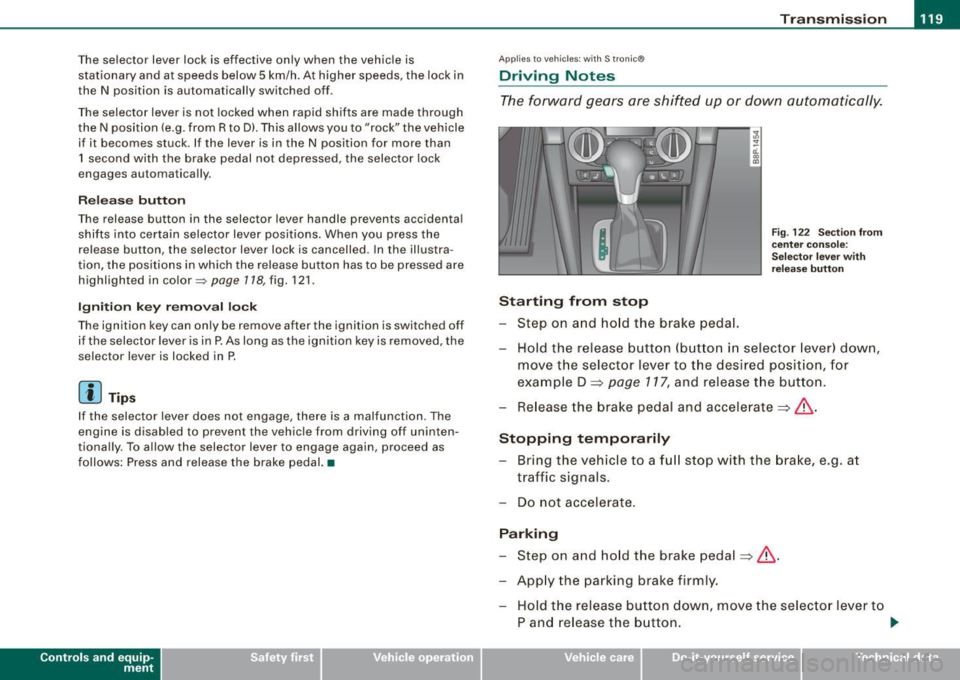
release button, the selector lever lock is cancelled . In the illustra
tion, the positions in which the release button has to be pressed are
highlighted in color~
page 718, fig. 121.
Ignition key removal lock
The ignition key can only be remove after the ignition is switched off
if the selector lever is in P. As long as the ignition key is removed, the
selector lever is locked in P.
[ i) Tips
If the selector lever does not engage, there is a malfunction . The
engine is disabled to prevent the vehicle from driving off uninten
tiona lly. To allow the selector lever to engage again, proceed as
follows: Press and release the brake pedal. •
Contro ls and eq uip
ment
Ap plies to vehic les: wit h S tron ic®
Driving Notes
The forward gears are shifted up or down automatically.
Starting from stop
Step on and hold the brake pedal.
Fig. 122 Section from
center console:
Selector lever with
release button
Hold the release button (button in selector lever) down,
move the selector lever to the desired position, for
example D =>
page 117, and release the button.
Release the brake pedal and accelerate => &, .
Stopping temporarily Bring the vehicle to a full stop with the brake, e.g. at
traffic signals.
Do not accelerate.
Parking Step on and hold the brake pedal=>&, .
Apply the parking brake firmly. Hold the release button down, move the selector lever to
P and release the button. .,.
Vehicle care I I irechnical data
Page 140 of 324

___ S_a_ f_ e_ t-= y_ b_e_ l_ t _s _______________________________________________ _
- Make sure that your passengers also b uckle up and prop
erly wea r th eir sa fety belts.
Protect children wit h a child restraint system appropriate
for the size and age.
The warning light i in the instrument cluster lights up when the
ignition is switched on as a reminder to fasten the safety belts. In
addition , you will hear a warning tone.
After the ignition is switched on, the warning light in the instrument cluster will a lways come on for about 6 seconds and if the driver has
not fastened the safety belt, a warning tone will also sound for
about 6 seconds . As soon as the driver has fastened the safety belt,
the warning tone will stop and the warning light will go out .
If the driver or front seat passenger have not buckled -up within
about 10 seconds after the warning tone has stopped and the
vehicle is moving faster than about 15 mph, the warning tone will
sound again for about 6 seconds and then stop for 24 seconds and
then repeat this reminder sequence for a maximum of 2 minutes. At
speeds be low 5 mph, the warning tone will not sound.
Fa sten your safe ty belt and m ake su re that your p assengers also
properl y put on th eir s afet y belts .
& WARNING
• Safety belt s are the single mo st effective mean s available to
reduce th e risk of ser ious injur y and death in a utomobile acci
dent s. For your prote ction and th at of your pas senger s, alwa ys
c orre ctl y we ar safety belt s when t he vehicle is moving .
• Failure t o pay att ention to th e warning light that co me on,
c ould lead to per sonal injury .•
Why safety belts?
Frontal co11isions and the law of physics
Front al crashes create very strong forces for pe ople riding
in vehicles.
F ig. 13 3 Unbel ted
o cc up ants i n a ve hicle
he ading for a wa ll
Fi g. 13 4 The vehi cle
c ras hes in to t he wa ll
The physical principles are simple. Both the vehicle and the passen
gers possess energy which varies with vehicle speed and body
we ight . Engineers cal l this energy "kinetic energy ."
T he higher the speed of the vehicle and the greater the vehic le's
we ight, the more energy that has to be "absorbed" in the crash .
Vehicle speed is the most significan t factor. If the speed doubles
from 15 to 30 mph (25 to 50 km/h), the energy increases 4 times! .,
Page 151 of 324
__________________________________________________ A_ i_ r _b _a...; g::- s_ y=--- s_t _e _m __ lllll
Child restraints on the front seat -some
important things to know
- Be sure to read the important information and head the
WARNINGS for important details about children and
Advanced Airbags :=>
page 169.
Even though your vehicle is equipped with an Advanced Airbag
System, make certain that all children, especially those 12 years and
younger, always ride in the back seat properly restrained for their age and size . The airbag on the passenger side makes the front seat
a potentially dangerous place for a child to ride . The front seat is not
the safest place for a child in a forward -facing child safety seat. It
can be a very dangerous place for an infant or a child in a rearward
facing seat.
The Advanced Airbag System in your vehicle has been certified to
comply with the requirements of United States Federal Motor
Vehicle Safety Standard 208 as applicable at the time your vehicle
was manufactured.
The Standard requires the front airbag on the passenger side to be
turned off ("suppressed") if a child up to about one year of age
restrained in one of the rear-facing or forward-facing infant
restraints listed in Federal Motor Vehicle Safety Standard 208 with
which the Advanced Airbag System in your vehicle was certified has been installed on the front passenger seat. For a listing of the child
restraints that were used to certify compliance with the US Safety
Standard =>
page 171.
The PASSENGER AIR BAG OFF light in the instrument panel tells you
when the front Advanced Airbag on the passenger side has been
turned off by the electronic control unit.
Each time you turn on the ignition, the
PASSENGER AIR BAG OFF
light will come on for a few seconds and:
• will stay on if the front passenger seat is not occupied,
Controls and equip
ment Safety first Vehicle operation
•
will stay on if there is a small child or child restraint on the front
passenger seat,
• will go off if the front passenger seat is occupied by an adult as
registered by the weight-sensing mat=>
page 158, "Monitoring the
Advanced Airbag System" .
The
PASSENGER AIR BAG OFF light comes on when the control unit
detects a total weight on the front passenger seat that requires the
front airbag to be turned off.
If the total weight on the front passenger seat is more than that of
a typical 1 year-old child but less than the weight of a small adult,
the front airbag on the passenger side can deploy (the
PASSENGER
AIR BAG OFF
light does not come on). If the PASSENGER AIR BAG
OFF
light does not come on, the front airbag on the passenger side
has not been turned off by the electronic control unit and can
deploy if the control unit senses an impact that meets the condi
tions stored in its memory.
For example, the airbag may deploy if:
• a small child that is heavier than a typical 1 year -old child is on
the front passenger seat (regardless of whether the child is in one
of the child safety seats listed=>
page 171), or
• a child who has outgrown child restraints is on the front
passenger seat.
If the front passenger airbag is turned off, the
PASSENGER AIR BAG
OFF
light comes on in the instrument cluster and stays on.
The front airbag on the passenger side may
not deploy (the
PASSENGER AIR BAG OFF light does not illuminate and stay lit) even
if a small adult or teenager, or a passenger who is not sitting upright
with their back against a non-reclined backrest with their feet on the
vehicle floor in front of the seat is on the front passenger seat
=>
page 128, "Proper seating position for the driver".
If the front passenger airbag deploys, the Federal Standard requires
the airbag to meet the "low risk" deployment criteria to reduce the risk of injury through interaction with the airbag . "Low risk" deploy
ment occurs in those crashes that take place at lower decelerations
I),
Vehicle care Do-it-yourself service Technical data