instrument cluster AUDI S3 2010 User Guide
[x] Cancel search | Manufacturer: AUDI, Model Year: 2010, Model line: S3, Model: AUDI S3 2010Pages: 320, PDF Size: 75.34 MB
Page 31 of 320
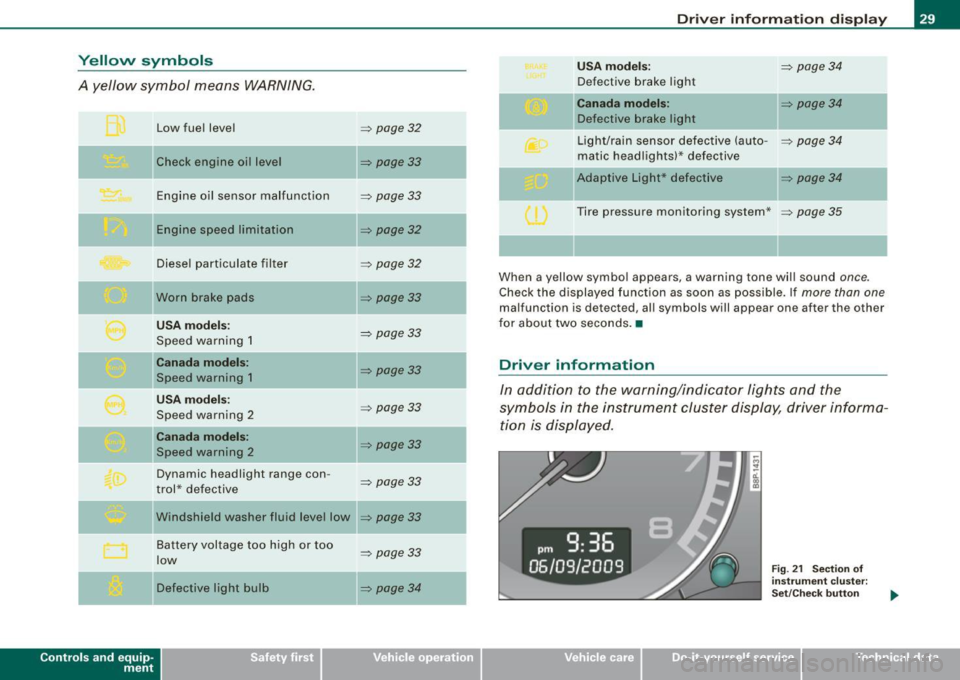
Yellow symbols
A yellow symbol means WARNING.
Contro ls and eq uip
ment Low fuel level
Check engine oi l level
Engine oil sensor malfunction
Engine speed limitation
Diesel particulate filter
Worn brake pads
USA models:
Speed warning 1
Canada models:
Speed warning 1
USA models:
Speed warning 2
Canada models:
Speed warning 2
Dynamic headlight range con -
trol * defective
W indshield washer fluid level low
Battery voltage too high or too
low
Defective light bulb
=> page 32
=> page33
-
=> page33
=> page32
=> page32
=> page33
=> page 33
=> page33
=> page33
=> page33
=> page33
=> page33
...
=> page 33
=> page34
-
-
-
Driver information display
USA models: => page34
Defective brake light
Canada models: => page 34
Defective brake light
Light/rain sensor defective (auto-
=> page 34
matic headlights)* defective
-Adaptive Light * defective => page34
Tire pressure monitoring system * => page 35
When a yellow symbol appears, a warning tone will sound once.
Check the displayed function as soon as possible. If more than one
malfunction is d etected, all symbols will appear one after the other
for about two seconds. •
Driver information
In addition to the warning/indicator lights and the
symbols in the instrument cluster display, driver informa tion is displayed .
Vehicle care I I
Fig. 21 Section of
instrument cluster:
Set/Check button
irechnical data
Page 35 of 320

If the '-" symbol comes on, add 1 quart (1 liter) of oil at the next
opportunity =>
page 230. •
Checking the engine oil level r.,
When the symbol illuminates, check the engine oil level as soon
as possible=>
page 229. Top off the oil at your earliest opportunity
=>
page 230. •
Engine oil sensor defective -;...
If the symbol illuminates, contact your authorized Audi dealer
and have the oil sensor inspected.•
Worn brake pads ~ :;
rt. Brake pads!
If the warning light illuminates, immediately contact your autho
rized Audi dealer or qualified workshop to have all brake pads
inspected. On USA models the warning light? comes on together
with the warning light
BRAKE. Both sets of brake pads on an axle must
always be replaced at the same time.
& WARNING
Driving with bad brakes can cause a collision and serious personal
injury.
• If the warning light and the warning light
BRAKE11 with the
message Brake pads! comes on in the instrument cluster display,
immediately contact your authorized Audi dealer or qualified
workshop to have all brake pads checked or replaced if
necessary. •
11 BRAKE : USA models only
Controls and equip
ment
Speed warning
models) 1
· ,I'""'
Driver information display
(USA models> IP (Canada
If the ~ symbol illuminates, this means you are driving faster than
the set vehicle speed. Slow down!=>
page 26. •
Speed warning 2 r (USA models) /,.__, (Canada
models)
If the C) symbol illuminates, this means you have driven faster than
the second set vehicle speed. Slow down! =>
page 26. •
Applies to veh icles : wi th dynamic head light range ad justment
Headlight range control defective
If the illuminates, the dynamic headlight range control is no
longer working properly. Have the system checked and repaired at
your authorized Audi dealer. •
Windshield washer fluid level too low .-_j
If the ~ symbol illuminates, add windshield washer fluid to the
washer system =>
page 240. •
Battery voltage low ~
If the C symbol illuminates, contact your authorized Audi dealer
and have the following components inspected:
• drive belt
• battery charge
Also see if the generator warning/indicator light illuminates
=>
page 14. •
I • •
Page 46 of 320
Opening and closing
Closing the rear lid
- Pull it down and shut it firmly~&. There is a recess in
the interior trim of the lid to make it easier to pull down.
& WARNING
• After closing the rear lid, always pull up on it to make sure that
it is properly closed. Otherwise it could open suddenly when the
vehicle is moving.
• To help prevent poisonous exhaust gas from being drawn into
the vehicle , always keep the rear lid closed while driving. Never
transport objects larger than those fitting completely into the
luggage area, because then the rear lid cannot be fully closed.
• Never leave your vehicle unattended especially with the rear lid
left open. A child could crawl into the car through the luggage
compartment and pull the lid shut, becoming trapped and unable
to get out. To reduce the risk of personal injury, never let children play in or around your vehicle. Always keep the rear lid, as well as
the vehicle doors, closed when not in use.
[ i ) Tips
• If the rear lid is open or not properly locked when the ignition is
turned on, the door and rear lid warning appears in the instrument
cluster display.
• If the rear lid on a locked vehicle is unlocked with the middle
button
cs on the remote key , the rear lid is automatically locked
again immediately after closing. This is indicated by the turn signals
blinking. •
Emergency release for rear lid
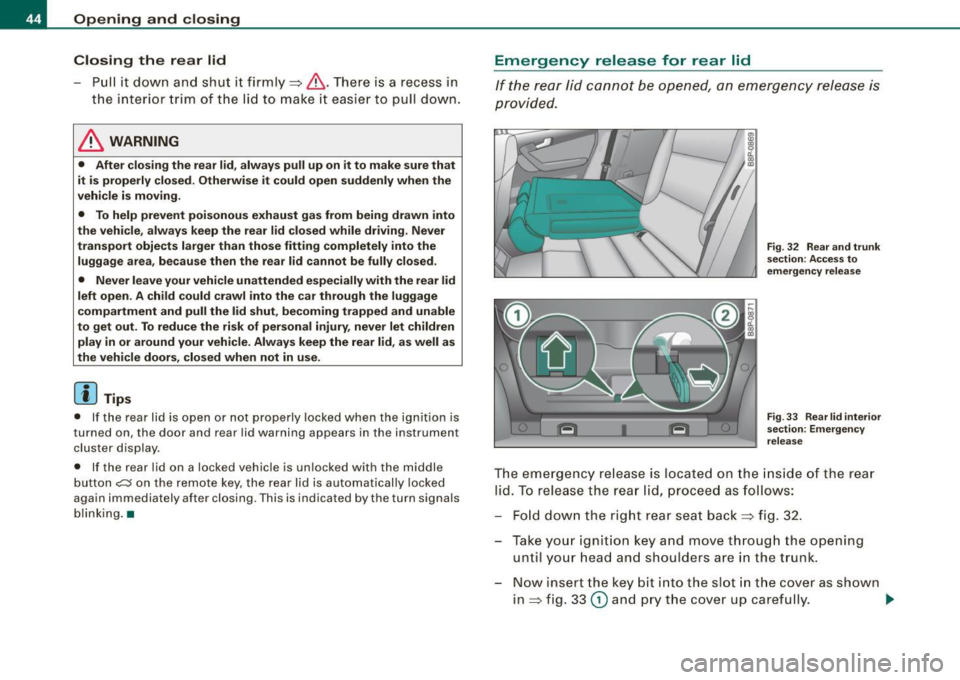
If the rear lid cannot be opened, an emergency release is
provided.
Fig. 32 Rear and trunk
section: Access to
emergency release
Fig. 33 Rear lid interior
section: Emergency
release
The emergency release is located on the inside of the rear
lid. To release the rear lid, proceed as follows:
- Fold down the right rear seat back~ fig. 32.
- Take your ignition key and move through the opening until your head and shoulders are in the trunk.
- Now insert the key bit into the slot in the cover as shown
in ~ fig. 33
(D and pry the cover up carefully. ..,.
Page 56 of 320

Clear vision
The daytime running lights function cannot be turned off .
Automatic headlight control *
In the switch position AUTO the automatic he adlight contro l is
turned on . The low beams are turned o n automatically through a
light sensor as soon as ambient brightness (e .g. when driving into a
t unnel) falls below a value preset at the factory. When ambien t
brightness increases again, the low beams are turned off again
aut omatically ==>&, .
In the
AUTO position the low beams are switched off automatically
when the ignition is turned off.
Light S ensor M alfun ction *
In the even t of a light sensor malfunct ion, the driver is notified in the
instrument cluster display :
Automatic headlights /automati c w ipers defe ctive
For safety reasons the low beams are turned o n permanently w ith
the switch in AUTO *. However , you can continue to turn the lights
on and off us ing the l ight switch . Have the lig ht sens or checked as
soon as possib le at a dealership .
Coming home /leaving home function *
The function is switched on when the switch is in the AUTO* posi
tion and the f unction is shown as ac tive in t he d river info rmat ion
system .
The
c oming home function illuminates the area around the vehicle
when the ignition is switched off a nd the driver's door is opened.
The length of time the lights remain on can be set in the menu
display
(Illumination > Exterior lights > coming home ).
The leaving home function illuminates the area around the vehicle
whe n unlocking it .
& WARNING
• Nev er use daytime run ning light s to see whe re you are going .
They are not bright enough and will not let you see far enough
ahead for safety , espe cially at du sk or when it i s da rk . Al way s
s w itch on the low beam s at du sk or when it i s dark .
• Automatic headlight s are only intended to assist the driver .
They do not relieve the driver of hi s responsibility to check the
head light s and to turn them on manually according to the cu rrent
light and visibility conditions . For example , fog and rain cannot be
detected b y the l ight sen sor s. S o alwa ys switch on th e headl ight s
under these weather conditions and when driving in the dark
io.
• Cra she s c an happen when you cannot see the road ahead and
when you cannot be seen by other motor ists.
- Alway s turn on the hea dlight s so that you can see ahead a nd
so that other s can see your car from the ba ck.
[ i ] Tips
• With the swi tch in AUTO front fog ligh ts cannot be turned on in
addition.
• The light sensor for head light contr ol is located in the rear view
mirror mount. Do not apply any stickers to the windshie ld in this
area to p revent malfunctions or failures.
• Some exterior lighting functions can be adjusted in the driver
informa tion system
==> page 23.
• I f you remove the ignition from the ignition lock while the head
l ights are still on, a bu zzer w ill sound as long as the driver's door is
open to remind you to turn off the lights.
• Always observe t he specific local regulations for your area as to
when to use your lights.
• With automatic headl ights, the high -beam function is also avai l
able, but with one restriction : If you have not switched the high
bea ms back to low beams duri ng automatic headlight operation (for
example , after driving through a tunne l), on ly the low beams come .,,_
Page 58 of 320
Clear vision
Instrument panel illumination
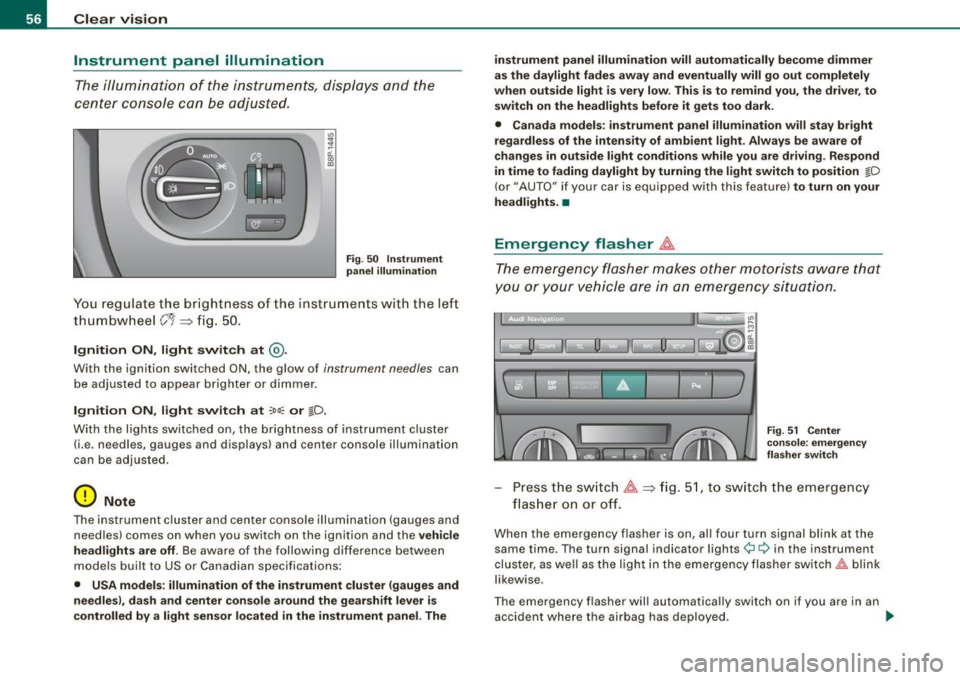
The ill umination of the instrumen ts, dis plays an d the
center cons ole c an be adjusted .
"' ;
a'.. ., m
Fig. 50 In stru men t
pan el illumi nat ion
You re gul ate the br ight ness o f the ins tru ments wit h the lef t
th um bw heel
C'1 => fi g. 50 .
Ignition ON , light switch at @ .
With the ignition switched ON, the g low of instrument needles can
be adjuste d to a ppear brigh ter or dimmer .
Ignition ON , light switch at ~oo : or tD.
With the l ights switched o n, the brightness of instrument c luster
(i.e . ne edles, gauges and displays) and center console il lumination
can be adjusted.
0 Note
The instrument cl uster and cente r console illumination (gauges and
needles) comes on when you switch on the ignition and the
v ehi cle
headlights are off.
Be aware of the f ollowi ng differe nce betwee n
models built to US or Canadian specifications :
• USA model s: illumination of the instrument cluster (gauges and
needles ), dash and center console around the gearshift leve r is
contr olled by a light sensor l ocated in the instrument panel. The i
nstrument panel illumination will autom ati cally be come dimmer
as the daylight fades away and eventually will go out completely
when out side light i s very low . Thi s is to rem ind you , the dri ver , to
sw itch on the headlights before it gets too dark.
• Canada models : in strument panel illumin ation will sta y bri ght
regardle ss of the inten sity of amb ient light . Alway s be aware of
c hange s in outside light conditions while you are d riving . Re spond
in time to fading dayl ight by turning the light switch to position
tD
(or" AUTO" if your car is equipped with this feature) to turn on your
he adl ights. •
Emergency flasher ~
The emergency flasher makes other motorists aware that
you or your vehicle are in an emergency situation.
1 1 0. -II 0 Ii i
11
u
I ] '
' F ig . 51 Center
c o ns ole : em erge ncy
fla sher swit ch
Pr ess th e sw itch ~=>fig. 51, to sw itch the em ergency
flas her on or off.
When the eme rgency flasher is on, al l four turn sig nal blink at the
same time . The turn signal indicator lights
¢i ¢ in the instrument
clu ster, as well as the light in the emergency flasher switch~ blink
likewise .
The emergency flasher will automatically switch on if you are in an accident where the airbag has deployed . _,,.
Page 59 of 320

[ i J Ti ps
You should switch on the emergency flasher when:
• you are the last vehicle standing in a traffic jam so that any other
vehicles coming can see you, or when
• your vehicle has broken down or you are in an emergency s itua
tion, or when
• your vehicle is being towed by a tow truck or if you are towing
another vehicle behind you .•
Turn signals -¢ ¢ and high beam ~D lever
The lever on the left side of the steering column is used to
operate the turn signals and the high beam as well as the
headlight flasher .
-"' M
-w ... m
Fig. 52 Tu rn sign al and
hig h beam l ever
The turn signal and high beam lever has the following func
tions:
Turn sign als
¢ ¢
- Lift the lever up all the way:::::, fig. 52 G), to use the right
turn s ignals, or push the lever down all the way@ to use
the left turn signals.
Con tro ls and eq uip
ment
C lea r v is ion
Auto-blink
- Move the lever (up or down) just to the point of resis
tance to use the turn signals for as long as you need
them, for example when changing lanes .
- Briefly move the lever up or down just to the point of resistance and then release it to flash the turn signals
three times in succession. This feature allows to indicate
lane changes clearly and with minimum effort when
driving on highways.
Hi gh b eam
~D
- Push the lever forward 0 to switc h on the high beam.
- P ull the lever back towards y ou to sw itch off the high
beam.
H eadlight flasher
~D
Pu ll the lever toward the steering wheel G) to use the
headlight flasher .
Note s on these features
• The turn signals only work with the ignition switched on. The
indicator lights
¢i or ¢ in the instrument cluster:::::, page 11 also
blink .
• After you have turned a corner, the turn signal switches off auto
matically.
• The high beam works only when the headlights are on . The indi
cator light ~Din the instrument cluster illuminates when the high
beams are on.
• The headlight flasher works only as long as you hold the lever -
even if there are no lights switched on. The indicator light ~D in the
instrument cluster illuminates when you use the headlight flasher . .,
Vehicle care I I Technical data
Page 111 of 320
_________________________________________________ O _n_ t_h _e _ r_o _a _d __ lfflll
R elea sing th e parking br ake
- Pu ll the parking brake lever up slight ly and press the
release button at the same time~
page 108, fig. 110
-arrow-.
- Keep the release button pressed and lower the parking brake ~& .
If you should drive off with the parking brake sti ll set, a warning tone
will sound and the fo llowing wil l appear in the instrument cluster to
remind you to re lease the parking brake:
Parking brak e set
The parking brake warning comes on only after you have driven for
longer than 3 seconds and faster than 5 mph (5 km/h).
The parking b rake warning light Brake (USA)/ «D>
(CDN) illuminates
when the parking brake is set and you switch on the ignition .
& WARNING
Alway s re leas e the par king br ake completely . A p artiall y engaged
br ake w ill overheat the r ear brake s, reduce their effective ness and
ca use e xcessive w ear. T his co uld le ad to brake failur e and an acc i
dent .
0 Note
Only after the vehicle has come to co mplete stop, should you firm ly
set the parking brake and either move the gearshift lever into 1st .
gear (manual transmission) or move the selector lever into "P"
(Automatic transmission). •
Controls and equip
ment
Parking
To prevent a parked vehicle from rolling away, there are a
few things you should do.
When you park your vehic le, do the fo llowi ng:
- Stop the vehicle using the brake pedal.
- Set the parking bra ke firm ly .
- Move the selector lever into the
P pos ition ( automatic
tran smi ssion)
or m ove the gea rshi ft lever into 1s t. gear
(manual transmission ) ~ &.
- Switch off the engine and remove the ignitio n key from
t h e igniti on loc k.
Wh at else you should d o wh en p arking your vehicle o n
a n i ncline or dec line
Turn the steering wheel so that if the vehicle should start to roll, it
will ro ll into the curb.
I f you are parking on a
declin e (the front of your vehic le facing
downhill!, turn the front wheels to the right so that they point
toward the curb .
If you are parking on an incline (the font of your vehicle fac ing
uphill!, turn the front whee ls to the left so that they point
away from
the curb.
Move the selector lever into the P position ( autom atic tran sm iss ion)
or move the gearshift leve r into 1st. gear (manual tr ansmi ssion ).
& WARNING
Thi s is how you can redu ce the r isk of injury when leaving y our
vehi cle .
• Never p ark the vehi cle where it can come in conta ct with dr y
gra ss, spi lled fuel or any other fl amm able m ater ials . .,_
I • •
Page 113 of 320

----------------------------------------------~O~n~t:.!..h~e::...!..r~o~a~d~ _fflll
-Drive at the speed you wish to set .
- Press button
@ to set that speed.
The disp lay=> page 110, fig . 112 will show the set speed . The
display may vary depending on the type of disp lay in your vehicle .
T he indicator light
CRU ISE (US model)/ f,f (Canadian mod e ll wi ll also
light up in the instrument cluster .
& WARNING
• Alway s pa y att ention to traffic ev en when the crui se contr ol is
s w it ched on . You are al ways respo nsi ble for your spee d and the
di stance between your v ehic le and other ve hicle s.
• For sa fet y reas on s, the crui se contr ol s h o uld not be u sed in the
ci ty , in stop -and -go traffic , on t wis ting road s and when road condi
tion s are po or (s uch a s ic e , fo g, gra vel , he avy ra in and h ydro
planing ) - risk of accident .
• Turn o ff th e cru is e c ont rol tempor arily w hen ente ring tu rn
lanes , highway e xit lan es or in con stru ction zone s.
• Please n ote that in ad vertentl y "res ting " yo ur foot on the a ccel
erator pedal cau se s t he crui se control not to brak e. Thi s is becau se
th e c ruise c ontrol i s overridden by the dri ver's acceler ation .
[ i] Tips
• Vehicles with manual transmission : You can attain the set speed
only if the curren tly engaged gear al lows it and the engine is not
stressed. Shifting to a higher or lower gear promptly will allow the
engine to run smooth ly .
• T he cruise control cannot maintain a constant speed when
driving downhi ll. The vehicle wi ll acce lerate under its own weight .
Downshift to a lower gear or use the brakes to slow down .•
Controls and equip
ment
Changing speed
Press lever in the 0 o r O direction ~ page 110, fig. 111
to increase or dec rease your speed.
- Release the lever to save that speed .
Change speed in increments of 1 mph (1 km/h) by lightly pressing
the lever. If you keep the lever pressed down, you will a lter your
speed in 5 mph (10 km/hl increments .
You can a lso press the acce lerator pedal down to increase your
speed, e.g. if you want to pass someone. The speed you saved
earlier will resume as soon as you release the accelerator pedal.
I f , however, you exceed your saved speed by 5 mph ( 10 km/h) for
longer than 5 minutes, the cruise control will turn off temporarily.
The symbol wi ll go out but the saved speed wi ll be retained. •
Presetting your speed
You can preset your desired speed while the vehicle is not
moving.
Turn on the ignition.
P ull lever into posit ion
G) ~ page 110 , fig. 11 1.
Press the lever in the
0 or O direction to increase or
decrease your speed.
- Release the lever to save that speed .
This function makes it possible, for example, to save the speed you
want before driving on the highway . Once on the highway, activate
the cruise contro l by pulling the lever toward
G) . •
I • •
Page 116 of 320
....... _T _r_a _ n_ s_m _ i_s _s _i_o _n ______________________________________________________ _
S tronic transmission
Applies to vehicles: w ith S tronic®
Introduction
Your vehicle is equipped with a S tronic transmission, also called a
double -clutch system/transmission.
Power is transferred between the engine and the transmission by means of two independent clutches. They replace the torque
converter of conventional automatic transmissions and al low the
vehic le to accelerate without a noticeable break in the power flow .
With the aid of
ti pt ronic, the gears can optionally be shifted manu
ally => page 118 . •
Appl ies to vehicles: with S tronic®
Selector lever positions
All the selector lever positions are explained in this
section .
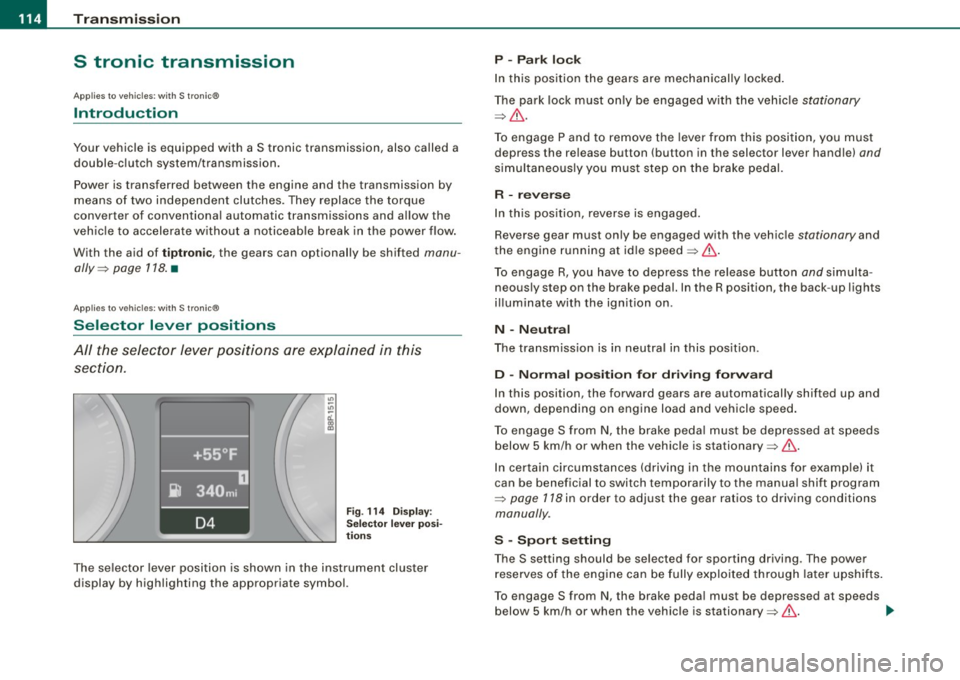
Fig. 114 Disp lay:
Selecto r lev er posi
t ions
The se lector lever position is shown in the instrument cluster
display by highlighting the appropriate symbol.
P -Park lock
In this position the gears are mechanically locked .
The park lock must only be engaged w ith the vehic le
stationary
=> & .
To engage P and to remove the lever from this position, you must
depress the release button (button in the selector lever handle)
and
simultaneously you must step on the brake pedal.
R -reverse
In this position, reverse is engaged.
Reverse gear must only be engaged with the vehic le
stationary and
the engine running at id le speed =>& .
To engage R, you have to depress the release button
and simulta
neously step on the brake pedal. In the R position, the back -up lights
i ll uminate with the ignition on.
N -N eutra l
The transmission is in neutra l in this pos ition.
D -Norm al po siti on fo r dri vin g fo rw ard
In this position, the forward gears are automatical ly shifted up and
down, depending on engine load and vehicle speed.
To engage S from
N, the brake peda l must be depressed at speeds
below 5 km/h or when the vehicle is stationary=>& .
In certain circumstances (driving in the mountains for examp le) it
can be beneficial to switch temporarily to the manual shift program
=>
page 118 in order to adjust the gear ratios to driving conditions
manually .
S -S po rt setting
The S setting should be selected for sporting driving. The power
reserves of the engine can be fully exploited through later upshifts .
To engage S from N, the brake peda l must be depressed at speeds
below 5 km/h or when the vehicle is stationary=>& . .,_
Page 121 of 320
____________________________________________________ T_ r_ a _n _s_ m_ i_ s _ s_ i_ o _ n _ ___.1111111
Ap plies to vehicl es: with S tro ni c® and w ith Tip tr onic cont rols o n the stee ring wh eel
Steering wheel with Tiptronic ® controls
The selector paddles allow the driver to keep both hands
on the steering wheel when shifting gears.
Shifting up
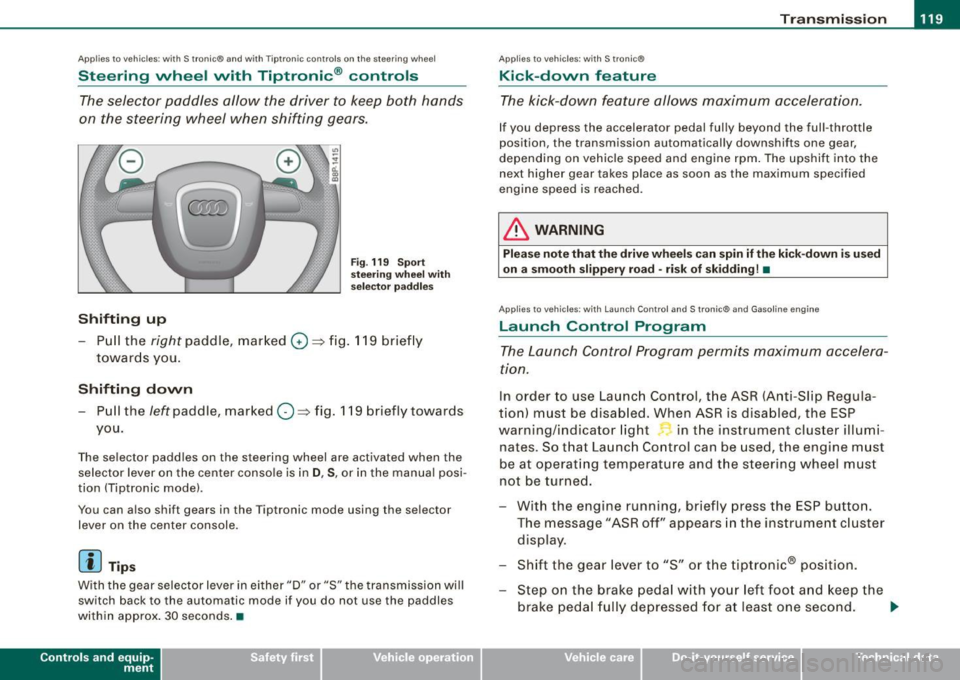
Fig . 119 S port
s tee ring w he el w it h
selector pa ddles
-Pull the right paddle, marked 0 ==> fig. 11 9 briefly
towar ds you .
Shifting down
-Pull the left paddle, mar ked O ==> fig. 119 briefly towards
you.
The selector paddles on the steering wheel are activated when the se lector lever on the center console is in
D , S , or in the manua l posi
tion (Tiptronic mode) .
You can a lso shift gears in the Tiptronic mode using the se lector
lever on the center console .
[ i] Tips
With the gear selector lever in ei ther "D" or "S" the transmission wi ll
switch back to the automatic mode if you do not use the paddles
within approx . 30 seconds .•
Con tro ls and eq uip
ment
Ap plies to vehi cles: wit h S tr on ic ®
Kick -down feature
T he kick-down feature allows maximum acceleration.
If you depress the accelerator pedal ful ly beyond the ful l- throt tle
position, the transmission automatically downshifts one gear,
depending on vehic le speed a nd eng ine rpm . The upshi ft into the
next higher gear takes place as soon as the max imum specified
engine speed is reached .
& WARNING
Please note th at th e drive wheel s can spin if the kick -do wn is used
o n a s mooth slippery r oad -ri sk of sk idding! •
Applies to ve hicles: w it h L aunch Contro l and S tronic ® and Gaso line engine
Launch Control Program
The Launch Control Program permits maximum accelera
ti on.
In order to use Launc h Control, t he ASR (Anti-Slip Regula
tion) must be disab led . When ASR is disabled, the ESP
warning/indicator light in t he instrument cluster illumi
nates . So that Launch Control can be used, the engine must
be at operat ing temperature and the stee ring wheel must
not be turned.
- With the engine running, briefly press the ESP button.
The message "ASR off" appears in the instrument c luster
disp lay .
- Shift the gear lever to "S" or the tiptronic® pos ition.
- Step on the brake peda l w ith yo ur left foo t and keep the
brake peda l fully depressed for at least one second . _,.
Vehicle care I I Technical data