wheel AUDI S3 2015 Owner's Manual
[x] Cancel search | Manufacturer: AUDI, Model Year: 2015, Model line: S3, Model: AUDI S3 2015Pages: 310, PDF Size: 76.15 MB
Page 102 of 310
100 Audi active lane assist
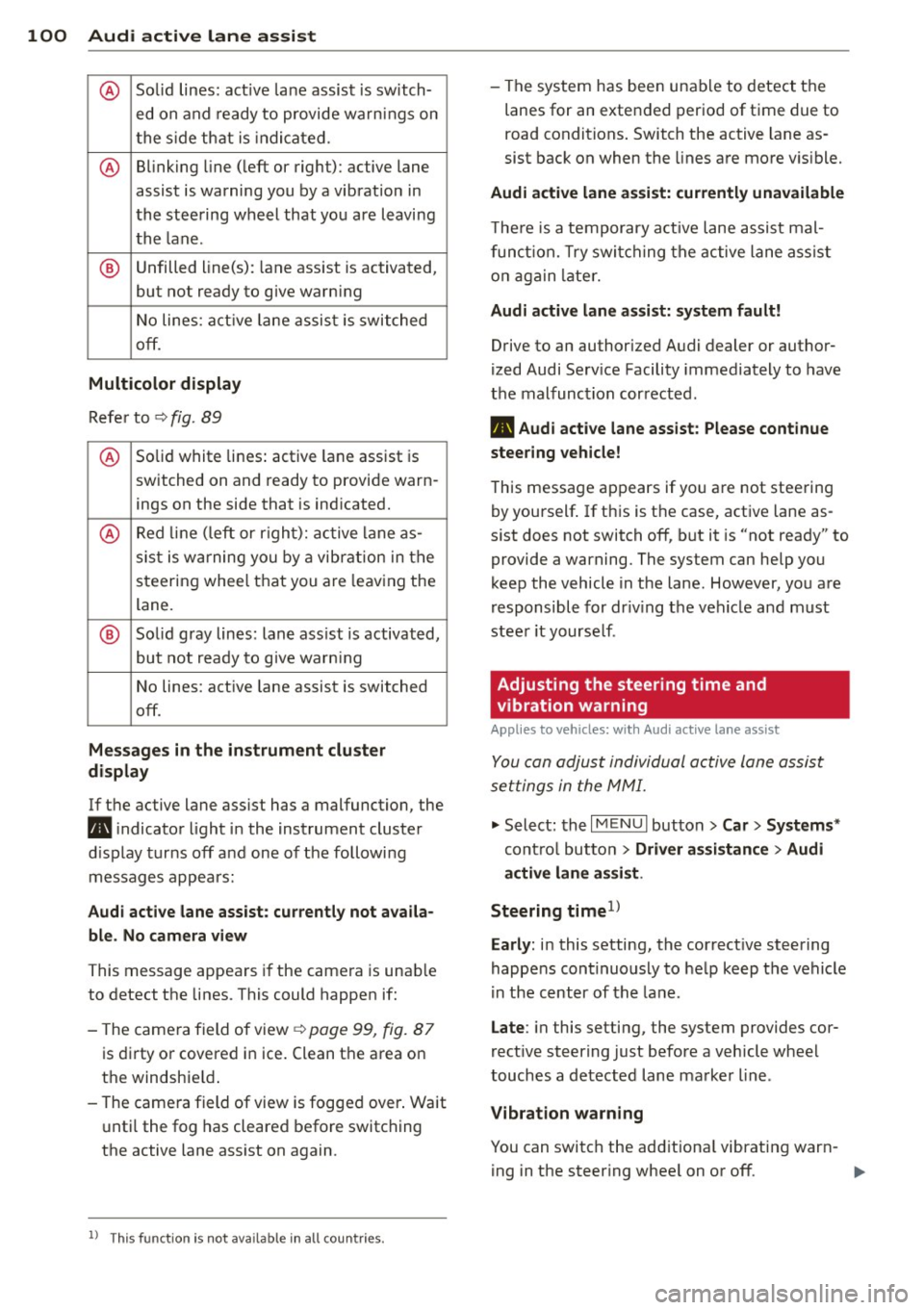
@ So lid lines: act ive la ne assist is sw itch-
ed on and ready to provide wa rn in gs on
t he s ide th at is indica ted.
@ B linking line ( left or right): active lane
assist is warning you by a vibration in
the stee ring wheel that you a re l eaving
th e l ane .
® Unfilled line(s) : lane ass ist is activated,
but not ready to g ive warn ing
N o lines: act ive lane assis t is switche d
off .
Multicolor display
Re fer to ¢ fig. 89
@ Solid white lines : active lane assist is
switched on and ready to provide warn-
ings on the side that is ind icated.
@ Red lin e ( left or r igh t): active lane a s-
sis t is w arning you by a vibr ation in t he
steering whee l that you are leav ing the
lane.
® Solid gray lines: lan e ass ist is activated,
but not ready to give warn ing
N o lines: act ive lane assist is switched
off.
Mes sages in the in strument clu ster
display
If t he active lane ass ist has a malfunction, the
B i ndicato r light in the instrument cluste r
di sp lay tur ns
off a nd one of the followi ng
messag es appears:
Audi active lane ass ist: currently not availa
ble . No camera view
This message appears if the camera is unab le
to detect t he lines . This could happen if :
- The came ra field of view ¢
page 99, fig. 87
is dir ty o r covered i n ice. Clean t he a rea on
t h e windshie ld.
- The came ra field of view is fogged over . Wait
u nti l the fog has cleared before switching
the active lane ass ist on again.
l ) Thi s fun ctio n is not ava ilable in all c ountries.
- The system has bee n una ble to detect the
lanes for an exte nded period of t ime due to
road conditions . Switch the active lane as
sist bac k on when the lines are mo re v is ible.
Audi active lane assi st: currently unavailable
T he re is a te mporary a ctive lane assist mal
f un ction. T ry swi tching the ac tive lane assist
o n a gain later.
Audi active lane assi st: system fault!
Drive to an authorized A udi dealer or author
ized Audi Se rv ice Facility immediately to have
the malfunc tion cor rected .
B Audi active lane assist: Please continue
steering vehicle!
T his messa ge ap pears if yo u are not stee ring
by yourself . If th is is t he case, act ive lane as
s ist does not switch
off, but it is "not ready" to
provide a warning. The system can help you
k eep the vehicle in t he lane . However , yo u are
r esponsible for dr iv ing the veh icle and m ust
stee r it yourse lf .
Adjusting the steering time and
vibration warning
Applies to veh icles: w ith Aud i act ive la ne ass ist
You can adju st individual active lane assist
set tings in the MMI.
.,. Select : the I MENU I but to n > Car > Systems *
contro l butto n > Driver assistance > Audi
active lane assi st.
Steering timel>
Early :
in this setting , the correct ive steering
happens con tinuously to he lp keep the vehicle
i n the cent er of the lane .
Late : in this setti ng, the system provides cor
rect ive steer ing just before a veh icle whee l
touches a de tected lane ma rke r line .
Vibration warning
You can switch the add it iona l vibrating war n-
ing in t he steer ing whee l on or
off . ..,_
Page 105 of 310
....,
N
0 > co
rl I.O
"' ....,
"' rl
General information
Applies to vehicles: with Audi side assist
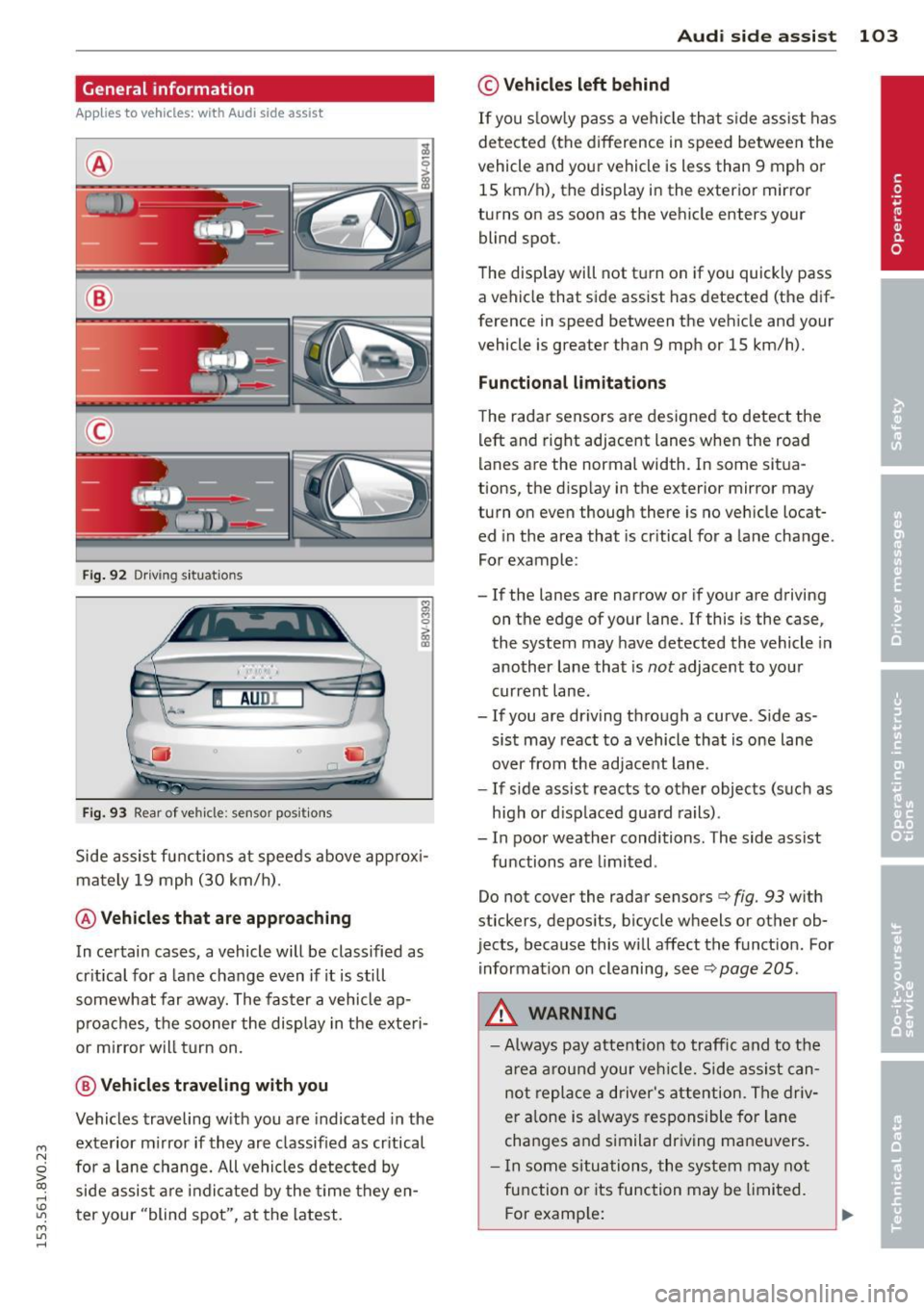
®
®
©
Fig . 92 Dr iv ing s it uat ions
I AU DI
Fi g. 93 Rear of ve hicle: se nsor pos it ions
Side assist functions at speeds above app rox i
mately 19 mph (30 km/h) .
@Vehicl es that ar e approaching
In certain cases, a vehicle will be classified as
cr itical for a lane change even if it is still
somewhat far away. The fas ter a vehicle ap
p roaches, t he sooner the display in the exteri
or m irror will t urn on.
@ V ehicles traveling with you
Vehicles traveling w ith you are indicated in the
exterior m irror if they are classified as cr itical
for a lane change. All vehicles detec ted by
side assist are indi cated by the time they en
t er your "blind spot", at the latest.
Aud i side assist 103
© Veh icles left behind
If you s low ly pass a vehi cle that s ide assist has
detected (the difference in speed between the
vehicle and you r vehicle is less than 9 mph or
15 km/h), the display in the exterio r mir ro r
turns on as soon as the vehicle enters your blind spot.
T he disp lay will not t urn on if you quickly pass
a vehicle that side assist has detected (the dif
ference in speed between the veh icle and your
vehicle is greater than 9 mph or 15 km/h).
Functional limitations
The radar sensors are designed to detect the
left and right adjacent lanes when the road
lan es are the normal width . In some sit ua
tions, the d isp lay in the exterior mirror may
turn on even though there is no ve hicle locat
ed in the area that is cr itical for a lane cha nge.
For example:
- If the lanes are narrow or if your are driving
on the edge of your lane.
If this is the case,
the system may have detected the vehicle in
another lane that is
not adjacent to you r
current lane .
-If you are dr iving through a curve . S ide as
sis t may react to a vehicle that is one lane
over from the adjacent lane.
- If side assist reacts to other objects (such as
high or d isp laced guard rails) .
- In poor weather conditions. The side assist
functions are limited .
Do not cover the radar sensors
c> fig. 93 w ith
stickers, depos its, bicycle wheels or other ob
jects, because this will affect the funct ion. For
information on cleaning, see
c> page 205.
A WARNING
- Always pay attention to traffic and to the
a rea a round your ve hicl e. Side assi st can
not repla ce a d river's attention . Th e driv
er a lone is always responsible for la ne
cha nges and s imilar dr iv ing ma ne uvers.
- In some si tua tions, the system may not
function or its function may be limited.
F or examp le:
Page 106 of 310
104 Audi side assist
-If vehicles are approaching or being
left behind very quickly. The display
may not turn on in time.
- In poor weather conditions such as
heavy rain, snow or heavy mist.
- On very wide lanes, in tight curves, or if
there is a rise in the road surface.
Vehicles in the adjacent lane may not
be detected because they are outside
of the sensor range.
- Audi side assist cannot detect all vehicles
under all conditions, which can increase
the risk of accidents.
- Please note that side assist only displays
approaching vehicles or vehicles in your
blind spot if your vehicle is traveling at
least 19 mph (30 km/h).
- In certain situations, the system may not
work or its function may be limited. For
example:
- The display may not turn on at the
right time if vehicles are approaching
or passing very quickly.
- In poor weather conditions, such as
heavy rain, snow or fog.
- In very wide lanes, in tight curves or
when there are slopes in the roadway,
vehicles in the neighboring lanes may not be detected because they are out
side of the sensor range.
The sensors can be displaced by impacts or damage to the bumper, wheel housing and
underbody. This can affect the system. Have your authorized Audi dealer or au
thorized service facility check their func
tion.
{D) Tips
- If the window glass in the driver's door
or front passenger's door has been tint
ed, the display in the exterior mirror may
be misinterpreted .
- For an explanation on conformity with
the FCC regulations in the United States and
the Industry Canada regulations, re
fer to~
page 292.
Switching on and off
Applies to vehicles: with Aud i s ide ass ist
The system and be switched on and off in the
MMI.
.. Select: the I MENU I button >Car> Systems*
control button > Driver assistance > Audi
side assist.
With Off, the system is switched
off.
An activated system will signal every time the ignition is switched on by turning the displays
in the exterior mirrors on briefly.
Adjusting the display brightness
Applies to vehicles: with A udi side ass ist
The display brightness can be adjusted in the
MMI.
.. Select: the I MENU I button >Car> Systems*
control button > Driver assistance > Audi
side assist.
The display brightness adjusts automatically
to the brightness of the surroundings, both in
the information and in the warning stage. In
very dark or very bright surroundings, the dis play is already set to the minimum or maxi
mum level by the automatic adjustment. In
such cases, you may notice no change when
adjusting the brightness, or the change may
only be noticeable once the surroundings
change.
Adjust the brightness to a level where the dis
play in the information stage will not disrupt
your view forward. If you change the bright
ness, the display in the exterior mirror will
briefly show the brightness level in the infor
mation stage. The brightness of the warning
stage is linked to the brightness in the infor
mation stage and is adjusted along with the
information stage adjustment. .,_
Page 107 of 310
M N
0 > co ,...., \!) 1.1'1
M 1.1'1 ,....,
@ Tips
-Side assist is not active wh ile you are
making the adjustment.
- Your settings are automati cally stored
and ass igned to the remote control key
being used.
Driver messages
App lies to vehicles: with Audi side assist
If t h e side assist switc hes off automatically, a
message appea rs in the instrument cluster
d is p lay.
@j Audi side assist: currently unavailable
No sensor vision
The radar sensors' vision is affected . Do not
cover the area in front of the senso rs with bike
wheels, s tickers, dirt or other obj ects . Clean
the area in front of the senso rs, if necessa ry
~p age 103, fig. 93.
@j Audi side assist: currently unavailable
Side assist can not be switched o n tempo rar ily
beca use there is a mal func tion (for exam ple,
the battery charge leve l may be too low) .
@j Audi side assist: System fault!
The system cannot guara ntee that it w ill de
tect ve hicles correctly and it is switched
off.
The senso rs have been displaced o r are faulty.
H ave the sys tem check ed by a n authorized
Aud i dea le r or autho rized Aud i S ervic e Facility
soon.
Audi side assist 105
•
Page 111 of 310
M N
0 > co ,...., \!) 1.1"1
M 1.1"1 ,....,
Automatic
transmission S tronic-transmission
Introduction
Applies to vehicles: with S tronic transmiss ion
Your vehicle is equipped with an electronical
l y -controlled DSG transmission called S tronic.
T wo independent clutches transfer the power
between the engine and transmission. It al
lows the vehicle to accelerate without a no
ticeable interruption in traction .
T he transmission upshifts or downshifts auto
matically. The driving style continuously influ
ences the selection of the driving program .
When a
moderate driving style is used, the
transmission selects the most econom ica l
driving mode. The transmission upshifts at a
lower RPM and downshifts at a higher RPM to
improve fuel effic iency .
T he transmission switches to a sporty mode
after a kick-down or when the driver uses a
sporty driving style characterized by quick ac
celerator pedal movements, heavy accelera
tion, frequent changes in speed and traveling
at the maximum speed.
If desired, the driver can also select the gears
manually (tiptronic mode) r=> page 114,
Shifting manually (tiptronic mode) .
Selector lever positions
Applies to vehicles: with S tro nic transmission
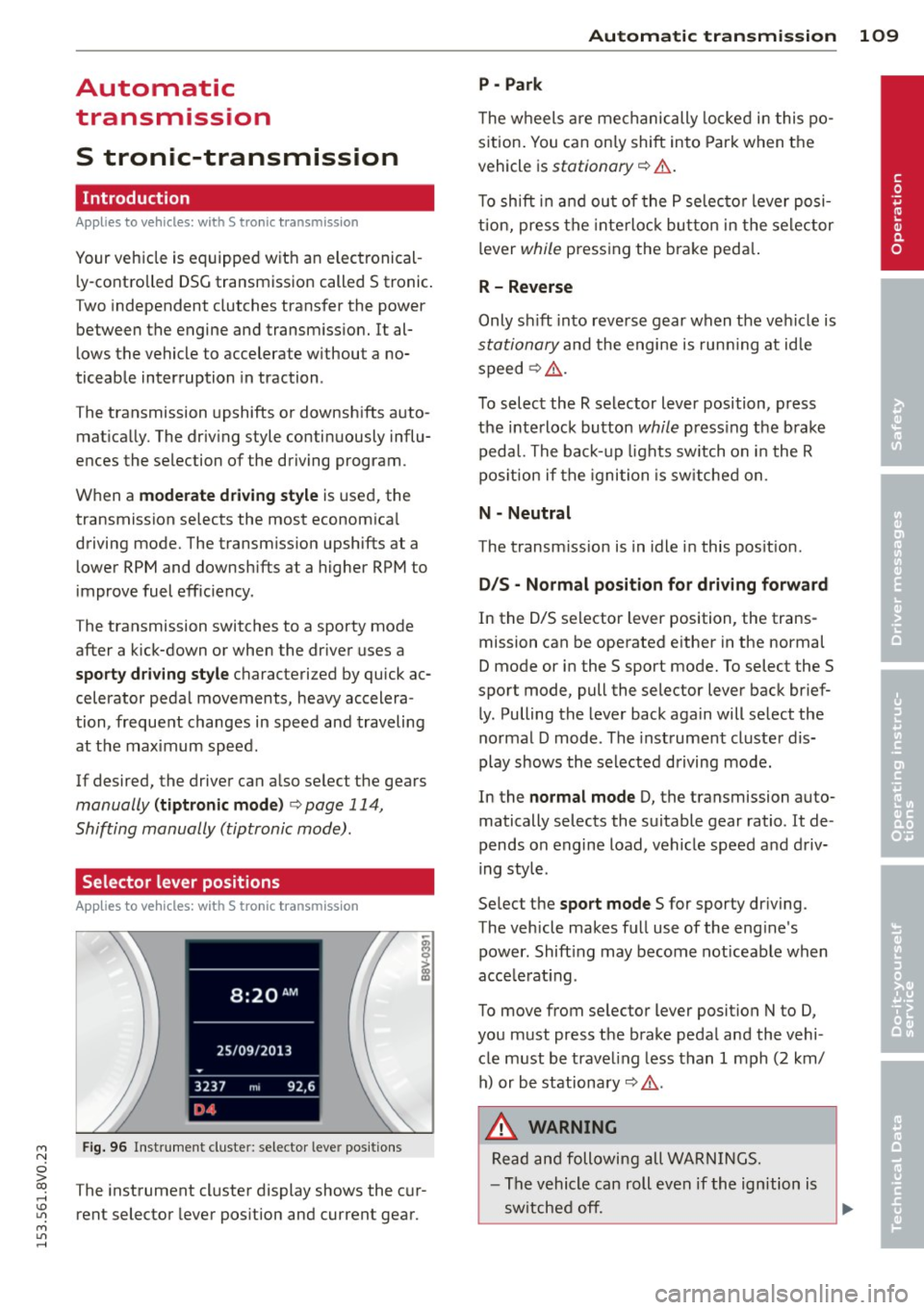
Fig. 96 Instrument cluster: selector leve r positions
The instrument cluster display shows the cur
rent selector lever position and current gear.
Automatic transmission 109
P -Park
The wheels are mechanically locked in this po
sition. You can only shift into Park when the
vehicle is
stationary r=> &..
To shift in and out of the P selector lever posi
tion, press the interlock button in the selector
lever
while pressing the brake peda l.
R- Reverse
Only shift into reverse gear when the vehicle is
stationary and the engine is running at idle
speed
r=> &. .
To select the R selector lever position, press
the interlock button
while press ing the brake
pedal. The back-up lights sw itch on in the R
pos ition if the ignition is switched on .
N -Neutral
The transm iss ion is in idle in this position .
DIS -Normal position for driving forward
In the D/S selector lever position , the trans
mission can be operated either in the normal
D mode or in the S sport mode. To select the S
spor t mode, pull the selector lever back brief
ly. Pulling the lever back again will select the
normal D mode . The instrument cluster dis
play shows the selected driving mode.
In the
normal mode D, the transmission auto
matically selects the suitable gear ratio . It de
pends on engine load, vehicle speed and driv
ing style .
Select the
sport mode S for sporty driving .
The vehicle makes full use of the eng ine's
power. Shift ing may become noticeable when
acce lerat ing.
To move from selector lever position N to D,
you must press the brake pedal and the vehi cle must be traveling less than 1 mph (2 km/
h) or be stationary~ &.-
.&_ WARNING
Read and following all WARNINGS.
- The vehicle can roll even if the ignition is
switched off.
~
•
Page 114 of 310
112 Automatic tran smi ssio n
Stopp ing /p ark ing
If the selector lever is not in the P position
when you open the driver's door, the vehicle
could ro ll. In vehicles with a convenience key*,
the following message appears:
Sh ift to P,
othe rwise veh icle c an roll a way. Door s do not
lock if le ver is not in P.
You will also hear a
warn ing tone.
"' Press and ho ld the brake pedal¢.&_ .
"' Set the parking brake.
"'Se lect the P selector lever pos ition.
St opp ing on an incline
• Always press the brake pedal to hold the ve
hicle in p lace and prevent it from "rolling
back"
¢ .&_ . Do n ot try to prevent the vehi
cle from "roll ing back" when a gear is en
gaged by increasing the eng ine speed
¢ (D.
Starting on an inclin e in vehicl es w it h out
Hill Hold *
"'Set the parking brake.
"' With the driving gear selected, press the ac
celerator pedal carefully . The parking brake
will release automat ically if your safety belt
is fastened.
St arting on an incline i n vehicle s with Hill
Hold*
"' With the driving gear selected, remove your
foot from the brake pedal and press the ac cele rato r pedal ¢
page 82, Hill hold.
Under certain circumstances, (such as driving
in the mountains or towing a tra iler), it may
be usefu l to sw itch temporarily to the manual
shift p rogram in order to adjust the gears to
the dr iving condit ions by hand
¢ page 114.
When parking on a level surface, simply place
the selector lever in the P pos ition. On in
clines , activate the parking bra ke first and
then move the selector lever to the P pos it ion
¢ page 80 . This prevents the locking mecha
nism from being loaded too heavi ly and will
make it easier to move the selector lever out
of the P position.
A WARNING
- The vehicle can roll even when the en
g ine is switched off.
- Unintended vehicle movement can lead
to serious injuries .
- Never leave your vehicle with the engine running while in gear. If you must leave
your veh icle when the engine is running,
set the parking brake and move these
lector lever to the P position .
- Power is still transferred to the wheels
when the engine is runn ing at idle. To
prevent the vehicle from "c reeping", you
must keep you r foot on the brake when
the engine is running and the selector lever is in the D, Sor R position or "tip
tronic" mode is selected . -
-Do not inadvertently press the accelera
tor peda l when the vehicle is stationary.
Otherwise the vehicle wi ll start to move
immediate ly, even if the parking brake is
set. Th is could result in a crash.
- Do not press the accelerator pedal when
changing the se lector lever position
while the veh icle is stationary and the
engine is running.
- Never engage the R or P selector level positions while dr iv ing. It could cause a
crash .
- Before driving down a steep slope, re
duce your speed and shift into a lower
gear with "tiptronic" .
- Do not ride the brakes or press the brake
pedal too often or too long when driving
downhill . Constant braking causes the
brakes to overheat and substantially re
duces braking pe rformance, increases
b rak ing distan ce or causes complete fa il
ure of the brake system.
- I f you must stop on an in cl ine, always
hold the vehicle i n place with the foot
brake or park ing brake to p revent it from
rolling back .
- Never hold the vehicle on an incline with
a slipping clutch . The clutch opens auto
matica lly when it becomes too hot from
Page 116 of 310
114 Automatic transmission
Shifting manually (tiptronic mode)
Applies to vehicles: with S tron ic t ransmiss ion/ s hift pa d
d les
The tiptronic allow the driver to shift the
gears manually.
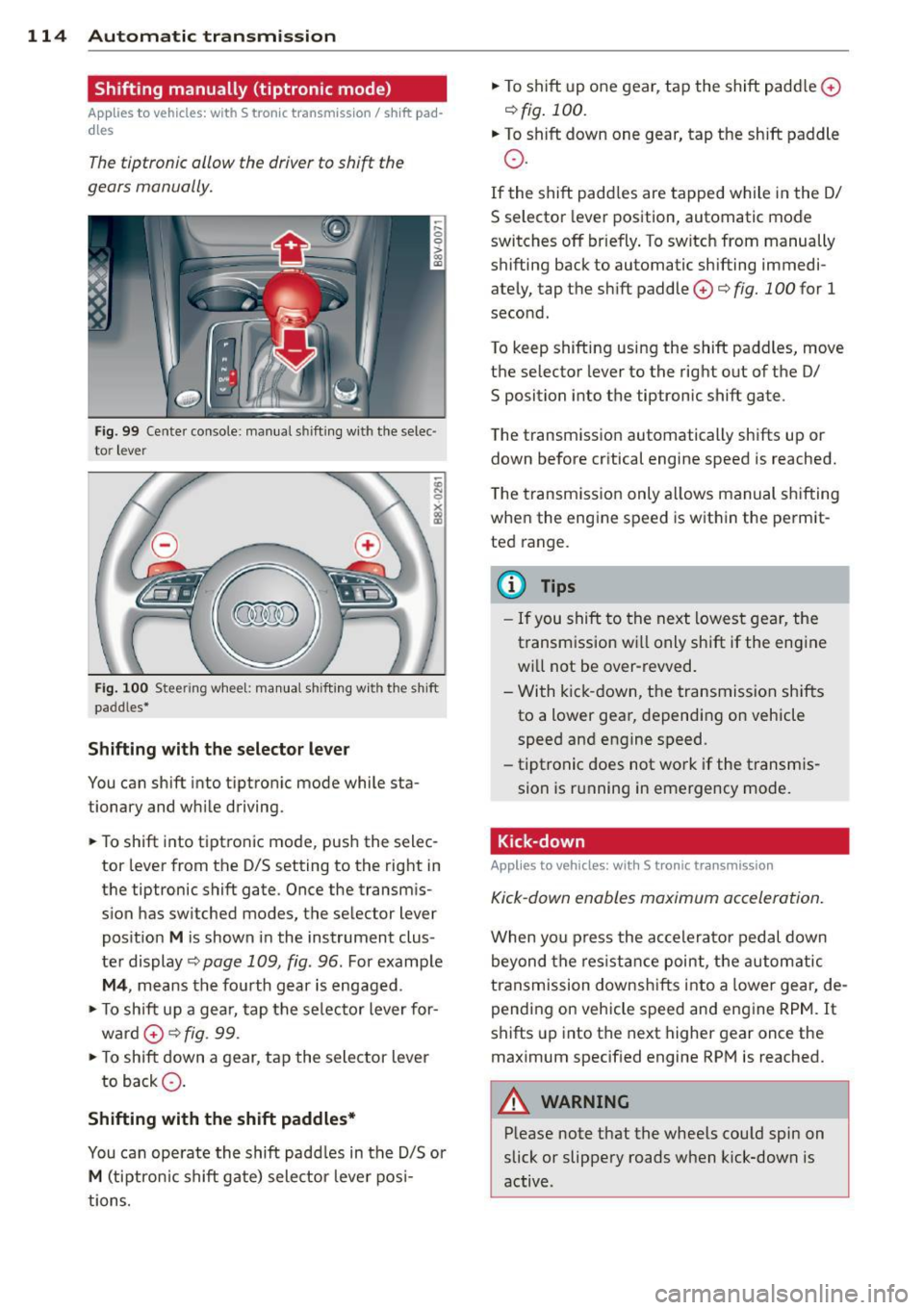
F ig. 99 Cente r console : manual shifting with the selec·
tor lever
Fi g. 100 Steer ing whee l: manua l sh ift ing w ith the s hift
paddles•
Shifting with the selector lever
You can shift into tiptronic mode while sta
tionary and while driving.
.. To shift into tiptronic mode, pus h the selec
tor lever from the D/S setting to the right in
the tiptronic shift gate . Once the transmis
s ion has switched modes, the selector lever
pos it ion
M is shown in the instrument clus
ter display
c:> page 109, fig. 96. For example
M4, means the fourth gear is engaged.
.. To shift up a gea r, tap the selector lever for
ward
0 c:>fig. 99.
.. To shift down a gear, tap the selector lever
to back Q.
Shifting with the shift paddles*
You can operate the shift paddles in the D/S or
M (tiptronic shift gate) selector lever posi
tions. ..
To shift up one gear, tap the shift paddle
0
c:> fig. 100.
.. To shift down one gear, tap the shift paddle
o.
If the shift padd les are tapped while in the D/
S selector lever position, automatic mode
switches
off briefly . To switch from manually
shifting back to automatic sh ifting immedi
ately, tap the shift paddle
0 c:> fig. 100 for 1
second.
To keep shifting using the shift paddles, move
the selector lever to the rig ht out of the D/
S position into the tiptronic shift gate.
The transmission automatically shifts up or
down before critical engine speed is reached.
T he transmission only allows manual shifting
when the engine speed is within the permit
ted range.
(D Tips
- If you shift to the next lowest gear, the
transmission w ill only shift if the engine
will not be over-revved.
- With kick-down, the transmission shifts
to a lower gear, depending on vehicle
speed and engine speed.
- tiptronic does not work if the transmis
sion is run ning in emergency mode.
· Kick-down
App lies to vehicles: wit h S t ronic tra nsmi ssio n
Kick-down enables maximum acceleration.
When yo u press the accele rator pedal down
beyond the resistance point, the automatic
transmission downshifts into a lower gear, de
pending on vehicle speed and engine RPM. It
shifts up into the next higher gear once the
maximum specified engine RPM is reached.
A WARNING
-Please note that the wheels could spin on
slick or slippery roads when kick-down is
active.
Page 117 of 310
M N
ci > co ,...., \!) ..,.,
M ..,., ,....,
Launch Control-Program
App lies to vehicles: with launch control
The Launch Control Program enables maxi
mum acceleration.
Requirement : The engine must be at operat
ing temperature and the steering wheel must
not be turned .
.. With the engine running, press the
!.$OFFI
button briefly one time 1) .
.. Pull the selector lever back out of the 0/S
position briefly to select the S position, or
press it toward the right into the t ipt ronic
pos ition or select the
d ynamic driv ing mode
i n drive select*
~ page 106.
.. Press the brake peda l firmly with your left
foot and hold it all the way down for at least
1 second.
.. At the same time, press the gas peda l all the
way down with your right foot unti l the en
gine reaches and stays at a high RPM level.
.. Remove your left foot from the brake.
A WARNING
- Always adapt your driving to the traffic
flow.
- Only use Launch Control when road and
t raff ic conditions a llow it and other driv
ers wi ll not be endangered or impacted
by yo ur driving and the veh icle's acceler
a tion.
- Please note tha t the dr ive whee ls can
spin and the vehicle can brea k away
when sport mode is switched on, espe
c ially when the road is sl ippery.
- Once the vehicle has started moving,
press the
I.$ OFF I button br iefly to turn
the sport mode off.
(j) Tips
- The transm ission tempe rat ure may in
crease significantly after using the
l ) In vehicles with a dr iver info rmat ion system, an ESC
light in the in stru m ent cl us ter stays on contin uo usly
and the m essage
Stabilizatio n cont rol (ESC): spor t.
W arning! Restricted stability
appears temporarily.
Automa tic tran sm iss ion 115
Launch Control Program . If that hap
pens, the program may not be availab le
for a few m inutes. It will be ava ilable
again after a cool-down per iod.
- When accelerating using the Launch
Contro l Program, all vehicle parts are
subject to heavy loads. Th is can lead to
increased wear .
Emergency mode
Applies to vehicles: with S tronic transm ission
In the event of a system malfunction, there is
an emergency program.
If all of the selector lever positions are high
li ghted with a light backgro und in the instru
ment cluster d isplay, there is a system mal
funct ion and the S tronic transmission is run
ning in the emergency program . The vehicle
can still be driven in emergency mode, but on
ly w ith reduced speed and not in all gears. In
some cases, the veh icle
c ann ot driv e in re
v e rs e .
(D Note
If the transmission runs in emergency
mode, drive to your author ized Audi dealer
or q ua lified repa ir facil ity immed iate ly to
have the ma lf u nction corrected.
Transmission malfunction
• Tran smiss ion malfuncti on! Please stop
the vehicle and select P
T here is a malfunction in the transmiss ion .
Park the vehicle securely and do not continue
driv ing. See an authorized Audi dealer or au
thorized Audi Service Facility for assistance.
• Tran smi ssion overh eatin g! Plea se stop
the vehicle!
The transm iss io n is too hot and can become
damaged . Stop and let the transmission cool .,.
•
Page 120 of 310
118 Parking systems
Parking systems
General information
Appl ies to vehicles: with rea r parking sys te m s/park in g
syste m plus/rearv iew camera
Depending on your vehicle's equipment, vari
ous parking aids will help you when parking
and maneuvering.
The
rear parking system is an audible parking
aid that warns you of obstacles
behind the ve
hicle
¢ page 119.
The parking system plus assists you when
parking by audibly and visually indicating ob
jects detected
in front of and behind the vehi
cle
¢ page 119.
The rearview camera shows the area behind
the vehicle in the MMI display . This display as
sists you when you are cross or parallel park ing. The parking system plus functions are al
so available ¢
page 120.
& WARNING
-Always look for traffic and check the area
around your vehicle by looking at it di
rectly as well. The parking system cannot
replace the driver 's attention. The driver
is always responsible when entering or
leaving a parking space and during simi
lar maneuvers .
- Please note that some surfaces, such as
clothing, are not detected by the system.
- Sensors and cameras have blind spots in
which people and objects cannot be de
tected . Be especially cautious of small
children and animals .
- Always pay attention to the area around
the vehicle -using the rearview mirror,
too.
- The sensors can be displaced by impacts
or damage to the radiator grille, bumper,
wheel housing and the underbody. The
parking system may become impaired as
a result . Have your authorized Audi deal
er or authorized service facility check
their function . -
Make sure the sensors are not obstructed
by stickers, deposits or other materials.
If they are, the sensor function could be impaired. For additional information on
cleaning, refer to¢
page 205.
(D Note
- Some objects are not detected or dis
played by the system under certain cir
cumstances:
- Objects such as barrier chains, trailer
draw bars, vertical poles or fences
- Objects above the sensors such as wall
extensions
- Objects with specific surfaces or struc
tures such as chain link fences or pow
der snow
- If you continue driving closer to a low-ly
ing object, it may disappear from the
sensor range. Note that you will no lon
ger be warned about this obstacle.
- The sensors can be displaced by impacts
or damage to the radiator grille, bumper,
wheel housing and the underbody. The
parking system may become impaired as
a result. Have your authorized Audi deal
er or authorized service facility check
their function .
(D Tips
- The system may provide a warning even
though there are no obstacles in the cov
erage area in some situations, such as:
- certain road surfaces or for long grass.
- external ultrasonic sources e.g. from
cleaning vehicles.
- heavy rain, snow, or thick vehicle ex
haust.
- We recommend that you practice park
ing in a traffic-free location or parking
lot to become familiar with the system.
When doing this, there should be good
light and weather conditions.
- You can change the volume and pitch of
the signals as well as the disp lay
¢ page 124.
Page 123 of 310
....,
N
0 > co
rl I.O
"' ....,
"' rl
General information
Applies to vehicles: with park ing system p lus wit h rear
view ca mera
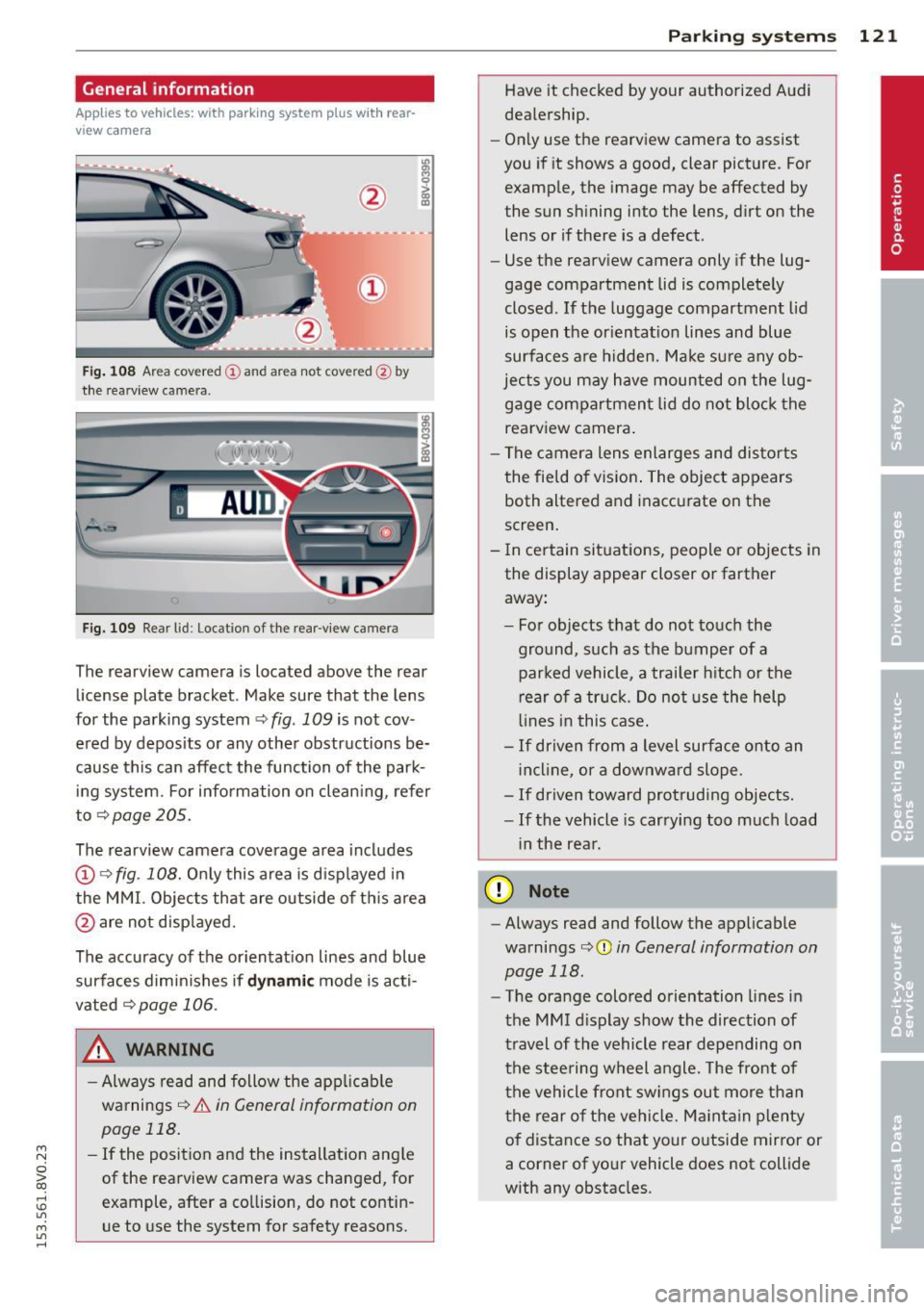
Fig. 108 Area covered
(D and area not covered @by
the rearv iew camera.
Fig. 109 Rear l id: Location of the rear-v iew camera
The rearview camera is located above the rear
license plate bracket . Make sure that the lens
for the parking system ~
fig. 109 is not cov
ered by deposits or any other obstructions be
cause this can affect the function of the park ing system. For information on cleaning, refer
to~page205.
The rearview camera coverage area includes
(D ¢ fig. 108. Only this area is displayed in
the MMI. Objects that are outside of this area
@ are not displayed.
The accuracy of the orientation lines and blue
surfaces diminishes if
dynamic mode is acti
vated
¢page 106.
_& WARNING
-Always read and follow the applicable
warnings¢
& in General information on
page 118.
- If the position and the installation angle
of the rearview camera was changed, for
example, after a collision, do not contin
ue to use the system for safety reasons .
Parking systems 121
Have it checked by your authorized Audi
dealership.
- Only use the rearview camera to assist
you if it shows a good, clear picture. For
example, the image may be affected by
the sun shining into the lens, dirt on the
lens or if there is a defect.
- Use the rearv iew camera only if the lug
gage compartment lid is completely
closed.
If the luggage compartment lid
is open the orientation lines and blue
surfaces are hidden. Make sure any ob
jects you may have mounted on the lug gage compartment lid do not block the
rearview camera.
- The camera lens enlarges and distorts
the field of vision. The object appears
both altered and inaccurate on the
screen.
- In certain situations, people or objects in
the display appear closer or farther away:
- For objects that do not touch the
ground, such as the bumper of a
parked vehicle, a trailer hitch or the
rear of a truck. Do not use the help
lines in this case.
-If driven from a level surface onto an
incline , or a downward slope.
- If driven toward protruding objects.
-If the vehicle is carrying too much load
in the rear.
(D Note
-Always read and follow the applicable
warnings
c:>(D in General information on
page 118.
- The orange colored orientation lines in
the MMI display show the direction of
travel of the vehicle rear depending on
the steering wheel angle. The front of
the vehicle front swings out more than
the rear of the vehicle. Maintain plenty
of distance so that your outside mirror or
a corner of your vehicle does not collide
with any obstacles.