Mode AUDI S3 2015 Owner's Guide
[x] Cancel search | Manufacturer: AUDI, Model Year: 2015, Model line: S3, Model: AUDI S3 2015Pages: 310, PDF Size: 76.15 MB
Page 96 of 310
94 Audi pre sen se
Audi pre sense
Introduction
Applies to vehicles: with Audi pre sense basic or Audi pre
sense front
Within the limits of the system, pre sense ba
sic and pre sense front can initiate steps to
protect vehicle occupants in certain danger
ous situations.
Critical driving situations can be recognized by
the pre sense front v ia a network of differe nt
vehicle systems and can take steps to prepare
the vehicle occupants for a potentia l collision.
The pre sense front works with a radar sensor
and a video came ra* .
It also functions within
the limits of the system when adapt ive cruise
control * is switched off.
General information
General information
App lies to vehicles: with Audi pre sense front or Audi
adaptive cruise control
A WARNING
Also follow the general information found
on
~ page 86, General information.
Audi pre sense basic
Descript ion
Applies to vehicles: with Audi pre sense basic
The function of the pre sense basic is activat
ed at a speed of 20 mph (30 km/h) or higher.
The following functions can be triggered un
der certain conditions within the limits of the
system:
- T ensioning of the safety be lts (for example,
during heavy braking) : The front safety belts
have reversib le be lt pretensioners. If a colli
sion does not occur, the safety belts loosen
s light ly and are ready to trigger again .
- Closing the windows and the sunroof* (for
example, when over- or understeering): The
windows and the sunroof" close until there is only a small gap open. Audi drive select:
The dep loyment time is
adapted in dynamic mode.
A WARNING
-The pre sense basic cannot overcome natu- ral phys ica l laws.
It is a system designed to
assist and it cannot prevent a coll is ion. Do
not let the increased safety provided
tempt you into taking risks. This could in
crease your r isk of a collis ion.
- The system can deploy incorrectly due to system-specific limits .
(D Tips
-Certa in pre sense bas ic functions switch
off when ESC is switched off (sport
mode) or when dr iving in reverse .
- The pre sense bas ic functions may not be
available if there is a ma lfunction in the
ESC system or the a irbag control mod
ule .
- Note that with pre sense bas ic, the rever
sible safety belt pretensioner on the
front passenger 's side deactivates when
the front passenger's a irbag is deactivat
ed.
Audi pre sense front
Description
Applies to vehicles: with Audi pre sense front or Audi
adapt ive cru ise control
Pre sense front informs yo u if the distance to
the vehicle ahead falls below the safe distance
for an extended period of time. It can warn of a possible collision and initiate braking ma
neuvers, within the limits of the system .
When detected in time, the system can assess
dangerous situat ions where an object ahead
brakes suddenly or if your own veh icle is trav
eling at a high speed and approaching an ob
ject that is moving more slow ly . If detection is
not possible, then p re sense fro nt does not re
act.
Page 98 of 310
96 Audi pre sen se
it is necessary. A lways follow traffic laws
regarding mainta ining a safe distance
between your vehicle and vehicles ahead.
- pre sense front works within certain lim
its and cannot react to situations that
are outside of the system lim its, such as
when approaching a stationary vehicle or
a stationary obstacle (the end of a traffic
jam or a vehicle that has broken down).
-Always keep i n m ind that the radar sen
sor fo r pre sense front only works within
defined detection zones, which mea ns
other vehicles may not always be dete ct
ed correct ly.
- T he function and range of the radar sen
sor can be impaired by rain, snow and
heavy mist. Veh icles ahead may not be
detected right away, or not detected at
all.
- Reflective surfaces such as g uard rails or
entrances to t unnels may impair the
function of the radar sensor .
{[) Note
The senso r can be disp laced by impacts or
damage to the bumper, whee l housing and
underbody . The pre sense front sensor can
be damaged by this . Have your authorized
Aud i dea ler or authorized service facility
check the ir function.
(D Tips
- You can cance l the braking w ith increas
ing force that is initiated by the system
by braking yourself, by accelerating no
ticeab ly or by swerving.
- For information on dr iver messages
about pre sense, refer to¢ page 96.
- Keep in mind that pre sense can brake unexpectedly. Always secure any cargo or
objects that you are transporting to re
duce the r isk of damage or injury .
- Certain pre sense front funct ions sw itch
off when ESC is sw itched off (sport
mode) or when drivi ng in reve rse .
- The pre sense front funct ions are not
available if there is a malfunction in the adaptive cru
ise cont ro l* system
¢ page
92 or ¢ page 96.
- Keep in mind that pre sense front can
brake abruptly. Always sec ure cargo or
objects that you transport to red uce the
r isk of damage or injury.
Settings in the Infotainment system
Applies to vehicles: with Aud i pre sense front or Aud i
adaptive crui se con trol
.,. Select in the MM I: I MENU I button > Car >
Systems * control button > Drive r assi st a nce
> Audi pre sense .
Switching the system on and off
Audi pre sense (Sys tem): If the system is
switched off, it switches on again automati
ca lly once the ignition is switched on aga in.
S ys te m -Swit ch A udi pre sense o n-off . With
th is, yo u can switch the p rewarning and the
braking intervention from Audi pre sense on
or off.
Prewarning -The distance and app roach
warnings can be switched
o n/off .
(D Tips
-If you restrict or sw itch off the ESC, the
pre sense also sw itches i tself off
¢page
190.
- Switch the p re sense off when you a re
loading the vehicle onto a veh icle carrier,
t rain, ship o r othe r type of transporta
tion . This can prevent undesired warn
ings from the pre sense system .
Driver messages
Applies to vehicles: wit h Aud i pre sense or Aud i adapt ive
cruise control
Aud i pr e se nse curr ently un availabl e. No sen
so r vi sion
This message appears if the sensor v iew is ob
structed, for examp le by leaves, snow , heavy
spray or d irt. Clean the sensor¢ page
86,
fig. 75.
Audi pre sense: off
Page 99 of 310
M N
0 > co ,...., \!) 1.1'1
M 1.1'1 ,....,
This message appears when the ESC is switch
ed to sport mode, for example
~ page 190.
Audi pre sense: system fault!
This message appears when the pre sense
function is affected. For example, this could
be caused by a faulty sensor .
If the message stays on, drive to your author
ized Audi dealer or qualified repair facility to
have the malfunction corrected.
Audi pre sense 97
•
Page 108 of 310
106 Audi drive select
Audi drive select
Driving settings
Introduction
Applies to vehicles: with Audi drive select
Aud i d rive select makes it possibl e to expe ri
e nce diffe ren t types of vehi cle sett ings in o ne
ve hicl e. The dr ive r can se lect from three
c om
fort , auto and dynamic modes using the t.'i:.:1
button in the center conso le or the MM I to
switch between a sporty an d a comfortable
driving mode, for examp le. In the
individual *
mode, the sett ings can be ad justed to your
pe rsonal preferences. This makes it poss ib le
to comb ine settings such as a sporty eng ine
tuni ng with lig ht steer ing.
A WARNING ,_
Using Audi dr ive se lect i ncorrect ly can lead
t o co llisions, othe r accidents an d serio us
inju ries.
Description
Applies to vehicles: with Audi drive select
The vehicle setup in each mode depends on
the vehicle's features. However, t he engine
and steering are always affected .
Engine and automatic transmission
Depending on the m ode, the e ng ine and au to
ma tic transm iss ion * respond more quickly or
in a more ba la nce d manner to acce lerator
pedal movements.
Adaptive dampers (Audi magnetic ride)*
T he adaptive dampers use senso rs to reco rd
in fo rma tion rega rding s teering moveme nts,
b rak ing and a cce le ra ti on ope rat ions by t he
d river, road s urface, driving spee d, an d load.
W ith Aud i drive se lect yo u can adjust the
adaptive dampe rs sporty (dynamic), comfort
ab le (comfort) or balanced (auto).
Steering
T he stee ring ad apts in te rms o f stee ring assis
tance. There are different modes
~ page 10 7.
Indirect stee ring that moves eas ily as in com -f
ort mode is es pec ially suited to long drives
o n a hig hway. The dynam ic mode provi des
spo rty, direct steer ing.
F o r vehicles wi th progressive stee ring * the
stee ring pe rformance is mo re agile.
Cornering light*
T he co rne ring light adjusts when driv ing on
c u rves a t speeds between 6 mph ( 10 km/h)
and 68 mph (1 10 km/h). The pivo ting act io n
and the light ing a re a lso adapted to the
mode.
Adaptive cruise control*
T he be hav io r whe n accelerating can be adjust
ed from comfor tab le to spor ty, depend ing on
t h e Au di drive sele ct mo de. Ad aptive cr uise
control also responds to the driving behavior
of the vehicle ahead in a more co nservative or
spo rty manne r.
(D Tips
In some mo dels, the maxim um vehicle
sp eed can on ly be reache d in t he a uto and
d ynam ic modes.
Page 109 of 310
....,
N
0 > co
rl I.O
"' ....,
"' rl
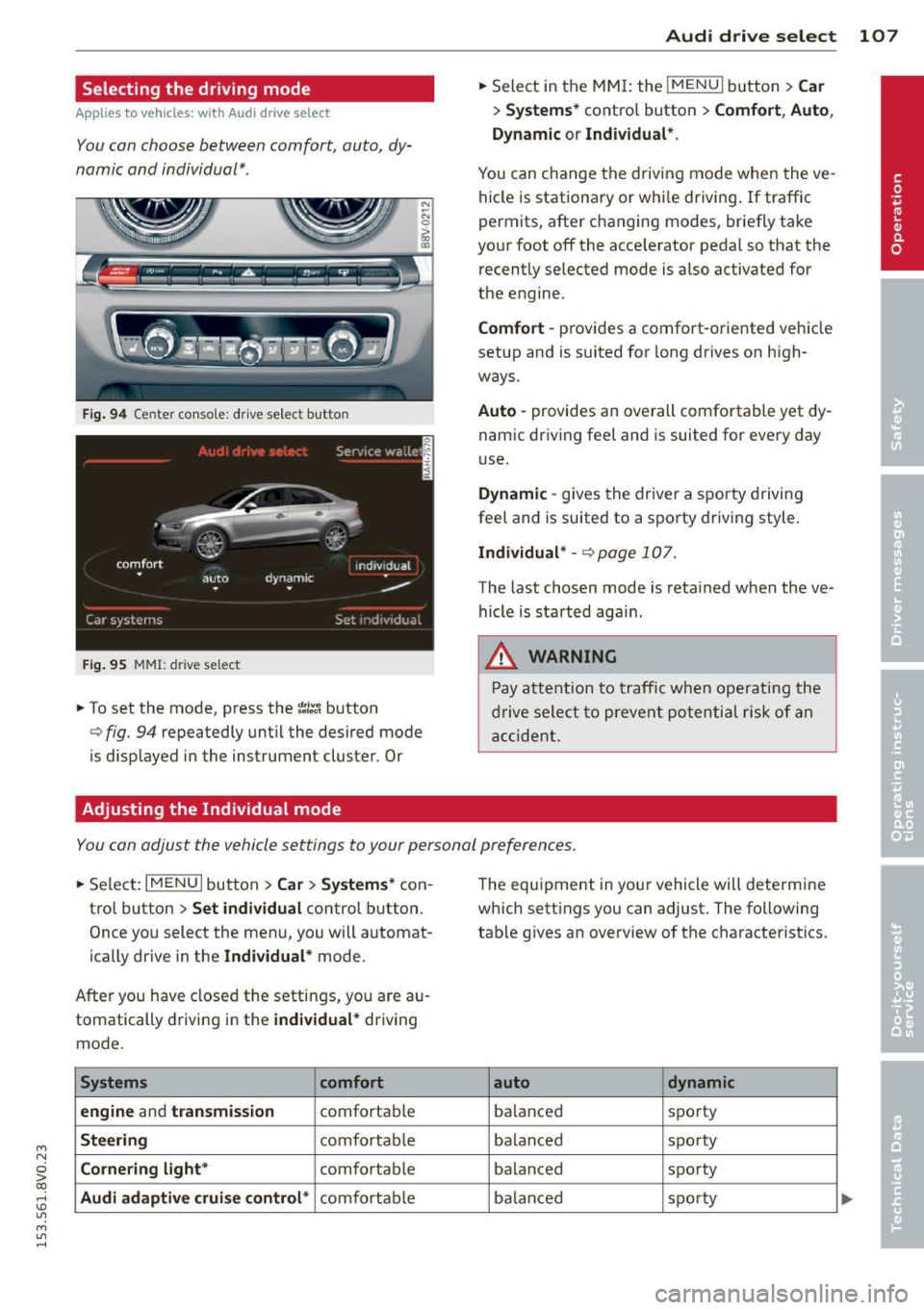
Selecting the driving mode
Applies to vehicles: with Audi drive select
You can choose between comfort, auto, dy
namic and individual* .
Fig. 94 Center conso le : drive select button
Fig. 95 MMI: dr ive se lect
.. To set the mode, press the ~:/:a button
N
-N 0 ::> a, Q)
Q fig . 94 repeatedly until the desired mode
is d isplayed in the instrument cluster . Or
Adjusting the Individual mode Audi drive
select 107
.. Select in the MMI: the !MENU I button> Car
> Systems* contro l button > Comfort , Auto ,
Dynamic
or Individual*.
You can change the driving mode when the ve
hicle is stationary or while driving. If traffic
permits, after changing modes, briefly take
your foot off the acce lerator pedal so that the
recently selected mode is also activated for
the engine .
Comfort -provides a comfort-oriented vehicle
setup and is suited for long drives on high
ways.
Auto -provides an overall comfortable yet dy
namic driving feel and is suited for every day
use.
Dynamic -gives the driver a sporty driving
feel and is suited to a sporty driving style.
Individual* -Qpage 107.
The last chosen mode is retained when the ve
hicle is started aga in .
.&_ WARNING
Pay attention to traffic when operating the
drive select to prevent potential risk of an
accident.
You can adjust the vehicle settings to your personal preferences .
.. Select: I MENU I button >Car > Systems* con
trol button >
Set individual control button.
Once you select the menu, you will automat
ically drive in the
Individual* mode.
After you have closed the settings, you are au
tomatically driving in the
individual* driving
mode .
Systems comfort
engine
and transmission comfortable
Steering comfortable
Cornering light* comfortable
Audi adaptive cruise control* comfortable The
equipment in your vehicle will determine
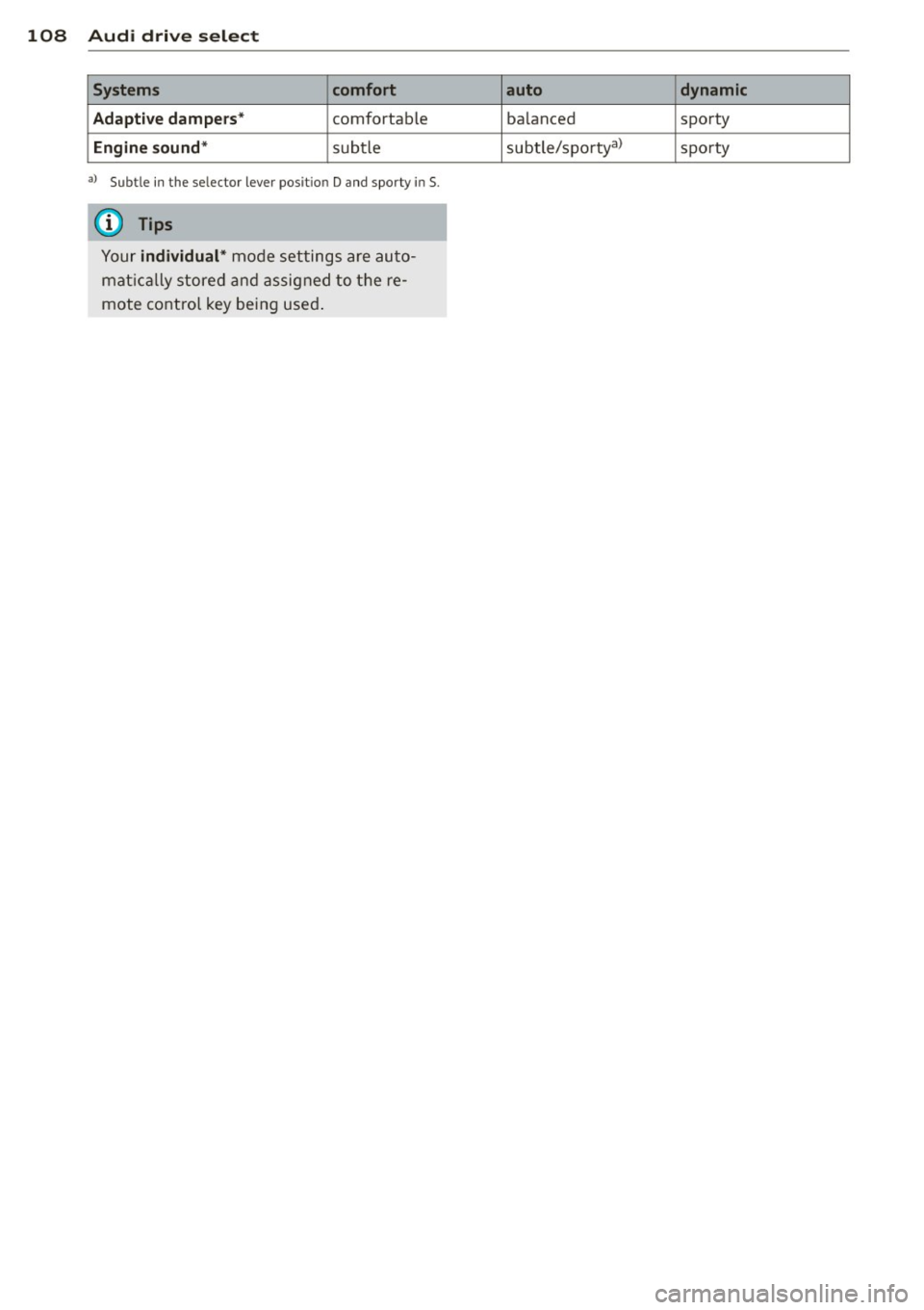
which settings you can adjust . The following
table gives an overview of the characteristics .
auto dynamic
balanced sporty
ba lan ced sporty
ba lanced sporty
ba lanc ed sporty
Page 110 of 310
108 Audi drive select
Systems comfort
Adaptive dampers*
comfortable
Engine sound* subtle
al Subt le in t he se lector lever pos it io n D and spo rty in 5 .
{i) Tips
Your individual* mode settings are auto
matically stored and assigned to the re
mote control key being used.
auto dynamic
balanced
sporty
subtle/sportyal sporty
Page 111 of 310
M N
0 > co ,...., \!) 1.1"1
M 1.1"1 ,....,
Automatic
transmission S tronic-transmission
Introduction
Applies to vehicles: with S tronic transmiss ion
Your vehicle is equipped with an electronical
l y -controlled DSG transmission called S tronic.
T wo independent clutches transfer the power
between the engine and transmission. It al
lows the vehicle to accelerate without a no
ticeable interruption in traction .
T he transmission upshifts or downshifts auto
matically. The driving style continuously influ
ences the selection of the driving program .
When a
moderate driving style is used, the
transmission selects the most econom ica l
driving mode. The transmission upshifts at a
lower RPM and downshifts at a higher RPM to
improve fuel effic iency .
T he transmission switches to a sporty mode
after a kick-down or when the driver uses a
sporty driving style characterized by quick ac
celerator pedal movements, heavy accelera
tion, frequent changes in speed and traveling
at the maximum speed.
If desired, the driver can also select the gears
manually (tiptronic mode) r=> page 114,
Shifting manually (tiptronic mode) .
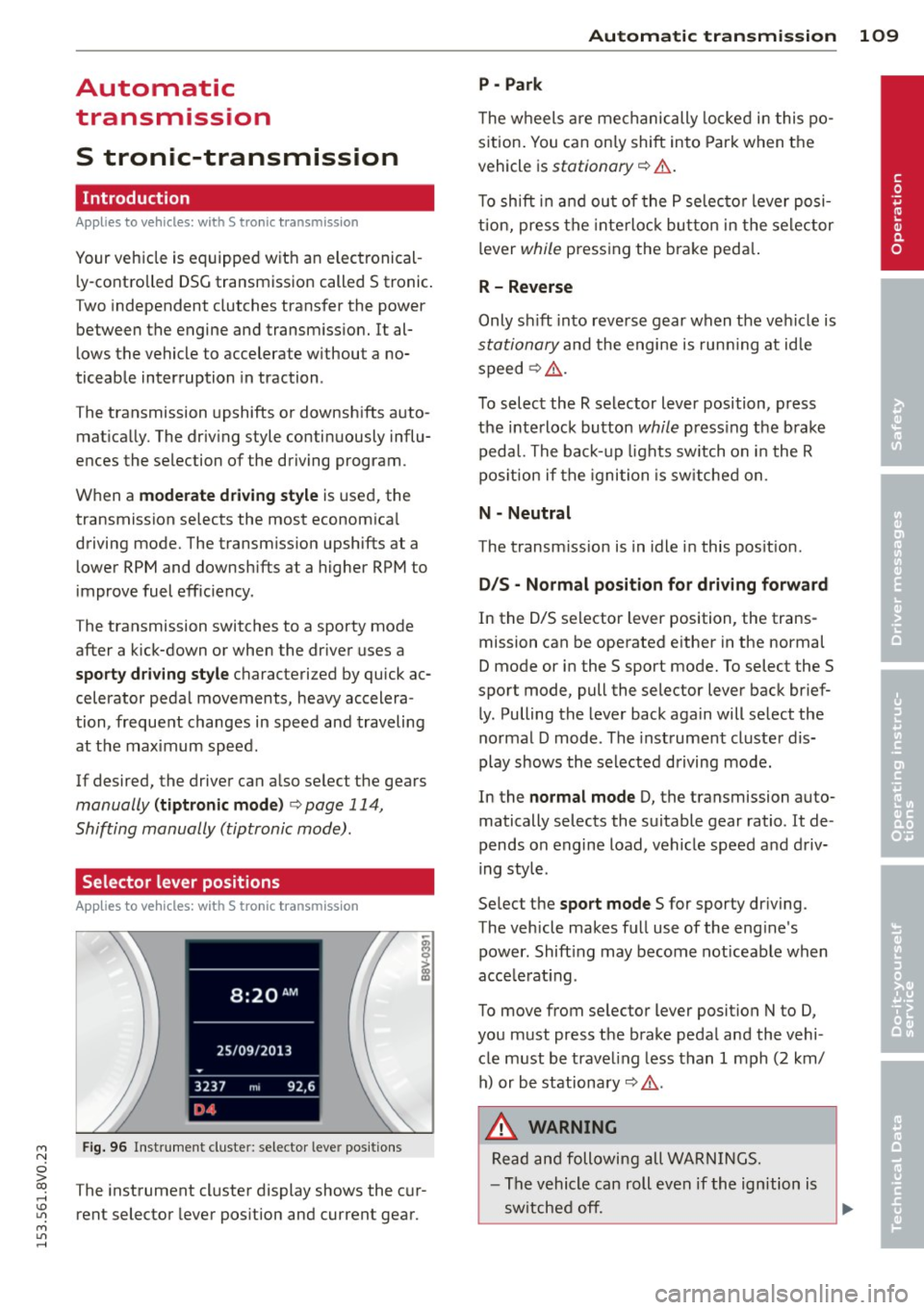
Selector lever positions
Applies to vehicles: with S tro nic transmission
Fig. 96 Instrument cluster: selector leve r positions
The instrument cluster display shows the cur
rent selector lever position and current gear.
Automatic transmission 109
P -Park
The wheels are mechanically locked in this po
sition. You can only shift into Park when the
vehicle is
stationary r=> &..
To shift in and out of the P selector lever posi
tion, press the interlock button in the selector
lever
while pressing the brake peda l.
R- Reverse
Only shift into reverse gear when the vehicle is
stationary and the engine is running at idle
speed
r=> &. .
To select the R selector lever position, press
the interlock button
while press ing the brake
pedal. The back-up lights sw itch on in the R
pos ition if the ignition is switched on .
N -Neutral
The transm iss ion is in idle in this position .
DIS -Normal position for driving forward
In the D/S selector lever position , the trans
mission can be operated either in the normal
D mode or in the S sport mode. To select the S
spor t mode, pull the selector lever back brief
ly. Pulling the lever back again will select the
normal D mode . The instrument cluster dis
play shows the selected driving mode.
In the
normal mode D, the transmission auto
matically selects the suitable gear ratio . It de
pends on engine load, vehicle speed and driv
ing style .
Select the
sport mode S for sporty driving .
The vehicle makes full use of the eng ine's
power. Shift ing may become noticeable when
acce lerat ing.
To move from selector lever position N to D,
you must press the brake pedal and the vehi cle must be traveling less than 1 mph (2 km/
h) or be stationary~ &.-
.&_ WARNING
Read and following all WARNINGS.
- The vehicle can roll even if the ignition is
switched off.
~
•
Page 112 of 310
110 Autom atic tr an smi ssion
-Never select R or P while driving, because
this increases the risk of an accident.
- Power is still transmitted to the whee ls
when the eng ine is running at idle. To
prevent the vehicle from "creeping", you
must keep your foot on the brake in all
selector lever positions (except P) when
the engine is runn ing. Otherwise, th is in
creases the risk of an accident.
- Do not inadvertently press the accelera
tor pedal when the vehicle is stopped if a
gea r is engaged. Otherwise the vehicle
will star t to move immediately, even if
the parking bra ke is set . This could result
in a crash .
- Do not press the accelerator pedal when
changing the selector lever position
whi le the vehicle is stationary and the
engine is running.
- Never leave your vehicle with the engine
running whi le in gear . If you must leave
yo ur vehicle when the engine is running,
set the park ing brake and move these
lector lever to the P position.
- Before opening the hood and working on
a running engine, select the P position
with the se lector lever and set the park
ing brake. Always read and follow the ap
plicable warnings
~ page 217, Working
in the engine compartment.
Q) Note
Never let the veh icle roll downhill with en
gine off and the selector lever in the N po
sition, because this cou ld damage the au
tomatic transmission and cata lytic con
verter.
@ Tips
- Audi drive select : Sporty shift ing cha rac
terist ics can be se lected using th e
dy·
nam ic driving mode. Swill appear in the
i nstrument cl uste r display i nstead of D.
- If you accidenta lly sele ct N while driv ing,
take your foot off the acce le rator pedal
i mmedia tely and wait for the engine to
s low down to idle be fore se lecting Dor S . -
If there is a power failure, the selector
lever wi ll not move out of the P position.
The emergency re lease can be used i f
this happens
¢ page 116.
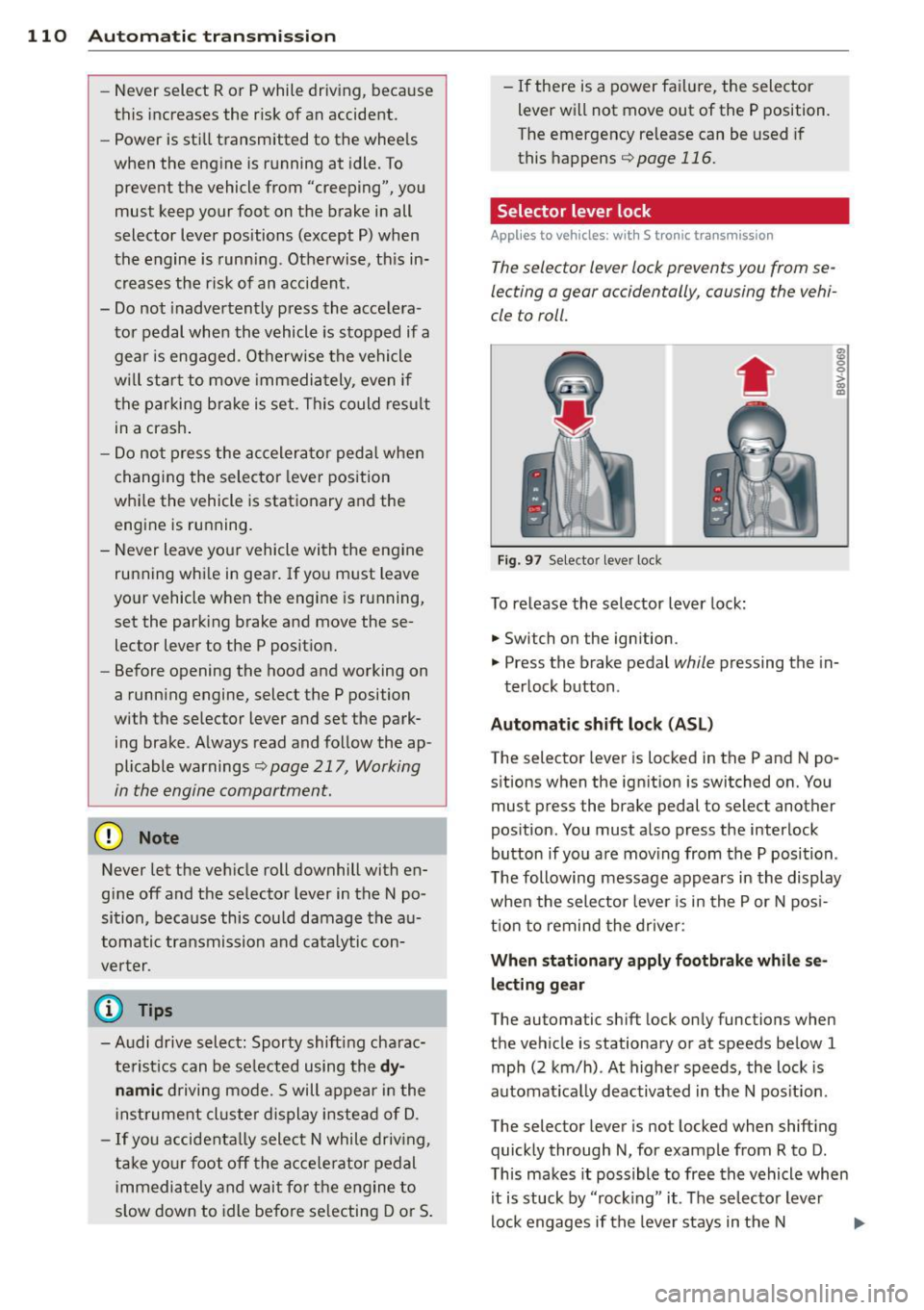
Selector lever lock '
Applies to vehicles: wi th S t ronic tra nsmi ssio n
The selector lever lock prevents you from se
lecting a gear occidentally, causing the vehi
cle to roll.
Fig . 97 Selecto r lever lock
To release the selector lever lock:
.. Switch on the ignition .
8 0 :,l. CX) .,
.. Press the brake pedal while pressing the in-
terlock button .
Automat ic shift loc k (AS L)
The selector lever is locked in the P and N po
sitions when the ign ition is switched on. You
must press the brake pedal to select another
position. You must also press the interlock
button if you a re mov ing from the P position .
T he following message appears in the display
when the selector lever is in the P or N pos i
t ion to remind the drive r:
When stationar y apply footbrake while se
l e cting gear
The automatic shift lock only functions when
the vehicle is stationary or at speeds be low 1
mph (2 km/h) . At higher speeds, the lock is
automat ica lly deactivated in the N pos it ion.
The selector lever is not locked when shifting
quick ly through N, for example from R to D.
T his makes it possible to free the vehicle when
it is stuck by "rocking" it. The se lector lever
lock engages if the lever stays in the N
Page 114 of 310
112 Automatic tran smi ssio n
Stopp ing /p ark ing
If the selector lever is not in the P position
when you open the driver's door, the vehicle
could ro ll. In vehicles with a convenience key*,
the following message appears:
Sh ift to P,
othe rwise veh icle c an roll a way. Door s do not
lock if le ver is not in P.
You will also hear a
warn ing tone.
"' Press and ho ld the brake pedal¢.&_ .
"' Set the parking brake.
"'Se lect the P selector lever pos ition.
St opp ing on an incline
• Always press the brake pedal to hold the ve
hicle in p lace and prevent it from "rolling
back"
¢ .&_ . Do n ot try to prevent the vehi
cle from "roll ing back" when a gear is en
gaged by increasing the eng ine speed
¢ (D.
Starting on an inclin e in vehicl es w it h out
Hill Hold *
"'Set the parking brake.
"' With the driving gear selected, press the ac
celerator pedal carefully . The parking brake
will release automat ically if your safety belt
is fastened.
St arting on an incline i n vehicle s with Hill
Hold*
"' With the driving gear selected, remove your
foot from the brake pedal and press the ac cele rato r pedal ¢
page 82, Hill hold.
Under certain circumstances, (such as driving
in the mountains or towing a tra iler), it may
be usefu l to sw itch temporarily to the manual
shift p rogram in order to adjust the gears to
the dr iving condit ions by hand
¢ page 114.
When parking on a level surface, simply place
the selector lever in the P pos ition. On in
clines , activate the parking bra ke first and
then move the selector lever to the P pos it ion
¢ page 80 . This prevents the locking mecha
nism from being loaded too heavi ly and will
make it easier to move the selector lever out
of the P position.
A WARNING
- The vehicle can roll even when the en
g ine is switched off.
- Unintended vehicle movement can lead
to serious injuries .
- Never leave your vehicle with the engine running while in gear. If you must leave
your veh icle when the engine is running,
set the parking brake and move these
lector lever to the P position .
- Power is still transferred to the wheels
when the engine is runn ing at idle. To
prevent the vehicle from "c reeping", you
must keep you r foot on the brake when
the engine is running and the selector lever is in the D, Sor R position or "tip
tronic" mode is selected . -
-Do not inadvertently press the accelera
tor peda l when the vehicle is stationary.
Otherwise the vehicle wi ll start to move
immediate ly, even if the parking brake is
set. Th is could result in a crash.
- Do not press the accelerator pedal when
changing the se lector lever position
while the veh icle is stationary and the
engine is running.
- Never engage the R or P selector level positions while dr iv ing. It could cause a
crash .
- Before driving down a steep slope, re
duce your speed and shift into a lower
gear with "tiptronic" .
- Do not ride the brakes or press the brake
pedal too often or too long when driving
downhill . Constant braking causes the
brakes to overheat and substantially re
duces braking pe rformance, increases
b rak ing distan ce or causes complete fa il
ure of the brake system.
- I f you must stop on an in cl ine, always
hold the vehicle i n place with the foot
brake or park ing brake to p revent it from
rolling back .
- Never hold the vehicle on an incline with
a slipping clutch . The clutch opens auto
matica lly when it becomes too hot from
Page 115 of 310
M N
0 > co ,...., \!) 1.1'1
M 1.1'1 ,....,
the overload. The ml indicator light
turns on and a message appears
Q page 115 when the clutch is overload
ed .
-If the engine must run while you are
working in the eng ine compartment with
the hood open, make sure a gear is not engaged . T he selecto r leve r must be
firmly in the P pos ition and locked in
pla ce and t he pa rking brake must be set
Qpage217. Otherwise, the veh icle
cou ld beg in moving when the eng ine
speed is high, even with the parking
brake set.
W Note
- When stopping on an incline, do not try
to ho ld the vehicle in place by pressing
the accelerator peda l w hile a dr iving gear
i s selected. This can cause the automatic
transmission to overheat and can dam
age it. Set the parking b rake or press the
brake pedal to p revent the veh icle from
ro lling .
- Allow ing the ve hicle to roll when the en
gine is stopped and the selector lever is
i n the N position will damage the auto
matic transmission beca use it is not lu
b ricated unde r tho se c ircumstances.
- The t ransm ission can overheat and be
damaged under certa in d riving and traf
fi c condition s suc h as frequent s tarts ,
creeping for a long time , or s top-and-go
traff ic. W hen the
ml or . indicator
light turns on, stop the vehicle at the
next oppo rtunity and let the t ransmis
s ion coo l
Qpage 115.
-Allow ing the ve hicle to roll when the en
gine is stopped w ill damage the S tron ic
transmission because it is not lubricated
Q page 282 , Emergency towing with
commercial tow truck .
@ Tips
For safety reasons, the park ing brake re
leases automatically only when the driver's
door is closed and dr iver 's safety belt is
fastened.
Automa tic tran sm iss ion 113
Hill descent control
App lies to vehicles : wi th 5 tronic tra nsmi ssio n
Hill descent control assists the driver when
driving down hills .
Hill descent control is activated when these
l ector lever is in the D or S position and you
press the brake peda l. The transmission auto
matically selects a gear that is suitable for the
i ncl ine. Hill descent cont ro l t ries to ma inta in
t h e speed ac hieved a t the t ime of b raking,
within physic al and tec hnical lim it a tions. If
may sti ll be ne cessa ry to adju st the speed
with t he b rakes . Because hi ll descent control
cannot sh ift down farthe r than 3rd gear, it
may be necessary to sh ift into t iptronic mode
in very steep areas. In this case, shift into 1st
o r 2nd gear in tiptro nic mode to use the en
gine's brak ing force to relieve the brakes .
Hill descent control switches off once the hi ll
levels out or you press the accelerator pedal.
On vehicles with a cruise contro l system*
Q page 83, hill descent control is also activat
ed when the speed is set .
A WARNING
-
Hill descent control cannot overcome
physical lim itations, so it may not be ab le
to maintain a co nsta nt speed unde r all
conditions . A lways be ready to apply the
b rakes .
•