lock AUDI S3 2015 Owner's Guide
[x] Cancel search | Manufacturer: AUDI, Model Year: 2015, Model line: S3, Model: AUDI S3 2015Pages: 310, PDF Size: 76.15 MB
Page 83 of 310
M N
0 > co ,...., \!) ..,.,
M ..,., ,....,
driving force has been built up at the
whee ls.
E mergenc y brake fun ction
An emergency braking funct ions ensures that
the vehicle can be slowed down even if the
normal brakes fail¢ page 82, Emergency
braking function .
A WARNING
-Do not press the accelerator pedal inad
vertent ly when the vehicle is stationary
and the engine is runn ing and a gear is
selected. Otherwise the vehicle will start
to move immediately and could result in a crash .
- If the power supply fa ils, the re leased
park ing brake can no longer engage. In
this case, par k the vehicle on level
ground and secure it by placing the se
lector lever i n the P pos ition. See an au
thori zed Aud i dea ler or a utho rized Aud i
Serv ice Facility for ass istance.
(D Note
I f the . or. (U SA mode ls) /. (Cana
da mode ls) indicato r light in t he instru
ment cluster blinks, there is a mal fun ct ion
in the brake system . Re fer to the detailed
description of the indicator lights
r=:>page 18.
-If the . (USA models) /. (Cana-
da models) or
Iii indicator light turns
on, there is a malfunct ion in the park ing
brake
r=:> page 19.
(D Tips
- If the electromechanical parking brake is
set wh ile the ignition is switched off, the
¢C)'A indicator light in the button and in
the instrument cluster dis- play . (USA models)
I. (Cana-
da models) w ill t urn off afte r a ce rtain
amount of time.
- If dr iver's door is opened while the ign i
tion is switched on, the parking b rake
sets automat ically. This prevents unin
tended ro lling of the vehicle .
Dri vin g 81
-Occasional noises when the pa rking
brake is set and released are normal and
are not a cause for concern.
- When the vehicle is pa rked, the park ing
brake goes through a self -test cycle at
regu lar interva ls. Any no ises assoc iated
w ith this are normal.
- If there is a power fa ilure, the park ing
brake will not set if it is released, and it
w ill not release if it is set
r=;, & . See a n
authorized Audi dealer or autho rized
Audi Service Facility fo r ass ista nce.
Parking
" Press the b rake pedal to stop the veh icle.
" Pull the switch @¢
page 80, fig. 73 to set
t he par king brake.
" Place the se lecto r lever in the P position .
.. Turn the engine off¢
A_.
"Tu rn the steering wheel when parking on in
clines so that the wheels w ill roll into the
curb if the vehicle starts moving.
A WARNING
- Always take the vehicle key w ith you
when leav ing the vehicle, even for a
short pe riod of time. This applies part ic
ularly when children rema in in the veh i
cle . Ot herwise children co uld s tart the
engine, release the pa rking brake o r op
erate electrical equipment such as power
windows, which increases the risk of an
accident.
- No one should remain in the vehicle
when it is locked, especially children.
Loc ked doors make it more difficult for
emergency workers to get into the ve hi
cle, which puts lives at risk.
•
Page 84 of 310
82 Driving
Starting from a stop
The start assist function ensures that the
parking brake is released automatically upon
starting.
St opping and sett ing the p ark ing br ake
.. Pull the switch@¢
page 80, fig. 73 to set
the parking brake.
St arting a nd aut omaticall y relea sing the
pa rking br ake
Requirement: The driver's door must be
locked and the driver's safety belt must be
fastened.
.. When you press the accelerator pedal, the
parking brake is automatically released and
your vehicle begins to move.
When stopping at a traffic signa l or stopping
in city traffic, the parking brake can be ap
plied. The vehicle does not have to be held
with the brake pedal. The parking brake elim i
nates the tendency to creep when a selector
l ever pos ition is engaged . As soon as you
press the accele rator pedal, the parking bra ke
re leases automatically and the veh icle starts
to move.
Starting on slope s
When starting on incl ines, the hill start ass ist
prevents the vehicle from unintentiona lly roll
i ng back. The braking force of the parking
brake is not released until sufficient dr iving
force has been bu ilt up at the whee ls.
(D Tips
For safety reasons, the park ing brake is re
leased automatically only when the dr iv
er 's sa fety belt is fastened and the driver 's
door is locked. Emergency braking function
This is used if the conventional brake system
fails or locks up .
.. To brake your vehicle in an emergency, pull
the @switch ¢
page 80, fig. 73 and hold it
pulled .
.. As soon as you release the@ switch or ac-
celerate, the b rak ing process stops.
Pul ling and ho ld ing the @switch while dr iv
ing at a speed of about 2 mph (3 km/h) or
higher init iates the emergency braking func
t ion. The vehicle is braked at a ll four wheels
by activating the braking hyd rauli cs . The brake
performance is sim ila r to heavy braking.
~ .&.
To he lp prevent activating the emergency
braking by mistake, a n aud ible war ning tone
(buzzer) sounds when the @switch is pulled .
Emergency brak ing stops as soon as the@
swi tch is re leased or the acce lerator pedal is
pressed.
.&, WARNING ,_
Emergency braking should only be used in
an emergency, when the normal brake pedal has fa iled or the brake pedal is ob
structed. During emergency brak ing, your
vehicle will brake s imilar to heavy b rak ing .
E SC and the associated components (ABS,
ASR, EDL) canno t overcome the laws of
physi cs. In corne rs and when road or
weather conditions are bad, a fu ll brake
application can cause the vehicle to skid or
the rea r end to break away, which increas
es the risk of an accident.
Hill hold
Applies to veh icles : w ith Hill Hold
Hill hold makes it easier to start on hills.
Req uirement: The dr iver door mus t be closed
and the engine must be running.
T he system is activated when the bra ke peda l
is p ressed while the vehi cle is stationa ry.
T o p revent the vehicle from rolling back when
sta rting, the b rake power is held fo r a b rief
ll>
Page 111 of 310
M N
0 > co ,...., \!) 1.1"1
M 1.1"1 ,....,
Automatic
transmission S tronic-transmission
Introduction
Applies to vehicles: with S tronic transmiss ion
Your vehicle is equipped with an electronical
l y -controlled DSG transmission called S tronic.
T wo independent clutches transfer the power
between the engine and transmission. It al
lows the vehicle to accelerate without a no
ticeable interruption in traction .
T he transmission upshifts or downshifts auto
matically. The driving style continuously influ
ences the selection of the driving program .
When a
moderate driving style is used, the
transmission selects the most econom ica l
driving mode. The transmission upshifts at a
lower RPM and downshifts at a higher RPM to
improve fuel effic iency .
T he transmission switches to a sporty mode
after a kick-down or when the driver uses a
sporty driving style characterized by quick ac
celerator pedal movements, heavy accelera
tion, frequent changes in speed and traveling
at the maximum speed.
If desired, the driver can also select the gears
manually (tiptronic mode) r=> page 114,
Shifting manually (tiptronic mode) .
Selector lever positions
Applies to vehicles: with S tro nic transmission
Fig. 96 Instrument cluster: selector leve r positions
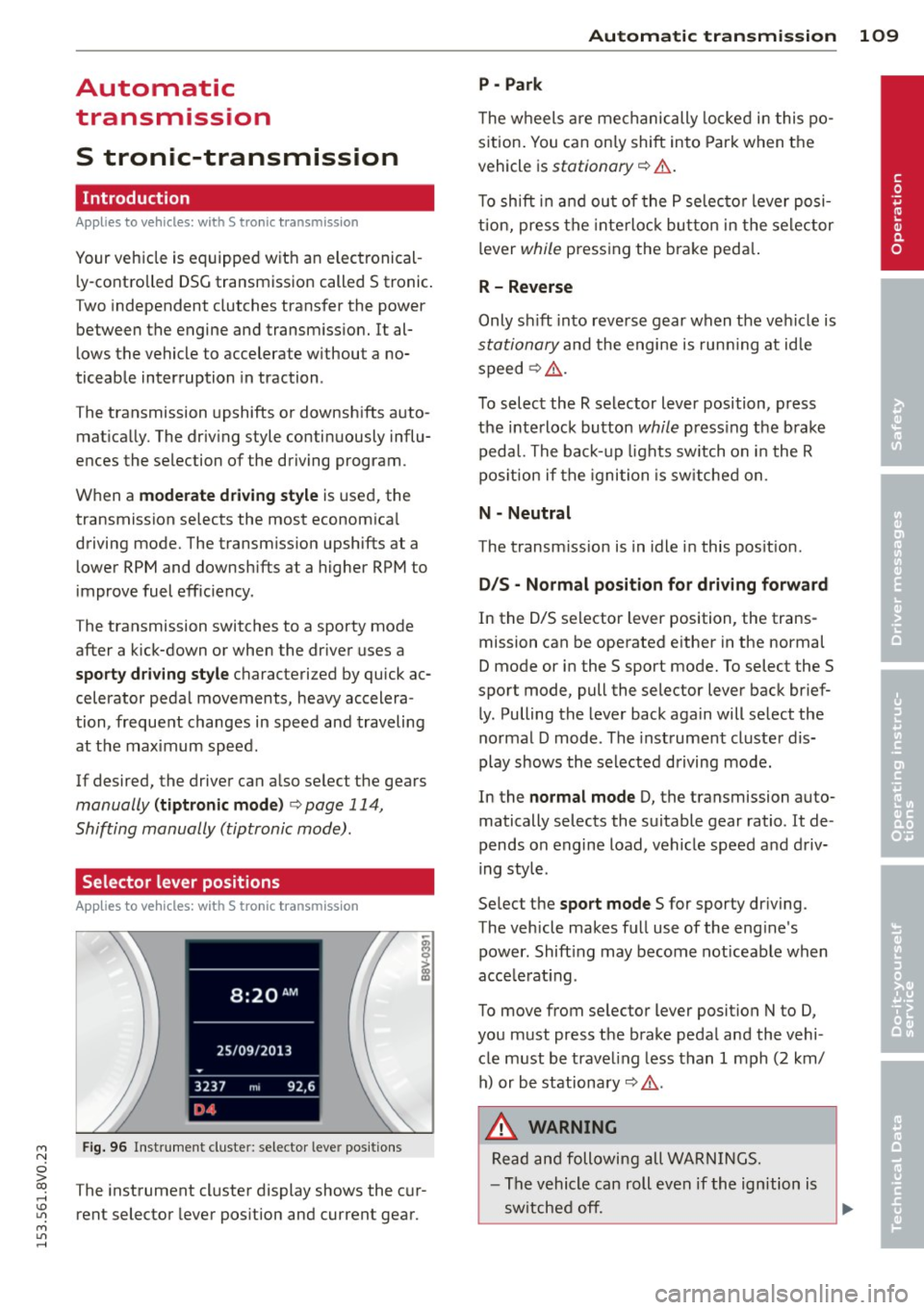
The instrument cluster display shows the cur
rent selector lever position and current gear.
Automatic transmission 109
P -Park
The wheels are mechanically locked in this po
sition. You can only shift into Park when the
vehicle is
stationary r=> &..
To shift in and out of the P selector lever posi
tion, press the interlock button in the selector
lever
while pressing the brake peda l.
R- Reverse
Only shift into reverse gear when the vehicle is
stationary and the engine is running at idle
speed
r=> &. .
To select the R selector lever position, press
the interlock button
while press ing the brake
pedal. The back-up lights sw itch on in the R
pos ition if the ignition is switched on .
N -Neutral
The transm iss ion is in idle in this position .
DIS -Normal position for driving forward
In the D/S selector lever position , the trans
mission can be operated either in the normal
D mode or in the S sport mode. To select the S
spor t mode, pull the selector lever back brief
ly. Pulling the lever back again will select the
normal D mode . The instrument cluster dis
play shows the selected driving mode.
In the
normal mode D, the transmission auto
matically selects the suitable gear ratio . It de
pends on engine load, vehicle speed and driv
ing style .
Select the
sport mode S for sporty driving .
The vehicle makes full use of the eng ine's
power. Shift ing may become noticeable when
acce lerat ing.
To move from selector lever position N to D,
you must press the brake pedal and the vehi cle must be traveling less than 1 mph (2 km/
h) or be stationary~ &.-
.&_ WARNING
Read and following all WARNINGS.
- The vehicle can roll even if the ignition is
switched off.
~
•
Page 112 of 310
110 Autom atic tr an smi ssion
-Never select R or P while driving, because
this increases the risk of an accident.
- Power is still transmitted to the whee ls
when the eng ine is running at idle. To
prevent the vehicle from "creeping", you
must keep your foot on the brake in all
selector lever positions (except P) when
the engine is runn ing. Otherwise, th is in
creases the risk of an accident.
- Do not inadvertently press the accelera
tor pedal when the vehicle is stopped if a
gea r is engaged. Otherwise the vehicle
will star t to move immediately, even if
the parking bra ke is set . This could result
in a crash .
- Do not press the accelerator pedal when
changing the selector lever position
whi le the vehicle is stationary and the
engine is running.
- Never leave your vehicle with the engine
running whi le in gear . If you must leave
yo ur vehicle when the engine is running,
set the park ing brake and move these
lector lever to the P position.
- Before opening the hood and working on
a running engine, select the P position
with the se lector lever and set the park
ing brake. Always read and follow the ap
plicable warnings
~ page 217, Working
in the engine compartment.
Q) Note
Never let the veh icle roll downhill with en
gine off and the selector lever in the N po
sition, because this cou ld damage the au
tomatic transmission and cata lytic con
verter.
@ Tips
- Audi drive select : Sporty shift ing cha rac
terist ics can be se lected using th e
dy·
nam ic driving mode. Swill appear in the
i nstrument cl uste r display i nstead of D.
- If you accidenta lly sele ct N while driv ing,
take your foot off the acce le rator pedal
i mmedia tely and wait for the engine to
s low down to idle be fore se lecting Dor S . -
If there is a power failure, the selector
lever wi ll not move out of the P position.
The emergency re lease can be used i f
this happens
¢ page 116.
Selector lever lock '
Applies to vehicles: wi th S t ronic tra nsmi ssio n
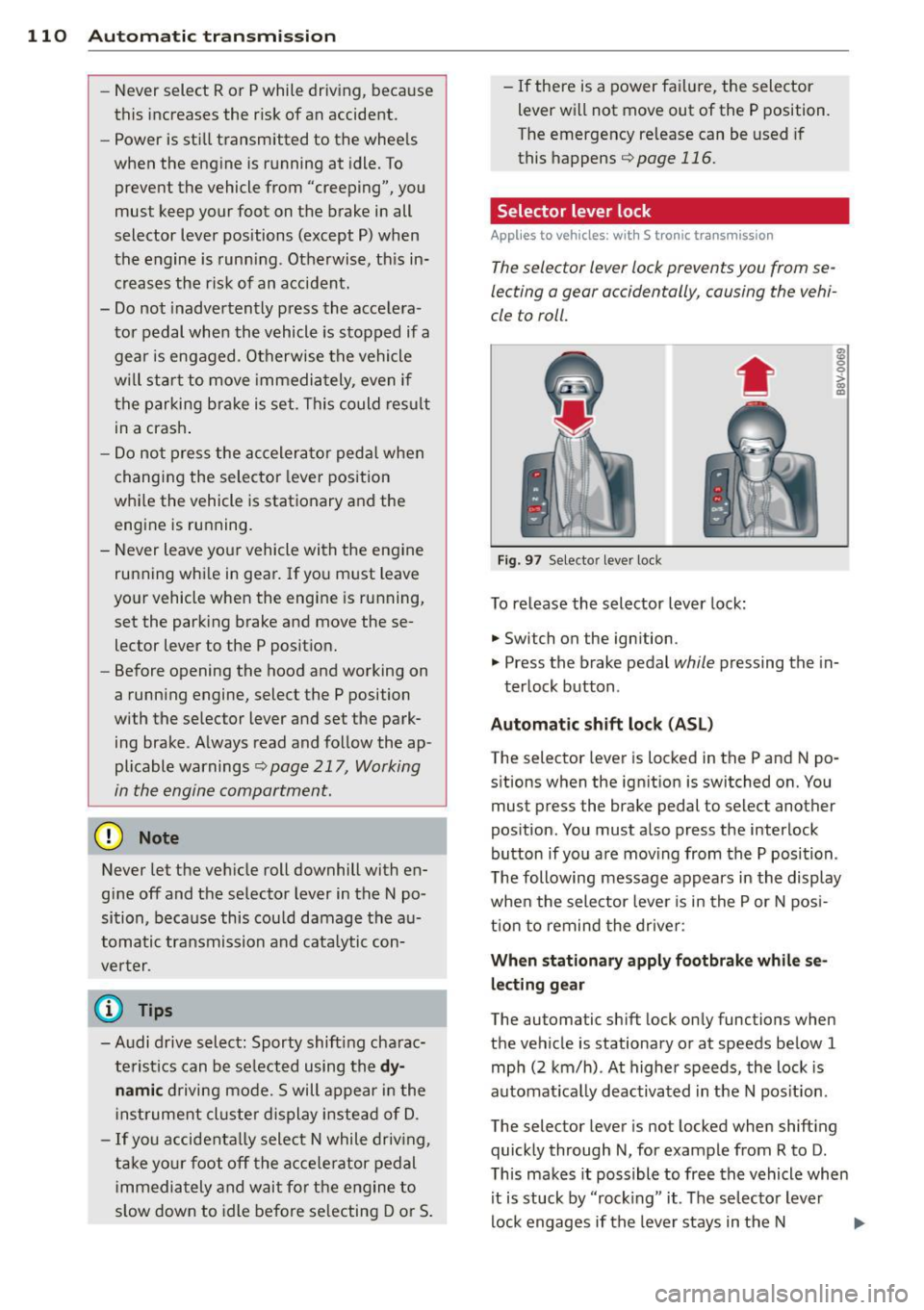
The selector lever lock prevents you from se
lecting a gear occidentally, causing the vehi
cle to roll.
Fig . 97 Selecto r lever lock
To release the selector lever lock:
.. Switch on the ignition .
8 0 :,l. CX) .,
.. Press the brake pedal while pressing the in-
terlock button .
Automat ic shift loc k (AS L)
The selector lever is locked in the P and N po
sitions when the ign ition is switched on. You
must press the brake pedal to select another
position. You must also press the interlock
button if you a re mov ing from the P position .
T he following message appears in the display
when the selector lever is in the P or N pos i
t ion to remind the drive r:
When stationar y apply footbrake while se
l e cting gear
The automatic shift lock only functions when
the vehicle is stationary or at speeds be low 1
mph (2 km/h) . At higher speeds, the lock is
automat ica lly deactivated in the N pos it ion.
The selector lever is not locked when shifting
quick ly through N, for example from R to D.
T his makes it possible to free the vehicle when
it is stuck by "rocking" it. The se lector lever
lock engages if the lever stays in the N
Page 113 of 310
....,
N
ci > co
rl I.O
"' ....,
"' rl
position longer than approximately 2 seconds
when the brake pedal is not pressed.
Interlock button
The interlock button in the selector lever han
dle prevents you from moving the selector
l eve r inadvertently while in some selecto r lev
er positions. The positions that require the in
terlock button to be pressed are marked in
color in the illustration
c::;, fig. 97.
Ignition key safety interlock*
You can only remove the key from the ignition
after switching the ignition off if the se lector
lever is in the P position. The selector lever
will be locked in the P position as long as the
key is not in the ignition .
A WARNING
Read and following all WARNINGS. c::;, &. in
Selector lever positions on page 109.
{D) Tips
- If the selector lever does not engage,
there is a malfunction. The engine is dis
abled to prevent the vehicle from driving
off unintentionally . Press the brake pedal
briefly to allow the selector lever lock to
engage again.
- If the vehicle does not move forward or
i n reverse even though a drive position is
se lected, proceed as follows:
- > If the veh icle does not move in the de
sired direction, the system may not have
engaged the dr ive position correctly.
Press the brake pedal and select the
drive position again.
- >If the vehicle still does not move in the
desired direction, there is a system mal
function. See an authorized Aud i dea ler
or authorized Audi Service Facility for as
sistance to have the system checked.
Autom atic transm ission 111
Driving tips
Applies to veh icles: w it h S tronic transm iss ion
T he transmission shifts up and down auto
matically when in the driving gears.
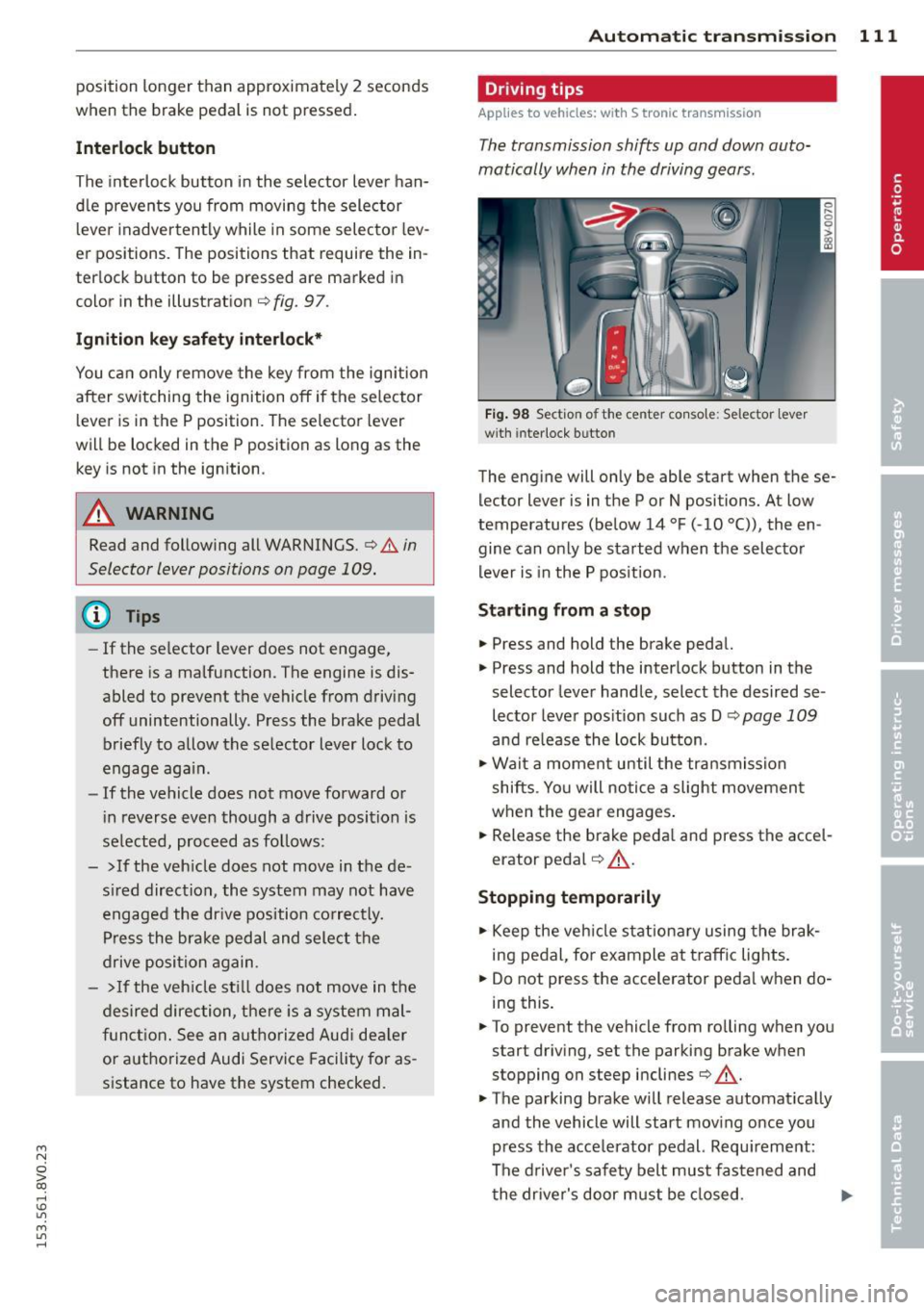
Fig. 98 Section of the center co nsole: Selector lever
w ith interlock b utto n
The engine will only be able start when these
lector lever is in the P or N positions. At low
temperatures (below 14 °F (-10 °C)), the en
gine can only be started when the selector
lever is in the P position.
Starting from a stop
.,. Press and hold the brake pedal.
.,. Press and hold the interlock button in the
selector lever handle, select the desired se
lector lever position such as D
c::;, page 109
and re lease the lock button.
.,. Wait a moment until the transmission
shifts . Yo u will notice a slight movement
when the gear engages.
... Release the brake peda l and press the accel
erator pedal
c::;, .&_ .
Stopping temporarily
.,. Keep the vehicle stationary using the brak
ing pedal, for example at traffic lights.
.,. Do not press the accelerator peda l when do
ing this.
.,. To prevent the vehicle from ro lling when you
start driving, set the parking brake when
stopping on steep inclines
c::;, .&_ .
.,. The parking brake will release automat ically
and the vehicle will start moving once you
press the acce lerator pedal. Requ irement:
The driver's safety belt must fastened and
the driver's door must be closed.
IJll,,
Page 114 of 310
112 Automatic tran smi ssio n
Stopp ing /p ark ing
If the selector lever is not in the P position
when you open the driver's door, the vehicle
could ro ll. In vehicles with a convenience key*,
the following message appears:
Sh ift to P,
othe rwise veh icle c an roll a way. Door s do not
lock if le ver is not in P.
You will also hear a
warn ing tone.
"' Press and ho ld the brake pedal¢.&_ .
"' Set the parking brake.
"'Se lect the P selector lever pos ition.
St opp ing on an incline
• Always press the brake pedal to hold the ve
hicle in p lace and prevent it from "rolling
back"
¢ .&_ . Do n ot try to prevent the vehi
cle from "roll ing back" when a gear is en
gaged by increasing the eng ine speed
¢ (D.
Starting on an inclin e in vehicl es w it h out
Hill Hold *
"'Set the parking brake.
"' With the driving gear selected, press the ac
celerator pedal carefully . The parking brake
will release automat ically if your safety belt
is fastened.
St arting on an incline i n vehicle s with Hill
Hold*
"' With the driving gear selected, remove your
foot from the brake pedal and press the ac cele rato r pedal ¢
page 82, Hill hold.
Under certain circumstances, (such as driving
in the mountains or towing a tra iler), it may
be usefu l to sw itch temporarily to the manual
shift p rogram in order to adjust the gears to
the dr iving condit ions by hand
¢ page 114.
When parking on a level surface, simply place
the selector lever in the P pos ition. On in
clines , activate the parking bra ke first and
then move the selector lever to the P pos it ion
¢ page 80 . This prevents the locking mecha
nism from being loaded too heavi ly and will
make it easier to move the selector lever out
of the P position.
A WARNING
- The vehicle can roll even when the en
g ine is switched off.
- Unintended vehicle movement can lead
to serious injuries .
- Never leave your vehicle with the engine running while in gear. If you must leave
your veh icle when the engine is running,
set the parking brake and move these
lector lever to the P position .
- Power is still transferred to the wheels
when the engine is runn ing at idle. To
prevent the vehicle from "c reeping", you
must keep you r foot on the brake when
the engine is running and the selector lever is in the D, Sor R position or "tip
tronic" mode is selected . -
-Do not inadvertently press the accelera
tor peda l when the vehicle is stationary.
Otherwise the vehicle wi ll start to move
immediate ly, even if the parking brake is
set. Th is could result in a crash.
- Do not press the accelerator pedal when
changing the se lector lever position
while the veh icle is stationary and the
engine is running.
- Never engage the R or P selector level positions while dr iv ing. It could cause a
crash .
- Before driving down a steep slope, re
duce your speed and shift into a lower
gear with "tiptronic" .
- Do not ride the brakes or press the brake
pedal too often or too long when driving
downhill . Constant braking causes the
brakes to overheat and substantially re
duces braking pe rformance, increases
b rak ing distan ce or causes complete fa il
ure of the brake system.
- I f you must stop on an in cl ine, always
hold the vehicle i n place with the foot
brake or park ing brake to p revent it from
rolling back .
- Never hold the vehicle on an incline with
a slipping clutch . The clutch opens auto
matica lly when it becomes too hot from
Page 115 of 310
M N
0 > co ,...., \!) 1.1'1
M 1.1'1 ,....,
the overload. The ml indicator light
turns on and a message appears
Q page 115 when the clutch is overload
ed .
-If the engine must run while you are
working in the eng ine compartment with
the hood open, make sure a gear is not engaged . T he selecto r leve r must be
firmly in the P pos ition and locked in
pla ce and t he pa rking brake must be set
Qpage217. Otherwise, the veh icle
cou ld beg in moving when the eng ine
speed is high, even with the parking
brake set.
W Note
- When stopping on an incline, do not try
to ho ld the vehicle in place by pressing
the accelerator peda l w hile a dr iving gear
i s selected. This can cause the automatic
transmission to overheat and can dam
age it. Set the parking b rake or press the
brake pedal to p revent the veh icle from
ro lling .
- Allow ing the ve hicle to roll when the en
gine is stopped and the selector lever is
i n the N position will damage the auto
matic transmission beca use it is not lu
b ricated unde r tho se c ircumstances.
- The t ransm ission can overheat and be
damaged under certa in d riving and traf
fi c condition s suc h as frequent s tarts ,
creeping for a long time , or s top-and-go
traff ic. W hen the
ml or . indicator
light turns on, stop the vehicle at the
next oppo rtunity and let the t ransmis
s ion coo l
Qpage 115.
-Allow ing the ve hicle to roll when the en
gine is stopped w ill damage the S tron ic
transmission because it is not lubricated
Q page 282 , Emergency towing with
commercial tow truck .
@ Tips
For safety reasons, the park ing brake re
leases automatically only when the driver's
door is closed and dr iver 's safety belt is
fastened.
Automa tic tran sm iss ion 113
Hill descent control
App lies to vehicles : wi th 5 tronic tra nsmi ssio n
Hill descent control assists the driver when
driving down hills .
Hill descent control is activated when these
l ector lever is in the D or S position and you
press the brake peda l. The transmission auto
matically selects a gear that is suitable for the
i ncl ine. Hill descent cont ro l t ries to ma inta in
t h e speed ac hieved a t the t ime of b raking,
within physic al and tec hnical lim it a tions. If
may sti ll be ne cessa ry to adju st the speed
with t he b rakes . Because hi ll descent control
cannot sh ift down farthe r than 3rd gear, it
may be necessary to sh ift into t iptronic mode
in very steep areas. In this case, shift into 1st
o r 2nd gear in tiptro nic mode to use the en
gine's brak ing force to relieve the brakes .
Hill descent control switches off once the hi ll
levels out or you press the accelerator pedal.
On vehicles with a cruise contro l system*
Q page 83, hill descent control is also activat
ed when the speed is set .
A WARNING
-
Hill descent control cannot overcome
physical lim itations, so it may not be ab le
to maintain a co nsta nt speed unde r all
conditions . A lways be ready to apply the
b rakes .
•
Page 123 of 310
....,
N
0 > co
rl I.O
"' ....,
"' rl
General information
Applies to vehicles: with park ing system p lus wit h rear
view ca mera
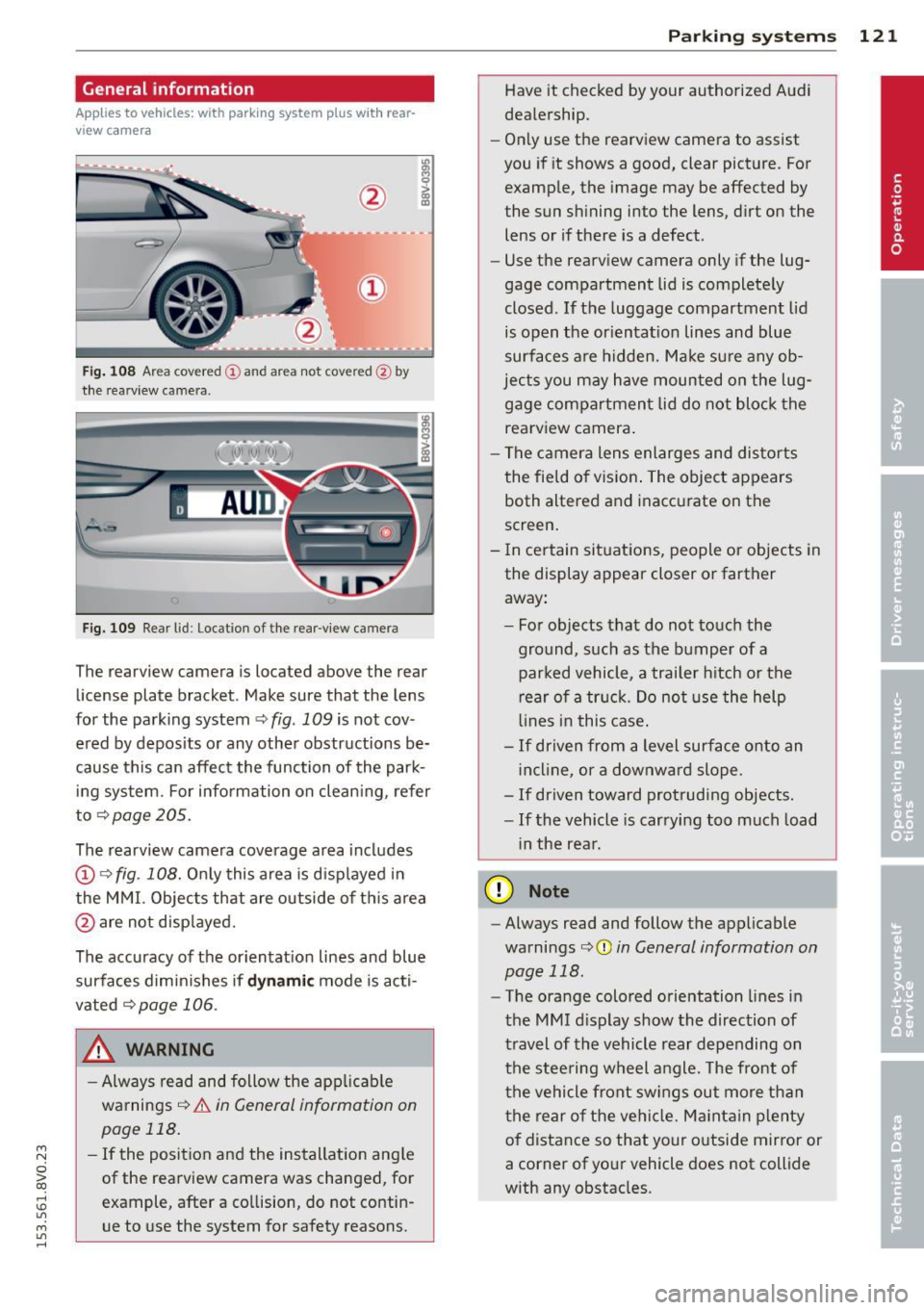
Fig. 108 Area covered
(D and area not covered @by
the rearv iew camera.
Fig. 109 Rear l id: Location of the rear-v iew camera
The rearview camera is located above the rear
license plate bracket . Make sure that the lens
for the parking system ~
fig. 109 is not cov
ered by deposits or any other obstructions be
cause this can affect the function of the park ing system. For information on cleaning, refer
to~page205.
The rearview camera coverage area includes
(D ¢ fig. 108. Only this area is displayed in
the MMI. Objects that are outside of this area
@ are not displayed.
The accuracy of the orientation lines and blue
surfaces diminishes if
dynamic mode is acti
vated
¢page 106.
_& WARNING
-Always read and follow the applicable
warnings¢
& in General information on
page 118.
- If the position and the installation angle
of the rearview camera was changed, for
example, after a collision, do not contin
ue to use the system for safety reasons .
Parking systems 121
Have it checked by your authorized Audi
dealership.
- Only use the rearview camera to assist
you if it shows a good, clear picture. For
example, the image may be affected by
the sun shining into the lens, dirt on the
lens or if there is a defect.
- Use the rearv iew camera only if the lug
gage compartment lid is completely
closed.
If the luggage compartment lid
is open the orientation lines and blue
surfaces are hidden. Make sure any ob
jects you may have mounted on the lug gage compartment lid do not block the
rearview camera.
- The camera lens enlarges and distorts
the field of vision. The object appears
both altered and inaccurate on the
screen.
- In certain situations, people or objects in
the display appear closer or farther away:
- For objects that do not touch the
ground, such as the bumper of a
parked vehicle, a trailer hitch or the
rear of a truck. Do not use the help
lines in this case.
-If driven from a level surface onto an
incline , or a downward slope.
- If driven toward protruding objects.
-If the vehicle is carrying too much load
in the rear.
(D Note
-Always read and follow the applicable
warnings
c:>(D in General information on
page 118.
- The orange colored orientation lines in
the MMI display show the direction of
travel of the vehicle rear depending on
the steering wheel angle. The front of
the vehicle front swings out more than
the rear of the vehicle. Maintain plenty
of distance so that your outside mirror or
a corner of your vehicle does not collide
with any obstacles.
Page 129 of 310
M N
0 > co ,...., \!) 1.1'1
M 1.1'1 ,....,
is not possible, try to adjust the head re
straint so that it is as close to this position
as possible. Move the head restraint so that
it is as close to the back of the head as pos
sible.
.. Fasten and wear safety belts correctly
Q page 138.
.. Always keep both feet in the footwell so
that you are in control of the vehicle at all
times.
For detailed information on how to adjust the
driver's seat, see
Q page 58.
.&, WARNING
Drivers who are unbelted, out of position
or too close to the airbag can be seriously
injured by an airbag as it unfolds. To help
reduce the risk of serious personal injury:
- Always adjust the driver's seat and the
steering wheel so that there are at least
10 inches (25 cm) between your breast
bone and the steering wheel.
- Always adjust the driver 's seat and the
steering wheel so that there are at least
4 inches (10 cm) between the knees and
the lower part of the instrument panel.
- Always hold the steering wheel on the
outside of the steering wheel rim with
your hands at the 9 o'clock and 3 o'clock positions to help reduce the risk of per
sonal injury if the driver's airbag inflates.
- Never hold the steering wheel at the
12 o'clock position or with your hands at
other positions inside the steering wheel
rim or on the steering wheel hub. Hold
ing the steering wheel the wrong way
can cause serious injuries to the hands,
arms and head if the driver's airbag in
flates.
- Pointing the steering wheel toward your
face decreases the ability of the supple
mental driver's airbag to protect you in a
collision.
- Always sit in an upright position and nev
er lean against or place any part of your
body too close to the area where the air
bags are located.
-
Driving safety 127
-Before driving, always adjust the front
seats properly and make sure that all passengers are properly restrained .
- For adjustable head restraints: before
driving, always also adjust the head re
straints properly.
- Never adjust the seats while the vehicle is moving. Your seat may move unexpect
edly and you could lose control of the ve hicle .
- Never drive with the backrest reclined or
tilted far back! The farther the backrests are tilted back, the greater the risk of in
jury due to incorrect positioning of the safety belt and improper seating posi
tion .
- Children must always ride in child seats
Q page 170 . Special precautions apply
when installing a child seat on the front
passenger seat ¢
page 144.
Proper seating position for the front
passenger
The proper front passenger seating position
is important for safe, relaxed driving.
For your own safety and to reduce the risk of
injury in the event of an accident, we recom
mend that you adjust the seat for the front
pass enger to the following position :
.. Adjust the angle of the seatback so that it is
in an upright position and your back comes
in full contact with it whenever the vehicle is
moving.
.. Fo r adjustable head restraints: adjust the
head restraint so the upper edge is as even
as possible with the top of your head. If that
is not possible, try to adjust the head re
straint so that it is as close to this position
as possible
¢ page 129. Move the head re
straint so that it is as close to the back of
the head as possible .
.. Keep both feet flat on the floor in front of
the front passenger seat.
.. Fasten and wear safety belts corr ectly
¢ page 138.
•
•
•
Page 134 of 310
132 Driving saf ety
A WARNING
Heavy loads will influence the way your ve
hicle handles. To help reduce the risk of a
loss of control leading to ser ious personal
injury:
-Always keep in m ind when transporting
heavy objects, that a change in the cen
ter of gravity can also cause changes in
vehicle handling:
- Always distribute the load as evenly as
possible.
- Place heavy objects as far forward in
the luggage compartment as possible.
- Never exceed the Gross Ax le Weight Rat
ing or the Gross Vehicle Weight Rating
specified on the safety compliance stick
er on the left door jamb. Exceeding per
missible we ight standards can cause the
vehicle to slide and handle differently.
- Please observe information on safe driv
ing
opoge 125.
A WARNING
To help prevent poisonous exhaust gas
from be ing drawn into the veh icle, always
keep the rea r lid closed while dr iving.
- Never transport objects larger than those fitting completely into the luggage
area because the rear lid cannot be fully
cl osed.
- If you absolutely must drive w ith the rear
lid open, observe the follow ing notes to
reduce the risk of poisoning:
- Close all w indows,
- Close the power roof *,
- Open all air outlets in the instrument
panel,
- Sw itch off the air recircu lation,
- Set the fresh a ir fan to the highes t
speed.
A WARNING
Always ma ke s ure th at the doors, all win
dows, the power roo f* and the rear lid are
securely closed and locked to reduce the risk of injury when the vehicle is not being
used.
- After closing the rear lid, always make
sure that it is properly closed and locked.
- Never leave your vehicle unattended es
pecially with the rear lid left open. A
child cou ld craw l into the vehicle thro ugh
the luggage compartment and close the rea r lid becoming trapped and unable to
get out. Being t rapped in a vehicle can
lead to serious pe rsonal in jury.
- Never let children play in or around the veh icle.
- Never let passengers ride in the luggage
compa rtment. Vehicle occupants must
always be prope rly restra ined in one of
the vehicle's seating posit ions.
(D Tips
- Air circulation helps to reduce window
fogging. Stale a ir escapes to the outside
through vents in the t rim panel. Be sure
to keep these slots free and open.
- The tire pressure m ust correspond to the
load. The tire pressure is shown on the
t ire pressure label. The tire pressure la
bel is located on the drive r's side B-pilla r.
The tire pressure label lists the recom
mended co ld tire inflation pressures for
the vehicle at its maxim um capacity
we ight and the tires that we re on your
vehicle at the t ime it was manufactured.
For recommended tire pressures for nor
ma l load cond itions, please see chapter
opoge240.
Tie -downs
The luggage comportment is equipped with
four tie-downs to secure luggage and other
items.
Use the t ie-downs to secure your cargo prop
erly
o page 131, Loading the luggage com
portment .
In a collision, the laws of physics mean that
even smaller items that are loose in the vehi-
cle w ill become heavy missiles t hat can cause .,..