light AUDI S3 2015 Service Manual
[x] Cancel search | Manufacturer: AUDI, Model Year: 2015, Model line: S3, Model: AUDI S3 2015Pages: 310, PDF Size: 76.15 MB
Page 74 of 310
7 2 Warm and cold
& WARNING
You should not use the rec irculation mode
for an extended per iod since no fresh air is
drawn in . With the ai r-conditioning switch
ed off, the windows can fog up, which in
c reases t he risk of an ac cident.
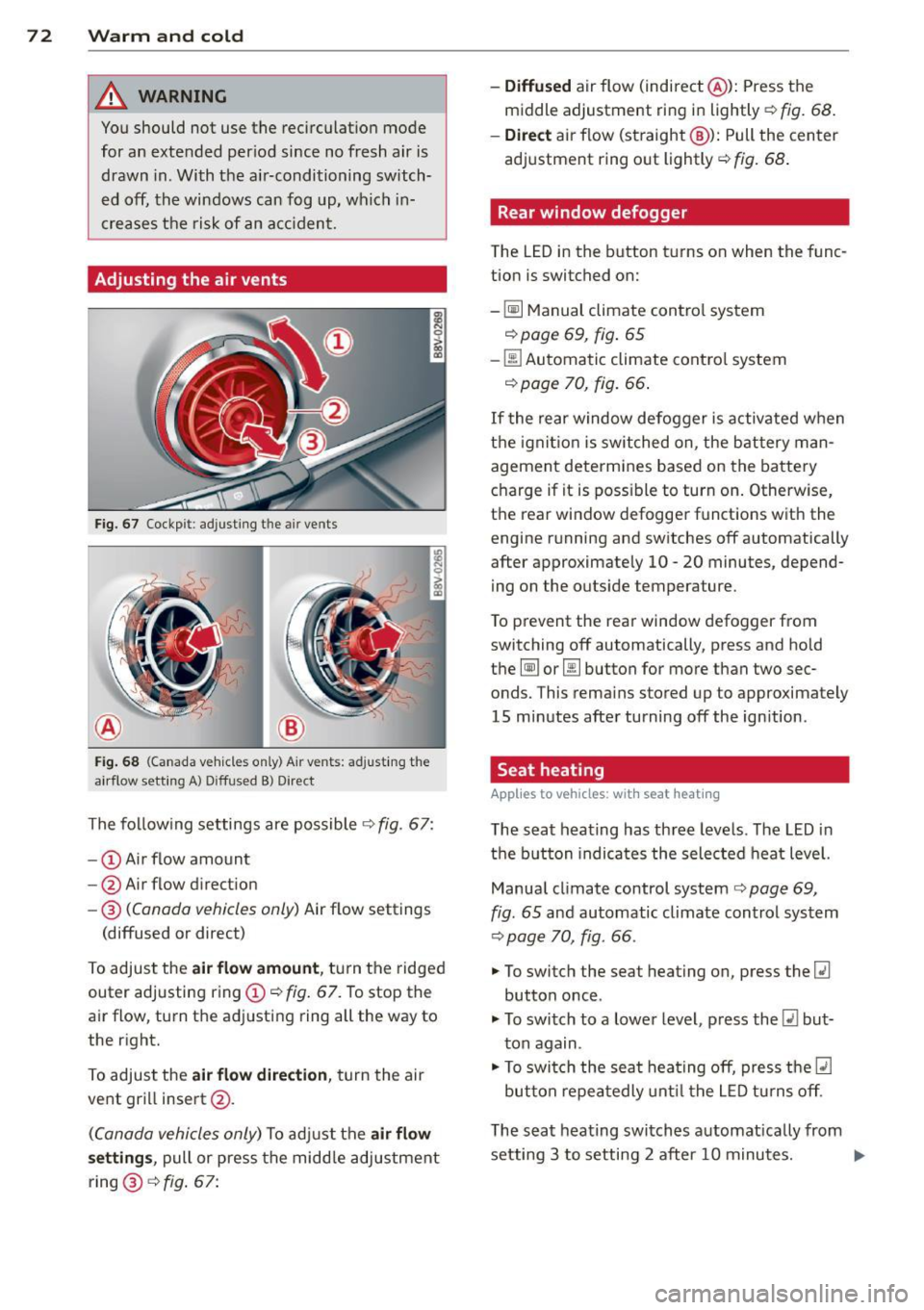
Adjusting the air vents
Fig. 67 Cockp it : adjust ing the a ir vents
®
Fi g. 6 8 (Canada ve hicles o nly) A ir ve nts : ad just ing t he
a irflow sett ing A ) D iffused B ) Direct
The fo llow ing settings are possible ¢ fig. 67:
- © Airflow amount
- @ Air flow d irect ion
- @
(Canada vehicles only) Air f low settings
(diffused or direct)
To adjust the
air flow amount , tu rn the ridged
outer adj usting ring©
c::> fig. 67. To stop the
air flow, turn t he adjusting ring all the way to
the right.
To adjust the
air flow direction , turn the air
ve nt gri ll insert @.
(C anada vehicles only) To ad just the air flow
setting s,
pull or press the midd le adjustment
ring @¢
fig. 67:
- Diffused air flow (indirect @): Press the
middle adjustment ri ng in lightly
c::> fig. 68 .
- Direct
air f low (st raight @): Pull the center
ad justment ring o ut lightly ¢
fig. 68 .
Rear window defogger
The LED in the button t urns on when the func
tion is switched on:
-
~ M anual climate contro l system
c::> page 69, fig . 65
-00 Automatic climate contro l system
c::> page 70, fig . 66.
If the rear w indow defogger is activated w hen
t h e igni tion is switched on, the bat tery man
agement determines based on the battery
c h arge if i t is poss ible to turn on . Otherw ise,
the rear window defogge r funct ions w it h the
engine running and switches off automatically
after approximately 10 -20 minutes, depend
i ng on the outs ide temperature .
T o p revent the rear window defogger f rom
switching off automatically, press and hold
t h e
@ii or 00 button for more than two sec
onds. This rema ins stored up to approxima tely
15 minutes afte r turning off the ign ition .
Seat heating
Applies to veh icles : w it h seat heat ing
The seat heating has th ree leve ls. The LED in
the b utt on indica tes the sele cted heat leve l.
Manua l climate control system
c::> page 69,
fig . 65 and automatic climate control system
c::> page 70, fig . 66.
"' To switch the seat heating on, press the
lt:J
button once .
"' To swi tch to a lower level , press the
lt:I but
ton again .
"' To swi tch the sea t heating off, press the
lt:J
but ton re peat edly unt il t he L ED turns off .
T he seat heating swi tches a utomat ica lly from
setting 3 to setting 2 after 10 minutes.
Iii>
Page 77 of 310
M N
0 > co ,...., \!) 1.1'1
M 1.1'1 ,....,
Switchin g th e ig nition on /off or
p rewar ming
~ To switch the ignition on, turn the ignition
key to position
(D .
~ To switch the ignition off, turn the ignition
key to position @.
Diese l vehicles are preheated while the igni
tion is switched on
II .
Starting th e engin e
Your veh icle is eq uipped with launch cont ro l.
As soon as you have turned the ignition key to position @, the engine will start automatical
l y.
~ Press the brake peda l and move the se lector
lever to the P or N position.
~ Turn the key briefly to position @. The igni
tion key automatically returns to position
(D . Do not press the accelerator peda l when
do ing this.
Major electrical equipment switches off tem
porarily when starting the engine.
It is poss ible that t here will be a slight delay
when starting the engine in diese l vehicles in
colder temperatures . Therefore , you must
ho ld the brake pedal down unti l the engine
starts . The indicator light turns on while the
engine is preheating
II .
The prewarming time depends on the coolant
temperature and outside temperature. The
glow plug indicator light
II wi ll only turn on
for approximately 1 second when the eng ine
is warm or the outside temperature is higher
than 8
°C. T hat means you can start the en
g ine
immediately .
If the engine does not start immediately, stop
the starting procedure by turn ing the ignition
key to pos ition @and repeat after 30 sec
onds .
Automatic star t m alfunction
If the ~ (gasoline engine) or II (diesel en
g ine) indicator light turns on and the message
E ngin e sta rt system m alfunction . P le ase Dri
vin g 75
cont act Se rv ice
appears, there is an automatic
start malfunction.
T o start the engine, hold the ign it ion key in
pos ition @unt il the engine r uns.
Drive to an authorized Audi dealer or author
ized Audi Serv ice Facility immediately to have
the malfunction corrected.
_& WARNING
- Never a llow the engine to run in confined
spaces - there is a risk of asphyxiation .
- Never remove the ignit ion key from the
ignition loo k while the vehicle is moving .
Otherwise the steering lock will engage
and you will not be able to steer the vehi
cle.
- Please note that the b rake booster and
power steering only work when the en
gine is running. When the engine off, you must use more force to steer or brake
the vehicle. Because the usual steer ing
and brak ing capability is not ava ilable,
the risk of accidents or injur ies increases .
- Always take the vehicle key with you when leav ing the vehicle, even for a
short pe riod of time. This applies part ic
ularly when children remain in the veh i
cle. Otherwise the chi ldren could start
the engine or operate electrical equip
ment such as power w indows.
(D Note
- Avo id h igh engine speed, full th rottle,
and heavy eng ine load as long as the en
gine has not reached operat ing tempera
t u re yet . You could damage the engine.
- T he engine cannot be started by pushing
or towing.
@) For the sake of the environment
Do no t let the eng ine run w hile pa rked to
warm up. Begin dr iv ing immediately. This
reduces unnecessary emissions.
•
Page 78 of 310
76 Driving
(D Tips
-If it is difficult to turn the key to position
(D , turn the steering wheel back and
forth slightly to release the steering
wheel lock .
- After starting a cold engine, there may
be a brief period of increased noise be
cause the oil pressure must first build up
in the hydraulic valve adjusters. This is
normal and not a cause for concern .
- If the battery is disconnected and recon
nected, you have to hold the ignition key
in position
(D for five seconds for the en
gine to start .
- After switching the ignition off, you can
only remove the key when the selector
lever is in the "P" (Park) position. After
that the selector lever is locked.
,
Stopping the engine with the key
App lies to vehicles: with mechanical ig niti on lock
Stopping the engine
.,,. Br ing the vehicle to a full stop.
.,,. Turn the key to position @.
Releasing the steering lock
Requirement : The selector lever must be in
the P position.
.,,. Remove the ignition key in position @
Qpage 77, fig . 71 Q &-
.,,. Turn the steering wheel until you hear the
steering wheel lock.
The locked steering helps prevent vehicle
theft .
_& WARNING
-Never turn off the engine before the ve
hicle has come to a complete stop. The
full function of the brake booster and the
power steering is not guaranteed. You
must use more force to turn or brake, if
necessary. Because you cannot steer and
brake as you usually would, this could
lead to accidents and serious injuries . -
Never remove the ignition key from the
ignition look while the vehicle is moving .
Otherwise, the steering lock could sud
denly engage and you would not be able
to steer the vehicle .
- Please note that the brake booster and
power steering only work when the en
gine is running. When the engine off, you
must use more force to steer or brake
the vehicle . Because the usual steering
and braking capability is not available,
the risk of accidents or injuries increases.
- Always take the vehicle key with you
when leaving the vehicle, even for a
short period of time. This applies partic
ularly when children remain in the vehi
cle. Otherwise the children could start
the engine or operate electrical equip
ment such as power windows.
- For safety reasons, always park the vehi
cle with the selector lever in the P posi
tion . Otherwise, there is the risk that the
vehicle could roll.
- After the engine has been switched off,
the radiator fan can continue to run for
up to 10 minutes - even with the ignition
switched off. It can also switch on again
after some time if the coolant tempera
ture rises as a result of heat buildup or if
the engine compartment is heated by
sunlight and the engine is hot .
(D Note
-If the engine has been under heavy load
for an extended period of time, heat
builds up in the engine compartment af
ter the engine is switched off -there is a
risk of damaging the engine. For this
reason, let the engine run for at idle for
approximately two minutes before shut
ting it off.
Page 79 of 310
....,
N
0 > co
rl I.O
"' ....,
"' rl
Starting and stopping
the engine (vehicles
with a convenience key)
St t· th · ith the
button
Applies to vehicles: with convenience key
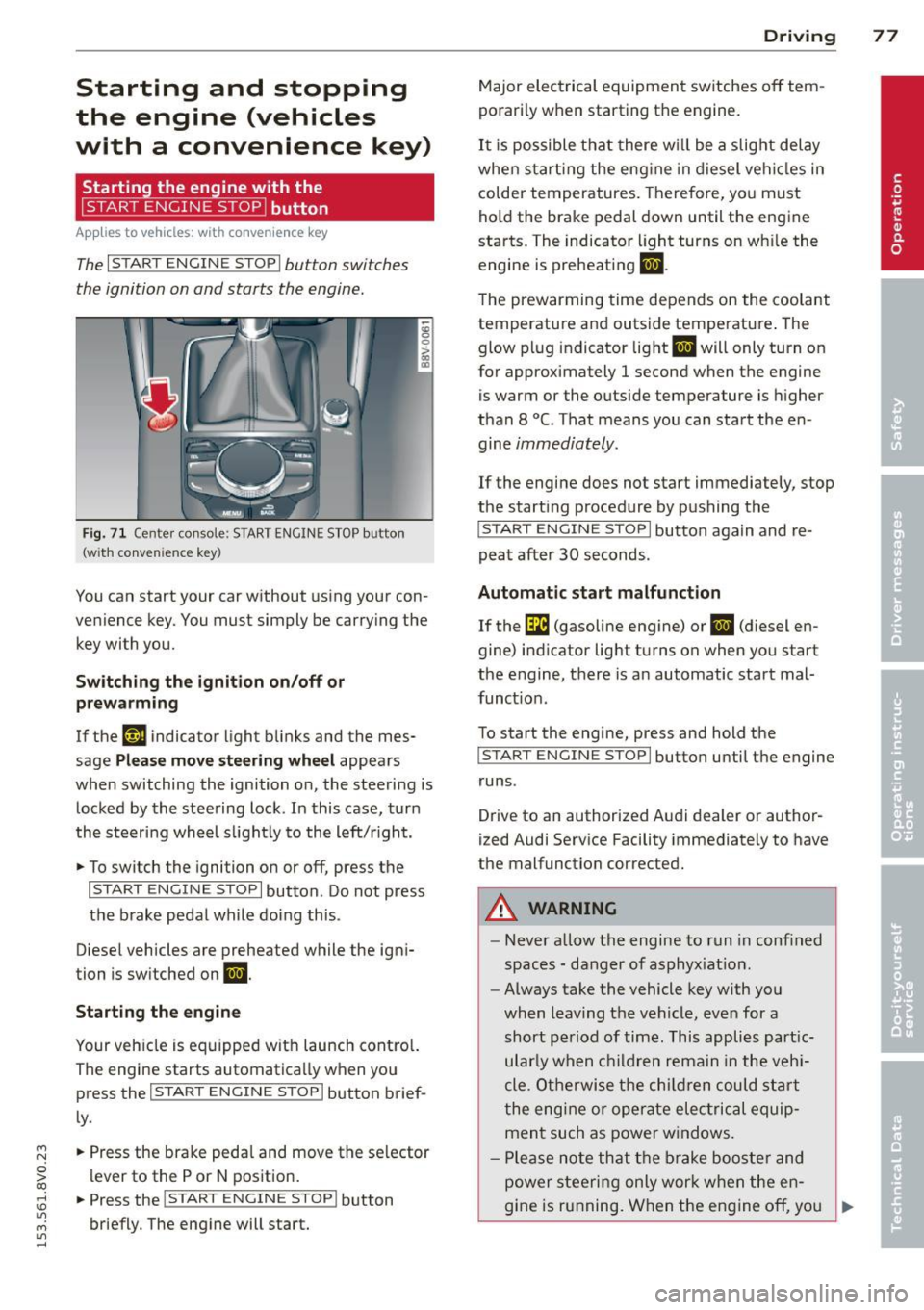
The I START ENGINE STOPI button switches
the ignition on and starts the engine.
Fig. 71 C en ter con sole : START ENGINE STOP b utton
(w ith conve nien ce key)
You can start your car without using your con
venience key. You must simply be carry ing the
key with you.
Switching the ignition on/off or
prewarming
If the 'y.ij indicator light blinks and the mes
sage
Please move steering wheel appears
when switching the ignition on, the steering is
locked by the steering lock . In this case, turn
the steering wheel slightly to the left/r ight .
.,. To switch the ignition on or off, press the
I START ENGINE STOPI button . Do not press
the brake pedal while do ing this .
Diesel vehicles are preheated while the igni
tion is switched on
II.
Starting the engine
Your vehicle is equipped with launch contro l.
The engine starts automatically when you press the
I START ENGINE STOP I button brief
ly .
.,. Press the brake pedal and move the se lector
lever to the P or N position.
.,. Press the
I START ENGINE STOPI button
briefly. The engine will start .
Driving 77
Major electrical equipment switches off tem
porarily when starting the engine.
It is possible that there will be a slight delay
when starting the engine in diesel vehicles in
colder temperatures. Therefore, you must
hold the brake pedal down until the engine
starts. The indicator light turns on wh ile the
engine is preheating
II .
The prewarming time depends on the coolant
temperature and outside temperature . The
glow plug indicator light
II will only turn on
for approximately 1 second when the engine
is warm or the outside temperature is higher
than 8
°C. That means you can start the en
gine
immediately.
If the engine does not start immediately, stop
the start ing procedure by pushing the
I START ENGINE STOP I button again and re
peat after
30 seconds.
Automatic start malfunction
If the GI (gasoline engine) or II (diesel en
gine) indicator light turns on when you start
the engine, there is an automatic start mal
funct ion .
To start the engine, press and hold the
I START ENGINE STOP I button until the engine
runs .
Drive to an authorized Audi dealer or author
ized Audi Service Facility immediately to have
the malfunction corrected .
A WARNING
-Never allow the engine to run in confined
spaces - danger of asphyx iat ion.
- Always take the vehicle key with you
when leaving the vehicle, even for a
short period of time. This applies part ic
ular ly when children remain in the vehi
cle . Otherwise the children could start
the engine or operate electrical equip
ment such as power windows .
- Please note that the brake booster and
power steering only work when the en-
gine is running. When the engine off, you
~
Page 80 of 310
78 Driving
must use more force to steer or brake
the vehicle. Because the usual steering
and braking capability is not available,
the risk of accidents or injuries increases .
- Avoid high engine speed, full throttle,
and heavy engine load as long as the en
gine has not reached operating tempera
ture yet. You could damage the engine .
- The engine cannot be started by pushing
or towing.
@ For the sake of the environment
Do not let the engine run while parked to
warm up. Begin driving immediately. This
reduces unnecessary emissions.
{D) Tips
- After starting a cold engine, there may
be a brief period of increased noise be
cause the oil pressure must first build up in the hydraulic valve adjusters. This is
normal and not a cause for concern .
- If the . indicator light blinks in the in
strument cluster before switching the ig
nition off, the ignition will not switch on
again.
9 page 193
- If you leave your vehicle with the ignition
switched on, the ignition will switch off
after a certain amount of time. Make
sure that electrical equipment such as
the exterior lights are switched off.
Turning the engine off using the button
Applies to vehicles: with conven ience key
• Bring the vehicle to a full stop.
• Move the selector lever into the P position .
• Press the
I START ENGIN E STOPI button
9page 77, fig. 71 .
Steering lockll
The steering locks when you turn the engine
off using the
I START E NGIN E STOP t* button,
l) Thi s fun ction is not available in all c oun tries.
move the selector lever into the P position
and open the driver's door.
The locked steering helps prevent vehicle
theft .
Emergency off function
If it is absolutely necessary, the engine can al
so be turned off while driving at speeds lower
than 6 mph (10 km/h). If you press the
I STAR T ENGINE ST OPI* button while driving,
the message
Pressing start/stop button
again will switch off engine!
appears. To
switch the engine off, press the
I S TAR T ENGINE ST OPI* button twice in a row
briefly or press and hold for longer than two
seconds.
A WARNING ~
- Never turn off the engine before the ve- hicle has come to a complete stop . The
full function of the brake booster and the
power steering is not guaranteed . You
must use more force to turn or brake if
necessary. Because you cannot steer and
brake as you usually would, this could
lead to crashes and serious injuries.
- Please note that the brake booster and
power steering only work when the en
gine is running. When the engine off, you
must use more force to steer or brake
the vehicle. Because the usual steering
and braking capability is not available,
the risk of accidents or injuries increases.
- Always take the vehicle key with you
when leaving the vehicle, even for a
short period of time. This applies partic
ularly when children remain in the vehi
cle . Otherwise the children could start
the engine or operate electrical equip
ment such as power windows.
- For safety reasons, always park the vehi
cle with the selector lever in the P posi
tion. Otherwise, there is the risk that the
vehicle could roll.
Page 82 of 310
80 Driving
To sti ll be able to start or stop t he engine, re
fer to "Correcting a malfunction"
¢ page 79.
fll Key not in vehicle?
The fll ind icator light tu rns on and this mes
sage appears if the conven ience key was re
moved from t he vehi cle when the engine was
runni ng. If the conven ien ce key is no lo nger in
the vehicle, yo u cannot swi tch the ign ition on
or start the engine on ce yo u stop it . Yo u also
cannot lock the veh icle from the o utside .
Press brake pedal
This message appears if you do not press t he
b rake peda l when starting the engine .
Please engage N or P
This message appears whe n starting or stop
p ing the engine if the se lecto r lever is not in
the Nor
P posit ion. The eng ine will not start/
stop.
Shift to P , otherwise vehicle can roll away.
Doors do not lo ck if lever is not in P
This message appears fo r safe ty rea sons
a long with a wa rning tone. I t ap pears if the
se lecto r lever for the automatic transm iss ion
i s not in the P position when sw itch ing the ig
n it ion off with the
! START ENGINE STOPI*
button . Sh ift the selector lever to t he P posi
tion . O the rwise, the vehicle could ro ll. You al
so cannot lock the vehicle usi ng the locki ng
sensor on the door handl e or us ing the con
ve nien ce key.
Electromechanical
parking brake
Operating
The ele ctromechanical parking brake replaces
t he hand brake.
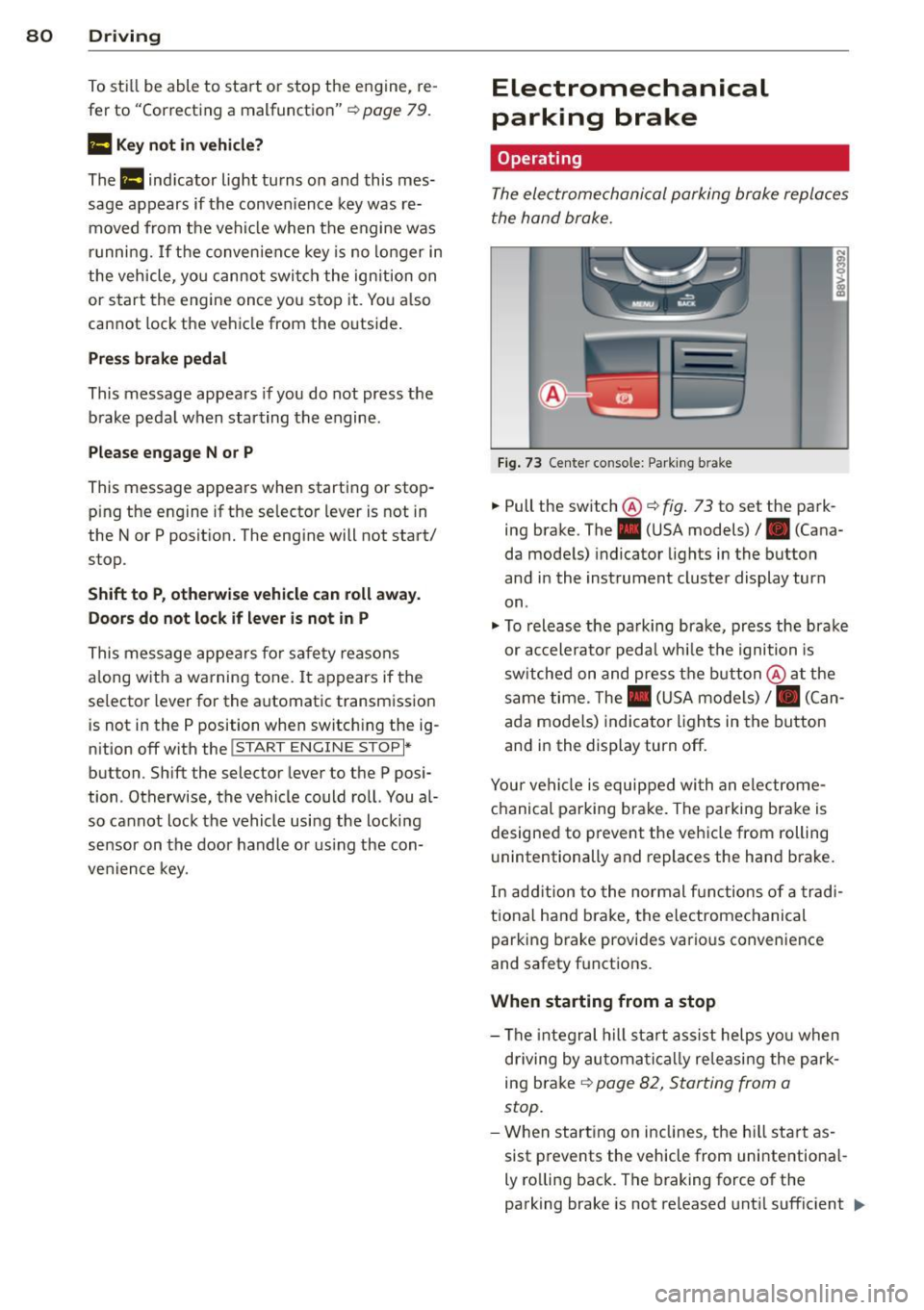
Fi g. 7 3 Center co nsole: Park ing b rake
.,. Pull the switch®¢ fig. 73 to set the park
ing brake. The. (USA m odels)/ . (Cana
da mode ls) indicator lights in the button
and in the instrument cluster display turn
on .
.,. To releas e the pa rking brak e, press the brake
or ac celera to r peda l wh ile the ignition is
sw itched on and pres s th e bu tton @ at the
same time. The . (USA mo dels) /. (Can
ada models) indica to r li gh ts in the bu tton
and i n the display turn off.
Your ve hicle is equipped wi th a n ele ctrome
ch anical parking brake. The parkin g bra ke is
designed to p revent the vehicle from rolling
u nintentionally and replaces the hand brake.
In ad dition to the normal fu nctions o f a tra d i
tio na l han d brake, the e lectromechanical
parking b rake provi des vario us convenience
and safety f unctions .
When starting from a stop
-The integral hill start assist helps yo u when
d riving by au toma tically releasi ng the pa rk
ing brake ¢
page 82, Starting from a
stop.
- W hen start ing o n in clines, t he h ill sta rt as
sist p revents the vehicle from unintentiona l-
ly ro lling back . The braking force of the
parking brake is not released unt il sufficient .,.
Page 83 of 310
M N
0 > co ,...., \!) ..,.,
M ..,., ,....,
driving force has been built up at the
whee ls.
E mergenc y brake fun ction
An emergency braking funct ions ensures that
the vehicle can be slowed down even if the
normal brakes fail¢ page 82, Emergency
braking function .
A WARNING
-Do not press the accelerator pedal inad
vertent ly when the vehicle is stationary
and the engine is runn ing and a gear is
selected. Otherwise the vehicle will start
to move immediately and could result in a crash .
- If the power supply fa ils, the re leased
park ing brake can no longer engage. In
this case, par k the vehicle on level
ground and secure it by placing the se
lector lever i n the P pos ition. See an au
thori zed Aud i dea ler or a utho rized Aud i
Serv ice Facility for ass istance.
(D Note
I f the . or. (U SA mode ls) /. (Cana
da mode ls) indicato r light in t he instru
ment cluster blinks, there is a mal fun ct ion
in the brake system . Re fer to the detailed
description of the indicator lights
r=:>page 18.
-If the . (USA models) /. (Cana-
da models) or
Iii indicator light turns
on, there is a malfunct ion in the park ing
brake
r=:> page 19.
(D Tips
- If the electromechanical parking brake is
set wh ile the ignition is switched off, the
¢C)'A indicator light in the button and in
the instrument cluster dis- play . (USA models)
I. (Cana-
da models) w ill t urn off afte r a ce rtain
amount of time.
- If dr iver's door is opened while the ign i
tion is switched on, the parking b rake
sets automat ically. This prevents unin
tended ro lling of the vehicle .
Dri vin g 81
-Occasional noises when the pa rking
brake is set and released are normal and
are not a cause for concern.
- When the vehicle is pa rked, the park ing
brake goes through a self -test cycle at
regu lar interva ls. Any no ises assoc iated
w ith this are normal.
- If there is a power fa ilure, the park ing
brake will not set if it is released, and it
w ill not release if it is set
r=;, & . See a n
authorized Audi dealer or autho rized
Audi Service Facility fo r ass ista nce.
Parking
" Press the b rake pedal to stop the veh icle.
" Pull the switch @¢
page 80, fig. 73 to set
t he par king brake.
" Place the se lecto r lever in the P position .
.. Turn the engine off¢
A_.
"Tu rn the steering wheel when parking on in
clines so that the wheels w ill roll into the
curb if the vehicle starts moving.
A WARNING
- Always take the vehicle key w ith you
when leav ing the vehicle, even for a
short pe riod of time. This applies part ic
ularly when children rema in in the veh i
cle . Ot herwise children co uld s tart the
engine, release the pa rking brake o r op
erate electrical equipment such as power
windows, which increases the risk of an
accident.
- No one should remain in the vehicle
when it is locked, especially children.
Loc ked doors make it more difficult for
emergency workers to get into the ve hi
cle, which puts lives at risk.
•
Page 85 of 310
M N
0 > co ,...., \!) 1.1'1
M 1.1'1 ,....,
moment after re leasi ng the b rake peda l. Dur
i n g this time, you can easily be gin to move
your veh icle.
A WARNING
- The intelligent technology of Hill Hold
cannot overcome the lim itations im
posed by natural phys ica l laws . The in
c reased comfort offered by Hill Hold
sho uld not cause you to ta ke safety risks .
- Hill Hold cannot hold the veh icle in all
hill start situat ions (for examp le, if the
ground is slippery or icy).
- If you do not begin movi ng immediately
after releasing the b rake pedal, the vehi
cl e could begin to roll backwa rd under
c ertai n circumst ances. Press the bra ke
peda l or set the par king b rake immed i
ately .
-If the engine "sta lls", p ress the brake
peda l or set the par king b rake immedi
ately .
- Star ting on in cli nes in s top-and-go traf
fic: To hel p prevent the vehicle from roll
ing back when starting, press and hold
the brake pedal for several seconds when
the vehicle is stationary.
@ Tips
You can find out if your vehicle is equipped
wit h Hill Hold by check ing at an authorized
Aud i dea le r or q ualified repa ir facility.
Speed warning system
Introduction
The speed warning system helps you to stay
under a specified maximum speed.
-
The speed warning system warns you if you
are exceeding the max imum speed that you
h ave set . Yo u will hea r a warn ing tone when
your speed exceeds the stored va lue by ap
p rox imately 3 mph (3 km/ h). The . (USA
models)/ . (Canad a mo dels) indicator l igh t
and the message
Speed limit e xceeded! ap
pear in the instr ument cluster disp lay at the
same time. The./. indicator light turns
Drivin g 83
off when the speed dec reases be low the stor
ed maximum speed .
Setting a t hreshold is recommended if you
would like to be rem inded when you reach a
ce rtain maxim um speed. S ituations whe re you
may want to do so incl ude driving in a co untry
with a genera l speed limit o r if the re is a
specified maximum speed for winter tires .
(D Tips
Regardless of the speed warning system,
you should a lways monitor your speed us
i ng the speedometer and make sure yo u
are follow ing the lega l speed limit .
Setting the threshold
You can set, change and delete the threshold
in the MMI.
.,.. Select: the
I MENU I button > Car > Systems*
cont ro l button > Driver assistance > Speed
warning .
You can set any threshold between 20 mph
(30 km/h) and 150 mph (240 km/h) . Settings
can each be adj usted in increments of 6 mph
(10 km/h).
Cruise control system
Description
Applies to veh icles: w ith c ruise control system
The cru ise con trol system makes it poss ib le to
drive at a cons tant speed start ing at 15 mph
(20 km/h).
T he speed is kept const ant by modifying en
gine powe r or throug h an ac tive brake inte r
vention .
.&_ WARNING
-Always pay attention to the t raffic
around you when the cruise contro l is in
operation. You are always responsible for
your speed and the distance between
your veh icle and other vehicles .
llll-
•
Page 86 of 310
84 Driving
-For reasons of safety, cruise control
should not be used in the city, in stop
and-go traffic, on winding roads and
when road conditions are poor (such as
ice, fog, gravel, heavy rain and hydro
planing) -you could have an accident .
- Switch the cruise control off temporarily
when driving in turning lanes, highway
exits or in construction zones.
- Please note that unconsciously "resting"
your foot on the accelerator pedal pre
vents the cruise control from braking.
This is due to the control system being
overridden by the driver's acceleration.
- If there is a brake system malfunction
such as overheating when the speed
warning system is switched on, the brak
ing function in the system will be deacti
vated. The remaining speed warning sys
tem functions will remain active, as long
as the
B (USA models)/ ii (Canada
models) indicator light is on.
@ Tips
- The cruise control system is ideal for
stretches with speed limits. The driver is
responsible for adhering to the correct
speed.
- The cruise control remains active when
shifting gears.
- The brake lights turn on when the brakes
are activated.
Switching on
Applies to vehicles: with cr uise contro l system
0
f
~
0
Fig. 74 Opera ting lever: Cruise control system
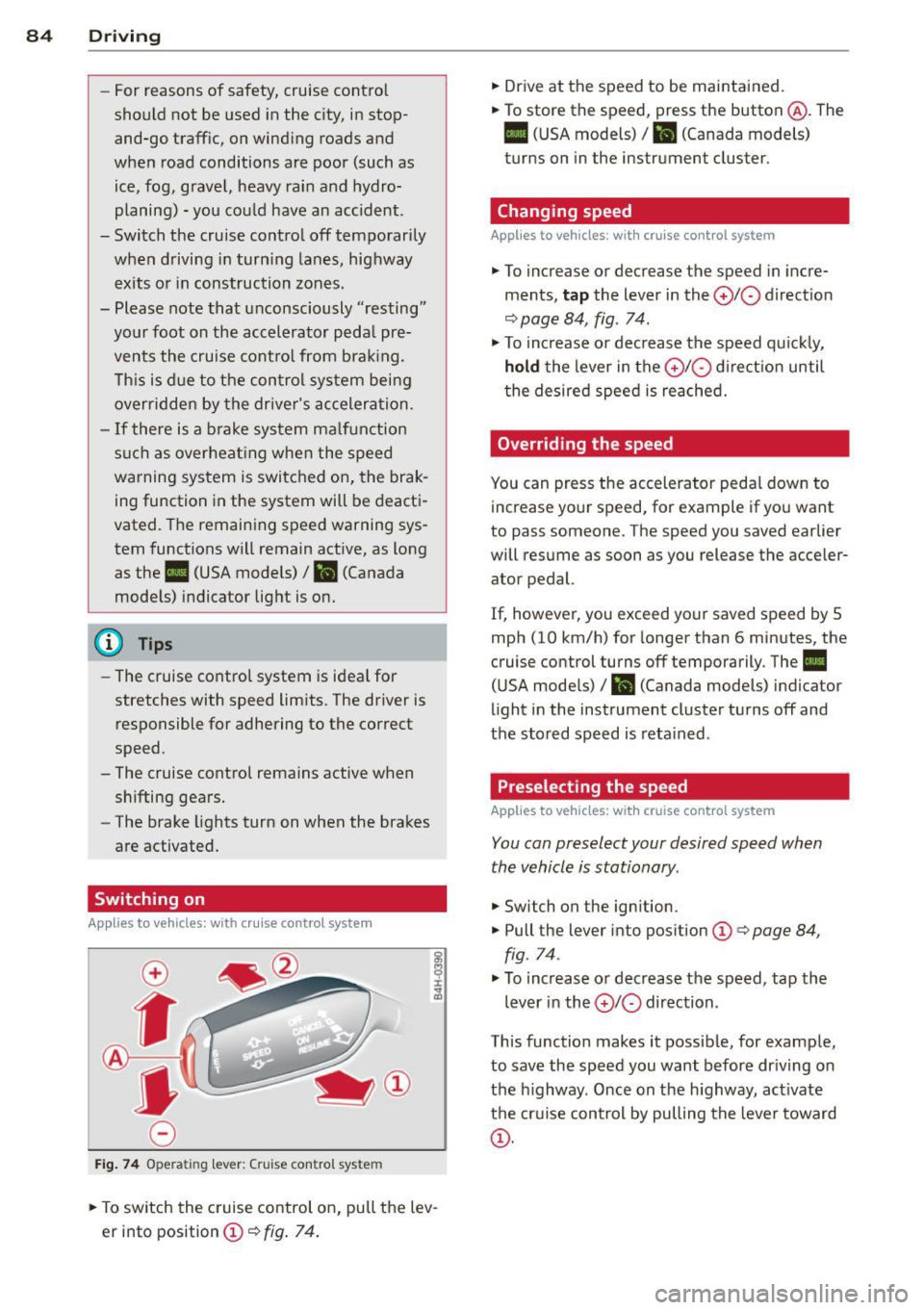
.,. To switch the cruise control on, pull the lev
er into position
CD¢ fig. 74.
.,. Drive at the speed to be maintained.
.,. To store the speed, press the button @. The
B (USA models)/ ii (Canada models)
turns on in the instrument cluster.
Changing speed
Applies to vehicles: with cruise control system
.,. To increase or decrease the speed in incre
ments,
tap the lever in the 0 10 direction
<:;>page 84, fig. 74 .
.,. To increase or decrease the speed quickly,
hold the lever in the 010 direction until
the desired speed is reached.
Overriding the speed
You can press the accelerator pedal down to
increase your speed, for example if you want
to pass someone. The speed you saved earlier
will resume as soon as you release the acceler ator pedal.
If, however, you exceed your saved speed by 5
mph (10 km/h) for longer than 6 minutes, the
cruise control turns off temporarily. The
II
(USA models) / Bl (Canada models) indicator
light in the instrument cluster turns off and
the stored speed is retained .
Preselecting the speed
Applies to vehicles: with cruise control system
You can preselect your desired speed when
the vehicle is stationary .
.,. Switch on the ignition .
.,. Pull the lever into position
CD¢ page 84,
fig . 74.
.,. To increase or decrease the speed, tap the
lever in the
010 direction .
This function makes it possible, for example,
to save the speed you want before driving on
the highway . Once on the highway, activate
the cruise control by pulling the lever toward
CD-
Page 90 of 310
88 Audi adaptive cruise control
What can adaptive cruise control do?
The ad aptive cruise co ntrol sys tem uses r ad ar
a nd a video came ra . T he r ada r is subject to
designated system limits ¢
page 86.
On ope n roads w ith no t raff ic, i t fun ctions like
a cruise co ntro l system . Th e stored s peed is
main taine d. When approach ing an object
ahead and the system detects it, the ada ptive
cr uise control system automatically brakes to
match that ob ject's speed and then maintains
the stored d istance. As soon as the system
does not detect an object ahead, adaptive
cru ise control accelerates up to the s to red
speed .
W ith in the lim its of the system, adaptive
cru ise contro l can brake in stop-and-go traff ic
u ntil t he vehicle is stationary and then begin
d riving aga in under certa in conditions
¢ page 90, Driving in stop-and-go traffic.
Which functions can be controlled?
When you sw itch adaptive cruise cont ro l on,
you can set the cur rent speed as the "control
speed" ¢
page 88, Switching on/off .
When driving, you can stop cruise control
¢
page 90 or change the speed ¢ page 89
at any time .
You can a lso adjust the following settings :
- D istan ce
¢page 91
- D riving p rogram ¢ page 92
-Driving mode ¢ page 92
l) Spee d lim it s depe nd o n th e cou ntry and t he s pee dom
e te r.
Switching on/off
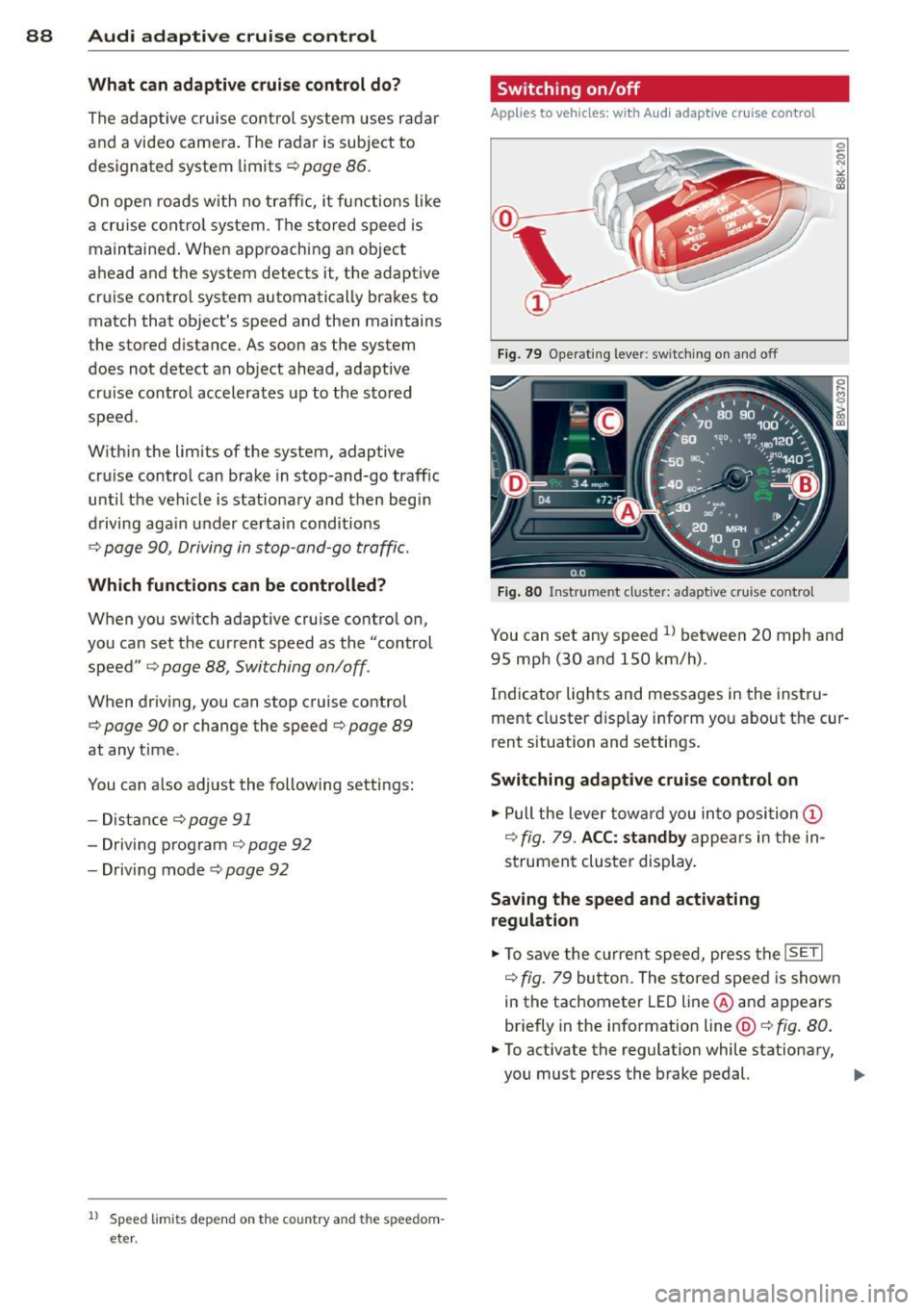
Applies to vehicles: wit h Audi adapt ive cr uise contro l
Fig . 79 Opera ting leve r: sw itc hin g on and off
Fig. 80 Instrume nt cluster: adaptive cru ise control
You can set any speed ll betwee n 20 mph and
95 mp h (30 and 150 km/h).
Ind icator lights and messages in the inst ru
me nt cluster d isp lay inform yo u about the cur
rent s ituation and settings.
Switching adaptive cruise control on
.,. Pull the lever tow ard you in to position (D
¢ fig . 79 . ACC: standby a ppears in the in
s trument cluster display.
Saving the speed and activating
regulation
.,. To save the c urre nt spee d, press t he ISETI
¢ fig. 79 bu tto n. The stored speed is show n
in the tachometer LE D line @and appears
briefly in the info rmation line@¢
fig. 80 .
• To activate the regulation while stationary,
you must press the brake pedal.
IJJ,-