brakes AUDI S3 SEDAN 2015 User Guide
[x] Cancel search | Manufacturer: AUDI, Model Year: 2015, Model line: S3 SEDAN, Model: AUDI S3 SEDAN 2015Pages: 282, PDF Size: 71.14 MB
Page 98 of 282
Ass is t
Sw it c h ing off c omplet ely
.,. Press the lever into pos ition @ (clicked into
place) , or
.,. switch the ignition
off .
The speed you saved w ill be retained if the cr uise
control has been sw itched
off temporar ily . To re
sume the stored speed, release the brake peda l
and pu ll the lever into position
(D .
The stored speed is erased when the cru ise con
trol is switched
off comp lete ly or the ignition is
switched
off .
A WARNING
You should only resume the saved speed if it
is not too high for existing traffic conditions.
Otherw ise you risk an accident.
@ Tips
- If the brakes become too heated while driv
ing, the cruise contro l switches
off. If this
happens while driving downhill, you can re
lieve the brakes by sh ifting into a lower
gear.
- When the cruise control is act ivated, ESC
sport mode cannot be switched on.
Audi adaptive cruise control
Description
Applies to veh icles: w ith Audi adaptive cruise control
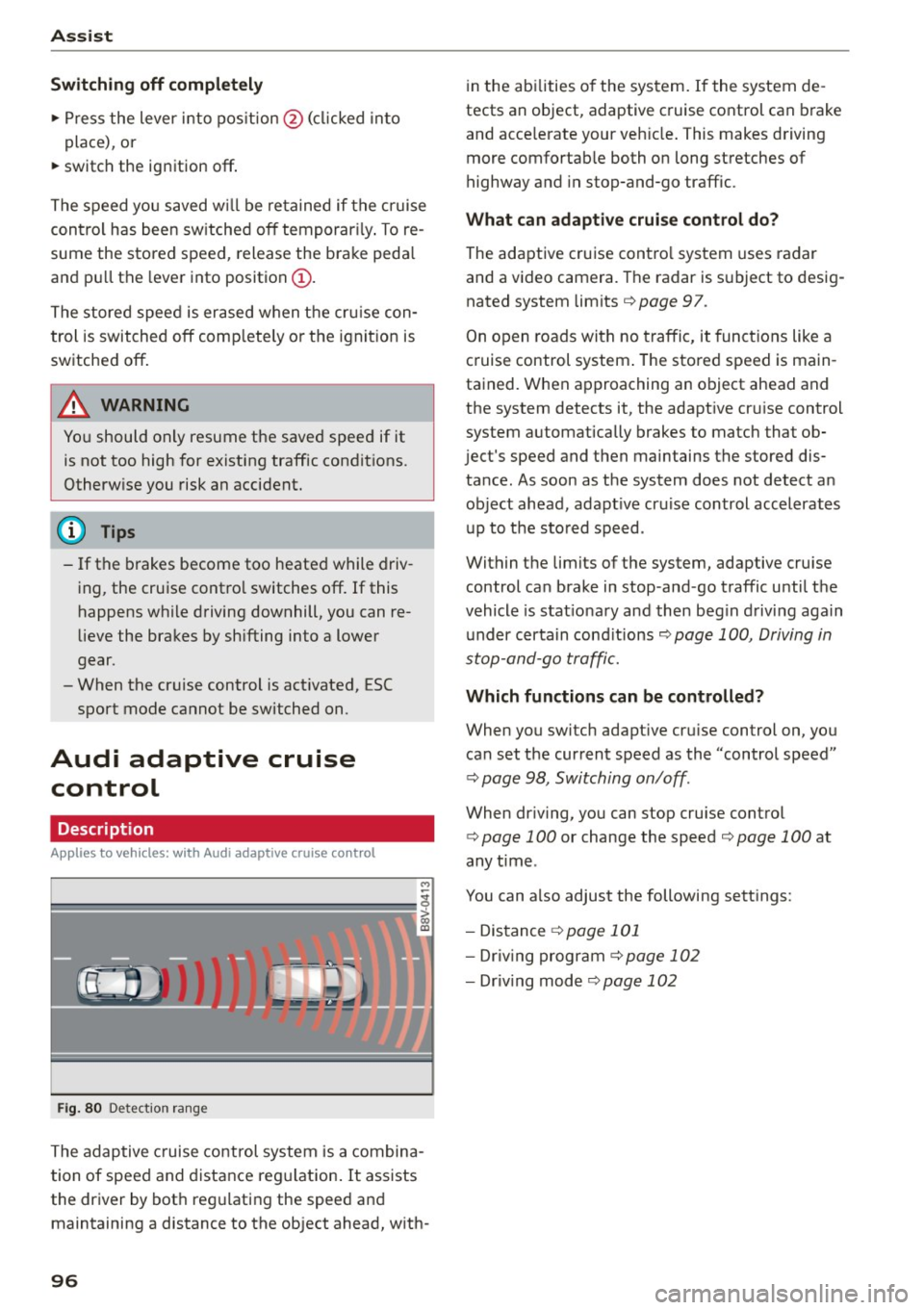
F ig. 80 Det ect ion rang e
The adaptive cruise control system is a combina
tion of speed and distance reg ulation . It assists
the driver by bot h reg ulating the speed and
maintaining a distance to the object ahead, w ith -
96
in the abilities o f the system. If the system de
tects an object, adaptive cruise control can brake
and acce lerate your veh icle . This makes driving
more comfortab le both on long stretches of
highway and in stop-and-go traffic.
What can adaptive crui se con trol do?
The adaptive cruise contro l system uses radar
and a video camera. The radar is subject to desig
nated system limits
q page 97.
On open roads with no traffic, it funct ions like a
cruise control system . The stored speed is main
tained. When approaching an object ahead and
the system detects it, the adapt ive cruise control
system automatically brakes to match that ob
ject's speed and then maintains the stored dis
tance. As soon as the system does not detect an object ahead, adapt ive cr uise control accelerates
up to the sto red speed .
Within the limits of the system, adaptive cruise
control can brake in stop -and -go traffic until the
vehicle is stat iona ry and then beg in driving again
under certain cond itions
q page 100, Driving in
stop-and-go traff ic.
Which functions can be controlled?
When you swi tch adapt ive cru ise control on, you
can set the current speed as the "control speed"
q page 98, Switching on/off .
When driving, yo u can stop cruise contro l
q page 100 or change the speed q page 100 at
any time .
You can also adjust the following sett ings:
- Distance
q page 101
- Dr iv ing program C) page 102
-Dr iv ing mode C)page 102
Page 99 of 282
....,
N
ci > co
rl I.O
"'
"'
"'
rl
General information
Applies to vehicles: with Audi adaptive cruise control and Audi
pre sense front
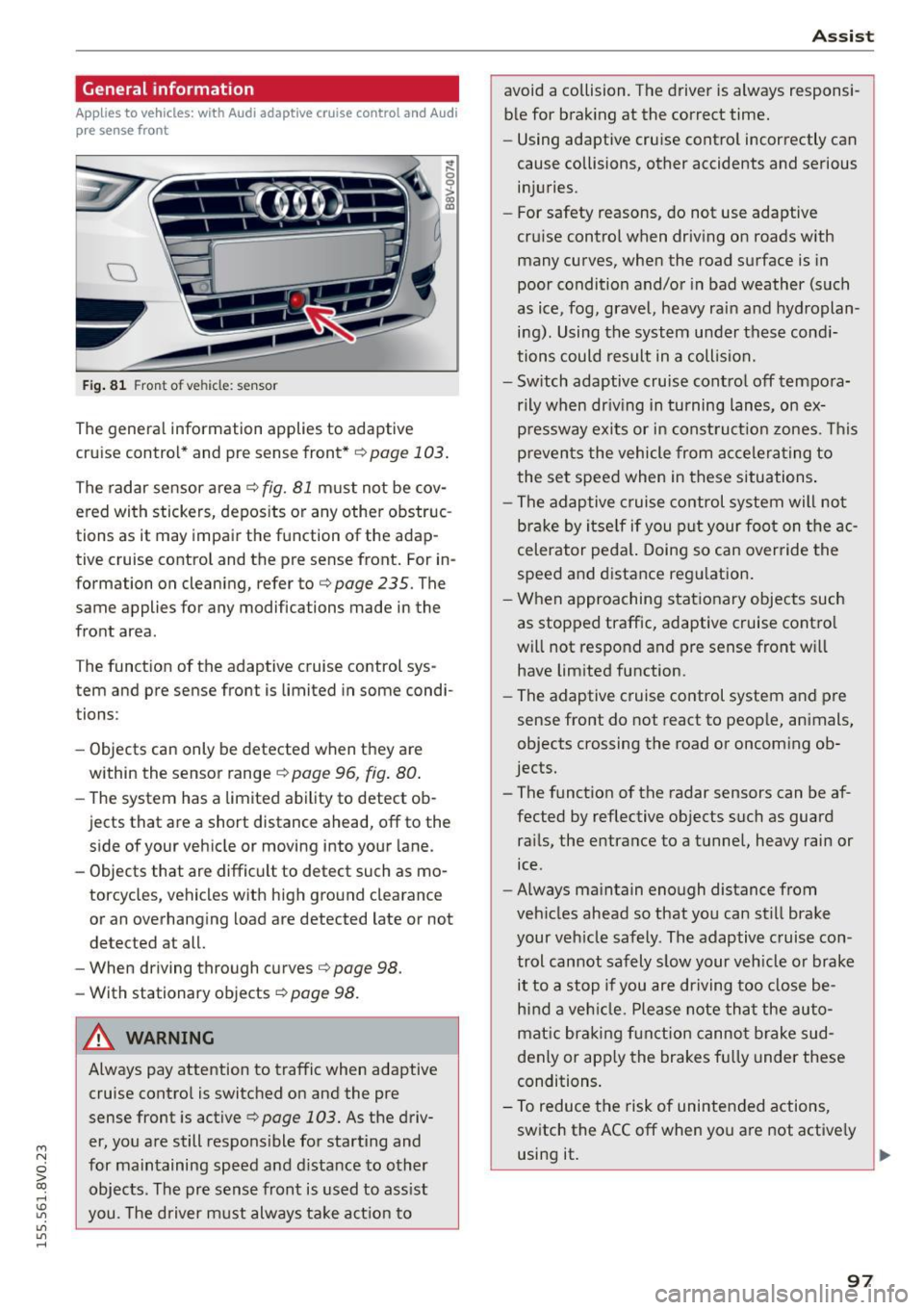
Fig. 81 Front of vehicle: sensor
The general information applies to adaptive
cruise control* and pre sense front*
r::!>page 103.
The radar sensor area r::!> fig. Bl must not be cov
ered with stickers, deposits or any other obstruc
tions as it may impair the function of the adap
tive cruise control and the pre sense front. For in
formation on cleaning, refer tor::!>
page 235. The
same applies for any modifications made in the
front area .
The function of the adaptive cruise control sys tem and pre sense front is limited in some condi
tions :
- Objects can only be detected when they are
within the sensor ranger::!>
page 96, fig. 80.
-The system has a limited ability to detect ob
jects that are a short distance ahead, off to the side of your vehicle or moving into your lane.
- Objects that are difficult to detect such as mo
torcycles, vehicles with high ground clearance
or an overhanging load are detected late or not
detected at all.
- When driving through curves
r=> page 98.
-With stationary objects r::!> page 98.
A WARNING
Always pay attention to traffic when adaptive
cruise control is switched on and the pre
sense front is active
r::!> page 103. As the d riv
er, you are still responsible for starting and
for maintaining speed and distance to other objects. The pre sense front is used to assist
you. The driver must always take action to
Assist
avoid a collision. The driver is always responsi
ble for braking at the correct time.
- Using adaptive cruise control incorrectly can
cause collisions, other accidents and serious
injuries.
- For safety reasons, do not use adaptive
cruise control when driving on roads with
many curves, when the road surface is in
poor condition and/or in bad weather (such
as ice, fog, gravel, heavy rain and hydroplan
ing). Using the system under these condi
tions could result in a collision.
- Switch adaptive cruise control off tempora
rily when driving in turning lanes, on ex
pressway exits or in construction zones. This
prevents the vehicle from accelerating to
the set speed when in these situations.
- The adaptive cruise control system will not
brake by itself if you put your foot on the ac
celerator pedal. Doing so can override the
speed and distance regulation.
- When approaching stationary objects such
as stopped traffic, adaptive cruise control
will not respond and pre sense front will
have limited function.
- The adaptive cruise control system and pre
sense front do not react to people, animals,
objects crossing the road or oncoming ob
jects.
- The function of the radar sensors can be af
fected by reflective objects such as guard
rails, the entrance to a tunnel, heavy rain or
ice.
- Always maintain enough distance from
vehicles ahead so that you can still brake
your vehicle safely. The adaptive cruise con trol cannot safely slow your vehicle or brake it to a stop if you are driving too close be
hind a vehicle. Please note that the auto
matic braking function cannot brake sud
denly or apply the brakes fully under these
conditions.
- To reduce the risk of unintended actions,
switch the ACC off when you are not actively
using it.
~
97
Page 100 of 282
Assist
(D Note
The sensor can be displaced by impacts or
damage to the bumper, wheel housing and
underbody. The adaptive cruise control and
pre sense front may become impaired as a re
sult. Have an authorized Audi dealer or au
thorized Audi Service Facility check their func
tion.
In curves
Applies to vehicles: with Audi adaptive cruise control and Aud i
pre sense front
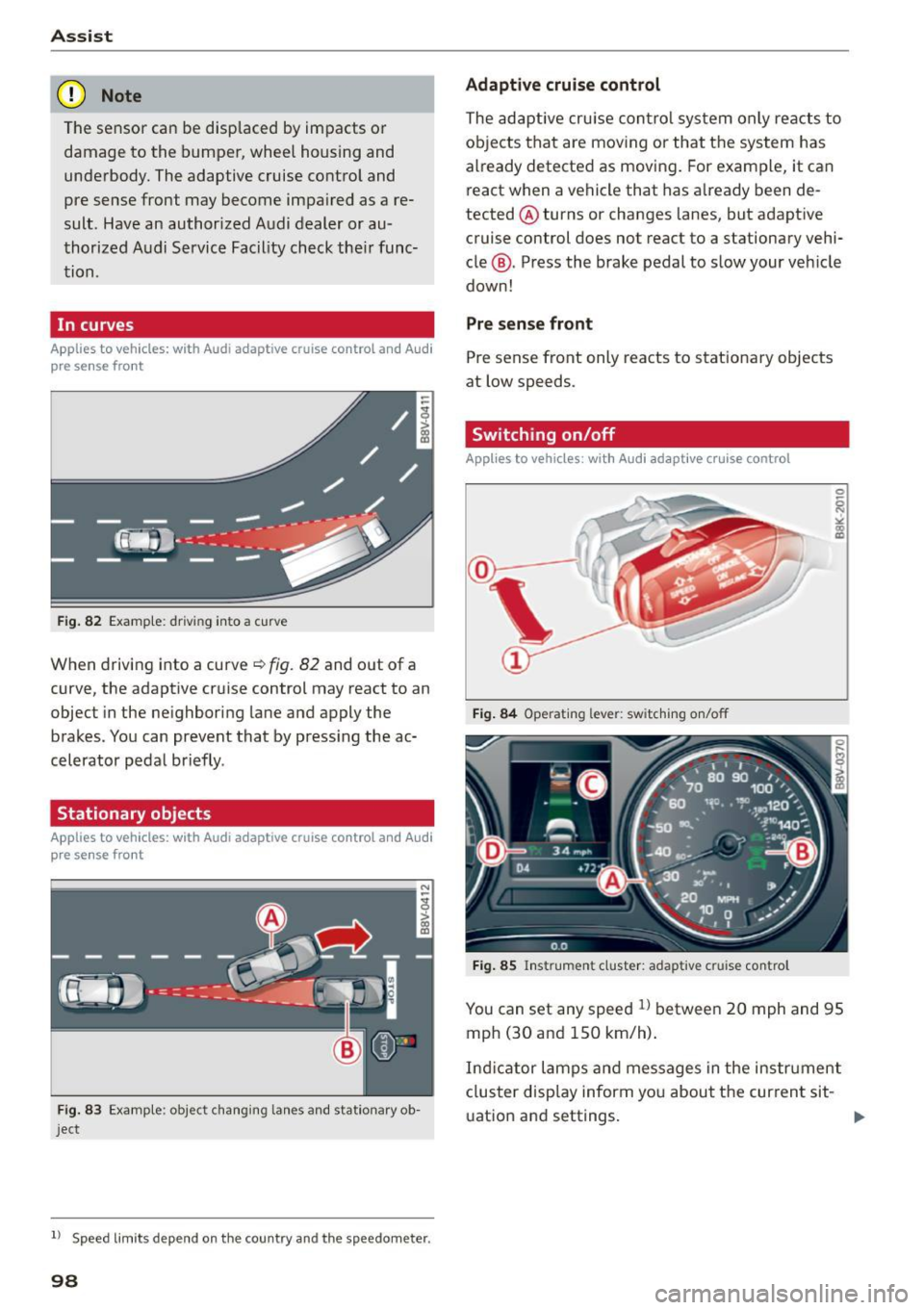
Fig. 82 Example: driving into a curve
When driving into a curve~ fig. 82 and out of a
curve, the adaptive cruise control may react to an
object in the neighboring lane and apply the
brakes. You can prevent that by pressing the ac
celerator pedal briefly .
Stationary objects
Applies to vehicles: with Audi adaptive cruise control and Audi
pre sense front
Fig. 83 Example: object changing lanes and stationar y ob
ject
l l Speed limits depe nd on t he country and the speedo meter .
98
Adaptive cruise control
The adaptive cruise control system only reacts to
objects that are moving or that the system has
already detected as moving. For example, it can
react when a vehicle that has already been de
tected @turns or changes lanes, but adapt ive
cruise control does not react to a stationary vehi
cle @. Press the brake pedal to slow your vehicle
down!
Pre sense front
Pre sense front only reacts to stationary objects
at low speeds.
Switching on/off
Applies to vehicles : with A udi adaptive cruise contro l
Fig. 84 Operating lever: switching on/off
Fig. 85 Instrument cluster: adaptive cruise control
You can set any speed ll between 20 mph and 95
mph (30 and 150 km/h).
Ind icator lamps and messages in the instrument
cluster disp lay inform you about the current sit-
ua tion and settings. ..,
Page 101 of 282
M N
0 > co ,...., \!) 1.1'1
1.1'1
1.1'1
,....,
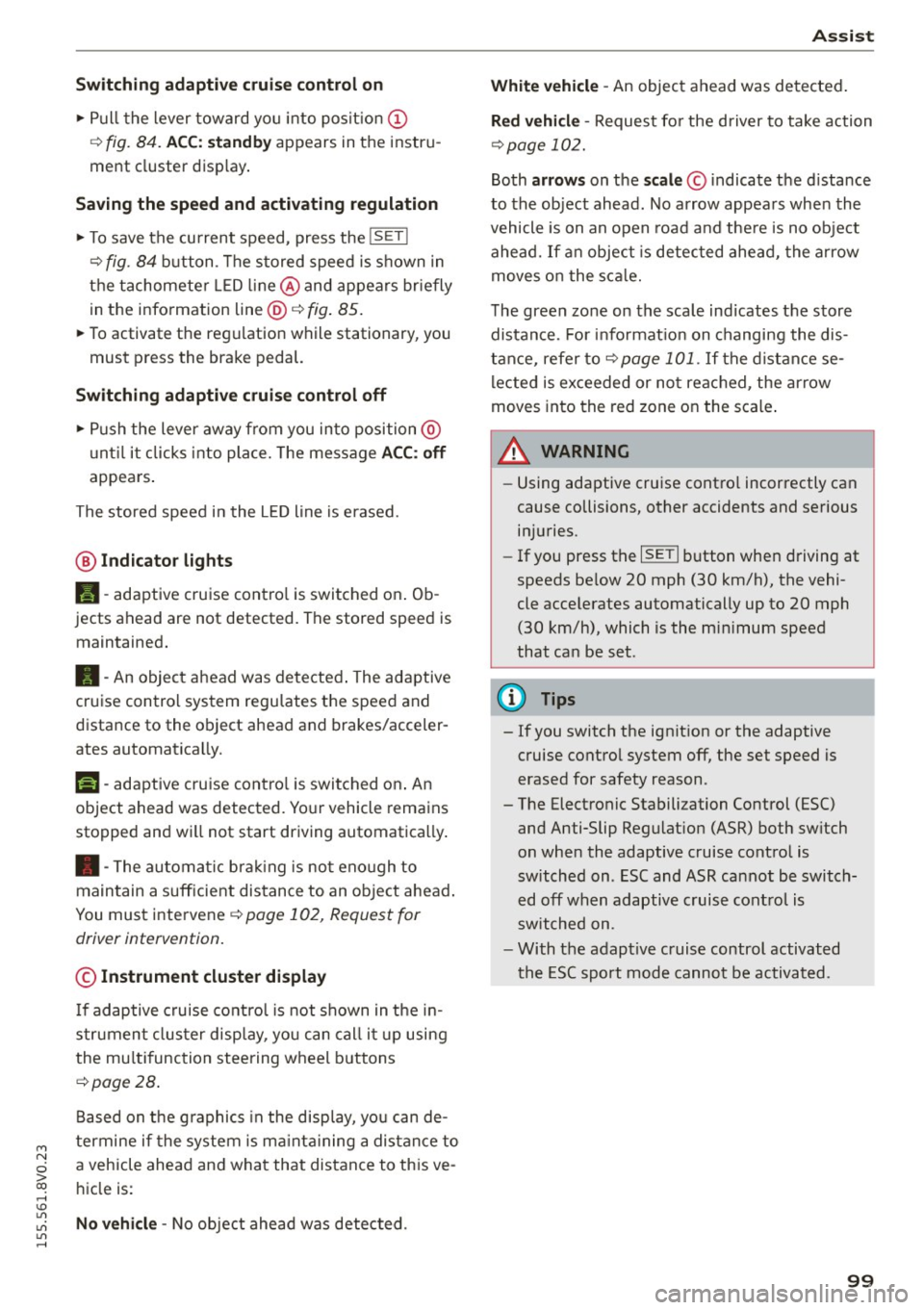
Switching adaptive cruise control on
"'Pull the lever toward yo u into posit ion (!)
¢fig. 84. ACC: sta ndb y appears in the instru
ment cluster disp lay .
Saving the speed and activating regulation
"'T o save the current speed, press the !SETI
¢ fig. 84 button . T he stored speed is s hown in
the tachomete r LED line @and appears briefly
in the information line @¢
fig. 85.
"' To activate the reg ulation while stationary, you
must press the brake pedal.
Sw itching adaptiv e cruise c ontrol off
"' Push the lever away from you into position @
u nt il it clicks into place. The message
ACC : off
appears .
The stored speed in the L ED line is erased.
@ Indicato r light s
II-adaptive cruise contro l is switched o n. Ob
jects ahead are not detected. The stored speed is
maintained.
• -An object ahead was detected . The adaptive
cruise control system regu lates the speed and
d istance to the object ahead and brakes/acceler
ates automatica lly.
f:i -adaptive cru ise contro l is switched o n. An
object ahead was detected. Yo ur vehicle remains
stopped and w ill not start dr iving automatica lly.
• -The automatic brak ing is no t eno ugh to
maintain a sufficient distance to an object ahead .
You must intervene ¢
page 102, Request for
driver intervention.
© Instrument clu ster display
If adaptive cruise control is not shown in the in
strument cluster display, yo u can call i t up using
the mu ltifunc tion steering wheel buttons
¢page 28.
Based on the g raphics in the display, you can de
termine if the system is ma inta ining a distance to
a vehicle ahead and what that dis tance to this ve
h icle is:
No vehi cle -No object ahead was detected .
Ass is t
White vehicle -An object ahead was de tected .
Re d vehi cle -Request fo r the d river to take action
¢page 102.
Both arrows on the scale© indicate the d istance
to the object ahead. No arrow appears when the
vehicle is on an open road and the re is no object
ahead. If a n object is detected ahead, the a rrow
moves on the sca le.
T he green zone on the sca le indicates the store
distance. For i nformat ion on changing the dis
t a nce, refer to ¢
page 101. If the distance se
l ected is ex ceeded or not reached, the arrow
moves into the red zone on the scale .
_& WARNING
-Using adaptive cruise contro l incorrectly can
cause collisions, other accidents and serious in ju ries.
- If you press the
ISETI button when driving at
speeds be low 20 mph (30 km/h), the vehi
cle acce lerates automatically up to 20 mph
(30 km/h), which is the mi nimum speed
that can be set.
{!) Tips
- If you switch the ignit ion or the adaptive
cruise contro l system off, the set speed is
erased for safety reason.
- The Electronic Stabilization Control (ESC) and Anti-Slip Regulat ion (ASR) both sw itch
on when the adaptive cruise contro l is
switched on . ESC and ASR ca nnot be switch
e d off when adaptive c ruise cont ro l is
sw itched on.
- With the adaptive c ruise control activated
the ESC sport mode cannot be activated .
99
Page 102 of 282
Ass is t
Changing the speed
Applies to vehicles: with Audi adaptive cruise control
0
f
•
0
Fig. 86 O pera tin g leve r: chan gin g th e speed
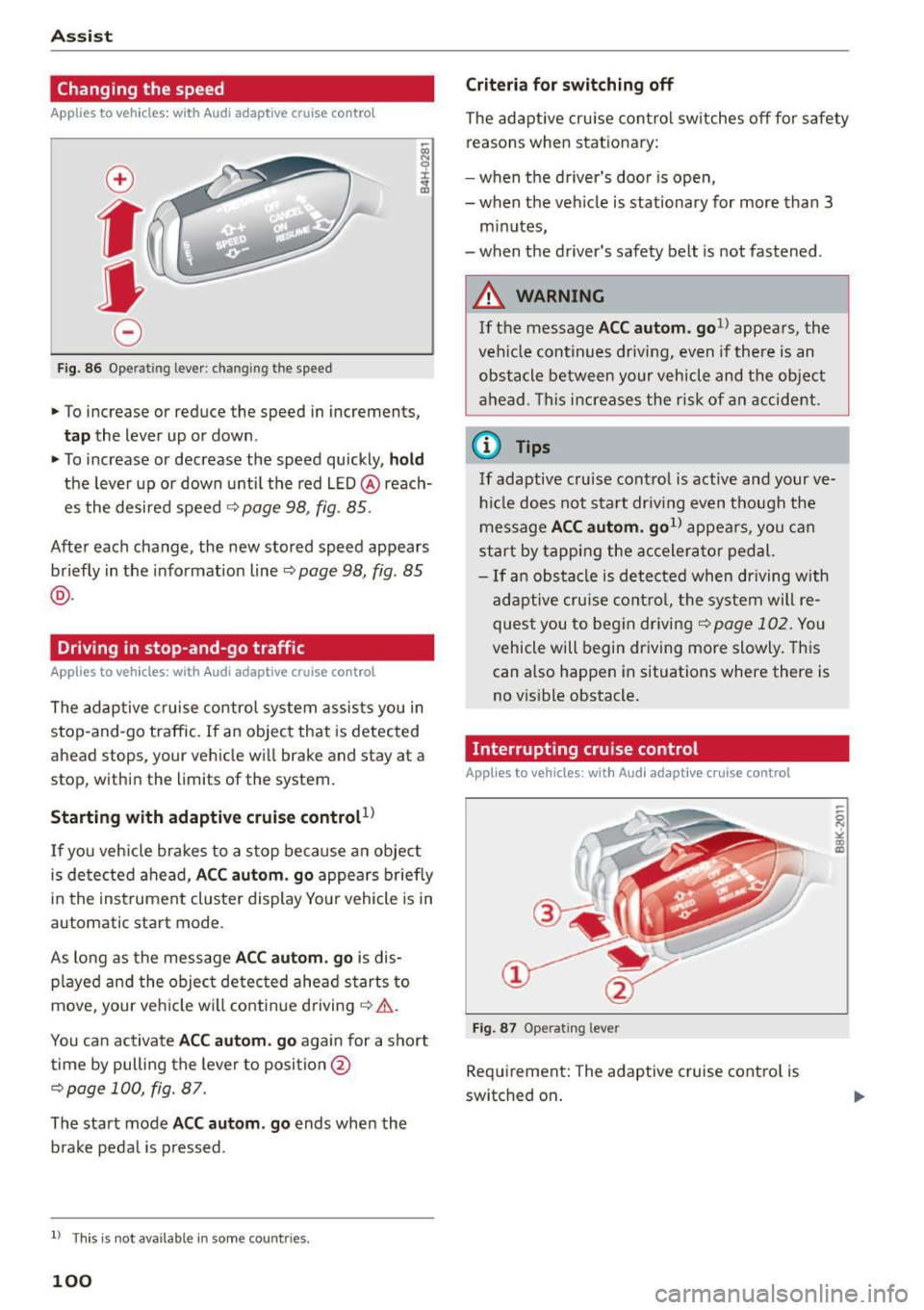
.,. To increase or reduce the speed in increment s,
tap the lever up or down .
.,. To increase or decrease the speed quickly,
hold
the leve r up or down until the red LED @reach
es the desired speed
¢ page 98, fig . 85.
Afte r each change, the new stored speed appears
briefly in the informat ion line ~
page 98 , fig. 85
@ .
Driving in stop-and-go traffic
Applies to vehicles: with Audi adaptive cruise control
The adaptive c ruise co ntrol system assists you in
s top-and-go traffic. If an object that is detected
ahead stops, your vehicle wi ll brake and stay at a
stop, within the limits of the system.
Starting with adaptive cruis e controt1l
If you veh icle brakes to a stop because an object
is de tected ahead,
ACC aut om . go appea rs briefly
in the ins trument cluste r display You r vehicle is in
automatic start mode.
As long as the message
ACC autom. g o is dis
p layed and the object detected ahead s tarts to
move , your veh icle wi ll contin ue driving ~& .
You ca n activate
ACC aut om . go again for a short
time by pulling the lever to position @
¢page 100, fig. 87.
The start mode ACC autom . go ends when the
b rake peda l is pressed .
ll T hi s is no t available i n some c oun tries .
100
Criteria for switching off
The adaptive cru ise contro l sw itches off for safety
reasons when stat ionary:
- when the driver 's doo r is open,
- when t he veh icle is stationary for more than 3
m inutes,
- when t he driver's safety belt is not fastened .
A WARNING
If the message ACC a utom . go1l appea rs, the
vehicle continues driving,
even i f there is an
obstacle between your vehicle and the obje ct
a head . Th is increases the risk of a n accident .
@ Tips
If adaptive cruise cont ro l is active and your ve
h icl e does not s tart dr iv ing even t h ough the
me ssage
ACC autom. go1l appea rs, you c an
start by tappi ng the accelera tor pedal.
- If an obstacle is de tec ted when dr iving with
adaptive cruise cont ro l, the system will re
ques t you to beg in d riving
¢page 102. You
vehicle will begin dr iving more slowly. This
can also happen in situations where there is
no v isible obstacle.
Interrupting cruise control
Applies to vehicles: with Audi adaptive cruise contro l
Fig. 87 O pe ra ting le ver
Requirement: The adaptive cruise cont ro l is
switched on .
Page 103 of 282
M N
0 > co ,...., \!) 1.1'1
1.1'1
1.1'1
,....,
Overriding cruise control
Overriding means exceeding the selected speed
when adaptive cruise contro l is active, for exam
p le when pressing the acce lerator pedal when
passing.
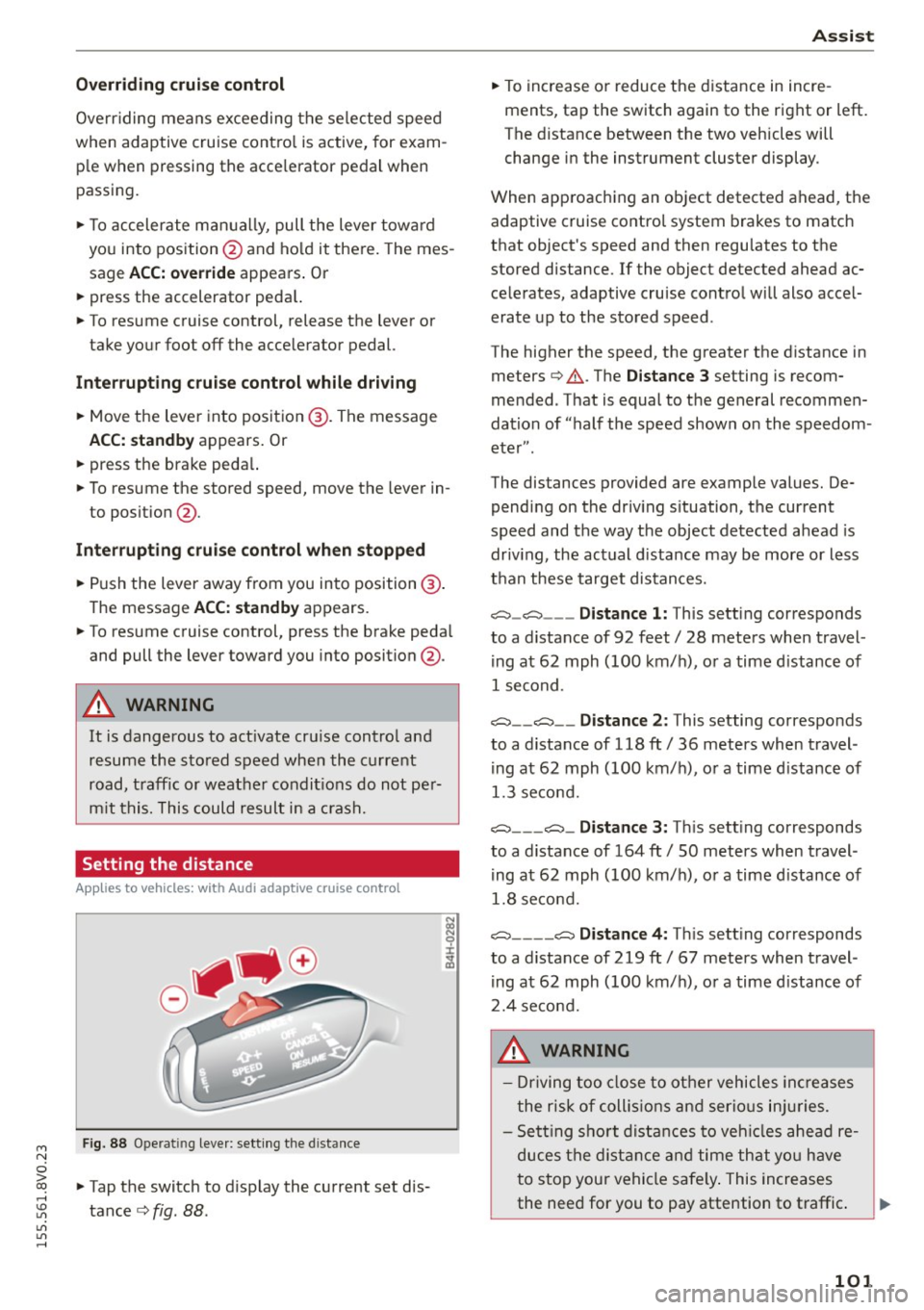
"'T o accelerate man ua lly, pull the lever towa rd
you into position @and ho ld it there. The mes
sage
ACC: o ve rride appears . Or
"' press the accelerator peda l.
"' To resume cruise control, release the lever or
take your foot off the acce lerator pedal.
Int errupting c ruis e contr ol w hil e driving
"'Move the lever into position @. The message
ACC: stand by appears. Or
"' press the brake peda l.
"' To resume the stored speed, move the lever in
to posit ion @.
Int errupting c rui se contr ol wh en stopped
"' Push the lever away from you into position @.
The message
ACC: s ta ndby appears.
"' To resume cruise control, press the brake peda l
and pull the lever toward you into position@.
A WARNING
It is dangerous to act ivate cru ise contro l and
resume the stored speed when the current
road, traff ic or weather condit ions do not per
m it this. This could result in a c rash.
Setting the distance
A ppl ies to vehicles: with Audi adaptive cruise co ntrol
Fig. 88 Ope rat ing leve r: sett ing the d istance
"' Tap the switch to d isplay the current set dis
tance
c> fig. 88 .
Ass is t
"' To increase or reduce the d istance in incre
ments, tap the switch again to the right or left.
The distance between the two vehicles will
change in the instrument cluster display .
When approaching an object detected ahead, the adaptive cruise contro l system brakes to match
that object's speed and then regu lates to the
stored distance. If the object detected ahead ac
celerates, adaptive cruise control will also accel
erate up to the stored speed .
The higher the speed, the greater the distance in meters
c> .&. . The Distanc e 3 setting is recom
mended. That is equal to the general recommen
dation of "half the speed shown on the speedom
eter" .
The distances provided are example values. De pending on the driv ing s ituation, the current
speed and the way the object detected ahead is
driv ing, the actual d istance may be more or less
than these target distances.
c::::::, _c::::::, ___ Distance 1: This setting corresponds
to a distance of 92 feet/ 28 meters when travel
ing at 62 mph (100 km/ h), or a time d istance of
1 second.
c::::::, __ c::::::, __ Distance 2 : This setting corresponds
to a distance of 118 ft/ 36 meters when travel
ing at 62 mph (100 km/ h), or a time d istance of
1.3 second.
c::::::, ___ c::::::,_ Distanc e 3: Th is sett ing corresponds
to a distance of 164 ft/ 50 meters when travel
ing at 62 mph (100 km/ h), or a time d istance of
1.8 second.
c::::::, ____ c::::::, Distance 4: This sett ing corresponds
to a distance of 219 ft/ 67 meters when travel
ing at 62 mph (100 km/h), or a time d istance of
2.4 second.
A WARNING
- Driving too close to other vehicles inc reases
the risk of coll is ions and ser io us in juries.
- Sett ing s ho rt distances to veh icles ahead re
duces the dist ance and time that you have
to stop your vehicle safe ly . This increases
the need for you to pay attention to traffic. .,,.
101
Page 106 of 282
Ass is t
- The pre sense basic functions may not be
available if there is a malfunction in the ESC
system or the airbag control module.
- Note that with pre sense basic, the reversi·
ble safety belt pretensioner on the front
passenger's side deact ivates when the front
passenger's airbag is deactivated .
Audi pre sense front
Description
Applies to vehicles: with Audi pre sense front or Audi adaptive
cruise control
Pre sense front informs you if the d istance to the
vehicle ahead falls below the safe distance for a n
extended per iod of time.
It c an warn of a possi·
b le co llision and initiate braking maneuvers,
within the limits of the system.
When detected in time, the system can assess
dangerous situations whe re a n object ahead
b rakes s udden ly or if you r own vehicle is traveling
at a high speed and approaching an object t hat is
moving more s lowly . If detection is not possible ,
then pre sense front does not re act .
Warnings
Applies to vehicles: with Audi pre sense front or Audi adaptive
cruise control
F ig . 90 nst rument clus te r: app roac h warn ing
The system recogn izes va rious dangerous situa
tions:
- Vehicles with adaptive cruise control: the
dis
tanc e warnin g
occurs if you dr ive too closely to
the object ahead for a long period of time .
If
the object ahead brakes strong ly, you would not
l l Thi s is no t ava ilab le i n so me c oun tries .
104
be able to avoid a collision . The indicator light
• indicates th is.
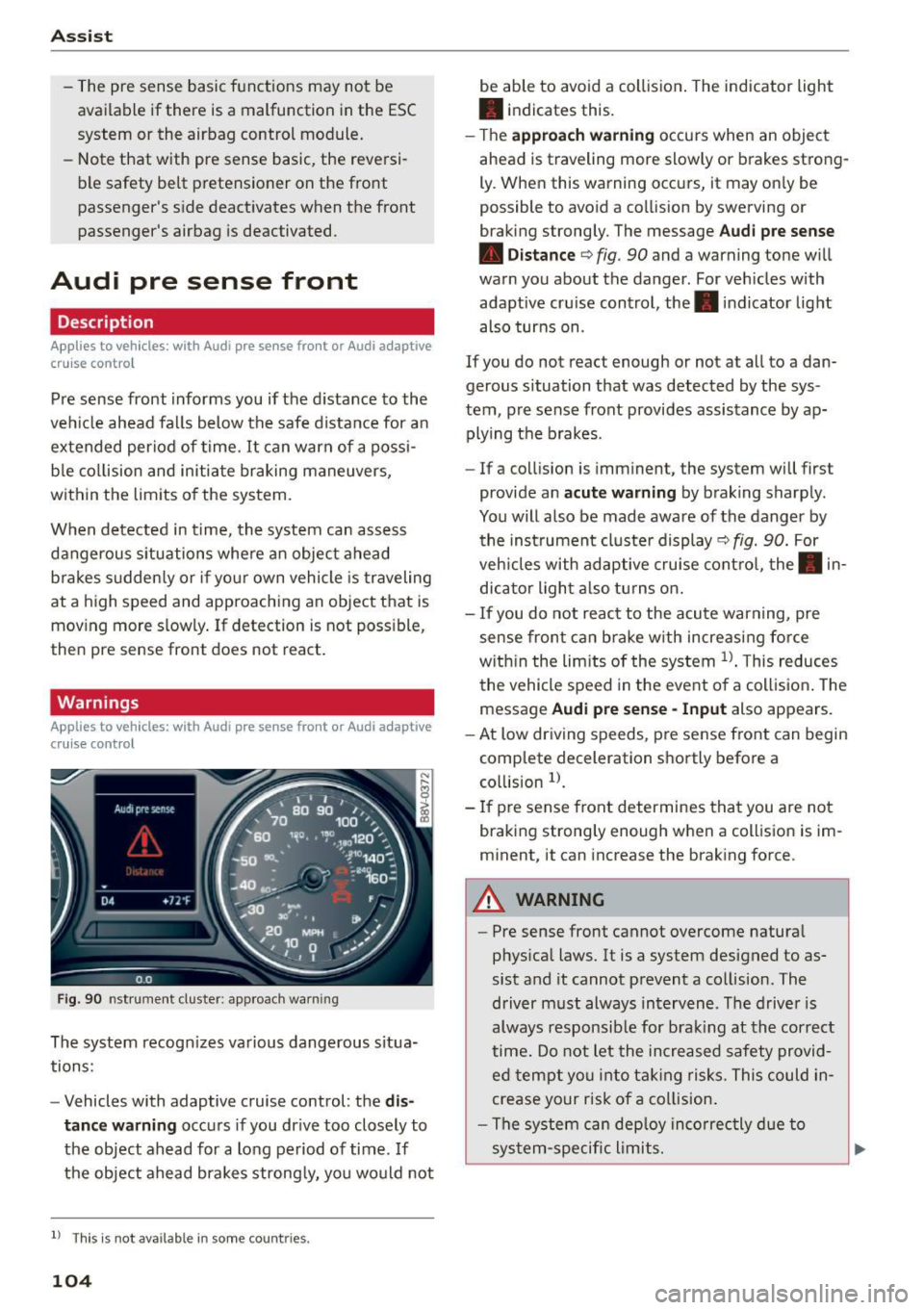
- T he
approach warn ing occurs when an object
ahead is traveling more slowly or brakes strong·
Ly. When this warning occ urs, it may on ly be
possible to avo id a collision by swerving o r
b raking strongly. The me ssage
Audi pre se nse
• Dis tance
q fig. 90 and a warning tone will
warn you about the danger . For veh icles with
adaptive cru ise control, the. indicator light
also turns on.
If you do no t reac t enough or no t at all to a dan
gerous situation that was detected by the sys
tem, p re sense front provides assistance by ap
plying the b rakes .
- If a collision is imm inen t, the system will first
provide a n
acu te warning by braking sharp ly .
You will also be made aware of the danger by the inst rument cluste r display
q fig. 90. For
veh icles with adaptive cru ise cont ro l, the . in
dic ator light a lso tu rns o n.
- If you do not reac t to the acu te warning, pre
sense front ca n brake w ith increasing force
w it hi n the lim its of the system
1> . T his reduces
the vehicle speed in the event o f a collis io n. The
message
Audi pre sense -Input also appears.
- At low driving speeds, pre sense front can begin
complete decelerat ion shortly before a
co llision
l).
- If p re sense front determines that you are not
braki ng strong ly enough when a coll is ion is im·
minent, it can increase the brak ing force .
A WARNING
-
-Pre sense front cannot overcome natura l
phys ica l laws. It is a system designed to as
sist and it cannot prevent a collision. The
driver m ust always intervene . The d river is
always responsib le for brak ing at the correct
time . Do not let the in crea sed safety provid
ed tempt you into ta king risks. This could in
crease your risk of a collision .
- The system can dep loy inco rrec tly d ue to
sys tem-specific l imits.
Page 125 of 282
M N
0 > co ,...., \!) 1.1"1
1.1"1
1.1"1
,....,
shared, please see your contract with the
wireless telecommunications provider and the
"About Aud i connect" tab in your vehicle's
MMI: ! MENUI button> Audi connect > About
Audi connect .
Electronic stabilization
control (ESC)
Description
The E lectronic Stabilization Contro l (ESC) reinfor
ces driver safety. It reduces the risk of slipping
and improves driving stability. ESC detects criti
cal s ituations such as the vehicle oversteering
and understeering or the wheels a re spinning.
The vehicle is stabilized by applying the brakes or
reducing engine torque. Once the ESC is activat
ed, the indicator light
DJ blinks in the instru
ment cluster.
The fol low ing systems a re integrated in the ESC:
Anti-lock braking system (ABS)
ABS prevents the wheels from locking when brak
i ng. The vehicle can still be steered even during
hard braking . Apply steady pressure to the brake
pedal. Do not pump the pedal. A pulsing in the
brake pedal ind icates that the system is acting to
stabilize the vehicle .
Brake assist system
The brake assist system can decrease braking d is
tance . It increases braking power when the driver
presses the brake pedal quickly in emergency s it
uations. You must press and hold the brake pedal
unti l the dangerous sit uation is ove r. In vehicles
with adaptive cruise control *, the brake assist
system is more sensit ive if the distance detected
to the vehicle ahead is too small.
Anti-slip regulation (ASR)
ASR reduces engine power when the drive whee ls
begin spinning and adapts the force to the road
conditions. This makes it easier to start, acceler
ate and drive up inclines.
Intelligent Technology
Electronic differential lock (EDL)
The EDL brakes whee ls that are spinning and
trans fers the drive power to the other drive wheel
or whee ls if the vehicle is equipped with all wheel
drive*). This function is not available at higher
speeds.
In extreme cases, EDL automatically switches off
to keep the brake on the braked wheel from over
heating. The vehicle is still working correct ly. EDL
will switch on again automatically when condi
tions have returned to normal.
Steering recommendation
The ESC helps to stabilize the vehicle by changing
the steering torque .
Selective wheel torque control
Selective wheel torque control is used when dr iv
i ng on curves. The front wheel on the inside of
the curve o r both wheels on the inside of the
curve are braked selectively as needed . This al
lows more precise driving in curves .
Automatic post-collision braking system
The "Automat ic post -collision braking system"
can help to reduce the ris k of sliding and of other
collisions after an accident. If the airbag control
module detects a collision above a certain vehicle
speed, the vehicle is braked by the ESC.
T he vehicle does not brake automatically if:
- the driver presses the accelerator pedal, or
- the braking force generated by the pressed
brake pedal is greater than the brak ing force
that would be initiated by the system, or
- the ESC, the brake system or the vehicle electr i
cal system are not funct ion ing .
A WARNING
-The ESC and its integrated systems cannot
overcome the limits posed by natural phys i
cal laws. This is especially important on slip
pery or wet roads .
If the systems begin act
ing to stabilize your vehicle, you should im-
mediately a lter your speed to match the ..,.
123
Page 127 of 282
M N
0 > co ,...., \!) 1.1'1
1.1'1
1.1'1
,....,
A WARNING
You should only switch sport mode on or switch ESC/ASR off if your driving ab ilities and
road condit ions perm it.
- The stabilization function is limited when
sport mode is switched on. The dr iving
wheels could sp in and the veh icle could
swerve, especially on slick or slippery road
surfaces.
- There is no vehicle stabilization when ESC/
ASR are switched off.
(D Tips
- ESC/ASR cannot be switched off or sport
mode cannot be sw itched on if the cru ise
control system* or the adapt ive cruise con
trol* is switched on.
- Malfunctions in the Audi magnetic r ide may
make it impossible to sw itch the ESC/ASR
off or to switch spo rt mode o n.
Brakes
New brake pads
New brake pads do not achieve their full braking
effect during the first 250 mi (400 km). They
must be "broken in" f irst. Howeve r, you can com
pensate for the slightly reduced braking force by
press ing firmly on the b rake pedal. Avoid heavy
braking during the break -in period.
Wear
Brake pad wear is large ly dependent on the way
the veh icle is d riven and on operating co nditions.
This is especially t rue if you are driving frequent ly
in the city and on cu rves or with a sporty driving
style.
Operating noise
Noises may occur when braking depending on the
speed, b rak ing force and o utside conditions s uch
as tempe rat ure and h umid ity.
Effect of water and road s alt
In certain situat ions, for example after driving
throug h wate r, in heavy ra in, after overn ight con
densat ion or afte r wash ing you r car, the braking
In te llig ent T echnolog y
effect can be reduced by moisture or ice on the
brake rotors and brake pads . The brakes must be
"dried" first with a few careful brake applications.
At higher speeds and with the windsh ield wipers
turned on, the brake pads press against the b rake
rotors for a short amount of time . This action
wh ich is not felt by the driver happens at regular
intervals and facilitates a better reaction t ime for
the brakes in wet weather.
The braking effect can a lso be reduced if you are
driv ing on salted roads and you do not apply the
brakes for long periods of time. The layer of salt
on the brake rotors and pads must be worn off
first whe n the brakes a re applied .
Corro sio n
Leav ing the ve hicle parked for long periods of
t ime, low mileage and avoiding heavy braking can
contribute to corros ion on the brake rotors and
dirty brake pads.
If you usua lly avoid heavy b raking or if there is
corrosion present, occas ional heavy braking at
high speeds is recommended to clean the brake
rotors and pads¢,&.
Brake sy stem malfunct ion
if you notice that the b rake pedal travel has sud
denly gotten larger, then a brake circ uit may have
failed. Drive to an authorized Audi dealer or au
thori zed Audi Service Facility immediately to have
the problem cor rected. On the way there, dr ive
with reduced speed and keep in mind that a long
braking distance and increased pressu re on the
brake pedal will be necessa ry.
Low br ake fluid level
When the brake f lu id level is low, malfunct ions in
the brake system may occur. The brake flu id leve l
is electronically mon itored.
Brake boo ste r
The brake booster amplifies the pressure yo u ap
ply to the brake peda l.
It only works when the en-
gine is running.
IJ>
125
Page 128 of 282
Intelligent Technology
& WARNING
-New brake pads do not achieve their full
braking effect during the first 250 mi
(400 km). They must be "broken in" first .
However, you can compensate for the slight·
ly reduced braking force by pressing firmly
on the brake pedal. Avoid heavy braking dur·
ing the break-in period.
- Alway apply the brakes for the purpose of
cleaning the brake system when road and
traffic conditions permit. You must not en·
danger other road users. This increases the
risk of an accident.
- On steep slopes , reduce the speed and se
lect a lower gear or lower selector lever po·
sition. Drive as little as possible while press· ing the brake pedal and avoid putting your
left foot on the brake pedal while driving.
This could cause the brakes to overheat and impair the efficiency of the brakes .
- Do not let the brakes "grind" by always
keeping your foot on the brake pedal. This
can cause the brakes to overheat, increase
wear and increase braking distance unneces·
sarily.
- Certain weather and operating conditions
such as driving through water, driving in
heavy rain or driving after washing your
ve·
hide can impair the effectiveness of the
brakes. In the winter, ice may build up on
the brake pads, rotors and drums. Check
these components by braking carefully. Ap·
plying the brakes carefully several times
dries the brakes and removes ice build-up .
- The efficiency of the brakes can also be im·
paired by driving for long stretches on roads
covered with salt without using the brakes.
You can
remove salt deposits from the brake
rotors and pads by carefully applying the
brakes several times.
- If the front spoiler is damaged or you install
another spoiler, make sure the front wheel
brakes are ventilated properly . Otherwise,
the brake system could overheat, which re·
duces their effectiveness.
- Failure of a brake circuit impairs braking
performance, which increases braking dis·
126
tance. Avoid driving the vehicle and have it
towed it to the nearest authorized Audi
dealer or authorized Audi Service Facility .
- Never let the vehicle roll while the engine is
stopped because this increases the risk of an
accident .
-If the brake booster is not working, you will
have to press much harder on the brake ped·
al to compensate for the lack of the booster .
(D Note
-Never let the brakes "rub" by pressing the
pedal lightly when braking is not really nee·
essary. This causes the brakes to overheat
and increases braking distance and causes
wear .
- Before driving on a long stretch with steep
slopes, reduce your speed and shift to the
next lower gear This makes use of the en·
gine braking effect and relieves the brakes .
If you need to brake additionally, brake in
intervals and not continuously.
(D Tips
-If the brake booster is not working, you
must press the brake pedal with much more
force then normal.
- If you retrofit your vehicle with a front spoil·
er, wheel covers or similar items, make sure
that the air flow to the front wheels is not
interrupted. Otherwise the brake system
can become too hot.
Electromechanical
steering
The electromechanical steering supports the
driver's steering movements .
Power steering adapts electronically based on
the vehicle speed.
T he vehicle still has full steering functionality if
the power steering fails or when the engine is
stopped (towing). To steer, you must apply much
more force than usual.
Indicator lights and messages
• Do not drive vehicle: steering defective