led AUDI S3 SEDAN 2018 User Guide
[x] Cancel search | Manufacturer: AUDI, Model Year: 2018, Model line: S3 SEDAN, Model: AUDI S3 SEDAN 2018Pages: 404, PDF Size: 62.3 MB
Page 41 of 404
Child safety lock
Applies to: veh icles wit h mechanica l child safety locks
The child safety lock prevents the rear doors
from being opened from the inside and the rear
power windows from be operated .
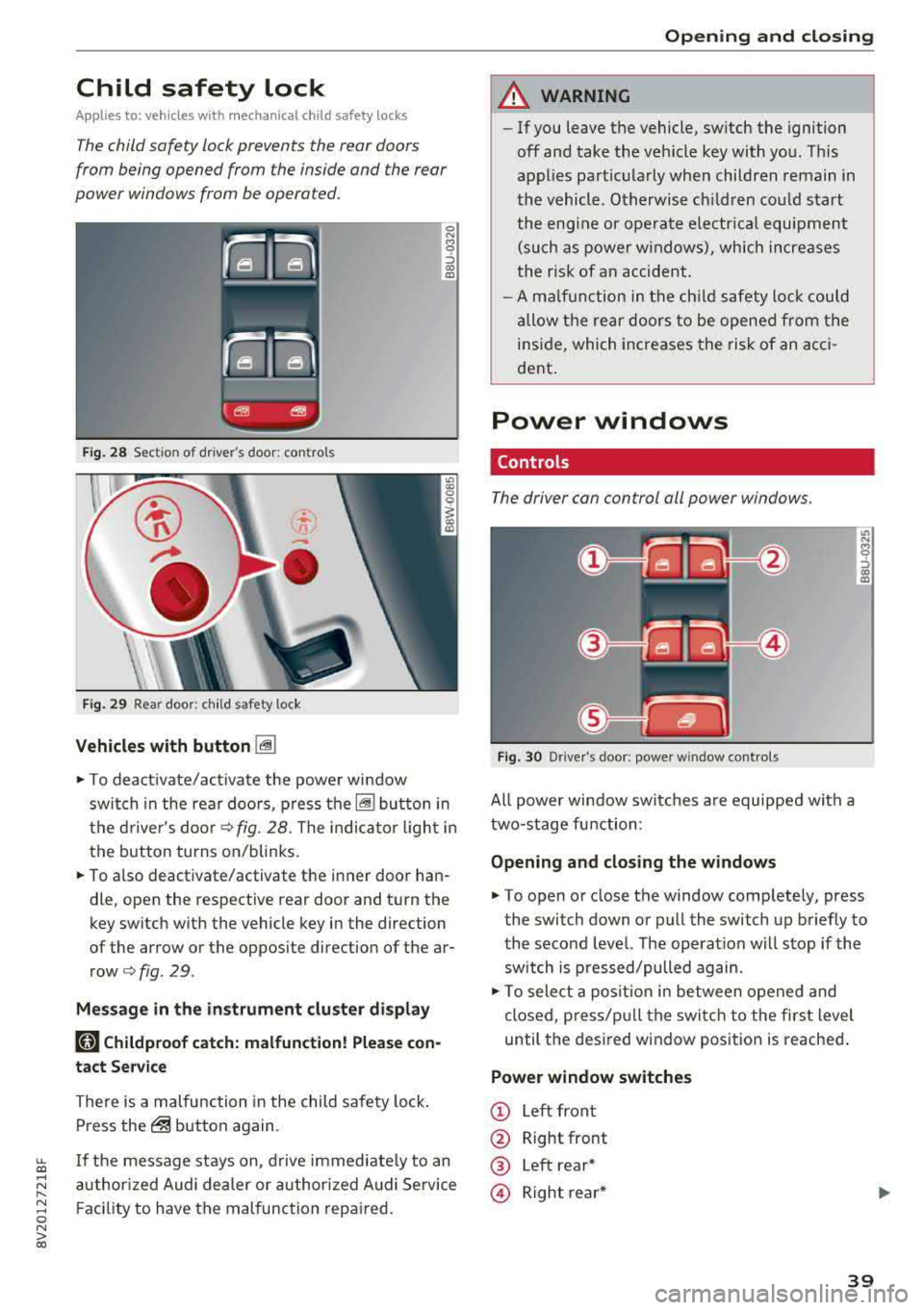
Fig . 2 8 Section of d river's door: co ntro ls
Fi g. 29 Rea r door: chil d safety lock
Vehicles with button [@]
0 N M 0 ::, a,
"'
.,. To deact ivate/activate the powe r wi ndow
swit ch in the rea r doo rs, p ress the[@] bu tton in
the d rive r's doo r
¢fig. 28. The indica to r ligh t in
the button turns on/blinks.
.,. To also deactivate/activate the i nner door han
dle, open the respective rear door and t urn the
key switch w ith the vehicle key in the direction
of the arrow or the opposite direction of the ar
row¢ fig. 29.
Mes sage in the instrument clu ster di splay
181 Childproof catch: malfunction! Please con
tact Service
There is a malfunction in the child safety lock .
Press
the@ but ton again.
~ If the message stays on, d rive immedia tely to an
;:::: a uthor ized Audi dealer or author ized A udi Se rvice
" ~ F aci lity to have the malfunc tion repa ired. 0 N > co
Opening and closing
A WARNING
- If you leave the vehicle, sw itch the ignition
off and take the veh icle key with you . T his
applies partic ularly when children remain in
the vehicle. Otherwise ch ildren cou ld st art
t he eng ine or opera te e lectr ical equi pme nt
(such as power w indows), which increases
t he r isk of an accident .
- A m alfu nction in the ch ild safety lock cou ld
al low the rear doors to be ope ned from the
i n side, which incre ases the risk of an acci
dent .
Power windows
Controls
The driver can control all power windows.
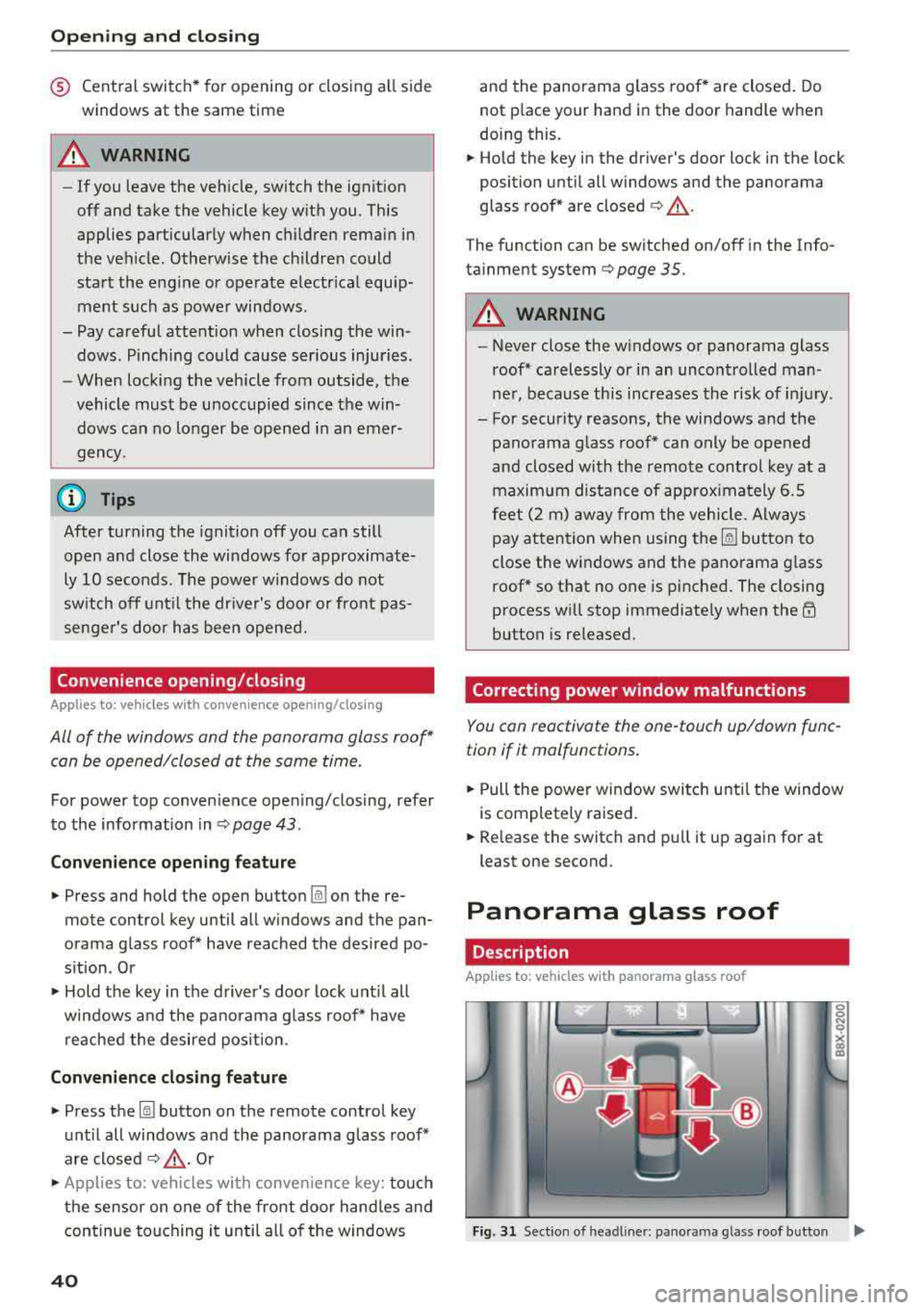
Fig. 30 Drive r's door: power w indow controls
All powe r win dow swi tches a re equipped with a
two-stage fu nction:
Opening and closing the w indows
.,. To open or close the window comp letely, press
the switch down or pull the switch up briefly to
the second level. The operat ion w ill stop if the
sw itch is p ressed/pulled again.
.,. To select a pos it ion in between opened and
cl osed, pres s/p ull th e switch t o the first level
until the des ired w indow position is reache d.
Power window switches
© Left front
@ Right front
® Left rear*
@ Right re ar *
39
Page 42 of 404
Opening and clo sin g
® Central switc h* for opening or closing all side
windows at the same t ime
A WARNING
- If you leave the vehicle, switch the ignit ion
off and take the vehicle key with you . This
applies particularly when children remain in
the vehicle. Otherwise the children could
start the engine or operate electr ical equip
ment such as power windows.
- Pay careful attention when closing the win
dows . Pinching could cause serious injuries.
- When locking the vehicle from outside, the
vehicle must be unoccupied since the win dows can no longer be opened in an emer
gency .
@ Tips
After turning the ignition off you can still
open and close the windows for approximate-
ly 10 seconds. The power w indows do not
sw itch off until the dr iver's door or front pas
senger's door has been opened.
Convenience opening/closing
App lies to: ve hicles w ith conve nience opening/clos ing
All of the windows and the panorama glass roof*
can be opened/closed at the same time.
For power top conven ience opening/closing, refer
to the information in
Q page 43 .
Convenience opening feature
.. Press and hold the open button Im on the re
mote con trol key until all w indows and the pan
orama glass roof* have reached the desired po
s ition . Or
.,. Hold t he key in the d river's door lock unt il all
windows and the panorama g lass roof* have
reached the desired pos ition.
Convenience closing feature
.. Press the Im button on the remote control key
u nt il all windows and the panorama glass roof *
are closed
¢ _&.. . Or
.,. Applies to: vehicles wi th conven ience key: touch
the sensor on one of the fro nt door hand les and
continue touching it until a ll of the w indows
40
and the panorama glass roof* are closed . Do
not p lace your hand in th e door hand le when
doing this.
.. Ho ld the key in the dr iver 's door lock in the lock
position unti l all windows and the panorama
glass roof* are closed
¢ _&.. .
The funct ion can be switched on/off in the Info
ta inment system
Q page 35.
A WARNING
- Never close the w indows or panorama glass
roof* ca relessly or in an uncontrolled man
ne r, because this increases the risk of in jury.
- For secur ity reasons, the windows and the
panorama g lass roof* can only be opened
and closed with the remote control key at a
maxim um distance of app roximately 6.5
feet (2 m) away from the vehicle . Always
pay atten tion when using
t he ~ button to
close the windows and the panorama g lass
roof* so that no one is pi nched. The closing
process w ill stop immediately when
the ~
button is re leased.
Correcting power window malfunctions
You can reactivate the one-touch up/down func
tion if it malfunctions.
.. Pull the power wi ndow switch until the window
is completely raised .
.. Release the sw itch and pu ll it up again for at
least one second .
Panorama glass roof
Description
Applies to: vehicles with panorama glass roof
Fig. 31 Sect ion o f headl iner: pan orama glass roof button IJ,>
Page 43 of 404
u. 00 .-< N l' N .-< 0 N > 00
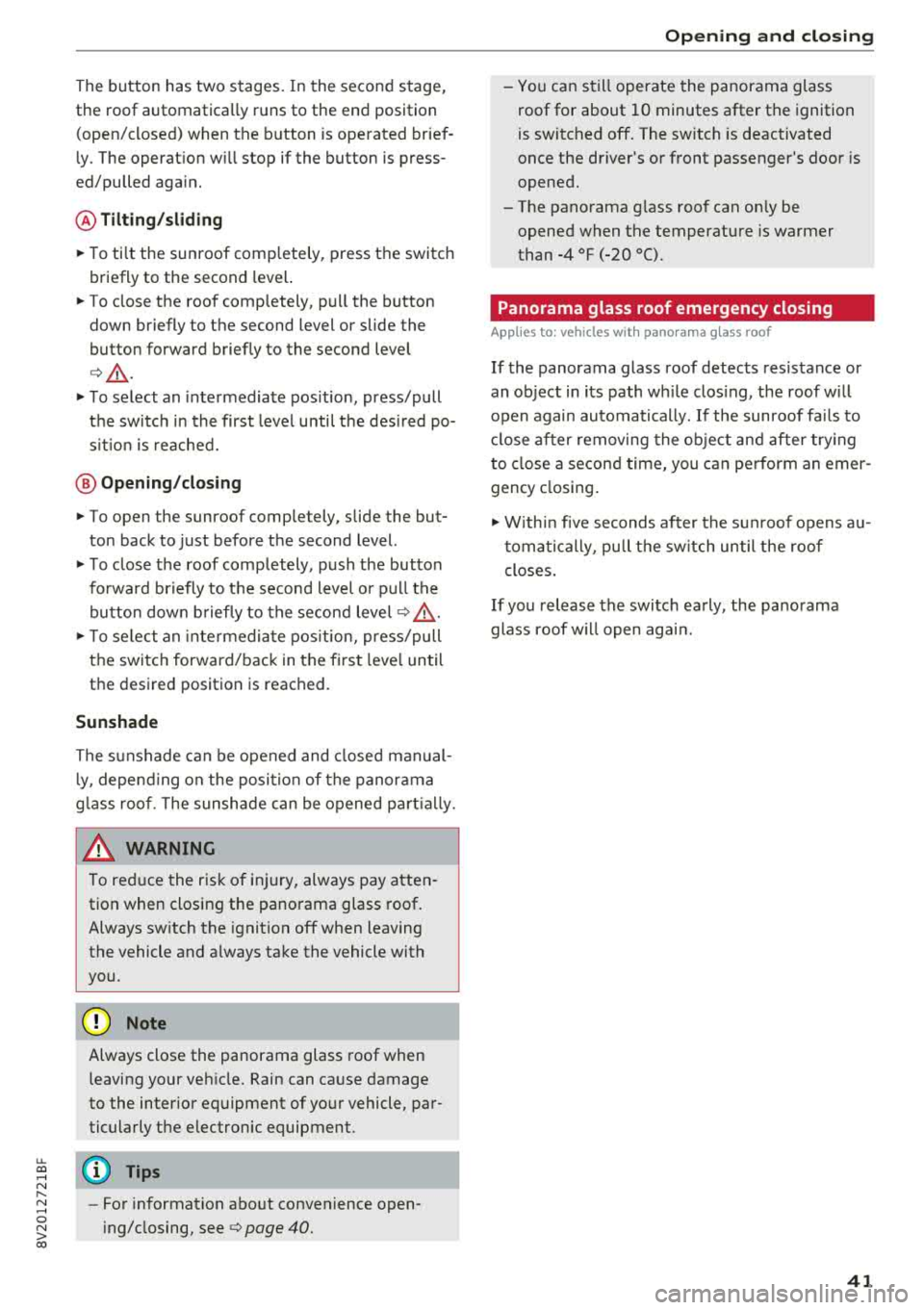
The button has two stages. In the second stage,
the roof automatically runs to the end position
(open/closed) when the button is operated brief
ly . The operat ion w ill stop if the button is press
ed/pulled again.
@ Tilt ing /sliding
~ To ti lt the sunroof comp letely, press the switch
briefly to the second level.
~ To close the roof completely, pull the button
down b riefly to the second level or slide the
button forward briefly to the second leve l
<=>& .
~ To select an intermediate pos ition, press/pull
the sw itch in the first level until the des ired po
s it ion is reached.
@ Opening /closing
~ To open the sunroof comp letely, slide the but
ton back to just before the second level.
~ T o close the roof completely, push the button
fo rward briefly to t he second level or p ull th e
bu tton dow n briefly to t he second level
c:> &
~ To se lect an inte rmedi ate pos ition, press/pull
the swi tc h forward/back in the fi rst leve l until
the desired position is reached.
Sunshade
The sunshade can be opened and closed manual
l y, depe nd ing on the posi tion of the panorama
g lass roof . The sunshade can be opened pa rtially.
A WARNING
To red uce the risk of in jury, always pay atten
tion when closi ng the pa norama glass roof.
Always sw itch the ignition off when leaving
the vehicle and a lways ta ke the vehicle with
you.
@ Note
Always close the panorama glass roof when
leaving your ve hicle. Rain can ca use damage
to the inter ior eq uipment of yo ur vehicle, par
ticula rly the e lectronic equipment.
(D Tips
-Fo r information about convenience open
i ng/closing, see
c:> page 40.
Open ing and cl osing
-You can s till operate the panorama glass
roof for about 10 minutes after the ignition
is switc hed off. The switch is deactivated
once the driver's or front passenger's door is
opened.
-The pano rama g lass roof can on ly be
opened when the temperature is warmer
than -4 °F (-20 °().
Panorama glass roof emergency closing
App lies to: vehicles wit h pano rama g lass roof
If the panorama glass roof detects resistance or
an ob ject in its path wh ile clos ing, the roof w ill
open again automa tically. If the sunroof fa ils to
cl ose after removing the ob ject and after try ing
to close a second time, you c an perform an emer
gency closing .
~ Within five seconds af ter the s un roof opens a u
t oma tically, pull t he sw itch u ntil the roof
closes .
If you release the switc h ea rly , the pa norama
glass roof w ill open again.
41
Page 44 of 404
Power top
Power top
Automatic power top
General information
A pp lies to: ve hicles w ith power top
The power top opens and closes automatically .
When open, the power top is stored completely in the power top compartment. The power top
can be opened or closed at speeds up to 30 mph
(SO km/h).
Under normal conditions, the power top is wind
and waterproof. In rare cases, small droplets of
water may form under extreme weather condi
tions such as torrential or prolonged rain. That is
normal and no cause for concern.
Follow the care instructions to keep the power
top free of leaks and to maintain its appearance
c:::> page 354, Care and cleaning. Also observe the
following:
- Open and stow the power top only when it is
clean and dry. Stowing the power top when it is
damp can create imprints in it, and if it is left
that way for long periods of time, mildew and
other damage can form. To prevent scratching
or damaging the power top, do not use any
sharp-edged objects to remove ice and snow.
The rear window may be cleared with a stand
ard ice scraper .
- Do not leave the power top open for several
weeks or the creases in it may become discol
ored .
- Do not open the power top when the tempera
ture is be low 32 °F
(0 °() . The fabric in the
power top loses elasticity in sub-zero tempera
tures.
42
Opening/closing the power top
App lies to : vehicles with power top
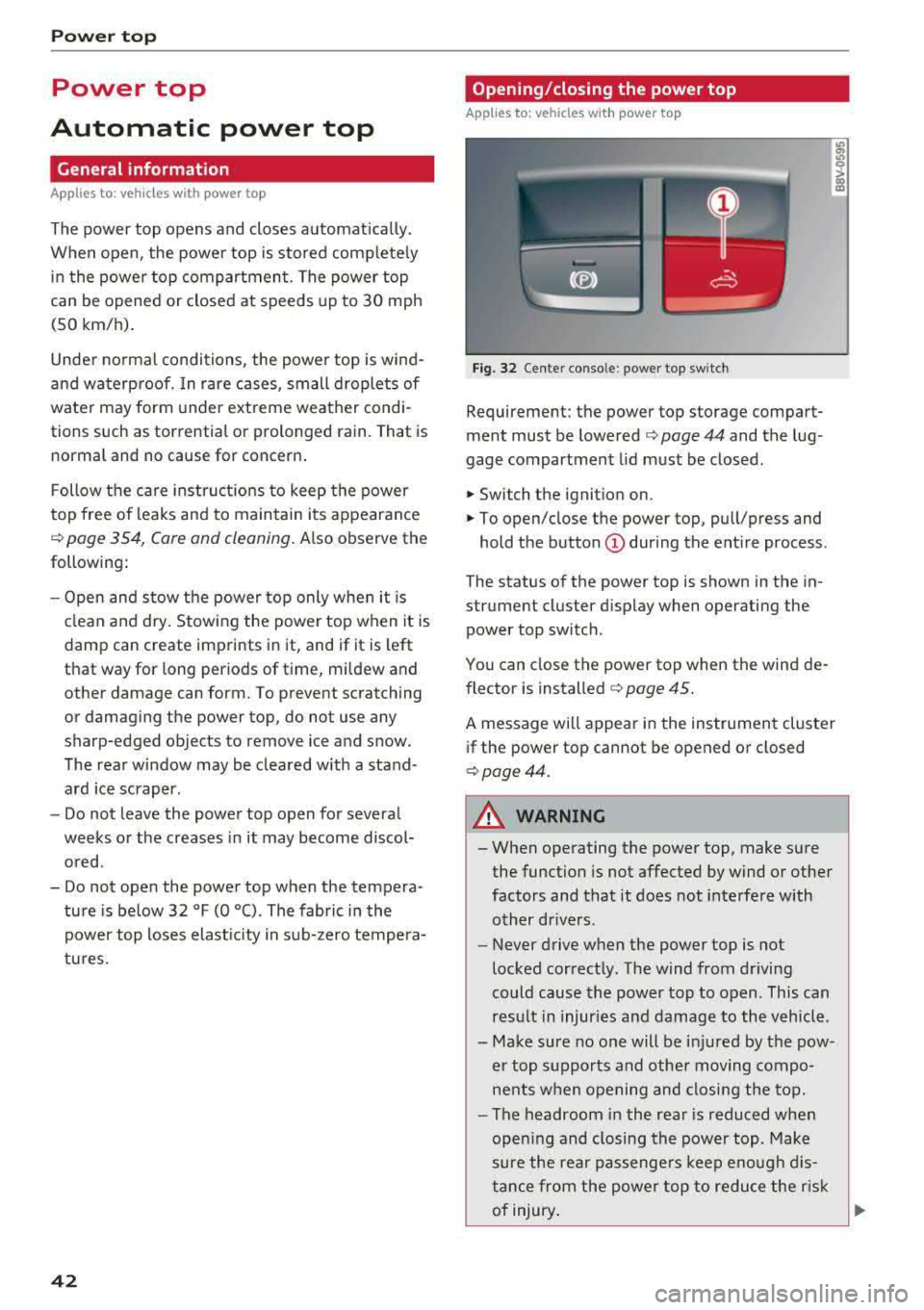
Fig. 32 Cente r conso le : power top sw itch
Requirement: the power top storage compart
ment must be lowered
c:::> page 44 and the lug
gage compartment lid must be closed .
.,. Switch the ignition on .
.,. To open/close the power top , pull/press and
hold the button
(D during the entire process .
The status of the power top is shown in the in
strument cluster display when operating the power top switch.
You can close the power top when the wind de
flector is installed
c:::> page 45.
A message will appear in the instrument cluster
if the power top cannot be opened or closed
c:::>page44.
A WARNING
-- When operating the power top, make sure
the function is not affected by wind or other
factors and that it does not interfere with
other drivers .
- Never drive when the power top is not
locked correctly. The wind from driving
could cause the power top to open . This can
result in injuries and damage to the vehicle .
- Make sure no one will be injured by the pow
er top supports and other moving compo
nents when opening and closing the top.
- The headroom in the rear is reduced when
opening and closing the power top . Make
sure the rear passengers keep enough dis
tance from the power top to reduce the risk
of injury .
..,.
Page 47 of 404
LL co .... N
" N .... 0 N > co
Power top: operation currently not possible.
Outside temperature too low
The power top will not open whe n the te mpe ra
ture iS belOW
-5 Of (-15 ° ( ),
Power top: operation currently not possible .
Speed too high
If you go above 30 mph (SO km/h), t he power
top cannot be operated d ue to safety reaso ns.
Reduce the vehicle speed to close or open the
power top.
Power top: not secur e. Speed too high
This message appea rs if you go above 30 mph
(SO km/h) when ope rating the power top . Reduce
the vehicle speed and operate the power top
again .
Power top: malfunction! You can continue dri v·
ing
This message appears i f there is a ma lf u nct ion in
the system. Try to open or close the power top
again.
If the message st ill appea rs, have the mal
f u nction co rrected by an autho rized Aud i dealer
or author ized Audi Se rvice Facility .
A WARNING
Never drive whe n the powe r top is not locked
co rrectly . The w ind from driving cou ld cause
t he power top to open . This can resul t in inju
r ies an d da m age to the vehicle.
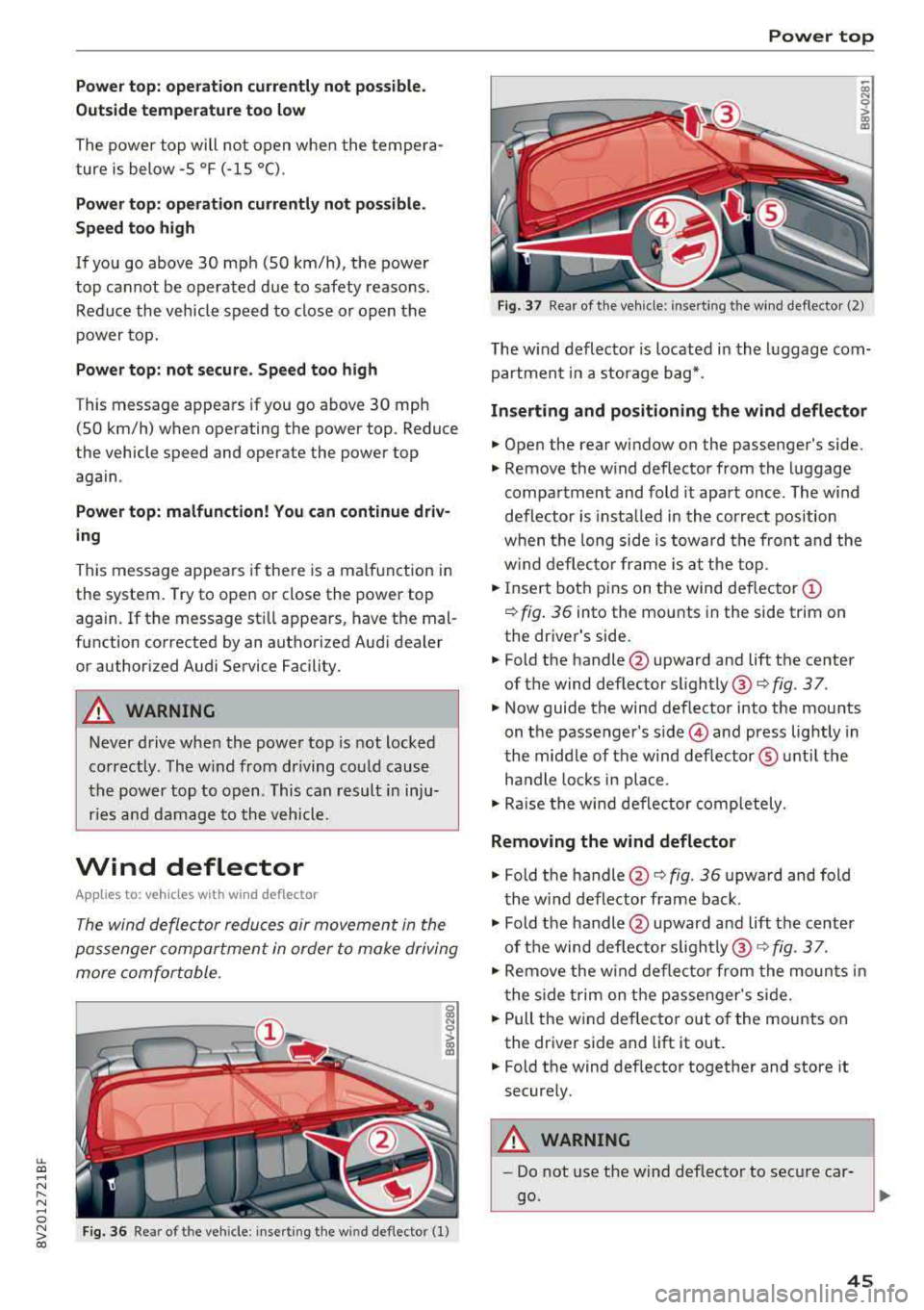
Wind deflector
Ap plies to: veh icles with wind deflector
The wind deflector reduces air movement in the
pas senger compar tment in order to make driving
more comfortable .
Fig. 36 Re ar of th e ve hicle: insert ing t he w ind deflecto r (1)
Power top
~ a, N 0 > a, m
Fig. 37 Rea r o f th e ve hicle : in sert ing t he w ind deflec to r (2)
The w ind defl ecto r is located i n the l uggage com
partmen t in a storage b ag*.
Inserting and positioning the wind deflector
.. Open the rear wi ndow on the passenger 's side.
.. Remove the w ind deflector from the l uggage
compa rtment and fold it apart once . The w ind
defle ctor is insta lled in the correct position
w hen t he long side is tow ard th e fron t and the
w ind deflec to r fra me is at th e to p .
.. Insert bot h pins on t he wind deflec tor (D
¢ fig . 3 6 into the mounts in the side trim on
the dr iver's side .
.. Fold the handle @upward and lift t he center
of t he wind deflector slightly @¢
fig. 3 7.
.. Now guide the wind deflector into the mou nts
on t he passenger's
side © and press lightly in
t he middle of the wind def lector ® unt il the
ha ndle loc ks in place .
.. Rai se the win d de flector comp letely .
Removing the wind deflector
.. Fold t he handle @¢ fig. 36 upwa rd and fold
t he wi nd deflector frame back .
.. Fold the handle @upwar d an d lift t he center
of t he wind def lec to r
sligh tly @ ¢ fig. 3 7.
.. Re move the w ind defle ctor from the moun ts in
t he side trim on the p assen ger's si de .
.. Pull the w ind deflec to r out of the mounts on
the dr iver side and lift it out .
.. Fold the wind def lector toget her and store it
secure ly.
A WARNING
=
- Do not use t he wind deflecto r to sec ure car -
go.
~
45
Page 48 of 404
Power top
-Be careful when installing so you do not
pinch your fingers.
-Pay attention to the traffic when insta lling
the wind def lector. Install the w ind deflec
tor from the s ide of the vehicle that is away
from traffic.
(D Note
Do not lean against the veh icle when insta l
ling the wind deflector. Hard objects and dec
orations on clothing such as belt buckles can
scratch the pa int.
@ Tips
-The wind deflector works best when a ll of
the w indows are rolled up wh ile driving.
-Only store the wind deflector in the storage
bag * when it is dry.
Power top emergency
operation
General information
Applies to: veh icles with power top
The power top can be closed manually if there is
a malfunction.
.,. Set the parking brake.
.,. Open all windows.
,.. Switch the ignition of f .
.. Pu ll the button @ for approximately 10 to
15 seconds to reduce the p ressure in the power
top
hydraulics ¢ page 42, fig. 32.
Only close the power top manua lly in an emer
gency . Have a second person assist . Drive to an
authorized Audi dealer or author ized Audi Service
Facility immediately to have the malfunction cor
rected.
A WARNING
-There is a r isk of pinching the hands or othe r
people during all of the powe r top emergen
cy operat ion steps .
-Make sure a ll windows are lowered during
emergency operation.
46
-Do not reach into the power top supports
or other mov ing components.
-Never drive when the power top is not
locked correct ly. The wind from driving
could cause the power top to open. This can
result in injur ies and damage to the vehicle .
(D Tips
The power top storage compartment lid is not l atched after the emergency operat ion is
complete. Dr ive to an authorized Audi dealer
or authorized Audi Service Facility immediate ly to have the malfu nction corrected.
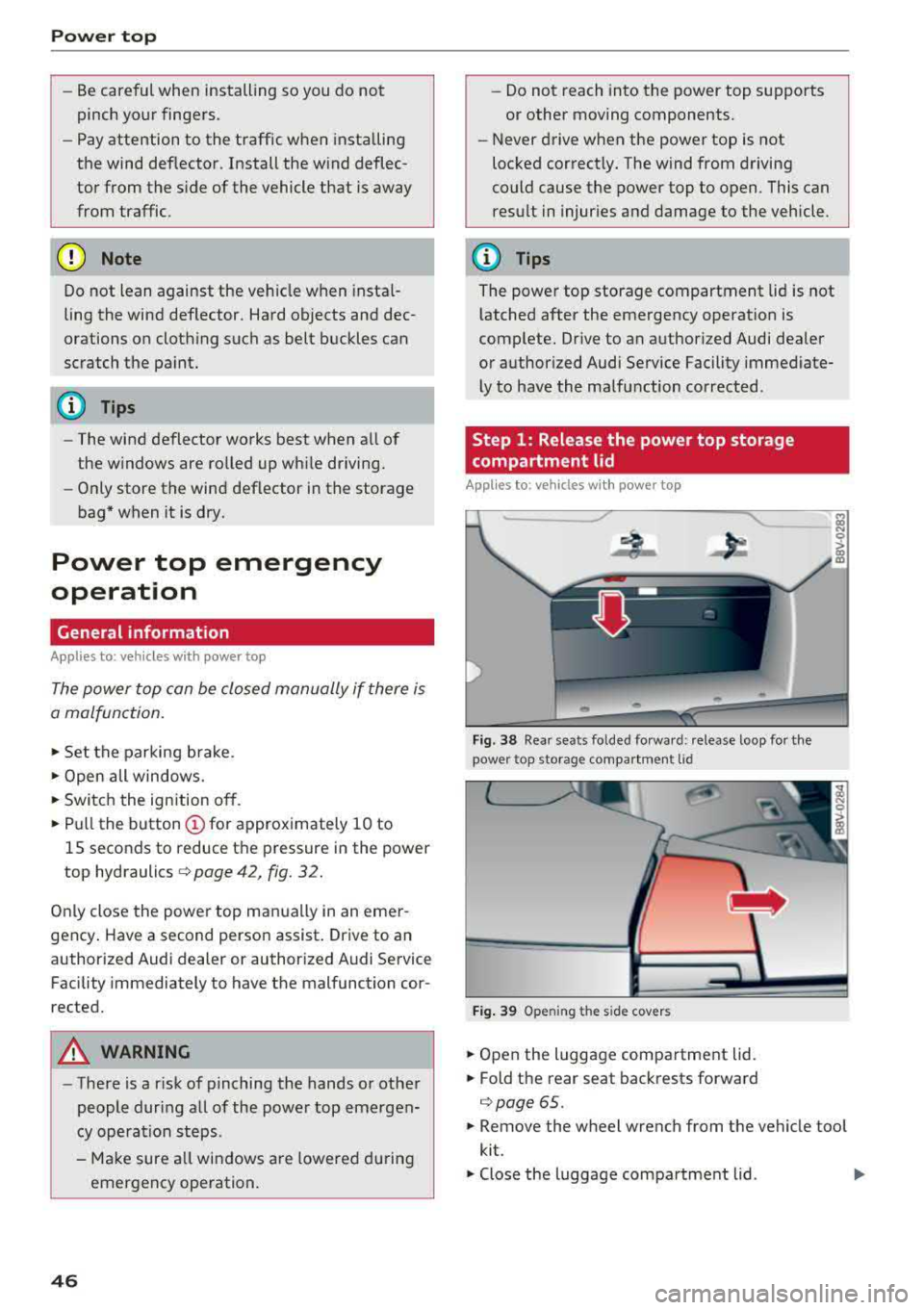
Step 1: Release the power top storage
compartment
lid
Applies to: vehicles with power top
Fig . 3 8 Rear sea ts fo lded fo rwar d: release l oop fo r the
pow er top storag e compartm en t lid
Fi g. 39 Openin g the side covers
.. Open the luggage compartment lid .
.. Fold the rear seat backrests forward
¢ page 65 .
.. Remove the wheel wrench from the vehicle too l
kit.
.,. Close the luggage compartment lid . ..,.
Page 54 of 404
Lights and Vision
turn signal lever. The emergency flashers stop
temporarily .
The emergency flashers also wo rk when the igni
tion is turned off.
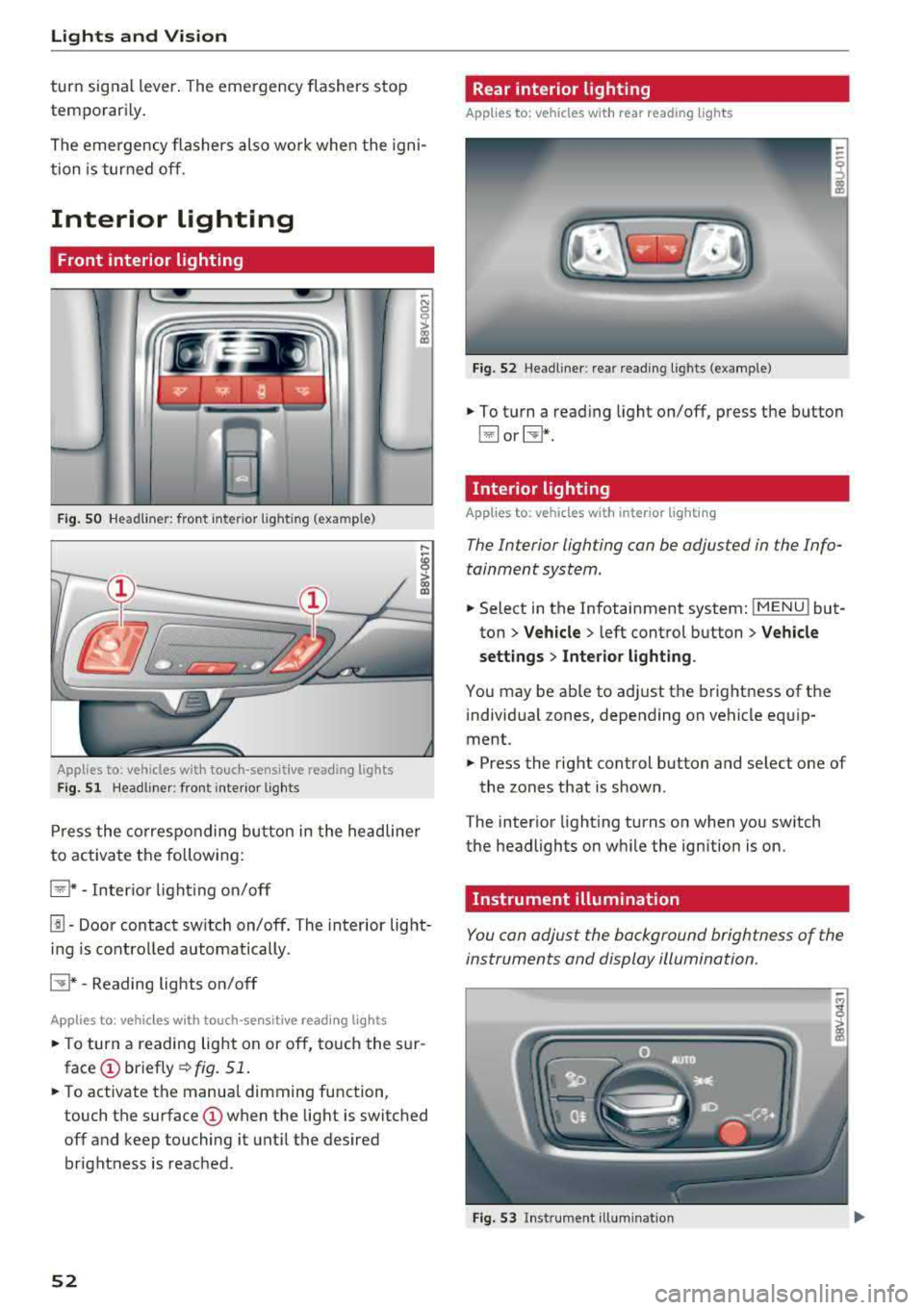
Interior lighting
Front interior lighting
F ig . SO Headl iner: fr ont inte rior lig htin g (exa mple)
:ti ?
Applies to: vehicles with touch-sensitive reading lights
F ig. 51 Headli ner: front inte rior lig hts
Pr ess the co rres ponding bu tton in the he adline r
to activate the following:
~ * -Inter io r li ght ing o n/off
[!] -Door contact sw itch on/off. The interior light
i n g is controlled automatically.
CTI* -Reading lights on/off
App lies to: veh icles with touch-sensitive reading lights
.. T o turn a reading lig ht on or off, to uch the s ur
face (!) briefly ¢fig. 51 .
.. To activate the manua l dimming function ,
touch the
surface (!) when the light is switched
off and keep touching it unt il the desired
brightness is reached .
52
Rear interior lighting
Applies to: vehicles with rear reading lights
Fi g. 52 Headli ne r: re ar reading l ights (example)
.. To t urn a read ing light on/off, press the button
~ or~ *-
Interior lighting
Applies to: vehicles with interior lighting
The Interior lighting can be adjusted in the Info
tainment system .
.. Select in the Infotainment system: IMENU ! but
ton
> Vehicle > l eft cont rol button > Vehicle
settings
> Inte rior light ing .
You may be ab le to ad just the brightness of the
i ndivid ua l zones, depending on vehicle eq uip
ment .
.. Press the right control button and se lect one of
the zones that is shown .
The inter ior light ing turns on when you sw itch
the headlights on w hile the ign ition is on.
Instrument illumination
You can adjust the background brightness of the
instruments and display illumination.
Fi g. 53 In st ru m en t ill uminat ion
Page 70 of 404
Warm and cold
Warm and cold Climate control system
Description
The climate control system circulates , warms or
coo ls, and removes humid ity from the air in the
veh icle interior . It is the most effective when the
windows and panorama g lass roof* or power top*
are closed. If there is a build-up of heat inside
the vehicle, ventilation can help to speed up the
coo ling process.
Pollutant filter
The pollutant filter removes pollutants such as
dust and po llen from the air.
Key recognition
Various sett ings are stored and ass igned to the
remote control key being used.
These settings are different when the power top* is open or closed .
Presetting
Several functions can be preset in the Infotain
ment system.
Select in the Infotainment system:
IMENU ! but
ton
> Vehicle > left control button > Air condi
tioning
A WARNING
Poor visibility can lead to accidents.
- For safer driving, keep all windows free of
ice, snow and fog.
- Become familiar with the correct use and
function of the climate control system as
quickly as poss ible, espec ia lly with the de
frosting and defogging functions.
- When the temperature is below freezing, only use the windsh ield washer system after
68
the windshield has been warmed by the cli
mate control system. The washer fluid could
freeze on the windshie ld and impair visib ili
ty .
@ Note
-If you suspect that the climate contro l sys
tem is damaged, switch the system off to
prevent further damage and have it checked
by an authorized Aud i dealer or authorized
Audi Serv ice Facility.
- Repa irs to the Aud i climate control system
require special technical knowledge and
special tools . See an authorized Aud i dealer
o r authorized Aud i Serv ice Facility .
@ For the sake of the environment
-To save fuel, turn off the climate control
system cooling mode by press ing the A/C
button. This w ill also reduce emissions . The
climate control system is off when the LED
in the button turns off.
- In vehicl es w ith the efficie ncy prog ram*,
yo u can find other consumpt ion information
and more economy tips ¢ page 19.
© Tips
- To prevent int erference with the heat ing
and cooling output and to prevent the win
dows from fogging over, the air intake in
front of the windshie ld must be free of ice,
snow or leaves.
- Condensation from the cooling system* can
drip and form a pudd le of water under the
vehicle . This is normal and does not mean
there is a leak.
- Th e energy management system may tem
porarily switc h off certain functions, such as
the seat heating* or rear window defogger.
These systems are ava ilable again as soon
as the energy supply has been restored.
Page 71 of 404
Warm and cold
Automatic climate control system
Applies to: ve hicles with a utomat ic climate contro l system
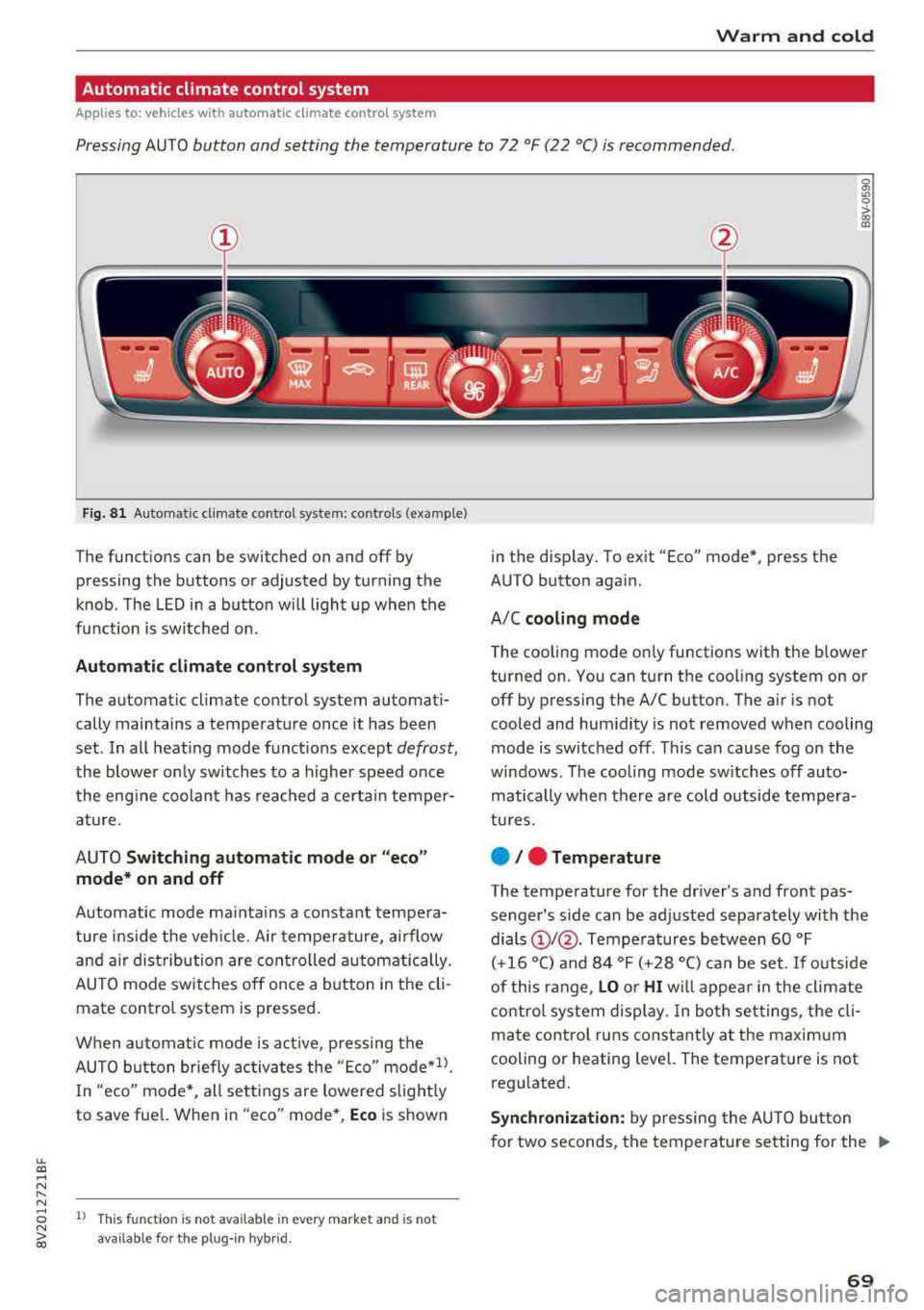
Pressing AUTO button and setting the temperature to 72 °F (22 °C) is recommended.
LL co .... N
" N
Fig. 8 1 Automatic climate control system: controls (example)
The funct ions can be switched on and off by
pressing the buttons or adjusted by turning the
knob. The LED in a button w ill light up when the
f u nction is switched on.
Automatic climate cont rol system
The automat ic climate control system automati
cally maintains a temperature once it has been
set . In all heat ing mode funct ions except
defrost,
the blower on ly switches to a higher speed once
the eng ine coolant has reached a certain temper
ature.
AUTO
Switching aut omatic mode or "ec o"
mode * on and off
Automatic mode ma inta ins a constant tempera
ture ins ide the veh icle. Air tempe rature, airflow
and a ir distribution are controlled a utomatically.
AUTO mode switches off once a b utton in the cli
mate control system is pressed.
When a utomat ic mode is act ive, pressing the
AUTO b utton briefly activa tes the
" E co" mode*1l.
In "eco" mode *, all sett ings are lowered slight ly
to save fuel. When in
"eco" mode*, Eco is shown
8 1l This fu nct ion is not available in every market and is not N ii'i available for the plug- in hybr id.
in the display. To ex it "Eco" mode*, press the
AUTO button aga in.
A/C
cooling mod e
The cooling mode on ly functions with the blower
turned on. You can turn the cooling system on or
off by pressing the A/C button. The air is not
cooled and humidity is not removed when cooling
mode is switched off. This can cause fog on the
windows . The cooling mode sw itches off auto
matically when there are cold outside tempera
tu res.
e / e Temperature
The temperature for the driver's and front pas
senger's s ide can be adjusted separately with the
dials
(D I@ . Tempera tures between 60 °F
(+16 °() and 84 °F (+28 °() ca n be set. If outside
of this range,
LO or HI w ill appea r in the climate
contro l system display. In both settings, the cli
mate contro l runs constant ly at the maxim um
cooling or heating level. The temperature is not
regulated.
S ynchr oniza tion : by pressing the AU TO butto n
for two seconds, the temperature setting for the
..,.
69
Page 72 of 404
Warm and cold
driver 's side is transferred to the front passeng
er's side. This applies a temperature change to
the front passenger 's side .
8/r Blower
Using the regu lator 8f?, you ca n manually adjust
the vo lume of a ir generated by the blower to your
p reference . The blowe r shou ld always run at a
low setting to prevent the windows from fogging
and to ensure a continuous exchange of air inside
t he vehicle . To h ave the blower regu lated au to
mat ically , press the AUTO button.
~/ :01 ~ Air distribution
The air distribution can adjusted with t he but
tons. To have the air distribution regulated auto matica lly, press the AU TO button.
The round air vents in t he cockpit are adjustable
q page 71 .
To keep the front s ide windows from fogging up
in damp weathe r, we recommend opening the
side air vents and tilting them to the side .
Foot vents are located under the front seats and
adjustab le vents o n the end of t he center console
t o heat the re ar of the vehicle .
3fx Defrosting
The windshield and s ide windows are defrosted
or cleared of condensation as qu ickly as possible .
The max imum amo unt of air flows ma inly from
the vents below the w indshield. Recircu lation
mode switches off. The temper ature s hou ld be
set at +72°F (22°() or higher. The temperat ure is
controlled automatica lly. In the
;Ix setting, the
A/C cooling mode switches on a utomatically , de
pending on the outside air temperature.
The A UTO button switches the defroster off.
~ Recirculation mode
The recircu lation mode can be turned on manua l
ly or automat ica lly*.
- Swi tc h ing man ua l rec irculat ion mode on and
off: press
t h e ~ button .
70
-Automatic * reci rcu lat ion mode : auto recircula
tion needs to be activated in the Infotainment
system. Se lect in the Infotainment system:
I MENU I button > Veh icle > left control button >
Air cond itioning > Aut o recircul ation
The air
quality sensor that is designed for d iesel and
gasoline exhaust automatically sw itches the re
circulation mode on or off depending on the level of pollutants in the o utside air.
In rec irculat ion mode, the air inside the vehicle is
c ir culated and filte red . T his prevents the unfil
te red air outs ide t he ve hicle from enteri ng the
vehicle inte rior. Switching rec irculat io n mode on
whe n driving throug h a tu nnel o r whe n sitting in
traffic is recommended
q & .
Pressing the~ button, A UTO o r the ;Ix button
switches recirculation mode off .
T he system switches to recirculation mode when
driv ing in reverse when the engine is cold .
SP. Rear window defogger
If the rear window defogger is act ivated when
the ignit ion is swi tched on, the battery manage
ment determines based on the battery charge if
i t is possible to turn on . Otherwise, the rear w in
dow defogger funct ions w it h the eng ine runni ng
and switches off automat ically after approxi
mately 1 0 - 20 m inutes, depending on the out
s ide temperat ure.
To p reve nt the rear window defogger from
switching off automat ica lly, press and hold the
!fP. button for more tha n two seconds. This re
mai ns sto red up to approxim ate ly lS m in utes af
te r turning off the ignition.
J Seat heating*
P ressing the J button switches the seat heat ing
o n at t he hi ghest sett ing (level 3) . The L EDs ind i
c a te the temperat ure level. To reduce the tem
per atu re , press t he button again . T o swi tc h t he
seat heating off, press the bu tton repeatedly un
ti l the LED turns off .
After approximate ly 10 m inu tes, the sea t heat ing
a utomat ic all y switches from leve l 3 to leve l 2.
..,_