ron AUDI S4 2008 Repair Manual
[x] Cancel search | Manufacturer: AUDI, Model Year: 2008, Model line: S4, Model: AUDI S4 2008Pages: 342, PDF Size: 15.01 MB
Page 112 of 342
Heating and cooling
110The synchronisation is cancelled as soon as any adjustments are
made on the front passenger's side.Applies to vehicles: with diesel engineSupplementary heater– Set the Supplementary heater to auto or off .Models with a diesel engine are equipped with a supplementary
heater to help warm up the interior more quickly. At outside temper-
atures below about +5 °C the sup plementary heater is switched on
(and off) automatically when the engine is running, depending on
the coolant temperature, the temperature in the vehicle interior and
the temperature the heater is set to.Auxiliary heating and auxiliary
ventilationApplies to vehicles: with auxiliary heating - under development at the time of printingDescription
The auxiliary heating and ventilation systems heat and
cool the interior independently of the engine.The auxiliary heating
works in conjunction with the air condi-
tioner system, but does not rely on heat from the engine. Instead of
this, the system burns fuel. The system's main function is to warm
up the interior of the vehicle and to defrost the windows in cold
weather.
The auxiliary heating system can be used both when the vehicle is
stationary and when driving (to pr ovide extra heat while the engine
is warming up). The
auxiliary ventilation
also operates independently of the
engine. This feature can be used to cool the interior with the blower
when the vehicle is left parked in the sun.
The system will automatically activa te either the auxiliary heating or
the auxiliary ventilation mode, depending on the actual tempera-
ture measured inside the car and the temperature you have set with
the air conditioner controls. It is possible to alter the temperature
setting while the auxiliary he ating/ventilation is running.
Switching on and off
There are two different ways of switching on the auxiliary
heating/ventilation system.
•
Immediate start: You can switch the auxi liary heating/ventilation
on and off at any time vi a the sound system or MMI ⇒page 111 . You
can also switch the system on and off using the remote control
⇒ page 113 .
•
Switching on via timer: You can programme various start times
using the timers ⇒page 111 . However you must first activate the
timer before the auxiliary heating/ventilation system will switch on
automatically.
The auxiliary heating/ventilation will switch itself off at the end of
the programmed running time. The running time can be set to 15,
30, 45 or 60 minutes ⇒page 112 .
WARNING
•
The auxiliary heating must not be allowed to run when the
vehicle is in a confined space because it can give off toxic fumes.
•
To avoid any possible fire risk, never have the auxiliary heating
switched on when refuelling the vehicle.
•
Because of the high temperatur es which occur when the auxil-
iary heating is running, make su re when parking the car that the
exhaust outlet under the car is not obstructed in any way and that
the exhaust gases do not come into contact with flammable mate-
rials (fire risk).
document_0900452a81b1b9de.book Seite 110 Donnerstag, 26. Juli 2007 9:16 09
--4 -
-T
• •
-+ +-
~
~---
Page 116 of 342
Heating and cooling
114Transmitting range
The range of the remote control transmitter is about 600 metres.
However, this can be greatly redu ced by obstacles (buildings, etc.)
between the remote control transm itter and the vehicle. Hold the
aerial upright when using the remote control.
You should not normally use the remote control at a distance of less
than 3 metres from the vehicle. If you are closer than this, or if you
use the remote control inside the vehicle, this can cause signal over-
load.
For the sake of the environment
Please dispose of old batteries in the proper manner so that they do
not harm the environment.Seat heatingApplies to vehicles: with front seat heating/ventilationSeat heating / ventilation
The seat cushions and backrests of the front seats can be
heated and ventilated* electrically.
Seat heating
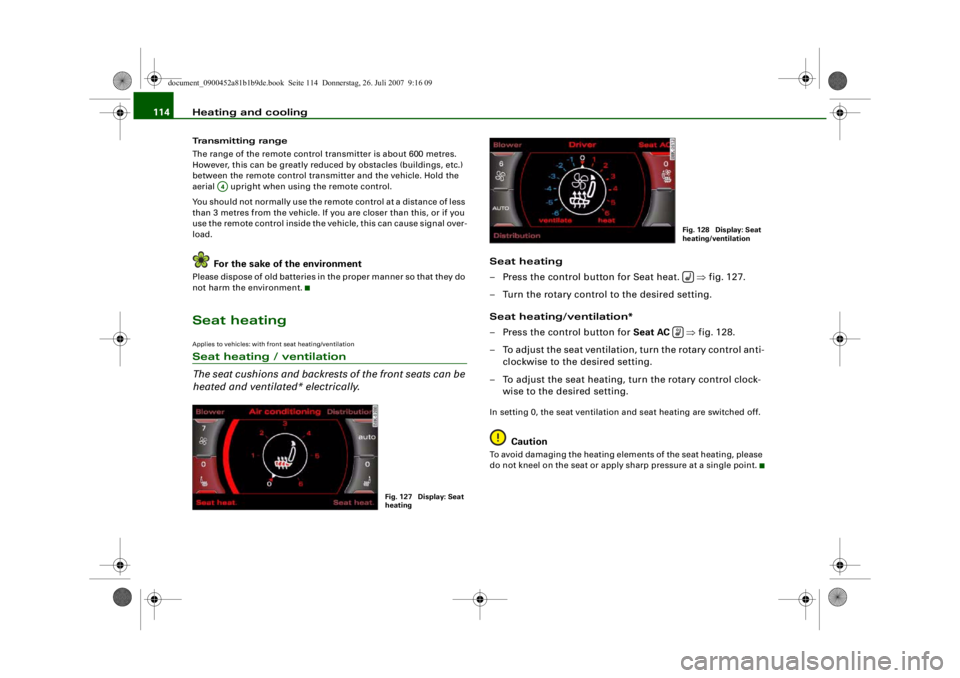
– Press the control button for Seat heat. ⇒fig. 127.
– Turn the rotary control to the desired setting.
Seat heating/ventilation*
– Press the control button for Seat AC ⇒fig. 128.
– To adjust the seat ventilation, turn the rotary control anti- clockwise to the desired setting.
– To adjust the seat heating, turn the rotary control clock- wise to the desired setting.In setting 0, the seat ventilation and seat heating are switched off.
Caution
To avoid damaging the heating elements of the seat heating, please
do not kneel on the seat or apply sharp pressure at a single point.
A4
Fig. 127 Display: Seat
heating
Fig. 128 Display: Seat
heating/ventilation
document_0900452a81b1b9de.book Seite 114 Donnerstag, 26. Juli 2007 9:16 09
-4 -
-
~
.1
0
'
T
6 88 .
(l)
0
-
-
I
AUTO
0
.··-
D
•
-+
D
+-
~I
-=---
'.auto
7
(l)
&j
-- .
0
0 J
fr.,
D
CD
•
,· ·-
Page 119 of 342
Driving117
Controls
Safety
Driving tips
General maintenance
Self-help
Technical data
If you press in the key
without pressing the clutch or brake pedal,
the ignition will be switched on or off. The steering lock is released
when the ignition is switched on. Diesel engines continue to be
automatically preheated.
The key can be removed only when the ignition is off. The key has to
be pressed in briefly to switch off the ignition. On vehicles with an
automatic gearbox, the selector lever has to be in position P.
Electrical components with a high power consumption are switched
off temporarily while you start the engine.
When starting from cold the engine may be a little noisy for the first
few seconds until oil pressure has built up in the hydraulic tappets.
This is quite normal and no cause for concern.
If the engine fails to start immediately, the starter will be switched
off automatically after a few seconds. Try to start the engine again.
Driver message in the instrument cluster display
Press brake pedal to start engine
This message appears on vehicles with an automatic gearbox if you
try to start the engine without first pressing the brake pedal.
Press clutch pedal to start engine
This message appears on vehicles with a manual gearbox if you try
to start the engine without first pressing the clutch pedal.
Engage N or P to start engine
This message will appear if you try to start the engine when the
selector lever of the automatic gearbox is not in P or N.
Shift to P, otherwise vehicle can roll away. Doors do not lock if lever
is not in P. or Please move selector lever to position P. Vehicle
cannot be locked.
For safety reasons, this message will appear and a warning buzzer
will sound if the selector lever of the automatic gearbox is not in
position P after you switch off the ignition. Put the selector lever in
position P; otherwise the vehicle can roll away. If the lever is not in position P you will not be able to
lock the vehicle using the exterior
locking switch on the door hand le or the remote control key.
Steering lock
The steering is locked when the key is not in the ignition. The
steering lock acts as a theft deterrent.
WARNING
•
Always take the key with you when you leave the vehicle.
Otherwise the engine can be st arted or power-operated equip-
ment such as the electric windows can be used. This could result
in serious injury.
•
Never leave children or disabled people alone in the car. The
doors could be locked with the re mote control key and the occu-
pants could become trapped in the vehicle. The vehicle occupants
could be exposed to extremely high or low temperatures,
depending on the time of year.
•
Never remove the key from the ignition while the vehicle is
moving. The steering l ock could engage suddenly, and you would
not be able to steer the car.Caution
•
If a malfunction occurs in the electronic ignition lock, a flashing
symbol and the message Ignition lock defective will appear in the
instrument cluster display.
•
Avoid high engine speeds, full throttle and extreme load condi-
tions until the engine has reached its normal operating tempera-
ture, otherwise this can damage the engine.For the sake of the environment
Do not warm up the engine by running it with the car stationary. You
should drive off immediately whenever possible. This will help avoid
unnecessary exhaust emissions.
document_0900452a81b1b9de.book Seite 117 Donnerstag, 26. Juli 2007 9:16 09
--4 -
-T
-+ +-
CD
Page 121 of 342
Driving119
Controls
Safety
Driving tips
General maintenance
Self-help
Technical data
–Automatic gearbox: Press the brake pedal and move the
selector lever to position P or N ⇒.
– Press the Start/Stop button ⇒page 118, fig. 131 to start
the engine.
– Diesel engines can take a fe w seconds longer than usual
to star t on cold days. Please keep your foot on the clutch
or brake pedal until the engine starts. The glow plug indi-
cator lamp
lights up in the instrument cluster while
the glow plugs are preheating.
If you press the Start/Stop button without pressing the clutch or
brake pedal, the ignition will be switched on (and will be switched
off if you press the button again). Diesel engines are preheated
when the ignition is switched on.
If the engine fails to start straight-away, switch off the starter after
about 10 seconds and try again after about half a minute.
When starting from cold the engine may be a little noisy for the first
few seconds until oil pressure has built up in the hydraulic tappets.
This is quite normal and no cause for concern.
Driver message in the instrument cluster display
No key identified
This message appears when you pre ss the Start/Stop button if there
is no remote control key inside the vehicle or if the system cannot
detect or identify the key. This can happen, for example, if the radio
signal from the key is obstructed by a metal briefcase or similar.
Electronic equipment, such as mobile phones, can also interfere
with the radio signal from the key.
Press brake pedal to start engine
This message appears on automatic vehicles if you press the
Start/Stop button to start the engine without first pressing the
brake pedal. The engine will only start if you press the brake pedal. Press clutch pedal to start engine
This message appears on manual vehicles if you press the
Start/Stop button to start the en
gine without first pressing the
clutch pedal. The engine will only star t if you press the clutch pedal.
Engage N or P to start engine
This message will appear if you try to start the engine when the
selector lever of the automatic gear box is not in P or N. The engine
can only be started if the selector lever is in one of these positions.
Key not in vehicle
This message will appear together with the symbol
if the remote
control key is removed from the vehicle while the engine is running.
This is to remind you not to continue driving without the key (for
example if you change drivers).
If the remote control key is not in the vehicle you will not be able to
switch on the ignition or restar t the engine after it has been
switched off. Without the key, you wi ll also not be able to lock the
vehicle from the outside.
Shift to P, otherwise vehicle can roll away. Doors do not lock if lever
is not in P. or Please move selector lever to position P. Vehicle
cannot be locked.
For safety reasons, this message will appear and a warning buzzer
will sound if the selector lever of the automatic gearbox is not in
position P when you switch off th e ignition with the Start/Stop
button. Put the selector lever in position P; otherwise the vehicle
can roll away. If the lever is not in position P you will not be able to
lock the vehicle using the exterior locking switch on the door handle
or the remote control key.
Advanced key defective ! Use ignition lock
This message appears if the vehicle has to be started with the igni-
tion key instead of the Start/Stop button.
document_0900452a81b1b9de.book Seite 119 Donnerstag, 26. Juli 2007 9:16 09
--4 -
-T
-+ +-
Page 125 of 342
Driving123
Controls
Safety
Driving tips
General maintenance
Self-help
Technical data
braking force of the parking brake is only released when there is
enough power at the wheels to make the vehicle move in the desired
direction.
Note
For safety reasons the parking brake will only release automatically
if the driver's seat belt
is engaged in its buckle.Driving away when towing a trailer
Please note the following po ints to prevent the vehicle
from rolling back unintentionally on a gradient.– Pull and hold the parking brake switch and press the
accelerator. The parking brake will remain engaged and
prevent any tendency to roll back down the slope.
– You can release the parking brake switch as soon as the engine is delivering enough power to the wheels.Depending on the weight of the vehicle and trailer and the steep-
ness of the slope, there may be a tendency to roll back downhill
when driving away from a standstill. You can prevent this by pulling
out the parking brake switch as you press the accelerator (in the
same way as with a conventional handbrake).Emergency braking function
This feature enables you to stop the vehicle if the main
brake system should fail or if the pedal is obstructed.– Pull out and hold the parkin g brake switch to stop the
vehicle with the parking brake in an emergency.
– The brakes will be released immediately if you release the switch or press down the accelerator.
If you pull out and hold the park ing brake switch at a road speed
above about 8 km/h, this will initiate an emergency brake applica-
tion. The brakes are then applied hy draulically at all four wheels.
The effect is the same as an emergency stop (full brake application)
⇒
To prevent the emergency braking function from being used acci-
dentally, a warning buzzer sounds when the switch is operated. The
brakes are released immediately when you release the switch or
press down the accelerator.
WARNING
You should only use the emergency braking function in a real
emergency, for example if the brake system should fail or if the
brake pedal is obstructed. If you use the emergency braking func-
tion by activating the parking brak e switch, the effect is similar to
a full brake application (emergenc y stop). Please remember that
the ESP (with its combined ABS, EDL and traction control func-
tions) is still subject to certain physical limits. In a corner or in bad
road or weather conditions an emergency stop can cause the
vehicle to skid or lose steering control.Driver messages in the instrument cluster displayCaution: Vehicle parked too steep
This message can appear when you apply the parking brake if the
car is parked on a gradient steeper than about 30%.
In this case the parking brake may not be strong enough to prevent
the vehicle from rolling back accidentally.
Please release parking brake
However, please remember that, for safety reasons, the parking
brake will only release automatically if the driver's seat belt is
buckled.
document_0900452a81b1b9de.book Seite 123 Donnerstag, 26. Juli 2007 9:16 09
--4 -
-T
[I]
•
-+
•
+-
•
Page 130 of 342
adaptive cruise control (ACC)
128adaptive cruise control (ACC)Speed and distance control systemApplies to vehicles: with adaptive cruise controlDescription
The adaptive cruise control is a combined speed and
distance control system to assist the driver.Adaptive cruise control allows you to maintain any desired constant
speed between 30 and 200 km/h. In addition, the system controls
the distance maintained to the vehicle in front (subject to certain
limitations as described below).
The system can be used to greatest effect on long motorway jour-
neys or on other main roads with long straight sections.
How is the system operated?
The adaptive cruise control system is operated via a control lever on
the steering wheel ⇒page 131, “Setting the speed” and
⇒ page 133, “Setting the distance”. Driver messages
When the system is being used, important information is displayed
in the speedometer and on the instrument cluster display screen
⇒
page 134, “Driver messages”.
Please note the following points:
The adaptive cruise control has ce rtain limits determined by the
system itself. This means that the driver may in some situations
have to intervene and control the speed and distance to the vehicle
in front himself ⇒page 138, “Driver intervention prompt” and
⇒ page 140, “System limitations”.
WARNING
Please always direct yo ur full attention to the road, even when you
are using adaptive cruise control. It is always the driver who is
responsible for determining the speed and for keeping a safe
distance to the other vehicles on the road.•
For safety reasons, the adaptive cruise control must not be
used in city traffic, stop-go traffic, roads with a lot of bends or in
difficult driving condition s (such as ice, fog, loose grit or gravel,
heavy rain, aquaplaning) - this could cause an accident!
•
When you take a turn-off, drive along a motorway exit lane or
pass through roadwork sections, please temporarily switch off the
adaptive cruise control in order to avoid the vehicle accelerating to
the selected speed.
•
The adaptive cruise control can only control the distance to
vehicles in front. As a rule, it cannot recognize vehicles travelling
in other lanes. For this reason, please temporarily switch off the
system if you are travelling in th e inside lane and vehicles in the
overtaking lane are travelling at a slower speed than you are.
Otherwise, you would overtake these vehicles on the inside.
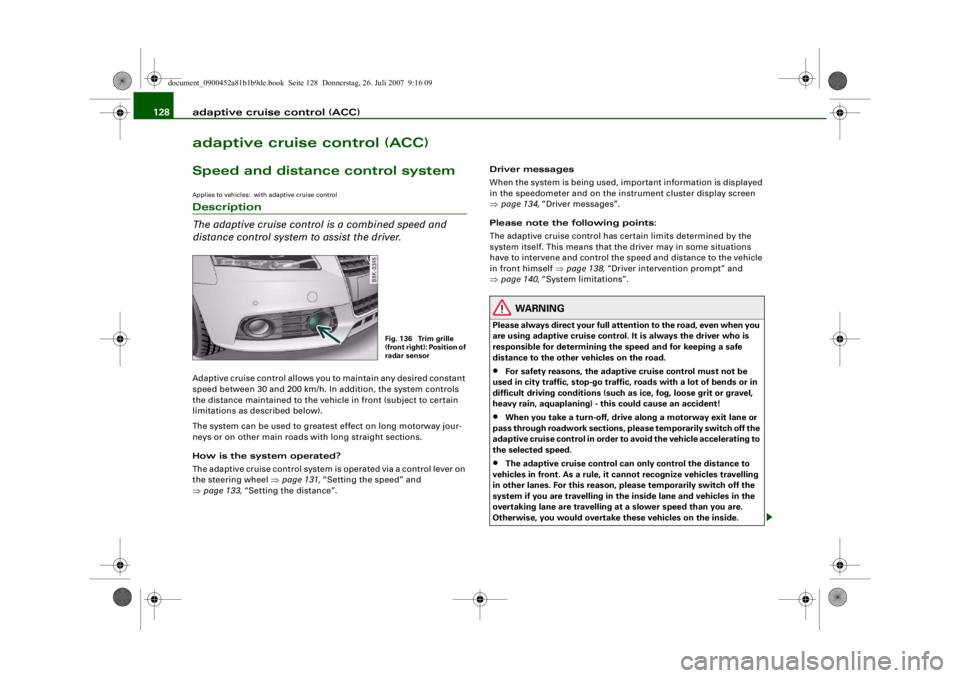
Fig. 136 Trim grille
(front right): Position of
radar sensor
document_0900452a81b1b9de.book Seite 128 Donnerstag, 26. Juli 2007 9:16 09
--4 -
-T
-+ +-
Page 131 of 342
adaptive cruise control (ACC)129
Controls
Safety
Driving tips
General maintenance
Self-help
Technical data
•
Adaptive cruise control will not react when approaching a
stationary obstacle, e.g. the end of a traffic jam or a broken-down
vehicle, or if a vehicle should come towards you in the same lane.
•
Please make sure you do not unintentionally rest your foot on
the accelerator - this will override the adaptive cruise control
system which, as a result, will not automatically brake the vehicle.Note
•
For safety reasons, the speed setting will be deleted when the
ignition is switched off.
•
Switching on the adaptive cruise control automatically activates
the Electronic Stabilisation Program (ESP) and the traction control
system (ASR). These two systems cannot be deactivated while the
adaptive cruise control is switched on.
•
Damage caused by impacts (e.g. if the vehicle is damaged when
parking) can affect the radar sensor settings. This can cause the
system to malfunction or switch off completely.
•
The radar sensor is heated. However, in winter conditions, you
should make sure that the radar sensor is free of ice and snow
before you set off. If necessary, carefully clean the cover of the radar
sensor and the surrounding area ⇒page 128, fig. 136.
•
To make sure that the radar sensor is fully operative, do not
attach any objects (e.g. stickers, add-on parts or other accessories)
to the area surrounding the radar sensor. Do not paint the area
surrounding the radar sensor.
Applies to vehicles: with adaptive cruise control and manual gearboxVehicles with manual gearbox
The driver of a vehicle with a manual gearbox of course
has to change gears as appropriate, even when the adap-
tive cruise control is activated.The adaptive cruise control is available from the second to the sixth
gear (when driven in normal engine speed range).
When the adaptive cruise control is activated, the driver must press
the clutch pedal as normal in order to change gear. When changing
gear or pressing the clutch pedal (for up to 20 seconds), the adap-
tive cruise control will remain activated.
When changing gear, the driver does not have to accelerate after
engaging a gear as the engine torque will be coordinated by the
adaptive cruise control.
The following situations may lead to an automatic deactivation of
the adaptive cruise control :•
pressing the clutch pedal too long (longer than approx.
20 seconds)
•
incorrect changing of gears and/or use of the clutch pedalNote
•
The adaptive cruise control cannot be activated while changing
gears.
WARNING (continued)
document_0900452a81b1b9de.book Seite 129 Donnerstag, 26. Juli 2007 9:16 09
--4 -
-T
-+ +-
[I)
•
•
Page 132 of 342
adaptive cruise control (ACC)
130Applies to vehicles: with adaptive cruise controlHow does the distance control work?
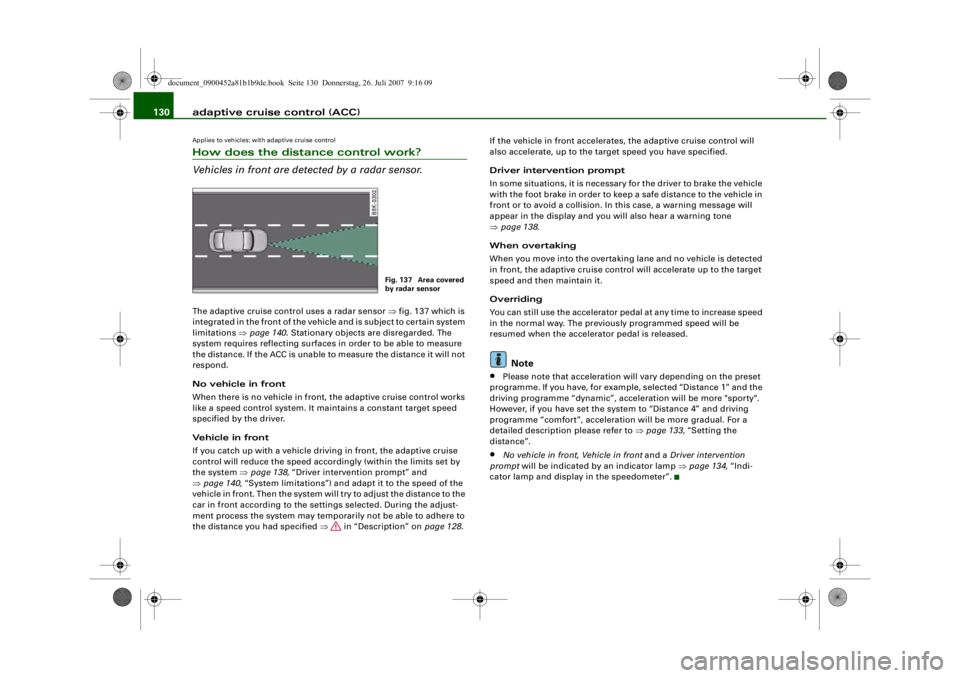
Vehicles in front are detected by a radar sensor.The adaptive cruise control uses a radar sensor ⇒fig. 137 which is
integrated in the front of the vehicle and is subject to certain system
limitations ⇒page 140 . Stationary objects are disregarded. The
system requires reflecting surfaces in order to be able to measure
the distance. If the ACC is unable to measure the distance it will not
respond.
No vehicle in front
When there is no vehicle in front, the adaptive cruise control works
like a speed control system. It maintains a constant target speed
specified by the driver.
Vehicle in front
If you catch up with a vehicle driv ing in front, the adaptive cruise
control will reduce the speed accordingly (within the limits set by
the system ⇒page 138, “Driver intervention prompt” and
⇒ page 140, “System limitations”) and ad apt it to the speed of the
vehicle in front. Then the system will try to adjust the distance to the
car in front according to the settings selected. During the adjust-
ment process the system may temporarily not be able to adhere to
the distance you had specified ⇒ in “Description” on page 128.If the vehicle in front
accelerates, the adaptive cruise control will
also accelerate, up to the target speed you have specified.
Driver intervention prompt
In some situations, it is necessary for the driver to brake the vehicle
with the foot brake in order to keep a safe distance to the vehicle in
front or to avoid a collision. In this case, a warning message will
appear in the display and you will also hear a warning tone
⇒ page 138 .
When overtaking
When you move into the overtaking lane and no vehicle is detected
in front, the adaptive cruise control will accelerate up to the target
speed and then maintain it.
Overriding
You can still use the accelerator pedal at any time to increase speed
in the normal way. The previously programmed speed will be
resumed when the accelerator pedal is released.
Note
•
Please note that acceleration wi ll vary depending on the preset
programme. If you have, for example, selected “Distance 1” and the
driving programme “dynamic”, acceleration will be more "sporty".
However, if you have set the sy stem to “Distance 4” and driving
programme “comfort”, acceleration will be more gradual. For a
detailed description please refer to ⇒page 133, “Setting the
distance”.
•
No vehicle in front , Vehicle in front and a Driver intervention
prompt will be indicated by an indicator lamp ⇒page 134, “Indi-
cator lamp and display in the speedometer”.
Fig. 137 Area covered
by radar sensor
document_0900452a81b1b9de.book Seite 130 Donnerstag, 26. Juli 2007 9:16 09
--4 -
-T
-+
[I]
+-
•
Page 135 of 342
adaptive cruise control (ACC)133
Controls
Safety
Driving tips
General maintenance
Self-help
Technical data
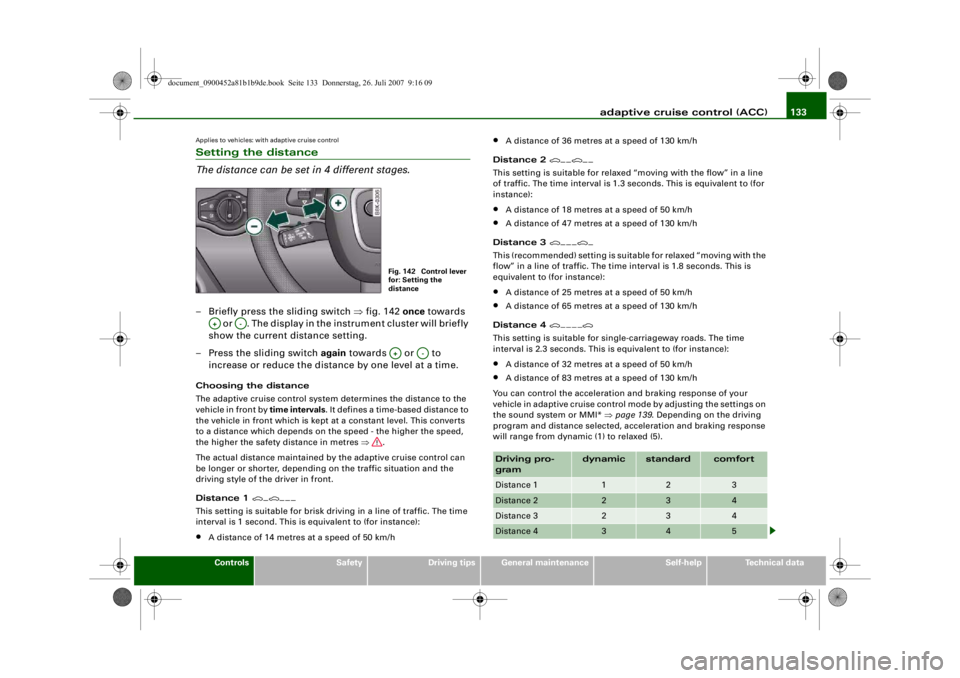
Applies to vehicles: with adaptive cruise controlSetting the distance
The distance can be set in 4 different stages.– Briefly press the sliding switch ⇒fig. 142 once towards
or . The display in the instrument cluster will briefly
show the current distance setting.
– Press the sliding switch again towards or to
increase or reduce the distance by one level at a time.Choosing the distance
The adaptive cruise control system determines the distance to the
vehicle in front by time intervals . It defines a time-based distance to
the vehicle in front which is kept at a constant level. This converts
to a distance which depends on the speed - the higher the speed,
the higher the safety distance in metres ⇒.
The actual distance maintained by the adaptive cruise control can
be longer or shorter, depending on the traffic situation and the
driving style of the driver in front.
Distance 1
This setting is suitable for brisk driving in a line of traffic. The time
interval is 1 second. This is equivalent to (for instance):•
A distance of 14 metres at a speed of 50 km/h
•
A distance of 36 metres at a speed of 130 km/h
Distance 2
This setting is suitable for relaxed “moving with the flow” in a line
of traffic. The time interval is 1.3 seconds. This is equivalent to (for
instance):•
A distance of 18 metres at a speed of 50 km/h
•
A distance of 47 metres at a speed of 130 km/h
Distance 3
This (recommended) setting is suitable for relaxed “moving with the
flow” in a line of traffic. The time interval is 1.8 seconds. This is
equivalent to (for instance):•
A distance of 25 metres at a speed of 50 km/h
•
A distance of 65 metres at a speed of 130 km/h
Distance 4
This setting is suitable for single-carriageway roads. The time
interval is 2.3 seconds. This is equivalent to (for instance):•
A distance of 32 metres at a speed of 50 km/h
•
A distance of 83 metres at a speed of 130 km/h
You can control the acceleration and braking response of your
vehicle in adaptive cruise control mode by adjusting the settings on
the sound system or MMI* ⇒page 139 . Depending on the driving
program and distance selected, acceleration and braking response
will range from dynamic (1) to relaxed (5).
Fig. 142 Control lever
for: Setting the
distance
A+
A-
A+
A-
Driving pro-
gram
dynamic
standard
comfort
Distance 1
1
2
3
Distance 2
2
3
4
Distance 3
2
3
4
Distance 4
3
4
5
document_0900452a81b1b9de.book Seite 133 Donnerstag, 26. Juli 2007 9:16 09
--4 -
-T
-+ +-
---
---~
Page 136 of 342
adaptive cruise control (ACC)
134
WARNING
When setting the distance, the driv er is responsible for adhering
to the laws and regulations which apply in the country he is trav-
elling in.Driver messagesApplies to vehicles: with adaptive cruise controlMessages in the instrument cluster
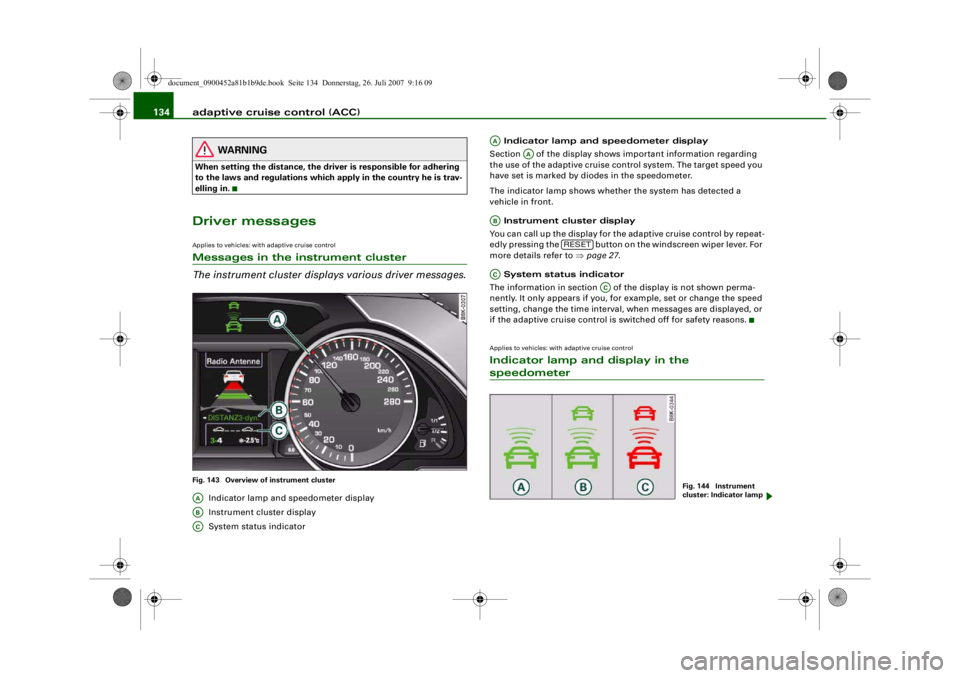
The instrument cluster displa ys various driver messages.Fig. 143 Overview of instrument cluster
Indicator lamp and speedometer display
Instrument cluster display
System status indicator Indicator lamp and speedometer display
Section of the display shows important information regarding
the use of the adaptive cruise control system. The target speed you
have set is marked by diodes in the speedometer.
The indicator lamp shows whether the system has detected a
vehicle in front.
Instrument cluster display
You can call up the display for the adaptive cruise control by repeat-
edly pressing the button on the windscreen wiper lever. For
more details refer to ⇒ page 27.
System status indicator
The information in section of the display is not shown perma-
nently. It only appears if you, for example, set or change the speed
setting, change the time interval, when messages are displayed, or
if the adaptive cruise control is switched off for safety reasons.
Applies to vehicles: with adaptive cruise controlIndicator lamp and display in the speedometer
AAABAC
AA
AA
AB
RESET
AC
AC
Fig. 144 Instrument
cluster: Indicator lamp
document_0900452a81b1b9de.book Seite 134 Donnerstag, 26. Juli 2007 9:16 09
--4 -
-T
-+
•
+-
~ ~
---
-~
--
~ - - --
-
~
~
~
® ® ©