brakes AUDI S4 2014 User Guide
[x] Cancel search | Manufacturer: AUDI, Model Year: 2014, Model line: S4, Model: AUDI S4 2014Pages: 296, PDF Size: 73.56 MB
Page 104 of 296
102 Audi adaptive cruise control and braking guard
Switching on and off
Applies to vehicles: with Audi adaptive cruise control
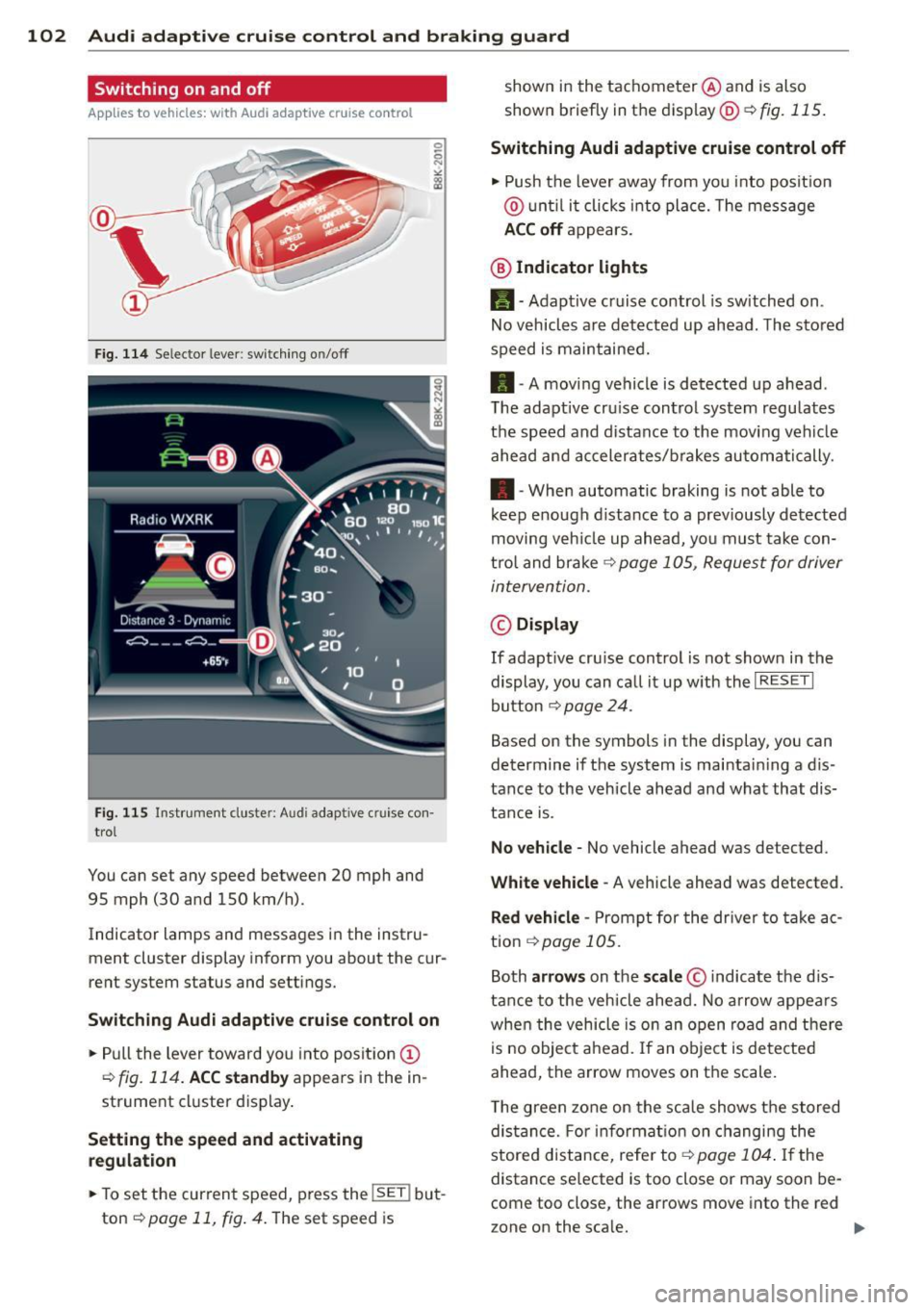
Fig. 114 Se lec tor lever: switching on/off
Fig. 115 Instrument clus te r: A udi adap tive c ru ise co n·
trol
You can set any speed between 20 mph and
95 mph (30 and 150 km/h).
Indicator lamps and messages in the instru·
ment cluster display inform you about the cur·
rent system status and settings.
Switching Audi adaptive cruise control on
• Pull the lever toward you into position (D
¢fig. 114. ACC standby appears in the in ·
strument cluster display.
Setting the speed and activating
regulation
.. To set the current speed , press the !SE T! but·
ton
¢ page 11, fig . 4. The set speed is shown in
the tachometer @and is also
shown briefly in the display@¢
fig. 115.
Switching Audi adaptive cruise control off
• Push the lever away from you into position
@ until it clicks into place. The message
ACC off appears.
@ Indicator lights
11 · Adaptive cruise control is sw itched on.
No vehicles are detected up ahead. The stored
speed is maintained.
• · A moving vehicle is detected up ahead .
T he adaptive cru ise control system regulates
the speed and distance to the moving vehicle
ahead and accelerates/brakes automatically .
• · When automatic braking is not able to
keep enough distance to a previously detected
moving veh icle up ahead, you must take con·
trol and brake
¢ page 105, Request for driver
intervention.
© Display
If adapt ive cru ise control is not shown in the
display, you can call it up w ith the
I RESET I
button ¢ page 24.
Based on the symbols in the display, you can
determine if the system is maintain ing a d is ·
tance to the vehicle ahead and what that dis
tance is.
No vehicle· No vehicle ahead was detected .
White vehicle -A vehicle ahead was detected .
Red vehicle -Prompt for the driver to take ac
tion
,=;, page 105.
Both arrows on the scale © indicate the dis·
tance to the vehicle ahead. No arrow appears
when the vehicle is on an open road and there
is no object ahead. If an object is detected
ahead, the arrow moves on the scale .
T he green zone on the scale shows the stored
distance. For information on changing the
stored distance, refer tor=;,
page 104 . If the
distance se lected is too close or may soon be·
come too close , the arrows move into the red
zone on the sca le. .,.
Page 106 of 296
104 Audi adaptive cruise control and braking guard
Setting the distance
Applies to vehicles: wit h Aud i adapt ive cru ise co ntrol
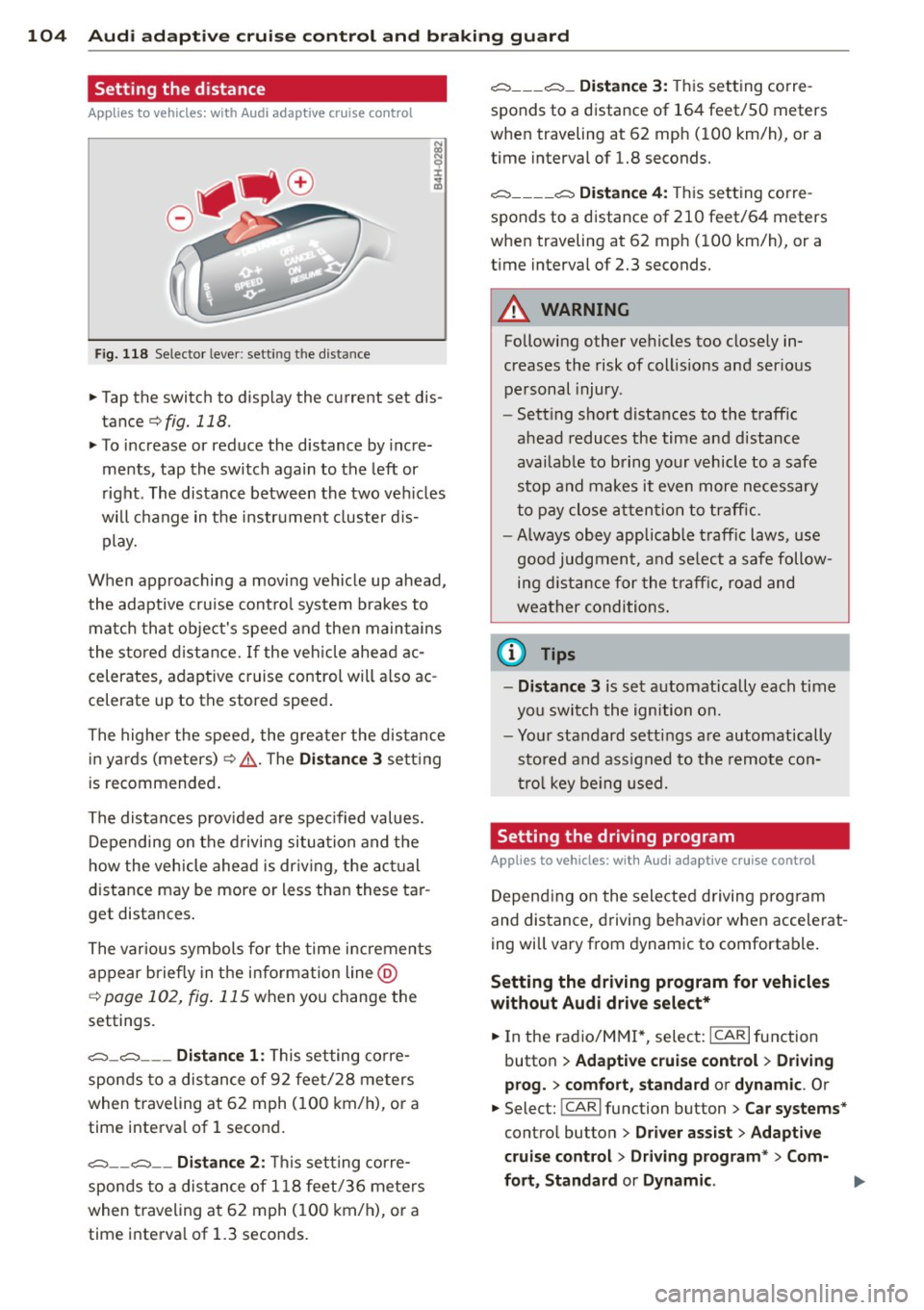
Fig. 118 Selector lever: setting the distance
~ Tap the switch to display the current set dis
tance
¢fig. 118.
~ To increase or reduce the distance by incre
ments, tap the switch again to the left or
right. The distance between the two vehicles
will change in the instrument cluster dis
play.
When approaching a moving vehicle up ahead,
the adaptive cruise control system brakes to match that object's speed and then maintains
the stored distance. If the vehicle ahead ac
celerates, adaptive cruise control will also ac
celerate up to the stored speed.
The higher the speed, the greater the distance
in yards (meters)¢ ,&.. The
Distance 3 setting
is recommended.
The distances provided are specified values.
Depending on the driving situation and the
how the vehicle ahead is driving, the actual
distance may be more or less than these tar
get distances.
The various symbols for the time increments
appear briefly in the information line @
c;, page 102, fig. 115 when you change the
settings.
c::::::,_c::::::, ___ Distance 1: This setting corre-
sponds to a distance of 92 feet/28 meters
when traveling at 62 mph (100 km/h), or a
time interval of 1 second.
c::::::, __ c::::::, __ Distance 2: This setting corre
sponds to a distance of 118 feet/36 meters
when traveling at 62 mph (100 km/h), or a
time interval of 1.3 seconds.
c::::::, ___ c::::::,_ Distance 3: This setting corre-
sponds to a distance of 164 feet/SO meters
when traveling at 62 mph (100 km/h), or a
time interval of 1.8 seconds.
c::::::, ____ c::::::, Distance 4: This setting corre-
sponds to a distance of 210 feet/64 meters
when traveling at 62 mph (100 km/h), or a
time interval of 2.3 seconds.
A WARNING
Following other vehicles too closely in
creases the risk of collisions and serious
personal injury .
- Setting short distances to the traffic
ahead reduces the time and distance
available to bring your vehicle to a safe
stop and makes it even more necessary
to pay close attention to traffic.
-
-Always obey applicable traffic laws, use
good judgment, and select a safe follow
ing distance for the traffic, road and
weather conditions.
0) Tips
- Distance 3 is set automatically each time
you switch the ignition on.
- Your standard settings are automatically
stored and assigned to the remote con
trol key being used.
Setting the driving program
Applies to veh icles: w ith Audi ada ptive c ruise control
Depending on the selected driving program
and distance, driving behavior when accelerat
ing will vary from dynamic to comfortable.
Setting the driving program for vehicles
without Audi drive select*
~ In the radio/MM!*, select: ICARlfunction
button
> Adaptive cruise control > Driving
prog.
> comfort, standard or dynamic. Or
~ Select: !CAR I function button > Car systems*
control button > Driver assist > Adaptive
cruise control> Driving program*
> Com-
fort, Standard
or Dynamic . ll-
Page 107 of 296
Audi adaptive cruise control and braking guard 105
Setting the driving mode for vehicles with
Audi drive select*
Refer to r=;,poge 114 .
(D Tips
Your settings are automatically stored and
assigned to the remote control key being
used.
Request for driver intervention
Applies to vehicles: with Audi adaptive cruise control
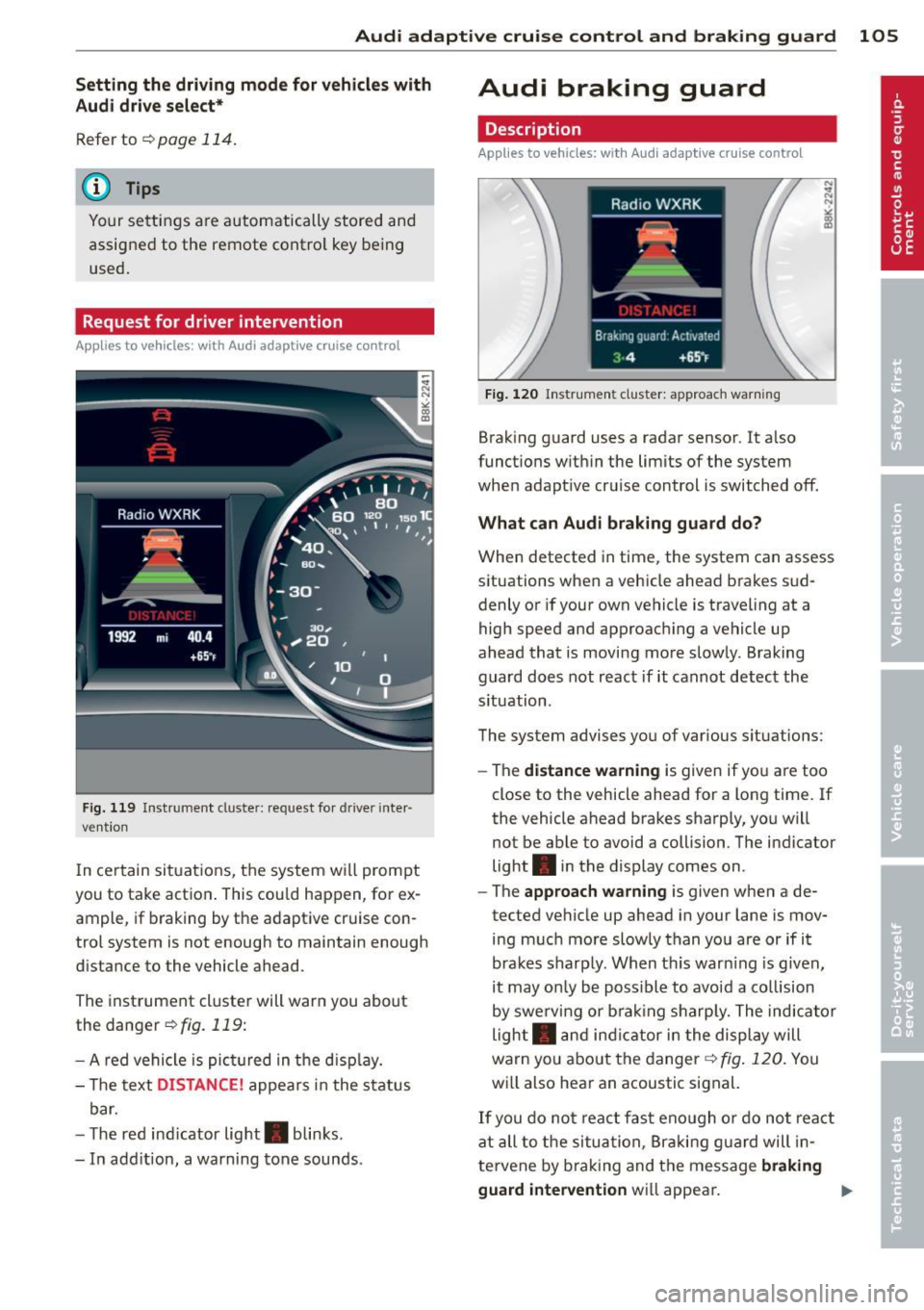
Fig. 119 Instrumen t cl us ter: reques t for drive r inte r·
vention
I n ce rtain situat ions, the system will prompt
you to take action . This cou ld happen, for ex
ample, if braking by the adaptive cruise con
trol system is not enough to maintain enough
distance to the vehicle ahead.
The instrument cluster will warn you about
the danger
r=;,fig. 119:
- A red vehicle is pict ured in the disp lay.
- The text
DISTANCE! appears in the status
bar.
- T he red ind icator light . blinks.
- In add ition, a warning tone sounds.
Audi braking guard
Description
Applies to vehicles: with Audi adaptive cruise control
Fig. 120 Instr ument cluster: approach warning
Braking guard uses a radar sensor. It also
functions within the limits of the system
when adapt ive cruise control is switched off.
What can Audi braking guard do?
When detected in time, the system can assess
situations when a vehicle ahead brakes sud
denly or if your own vehicle is traveling at a
high speed and approaching a vehicle up
ahead that is moving more slowly. Braking
guard does not react if it cannot detect the
s ituation.
The system advises you of various situations:
- The
distance warning is given if you are too
close to the vehicle ahead for a long time. If
the vehicle ahead brakes sharply, you will
not be able to avoid a collision . The indicator
light . in the display comes on .
- The
approach warning is given when a de
tected vehicle up ahead in your lane is mov
ing much more slowly than you are or if it
brakes sharply. When thi s war ning is given,
it may on ly be possible to avoid a co llision
by swerving or brak ing sharp ly. The indicator
light . and indicator in the display will
warn you about the danger¢
fig. 120. You
wi ll also hear an acoustic signal.
If you do not react fast enough or do not react
at all to the situation, Braking guard will in
te rvene by brak ing and the message
braking
guard intervention
wi ll appear.
Page 108 of 296
106 Audi adap tive cruise control and br aking guard
- If a co llision is imminent, the system will
first provide an
acute warning by bri efly and
sharp ly app ly ing the brakes .
- If you do not react to the ac ute warning ,
braking guard can brake within the limits of
the system. This reduces the veh icle speed
in the event of a collision.
- At speeds under 20 mph (30 km/h), the sys
tem can in it iate a complete deceleration
s hortly before a collision
l) .
-If the braking guard senses that you are not
braking hard enough when a collision is im
minent, it can increase the braking force.
Which funct ion s can be contr oll ed ?
You can switch braking guard and the dis
tance/approach warning on or off in the radio
or MM I c> poge 106, Settings in the radio/
MMI.
A WARNING
Lack of attention can cause col lisions, oth
er accidents and serious personal injuries.
The braking guard is an assist system and
cannot prevent a collis ion by itself. The
driver m ust always intervene . T he d river is
always responsib le for bra king at the cor
rect time.
- Always pay close attention to traffic,
even when the brak ing guard is switched
on. Be ready to intervene and be ready to
take complete control whenever necessa
ry. A lways keep the safe and legal dis
tance between your vehicle and vehicles
up ahead.
- Braking guard works w ith in limits and
will not respond outs ide the system lim
its, for example when approaching a
stopped vehicle or stationary obstacle
(end of a traff ic jam or veh icle that has
broken down in traffic).
- Always remember that the radar sensor
for the braking guard works only within
defined detection and range limits that
l ) Th is is not available in some c oun tri es.
may prevent the proper detection of oth
er vehicles.
- The radar sensor's function and range
can be reduced by rain, snow and heavy
spray. Moving veh icles up ahead may not
be prompt ly detected or may not be de
tected at all .
- Reflective surfaces including crash barri
ers or tunne l entrances may impair the
function of the radar sensor .
(D Tips
- You can cancel the braking that is in it iat
ed by the system by braking yourse lf, by
accelerating not iceably or by swerving .
- Braking guard error messages
c>poge 107.
- Keep in mind that braking guard can brake unexpectedly. Always secure any
cargo or objects that you are transport
ing to reduce the risk of damage or in
jury .
Settings in the radio/MMI
App lies to vehicles : wit h Audi ada ptive cr uise contro l
.,. Select: !CARI function button> Car sy ste m s*
contro l but ton > Driv er a ssi st> Audi brak
ing guard .
Or
.,. Select: !CAR I function button> Audi b raking
gua rd.
Sys tem -
Switch A udi braking guard On and
Off . When you switch the ignition on, the
message
Audi b raking gu ard off appears if
the system is switch ed off .
Ea rly warnin g -The distance and approach
warnings in the display can be switched
On/
Off .
(D Tips
-Yo ur settings are automatically s tored
and assigned to the remote contro l key
being used at the times the settings are
made.
Page 189 of 296
ESC includes and/or works together with the
anti-lock brake system (ABS), brake assist sys
tem, anti -slip regulation (ASR) , e lectronic dif
ferential lock (EDL), dynamic steering* and electronic i nteraxle differential lock* /selective
wheel torque control* . ESC is switched on all
the t ime. I n certain s ituations when you need
less traction, you can switch
off ASR by press
i ng the button~~
page 188, fig. 174 or
~ page 188, fig. 175. Be sure to sw itch ASR
on again when you no longer need less trac
tion.
Anti-lock b ra king s ystem (ABS)
ABS prevents the wheels from locking up
when braking. The vehicle can still be steered
even d uring hard brak ing . Apply ste ady p res
sure to the brake pedal. Do not pump the ped
a l. A pulsing in the brake peda l indicates t hat
the system is he lping you to brake the vehicle .
Brake assist system
The brake assist system can decrease bra king
d istance. It increases braking power when the
d river presses the brake pedal quick ly in eme r
gency situations . You must press and hold the
brake peda l until the situation is over. In
veh icles w ith adaptive cru ise contro l*, the
brake assist system is more sensit ive if the
d istance detected to the veh icle ahead is too
small.
Anti- slip regulati on (ASR)
ASR reduces engine power when the drive
wheels begin to spin and adapts the force to
the road condit ions. This makes it eas ier to
start, accelerate and drive up hills.
Elect ronic diffe renti al lo ck (EDL )
The ED L brakes wheels that are spinning and
transfers the drive power to the other drive
wheel or wheels if the vehicle is equipped with
all-wheel drive*. This function is available up
to about 60 mph (100 km/h) .
In extreme cases, EDL automatica lly switches
off to help keep the brake on the braked whee l
from overheating. EDL w ill switch on again au-
Intellig ent technolog y 187
tomat ica lly when conditions have returned to
norma l.
Dynamic steering*
On vehicles with dynam ic steering*, ESC helps
stab il ize the s teer ing in crit ica l sit uat io ns.
Electronic interaxle differential lock* /
selective wheel torque control*
T he electronic i nteraxle differential lock (front
whee l dr ive) or the se lective whee l to rque
control (all-whee l dr ive) opera tes when dr iv
ing thro ugh curves. The front wheel on the in
side of the c urve or both whee ls on the inside
of the curve are braked selectively as needed .
This min imizes sliding in the front wheels and
allows for more precise driving through
cu rves . The applicable system may not acti
vate when dr iv ing in wet or snowy conditions.
A WARNING
- ESC, ABS , ASR, EDL dynam ic steering*
a nd the elect ronic interaxle differential
loc k* /se lective wheel torque control*
cannot overcome the laws of physics .
This is especially important on slippery
or wet roads. If the systems begin acting
to stabilize your veh icle, yo u should im
mediately change your speed to match
the road and traff ic conditions. Do not
let the increased safety provided by
these systems tempt you to take r isks.
Doing so will increase the risk of a loss of
veh icle contro l, col lision and ser ious per
sonal injuries.
- Always adapt your speed to road, traffi c
and wea ther conditions. The risk of los
ing con tro l of the vehicle increases when
driving too fast, espec ially through
curves and on slippery or wet roads, and
when dr iv ing too close to vehicles up
ahead. ESC, ABS, the brake ass ist sys
tem, ASR, EDL dynam ic steering* and the
electronic interaxle differentia l lock*/se
lective whee l torque control* cannot p re-
vent co llisions . ..,.
•
•
Page 192 of 296
190 Intelligent technology
Operating conditions and d riving hab it s
The brakes on today 's automob iles are st ill
subject to wear, depending largely on operat
ing conditions and driving habits
c::> ,& . On
vehicles that are either driven mostly in stop
and-go city traffic or are driven hard, the
brake pads should be checked by your author
ized Audi dealer more often than specified in
the
W arranty & M ainte nance booklet . Failure
to have your brake pads inspected can result
in reduced b rake pe rformance.
On steep slopes, you should use the brak ing
effect of the eng ine . This way, you prevent un
necessa ry wear on the brake system. If you
must use you r brakes, do not hold the brakes
down continuously . P u mp the b rakes at inter
va ls.
Operating nois e
Noises may occur when braking depending on
the speed, braking force and outside condi
tions such as temperature and humidity .
Effect of w ater and ro ad sa lt
In certain situat ions, for example after driving
through wate r, in heavy ra in, after overn ight
condensation or after washing your car, the brak ing effect can be reduced by moistu re or
i ce on the bra ke roto rs and b rake pads . The
b rakes must be dried fi rst with a few ca ref ul
brake app lications .
At h igher speeds and with the w indshie ld w ip
e rs turned on, the brake pads press agains t
the bra ke rotors for a short amount of time.
This occurs a t regular intervals without the
driver noticing and provides for better brake response time under wet conditions.
The effectiveness of the brakes can be reduced
when the vehicle is driven on a salt-covered
road and the brakes are not used. Likewise,
you clean off accumulated sa lt coating from
brake discs and pads with a few caut ious ap
plications of the brake
c::> ,& .
Cor rosion
There may be a tendency for dirt to bui ld up
on the brake pads and corrosion to form on the d
iscs if the car is not driven regu larly or
o n Ly for short trips with litt le use of the
brakes.
If t he brakes a re not used frequently, o r if cor
r os ion has formed on the discs, it is adv isable
to clean off the pads and discs by braking
firmly a few times from a moderately h igh
speed
c::> .&. .
Fault s in the brak e syst em
If you shou ld notice a sudden increase in
brake pedal trave l, then one of the two brake
circuits may have fai led
c::> .& .
Low br ake fluid lev el
Malfunctions ca n occu r in the b ra ke system if
t h e b rake fluid level is too low. The brake flu id
l evel is monitored electronica lly.
Brake booster
The brake booster inc reases the pressure that
you generate with the b rake peda l. It works
o n ly when the engine is runn ing
.c::> .&
Brake lining wear status
Brake lining wear may be checked by visual in
spect io n of the condition of the brake pads
th rough the open ings in the wheel. If neces
sary, the wheel may be removed fo r thi s i n
spe ct ion
c::> page 255, Changing a wheel.
.&, WARNING
- New b rake pads don' t have the bes t stop
ping power and m ust be "bro ken -in" dur
ing the initial 100 to 150 miles (150 to
200 kilometers) of normal c ity driving.
You can compensate for this by pressing the brake pedal more firmly. Th is also
applies later when new pads are instal
led.
- You shou ld perform braking maneuvers
for the purpose of cleaning the brake
system only if road conditions permit.
Othe r road use rs must no t be put at risk -
you may ca use an accident!
- Before descend ing a steep grade, reduce
speed and sh ift transmission into a lower
gear or lower dr iving range. Do not ride
~
Page 193 of 296
th e brakes or hold the pedal down too
long or too ofte n. This cou ld cause the
brakes t o get hot and dimi nish b raking
efficiency .
- Do not "r ide t he b rakes" by resting your
foot on the pedal when you do n ot intend
t o brake . Th is may cause the brakes to
overheat, premature wear and increased
stopp ing distance.
- Under certa in climat ic and operating
condit ions such as passing through wa
ter, driving i n heavy rai n or after wash ing
the vehicle, the effe ct iveness of the
brakes can be re duced. In winter, ice can
acc umulate on the brake pads, linings,
discs and drums. Carefully apply brakes
f or a test. Brakes will dry and ice coat
ings will be cleaned off after a few care
ful brake app lications.
- Driv ing for an extended period of time on
salt-covered roads w ithout using your
brakes can also affect braking efficiency .
Clean off accumulated salt coating from
brake discs and pads w ith a few caref ul
brake applicat io ns.
- If you damage the front spo iler, or if you
install a diff ere nt spoiler, be sure the air
flow to t he front b ra kes is not obstr uct
ed . Otherwise the br ake sys tem co uld
overheat red ucing the effectiveness of
the ent ire brake sys tem.
- F ailure of one br ake circui t will im pair
the brakin g capability res ulting in an in
creased stop ping distance . Avoid driving
the vehicle and have it towed to t he near
est author ized Audi dealer or qualified
workshop.
- Never let the vehicle ro ll to a stop w ith
the engine shut off.
- If the brake booster is not work ing, the
brake pedal must be pressed considera
bly harder to make up for the lack of
booster assistance.
Int ellig ent technolog y 191
Electro-mechanical
power assist, dynamic
steering
The electro-mechanical power assist helps
t he driver when steering.
Power steer ing adap ts electronically based on
t he ve hicl e spee d.
Indicator lights and messages
• Steering defect ive! Do not drive vehicle!
If this indicator light turns on and stays on
and t his message appears, the power steer ing
may have failed.
Do
not continue driving. See your authorized
Audi dealer or a qualified repair facility for as
s istance.
':rij Dynamic steering: Sy stem fault! You can
continue dr iving
If the indic ator ligh t turns on and the mes
sage appears, the steering may be more diffi
cu lt to move o r more sensitive tha n usual. The
steering wheel may a lso be at an ang le when
driv ing straight.
Drive slowly to your a uth orized Audi dea ler or
qualified workshop to have the ma lf u nction
corrected.
(;rij Dynamic ste ering : initializing
If this drive r message appea rs and the indica
tor light is flas hing on the instrument panel,
dynam ic steer ing* i s being rein itia lized. After
sta rting the engine, the stee ring w heel will
move s light ly . Re- initializa tion might be nec
essary if the stee ring wheel was moved hard
to the left and right whi le the vehicle was not
moving. The display goes out as soon as initi
alization is complete .
A WARNING
-Have the dy namic stee ring* system mal
f u nction repa ired as soon as possible by an
authorized Audi dealer or qualified work
shop - risk of acc ident!
-
•
•
Page 198 of 296
196 Driving and en vironm ent
8_ WARNING
After driving through water, mud, slush,
etc ., the brakes may be slow to take effect
because of wet brake rotors and pads . Dry
the brakes first by braking carefully to re
store the full braking effect.
(D Note
Vehicle components such as the engine,
transmiss ion, suspension or electrical sys
tem can be severely damaged by driving
through wate r.
@ Tips
- Check the depth of the water before dr iv
i ng through it .
- Do not stop the veh icle, dr ive in reverse
or switc h the engine off when driving
t hr ough water .
- Keep in mind that oncoming vehicles
may c reate waves that raise the water
l evel and make it too deep fo r you r vehi
cle to dr ive through safely.
-
- Avoid dr iving thro ugh salt water because
i t can ca use corrosion.
Catalytic converter
It is very important that your emission con
trol system (catalytic conv ert er) is function
ing properly to ensure that your vehicle is run
ning in on env ironm entally sound manner.
,,. Always use lead-free gaso line Q page 209,
Fuel supply .
,,. Never run the tank down a ll th e way to emp
ty.
,,. Never put too much moto r oil in your engine
Q page 219, "t':::r. Adding engine oil .
,,. Never try to push -or tow -start your ve hicle .
T he cata lytic converter is an eff ic ient "clean
up" device built in to the exhaust system of
the vehicle . The catalytic converter burns
many of the polluta nts in the exhaust gas be
fore they are released into the atmosphe re . The exclus
ive use of unleaded f uel is critica lly
important for the life of the catalytic conv ert
er and p roper funct ion ing of the eng ine .
A WARNING
=
-The temperature of the exhaust system
is high, both when driving and after stop
p ing the eng ine .
- Never touch the exhaust tail pipes once
they have become hot. This could result
in burns.
- Do not park or operate the vehicle i n
areas where the hot exhaust system may
come in co ntact with dry grass, brush,
fue l spill or other material wh ich can
cause a fire .
- Do not app ly additional undercoating or
r u stp roofing on or nea r the exhaust
manifold, exhaust pipes, cataly tic con
ver ter or he at s hields. Dur ing driv ing, the
substance used fo r undercoating could
overheat and cause a fire.
CI) Note
- Be aware tha t just o ne tank filling with
leaded fu el w ill alre ady ser io usly de
grade the performance of the cata lytic
converter .
- Do not exceed the cor rect engine oil level
Q poge 219.
-Do not drive until the fuel t ank becomes
comple tely empty . The engine cou ld mis
fire . Unburned fuel could also get into
the exhaust system and th is co uld cause
the catalytic converter to overheat.
- Do not turn off the ignition while the ve
hicle is mov ing.
- Do not contin ue to ope rate your veh icle
under these conditions, as otherwise fuel
can reach the catalyt ic converter. Th is
co uld result in overheating of the con
verter, requir ing its replacement.
- To assure efficient operation of the Emis -
sion Control System: .,..
Page 199 of 296
-Have your vehicle maintained properly
and in accordance with the service rec
ommendations in your Warranty
&
Maintenance booklet.
- Lack of proper maintenance as well as
improper use of the vehicle will impair
the function of the emission control
system and could lead to damage.
@ For the sake of the environment
Even when the Emission Control System is
operating properly, the exhaust gas can
have a sulfur-like exhaust gas smell under
some operating states. This depends on
the sulfur content of the fuel being used .
Using a different brand of fuel may help,
or filling the tank with lead-free super
grade gaso line.
Shutting down vehicle
If you wou ld like your veh icle to remain inop
erat ive for a longer period of time, contact an
Aud i or other specialized dealer. They can ad
vise you on necessary precautions e .g. corro
sion prevention, maintenance and storage. Pay attention to add itional information con
cerning the battery. Refer to¢
page 225.
Operate your vehicle
economically and
minimize pollution
General
Your personal style of driving will determine
the economy of your vehicle , as well as ex
haust and noise levels .
Fuel economy, environmental impact, and
wear on your engine, brakes and tires largely
depend on three factors:
- your persona l driving style
- operating conditions
- technical limitat ions
If you anticipate what you need to do next and
drive economically, you can easily cut your
f u el cons umption by 10-15 percent. This sec-
Driving and environment 197
tion wi ll give you some tips on how you can
help the environment and your pocketbook .
(0 Tips
The consumption estimates as published
by ENVIRONMENTAL PROTECTION AGENCY
(EPA) and Transport Canada may not corre
spond to your actual consumption on the
road, which will vary depending upon vehi
cle load and speed, road and weather con
ditions, trip length, etc.
Drive smoothly and keep a lookout
ahead
Vehicles use the most fuel when they are ac
celerating .
.,. Avo id unnecessary accelerating and brak ing.
Vehicles use the most fue l when they are ac
ce lerat ing. If you ant icipate what is going to
happen next, you will need to brake less and,
thus, accelerate less . Let the vehicle coast
whenever possible -for example when you see
that the next traff ic light is red.
Avoid full throttle
Driving at moderate speeds saves fuel and
improves your mileage .
.,. Try and keep well below your car's maximum
speed.
Acce lerat ing gently red uces fue l cons ump
tion, eng ine wear, and does not disturb the
environment .
Fuel consumption, exhaust emiss ions and en
gine noise increase disproportionately at high
speeds. If you drive at approximately three quarters of top speed, fuel consumption w ill
be reduced by one half. Never drive faster
than the posted speed l imit and weather con
ditions permi t.
•
•
Page 203 of 296
Trailer towing Driving with a trailer
General information
Your Audi was designed primarily for passen
ger transportation .
If you plan to tow a tra iler, p lease remember
that the addit ional load will affect durab ility,
economy and performance .
T railer towing not on ly places more stress on
the vehicle, it also calls for more concentra
tion from the driver.
F or this reason, a lways fo llow the operating
and driving instructions provided and use
common sense.
Technical requirements
Traile r hitch
Use a weight-carrying hitch conforming to the
gross trailer we ight. The hitch must be suita
b le for your veh icle and trailer and must be
mounted secure ly on t he veh icle's chassis at a
technically sound location . Use only a t railer
h itch w ith a removab le ball moun t. A lways
check with the tr ailer hitch man ufac tur er to
make sure that you are using the correct
hitch.
Do not use a bumper hitch.
T he hitc h must be installed in such a way that
it does not inte rfe re with the impac t-absorb
i ng b umper syst em. No modifica tions should
be made to the vehicle exhaus t and b rake sys
tems . From t ime to time, check that a ll hitch
mo unt ing bolt s remain securely fas tened.
W hen you are not tow ing a trailer, remove the
trai le r hi tch ball moun t. T h is prevents the
hi tch from causing damage sho uld your ve hi
cle be str uck from be hind
¢ &. .
Trailer brakes
If yo ur tra iler is equ ipped w it h a braking sys
tem, check to be su re that it conforms to a ll
r eg ulat io ns.
Trailer towin g 201
The trailer hyd ra ulic bra ke system must not be
direct ly connected to the vehicle's hydraulic
brake system
¢ &. .
Safety chains
Alw ays use s afety chains between your ve hicle
and t he tra ile r.
Trailer lights
Tra ile r lights m ust meet all reg ulations . Be
su re to check w ith your authorized Audi dealer
fo r c orrec t w iri ng, sw itches, and relays.
Mirrors
If you a re unable to see the traffic behind you
u sing the regula r outside m irrors, then you
must insta ll ext ended mir ro rs. It is important
t h at you
always have clea r vis io n to the rear .
.8, WARNING
- If a trai ler has elec trica l br ake s plea se
no te th at t hese bra kes are not activat ed
by the fa ctory -fit ted control unit -risk of
accident!
- After removing the t railer hi tch, do no t
s to re it in yo ur vehicle . In case of sudden
brak ing, the hitch could fly fo rward and
in ju re you or yo ur passenge rs .
Operating instructions
Maximum traile r we ight
-
A trai ler fo r you r vehicle is limited to a typical
class 1 or class 2 tra iler.
Trailer load distribution
B e sure the lo ad in the tra iler is h eld secure ly
i n p lace to p reven t it from shifting fo rward,
backward or sideways.
Never allow a passenger to ride in a trailer
¢ &. in Driving instru ctions on page 20 2.
Engine cooling system
Towing a t railer ma kes t he engine wor k hard
er . It is impo rta nt that the cooling system's
perfo rman ce is up to the additional load.
Make sure tha t the coo ling sys tem h as enough
f lu id . .,..
•
•