ECO mode AUDI S4 2018 User Guide
[x] Cancel search | Manufacturer: AUDI, Model Year: 2018, Model line: S4, Model: AUDI S4 2018Pages: 403, PDF Size: 66.81 MB
Page 80 of 403

Warm and cold
system operates most efficiently in eco cooling
mode.
A/C MAX cooling mode*
You can switch the maximum cool ing mode on or
off using the rocker switch@. Th e air is not
coo led and humidity is not removed when cooling
mode is switched off. This can cause fog on the
windows. Cooling mode switches off automati
cally when the outside temperature is below
zero. When the cooling mode is switched on, the
vehicle interior is cooled as quickly as possible
and dehumidified .
c:E) Recirculation mode
In recirculation mode, the air inside the vehicle is
circu lated and filtered. This prevents the unfil
tered air outside the vehicle from entering the
vehicle interior. Switching recirculation mode on
when dr iv ing through a tunnel or when s itting in
traffic is recommended
Q &, .
Using the button, recirculation mode is~ using
the button. You can also switch the recirculation
mode off by pressing the knob (D or the ~ but
ton.
AUTO
Automatic mode
Automatic mode maintains a constant tempera
ture inside the vehicle. Air temperature, airflow
and air distribution are controlled automatically .
You can switch automatic mode on or off by
pressing the
knob@.
Temperature
You can adjust the temperature between 60°F
( + 16°()
and 84°F ( +28°() by turn ing the knob
(D . Outs ide of this range, LO or HI will appear in
the climate control system display . In both set
tings, the climate control runs constantly at the
maximum cooling or heating level. The tempera
ture is not regulated.
The temperature can be adjusted in the rear us
ing the rear contro ls
Q fig. 91.
86'~ Blower
You can adjust the vo lume of air generated by the
blower to your preference using the rocker switch
@ . The blower should always run at a low setting
78
to prevent the windows from fogging and to en
sure a continuous exchange of air inside the vehi
cle. To have the blower regulated automatically,
press one of the knobs
(D .
Air distribution
You can use the rocker sw itches @to adjust the
vents where the air will flow out of. Press the
rocker switches @repeatedly unti l the desired
air distribution setting is displayed in the climate
control system controls. To have the air distribu
tion regulated automatically, press one of the
knobs
(D .
""lll"' OPEN/CLOSE the wide vent
You can open and close the wide vent in the cock
pit using the rocker switch ®·
JI~ Seat heating and ventilation*
If you press the button J ,J, the seat heating/
ventilat ion is switched on at the highest leve l (3) .
The LEDs indicate the temperature level. To re
duce the temperature, press the button again. To
switch the seat heating/ventilation off, press the
button repeatedly until the LED turns
off.
3% Defrosting
The windshield and side windows are defrosted
or cleared of condensation as quick ly as possible .
The maximum amount of air flows mainly from
the vents below the windsh ield. Recirculation
mode switches off. The temperature should be
set at
+72°F (+22°() or higher . The temperature
i s controlled automat ically .
Defrost is switched on and off
3% using the but
ton. You can switch the function off by pressing a knob
(D .
Applies to vehicles with windshield defogger: the
windshield defogger switches on automatically
when outside temperatures are low. If you would like to sw itch the windshield defroster on man
ually, press the
3%. The LED in the button blinks.
ClWREAR Rear window defogger
Press the button [email protected] switch the rear window de
fogger on. It on ly operates when the engine is
running. It switches off automatically after
10 to .,,.
Page 81 of 403

a co .... N ,....
N .... 0 0
3 co
20 minutes, depending on the outside
temperature.
To keep the rear window defogger on contin uous
l y, press and hold the
QWREAR button longer
than
3 seconds. This is stored unti l the ignition is
switched off .
SYNC Synchronization
Use the rocker switc h® to sele ct the funct ion.
When synch ronization is switched on, the set
tings for the driver's side are applied to the front
passenger's side and the rear (except for seat
heating/venti lation*) . When the settings on the
front passenger's side or in the rear are changed,
the synchron iz at ion is automatically sw itched off
and
3 -z one appears in the display .
SET REAR function
Use t he rocker switch ® to select the function .
When the function is switched on, you can adjust
all settings for the rear us ing the climate control
system controls in the cockpit. The rear climate
control system controls cannot be operated at
the same time . This function switches off auto
mat ically after a certain period of time or after
leaving the menu.
Vent s
You can open or close the center and rear vents in
the cockpit and the vents in the rear center con
sole us ing the r idged thumbwheels . The levers
adjust the d irection of the airflow from the vents.
The wide vent is opened and closed using the
r ocker switch
® ·
Residu al heat
You can activate the residual heat funct ion when
the ignition is switched off by pressing the knob
(D . The res idual heat from the coolant is used to
h eat the vehicle inte rior. The residual heat func
tion swi tches off automatically afte r abou t 15
minu tes .
A WARNING
- You should not use the recirculation mode for an exten ded period of time, because no
fresh a ir is drawn in and the w indows can
Warm and c old
fog when cooling mode is switched off. This
increases the r isk of an accident.
- Individuals with reduced sensitivity to pain
or temperature could develop burns when
using the seat heat ing* function. To reduce
the risk of injury, these individua ls should
not use seat heating*.
(D Note
To avoid damaging the seat heat ing* ele
ments, do not knee l on the seats or place
heavy pressure on one area of the seat.
Setup
The climate control system basic settings ore ac
cessed in the Infotainment system .
.,. Select in the Infotainment system : I MENU! but
ton
> Vehicle > l eft control button > Ai r co ndi
tioning
Auto recircu lation
When switched on, a utomat ic rec irculat ion con
trols the recircu lation mode automatically . You
must press the
®MAX button if fog forms on
the windows.
Automatic auxiliary heater*
T he aux iliary hea ter he lps to wa rm the vehicle in
terior more q uickly.
Steering wheel heating
Applies to: vehicles with steering wheel heating
The steering wheel rim con be heated.
.,. Press the bu tton on the m ultif unct ion steeri ng
wheel to switch the steering whee l heating on
and
off~ r=:> poge 15, fig . 11 . The message
Steering wheel heating : on /Steering wheel
heating: off
appears in the instrument cluster
disp lay.
The temperature is maintained at a constant lev el when steering wheel heating is switched on .
T he s teer ing whee l heating se tt ings a re stored
automat ica lly and assigned to the remo te control
key that is in use.
79
Page 82 of 403

Driving
Driving
General information
Breaking in
A new vehicle must be broken in for the first 1,000 mi les (1,500 km). Do not drive at speeds
that will exceed 2/3 of the maximum perm itted
engine speed (RPM) for the first 600 miles
(1,000 km), and avoid full acceleration during
this period . You may gradually start increasing
the RPM and the speed between 600 miles (1,000 km) and 1,000 miles (1,500 km) .
During the first hours of use, the engine has a
h igher internal friction than later on when all
moving parts have settled into place with each
other.
How the vehicle is driven during the first 1,000
miles (1,500 km) also affects the engine quality.
Drive at moderate engine speeds after the initial
break-in period, particularly when running a cold
engine. This will reduce engine wear and improve
the mileage .
Do not drive at too low of an engine speed (RPM) .
Shift down if the engine stops running "smooth ly". Extremely high engine speeds are automati
cally reduced .
Reducing the risk of vehicle damage
(D Note
When driving on poor roads, by curbs and on
steep ramps, make su re that low-hang ing
components such as the spoi ler and exhaust
system do not come into contact with these
or they could be damaged. This especially ap
plies to vehicles with low ground clearance
and vehicles that are heavily loaded.
Driving through water on roads
Note the following to reduce the risk of vehicle
damage when driv ing through water, for example
on flooded roads:
-The water must not be any higher than the bot
tom of the vehicle body .
80
-Do not drive faster than walking speed .
A WARNING
After driving through water or mud, the effec
tiveness of the brakes may be reduced due to
moisture on the brake rotors and brake pads.
A few careful brake applications should dry
off the brakes and restore the full braking ef
fect .
{CT) Note
-Vehicle components such as the engine,
transmission, suspension or electrical sys-
tem can be severely damaged by driving
through water .
-Always switch the Start/Stop system* off
when driving through water <=:>page
85.
@ Tips
-Determine the depth before driving through
water.
-Do not stop the vehicle, drive in reverse or
switch the engine off when driving through
water .
'
-Keep in mind that oncoming vehicles may
create waves that raise the water level and
make it too deep for your vehicle to drive
through safe ly .
-Avoid driving through salt water, because
this can cause corrosion .
Economical and environmentally -friendly
dr iving
The amount of fuel consumption, the environ
mental impact and the wear to the engine,
brakes and tires depends mostly on your driving
style. With an anticipatory and economic driving
style, fuel consumption can be reduced by ap proximately 10-15%. The following tips will help
you conserve the environment and your money at the same time .
Anticipatory driving
A vehicle uses the most fuel when accelerating.
When you drive with anticipation, you do not need to brake as often and so you accelerate less.
When possible, let your vehicle coast with a gear
..,.
Page 87 of 403

you stop it. You also cannot lock the vehicle from
the outside .
Applies to: vehicles with au tomatic transm issions
Shift to P , otherwise vehicle can roll away.
Doors do not lock if gearshift is not in P
This message appears for safety reasons if the
selector lever is in the N position when you
sw itch the ignition off. Move the selector leve r to
the P position. Otherwise the vehicle is not pro
tected from ro lling and it cannot be locked .
DJ Remote control key: hold back of key
against the designated area . See owner 's man
ual
If the indicator light turns on and th is message
appears, there is a malfunction
q page 85 .
Applies to: vehicles with automatic transmissions
Shift to P before leaving car, otherwise vehicle
can roll away
This message appears if the driver's door is
opened while the ignition is switched on and the
transmission has not been shifted to the P posi
tion . Sh ift the transmiss ion into the P position
and turn off the ignition if you are leaving the ve
hicle . Otherwise the vehicle could roll. Also see
c::> page87 .
Starting the engine when there is a
malfunction
It may not be possible to start the engine under
certain circumstances, for example if the battery
in the vehicle key is drained, if interference is af
fected the key or if there is a system malfunc
tion .
Fig. 94 Cente r console/ remote contro l key: starting t he
eng ine if there is a malfunc tion
Driving
Requirement: the message Remote control key:
hold back of key against the designated area .
See owner's manual
must display and the DJ i n
dicator light must turn on.
.,. Place the remote control key on the location
shown in the illustration
y >l) c::> fig . 94.
Applies to: vehicles with manual transmission
.,. Press the clutch pedal.
Applies to: vehicles with automatic transmissions
• Press the brake pedal.
.. Press the !START ENGINE STOP ! button. The
engine will start.
.,. Drive to an authorized Audi dea ler or author
ized Aud i Service Facility immediately to have
the malfunction corrected.
@ Tips
You can view the message again by pressing
the
I S TART ENGINE STOP I button.
Start/Stop system
Description
Applies to: vehicles with Start/Stop system
The Start/Stop system can help increase fue l
economy and reduce CO2 emissions.
In Sta rt/Stop mode, the engine shuts off auto
matically when the vehicle is stopped, such as at
a traffic light. The ignition remains switched on
during this stop phase . The engine wi ll restart
automatica lly when needed .
Th e Start/Stop system is a utomaticall y activated
as soon as the ignition is switched on.
Basic requirements for Start/Stop mode
-The driver's door must be closed .
-The driver's seat belt much be fastened.
- The hood must be closed.
- The vehicle must have driven faster than
2 mph
(3 km/h) since the last time it stopped .
- A trailer must not be hitched to the vehicle.
If you leave the vehicle during a stop phase, the
engine can be restarted within approximately 30
seconds if the following requi rements are met:
IJ>
85
Page 89 of 403

a co .... N ,....
N .... 0 0
3 co
@j indicator light appears in the instrument clus
ter disp lay, the engine will not be stopped, for
examp le in the following situations:
- T he eng ine has not reached the minimum re
quired temperature for Start/Stop mode.
- T he interior temperature selected by the cli-
mate contro l system has not been reached .
- T he outs ide temperature is ext remely h igh/low.
- The windshield is being defrosted.
- The vehicle battery charge level is too low.
- The steering whee l is turned at a sharp angle or
is mov ing .
- After engaging the reverse gear.
- On sharp inclines.
- At high a ltitudes.
Engine automatically restarts
The standard Start/Stop mode will be cance led
during a stop phase in the follow ing s ituations .
The engine restarts without any action by the
d river.
- The vehicle rolls, for examp le while on a slope.
- The interior temperature differs from the tem-
perature se lected in the A/C system .
- The windshield is being defrosted .
- The brake pedal is pressed several times in a
row.
- The vehicle battery charge level is too low.
- Power consumption is high.
The engine can t urn off again when the condi
tions for Start/Stop mode are met.
Ignition is switched off automatically
To prevent the veh icle battery from drain ing, the
ignition will switch off automat ica lly under the
following conditions :
- The Start/Stop system has stopped the engine .
- The veh icle is stationary.
- You left the vehicle and the engine was not re -
started within approximately 30 seconds .
I f this happens, you wi ll see the message
Igni
tion turns off automatically
in the instrument
cluster and the activated low beams are replaced by the parking light. The parking lights will
sw itch off after approximately 30 minutes or
when you lock the vehicle .
Driving
The ignition also switches off when you lock the
vehicle from the outside during a stop phase.
If the Start/Stop system has not turned off the
engine or if you have switched the Start/Stop sys
tem off manually, the ignition will not be auto
matically switched off and the engine will contin
ue to run
¢ .&..
A WARNING
To reduce the risk of poisoning, never allow
the eng ine to run in confined spaces .
(D Tips
Applies to : vehicles with auto matic transmissions
-
- If you leave the vehicle with the D/S or R se
lector lever position engaged, the parking
brake is automatically set.
- If you select the D or N selector lever posi
tion after shifting into reverse, the vehicle
must be driven faster than 6 mph ( 10 km/h)
in o rder fo r the engine to switch off again .
' Manually switching the Start/Stop system
, off/on
Applies to: vehicles wi th Start/Stop syste m
If you do not wish to use the system, you can
switch it off manually.
Fig. 96 Cente r console : Start/Stop system button
.,. To switch the Start/Stop system off/on man
ually, press the
l v'> ~I button. The LED in the but
ton turns on when the system is switched off .
(D Tips
If you switch the system off during a stop
phase, the engine will start aga in automati
cally .
87
Page 92 of 403

Driving
"'T o activate hill hold assist, press and hold the
brake peda l for several seconds. The vehicle
must be in an uph ill direction of travel.
Afte r releasing the bra ke pedal, the brak ing pow
er is ma intained for a brie f
moment¢ A to pre
vent the vehicle from rolling back when starting .
During this time, you can eas ily beg in to move
your veh icle.
A WARNING
- If you do not begin dr iving immediately or
the engine stalls after releas ing t he brake
peda l, yo ur vehicle may begi n to roll back
ward . Press t he b rake pedal o r set the park
i ng bra ke immed iate ly.
- The intelligent techno logy of hill hold assist
c annot overcome the lim itations imposed by
n atu ral physical laws. The incre ased comfo rt
offered by h ill hold assist sho uld not cause
yo u to take safety risks .
- Hill ho ld assis t can not hold the veh icle in
place on all h ills ( for example, i f the gro und
is slippery or icy) .
- T o reduce the risk of an ac cident, always
make sure the vehicle is si tuated safely
whi le stat ionary.
Driving offroad
General information
A ppl ies to: a ll r oad
The electro nic stabilization co ntrol (ESC) func
tions were e nhanced for dr iv ing offroad. Offroad
mode c an be ac tivated whe n driving in situat ions
where slipp age or a different ia l loc k func tion is
necessary ¢ page 147. The h ill descent ass ist is
a lso available, which automatica lly brakes the
ve
h icle and mainta ins a constant speed as a result
¢ page 148. In add ition, your Audi prov ides con
tinuous all wheel drive.
However , you r Audi is not an offroad vehicle.
Only drive in terrain that is su itable for the vehi ·
cle and your driving abilit y. Never take an y un·
neces sary risks!
90
Afte r driving offroad
- After driving off road , remove b ranches and
other debris from the rad iator grille, under
body, and wheels . Look especially fo r foreign
objects (such as stones) that may be st uck in
the t ire tread.
- Clean the vehicle body and underbody and
in
spect the vehicle for possible damage.
- Clean the windows, headlights, tail lights and
the license p late if they are dirty.
- Per form a brake test (especia lly after d riving
throug h water) .
A WARNING
-Be especially aware and attentive when d riv
ing under diff icu lt cond itions. Vehicle dam
age and in juries may occur when driving at
excess ively high speeds or with incorrect
driving maneuvers.
- Always ad just yo ur speed and driving sty le
to the roads, terrain, traffic and weat her
conditions . Drive especially slowly if there is
low visibility when off road.
- Please note that t he wheels can sp in mo re
and the vehicle can swerve when in offroad
mode, espe cially when the road is slippery
or h as loose s urfa ce mate rial.
- D riving stability is reduce d when in offroad
mode.
@ For the sake of the environment
Avo id harm ing the env ironmen t and show
conside ration fo r nat ure.
(D Tips
Only drive where it is permitted and always
stay on the prov ided roads and paths .
Driver messages
Applies to : allroad
There is only one right way to drive in difficul t
conditions: slowly and with caution!
Observe the following when driving on unpaved
r oads :
1111>
Page 93 of 403
.. Only drive in terrain that is suitable for the ve
hicle and your driving ability. Never take any
unnecessary risks!
.. Drive slowly and carefully.
.. Pay attention to the ground cl eara nce of your
vehicle .
.. Activate the o ffroad mod e as needed
~page 147 .
.,. Use the hill de sce nt ass is t when dr iving down
steep h ills
¢page 148.
Difficult ter rain
When driving in unfamiliar areas and offroad,
drive slowly and keep on the watch for unexpect
ed obstacles (such as potholes, rocks, tree
stumps, etc.).
To prevent the veh icle from bottoming out and to
reduce the risk of underbody damage, you sho uld
d rive across uneven ground on only one side of
the veh icle so that only two of your wheels cross
the uneve n are a, instead of driving across the
center of the uneven area with a ll four wheels .
Drive quick ly through sandy or marshy off-road
sections and do not stop, if at all possible.
Driving through water
Also read the information found i n¢ page 80.
Automatic transmission
Introduction
Applies to: vehicles with automatic transm issions
The automat ic transmission is controlled elec
tronically. The transmission shifts up o r down au
tomatically depend ing on which drive program is
se lected .
When a
moderate drivi ng style is used, the
transmission selects the most economical driving
mode. The transmiss ion upshifts at a lower RPM
and downshifts at a higher RPM to improve fuel
efficiency .
The transm ission switches to a sporty mode after
a kick-down or when the driver uses a
s po rty
d rivi ng style
character ized by quick accelerator
pedal movements, heavy acceleration, frequent
D rivi ng
changes in sp eed and traveling at the maximum
speed.
If des ired, t he d river can also se lect the gea rs
manually (tiptronic mo de) ¢ page 94 .
S tronic transmission
The S tron ic is a dual-clutch transmission . Power
is transferred using two clutches that work inde
pendent ly from one another. They rep lace the
torque conve rter used in convent io nal automatic
transm issions and allow the vehicle to accelerate
without a noticeable interruption in traction.
tiptronic transmission
In th e tiptronic transmission, power is t ransfer
red by a torque conve rter.
Selecting a selector lever position
Applies to: vehicles with automatic transmissions
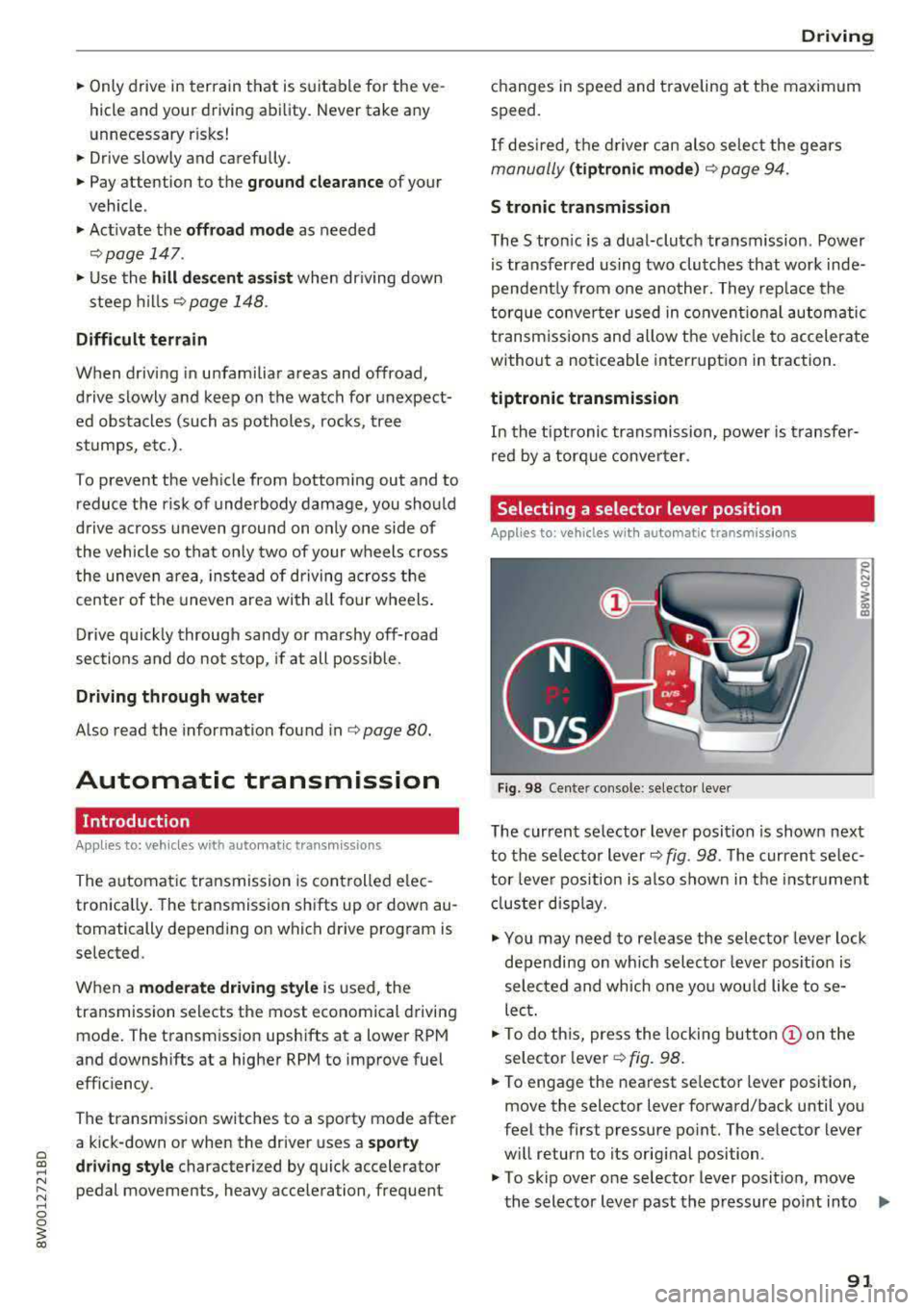
Fig. 98 Center console : se lector lever
The current se lector lever position is shown next
to the se lector lever
c::> fig. 98 . The current se lec
tor leve r position is a lso shown in the instr ument
cl uster disp lay.
.. You may need to release the selector lever lock
depending on wh ich selector leve r pos ition is
selec ted and which one you would like to se
lect.
.. To do th is, press the locking button (!) on the
selector
l ever¢ fig. 98.
.,. To engage the nearest se lector lever position,
move the selector lever forward/back until you
feel the first pressure po int. The selector lever
w ill return to its original position .
.,. To skip over one selector lever position, move
the selector lever past the pressure point into .,,.
91
Page 94 of 403

Driving
the desired position . The selector lever will re
turn to its original position.
F or examp le, you c an skip over the
N posit ion if
you would like to go directly from D into
R.
Selector lever lock
The se lector lever lock prevents you from se lect
i n g a position un intent ionally, causing the vehicle
to ro ll. Whe n engaging some sele ctor lever posi
tions , you must press t he locking
bu tton (!) on
the selector leve r and/or press the brake pedal
¢ fig . 98.
You mus t press the brake pedal to engage a se
lec to r l ever pos it ion when the engine is running
an d the vehicle is stationary .
You do not have to press the brake peda l if yo u
shift from D to
R with in one second. This allows
you to " roc k" the veh icle to free it when it is
s tuck .
P - Park
This se lecto r lever position p revents the vehicle
from rolling . Only s hif t in to par k w hen the veh i
cle is
s tat ionary ¢.&. . To selec t the P se lector lev
e r position, press the P bu tton @ on the selec to r
lever ¢ fig. 98 . P appears next to the selector lev
er.
Appl ies to veh icles w ith S tro nic t ra nsmission:
t he par king lock can only be released when t he
ignition is switched on and the b rake pedal is
pressed. To release the parking lock, press the
brake pedal, press the lock ing
button (!) on the
selector lever and select the desired position
¢ fig. 98. The engine must a lso be started to en
gage the Dor R se lector lever posit io n.
App lies to vehicles w ith tiptronic transm iss ion:
the park ing lock can only be released when the
engine is running and the brake pedal is pressed.
To re lease the park ing lock, press the brake ped
al, press the locking
button (!) on the selector
leve r and se lect t he des ired
posit ion ¢ fig. 98.
P engages automatically if you switch t he engine
off while the selector leve r is in D, E, S, R or man
ua l mode .
92
If you swi tc h the engine off when the N selector
l ever position is selected, the t ransm ission re
mains in
N for approx imately 30 minutes and
then Pis engaged. The vehicle is not secured
from ro lling in the
N selector lever pos ition, so
yo u need to set the parking brake
®l ¢ page 88 .
You m ust use the park ing lock emergency re lease
before towing the
vehicle ¢ page 97.
R- Reverse
The reverse gea r is engaged in th is posi tion . On ly
se lect reve rse gear when t he vehi cle is stationary
and t he engine is running at idle
speed ¢.&, . To
engage the
R se lector lever position, press the
bra ke peda l, press the locking
button (!) on the
selector lever and select the
R pos it ion ¢ fig. 98.
A confi rmation tone will sound when the reverse
gear is engaged.
N - Neutral (idle)
The transmission is in idle in th is po sit ion. To en
gage the
N selector lever position, press the lock
i ng
button (!) on the se lector lever and sh ift into
the
N pos ition ¢ fig. 98.
I f you swi tc h t he eng ine off when the N sele ctor
l eve r posit ion is sele cted, the t ransm iss ion re
mains in
N for approximately 30 minutes and
then Pis engaged.
Yo u c anno t se lec t th e N po sition w hen the ig ni
tion is swi tched off. When dr iv ing th rough an au
tomat ic car wash, fi rst select the N position and
then turn the eng ine off.
Fo r safe ty re asons , the veh icle canno t be lo cked
when the transmiss io n is in t he N pos it ion .
DIS -Driving forward
When the transm iss ion is in the D/S posit io n, it
can be ope ra ted e ither in the no rma l D mode o r
i n the S sport mo de. Move the sele ctor leve r back
to engage the S sport mode. You c an on ly se lect
t h e S selector lever position when the Dor E pos i
tion is se lected . To select the Dor E position
again w hen S is engaged, move the selector lever
back ¢.&. . To sh ift from N to D when traveling at
speeds below 1 mph (2 km/h), p ress the brake
pedal and shift into the D
position ¢.&. . .,.
Page 95 of 403

In the no rmal mode D, the transmission a uto
matica lly selects the suitab le gear ratio. It de
pends on eng ine load, vehicle speed and driving
style.
Select the
sport mode S for sporty driving. The
vehicle makes full use of the engine's power.
Shifting may become noticeable when accelerat ing.
The S selector lever position engages automati
cally when you se lect
Dynamic mode in drive se
l ect*.
A WARNING
Read and follow all WARNINGS.
-The vehicle can roll even if the ignition is
switched off.
-Power is sti ll transmitted to the wheels
when the eng ine is running at idle . To pre
vent the veh icle from "creeping", you must
keep your foot on the brake in all selector
lever positions (except P and N) when the
engine is running .
-Before opening the hood, select the P selec
tor lever position and set the parking brake.
This reduces the risk of an accident. Always
read and fo llow the applicable warnings
¢ page 323, Working in the engine com
partment.
@ Tips
If you accidentally se lect N wh ile d riving, take
your foot off the accelerator pedal and wa it
for the engine to slow down to idle before se
lect ing Dor S.
Driving tips
Appl ies to: vehicles with automatic transmissions
Starting the engine
.,. The P or N position must be selected.
Starting from a stop
.. Press and hold the brake pedal.
~ .. Start the engine ¢ page 83 .
;::; .,. Press the lock ing button @ on the selector Lev-,....
:::l er and select the D, E, So r R position 0
3 ¢page 91 .
.. Wait a moment until the transmission shifts.
You will notice a slight movement when the
gear engages .
.. Release the brake pedal and press the accelera-
tor
pedal ¢&, .
Various convenience functions are available for
start ing on h ills
¢ page 89.
Stopping temporarily
.,. Press the brake pedal to stop the vehicle, for
examp le at a traffic light. Do not press the ac
celerator pedal when doing this .
.. To prevent the vehicle from rolling when you
start driving, set the parking brake when stop
ping on steep
hills ¢&, .
.. The parking brake will release automatically
and the vehicle will start moving once you press
the accelerator pedal.
Stopping /parking
If the selector lever is not in the P position when
you open the driver's door, the vehicle could roll.
.. Press and hold the brake peda l¢ &, .
.. Set the parking brake.
.. To select the P selector lever posit ion, press the
P button
@ on the selector lever¢ page 91 ,
fig . 98 .
Under certain conditions, such as driving in the
mountains or when towing a trailer, it may be
helpful to switch to manual mode temporar ily
and shift
manually to adapt to the driv ing cond i
t ions ¢ page 94 .
On hills, activate the park ing brake first and then
shift into the P
position ¢ page 88. This prevents
too much stress from being placed on the locking
mecha nism .
A WARNING
--The vehicle can roll even when the engine is
switched off.
-Unintended vehicle movement can lead to
. . . . serious mJunes .
-To reduce the r isk of an accident, do not
press the accelerator pedal when changing
the selector lever position while the vehicle
is stationary and the engine is running.
93
Page 97 of 403

a co .... N ,....
N .... 0 0
3 co
.,. To shift down a gear, tap the 0 shift paddle.
.. To engage the lowest gear, hold the 0 shift
paddle.
.. If you do not press a shift button within a short
time while in the D/S position, the transmission
will return to automatic mode. To keep shifting using the shift paddles, move the selector lever
to the right out of the D/S position .
.,. When you want to shift out of tiptronic mode,
press and hold the
0 shift paddle for a longer
period of time or move the selector lever back
and release it.
The transmission automatically shifts up or down before critical engine speed is reached.
The transmission only allows manual shifting
when the engine speed is within the permitted
range.
@ Tips
- If you shift to the next lowest gear, the
transmission will only shift if the engine will
not be over-revved.
- With kick-down, the transmission shifts to a
lower gear, depending on vehicle speed and
engine speed.
- tiptronic does not work if the transmission
is running in emergency mode.
Kick-down
Applies to: vehicles with automatic transm issions
Kick-down enables maximum acceleration.
When you press the accelerator pedal down be
yond the resistance point, the automatic trans
mission downshifts into a lower gear and the en
gine utilizes its full power , depending on vehicle
speed and engine RPM. It shifts up into the next
higher gear once the maximum specified engine
RPM is reached.
A WARNING
Please note that the wheels could spin on
slick or slippery roads when kick-down is ac
tive .
-
Driving
Launch control program
Applies to: vehicles with S tronic transmission
The launch control program provides the best
possible acceleration when starting from a stop .
Requirement: the engine must be at operating
temperature and the steering wheel must not be
turned .
.. Deactivate the Start/Stop system* c> page 87 .
The LED in the ICA> ~I button turns on .
.. Applies to: seda n: Press the I.B OFFI button
briefly while the engine is running
c> page 147.
The II indicator light turns on and the mes
sage
Stabilization control (ESC): sport. Warn·
ing! Restricted stability
appears in the instru
ment cluster display .
.. Applies to: allroad: Press the i.i, O FF I button
briefly while the engine is
running ¢ page 147.
The II indicator light turns on and the mes
sage
Stabilization control (ESC): offroad.
Warning! Reduced stability
appears in the in
strument cluster display .
.. Pull the selector lever back out of the D/S posi
tion briefly to select the S position or select the
Dynamic driving mode in drive se-
lect* ¢ page 134 .
.,. Press the brake pedal firmly with your left foot
and hold it all the way down for at least one
second .
.. At the same time, press the gas pedal all the
way down with your right foot until the engine
reaches and stays at a high RPM level.
.. Remove your foot from the brake pedal within
five
seconds ¢,,&. .
A WARNING ~
-Always adapt your driving to the traffic flow.
- Only use the Launch control program when
road and traffic conditions allow it and oth
er drivers will not be endangered or both
ered by your driving and the vehicle's accel
eration.
- Please note that the drive wheels can spin
and the vehicle can break away when sport
mode/offroad mode is switched on, espe
cially when the road is slippery.
95