service AUDI S4 2018 User Guide
[x] Cancel search | Manufacturer: AUDI, Model Year: 2018, Model line: S4, Model: AUDI S4 2018Pages: 403, PDF Size: 66.81 MB
Page 34 of 403
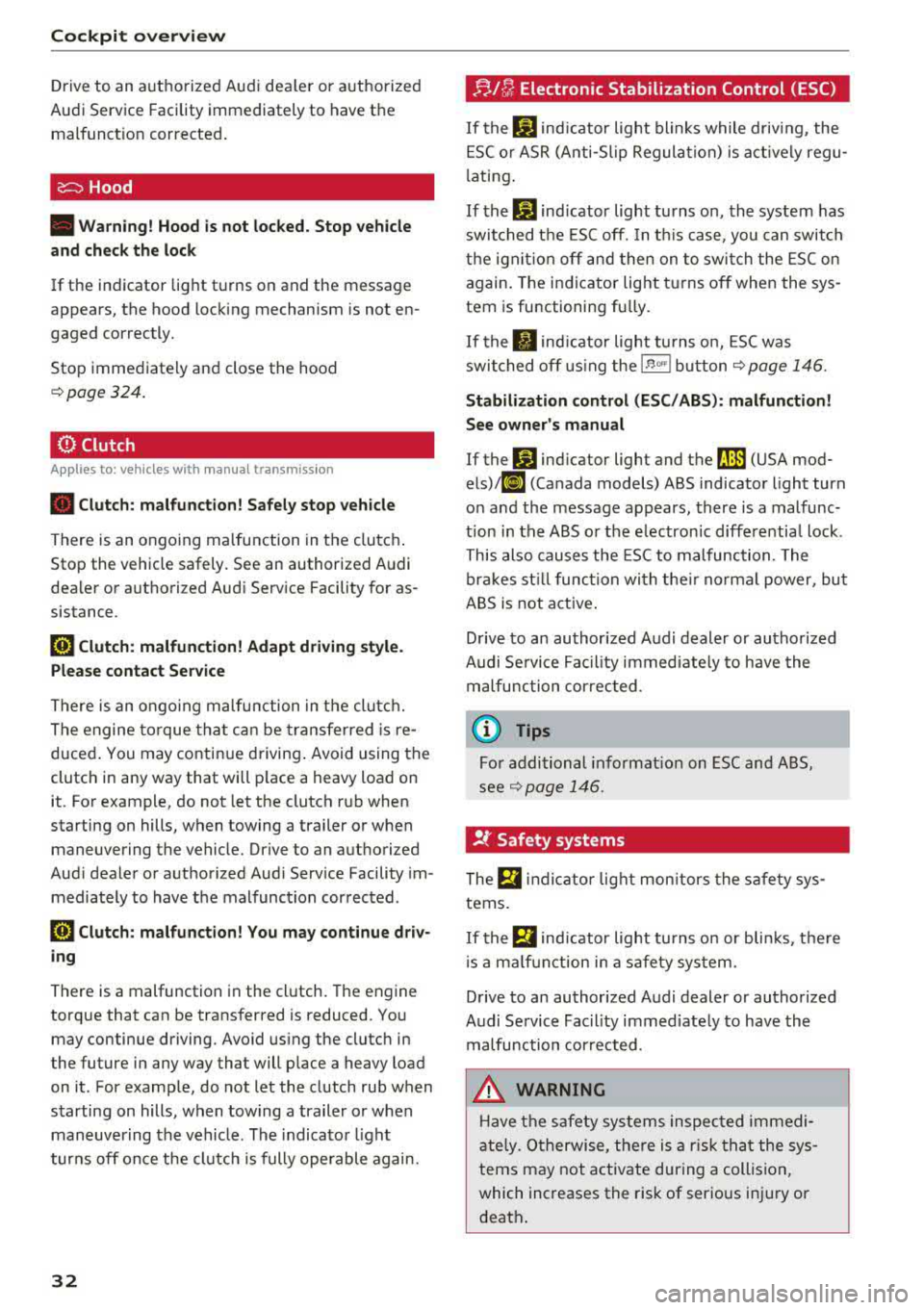
Cockpit over view
Drive to an autho rized Audi dea ler or a uthorized
Audi Service Facility immediately to have the
malfunct ion corrected.
c::=:,Hood
• Warning! Hood is not locked. Stop vehicle
and check the lo ck
If the indicator light turns on and the m essage
appears, the hood locking mechanism is not en
gaged correctly.
Stop immediate ly and close the hood
<::> page 324.
0 Clutch
Appl ies to: ve hicles w ith manu al transmiss ion
• C lutch: malfun ction! Safely stop vehicle
There is an ongoing ma lfunction in t he clutch .
Stop the vehicle safely. See an authorized Audi
dea ler or a uthori zed Audi Serv ice Facility for as
sistance .
[Pl Clut <:h: malf un<:ti on! Adapt dri ving style .
Please contact Ser vice
There is an ongo ing malfu nction in the clutc h.
The engine torque tha t can be transferred is re
duced . You may continue d riving . Avoid using the
clutch in any way that will p lace a heavy load on
it . For example, do not let the clutch r ub when
starting on hills, when towing a trailer or when
maneuvering the vehicle. Drive to an authori zed
Aud i dealer or authorized Aud i Serv ice Facility im
mediately to have the malfunc tion corrected .
5] Clutch: malfun ction! You ma y continue d riv
ing
There is a malfunction in the clutch. The engine
torque that can be transferred is reduced. Yo u
may continue driving. Avoid using the clutch in
the future in any way that will p lace a heavy load
on it. For examp le, do not let the clutch rub when
starting on hills, when tow ing a trailer or when
maneuvering the vehicle . The indicato r light
tur ns off once the clutc h is fully operable again.
32
!;.J [/; Electronic Stabilization Control (ESC)
If the bJ indicator light blinks while driving , the
E SC o r ASR (A nti-Sl ip Regulation) is act ively regu
l ating .
If the
bJ ind icator light turns on, the system has
switched the ESC off. In t his case, you can switch
t h e ign it io n off and then on to swi tch the ESC on
again. The indicator light t urns off when the sys
tem is functioning fu lly.
If
the . indicator light turns on, ESC was
swi tched off using the
l.a00I button<::> page 146.
Stabi liz ation contro l (ESC /ABS ): malfunction !
See owner's manual
If the G1 ind icator light and the ~ (USA mod
els),11J (Canada models) ABS indicator light turn
o n and the message appears, there is a malfunc
tion in the ABS o r the e lectronic diffe rentia l lock .
This also causes the ESC to malfunction. The
br akes st ill func tion wi th the ir normal power, bu t
ABS is not active .
D rive to an authorized A udi dealer or authorized
Audi Se rvice Fa cil ity immed iate ly to have the
malfunction cor rec ted .
(D Tips
For addi tional informat ion on ESC and ABS,
see <::>
page 146 .
!I..' Safety systems
The fll indicator lig ht mon itors the safe ty sys
tems.
If the
fll ind icator light turns on or blinks, the re
i s a ma lfunction in a safety system.
Drive to an author ized Audi dealer or authorized
Audi Se rvice Fac ility immed iate ly to have the
malfunction cor rected .
_&, WARNING
Have the safety sys tems inspec ted immedi
a tely . O therwise, the re is a ris k t hat the sys
tems may not activate during a collision,
which increases the risk of serious injury or
death .
Page 35 of 403
a co .... N ,....
N .... 0 0
3 co
C© ) Brake system
rm Brakes overheating . Please shift to D
rm Brakes overheating. Please select a gear and
follow gear recommendation
There was a heavy load on the brakes. Engage a
suitable gear (manual transm ission) or place the
selector lever in the D/S position (automat ic
transmission) to use the eng ine braking effect
and reduce the load on the brakes.
~·
:t:J /(0 : Brake pads
II (USA models)/£i1 (Canada models) Brake
pads: wear limit reached. You can continue driv
ing. Please contact Service
The brake pads are worn.
Drive to an authorized Aud i dealer or authorized
Aud i Service Facility as soon as possible to have
the malfunct ion corrected .
c:l:::, Engine control
II Drive system: malfunction! Please contact
Service
There is an engine control malfunction .
Drive slow ly to an author iz ed Audi dealer or au
thor ized Audi Service Facility to have the eng ine
checked .
W Engine control (diesel engine )
Applies to: vehicles with diesel engines
The engine is preheating if the II indicato r light
turns on when the ignition is switched o n.
I f the indicator light does not turn on or b links
while driving , there is an eng ine control malfunc
tion .
Immediately drive slowly to an authori zed Aud i
dealer or authorized Aud i Serv ice Facility to have
the malfunction co rrected .
o Malfunction indicator lamp (MIL)
The malfunction indicato r lamp (MIL) is part of
the On -Board Diagnostic System (OBD II). The Cockpit overview
('4 ,;ymbol turns on when the
ignition is switched
on and turns off again once the engine is started
and running at a steady idle speed. This indicates
that the MIL is function ing correctly.
T he indicator light turns on if there is a malfunc
tion in the engine electronics. See an authorized
Audi dealer or authorized Audi Service Fac ility to
have the malfunction corrected . For additional
information, see
c:::> page 24.
The indicator light can a lso turn on if the fuel fill
er cap is not closed correctly
c:::> page 317.
,m,,
Diesel particulate filter
Applies to : vehicles wit h diesel eng ine a nd diesel particulate
filter
II Particulate filter : malfunction! See owner's
manual
T he diese l particulate filter requires regenera
tion . To support the filter 's self-cleaning func
tion:
Drive for approximately 15 minutes at a mini
mum of 37 mph (60 km/h) in 4th or 5th gear
(manua l transmission) or in the S selector lever
position (automatic transmission). Keep the en
gine speed at approximately 2,000 RPM . The
temperature increase that will result from th is
can burn off the soot in the filter . The ind icator
light will turn off when the cleaning has complet
ed successfully .
If the indicator light does not turn off, drive im
med iate ly to an authori zed Audi dealer or author
ized Audi Service Facility to have the malfunct ion
corrected .
A WARNING "---
Always adapt your speed to the current
weather, road and traffic conditions. You
should never disobey traffic laws in order to
follow driving recommendations .
@ Tips
For additional informat ion on the diesel par
ticulate filter, see
c:::> page 322 .
33
Page 36 of 403
Cockpit overview
!?i Engine speed limitation
(ill Maximum engine speed: XXXX rpm
The engine speed is automatically limited to the
speed displayed in the instrument cluster. This
protects the engine from overheating.
The engine speed limitation deactivates once the
engine is no longer in the critical temperature
range and you have released the accelerator ped
al once.
If the engine speed limitation was activated by
an engine control malfunction, the
II indicator
light also turns on. Make sure the engine speed
does not go above the speed displayed, for exam
ple when downshifting. Drive to an authorized
Audi dealer or authorized Audi Service Facility im
mediately to have the malfunction corrected.
~ ;,,. Engine oil sensor
• Oil level system: malfunction! Please con
tact Service
The sensor to check the engine oil level has
failed. Drive to an authorized Audi dealer or au
thorized Audi Service Facility immediately to have
the malfunction corrected.
• Oil level sensor: oil change necessary. Please
contact Service
Fuel has entered the engine oil as a result of fre
quent short drives. Avoid high engine speeds, full
acceleration and heavy engine loads. Drive to an
authorized Audi dealer or authorized Audi Service
Facility immediately to have the oil changed .
• Oil pressure sensor: malfunction! Please
contact Service
There is a malfunction in the oil pressure sensor.
Drive to an authorized Audi dealer or authorized
Audi Service Facility immediately to have the
malfunction corrected.
f Engine warm-up request
0 Please warm up engine
Fuel has entered the engine oil, either from low
outside temperatures or frequent short drives.
34
Drive until the engine is warm so that the fuel in
the engine oil will evaporate. Avoid high engine speeds, full accelerating and heavy engine loads
when doing this.
Eli) Tank system
ID Please refuel
If the indicator light turns on for the first time
and the message appears, there are about 2.1
gallons (8 liters) of fuel left in the tank.
(jg Please refuel immediately
If the indicator light turns on the message ap
pears, the fuel tank is almost empty. Refuel the
vehicle immediately.
ID Tank system: malfunction! Please contact
Service
Th ere is a malfunction in the fuel tank system.
Drive to an authorized Audi dealer or authorized
Audi Service Facility immediately to have the
malfunction corrected.
{!) Tips
For more information on fueling, see
¢page 317 .
,_ Washer fluid level
m Please add washer fluid
Fill the washer fluid for the windshield washer
system and the headlight washer system* when
the ignition is switched
off¢ page 332.
·
II Windshield wipers: malfunction! Please con
tact Service
There is a malfunction with the windshield wip
ers.
Drive to an authorized Audi dealer or authorized
Audi Service Facility immediately to have the malfunction corrected.
Page 37 of 403
![AUDI S4 2018 User Guide a co .... N ,....
N .... 0 0
3 co
c::S Drivers door
II] Driver s door: malfunction! Shift to P before
l e aving vehi cle. See own ers manual
There is a malfunction in the drivers](/img/6/57559/w960_57559-36.png "AUDI S4 2018 User Guide a co .... N ,....
N .... 0 0
3 co
c::S Drivers door
II] Driver s door: malfunction! Shift to P before
l e aving vehi cle. See own ers manual
There is a malfunction in the drivers")
a co .... N ,....
N .... 0 0
3 co
c::S Driver's door
II] Driver' s door: malfunction! Shift to P before
l e aving vehi cle. See own er's manual
There is a malfunction in the driver's door. Select
the P se lector lever position (automat ic transmis
sion) to secure the vehicle.
Drive to an authori zed Aud i dealer or authorized
Aud i Service Facility immediately to have the
malfunct ion corrected .
-:
If the II indica to r li ght turns on, a b ulb has
fa iled. The message ind icates the location of the
bu lb . Rep lace the b ulb immediately .
Vehicle lights: malfunction! Please c ont ac t
Servic e
There is a malfunction in the headlights or the
light switch . Drive to an authorized Audi dealer o r
author ized Audi Se rvice Facility immed iate ly to
h ave the ma lf u nction co rre cted.
_& WARNING
- Ligh t bul bs are under pressu re and can ex
plode when bulbs are replaced, which in
creases the risk of injury.
- Wi th H ID headlights (xenon headlights), the
high -voltage component must be handled
correctly. Otherwise, there is a risk of fata l
injury.
{(D Dynamic headlight range control
II He adlight range cont rol: malfun ctio n! S ee
o w ner 's manual
There is a malfunction in the headlight range
control system, which may ca use glar e for other
drivers.
Drive to an authorized Audi dea ler o r a uthorized
Audi Servic e Facility immediately to have the
malfunct ion corr ected.
-
Coc kpit o ve rv iew
~O Audi adaptive light
Applies to: vehicles with Audi adaptive light
m;J Audi adapt ive light : malfun ction! See own
er's manual
Adaptive light is not working . The headlights still
funct ion .
Drive to an au thorized Audi dealer or authorized
Audi Service Facility immed iately to have the
malfunction corrected .
@ Light/rain sensor
!;I Automatic headlights: ma lfunction! See
o wner' s manual
!;I Automati c wipers : malfunction ! See owner' s
manual
The light/rain sensor is malfunctioning.
The low beams remain switched on at a ll times
for safety reasons when the light switch is in the
AUTO position. However, you can continue to
turn the lights on and off using the light switch.
You can still contro l all functions that a re inde
pendent of the rain sensor through the wind
shield wiper leve r.
Drive to an au thori zed Audi dealer or authori zed
Audi Service Facility immed iately to have the
malfunction corrected.
Q Suspension control
Applies to : vehicles with suspension control
II Su sp ension: malfunction! You may continue
drivin g
There is a suspension control malfunction .
Drive to an authorized Audi d eal er or authorized
Audi Service Facility immed iate ly to have the
malfunction correc ted.
r : All wheel drive/sport differential
Applies to: vehicles with all wheel drive/sport diffe rentia l
(II All-wh eel dri ve : malfun ction! You may con-
tinue driv ing. Pl ease contact Service
.,.
35
Page 38 of 403
Cockpit over view
Ill Sport d ifferential : malfunction! Please con
tact Se rvice
There is a malfunction.
Dr ive to an authorized Aud i dealer or authorized
Aud i Serv ice Facility immediately to have the
malfunct io n corrected.
Ill All-whee l dri ve o verhe ating . Ple ase a dapt
driving st yle . See owner' s manual
Ill Sport d ifferential : temper ature too high.
Ple ase adapt drivi ng sty le
The transmission temperature has increased sig
nificant ly due to the sporty driv ing manner. Drive
in a less sporty manner until the temperature re
turns to the normal range and the indicator light
sw itches of .
A WARNING
Contact an authorized Audi dealer or author
ized Aud i Serv ice Facility if the all whee l dr ive/
sport diffe rential is fau lty o r malfunctioning.
The repair must be performed by trained per
sonnel using the correct oil in order to ensure
safety.
¢¢ Turn signals
If the . or .l indicator light b links, a turn s ig
na l is turned on. If bot h indicator lig hts are blink
ing, the emergency flashers are on.
If an indicato r light blinks twice as fast as usua l,
a t urn signa l bulb has failed. Caref ully dr ive to an
authorized Audi dealer or author ized Audi Service
Facility immediately to have the malfunction cor
rected.
36
Page 39 of 403
a co .... N ,....
N .... 0 0
3 co
Opening and closing
Central locking
Description
You can lock and unlock the veh icle centrally . You
have the following options:
-Remote control key¢ page 40,
-Sensors in the door handles* ¢ page 40,
-Lock cylinder on the driver's door c::> page 42,
or
-Interior central locking switch c::> page 41.
Turn signals
The turn s ignals flash twice when you unlock the
veh icle and flash once when you lock the veh icle.
If they do not flash, then one of the doors, the
rear lid or the hood is not closed.
Automatic locking (Auto Lock)
The Auto Lock funct ion locks all doors and the
luggage compartment lid once the speed has
ex
ceeded approximately 9 mph (15 km/h).
The vehicle can be unlocked if the opening func
tion in the central locking system sw itch is used
or one of the door handles is pulled.
In the event of a crash with airbag deployment,
the doors will a lso automat ically unlock to allow
access to the vehicle.
Selective door unlocking
The doors and luggage compartment lid will lock
when they close . You can set in the Infotainment
system whether
only the driver's door or the en
tire vehicle should be unlocked when unlocking
c::> page 41.
Unintentionally locking yourself out
Only lock your vehicle when all of the doors and
the luggage compartment lid are closed and the remote control key is not in the vehicle . This
helps to prevent you from locking yourse lf out
accidentally .
The follow ing cond it ions prevent you from lock
ing your remote control key in the vehicle:
Opening and closing
-If the driver's door is open, the vehicle cannot
be locked by pressing the
fi'.) button on the re
mote contro l key or by touching the locking
sensor* on a door.
-If the most recently used convenience key* is
detected in the luggage compartment, the lug
gage compartment lid automatically unlocks
again after closing it.
-If the convenience key* that was last used is de
tected inside the vehicle, then the vehicle will
not be able to lock from the outside .
_& WARNING
---
-When you lock your vehicle from outs ide,
nobody- espec ially children
-should rema in
inside the vehicle. Remember, when you
loc k the vehicle from the outside the win
dows cannot be opened from the inside .
- When you leave the vehicle, always take the
ignit ion key with yo u. This will prevent pas
sengers (children, for examp le) from acci
dentally being locked in the vehicle should
they accidentally press the power locking
switch in the doors.
- Do not leave children inside the vehicle
un
supervised. In an emergency it would be im
possible to open the doors from the outside
without the key.
(D Tips
-Do not leave valuables unattended in the ve
hicle. A locked vehicle is not a safe!
-The LED in the driver's door rail blinks when
you lock the vehicle. If the LED lights up for
approximately 30 seconds after locking,
there is a malfunction in the central locking
system. Have the problem corrected by an
authorized Audi dealer or authorized Audi
Service Facility.
37
Page 40 of 403
Opening and closing
Key set
Fig. 23 Your veh icle key set
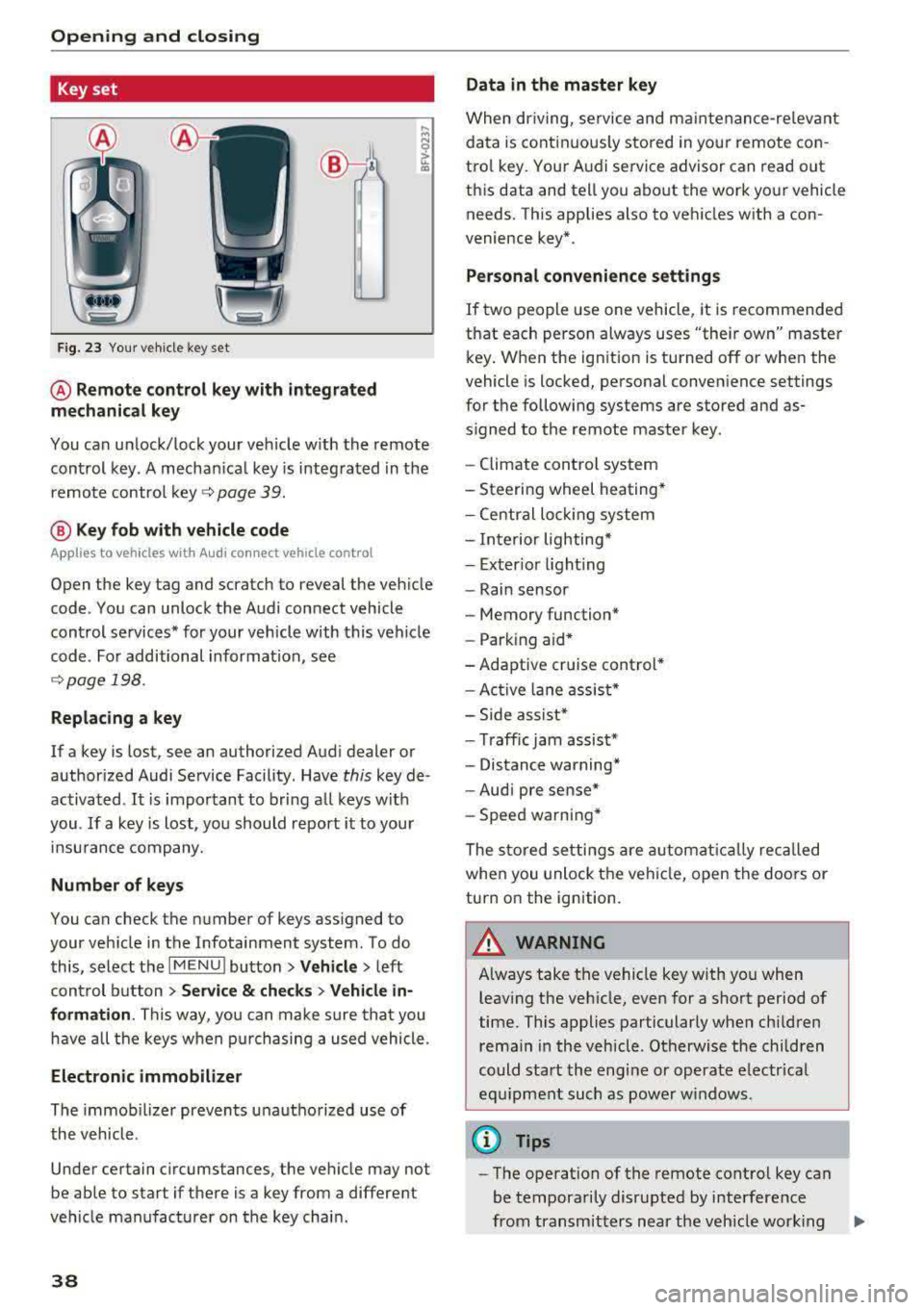
@ Remote control key with integrated
mechanical key
You can unlock/lock your veh icle w ith the remote
control key . A mechan ical key is integrated in the
remote control
key ~ page 39.
@ Key fob with vehicle code
Appl ies to veh icles with A udi co nnect vehicle con trol
Open the key tag and scratch to reveal the veh icle
code . You can unlock the Audi connect vehicle
control se rvices* for your vehicle with this vehicle
code . For additional information, see
~ page 198 .
Replacing a key
If a key is lost, see an authorized Audi dealer or
authorized Audi Service Facility. Have
this key de
activated .
It is important to bring all keys with
you .
If a key is lost, you should report it to your
insu rance company.
Number of keys
You can check the number of keys assigned to
your vehicle in the Infotainment system . To do
this, select the
IM ENU I button > Vehicle > left
control button
> Service & checks> Vehicle in·
formation . This way, you can make sure that you
have all the keys when purchasing a used vehicle.
Electronic immobilizer
The immob ilizer prevents unauthorized use of
the vehicle .
Under certain circumstances, the vehicle may not
be able to start if there is a key from a different
veh icle manufacturer on the key chain.
38
Data in the master key
When dr iving, service and maintenance-re levant
data is continuously stored in your remote con
trol key. Your A udi service advisor can read out
this data and tell you about the work your vehicle needs . This applies also to vehicles with a con
venience key*.
Personal convenience settings
If two people use one vehicle, it is recommended
that each person always uses "their own" master
key . When the ign ition is turned off or when the
vehicle is locked, personal convenience settings
for the following systems are stored and as
s igned to the remote master key.
- Climate control system
-Steering wheel heating*
-Central lockin g system
-Interior lighting*
-Exter ior lighting
- Rain sensor
- Memory function*
- Park ing a id *
-Adaptive cr uise control *
-Active lane assist*
-Side assist*
-Traff ic jam assist*
- Distance warning*
-Audi pre sense*
- Speed warning *
The stored settings are automatically recalled
when you unlock the vehicle, open the doors or
turn on the ignition .
~ WARNING
Always take the vehicle key with you when
leaving the vehicle, even for a short period of
time. This applies particularly when children
rema in in the vehicle . Otherwise the children
could start the engine or operate electrical
equipment such as power windows .
(© Tips
-
-The operation of the remote control key can
be temporarily disrupted by interference
from transmitters near the veh icle work ing
1J11,
Page 50 of 403
Opening and closing
Child safety lock
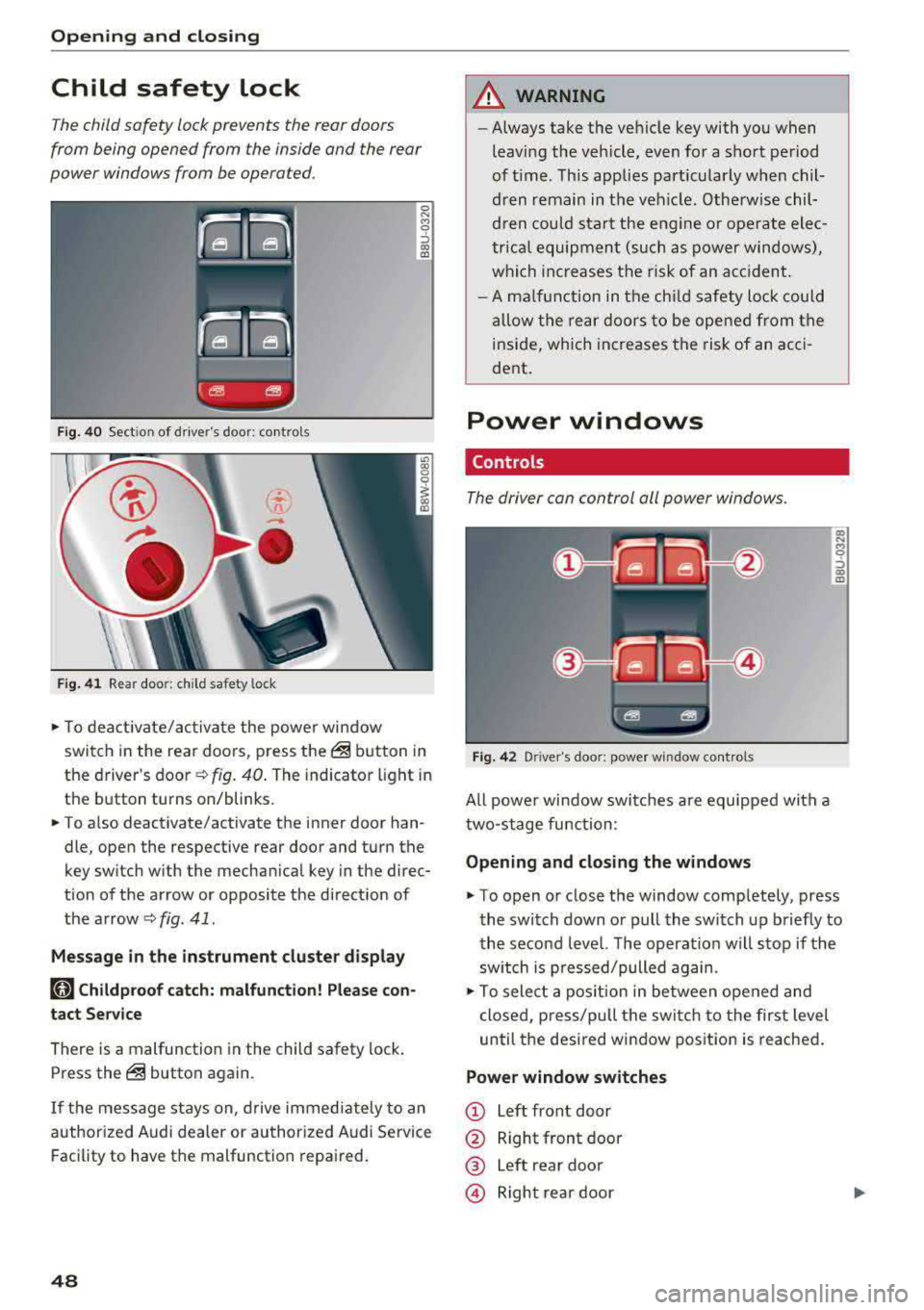
The child safety lock prevents the rear doors
from being opened from the inside and the rear
power windows from be operated .
Fig. 40 Section of driver's door: co ntrols
Fig. 41 Rear door: chil d safety lock
0 N M 9 ::J co (D
• T o deactivate/activate the power window
switch in the rear doors, press the@ button in
the driver 's
door ¢ fig. 40. The indicator light in
the button turns on/blinks.
• To also deactivate/activate the inner door han
dle, open the respective rear door and turn the
key switch with the mechan ical key in the direc
tion of the arrow or opposite the direct ion of
the arrow
<=> fig. 41 .
Message in the instrument cluster display
faj Childproof catch: malfunction! Please con
tact Service
There is a malfunction in the child safety lock.
Press the@ button again.
If the message stays on, drive immediately to an
authori zed Audi dealer or authorized Audi Service
Facility to have the malfunction repaired.
48
A WARNING
-Always take the vehicle key with you when
leav ing the vehicle, even for a short period
of time . This applies part icularly when chil
dren remain in the vehicle . Otherwise chil
dren could start the engine or ope rate elec
trical equipment (such as power windows),
which increases the risk of an acc ident.
- A malfunction in the child safety lock could
allow the rear doors to be opened from the
inside, which increases the risk of an acci
dent .
Power windows
Controls '
The driver con control all power windows .
Fig. 42 Driver"s door: power w indow controls
All powe r window switches are equipped with a
two-stage function :
Opening and closing the windows
a, .... M 0 ::, (X) (D
• To open or close the window completely, press
the switch down or pull the switch up briefly to
the second level. The operat ion will stop if the
sw itch is p ressed/pulled again.
• To select a position in between opened and
closed, p ress/pu ll the switch to the first level
until the desired window position is reached.
Power window switches
CD Left front door
@ Right front door
® Left rear door
© Right rear door
Page 56 of 403
Lights and Vision
Lights and Vision
Exterior lighting
Switching the lights on and off
--- --------...... ~
I
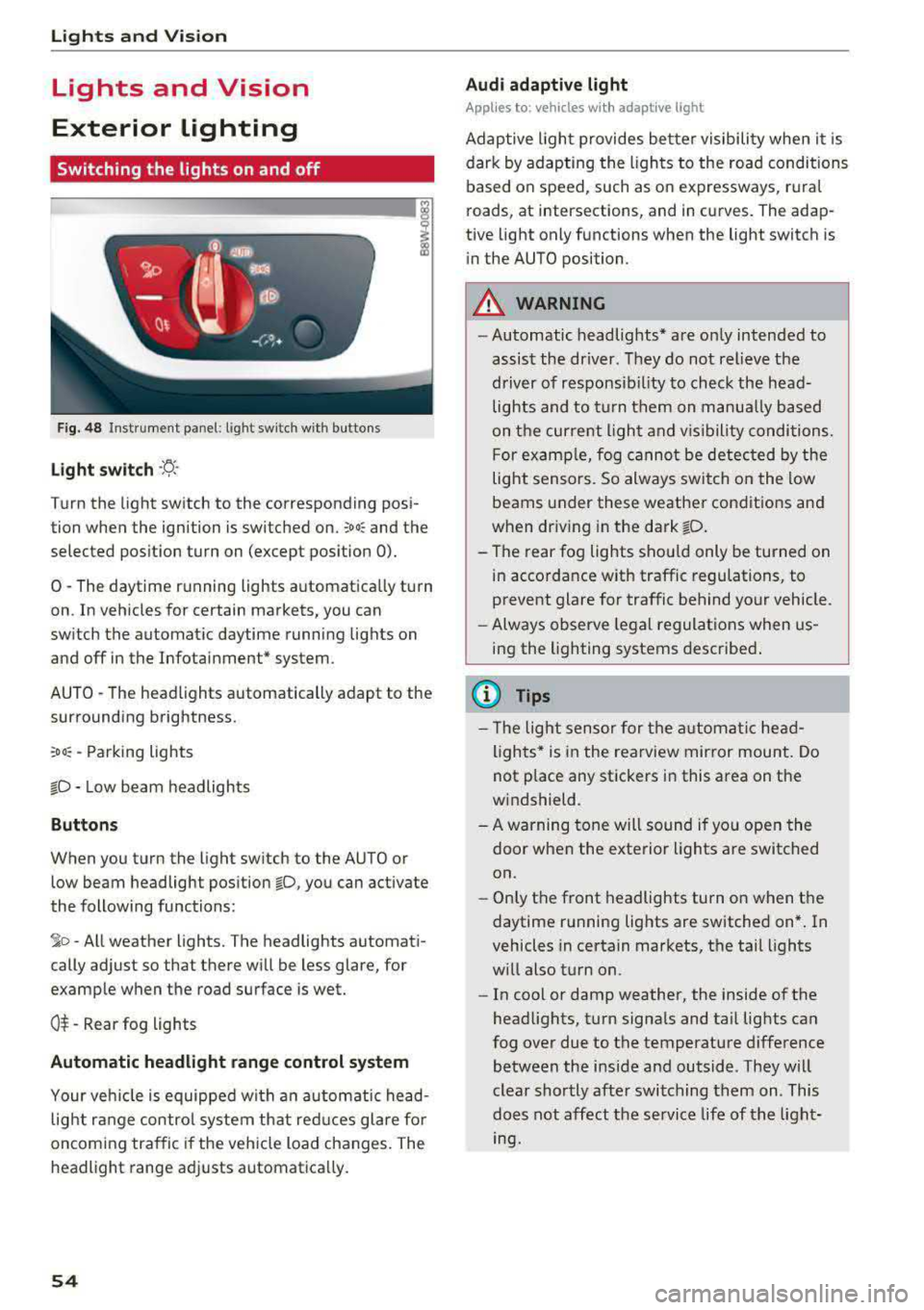
Fig. 48 Instrument panel: light sw itch w ith buttons
Light switch ·ti :
Turn the light switch to the corresponding posi
tion when the ignition is switched on.
;oo: and the
selected pos ition turn on (except pos ition 0).
0 -The daytime r unning lights a utomat ica lly turn
on . In veh icles for certain markets, you can
switch the automatic daytime runn ing lights on
and off in the Infotai nment* system.
AUTO -T he head lights automatically adapt to the
surrounding brightness.
:oo: -Parking lights
io -Low beam headlights
Buttons
When you turn the light sw itch to the AUTO or
low beam headlight position
io, you can activate
the following functions:
jo -All weather lights. The headlights automati
cally adjust so that there will be less glare, for
examp le when th e road surface is wet.
0$ -Rear fog lights
Automatic headlight range control system
Your veh icle is equipped wi th a n automatic head
light r ange control system th at red uces glare fo r
oncoming tra ffic if the vehicle load changes. The
headlight range ad justs automatica lly.
54
Audi adaptive light
App lies to: vehicles wi th adaptive light
Adap tive ligh t provides be tter visibility when it i s
dark by adapting the ligh ts to the road conditions
based on speed, such as on expressways, r ura l
roads, at intersections, and in curves. The adap
tive light only functions when the light switch is
i n the AUTO position.
A WARNING
-Automatic headlig hts* are on ly intended to
assist the driver. They do not relieve the
driver of responsib il ity to check the head
lights and to t urn them on manua lly ba sed
on t he curre nt ligh t and v is ibility conditions.
F or examp le, fog cannot be detec ted by the
light sensors. So always switch on the low
beams under these weather condit ions and
when dr iv ing in the dark
fD .
- The rear fog lights shou ld only be turned on
in accordance w ith traffic regulations, to
prevent glare for traffic behind your vehicle.
- Always observe legal regulat ions when us
ing the lighting systems desc ribe d.
{l) Tips
- Th e light sensor for the a utomat ic he ad
lights * is in the rearview mir ror mount. Do
not p lace any stickers in this area on the
w indshield.
- A warning tone will sound if yo u ope n the
door when the exte rior lights a re switched
on.
- On ly the front headlights turn on when t he
daytime running lights are switched on* . In
vehicles in certain markets, t he tail lights
w ill also t urn on.
- In cool or damp weather, the inside of the
head lights, t urn signa ls and ta il lig hts can
fog over due to the temperature difference between the inside and outside. They w ill
clear shortly afte r switching them on. This
does not affect the service life of t he light
mg.
Page 63 of 403

a co .... N ..... N .... 0 0
3 co
®-Clean the windshield . The wipers wipe one
time after severa l seconds of driving to remove
water drop lets. You can switch this function off
by moving the lever to position ® within 10 sec
onds of the afterwipe. The afterwipe function is
reactivated the next time you switch the ignition
on .
C lean the headlights*. The headlight washer sys
tem" operates only when the low beam head
lights are on . If you move the lever into position
@, the headlights will be cleaned at fixed inter
va ls .
Applies to: allroad:
@ -Wiping the rear window.
T he number of wipes depends on the windsh ield
wiper movement .
The rear wiper automatically switches on when
the reverse gear is selected and the front wind
shield wipers are on and running .
Applies to: allroad:
0 -Clean ing the rear win
dow. The number of wipes depends on how long
the lever is held in position
(J).
A WARNING
-The rain sensor is only intended to assist the
dr iver . The driver may still be responsible
for manually sw itching the w ipers on based
on v is ibi lity conditions.
- The windshie ld may not be treated with wa
ter-repelling windshield coating agents . Un
favorable conditions, such as wetness, dark
ness or low sun, can result in increased
glare, which increases the risk of an acc i
dent . Wiper blade chatter is also possible.
- Properly functioning windsh ield wiper
blades are required for a clear view and safe
driving
¢ page 62, Replacing wiper
blades.
(D Note
- If there is frost, make sure the windshie ld
wiper blades are not frozen to the wind
shield. Switching on the windshield wipers
when the blades are frozen to the wind
shield can damage the wiper blades .
- The windshield wiper system must be
switched off ( lever in position 0) before us-
Lights and Vision
ing a car wash. This prevents the wipers
from switching on unintentionally and caus ing damage to the windsh ield wiper system .
(D Tips
- The windshie ld wipers switch off when the
ignition is switched off . You can activate the
windshield wipers after the ignition is
switched back on by moving the w indshield
wiper lever to any position.
- Worn or dirty windshie ld wiper blades resu lt
in streaking. Th is can affect the rain sensor
function . Check your windshield w iper
blades regularly .
- The washer fluid nozzles for the windshield
washer system are heated at low tempera
tures when the ign ition is on .
- When stopping temporarily, such as
at a
traffic light, the speed of the windshield
w ipers automatically reduces by one level.
Cleaning the wiper blades
Clean the wiper b lades when you see w iper
streaks. Use a soft cloth and a glass cleaner.
Windshield wiper
.,. Place the windshield wiper arms in the service
position
¢ page 62.
.,. Fold the windsh ie ld wiper arms away from the
w indshie ld.
Rear window wiper
Applies to : all road
.,. Fold the wiper arm away from the rear window.
A WARNING
D irt y windshield wiper blades can impa ir vi
sion, wh ich i ncreases the risk of an accident .
-
61