tow AUDI S6 2008 User Guide
[x] Cancel search | Manufacturer: AUDI, Model Year: 2008, Model line: S6, Model: AUDI S6 2008Pages: 390, PDF Size: 88.42 MB
Page 102 of 390
-L---S=..:: e...:a :.. t::..: s:......: a::..: n~ d:...:: s...:t ...:o ...:r...: a:.:..: g~ e ________________________________________________ _
Applies to vehicles: wi th load- through facility and removab le s ki sack
Ski sack
Use the removable ski sack to transport and protect skis
and other Jong, light items in the passenger compart
ment.
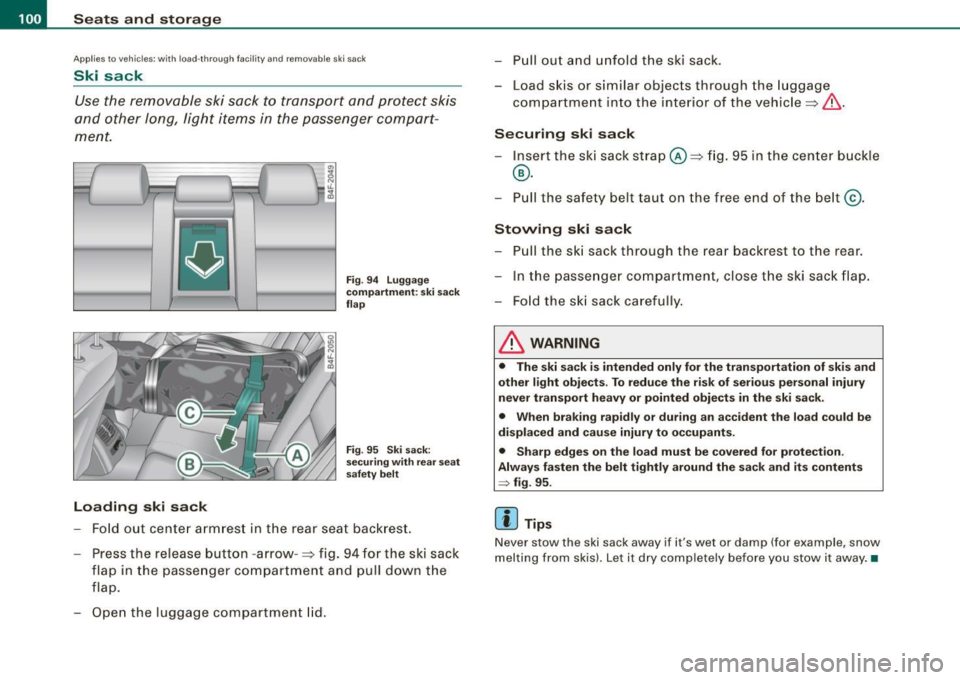
Loading ski sack
Fig . 94 Luggage
compartment: ski sack
flap
Fig . 95 Ski sack:
securing with rear seat
safety belt
Fold out center armrest in the rear seat backrest.
- Press the release button -arrow -=> fig. 94 for the ski sack
flap in the passenger compartment and pull down the
flap.
- Open the luggage compartment lid. -
Pull out and unfold the ski sack.
- Load skis or similar objects through the luggage
compartment into the interior of the vehicle =>
&-
Securing ski sack
- Insert the ski sack strap@=> fig. 95 in the center buckle
@.
- Pull the safety belt taut on the free end of the belt @.
Stowing ski sack
- Pull the ski sack through the rear backrest to the rear.
- In the passenger compartment, close the ski sack flap.
- Fold the ski sack carefully.
& WARNING
• The ski sack is intended only for the transportation of skis and
other light objects . To reduce the risk of serious personal injury
never transport heavy or pointed objects in the ski sack.
• When braking rapidly or during an accident the load could be
displaced and cause injury to occupants.
• Sharp edges on the load must be covered for protection .
Always fasten the belt tightly around the sack and its contents
~ fig. 95 .
[ i ] Tips
Never stow the ski sack away if it's wet or damp (for example, snow
melting from skis). Let it dry completely before you stow it away. •
Page 129 of 390
![AUDI S6 2008 User Guide On th e road -_________________________________ __::..:....:.......;,;_;_;_ _ __;____,J
Switching the ignition on
- Press t he [ S TART] button once to the first stage to switch
on on](/img/6/57596/w960_57596-128.png "AUDI S6 2008 User Guide On th e road -_________________________________ __::..:....:.......;,;_;_;_ _ __;____,J
Switching the ignition on
- Press t he [ S TART] button once to the first stage to switch
on on")
On th e road -_________________________________ __::..:....:.......;,;_;_;_ _ __;____,J
Switching the ignition on
- Press t he [ S TART] button once to the first stage to switch
on on ly the ignition.
Starting the engine
- Step on t he brake.
- Move the se lector leve r to t he P or N posit ion
~ & .
- Press the [ STA RT ] button to t he second s tage to star t the
engine.
After a cold engine is started, there may be a brief period of
increased noise because oil pressure must first bui ld up in the
hydraulic valve adjusters . This is norma l and not a cause for
concern.
If the engine does not start immed iately, stop trying after 10
seconds and then try to restart the engine about 30 seconds later.
& WARNING
Ne ver all ow the e ngine to run in confined spa ce s -danger of
asphyxi atio n.
0 Note
• Avo id high engi ne rp m, full throttle and heavy engine loads unti l
the engine has reached operating temperature -otherwise you risk
engine damage .
• T he engine cannot be started by pushing or towing the vehic le.
c£> For the sake of the environment
Do not allow the engine to warm up with the vehicle stationary . Start
driving right away . In this way you avo id unnecessary emissions .
Contro ls and eq uip
ment
[ i ] Tip s
If you open the driver's door when t he ign itio n is switched on, a
buzzer sounds and the message
Ign ition i s on appears in the instru
ment cluster display. P lease switch the ignition off. •
Applies to vehic le s: with Adva nced Key
Switching engine off with the [STOP] button
Bring yo ur vehicle to a comp le te sto p.
Fig. 12 5 Advan ced
Key: E NGIN E STO P
button
Move the se lector lever to the P o r N position .
Press the [
STOP I button ~ fig . 125.
Pressing the ( STO P] button once switches off the engine and the
ignition . If you press the ( S T OP! button again for more than 1
second, the steering is locked, provided that the selector leve r is in
the P position
~ & .
Emergency OFF function
If necessary , the engine can be switched off with the selector leve r
in the R, Dor S positions. To do so, step on the brake peda l and
press and hold the ( STOP] button (vehicle speed must be less than
6 mph/ 10 km /h. .,,_
Vehicle care I I irechnical data
Page 132 of 390
![AUDI S6 2008 User Guide • .___O_ n_ t_ h_ e_ r_ o_ a_d ____________________________________________________ _
[ i] Tips
• You can apply the parking brake at any time - even with the igni
tion turned](/img/6/57596/w960_57596-131.png "AUDI S6 2008 User Guide • .___O_ n_ t_ h_ e_ r_ o_ a_d ____________________________________________________ _
[ i] Tips
• You can apply the parking brake at any time - even with the igni
tion turned")
• .___O_ n_ t_ h_ e_ r_ o_ a_d ____________________________________________________ _
[ i] Tips
• You can apply the parking brake at any time - even with the igni
tion turned off. The ignition must be turned on in order to release
the parking brake .
• Occasional noises when the parking brake is applied and
released are normal and are not a cause for concern .
• The parking brake goes through a self -test cycle at regular inter
vals - when the vehicle is parked . Any associated noises are
normal. •
Parking
To prevent a parked vehicle from rolling away, there are a
few things you should do.
When you park your vehicle, do the following
- Stop the vehicle using the brake pedal.
- Pull the switch to apply the electromechanical parking
brake.
- Move the selector lever into the
P position ~& .
- Switch off the engine and remove the ignition key from
the ignition lock.
When you park your vehicle on hills, do the
following - Stop the vehicle using the brake pedal.
- Pull the switch to apply the electromechanical parking
brake.
- If you are parking headed downhill, turn the front wheels
toward the curb. - If you are
parking headed uphill, turn the front wheels
awayfrom the curb.
- Move the selector lever into the P position .
- Switch off the engine and remove the ignition key from
the ignition lock.
& WARNING
This is how you can reduce the risk of injury when leaving your
vehicle.
• Never park the vehicle where it can come in contact with dry
grass, spilled fuel or any other flammable materials.
• When parking on hills, always turn the wheels so that the front
wheels will first roll into the curb, if the vehicle should start to roll.
• Never allow anyone -especially small children -to remain in the
vehicle when it is locked. Locked doors make it more difficult for
rescuers to access the passenger compartment in the event of an
emergency. Danger to life!
• Never leave children unsupervised in the vehicle. Children
could release the parking brake or move the gearshift lever out of
gear. The vehicle could start to roll away and cause an accident.
• No matter what the season is, the temperature in a parked
vehicle can reach dangerous levels.
0 Note
• Please exercise care when you park your vehicle in parking areas
with parking barriers or curbs. Parking barriers and curbs vary in height and could damage your bumper and related components as
the front of your vehicle moves over a barrier or curb that is too
high, as you park or as you back out of a parking spot. In order to be
sure that no such damage can occur, you may wish to stop short of
having the front tires of your car touch the parking barrier or curb . ..,_
Page 135 of 390
On the road -
----------------
The display=> page 132, fig. 128 will show the set speed . The
display may vary depending on the type of disp lay in your vehicle .
The indicator light
CRU ISE (US model) I (')0 (Canadian mode l) wi ll also
light up in the instrument cluster.
The speed is kept constant via an engine output adjustment or active brake intervention .
_& WARNING
• Always pa y attent ion to traffic even whe n the crui se control is
switc hed on. You are alw ays r esp onsi ble for your speed and the
di sta nce b etween your vehi cle and other vehi cle s.
• For s afet y reason s, the crui se control should not be u sed in the
c ity , in stop- and-go traffic , on twi sting roads and when road condi
t ion s a re p oor (s uch a s ice , fo g, gra vel , he avy ra in and h ydro
planing ) - risk of accident.
• Turn off the crui se control tempor arily when e nte ring tu rn
lan es, highway exit lanes or in constru ction zone s.
• Plea se note that in adv ertentl y "re sting " yo ur foot on the accel
erator ped al cau se s the cruise control not to brake . Thi s is b ecau se
the crui se control i s overridden b y the dri ve r's acc eleration .
[ i] Tips
The brake lights il luminate as soon as the brakes decelerate
automatically .•
Ap plie s to v ehicl es: w it h c ruise contro l
Changing speed
-Press lever© in the 0 or O directi on => page 132,
fig. 127 t o in crease or d ec reas e your spe ed.
- Re lease the lever to s ave tha t speed.
Controls and equip
ment Change speed in increments of 1 mph (1 km/h) by
lightly pressing
the lever . If you keep the lever pressed down, you will a lter your
speed in 5 mph (10 km /h) increments .
You can a lso press the acce lerator pedal down to increase your
speed, e.g. if you want to pass someone. The speed you saved
earlier will resume as soon as you release the accelerator pedal.
If , however, you exceed your saved speed by 5 mph (10 km/h) for
longer than 5 minutes, the cruise control will turn off temporarily .
The symbol wi ll go ou t bu t the saved speed wi ll be retained. •
Applie s to v ehic le s: with c ruise cont ro l
Presetting your speed
You can prese t your desire d speed while the vehicle is not
moving.
- Turn o n the ignition .
Pu ll lever © into posit ion
G) => page 13 2, fig. 127 .
Press the lever in the
0 or O direction to increase or
decrease your speed .
- Release the lever to save that speed .
This function makes it possible, for example, to save the speed you
want before driving on the highway. Once on the highway , activate
the cruise contro l by pu lli ng the lever toward
G) . •
Ap plies to ve hic les: with c ruise contro l
Switching the system off
Temporary dea ctivation
- Press the brake pedal, or
I • •
Page 138 of 390
• .___A_ d_ a_ p =- t_iv _ e _ C_ r_u _is_ e_ C _ o_ n_ t _r _o_ l --------------------------------------------
& WARNING (continued)
• Always turn off Adaptive Cruise Control when entering turn
lanes, highway exit lanes and construction zones or similar situa
tions because the vehicle will automatically accelerate to the
stored speed.
• Never rest your foot on the accelerator pedal, especially when
the Adaptive Cruise Control is being used because doing so will
override the braking function and prevent the brakes from being
applied by the system when it detects a situation when the brakes
must be applied.
• Always remember that the Adaptive Cruise Control has limits -
it does not react when you drive towards an obstacle or some
thing else on or near the road that is not moving, such as vehicles stopped in a traffic jam, a stalled or disabled vehicle .
• Always remember that the Adaptive Cruise Control cannot
detect a vehicle that is driving towards you in your traffic lane and
that it cannot detect narrow vehicles such as motorcycles and
bicycles .
[ i) Tips
• For safety reasons, the stored speed is deleted when the ignition
is turned off.
• The Electronic Stabilization Program (ESP) and the Anti -Slip
Regulation (ASRl cannot be deactivated when the Adaptive Cruise
Control is switched on. If the ESP and the Anti -Slip Regulation (ASRl
has been deactivated and you then switch on the Adaptive Cruise
Control, the ESP function will also be activated automatically.
• Damage caused by accidents (e.g. if the vehicle is damaged
when parking) can affect the radar sensor settings. This can cause
the system to malfunction or switch off completely.
• The radar sensor cover is heated. In winter conditions, you
should still check before driving to make sure it is free of ice and
snow. If necessary, clean the area near the radar sensor carefully
=>
page 135, fig. 129. • To
ensure that the radar sensor is not blocked, foreign objects
(e.g. stickers, larger license plate mounts, add -on parts) must not
cover the area near the radar sensor=>
page 135, fig. 129. The area
near the radar sensor must not be painted, either. •
Applies to veh ic les: with Adaptive Cruis e Contro l
How does Adaptive Cruise Control work?
Vehicles traveling ahead are detected with the aid of a
radar sensor.
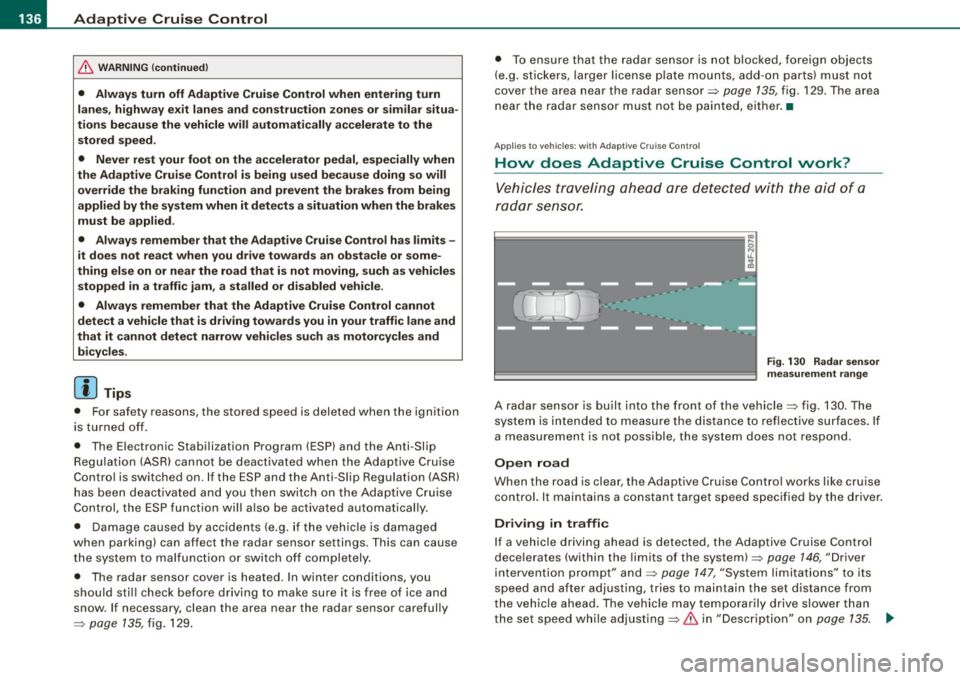
Fig. 130 Radar sensor
measurement range
A radar sensor is built into the front of the vehicle=> fig. 130. The
system is intended to measure the distance to reflective surfaces. If
a measurement is not possible, the system does not respond.
Open road
When the road is clear, the Adaptive Cruise Control works like cruise
control. It maintains a constant target speed specified by the driver.
Driving in traffic
If a vehicle driving ahead is detected, the Adaptive Cruise Control
decelerates (within the limits of the system)=>
page 146, "Driver
intervention prompt" and=>
page 147, "System limitations" to its
speed and after adjusting, tries to maintain the set distance from
the vehicle ahead. The vehicle may temporarily drive slower than
the set speed while adjusting=>
& in "Description" on page 135. .,
Page 147 of 390
_____________________________________________ A_ d_a ...: p_ t_ i_ v _e_ C_ ru_ is_ e_ C_ o_n _ t_ r_o _ l _ __.11111
Ap plies to vehicles: with Adaptive Cru ise Co nt rol
System status indicator
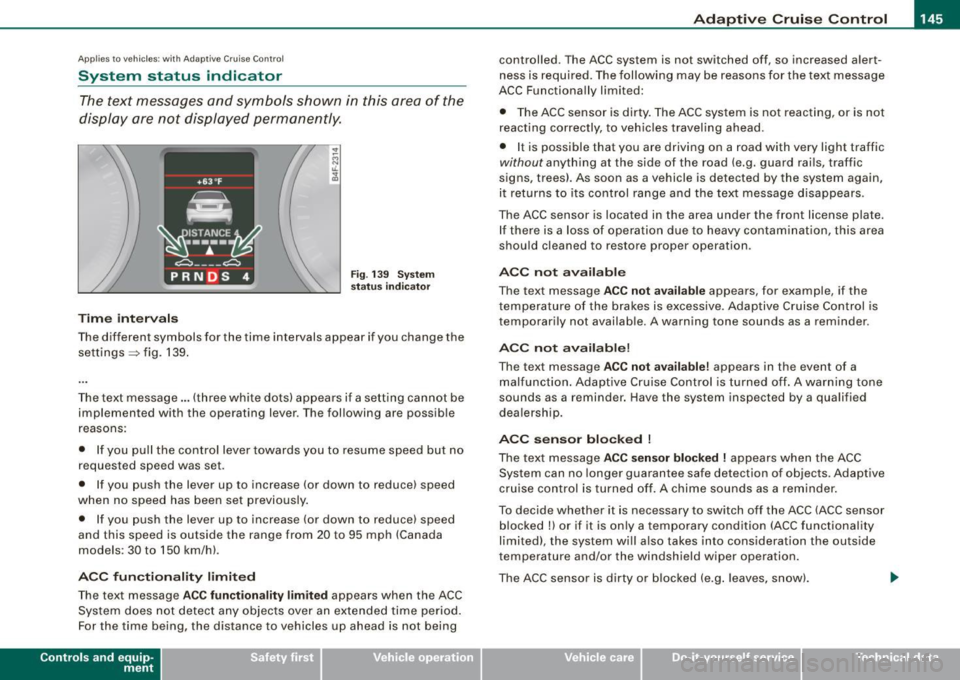
The text messages and symbols shown in this area of the
display are not displayed perm anently.
T ime intervals
Fig . 139 Sy stem
sta tus indi cator
The different symbols for the time intervals appear if you change the
settings ~ fig. 139 .
The text message ... (three white dots) appears if a setting cannot be implemented with the operating lever . The following are possible
reasons:
• If you pul l the control lever towards you to resume speed but no
requested speed was set .
• I f you push the lever up to increase (or down to reduce) speed
when no speed has been set previously.
• If you push the lever up to increase (or down to reduce) speed
and this speed is outside the range from 20 to 95 mph (Canada
models : 30 to 150 km/h) .
ACC fun cti ona lity limited
The text message AC C functionalit y limited appears when the ACC
System does not detect any objects over an extended time period.
For the time being, the distance to vehicles up ahead is not being
Con tro ls and eq uip
ment
controlled. The ACC system is not switched off, so increased alert
ness is required. The following may be reasons for the text message
ACC Functiona lly limited:
• The ACC sensor is dirty. The ACC system is not reacting, or is not
reacting correctly, to veh ic les travel ing ahead.
• I t is possible that you are driving on a road with very light traffic
without anything at the side of the road (e.g. guard rai ls, traffic
signs, trees). As soon as a vehicle is detected by the system again,
it returns to its control range and the text message disappears .
The ACC sensor is located in the area under the front license plate.
If there is a loss of operation due to heavy contamination, this area
should cleaned to restore proper operation .
ACC not available
The text message ACC n ot ava ila ble appears, for example, if the
t emperature of the brakes is excessive. Adap tive Cruise Control is
temporarily not available . A warning tone sounds as a reminder .
ACC not available!
The text message ACC not ava ilable ! appears in the event of a
malfunction . Adaptive Cruise Contro l is tur ned o ff. A warning to ne
sounds as a reminder. Have the system inspected by a qua lified
dea lership .
ACC se nsor bl ocked !
The text message AC C sensor blocked ! appears when the ACC
System can no longer guarantee safe detection of objects . Adaptive
cruise control is turned off. A chime sounds as a rem inder .
To decide whether it is necessary to switch off the ACC (ACC sensor
blocked
!) or if it is only a temporary condition (ACC functionality
limited), the system wi ll also takes into consideration the outside
temperature and/or the windshield wiper operation.
The ACC sensor is dirty o r blocked (e .g . leaves, sn ow).
Vehicle care I I irechnical data
Page 161 of 390
_________________________________________________ A_ u_t_ o_ m_ a_t _i _ c _ t _ra_ n_s_ m __ is_ s_ io_ n _ __.1!111
Ap plies to vehicle s: with 6-speed automat ic transmission
Emergency release for selector lever
If the vehicle's power supply fails, the selector lever can
be released in an emergency.
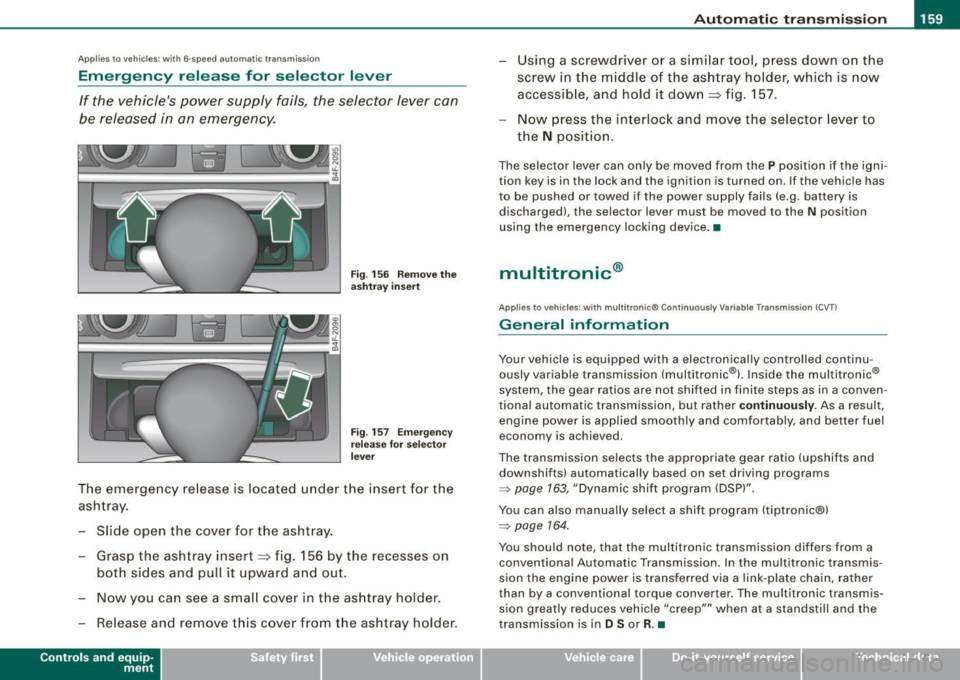
Fig . 156 Remove the
as htray i nsert
Fig . 157 Eme rge ncy
r elease fo r se lecto r
l ever
The emergency release is located under the insert for the
ashtray.
- Slide open the cover for the ashtray .
- Grasp the ashtray insert~ fig. 156 by the recesses on
both sides and pull it upward and out.
- Now you can see a sma ll cover in t he as htray holder.
- Release and remove this cover from the ashtray holder.
Con tro ls and eq uip
ment
Using a screwdriver or a similar tool, press down on the
screw in the m iddle of the ashtray holder, which is now
accessib le, and hold it down
~ fig. 157 .
Now press the interlock and move the selector lever to
the
N position.
The selector lever can only be moved from the P position if the igni
tion key is in the lock and the ignition is turned on. If the vehicle has
to be pushed or towed if the power supply fails (e.g. battery is discharged), the selector lever must be moved to the N position
using the emergency locking device .•
multitronic ®
Applies to veh icles: with multitronic® Continuously Variable Transm ission (CVT l
General information
Your vehicle is equipped with a electronically controlled continu
ously variable transmission (multitronic ®l. Inside the multitronic ®
system, the gear ratios are not shi fted in finite steps as in a conven
tional automatic transmission, but rather
co ntin uously. As a result,
engine power is applied smoothly and comfortably, and better fuel
economy is achieved.
The transmission selects the appropriate gear ratio (upshifts and
downshifts) automatically based on set driving programs
=> page 163, "Dynamic shift program (DSP)".
You can also manually select a shift program (tiptronic®)
=> page 164.
You should note, that the multitronic transmission differs from a conventiona l Automatic Transmission . In the multitronic transmis
sion the engine power is transferred via a link -plate chain, rather
than by a conventional torque converter. The multitronic transmis
sion greatly reduces vehicle "creep'"' when at a standsti ll and the
transmission is in
D Sor R. •
Vehicle care I I Technical data
Page 168 of 390
•L---=A....::...: u:;.. t:..: o:..::....: m.....;::. a..;:t :;..ic ~ t:..: r..;: a ..:..; n.....;::. s..:.m ;.;..:. is::.. s .::....:. io::....:. n;__ ____________________________________________ _
Applies to vehic les: with mul tit roni c® Cont inuous ly Variab le Transmission (CVTl
Emergency release for selector lever
If the vehicle's power supply fails, the selector lever can
be released in an emergency.
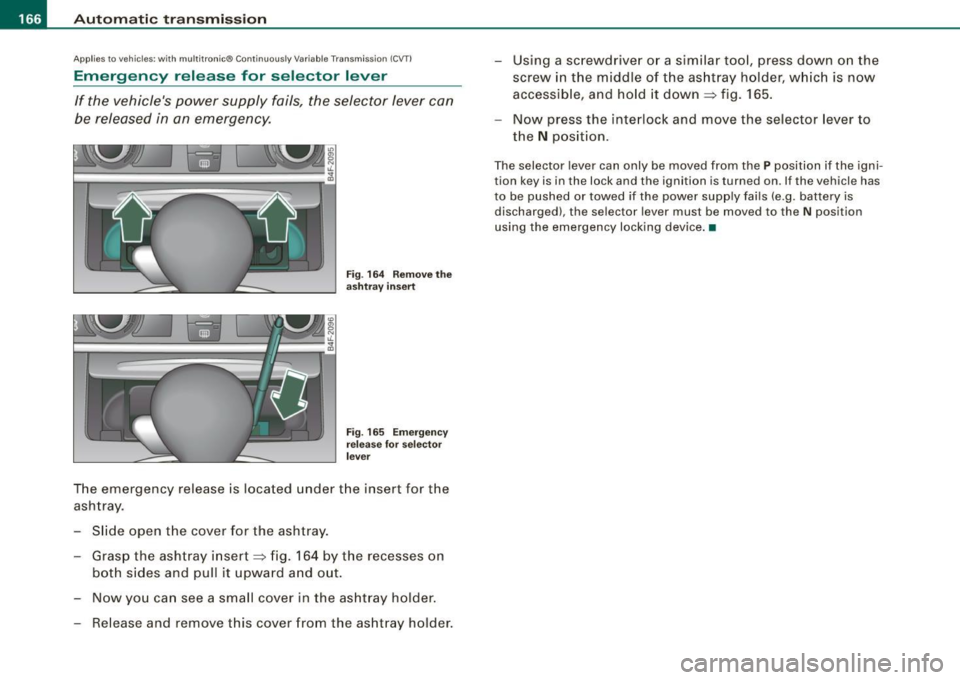
Fig. 164 Remove the
ashtray insert
Fig. 165 Emergency
release for selector
lever
The emergency release is located under the insert for the
ashtray.
- Slide open the cover for the ashtray.
- Grasp the ashtray insert~ fig. 164 by the recesses on
both sides and pull it upward and out.
- Now you can see a small cover in the ashtray holder.
- Release and remove this cover from the ashtray holder. -
Using a screwdriver or a similar tool, press down on the
screw in the middle of the ashtray holder, which is now
accessible, and hold it down
~ fig. 165.
- Now press the interlock and move the selector lever to
the
N position.
The selector lever can only be moved from the P position if the igni
tion key is in the lock and the ignition is turned on. If the vehicle has
to be pushed or towed if the power supply fails (e .g. battery is
discharged), the selector lever must be moved to the N position
using the emergency locking device. •
Page 179 of 390
_____________________________________________ A_u_ d_ i _P _a_ r_ k_ i_n -=g a..- S-=y'--- s_ t_ e_ m __ ....J_
& W ARNING ! continued )
• The Audi Parking System is not a substitute for being careful
and alert when b acking up. Be e spe cially careful during parking
and similar maneuvers . Alw ays wat ch where you are dr iv ing and
make sure that nothing is in the way.
• When maneuvering or parking , do not only use the MMI Display
for orientation . Cert ain ob ject s · depending on the screen resolu
tion -may not , or not ent irely , be displ ayed ; for example trailer
hitches , chains, narrow posts , or fence s.
• Improper reliance on the Audi Parking System can cause colli
s ions and serious personal injury .
- Never rely only on parking assist when changing backing up.
- Always check rear view mirrors to make sure it is safe to back
up. •
Applies to vehic les : w it h Audi Pa rk in g System (rea rl and rear-v iew camera
Notes on distance information
Con tro ls and eq uip
ment
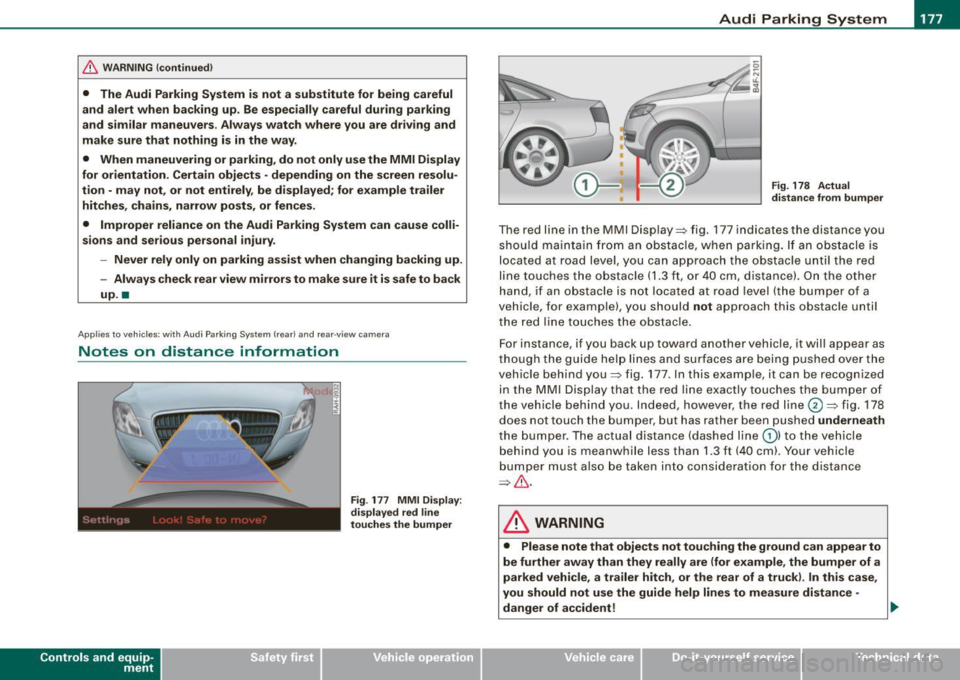
Fig . 177 MMI Displ ay :
di splay ed red l ine
t o uche s the bumpe r Fig
. 178 Actu al
di stan ce from bumpe r
The red line in the MMI Display=> fig. 177 indicates the distance you
should ma intain fr om an obs tacle, when park ing. If an ob stacle is
located at road level, you can approach the obstacle unti l the red
line touches the obstacle
(1.3 ft, or 40 cm, dis tance) . On the othe r
hand , if an obs tacle is not located at road level (the bumper o f a
vehic le, for example), you should
not approach this obstac le unti l
the red lin e touches the obstac le.
F or instance , if you back up toward another vehic le, it wil l appear as
t ho ugh the guide hel p lin es a nd su rfaces are being pushed over t he
vehic le behind you=> fig. 177 . In this example, it can be recognized
in the MMI Disp lay that the red lin e exactly touches the bumper of
the vehicle behind you . Indeed, however, the red line@=> fig. 178
does not touch the bumper, but has rather been pushed
underneath
t he bumper. The actual distance (dashed line G) ) to the veh icle
beh ind you is meanwhile less than
1.3 ft (40 cm). Your vehicle
bu mper mus t also be tak en in to conside rat ion f or the distance
=> & .
& WARNING
• Please note that objects not touching the ground can appear to
be further a way than they really are (for example , the bumper of a
p arked vehi cle, a trailer h itch , or the rear of a truck ). In this ca se ,
you should not use the guide help lines to measure distan ce -
d anger of accident! ..
Vehicle care I I irechnical data
Page 182 of 390
• .___A_ u_d_ i _P _a_ r_ k_ i_ n ..:g=-- S_ y=-- s_t _ e _m _____________________________________________ _
Applies to vehic les: with Audi Park ing System (rearl and rear-view camera
Rear-view camera tips
We recommend that you practice parking with t he rear -view camera
in a traff ic -free location, or parking lot, to become fami liar with the
system, the orientati on line s, a nd th eir functi on. When doi ng this,
there should be good light and weather conditions.
In the MMI Display, objects or vehicles ap pea r closer or further away
i f:
• you are driving in reverse gear from a level surface onto an
inc lin e, o r a downwa rd sl ope,
• you are driving in reverse gear toward protruding objects,
• the ve hicle is carrying too much load in the rear.
The accuracy of the orientation lines and blue surfaces diminishes if :
• the Adaptive Air Suspension* is defective, or th e dynamic, off
road, o r lift mode is swi tched on,
• the rear -view camera does not provide a reliable image, for
exam ple, in po or vi sibi lit y c ondi tio ns or if the lens is dirt y,
• the image on the screen is not visible due to sun g lare and reflec
t ion .
Caring for the rear-view camera lens:
• Dampen the lens with a household a lcoho l- based g lass c leaner,
and c lean th e lens wit h a dry cl oth.
• Remove snow with a hand brush.
• Remove ice, preferably with de -icing spray~
0.
& WARNING
• The rear-v iew camera does not replace the view to the rear and
the rear view mirrors .
• The rear-view camer a - because of technical limitat ions -does
not show the entire area behind the vehicle~
page 17 3, fig. 171.
& WARNING (continued )
Be especially careful to che ck for small children and animals
before backing up . Small children and animals will not alway s be
shown in the rear-view display .
• The Audi Parking System is not a sub stitute for being careful
and alert when back ing up . Be especially careful during parking
and similar maneuver s. Always watch where you are driving and
make su re that nothing is in the way .
• Do not allow yourself to be distracted from traffic by the rear
view camera pi ctures .
• When maneuvering or parking , do not only u se the MMI Display
for orientat ion . Certain obje cts - depending on the screen resolu
tion -may not, or not entirely, be displayed ; for example tr ailer
hitches , cha ins , narrow posts , or fences .
• Only use the rear -view camera for aid if it shows a good , clear
picture . The image may be obscured , for example , by the sun
shining into the lens, dirt on the lens, or as the result of a defect -
danger of accident!
• If the image i s hazy when the MMI Display is switched on or the
area behind the vehicle is not visible (for e xample , as the result of
a dirty or defective lens ), the rear -view camera must not be used
for aid in maneuver ing - danger of accident!
• The rear -view camera generates two -dimensional images . For
this reason , please note that recesses in the ground and
protruding parts on another vehicle , or protruding objects fixed to
the ground , will be more difficult or impossible to recognize on the
MMI Di splay, due to the missing spacial depth .
• If the position and the installation angle of the camera has
changed, for example , after a rear end collision , do not continue to
use the system for safety reasons . Have it checked by an autho
rized Audi dealer or qualified work shop .
• Only use the rear-v iew camera when the rear lid is fully closed .
Make sure that objects mounted on the rear are not obscuring the
camera v iew .