turn signal AUDI S6 2008 Owner's Manual
[x] Cancel search | Manufacturer: AUDI, Model Year: 2008, Model line: S6, Model: AUDI S6 2008Pages: 390, PDF Size: 88.42 MB
Page 178 of 390
• .___A_ u_d_ i _P _a_ r_ k_ i_ n ..:g=-- S_ y=-- s_t _ e _m _____________________________________________ _
When the turn signal is switched on, only the necessary surfaces
and curves are shown. To change the side that is shown, simply
change the turn signal.
The displayed light blue® or dark blue © curved line identifies the
turn-around point when maneuvering to park. If the curved line
touches the curb, the steering wheel turn -around point has been
reached =>
page 175, fig. 175.
The distance from the rear bumper © to the red line@ is approxi
mately 1.3 ft (40 cm). Here, at the latest, you should stop backing up
=>
page 177.
& WARNING
Please note that objects not touching the ground can appear to be
further away than they really are (for example, the bumper of a parked vehicle, a trailer hitch, or the rear of a truck).
In this case,
you should not use the guide help lines to measure distance -
danger of accident!
0 Note
In the MMI Display, the direction of travel of the vehicle rear is repre
sented depending on the steering wheel angle. The vehicle front
swings out more than the vehicle rear .
[ i] Tips
• In order for the rear-view camera to function properly, the
camera lens=>
page 169, fig. 167 must be kept clean, and free of
snow and ice. Please follow the additional notes on=>
page 180.
• The positions of the orientation lines/ surfaces are displaced up
or down if the parking process is carried out with the rear-view
camera in Adaptive Air Suspension*=>
page 21 dynamic, off -road,
or lift mode. Therefore, the accuracy is reduced. •
Special parking situations
Applies to vehicles : with Audi Parkin g System (rea r) and rear-view camera
Parking next to obstacles
When parking next to an obstacle, enough distance must
left on the side.
=
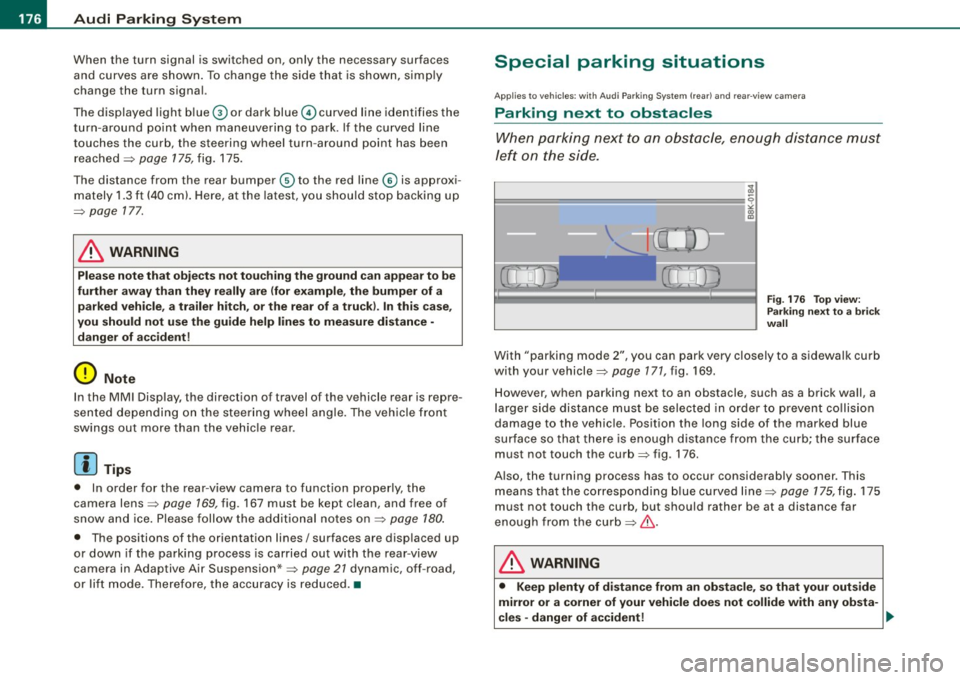
Fig. 176 Top view:
Parking next
to a brick
wall
With "parking mode 2", you can park very closely to a sidewalk curb
with your vehicle=>
page 171, fig. 169.
However, when parking next to an obstacle, such as a brick wall, a
larger side distance must be selected in order to prevent collision
damage to the vehicle. Position the long side of the marked blue
surface so that there is enough distance from the curb; the surface
must not touch the curb=> fig. 176 .
Also, the turning process has to occur considerably sooner. This means that the corresponding blue curved line=>
page 175, fig. 175
must not touch the curb, but should rather be at a distance far
enough from the curb=>&.
& WARNING
• Keep plenty of distance from an obstacle, so that your outside
mirror or a corner of your vehicle does not collide with any obsta-
cles -danger of accident! ..
Page 181 of 390
_____________________________________________ A_u_ d_ i _P _a_ r_ k_ i_n -=g a..- S-=y'--- s_ t_ e_ m __ ....JJIIII
Ap plies to vehicles: with Audi Par king System (r ear) and rea r-vie w came ra
Adjusting the chimes -option 2
The menu for adjusting signal sounds can also be called
up via the control button with the "settings" function.
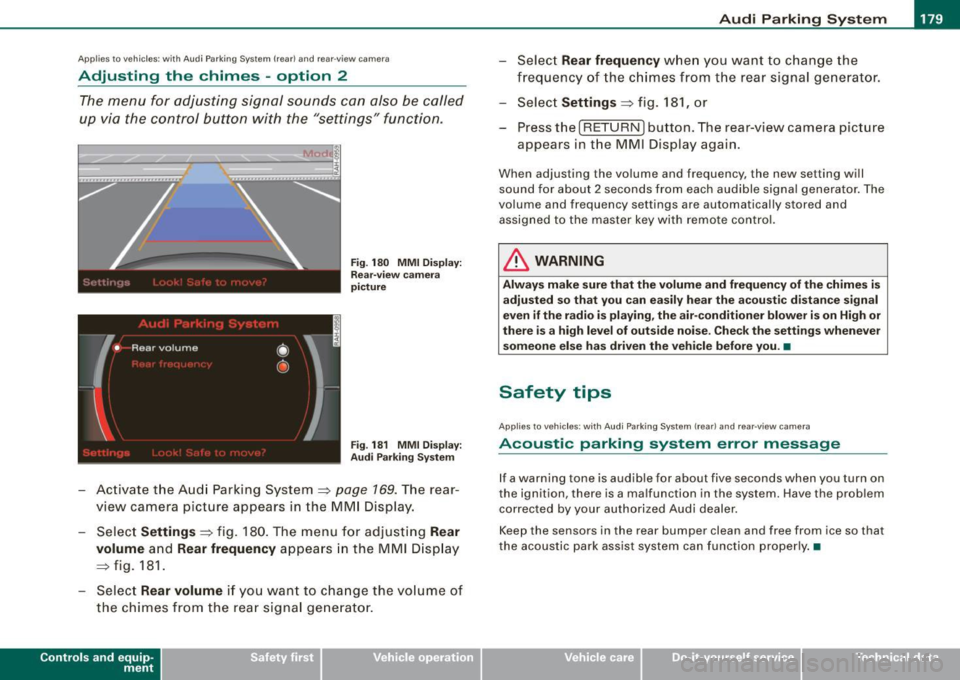
Fig. 180 MMI Display:
Rear-view camera
picture
Fig . 181 MMI Display:
Audi Parking System
- Activate the Audi Parking System=> page 169. The rear
view camera picture appears in the
MMI Display.
- Select
Settings => fig. 180. The menu for adjusting Rear
volume
and Rear frequency appears in the MMI Display
=> fig.
181.
Select Rear volume if you want to change the volume of
the chimes from the rear signal generator.
Contro ls and eq uip
ment
Select Rear frequency when you want to change the
frequency of the chimes from the rear signal generator.
Select
Settings => fig. 181, or
Press the [RETURN] button . T he rear-v iew camera picture
appears in the
MMI D isplay again.
When adjusting the volume and frequency , the new setting will
sound for about 2 seconds from each audible signal generator. The
volume and frequency settings are automatically stored and
assigned to the master key with remote control.
& WARNING
Always make sure that the volume and frequency of the chimes is
adjusted so that you can easily hear the acoustic distance signal
even if the radio is playing, the air-conditioner blower is on High or
there is a high level of outside noise. Check the settings whenever
someone else has driven the vehicle before you. •
Safety tips
Applies to vehic les: with Audi Par king System {rear) and rea r-v iew came ra
Acoustic parking system error message
If a warning tone is audible for about five seconds when you turn on
the ignition, there is a malfunction in the system. Have the problem
corrected by your authorized Audi dealer.
Keep the sensors in the rear bumper clean and free from ice so that
the acoustic park assist system can function properly.•
Vehicle care I I irechnical data
Page 238 of 390
-Child Safety -----<------------------------------
restraints and for the different models of the same kind of child
restraint offered by child restraint manufacturers.
The weight ranges for the individual types, makes and models of
child restraints that the NHTSA has specified in the Safety Standard
together with the weight ranges of typical infants and typical 1 year old child have been stored in the control unit of the Advanced
Airbag System. When a child restraint is being used on the front passenger seat with a typical 1 year-old child, the Advanced Airbag
System compares the weight measured by the weight sensing mat
with the information stored in the electronic control unit.
The electronic control unit also registers the tension on the front
passenger safety belt. The tension on the safety belt for the front
passenger seat will be different for an adult who is properly using
the safety belt as compared to the tension on the belt when it is
used to attach a child restraint to the seat. The sensor below the
latch for the safety belt for the front seat passenger measures the
tension on the belt . Th e input from this sensor is then used with the
weight to "decide" , whether there is a chi ld restraint with a typica l 1
year-old child on the front passenger seat and whether or not the
airbag must be turned off.•
Child restraints and Advanced Airbags
Regard less of the child restraint that you use, make sure that it has
been certified to meet United States Federal Motor Vehicle Safety
Standards and has been certified by its manufacturer for use with
an airbag. Always be sure that the child restraint is properly
installed at one of the rear seating positions. If in exceptional
circumstances you must use it on the front passenger seat, carefully read all of the information on child safety and Advanced Airbags
and heed all of the applicable WARNINGS. Make certain that the
child restraint is correctly recognized by the weight -sensing mat
inside the front passenger seat, that the front passenger airbag is
turned off and that the airbag status is always correctly signaled by
the
PASSENGER AIR BAG OFF light . Many
types and models of child restraints have been available over
the years, new mode ls are introduced regularly incorporating new
and improved designs and older models are taken out of produc
tion. Child restraints are not standardized. Child restraints of the
same type typically have different weights and sizes and different
'footprints,' the size and shape of the bottom of the child restraint
that sits on the seat, when they are installed on a vehicle seat. These
differences make it virtually impossible to certify compliance with
the requirements for advanced airbags with each and every child
restraint that has ever been sold in the past or will be sold over the
course of the usefu l life of your vehicle.
For this reason, the United States National Highway Traffic Safety
Administration has pub lished a list of specific type, makes and
models of child restraints that must be used to certify compliance
of the Advanced Airbag System in your vehicle with the suppression
requirements of Federal Motor Vehicle Safety Standard 208. These
child restraints are:
A. Car beds, manufactured on or after September 1,
2004:
• Cosco Dream Ride 02-719
B. Rear facing child restraint systems, manufactured
on or after September 1, 2004:
(When the restraint system comes equipped with a removable base,
compliance has to be certified with or without the basel.
• Britax Handle with Care 191
• Century Assura 4553
• Century Smart Fit 4543
• Cosco Arriva 02727
• Evenflo Discovery Adjust Right 212
• Evenflo First Choice 204
• Graco Infant 8457
Page 261 of 390
The direction in which the driver wishes to travel is determined with
t he aid of the steering angle and vehicle speed and is continua lly
compared with the actual behavior of the vehicle. If the two do not
match, for example, when the vehic le starts hydrop laning on a wet
road, ESP will automatically brake the appropriate whee l to correct
the prob lem.
The vehicle is then stab ilized by the forces acting on the whee l
during braking. If the vehicle is
oversteering (rear tends to skid out
of the turn), the brakes are mainly app lied on the wheel that is on
the outside of the curve. In the case of a vehicle that is
understeering
(tendency to sl ide out of the curve), the brakes are applied at the
rear wheel that is on the inside of the curve . An acoustic signal indi
cates when ESP brake application cuts in
~ & .
The system operates across the entire speed range in combination
with the ABS system
~ page 262 . If the Anti -Lock Brake System
(ABS) malfunctions, the ESP wi ll be out of action as well.
Ac tivat ing
When you turn on the eng ine, ESP will automatically be activated
and will perform a se lf -test . As soon as the test is comp leted, the
system is in norma l operating mode.
You can activate a deactivated ESP or deactivated ESP/ASR if required by pressing the~
page 258, fig. 225 button . When they are
activated, the message
E S P/AS R on appears briefly in the display.
D eactiv ating
The ESP should normally be activated al l the time . If necessary, you
can deactivate An ti- Slip Regulation (ASR) or the E lectronic Stabiliza
tion Program (ESP) by pressing the button~
page 258, fig. 225.
• Dea ct ivat ing A SR: Tap the button . In certain exceptional situa
tions (e.g. driving with t ire chains) , the Anti-Sl ip Regulation (ASR)
can be deactivated ~
page 260. The message ASR off appears in the
display as we ll.
• Dea ctiv at ing E SP/ASR Press the button for more than 3 seconds.
With the ESP/ASR deactivated, the ESP check light comes on, see
Controls and equip
ment Safety first Vehicle operation
In
te llig ent tec hn olo gy
~ page 19 . The message ES P sw itched off appears in the disp lay as
we ll.
& WARNING
The Electroni c Stabili zation Program i s never thele ss subject to the
la ws o f physics . It is p articularl y import ant t o pay a ttent ion t o th is
f a ct on wet and slippery road s. It is ther efore important tha t y ou
a lw ays a dapt your dr iving to the c ondit ion of th e ro ad and t raffi c
c ondition s. Do n ot allow the inc rea sed safety pro vided b y th e Elec
tr on ic S ta bili zatio n Pr ogram sys tem to lull you in to acc epting
add iti onal safet y risk s. C
Electronic differential tock (EDL)
The electronic differential lock monitors the rotational
speed of the drive wheels.
Gener al note s
The electronic differential lock (EDU helps the car to start moving,
accelerate and c limb a gradient on surfaces providing poor or
almost no grip . Without EDL, this would be difficult, if not impos
sib le .
How th e sys te m wo rk s
The EDL operates automatical ly . It monitors the rotational speed of
the drive wheels on an axle with the he lp of the ABS sensors
~ page 262 . If a noticeable difference in rotational speed between
the drive wheels on one axle is detected (e.g. on slippery ground
on
one side),
the spinning wheel is braked, thereby transferring power
to the other drive wheel or whee ls (a ll -whee l drive) . Th is is done up
to a speed of about 60 mph ( 100 km/h). Noises from the brake
system signal that wheel spin is being control led .
Dr iving off
When driving off , always be sure to keep road conditions in mind as
you accelerate. If one drive wheel spins because it is on a surface
Iii>
•
Vehicle care Do-it-yourself service Technical data
Page 381 of 390
______________________________________________ A_ l:.!: p :...:h..:. a= b..:e :...: t:..:..i c.::....:.: a..:..l ..:.in :....:..:: d:.:e :.: x-=---"'
Leather . .... ....... ... . .... .. .. .... 286
Cleaning . .... .... ....... ........ 287
Leve l adjustment
See Adaptive Air Suspension . .... .. 182
Lifting jack . .... ........ ... .... .... . 341
Lifting vehicle ...................... 356
Light Exterior lighting in the mirror housing 73
leaving home ...... ..... .... .... .. 73
Light sensor defective ... .... ... .... .. 36
Lighting in the mirror housing ......... 73
Lights ........ .... .... .... ...... .... 70
Coming home ... .... .... .......... 71
Daytime running lights . .... .... .... 71
Emergency flashers . ... .. .... .... .. 73
Exterior lights . .... .... ... .... .... . 71
Front fog lights ...... .... ..... .. ..
72
Headlights .. ... ... .. .... .... .... . 70
High beam .................... 70, 74
High beam warning/indicator light . .. 22
Leaving home .... .... .... .... ..... 71
Rear fog lights ... .... .... .... .... . 72
Side marker lights .. ...... ...... ... 70
Turn signals .... .... .... .... .... .. 74
Xenon headlights ... ..... .. .. .... .. 70
Loading the luggage compartment .... 199
Loading the roof rack .... ....... .... . 102
Lockable backrest .... ....... .... .... . 96
Locking Power locking switch .... .... .... .. 56
Rear lid/trunk lid .................. 58
Remote control key .......... .... .. 54
Using the key .... .... ... ....... ... 55
Controls and equip
ment Safety first
Lower anchorage locator button
..... .. 249
Lower universa l anchorage bars (Canada) ..
249
Lower universal anchorages (Canada) .. 249
Luggage Stowing . .... ....... .... .... .... . 199
Luggage compartment ................ 96
Cargo net .... .... ...... ........ .. 98
DVD player for navigation system ... . 99
Expanding .... .... .... .... .... ... . 96
Fastening eyelets ... .... ....... .... 97
Side Compartment .. ....... .... ... 99
Ski sack . .... ....... .. .. .... .... . 100
See also Loading the luggage
compartment ..... .. ... ... .. .... 199
Lumbar support .... ....... .... .... ... 90
M
Maintenance ... ....... .... .... .... . 366
Malfunction Indicator Lamp (MIU .. .. 20, 29
Master key ... ........... ....... .... . 49
Battery replacemen t .. .... .... .. 49, 50
Check light ..... ........... .... ... 49
Mi leage
Average .. ..... ... .... .... .... ... . 40
Instantaneous ... ...... ... .. .... .. 40
Mirrors Activating the digital compass .... ... 85
Adjusting the anti -glare . .... ..... .. 82
Automatic dimming for the outside mirrors . .... .... .... ........ ... . 84
Automatically dimming inside mirror . 82
Inside day -night m irror .... .... .... . 82 Interior mirror
... .. .... .... ..... .. . 82
Outside mirrors ... .... .... .... .... 83
Recalling position of outside mirrors . 91
Storing position of outside mirrors . .. 91
Monitoring the Advanced Airbag System ..
223
multitronic® ........................ 159
Automatic Shift Lock (ASU ....... .. 162
Driving the multitronic® ... .... .... 160
Dynamic shift program .... .... .... 163
Fail-safe mode .... .... ... .... .... 165
Kick-down ....................... 163
Manual shift program ... .... .... .. 164
Se lector lever ... ... .. .... .... .... 161
Steering wheel with tiptronic® .... . 165
tiptronic .... .... .... .... .... ..... 164
N
Natural leather .... .... ... .. .... .... . 286
New tires and wheels . .... ..... ...... 325
NHTSA Contacting ..... .. ... ... .... .... . 201
Number of seats ...... ... .. .... .... . 202
0
Occupant seating positions .. ... .. .... 194
Octane rating .... .... .... .... ... .... 291
Odometer ... .... .... .... ... .... .... . 15
Oil
See Engine oil ... ...... .. . ... ..... 299
Older children and safety belts .... .... 243
Vehicle operation Vehicle care Do-it-yourself service Technical data
Page 385 of 390
______________________________________________ A_ l_,_ p _h_ a_ b_e _t_i c_ a _ l _in _ d_e _ x __ lllll
T ank flap
Un locking the fuel fi ller flap by hand 295
Technical modifications .... .... ...... 368
Temperature Climate controls .. .... .... ... .... . 114
Setting for the driver's and front passen- ger's side .. ... ... ..... .... ... .. 114
Tether strap ... .... .... .. ... ........ 254
Securing the upper tether strap 255
The first 1,000 miles (1,500 km) and afterwards .... .. .. .. ... ...... .. 267
Tie-downs . ... .... .... .... ....... .. 201
Tilt sensors . .... .... ...... .... .... .. 62
Tips for the environment Saving fuel . ..... ... .... ... ..... . 102
Using the air conditioner only when necessary .. ..... ... .... ... .... . 119
tiptronic® .. ... ... .. .... .... ....... . 153
Automatic Shift Lock (ASU . ...... .. 155
Driving ............. ....... ..... 153
Dynamic shift program ............ 156
Fail-safe mode ... ... ... .. ...... .. 158
Kick-down ... .... .... .... ... .... . 156
Manual shift program ........ .... . 157
Se lector lever ... .... .... ... .... .. 154
Tire pressure ..... .. .... .... ....... . 319
Tire pressure monitoring system ... .... 43
Changing wheels .... .... ..... .... . 46
L earning process . .... .... ... .... .. 45
Loss of air pr essure ........ ... .. 20, 44
Mal functions ...... ...... .... ..... 46
Sensors . .......... .............. 327
Storing tire pressures .... .... .... .. 45
Controls and equip
ment Safety first
Tires and wheels ..
...... .... . .... 327 Towing
Valves ..... .. ...... ........ ..... 327 Front eyelet .. .. .. ... ... .. .... .... 354
Tire service life .... . .. .. ...... .... .. 323 Rear eyelet
... .... ... ... ..... ... . 355
Tires .... ..... .. ... ... .. .... .... ... 313 Tow truck procedures
..... ... .... . 354
Replacing .... .... .... ..... .. .... 327 Trailer towing .
.... .... ... .... ..... .. 272
Service life . .... . .. .. .... .... .... 323 Operating instructions .
...... ... .. 273
speed rating letter code .... ... .... 326 Technical r
equirem ents ... .... 272 , 273
Tire manufacturing date .... .... ... 326 Trailer towing tips .
... ... . .. .. .... 274
Tire specifications ... ..... ... ... .. 326 Transmission
Tread depth .... . .. .. ...... .. .... 323
tiptronic® ...... .... .. .. .... ..... 153
Uniform tire quality grading ... ..... 328
Transport Canada . .. ... .... .. ... ... . 365
Winter tires ... .... .... .... .... ... 329
Tread Wear Indicator (TWll ... .... .... . 323
Tires and vehicle load limits ... ...... . 321
Trip computer
Tires and wheels Fuel consumption ... .. .. . ... ...... 40
Checking tire pressure .......... .. 319
Mileage . ..... .... .... ...... .... .. 40
Cold tire inflation pressure .. .... ... 317
Single-trip memory .. .... . .... .. .. . 41
Dimensions ... ... ..... ... .... .... 325
Total-trip memory .... .... .... ... .. 41
Genera l notes ... ...... ..... .... .. 313
Trip odometer .. ... .. .... .... ... .. .. . 15
Glossary of tire and loading termino logy
What does it mean when dEF appears in
314 the trip odometer display? ......... 15
New tires and wheels .. .... .... ... 325
Trunk
Replacing .... .... .... ...... ... .. 325
See Rear lid ... .... .... ... .... .... . 58
Snow chains .. .... ... .... .... .... 330
Tire pressure monitoring system .. .. 327
Tires and vehicle load limits . .. . .... 321
Wheel bolts .. ....... ... .. ... ..... 331 Trunk escape handle
...... .. . .... ... . 336
Turn signals . .... .... .... ...... .... .. 74
Warning/indicator lights ...... .... .. 20
Winter tires .. ... ... .. ... .... .... . 329
Tires/Wheels
u
Low aspect ratio tires . ...... .. .... 332
Undercoating ...... .... ....... .. ... . 284
Tire pressure monitoring system .. 20 , 43
Unfastening safety be lts ...... .... .. . . 209
Tools ... .... .... ... ..... ... .... .... 337
Unidirectiona l tires ... .... ...... .... . 313
Torn or frayed safety be lts ... .. . ..... . 205
Uniform tire quality grading .. .... ... . 328
Touch-up pa int . .... ... .... .... ..... 282
Vehicle operation Vehicle care Do-it-yourself service Technical data
Page 386 of 390
___ A_l.:,. p _h_ a_ b_e _t _ic _ a_l _in _ d_e _x ____________________________________________ _
Unlocking
Power locking switch . . . . . . . . . . . . . . 56
Rear lid/trunk lid .. .... .... .... .... 58
Remote control key . . . . . . . . . . . . . . . . 54
Using the key .. .... ....... ........ 55
V
Valet key function
Activating and deactivating .. ..... .. 51
Vanity mirror ...... .. .......... ...... 76
Vehic le electrical system . . . . . . . . . . . . . . 19
Vehicle Identification Number (VIN) .... 360
Vehicle jack ...... .... .......... 336, 34 1
Vehic le literature ..................... 5
Vehicle-care products . . . . . . . . . . . . . . . 278
w
Warning lights . . . . . . . . . . . . . . . . . . . . . . 17
Warning/indicator lights ... .. .... .... . 13
Adaptive Air Suspension . ........ .. 21
Adaptive Cruise Control ... .... .... 143
Airbag system .................... 20
Anti -lock brake system (ABS) . . . . . . . . 22
Brake system . . . . . . . . . . . . . . . . . . . . . 23
Cruise control . . . . . . . . . . . . . . . . . . . . 22
Electromechanical parking brake .... 23
Electronic power control ........... 19
Electronic stabilization program (ESP) 19
Generator . . . . . . . . . . . . . . . . . . . . . . . . 19
H igh beam . . . . . . . . . . . . . . . . . . . . . . . 22 T
ire pressure monitoring system .. .. 20
Turn signals ... ...... ...... ....... 20
Warranty coverages ...... .... .... ... 365
Washer reservoir .. ..... .. ...... ..... 312
Washing .. ........ ........... .... .. 278
Automatic car wash .............. 279
by hand ........................ 279
General information .............. 278
with a power washer ... .... .... ... 280
Waxing ... ........ ... .... .... .... .. 281
Wear indicato r .... .... ... .... .... ... 323
Weatherstrips ..................... .
Weights ....... .. .... ...... ... .. .. . 283
361
What happens if you wear your safety belt too
loose? .. ... .. .... .... .... ...... 207
What happens to unbelted occupants? . 204
What impairs driving safety? ......... . 193
What should I do after changing a wheel?
320
What should I do after replacing wheels?
320
Wheel bolts Torqu e ...... ....... ..... ..... .. 331
Wheels . ......... ... ... .. .... ...... 313
Cas t alloy ... ... ... .... .... .... .. 283
Checking tire pressure ...... ...... 319
Cold tire inflation pressure ...... .. 317
General notes .. ... .... .... .... .. 313
Glossary of tire and loading terminology.
314
New tir es and wheels . .... ... .. ... 325
Tires and vehicle load limits .. ..... 321
Malfunction Indicator Lamp (MIU . ... 20
Safety belt ..... .. .... .... ...... ..
21 When must a safety belt be
replaced? .. 205 When
must the airbag system be inspected?
223
When should I adjust the tire pressures?
320
When should I check the tire pressures? 320
Where can I find the tire pressures for my
car? ... .. .... .... .... ... .... ... 319
Why safety belts? ...... ...... ... 202, 203
Windows Cleaning .... ...... .... ..... .. ... 282
Convenience close/open feature ... .. 65
Defogging .... ... .... .... .... ... 116
Defrosting . . . . . . . . . . . . . . . . . . . . . . 116
Rapid defrosting/defogging ........ 118
Windshield washer fluid Low level .......... .... ... .... .... 36
Windshield wipers Faulty ............ ... .... .... .... 38
Inte rmittent wiping ......... ....... 78
One -tap wiping .. ...... ...... .... . 78
Rain sensor . ...... .... ... .... .... 78
Service position . ...... .... ........ 80
Washer reservoir ....... ..... .... . 312
Winter operation Battery . . . . . . . . . . . . . . . . . . . . . . . . . 307
Coolant system ............... ... 303
Steering wheel heating ...... .... .. 115
Tir es ...... .... ....... .... ...... 264
Windows ...... .... .... ..... .. ... 282
Winter tires ... .... ....... .... .... .. 329
All -wheel drive ... .. .... .... .... .. 329