sensor AUDI S6 2009 User Guide
[x] Cancel search | Manufacturer: AUDI, Model Year: 2009, Model line: S6, Model: AUDI S6 2009Pages: 398, PDF Size: 43 MB
Page 73 of 398
Rear window blind -settings
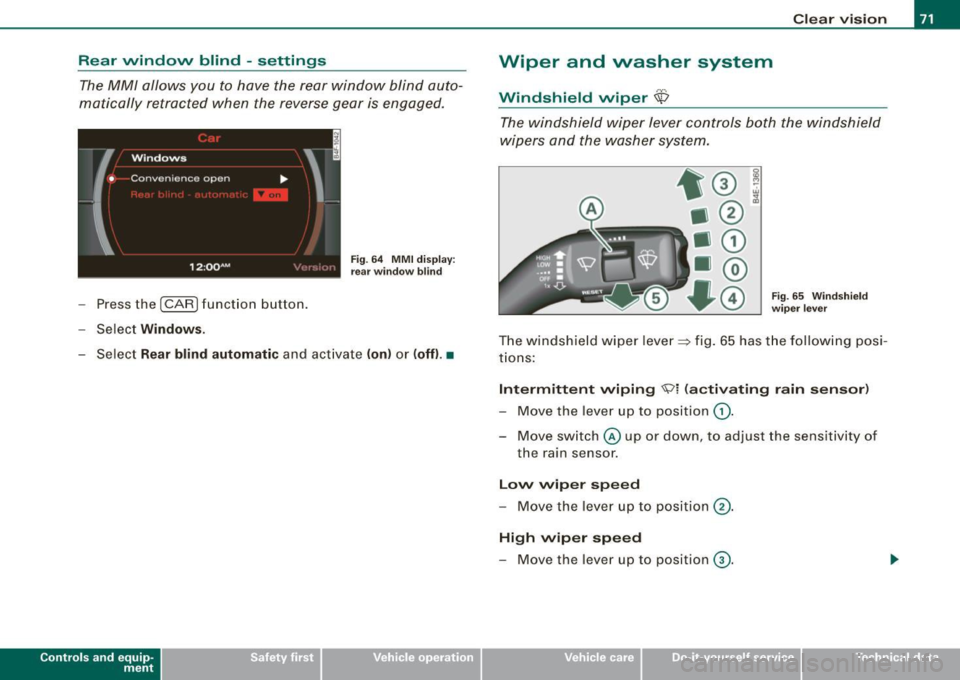
The MM/ allows you to have the rear window blind auto
matically retracted when the reverse gear is engaged.
- Press the (CAR ) function button.
- Select
Windows.
Fig . 64 MMI display:
rear window blind
- Select Rear blind automatic and activate (on) or (off) .•
Con tro ls and eq uip
ment
Clear vision
Wiper and washer system
Windshield wiper $
The windshield wiper lever controls both the windshield
wipers and the washer system.
Fig. 65 Windshield
wiper lever
The windshield wiper lever~ fig. 65 has the following posi
tions:
Intermittent wiping 'Vi (activating rain sensor)
- Move the lever up to position G).
- Move switch© up or down, to adjust the sensitivity of
the ra in sensor.
Low wiper speed
- Move the lever up to position 0-
High wiper speed
- Move the lever up to position G).
Vehicle care I I irechnical data
Page 74 of 398
Clear vision
One-touch wiping
- Move the lever to position@, when you want to wipe the
windsh ield
briefly.
Automatic wiper /washer
- Pull the lever to pos ition © (toward the steering wheel)
and ho ld.
- Re lease t he lever. T he wash er stops a nd the wipers keep
g o ing for about fo ur secon ds. Dep ending on h ow long
t h e lever is held, d ifferent numbers of was h cyc les are
performed.
Turning off the wipers
- Move the lever back to position @ .
Gen era l inform ati on
The windshield wipers and the windshield washer system operate
only with the ignition on.
During a temporary stop, e.g. at a traffic signa l, the set wipe speed
is aut omatically reduced by one stage .
The windshield washer nozzles are heated at low temperatures
when the ignition is on .
Removing vv ater drop let s
About 5 seconds after the wash cycle is complete, the wiper system
performs a single automatic wipe cycle to remove any water drop
lets that remain on the windshield .
If you would like to deactivate this delayed wipe cyc le whi le dr iving,
you have to pull the lever to position © again within 10 seconds
af ter this w ipe cyc le .
Water droplet removal is reactivated after the ignition is switched off and then on again .
Rain se nsor
The ra in sensor operates on ly in the interval wiper position . When it
starts to rain, the interval wiper mode is activated automatically .
I f the windshie ld wiper lever is in the interval wipe position with the
ign ition sw itched off, the rain sensor is not activated unt il veh ic le
speed is above 4 mph (6 km/h) .
T o reduce the sens itivi ty of the rain sensor, the swi tch
© must be
moved down. To increase the sensitivity of the rain sensor, the
sw itc h must be moved up .
T he higher the sensitivity sett ing, the sooner the windshield wipers
react to moisture on the windshie ld. Increased sensitivity is
signa led by the windshie ld w ipers making a si ng le pass over the
windshield.
T he rain sensor wiper interva ls depend on the sens itivity setting as
we ll as vehicle speed. During brief stops, wiper motion will adjust in
r elation to the amount of rain on the windshield .
& WARNING
• Wiper blades are crucial for safe driving! Only when they are in
good cond ition are they able to clear the windo ws properly to
provide uncompromised visibility . Worn or d am aged wiper blades
are a safet y hazard ::::> page
74 , "I nst alli ng new wiper blades "!
• The rain sensor is only designed to a ssist and support the
dri ver . It remai ns entirel y the dr iver's respon sibil ity to monitor
out side weather conditions and to manually activate the wiper s as
so on a s rain or dri zzle reduce s vis ibility through the wind sh ield.
• The wind shield must not be treated with water -repellent mate
rials . The y can incre as e g la re under poor visibility condition s su ch
as wetness , darkne ss, or when th e sun is low on t he horizon. In
addition , they can cause the wind shield wiper s to ch att er.
0 Note
In freezing or near freezing conditions :
Page 75 of 398
• Always check that the wiper blades are not fro zen to the glass
before you turn the wipers on. Loosen a wiper blade which is frozen
in place before operating the wipers to prevent damage to the wiper
blade or the wiper motor.
• Do not use the wipers to clea r a frosted window . Using the
wipers as a convenient ice scraper will destroy the wiper blades.
• Before you take your v ehicl e to an automatic car wash, make sure
you have the windshield wiper system switched off (lever in position
Ol, otherwise the windshield wiper sys tem could get damaged in the
car wash if it should suddenly come on.
[ i] Tips
• The rain sensor is part of the interval wiping system . Turning off
the ignition will also deactivate the rain sensor . To reactivate the
sensor, switch off the interval wiping function, then switch it back
on again.
• Worn or dirty windshield wiper blades cause smearing which
can affect the operation of the rain sensor. Check the condition of
your windshield wiper blades regularly.
• Make sure the washer fluid reservoir in the engine compartment
is topped off before going on a long trip. Look up~
page 316for
checking and filling the washer container .•
A pplies to ve hicles: wit h hea dligh t wa sher sys tem
Headlight washer system
The headlight washer system cleans the headlights.
- Operate the windshield wiper/washer system~ page 71,
fig. 65 ® with the headlights turned on by holding the
lever for longer than one second.
The washer jets extend forward out of the front bumper driven by
water pressure to spray the front headlights with water.
Controls and equip
ment
Clear vision
You should inspect the headlights regularly (for example when refu
eling) and clean off any solid dirt or insects from the lenses.
To ensure the system works properly in winter , keep the washer jets
free of snow and
remove any ice using a de -icing spray .•
Service position
The wiper blades can only be changed in the service posi
tion.
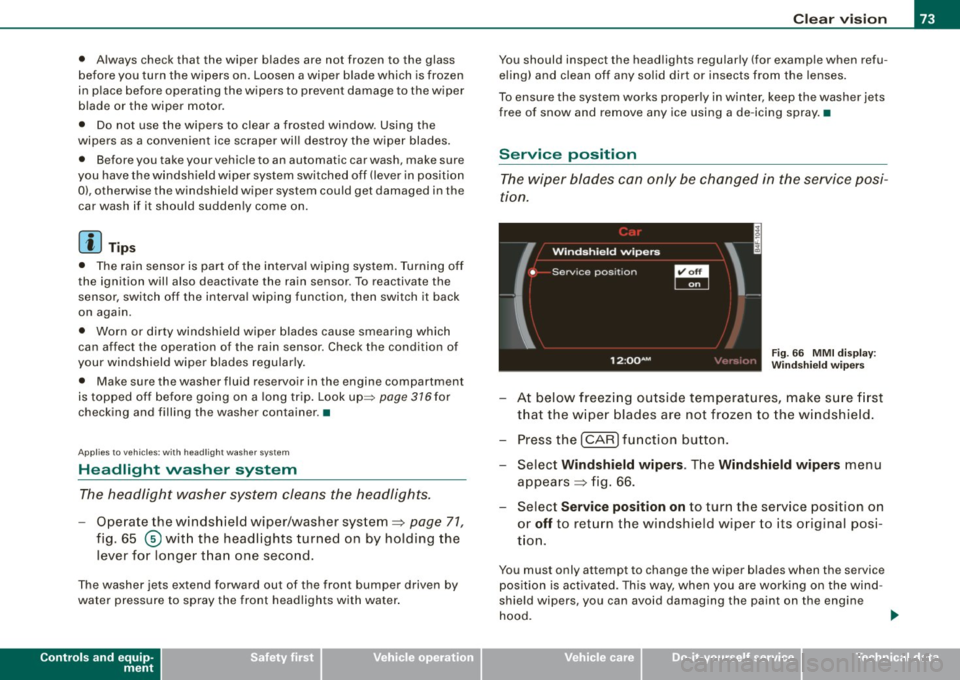
Fig. 66 MMI display :
Windshield wipers
At below freezing outside temperatures, make sure first
that the wiper blades are not frozen to the windshield.
- Press the [CAR] function button.
- Select Windshield wipers . The Windshield wipers menu
appears ~ fig. 66.
- Select Service position on to turn the service position on
or
off to return the windshield w iper to its orig inal posi
tion .
You must only attempt to change the wiper blades when the s ervice
position is activated. This way, when you are working on the wind
shield wipers , you can
avoid damaging the paint on the engine
hood.
~
I • •
Page 78 of 398
Clear vision
& WARNING
Broken glass of automatic dimming mirror can cause electrolyte
fluid leakage. Electrolyte fluid can irritate skin, eyes, and respira
tory system .
• Repeated or prolonged exposure to electrolyte can cause irrita
tion to the respiratory system, especially among people with
asthma or other respiratory conditions. Get fresh air immediately
by leaving the vehicle or, if that is not possible, open windows and
doors all the way.
• If electrolyte gets into the eyes, flush them thoroughly with
large amounts of clean water for at least 15 minutes; medical
attention is recommended.
• If electrolyte contacts skin, flush affected area with clean water
for at least 15 minutes and then wash affected area with soap and
water; medical attention is recommended. Thoroughly wash
affected clothing and shoes before reuse.
• If swallowed and person is conscious, rinse mouth with water
for at least 15 minutes. Do not induce vomiting unless instructed
to do so by medical professional. Get medical attention immedi
ately.
0 Note
Liquid electrolyte leaked from a broken mirror glass will damage any
plastic surfaces it comes in contact with . Clean up spilled electrolyte
immediately with clear water and a sponge .
[ i ] Tips
• If you switch off the automatic dimming function on the inside
mirror, automatic dimming of the outside mirrors will likewise be
disabled.
• Check to make sure there are no objects preventing light from
reaching the inside mirror. •
Do not attach any stickers to the windshield in front of the light
sensor, as this would interfere with the automatic operation of the
headlights and the automatic dimming of the inside mirror.
• Be aware that automatic dimming of the inside mirror can only
operate properly if the rear window sun blind * is retracted .•
Outside mirrors
The outside mirrors are electrically adjusted.
Adjusting the outside mirrors
Fig. 70 Forward
section of driver's
armrest: power mirror
controls
Turn the adjusting knob to position (D => fig. 70 to adjust
the outside mirror on the driver's side.
Turn the adjusting knob to position
@ to adjust the
outside mirror on the passenger side .
Press the knob in the appropriate direction to move the
mirror surface so that you have a good view to the rear .
Heated mirrors
- Turn the knob to position
@.
Folding both outside mirrors flat*
- Turn the knob to® ·
Page 114 of 398
-Warm
and cold --------------------
ECON
The ECON mode helps to save fuel.
The air conditioning is turned off in ECON mode. "ECON" means
"Economy". By switching off the air conditioning (compressor), you
save fuel.
Please note that vehicle interior temperature cannot be lower than
the outside temperature in the ECON mode. The air is not cooled or dehumidified.
If the vehicle interior becomes too hot or if the windows fog up,
ECON mode should be turned off. As soon as the
jAUTO I button in
the air conditioning controls is pressed, the system automatically leaves the ECON mode, and the air conditioning compressor is
turned on again. •
Automatic recirculation mode
An air quality sensor detects increased concentrations of
pollutants in the outside air and automatically switches
to recirculation mode.
We recommend that you always keep automatic air recirculation ON
to prevent polluted outside air from entering the vehicle interior.
If the
air quality sensor located in the air conditioning system
detects polluted outside air, the sensor decides whether the air
pollution can be reduced by the factory -installed pollutant filter or
whether it is necessary to switch to air recirculation. With heavy concentrations of pollutants, the air conditioning system is
switched automatically to recirculation mode and the supply of
outside air is blocked. As soon as the concentration of pollutants in
the outside air drops, fresh air is supplied to the vehicle interior
again.
In the event that the windows fog up during automatic air recircula
tion, you must press the® button immediately. Under certain operating conditions, automatic air recirculation is
switched off automatically. With outside temperatures below about
+ 10
°C, automatic air recirculation is limited to 30 seconds. With
outside temperatures below about -1 °C and in the ECON mode,
automatic air recirculation is limited to 15 seconds. •
Synchronization
One climate control setting for the passenger's and
driver's seats.
After Synchronization is set to on, all of the subsequent climate
control settings (except for seat heating*) for the driver are trans
ferred to the front passenger.
Synchronization is canceled when settings are adjusted on the front passenger's side. •
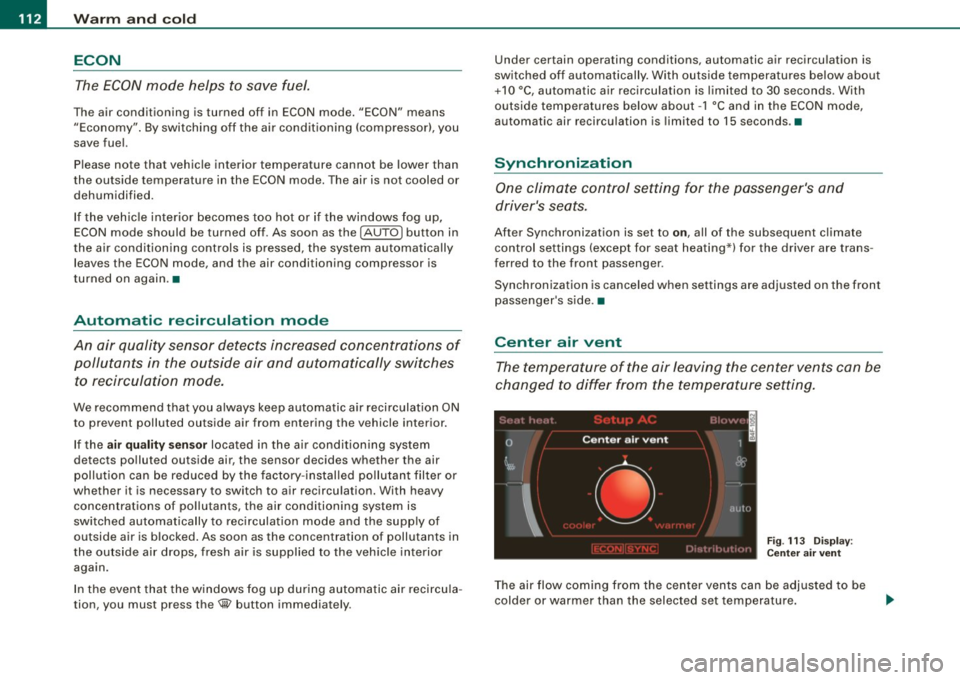
Center air vent
The temperature of the air leaving the center vents can be
changed to differ from the temperature setting.
Fig. 113 Display:
Center air vent
The air flow coming from the center vents can be adjusted to be
colder or warmer than the selected set temperature.
Page 130 of 398
• .___A_ d_a_ p:- t_iv _ e_ C_ r_u _is _ e_C_ o_ n_ t_ r_ o_ l --------------------------------------------
& WARNING (continued)
• Never allow the closing speed between you and other vehicles
to be so high that the Adaptive Cruise Control may not be able to slow your vehicle safely. If closing speed is too high , you must
apply the brakes yourself to reduce the risk of a rear -end crash.
• Never rest your foot on the accelerator pedal, especially when
the Adaptive Cruise Control is being used. Pressure on the acceler
ator will override the ACC braking function and prevent the brakes
from being applied when ACC detects a situation when the brakes must be applied .
• Never use Adaptive Cruise Control when you cannot drive
safely at a steady speed, including on city streets, on winding
roads or when road conditions are poor (for example, on ice,
gravel, in fog, heavy rain or on wet roads that increase the risk of
hydroplaning).
• The radar sensor's
vision can be reduced by rain, snow and
heavy road spray. These and similar conditions can prevent vehi
cles up ahead from being accurately detected and in some cases
they may not be detected at all. Do not use ACC when the radar sensors cannot accurately detect vehicles moving ahead of you in
traffic.
• Always turn off Adaptive Cruise Control when entering turn
lanes, exit lanes and construction zones or in similar situations
because the vehicle will automatically accelerate to the stored
speed when the road ahead is clear.
• To prevent unintended operation, always switch ACC off when
it is not being used.
[ i) Tips
• For safety reasons, the stored speed is deleted when the ignition
is turned off .
• The Electronic Stabilization Program (ESP) and the Anti-Slip
Regulation (ASR) cannot be deactivated when the Adaptive Cruise
Control is switched on. If the ESP and the Anti-Slip Regulation (ASRI has been deactivated and you then switch on the
Adaptive Cruise
Control, the ESP function will also be activated automatically.
• Damage caused by accidents and some minor collisions can
affect the radar sensor settings and cause the system to malfunc
tion or switch off completely.
• The radar sensor cover is heated. In winter conditions, you
should still check before driving to make sure it is free of ice and
snow. If necessary, clean the area near the radar sensor carefully
=>
page 127, fig. 123.
• To ensure that the radar sensor is not blocked, foreign objects
(e.g. stickers, larger license plate mounts, add -on parts) must not
cover the area near the radar sensor=>
page 127, fig. 123. The area
near the radar sensor must not be painted, either.
• For Declaration of Compliance to United States FCC and Industry
Canada regulations =>
page 375. •
Applies 10 veh ic les: w ith Ada ptive Crui se Contro l
How does Adaptive Cruise Control work?
Vehicles traveling ahead are detected with the aid of a
radar sensor.
Fig. 124 Basic prin
ciple diagram : Radar
sensor measurement
range
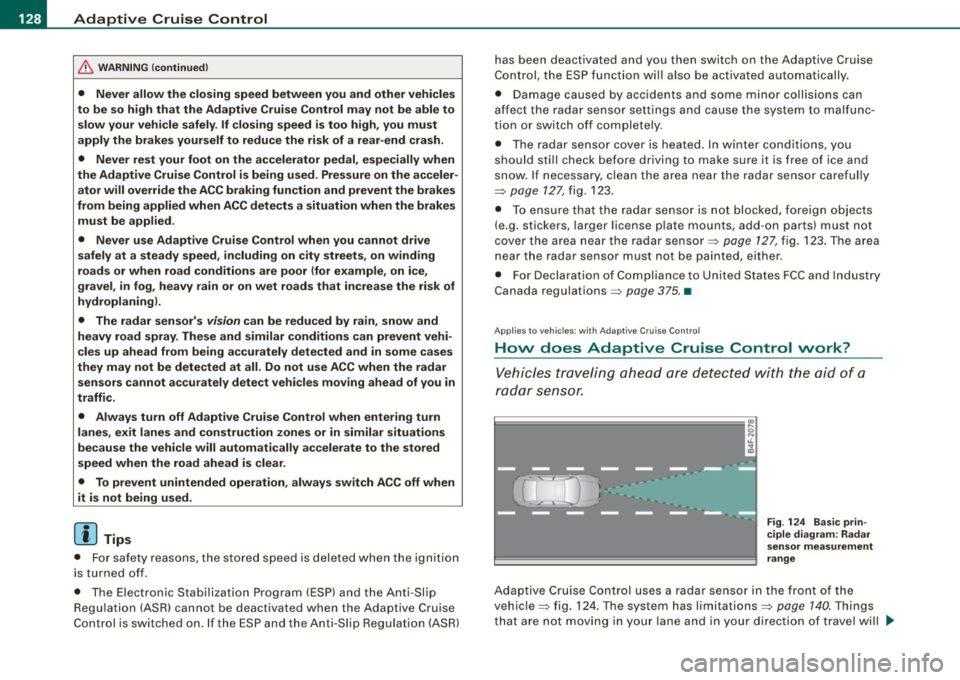
Adaptive Cruise Control uses a radar sensor in the front of the
vehicle=> fig. 124. Th e system has limitations=>
page 140. Things
that are not moving in your lane and in your direction of travel will
~
Page 131 of 398

Adaptiv e Crui se Contro l IIJ!IIIII ---------------------------------..:....:.:=:...:.;_;....::.....::...._ \
_______ _
not be detected. The sensor measures the distance to reflective
surfaces that must have a certain size. The system responds only
after the distance measurement has been made . If a measurement
is not possible, the system cannot respond and wil l not react to a
vehicle or something else up ahead.
O pen ro ad
When the road is clear, the Adaptive Cruise Control works like cruise
control. It main tains a constant target speed specified by the driver.
D riv in g in tr affic
If a slower vehic le driving ahead is detected, the Adaptive Cruise
Control dece lerates (within the limits of the system)::::;,
page 138,
"Driver intervention prompt" and::::;, page 140, "System limitations"
to its speed and after adjusting, tries to maintain the set distance
from the vehicle ahead . The vehicle may temporarily drive s lower
than the set speed while adjusting::::;,
& in "Description" on
page 127.
If the vehicle in front accelerates, Adaptive Cruise Control a lso acce l
erates up to the speed that you have set.
Sit uation s re qui ring d rive r int erve ntion
In some situations you will have to use the footbrake to s low the
vehicle down in order to keep a safe distance from vehic le in front
of you or to avoid a rear -end collision. In this situation, a symbol
appears and a warning tone sounds::::;,
page 138.
P assing anoth er veh icle
If you move into the pass ing lane and no vehicle is detected ahead,
the Adaptive Cruise Control accelerates to the speed you have set
and ma intains it.
O ve rridin g ACC
You can increase your speed at any time by stepping on the acceler
ator pedal. After you re lease the acce lerator pedal, the system
adjusts back down to the speed you previously set.
Controls and equip
ment R
edu cin g s topping di sta nce
If the radar sensor detects that the distance to the vehicle ahead is
less than defined minimum distance, the brakes are automatical ly
prepared for emergency braking by the driver . The brake pads are
moved very c lose to the brake discs without actual ly braking the
vehic le. This brake assistant feature reacts more quick ly to the
driver's braking, and also works when Adaptive Cruise Control is off.
The stopping distance is reduced as a result of this advance brake
preparation. This function does not perform any emergency brak ing
maneuvers by itself; the driver must always app ly the brakes.
& WARNING
• Never r ely on the d istan ce control feature of ACC alone t o
p re vent re ar- end colli sio ns. Alwa ys be prep ared t o br ake and take
eva sive ac tion to a void colli sio ns and ot her acc ident sit uation s.
• Never allo w the clo sing sp ee d b etwe en you and other vehi cle s
to be so hi gh th at th e Ada ptive Crui se Control may not b e able to
s low your vehicl e safely . If clo sing spe ed i s too h igh , you must
a pp ly the brake s yours elf to reduce the risk of a rea r-end cras h.
[ i ] Tip s
Please note that the amount of acceleration the Adaptive Cruise
Contro l uses depends on the Distance setting selected . DISTA NCE 1
gives you acceleration that is dynamic and sporty . D ISTANCE 4, on
t he o ther hand, gives more moderate acce leration. For more infor
mation about the time intervals::::;,
page 133, "How is the distance
(time interval) set?" .
• Please note that if the Adaptive Cruise Control has begun braking
t he vehicle and the driver chooses to brake the vehicle additional ly,
the brakes may feel "hard". This is simply due to the pressure build
up of the initial braking .
• Adaptive Cruise Control is switched off after pressing the foot
brake . The speed saved up this point can be resumed. To resume the
saved speed, release the brake pedal and pu ll the control lever _.,
I • •
Page 140 of 398
• ..__A_ d_a...: p:,..._ ti_v _ e_ C_ ru_ is_ e_ C_ o_n_ t_ r_ o _ l ___________________________________________ _
tained. The ACC system is not switched off, and increased attention
to the traffic situation is absolutely necessary. The following may be
reasons why the message
ACC functionality limited appears:
• The ACC sensor is dirty . The ACC system is not reacting, or is not
reacting correctly, to moving vehicles up ahead in your lane of
travel.
• There may be very light traffic on and there is nothing that marks
the side of the road (for example, guard rails, traffic signs, trees). As
soon as a moving vehicle up ahead is detected again, ACC becomes
active again and the message disappears .
The ACC sensor is located in the area under the front license plate.
If the ACC sensor is dirty or blocked, clean the area to restore system
operation.
ACC not available
The text message ACC not available appears, for example, if the
temperature of the brakes is excessive . Adaptive Cruise Control is
temporarily not available. A warning tone sounds as a reminder.
ACC not available!
The text message ACC not available! appears in the event of a
malfunction. Adaptive Cruise Control is turned off. A warning tone
sounds as a reminder. Have the system inspected by a qualified
dealership .
ACC sensor blocked !
The text message ACC sensor blocked ! appears when the ACC
System can no longer accurately detect vehicles moving up ahead
in your lane of travel. Adaptive Cruise Control is turned off. A
warning tone a lso sounds as a reminder.
To decide whether it is necessary to switch off the ACC (ACC sensor blocked
!) or if it is only a temporary condition (ACC Functionally
limited), the system will also takes into consideration the outside
temperature and/or the windshield wiper operation.
The ACC sensor is dirty or blocked (e.g. leaves, snow) . The
ACC sensor is located in the area under the front license plate .
If the ACC sensor is dirty or blocked, clean the area to restore system
operation.
EPB activation
Th e text message EPB activation appears if emergency braking was
manual ly initiated with the Electromechanical Parking Brake (EPB).
The Adaptive Cruise Con trol is turned off . This is accompanied by a
warning tone.
Speed
The set speed in mph (Canada km/h) always appears when saving or
changing the speed in Adaptive Cruise Control~
page 130 , "How is
the speed stored?" and~
page 131 , "Changing stored speed".
Selector lever position!
The text message Selector lever position! appears when the
selector lever is moved to position
N. In this position, Adaptive
Cruise Control is not available. •
Applies to vehicles : with Ada ptive Cruise Cont rol
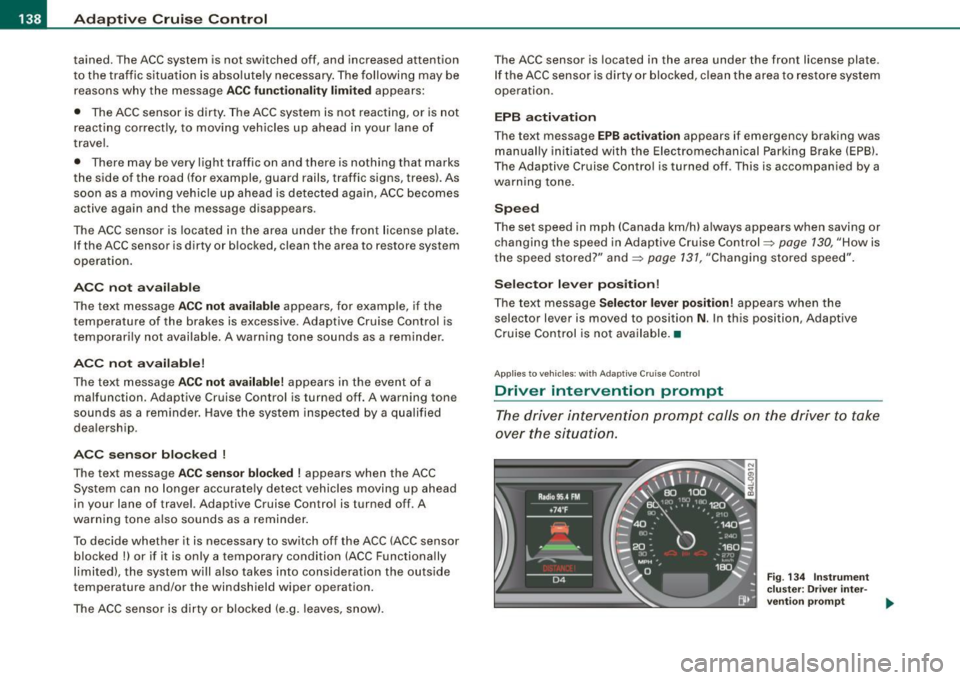
Driver intervention prompt
The driver intervention prompt calls on the driver to take
over the situation.
Fig . 134 Instrument
cluster: Driver inter-
vention prompt
~
Page 142 of 398
• ..__A_ d_ a-:.. p_t _iv _ e_ C_r_ u_ i _s _ e_ C_ o_n_ t_ r_ o_ l _____________________________________________ _
Sav ing s etting s
Your individual settings are automa tically saved and assigned to the
remote control key being used {remote key storage). If the key is
given to another person, the saved settings remain as they are. •
System limitations
Applies to vehic les : with Adapt ive Crui se Co ntro l
General information
The radar sensor has limits that the driver must know to
b e able to use AC C properly.
The Adaptive Cruise Control works within limits that are also re lated
to radar sensor range and sight d istance. In some situations ACC
may react unusually or late from the driver's point of view. There
fore, always be attentive to what is happening around you and
a lways be ready to in tervene, if necessary:
• when driving around curves=>
page 140
• whe n vehicles up front are not in line with y our vehicle
=>
page 141
• when other vehicles a re changing lanes => page 141
• when other vehicles are difficu lt to detect => page 141.
• when vehicles up ahead are not moving or obstacles are in your
travel lane=>
page 141
& WARNING
The radar sensor's function and range can be r educed by rain ,
sn ow and he avy spray. Moving vehicles up ahead may not be
promptly det ected or ma y not be det ected at all.
• Alway s pay careful attention to the traffi c situatio n a nd be
ready to intervene and be ready to take complete contr ol when
e ver ne ces sary . •
Ap plies to veh ic les: with Ad apt ive Crui se Contro l
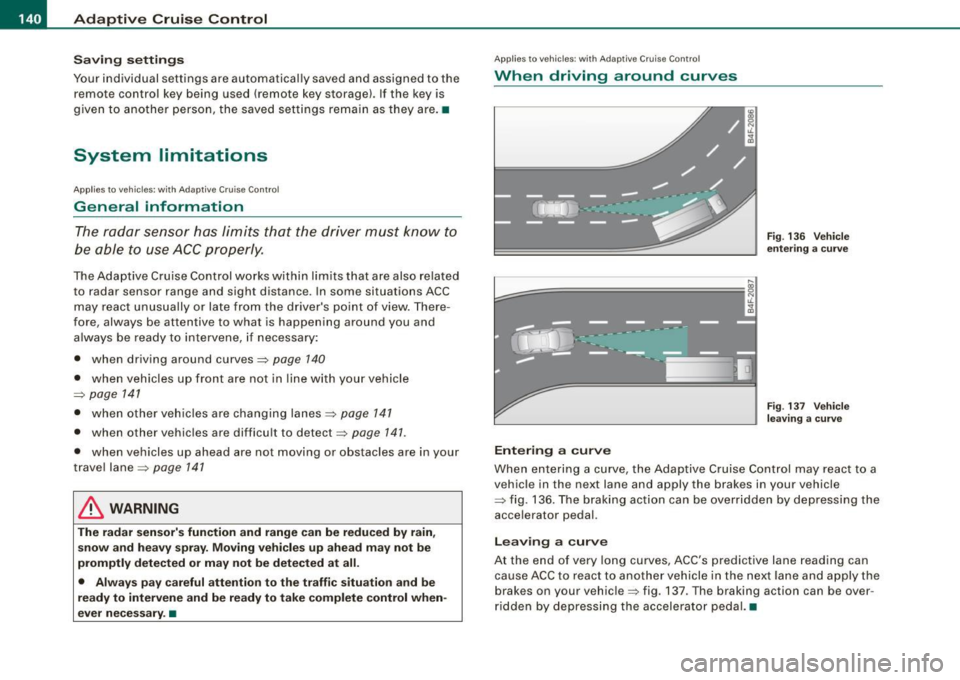
When driving around curves
k::;=========== =,!
~
[J
Ent ering a cur ve
Fi g. 13 6 Veh icle
e nteri ng a curv e
Fig. 137 Ve hicle
l ea ving a curv e
When entering a curve, the Adaptive Cruise Control may react to a
vehicle in the next lane and apply the brakes in your vehicle
=> fig. 136. The braking action can be overridden by depressing the
acce lerator pedal.
Lea vin g a c urve
At the end of very long curves, ACC 's predictive lane reading can
cause ACC to react to another vehicle in the next lane and apply t he
brakes on your vehicle=> fig. 137 . T he braking action can be over
ri dden by depressing t he accelerator peda l.•
Page 143 of 398
_____________________________________________ A_ d_a ...: p_ t_ i_ v _e_ C_ ru_ is_ e_ C_ o_n _ t_ r_o _ l _ __._
Ap plies to veh ic les: w ith Adapt ive Cru ise Co nt rol
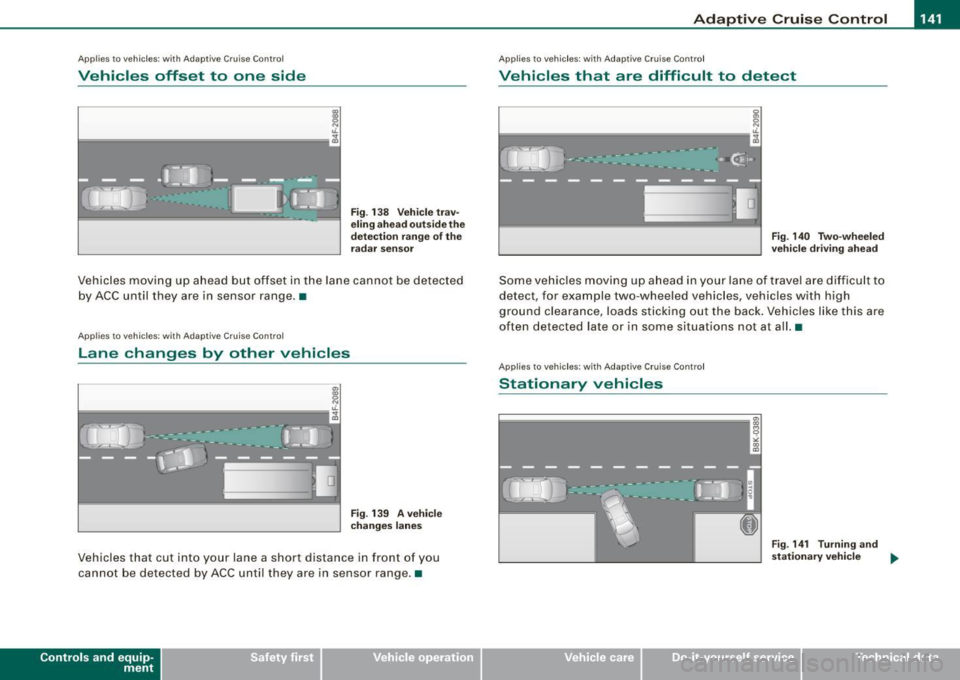
Vehicles offset to one side
I IL
F==================;;;g
Fig. 138 Veh ic le tr av
e lin g a hea d outs ide th e
d etec tion r ange of the
ra dar se nso r
Vehicles moving up ahead but offset in the lane canno t be detected
by ACC until they are in sensor range. •
App lies to veh ic les: w ith A daptive Cru ise Contro l
Lane changes by other vehicles
Fig . 139 A veh icle
c ha ng es la n es
Veh icles that cut into you r lane a short distance in front of you
cannot be detec ted by ACC un til they are in sensor range .•
Con tro ls and eq uip
ment
A pp lies to veh ic les: w it h A dapt ive Crui se Contro l
Vehicles that are difficult to detect
I IL F==================-;g
Fig . 140 Two-wheeled
ve hicle dr iving ah ea d
Some vehic les moving up ahead in your lane of trave l are difficu lt to
detect , for example two-wheeled vehicles, vehicles with high
ground clearanc e, loads sticking out th e back. Vehicles like this a re
often detected la te or in s ome situations not at all. •
Applie s to v ehic le s: w ith A dapt iv e Crui se C ont rol
Stationary vehicles
I,;;-================--~
Vehicle care I I
8 ,; 0:, a,
Fig . 14 1 Turnin g and
stati ona ry v ehi cle
~
irechnical data