change AUDI S6 2016 User Guide
[x] Cancel search | Manufacturer: AUDI, Model Year: 2016, Model line: S6, Model: AUDI S6 2016Pages: 294, PDF Size: 73.88 MB
Page 69 of 294
Warm and cold Climate control system
Description
App lies to vehicles: with three-zone climate control or four
zone a utomat ic climate contro l
The climate control system warms, cools and
adds humidity to the air in the vehicle interior . It
is the most effective when the windows and sun
roof* are closed .
If the temperature inside the
parked vehicle becomes very warm, opening the
window briefly will speed up the cooling process.
In all heating mode functions except
defrost, the
blower only switches to a higher speed once the
engine coolant has reached a certain tempera
ture.
Condensat ion from the cooling system can drip
and form a puddle of water under the vehicle.
This is normal and does not mean there is a leak.
Pollutant filter
The pollutant filter removes pollutants such as
dust and pollen from the air.
T he air pollutants filter must be changed at the
intervals specified in your Warranty
& Mainte
nance booklet, so that the air conditioner can
properly work .
If you drive your vehicle in an area with high air pollution, the filter may need to be changed
more frequently than specified in your Audi War
ranty
& Maintenance booklet . If in doubt, ask
your authorized Audi Service Advisor for advice .
Key coded settings
Three-zone climate control: The blower setting
and air distribution are stored automatically and
assigned to the remote contro l key that is in use.
Four-zone automatic climate control: Th e cli
mate control settings are automatically stored
and assigned to the remote contro l key that is in
use.
Warm and cold
A WARNING
Reduced visibility is dangerous and can cause
accidents .
- For safe driving it is very important that all
windows be free of ice, snow and condensa
tion .
- Completely familiarize yourself with the
proper use and function of the heating and
ventilation system and especially how to de
fog and defrost the windows .
- Never use the windshield wiper/washer sys tem in freezing weather until you have warmed the windshield first, using the heat
ing and vent ilation system. The washer so lu
tion may freeze on the w indshield and re
duce visibility.
(D Note
- If you suspect that the air conditioner has
been damaged, sw itch the system off to
avoid further damage and have it inspected
by a qualified dealership.
- Repa irs to the Aud i air cond itioner require
special technical knowledge and special
tools. Contact an authorized Audi dea ler for
assistance.
@ For the sake of the environment
By reduc ing the amount of fuel you use, you
also reduce the amount of pollutants emitted
into the air.
(D Tips
- Keep the air intake slots (in front of the
windshield) free from ice, snow and debris
in order to maintain the proper function of
the climate control system.
- The energy management system may switch
the seat heating* or rear window defroster off temporarily . These systems are availab le
again as soon as the energy balance has
been restored .
- Air escapes through vents under the rear
window. When placing items of clothing on the luggage compartment cover, ensure
that the openings are not covered.
67
Page 83 of 294
..... N
0 CJ '
Switching the Start-Stop-System on/off
manually
Applies to vehicles: with Start-Stop-System
If you do not wish to use the system, you can
switch it off manually .
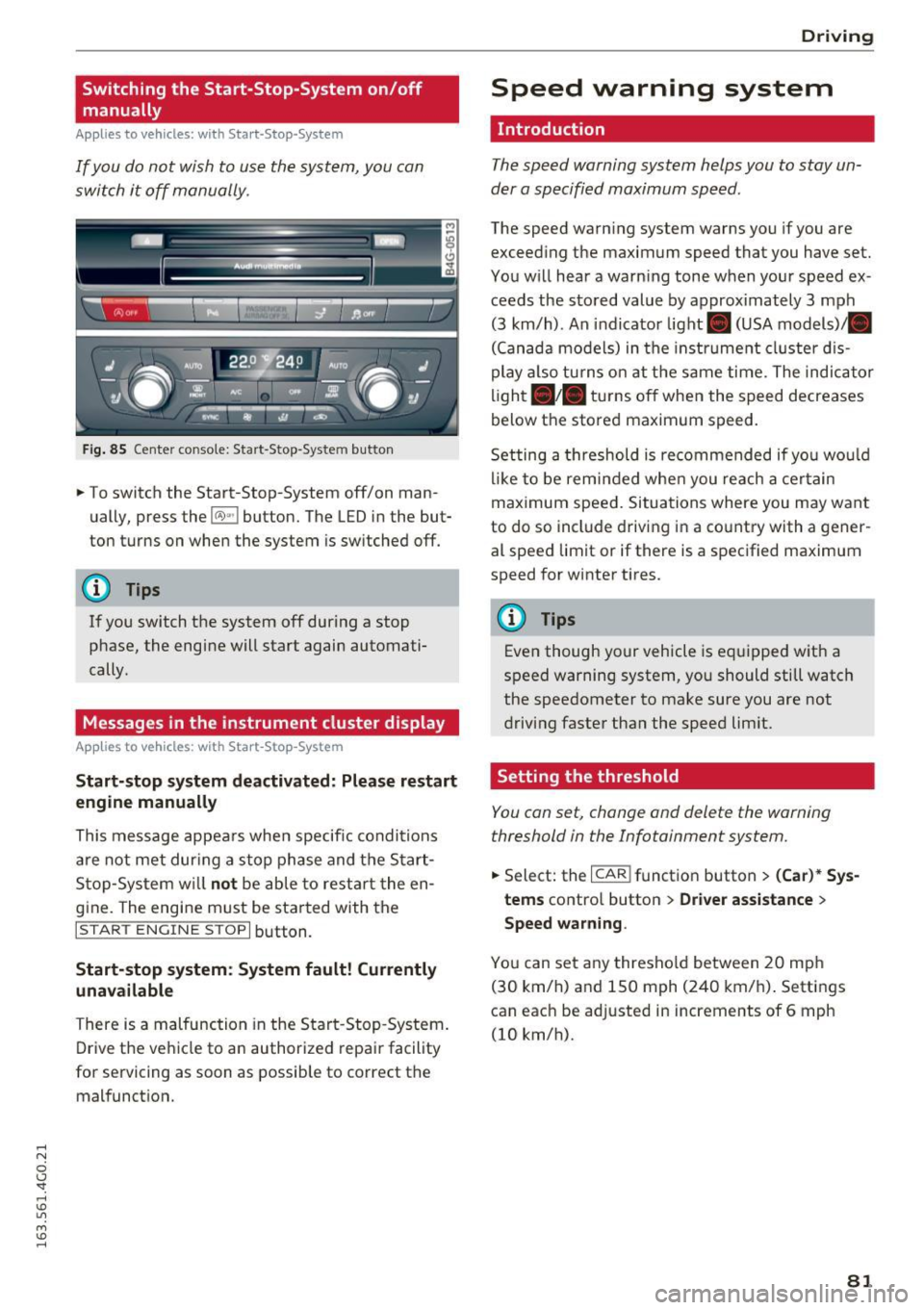
Fig. 85 Center co nso le: Start -S top -Syste m but ton
.. To switch the Start -Stop-System off/on man
ually, press the
l(A)••I button. The L ED in the but
ton turns on when the system is sw itched off.
@ Tips
I f you switch the system off during a stop
phase, the engine will start again automati
cally.
Messages in the instrument cluster display
Applies to vehicles: with Start-Stop-Sys tem
Start-stop system deactivated: Please restart
engine manually
This message appea rs when specifi c condi tions
are not met dur ing a stop phase and t he S tart
S top -Sy stem w ill
not be able to resta rt the en
gine. The engine must be sta rted with the
I START ENGINE ST OPI button.
Start-stop system : System fault! Currently
unavailable
There is a mal function in the Start -Stop -System .
Drive the ve hicl e to an authorized repa ir facility
for servicing as soon as possible to correct the malfunct ion .
D rivi ng
Speed warning system
Introduction
The speed warning system helps you to stay un
der a specified maximum speed.
The speed warn ing system warns you if you are
exceed ing the maximum speed that you have set.
You will hear a warn ing tone when your speed ex
ceeds the s tored value by approx imately 3 mph
(3 km/h) . An indicator light . (USA models)/ .
(Canada models) in the instrume nt cl uste r d is
play a lso tu rns on at t he same time. The indicator
lig ht •• tur ns off when the speed decreases
below the stored maximum speed.
Setting a th reshold is recommended if yo u wo uld
lik e to be rem inded whe n you reach a cer tain
ma ximum speed. Situations where you may want
to do so incl ude driving in a co untry with a gener
al speed limit or if there is a spec ified maximum
speed for winter tires.
@ Tips
Eve n though your vehicle is eq uipped w ith a
speed warning system, yo u should still watch
the speedometer to make sure you are not
driving faster than the speed lim it.
Setting the threshold
You can set, change and delete the warning
threshold in the Infotainment system.
.. Select: the I CAR ! funct ion button > (Car) * Sys
tems
contro l button > Driver as sistance >
Speed warning .
You can set a ny thresho ld between 20 mp h
(30 km/h) and 150 mph (240 km/ h). Settings
can eac h be adjusted in increments of 6 mph
(10 km/h).
81
Page 87 of 294
.... N
0 CJ '
Audi ada pti ve c ruise contr ol and br akin g gu ard
-For safety reasons, do not use adapt ive
cruise contro l when driv ing on roads with
many curves, when the road surface is in
poor condit ion and/or in bad weather (such
as ice, fog, gravel, heavy rain and hydroplan
ing) . Us ing the system under these condi
t ions could result in a collision .
- Switch adaptive cruise contro l off tempora
rily when driving in turn ing lanes, on ex
pressway exits or in const ruc tion zones. This
preven ts the vehicle from accelerating to
the set speed when in these situat ions .
- T he adapt ive cr uise con trol system will no t
br ake by i tself if you pu t your foot on the ac
celerator peda l. Doing so can override the
speed and distance regulation.
- Whe n approaching stat ionary obje cts such
as stopped traffic, adapt ive cruise control
will not respo nd and braking guard will have
limited function .
- The adaptive cruise control system and
brak ing guard do not react to peop le, ani
ma ls, objects crossing the road or oncom ing
objects.
- The function of the radar sensors can be af
fected by reflective objects such as guard
rai ls, t he entrance to a tunnel, heavy rain or
ice.
- Never follow a veh icle so closely that you
cannot stop your vehicle safely . The adap
t ive cr uise control cannot slow or brake the
vehicle safely when you follow another veh i
cle too close ly. Always remember th at the
au tom atic b raking function ca nnot br ing the
vehicle to a sudden or emergency stop un
der these conditions .
- T o preven t unintended operation, alw ays
switch AC C off when i t is not be ing used.
(D Note
The sensors can be displaced by impacts o r
damage to the bumper, whee l housing and
underbody. That co uld affect the adaptive
cru ise con trol sys tem and braking guard .
Have your a uthorized Audi dea ler or author·
ized Aud i Service Facility check their function.
In curves
Applies to vehicles: w ith Audi adapt ive cruise control
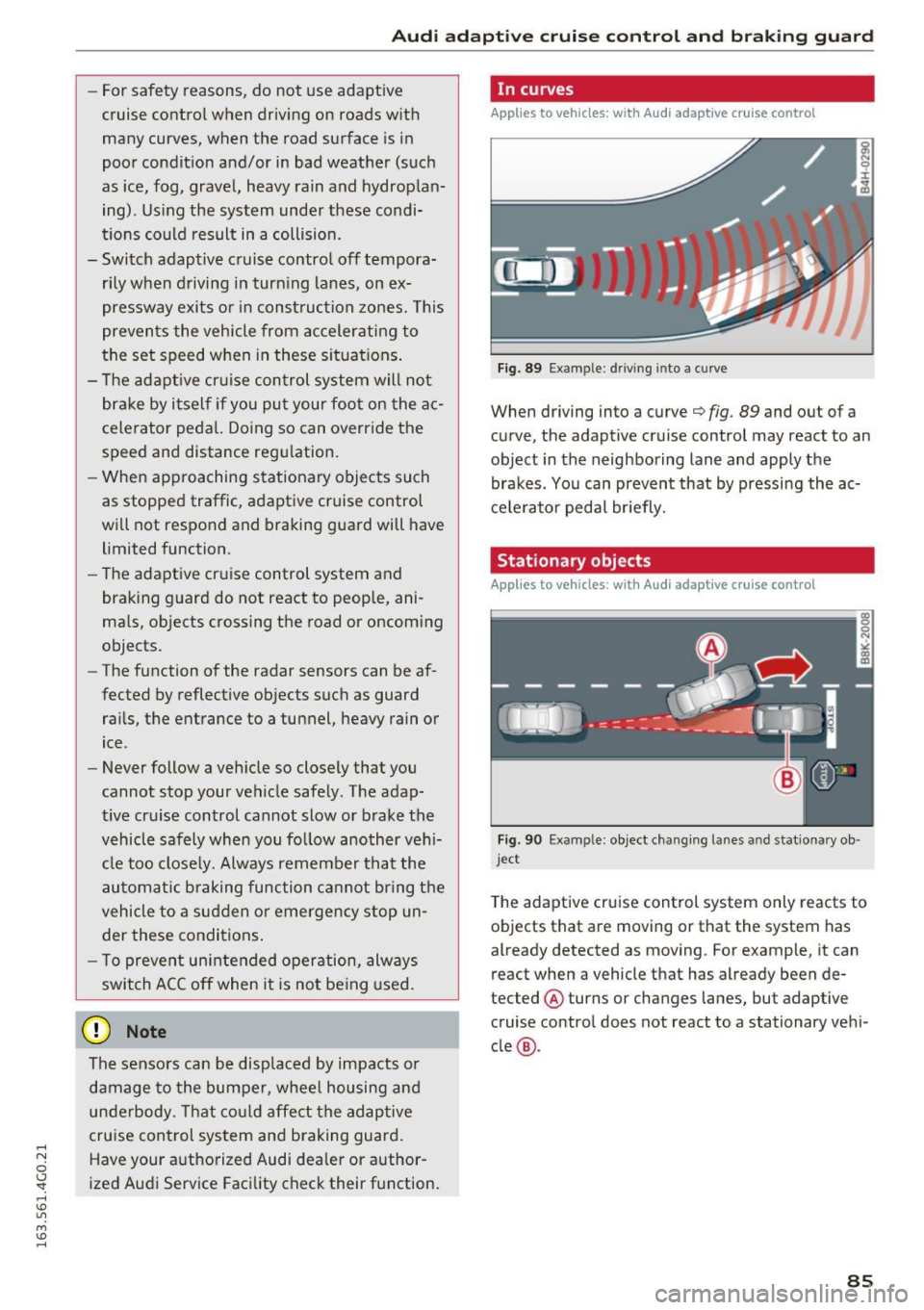
F ig. 89 Exampl e: d ri ving into a curve
When driving into a curve¢ fig. 89 and out of a
curve, the adaptive cruise control may react to an
object in the neighboring lane and app ly the
brakes . Yo u can prevent that by pressing the ac
ce le rator peda l br iefly.
Stationary objects
Applies to vehicles : w ith Audi adaptive cruise control
Fig. 90 Exa mple : object changing la nes a nd s tatio nary ob ·
j e ct
T he adaptive cruise control system only reacts to
objects that are moving or that the system has
already detected as moving. For example, it can
react when a vehicle that has already been de
tected @ turns or changes lanes, but adaptive
cruise control does not react to a stationary veh i
cle @.
85
Page 88 of 294
Audi adaptive cruise control and braking guard
Audi adaptive cruise
control
Description
Applies to vehicles: with Audi adaptive cruise control
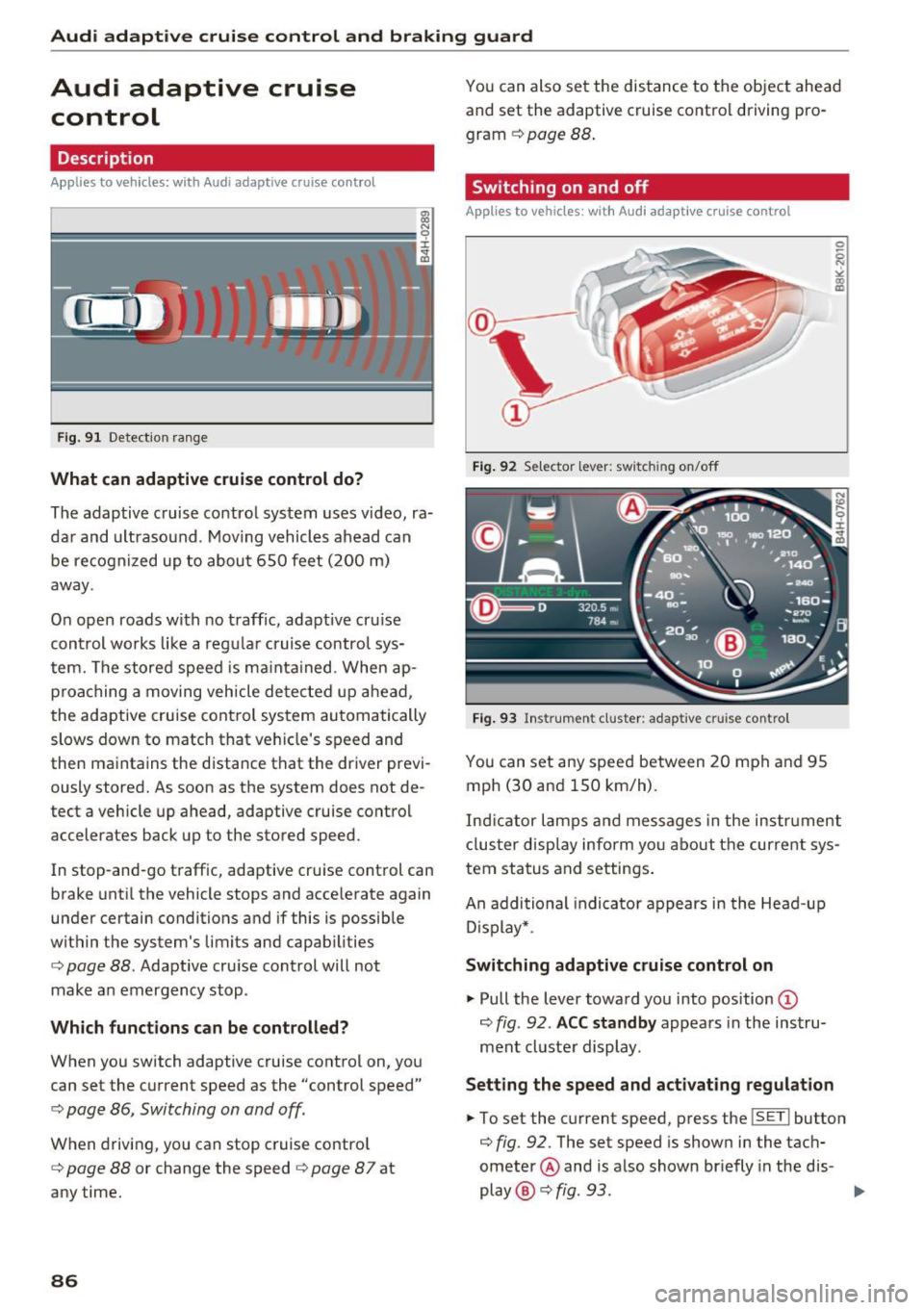
F ig. 91 Detection range
What can adaptive cruise control do?
The adaptive cruise control system uses video, ra
dar and ultrasound . Moving vehicles ahead can
be recognized up to about 650 feet (200 m)
away .
On open roads with no traffic, adaptive cru ise
control works like a regular cruise control sys
tem. The stored speed is ma inta ined. When ap
proaching a moving vehicle detected up ahead,
the adaptive cruise cont rol system automatically
slows down to match that vehicle's speed and
then maintains the distance that the driver previ ously stored. As soon as the system does not de
tect a vehicle up ahead, adaptive cruise control
accelerates back up to the stored speed.
In stop-and-go traffic, adaptive cruise control can
brake until the vehicle stops and accelerate again
under certain conditions and if this is possible
within the system's limits and capabilities
¢ page 88. Adaptive cruise control will not
make an emergency stop .
Which functions can be controlled?
When you switch adaptive cruise control on, you
can set the current speed as the "control speed"
¢ page 86, Switching on and off.
When driving, you can stop cruise control
¢ page 88 or change the speed ¢ page 8 7 at
any time.
86
You can also set the distance to the object ahead and set the adaptive cruise control driving pro
gram
¢ page 88.
Switching on and off
Applies to vehicles: with Audi adaptive cruise control
Fig. 92 Selector leve r: switch ing on/off
Fig. 93 Instrument cluster : adaptive cruise contro l
You can set any speed between 20 mph and 95
mph (30 and 150 km/h) .
Indicator lamps and messages in the instrument
cluster display inform you about the current sys
tem status and settings.
An addi tional indicator appears in the Head-up
D isplay* .
Switching adaptive cruise control on
.,. Pull the lever toward you into position ©
¢
fig . 92 . ACC standby appears in the instru
ment cluster display.
Setting the speed and activating regulation
.,. To set the current speed, press the ISETI button
¢ fig. 92. The set speed is shown in the tach
ometer @ and is also shown br iefly in the dis-
play @¢
fig. 93 . II>
Page 89 of 294
.... N
0 CJ '
Audi ada pti ve c ruise contr ol and br akin g gu ard
.. You must also press the brake pedal when the
vehicle is stopped .
Switching adaptive cruis e co ntrol off
.. Push the lever away from you into position @
un til it clicks into place. The message
AC C o ff
appea rs.
@ Indic ator lights
II -Adapt ive cru ise control is switched on . No
vehicles are detected up ahead. The stored speed
is ma inta ined .
• -A moving vehicle is detected up ahead . The
adapt ive cruise control system regulates the
speed and distance to the moving vehicle ahead
and accelerates/brakes automatically.
(-) -Adaptive cru ise control is switched on . A
mov ing vehicle up ahead was detected . Your veh i
cle remains stopped .
• -When automatic braking is not able to keep
enough d istance to a previously detected moving
veh icle up ahead, you must take control and
brake
c::> page 89, Prompt for driver interven
tion.
© Di spla y
If adaptive cruise control is not shown in the dis
play, you can call it up with the multifunction
steer ing wheel buttons
c::> page 23.
Based on the symbols in the display, you can de
termine if the system is ma inta ining a distance to
the vehicle ahead and what that distance is.
N o v ehicle -No vehicle ahead was detected.
White vehicl e -A vehicle ahead was detected.
Red ve hicl e -Prompt for the driver to take action
c::> page 89.
Both arr ow s on the scal e© indicate the distance
to the vehicle ahead. No arrow appears when the
vehicle is on an open road and there is no object
ahead .
If an object is detected ahead, the arrow
moves on the scale .
The green zone on the scale shows the stored dis
tance . For information on chang ing the stored
distance, refer to
c::> page 88 . If the distance se- lected is too close or may soon become too close,
the arrows move into the red zone on the scale .
A WARNING
Improper use of the adaptive cruise control
can cause collisions, other accidents and seri
ous personal injuries.
- Pressing the
ISETI button when driving at
speeds below 20 mph (30 km/h), will auto matically accelerate the ve hicle to 20 mph
(30 km/h), which is the minimum speed
that can be set.
(D Tips
- If you switch the ignit ion or the adaptive
cruise control off, the set speed is erased
from the system memory .
- The e lectronic stabilization control (ESC)
and the anti-slip-regulation (ASR) are auto
matically turned on when the adaptive
cruise cont rol is tu rned on . Both systems
cannot be turned off if the adaptive cru ise
control is t urned on.
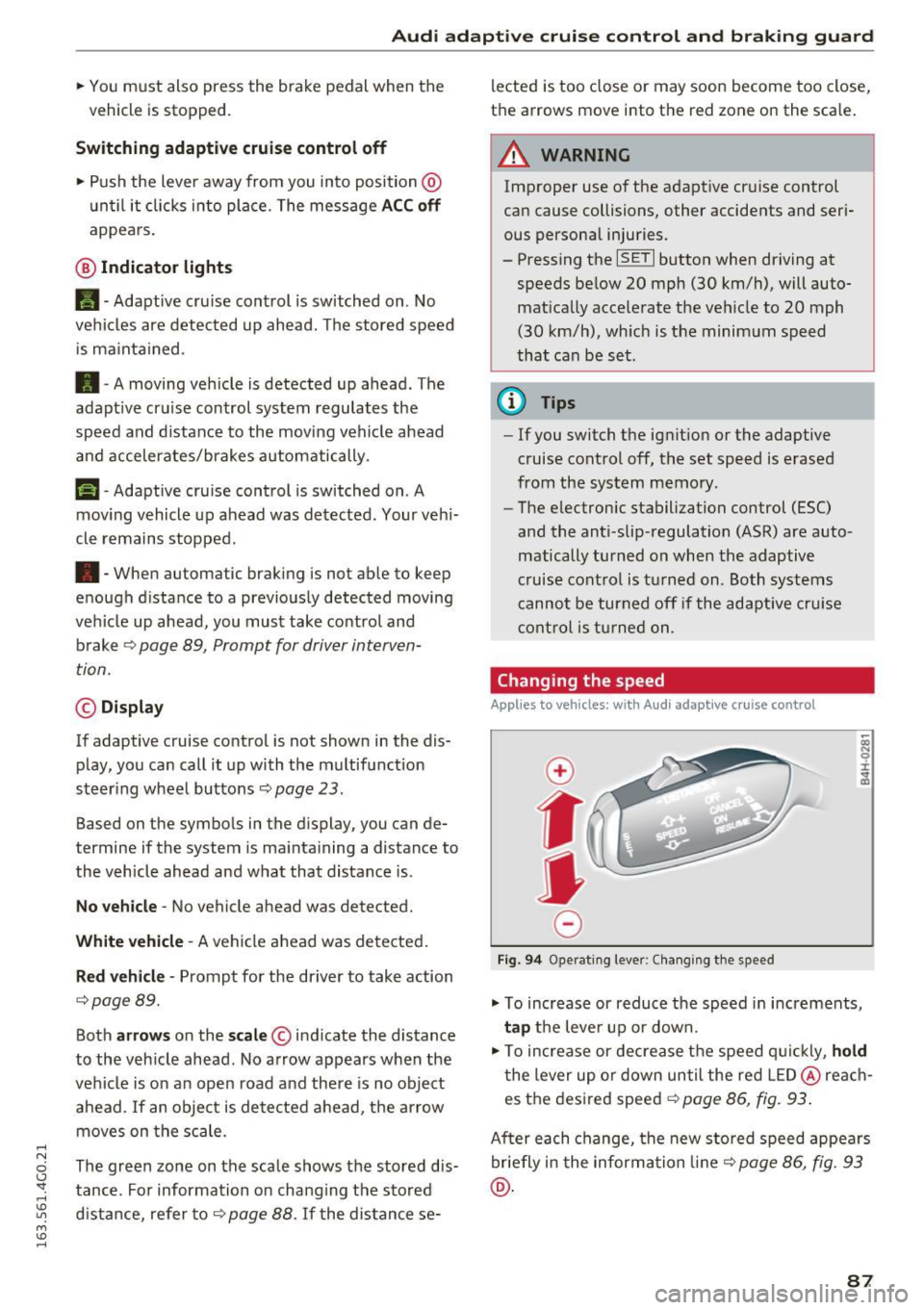
Changing the speed
Appl ies to vehicl es: wi th Audi ada ptive c ruise con trol
0
f
jJ
0
Fig. 9 4 Operat ing lever : Chang ing the speed
.,. To increase or reduce the speed in increments,
ta p the lever up or down.
.. To increase or decrease t he speed q uickl y,
ho ld
the lever up or down un til the red LED @ reac h
es the desired speed
c::> page 86, fig. 93 .
After each change, the new stored speed appears
br iefly i n the informa tion line
c::> page 86, fig . 93
@ .
87
Page 90 of 294

Audi adaptive cruise control and braking guard
Driving in stop-and-go traffic
Applies to vehicles: with Audi adaptive cruise control
The adaptive cruise control system also assists
you in stop-and-go traffic.
If a previous detected
vehicle ahead stops, your vehicle will brake to a
stop, within the limits of the system.
• To resume driving with adaptive cruise control,
tap the accelerator pedal or
• Pull the lever toward you into position @
¢ page 88, fig. 95.
(Di Tips
-If adaptive cruise control is active and your
vehicle does not start driving as expected
after pulling the lever once, you can start
out again by tapping the accelerator pedal.
- If an obstacle is detected when your vehicle
starts driving, the system will prompt you
to take over¢
page 89. Your vehicle will
drive more slowly when starting. This may
also happen in some situations when no ob
stacle is apparent.
Interrupting cruise control
Applies to vehicles: with Audi adaptive cruise contro l
Fig. 95 Selector lever
Requirement: The adaptive cruise control is
switched on.
Overriding cruise control
• To accelerate manually, pull the lever toward
you into position@and hold it there. The mes
sage
ACC: Override appears. Or
• press the accelerator pedal.
• To resume cruise control, release the lever or
take your foot off the accelerator pedal.
88
Canceling cruise control while driving
• Move the lever into position @. The message
ACC: Standby appears. Or
• press the brake pedal.
• To resume the stored speed, move the lever in
to position @.
Canceling cruise control when stopped
• Push the lever away from you into position@.
The message
ACC: Standby appears.
• To resume cruise control, press the brake pedal
and pull the lever toward you into position @.
A WARNING
It is dangerous to activate cruise control and
resume the stored speed when the current
road, traffic or weather conditions do not per
mit this . This could result in a crash.
Setting the distance
Applies to vehicles: with Audi adapt ive cruise control
Fig. 96 Selector lever: setting the dista nce
• Tap the switch to display the current set dis
tance ¢
fig. 96.
• To increase or reduce the distance by incre
ments, tap the switch again to the left or right.
The distance between the two vehicles will
change in the instrument cluster display.
When approaching a moving vehicle up ahead,
the adaptive cruise control system automatically brakes to match that object's speed and then
maintains the stored distance.
If the vehicle
ahead accelerates, adaptive cruise control will al-
so accelerate up to the stored speed.
II--
Page 91 of 294
.... N
0 CJ '
M
"' ......
Audi ada pti ve c ruise contr ol and br akin g gu ard
The highe r the speed, the greater the distance in
yards (meters) ¢&. .The
Distance 3 setting is
recommended .
The distan ces p rovided are specified values. De
pending on the driving situation and the how the
vehicle ahead is driving, the actual distance may
be more or less than these target d istances.
The various symbols fo r the time increments ap
pear br ie fly in the information line @ ¢
page 86,
fig. 93 when you change the settings.
c:::, _c:::, ___ Dis tan ce 1: This setting corresponds
to a distance of 92 fee t/28 meters when travel
ing at 62 mph (100 km/h), o r a time interval of 1
second.
c:::, __ c:::, __ Distan ce 2 : This setting corresponds
to a distance of 118 feet/36 meters whe n travel
ing at 62 mph (100 km/h), or a time interval of
1.3 seconds.
c:::, ___ c:::,_ Distanc e 3: This setti ng corresponds
to a distance of 164 feet/SO meters when travel ing at 62 mph (100 km/h), o r a time interval of
1.8 seconds.
c:::, __ __ c:::, Di stance 4 : This setti ng corresponds
to a distance of 210 feet/64 meters when travel ing at 62 mph (100 km/h), or a time interval of
2 .3 seconds.
A WARNING
Following other vehicles too closely increases
the risk of collisions and ser ious personal in
jury.
- Setting short distances to the traffic ahead reduces the t ime and distance available to
br ing your vehicle to a safe stop a nd makes
it even more necessary to pay close atten
t ion to traffic .
- Always obey applicable traff ic laws, use
good judgment, and select a safe following distance for the traffic, road and weathe r
condit io ns.
(D Tips
- Di stance 3 is set automatically each time
you switch the ignition on . -
Your standard settings are automatically
stored and assigned to the remote control
key being used.
Selecting the driving mode
Applies to vehicles: with Aud i adapt ive cru ise control
.,. Select the desired driving mode in drive select
¢page 100.
{!) Tips
Your settings are automatically stored and as
s igned to the remote control key being used.
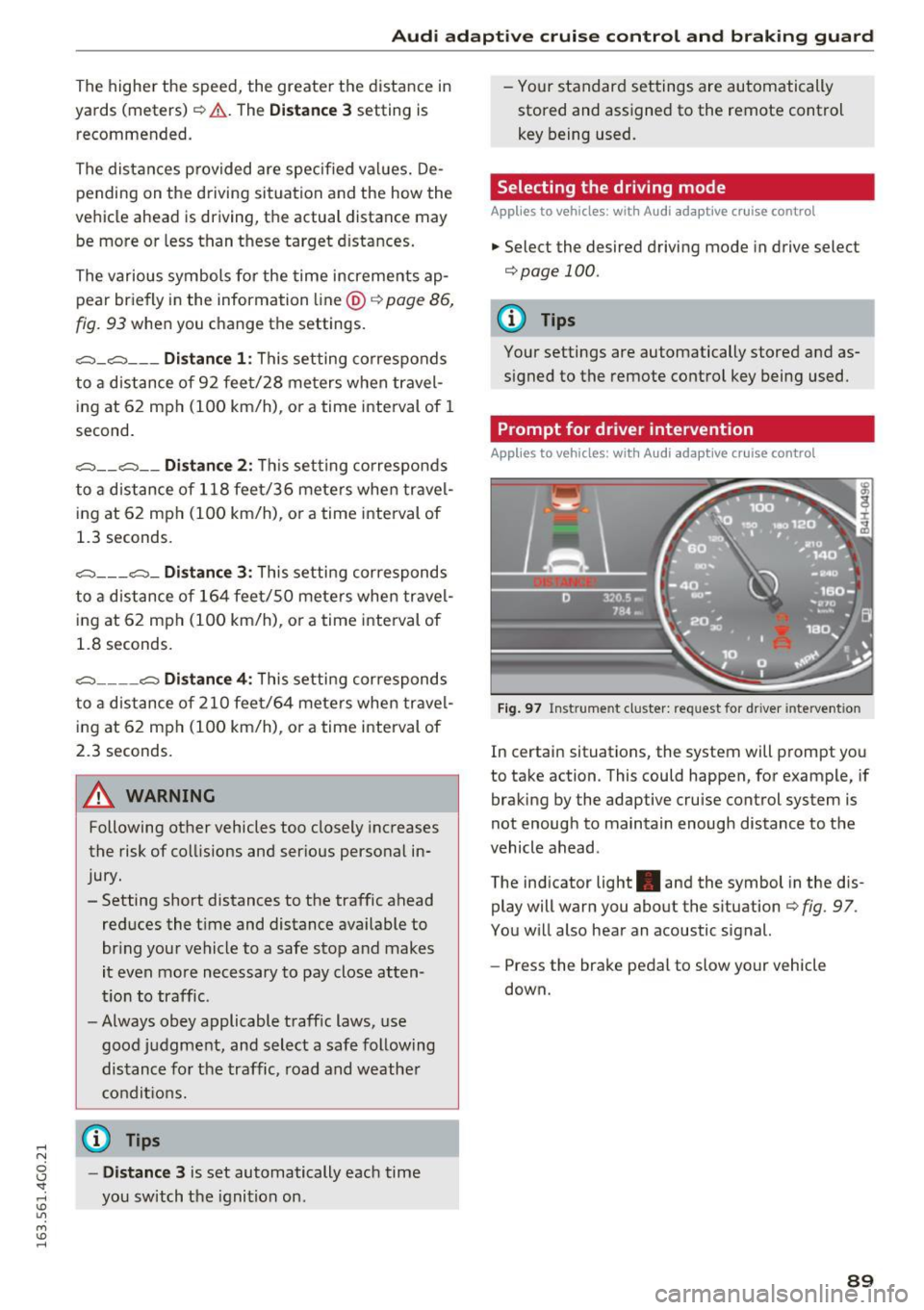
Prompt for driver intervention
Applies to vehicles: with Aud i adapt ive cru ise control
F ig . 97 Inst rume nt cluster: request for d river in tervention
In certain situations, the system will prompt you
to take action . This could happen, for example, if
braking by the adaptive cru ise control system is
not enough to maintain enough distance to the
vehicle ahead .
The ind icator light . and the symbol in the dis
play will warn you about the situation ¢
fig. 97 .
You w ill also hear an acoustic signal.
- Press the brake pedal to slow yo ur vehicle
down.
89
Page 95 of 294
Audi active lane assist Lane assist
Description
Applies to vehicles: with Audi active lane assist
Active lane ass ist detects lane marker lines with
i n the l imits of the system using a camera in the
windshie ld. If you are approaching a detected
lane marker line and it appears likely that you
will leave the lane, the system will warn you with
corrective steering. You can override this steering
at any time . If you pass over a line, the steering
wheel will vibrate lightly. In order for this warn ing vibration to occur, it must first be switched
on in the Infotainment system. Act ive lane assist
is operable when the lane marker line is detected
on at least one side of the vehicle.
The system is designed for driving on freeways
and expanded highways and thus works only at
speeds of 40 mph (65 km/h) or more .
Applies to vehicles with side assist* : If you acti
vate a turn signal when active lane assist is ready
and it classifies a lane change as critical because
of vehicles traveling alongside you or approaching you, there w ill be not iceable correct ive steer
i ng short ly before you leave the lane. This will at
tempt to keep your veh icle in the lane.
Appl ies to vehicles w ithout s ide ass ist*: the sys
tem does not warn when it is ready if you activate
the turn signa l before crossing the lane marker
line. In this case, it ass umes that you are chang
ing lanes intentionally.
Applies to vehicles w ith adapt ive cruise control*
or pa rking aid*: The corrective steering is ta rget
ed based on the driving situation . In add ition to
the lane marker lines, the system can also take
into account other objects such as guard rails. If
they are detected in close proximity to the vehi
cle, active lane assist helps prevent the vehicle
from driving too close to them. There is also passing assistance . The system does not provide
any correct ive steer ing if it detects that you are
passing another vehicle .
Audi act ive lane ass ist
A WARNING
- The system warns the driver that the vehicle
is leaving the lane using corrective steering.
The driver is always responsible for keeping
the vehicle within the lane.
- The system can help you keep the vehicle in the lane, but it does not drive by itself . Al
ways keep your hands on the stee ring
wheel.
- Corrective steering may not occur in certain
situations, such as du ring heavy b raking.
- There may be cases whe re the camera does
not recognize all la n e mar ker lines. Cor rec
tive steering can only take place on the s ide
of the vehicle where lane marker lines are
detected.
- Othe r road structures or objects could poss i
b ly be identified un inten tionally as lane
marker lines . As a result, corrective steering
may be unexpected or may not occur.
- The camera view can be rest ricted, for ex
ample by vehicles driving ahead or by rain,
snow, heavy spray or light shining into the
camera. Th is can result in active lane ass ist
not detecting the lane marker lines or de
tect ing them incorrectly.
- Under certain condit ions such as ruts in the
road, a banked roadway or crosswinds, the
correct ive steer ing alone may not be enough
to keep the vehicle in the middle of the lane .
- For safety reasons, act ive lane assist must
not be used when there are poor road and/
or weather conditions such as slippery
roads, fog, gravel, heavy rain, snow and the potential fo r hydrop laning. Using active lane
assis t under these condit ions may i ncrease
the risk of a crash .
93
Page 98 of 294
Audi side assist
Audi side assist
Side assist
Description
Applies to vehicles: with Audi side assist
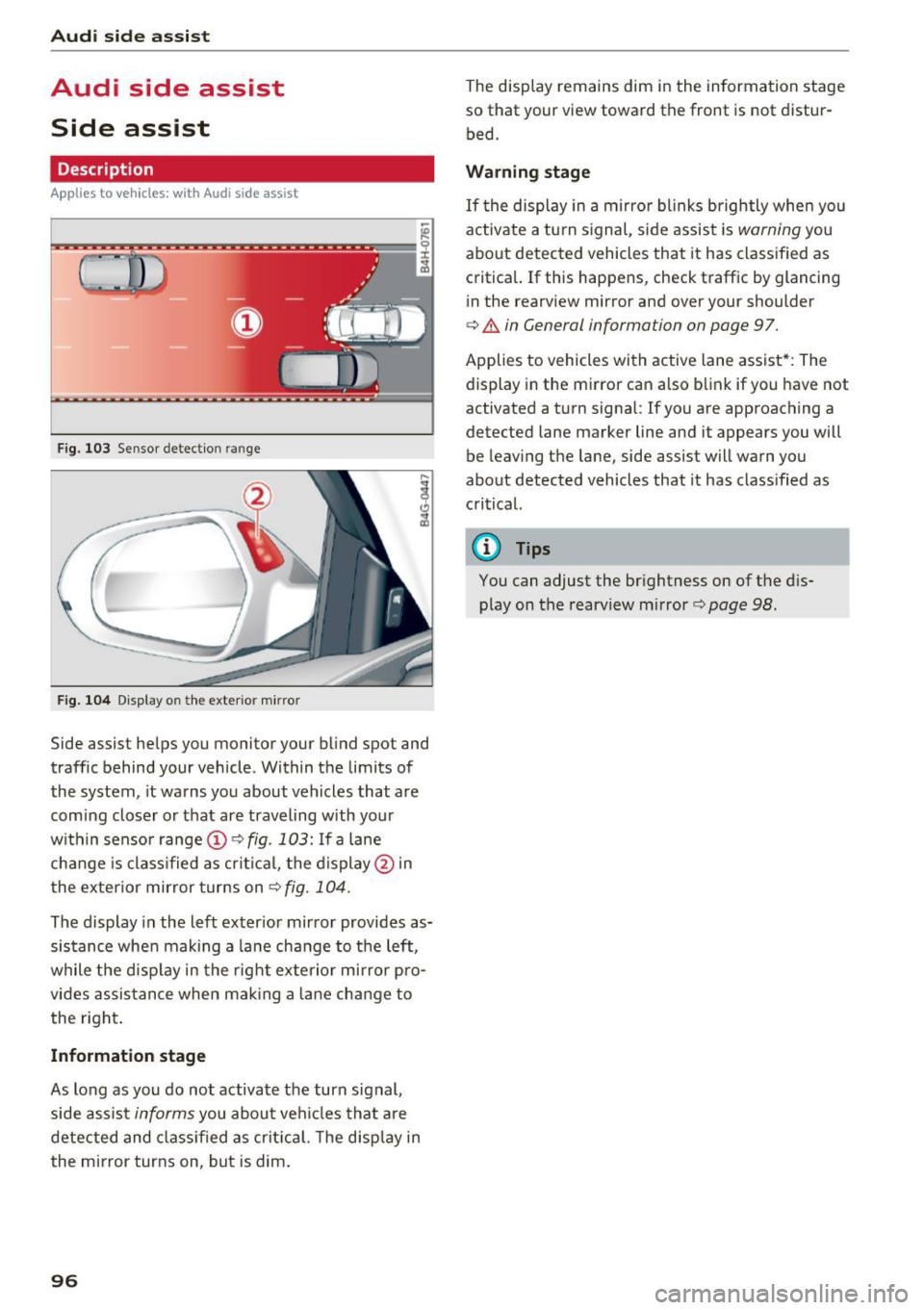
F ig. 103 Sensor detection ra nge
F ig . 104 Display o n the exte rio r m irror
Side assist helps you monitor your blind spot and
traffic behind your vehicle. Within the limits of
the system , it warns you about vehicles that are
comi ng closer o r that are traveling with your
within senso r range @
c:> fig. 103: If a lane
cha nge is class ified as crit ica l, the display @in
the exte rior mirror turns on
c:> fig. 104.
The display in the left exter ior mir ror provides as
sis tance whe n making a la ne change to the left,
while the disp lay in the rig ht exte rio r mi rror pro
vides assis tance when mak ing a lane change to
the right .
Informat ion stage
As lo ng as you do no t activate the turn signal,
side assis t
informs you about ve hicles that a re
detected and class if ied as crit ic al. T he disp lay in
the mirror turns on, but is dim .
96
The display remains dim in the information stage
so that your view toward the front is not distur
bed.
Warning stage
If the display in a mirro r blinks brightly when you
activate a tu rn s ignal, side assist is
warning you
about detected vehicles that it has classified as critical. If this happens, check traffic by glancing
in the rearview mirror and over your shoulder
c:> & in General information on page 97.
Applies to vehicles with active lane assist* : The
display in the mirror can also b link if you have not
activated a turn signal:
If you are approach ing a
detected lane marker line and it appears you will
be leaving the lane, side assist will warn you
about detected vehicles that it has class ified as
critical.
@ Tips
You can adjust the brightness on of the d is
play on the rearview m irror
c:> page 98.
Page 99 of 294
.... N
0 CJ '
M
"' ......
General information
Applies to vehicles: with side assist
®
®
©
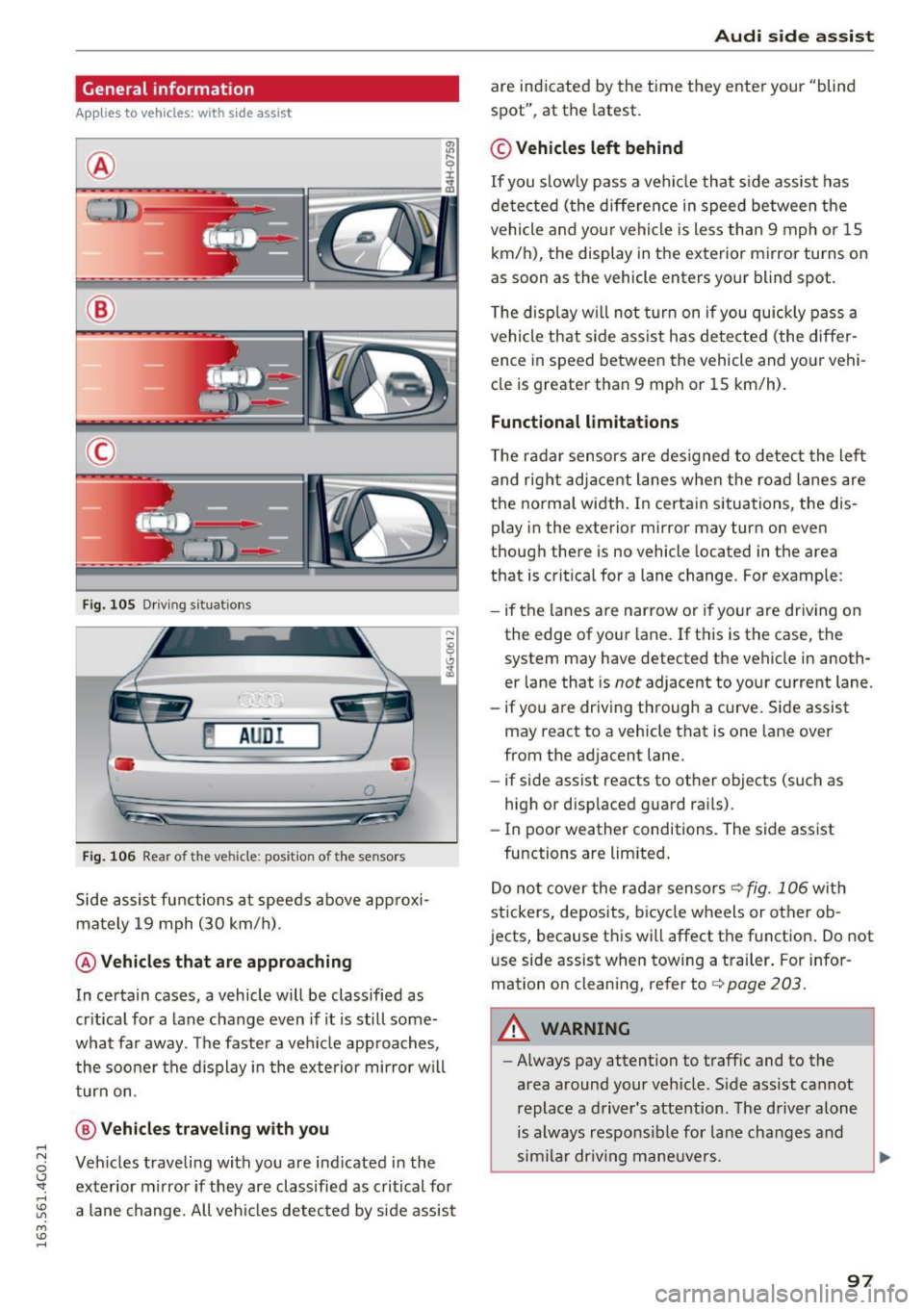
Fig. 105 Driving s it u atio ns
~ AUD !
• •
F ig. 106 Rear of the vehicle: position of the senso rs
S ide a ssist fu nctions a t speeds above ap proxi
ma te ly 19 mph (30 km/h).
@ Vehicles that are approaching
In ce rtain cases, a vehicle will be classified as
cr itica l for a lane change even if it is still some
what far aw ay. The faste r a ve hicle app roaches,
t he soo ner the d isplay in the exterio r mirror w ill
t urn on.
@ Vehicles traveling with you
Ve hicles traveli ng w ith you are ind icated i n the
ex te rior m irro r if they are classifie d as critical for
a lane change. All vehi cles detec ted by s ide assist
Aud i side assist
are ind icate d by the time they ente r your "blin d
spot", at the latest.
© Vehicles left behind
If you s low ly pas s a vehi cle that s ide ass ist has
de te cted ( the diffe re nce in speed between t he
vehicle and you r vehicle is less than 9 mph or 15
km/h), the display in the exterior mirror turns on
as soon as the vehicle enters your blind spot.
T he disp lay w ill not tu rn on if you quickly pass a
vehicle th at side a ssist h as dete cte d (t he differ
ence in speed between the vehicle and yo ur vehi
cl e is greater tha n 9 mp h or 15 km/h).
Functional limitations
The radar se nsors are des igned to detect the le ft
and right adj ace nt lane s whe n the ro ad la nes are
the normal width . In certa in situations, the dis
play in the exte rior mirror may turn on eve n
though there is no vehicle located in the area
that is critical for a lane change. For e xample:
- if the lanes a re narrow or i f yo ur are dr iv ing on
the edge o f you r lane. If t his is the case, the
system may have detected t he vehicle in anoth
er lane that is
not adjacent to you r cu rrent lane.
- if you are dr iv ing through a curve. Si de assist
may react to a vehicle that is one lane over
from the ad jacent lane .
- if side assist reacts to ot her objects (such as
high or disp laced guard ra ils).
- In poor weather conditions. The side assist
fu nctions a re limited .
D o no t cover the r adar senso rs
c> fig. 106 wit h
stickers, deposits, b icycle wheels or other o b
jects, because th is wi ll affect the f unction . Do not
u se side assist when towing a t railer . For info r
mation o n cleaning, refer to
c> page 203.
A WARNING
- Always pay attention t o traffic and to the
area a round your veh icle . S ide assist cannot
replace a driver' s attention. The driver alone
is always respo nsibl e for la ne cha nges and
s im ila r dr iv in g ma neuve rs.
97