change AUDI S6 2016 Owners Manual
[x] Cancel search | Manufacturer: AUDI, Model Year: 2016, Model line: S6, Model: AUDI S6 2016Pages: 294, PDF Size: 73.88 MB
Page 6 of 294
Table of content s
Bulbs ... . ... ... .. .. ..... ... .. .. ...
263
Replacing light bulbs . . . . . . . . . . . . . . . . . 263
Emergency situations . . . . . . . . . . . . 264
General . . . . . . . . . . . . . . . . . . . . . . . . . . . . 264
Starting by pushing or towing . . . . . . . . . . 264
Starting w ith jumper cables . . . . . . . . . . . 264
Use of jumper cables . . . . . . . . . . . . . . . . . 265
Towing w ith a tow truck . . . . . . . . . . . . . . 266
Ra is ing the veh icle . . . . . . . . . . . . . . . . . . . 268
Te chnical Data . . . . . . . . . . . . . . . . . . . 270
Technical data . . . . . . . . . . . . . . . . . . . . 270
Veh icle identification . . . . . . . . . . . . . . . . . 270
We ights . . . . . . . . . . . . . . . . . . . . . . . . . . . 270
D imensions. .. .... ........... .... ... 27 1
Capac ities . . . . . . . . . . . . . . . . . . . . . . . . . . 2 7 1
Gasoline engines . . . . . . . . . . . . . . . . . . . . 272
D iese l engines . . . . . . . . . . . . . . . . . . . . . . 272
Consumer information ... .. .. .. . 273
Warranty coverages . . . . . . . . . . . . . . . . . . 273
Operating your vehicle outside the U .S .A .
or Canada . . . . . . . . . . . . . . . . . . . . . . . . . . 273
Aud i Service Repair Man uals and
Literature . . . . . . . . . . . . . . . . . . . . . . . . . . 273
Maintenance . . . . . . . . . . . . . . . . . . . . . . . . 27 3
Accesso ries and technical changes . . . . . . 275
D eclarat ion of Compliance,
Telecommu nication and Electron ic
Systems . . . . . . . . . . . . . . . . . . . . . . . . . . . 276
Index ... .. .. .... ........... .. .. .. . 277
4
Page 7 of 294
In addition to this Owner's Manual, your Audi
comes with the
- MMI Operat ing Instructions
- Warranty
& Maintenance booklet.
If you are missing one of these publications, or if
you believe that the information is not complete,
contact your author ized Audi dealer for assis
tance.
MMI Operating Instructions
contain detailed description of the Aud i Mu lti
Media Interface (MMI) includ ing the nav igation
system, the sound system and the hand held
phone.
The Warranty & Maintenance booklet
explains how you can keep your Audi in top driv ing condition by having it serviced regu larly and
contains detailed information about the warran
ties covering your Aud i. Always have the booklet
with you when you take your veh icle to an author
iz ed A udi dealer for serv ice. Your Audi Serv ice Ad
visor w ill record each scheduled service and can
answer any questions you may have regarding
h ow to maintain your vehicle.
In Canada,
the vehicle literature is also available in French.
To obtain a copy, co nta ct you r dealer or write to:
Au Canada, on peut se procurer un exemplaire en
frarn;ais de ce document aupres du concession
naire ou de:
Aud i Canada
Client Assistance
Assistance a la Clientele
777 Bayly Street, West,
Ajax, Ontario LlS 7G7
If you sell your Audi
all literature should be left in the vehicle to make
the Warranty terms as well as all operating, safe
ty and maintenance informat ion ava ilable to the
next owner.
Owner 's Literature
If you change your address or if you bought
this Audi used
be sure to send in a "Notice of Address Change" I
"Not ice of Used Car Purchase" post card. This
card can be found in the Warranty
& Mainte
nance booklet or obtained from your authorized
Audi dealer.
It is in your own interest that we are able to
contact you should the need arise.
5
Page 21 of 294
....
no longer available. This cou ld cause the vehi
cle to swerve and increase the risk of sliding.
Drive carefully to the nearest authorized Audi
dealer or other qualified workshop and have
the malfunction corrected.
(D Tips
For additional information on ESC and ABS,
refer to
c:::;, page 187.
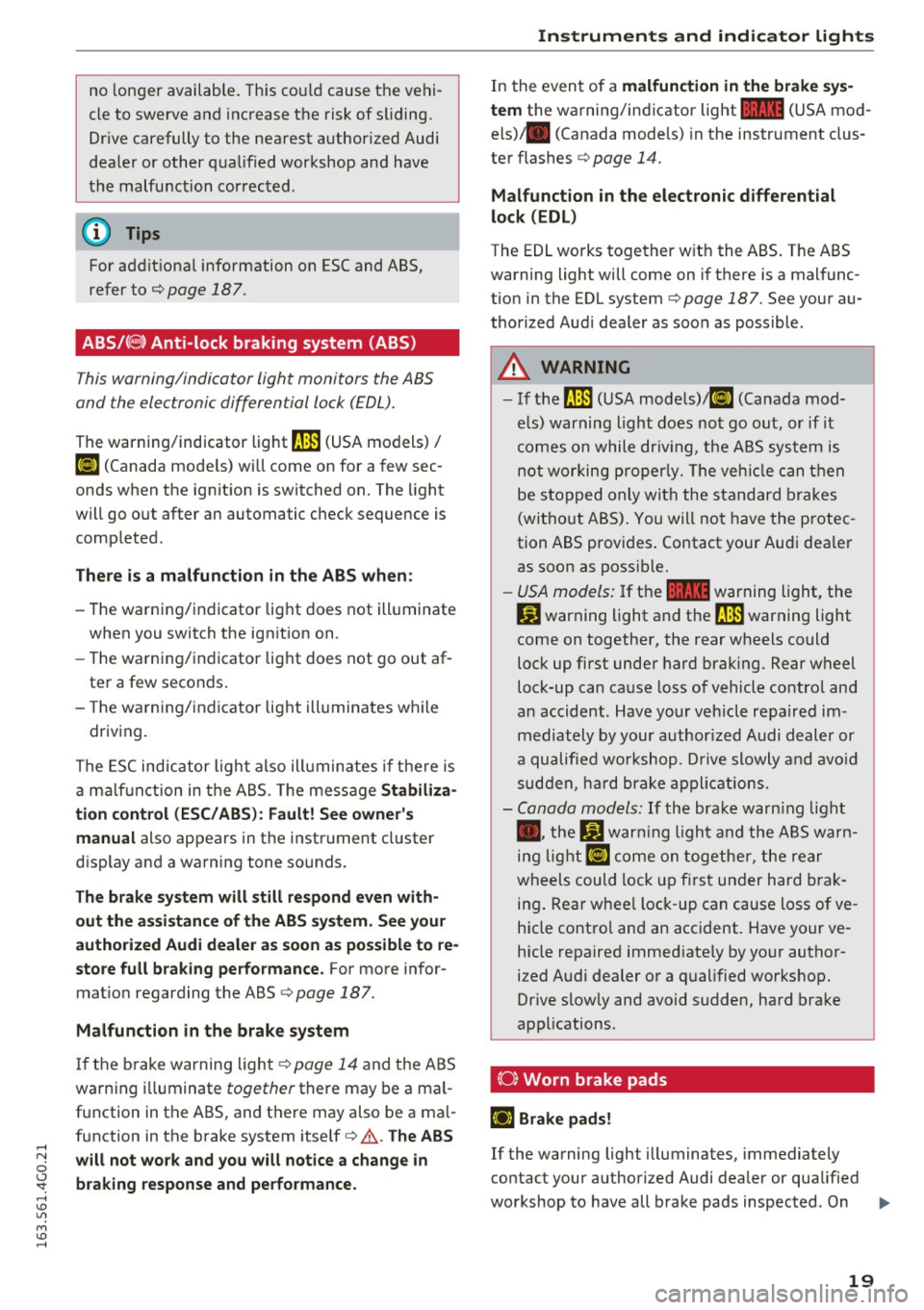
ABS /C8) Anti-lock braking system (ABS)
This warning/indicator light monitors the ABS
and the electronic differential lock (EDL).
The warning/indicator light~ (USA models)/
KG» (Canada mode ls) will come on for a few sec
onds when the ignition is switched on. The light
will go out after an automatic check sequence is
completed .
There is a malfunction in the ABS when:
-The warning/indicator light does not illuminate
when you switch the ign ition on .
- Th e warning/indicator light does not go out af
ter a few seconds .
- The warning/indicator light illuminates while
driving.
The ESC indicator light also illuminates if the re is
a ma lf u nction in the ABS. The message
Stabiliza
tion control (ESC/ ABS): Fault! See owner's
manual
also appears in the instrument cluster
disp lay and a warning tone sounds.
The brake system will still respond even with
out the assistance of the ABS system. See your
authorized Audi dealer as soon as possible to re
store full braking performance.
For more infor
mation regarding the ABS
c:::;, page 187.
Malfunction in the brake system
I f the brake warning light¢ page 14 and the ABS
warn ing illuminate together there may be a mal
function in the ABS, and there may also be a ma l
function in the brake system itself
c:::;, ,&. The ABS
"' will not work and you will notice a change in
0
~ braking response and performance. ....
In the event of a malfunction in the brake sys
tem
the warning/indicator light 11111 (USA mod
els) . (Canada models) in the instrument clus
ter flashes
c:::;, page 14.
Malfunction in the electronic differential
lock (EDL)
The EDL works together with the ABS . The ABS
warning light will come on if there is a malfunc
tion in the EDL system
c:::;, page 187. See your au
thorized Aud i dealer as soon as possible .
A WARNING
= -
-If the ~ (USA models)/ 11] (Canada mod-
els) warning light does not go out, or if it
comes on while dr iv in g, the ABS system is
not working properly. The veh icle can then
be stopped only with the standard brakes
(without ABS). You will not have the protec
tion ABS provides . Contact your Audi dea ler
as soon as possible.
- USA models: If the
11111 warning light, the
D.J warning light and the~ warning light
come on together, the rear wheels could
lock up first under hard braking. Rear wheel
lock-up can cause loss of vehicle control and
an accident . Have your vehicle repaired im
mediately by your author ized Audi dealer or
a qualified workshop. Drive slowly and avoid
sudden, hard brake applications.
- Canada models:
If the brake warn ing light
• • the
Ji] warning light and the ABS warn
ing light
II] come on together, the rear
wheels could lock up first under hard brak
ing . Rear whee l lock -up can cause loss of ve
hicle contro l and an accident. Have your ve
hicle repaired immediate ly by your author
ized Audi dealer or a qualified workshop.
Drive slowly and avoid sudden, hard brake
applications.
(0} Worn brake pads
iJ Brake pads!
If the warning light illuminates, immediately
contact your authorized Audi dealer or qualified
workshop to have all brake pads inspected . On
liJJ,-
19
Page 28 of 294
Instrumen ts and ind icator ligh ts
Econom y tip s
In certain s ituations, economy tips appear auto
matica lly for a sho rt time in the efficiency pro
gram
c:> fig. 10. If you fo llow these economy tips,
you can reduce your vehicle's fuel consumption.
To t urn an economy tip off immed iate ly after it
appears, press any button on the multifunction
steering wheel.
(D Tips
- If you e rase the data in the efficiency pro
gram, the values in the on-board computer
will a lso be reset.
- Once you have turned an economy tip off, it
will only appear again after you turn the ig
nition on again .
- The economy t ips are not displayed in every
instance, but rather in intervals over a peri
od of t ime.
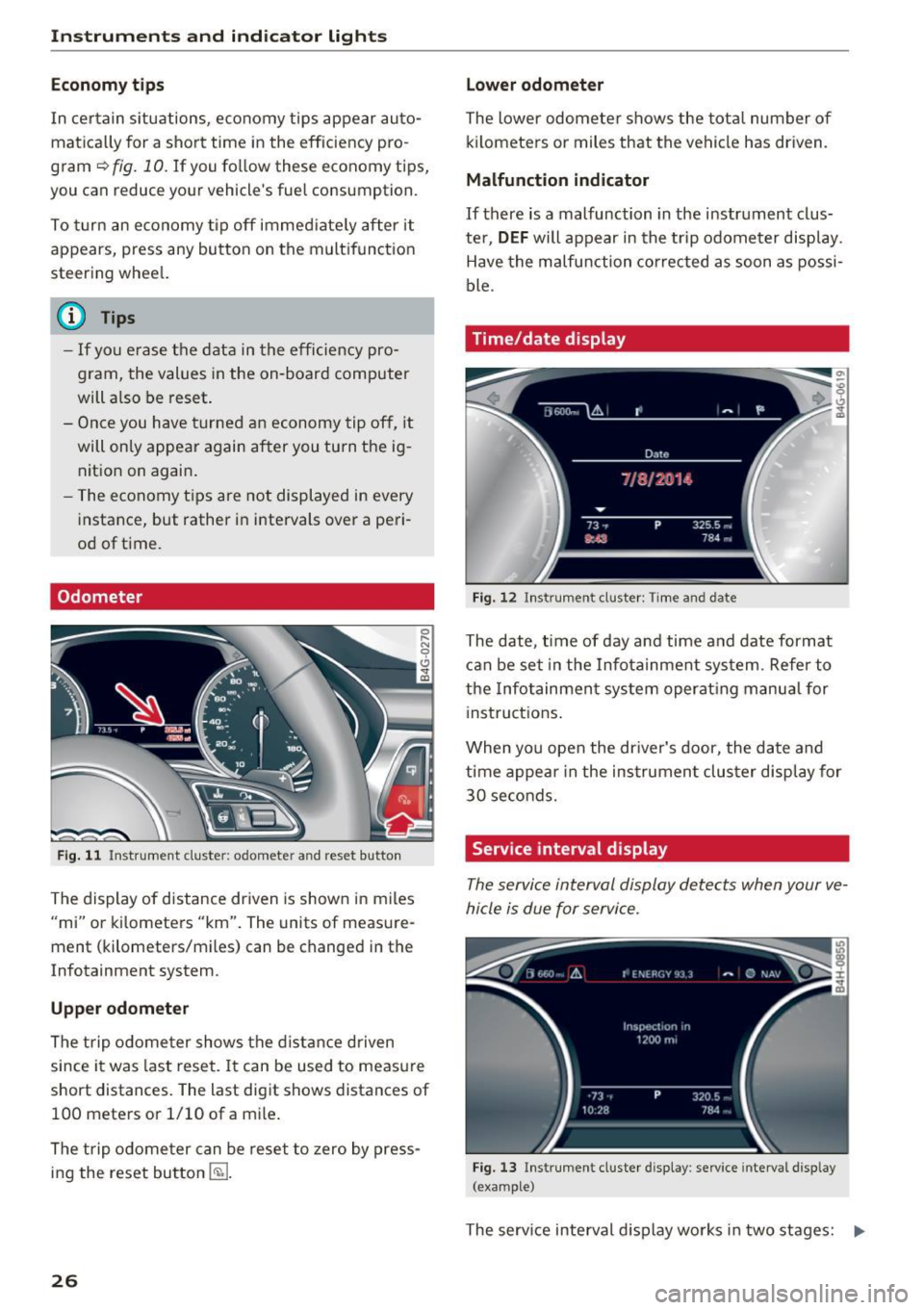
Odometer
F ig . 1 1 Instrument cluster: odometer and reset button
The display of distance dr iven is shown in miles
"mi" or kilometers "km". The units of measure
ment (kilometers/m iles) can be changed in the
Infotainment system.
Upp er odometer
The trip odome ter shows the d istance driven
since it was last reset. It can be used to measure
short distances. The last digit shows distances of 100 meters or 1/10 of a mile .
The trip odome ter can be reset to zero by press
ing the reset bu tton
E§J .
26
Lo wer odom eter
The lower odomete r shows the tota l number of
k ilometers or miles that the vehicle has driven.
Malfunction indicator
If there is a malfunction in the instrument clus
ter,
DEF will appear in the trip odometer display.
Have the malfunction corrected as soon as possi
ble.
Time/date display
Fig. 12 Instrument cluster: Time and date
The date, time of day and time and date format
can be set in the Infotainment system. Refer to
the Infotainment system operat ing manu al for
inst ructions.
When you open the dr iver's door, the date and
time appear in the instrumen t cluster display for
30 seconds.
Service interval display
The service interval display detects when your ve
hicle is due for service.
Fig. 13 Instrument cluster display: service interval d isplay
(example)
The serv ice interval display works in two stages: II>
Page 29 of 294
.... N
0 CJ '
-Inspection or oil change reminder: After a cer
tain distance driven, a message appears in the
instrument cluster display each time the ign i
tion is switched on or off¢
fig. 13. The remain
ing distance or time is displayed briefly.
-Inspection or oil change due: If your vehicle is
due for an inspection or oil change or both, a
message appears briefly in the instrument clus
ter display when sw itching the ign ition on or
off:
Inspection due! or Oil change due! or Oil
change and inspection due! .
Checking service intervals
You can check the remaining distance or time un
til the next oil change or next inspection n the
Car menu. To do this, select: the
ICARI function
button
> (Car)* Systems control button > Service
& control > Service intervals .
Resetting the indicator
Your authorized Audi dealer or authorized Audi
Service Facility will reset the service interval dis
play after performing service .
If you have changed the oil yourself, you must re
set the oil change interval.
To reset the indicator, select: the
ICARI function
button
> (Car)* System control button > Service
& control > Service intervals. Turn the control
knob downward to
Reset oil change interval and
press the control knob.
(D Note
-Only reset the oil change indicator if the oil
was changed.
- Following the service intervals is critical to
maintain ing the service life and va lue of
your vehicle, especially the engine. Even if
the mileage on the vehicle is low, do not ex
ceed the time for the next service.
- Calculating the t ime to the next oil change
i s interrupted when the vehicle battery is
disconnected.
If the vehicle is not driven for
a long period of time, check the mainte
nance schedule so that you can follow the
maintenance interva ls.
Instruments and indicator lights
Head-up display
Applies to vehicles: with Head-up display
Fig. 14 Example : Indicato rs in the Head -up d isplay
Fig . 15 Instrument panel: head-up display knob
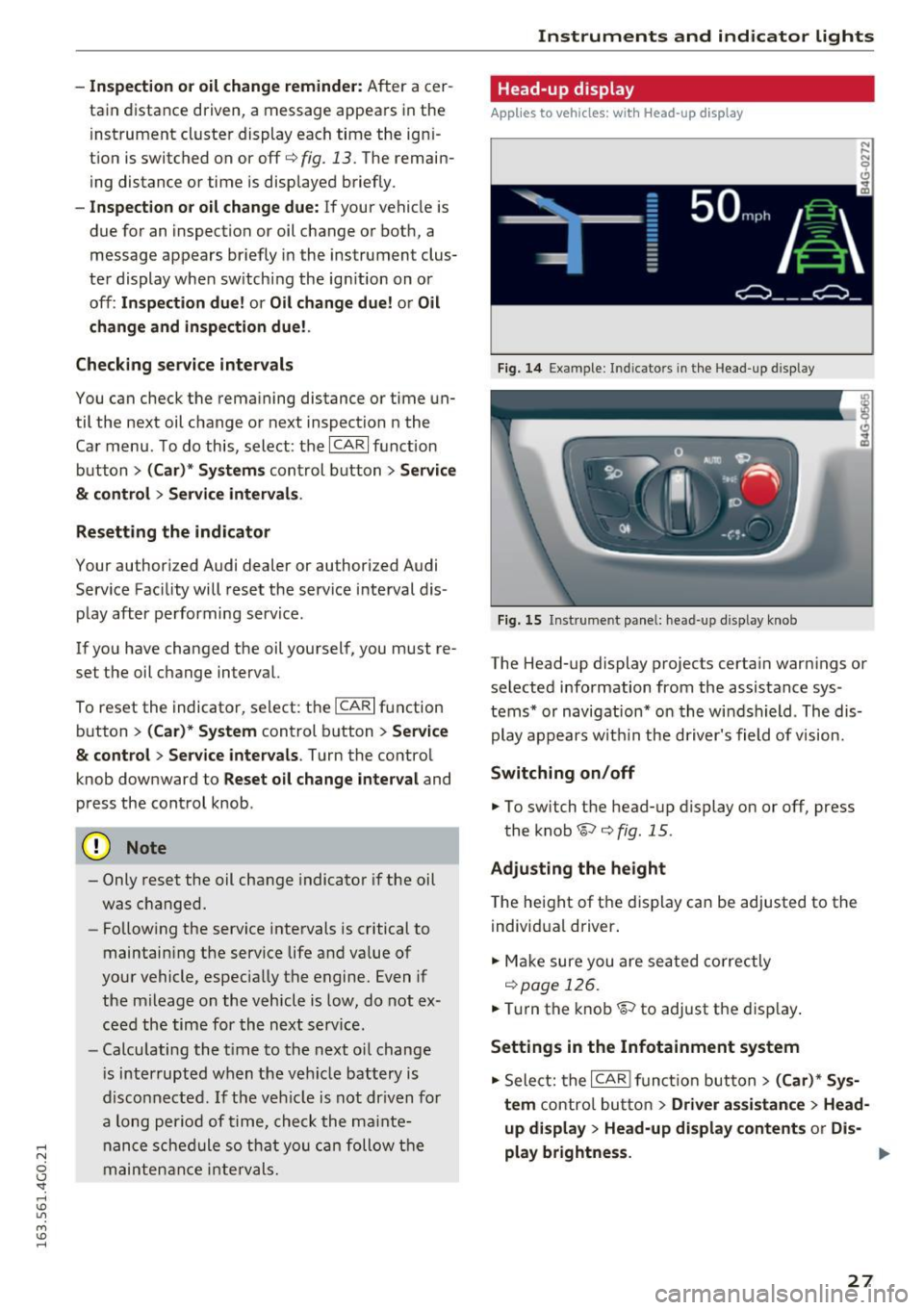
The Head-up display projects certain warnings or
selected information from the assistance sys
tems* or navigation* on the windshield . The dis
play appears w ithin the driver's field of vision.
Switching on/off
.. To switch the head-up display on or off, press
the knob~¢
fig. 15 .
Adjusting the height
The height of the display can be adjusted to the
individual driver .
.. Make sure you are seated correctly
r=!)page 126.
.. Turn the knob~ to adjust the disp lay .
Settings in the Infotainment system
.. Select: the I CAR I function button> (Car)* Sys
tem
control button > Driver assistance > Head
up display > Head-up display contents
or Dis-
play brightness. .,..
27
Page 33 of 294
.... N
0 CJ '
.. Press the release button@ c::> fig. 18.
.. Pull the mechanical key @ out of the master
key.
Using the mechanical key , you can:
- lock and unlock the storage compartment on
the passenger's s ide
c::> page 61.
- lock and unlock the vehicle manually
Qpage 35.
-lock the front and rear passenger doors me
chanically
c::> page 36.
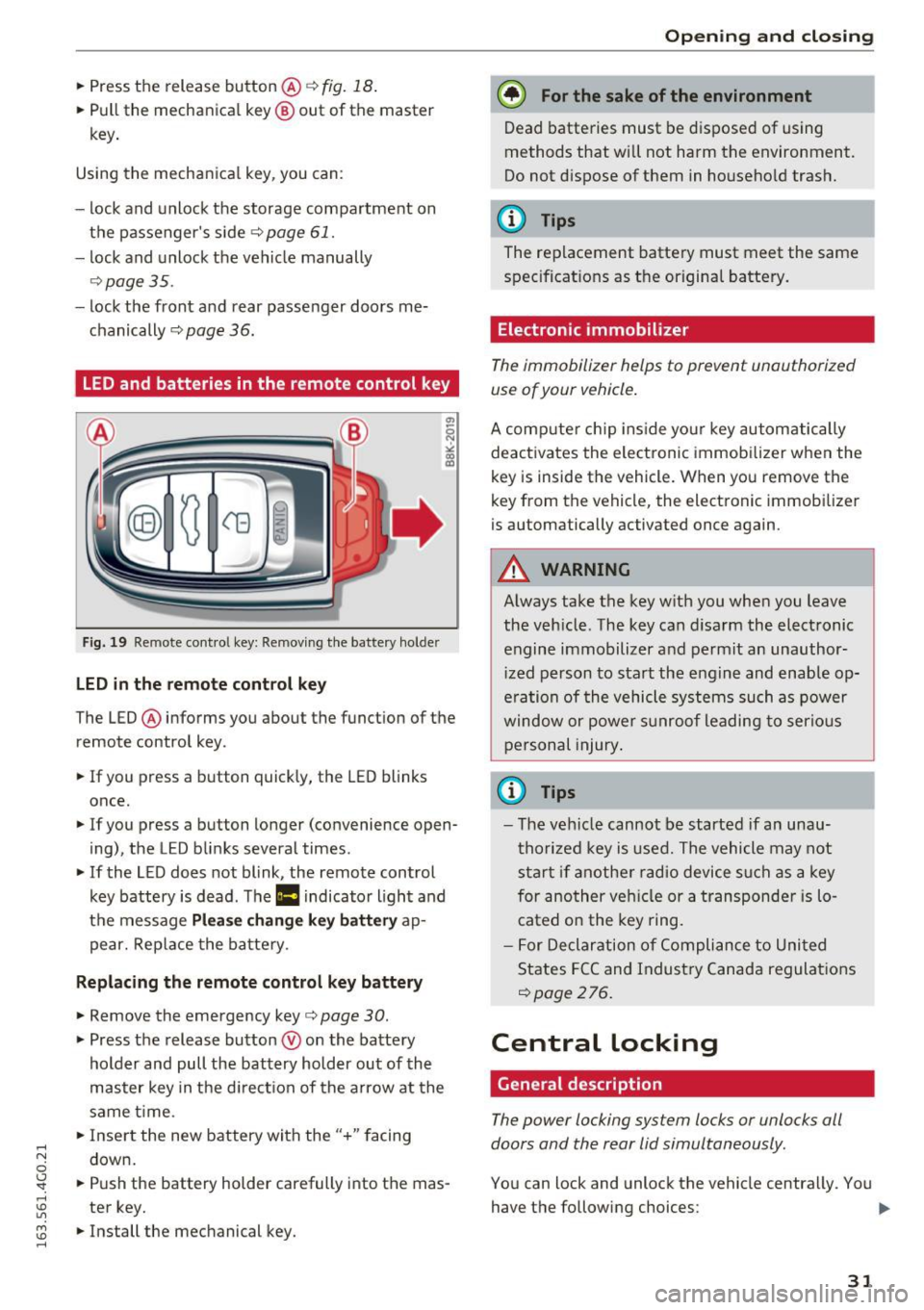
LED and batteries in the remote control key
Fig. 19 Re mote cont ro l key: Removing the battery holde r
LED in the remote control key
The LED ® informs you about the function of the
remote control key .
.. If you press a button quickly, the LED blinks
once.
.. If you press a button longer (convenience open
ing) , the LED blinks several times .
.. If the LED does not blink, the remote control
key battery is dead . The
Ill indicator light and
the message
Plea se change key battery ap
pear. Replace the battery .
Replacing the remote control key battery
.. Remove the emergency key c::> page 30 .
.,. Press the release button ® on the battery
holder and pull the battery holder out of the
master key in the direction of the arrow at the
same time.
.. Insert the new battery with the
"+ " facing
down.
.. Push the battery holder carefully into the mas
ter key.
.. Install the mechanical key.
Open ing and closing
@) For the sake of the environment
Dead batteries must be disposed of using
methods that will not harm the environment.
Do not d ispose of them in household trash.
@ Tips
The replacement battery must meet the same
specifications as the origina l battery.
Electronic immobilizer
The immobilizer helps to prevent unauthorized
use of your vehicle .
A computer chip ins ide your key automatically
deactivates the electronic immobilizer when the
key is inside the vehicle. When you remove the
key from the vehicle, the electronic immobilizer
is automatically activated once again.
A WARNING
-Always take the key with you when you leave
the vehicle. The key can disarm the electronic
engine immobilizer and permit an unauthor
iz ed person to start the engine and enable op
e rat ion of the vehicle systems such as power
window or power s unroof leading to serious
personal injury .
@ Tips
-The vehicle cannot be started if an unau
thorized key is used. The vehicle may not
start if another radio device such as a key
for another vehicle or a transponder is lo
cated on the key ring.
- For Declaration of Compliance to United
States FCC and Industry Canada regulations
Qpage 276 .
Central Locking
General description
The power locking system locks or unlocks all
doors and the rear lid simultaneously.
You can lock and unlock the vehicle centrally. You have the following choices:
111>
31
Page 46 of 294
Lights and Vision
Lights and Vision
Exterior lighting
Switching the lights on and off
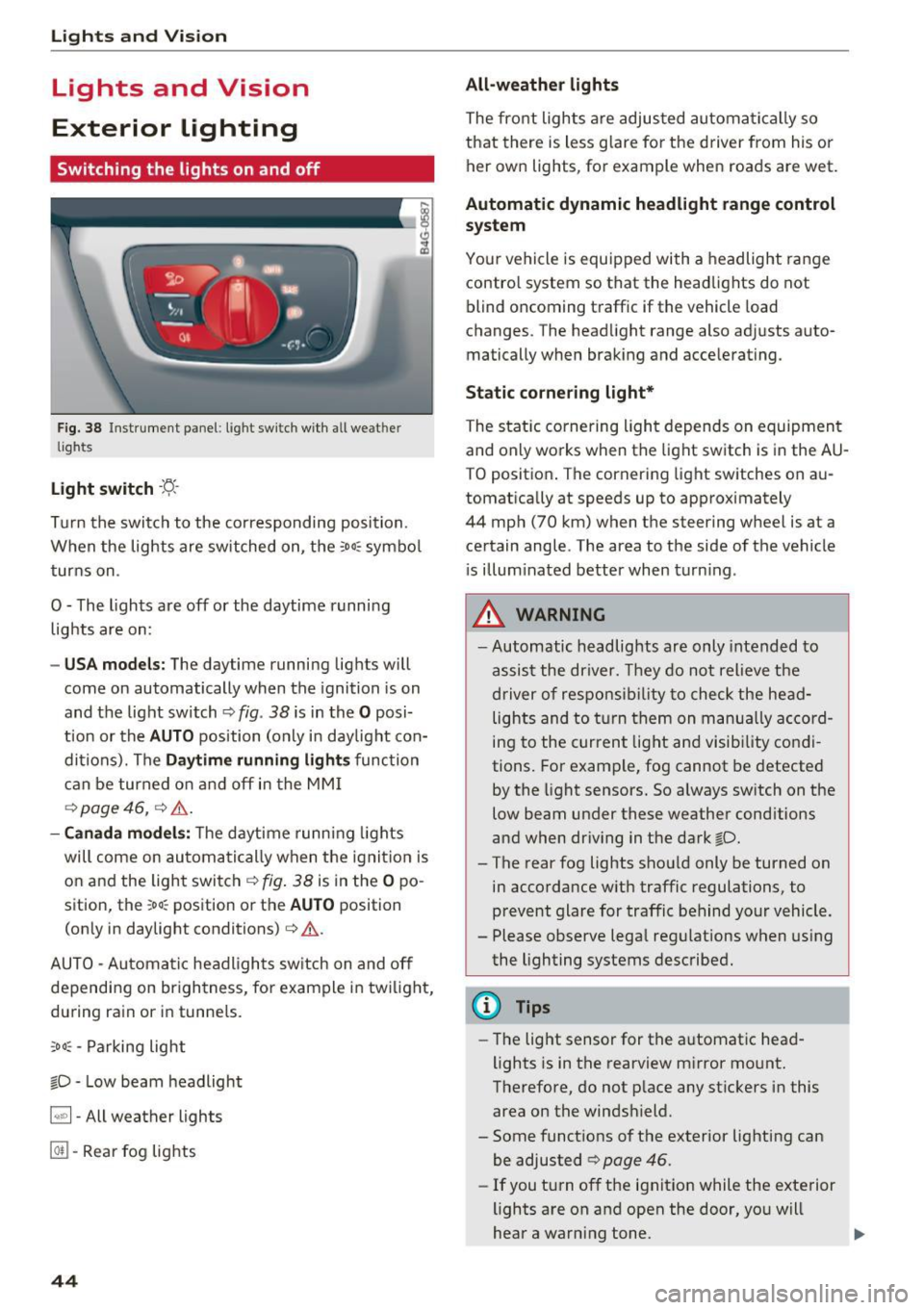
Fig. 38 Instrument panel : lig ht sw it c h with all we ath er
li gh ts
Light switch ·t:/.. ·
Tu rn the switch to the corresponding posi tion .
When the lights are sw itched on, the
:o o:c symbo l
turns on .
O - The lights are off or the daytime running lights are on :
-USA mode ls: The daytime running lig hts will
come on automatically when the ignition is on
and the light switch¢
fig. 38 is in the O posi
t ion or the
AUTO position (only in day light con
ditions). The
D aytime running light s function
can be turned o n and off in the MM I
¢ page 46, ¢ &.
- Canada mo del s: T he d aytime runn ing lights
will come on automati cally when the ignit io n is
on and the ligh t swi tch ¢
fig. 38 is in the O po
sition, the
; oo :c position or th e AUTO position
(on ly in daylight conditions) ¢
&.
AUTO - Automatic hea dlights sw itch on and off
depending on br igh tness, for example i n tw ilig ht,
du ring rain or in tunne ls.
;oo :c -Parking light
io -Low beam headlight
~ - All weather lights
@TI -Rear fog lights
44
All-weather lights
The front lights a re adjusted au toma tically so
that there is less g lare fo r the d river from his o r
her ow n lights , fo r example when roads are wet .
Automatic dynamic headlight range control
system
Your vehicle is equ ipped with a headlight range
contro l system so tha t the head lights do not
blind oncoming t raff ic if the vehicle load
changes. The head light range also adjusts auto
matically when brak ing and acce lerating .
Static cornering light*
The static co rnering light depends on equipmen t
and only wo rks when the light sw itch is in the AU
T O positio n. The corn ering light switches on au
tomatically at speeds up to app roximately
44 mph (70 km) when the steer ing wheel is at a
ce rtain angle. The area to the side of the vehicle
i s illum inated better when t urn ing .
,&. WARNING
-Automatic headlights are only intended to
assis t the driver. They do not relieve t he
driver of respons ibility to check the he ad
lights and to t urn them on manu ally a ccord
ing to the current light and visibility co ndi
tions. For exam ple, fog cannot be detected
by the light sensors. So always sw itch on the
low beam under these weather cond itions
and when dr iv ing in the dark
io.
-The rear fog lights shou ld only be turned on
in acco rdance with traffic regulations, to
p revent glare for traffic behind your vehicle .
- Please observe lega l reg ulations when using
the lighting systems described .
@ Tips
-Th e light sensor for the a utomat ic head
lights is in the rearview m irror mo unt.
Therefore, do not p lace any st ickers in this
area on the winds hield.
- Some funct ions of t he exterior lighting can
be adjusted ¢ page
46 .
-If you t urn of f the ignit ion while the e xte rior
lights are on a nd open the door, yo u will
hear a warning tone .
Page 54 of 294
Lights and Vi sion
Cleaning w indshield wiper blades
Clean the wiper blades when you see wiper
s treaks. Use a soft cloth and a glass cleaner .
... Place the w indshield wiper arms in the service
pos ition
c::> page 52 .
... Fo ld the windshield wipe r arms away from the
winds hield.
A WARNING
Dirty windshield wiper blades can impair vi
sion, which increases the risk of an accident.
Replacing windshield wipe r blades
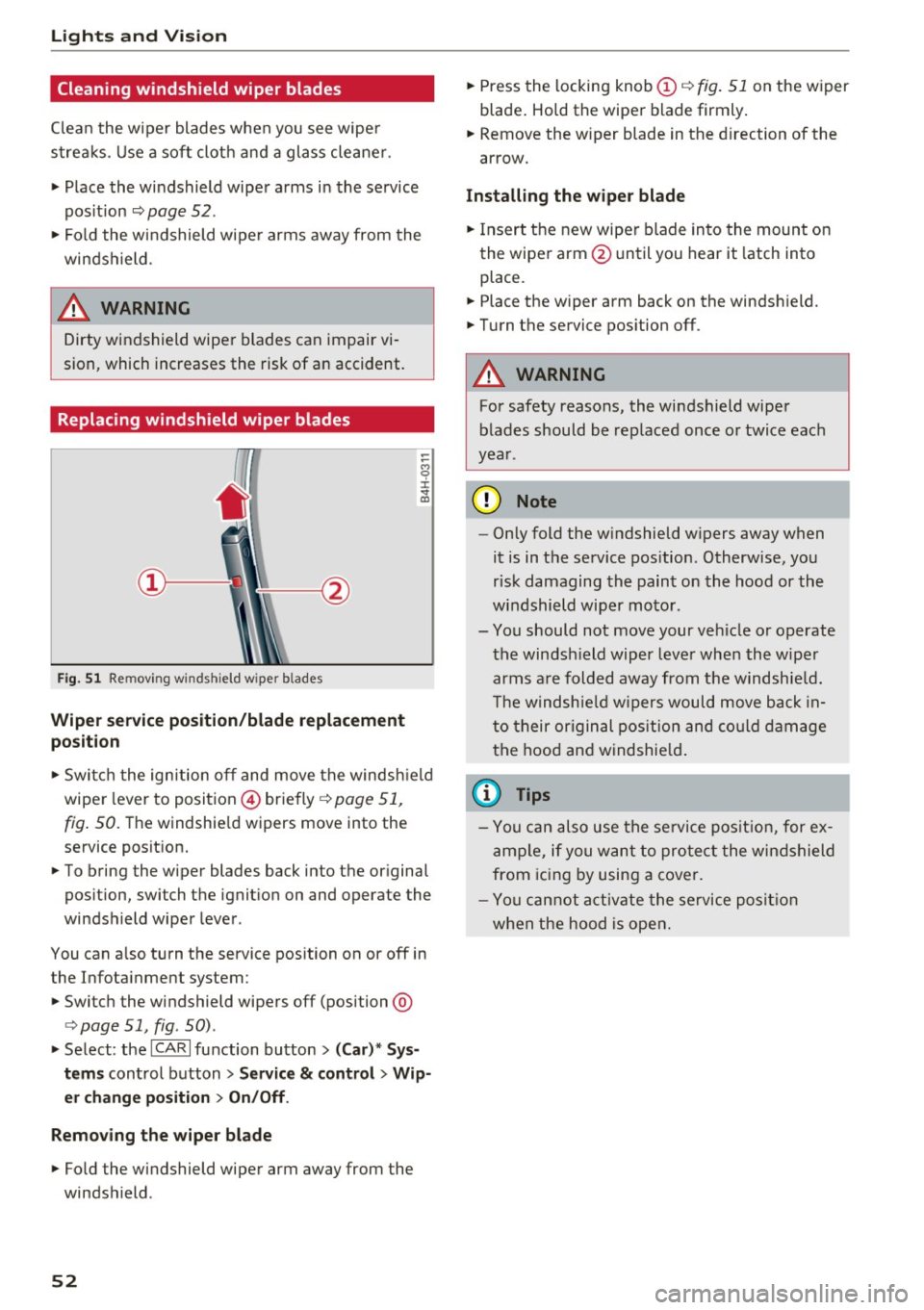
Fig. 51 Remov ing w indshi eld wiper b lades
Wiper service position/blade replacement
posit ion
:= M 0 ±
" CD
... Switch the ignition off and move the windsh ield
wiper lever to position @) briefly
c::> page 51,
fig. 50. Th e windshie ld wipers move into the
service position.
... To bring the wiper blades back into the original
position, switch the ignition on and operate the
windshield wiper lever.
You can also turn the service position on or off in
the Infotainment system:
... Switch the windshield wipers off (position @
¢ page 51, fig. 50) .
... Select: the
ICA RI function button> (Car)* Sys
tems
control button > Service & control > Wip
er change position
> On/Off .
Removing the wiper blade
... Fo ld the windshield wiper arm away from the
windshield .
52
... Press the locking knob (D c::> fig. 51 on the wiper
blade . Hold the wiper blade firmly.
... Remove the wiper blade in the direction of the
arrow .
Installing the wiper blade
... Insert the new wiper blade into the mount on
the wiper arm @until you hear it latch into
place .
... Place the wiper arm back on the windshield.
... Turn the service position off.
A WARNING
-
For safety reasons, the windshield wiper
blades should be replaced once or twice each
year .
(D Note
-Only fold the w indshield w ipers away when
it is in the service position. Otherwise, you
risk damaging the paint on the hood or the
windshield wiper motor.
- You should not move your veh icle or operate
the windsh ield wiper lever when the wiper
arms are folded away from the w indshie ld.
Th e windshie ld wipers would move back in
to their original position and could damage
the hood and windshield .
{i) Tips
- You can also use the service position, for ex
ample, if you want to protect the windshield
from icing by using a cover.
- You cannot activate the service position
when the hood is open.
Page 65 of 294
-Objects fal ling from the roof of a vehicle can
cause a crash and personal injury.
- Only mount the roof rack on the designated
locations on the roof
c:> fig. 67.
-The roof rack system must be installed ex
act ly according to the instructions provided .
- When driving with a roo f rack system,
changes to the center of gravity and wind
resistance can change the vehicle handling
and lead to a collision. Always adapt your
dr iv ing and your speed to the current condi
t ions.
- Your vehicle warranty does not cover any
damages to the vehicle caused by using roof
racks or mounting structures not approved
by Audi for your vehicle . The same applies to
damage result ing from incorrect roof rack
i nstallation.
-Always check the roof rack mount ings and
hardware before each t rip and dur ing a tr ip
to make sure everyt hing is securely tight
ened.
If necessary, ret igh ten the mo unt ings
and c hec k the en tire system from time to
time.
- After mounting a roof rack system, or when
you transport objects on the roof of your ve
hicle, the height of the vehicle is naturally
increased . Be careful when driving under
l ow bridges or in parking garages for exam
ple. This could cause damage to the load
and even the vehicle itself.
- Make s ure the open rear lid and the sun
roof* do not come into contact with the roof
rack.
Loading the roof rack
Always distribute loads evenly. Make sure any
thing on the roof rack is securely tied down.
~ Always distribute the loads on the roof rack
evenly .
~ Always attach items to the roof rack securely
before you drive off.
The maximum perm iss ible roof weight is
220 lb
( 100 kg ).
The roof weight is the total of the
Seat s and sto rage
weight o f the roof rack, the attachments and the
cargo you are carrying. You must a lso not exceed
the max imum load weight for the roof rack you
are using.
When using a roo f rack system which has a lower
load carrying capacity, you must not use up the
total max imum permissible load carry ing capac i
ty specified above. Instead, you should load the
roof rack system only to the maximum capacity
specified by the manufacturer of the roof rack
system .
A WARNING
= -Weak, damaged or imprope r straps used to
secure items to the roof rac k can fail d uring
hard brak ing o r in a co llision and cause seri
ous persona l injury.
- Make sure the roof r ack is installed exactly
as specified above
c:> page 62.
- Always use suitable mounting straps fo r se
cur ing items to the roof rac k to he lp prevent
items from shifting o r flying forward .
- Items on the roof rack mus t always be se
curely mounted.
- The use of a roof rack can negative ly affect
the w ay a vehicle hand les. Cargo tha t is
large, heavy, b ulk y, long or flat wi ll have a
grea ter negat ive infl uence on the vehicle's
aerodynamics, center of gravity and overa ll
handling. Always drive slowly, avoid sudden
braking and maneuvers when transporting
cargo on the roof of your vehicle.
- Never exceed the max imum permissib le
load carrying capacity of the roof of your ve
h icle, the permiss ible axle weights and the
perm iss ible total we ight of your vehicle
c:> page 2 70, Weights .
@ For the sake of the environment
As a result of the increased wind res istance
created by a roof rack, your vehicle is using
fuel unnecessarily . So remove the roof rack
after using it .
63
Page 66 of 294
Sea ts and stor age
Luggage compartment
Loading luggage compartment
Luggage items must be stowed securely.
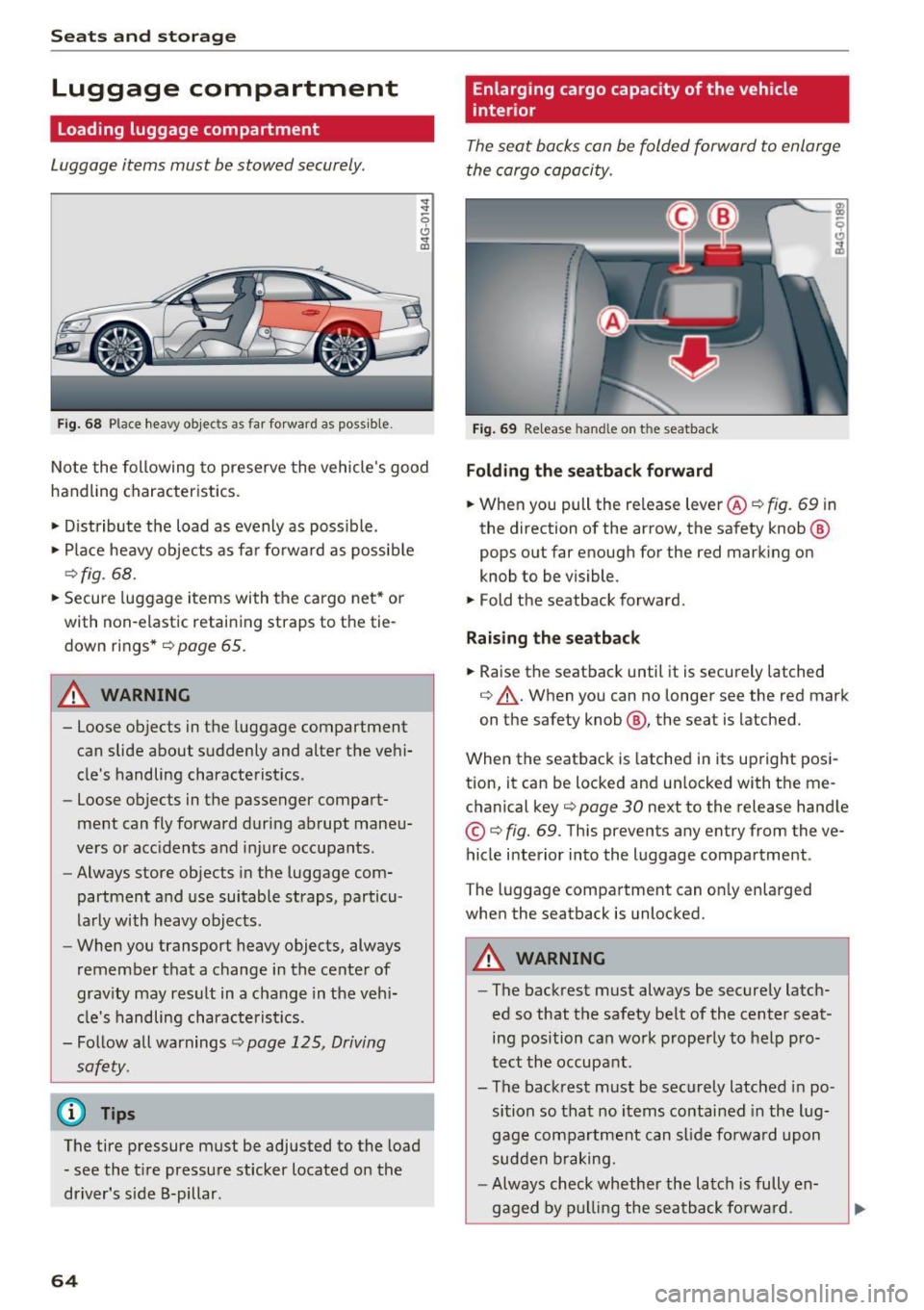
Fig . 68 Place heavy objec ts as far forward as poss ib le .
~
-0
0 ... co
No te the following to preserve the vehicle 's good
handling characteristics .
• Distribute the load as evenly as possible.
• Place heavy objects as fa r fo rward as possib le
~ fig . 68.
• Secure luggage items with the cargo net * or
with non-elastic retaining straps to the tie
down rings *
<=> page 65.
A WARNING
- Loose objects in the luggage compartment
can slide about suddenly and alter the vehi
cle's handling characte ristics.
- Loose objects in the passenger compart
ment can fly forward during abrupt maneu
vers or acc idents and injure occupants.
- Always store objects in the luggage com
partment and use suitable straps, particu
larly with heavy objects .
- When you transport heavy objects, always
remember that a change in the center of
grav ity may result in a change in the veh i
cle's handling characte ris tics.
- Follow all warnings<=>
page 125, Driving
safety.
@ Tips
The tire pressure must be adjusted to the load - see the t ire pressure sticker located on the
driver's side B-pillar.
64
Enlarg ing cargo capacity of the vehicle
interior
The seat backs can be folded forward to enlarge
the cargo capacity.
Fig . 69 Re lease hand le on t he seatback
Fold ing th e seatback forward
• When you pull the re lease lever@<=> fig. 69 in
the direction of the arrow, the safety knob @
pops out far enough for the red marking on
knob to be visible.
• Fold the seatback forward.
Rai sing th e seatback
• Raise the seatback until it is securely latched
<=> .&,. . When you can no longer see the red mark
on the safety knob @, the seat is latched.
When the seatback is latched in its up right posi
tion, it can be locked and un locked with the me
chanical key~
page 30 next to the release hand le
© <=>fig. 69. This prevents any entry from the ve
hicle interior into the luggage compartment .
The luggage compartment can on ly enlarged
when the seatback is unlocked.
A WARNING
- The backrest must always be securely latch
ed so that the safety belt of the center seat
ing position can wo rk properly to help pro
tect the occupant.
- The backrest must be securely latched in po sition so that no items contained in the lug
gage compartment can s lide fo rwa rd upon
sudden b raking.
- Always check whether the latch is fully en-
gaged by p ulling the seatback fo rwa rd.
~