instrument cluster AUDI S8 2008 User Guide
[x] Cancel search | Manufacturer: AUDI, Model Year: 2008, Model line: S8, Model: AUDI S8 2008Pages: 404, PDF Size: 52.7 MB
Page 32 of 404
Driver inf orma tio n displ ay
Red symbols
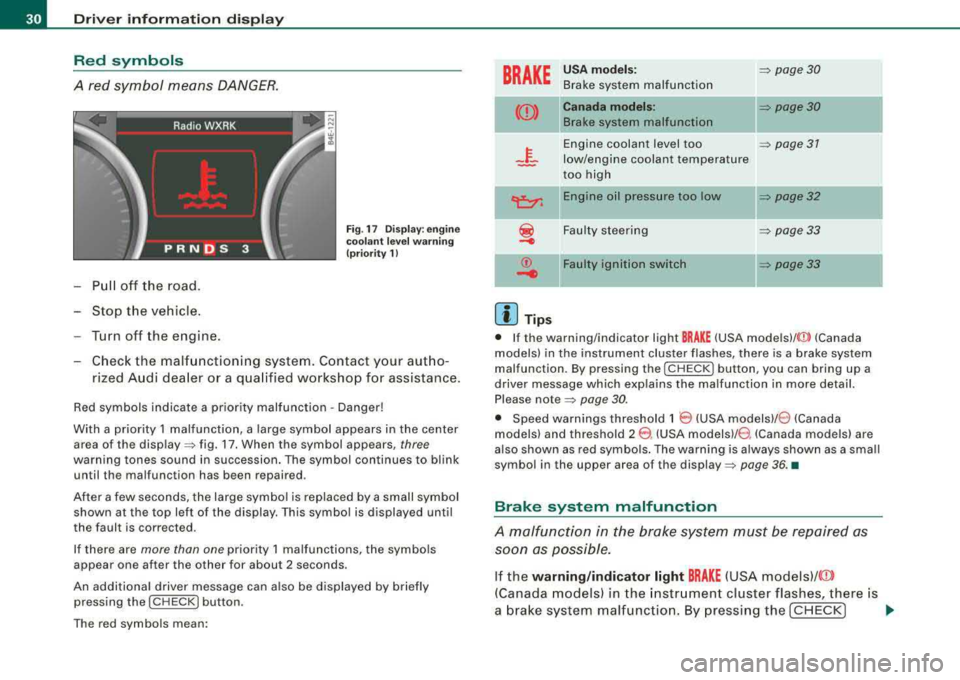
A red symbol means DANGER.
Pull off the road.
-Stop the vehicle .
-Turn off the engine.
Fig . 17 Dis play: en gine
co ola nt leve l warnin g
(pr iori ty 1)
-Check the malfunctioning system. Contact your aut ho-
rized Audi dea ler or a qua lified workshop for assistance.
Red symbols indicate a prio rity malfunction -Danger!
With a priority 1 malfunction, a large symbol appears in the center area of the
disp lay => fig. 17. When the symbol appears, three
warning tones sound in succession . The symbol continues to blink
until the malfunction has been repaired .
After a few seconds, the large symbol is replaced by a small symbol shown at the top left of the display. This symbol is displayed until
the fault is corrected.
If there are more than one priority 1 malfunctions, the symbo ls
appear one after the other for about 2 seconds .
An additional driver message can a lso be d isplayed by briefly
pressing the
( CHECK) button .
The red symbols mean:
BRAKE
-
((l))
©
.....
[ i ] Tips
U SA m od els: => page 30
Brake system malfunction
C anad a mod els:
B rake system malfunction
II=> page 30
Engine coolant level too
=> page 31
low/engine coolant temperature
too high
En gine o il p ress ure too lo w
=> page 32
Faulty steering
=> page 33
Fa ult y ig nition s witch
=> page 33
• If the warning/indicator light
BRAKE (USA mode ls)/ <@ (Canada
models) in the instrument cluster flashes, there is a brake system
malfunction. By pressing the [
CHECK) button, you can bring up a
driver message which exp lains the malfunction in more detail.
Please
note=> page 30.
• Speed warnings threshold 1
8 (USA modelsl /8 (Canada
models) and threshold 2
8 . (USA models)/ 0, (Canada models) are
also shown as red symbo ls . The warning is a lways shown as a small
symbol in the upper area of the
display => page 36 . •
Brake system malfunction
A malfunction in the brake system must be repaired as
soon as possible.
If the warning /indi cator light BRAKE (USA models)/ ((D)
(Canada models) in the instr ument cluster flashes, there is
a brake system malfunction . By pressing the [
CHECK] ~
Page 39 of 404
The speed warning 2 symbol, 8, (USA models)/ 8, (Canada models)
appears in the disp lay when you exceed the stored speed limit.
Un like warning 1, it wil l not go out unti l the vehicle speed drops
below the stored speed limit .
Setting speed warning 2
=> page 37.
[ i J T ips
Even though your vehicle is equipped with a speed warning system,
you should still watch the speedometer to make sure you are not
driving faster than the speed limit. •
Speed warning 1: setting a speed limit
Warning threshold 1 is set by the I CHECK) button.
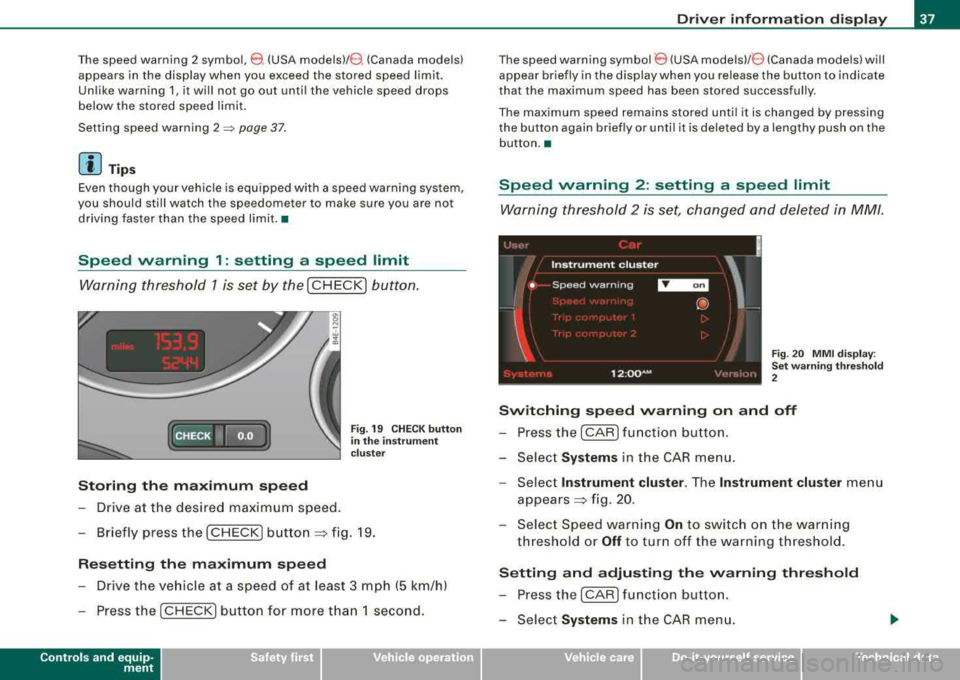
(CHECK • fo.o'
Storing the maximum speed
- Drive at the desired maximum speed.
Fig . 19 C HEC K but ton
in th e inst ru m ent
c lu st er
- B riefly press the I CHECK) b utto n ~ fig. 19.
Rese tting the m aximum speed
- Drive the vehicle at a speed of at least 3 mph (5 km/h)
- Press the
I CHECK] button for more t han 1 second .
Controls and eq uip
ment
Dr ive r inf ormati on d ispl ay
The speed warning symbol 8 (USA models)/ 8 (Canada mode ls) will
appear briefly in the display when you release the button to indicate
that the maximum speed has been stored successfully.
The maximum speed remains stored unti l it is changed by pressing
the button again briefly or unti l it is deleted by a lengthy push on the
button. •
Speed warning 2 : setting a speed limit
Warning threshold 2 is set, changed and deleted in MM/.
Fig. 20 MMI d isp lay :
Se t w arni ng thr esho ld
2
Switching spe ed warning on and off
- Press the
I CAR) function button.
- Select
System s in the CAR menu.
- Select
Instrume nt clus ter . The Instrument cluster menu
appea rs~ fig. 20.
- Select Speed warning
On to switch on the warn ing
threshold or
Off to turn off the warning threshold.
Setting and adju sting th e warning threshold
- Press the
I CAR I fu nction button.
Select
Systems in the CAR menu.
Vehicle care I I irechnical data
Page 40 of 404
Driver information display
-Select Instrument cluster. The In strument cluster menu
appears .
Select the second item in the
Speed warning menu. The
submenu
Speed threshold appears ~ page 37, fig. 20.
Set the warning threshold you want .
Warning threshold 2 can only be set in a speed range from 20 to
150 mph (30 to 240 km/h). •
Trip computer
Introduction
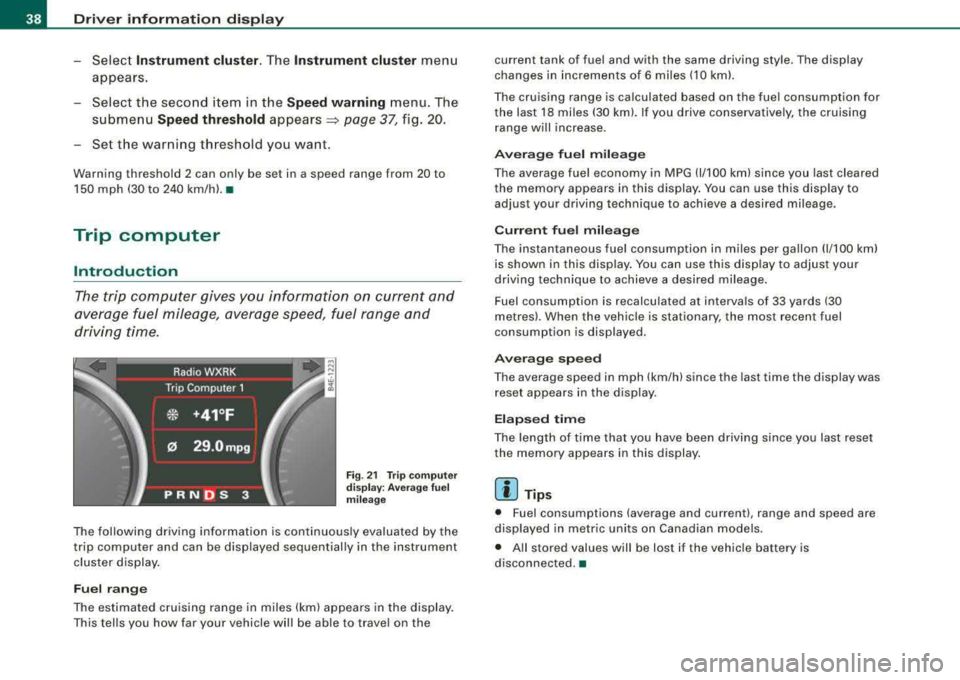
The trip computer gives you information on current and
average fuel mileage, average speed, fuel range and
driving time.
Fig. 21 Trip comput er
di sp lay : Average fuel
mil eage
The following driving information is continuously evaluated by the
trip computer and can be displayed sequential ly in the instrument
cluster display.
Fuel range
The estimated cruising range in miles (km) appears in the display.
This tells you how far your vehicle will be able to travel on the current tank of fuel and with the same driving style. The display
changes in increments of 6 miles (10 kml.
The cruising range is calculated based on the fuel consumption for
the last 18 miles (30 km). If you drive conservative ly, the cruising
range will increase.
Average fuel mileage
The average fuel economy in MPG (1/100 km) since you last cleared
the memory appears in this display . You can use this disp lay to
adjust your driving technique to achieve a desired mileage .
Current fuel mileage
The instantaneous fuel consumption in miles per gallon (1/100 km)
is shown in this display. You can use this display to adjust your
driving technique to achieve a desired mileage.
Fuel consumption is recalculated at interva ls of 33 yards (30
metres). When the vehic le is stationary, the most recent fuel
consumption is displayed.
Average speed
The average speed in mph (km/h) since the last time the display was
reset appears in the display.
Elapsed time
The length of time that you have been driving since you last reset
the memory appears in this display .
[ i] Tips
• Fuel consumptions (average and current), range and speed are
displayed in metr ic units on Canadian models.
• All stored values will be lost if the vehicle battery is
disconnected .•
Page 42 of 404
![AUDI S8 2008 User Guide Driver inf ormation displ ay
In addit ion, a ll the values in the single-trip or the total -trip memory
can be de leted s imu ltaneously.
[ i ] Tips
All stored values will be lost](/img/6/57619/w960_57619-41.png "AUDI S8 2008 User Guide Driver inf ormation displ ay
In addit ion, a ll the values in the single-trip or the total -trip memory
can be de leted s imu ltaneously.
[ i ] Tips
All stored values will be lost")
Driver inf ormation displ ay
In addit ion, a ll the values in the single-trip or the total -trip memory
can be de leted s imu ltaneously.
[ i ] Tips
All stored values will be lost if the vehicle battery is disconnected. •
MMI settings
Basic settings for the trip computer can be made in the
MM/.
Fig . 2 4 M MI di splay :
Trip com put er
S ett ing v alu es to ze ro
- Pressthe!CAR)function button.
- Select
S ystems in the CAR menu .
- Selec t
Instrum ent cluster.
- Selec t Trip compute r 1 or Trip comput er 2.
- Select Reset to delete all the values in the memory
=> fig. 24 .
Displaying and hiding dri ver inform ation
- Press the
I CAR) f unct ion butto n. - Selec
t
Syste m s in the CA R me nu.
- Select
Instrument clu ster .
- Select Trip computer 1 or Trip computer 2 .
-Select, for example, Fu el range On to tu rn on t he display
or
Off t o turn the display o ff.
All values in the s ingle -tr ip or the total -trip memory can be reset to
zero simultaneously in MMI. In addition you can de termine what
driving information from the trip computer shou ld be shown in the
ins trument cluster display. If one of the pieces of dr iver information
is turned
off, that driver information will not be shown in the display .
The informat ion wi ll continue to be calcu lated by the trip computer
and can be turned back
on at any time. •
Tire pressure monitoring system
General notes (l)
Each tire, including the spare {if provided), should be checked
monthly when co ld and in flated to the inflation pressure recom
mended by the vehicle manufacturer on the vehicle p lacard or tire
inf lation pressure labe l. (If your vehicle has tires of a different size
than the size indicated on the vehicle placard or tire inflation pres
sure labe l, you should determine the proper tire inf lation pressure
for those
tires.!
As an added safety feature , your vehicle has been equipped with a
t ire pressure monitoring system {TPMS) that illuminates a low t ire
pressure telltale when one or more of your tires is significantly
under -inf lated. Accordingly, when the low t ire pressure te lltale i llu
minates , you should stop and check your tires as soon as possible,
and inf late them to the proper pressure . Driving on a significantly
under-inf lated tire causes the tire to overheat and can lead to tire
~
Page 43 of 404
failure. Under-inflation also reduces fue l efficiency and tire tread
life, and may affect the veh ic le's handling and stopping abi lity.
Please note that the TPMS is not a substitute for proper tire mainte
nance, and it is the driver's responsibi lity to maintain correct tire
pressure, even if under-inflation has not reached the leve l to tr igger
illumination of the TPMS low tire pressure tellta le.
Your veh icle has a lso been equipped with a TPMS malfu nction indi
cator to indicate when the system is not operating properly . The
TPMS malfunction indicator is combined w ith the low tire press ure
telltale . When the system detects a ma lfunction , the telltale wi ll
fl ash for approximately one minute and then remain continuously
illum inated . This sequence will continue upon subsequent vehicle
start -ups as long as the ma lfunction exists.
When the ma lfunctio n indicator is i llum inated, the system may not
be ab le to detect or signa l low tire pressure as intended . TPMS
malfunctions may occ ur for a var iety of reasons, i nclud ing the
installation of replacement or alternate tires or wheels on the
vehic le that prevent the TPMS from f unctioning proper ly . Always
check the TPMS malfunction tellta le after replac ing one or more
t ires or whee ls on yo ur ve hicle to ens ure t hat the replacement or
a lternate tires and wheels allow the T PMS to continue to function
proper ly. •
Introduction
The tire pressure monit oring system m onitors air pressure
in all four road wheels and the spare tire* while the
vehicle is movin g.
As soon as the tire pressure moni toring system se nses a signi ficant
loss of air pressure in one or severa l tires, text messages and yellow
symbo ls appear in the inst rume nt cluster d isplay to aler t t he driver .
T he
(l) warning light in the instrument c luster comes on when the
t ire is sig nificant ly underinflated
=> page 20 .
Controls and equip
ment
Driver information di splay
The warning light U) also i lluminates in the case of a system
mal fu ncti on.
The system continuous ly receives rad io signa ls from sensors
located inside each tire .
Be aware that t ire p ressu re is also dependen t on the tempera ture of
the tire . For every
18 °F (1 O °C) increase in tire temperature, tire pres
sure increases by about 1 .5 psi (0 .1 bar). The tire warms up wh ile the
vehicle is moving and t ire pressure rises . So you should adjust tire
pressure only when the t ires are
cold, when the temperature of the
tires is roughly the same as the ambient air temperature .
I n order to keep the tire pressure monitoring system properly cali
brated, tire pressure on all four tires and on the spare tire* should
be checked at regular intervals, adjusted if n ecessary and saved in
the proper setti ng (recommended
pressure) => page 44.
The tire pressure is shown on the tire pressure label. On USA vehi
cles, the tire pressure labe l is located on the drive r's s ide B -p ill ar. On
Canada vehicles, the tire pressure labe l is located either on the
driver's side B -pillar o r inside the fuel fi ller flap. The t ire press ure
label l ists t he recommended cold tire inflat io n pressures for t he
vehic le at its maximum capacity weight and the tires that were on
your ve hicle at the time it was manufactured . For recommended tire
pressures for normal load condit ions, please see chapter
=> page 328 .
The current temperatures and pressure of your tires can be viewed
in the M MI
=> page 43 .
& WARNING
• When the tire pre ssure monitoring system warning light i s lit ,
one or more of your tires is signifi cantly under -infl ated . You should
stop and check your tires a s soon a s po ssible , and inflate them to
the proper pre ssure a s indi cated on the vehi cle' s tire pre ssure
label
=> page 328 . Driving on a significantly under -inflated tire
ca use s the tire to o verheat and can lead to tire failure. Under -infla -
~
Page 44 of 404
Driver information display
& WARNING (continued)
tion also is likely to impair the vehicle's handling and stopping
ability.
• Do not adjust tire pressure when tire temperature is excessive .
This could lead to serious tire damage and even cause the tire to
burst, with the additional danger of an accident.
W For the sake of the environment
Driving with under -inflated tires reduces fuel efficiency and tire
tread life.
[ i) Tips
• Each tire, including the spare*, should be checked monthly when
cold and set to the recommended inflation pressure as specified on
the tire pressure label
=> page 328.
• The tire pressure monitoring system helps the driver to keep an
eye on tire pressures. But the driver still has the responsibility for
maintaining the correct tire pressure .
• Tire pressure must only be adjusted when the temperature of the
tires is about the same as ambient air temperature.
• When tires are replaced, the sensors and valves should not be
detached or exchanged. Only the valve core needs to be replaced
and, if necessary, the valve and the wheel electronics replaced.
• If you should put different wheels and tires on your vehicle (e .g.
winter wheels and tires), you must be certain that the wheels and
tires are compatible with the tire pressure monitoring system .
Otherwise the system will register a malfunction and a fault
message will be displayed. For more information, contact your
authorized Audi dealer.
• Adjust the tire pressure and store the pressure in the tire pres
sure monitoring system to the load you are
carrying => page 328. •
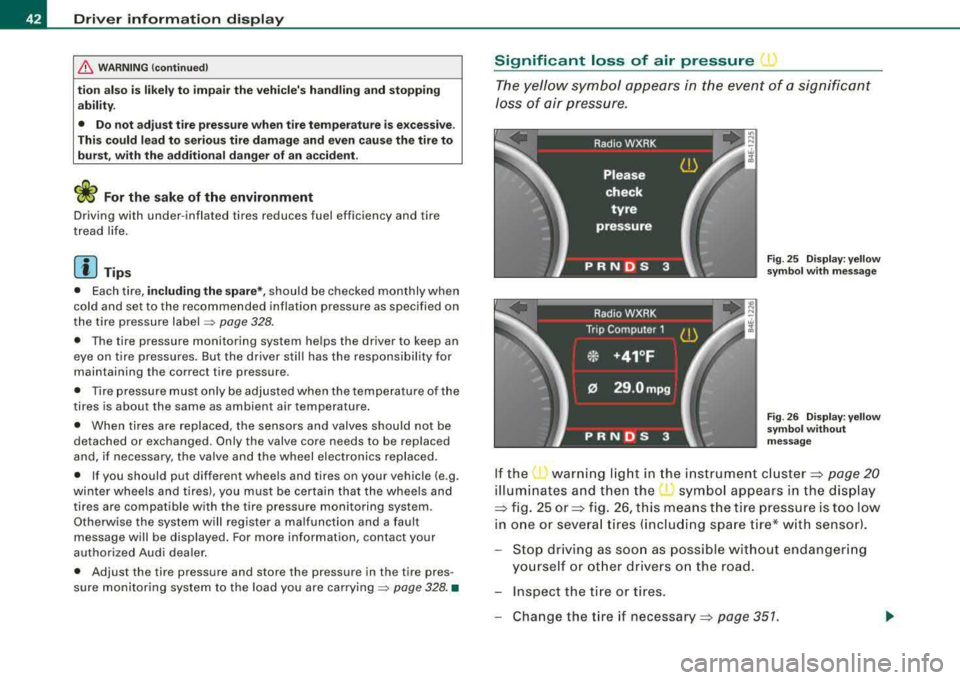
Significant loss of air pressure ( )
The yellow symbol appears in the event of a significant
loss of air pressure.
Fig . 25 Display: yellow
symbol with message
Fig . 26 Display: yellow
symbol without
message
If the warning light in the instrument cluster:::::, page 20
illuminates and then the ( symbol appears in the display
:::::, fig. 25 or:::::, fig. 26, this means the tire pressure is too low
in one or several tires (including spare tire* with sensor).
Stop driving as soon as possible without endangering
yourself or other drivers on the road.
- Inspect the tire or tires.
Change the tire if
necessary:::::, page 351.
Page 45 of 404
The j warning light in the instrument cluster comes on when the
tire is significantly underinflated.
In addition, the tire symbo l
) appears in the display together with
the message
Please check tire pressure => page 42, fig. 25.
Af ter a few seconds, the message disappears again:::>
page 42,
fig. 26. If you would like to show the message again, press the
!CHECK] button.
[ i] Tips
• In the case of an intentional loss of air pressure, for example,
when re-adjusting tire pressure, this has to be stored again after
wards =>
page 44.
• Current information about tire pressures and temperatures can
be scanned in MMI =>
page 43.
• Tire pressure must only be adjusted when the temperature of the
tires is about the same as ambient a ir temperature .
• The yellow symbol disappears, when the tire pressure is
corrected and the new pressure is stored in the system=>
page 44.
• After changing a wheel you have to adjust the tire pressures on
all whee ls . In addition, you must then initialize the new tire pres
sures in the tire pressure monitoring system =>
page 45.
• If your vehicle is equipped with a spare tire* with a wheel sensor,
the tire will be monitored and the display
symbols => page 42, fig. 25
or=>
page 42, fig. 26 will appear if the pressure is too low.•
Controls and eq uip
ment
Driver information display
Displaying tire pressures and temperatures
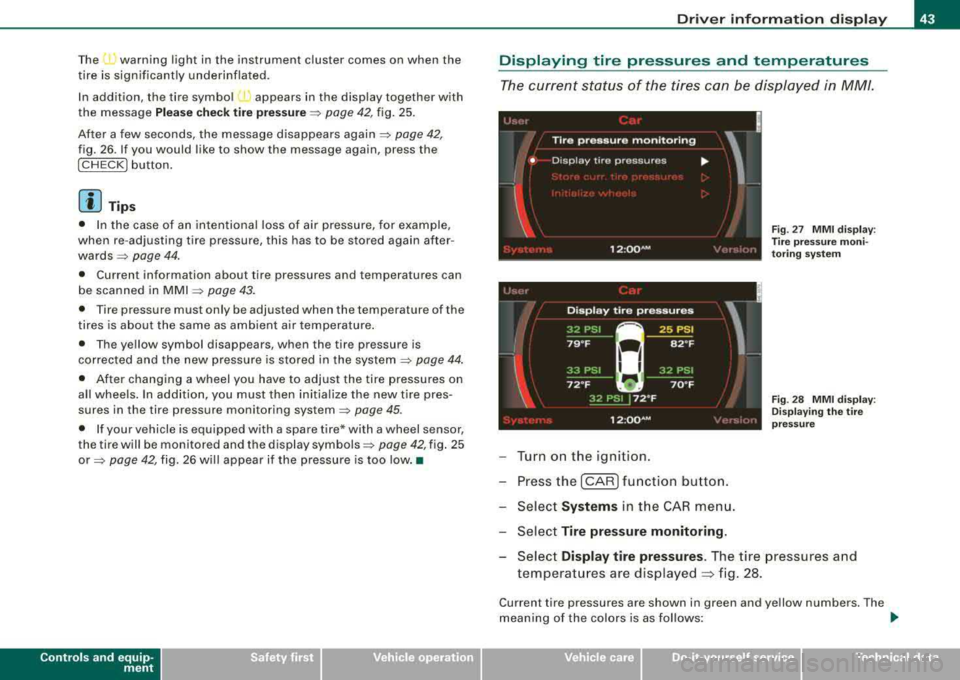
The current status of the tires can be displayed in MM/.
'
!
Tire pressure monitoring
• Disp lay tire pressures ...
I
Fig . 27 MMI display :
T ire pres sure moni
toring system
12 :QQ AM
Turn on the ignition.
Press the
I CAR I function button.
Select
Systems in the CAR menu.
Select
Tire pressure monitoring .
,. •I
Fig. 28 MMI display:
Displaying the tire
pressure
Select Display tire pressures . The tire pressures and
temperatures are displayed
~ fig. 28.
Current tire pressures are shown in green and yellow numbers. The
meaning of the colors is as follows:
~
Vehicle care I I irechnical data
Page 47 of 404
Changing a wheel When you change a wheel, the new tire must be initial
ized.
Turn on the ignition.
Press the
I CAR I function button.
- Select
Systems in the CAR menu .
- Selec t
Tire pressure monitoring .
-Select Initialize wheels ~ page 43, fig. 27.
Programming is necessary:
• After the tires have been rotated on the vehicle (including use of
the spare tire*),
• If tires with new wheel sensors are used.
All pressure warning and system malfunction indicators in the
display will be canceled.
If a wheel change has been made, it is necessary to complete the
Initialize wheels function.
Th e tire pressure monitoring system is not available dur ing the
programming process and no pressure and temperature values are
displayed on the MMI display.
After you have selected the funct ion, the new wheels are
programmed and the actual pressures are stored. This learning
phase can take up to 20 minutes driving time.•
Contro ls a nd eq uip
ment
Driver information display
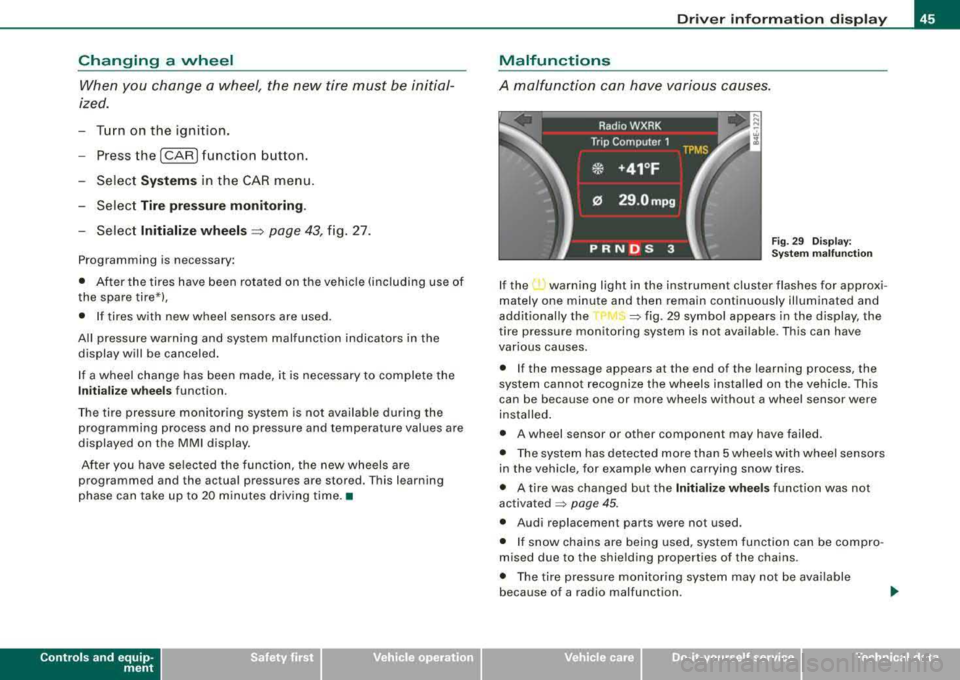
Malfunctions
A malfunction can have various causes.
Fig. 29 Display:
Syste m malfunction
If the ...., warning light in the instrument cluster flashes for approxi
mately one minute and then remain continuously illuminated and
additional ly the
=> fig. 29 symbol appears in the display, the
tire pressure monitoring system is not available. This can have
various causes.
• If the message appears at the end of the learning process, the
system cannot recognize the wheels installed on the vehicle. This
can be because one or more wheels without a wheel sensor were
insta lled .
• A wheel sensor or other component may have failed.
• The system has detected more than 5 wheels with wheel sensors
in the vehicle, for example when carrying snow tires.
• A tire was changed but the
Initialize wheels function was not
activated
=> page 45.
• Audi replacement parts were not used.
• If snow chains are being used, system function can be compro
mised due to the shielding properties of the chains.
• The tire pressure monitoring system may not be available
because of a radio malfunction.
Vehicle care I I irechnical data
Page 51 of 404
is pressed. If the check light does not flash, the battery is dead and
has to be replaced .
In addition, when the battery is dead the
!i, symbol appears in the
instrument cluster display as well as the message:
!i, Pl ease chang e key batte ry
We recommend having the battery changed by an Audi Dealer .•
Electronic immobilizer
The immobilizer helps to prevent unauth orized use of
y o ur vehicle.
A computer chip inside your key automatica lly deactivates the e lec
t ronic immobilizer when you insert the key in the ignition lock, or on
vehic les with Advanced Key*, when the key is inside the vehicle .
When you remove the key from the ignition lock, or on vehicles with
Advanced Key, when you remove the key from the vehicle, the elec
t ronic immobilizer is automatically activated once again.
If an unauthorized key was used,
S AFE is disp layed continuous ly in
the odometer disp lay field.
& WARNING
Alw ays tak e the k ey with you wh en you le ave th e vehicl e. The k ey
ca n di sarm th e ele ctr onic engin e immobili zer and permit an un au
thorized p ers on to start th e eng in e and enable opera tion of the
v ehicle system s such as power window or power sunroof l eading
to ser iou s per son al in jur y.
[ i ] Tip s
• Your engine can on ly be started using the factory -equipped key.
• You may not be able to start your vehic le if an ignition key of a
different vehicle make is also located on your set of keys .•
Controls and equip
ment
Openin g and clo sing
Certification
The remote control device comp lies with
• USA models: Part 15 of the FCC Rules .
• Can ad a m odels: RSS -210 of Industry Canada .
Operation is subject to the f ollowing conditi ons :
• this device may not cause harmful interference, and
• t his device must accept any interfere nce rece ived, i ncluding
interference that may cause undes ired operation.
0 Note
The manufacturer is not responsib le for ANY RA DIO OR TV interfer
ence caused by unauthorized modifications to this equipment .
Changes or modifications to this unit not express ly approved by the
party responsible for compliance could void the user's authority to
operate the equipment. •
Power locking system
General description
The power locking system locks or unlocks all doors and
the rear lid simultaneously.
The power locki ng system in your veh ic le incorporates the following
functions:
• Central lock ing function
• Selective unlock
feature=> page 52
• Remote contro l feature=> page 48
• Advanced Key *=> page 59
• Anti -theft alarm system=> page 67
Page 72 of 404
Clear vision
control is activated. The high beam function must first be switched
on in the MMI
=> page 70 .
Light Sensor Malfunction
In the event of a light sensor mal fu n ct ion, the driver is notified i n the
instrument cluster display :
@ Automatic headlights/automatic wipers defe ctive
For safety reasons the low beams are turned on permanently with
the switch in
AUTO . However, you can continue to turn the lights on
and off us ing the light switch . Have the light sensor checked as soon
as possib le at a dealership .
& WARNING
• Never use dayt ime running lights to see where you are going .
The y are not bright enough and will not let you see f ar enough
ahead for s afet y, espe cially at du sk or when it is d ark. Alwa ys
switch on the low beams at dusk or when it is dark .
• Autom atic he adlight s are onl y intended to a ssist the dr iver.
The y do n ot relie ve the dri ver of his re spon sibility to che ck the
headlights and to turn them on manuall y according to the current
light and vi sibility condi tion s. For example , fog and rain cannot be
dete cted b y the l ight sen sors . S o alway s switch on the he adlights
under these wea the r condition s and when driving in the dark
gD .
• Cra shes can h appen when you c annot see the road ahead and
when you cannot be seen b y other motori sts .
- Alway s turn on the headlight s so that you can see ahead and
s o that others c an see your c ar from the ba ck.
[ i ] Tips
• With the switch in AUTO front fog lights and rear fog lights
cannot be turned on in addition. • I
f you remove the ignition from the ignition lock while the head
li ghts are s til l on, a bu zzer w ill sound as long as the driver's door is
open to remind you to turn off the lights .
• Always observe t he specific local regulations for your area as to
when to use your lights .•
Adjusting exterior lighting
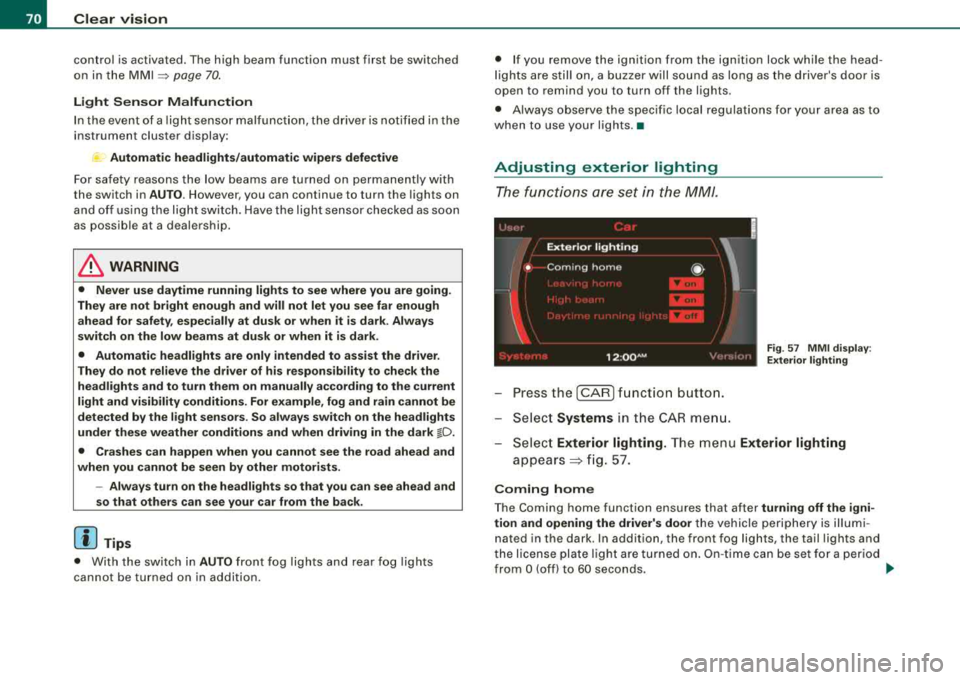
The functions are set in the MM/.
F ig . 57 MM I di spla y:
E xt eri or ligh ting
- Pressthe [CAR ]function button.
- Select
Systems in the CAR me nu.
- Selec t
Exterior lighting. The menu Exterior lighting
appears => fig. 57.
C oming home
The Coming home function ensures that after turning off the igni
tion and op ening the driv er's door
the vehicle periphery is il lum i
nated in the dark . In addition, the front fog lights, the tail lights and
t he license plate lig ht are turned on . O n-t ime can be set fo r a period
from
O (off) to 60 seconds. ~