instrument cluster AUDI S8 2008 Owner's Guide
[x] Cancel search | Manufacturer: AUDI, Model Year: 2008, Model line: S8, Model: AUDI S8 2008Pages: 404, PDF Size: 52.7 MB
Page 153 of 404
Audi lane assist -_____________________ __.
Audi lane assist
Lane assist
Applies to vehicles: with lane assist
Description
Lane assist helps you keep your vehicle in your lane.
Lane assist uses a camera to detect lane boundary lines. If the
system detects that your vehicle is about to leave a lane boundary
line, the steering wheel
vibrates to alert the driver. If lane assist
detects boundary lines on both sides of the vehicle's lane, the
system enters active standby mode, which is indicated by the green
indicator light/: on the instrument cluster.
If the system is in active standby mode and the turn signal is acti
vated before driving over the boundary line, the warning does not
occur since the system allows for intentional lane changes.
The system is designed for driving on freeways and expanded high
ways and thus works only at speeds of 40 mph (65 km/h) or more.
& WARNING
• Lane assist will not keep your vehicle in your lane. The system
only warns the driver when the vehicle is leaving the lane. The
driver is always responsible for keeping the vehicle in the lane.
• The camera is not able to detect all lane boundary lines and in
some cases might also detect lane structures or objects as
boundary lines. This can lead to incorrect warnings or warnings
that fail to go off at all.
• The camera's visibility can be impaired by vehicles ahead of
you, for instance, or by rain, snow, heavy spray or light shining into
the camera lens. This can cause lane assist to fail to detect
boundary lines. •
Contro ls a nd eq uip
ment
Applies to vehicles: with lane assist
Activating and deactivating
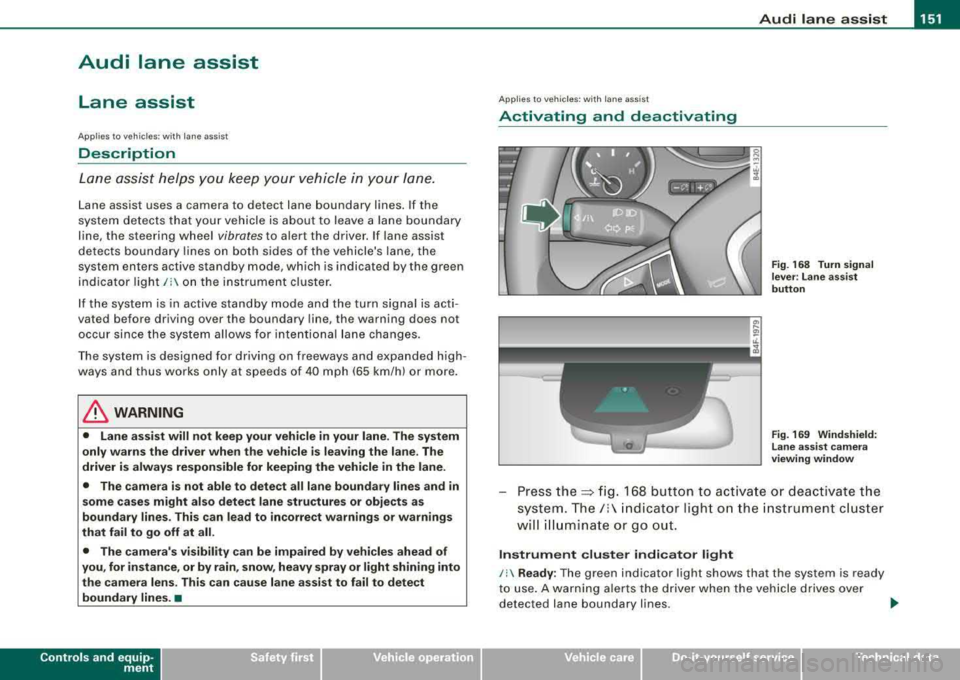
Fig. 168 Turn signal
lever : Lane assist
button
Fig . 169 Windshield:
Lane assist camera
viewing window
Press the:::> fig. 168 button to activate or deactivate the
system.
The/: indicator light on the instrument cluster
will illuminate or go out.
Instrument cluster indicator light
/: Ready : The green indicator light shows that the system is ready
to use. A warning alerts the driver when the vehicle drives over
detected lane boundary lines.
.,.
Vehicle care I I irechnical data
Page 154 of 404
-
Audi lane assist
----------------
I Not re ad y: The yellow ind icator light shows that the system is
t urned on but unab le to send a warning . This can be due to the
following:
• There are no boundary lines, or there is on ly one boundary line
present .
• The boundary lines are not detected (e.g. due to snow, dirt, wet
conditions or light shining into the camera lens) .
• More than two boundary lines (such as at construction sites) are
located in the vehicle's lane .
• The vehicle's speed is below the speed needed to activate it,
which is abou t 40 mph (65 km/h).
• The lane is narrower than about 8 ft . (2 .5 m), or wider than about
16
ft . (5 m).
• The curve is too sharp .
Notes on th e instr umen t clu ste r displa y
When the lane assist turns off automatically , the instrument cluster
indicator goes out and one of the following messages appears on
the display:
Audi lan e assist not available: C urre ntl y no se nsor vis ion
This message appears when the camera can no longer function
because it cannot detect the boundary lines. This may be due to the
following :
• The exterior s ide of the camera viewing
window => page 151,
fig. 169 is covered with dirt or ice. Clean this part of th e windshield.
• The camera v iew ing window is fogged up on the inside. In t his
case, wait until the fog disappears before turning lane assist on
aga in.
• The system was unable to detect boundary lines over an
extended period of time due to road conditions (such as snow
covered lanes). Do not turn lane assist on again unti l the lines can
be more easily detected .
Audi lane assist not ava ila bl e
A temporary malfunction is preventing lane assist from operating .
Try turning on lane assist again a t a la ter t ime.
Audi l ane ass is t: sys te m f ault
T he system should be checked by an authorized Audi dealer or other
qual ified workshop .
[ i ] Tips
• Make sure that the camera viewing window => page 151, fig. 169
is not covered by stickers or similar objects .
• Always keep the camera view ing w indow c lean . This can usual ly
b e don e by op erat ing the windshield wipers. •
App lies to vehicles: w it h l ane assist
MMI settings
You can use the MM/ to adjust the warning time and
steering wheel vibration.
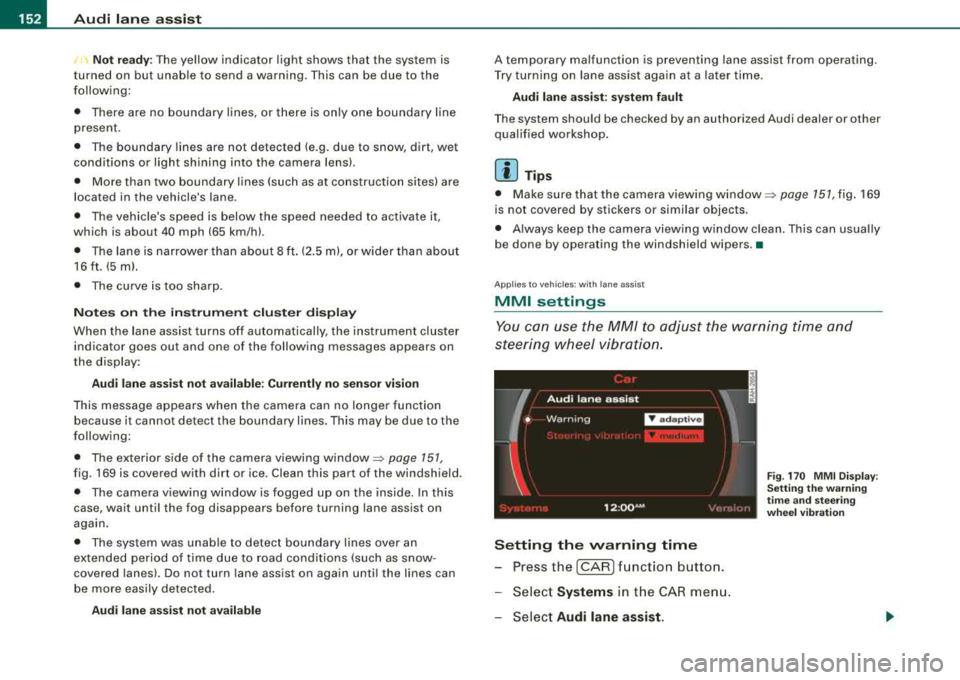
Setting the warning time
- Press the [CAR ] function button.
- Select
Systems in the CAR men u.
- Select
Audi l ane ass is t.
Fig . 17 0 M MI D isp lay :
Se ttin g th e w arning
t im e a nd stee ring
w hee l v ibr ati on
Page 163 of 404
_________________________________________________ A
_ u_ d_ i _s _ i_d _e _ a_s_ s_ i_ s _t __ lJIII
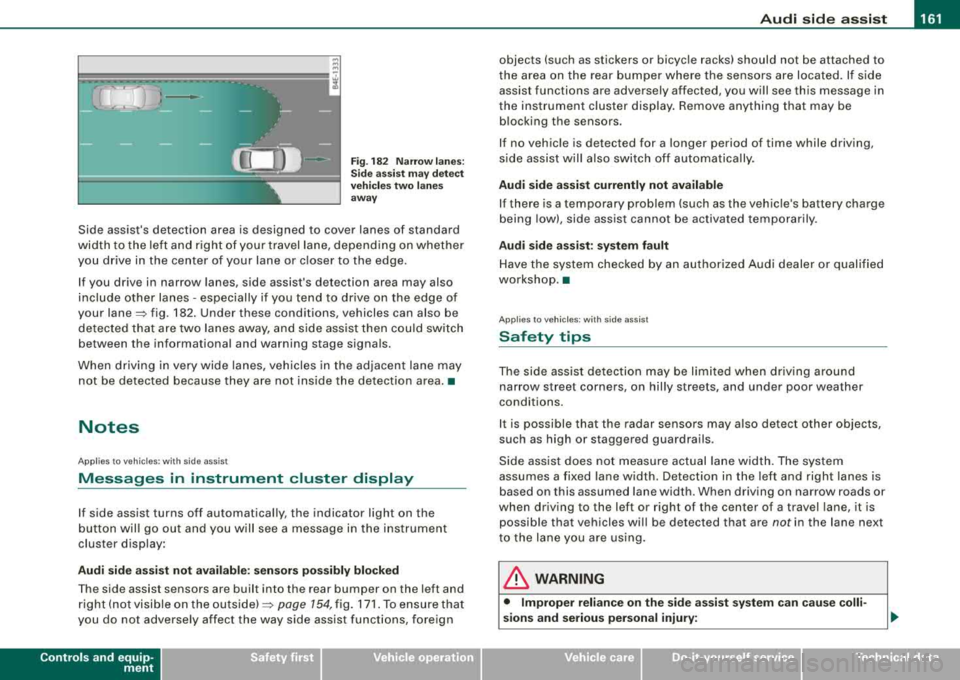
Fig . 182 Narr ow lane s:
Si de ass is t m ay detec t
vehi cle s two la ne s
a w ay
Side assist's detection area is designed to cover lanes of standard
width to the left and r ight of your travel lane, depend ing on whethe r
you drive in the center of your lane or c loser to the edge .
I f you drive in narrow lanes, side assist's detection area may also
include other lanes - especially if you tend to dr ive on the edge of
your
lane~ fig . 182. Under these conditions, vehicles can also be
de tec ted tha t are two lanes away, and side ass ist then c ould switch
between the informational and warning stage signa ls.
When d riving in very wide lanes, vehicles in t he adjacent lane may
not be detected because they are not ins ide the detection area. •
Notes
Applies to vehicles: with side ass is t
Messages in instrument cluster display
If side assist turns off automatically, the indicator light on the
b utton wil l go out a nd you w ill see a message in the i nstrument
cluster disp lay :
Audi side a ssist not available : sen sor s pos sibly blocked
T he side assist sensors are bui lt into the rear bumper on the left and
r ight ( not visi ble on the
ou ts id e) ~ page 154, fig. 171 . To ensure t hat
you do not adverse ly affect the way side assist functions, foreign
Controls and equip
ment
objects (such as stickers or bicyc le racks) should not be attached to
t he area on the rear bumper where the sens ors are loca ted. If s ide
assist functions are adversely affected, you will see this message in
the instrument cluster display. Remove anything that may be b locking the sensors .
I f no vehic le is detected for a longer period of time while driving,
s ide assist wil l also switch o ff automatica lly.
Audi side a ssist currently not available
If there is a temporary prob lem (such as the vehic le's battery charge
being low), side assist cannot be activated temporarily .
Audi side assis t : sy stem fault
Have t he system chec ked by an autho rized Audi dealer o r qualified
workshop. •
Applies to vehic les: with side assist
Safety tips
The side ass ist detec tion may be li mit ed when dr iv ing a round
narrow street corners, on hilly streets, and under poor weather
conditions.
I t is possible that the radar sensors may a ls o detec t other objects,
such as high or staggered guardrails.
Side ass ist does not measu re actual la ne w idth. The system
assumes a fixed lane width. Detection in the left and right lanes is
based on this assumed lane width. When driving on narrow roads or
when driv ing to the left or right of the center of a travel lane, it is
possible that vehicles wi ll be detected that are
not in the lane next
to the lane you are using.
& WARNING
• Improper relian ce on the side assi st system c an cau se colli
sions and serious personal injury:
Page 166 of 404

___ A_ u_ t
_ o_ m_ a_ t_ i_ c _ t_r _a _n_ s_ m_ is_ s_io _ n ________________________________________________ _
The selector lever must be in Nor P. If one of the driving positions
is e ngaged a sa fe ty swit ch will preven t the eng ine from bei ng
started. See
also=:> pa ge 130 .
Before you move the selector lever from the P pos ition, you m ust
a lways apply the b ra ke pe dal be fore and wh ile depress in g th e
button in the hand le of the selecto r lever.
& WARNING
• Unintended vehicle movement can cause seriou s injury .
- When the selector lever is in a driving position , the vehicle
may creep , even at idle speed . Therefore do not release the
parking brake or foot brake until you are ready to move,
be cause power is tran smitted to the wheels as soon as a
driving position is engaged .
- Do not accelerate while select ing a driving position . At th is
time the engine must be at idle speed so that undue stress is
not placed on the clut ches in the transmi ssion .
- Remember: -even when stopped briefly with the automatic
transmission in
" D " or "R ", engine power is being transmitted
to the wheels . Your vehicle could "creep " forward or backward.
When stopped , keep the brake pedal fully depressed and use
the parking brake if necessary to keep the vehicle from rolling.
• If the selector lever is unintentionally moved into N while you
are driving , take your foot off the accelerator pedal and wait for
the engine to return to idle speed before sele cting a driving posi
tion.
• Never shift into
" R " or "P " when the vehicle is in mot ion .
• Never get out of the dri ver's seat when the engine is running .
• If you must get out of the vehicle , move the selector lever
securely into the P position and apply the parking brake firmly .
• If the engine must remain running , never have any driving posi
tion engaged when checking under the hood . Make sure the
selector lever has securely engaged and is locked in
"P" with the
parking brake firmly
set => page 299, "Engine compartment ".
& WARNING (continued )
Otherwise , any increase in engine speed may set the vehi cle in
motion , even with the parking brake applied . •
Selector lever positions
This sec tion des crib es the selec tor lever p ositions an d
driv ing rang es.
Fig . 184 Disp lay in the
in strument clu ster :
selector lever in pos i
t ion D
T he sele cto r leve r posi tion engag ed ap pears next to the selector
l ever as we ll as in the instrument cluster disp lay . A lso, the current
gear engaged is show n in po sitions D and S .
P -Park
In this selector lever posit ion the t ra nsmi ssio n i s m ec hani cally
l ocked. Engage
P on ly when the vehicle is completely stopped=> &
i n "Dr iv ing th e auto mat ic tra nsmi ssion" on page 163 .
To shift in or out of position P , you must first press and hold the
b rake peda l
and then press the release button in th e selec tor leve r
handle wh ile movi ng the selector lever to or from
P . You can shift
ou t of this posi tion only wi th th e igni tio n on.
R -Reverse
Th e trans missi on wil l au to m atica lly select t he lowest gear ratio
when you shift into reverse .
Page 188 of 404
___ A_ d_a_ p_ ti_v _ e_ A_ ir_ S_u_ s_ p_e _n_ s_ io_n ___________________________________________ _
Chassis Controls
Four different driving modes can be set by the driver.
The automatic control processes are speed -and time -dependent.
For example, it is not possible to raise the suspension to the lift
mode above certain speeds .
When a speed of about 75 mph (120 km/h) is exceeded for more than 30 seconds, the vehicle is automatically lowered approximate ly 1
inch (25 mm) to a level suitable for highway speeds, except in the
standard mode . Road holding is optim ized as a result of the lower
center of gravity and fuel consumption is reduced as a result of
reduced wind resistance .
Level adjustment
lift
standard
automatic
dynam ic
automatic Ground
clearan ce
about 5 .7 inches (145 mm)
a bout 4.7 inches ( 120 m m)
about 4 .7 inches (120 mm)
about 3.9 inches (100 mm)
Se lect the automatic mode if you prefer a suspension setting
e m phas izing comfort . Damping characterist ics emphasiz ing
comfort are selected in this mode.
• Lowering : When a speed of abou t 75 mph ( 120 km/h) is excee ded
for more than 30 seconds, the vehic le is automatically lowered by
about 1 inch (25 mm) .
• Raising : The vehic le is automat ical ly raised again if the speed
fa lls bel ow about 44 mph (70 km/h) for a per iod of 120 seconds. The
vehic le is raised immediate ly when speed fa lls below about 22 mph
(35 km/h) .
dynami c
Select the sport mode if you prefer a sporty suspensio n setting . In
this mode, the veh ic le is lowered whi le it is still stationary and sporty damping characteristics are selected
. The warning
light ~
in the instrument cluster will c ome on for a few seconds just to
remind you of the reduced ground clearance .
I f you switch off the engine while the vehic le is in the dynamic mode
and then switc h on the ign it ion once aga in,
t h e ~ warning lig ht
wi ll also come on again for a few seconds.
• Lowering : When a speed of abou t 75 mph (120 km/h) is exceeded
for more than 30 seconds , the vehicle is automatica lly lowered by an
addi tiona l 0 .2 in (5 mm).
• Raising : The vehic le is automatically raised again if the speed
f alls below ab out 44 mph (70 km/ h) for a per iod of 120 seconds . The
vehic le is raised immediate ly when speed fa lls below about 22 mph
(35 km/h) .
sta nd ard
Se lect the s tandard mode if you desire a suspensi on se tt ing with a
special emphasis on comfort . In the standard mode there is
n o
lo wer ing of t he suspension . Even at high speeds, the vehicle stays
at the same level. Damping characteristics with a decided emphasis
on com fort are selected in this mode.
lift
Se lec t t he lif t mode when you have to travel over poor secti ons of
road (e .g . trails). In the lift mode, the vehic le is raised by 1 inch (25
mm ) compared to norma l level wh ile it is st ill stati onary a nd
damping characteristics are ad justed to emphasize comfort.
T he lift mode can be act ivated on ly at speeds below 50 mph (80
k m/h). When a speed of about 62 mph (100 km/h) is exceeded, the
system automatical ly leaves lift mode and the mode set previously
(standard, au tomat ic, dynamic) is activated aga in. •
Page 190 of 404
___ A_ d_a_ p=--- t_iv _ e_ A
_ i_ r _ S_ u_s--= p'--- e_n _ s_ i
_ o _ n _____________________________________________ _
Setting the Driving Modes
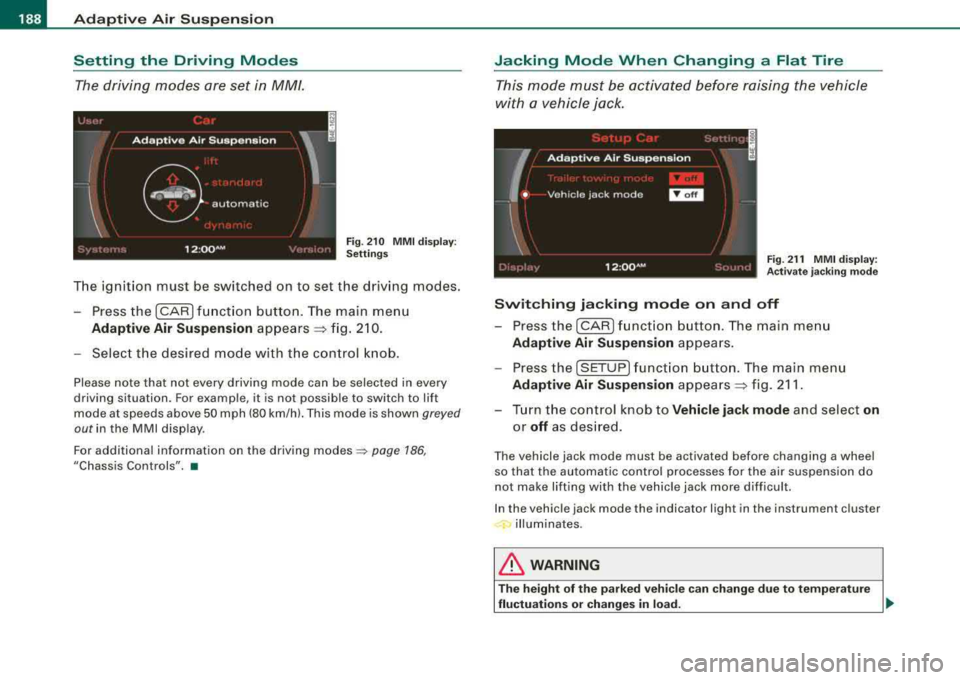
The driving modes are set in MM/.
F ig . 2 10 MM I d is pl ay:
Setti ngs
The ignition must be switched on to set the driving modes .
- Press the (CAR] f unction button . The main menu
Ad aptive Air Suspension appears ~ fig. 2 10.
- Select the desired mode with the c ontrol k nob .
Please note that not every driving mode can be selected in every
driving situation. For examp le, it is not possible to switch to lift
mode at speeds above 50 mph (80 km/h). This mode is shown
greyed
out in the MMI disp lay .
For additional information on the driving
modes ~ page 186,
"Chassis Controls". •
Jacking Mode When Changing a Flat Tire
This mode must be activated before raising the vehicle
with a vehicle jack .
Fig. 21 1 MMI displ ay:
Ac tivat e ja ckin g m od e
Switching jacking mod e on and off
- Press the
I CAR ) fu nct io n bu tton. The main me nu
Adaptive Air Su spen sion appea rs .
- Press the
[SETUP] f unct io n button . The main menu
Adaptive Air Su spen sion appea rs ~ fig. 211 .
- Turn the co ntrol knob to
Vehicle jack mode and select on
or off as des ired .
The vehicle jack mode must be activated before changing a wheel
so that the automatic control processes fo r the air suspension do
not make lifting with the vehicle jack more difficult.
In the vehic le jack mode the indicator light in the instrument cluster
illuminates.
& WARNING
T he height of the p arked vehic le c an change du e to te mpera ture
fluctu ation s or change s in lo ad.
~
Page 211 of 404
_________________________________________________ s_ a_f _e _t .:,.y _ b_ e_lt_ s __ lfll
Safety belts
General notes
Always wear safety belts!
Wearing safety belts correctly saves lives!
This chapter explains why safety belts are necessary, how
they work and how to adjust and wear them correctly.
- Read all the information that follows and heed all of the
instructions and WARNINGS.
& WARNING
Not wearing safety belts or wearing them improperly increases
the risk of serious personal injury and death.
• Safety belts are the single most effective means available to
reduce the risk of serious injury and death in automobile acci
dents. For your protection and that of your passengers, always
correctly wear safety belts when the vehicle is moving.
• Pregnant women, injured, or physically impaired persons must
also use safety belts . Like all vehicle occupants, they are more
likely to be seriously injured if they do not wear safety belts. The
best way to protect a fetus is to protect the mother -throughout
the entire pregnancy. •
Number of seats
Your Audi has a total of five seating positions: two in the front and
three in the rear. Vehicles with power individual rear seats* have
seating for four: two in the front and two in the rear. Each seating
position has a safety belt.
Controls and equip ment Safety first
Vehicle operation
& WARNING
Not wearing safety belts or wearing them improperly increases
the risk of serious personal injury and death .
• Never strap more than one person, including small children,
into any belt. It is especially dangerous to place a safety belt over
a child sitting on your lap.
• Never let more people ride in the vehicle than there are safety
belts available.
• Be sure everyone riding in the vehicle is properly restrained
with a separate safety belt or child restraint. •
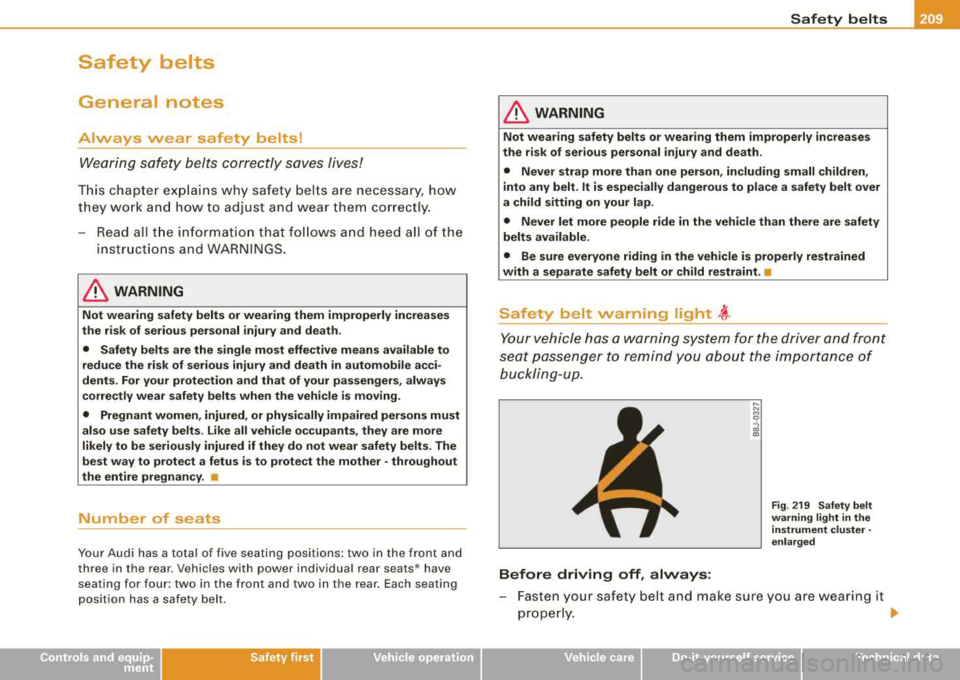
Safety belt warning light ~
Your vehicle has a warning system for the driver and front
seat passenger to remind you about the importance of
buckling-up.
Before driving off, always:
Fig . 219 Safety belt
warning light in the
instrument cluster -
enlarged
- Fasten your safety belt and make sure you are wearing it
properly.
.,_
Vehicle care Do-it-yourself service Technical data
Page 212 of 404
___ s_a_ f_ e_ t-= y_ b_e_ l_ t _s _______________________________________________ _
-Make sure that your passengers also b uckle up and pro p
erly wea r th eir sa fety be lts.
Protect children wit h a c hild restraint sys tem appropriate
for the size and age.
The warning light ~ in the instrument cluster lights up when the
ignition is switched on as a reminder to fasten the safety belts. In
addition , you will hear a warning tone.
After the ignition is switched on, the warning light in the instrument cluster will a lways come on for about 6 seconds and if the driver has
not fastened the safety belt, a warning tone will also sound for
about 6 seconds . As soon as the driver has fastened the safety belt,
the warning tone will stop and the warning light will go out .
If the driver or front seat passenger have not buckled -up within
about 10 seconds after the warning tone has stopped and the
vehicle is moving faster than about 15 mph, the warning tone will
sound again for about 6 seconds and then s top for 24 seconds and
then repeat this reminder sequence for a maximum of 2 minutes. At
speeds be low 5 mph, the warning to ne will not sound.
Fa sten your safe ty belt and make su re that your p assengers al so
properl y put on their s afet y belts .
& WARNING
• Safety belts are the single mo st effective mean s available to
reduce th e risk of ser ious in jur y a nd death in aut omobile acci
dent s. For your prote ction and that of your pas sengers , alway s
c orrectly wear safety belt s when t he v ehicle is moving .
• Failure t o pay attention to th e warning light that come on,
c ould lead to per sonal injur y.•
Why safety belts?
Frontal collisions and the law of physics
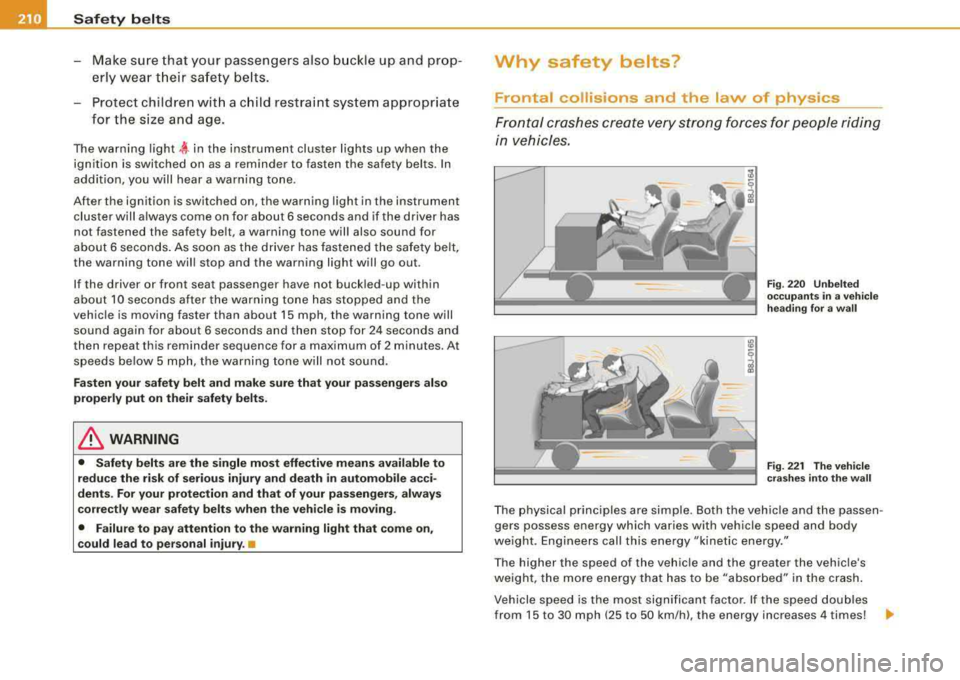
Frontal cras hes cre ate very strong forces for people ridi ng
in vehicles.
F ig . 22 0 Unbel te d
occ upants in a ve hicle
h ead ing for a w all
F ig . 22 1 The vehi cle
c ras hes in to th e wa ll
The physical principles are simple. Both the vehicle and the passen
gers possess energy which varies with vehicle speed and body
we ight . Engineers call this energy "kinetic energy ."
T he higher the speed of the vehicle and the greater the vehic le's
we ight, the more energy that has to be "absorbed" in the crash .
Vehicle speed is the most signi fican t factor. If the speed doubles
from 15 to 30 mph (25 to 50 km/h), the energy increases 4 times!
.,
Page 222 of 404
___ A_ ir_b _ a_ g=- s-a. y_s _t _e _m _________________________________________________ _
Child restraints on the front seat - some important things to know
- Be sure to read the important information and head the WARNINGS for important details about c hildren and
Advanced
Airbags=> page 243.
Even though your vehic le is equipped with an Advanced Airbag
System, make certain that a ll children, especia lly those 12 years and
younger, a lways ride in the back seat proper ly restrained for their
age and size . The airbag on the passenger side makes the front seat
a potentia lly dangerous place for a child to ride. The front seat is not
the safest p lace for a child in a forward -facing chi ld seat. It can be a
very dangerous place for an infant or a child in a rearward -fac ing
seat.
The Advanced Ai rbag System in your vehicle has been certified to
comply with the Requirements of United States Federal Motor
Vehicle Safety Standard 208 as applicable at the time your vehicle
was manufactured.
The Standard requires the front airbag on the passenger side to be
t urned off ("suppressed") if a chi ld up to about one year of age
restrained in one of the rear -facing or forward -facing infant
restraints l isted in Federa l Motor Vehic le Safety Standard 208 with
which the Advanced Airbag System in your vehicle was certified has
been insta lled on the front passenger seat. For a listing of the child
restraints that were used to certify compl iance with the US Safety
Standard
=> page 245.
The PASSENGER AIR BAG OFF l ight in the instrument pane l te lls you
when the front Advanced Airbag on the passenger side has been
t urned off by the electronic co ntrol unit.
Each time you turn on the ignition, the
PA SS ENGER AIR BAG OFF
light will come on for a few seconds and :
• will stay on if the front passenger seat is not occup ied, •
will stay on if there is a small child or chi ld restraint on the front
passenge r seat,
• will go off if the front passenger seat is occupied by an adult as
r egis tered by the weight-sensi ng
m at => page 229, "Monitoring the
Advanced Airbag System" .
The
PASSENGER AIR BAG OFF light comes on when the contro l unit
detects a tota l weight on the front passenger seat that requires the
front airbag to be turned off.
I f the to tal weight on the front passe nger seat is m ore than tha t of
a typ ica l 1 year -old child but less than the weight of a small adult,
t he fron t airbag on the passe nger side can dep loy (the
PAS SENGER
AIR BAG OFF
light does not come on). If the PASSEN GER AIR BAG
OFF
light does not come on, the front airbag on t he passe nger s ide
has not been turned off by the electronic contro l unit and can
deploy if the control unit senses an impact t hat meets the condi
tions stored in its memory.
For example , the airb ag m ay deploy if :
• a small ch ild that is heavier tha n a typ ical 1 yea r-o ld child is on
the front passenger seat (regardless of whether the child is in one
of the child seats
l isted => page 245), or
• a child who has outgrown chi ld restraints is on the front
p asse nger seat.
I f the front passe nger airbag is turned o ff, the
PASSENGER AIR BAG
OFF
light comes on in the instrument cluster and stays on.
T he front a irbag o n th e passenger s ide may
not deploy (the
PASSENGER AIR BAG OFF l ight does not illuminate and stay lit) even
if a smal l adult or teenage r, o r a passenger wh o is n ot sitting uprigh t
with their back against a non -reclined backrest with their feet on the
vehic le floor in front of the seat is o n the front passenge r seat
=> page 200, "Proper seating pos it ion for the driver".
I f the front passenger airbag deploys, the Federa l Standard requires
the airbag to meet the "low risk" deployment cr iteria to reduce the
risk of injury through interaction with the airbag. "Low risk" deploy
ment occu rs in those crashes that take place at lower decelerations
~
Page 227 of 404
Airbag system -
--------------=---=--
& WARNING (continued)
• If you must install a rearward facing child seat on the front
passenger seat because of exceptional circumstances and the
PASSENGER AIR BAG OFF light does not come on and stay on,
immediately install the rear-facing child seat in a rear seating posi
tion and have the airbag system inspected by your Audi dealer.
& WARNING
If, in exceptional circumstances, you must install a forward-facing
child restraint on the front passenger's seat:
• Always make sure the forward-facing seat has been designed
and certified by its manufacturer for use on a front seat with a
passenger front and side airbag.
• Never put the forward-facing child restraint up against or very
near the instrument panel.
• Always move the passenger seat into its rearmost position in
the seat's fore and aft adjustment range, as far away from the
airbag as possible, before installing the forward-facing child
restraint. The backrest must be adjusted to an upright position.
• Make sure that the PASSENGER AIR BAG OFF light comes on
and stays on all the time whenever the ignition is switched on. •
Advanced Airbag System components
The front passenger seat in your vehicle has a lot of very important
parts of the Advanced Airbag System in it. These parts include the
weight -sensing mat, sensors, wiring, brackets, and more. The func
tion of the system in the front passenger seat is checked by the elec
tronic control unit when the ignition is on. The control unit monitors
the Advanced Airbag System and turns the airbag indicator light on
when a malfunction in the system components is detected. The
function of the airbag indicator light is described in greater detail below . Because the front passenger seat contains important parts
Controls and equip
ment Safety first Vehicle operation
of the Advanced Airbag System, you must
take care to prevent it
from being damaged. Damage to the seat may prevent the
Advanced Airbag for the front passenger seat from doing its job in
a crash.
The front Advanced Airbag System consists of the
following:
• Crash sensors in the front of the vehicle that measure vehicle
acceleration/deceleration to provide information to the Advanced
Airbag System about the severity of the crash.
• An electronic control unit, with integrated crash sensors for front
and side impacts. The control unit "decides" whether to fire the
front airbags based on the information received from the crash
sensors. The control unit also "decides" whether the safety belt
pretensioners should be activated.
• An Advanced Airbag with gas generator for the driver inside the
steering wheel hub.
• An Advanced Airbag with gas generator inside the instrument
panel for the front passenger.
• A weight -sensing mat under the upholstery padding of the front
passenger seat cushion that measures the total weight on the seat.
The information registered is sent continuously to the electronic
control unit to regulate deployment of the front Advanced Airbag on
the passenger side .
• An airbag monitoring system and indicator light in the instru
ment
cluster => page 229.
• The PASSENGER AIR BAG OFF light comes on and stays on in the
center of the instrument
panel => page 230, fig. 233 and tells you
when the front Advanced Airbag on the passenger side has been
turned off .
• A sensor below the safety belt latch for the front seat passenger
to measure the tension on the safety belt . The tension on the safety
belt and the weight registered by the weight-sensing mat help the
control unit
"decide" whether the front airbag for the front
passenger seat should be turned off or
not=> page 220, "Child
restraints on the front seat
-some important things to know". .,_
Vehicle care Do-it-yourself service Technical data