lock AUDI S8 2008 User Guide
[x] Cancel search | Manufacturer: AUDI, Model Year: 2008, Model line: S8, Model: AUDI S8 2008Pages: 404, PDF Size: 52.7 MB
Page 35 of 404
Dipstick reading checks OK
-If the oil pressure warning symbol "e::7: starts flashing
again even though the engine oil level checks OK on the
dipstick,
do not continue driving and do not let the
engine run in idle.
Instead, contact your authorized Audi
dealer for assistance.
[ i] Tips
• The engine oil pressure symbol ~ is not an indicator for a low
engine oil level. Do not rely on it . Instead, check the oil level in your
engine at regular intervals, preferably each time you refuel, and
always before going on a long trip.
• The yellow oil level warning indication
~ requires oil refill or
workshop service without delay. Do not wait until the red oil pres
sure warning
~ starts to flash before you respond to the low oil
level warning
~- -By then, your engine may already have suffered
serious damage. •
Steering malfunction i
If there is a malfunction in the electronic steering column
lock, the steering cannot be unlocked.
If the ~ symbol in the display blinks, there is a malfunction
in the electronic steering column lock. An additional driver
message can also be displayed by pressing the [ CHECK]
button :
Do not drive vehicle: Steering defective
-Contact your nearest authorized repair facility.
- Do
not tow your vehicle.
Controls and equip
ment • I I • • I
Driver information display
& WARNING
Your vehicle must not be towed in the event of a malfunction in the
electronic steering column lock because it cannot be steered due
to the locked steering. If it is towed with the steering locked, there
is the risk of an accident. •
Ignition lock malfunction ~
A malfunction in the ignition lock must be repaired imme
diately.
If the ~ symbol in the display blinks, there is a malfunction
in the electronic ignition lock. An additional driver message
can also be displayed by pressing the [ CHECK] button:
Ignition lock defective. Contact workshop !
-Do not turn the engine off.
- Drive immediately to an authorized Audi dealer to have
the malfunct ion corrected.
If there is a malfunction in the electronic ignition lock, the ignition
cannot be turned off. Drive immediately to an authorized Audi
dealer to have the cause of the malfunction corrected.
I f your vehicle has an Advanced Key *, then you should not use the
I STOPI button to shut off the engine. You will not be able to start the
engine again once the ignition is switched off. •
Page 37 of 404
If the symbol illuminates, contact your authorized Audi dea ler to
have the front brake pads inspected (on that occas ion have the rear
brakes inspected as wel l to be
safe!. •
Checking the engine oil level ~
~-Please c hec k oil le vel
When the symbo l illuminates, check the engine oi l leve l as soon as
possible=> page 311 . Add oil if necessary=> page 312 . •
Engine oil sensor defective ~ ....
~ ... Oil le vel ! sen sor defe cti ve
If the symbo l illuminates, contact your authorized Audi dea ler and
have the oi l sensor inspected . Unt il you have this done, check the o il
level each time you refuel just to be on the safe
side => page 311. •
Fuel supply too low Bil
Bu Please refuel
When the symbol i lluminates, th is means there are abou t 2.4
gallons (9 l itres) of fue l left in the fue l tank . Time to refuel.
=> page 302 .
If the symbo l lights up, even when there is ample fuel in the tank,
and the text
Tan k sys tem m alfunct ion ! Conta ct w ork shop appears
in the disp lay, there is a fault in the system. Contact a qual ified work
shop to have the fau lt rectified .•
Windshield washer fluid level too low ~
~ Ple ase top up washer fluid
Controls and equip ment
Driver information di splay
If the symbo l illuminates, add windshie ld washer fluid to the washer
system and a lso to the headlig ht washer
sys tem => page 323. •
Battery voltage 0
If the battery 's state o f charge is not in the optimal range, the 0
symbo l is shown in the display and the driver message L ow batter y
charge: b attery will be charged while driving
appears .
Whi le this driver not ification is displayed, you have to be prepared
for limited starting capability .
Drive r m essa ge a ppear s a nd go es out ag ain
If th is d rive r message appears after the ign ition is turned on or
wh ile dr iving and it goes out again after a wh ile, the battery has
been adequately recharged.
Dri ver messa ge ap pears a nd does not g o out ag ain
If t his drive r notif ication appea rs after the ignition is t urned o n or
wh ile driving and does not go out again, the battery's state of
charge is not in the opti mal range. Start ing capab ility is restricted.
Have the battery c hecked at a dea lership as soon as possible. •
Applies to vehi cles : with Advanced Key
Key not in vehicle ..?c
.,J. Key not in vehi cle
This message appears toget her with the ..J. symbol when the
remote control key is removed from the vehicle whi le the engine is
run ning. This is to remind you that you s hould not continue your trip
without your key.
I f the remote control key is no longer i n the vehicle, you w ill not be
able to start the engine aga in after you have switched off the igni
tion. In addition to this, you will not be able to lock the vehic le from
the outside. •
Page 49 of 404
Opening and closing
Keys
Key set
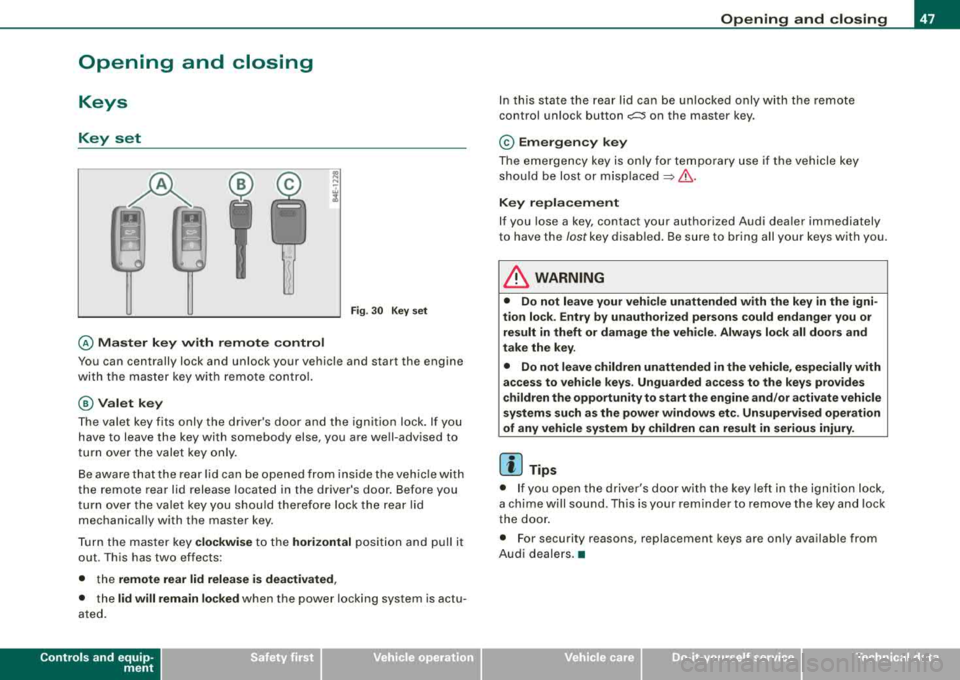
@ Master key with remote control
Fig. 30 Key set
You can centrally lock and unlock your vehicle and start the engine
with the master key with remote control.
@Valet key
The valet key fits only the driver's door and the ignition lock. If you
have to leave the key with somebody else, you are well-advised to
turn over the valet key only.
Be aware that the rear lid can be opened from inside the vehicle with
the remote rear lid release located in the driver's door. Before you
turn over the valet key you should therefore lock the rear lid
mechanically with the master key.
Turn the master key
clockwise to the horizontal position and pull it
out . This has two effects:
• the
remote rear lid release is deactivated,
• the lid will remain locked when the power locking system is actu
ated.
Controls and equip ment
Opening and closing
In this state the rear lid can be unlocked only with the remote
control unlock button
c:::::5 on the master key.
© Emergency key
The emergency key is only for temporary use if the vehicle key
should be lost or misplaced
=> &.
Key replacement
If you lose a key, contact your authorized Audi dealer immediately
to have the /ostkey disabled. Be sure to bring all your keys with you.
& WARNING
• Do not leave your vehicle unattended with the key in the igni
tion lock. Entry by unauthorized persons could endanger you or
result in theft or damage the vehicle. Always lock all doors and
take the key.
• Do not leave children unattended
in the vehicle, especially with
access to vehicle keys. Unguarded access to the keys provides
children the opportunity to start the engine and/or activate vehicle
systems such as the power windows etc. Unsupervised operation
of any vehicle system by children can result in serious injury.
[ i] Tips
• If you open the driver 's door with the key left in the ignition lock,
a chime will sound . This is your reminder to remove the key and lock
the door.
• For security reasons, replacement keys are only available from
Audi dealers.
•
Page 50 of 404
Opening and clo sing
Master key vvith remote control
The remote control allows y ou to l ock or unlock the
vehicle electronically.
F ig . 31 Fo ld -u p m aster
key wit h re mote
c ontr ol
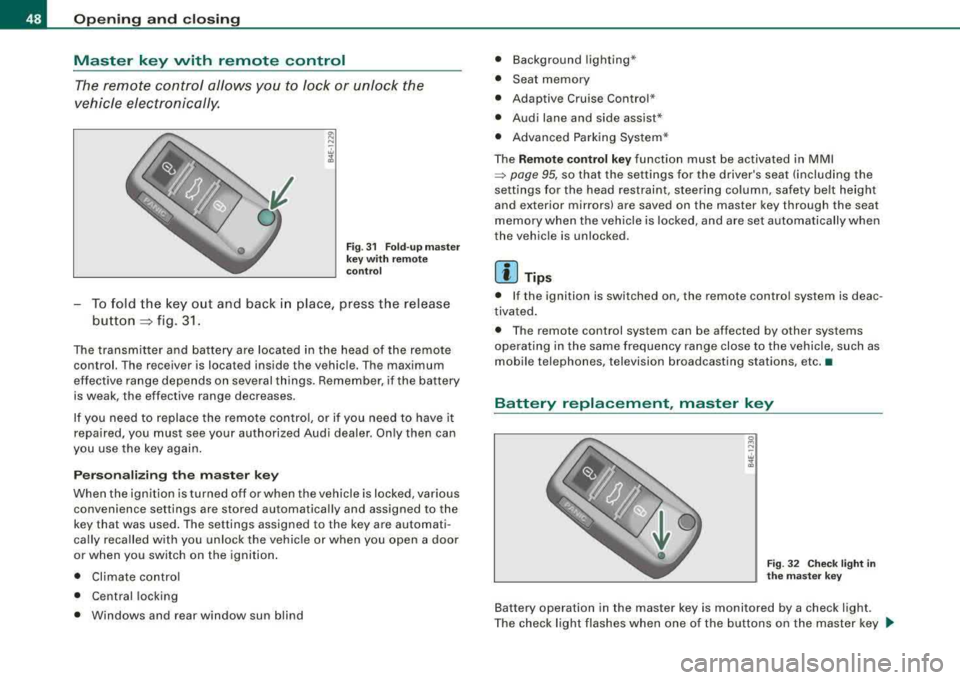
-To fold the key out and back i n place, press the release
button
::::, fig. 3 1.
The transmitter and battery are located in the head of the remote
control. The r eceiver is locat ed ins ide th e vehicle . Th e maximum
ef fective range depends on several th ings. Remember, if the battery
is weak, the effective range decreases.
If you need to replace the remote contro l, or if you need to have it
repaired, you must see your authorized Audi dealer. On ly then can
you use the key again .
P erson aliz ing the ma ste r ke y
When the ignition is turned off or when the vehicle is locked, various convenience set tings are stored automatical ly and assigned to the
key that was used . The settings assigned to the key are automati
cally recalled with you unloc k the vehicle or when you open a door
or when you switch on the igni tion .
• Climate contro l
• Ce ntral locking
• Windows and rear window sun blind •
Background lighting *
• Seat memory
• Adaptive Cruise Contro l*
• Audi lane and side assist *
• Advanced Parking Syste m*
The
Remo te co ntrol ke y function must be activated in MMI
~ page 95, so that the settings fo r the driver's seat (including the
settings for the head restraint, steering column , safety be lt height
and exterior mirrors) are saved on the master key through the seat
memory when the vehicle is locked, and are set automatically when
the vehic le is unlock ed.
[ i ] Tip s
• If the ignition is switched on, the remote control system is deac
tivated .
• The remote control system can be affected by other systems
opera ting in the same frequency range close to the vehicle, such as
mobile tel ephones, television broadcasting stations, etc. •
Battery replacement, master key
g N
-. w 1l.
Fig . 3 2 Che ck light in
th e m as ter key
Battery operation in the master key is monitored by a check light .
The check light flashes when one o f the buttons on the master key
~
Page 51 of 404
is pressed. If the check light does not flash, the battery is dead and
has to be replaced .
In addition, when the battery is dead the
!i, symbol appears in the
instrument cluster display as well as the message:
!i, Pl ease chang e key batte ry
We recommend having the battery changed by an Audi Dealer .•
Electronic immobilizer
The immobilizer helps to prevent unauth orized use of
y o ur vehicle.
A computer chip inside your key automatica lly deactivates the e lec
t ronic immobilizer when you insert the key in the ignition lock, or on
vehic les with Advanced Key*, when the key is inside the vehicle .
When you remove the key from the ignition lock, or on vehicles with
Advanced Key, when you remove the key from the vehicle, the elec
t ronic immobilizer is automatically activated once again.
If an unauthorized key was used,
S AFE is disp layed continuous ly in
the odometer disp lay field.
& WARNING
Alw ays tak e the k ey with you wh en you le ave th e vehicl e. The k ey
ca n di sarm th e ele ctr onic engin e immobili zer and permit an un au
thorized p ers on to start th e eng in e and enable opera tion of the
v ehicle system s such as power window or power sunroof l eading
to ser iou s per son al in jur y.
[ i ] Tip s
• Your engine can on ly be started using the factory -equipped key.
• You may not be able to start your vehic le if an ignition key of a
different vehicle make is also located on your set of keys .•
Controls and equip
ment
Openin g and clo sing
Certification
The remote control device comp lies with
• USA models: Part 15 of the FCC Rules .
• Can ad a m odels: RSS -210 of Industry Canada .
Operation is subject to the f ollowing conditi ons :
• this device may not cause harmful interference, and
• t his device must accept any interfere nce rece ived, i ncluding
interference that may cause undes ired operation.
0 Note
The manufacturer is not responsib le for ANY RA DIO OR TV interfer
ence caused by unauthorized modifications to this equipment .
Changes or modifications to this unit not express ly approved by the
party responsible for compliance could void the user's authority to
operate the equipment. •
Power locking system
General description
The power locking system locks or unlocks all doors and
the rear lid simultaneously.
The power locki ng system in your veh ic le incorporates the following
functions:
• Central lock ing function
• Selective unlock
feature=> page 52
• Remote contro l feature=> page 48
• Advanced Key *=> page 59
• Anti -theft alarm system=> page 67
Page 52 of 404
Openin g and clos ing
All the doors and the rear lid are locked by the central locking
system when you lock the vehicle. You can se t whether generally
only the driver's door or all doors and the rear lid should be
unlocked when you open the vehicle in the MM I menu
C entral
l ock ing
to suit your individual desires=> page 52.
Unlocking the veh icle
You can un lock the vehicle from outside ei ther by using the remote
control
or by turning the key inside the driver's door lock. When you
unlo ck your vehic le:
• The anti -theft alarm system is deactivated briefly .
• The vehicle interior l ights illuminate for approximate ly 30
seconds .
• All turn signal lights will flash twice when the car is unlocked.
• Afte r unlocking the vehic le, you have
60 seconds to open a door
or the rear lid . After
60 seconds, th e vehicle automatically locks and
t he anti -theft a lar m system activates agai n.
The rear lid can be locked or unlocked e ither by using the remote
control
or by turning the key inside the driver 's door lock. Unlocking
the vehic le wit h the remote contro l will on ly
unlock the rear lid, to
open it , the lid handle needs to be pressed.
Lo ckin g the vehicle
Yo u can lock the vehicle from outside either by using the remote
control
or by turning the key inside the dr ivers's door lock . When
you
lo ck the veh ic le:
• All doors and the rear lid are locked.
• All turn signal lights will flash once when the car is locked .
• The anti-theft alarm system is activated. The horn of the anti
theft alarm system will sound and the anti -theft a larm system readi
ness l ight, located in the upper part o f the driver's door panel, w ill
start to blink .
• The vehicle interior l ights turn off.
Unlo cking and l ocking th e vehicle using the Ad vanced
Key *
The Ad van ced Key * feature is a keyless system which allows you to
unlock the vehicle via sensors in the door hand le . Locking is likewise
keyless using a lock button . Each door is equ ipped w ith a sensor and
lock button.
Power side door closer*
The veh icle is equipped with a power side doo r c lose r. When closing
a door, you s imp ly need to gently push on the door . The door w ill
t hen automa tically c lose by
itse lf => page 53 .
Autom atic l ockin g
The automatic lock ing fea ture locks all the vehicle doors and the
rear lid when you drive faster than
9 mph ( 1 5 km/hl. This funct ion
can be turned on and off in the MMI
Central locking Menu
=> page 52 .
You can unlock the vehicle from the inside by :
• r emovi ng the key from the ignition switc h (the vehicle wi ll auto
matically un lock itse lf) or
• pressing the unlock part of the power lock swi tch
m or
pulling the door handle (once to open the door) .
& WARNING
• When you lock your veh icle from out sid e, nobody -espe cially
children - should remain in side the vehicle. Remember , when you
l oc k the vehicle from the out side the windo ws ca nnot be opened
from the inside .
• When you leave the vehi cle , alwa ys remove the ignition key and
take it with you. Thi s will prevent passengers (children , for
e x ample) from ac cidentally being l ocked in the vehi cle should they
ac cidentally pre ss the power locking switch in the doors .
~
Page 53 of 404
fl::. WARNING (c o ntinue d)
• Do not le av e children in side th e vehicle un supervis ed. In an
emergen cy it would be i mpo ssi ble to op en the do ors fr om th e
out side without the ke y.
[ i J Tips
• In the event of a crash with airbag deployment all locked doors
will be automat ically unlocked to give access to the vehicle occu
pants from the outside.
• If the power locking system should malfunction , you can lock
each door individually using the vehicle
key => page 54.
• If the power locking system shou ld fail, you can still open the
fue l tank flap in an
emergency => page 305.
• You are we ll advised not to keep valuables inside an unattended
vehic le, visible or not. Even a properly locked vehic le cannot provide
the security of a safe .•
Unlocking and locking the vehicle with the
remote control
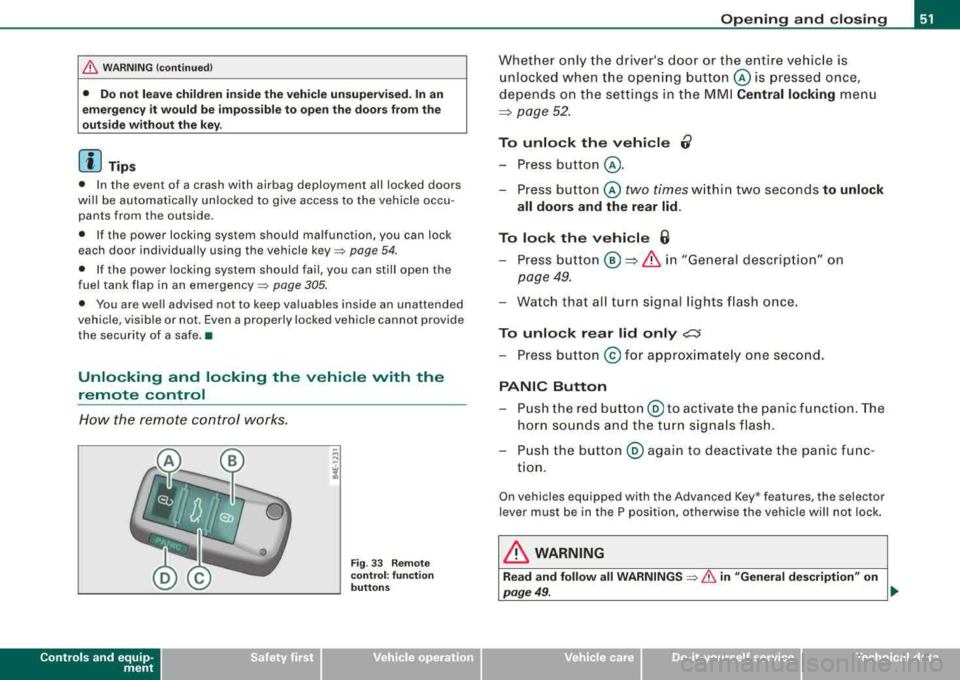
How the remote control works.
Contro ls a nd eq uip
ment
Fig . 33 Remote
co ntr ol: fu nction
bu tto ns
Op ening and clo sing
Whether only the driver's door or the entire vehicle is
unlocked when the ope ning button © is pressed once,
depends on the settings in the MMI
Central locking menu
~ page 52.
To unlo ck the vehi cle 0
-Press button @ .
-Press button © two times within two seconds to unlock
all doors and the rear lid.
To lock th e vehi cle 6
-Press button @ ~ & i n "Gene ral descrip tion" on
page 49.
-Wa tch that all turn signal lights flash once.
To unlo ck rear lid only ,;;::::J
-Press button @ for approx imate ly one second.
PANIC Button
-P ush the red butto n@ to ac tivate the panic f unction. The
horn sounds and the t urn signals flash .
-Push the button @ aga in to deactivate the panic func
t ion.
On vehicles equipped with the Advanced Key * features, the selector
lever must be in the P position, otherwise the vehicle will not lock .
& WARNING
Read and follo w all WARNINGS => & in "General de scription " on
page 49 . .,,_
Vehicle care I I irechnical data
Page 54 of 404
Opening and closing
[ i J Tips
• In order to make sure the locking function is working, you should
always keep your eye on the vehicle to make sure it is properly
locked .
• Do not use the remote control if you are inside the car, otherwise
you may unintentionally lock the vehicle, and then you would set off
the anti -theft alarm when you try to start the engine or open a door.
In case this happens anyhow, push the unlock button
0 .
• Use the panic function only if you are in an emergency
situation. •
Operating locks with the key
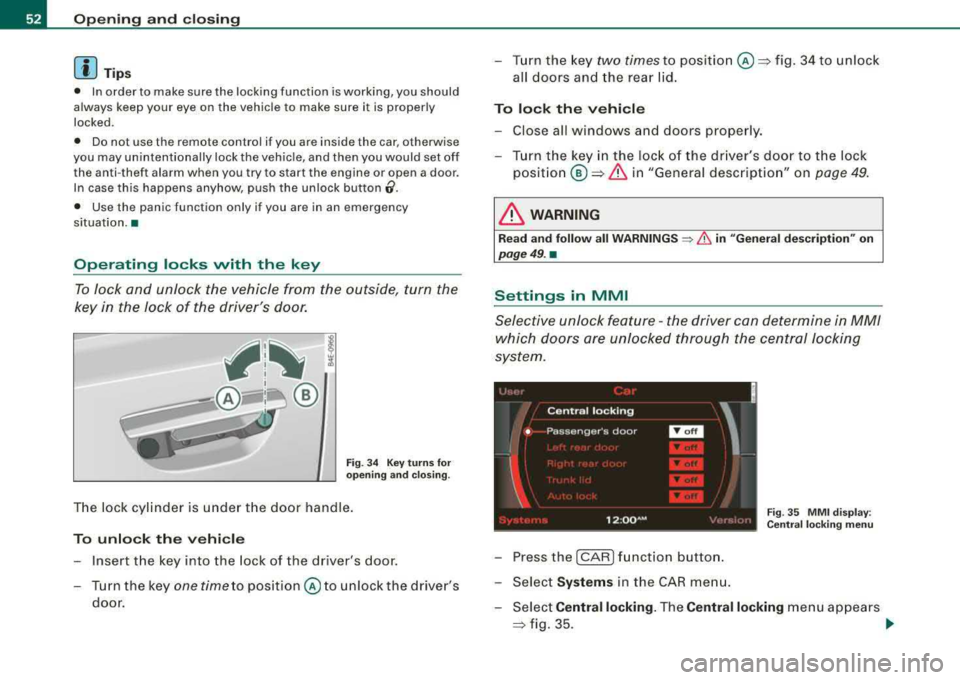
To lock and unlock the vehicle from the outside, turn the
key in the lock of the driver's door.
Fig. 34 Key turns for
opening and closing .
The lock cylinder is under the door handle.
To unlock the vehicle
Insert the key into the lock of the dr iver's door.
Turn the key
one time to position © to unlock the driver's
door.
-Turn the key two times to position@=> fig. 34 to unlock
all doors and the rear lid.
To lock the vehicle
-Close all windows and doors properly.
-Turn the key in the lock of the driver's door to the lock
position®=> & in "General description" on page 49.
& WARNING
Read and follow all WARNINGS ~ & in "General description" on
page 49. •
Settings in MMI
Selective unlock feature -the driver can determine in MM/
which doors are unlocked through the central locking
system.
Fig . 35 MMI display :
Central locking menu
-Pressthe(CAR )function button.
-Select Systems in the CAR menu.
-Select Central locking. The Central locking menu appears
=> fig. 35. _,.
Page 55 of 404
-Activate the doors (on) that should be unlocked together
with the driver's side door.
In the Central locking menu you can set which doors you want to
have unlock using the remote control key or the Advanced Key *. For
examp le, if you switch the item passenger's door
off, the
passenger 's door is no longer included in the central locking
system, and will not be unlocked by pressing the unlock button on
the master key remote control.
There is also a
side selective unlocking option available that can be
set to fit your needs. You can continue to unlock all the doors and
the rear lid as before . Press the opening button on the master key
twice .
Automatic Locking (Auto lock) can also be switched on and off.
[ i] Tips
When locking, all doors and the trunk lid are locked automatical ly. •
Ap plies to veh icle s: w ith power sid e door closer
Doors with power side door closer
The vehicle doors are equ ipped with a power door closer. When you
want to close an open door, gent ly push on the door. The door will
automatically close by itself .
& WARNING
When closing a door , make sure nothing can interfere with the
door . This could cause serious personal injury .
• You can stop the door from closing at any time by pulling on the
inside or outside door handle .•
Contro ls a nd eq uip
ment
Opening and closing
Locking and unlocking the vehicle from inside
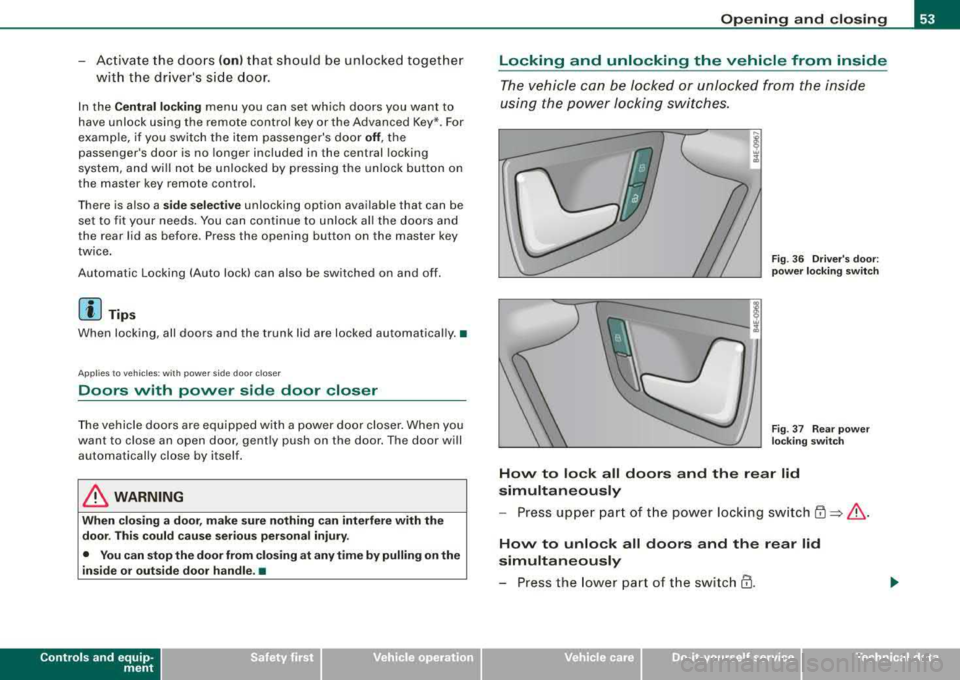
The vehicle can be locked or unlocked from the inside
using the power locking switches.
Fig . 36 Driver's door:
power locking switch
Fig. 37 Rear power
locking switch
How to lock all doors and the rear lid
simultaneously
- Press upper part of the power locking switch
~ ~ &.
How to unlock all doors and the rear lid
simultaneously
-Press the lower part of the switch @.
Vehicle care I I irechnical data
Page 56 of 404
Opening and clo sing
How to unlo ck ea ch door s eparat ely using th e
door handle
-Pull the handle to open the door.
You wil l find a power locking switch in ea ch door. You can lo ck and
u nlock
the vehicle using the switches in the driver's or passenger 's
door=> page 53, fig . 36. You can only lock the vehicle using the
switches in the rear
doors => page 53, fig. 37. If you lock the vehicle
using the
po wer l ock ing sw it c h, please note the following:
• You cannot open the doors or the rear lid from the
outside
(increased security, for exam ple when you are stopped at a red
light).
• The diodes in t he power locking switch illum inate when all the
doors and the rear lid are c losed and locked.
• All diodes turn dark as soon as one of the doors has been
unlocked .
• You can unlock and open the doors from the inside by pulling on
the door handle.
• If the driver 's doo r is opened (after you have locked the vehicle
from the inside using the power locking switch), the door wi ll
remain un locked to prevent you from locking yourself out of your
vehic le . After you c lose the door , you have to lock the drive r's door
again.
• If you have a crash and the airbag is activated, the doors auto
matical ly un lock.
& WARNING
• If you u se the power lo ck ing switch with the door s closed ,
r e member that all the vehicle doors will lock .
• Lo cki ng door s from the in side can help prevent in advertent
door op ening during an accident and can also prevent unw anted
e ntry from the out side . Lo cked doors can , how ever , d ela y as sis
t a nce to vehicle occupants and hold up rescue effort s from the
o uts ide in an acc ident or othe r em erge ncy. •
Emergency locking
If the central locking system foils (power s upply), each
door h os to be loc ked separ ately .
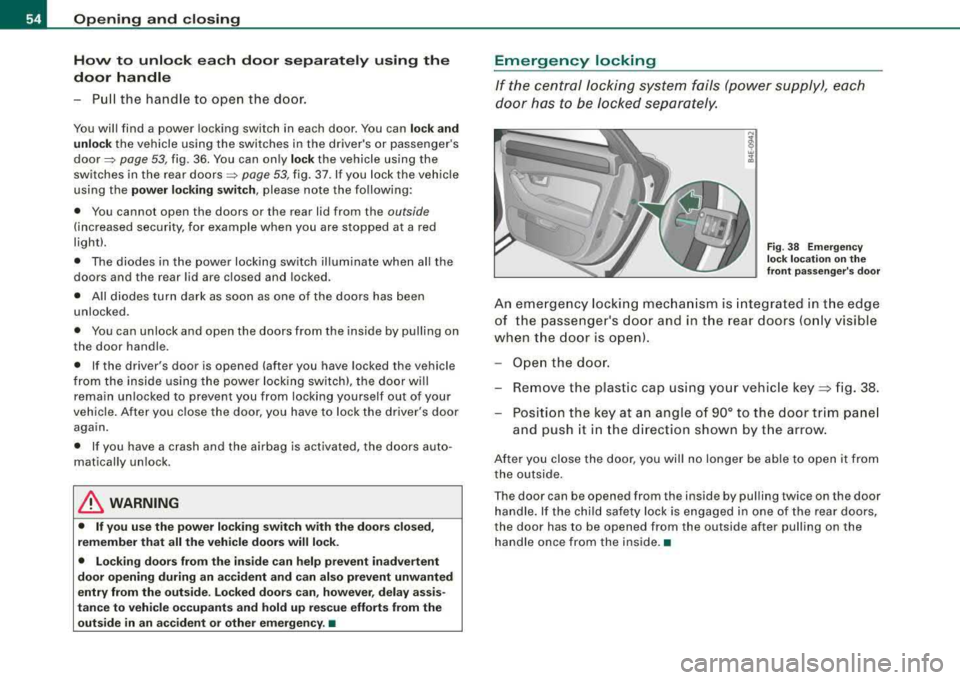
Fig. 38 E mergency
l oc k l oca tion on the
front pa ssenger 's do or
An eme rgency locking mec hani sm is integra ted in t he edge
of the passe nger's door and in the rear doors (o nly visible
when the door is o pen).
Ope n the door .
- Remove the plastic cap using your vehic le
key => fig. 38.
- Position the key at an angle of 90° to th e door trim pa nel
and push it in the d irection shown by t he arrow.
After you close the door, you wil l no longer be able to open it from
the outside.
T he door can be opened from the inside by pu lling twic e on the door
handle. If the chi ld safety lock is engaged in one of the rear doors,
the door has to be opened from the outside after pulling on the
ha ndle once from the inside. •