lock AUDI S8 2008 Service Manual
[x] Cancel search | Manufacturer: AUDI, Model Year: 2008, Model line: S8, Model: AUDI S8 2008Pages: 404, PDF Size: 52.7 MB
Page 96 of 404
Seats and storage
Seat memory
Driver's seat memory
The seat adjustment settings for four drivers can be
stored using the memory buttons in the driver's door.
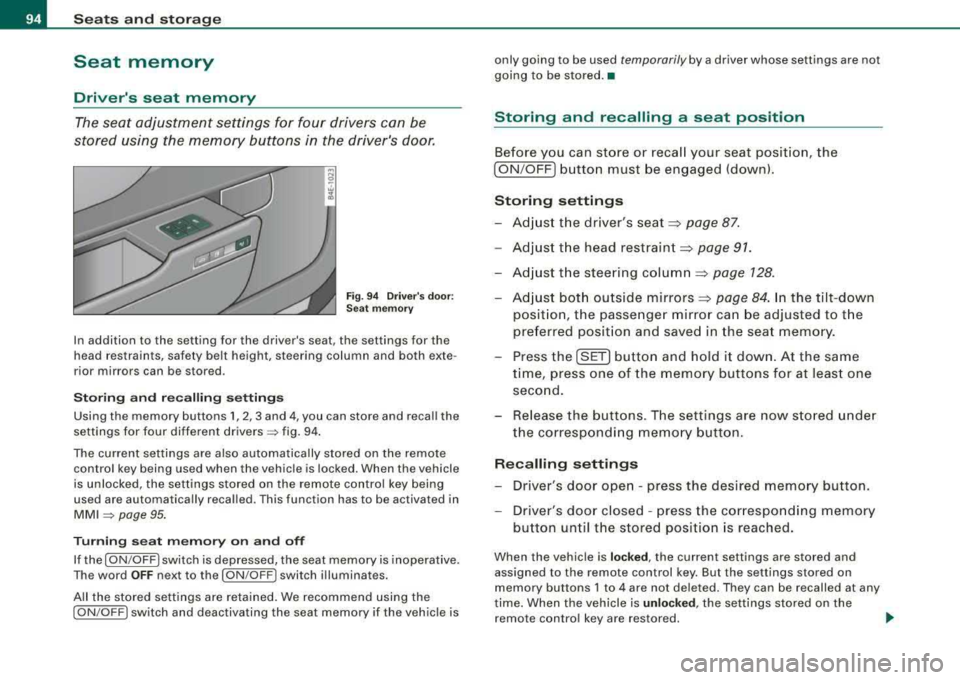
Fig. 94 Driver's door:
Seat memory
In addition to the setting for the driver's seat, the settings for the
head restraints, safety belt height, steering column and both exte
rior mirrors can be stored .
Storing and recalling settings
Using the memory buttons 1, 2, 3 and 4, you can store and recall the
settings for four different
drivers => fig. 94.
The current settings are also automatically stored on the remote
control key being used when the vehicle is locked. When the vehicle
is unlocked, the settings stored on the remote control key being
used are automatically recalled. This function has to be activated in
MMI => page 95.
Turning seat memory on and off
If the [ ON/OFF I switch is depressed, the seat memory is inoperative.
The word
OFF next to the [ON /OFF ! switch illuminates.
All the stored settings are retained. We recommend using the
[ ON /OFF! switch and deactivating the seat memory if the vehicle is only going to be used
temporarily by a driver whose settings are not
going to be stored. •
Storing and recalling a seat position
Before you can store or recall your seat position, the
[ ON /OFF] button must be engaged (down).
Storing settings
-Adjust the driver's seat => page 87.
-Adjust the head restraint => page 91.
-Adjust the steering column => page 128.
-Adjust both outside mirrors=> page 84. In the tilt-down
position, the passenger mirror can be adjusted to the
preferred position and saved in the seat memory.
-Press the [SET] button and hold it down. At the same
time, press one of the memory buttons for at least one
second.
-Release the buttons. The settings are now stored under
the corresponding memory button.
Recalling settings
-Driver's door open - press the desired memory button .
-Driver's door closed - press the corresponding memory
button until the stored position is reached.
When the vehicle is locked, the current settings are stored and
assigned to the remote control key. But the settings stored on
memory buttons 1 to 4 are not deleted. They can be recalled at any
time. When the vehicle is
unlocked , the settings stored on the
remote control key are restored. .,_
Page 97 of 404

If your vehicle is driven by other persons using your remote control
key, you should save your individual seat posi tion on one of the
memory buttons. You can recall your settings again simply and
conveniently by pressing the corresponding memory bu tt o n. When
the vehicle is locked, these settings are automatically re -assigned to
the remote control key and stored .
& WARNING
• For safety reasons, the seat s etting can only be recalled whe n
the vehi cle i s sta tiona ry
-otherwi se you ri sk h aving an accident .
• In an emergency , the recall operation can be stopped by
pre ssing the
I ON /OF F) button or b y briefly pre ssing an y given
mem ory button . •
Activating remote control key memory
To be able to recall the stored settings with the remo te
con trol key, the function has to be activated in
MM/ .
-Selec t Systems in the CAR menu .
-Select Seat adjustment .
-Select Driver's seat.
Controls a nd eq uip
ment
Fig . 9 5 MMI disp lay :
Drive rs' seat
Seats and storage
Sel ect Remote control key on to activate the rem ote
contro l key
mem ory ~ fig. 95 .
Passenger's seat memory
Using the memory but tons in the passenger's door, you
ca n sto re an d rec all f our se at sett ings.
Storing and recalling settings
Fi g. 9 6 Pa ssenger's
d oo r: s eat m emo ry
Using the memory buttons 1, 2 , 3 and 4, you can store and recall the
settings for four di fferent
passengers ~ fig. 96 .
Tu rning s eat m emory on and off
If the I ON /OFF ) switch is depressed, the seat memory is inoperative .
The word
OFF next to the I ON /OFF ) swi tch illuminat es.
All the s tored settings are retained. Now the seat can on ly be
adjusted electrically in the normal way. •
Vehicle care I I irechnical data
Page 99 of 404
Rear window shelf
You can place li gh t a rticles of cl othing on the re ar
window shelf behind the sea tbac k.
& WARNING
When driv ing , do not leave any hard objects on the rear w indow
s helf or allow your pet to sit on the shelf . They could be come a
hazard for vehicle oc cup ant s i n the event of sudden bra king or a
c rash .
[ i ] Tips
• A vent slot is located between t he shel f and the rear window . Do
not b lock the vent with any items you may place on the rear window
she lf.
• Do not place bulky items on the rear window shelf as they could
res trict or b lock the driver's vision in the rear view mirro r.•
Contro ls a nd eq uip
ment
Seats and storage
Individual rear seats
Ap plies to ve hic les : with indi vid ual rea r seat s
Controls
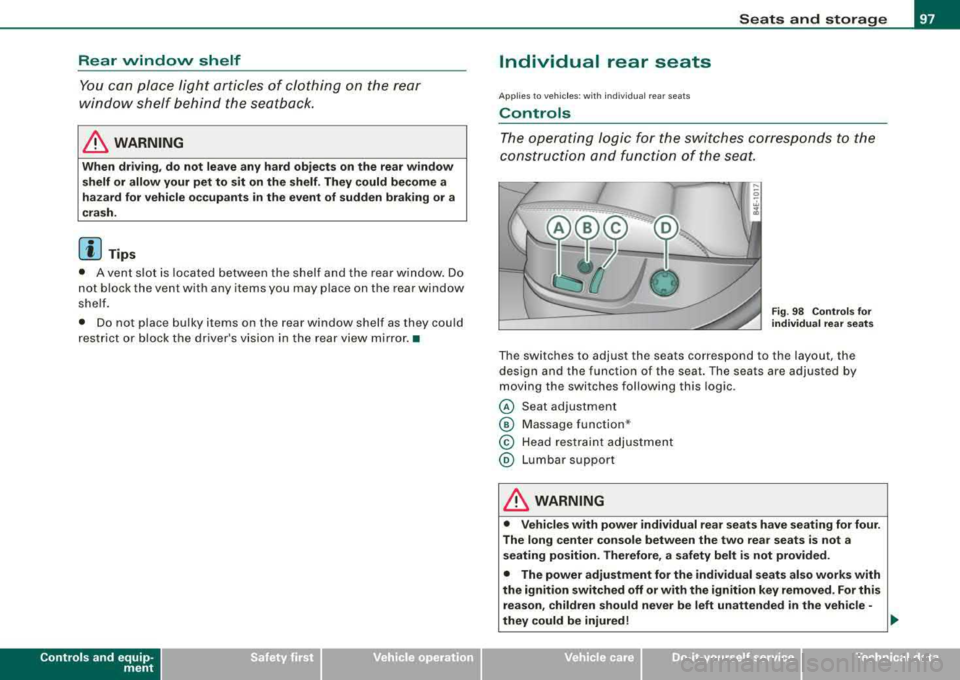
The operating logic for the switches corresponds t o the
construction and function of the sea t.
Fig. 98 Co ntro ls fo r
individual rear seats
The switches to adjust the seats correspond to the layout, the
design and the function of the seat. The seats are adjusted by
moving the switches following this log ic .
@ Seat adjustment
© Massage function *
© Head restraint adjustment
@ Lumbar support
& WARNING
• Vehicle s with power individual rear se ats have seating for four .
The long center co nsole between the two rear se ats is not a
s eating po sition. Therefore , a safety belt i s not provided.
• The power adjustment for the individual seats al so works with
the ignition switched off or with the ignition key removed . For this
re as on , children should never be left unattended in the vehicle -
they could be injured!
.,
Vehicle care I I irechnical data
Page 111 of 404
![AUDI S8 2008 Service Manual ________________________________________________ S_ e_ a_t _
s _a_ n_d _ s_t _o _ r_ a_ g~ e __ fflll
0 Note
To avoid damaging the socket, only use plugs that fit properly.
[ i] Tips
Wh](/img/6/57619/w960_57619-110.png "AUDI S8 2008 Service Manual ________________________________________________ S_ e_ a_t _
s _a_ n_d _ s_t _o _ r_ a_ g~ e __ fflll
0 Note
To avoid damaging the socket, only use plugs that fit properly.
[ i] Tips
Wh")
________________________________________________ S_ e_ a_t _
s _a_ n_d _ s_t _o _ r_ a_ g~ e __ fflll
0 Note
To avoid damaging the socket, only use plugs that fit properly.
[ i] Tips
When the engine is off and accessories are still plugged in and are
on, the vehicle battery can still be drained. •
Storage
General overview
There are numerous places to store items in your vehicle.
Glove compartment
Storage compartment
Pockets in the front seats*
Compartments in the door trim panels
Compartments in the rear doors*
Coat hooks => page 109
=> page 110
=> page 110
=> page 111
=> page 111
Left side storage compartment in the => page 112
trunk
--Right side storage compartment in the => page 113
trunk
Emergency warning triangle
=> page 348
& WARNING
• Always remove objects from the instrument panel. Any items
not stored could slide around inside the vehicle while driving or
Controls and equip ment
&, WARNING (continued)
when accelerating or when applying the brakes or when driving
around a corner.
• When you are driving make sure that anything you may have
placed in the center console or other storage locations cannot fall
out into the footwells. In case of sudden braking you would not be
able to brake or accelerate.
• Any articles of clothing that you have hung up must not inter
fere with the driver's view. The coat hooks are designed only for
lightweight clothing . Never hang any clothing with hard, pointed
or heavy objects in the pockets on the coat hooks. During sudden
braking or in an accident -especially if the airbag is deployed -
these objects could injure any passengers inside the vehicle. •
Glove compartment
Your Owner's Literature and the media player are stored
in the lockable glove compartment.
t------.-,.---------. l
i
Fig. 117 Glove
compartment
Page 112 of 404
___ S_ e
_ a_t_s _ a_n_ d
__ s _t _o _r _a ...::g:::.... e ________________________________________________ _
"' 'IZ::mimr::a ..
-
-
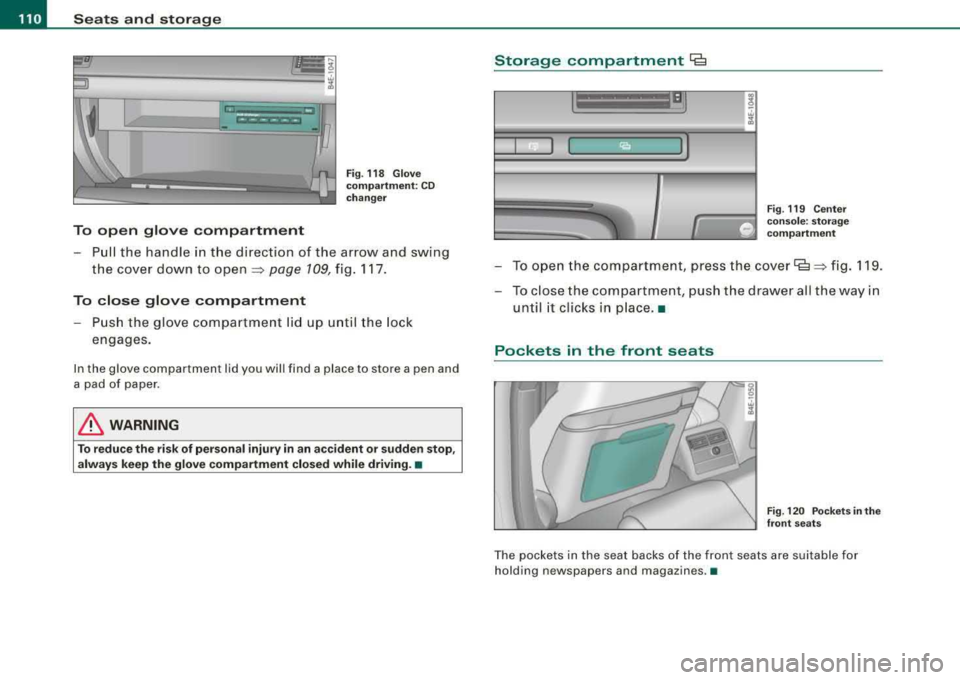
To open glove compartment
Fig. 118 Glove
compartment: CD
changer
- Pull the handle in the direction of the arrow and swing
the cover down to
open ~ page 109, fig. 117.
To close glove compartment
- Push the glove compartment lid up until the lock
engages.
In the glove compa rtm ent lid you will find a place to store a p en and
a pad of paper.
& WARNING
To reduce the risk of personal injury in an accident or sudden stop,
always keep the glove compartment closed while driving. •
Storage compartment Cg
. w :;
Fig. 119 Center
console: storage compartment
- To open the compartment, press the cover~ ~ fig. 119.
- To close the compartment, push the drawer all the way in
until it clicks in place .•
Pockets in the front seats
Fig . 120 Pockets in the
front seats
The pockets in the seat backs of the front seats are suitable for
holding n ewspapers and magazines .•
Page 119 of 404
![AUDI S8 2008 Service Manual Warm and cold -
----------------
Turning on and off [ ON/OFF]
Turning th e air conditioning on
- Press [ON/OF F], or
- Press [AUTO].
Turning th e air conditioning off
- Press [ ON/OF](/img/6/57619/w960_57619-118.png "AUDI S8 2008 Service Manual Warm and cold -
----------------
Turning on and off [ ON/OFF]
Turning th e air conditioning on
- Press [ON/OF F], or
- Press [AUTO].
Turning th e air conditioning off
- Press [ ON/OF")
Warm and cold -
----------------
Turning on and off [ ON/OFF]
Turning th e air conditioning on
- Press [ON/OF F], or
- Press [AUTO].
Turning th e air conditioning off
- Press [ ON/OF F] to tu rn the air conditioner off and block
outside air f rom entering the vehicle .
The air conditioner turns back on if you press one of the control
buttons or the contro l knob .
[ i] Tip s
Resi du al h eat: With the ignition turned off, you can activate the
residual heat funct ion by press ing the [ ON/OFF] button. The
residual heat from the coo lant can be used to heat the vehic le inte
rior . The residua l heat function is turned off automat ical ly after 30
minutes. •
Automatic mode [AU TO]
The aut omatic mode is the standar d setting for all
seasons.
Turning on AUTO
- Select temperature between 60 °F
(+ 16 °C) and 84 °F
(+28 °C).
- Press
[AUTO]~ page 116, fig. 129.
Automatic operation ensures constant temperatures in the interior
and dehumidifies the air inside the vehicle . Air temperature, vo lume
and distr ibut ion are contro lled automat ical ly to reach or main tain
Controls and equip
ment
the desired interior temperature as quickly as possib le. F luctuations
in exterior temperature and the effects of temperature from the
position of the sun are compensated for automatica lly.
This operating mode works only in the adjustable temperature range, from 60 °F
!+ 16 °Cl to 84 °F ( +28 °Cl. If a temperature below
60 ° F (+ 16 °C) is selected,
LO appears in the disp lay. At temperatures
above 84 °F (+28 °C),
HI is displayed . At both extreme settings,
climate control runs continuous ly at maximum cooling or heating
power . There is no temperature regulation .•
Setting the temperature
Separate temperatures can be selected for the driver's
and fr ont passenger's side.
6
fl
I . 6S rF.
,,
-\,.,/
'I
.· I
3
iii
3
:'*.
I
Fig . 13 0 MMI di spl ay:
Sett ing t he temp era
t ur e
- Rot ate the cont ro l knob to the left to reduce the temper
ature, or to the right t o increase t he tempera ture .
[ i ] Tips
• When you press the control knob for choos ing the temperature,
the temperature you choose wi ll a lso appear in the MMI display
~ fig. 130 .
• Synchronizi ng clim ate con trol: By pressing and ho lding the
control knob on the driver's side, t he temperature setting on the
Page 128 of 404
___ w_ a_ r_ m __ a_n_ d_ c_ o_ld ________________________________________________ _
0 Note
To avoid damage to the heating elements in the seats, do not kneel
on the seats or place heavy loads on a small area of the seat. •
Basic settings [SETUP]
General
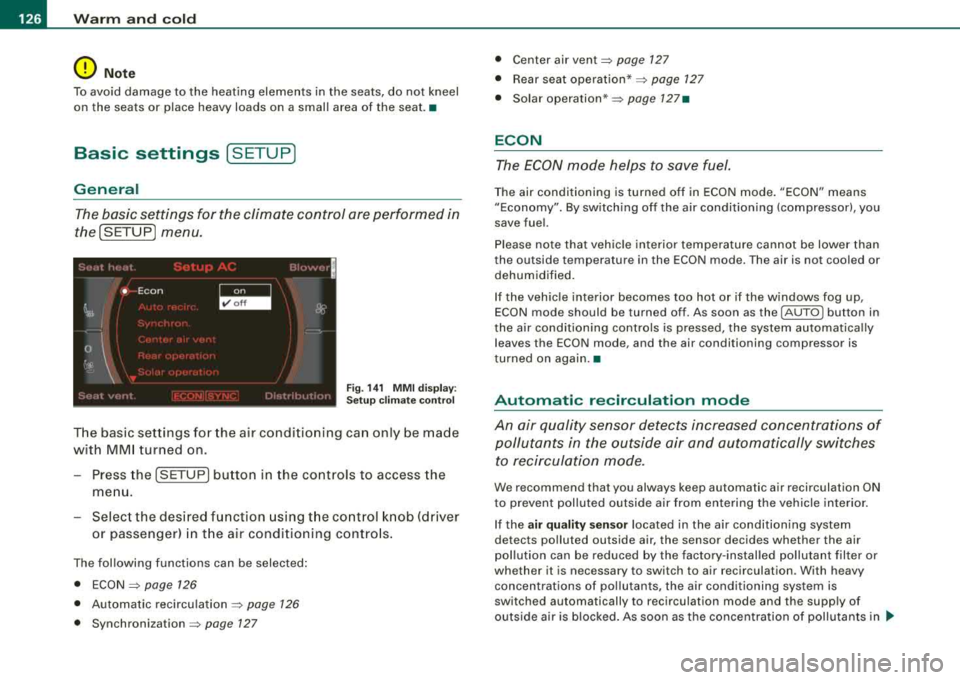
The basic settings for the climate control are performed in
the[SETUP] menu.
Fig . 141 MMI display:
Setup climate control
The basic settings for the air conditioning can only be made
with MMI turned on.
- Press the !SETUP] button in the controls to access the
menu.
- Select the desired function using the control knob (driver
or passenger) in the air conditioning controls.
The following functions can be selected:
• ECON
=> page 126
• Automatic recirculation => page 126
• Synchronization => page 127
• Center air vent=> page 127
• Rear seat operation* => page 127
• Solar operation* => page 127•
ECON
The ECON mode helps to save fuel.
The air conditioning is turned off in ECON mode. "ECON" means
"Economy". By switching off the air conditioning (compressor), you
save fuel.
Please note that vehicle interior temperature cannot be lower than
the outside temperature in the ECON mode. The air is not cooled or
dehumidified.
If the vehicle interior becomes too hot or if the windows fog up,
ECON mode should be turned off. As soon as the
(AUTO ] button in
the air conditioning controls is pressed, the system automatically leaves the ECON mode, and the air conditioning compressor is
tu rned on again. •
Automatic recirculation mode
An air quality sensor detects increased concentrations of pollutants in the outside air and automatically switches
to recirculation mode.
We recommend that you always keep automatic air recirculation ON
to prevent polluted outside air from entering the vehicle interior.
If the
air quality sensor located in the air conditioning system
detects polluted outside air, the sensor decides whether the air
pollution can be reduced by the factory-installed pollutant filter or
whether it is necessary to switch to air recirculation . W ith heavy
concentrations of pollutants, the air conditioning system is
switched automatically to recirculation mode and the supply of
outside air is blocked. As soon as the concentration of pollutants in
~
Page 130 of 404
___ O_ n_t_ h_ e_ ro_ a_d __________________________________________________ _
On the road
Steering
Adjusting steering wheel position
The steering wheel position can be adjusted for height
and reach .
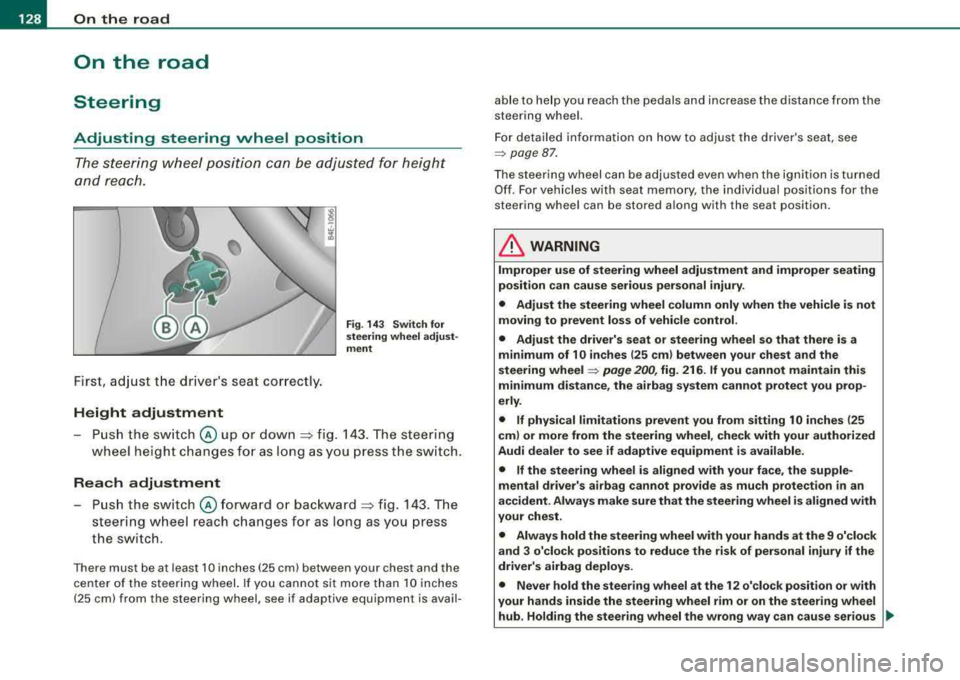
First, adjust t he driver's seat correctly.
Height adjustment
Fig . 14 3 Sw itch fo r
s te erin g whe el a dju st
me nt
-P u sh the sw itch @ up or down :=> fig. 143 . The steering
wheel height changes fo r as l ong as you press the sw itch.
Rea ch adjustment
Push the switch @forward o r bac kward => fig. 143 . The
steering wheel reach changes for as long as you press
the switch.
There must be at least 10 inches (25 cm) between your chest and the
center of the steer ing wheel. If you cannot sit more than 10 inches
(25 cm) from the steering wheel, see if adaptive equipment is avail- able to help you reach the pedals and increase the distance from the
steering wheel.
For detailed in formation on how to adjust the driver's seat, see
=> page 87 .
The steering wheel can be adjusted even when the ig nition is turned
Of f. For vehicles w ith seat memory, the individual positions for the
steering wheel can be stored a long with the seat position.
& WARNING
Improper u se of steering wheel adju stment and improper seating
po sition can cause se rious per sonal inju ry .
• Adjust the steering wheel column only when the vehicle is not
mo ving to prevent los s of vehi cle control.
• Adjust the driver' s seat or steering wheel so that there is a
minimum of 10 in ches (25 cm ) bet ween your chest and the
s teering wheel
=> pag e 200 , fig. 216 . If you cannot maintain this
minimum di sta nce , the ai rbag sy stem can not prote ct you prop
erly .
• If physical limitations prevent you from s itting 10 inche s (25
cm ) or more from the steering wheel , check with your authori zed
Audi dealer to see if adapti ve equipment i s available .
• If the steering whee l is aligned with your face, the supple
mental drive r's airbag cannot provide as mu ch pr otection
in an
ac cident. Alway s make sure that the steerin g wheel i s aligned with
your che st .
• Alway s hold the steering wheel with your hand s at the 9 o'clock
and 3 o'clo ck posit ion s to reduce the ri sk of pers ona l injury if the
driv er's airbag deploys.
• Never hold the ste ering wheel at th e 12 o' clo ck position or with
your hand s inside the steerin g wheel rim or on the steering wheel
hub . Holding the steering wheel the wrong wa y can cau se ser ious ..,,
Page 131 of 404
___________________________________________________ O_ n_ t_h _e_ r_o _a_ d _ ___.111111
fl::. WARN ING (c o ntinue d)
injurie s to the hands, arm s and head if the driv er's a irbag
deplo ys.•
Easy entry feature
The easy entry feature makes it easier to enter and exit the
vehicle by automatically adjusting the steering wheel.
Press the button @ ::::> page 128, fig . 143 to turn the easy
entry feature on or off.
When the easy entry feature is tu rned on (bu tton depressed), the
steering wheel moves up to the parked position when the ignition is
turned off. After you en ter the vehicle, the steer ing wheel moves to
the stored position as soon as you turn on the ignition. •
Ignition lock and ignition switch
Ignition key positions
The engine can be started or turned off with the ignition
key.
Contro ls a nd eq uip
ment
F ig . 14 4 Ignit ion
sw itch po sitio ns
P os it ion @
The ignition key can be inserted into the ignition switch in this posi
tion. This automatically unlocks the steering column lock. When the ignition key is removed, the stee ring co lumn lock is automatically
locked
=> fl::. .
Ignition on G)
Turn the ignition key to this position and re lease it.
Starting the engin e @
The engine starts with the key in this position . Major electrical loads
are tempo rar ily turned off.
Ign ition off G)
Turn the ignition key to this position and re lease it .
& WARNING
• Never remo ve the key from th e ign ition lock while the ve h icle i s
mo ving . The stee ring wheel will lo ck, c au sing loss of control.
• If you have to leave your veh icle, even for ju st a minute , al ways
remove the ignition key and take it with you. Thi s is esp eciall y
important if you are going to lea ve ch ildren unatten ded in the
vehi cle . The ch ildren co uld start the eng ine or u se other vehicle
c ontrol s. Un super vis ed u se of veh icle control s (for e xam ple , po wer
windows ) can cause seriou s personal inj uries .
0 Note
• I f the~ symbo l in the display blinks, there is a malfunction in the
e lectron ic steering column lock. Fo llow the instructions in
=> page 33 , "Steering malfunction i".
• If the .Pc symbol in the display b links, there is a malfunct ion in
the electronic ignition lock. Follow the instructions
in => page 33,
"Ignition lock malfunct ion .Pe" . ..
Vehicle care I I irechnical data
Page 132 of 404
___ O_ n_ t_h _e_ r_o _ a_ d ____________________________________________________ _
[ i J Tips
• If you release the ignition key in positions G) ,@ or G) , the key
automatically returns to pos ition @.
• If you open the driver 's door when the ignition is switched on , a
buzzer sounds and the message
Ignition is on appears in the instru
ment cluster display. Please switch the ignition off .•
Ignition key safety lock
The igni tio n key can only be re move d when the selector
lever is in the
"P" (P ark) posi tion.
After turning off the ignition , the igni tion key can only be removed
from the ignition lock when the selec tor lever is in the
"P" (Park)
position . Af ter you have removed the key , the selector lever is locked
and cannot be moved .•
Starting and stopping the engine
Starting the engine
The engine ca n only be st arted with y our or iginal A udi
key.
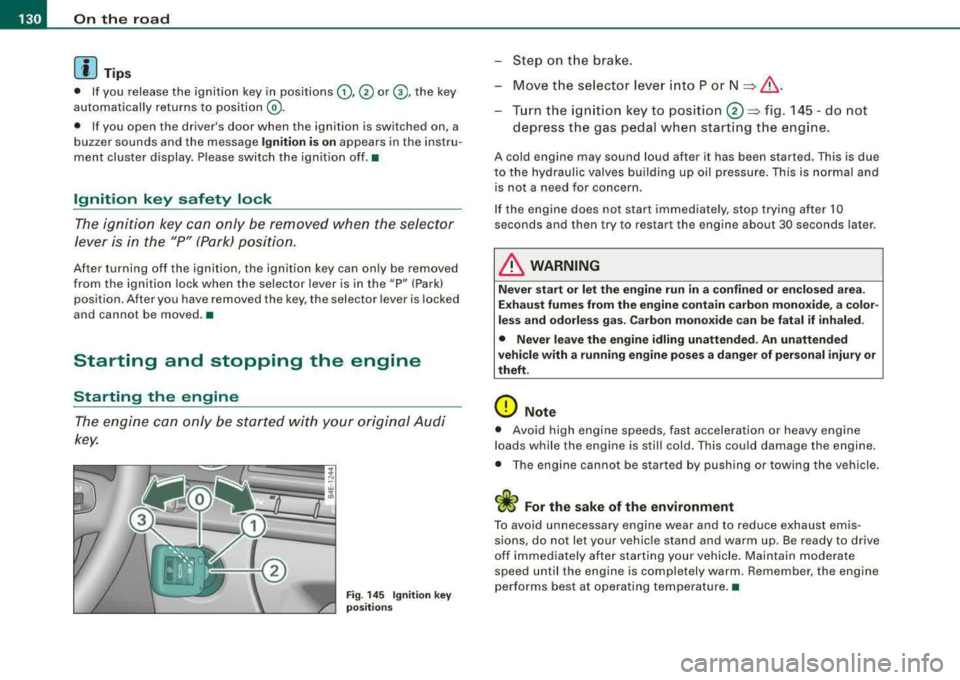
Fig . 14 5 Ignit ion key
po sitions
-St ep o n the brake.
- Move t he selector lever into P or
N => &, .
-Turn the ign ition key to position 0 => fig . 14 5 -do not
depress the gas pedal when start ing t he engine .
A cold engine may sound loud after it has be en started. This is due
to the hydrau lic valves building up oil pressure. This is normal and
is not a n eed fo r concern .
I f the engine does not start immediately, stop trying after 10
seconds and then try to restart the engine about 30 seconds later .
& WARNING
Never start or let the engine run in a confined or en clo sed are a.
Exhaust fumes from the engine contain carbon monoxide, a color
less and odorle ss gas . Carbon mono xide can be fatal if inhaled.
• Never leave the engine idling unattended. An unattended
vehicle with a running engine po ses a dange r of person al injury or
theft.
0 Note
• Avo id high e ngine speeds, fast accelerati on or heavy eng ine
loads while the engine is still cold. This could damage the engine.
• The eng ine ca nnot be s tarted by push ing or towi ng the ve hicle.
sions, do not let your vehic le stand and warm up. Be ready to drive
off im mediately afte r starting your vehicle . Maintain modera te
speed until the engine is completely warm . Remember , the engine
performs best at operating temperature. •