lock AUDI S8 2008 Workshop Manual
[x] Cancel search | Manufacturer: AUDI, Model Year: 2008, Model line: S8, Model: AUDI S8 2008Pages: 404, PDF Size: 52.7 MB
Page 134 of 404
-
On the roa d
----------------
When starting a cold engine, the engine may be a bi t noisy for a
shor t w hile. This is because the hydraulic valves are working to
bring up the oil pressure . This is norma l and no cause for concern .
If the engine does not start immediately, stop cranking the engine
after 10 seconds . Wa it 30 seconds, t hen try to restart the eng ine.
& WARNING
Ne ver sta rt the engine in an en clo sed area su ch a s in your garage
with the garage door clo sed . The exhau st fumes are poi sonous!
0 Note
• Avoid high engine speeds, full gas or heavy engine loads if the
eng ine has not warmed up to its operating temperature . You cou ld
damage the engine.
• Do not try to start the engine by pu lling or pushing .
~ For the sake of the environment
Do not let your veh ic le stand and warm up . Be ready to drive off
right away. T his way, you prevent unnecessary exhaust emissions.
[ i ] Tip s
If you open th e driver 's door when the ignition is switched on , a
buzzer sounds and the message
Ignition i s on appears in the instru
ment cluster display. P lease switch the ign ition off .•
A pp lies to vehicles: w it h Ad vanced Key
Stopping the engine using the [S TO P] button
0
0
- Bring t he vehicle to a complete stop.
Fi g. 14 7 Advan ced
Ke y: S TOP button
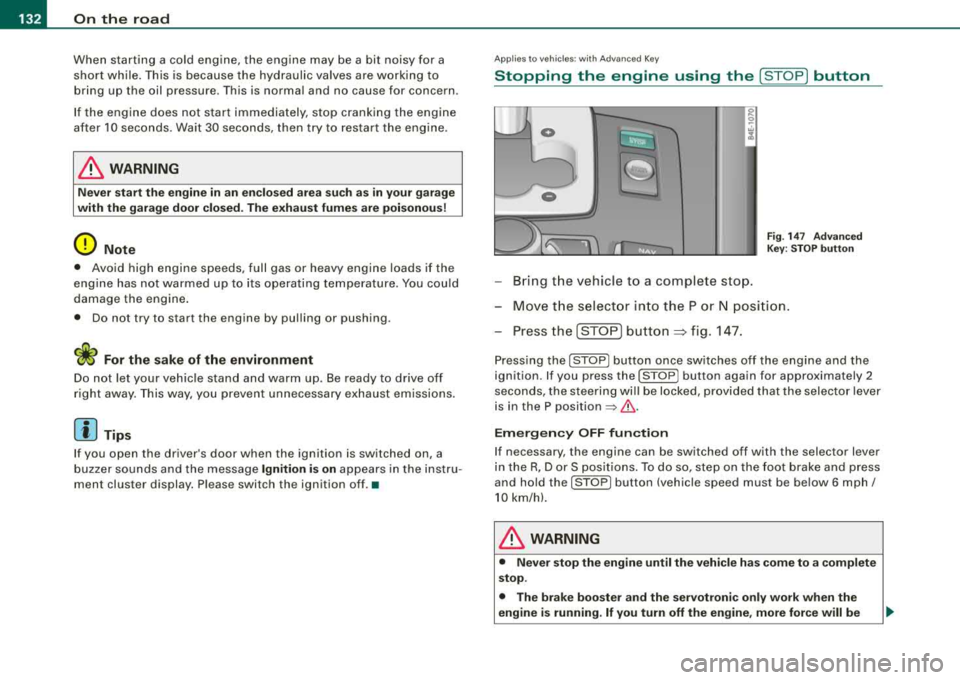
-Mov e th e s elect or in to the P or N posi tion .
- Press the [STO P]
button => fig. 14 7.
Press ing the [ STOP) butto n once sw itches o ff the engi ne and the
ignition . If you press the [STOP] button again for approximately 2
seconds, the steeri ng wi ll be locked, provided that the selector lever
is in the P position
=> & .
Em ergen cy OFF fun ction
If necessary, the engine can be switched off with the selector lever
in the R, Dor S pos it io ns. To do so, step on the foot brake and press
and ho ld the [S T O P] button (vehic le speed must be be low 6 mph/
10 km/h).
& WARNING
• Never stop the engine until the vehi cle h as c ome to a complete
stop .
• The br ake boo ster and the servotroni c onl y w ork when the
engine is running . If you turn off the engine , more force will be
Page 135 of 404
On the road -----------------
& W AR NIN G (c ontinu ed )
re qu ir e d to ste er or br ake the vehicle . If you are n ot prep ared , this
c ould r esult in a colli sion and serious per sonal injur y.
• For y our safet y, move the sele cto r lever to the P po sition , then
turn off the engine. Oth erw ise the vehi cle could inad vertently roll
away.
• After tu rning off the engin e, the r adi ato r fa n ca n co me on and
ru n for up to 10 minute s
-even if the ignition is sw itched off . Like
wise , the fan could com e on if the temper ature in the engine
c omp artm ent r ais e s du e to he at build up or if you le ave the vehicle
s tanding in direc t sunligh t.
0 Note
After driving at high engine load, heat can bu ild up in the engine
compartment after you have turned off the engine. This can damage
t he engine . Let the veh icle stand and run in id le for about 2 minutes
before turning off the engine .•
Applies to vehicles: with Advanced Key
Driver's messages in the instrument cluster
Messages appear in the instrument cluster to let the
driver know if something is missing or if some thing must
be done.
No ke y identified
This message appears when you press the [ START ] button, but
t here is no remote control key insi de the vehicle or i f the system
does not recognize the key . For example, if your key is
shielded by
an object or
encased, i.e . ins ide an a lum in um br iefcase, the sig nal
from the key cannot be detected. E lectronic devices such as cell
phones can also interfere with t he rad io signa l.
Controls and equip
ment P
re ss bra ke pedal to start engine
This message appears when you press the [ S TART] button when
starting the engine but you have not depressed the brake pedal.
En gage N or P to start engine
This message appears when you start the engine but the selector
lever is not in t he P or
N pos ition. The e ng ine can be started o nly if
the selector lever is in one of these two positions .
-.?. Key not in vehicle
This message appears together with the -:?e symbol when the
remote con trol key is removed from t he ve hicle whi le the engine is
running . This is to remind you that you should not continue your trip
without you r key .
I f the key is no longer inside the veh ic le when you turn o ff the
engine, you will not be able to switch on the ignition or restart the
eng ine. Also, you w ill not be ab le to loc k the veh icle from the
outside.
S hift t o P, other wise vehi cle ca n roll away. Doors d o not lo ck if le ver
i s not in P.
This message appears for your safety together wit h an aud ib le
warning signa l when you press the [S TO P] button but the selector
lever is not in the P posit ion and you open the driver's door. Move
the selector lever into P, otherwise the vehic le could rol l away. In
addit ion, you will not be able to lock the vehicle with either the lock
button located on the door handle or the remote control.
To engag e steering lo ck, pre ss a nd hold S TOP button
This message appears for your personal safety if you switch off the
engine and the ignition by pressing the [ S TOP ] button and then
open the driver's door. In this case, the steering will sti ll not be
locked. The stee ring wheel wi ll lock :
• If you press the [ STOP] button for longer than 1 second.
• If you lock the vehicle fr om the outside .•
Page 137 of 404
On the road -----------------
Parking
To prevent a parked vehicle from rolling away, there are a
few things you should do.
When you park your vehicle, do the following
- Stop the vehicle using the brake pedal.
- Pull the switch to apply the electromechanical parking
brake.
- Move the selector lever into the
P position => &.
- Switch off the engine and remove the ignition key from
the ignition lock.
When you park your vehicle on hills, do the
following
- Stop the vehicle using the brake pedal.
- Pull the switch to apply the electromechanical parking
brake.
- If you are parking headed
downhill, turn the front wheels
toward the curb.
- If you are parking headed
uphill, turn the front wheels
awayfrom the curb.
- Move the selector lever into the
P position.
- Switch off the engine and remove the ignition key from
the ignition lock.
& WARNING
This is how you can reduce the risk of injury when leaving your
vehicle.
Controls and equip ment
&, WARNING (continued)
• Never park the vehicle where it can come in contact with dry
grass, spilled fuel or any other flammable materials.
• When parking on hills, always turn the wheels so that the front
wheels will first roll into the curb, if the vehicle should start to roll.
• Never allow anyone -especially small children -to remain
in the
vehicle when it is locked. Locked doors make it more difficult for
rescuers to access the passenger compartment in the event of an
emergency. Danger to life!
• Never leave children unsupervised in the vehicle. Children
could release the parking brake or move the gearshift lever out of
gear. The vehicle could start to roll away and cause an accident.
• No matter what the season is, the temperature in a parked
vehicle can reach dangerous levels.
0 Note
• Please exercise care when you park your vehicle in parking areas
with parking barriers or curbs . Parking barriers and curbs vary in
height and could damage your bumper and related components as
the front of your vehicle moves over a barrier or curb that is too high, as you park or as you back out of a parking spot. In order to be
sure that no such damage can occur, you may wish to stop short of
having the front tires of your car touch the parking barrier or curb.
• Please also exercise exceptional care when you drive up or down
steep ramps or drive over curbs or other obstacles, for which the
vehicle is not designed , because components of the vehicle close to
the ground, such as bumper covers, spoilers and suspension and
exhaust system components, may become damaged. •
Page 138 of 404
___ o_ n_ t_
h _e _ ro_ a_d __________________________________________________ _
Starting off with a trailer To prevent rolling back unintentionally on an incline, do
the following:
- Keep the switch pulled and depress the accelerator. The
parking brake stays applied and prevents the vehicle
from rolling backward.
- You can release the switch once you are sure that you are
developing enough forward momentum at the wheels as
you depress the accelerator.
Depending on the weight of the rig (vehicle and trailer) and the
severity of the incline, you may roll backwards as you start. You can
prevent rolling backwards by holding the parking brake switch
pulled out and accelerating -just as you would when starting on a
hill with a conventional hand brake. •
Emergency braking
In the event that the conventional brake system fails or
locks.
- Pull the switch and continue to pull it to slow your vehicle
with the parking brake in an emergency.
- As soon as you release the switch or accelerate, the
braking process stops.
If you pull the switch and hold it above a speed of about 5 mph (8
km/h), the emergency braking function is initiated . The vehicle is
braked at all four wheels by activating the hydraulic brake system.
Brake performance is similar to making an emergency
stop~ &.
So that emergency braking is not activated by mistake, an audible
warning tone (buzzer) sounds when the switch is pulled . As soon as the switch is released
, or the accelerator pedal is depressed, emer
gency braking stops.
& WARNING
Emergency braking should only be used in an emergency, when
the normal foot brake has failed or the brake pedal is obstructed .
Using the parking brake to perform emergency braking will slow
your vehicle as if you had made a full brake application. The laws
of physics cannot be suspended even with ESP and its associated
components (ABS, ASR, EDS). In corners and when road or
weather conditions are bad, a full brake application can cause the
vehicle to skid or the rear end to break away -risking an
accident. •
Driver messages in the instrument cluster
Caution: Vehicle parked too steep
This message appears when the parking brake is applied on an
incline that exceeds about 30%.
In this case the braking power of the parking brake may
not be
adequate
to prevent the vehicle from rolling unintentionally.
Please release parking brake
This message appears, when a gear is selected and the accel erator
pedal is depressed -release the parking brake.
Press brake pedal to release parking brake
This driver message appears when the switch to release the parking
brake was pressed. The parking brake can only be released if you
press the brake or accelerator pedal and press the switch at the
same time .
~ Parking brake malfunction !
This driver message appears together with the yellow 'Jlf symbol
when there is a parking brake malfunction.
~
Page 142 of 404

___ A_ d_a_ p_ ti_v _ e_ C_ ru_ is_ e_ C_ o_n_ t_ r_ o _ l ___________________________________________ _
&, WARNING (continued )
appl ied b y the s ystem when it det ects a situation when the brakes
mu st be applied.
• Alway s remember th at Ad aptive Cru ise Control has limits - it
doe s not rea ct when you dri ve toward s an ob stac le or something
e lse on or near the road th at is not mov ing , such as ve hic le s
s topped in a traffic jam , a sta lled or di sabled vehicle.
• Alway s remember th at the Ad aptive Cru ise Control cannot
detect a vehicle that i s driving to wards you in your tr affi c la ne and
that it cannot det ect narrow veh icles su ch a s motor cycles and
bicycle s.
[ i] Tips
• For sa fety reasons, the stored speed is deleted when the ign it ion
is turned off .
• When Adaptive Cru ise Control is switched on, the Electronic
Stabilization Program (ESP) is also automatically activated.
• Damage caused by accidents (e.g . if the vehic le is damaged
when parking) can affect the radar sensor settings. This can cause
the system to malfunct ion or switch off completely.
• In winter conditions, you should check the radar sensor cover
before driving to make sure it is free of ice and snow. If necessary ,
clean the area near the radar sensor
carefully => page 139, fig. 151.
• To ensure that the radar sensor is not blocked, foreign objects
(e.g. stickers, larger license plate mounts, add -on parts) must not
cover the area near the radar
sensor=> page 139, fig . 151. The area
near the radar sensor must not be painted, either .•
Ap plies to vehicles: with Ad aptive Crui se Co nt rol
How does Adaptive Cruise Control work?
Vehicles traveling ahead are detected with the aid of the
radar sensor.
Fi g. 152 Ra dar sens or
me asuremen t range
A forward -look ing radar sens or in the fro nt b umper monitors the
traffic situation ahead . Vehicles moving in your direction can be
de tec ted up to a distance of a bout 140 yards ( 130 meters) but the
Adaptive Cruise Contro l cannot detect vehicles that are stopped or
stal led, obstac les that do not move or narrow vehic les like motorcy
cles and
bicycles.=> fig. 152 .
Open road
When the road is clear, Adaptive Cruise Contro l works like cruise
co ntrol. The stored speed requested is main tained .
Driving in tr affi c
If you start to catch up with a vehic le in front of you, Adap tive Cruise
Control automatically slows your vehic le to a speed that will he lp
you stay a safe distance back .
If the vehicle in front acce lerates, Adaptive Cruise Control a lso accel -
erates up to the speed that you have set . .,_
Page 149 of 404
_____________________________________________ A_ d_a ....: p_ t_ i_ v _e_ C_ ru_ is_ e_ C_ o_n_ t_ r_o _ l _ __._
Ap plie s to vehic les: with Adaptive Cru ise Co nt rol
Messages
The text messages and symbols shown in this area of the
display are not displayed perm anently .
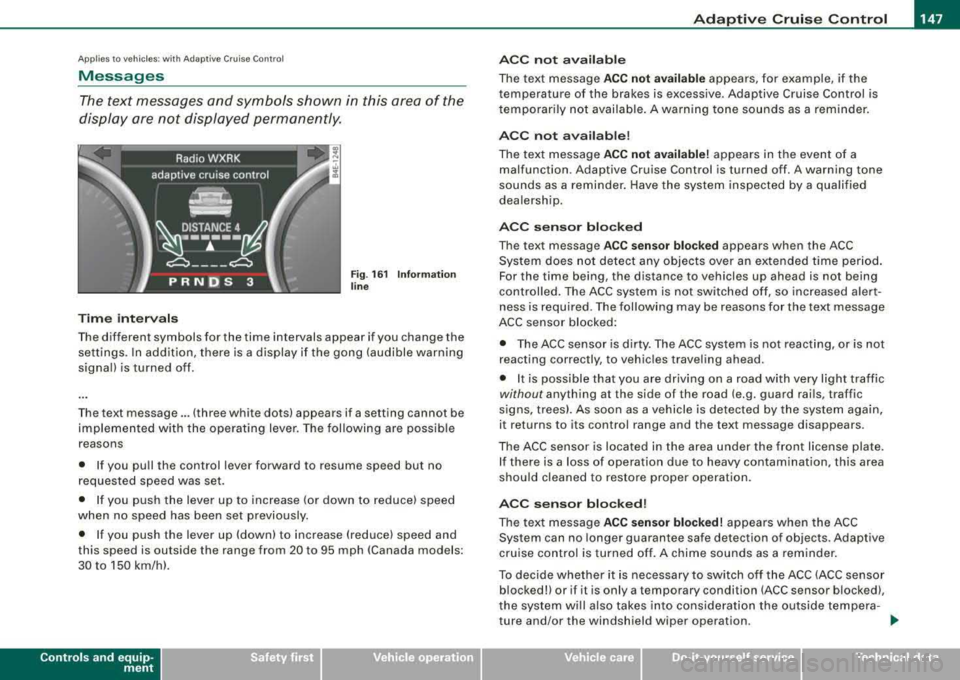
Time interval s
Fig . 16 1 Informa tion
lin e
The different symbols for the time intervals appear if you change the
settings. In addition, there is a display if the gong (audible warning
signa l) is turned off.
The text message ... (three white dots) appears if a setting cannot be
implemented with the operat ing lever. The fol lowing are possible
reasons
• If you pu ll the control lever forward to resume speed but no
requested speed was set.
• I f you push the lever up to increase (or down to reduce) speed
when no speed has been set previously.
• I f you push the lever up (down) to increase (reduce) speed and
this speed is outside the range from 20 to 95 mph !Canada models:
30 to 150 km/h) .
Controls a nd eq uip
ment
A CC not a vailab le
The text message ACC not av ailabl e appears, for example, if the
temperature of the brakes is excessive . Adaptive Cruise Control is
t emporarily not availab le . A warning tone sounds as a rem inder.
A CC not available !
The text message ACC not av ailabl e! appears in the event of a
malfunction. Adaptive Cruise Control is turned off . A warning tone
sounds as a reminder. Have the system inspected by a qua lified
dea lersh ip.
ACC senso r blocked
The text message AC C s en so r blo cked appears when the ACC
System does not detect any objects over an extended time period .
For the time being, the distance to vehicles up ahead is not being
cont rolled . The ACC system is not switched off, so increased alert
ness is required. The following may be reasons for the text message
ACC sensor blocked:
• The ACC sensor is dirty. The ACC system is not react ing, or is not
reacting correctly, to vehic les traveling ahead.
• It is possible that you are driving on a road with very light traffic
without any thing at the side of the road (e.g. guard rai ls, traffic
s igns, trees). As soon as a vehicle is detected by the system again,
it returns to its control range and the text message d isappears .
The ACC sensor is located in the area under the front license plate .
I f there is a loss of operation due to heavy contamination, this area
should cleaned to restore proper operation.
AC C senso r bl ock ed!
The text message ACC sensor blocked! appears when the ACC
System can no longer guarantee safe detection of objects . Adaptive
cruise control is turned off . A chime sounds as a reminder.
To decide whether it is necessary to switch off t he ACC (ACC sensor
blocked!) or if it is only a temporary condition (ACC sensor blocked),
the system wi ll a lso takes into cons ideration the outside tempera -
ture and/or the windshield wiper operation .
.,_
Vehicle care I I irechnical data
Page 150 of 404
___ A_ d_a_ p_ ti_v _ e_ C_ ru_ is_ e_ C_ o_n_ t_ r_ o _ l ___________________________________________ _
The ACC sensor is dirty or blocked (e.g. leaves, snow).
The ACC sensor is located in the area under the front license plate.
If there is a loss of operation due to heavy contamination, this area
should cleaned to restore proper operation.
EPB activation
The text message EPB activation appears if emergency braking was
initiated with the Electromechanical Parking Brake (EPBl. Adaptive
Cruise Control is turned off. A gong sounds as a reminder.
ESP activation
The text message ESP activation appears if the Electronic Stabiliza
tion Program (ESP) has intervened to take control in a critical driving
situation. In this case Adaptive Cruise Control is automatically
turned off . A gong sounds as a reminder .
Speed range
The text message Speed range appears if the current speed is too
low to set or to hold the requested speed.
When setting a desired speed, it must be at least 20 mph (30 km/h).
At speeds below 17 mph (25 km/h), the cruise control is turned off.
Shift lever position!
The text message Shift lever position! appears when the shift select
lever is moved to position
N. In this position, Adaptive Cruise
Control is not available. •
Applies to veh ic les: with Ad apt ive Crui se Contro l
Settings in MMI
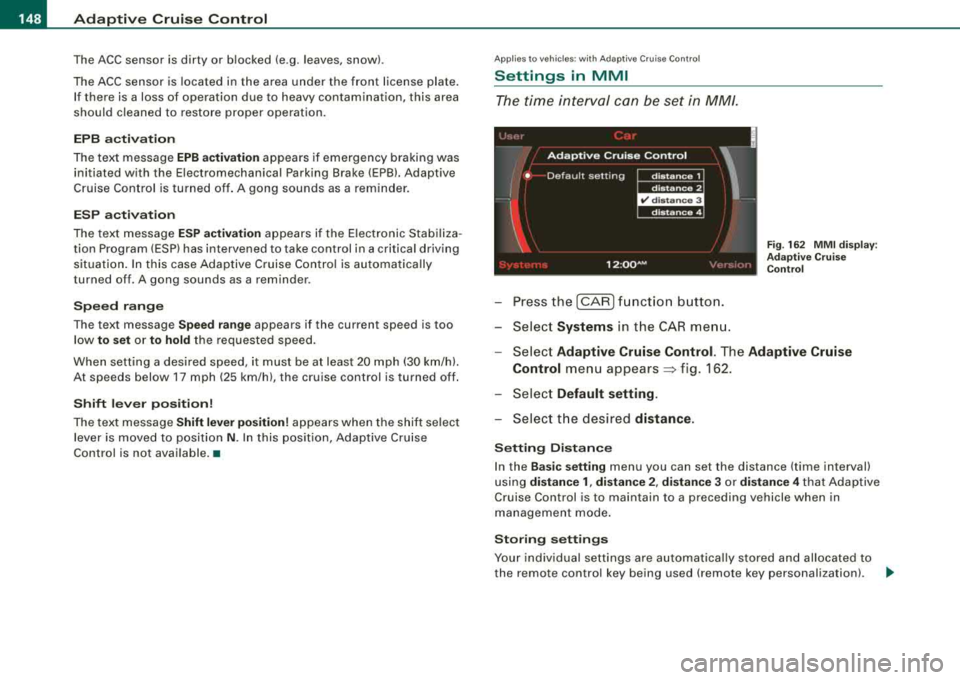
The time interval can be set in MM/.
-Press the [CAR] function button.
-Select Systems in the CAR menu.
Fig. 162 MMI display :
Adaptive Cruise Control
-Select Adaptive Cruise Control. The Adaptive Cruise
Control
menu appears~ f ig . 162.
-Select Default setting .
-Select the desired distance.
Setting Distance
In the Basic setting menu you can set the distance (time interval)
using
distance 1, distance 2, distance 3 or distance 4 that Adaptive
Cruise Control is to maintain to a preceding vehicle when in
management mode.
Storing settings
Your individual settings are automatically stored and allocated to
the remote control key being used (remote key personalization) .
~
Page 157 of 404
Audi side assist -
----------------
Dea ctivating
Press the button again . The indicator l ight on the butto n
goes out .
The system can assist when driving on highways and secondary
roads . The system works only at speeds faster than 37 mph (60
km/h).
& WARNING
• Improper reliance o n the side assist s ystem can cause colli
s ions and seriou s pers onal injury:
- Ne ver rel y only on side a ssis t w hen ch anging l anes .
- Always che ck re ar view mirror s to make sur e that it i s safe to
c hange lane s.
• Side assi st cannot dete ct all vehicle s under all condition s
danger of accident!
• Side a ssist cannot detect vehicles in time to alert you when
they app roach from behind at very high speed , or fall drop b ack
very quickly.
• The radar sen sor's
vi sion ca n be redu ced or entirel y blo cked b y
rain , snow , and heavy spray . Thi s can result in side a ssis t not
a dequately dete cting veh icles or , in some cases , not detect ing
them at all . Always keep an eye on the direction you are traveling
and the relevant ar ea around th e vehi cle .
• Please note that side a ssis t indicate s th ere are approaching
vehi cle s, or vehi cle s in your bl ind spot , onl y after your vehicle has
reached a driving speed of at lea st 37 mph (60 km /h).
• Side as sist sign al doe s not work around t ight corner s (turning
radiu s less than 218 yard s, or 200
ml.
• Side a ssist is no repla cement for the driver's full attention . The
driver alone i s re spon sible for lane ch anges and similar driving
maneuver s. Always k eep an eye on the d ire ction you are tr aveling
and the relevant area around the vehi cle .
Controls and equip ment
0 Note
• To ensure that you do not adverse ly affect s ide assist, do not
b lock the area on the rear bumper where the radar sensors are
located with foreign objects (suc h as stickers or bicycle racks).
• Make su re that the signal light on the outside mirror is not
b locked by stickers or other items.
[ i ] Tip s
• Side ass ist automatically deactivates if it detects that the radar
sensors are
blocked => page 167. The indicator light on the button
goes out.
• The area on the bumper where the radar sensors are located
must consistently re main free of snow, ice, and heavy so iling so that
side assist can function properly. Follow the additiona l notes on
=> page 761.
• Additiona l tinting on the front side windows can make it harder
to see and correct ly understand the s ignal light on the outside
mirror. •
Applies to veh ic les: with side ass ist
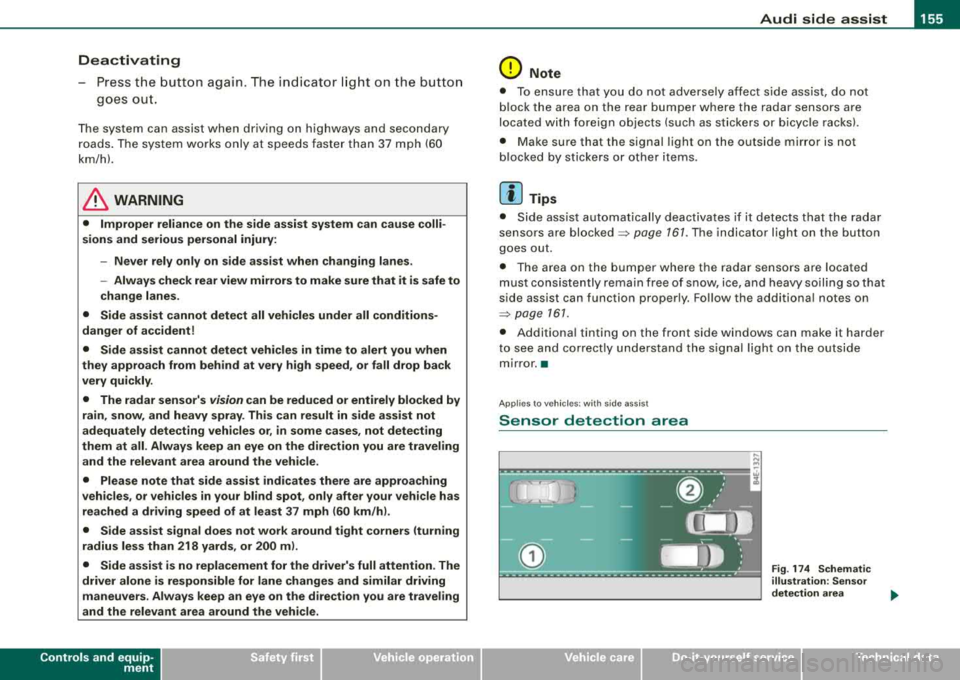
Sensor detection area
Fig . 17 4 Schem atic
illu stratio n: Senso r
det ection ar ea
.,.
Page 163 of 404
_________________________________________________ A
_ u_ d_ i _s _ i_d _e _ a_s_ s_ i_ s _t __ lJIII
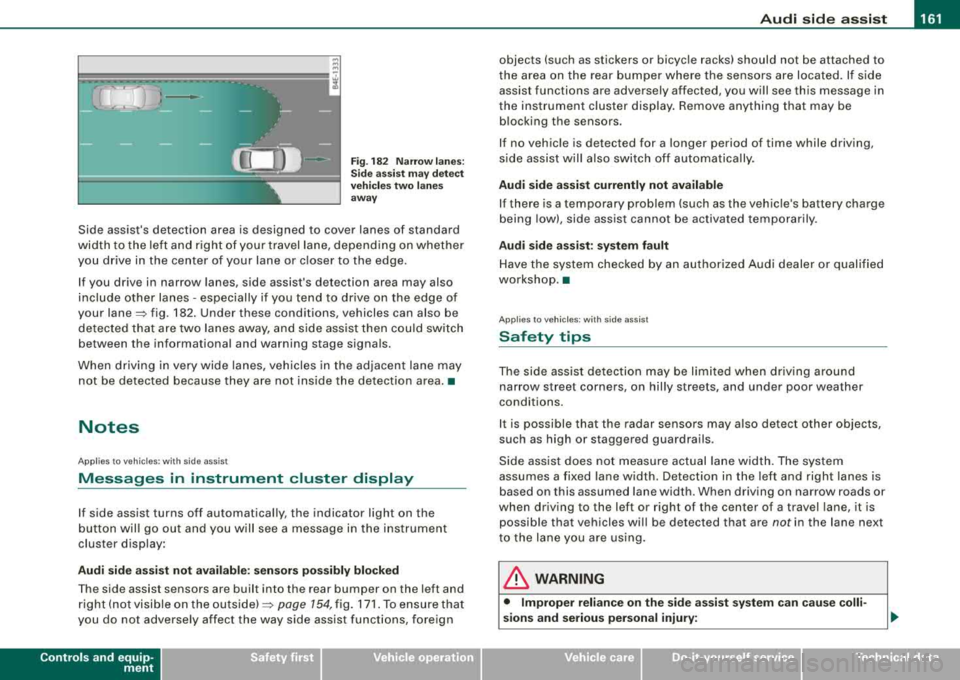
Fig . 182 Narr ow lane s:
Si de ass is t m ay detec t
vehi cle s two la ne s
a w ay
Side assist's detection area is designed to cover lanes of standard
width to the left and r ight of your travel lane, depend ing on whethe r
you drive in the center of your lane or c loser to the edge .
I f you drive in narrow lanes, side assist's detection area may also
include other lanes - especially if you tend to dr ive on the edge of
your
lane~ fig . 182. Under these conditions, vehicles can also be
de tec ted tha t are two lanes away, and side ass ist then c ould switch
between the informational and warning stage signa ls.
When d riving in very wide lanes, vehicles in t he adjacent lane may
not be detected because they are not ins ide the detection area. •
Notes
Applies to vehicles: with side ass is t
Messages in instrument cluster display
If side assist turns off automatically, the indicator light on the
b utton wil l go out a nd you w ill see a message in the i nstrument
cluster disp lay :
Audi side a ssist not available : sen sor s pos sibly blocked
T he side assist sensors are bui lt into the rear bumper on the left and
r ight ( not visi ble on the
ou ts id e) ~ page 154, fig. 171 . To ensure t hat
you do not adverse ly affect the way side assist functions, foreign
Controls and equip
ment
objects (such as stickers or bicyc le racks) should not be attached to
t he area on the rear bumper where the sens ors are loca ted. If s ide
assist functions are adversely affected, you will see this message in
the instrument cluster display. Remove anything that may be b locking the sensors .
I f no vehic le is detected for a longer period of time while driving,
s ide assist wil l also switch o ff automatica lly.
Audi side a ssist currently not available
If there is a temporary prob lem (such as the vehic le's battery charge
being low), side assist cannot be activated temporarily .
Audi side assis t : sy stem fault
Have t he system chec ked by an autho rized Audi dealer o r qualified
workshop. •
Applies to vehic les: with side assist
Safety tips
The side ass ist detec tion may be li mit ed when dr iv ing a round
narrow street corners, on hilly streets, and under poor weather
conditions.
I t is possible that the radar sensors may a ls o detec t other objects,
such as high or staggered guardrails.
Side ass ist does not measu re actual la ne w idth. The system
assumes a fixed lane width. Detection in the left and right lanes is
based on this assumed lane width. When driving on narrow roads or
when driv ing to the left or right of the center of a travel lane, it is
possible that vehicles wi ll be detected that are
not in the lane next
to the lane you are using.
& WARNING
• Improper relian ce on the side assi st system c an cau se colli
sions and serious personal injury:
Page 164 of 404
___ A_ u_ d_ i_s _i_d _e_ a_ s_ s
_ is_ t __________________________________________________ _
&, WARNING (continued )
-Never rely only on side assist when changing lanes .
- Always check rear view mirrors to make sure that it is safe to
change lanes .
• Side a ssist cannot detect all vehicle s under all conditions
danger of a cc ident!
• Side assist cannot detect vehicles in time to alert you when
they approach from behind at very high speed, or fall drop back
very quickly.
• The radar sensor 's
vi sion can be reduced or entirely blocked by
rain , snow , and heavy spray . This can result in side as sist not
adequately detecting vehicles or , in some cases , not dete cting
them at all . Always keep an eye on the direction you are traveling
and the relevant area around the vehicle .
• Please note that side assist indicates there are approaching
vehicles , or vehicles in your blind spot , only after your vehicle has
reached a driving speed of at lea st 37 mph (60 km /h).
• Side assist signal does not work around tight corners (turning
radius less than 218 yards , or 200
ml.
• Side a ssist is no replacement for the driver's full attention . The
driver alone is responsible for lane changes and similar driving
maneuvers. Always keep an eye on the direction you are traveling
and the relevant area around the vehicle .
0 Note
To ensure that s ide assist is not adv ers ely affected, you should not
b lock the area on the rea r bumper where the radar sensors are
located with for eign objects (such as wit h stickers or b icycle rac ks).
[ i ] Tips
If th e pos it ions of the rada r se nsors have bee n changed as a resu lt
of a rear end -collision, for instance, have side as sist checked by an
autho rized Aud i dea ler fo r sa fety reaso ns.•
A pplies to veh icles : w ith side ass is t
Declaration of compliance
Th e Audi side assist system is based o n radar sensors which operate
i n o ne of t wo fr eque ncy ban ds a t 24 GH z. In so me countr ies only one
of both bands is a llowed . D epending on the country in which you
are dr iving, the A ud i s ide ass is t syste m may not be legal ly act ivated
unless the frequency band permitted has been set by an authorized
A ud i dea ler . O pera tion in th e US a nd Cana da is o nly perm itte d on
the 240 75 MHz to 24 175 M Hz frequenc y band. The correct frequency
b and was se t by A udi or an a utho rized Aud i deale r in the coun try
where your ve hicle was originally purchased and may have been
rese t if the ve hicle was ope ra ted outside the US o r Canada . Cha nge s
or modi fications not expressl y approved b y Aud i can void the us er's
authority to operate the Audi side assist system .
T his dev ice co m plies wi th Pa rt 15 of th e FCC Rules. Operat ion is
subject to the fo llowing two condit ions :
• this device may not cause ha rm ful in te rfe re nc e, a nd
• this device must accept any interference received, inc luding
i nter fere nce t hat m ay ca use un des ired ope ration .•