wheel AUDI S8 2008 User Guide
[x] Cancel search | Manufacturer: AUDI, Model Year: 2008, Model line: S8, Model: AUDI S8 2008Pages: 404, PDF Size: 52.7 MB
Page 74 of 404
Clear vision
0 Note
The rear fog lights can distract drivers behind you, so, they should be turned on
only in conditions of very poor visibility. Always
observe local regulations when using the rear fog lights.
[ i] Tips
With the switch in AUTO front fog lights and rear fog lights cannot
be turned on in addition. •
Applies to vehic les: with Adapt ive Ligh t
Adaptive Light
When making a turn or driving around tight corners, the
relevant area of the road is better illuminated.
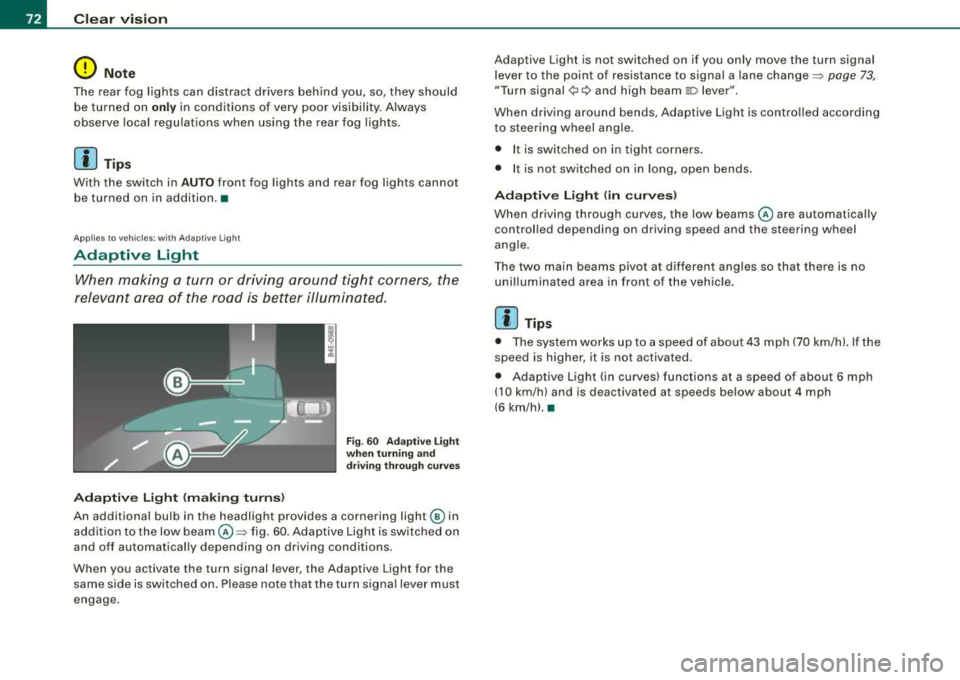
Adaptive Light (making turns)
Fig. 60 Adaptive Light
when turning and
driving through curves
An additional bulb in the headlight provides a cornering light@ in
addition to the low
beam @~ fig. 60. Adaptive Light is switched on
and off automatically depending on driving conditions .
When you activate the turn signal lever, the Adaptive Light for the
same side is switched on. Please note that the turn signal lever must
engage. Adaptive Light is not switched on if you only move the
turn signal
lever to the point of resistance to signal a lane
change~ page 73,
"Turn signal¢ c:> and high beam 110 lever ".
When driving around bends, Adaptive Light is controlled according
to steering wheel angle .
• I t is switched on in tight corners.
• It is not switched on in long, open bends.
Adaptive Light (in curves)
When driving through curves, the low beams @are automatically
controlled depending on driving speed and the steering wheel
angle.
Th e two main beams pivot at different angles so that there is no
unilluminated area in front of the vehicle.
[ i] Tips
• The system works up to a speed of about 43 mph (70 km/h). If the
speed is higher, it is not activated.
• Adaptive Light (in curves) functions at a speed of about
6 mph
(10 km/h) and is deactivated at speeds below about 4 mph
(6 km/h).•
Page 76 of 404
Clear vision
High b eam
~D
Push the lever forward to switch on the high beam.
- Pull the lever back towards you to switch off the high
beam .
Headlight flasher ~D
- Pull the lever toward the steering wheel to use t he head
light flasher .
Notes on the se feature s
• The turn signals only work with the ignition turned on . Th e indi
cator
l ights ¢ or¢ in the instrument cluster ~ page 16 also blink .
• After you have turned a corner, the turn signal switches off auto
matical ly .
• The high beam works only when the head lights are on . The indi
cator light
~D in the instrument cluster illuminates when the high
beams are on.
• The headlight flasher works only as long as you hold the lever -
even if ther e are no lights turned on. The indicator light
~D in the
instrument cluster illuminates when you use the headl ight flasher.
• With the switch in the
AUTO position, the high beams can only
be turned on if the function is switched on in MM I
=> page 70.
0 Note
Do not use the high beam or headlight flasher if you know that these
could blind oncoming traffic .•
Interior lights
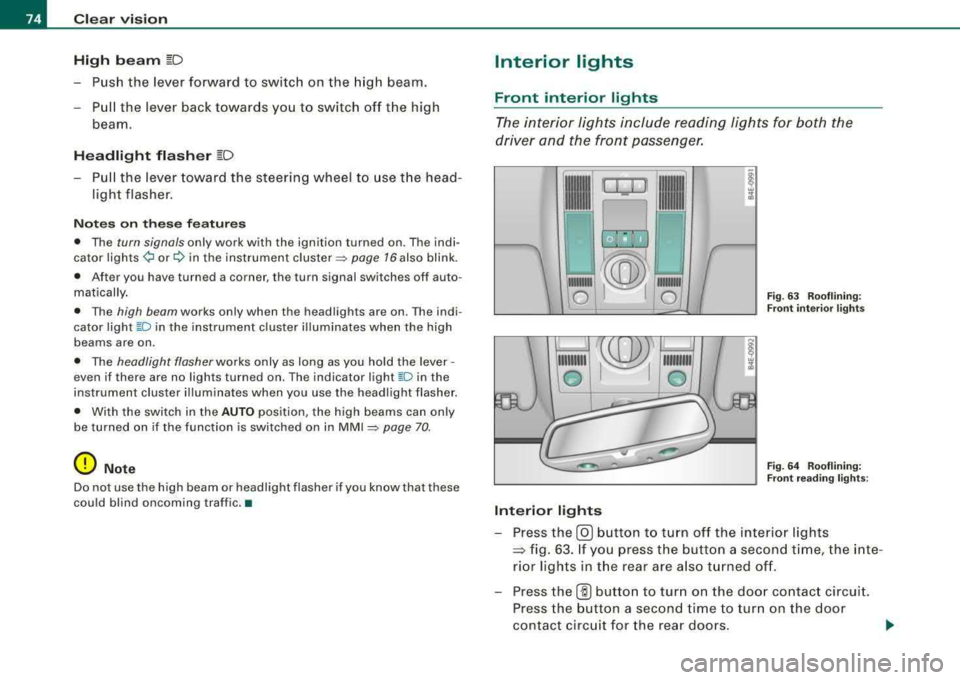
Front interior lights
T he in terior lights include rea ding ligh ts for b oth the
d river and the fr ont passenge r.
--
1111
, I I, . II
-
~
•
'
'.(ZW
ro ,1@1
111111111
0
Interior lights
-
®
111111111
...
/!
111111111
0 Fig . 6 3 Rooflining:
Fr ont inter ior light s
Fi g. 64 Rooflining:
F ront readin g ligh ts:
- Press the @J button to tur n off the interior lights
~ fig . 63. If you pre ss the butt on a secon d time, the inte
ri o r ligh ts in the rear ar e also t urned off .
- Press the
(ID butto n to turn on the door contact circui t.
Press the button a second time to tur n on the door
contact circ uit for the rear doors .
Page 82 of 404
Clear vision
Fig. 75 Left rear roof
lining: Vanity mirror
folded down
-To fold down, tap the rear edge of the mirror as indicated
by
arrow~ page 79, fig. 74.
As the mirror folds down, it automatically il lumina tes.•
Wiper and washer system
Windshield wiper ~
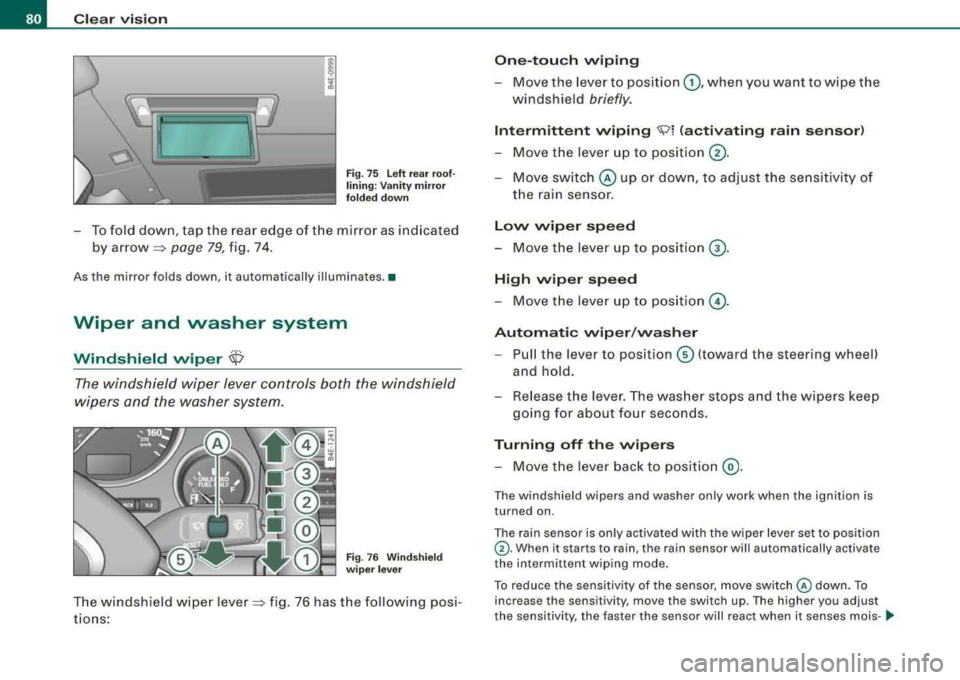
The windshield wiper lever controls both the windshield
wipers and the washer system.
Fig. 76 Windshield
wiper lever
The windshield wiper lever~ fig. 76 has the following posi
tions:
One-touch wiping
-Move the lever to position G) , when you want to wipe the
windshield
briefly.
Intermittent wiping <:S;)l (activating rain sensor)
-Move the lever up to position ®·
-Move switch © up or down, to adjust the sensitivity of
the rain sensor.
Low wiper speed
-Move the lever up to position G).
High wiper speed
-Move the lever up to position @.
Automatic wiper/washer
-Pull the lever to position© (toward the steering wheel)
and hold.
-Release the lever. The washer stops and the wipers keep
going for about four seconds.
Turning off the wipers
-Move the lever back to position @.
The windshield wipers and washer only work when the ignition is
turned on.
The rain sensor is only activated with the wiper leve r set to position
G) . When it starts to rain, the rain sensor will automatically activate
the intermittent wiping mode.
To reduce the sensitivity of the sensor, move switch
@ down. To
increase the sensitivity, move the switch up. The higher you adjust
the sensitivity, the faster the sensor will react when it senses mois-
.,_
Page 88 of 404
Seats and storage
Seats and storage
General recommendations
Why is your seat adjustment so important?
The safety belts and the airbag system can only provide
maximum protection if the front seats are correctly
adjusted.
There are various ways of adjusting the front seats to provide safe and comfortable support for the driver and the front passenger.
Adjust your seat properly so that:
• you can easily and quickly reach all the switches and controls in
the instrument panel
• your body is properly supported thus reducing physical stress
and fatigue
• the safety belts and airbag system can offer maximum protec
tion=> page 218.
In the following sections, you will see exactly how you can best
adjust your seats.
There are special regulations and instructions for installing a child seat on the front passenger's seat. Always follow the information
regarding child safety provided
in=> page 243, "Child Safety".
& WARNING
Incorrect seating position of the driver and all other passengers
can result in serious personal injury.
• Always keep your feet on the floor when the vehicle is in motion
- never put your feet on top of the instrument panel, out of the
window or on top of the seat cushion. This applies especially to
the passengers. If your seating position is incorrect, you increase
the risk of injury in the case of sudden braking or an accident. If
& WARNING (continued)
the airbag inflates and the seating position is incorrect, this could
result in personal injury or even death.
• It is important for both the driver and front passenger to keep
a distance of at least 10 inches (25 cml between themselves and
the steering wheel and/or instrument panel. If you're sitting any
closer than this, the airbag system cannot protect you properly. In
addition, the front seats and head restraints must be adjusted to
your body height so that they can give you maximum protection.
• Always try to keep as much distance as possible between your
self and the steering wheel or instrument panel.
• Do not adjust the driver's or front passenger's seat while the
vehicle is moving. Your seat may move unexpectedly, causing
sudden loss of vehicle control and personal injury. If you adjust
your seat while the vehicle is moving, you are out of position. •
Driver's seat
The correct seat position is important for safe and relaxed
driving.
We recommend that you adjust the driver's seat in the
following manner:
- Adjust the seat in fore and aft direction so that you can
easily push the pedals to the floor while keeping your knees slightly
bent => & in "Why is your seat adjustment
so important?".
- Adjust the seatback so that when you sit with your back
against the seatback, you can still grasp the top of the
steering wheel.
~
Page 121 of 404
_________________________________________________ W_ a_ r_ m __ a_n_ d_ c_ o_ld _ ___.ffllll
Ap plies to vehicles : w ith heated rear seats
Heated rear seats
The seat cushions and seat backs of the two outer rear
seats can be heated electrically.
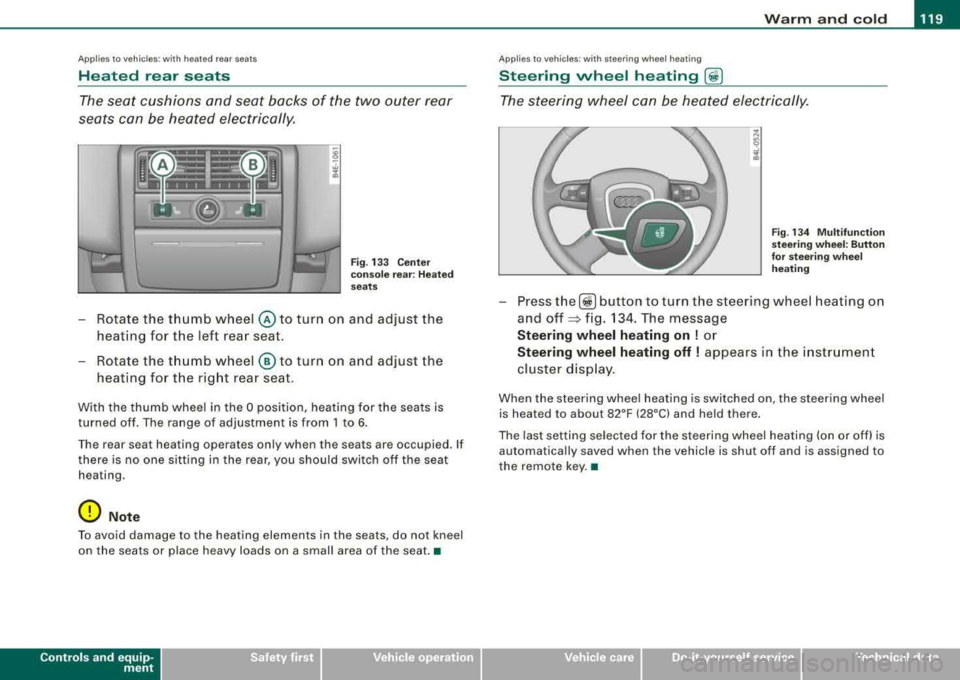
Fig . 133 C ente r
co nso le rea r: H ea ted
seats
- Rotate the thumb wheel © to turn on and adjust the
heating for the left rear seat.
- Rotate the thumb wheel
® to turn on and adjust the
heating for the right rear seat .
With the thumb wheel in the O position, heating for the seats is
turned off . The range of adjustment is from 1 to 6 .
Th e rear sea t hea ting operat es on ly wh en th e seats ar e occupied. If
there is no one s itting in the rear , you should swi tch off the seat
hea ting .
0 Not e
To avoid damage to the heating elements in the seats , do not kneel
on the seats or place heavy loads on a small area of the seat .•
Contro ls a nd eq uip
ment
Ap plies to vehi cles: with steer in g w heel heatin g
Steering wheel heating (j)
The steering wheel can be heated electrically.
F ig . 1 34 M ultifun cti on
st eeri ng w heel: Button
for stee ring w hee l
he ating
- Press the[ ~] button to turn the steer ing wheel heat ing on
and
off ~ fig. 134. The message
Steering wheel heating on ! or
Steering wheel heating off ! appears in the i nstrument
cluster d isp lay .
When the steering whee l heating is switched on , the steering wheel
is heat ed to about 82°F (28°C) and held th ere.
The last setting se lected for the steering wheel heating (on or off) is
automatically saved when the vehicle is shut of f and is assigned to
the remote key. •
Vehicle care I I irechnical data
Page 124 of 404
--~W~ a~r~m ~ a~ n
~ d~ c:!:o ~l~d :._ _____________________________________________ _
Air outlets
Air distribution determines the air flow to the individual
vents .
---- P
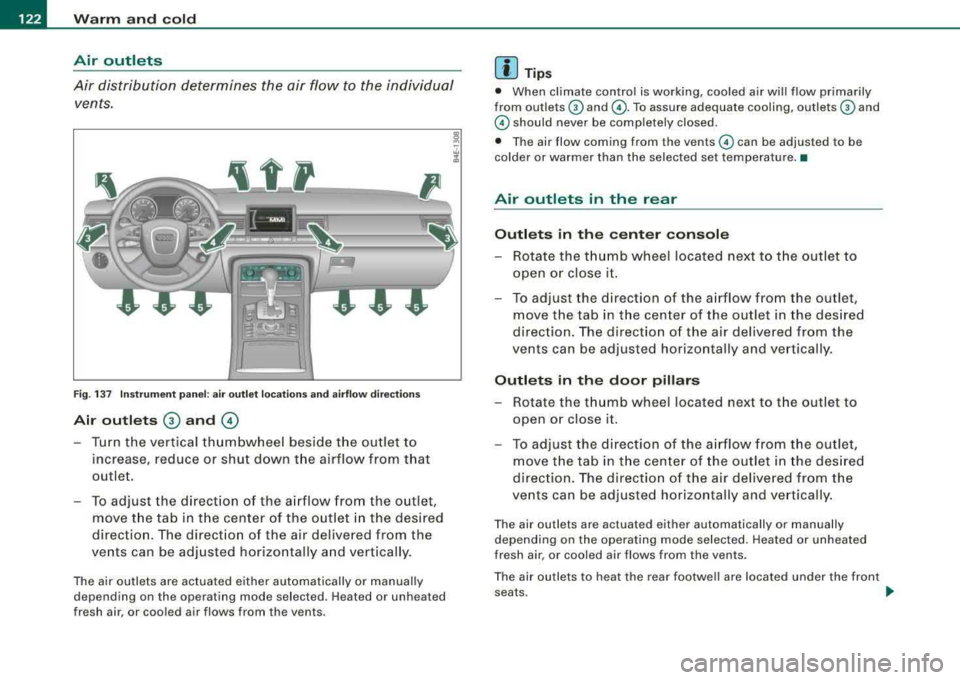
Fig. 1 37 Ins tru me nt pa nel: a ir o utlet loca tions a nd ai rf low di rectio ns
Air outl ets G) and ©
- Turn the vertical thumbwheel beside the outlet to
increase , reduce or shut down t he airflow from that
outlet .
- To adjust the direct ion of the a irflow from the outlet,
move the tab in t he center of the outlet in the desired
direction . The direct ion of the air delivered from the
vents can be adjusted horizontally and vertically .
The air outlets are actuated either automatically or manual ly
depending on the operating mode selected. Heated or unheated
fresh air, or cooled air flows from the vents.
[ i ] Tip s
• When climate contro l is working, coo led air wi ll flow primarily
from outlets
G) and ©-To assure adequate cooling, outlets G) and
© should never be completely closed.
• The air flow coming from the vents © can be adjusted to be
colder or warmer than the selected set temperature. •
Air outlets in the rear
Outl ets in the c ente r con sol e
- Rotate the thumb wheel located next to the outlet to
open or close it.
- To adjust the direction of the airflow from the outlet,
move the tab in t he center of the outlet in the des ired
direction. The direction of the air delivered from the
vents can be adjusted horizontally and vertically .
Outl ets in th e door pillars
- Rotate the t humb wheel located next to t he out let to
open or close it.
- To adjust the d irection of the a irflow from the outlet,
move the tab in t he center of the outlet in the des ired
direction . The direction o f the air delive red from the
vents can be adjusted hor izontally and vertically .
The air outlets are actuated either automatically or manually
depending on the operating mode selected. Heated or unheated
fresh air, or cooled air flows from the vents .
The air outlets to heat the rear footwel l are located under the front
seats . _,,,
Page 130 of 404
___ O_ n_t_ h_ e_ ro_ a_d __________________________________________________ _
On the road
Steering
Adjusting steering wheel position
The steering wheel position can be adjusted for height
and reach .
First, adjust t he driver's seat correctly.
Height adjustment
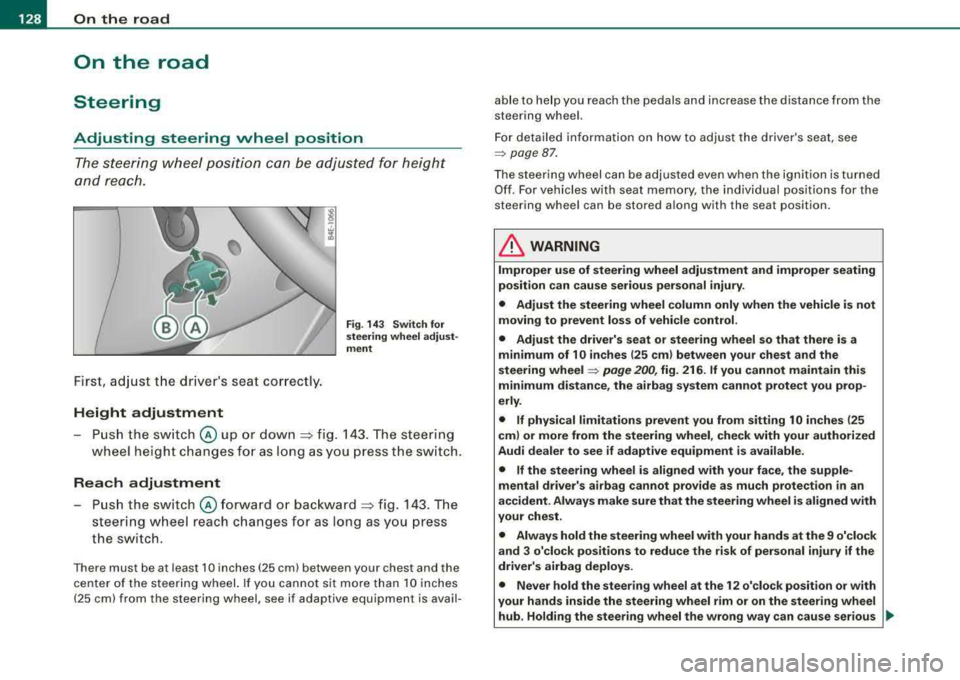
Fig . 14 3 Sw itch fo r
s te erin g whe el a dju st
me nt
-P u sh the sw itch @ up or down :=> fig. 143 . The steering
wheel height changes fo r as l ong as you press the sw itch.
Rea ch adjustment
Push the switch @forward o r bac kward => fig. 143 . The
steering wheel reach changes for as long as you press
the switch.
There must be at least 10 inches (25 cm) between your chest and the
center of the steer ing wheel. If you cannot sit more than 10 inches
(25 cm) from the steering wheel, see if adaptive equipment is avail- able to help you reach the pedals and increase the distance from the
steering wheel.
For detailed in formation on how to adjust the driver's seat, see
=> page 87 .
The steering wheel can be adjusted even when the ig nition is turned
Of f. For vehicles w ith seat memory, the individual positions for the
steering wheel can be stored a long with the seat position.
& WARNING
Improper u se of steering wheel adju stment and improper seating
po sition can cause se rious per sonal inju ry .
• Adjust the steering wheel column only when the vehicle is not
mo ving to prevent los s of vehi cle control.
• Adjust the driver' s seat or steering wheel so that there is a
minimum of 10 in ches (25 cm ) bet ween your chest and the
s teering wheel
=> pag e 200 , fig. 216 . If you cannot maintain this
minimum di sta nce , the ai rbag sy stem can not prote ct you prop
erly .
• If physical limitations prevent you from s itting 10 inche s (25
cm ) or more from the steering wheel , check with your authori zed
Audi dealer to see if adapti ve equipment i s available .
• If the steering whee l is aligned with your face, the supple
mental drive r's airbag cannot provide as mu ch pr otection
in an
ac cident. Alway s make sure that the steerin g wheel i s aligned with
your che st .
• Alway s hold the steering wheel with your hand s at the 9 o'clock
and 3 o'clo ck posit ion s to reduce the ri sk of pers ona l injury if the
driv er's airbag deploys.
• Never hold the ste ering wheel at th e 12 o' clo ck position or with
your hand s inside the steerin g wheel rim or on the steering wheel
hub . Holding the steering wheel the wrong wa y can cau se ser ious ..,,
Page 131 of 404
___________________________________________________ O_ n_ t_h _e_ r_o _a_ d _ ___.111111
fl::. WARN ING (c o ntinue d)
injurie s to the hands, arm s and head if the driv er's a irbag
deplo ys.•
Easy entry feature
The easy entry feature makes it easier to enter and exit the
vehicle by automatically adjusting the steering wheel.
Press the button @ ::::> page 128, fig . 143 to turn the easy
entry feature on or off.
When the easy entry feature is tu rned on (bu tton depressed), the
steering wheel moves up to the parked position when the ignition is
turned off. After you en ter the vehicle, the steer ing wheel moves to
the stored position as soon as you turn on the ignition. •
Ignition lock and ignition switch
Ignition key positions
The engine can be started or turned off with the ignition
key.
Contro ls a nd eq uip
ment
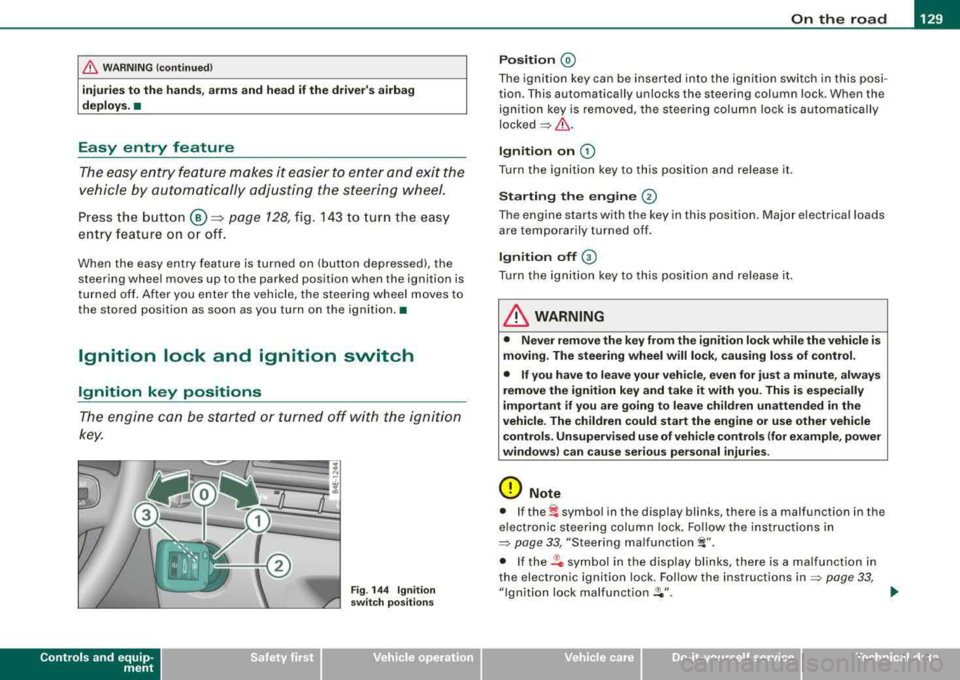
F ig . 14 4 Ignit ion
sw itch po sitio ns
P os it ion @
The ignition key can be inserted into the ignition switch in this posi
tion. This automatically unlocks the steering column lock. When the ignition key is removed, the stee ring co lumn lock is automatically
locked
=> fl::. .
Ignition on G)
Turn the ignition key to this position and re lease it.
Starting the engin e @
The engine starts with the key in this position . Major electrical loads
are tempo rar ily turned off.
Ign ition off G)
Turn the ignition key to this position and re lease it .
& WARNING
• Never remo ve the key from th e ign ition lock while the ve h icle i s
mo ving . The stee ring wheel will lo ck, c au sing loss of control.
• If you have to leave your veh icle, even for ju st a minute , al ways
remove the ignition key and take it with you. Thi s is esp eciall y
important if you are going to lea ve ch ildren unatten ded in the
vehi cle . The ch ildren co uld start the eng ine or u se other vehicle
c ontrol s. Un super vis ed u se of veh icle control s (for e xam ple , po wer
windows ) can cause seriou s personal inj uries .
0 Note
• I f the~ symbo l in the display blinks, there is a malfunction in the
e lectron ic steering column lock. Fo llow the instructions in
=> page 33 , "Steering malfunction i".
• If the .Pc symbol in the display b links, there is a malfunct ion in
the electronic ignition lock. Follow the instructions
in => page 33,
"Ignition lock malfunct ion .Pe" . ..
Vehicle care I I irechnical data
Page 135 of 404
On the road -----------------
& W AR NIN G (c ontinu ed )
re qu ir e d to ste er or br ake the vehicle . If you are n ot prep ared , this
c ould r esult in a colli sion and serious per sonal injur y.
• For y our safet y, move the sele cto r lever to the P po sition , then
turn off the engine. Oth erw ise the vehi cle could inad vertently roll
away.
• After tu rning off the engin e, the r adi ato r fa n ca n co me on and
ru n for up to 10 minute s
-even if the ignition is sw itched off . Like
wise , the fan could com e on if the temper ature in the engine
c omp artm ent r ais e s du e to he at build up or if you le ave the vehicle
s tanding in direc t sunligh t.
0 Note
After driving at high engine load, heat can bu ild up in the engine
compartment after you have turned off the engine. This can damage
t he engine . Let the veh icle stand and run in id le for about 2 minutes
before turning off the engine .•
Applies to vehicles: with Advanced Key
Driver's messages in the instrument cluster
Messages appear in the instrument cluster to let the
driver know if something is missing or if some thing must
be done.
No ke y identified
This message appears when you press the [ START ] button, but
t here is no remote control key insi de the vehicle or i f the system
does not recognize the key . For example, if your key is
shielded by
an object or
encased, i.e . ins ide an a lum in um br iefcase, the sig nal
from the key cannot be detected. E lectronic devices such as cell
phones can also interfere with t he rad io signa l.
Controls and equip
ment P
re ss bra ke pedal to start engine
This message appears when you press the [ S TART] button when
starting the engine but you have not depressed the brake pedal.
En gage N or P to start engine
This message appears when you start the engine but the selector
lever is not in t he P or
N pos ition. The e ng ine can be started o nly if
the selector lever is in one of these two positions .
-.?. Key not in vehicle
This message appears together with the -:?e symbol when the
remote con trol key is removed from t he ve hicle whi le the engine is
running . This is to remind you that you should not continue your trip
without you r key .
I f the key is no longer inside the veh ic le when you turn o ff the
engine, you will not be able to switch on the ignition or restart the
eng ine. Also, you w ill not be ab le to loc k the veh icle from the
outside.
S hift t o P, other wise vehi cle ca n roll away. Doors d o not lo ck if le ver
i s not in P.
This message appears for your safety together wit h an aud ib le
warning signa l when you press the [S TO P] button but the selector
lever is not in the P posit ion and you open the driver's door. Move
the selector lever into P, otherwise the vehic le could rol l away. In
addit ion, you will not be able to lock the vehicle with either the lock
button located on the door handle or the remote control.
To engag e steering lo ck, pre ss a nd hold S TOP button
This message appears for your personal safety if you switch off the
engine and the ignition by pressing the [ S TOP ] button and then
open the driver's door. In this case, the steering will sti ll not be
locked. The stee ring wheel wi ll lock :
• If you press the [ STOP] button for longer than 1 second.
• If you lock the vehicle fr om the outside .•
Page 137 of 404
On the road -----------------
Parking
To prevent a parked vehicle from rolling away, there are a
few things you should do.
When you park your vehicle, do the following
- Stop the vehicle using the brake pedal.
- Pull the switch to apply the electromechanical parking
brake.
- Move the selector lever into the
P position => &.
- Switch off the engine and remove the ignition key from
the ignition lock.
When you park your vehicle on hills, do the
following
- Stop the vehicle using the brake pedal.
- Pull the switch to apply the electromechanical parking
brake.
- If you are parking headed
downhill, turn the front wheels
toward the curb.
- If you are parking headed
uphill, turn the front wheels
awayfrom the curb.
- Move the selector lever into the
P position.
- Switch off the engine and remove the ignition key from
the ignition lock.
& WARNING
This is how you can reduce the risk of injury when leaving your
vehicle.
Controls and equip ment
&, WARNING (continued)
• Never park the vehicle where it can come in contact with dry
grass, spilled fuel or any other flammable materials.
• When parking on hills, always turn the wheels so that the front
wheels will first roll into the curb, if the vehicle should start to roll.
• Never allow anyone -especially small children -to remain
in the
vehicle when it is locked. Locked doors make it more difficult for
rescuers to access the passenger compartment in the event of an
emergency. Danger to life!
• Never leave children unsupervised in the vehicle. Children
could release the parking brake or move the gearshift lever out of
gear. The vehicle could start to roll away and cause an accident.
• No matter what the season is, the temperature in a parked
vehicle can reach dangerous levels.
0 Note
• Please exercise care when you park your vehicle in parking areas
with parking barriers or curbs . Parking barriers and curbs vary in
height and could damage your bumper and related components as
the front of your vehicle moves over a barrier or curb that is too high, as you park or as you back out of a parking spot. In order to be
sure that no such damage can occur, you may wish to stop short of
having the front tires of your car touch the parking barrier or curb.
• Please also exercise exceptional care when you drive up or down
steep ramps or drive over curbs or other obstacles, for which the
vehicle is not designed , because components of the vehicle close to
the ground, such as bumper covers, spoilers and suspension and
exhaust system components, may become damaged. •