warning light AUDI S8 2008 Owner's Manual
[x] Cancel search | Manufacturer: AUDI, Model Year: 2008, Model line: S8, Model: AUDI S8 2008Pages: 404, PDF Size: 52.7 MB
Page 43 of 404
failure. Under-inflation also reduces fue l efficiency and tire tread
life, and may affect the veh ic le's handling and stopping abi lity.
Please note that the TPMS is not a substitute for proper tire mainte
nance, and it is the driver's responsibi lity to maintain correct tire
pressure, even if under-inflation has not reached the leve l to tr igger
illumination of the TPMS low tire pressure tellta le.
Your veh icle has a lso been equipped with a TPMS malfu nction indi
cator to indicate when the system is not operating properly . The
TPMS malfunction indicator is combined w ith the low tire press ure
telltale . When the system detects a ma lfunction , the telltale wi ll
fl ash for approximately one minute and then remain continuously
illum inated . This sequence will continue upon subsequent vehicle
start -ups as long as the ma lfunction exists.
When the ma lfunctio n indicator is i llum inated, the system may not
be ab le to detect or signa l low tire pressure as intended . TPMS
malfunctions may occ ur for a var iety of reasons, i nclud ing the
installation of replacement or alternate tires or wheels on the
vehic le that prevent the TPMS from f unctioning proper ly . Always
check the TPMS malfunction tellta le after replac ing one or more
t ires or whee ls on yo ur ve hicle to ens ure t hat the replacement or
a lternate tires and wheels allow the T PMS to continue to function
proper ly. •
Introduction
The tire pressure monit oring system m onitors air pressure
in all four road wheels and the spare tire* while the
vehicle is movin g.
As soon as the tire pressure moni toring system se nses a signi ficant
loss of air pressure in one or severa l tires, text messages and yellow
symbo ls appear in the inst rume nt cluster d isplay to aler t t he driver .
T he
(l) warning light in the instrument c luster comes on when the
t ire is sig nificant ly underinflated
=> page 20 .
Controls and equip
ment
Driver information di splay
The warning light U) also i lluminates in the case of a system
mal fu ncti on.
The system continuous ly receives rad io signa ls from sensors
located inside each tire .
Be aware that t ire p ressu re is also dependen t on the tempera ture of
the tire . For every
18 °F (1 O °C) increase in tire temperature, tire pres
sure increases by about 1 .5 psi (0 .1 bar). The tire warms up wh ile the
vehicle is moving and t ire pressure rises . So you should adjust tire
pressure only when the t ires are
cold, when the temperature of the
tires is roughly the same as the ambient air temperature .
I n order to keep the tire pressure monitoring system properly cali
brated, tire pressure on all four tires and on the spare tire* should
be checked at regular intervals, adjusted if n ecessary and saved in
the proper setti ng (recommended
pressure) => page 44.
The tire pressure is shown on the tire pressure label. On USA vehi
cles, the tire pressure labe l is located on the drive r's s ide B -p ill ar. On
Canada vehicles, the tire pressure labe l is located either on the
driver's side B -pillar o r inside the fuel fi ller flap. The t ire press ure
label l ists t he recommended cold tire inflat io n pressures for t he
vehic le at its maximum capacity weight and the tires that were on
your ve hicle at the time it was manufactured . For recommended tire
pressures for normal load condit ions, please see chapter
=> page 328 .
The current temperatures and pressure of your tires can be viewed
in the M MI
=> page 43 .
& WARNING
• When the tire pre ssure monitoring system warning light i s lit ,
one or more of your tires is signifi cantly under -infl ated . You should
stop and check your tires a s soon a s po ssible , and inflate them to
the proper pre ssure a s indi cated on the vehi cle' s tire pre ssure
label
=> page 328 . Driving on a significantly under -inflated tire
ca use s the tire to o verheat and can lead to tire failure. Under -infla -
~
Page 44 of 404
Driver information display
& WARNING (continued)
tion also is likely to impair the vehicle's handling and stopping
ability.
• Do not adjust tire pressure when tire temperature is excessive .
This could lead to serious tire damage and even cause the tire to
burst, with the additional danger of an accident.
W For the sake of the environment
Driving with under -inflated tires reduces fuel efficiency and tire
tread life.
[ i) Tips
• Each tire, including the spare*, should be checked monthly when
cold and set to the recommended inflation pressure as specified on
the tire pressure label
=> page 328.
• The tire pressure monitoring system helps the driver to keep an
eye on tire pressures. But the driver still has the responsibility for
maintaining the correct tire pressure .
• Tire pressure must only be adjusted when the temperature of the
tires is about the same as ambient air temperature.
• When tires are replaced, the sensors and valves should not be
detached or exchanged. Only the valve core needs to be replaced
and, if necessary, the valve and the wheel electronics replaced.
• If you should put different wheels and tires on your vehicle (e .g.
winter wheels and tires), you must be certain that the wheels and
tires are compatible with the tire pressure monitoring system .
Otherwise the system will register a malfunction and a fault
message will be displayed. For more information, contact your
authorized Audi dealer.
• Adjust the tire pressure and store the pressure in the tire pres
sure monitoring system to the load you are
carrying => page 328. •
Significant loss of air pressure ( )
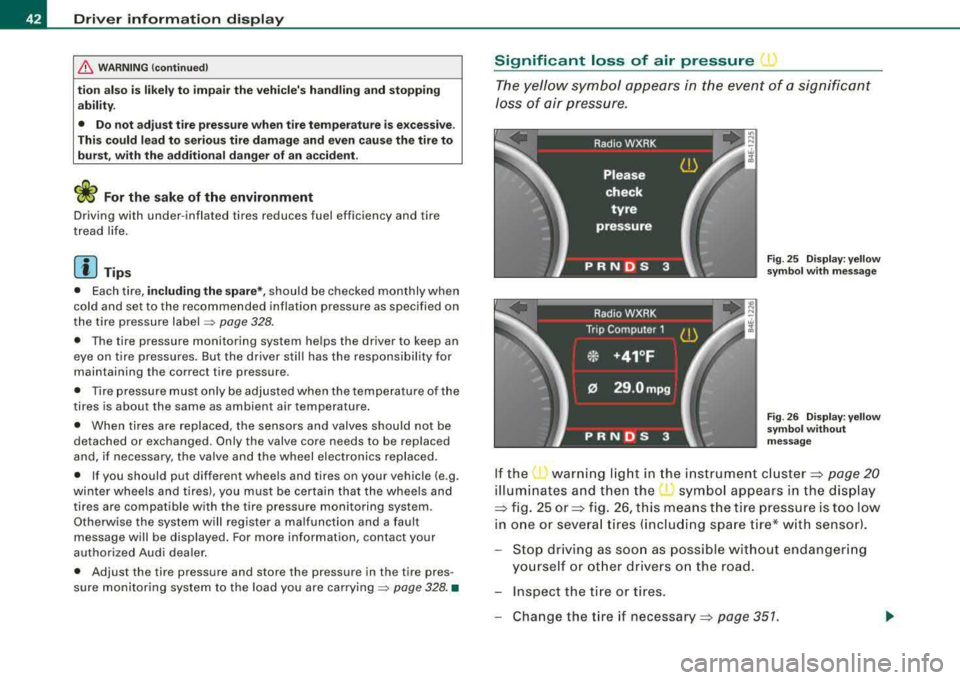
The yellow symbol appears in the event of a significant
loss of air pressure.
Fig . 25 Display: yellow
symbol with message
Fig . 26 Display: yellow
symbol without
message
If the warning light in the instrument cluster:::::, page 20
illuminates and then the ( symbol appears in the display
:::::, fig. 25 or:::::, fig. 26, this means the tire pressure is too low
in one or several tires (including spare tire* with sensor).
Stop driving as soon as possible without endangering
yourself or other drivers on the road.
- Inspect the tire or tires.
Change the tire if
necessary:::::, page 351.
Page 45 of 404
The j warning light in the instrument cluster comes on when the
tire is significantly underinflated.
In addition, the tire symbo l
) appears in the display together with
the message
Please check tire pressure => page 42, fig. 25.
Af ter a few seconds, the message disappears again:::>
page 42,
fig. 26. If you would like to show the message again, press the
!CHECK] button.
[ i] Tips
• In the case of an intentional loss of air pressure, for example,
when re-adjusting tire pressure, this has to be stored again after
wards =>
page 44.
• Current information about tire pressures and temperatures can
be scanned in MMI =>
page 43.
• Tire pressure must only be adjusted when the temperature of the
tires is about the same as ambient a ir temperature .
• The yellow symbol disappears, when the tire pressure is
corrected and the new pressure is stored in the system=>
page 44.
• After changing a wheel you have to adjust the tire pressures on
all whee ls . In addition, you must then initialize the new tire pres
sures in the tire pressure monitoring system =>
page 45.
• If your vehicle is equipped with a spare tire* with a wheel sensor,
the tire will be monitored and the display
symbols => page 42, fig. 25
or=>
page 42, fig. 26 will appear if the pressure is too low.•
Controls and eq uip
ment
Driver information display
Displaying tire pressures and temperatures
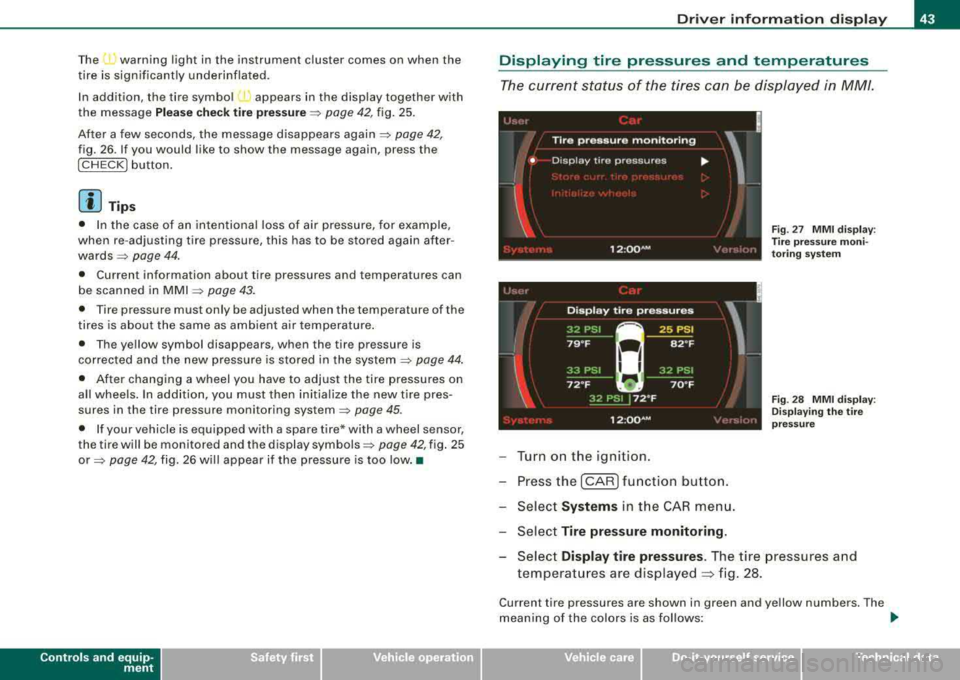
The current status of the tires can be displayed in MM/.
'
!
Tire pressure monitoring
• Disp lay tire pressures ...
I
Fig . 27 MMI display :
T ire pres sure moni
toring system
12 :QQ AM
Turn on the ignition.
Press the
I CAR I function button.
Select
Systems in the CAR menu.
Select
Tire pressure monitoring .
,. •I
Fig. 28 MMI display:
Displaying the tire
pressure
Select Display tire pressures . The tire pressures and
temperatures are displayed
~ fig. 28.
Current tire pressures are shown in green and yellow numbers. The
meaning of the colors is as follows:
~
Vehicle care I I irechnical data
Page 47 of 404
Changing a wheel When you change a wheel, the new tire must be initial
ized.
Turn on the ignition.
Press the
I CAR I function button.
- Select
Systems in the CAR menu .
- Selec t
Tire pressure monitoring .
-Select Initialize wheels ~ page 43, fig. 27.
Programming is necessary:
• After the tires have been rotated on the vehicle (including use of
the spare tire*),
• If tires with new wheel sensors are used.
All pressure warning and system malfunction indicators in the
display will be canceled.
If a wheel change has been made, it is necessary to complete the
Initialize wheels function.
Th e tire pressure monitoring system is not available dur ing the
programming process and no pressure and temperature values are
displayed on the MMI display.
After you have selected the funct ion, the new wheels are
programmed and the actual pressures are stored. This learning
phase can take up to 20 minutes driving time.•
Contro ls a nd eq uip
ment
Driver information display
Malfunctions
A malfunction can have various causes.
Fig. 29 Display:
Syste m malfunction
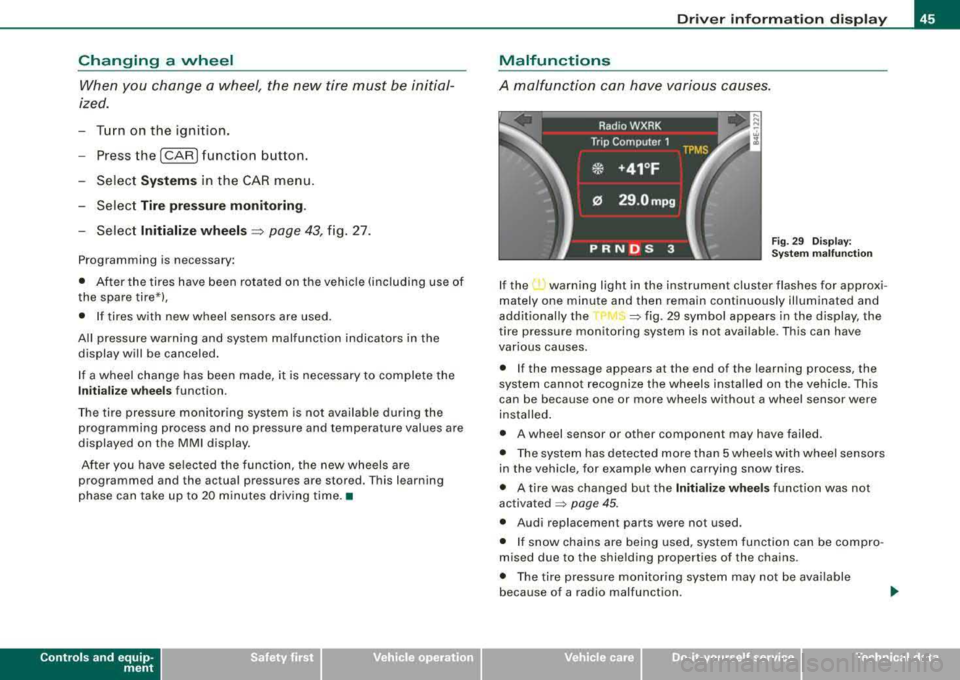
If the ...., warning light in the instrument cluster flashes for approxi
mately one minute and then remain continuously illuminated and
additional ly the
=> fig. 29 symbol appears in the display, the
tire pressure monitoring system is not available. This can have
various causes.
• If the message appears at the end of the learning process, the
system cannot recognize the wheels installed on the vehicle. This
can be because one or more wheels without a wheel sensor were
insta lled .
• A wheel sensor or other component may have failed.
• The system has detected more than 5 wheels with wheel sensors
in the vehicle, for example when carrying snow tires.
• A tire was changed but the
Initialize wheels function was not
activated
=> page 45.
• Audi replacement parts were not used.
• If snow chains are being used, system function can be compro
mised due to the shielding properties of the chains.
• The tire pressure monitoring system may not be available
because of a radio malfunction.
Vehicle care I I irechnical data
Page 48 of 404
Driver inf ormation displ ay
• Transmitters with the same frequency, such as radio head
phones in the vehic le or rad io equipment, can cause a temporary
disruption of the system through excessive electromagnetic fields .
• Elimi nate the in terference if possible/if you can and then re-start
the
Initi alize w heel s function . If the warning light comes on again,
you shou ld con tact your autho rized Audi dea ler im mediately to have
the prob lem corrected .
• Do not use commerc ial ly avai lab le tire sea lants . O therwise, t he
e lectrica l components of the tire pressure monitoring system wi ll
n o longer work properly and the sensor for the tire p ressure moni
toring system wi ll have to be replaced by a qua lified workshop. •
Page 51 of 404
is pressed. If the check light does not flash, the battery is dead and
has to be replaced .
In addition, when the battery is dead the
!i, symbol appears in the
instrument cluster display as well as the message:
!i, Pl ease chang e key batte ry
We recommend having the battery changed by an Audi Dealer .•
Electronic immobilizer
The immobilizer helps to prevent unauth orized use of
y o ur vehicle.
A computer chip inside your key automatica lly deactivates the e lec
t ronic immobilizer when you insert the key in the ignition lock, or on
vehic les with Advanced Key*, when the key is inside the vehicle .
When you remove the key from the ignition lock, or on vehicles with
Advanced Key, when you remove the key from the vehicle, the elec
t ronic immobilizer is automatically activated once again.
If an unauthorized key was used,
S AFE is disp layed continuous ly in
the odometer disp lay field.
& WARNING
Alw ays tak e the k ey with you wh en you le ave th e vehicl e. The k ey
ca n di sarm th e ele ctr onic engin e immobili zer and permit an un au
thorized p ers on to start th e eng in e and enable opera tion of the
v ehicle system s such as power window or power sunroof l eading
to ser iou s per son al in jur y.
[ i ] Tip s
• Your engine can on ly be started using the factory -equipped key.
• You may not be able to start your vehic le if an ignition key of a
different vehicle make is also located on your set of keys .•
Controls and equip
ment
Openin g and clo sing
Certification
The remote control device comp lies with
• USA models: Part 15 of the FCC Rules .
• Can ad a m odels: RSS -210 of Industry Canada .
Operation is subject to the f ollowing conditi ons :
• this device may not cause harmful interference, and
• t his device must accept any interfere nce rece ived, i ncluding
interference that may cause undes ired operation.
0 Note
The manufacturer is not responsib le for ANY RA DIO OR TV interfer
ence caused by unauthorized modifications to this equipment .
Changes or modifications to this unit not express ly approved by the
party responsible for compliance could void the user's authority to
operate the equipment. •
Power locking system
General description
The power locking system locks or unlocks all doors and
the rear lid simultaneously.
The power locki ng system in your veh ic le incorporates the following
functions:
• Central lock ing function
• Selective unlock
feature=> page 52
• Remote contro l feature=> page 48
• Advanced Key *=> page 59
• Anti -theft alarm system=> page 67
Page 52 of 404
Openin g and clos ing
All the doors and the rear lid are locked by the central locking
system when you lock the vehicle. You can se t whether generally
only the driver's door or all doors and the rear lid should be
unlocked when you open the vehicle in the MM I menu
C entral
l ock ing
to suit your individual desires=> page 52.
Unlocking the veh icle
You can un lock the vehicle from outside ei ther by using the remote
control
or by turning the key inside the driver's door lock. When you
unlo ck your vehic le:
• The anti -theft alarm system is deactivated briefly .
• The vehicle interior l ights illuminate for approximate ly 30
seconds .
• All turn signal lights will flash twice when the car is unlocked.
• Afte r unlocking the vehic le, you have
60 seconds to open a door
or the rear lid . After
60 seconds, th e vehicle automatically locks and
t he anti -theft a lar m system activates agai n.
The rear lid can be locked or unlocked e ither by using the remote
control
or by turning the key inside the driver 's door lock. Unlocking
the vehic le wit h the remote contro l will on ly
unlock the rear lid, to
open it , the lid handle needs to be pressed.
Lo ckin g the vehicle
Yo u can lock the vehicle from outside either by using the remote
control
or by turning the key inside the dr ivers's door lock . When
you
lo ck the veh ic le:
• All doors and the rear lid are locked.
• All turn signal lights will flash once when the car is locked .
• The anti-theft alarm system is activated. The horn of the anti
theft alarm system will sound and the anti -theft a larm system readi
ness l ight, located in the upper part o f the driver's door panel, w ill
start to blink .
• The vehicle interior l ights turn off.
Unlo cking and l ocking th e vehicle using the Ad vanced
Key *
The Ad van ced Key * feature is a keyless system which allows you to
unlock the vehicle via sensors in the door hand le . Locking is likewise
keyless using a lock button . Each door is equ ipped w ith a sensor and
lock button.
Power side door closer*
The veh icle is equipped with a power side doo r c lose r. When closing
a door, you s imp ly need to gently push on the door . The door w ill
t hen automa tically c lose by
itse lf => page 53 .
Autom atic l ockin g
The automatic lock ing fea ture locks all the vehicle doors and the
rear lid when you drive faster than
9 mph ( 1 5 km/hl. This funct ion
can be turned on and off in the MMI
Central locking Menu
=> page 52 .
You can unlock the vehicle from the inside by :
• r emovi ng the key from the ignition switc h (the vehicle wi ll auto
matically un lock itse lf) or
• pressing the unlock part of the power lock swi tch
m or
pulling the door handle (once to open the door) .
& WARNING
• When you lock your veh icle from out sid e, nobody -espe cially
children - should remain in side the vehicle. Remember , when you
l oc k the vehicle from the out side the windo ws ca nnot be opened
from the inside .
• When you leave the vehi cle , alwa ys remove the ignition key and
take it with you. Thi s will prevent passengers (children , for
e x ample) from ac cidentally being l ocked in the vehi cle should they
ac cidentally pre ss the power locking switch in the doors .
~
Page 53 of 404
fl::. WARNING (c o ntinue d)
• Do not le av e children in side th e vehicle un supervis ed. In an
emergen cy it would be i mpo ssi ble to op en the do ors fr om th e
out side without the ke y.
[ i J Tips
• In the event of a crash with airbag deployment all locked doors
will be automat ically unlocked to give access to the vehicle occu
pants from the outside.
• If the power locking system should malfunction , you can lock
each door individually using the vehicle
key => page 54.
• If the power locking system shou ld fail, you can still open the
fue l tank flap in an
emergency => page 305.
• You are we ll advised not to keep valuables inside an unattended
vehic le, visible or not. Even a properly locked vehic le cannot provide
the security of a safe .•
Unlocking and locking the vehicle with the
remote control
How the remote control works.
Contro ls a nd eq uip
ment
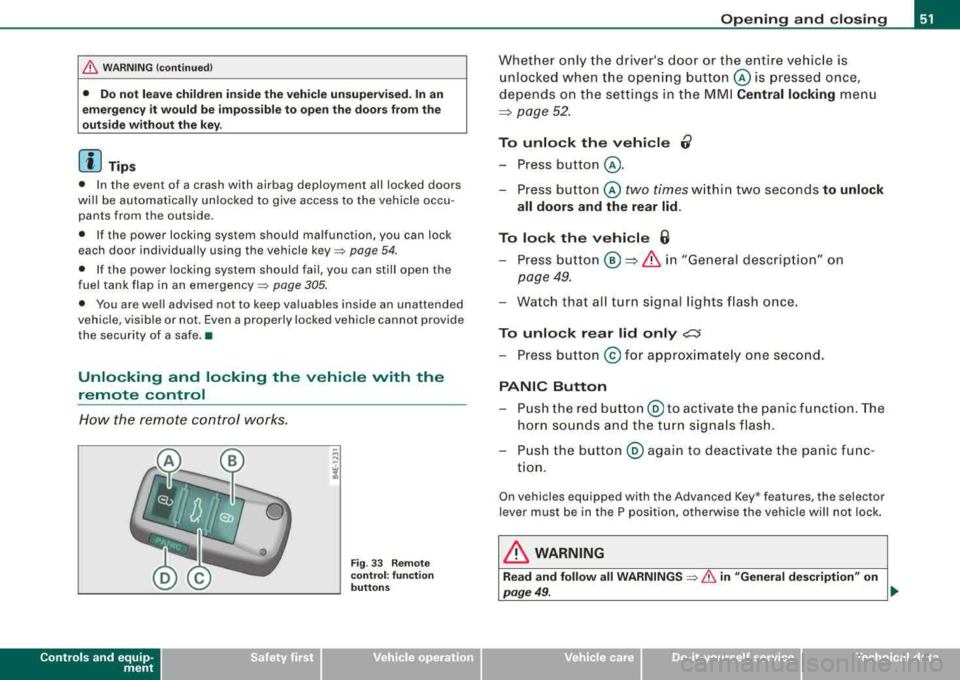
Fig . 33 Remote
co ntr ol: fu nction
bu tto ns
Op ening and clo sing
Whether only the driver's door or the entire vehicle is
unlocked when the ope ning button © is pressed once,
depends on the settings in the MMI
Central locking menu
~ page 52.
To unlo ck the vehi cle 0
-Press button @ .
-Press button © two times within two seconds to unlock
all doors and the rear lid.
To lock th e vehi cle 6
-Press button @ ~ & i n "Gene ral descrip tion" on
page 49.
-Wa tch that all turn signal lights flash once.
To unlo ck rear lid only ,;;::::J
-Press button @ for approx imate ly one second.
PANIC Button
-P ush the red butto n@ to ac tivate the panic f unction. The
horn sounds and the t urn signals flash .
-Push the button @ aga in to deactivate the panic func
t ion.
On vehicles equipped with the Advanced Key * features, the selector
lever must be in the P position, otherwise the vehicle will not lock .
& WARNING
Read and follo w all WARNINGS => & in "General de scription " on
page 49 . .,,_
Vehicle care I I irechnical data
Page 56 of 404
Opening and clo sing
How to unlo ck ea ch door s eparat ely using th e
door handle
-Pull the handle to open the door.
You wil l find a power locking switch in ea ch door. You can lo ck and
u nlock
the vehicle using the switches in the driver's or passenger 's
door=> page 53, fig . 36. You can only lock the vehicle using the
switches in the rear
doors => page 53, fig. 37. If you lock the vehicle
using the
po wer l ock ing sw it c h, please note the following:
• You cannot open the doors or the rear lid from the
outside
(increased security, for exam ple when you are stopped at a red
light).
• The diodes in t he power locking switch illum inate when all the
doors and the rear lid are c losed and locked.
• All diodes turn dark as soon as one of the doors has been
unlocked .
• You can unlock and open the doors from the inside by pulling on
the door handle.
• If the driver 's doo r is opened (after you have locked the vehicle
from the inside using the power locking switch), the door wi ll
remain un locked to prevent you from locking yourself out of your
vehic le . After you c lose the door , you have to lock the drive r's door
again.
• If you have a crash and the airbag is activated, the doors auto
matical ly un lock.
& WARNING
• If you u se the power lo ck ing switch with the door s closed ,
r e member that all the vehicle doors will lock .
• Lo cki ng door s from the in side can help prevent in advertent
door op ening during an accident and can also prevent unw anted
e ntry from the out side . Lo cked doors can , how ever , d ela y as sis
t a nce to vehicle occupants and hold up rescue effort s from the
o uts ide in an acc ident or othe r em erge ncy. •
Emergency locking
If the central locking system foils (power s upply), each
door h os to be loc ked separ ately .
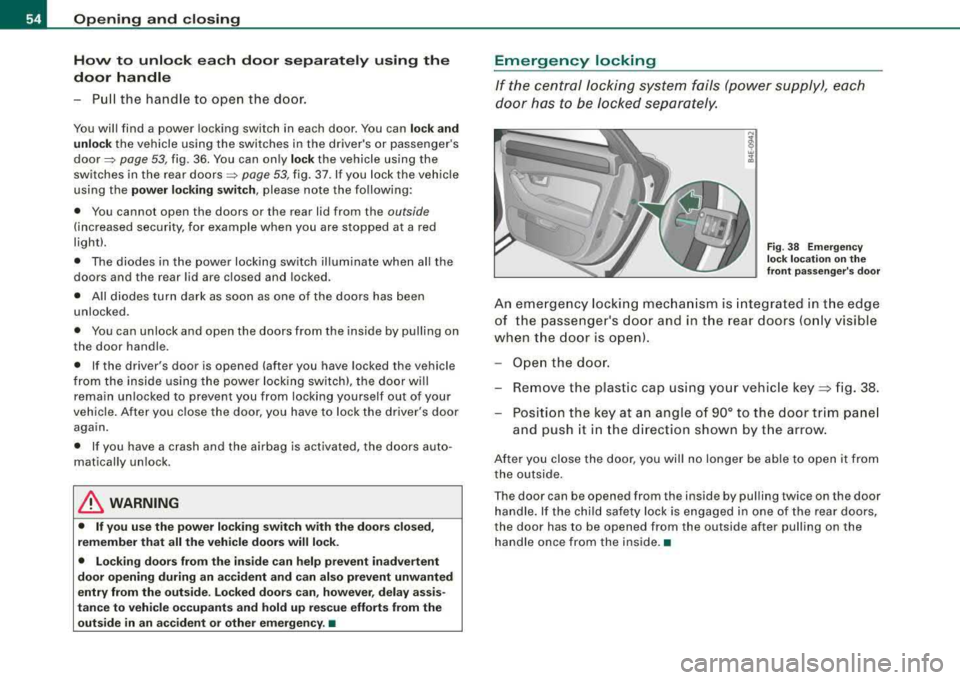
Fig. 38 E mergency
l oc k l oca tion on the
front pa ssenger 's do or
An eme rgency locking mec hani sm is integra ted in t he edge
of the passe nger's door and in the rear doors (o nly visible
when the door is o pen).
Ope n the door .
- Remove the plastic cap using your vehic le
key => fig. 38.
- Position the key at an angle of 90° to th e door trim pa nel
and push it in the d irection shown by t he arrow.
After you close the door, you wil l no longer be able to open it from
the outside.
T he door can be opened from the inside by pu lling twic e on the door
handle. If the chi ld safety lock is engaged in one of the rear doors,
the door has to be opened from the outside after pulling on the
ha ndle once from the inside. •
Page 58 of 404
Opening and closing
Opening and closing rear lid manually
If the central locking system fails (power supply), you can
also open the rear lid using the mechanical key.
@ ®
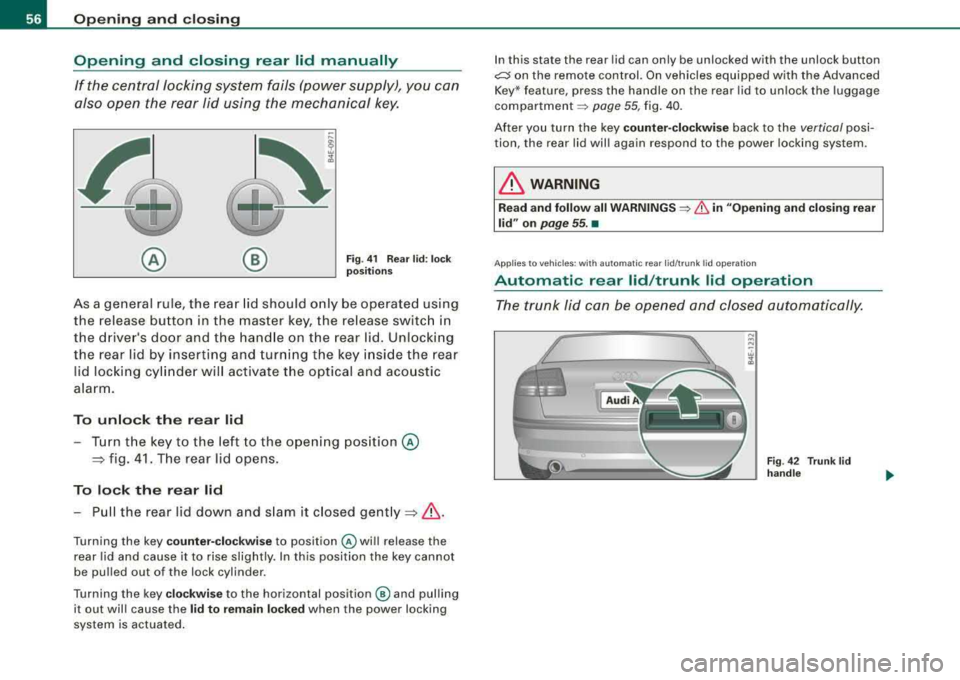
Fig. 41 Rear lid : lock
positions
As a general rule, the rear lid should only be operated using
the release button in the master key, the release switch in
the drive r's door and the handle on the rear lid. Unlocking
the rear lid by inserting and turning the key inside the rear
l id locking cylinder will activate the optical and acoustic
alarm.
To unlock the rear lid
- Turn the key to the left to the opening position @
=> fig. 41. The rear lid opens.
To lock the rear lid
-Pull the rear lid down and slam it closed gently =>& .
Turning the key counter-clockwise to position @ will release the
rear lid and cause it to rise slightly. In this position the key cannot
be pulled out of the lock cylinder.
Turning the key
clockwise to the horizontal position @ and pulling
it out will cause the
lid to remain locked when the power locking
system is actuated. I
n this state the rear lid can only be unlocked with the unlock button
~ on the remote control. On vehicles equipped with the Advanced
Key * feature, press the handle on the rear lid to unlock the luggage
compartment ~ page 55, fig. 40.
After you turn the key
counter-clockwise back to the vertical posi
tion, the rear lid will again respond to the power locking system.
& WARNING
Read and follow all WARNINGS ~ & in "Opening and closing rear
lid" on
page 55. •
App lies to veh icles : with au to m at ic rear lid/ tr unk lid operatio n
Automatic rear lid /trunk lid operation
The trunk lid can be opened and closed automatically.
Fig . 42 Trunk lid
handle