warning light AUDI S8 2008 Service Manual
[x] Cancel search | Manufacturer: AUDI, Model Year: 2008, Model line: S8, Model: AUDI S8 2008Pages: 404, PDF Size: 52.7 MB
Page 108 of 404
___ S_ e_ a_t _s _ a_ n_d_ s_t_o _ r_ a_, g=--- e ______________________________________________ _
Adjusting the cupholder individually
P ress and ho ld the retainer arm @ inw ard an d adjust i t
to fit t he c up size.
T he retainer arm should fit snugly around the cup or can. The
cupho lde r is de signed to hold no more than t wo c ups o r cans.
& WARNING
Spilled hot liquid can cau se an accident and per sonal injury.
• Never carry any beverage containers with hot liquids , such as
hot coffee or hot tea , in the vehicle while it is moving. In case of an
accident, sudden braking or other vehicle movement , hot liquid
could spill , causing scalding burns. Spilled hot liquid can al so
cause an accident and personal injury .
• Use only soft cups in the cupholder. Hard cups and glasses can
cause injury in an accident.
0 Note
Only drink containers with lids should be carried in the cupholder.
Liq uid c ould sp ill out and damage y our vehicle's electr onic e qu ip
ment or stain the upholstery , etc .
•
Ashtray
Front ashtray
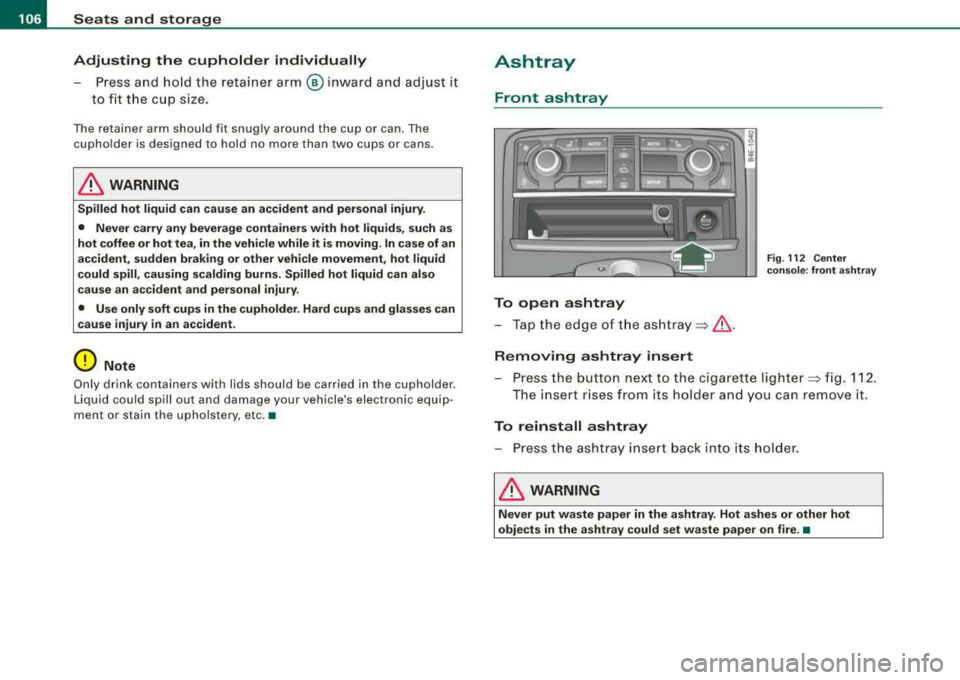
To open ashtray
-Tap the e dge o f th e ash tr ay ~ & .
Removing ashtray insert
Fig . 11 2 C enter
c o n so le: front a shtr ay
-P ress the button nex t to the ciga rette light er~ fig. 112 .
T he insert r ises from its holder and you ca n remove it.
To reinstall ashtray
-P re ss the ashtra y insert back into i ts hol de r.
& WARNING
Never put wa ste paper in the ashtray . Hot a shes or other hot
objects in the ashtray could set waste paper on fire . •
Page 109 of 404
________________________________________________ S_e_ a_ ts_ a_ n_d _ s_t _o _r_ a _, g:. e _ ___,_
Rear ashtray
Fig . 113 Rear ashtray
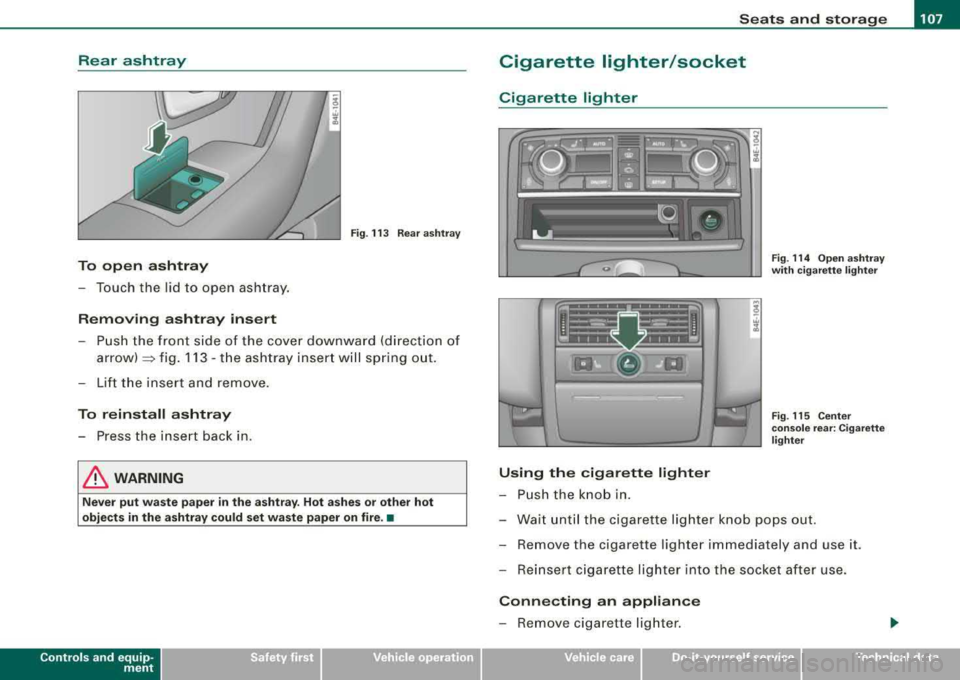
To open ashtray
-Touch the lid to open ashtray.
Removing ashtray insert
-Push the front side of the cover downward (direction of
arrow)::::::, fig. 113 -the ashtray insert will spring out.
-Lift the insert and remove.
To reinstall ashtray
-Press the insert back in .
& WARNING
Never put waste paper in the ashtray. Hot ashes or other hot
objects in the ashtray could set waste paper on fire. •
Contro ls a nd eq uip
ment
Cigarette lighter/socket
Cigarette lighter
Using the cigarette lighter
-Push the knob in.
Fig. 114 Open ashtray
with cigarette lighter
Fig . 115 Center
console rear: Cigarette
lighter
-Wait until the cigarette lighter knob pops out.
-Remove the cigarette lighter immediately and use it.
-Reinsert cigarette lighter into the socket after use.
Connecting an appliance
-Remove cigarette lighter.
Vehicle care I I irechnical data
Page 110 of 404
___ S_ e
_ a_t_s _ a_n_ d
__ s _t _o _r _a ...::g:::.... e ________________________________________________ _
-Plu g in applian ce to be use d.
The socket of the ci gare tte l ighter may be used for 12-volt appli
ances with maximum consumption of up to 100 watts , such as a
flash light, small vacuum c leaner, etc .
Before you purchase any accessories , always read and fo llow the
in fo rm ati on in
~ page 382 , "Additiona l ac cess ories a nd parts
replacement".
& WARNING
Improper use of the cigarette lighter can cause ser ious injury or
start a fire .
• Be careful when using the cigarette lighter . If you do not pay
attention to what you are do ing when you are using the cigarette
lighter you can burn yourself .
• The cigarette lighter and socket remain functional even if the
ignition is switched off or the ignition key is removed. Never leave
c hildren inside the vehi cle without supervision.
0 Note
• To avoid damaging the s ocket , only use plugs tha t fit pr operly.
• Only use the cigarette lighter socket as a power source for elec
tr ical accesso ries for sh ort du rations. Use the sockets in the vehic le
when a power source is needed for longer durations .
[ i J Tips
When the engine is off and accessories are sti ll plugged in and are
on, the v ehicle battery ca n st ill be d raine d.•
Long center console
Ap plies to veh ic les : w ith lon g cen ter co nso le
Overview
Fig . 116 Long re ar
cen ter con sole
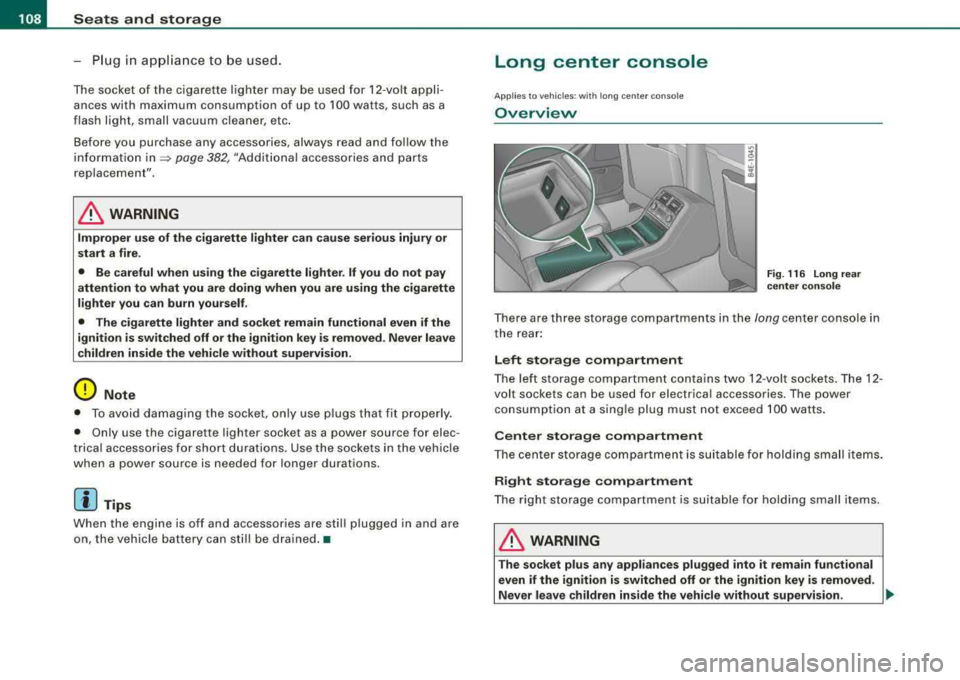
T here are three storage co mpartments in the long center console in
t he rear :
Left storage compartment
The le ft sto rage c om partm ent co ntain s two 12 -v o lt so ckets. The 12 -
volt sockets can be used for electrica l accessories. The power
co nsumption a t a sing le plug mus t no t exceed 100 watts .
Center storage compartment
Th e cen te r storag e compar tment is suitabl e fo r hol ding small items .
Right storage compartment
T he right storage co mpart ment is suita ble for hold ing smal l items.
& WARNING
T he socket plus any appliances plugged into it remain functional
even if the ignition is switched off or the ignition key is removed.
Never leave children in side the vehicle without supervision.
~
Page 111 of 404
![AUDI S8 2008 Service Manual ________________________________________________ S_ e_ a_t _
s _a_ n_d _ s_t _o _ r_ a_ g~ e __ fflll
0 Note
To avoid damaging the socket, only use plugs that fit properly.
[ i] Tips
Wh](/img/6/57619/w960_57619-110.png "AUDI S8 2008 Service Manual ________________________________________________ S_ e_ a_t _
s _a_ n_d _ s_t _o _ r_ a_ g~ e __ fflll
0 Note
To avoid damaging the socket, only use plugs that fit properly.
[ i] Tips
Wh")
________________________________________________ S_ e_ a_t _
s _a_ n_d _ s_t _o _ r_ a_ g~ e __ fflll
0 Note
To avoid damaging the socket, only use plugs that fit properly.
[ i] Tips
When the engine is off and accessories are still plugged in and are
on, the vehicle battery can still be drained. •
Storage
General overview
There are numerous places to store items in your vehicle.
Glove compartment
Storage compartment
Pockets in the front seats*
Compartments in the door trim panels
Compartments in the rear doors*
Coat hooks => page 109
=> page 110
=> page 110
=> page 111
=> page 111
Left side storage compartment in the => page 112
trunk
--Right side storage compartment in the => page 113
trunk
Emergency warning triangle
=> page 348
& WARNING
• Always remove objects from the instrument panel. Any items
not stored could slide around inside the vehicle while driving or
Controls and equip ment
&, WARNING (continued)
when accelerating or when applying the brakes or when driving
around a corner.
• When you are driving make sure that anything you may have
placed in the center console or other storage locations cannot fall
out into the footwells. In case of sudden braking you would not be
able to brake or accelerate.
• Any articles of clothing that you have hung up must not inter
fere with the driver's view. The coat hooks are designed only for
lightweight clothing . Never hang any clothing with hard, pointed
or heavy objects in the pockets on the coat hooks. During sudden
braking or in an accident -especially if the airbag is deployed -
these objects could injure any passengers inside the vehicle. •
Glove compartment
Your Owner's Literature and the media player are stored
in the lockable glove compartment.
t------.-,.---------. l
i
Fig. 117 Glove
compartment
Page 113 of 404
Seats and storage -______________ ___,;.____.
Compartments in the door trim panels
Fig. 121 Storage
compartment in the
door panel
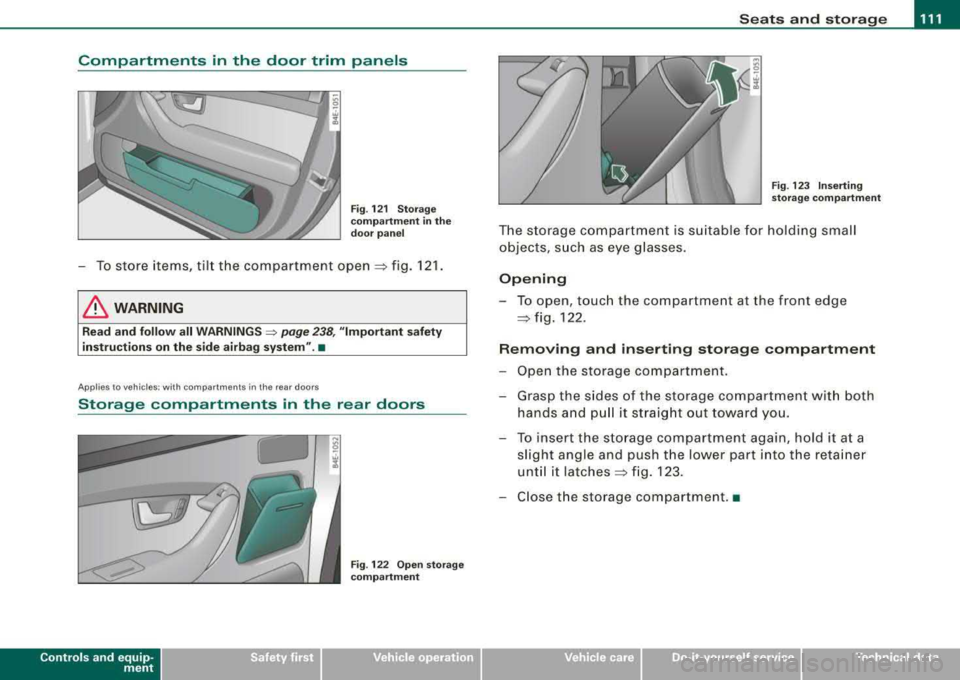
-To store items, tilt the compartment open => fig. 121.
& WARNING
Read and follow all WARNINGS => page 238, "Important safety
instructions on the side airbag system" .•
Appl ies to vehicles: with compartments in the rea r doors
Storage compartments in the rear doors
Contro ls a nd eq uip
ment
Fig . 122 Open storage
compartment Fig. 123 Inserting
storage compartment
The storage compartment is suitable for holding small
objects, such as eye glasses.
Opening
-To open, touch the compartment at the front edge
=> fig. 122.
Removing and inserting storage compartment
-Open the storage compartment.
-Grasp the sides of the storage compartment with both
hands and pull it straight out toward you.
-To insert the storage compartment again, hold it at a
slight angle and push the lower part into the retainer
until it
latches => fig. 123.
-Close the storage compartment. •
Vehicle care I I irechnical data
Page 114 of 404
-
Seats and storage
----=---------------
Coat hooks
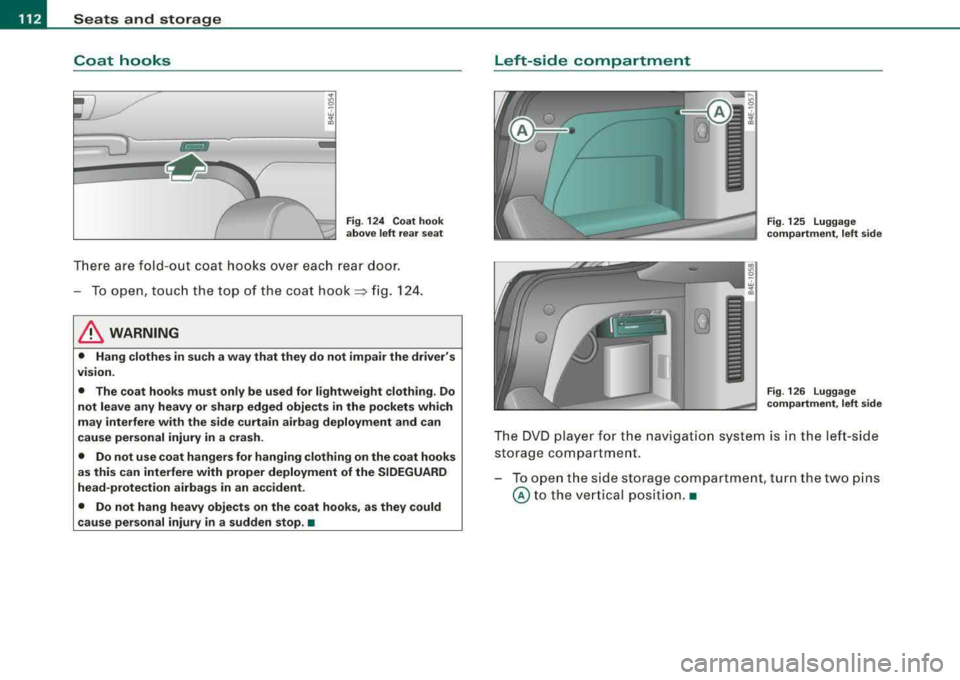
Fig. 124 Coat hook
above left rear seat
There are fold -out coat hooks over each rear door.
-To open, touch the top of the coat hook=> fig. 124.
& WARNING
• Hang clothes in such a way that they do not impair the driver's
v1s1on.
• The coat hooks must only be used for lightweight clothing. Do
not leave any heavy or sharp edged objects in the pockets which
may interfere with the side curtain airbag deployment and can
cause personal injury in a crash.
• Do not use coat hangers for hanging clothing on the coat hooks
as this can interfere with proper deployment of the SIDEGUARD
head-protection airbags in an accident.
• Do not hang heavy objects on the coat hooks, as they could
cause personal injury
in a sudden stop. •
Left-sid e compartment
Fig. 125 Luggage
compartment, left side
Fig . 126 Luggage
compartment, left side
The DVD player for the nav igation system is in the left-side
storage compartment .
- To open the side storage compartment, turn the two pins
© to the vertical position.•
Page 133 of 404

On the road -
-----------------'
Stopping the engine
-Turn the ignition key to position®~ page 130, fig. 145.
& WARNING
• Never turn off the engine until the vehicle has come to a
complete stop.
• The brake booster and servotronic only work when the engine
is running. With the ignition turned off, you have to apply more
force when steering or braking. Since you cannot steer and stop normally, this can lead to accidents and serious injuries .
• The radiator fan can continue to run for up to 10 minutes even
after you have turned off the engine and removed the ignition key.
The radiator fan can also turn on again if the engine coolant heats
up because of intense sunlight or heat build-up in the engine
compartment.
0 Note
Do not stop the engine immediately after hard or extended driving.
Keep the engine running for approximately two minutes to prevent
excessive heat build-up.•
Contro ls a nd eq uip
ment
Starting and stopping the engine
using the Advanced Key
A pp lies to veh ic les: with Advanced Key
Starting the engine using the [ START] button
Using this button, you can switch on the ignition and start
the engine.
0
0
Fig . 146 Advanced
Key: START button
The [ START] button has a two position feature. ~ fig. 146.
Switching on the ignition
-Press the [START] button to the first position. Only the
ig nition switches on .
Starting the engine
-Depress the foot brake.
- Move the selector lever into the P or N position
~ &.
- Press the [ START] button to the second position. The
engine starts.
Vehicle care I I irechnical data
Page 136 of 404
___ O_ n_t_ h_ e_ ro_ a_d __________________________________________________ _
Electromechanical parking brake
Operation
The electromechani ca l parking brake replaces the hand
brake.
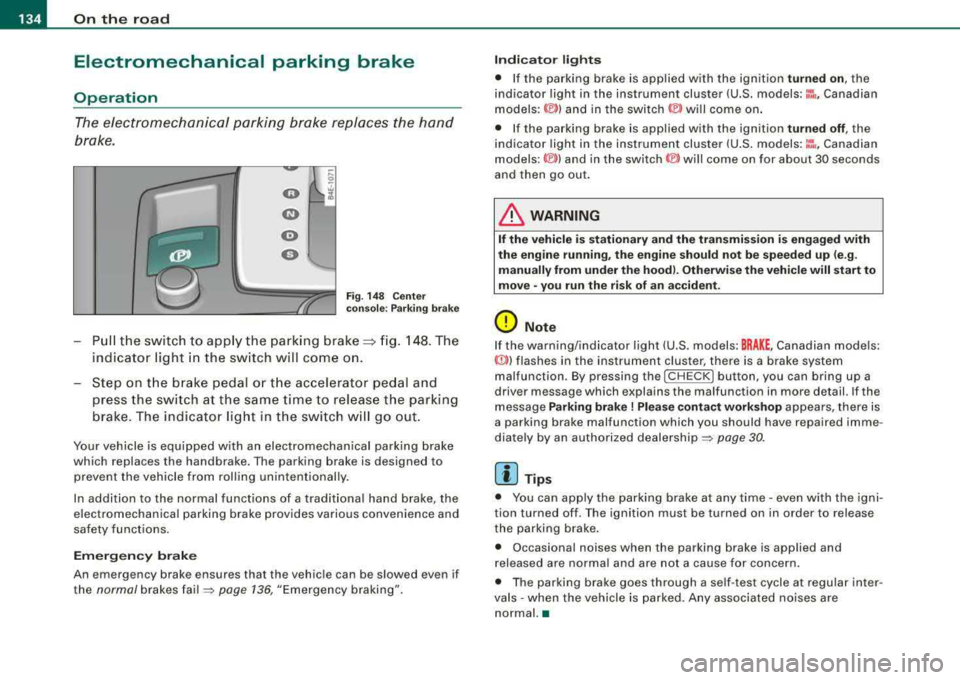
F ig. 148 C enter
co nso le: P arki ng b ra ke
Pu ll the switch to app ly the parking brake==> fig. 148. The
indicator light in the sw itch will come on.
Step on t he brake pedal o r th e acce lerator pedal and
press th e switch at the s am e time to rel eas e the parking
brake . The indicator light in t he switch w ill go out .
Your vehicle is equ ipped w ith an electromechanical parking brake
which replaces the handbrake . The parking brake is designed to
prevent the vehicle from rolling unintentionally .
In addition to the norma l functions of a trad itiona l hand brake, the
e lectromechanical parking brake provides various convenience and
safety functions.
Em erg ency brake
An emergency brake ensures that the vehicle can be slowed even if
the
normal brakes fa il=> page 136, "Emergency braking".
Indi cat or light s
• If the pa rking brake is app lied with the ignition turned on , the
indicator light in the instrument cluster (U.S. models:
::i , Canadian
models: ©) and in the switch © will come on .
• If the parking brake is applied with the ignition
tu rn ed off , the
indicator light in the instrument cluster (U .S .
models :~~ . Canadian
models :(®) ) and in the
switch (®) will come on for about 30 seconds
and then go out.
& WARNING
I f the vehicle i s stati onary and the transmis sion i s engaged with
the eng ine runnin g, the engine should n ot b e speeded up (e .g .
manu ally from under the ho od). Otherw ise th e vehi cle w ill start to
mo ve
-you r un the ris k of an ac cident .
0 Note
If the warning/indicator light (U .S . models: BRAKE , Canadian models:
«D>) flashes in the instrument cluster, there is a brake system
malfunction . By pressing the
I CH ECK] button , you can bring up a
driver message which explains the malfunction in more detail. If the
message
Parking brake! Plea se conta ct w ork shop appears, there is
a parking brake malfunction which you should have repaired imme
diate ly by an authorized dealership =>
page 30.
[ i] Tips
• You can app ly the parking brake at any time -even with the igni
tion turned off . T he ignition must be turned on in order to release
the parking brake.
• Occasional noises when the parking brake is applied and
released are norma l and are not a cause for concern .
• The parking brake goes through a se lf -test cycle at regular inter
va ls
-when the vehicle is parked. Any associated no ises are
normal. •
Page 139 of 404
_________________________________________________ O_ n_ t_h _e _ ro_ a_d _ ___._
0 Note
If the warning/indicator light (U.S. models : BRAKE, Canadian models:
malfunction. By pressing the
I CHECK] button , you can bring up a
driv er m essage which explains the malfunction in more detail. If the
message
Parking brake! Please contact workshop appears, there is
a parking brake malfunction which you should have r epaired imme
diately by an authorized
dealership => page 30. •
Cruise control
Switching the system on
The cruise control system makes it possible to drive at a
constant speed starting at 20 mph (30 km/h).
rr- -- ...--,,-~------ -~ ----,-~
Contro ls a nd eq uip
ment
.... S? w ;f,
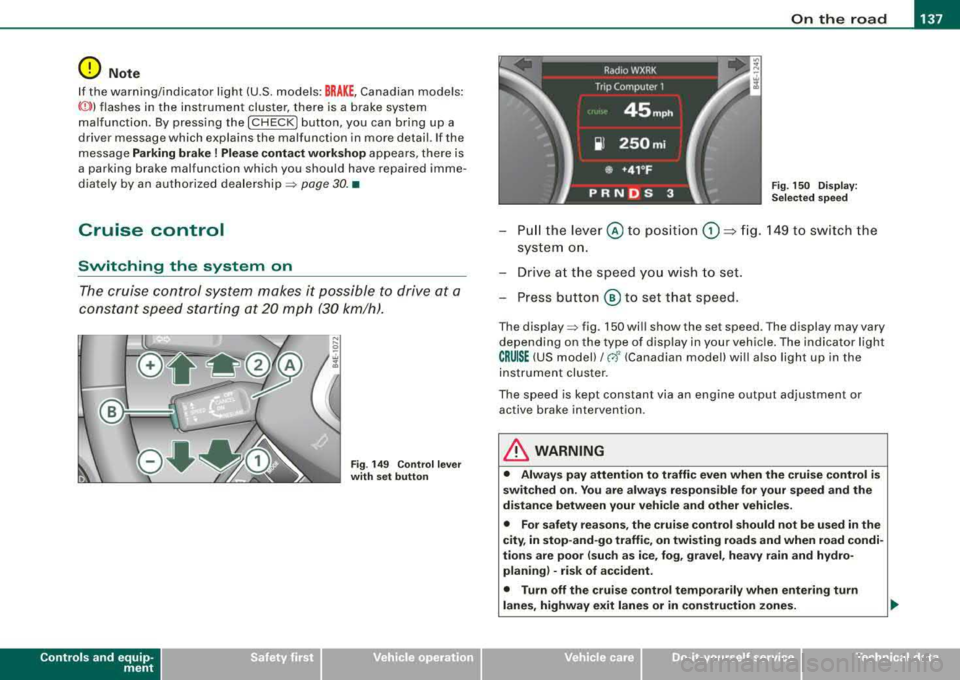
Fig . 149 Control lever
with set button Fig
. 150 Display:
Selected speed
Pull the lever © to position G) ~ fig. 149 to switch the
system on.
Drive at the speed you wish to set.
- Press button
® to set that speed.
The display => fig. 150 will show the set speed . The display may vary
depending on the type of display in your vehicle. The indicator light
CRUISE (US model)/ 0 (Canadian model) will also ligh t up in the
instrument cluster .
The speed is kept constant via an engine output adjustment or active brake intervention .
& WARNING
• Always pay attention to traffic even when the cruise control is
switched on. You are always responsible for your speed and the
distance between your vehicle and other vehicles.
• For safety reasons, the cruise control should not be used in the
city, in stop-and-go traffic, on twisting roads and when road condi
tions are poor (such as ice, fog, gravel, heavy rain and hydro
planing) -risk of accident.
• Turn off the cruise control temporarily when entering turn
lanes, highway exit lanes or in construction zones.
Vehicle care
I I irechnical data
Page 140 of 404
___ o_ n_ t_
h _e _ ro_ a_d __________________________________________________ _
&, WARNING (continued)
• Please note that inadvertently "resting" your foot on the accel
erator pedal causes the cruise control not to brake . This is because
the cruise control is overridden by the driver's acceleration.
[ i] Tips
The brake lights illumin ate as soon as the brakes decelerate
automatically. •
Changing speed
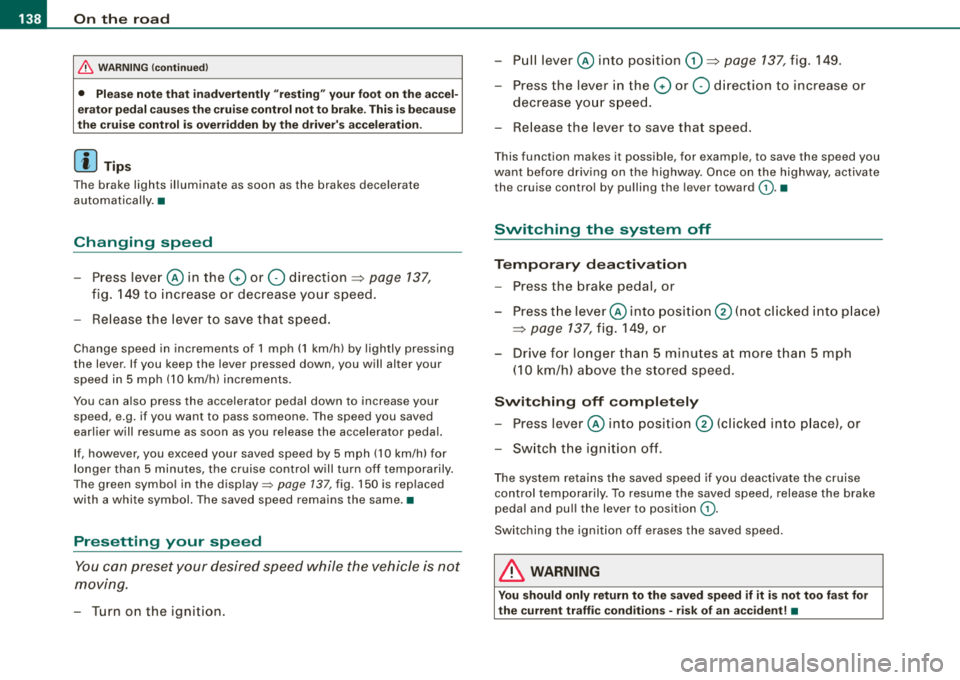
-Press lever@in the 0 or Q direction=> page 137,
fig. 149 to increase or decrease your speed.
-Release the lever to save that speed.
Change speed in increments of 1 mph (1 km/h) by lightly pressing
the lever . If you keep the lever pressed down, you will alter your
speed in 5 mph (10 km/h) increments.
You can also press the accelerator pedal down to increase your
speed, e.g. if you want to pass someone. The speed you saved
earlier will resume as soon as you release the accelerator pedal.
If, however, you exceed your saved speed by 5 mph (10 km/h) for
longer than 5 minutes, the cruise control will turn off temporarily.
The green symbol in the
display=> page 137, fig . 150 is replaced
with a white symbol. The saved speed remains the same. •
Presetting your speed
You can preset your desired speed while the vehicle is not
moving.
-Turn on the ignition .
-Pull lever@ into position G) => page 137, fig. 149 .
-Press the lever in the 0 or Q direction to increase or
decrease your speed.
-Release the lever to save that speed.
This function makes it possible, for example, to save the speed you
want before driving on the highway. Once on the highway, activate
the cruise contro l by pulling the lever toward
G). •
Switching the system off
Temporary deactivation
-Press the brake pedal, or
-Press the lever @into position ® (not clicked into place)
=> page 137, fig. 149, or
-Drive for longer than 5 minutes at more than 5 mph
(10 km/h) above the stored speed.
Switching off completely
-Press lever@ into position ® (clicked into place), or
-Switch the ignition off.
The system retains the saved speed if you deactivate the cruise
control temporarily . To resume the saved speed , release the brake
pedal and pull the lever to position
G) .
Switching the ignition off erases the saved speed.
& WARNING
You should only return to the saved speed if it is not too fast for
the current traffic conditions -risk of an accident!
•