warning light AUDI S8 2008 Repair Manual
[x] Cancel search | Manufacturer: AUDI, Model Year: 2008, Model line: S8, Model: AUDI S8 2008Pages: 404, PDF Size: 52.7 MB
Page 179 of 404
__________________________________________ A_ d_v _a_ n_ c_e _d _ P_a_ r_ k_ i_n -=g ;.._ S...:y'-- s_ t_ e_ m __ ......
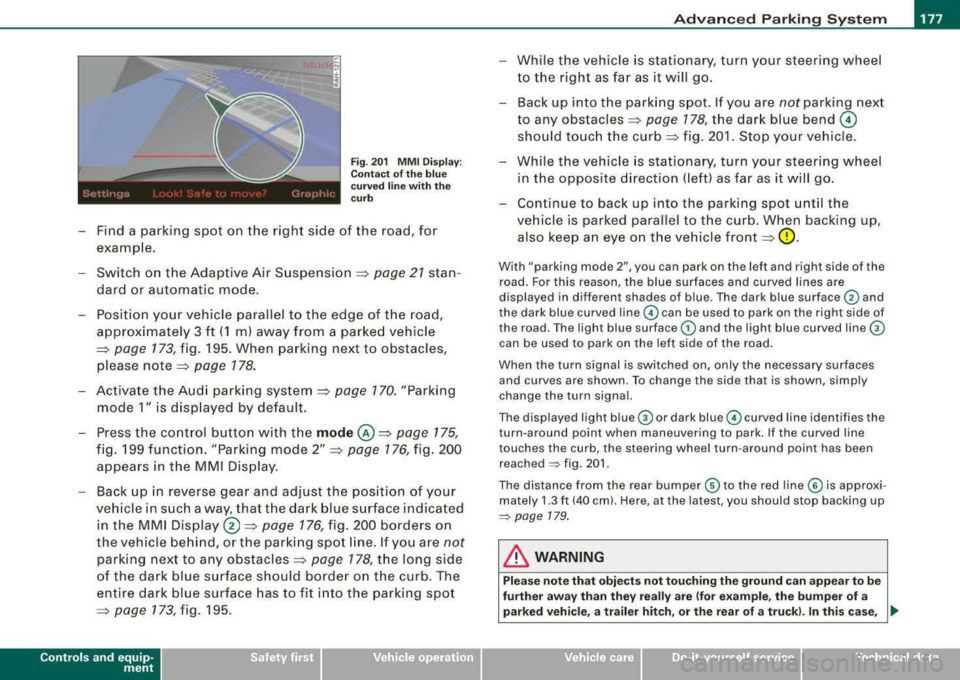
Fig . 201 MMI Display:
Contact of the blue
curved line with the
curb
- Find a parking spot on the right side of the road, for
example .
- Switch on the Adaptive Air Suspension =>
page 21 stan
dard or automatic mode.
- Position your vehicle parallel to the edge of the road,
approximately 3 ft (1 ml away from a parked vehicle
=> page 173 , fig. 195. When parking next to obstacles,
please
note => page 178.
- Activate the Audi parking system => page 170. "Parking
mode 1" is displayed by default.
- Press the control button with the
mode @=> page 175,
fig. 199 function. "Parking mode 2" => page 176, fig. 200
appears in the MMI Display.
- Back up in reverse gear and adjust the position of your
vehicle in such a way, that the dark blue surface indicated in the MMI
Display ®=> page 176, fig. 200 borders on
the vehicle behind, or the parking spot line. If you are
not
parking next to any obstacles => page 178, the long side
of the dark blue surface should border on the curb. The
entire dark blue surface has to fit into the parking spot
=> page 773,fig.195 .
Controls a nd eq uip
ment
While the vehicle is stationary, turn your steering wheel
to the right as far as it will go.
- Back up into the parking spot. If you are
not parking next
to any
obstacles => page 178, the dark blue bend ©
should touch the curb=> fig. 201. Stop your vehicle.
- While the vehicle is stationary, turn your steering wheel
in the opposite direction (left) as far as it will go.
- Continue to back up into the parking spot until the
vehicle is parked parallel to the curb. When backing up, also keep an eye on the vehicle
front => 0.
With "parking mode 2", you can park on the left and right side of the
road. For this reason, the blue surfaces and curved lines are
displayed in different shades of blue . The dark blue surface
G) and
the dark blue curved
line © can be used to park on the right side of
the road . The light blue surface
G) and the light blue curved line ©
can be used to park on the left side of the road.
When the turn signal is switched on, only the necessary surfaces
and curves are shown. To change the side that is shown, simply
change the turn signal.
The displayed light
blue © or dark blue© curved line identifies the
turn -around point when maneuvering to park. If the curved line
touches the curb, the steering wheel turn-around point has been reached
~ fig. 201 .
The distance from the rear bumper © to the red line© is approxi
mately
1.3 ft (40 cm). Here, at the latest, you should stop backing up
~ page 179.
in. WARNING
Please note that objects not touching the ground can appear to be
further away than they really are (for example, the bumper of a
parked vehicle, a trailer hitch, or the rear of a truck). In this case,
..,_
Vehicle care I I irechnical data
Page 185 of 404
__________________________________________ A_ d_v _a_ n_ c_e _d _ P_a_ r_ k_ i_n ~g _ S_y_ s_ t_ e_ m
___ ffllll
"O ff" se tting
If yo u have set t he off function, both the rear -view camera and the
visual disp lay wi ll be deactivated. The acoustic parking assist
rema ins active .
[ i] Tip s
If you change the settings in the MM I, the new settings do not
become active unti l the parking assis t is sw itched on again .•
Safety tips
Ap plies to vehi cles : w ith Ad vance d Par king Sys tem with re a r view c ame ra
Acoustic parking system error message
If you hear a continuous tone for several seconds while the front
and back parking ass ist w ith visual d isplay is activated and the LED
in the switch
P wA flashes when you engage the reverse gear, there is
a malfunction in the acoustic parking assist.
This system error is immed iate ly output after:
• Every manua l activation via the switch
Pw.o. => page 170,
• Reverse gear is engaged for t he first t ime during an ign it ion
cycle, or
• An error is detected dur ing operation.
[ i ] Tip s
If the system reports an error, have an Audi dealer or an authorized
dea lership correct this system error .•
Controls and equip ment
Applies to vehi cles: w it h Ad vanced Par king Sy stem wit h rea r vie w camera
Rear-view camera tips
We recommend that you pract ice parking with t he rear -v iew ca mera
in a traffic-free location, or parking
lot, to become familiar with the
system, the orien tation lines, and their fu nction . When do ing th is,
there should be good light and weather conditions .
I n the MMI Disp lay, objects or vehicles appear closer or further away
if:
• you are driving in reverse gear from a level surface onto an
inc lin e, or a downward slope,
• you are dr iving in reverse gear toward protruding objects,
• the vehicle is carrying too much load in the rear .
The accuracy of the orientation lines and b lue surfaces diminishes
if :
• the Adaptive Air Suspension is defec tive, or the dynamic or lift
mode is switched on,
• the rear -view camera does not provide a re liable image, for
examp le, in poor vis ibility conditions or if the lens is dirty,
• the image on the screen is not visib le due to sun glare and reflec
t ion.
Caring for the re ar-v iew c amer a len s:
• Dampen the lens with a household a lcoho l- based g lass c leaner,
and c lean the lens with a dry cloth.
• Remove snow with a hand brush.
• Remove ice, preferably with de -icing
spray=> 0.
& WARNING
• The rear -view c amera does not r epla ce the vie w to the re ar a nd
the rear view mirror s.
• The rear-view camer a - be cause of t echn ical lim itations -doe s
not show the entire are a behind the
vehicle => page 174, fig. 197. ~
Page 188 of 404
___ A_ d_a_ p_ ti_v _ e_ A_ ir_ S_u_ s_ p_e _n_ s_ io_n ___________________________________________ _
Chassis Controls
Four different driving modes can be set by the driver.
The automatic control processes are speed -and time -dependent.
For example, it is not possible to raise the suspension to the lift
mode above certain speeds .
When a speed of about 75 mph (120 km/h) is exceeded for more than 30 seconds, the vehicle is automatically lowered approximate ly 1
inch (25 mm) to a level suitable for highway speeds, except in the
standard mode . Road holding is optim ized as a result of the lower
center of gravity and fuel consumption is reduced as a result of
reduced wind resistance .
Level adjustment
lift
standard
automatic
dynam ic
automatic Ground
clearan ce
about 5 .7 inches (145 mm)
a bout 4.7 inches ( 120 m m)
about 4 .7 inches (120 mm)
about 3.9 inches (100 mm)
Se lect the automatic mode if you prefer a suspension setting
e m phas izing comfort . Damping characterist ics emphasiz ing
comfort are selected in this mode.
• Lowering : When a speed of abou t 75 mph ( 120 km/h) is excee ded
for more than 30 seconds, the vehic le is automatically lowered by
about 1 inch (25 mm) .
• Raising : The vehic le is automat ical ly raised again if the speed
fa lls bel ow about 44 mph (70 km/h) for a per iod of 120 seconds. The
vehic le is raised immediate ly when speed fa lls below about 22 mph
(35 km/h) .
dynami c
Select the sport mode if you prefer a sporty suspensio n setting . In
this mode, the veh ic le is lowered whi le it is still stationary and sporty damping characteristics are selected
. The warning
light ~
in the instrument cluster will c ome on for a few seconds just to
remind you of the reduced ground clearance .
I f you switch off the engine while the vehic le is in the dynamic mode
and then switc h on the ign it ion once aga in,
t h e ~ warning lig ht
wi ll also come on again for a few seconds.
• Lowering : When a speed of abou t 75 mph (120 km/h) is exceeded
for more than 30 seconds , the vehicle is automatica lly lowered by an
addi tiona l 0 .2 in (5 mm).
• Raising : The vehic le is automatically raised again if the speed
f alls below ab out 44 mph (70 km/ h) for a per iod of 120 seconds . The
vehic le is raised immediate ly when speed fa lls below about 22 mph
(35 km/h) .
sta nd ard
Se lect the s tandard mode if you desire a suspensi on se tt ing with a
special emphasis on comfort . In the standard mode there is
n o
lo wer ing of t he suspension . Even at high speeds, the vehicle stays
at the same level. Damping characteristics with a decided emphasis
on com fort are selected in this mode.
lift
Se lec t t he lif t mode when you have to travel over poor secti ons of
road (e .g . trails). In the lift mode, the vehic le is raised by 1 inch (25
mm ) compared to norma l level wh ile it is st ill stati onary a nd
damping characteristics are ad justed to emphasize comfort.
T he lift mode can be act ivated on ly at speeds below 50 mph (80
k m/h). When a speed of about 62 mph (100 km/h) is exceeded, the
system automatical ly leaves lift mode and the mode set previously
(standard, au tomat ic, dynamic) is activated aga in. •
Page 190 of 404
___ A_ d_a_ p=--- t_iv _ e_ A
_ i_ r _ S_ u_s--= p'--- e_n _ s_ i
_ o _ n _____________________________________________ _
Setting the Driving Modes
The driving modes are set in MM/.
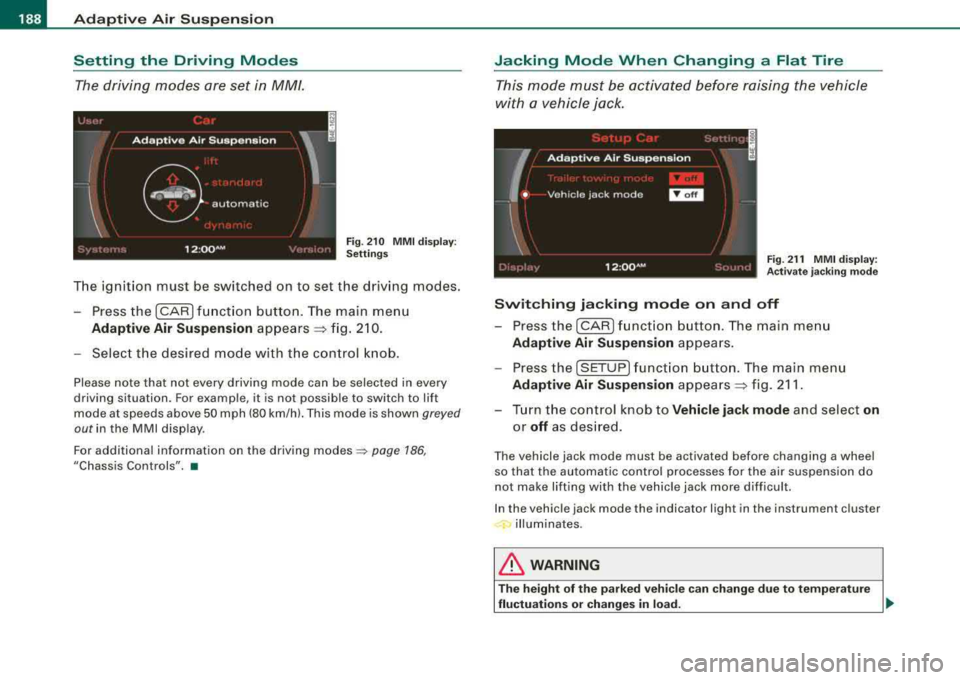
F ig . 2 10 MM I d is pl ay:
Setti ngs
The ignition must be switched on to set the driving modes .
- Press the (CAR] f unction button . The main menu
Ad aptive Air Suspension appears ~ fig. 2 10.
- Select the desired mode with the c ontrol k nob .
Please note that not every driving mode can be selected in every
driving situation. For examp le, it is not possible to switch to lift
mode at speeds above 50 mph (80 km/h). This mode is shown
greyed
out in the MMI disp lay .
For additional information on the driving
modes ~ page 186,
"Chassis Controls". •
Jacking Mode When Changing a Flat Tire
This mode must be activated before raising the vehicle
with a vehicle jack .
Fig. 21 1 MMI displ ay:
Ac tivat e ja ckin g m od e
Switching jacking mod e on and off
- Press the
I CAR ) fu nct io n bu tton. The main me nu
Adaptive Air Su spen sion appea rs .
- Press the
[SETUP] f unct io n button . The main menu
Adaptive Air Su spen sion appea rs ~ fig. 211 .
- Turn the co ntrol knob to
Vehicle jack mode and select on
or off as des ired .
The vehicle jack mode must be activated before changing a wheel
so that the automatic control processes fo r the air suspension do
not make lifting with the vehicle jack more difficult.
In the vehic le jack mode the indicator light in the instrument cluster
illuminates.
& WARNING
T he height of the p arked vehic le c an change du e to te mpera ture
fluctu ation s or change s in lo ad.
~
Page 193 of 404

___________________________________________________ H_ o_m_ e_ L_ i_ n _ k_ ®_ R __ l!III
Homelink ®
Universal remote control
Applies to vehicles: w ith Home link® unive rsa l remo te cont rol
General information
The HomeLink® feature can learn up to three radio
frequency codes for most current transmitters used for
operating garage doors, estate gates, home or outdoor
lighting systems, and other devices.
You must first program the Homelink® transmitter before you can
use the
system=> page 191, "Programming the Homelink® trans
mitter".
In order to program the Homelink® transmitter for devices utilizing
rolling code , a second person on a ladder who can safely reach the
garage door opener motor is recommended. It is also necessary to
locate the
"learn" button on your garage door opener motor . Refer
to the operating instructions for the opener, as the location and
color of this button may
vary by manufacturer.
You can still use the original remote control for the device at any
time.
& WARNING
• Never use the Homelink"" transmitter with any garage door
opener that does have not the safety stop and reverse feature as
required by federal safety standards. This includes any garage
door opener model manufactured before April 1, 1982.
• A garage door opener which cannot detect an object, signaling
the door to stop and reverse does not meet current federal safety standards . Using a garage door opener without these features
increases risk of serious injury or death.
Controls and equip ment
& WARNING (continued)
• For safety reasons never release the parking brake or start the
engine while anyone is standing in front of the vehicle.
• A garage door or an estate gate may sometimes be set in
motion when the Homelink® remote control is being
programmed. If the device is repeatedly activated, this can over
strain motor and damage its electrical components -an over
heated motor is a fire hazard!
• To avoid possible injuries or property damage, please always
make absolutely certain that no persons or objects are located in
the range of motion of any equipment being operated. •
Applies to vehicles : wit h Home link ® uni vers al remote con trol
Programming the Homelink ® transmitter
The transmitter is programmed in two phases. For rolling
code transmitters, a third phase is also necessary.
f ( ~ ~
i
s: 0
,1, .., Cl)
ll
Fig . 213 Overhead
console: Homelink®
keypad
~
Page 201 of 404
________________________________________________ D_r_iv _ i
_ n..; g::;_ S_ a_ fe---' ly'---_JIII
Important things to do before driving
Safety is everybody's job! Vehicle and occupant safety
always depends on the informed and careful driver.
For your safety and the safety of your passengers, before
driving always:
- Make sure that all lights and signals are operat ing
correctly.
- Make sure that the tire pressure is correct.
- Make sure that all windows are clean and afford good
visibility to the outside.
- Secure all luggage and other items
carefully => page 109.
-Make sure that nothing can interfere with the pedals.
- Adjust front seat, head restraint and mirrors correctly for your height .
- Instruct passengers to adjust the head restraints
according to their height.
- Make sure to use the right child restraint correctly to
protect
children => page 243, "Child Safety".
- Sit properly in your seat and make sure that your passen
gers do the
same => page 86, "General recommenda
tions".
- Fasten your safety belt and wear it properly. Also instruct
your passengers to fasten their safety belts properly
=> page 209. •
Controls and equip
ment Safety first
Vehicle operation
What impairs driving safety?
Safe driving is directly related to the condition of the
vehicle, the driver as well as the driver's ability to concen
trate on the road without being distracted.
The driver is responsible for the safety of the vehicle and all
of its occupants. If your ability to drive is impaired, safety
risks for everybody in the vehicle increase and you also
become a hazard to everyone else on the road
=>& .There
fore:
Do not let yourself be distracted by passengers or by
using a cellular telephone .
NEVER drive when your driving ability is impaired (by
medications, alcohol, drugs, etc.).
- Observe all traffic laws, rules of the road and speed limits
and plain common sense .
- ALWAYS adjust your speed to road, traffic and weather
conditions.
- Take frequent breaks on long trips. Do not drive for more
than two hours at a stretch.
- Do NOT drive when you are tired, under pressure or when
you are stressed .
& WARNING
Impaired driving safety increases the risk of serious personal
injury and death whenever a vehicle is being used. •
Vehicle care Do-it-yourself service Technical data
Page 202 of 404
___ D_ ri_v _i_n ..;::g:c..- S_ a_ f
_ e____, IY,__ ________________________________________________ _
Proper occupant seating positions
Proper seating position for the driver
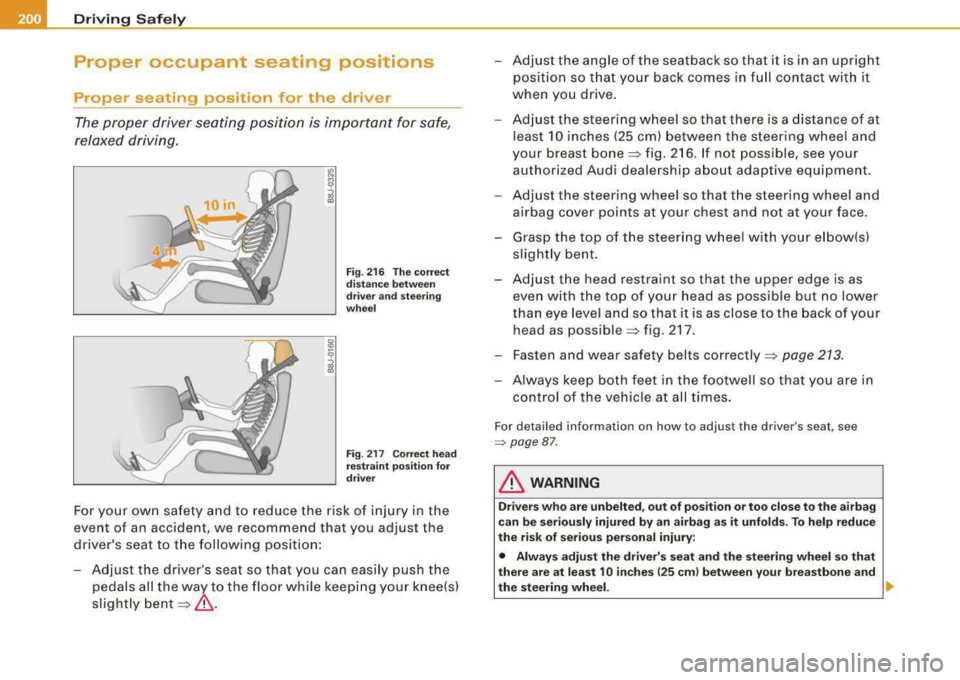
The proper driver seating position is important for safe ,
relaxed driving.
I.I> N
;
Fig. 216 The correct
distance between
driver and steering
wheel
Fig . 217 Correct head
restraint position for
driver
For your own safety and to reduce the risk of injury in the
event of an acc ident , we recommend that you adjust the
driver's seat to the following position:
- Adjust the driver's seat so that you can easily push the
pedals all the way to the floor while keeping your knee(s)
slightly
bent =:>& .
- Adjust the angle of the seatback so that it is in an upright
position so that your back comes in full contact with it
when you drive.
- Adjust the steering wheel so that there is a distance of at
least 10 inches (25 cm) between the steering wheel and
your breast
bone =:> fig. 216. If not possible, see your
authorized Audi dealership about adaptive equipment.
- Adjust the steering wheel so that the steering wheel and
airbag cover points at your chest and not at your face.
- Grasp the top of the steering wheel with your elbow(s)
slightly bent.
- Adjust the head restraint so that the upper edge is as even with the top of your head as poss ible but no lower
than eye level and so that it is as close to the back of your
head as
poss ible =:> fig. 217 .
- Fasten and wear safety belts
correctly =:> page 213.
- Always keep both feet in the footwell so that you are in
control of the vehicle at all times.
For detailed information on how to adjust the driver's seat, see
=> page 87 .
& WARNING
Drivers who are unbelted, out of position or too close to the airbag
can be seriously injured by an airbag as it unfolds. To help reduce
the risk of serious personal injury:
• Always adjust the driver's seat and the steering wheel so that
there are at least 10 inches
125 cm) between your breastbone and
the steering wheel. .,
Page 211 of 404
_________________________________________________ s_ a_f _e _t .:,.y _ b_ e_lt_ s __ lfll
Safety belts
General notes
Always wear safety belts!
Wearing safety belts correctly saves lives!
This chapter explains why safety belts are necessary, how
they work and how to adjust and wear them correctly.
- Read all the information that follows and heed all of the
instructions and WARNINGS.
& WARNING
Not wearing safety belts or wearing them improperly increases
the risk of serious personal injury and death.
• Safety belts are the single most effective means available to
reduce the risk of serious injury and death in automobile acci
dents. For your protection and that of your passengers, always
correctly wear safety belts when the vehicle is moving.
• Pregnant women, injured, or physically impaired persons must
also use safety belts . Like all vehicle occupants, they are more
likely to be seriously injured if they do not wear safety belts. The
best way to protect a fetus is to protect the mother -throughout
the entire pregnancy. •
Number of seats
Your Audi has a total of five seating positions: two in the front and
three in the rear. Vehicles with power individual rear seats* have
seating for four: two in the front and two in the rear. Each seating
position has a safety belt.
Controls and equip ment Safety first
Vehicle operation
& WARNING
Not wearing safety belts or wearing them improperly increases
the risk of serious personal injury and death .
• Never strap more than one person, including small children,
into any belt. It is especially dangerous to place a safety belt over
a child sitting on your lap.
• Never let more people ride in the vehicle than there are safety
belts available.
• Be sure everyone riding in the vehicle is properly restrained
with a separate safety belt or child restraint. •
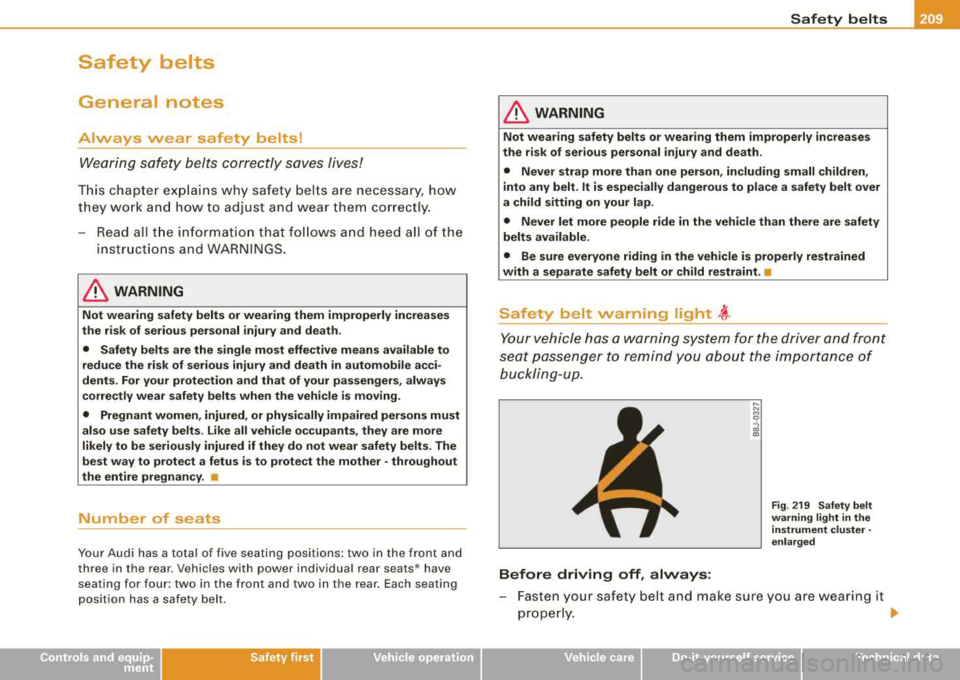
Safety belt warning light ~
Your vehicle has a warning system for the driver and front
seat passenger to remind you about the importance of
buckling-up.
Before driving off, always:
Fig . 219 Safety belt
warning light in the
instrument cluster -
enlarged
- Fasten your safety belt and make sure you are wearing it
properly.
.,_
Vehicle care Do-it-yourself service Technical data
Page 212 of 404
___ s_a_ f_ e_ t-= y_ b_e_ l_ t _s _______________________________________________ _
-Make sure that your passengers also b uckle up and pro p
erly wea r th eir sa fety be lts.
Protect children wit h a c hild restraint sys tem appropriate
for the size and age.
The warning light ~ in the instrument cluster lights up when the
ignition is switched on as a reminder to fasten the safety belts. In
addition , you will hear a warning tone.
After the ignition is switched on, the warning light in the instrument cluster will a lways come on for about 6 seconds and if the driver has
not fastened the safety belt, a warning tone will also sound for
about 6 seconds . As soon as the driver has fastened the safety belt,
the warning tone will stop and the warning light will go out .
If the driver or front seat passenger have not buckled -up within
about 10 seconds after the warning tone has stopped and the
vehicle is moving faster than about 15 mph, the warning tone will
sound again for about 6 seconds and then s top for 24 seconds and
then repeat this reminder sequence for a maximum of 2 minutes. At
speeds be low 5 mph, the warning to ne will not sound.
Fa sten your safe ty belt and make su re that your p assengers al so
properl y put on their s afet y belts .
& WARNING
• Safety belts are the single mo st effective mean s available to
reduce th e risk of ser ious in jur y a nd death in aut omobile acci
dent s. For your prote ction and that of your pas sengers , alway s
c orrectly wear safety belt s when t he v ehicle is moving .
• Failure t o pay attention to th e warning light that come on,
c ould lead to per sonal injur y.•
Why safety belts?
Frontal collisions and the law of physics
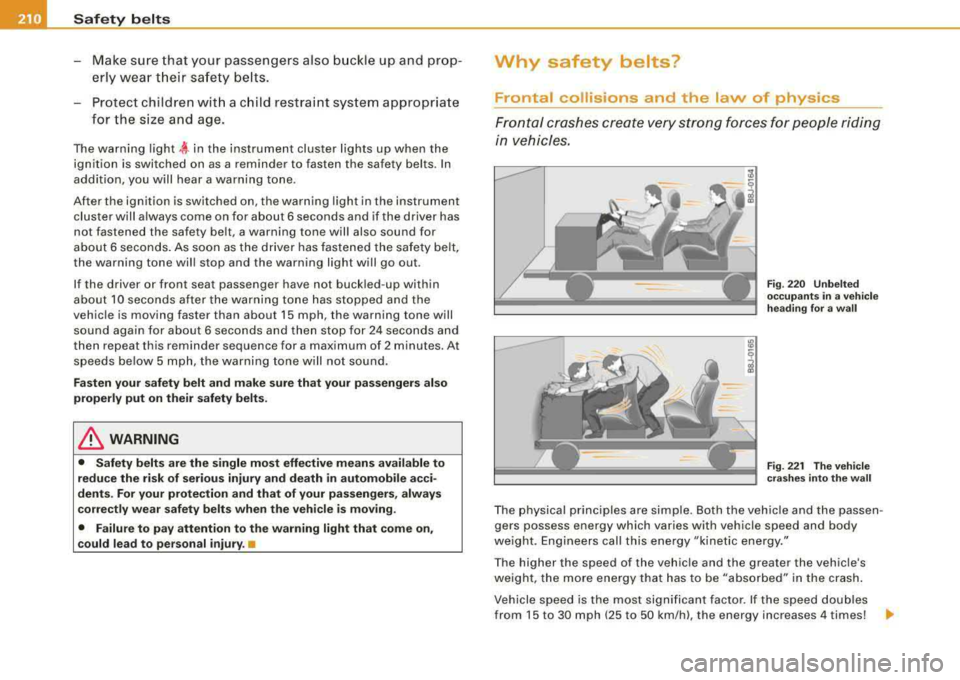
Frontal cras hes cre ate very strong forces for people ridi ng
in vehicles.
F ig . 22 0 Unbel te d
occ upants in a ve hicle
h ead ing for a w all
F ig . 22 1 The vehi cle
c ras hes in to th e wa ll
The physical principles are simple. Both the vehicle and the passen
gers possess energy which varies with vehicle speed and body
we ight . Engineers call this energy "kinetic energy ."
T he higher the speed of the vehicle and the greater the vehic le's
we ight, the more energy that has to be "absorbed" in the crash .
Vehicle speed is the most signi fican t factor. If the speed doubles
from 15 to 30 mph (25 to 50 km/h), the energy increases 4 times!
.,
Page 216 of 404
-Safety belts
---=---------------------------------
Automatic safety belt retractors
Every safety belt is equipped with an automatic belt retractor on the
shoulder belt. This feature locks the belt when the belt is pulled out
fast, during hard braking and in an accident. The belt may also lock
when you drive up or down a steep hill or through a sharp curve. During normal driving the belt lets you move freely.
Safety belt pretensioners
The safety belts are equipped with a belt pretensioner that helps to
tighten the safety belt and remove slack when the pretensioner is
activated. The function of the pretensioner is monitored by a
warning
light=> page 19.
Switchable locking feature
Every safety belt except the one on the driver seat is equipped with
a switchable locking feature that
must be used when the safety belt
is used to attach a child seat. Be sure to read the important informa
tion about this
feature => page 253.
& WARNING
Improperly positioned safety belts can cause serious injury in an
accident=> page 214, "Safety belt position" .
• Safety belts offer optimum protection only when the seat back
is upright and belts are properly positioned on the body.
• Never attach the safety belt to the buckle for another seat.
Attaching the belt to the wrong buckle will reduce safety belt
effectiveness and can cause serious personal injury.
• A passenger who is not properly restrained can be seriously
injured by the safety belt itself when it moves from the stronger
parts of the body into critical areas like the abdomen.
• Always lock the convertible locking retractor when you are
securing a child seat in the vehicle
=> page 255. •
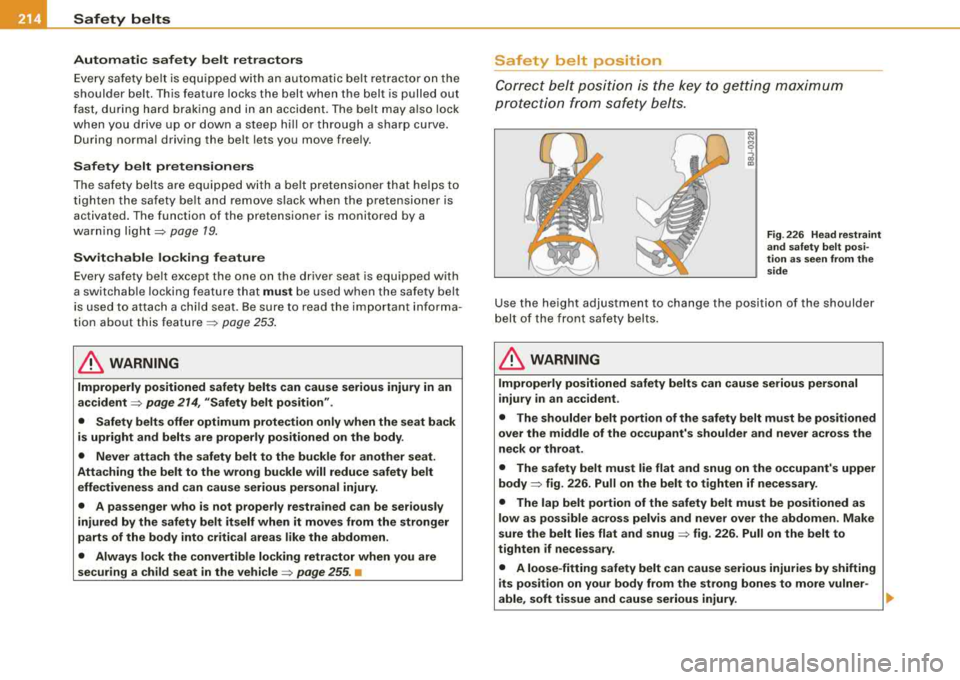
Safety belt position
Correct belt position is the key to getting maximum
protection from safety belts.
., N
8
~
Fig . 226 Head restraint
and safety belt
posi
tion as seen from the
side
Use the height adjustment to change the position of the shoulder
belt of the front safety belts.
& WARNING
Improperly positioned safety belts can cause serious personal
injury in an accident .
• The shoulder belt portion of the safety belt must be positioned
over the middle of the occupant's shoulder and never across the
neck or throat.
• The safety belt must lie flat and snug on the occupant's upper
body
=> fig. 226. Pull on the belt to tighten if necessary.
• The lap belt portion of the safety belt must be positioned as
low as possible across pelvis and never over the abdomen. Make
sure the belt lies flat and snug
=> fig. 226. Pull on the belt to
tighten if necessary.
• A loose-fitting safety belt can cause serious injuries by shifting
its position on your body from the strong bones to more vulner-
able, soft tissue and cause serious injury.
...