brake AUDI S8 2008 Owner's Guide
[x] Cancel search | Manufacturer: AUDI, Model Year: 2008, Model line: S8, Model: AUDI S8 2008Pages: 404, PDF Size: 52.7 MB
Page 148 of 404
__ _!_A~d~a~p~t~i~v~e~C:::.r~u~is~ e~C~o'.!.n~t:!r~o~I ___________________________________________ _
Ap plies to ve hicles : wi th Ad aptive Crui se Co ntro l
Supplementary display
You should have the supplementary information
displayed here, particularly on your first trips.
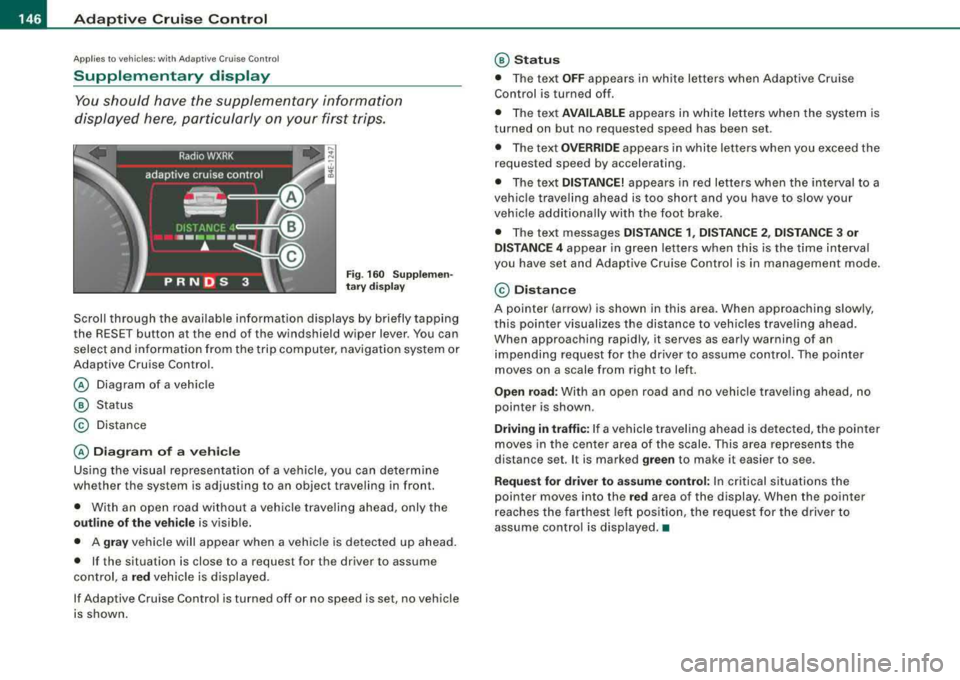
F ig . 16 0 S upplem en
t a ry di sp lay
Scrol l through the avai lab le information displays by briefly tapping
the RESET button at the end of the windshie ld wiper lever . You can
select and information from the trip computer, navigation system or
Adaptive Cruise Con trol.
@ Diagram of a vehic le
@ Status
© Distance
@ Diagram of a ve hi cle
Using the v isual representation of a vehicle, you can determine
whether the system is adjusting to an object traveling in fron t.
• With an open road without a vehicle trave ling ahead, only the
outline of the vehi cle is visible .
• A
gray vehicle will appear when a vehic le is de tec ted up ahead.
• If the situation is close to a reques t for the driver to assume
control, a
red vehicle is displayed.
If Adaptive Cruise Control is turned off or no speed is set, no vehicle
is shown.
@ Statu s
• The te xt OFF appears in white letters when Adaptive Cruise
Control is turned off.
• Th e text
AVAILABLE ap pears in white letters when the system is
turned on but no requested speed has been set .
• The text
O V ERRIDE appears in white letters when you exceed the
reques ted speed by accelerating .
• The text
DISTANCE! appears in red letters w hen the interval to a
vehic le traveling ahead is too short and you have to slow your
vehic le add itionally wi th the foot brake.
• The text messages
DISTANCE 1 , DISTANCE 2 , DI STANCE 3 or
DISTANCE 4
appear in green let ters when th is is the time interval
you have set and Adaptive Cruise Cont rol is in management mode.
© Di stan ce
A pointe r (arrow) is shown in this area. When approaching slowly,
this poin ter visual izes the distance to veh icles traveling ahead.
When approaching rapid ly, it serves as early warning of an
impending request for the dr iver to assume contro l. The po inter
moves on a scale from right to left .
Open road: With an open road and no vehicle trave ling ahead, no
pointer is shown .
Driving in traff ic: If a vehicle trave ling ahead is detected, the pointer
moves in the center area of the scale. This area represen ts the
distance set. It is marked
green to make it easier to see .
Request for driver to assume control: In critical situations t he
pointer moves into the
red area of the display. When the pointer
r eaches the farthe st left position, the request for the d river to
assume control is displayed. •
Page 149 of 404
_____________________________________________ A_ d_a ....: p_ t_ i_ v _e_ C_ ru_ is_ e_ C_ o_n_ t_ r_o _ l _ __._
Ap plie s to vehic les: with Adaptive Cru ise Co nt rol
Messages
The text messages and symbols shown in this area of the
display are not displayed perm anently .
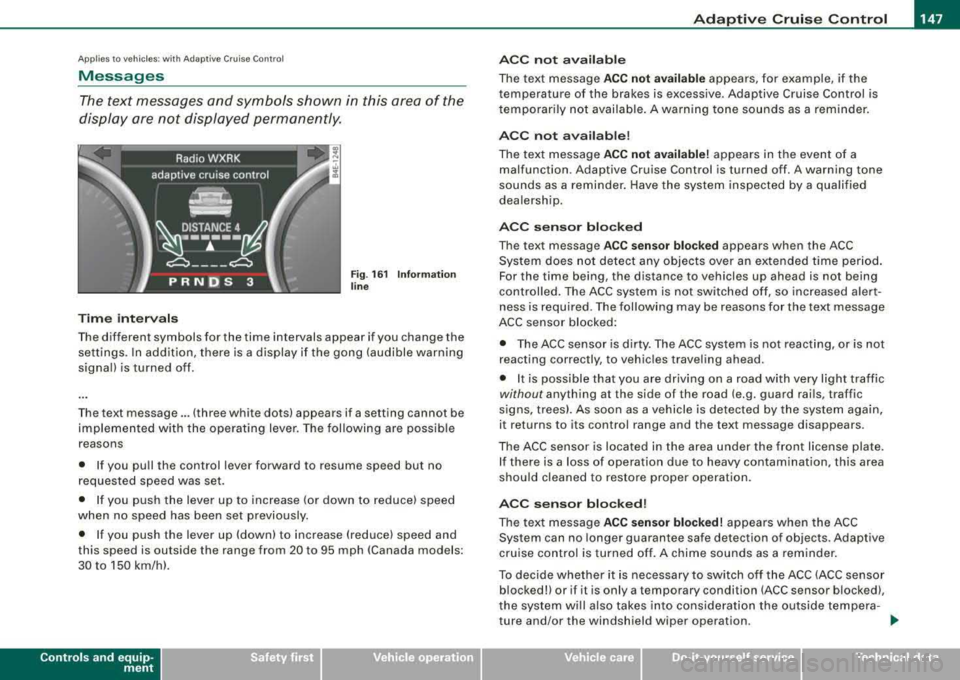
Time interval s
Fig . 16 1 Informa tion
lin e
The different symbols for the time intervals appear if you change the
settings. In addition, there is a display if the gong (audible warning
signa l) is turned off.
The text message ... (three white dots) appears if a setting cannot be
implemented with the operat ing lever. The fol lowing are possible
reasons
• If you pu ll the control lever forward to resume speed but no
requested speed was set.
• I f you push the lever up to increase (or down to reduce) speed
when no speed has been set previously.
• I f you push the lever up (down) to increase (reduce) speed and
this speed is outside the range from 20 to 95 mph !Canada models:
30 to 150 km/h) .
Controls a nd eq uip
ment
A CC not a vailab le
The text message ACC not av ailabl e appears, for example, if the
temperature of the brakes is excessive . Adaptive Cruise Control is
t emporarily not availab le . A warning tone sounds as a rem inder.
A CC not available !
The text message ACC not av ailabl e! appears in the event of a
malfunction. Adaptive Cruise Control is turned off . A warning tone
sounds as a reminder. Have the system inspected by a qua lified
dea lersh ip.
ACC senso r blocked
The text message AC C s en so r blo cked appears when the ACC
System does not detect any objects over an extended time period .
For the time being, the distance to vehicles up ahead is not being
cont rolled . The ACC system is not switched off, so increased alert
ness is required. The following may be reasons for the text message
ACC sensor blocked:
• The ACC sensor is dirty. The ACC system is not react ing, or is not
reacting correctly, to vehic les traveling ahead.
• It is possible that you are driving on a road with very light traffic
without any thing at the side of the road (e.g. guard rai ls, traffic
s igns, trees). As soon as a vehicle is detected by the system again,
it returns to its control range and the text message d isappears .
The ACC sensor is located in the area under the front license plate .
I f there is a loss of operation due to heavy contamination, this area
should cleaned to restore proper operation.
AC C senso r bl ock ed!
The text message ACC sensor blocked! appears when the ACC
System can no longer guarantee safe detection of objects . Adaptive
cruise control is turned off . A chime sounds as a reminder.
To decide whether it is necessary to switch off t he ACC (ACC sensor
blocked!) or if it is only a temporary condition (ACC sensor blocked),
the system wi ll a lso takes into cons ideration the outside tempera -
ture and/or the windshield wiper operation .
.,_
Vehicle care I I irechnical data
Page 150 of 404
___ A_ d_a_ p_ ti_v _ e_ C_ ru_ is_ e_ C_ o_n_ t_ r_ o _ l ___________________________________________ _
The ACC sensor is dirty or blocked (e.g. leaves, snow).
The ACC sensor is located in the area under the front license plate.
If there is a loss of operation due to heavy contamination, this area
should cleaned to restore proper operation.
EPB activation
The text message EPB activation appears if emergency braking was
initiated with the Electromechanical Parking Brake (EPBl. Adaptive
Cruise Control is turned off. A gong sounds as a reminder.
ESP activation
The text message ESP activation appears if the Electronic Stabiliza
tion Program (ESP) has intervened to take control in a critical driving
situation. In this case Adaptive Cruise Control is automatically
turned off . A gong sounds as a reminder .
Speed range
The text message Speed range appears if the current speed is too
low to set or to hold the requested speed.
When setting a desired speed, it must be at least 20 mph (30 km/h).
At speeds below 17 mph (25 km/h), the cruise control is turned off.
Shift lever position!
The text message Shift lever position! appears when the shift select
lever is moved to position
N. In this position, Adaptive Cruise
Control is not available. •
Applies to veh ic les: with Ad apt ive Crui se Contro l
Settings in MMI
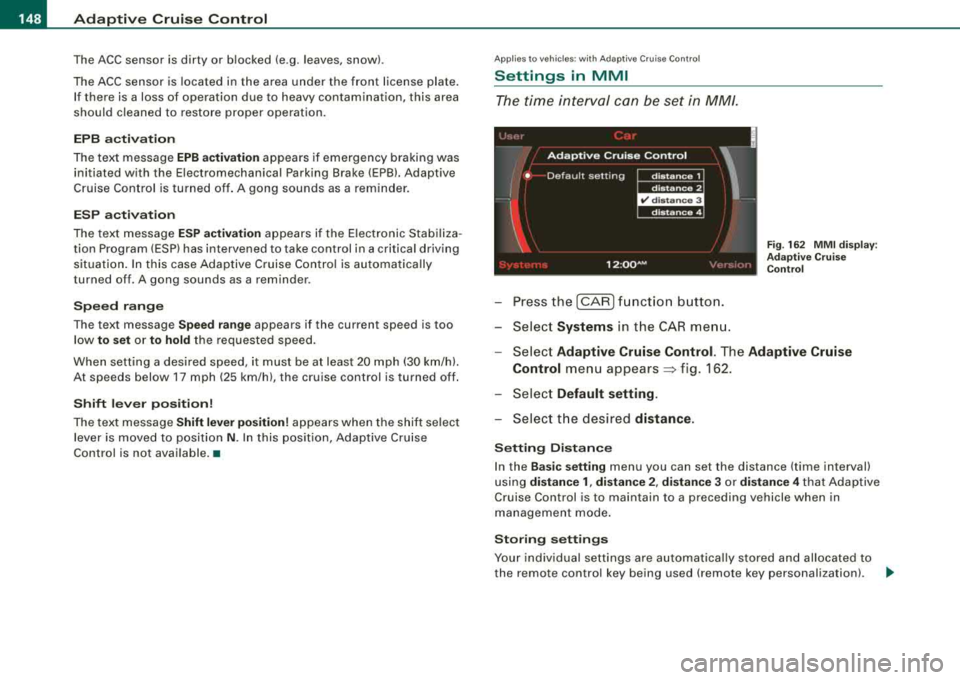
The time interval can be set in MM/.
-Press the [CAR] function button.
-Select Systems in the CAR menu.
Fig. 162 MMI display :
Adaptive Cruise Control
-Select Adaptive Cruise Control. The Adaptive Cruise
Control
menu appears~ f ig . 162.
-Select Default setting .
-Select the desired distance.
Setting Distance
In the Basic setting menu you can set the distance (time interval)
using
distance 1, distance 2, distance 3 or distance 4 that Adaptive
Cruise Control is to maintain to a preceding vehicle when in
management mode.
Storing settings
Your individual settings are automatically stored and allocated to
the remote control key being used (remote key personalization) .
~
Page 151 of 404
_____________________________________________ A_ d_a ....: p_ t_ i_ v _e_ C_ ru_ is_ e_ C_ o_n_ t_ r_o _ l _ __.9'
[ i J Tip s
Settings in the Adapt ive Crui se C ontrol menu are possib le only with
the engine running and the vehicle stationary .•
Special driving situations
Applies to vehic les: with Adaptive Cru ise Control
General
Some driving situations which affect the function of the
radar sensor are described below.
There are l imits to what Adap tive Cruise Control can do as the
vehicle is driven. So be especially attentive :
• when driving around curves => page
149.
• when driving in staggered lanes of traffic~ page 150.
• when other vehicles are changing lanes::> page 150.
• when other vehicles are difficu lt to detect ~ page 150.
& WARNING
The radar s en sor 's visi on can b e re du ced by rain , snow and h eav y
sp ray. Thi s can re sult in ve h ic les driving ahe ad be ing inade quately
detect ed or , in some cir cum stan ce s, not det ected a t all . •
Contro ls a nd eq uip
ment
Ap plie s to vehicles: with Adapt ive Cru ise Co nt rol
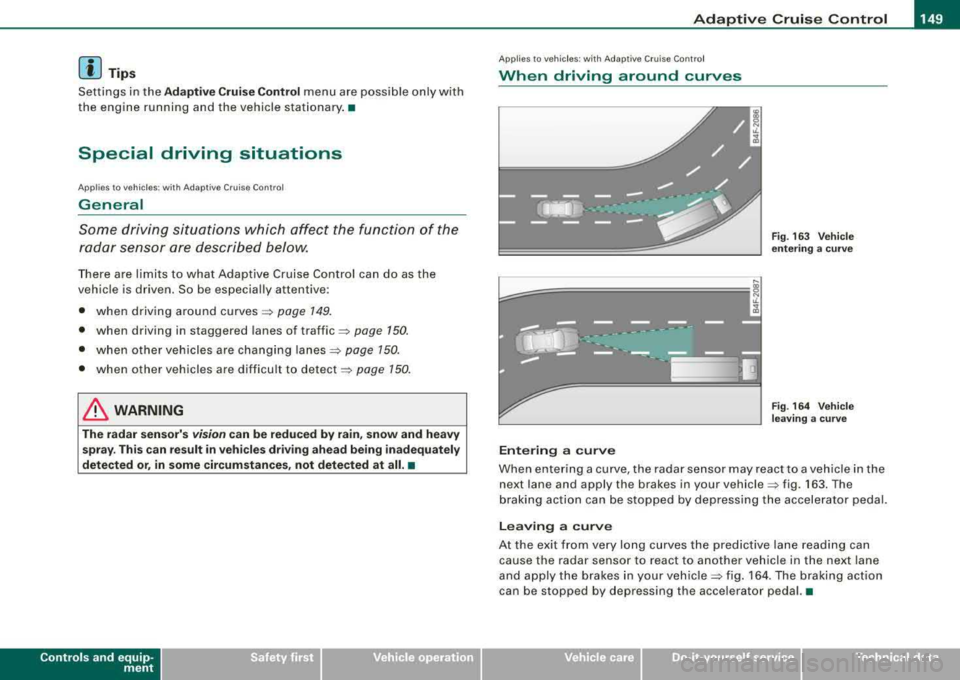
When driving around curves
~============, J
;g
j
Entering a curve
Fig . 16 3 Ve hicle
e nt erin g a c urv e
F ig . 164 Vehicle
l eav ing a cu rve
When entering a curve, the radar sensor may react to a vehic le in the
next lane and apply the brakes in your
vehicle ~ fig. 163. The
braking action can be stopped by depressing the accelerator pedal.
Lea ving a curve
At the exit from very long curves the pred ictive lane reading can
cause the radar sensor to react to another vehicle in the next lane
and apply the brakes in your
vehic le => fig. 164 . The braking act ion
can be stopped by depressing the accelerator pedal. •
Vehicle care I I irechnical data
Page 165 of 404

_____________________________________________ A_ u_t _o _m_ a_ t_ i_c _ t_ r_ a_ n_ s_m _ is_ s_ io_ n _ ___.11111
Automatic transmission
tiptronic ® (6-speed automatic
transmission)
Gener al information
Your vehicle is equipped with an electronically controlled 6-speed
automatic transmission. Upshifting and downshifting takes place
automatically.
The transmission is also equipped with tiptronic®. It allows the
driver to shift gears
manually if desired ~ page 167. •
Driving th e autom ati c transmission
Starting the engine
- The selector lever must be in Nor P.
Starting off
-Press and hold the brake pedal.
Contro ls a nd eq uip
ment
Fig . 183 Shift gate on
the center console:
selector lever with
release button
- Press and hold the release button in the selector lever
handle and move the selector lever from
P or N to D and
release the button
=> & .
- Wait briefly until the transmission has shifted (you will
feel a slight movement).
- Remove your foot from the brake pedal and accelerate.
Rocking back and forth to become unstuck
- Shift only between D and R when the vehicle is at a full
stop and the engine is running at idle speed.
Stopping
- Press and hold the brake pedal until the vehicle has come
to a complete stop.
Keep the brake pedal depressed so that the vehicle
cannot roll forward or backward while it is
idling=>& .
-Once stopped, do not depress the accelerator pedal to
rev up the
engine=> &.
Parking
- Press and hold the brake pedal until the vehicle has come
to a complete stop.
- Set the parking brake
firmly=> page 135, "Parking".
- Press and hold the release button in the selector lever
handle, move the selector lever into
P and then let go of
the release button
=> &. ._
Vehicle care I I irechnical data
Page 166 of 404

___ A_ u_ t
_ o_ m_ a_ t_ i_ c _ t_r _a _n_ s_ m_ is_ s_io _ n ________________________________________________ _
The selector lever must be in Nor P. If one of the driving positions
is e ngaged a sa fe ty swit ch will preven t the eng ine from bei ng
started. See
also=:> pa ge 130 .
Before you move the selector lever from the P pos ition, you m ust
a lways apply the b ra ke pe dal be fore and wh ile depress in g th e
button in the hand le of the selecto r lever.
& WARNING
• Unintended vehicle movement can cause seriou s injury .
- When the selector lever is in a driving position , the vehicle
may creep , even at idle speed . Therefore do not release the
parking brake or foot brake until you are ready to move,
be cause power is tran smitted to the wheels as soon as a
driving position is engaged .
- Do not accelerate while select ing a driving position . At th is
time the engine must be at idle speed so that undue stress is
not placed on the clut ches in the transmi ssion .
- Remember: -even when stopped briefly with the automatic
transmission in
" D " or "R ", engine power is being transmitted
to the wheels . Your vehicle could "creep " forward or backward.
When stopped , keep the brake pedal fully depressed and use
the parking brake if necessary to keep the vehicle from rolling.
• If the selector lever is unintentionally moved into N while you
are driving , take your foot off the accelerator pedal and wait for
the engine to return to idle speed before sele cting a driving posi
tion.
• Never shift into
" R " or "P " when the vehicle is in mot ion .
• Never get out of the dri ver's seat when the engine is running .
• If you must get out of the vehicle , move the selector lever
securely into the P position and apply the parking brake firmly .
• If the engine must remain running , never have any driving posi
tion engaged when checking under the hood . Make sure the
selector lever has securely engaged and is locked in
"P" with the
parking brake firmly
set => page 299, "Engine compartment ".
& WARNING (continued )
Otherwise , any increase in engine speed may set the vehi cle in
motion , even with the parking brake applied . •
Selector lever positions
This sec tion des crib es the selec tor lever p ositions an d
driv ing rang es.
Fig . 184 Disp lay in the
in strument clu ster :
selector lever in pos i
t ion D
T he sele cto r leve r posi tion engag ed ap pears next to the selector
l ever as we ll as in the instrument cluster disp lay . A lso, the current
gear engaged is show n in po sitions D and S .
P -Park
In this selector lever posit ion the t ra nsmi ssio n i s m ec hani cally
l ocked. Engage
P on ly when the vehicle is completely stopped=> &
i n "Dr iv ing th e auto mat ic tra nsmi ssion" on page 163 .
To shift in or out of position P , you must first press and hold the
b rake peda l
and then press the release button in th e selec tor leve r
handle wh ile movi ng the selector lever to or from
P . You can shift
ou t of this posi tion only wi th th e igni tio n on.
R -Reverse
Th e trans missi on wil l au to m atica lly select t he lowest gear ratio
when you shift into reverse .
Page 167 of 404
_________________________________________________ A_ u_t_ o_ m_ a_t _i _c _ t
_ ra_ n_s_ m __ is_s_ io_ n _ ___.1111
Select R only when the vehicle is at a full stop and the engine is
running at idle
speed => & in "Driving the automatic transmission"
on
page 763 .
Before you move the selector lever to R, press both the button in the
handle of the selector lever
and the brake peda l at the same time .
When the ignition is on, the backup lights illuminate when the selector lever is moved into
R.
N -Neutral
The transmission is in neutral in this position. Shift to this position
for standing with the brakes applied =>
page 165.
When the vehicle is stationary or at speeds below 3 mph (5 km/h),
you must always apply the footbrake before and while moving the lever out of
N.
D -Normal position for driving forward
Position Dis for normal city and highway driving. It ranges from zero
to top speed and all six gears shift automatically, depending on
engine load, driving speed and automatically selected shift
programs.
When the vehicle is stationary or at speeds below 3 mph (5 km/h),
you must always apply the foot brake before and while moving the
lever to
D out of N .
In certain circumstances it may be advantageous to temporarily
switch to the manual shift program to manually select gear ratios to
match specific driving
conditions => page 167.
S -Sport position
Select this position for sportier performance. In this position, the
transmission will not upshift as soon, allowing the vehicle to use the increased power available at higher engine speeds to achieve live
lier acceleration.
When the vehicle is stationary or at speeds below 3 mph (5 km/h),
you must always apply the foot brake before and while moving the
lever to
S out of N.
Contro ls a nd eq uip
ment
& WARNING
Read and follow all WARNINGS => & in "Driving the automatic
transmission " on
page 163.
0 Note
Coasting downhill with the transmission in N and the engine not
running will result in damage to the automatic transmission and
possibly the catalytic converter. •
Automatic Shift Lock (ASL)
Automatic shift lock prevents you from accidentally
shifting into a forward gear or into reverse, thus causing
the vehicle to move unintentionally.
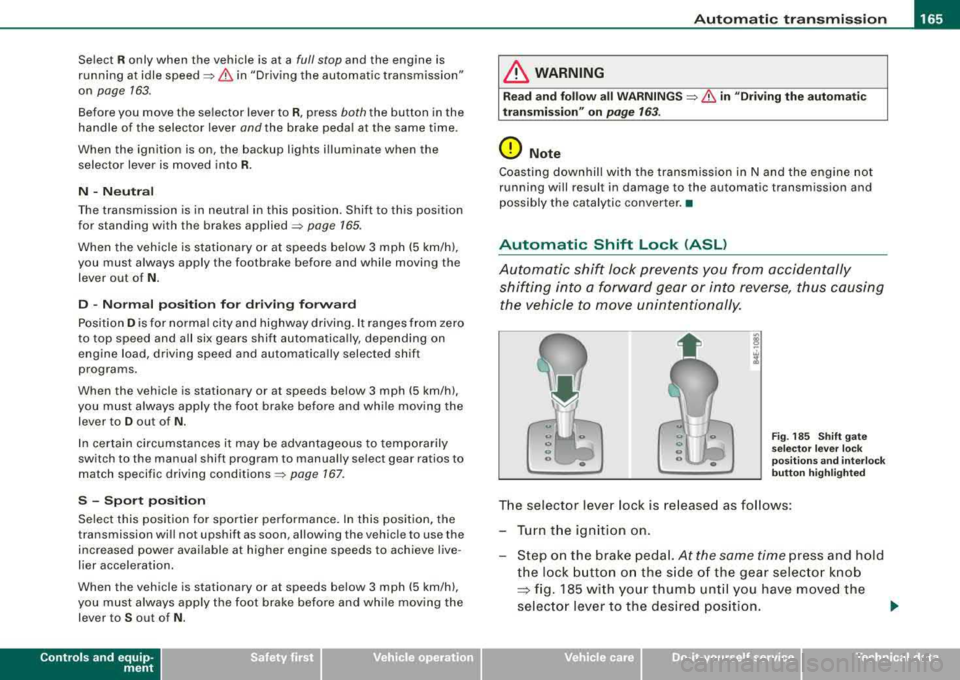
Fig . 185 Shift gate
selector lever lock
positions and interlock
button highlighted
The selector lever lock is released as follows :
Turn the ignition on.
Step on the brake pedal.
At the same time press and hold
the lock button on the side of the gear selector knob
=:> fig. 185 with your thumb until you have moved the
selector lever to the desired position.
~
Vehicle care I I Technical data
Page 168 of 404
___ A_ u_ t
_ o_ m_ a_ t_ i_ c _ t_r _a _n_ s_ m_ is_ s_io _ n ________________________________________________ _
Aut om at ic se lec tor l ever lock
The se lector lever is locked in the P and N pos itions when the ign i
tion is turned on. To move the lever from these positions the driver
must depress t he brake peda l. As a reminder to t he driver, the
follow ing warn ing appears in the instrument c luster disp lay when
the selector is in
P and N :
When stationar y appl y foot brak e while selecting gear
A time de lay e lement prevents the selector lever from lock ing when
it is moved through the
N position (going from R to D l. The locking
e lement will lock the selector lever if the lever is left in N (Neutral)
for more than approximate ly 1 second, without the brake peda l
being pressed.
At speeds above about 3 mph (5 km/h) the Automatic Shift Lock is
automatically deactivated in the
N pos ition .
Interlock button
The lock button on t he se lector lever prevents the lever from being
accidentally shifted into certain positions. Pressing this button
deactivates the selector lever lock. Depending on the direction of
the shift, the selector lever locks at different positions . The positions
a re h igh lighted in the
il lustration => page 165, fig. 185.
Igniti on k ey sa fe ty in te rlock
The key cannot be removed from the ignition un less the selector
lever is in the
P park position. When the ignition key is removed, the
selector leve r wil l be locked in the
P posi tion .•
Kick-down
T he kick-down feature allows the vehicle to generate
maximum acceleration.
When you press t he accelerator peda l beyond the resistance point
that is reached at ful l throttle, the transmission will select a lower
gear ratio based on vehic le speed and engine RPM. The engine RP M
wi ll be control led to produce maximum vehicle acce leration as long as you continue to press the accelerator pedal beyond this resis
t ance po int.
& WARNING
Be careful when u sing th e kick -down feature on slippery road s.
R apid ac cel erat ion m ay ca use th e ve hic le to skid . •
Dynamic shift program (DSP)
T he aut omatic transmission is electronically controlled.
T he transmission is self adapting and wi ll autom ati ca lly select the
best shift program suited to t he driving condi tions and drivi ng s tyle.
The transmission will se lect one of the
eco nom y programs when
you drive at a steady speed or a gradual ly changing speed without
heavy acce leration . T his achieves optimum fuel efficiency, with ear ly
upshifting and delayed downshifting .
T he trans mission wil l automat ica lly select the
s porty shift programs
when you drive at higher speeds, or with heavy acce leration and
frequen tly changing speeds . Upshifts are de layed to make full use
of engine power. Down shifting takes place at higher engine speeds
t han in the economy programs .
The selection of the most suitab le shift program is a continuous,
automatic process . The driver can also make the transmission
switch to a sporty program by
quickl y pressing down the gas peda l.
T his causes the transmission to shift down to a lower gear to
achieve rapid acceleration, e.g . for quickly passing ano ther veh ic le .
You do not need to press the gas pedal into the kick-down range .
After the transmission has upshifted, t he original program is
selected according to your driving style.
An additional shift program allows the automatic transmission to select the proper gear for uph ill and downh ill gradients.
T his prevents the transmission from upshifting and downshifting
unnecessa rily on hi lls. The transmiss ion will shift down to a lower
~
Page 169 of 404
_______________________________________________ A_ u_t _o _m_ a_ t_ i_ c _ t_r _
a _n _s_ m_ i_ s _ s_ i_ o _ n _ ___._
gear when the driver presses the brake pedal on a downhill
gradient. This makes use of the braking effect of the engine without
the need to shift down manually. •
Manual shift program
Using the manual shift program you can manually select
gears.
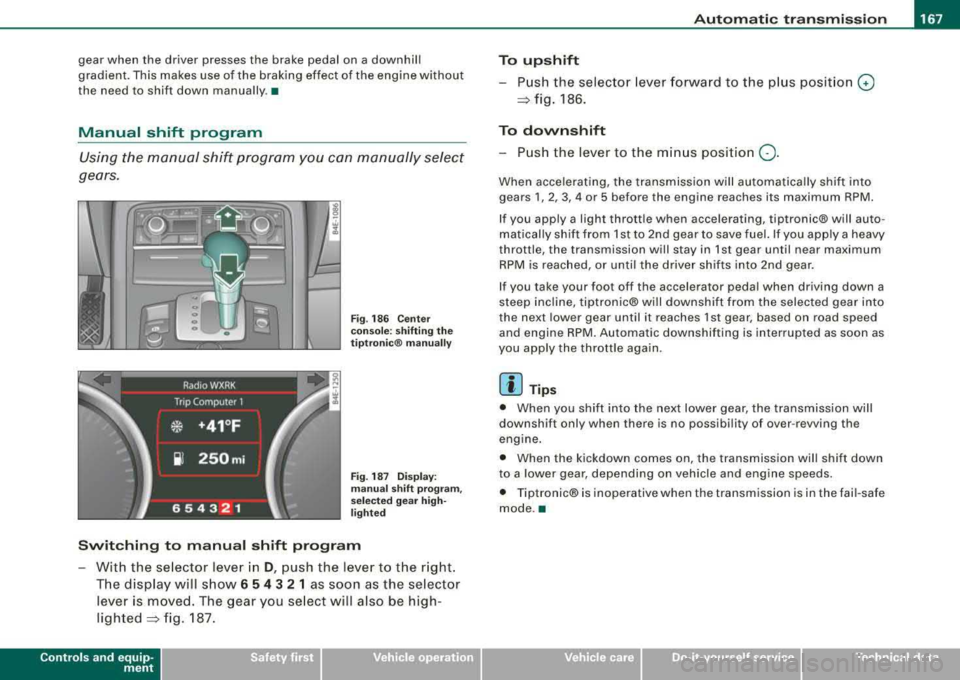
Fi g. 186 Center
console: shifting the
tiptr onic ® manually
Fig. 187 Display:
man ual shift pr ogra m ,
selected gear high
li ghted
Switching to manual shift program
With the se lector lever in D, push the lever to the right.
The display will show
6 5 4 3 2 1 as soon as the selector
lever is
moved. The gear you select will also be high
lighted~ fig. 187.
Controls a nd eq uip
ment
To upshift
Push the selector lever forward to the plu s position 0
~ fig. 186.
To downshift
- Push the lever to the minus position Q.
When accelerating, the transmission will automatically shift into
gears
1, 2, 3, 4 or 5 before the engine reaches its maximum RPM.
If you apply a light thrott le when accelerating, tiptronic® will auto
matically shift from 1st to 2nd gear to save fuel. If you app ly a heavy
throttle, the transmission will stay in 1st gear until near maximum
RPM is reached, or until the driver shifts into 2nd gear.
If you take your foot off the accelerator peda l when driving down a
steep inc line, tiptronic® wi ll downshift from the selected gear into
the next lower gear until it reaches 1st gear, based on road speed
and engine RPM. Automatic downshifting is interrupted as soon as
you apply the throttle again.
[ i ] Tips
• When you shift into the next lower gear, the transmission will
downshift only when there is no possibi lity of over -revving the
engine.
• When the kickdown comes on, the transmission will shift down
to a lower gear, depending on vehicle and eng ine speeds.
• Tiptronic® is inoperative when the transmission is in the fai l-safe
mode .•
Vehicle care I I irechnical data
Page 193 of 404

___________________________________________________ H_ o_m_ e_ L_ i_ n _ k_ ®_ R __ l!III
Homelink ®
Universal remote control
Applies to vehicles: w ith Home link® unive rsa l remo te cont rol
General information
The HomeLink® feature can learn up to three radio
frequency codes for most current transmitters used for
operating garage doors, estate gates, home or outdoor
lighting systems, and other devices.
You must first program the Homelink® transmitter before you can
use the
system=> page 191, "Programming the Homelink® trans
mitter".
In order to program the Homelink® transmitter for devices utilizing
rolling code , a second person on a ladder who can safely reach the
garage door opener motor is recommended. It is also necessary to
locate the
"learn" button on your garage door opener motor . Refer
to the operating instructions for the opener, as the location and
color of this button may
vary by manufacturer.
You can still use the original remote control for the device at any
time.
& WARNING
• Never use the Homelink"" transmitter with any garage door
opener that does have not the safety stop and reverse feature as
required by federal safety standards. This includes any garage
door opener model manufactured before April 1, 1982.
• A garage door opener which cannot detect an object, signaling
the door to stop and reverse does not meet current federal safety standards . Using a garage door opener without these features
increases risk of serious injury or death.
Controls and equip ment
& WARNING (continued)
• For safety reasons never release the parking brake or start the
engine while anyone is standing in front of the vehicle.
• A garage door or an estate gate may sometimes be set in
motion when the Homelink® remote control is being
programmed. If the device is repeatedly activated, this can over
strain motor and damage its electrical components -an over
heated motor is a fire hazard!
• To avoid possible injuries or property damage, please always
make absolutely certain that no persons or objects are located in
the range of motion of any equipment being operated. •
Applies to vehicles : wit h Home link ® uni vers al remote con trol
Programming the Homelink ® transmitter
The transmitter is programmed in two phases. For rolling
code transmitters, a third phase is also necessary.
f ( ~ ~
i
s: 0
,1, .., Cl)
ll
Fig . 213 Overhead
console: Homelink®
keypad
~