ESP AUDI S8 2009 User Guide
[x] Cancel search | Manufacturer: AUDI, Model Year: 2009, Model line: S8, Model: AUDI S8 2009Pages: 408, PDF Size: 91.63 MB
Page 35 of 408

Dipstick reading checks OK
-If the oil pressure warning symbol "t=:7: starts flashing
again even though the engine oil level checks OK on the
dipstick,
do not continue driving and do not let the
engine run in idle.
Instead, contact your authorized Audi
dealer for assistance.
[ i] Tips
• The engine oil pressure symbol ~ is not an indicator for a low
engine oil level. Do not rely on it . Instead, check the oil level in your
engine at regular intervals, preferably each time you refuel, and
always before going on a long trip .
• The yellow oil level warning indication .: requires oil refill or
workshop service without delay. Do not wait until the red oil pres
sure warning
~ starts to flash before you respond to the low oil
level warning . By then, your engine may already have suffered
serious damage. •
Steering malfunction i
If there is a malfunction in the electronic steering column
lock, the steering cannot be unlocked.
If the i symbol in the display blinks, there is a malfunction
in the electronic steering column lock. An additional driver
message can also be displayed by pressing the [
CHECK]
button:
Do not drive vehicle: Steering defective
- Contact your nearest authorized repair facility.
- Do
not tow your vehicle.
Controls and equip
ment
Driver information display
& WARNING
Your vehicle must not be towed in the event of a malfunction in the
electronic steering column lock because it cannot be steered due
to the locked steering. If it is towed with the steering locked, there
is the risk of an accident. •
Ignition lock malfunction ~
A malfunction in the ignition lock must be repaired imme
diately.
If the -Pe symbol in the display blinks, there is a malfunction
in the electronic ignition lock. An additional driver message
can also be displayed by pressing the [
CHECK] button:
Ignition lock defective. Contact workshop !
- Do not turn the engine off.
-Drive immediately to an authorized Audi dealer to have
the malfunction corrected.
If there is a malfunction in the electronic ignition lock, the ignition
cannot be turned off. Drive immediately to an authorized Audi
dealer to have the cause of the malfunction corrected.
If your vehicle has a Conv eni enc e key *, th e n you should not use the
I STOP I button to shut off the engine. You will not be able to start the
engine again once th e ignition is switched off. •
I • •
Page 43 of 408
-Select System s in the CAR menu .
- Selec t
Instrument cluster .
-Select Trip computer 1 or Trip computer 2 .
-Select, for examp le, Fuel range On to turn on the display
or
Off to turn the disp lay off.
All values in the single -trip or the total -trip memory can be reset to
zero simultaneously in MMI. In addition you can determine what
driving information from the trip computer should be shown in the
instrument cluster display. If one of the pieces of driver information
is turned off, that driver information will not be shown in the display .
The information will continue to be calcu lated by the trip computer
and can be turned back
on at any time. •
Tire pressure monitoring system
Applies t o vehi cle s: with n re pre ss ure moni toring sys te m
General notes I)
Each tire, including the spare (if provided}, should be checked
month ly when cold and inflated to the inflation pressure recom
mended by the vehicle manufacturer on the vehicle placard or tire
inflation pressure label. (If your vehicle has tires of a different size
than the size indicated on the vehicle placard or tire inflation pres
sure label, you should determine the proper tire inflation pressure
for those tires.}
As an added safety feature, your vehicle has been equipped with a
tire pressure monitoring system (TPMSl that illuminates a low tire pressure tellta le when one or more of your tires is significantly
under-inflated . Accordingly, when the low tire pressure te lltale i llu
minates, you should stop and check your tires as soon as possible,
and inflate them to the proper pressure. Driving on a significantly
under -inflated tire causes the tire to overheat and can lead to tire
Controls and equip
ment
Dr ive r informat ion di spl ay
failure . Under -inflation also reduces fuel efficiency and tire tread
life, and may affect the vehicle's handling and s topping ability.
Please note that the TPMS is not a substitute for proper tire mainte
nance, and it is the driver 's responsibility to maintain correct tire
pressure, even if under-inflation has not reached the leve l to trigger
illumination of the TPMS low tire pressure te lltale.
Your vehic le has a lso been equipped with a TPMS malfunction indi
cator to indicate when the system is not operating proper ly. The
TPMS ma lfunction indicator is combined w ith the low ti re p ressure
tel ltale . When the system detects a malfunction , the telltale wil l
flash for approximately one minute and then remain continuously
il luminated . This sequence will cont inue upon subsequent vehicle
start -ups as long as the malfunction exists.
When the ma lfunction indicator is illuminated, the system may not
be able to detect or signal low tire pressure as intended . TPMS
mal functions may occur for a variety of reasons, including the
insta llation of replacement or alternate tires or wheels on the
vehic le that prevent the TPMS from funct ioning properly. A lways
check the TPMS malfunction tellta le after replacing one or more
tires or whee ls on your vehicle to ensure that the replacement or
alternate tires and wheels allow the TPMS to continue to function
properly. •
Applies t o vehic les : w ith Tire press ure mon itoring sy stem
Introduction
The tire pressure monitoring system moni tors air pressure
in all four roa d wheels and the spare tire* while the
vehicle is moving.
As soon as the tire pressure monitoring system senses a significant loss of air pressure in one o r severa l tires, text messages and yellow
symbo ls appear in the instrument cluster display to alert the driver.
The L warni ng light in the instrument cluster comes on when the
tire is significantly underinflated
=> page 20. _,,
I • •
Page 44 of 408
Driver inf ormati on displ ay
The warning light n also illuminates in the case of a system
mal fu n ction.
The system continuously receives radio signals from sensors located inside each tire .
Be aware that tire pressure is also dependent on the temperature of
the tire. For every 18 °F (10 °C) increase in tire temperature, tire pres
sure increases by about
1 .5 psi (0.1 bar). The tire warms up while the
vehic le is moving and tire pressure rises. So you should adjust tire
pressure only when the tires are
cold, when the temperature of the
tires is roughly the same as the ambient air temperature .
In order to keep the tire pressure monitoring system properly cali
brated, tire pressure on al l four tires and on the spare tire * should
be checked at regular intervals, adjusted if necessary and sav ed in
the proper setting (recommended pressure) =>
page 44.
The tire pressure is shown on the tire pressure label. On USA vehi
cles, the tire pressure label is located on the driver's side B -pi llar. On
Canada vehicles, the tire pressure labe l is located either on the
driver's side B -pil lar or inside the fuel filler flap . The tire pressu re
label lists the recommended cold t ire inflat ion pressures for the
vehic le at its maximum capacity weight and the tires that were on
your vehicle at the time it was manufactured . For recommended tire
pressures for normal load conditions, please see chapter
=>
page 330 .
The current temperatures and pressure of your tires can be viewed
i n the MMI =>
page 44.
& WARNING
• When the t ire pre ssure moni toring sy st em warning light i s lit ,
one or more of your tir es is s ignifi cantly under -infl ate d . Y ou s hould
s to p and che ck your tir es as soon as poss ible, and infl ate th em to
th e p rop er p ress ure as i ndicated on the vehicle's tire press ure
lab el
=> page 3 30 . Driving on a s ig n ific antly und er-inflated tir e
ca uses the t ire to overheat an d ca n le a d t o tir e fai lur e. U nde r- infl a-
& W ARN IN G (c ontinued )
tion a lso is likel y to imp air t he veh icle 's handling and sto pping
ability .
• Do not adju st t ire press ure when t ire temper atu re i s excessiv e.
T hi s c ould le ad to seriou s tire dam age and even cause the ti re to
bur st, w ith the additional d ange r of an accident .
tread life.
[ i ] Tips
• Each tire, includin g the sp are*, should be checked monthly when
cold and set to the recommended inflation pressure as specified on
the tire pressure label=>
page 330.
• T he tire pressure monitoring system he lps the d river to keep an
eye on tire pressures . But the dr iver st ill has the responsibility for
maintaining the correct tire pressure .
• Tire pressure must only be adjusted when the temperature of the
tires is about the same as ambient air temperature.
• When tires are replaced, the sensors and valves shou ld not be
detached or exchanged . Only the valve core needs to be replaced
and, if necessary, the va lve and the wheel electronics replaced .
• If you should put different whee ls and tires on your vehicle (e.g .
winter wheels and tires), you must be certain that the wheels and
tires are compatible with the tire pressure monitoring system. Otherwise the system will register a ma lfunction and a fault
message will be displayed. For more information , contact your
authorized Audi dea ler.
• Adjust the tire pressure and store the pressure in the tire pres
sure mon itor ing system to the load you are carrying=>
page 330.
• For Declaration of Compliance to United States FCC and Industry
Canada regulations =>
page 385. •
Page 46 of 408
Driver informati on displ ay
Ap plies to vehicles: w ith n,e pre ssu re monitoring system
Displaying tire pressures and temperatures
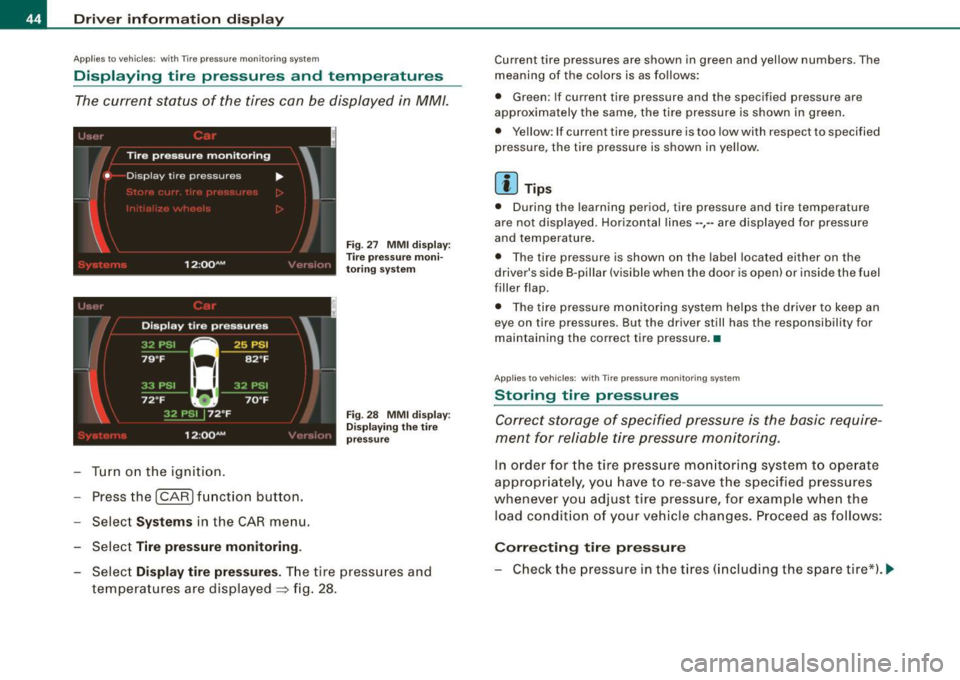
The current status of the tires can be displayed in MM/.
~ J '-, ' l
I
'
Tire pressure monitoring
• D isp lay tire pressures ....
I
12 :QQ AM , ·' ',!(,I:
Turn on the ignition.
Press the
!CAR) function button.
Select
Syst ems in the CAR menu.
Select
Tire pre ssure monitoring .
Fig . 27 MMI d isp lay:
T ire pressure moni
to ring system
Fig . 28 MMI dis play:
D is play in g th e tire
p ressu re
Select Di splay tir e pr ess ures. The tire pressures and
temperatures are dis played
=> fig . 28.
Current tire pressures are shown in green and yellow numbers. The
meaning of the co lors is as fo llows:
• Green: If current tire pressure and the specified pressure are
approximately the same, the tire pressure is shown in green .
• Yellow : If current tire pressure is too low with respect to specified
pressure, the tire pressure is shown in yellow.
[ i ] Tips
• During the learning period, tire pressure and tire temperature
are not displayed . Horizontal lines --,-- are displayed for pressure
and temperature.
• The tire pressure is shown on the label located either on the
driver's side B-pil lar (visible when the door is open) or inside the fuel
filler flap.
• The tire pressure monitoring system helps the driver to keep an
eye on tire pressures. But the driver still has the responsibility for
maintaining the correct tire pressure. •
Applies to vehicles: with Tire pressure mon itor ing system
Storing tire pressures
Correct storage of specified pressure is the basic require
men t for reliable tire pressure monitoring.
In order for the tire pressure mo nito ring system to ope rate
appropr iately, yo u have to re -save the specified pressures
whenever yo u adjust tire pressure, for example when the
load condition of your vehicle changes. Proceed as follows:
Corr ecting t ir e pres sure
- Check the pressure in the tires (including the spare tir e*). ~
Page 47 of 408
-Adjust air pressure as needed in acco rdance with the
informat io n on the label located either on the driver's
side B -pillar (visible w hen the door is open), inside the
fuel filler flap and addi tionally in t he manua l.
Saving tir e pres sur es
- Tur n on the ignition.
- Press the
I CAR I funct ion button.
- Select
Systems in the CAR menu .
Selec t
Tire p ressure monitoring.
-Select Store curr. tire pres sures :::} page 44, fig. 27 .
All pressure warning indicators in the display will be canceled .
Following each intentional change in specified pressures, tire pres
sures must be resaved .
After the pressures are saved, the tire pressure monitoring system measures the current tire pressures and saves them as the new
specified pressures.
[ i ] Tip s
• T he t ire pressure is shown on the tire pressure label. On USA
vehic les, the tire pressure label is located on the driver's side 8 -
pillar. On Canada vehicles , the tire pressure labe l is located e ither on
the driver's side 8 -pillar or inside the fuel filler flap. The tire pressure
label lists the recommended cold tire inflation pressures for the
vehicle at its maximum capacity weight and the tires that were on
your vehicle at the time it was manufactured . For recommended tire
pressures for normal load conditions, please see chapter
=> page 330 .
• The tire pressure mon itoring system he lps the driver to keep an
eye on tire pressures. But the driver still has the responsibility for
maintaining the correct tire pressure.
Controls and equip
ment
Dr ive r informat ion di spl ay
• I f your vehic le is equipped with a standard spare tire *, it must be
inflated to the maximum pressure specified for the veh icle. •
Applie s to veh ic le s : with T ire pressur e mo nitoring sys tem
Changing a wheel
When you change a wheel, the new tire must be initial
ized.
- Turn on the ignition .
Press the
I CAR] function button.
Select
Systems in the CAR menu.
- Selec t
Tire pre ssure monitoring .
Select Initialize wh eel s:::} page 44, fig. 27.
Programming is necessary:
• After the tires have been rotated on the vehicle (inc luding use of
the spare tire*),
• I f tires with new wheel sensors are used.
A ll pressure warning and system ma lfunction indicators in the
display will be canceled.
I f a wheel change has been made, it is necessary to complete the
Initi aliz e w heel s function.
The tire pressure monitoring system is not available during the programming process and no pressure and temperature values are
displayed on the MMI display.
After you have selected the function, the new whee ls are
programmed and the actual pressures are stored. This learning
phase can take up to 20 minutes driving time. •
I • •
Page 49 of 408
Opening and closing
Keys
Key set
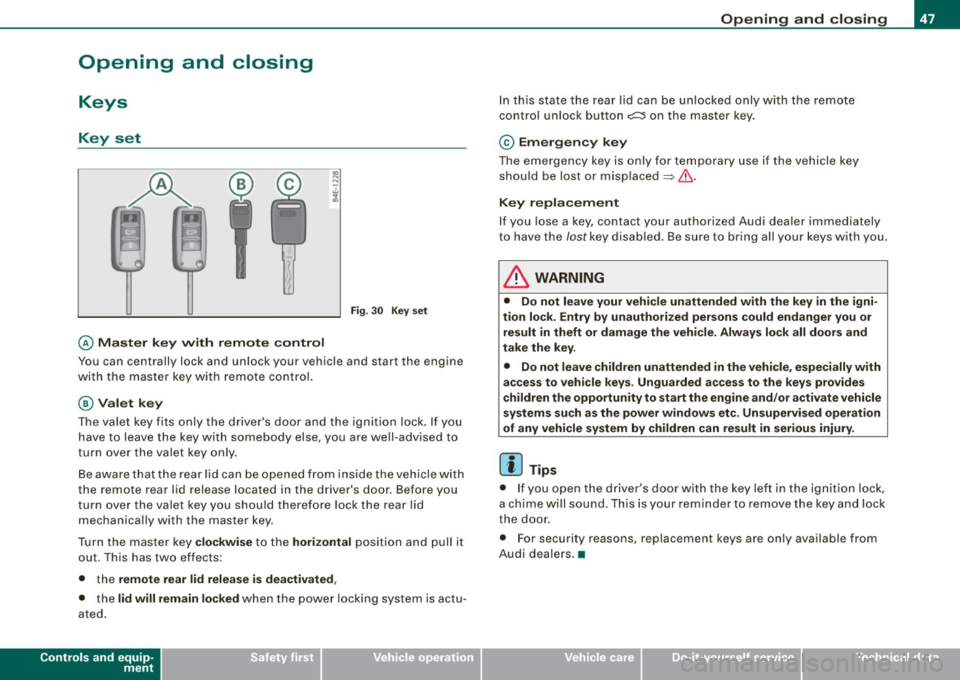
@ Master key w ith remo te con trol
Fig . 30 Key s et
You can centrally lock and unlock your vehicle and start the engine
with the mas ter key with remote control.
@ Valet k ey
The va le t key fits only the driver's door and the ignition lock . If you
have to leave the key with somebody else, you are well -advised to
t urn over the valet key only .
Be aware that the rear lid can be opened from inside the veh ic le with
the remote rea r lid release located in the driver's door . Before you
turn over the valet key you shou ld therefore lock the rear lid
mechanica lly with the master key .
T ur n th e mas ter key
clo ckwi se to the hori zontal positi on and pull it
out. This has two effects:
• the
remote rear lid release i s deactivated ,
• the lid will remain l ocked when the power locking system is actu
ated .
Controls and equip
ment
Opening and clo sing
In this state the rear lid can be unlocked only with the remote
control unlock button
c:::::5 on the mast er key.
© Em erg ency k ey
The emergency key is only for temporary use if the vehicle key
should be lost or misp laced
=> & .
Key replacement
If you lose a key , contact your authorized Audi dea ler immediately
t o have the
Jost key disabled . Be sure to bring all your keys with you.
& WARNING
• Do not leave your vehicle unattended with the key in the igni
tion lock . Entry b y unauth orized persons could endanger you or
re sult in theft or damage the vehi cle . Alway s lock all door s and
take the ke y.
• Do not le ave children unattended
in the vehicle , especially with
acce ss to veh icle key s. Unguarded a ccess to the key s provide s
c hildren the opportunity to start the engine and /or a ctivate vehicle
s y stem s such a s the power w indo ws e tc. Un supervi sed operat ion
of any vehi cle system by children c an re sult in serious injury .
[ i ] Tips
• I f you open the driver 's door wi th the key left in the ignit ion lock,
a chime w ill sound . T his is your reminder to remove the key and lock
the door .
• For security reasons, replacement keys are only available from
Audi deale rs. •
I • •
Page 52 of 408
Openin g a nd clo sin g
• After un locking the vehicle, you have 60 seconds to open a door
or the rear lid. After 60 seconds, the vehicle automatically locks and
the anti-theft a larm system activates again .
The rear lid can be locked or unlocked either by using the remote
control
or by turning the key ins ide the driver's door lock. Unlocking
the vehicle with the remote control will on ly
unlock the rear lid, to
open it, the lid handle needs to be pressed .
Lock ing t he ve hicle
You can lock the vehicle from outside either by using the remote
control
o r by turning the key inside the drivers's door lock . When
you
l o ck the vehic le :
• All doors and the rear lid are locked .
• All turn signal lights will flash once when the car is locked.
• The anti -theft alarm system is activated. The horn of the anti
t heft alarm system wi ll sound and the anti-theft alarm system readi
ness light, located in the upper part of the driver's door panel, will
start to blink.
• The vehicle interior lights turn off.
Unlo ck ing and lo ckin g th e ve hicle using th e
C onven ien ce key *
The Con ve nie n ce key* feature is a keyless system which al lows you
to unlock the vehicle via sensors in the door handle . Lock ing is like
wise
keyless using a lock button. Each door is equipped with a
sensor and lock button.
P ower s ide door clo ser*
The vehicle is equipped with a power side door closer . When closing
a door, you simply need to gently push on the door. The door wil l
then automatically close by itself ~
page 53 .
Autom atic lockin g
The automatic locking feature locks a ll the veh ic le doors and the
rear lid when you drive faster than 9 mph (15 km/h). This function can be turned on and off in the
MMI C
entral lo cking Menu
~ page 52.
You can unlock the vehicle from the inside by:
• removing the key from the ignition switch (the vehicle wi ll auto
matically unlock itself) or
• pressing the unlock part of the power lock switch
ffi or
pulling the door handle (once to open the door).
& WARNING
• When you lock your veh icle from o utside, nobod y -espec iall y
c h ildr en -should rem ain in sid e the vehicle . R emember , when you
lo ck the vehicle from the out side the window s ca nnot be opened
from t he in side .
• When you l eav e the vehi cle , al ways remove th e ign ition key and
take it with you . Thi s w ill prevent pa ssenger s (childr en , for
exampl e) from acciden tally being locked in the vehicle should they
a cc ident ally p re ss th e p ower lo cking s witch in the door s.
• Do not lea ve children in side the vehi cle un supe rvis ed. In an
e merg ency i t would be impos sible t o ope n th e door s from the
out side wi thou t the key.
[ i ] T ips
• In the event of a crash with a irbag deployment all locked doors
wi ll be automatically un locked to give access to the vehic le occu
pants from the outside .
• If the power locking system should malfunction, you can lock
each door individually using the vehicle key~
page 54.
• If the power locking system should fail, you can still open the
fue l tank flap in an emergency ~
page 307.
• You are well advised not to keep valuables inside an unattended
vehic le, visib le or not. Even a properly locked vehic le cannot provide
the security of a safe .•
Page 57 of 408
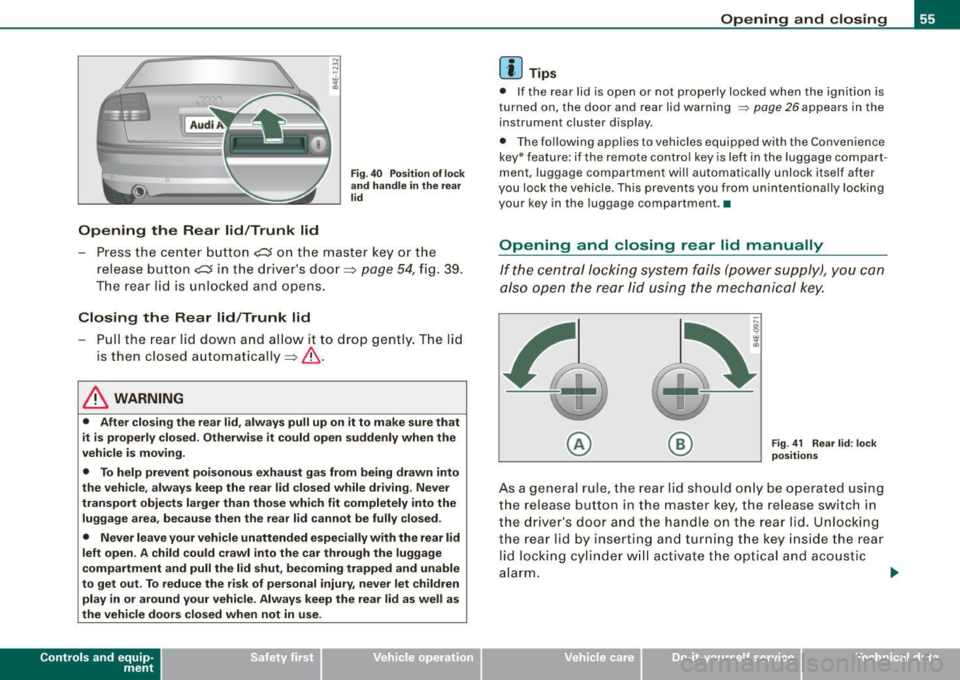
Opening the Rear lid/Trunk lid
Fig. 40 Position of lock
and handle in the rear
lid
- Press the center button c::s on the master key or the
release button
C::5 in the driver's door=> page 54, fig. 39.
The rear lid is unlocked and opens.
Closing the Rear lid/Trunk lid
-Pull the rear lid down and allow it to drop gently. The lid
is then closed automatically =>& .
& WARNING
• After closing the rear lid, always pull up on it to make sure that
it is properly closed. Otherwise it could open suddenly when the
vehicle is moving.
• To help prevent poisonous exhaust gas from being drawn into
the vehicle, always keep the rear lid closed while driving. Never
transport objects larger than those which fit completely into the
luggage area, because then the rear lid cannot be fully closed.
• Never leave your vehicle unattended especially with the rear lid
left open. A child could crawl into the car through the luggage
compartment and pull the lid shut, becoming trapped and unable
to get out. To reduce the risk of personal injury, never let children
play in or around your vehicle. Always keep the rear lid as well as
the vehicle doors closed when not in use.
Con tro ls and eq uip
ment
Opening and closing
[ i ] Tips
• If the rear lid is open or not properly locked when the ignition is
turned on, the door and rear lid warning
~ page 26 appears in the
instrument cluster display.
• The following applies to vehicles equipped with the Convenience
key* feature: if the remote control key is lef t in the luggage compart
ment, luggage compartment will automatically unlock itself after
you lock the vehicle. This prevents you from unintentionally locking
your key in the luggage compartment. •
Opening and closing rear lid manually
If the central locking system fails (power supply), you can
also open the rear lid using the mechanical key.
© ®
Fig
. 41 Rear lid: lock
positions
As a general rule, the rear lid should only be operated using
the release button in the master key, the release switch in
the driver's door and the handle on the rear lid. Unlocking
the rear lid by inserting and turning the key inside the rear
lid locking cylinder will activate the optical and acoustic
alarm.
~
Vehicle care I I irechnical data
Page 58 of 408
Opening and closing
To unlock the rear lid
- Turn the key to the left to the opening position
©
~ page 55, fig. 41. The rear lid opens.
To lock the rear lid
- Pull the rear lid down and slam it closed gently~,&.
Turning the key counter-clockwise to position @ will release the
rear lid and cause it to rise slightly. In this position the key cannot
be pulled out of the lock cylinder.
Turning the key
clockwise to the horizontal position @ and pulling
it out will cause the
lid to remain locked when the power locking
system is actuated.
In this state the rear lid can only be unlocked with the unlock button
,c:::j on the remote control. On vehicles equipped with the Conve
nience key* feature, press the handle on the rear lid to unlock the
luggage compartment =>
page 55, fig. 40.
After you turn the key
counter-clockwise back to the vertical posi
tion, the rear lid will again respond to the power locking system.
& WARNING
Read and follow all WARNINGS=> & in "Opening and closing rear
lid" on page 54. •
Applies 10 vehic les: w ith automatic rear lid/trun k lid ope rat ion
Automatic rear lid /trunk lid operation
The trunk lid can be opened and closed automatically.
Opening rear lid/trunk lid
Fig. 42 Trun k lid
handle
Fig . 43 Locking switch
in luggage compart
ment
- Press the handle on the rear lid/trunk lid~ fig. 42, or
- Press the middle button
- Press the release button
Page 59 of 408
Closing rear lid/trunk lid
- Press the lock s witch i n the lug gag e com pa rtm ent
~ page 56, fi g. 43 . T he trunk lid m oves to the close d posi
ti on b y itse lf and soft close loc ks i t auto ma tica lly ~& .
- Closin g is stopped immediately if yo u a gain p ress the
r elea se sw itch
c:::; in the d riv er's d oor, the mi ddle butt on
c:::; in the rem ote co ntr ol m aster ke y, the handl e on the
t r unk lid or th e l oc k s wit ch in th e lu ggage com pa rtmen t.
& WARNING
• After closing the rear lid , always pull up on it to make sure that
it is properly closed. Otherwise it could open suddenly when the
vehicle is moving .
• To help prevent poisonous exhaust gas from being drawn into
the vehicle , always keep the rear lid closed while dr iving . Never
transport objects larger than those which fit completely into the luggage area , because then the rear lid cannot be fully closed .
• Never leave your vehicle unattended especially with the rear lid
left open. A child could crawl into the car through the luggage
compartment and pull the lid shut , becoming trapped and unable
to get out . To reduce the r isk of personal injury , never let ch ildren
play in or around your vehicle. Always keep the rear lid as well as
the vehicle doors closed when not in use.
• Never close the rear lid inattentively or without checking first .
Although the closing force of the rear lid is limited , you can still
seriously injure yourself or others .
• Always ensure that no one is within range of the rear lid when
it is moving , in particular close to the hinges and the upper and
lower edges -fingers or hands can be pinched .
• Never try to interfere with the rear lid or help it when it is being
opened or closed automatically.
Con tro ls and eq uip
ment
Opening and closing
[ i ] Tips
• I f the re is a mechan ica l pro blem w ith auto mat ic clos in g f or the
rea r lid or there is an obstruction , it opens again immediate ly . Chec k
to se e wh y th e rear lid c ould not b e closed be fore a ttempt ing to
c lose it again .
• The fo llo w in g ap plies to ve hic les equ ip p ed wi th t he Conven ie nce
key * feature : if the remote control key is left in the luggage com part
m ent. luggage compartme nt w ill auto matically unlock itse lf af te r
you lock the vehicle . This prevents you from un intentiona lly locking
yo ur key in the lugga ge co mpartm ent. •
Child safety lock
Mechanical child safety lock in the rear doors
t
Th e chil d sa fety lock p reve nts the re ar doors f rom be ing
op en ed f ro m the i nsid e.
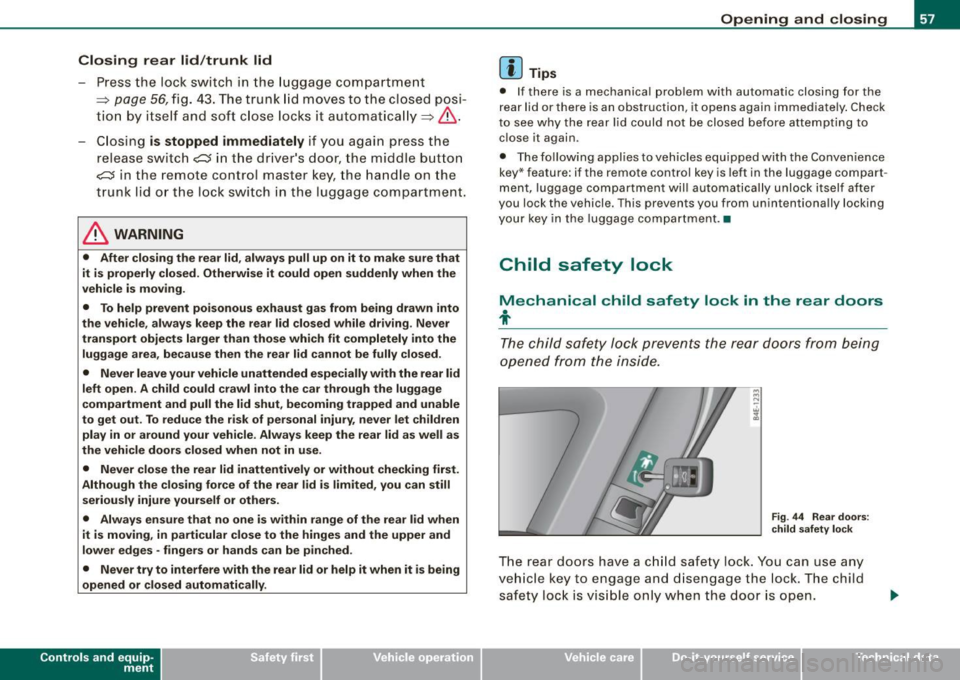
Fig . 44 Rea r doors :
c hild safety lock
T h e re ar doo rs have a c hild saf ety lock . You can u se any
v ehi cle ke y to engage a nd disen gag e the lock. The child
s afet y lo ck is vi sible o nly wh en the door is op en.
Vehicle care I I irechnical data