ESP AUDI S8 2009 Service Manual
[x] Cancel search | Manufacturer: AUDI, Model Year: 2009, Model line: S8, Model: AUDI S8 2009Pages: 408, PDF Size: 91.63 MB
Page 131 of 408
___________________________________________________ O_ n_ t_h _e_ r_o _a_ d _ ___.9I
& WARNING !continued)
injuries to the hands, arms and head if the driver's airbag
deploys. •
Easy entry feature
The easy entry feature makes it easier to enter and exit the
vehicle by automatically adjusting the steering wheel.
Press the button @ :::> page 128, fig. 143 to turn the easy
entry feature on or off.
When the easy entry feature is turned on (button depressed), the
steering wheel moves up to the parked position when the ignition is
turned off. After you enter the vehicle, the steering wheel moves to
the stored position as soon as you turn on the ignition. •
Ignition lock and ignition switch
Ignition key positions
The engine can be started or turned off with the ignition
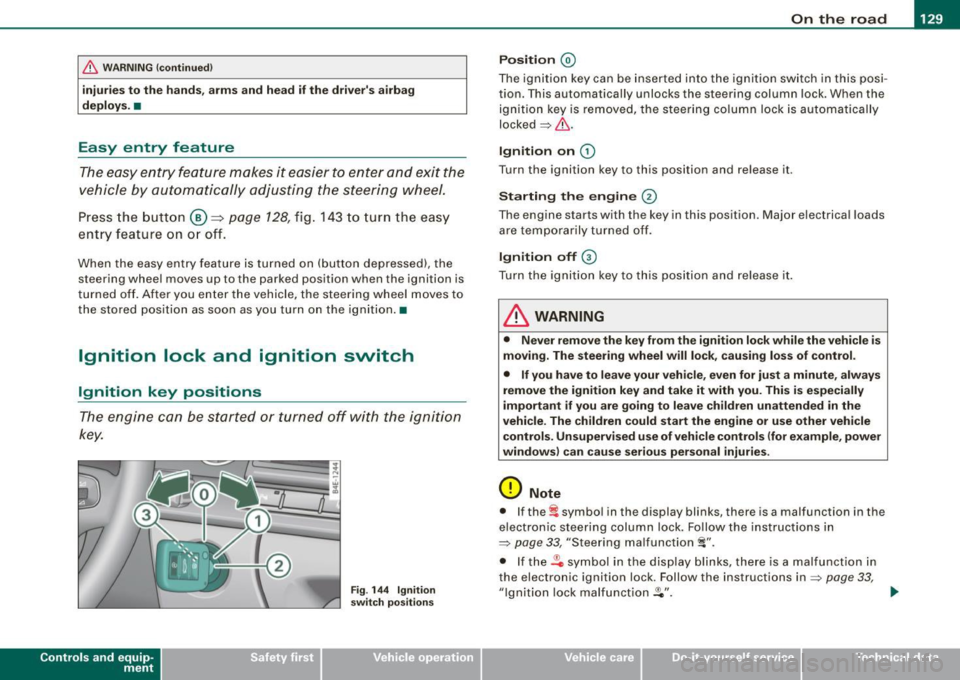
key.
Con tro ls and eq uip
ment
Fig . 144 Ignition
switch positions
Position @
The ignition key can be inserted into the ignition switch in this posi
tion. This automatically unlocks the steering column lock. When the
ignition key is removed, the steering column lock is automatically
locked=> &.
Ignition on G)
Turn the ignition key to this position and release it.
Starting the engine @
The engine starts with the key in this position. Major electrical loads
are temporarily turned off.
Ignition off G)
Turn the ignition key to this position and release it.
& WARNING
• Never remove the key from the ignition lock while the vehicle is
moving. The steering wheel will lock, causing loss of control.
• If you have to leave your vehicle, even for just a minute, always
remove the ignition key and take it with you. This is especially
important if you are going to leave children unattended in the
vehicle. The children could start the engine or use other vehicle
controls. Unsupervised use of vehicle controls (for example, power
windows) can cause serious personal injuries.
0 Note
• If the ~ symbol in the display blinks, there is a malfunction in the
electronic steering column lock. Follow the instructions in
=>
page 33, "Steering malfunction i".
• If the .Pc, symbol in the display blinks, there is a malfunction in
the electronic ignition lock. Follow the instructions in
=> page 33,
"Ignition lock malfunction .Pe". ..,.
Vehicle care I I irechnical data
Page 139 of 408

_________________________________________________ O_ n_ t_h _e _ ro_ a_d _ __._
0 Not e
If the warning/indicator light (U.S. models : BRAKE, Canadian models:
CCD) ) flashes in the instrument cluster, there is a brake system
malfunction. By pressing the
I CHECK] button, you can bring up a
driver m essage which explains the malfunction in more detail. If the
message
P arking br ake ! Plea se contact work shop appears, there is
a parking brake malfunction which you should have repaired imme
diate ly by an au thorized dealership ~
page 30. •
Cruise control
Switching the system on
The cruise control system makes it possible to drive at a
constant speed starting at 20 mph (30 km/h).
Con tro ls and eq uip
ment
F ig . 149 Contro l le v er
w ith set butt on F
ig . 150 D ispla y:
Se lecte d sp ee d
Pull the lever to positi on G) => fig. 149 to swi tc h the
system on .
Drive a t th e speed yo u w ish to set .
Press button
© to set that speed.
The display ~ fig. 150 will show the set speed. The display may vary
depe nding on the type of display in your vehic le. The indicator light
CRUISE (US model)/ 0" (Canadian model) will a lso light up in the
instrument cluster.
The speed is kept constant via an engine output adjustment or active brake intervention .
& WARNING
• Alway s pa y attention to traffic even when the crui se control is
s w itched o n. You are alwa ys respo nsible f or your speed and the
d is tan ce bet ween your vehicl e and other vehi cle s.
• For safety reason s, the cruise con trol s hould not be used in the
c ity , in stop -and -go tra ffi c, o n twi sting road s and when road condi
tion s are po or (s uch a s ice, fog, gr avel , he avy rain and h ydro
pl anin g) -ris k of a ccident.
• Turn off the crui se co ntro l te mpo rarily whe n ente rin g turn
lan es, highwa y exit la ne s or in con stru ction zon es.
Vehicle care
I I irechnical data
Page 142 of 408
• .___A_ d_a_ p:- t_iv _ e_ C_ r_u _is _ e_C_ o_ n_ t_ r_ o_ l --------------------------------------------
& W ARN ING (continued )
slow your veh icle safel y. If closing speed is too h igh , you must
apply the brake s your self to reduce the risk of a rear -end cra sh.
• Never rest your foot on the accelerator pedal , especi ally when
the Adapt ive Crui se Control is being u sed . Pressure on the acceler
ator will override the ACC brak ing function and prevent the brakes
from being applied when ACC detect s a situation when the brake s
must be applied .
• Never use Ad aptive Cruise Control when you cannot drive
safely at a steady speed , including on city streets , on winding
roads or when road condition s are poor (for example, on i ce ,
gravel , in fog , heavy rain or on wet roads that in crease the risk of
hydroplaning).
• The radar sensor's
vision can be redu ced by rain , snow and
heavy road spray . These and similar conditions can prevent vehi
cles up ahe ad from being a ccurately detected and in some cases
they may not be detected at all . Do not use ACC when the radar
sensors cannot ac curately detect vehi cles moving ahead of you in
traffic.
• Always turn off Adaptive Cruise Control when entering turn
lanes, exit lanes and construction zones or in similar situations
be cause the vehicle will automati cally ac celerate to the stored
speed when the road ahead is clear.
• To p revent unintended operation , always switch ACC off when
it is not being used.
[ i ] Tips
• For safety r eas ons, the store d spe ed is d elet ed whe n th e ig nition
is turned off .
• When Ada ptive Cru ise Contr ol is swi tch ed o n, the Electr onic
Stabilization Program (ES P) is also automatically activated .
• Damage caused by accidents an d so me min or collis ions ca n
affect the radar sensor settings and cause the system to malfunc
t ion o r sw itch o ff co mplet ely . • I
n winter conditions, you should check the radar sensor cover
b ef or e driving to make s ure it is free of ice and snow . If n ecessary,
clean the area near the radar sensor carefully=:>
page 139, fig. 151 .
• To ensu re tha t the rada r se nsor is not bl ocked, fo reign objec ts
(e .g. stickers, larger license p late mounts, add -on parts) must not
cover the area near the rada r sens or=:>
pag e 139, fig. 151. The area
near the radar sensor must not be painted, either.
• For Dec laration of C ompliance to U nited S ta te s FCC an d Ind ustry
Canada regulations=>
page 385. •
Appl ies to vehic les: w ith Ada ptive Cru ise Contro l
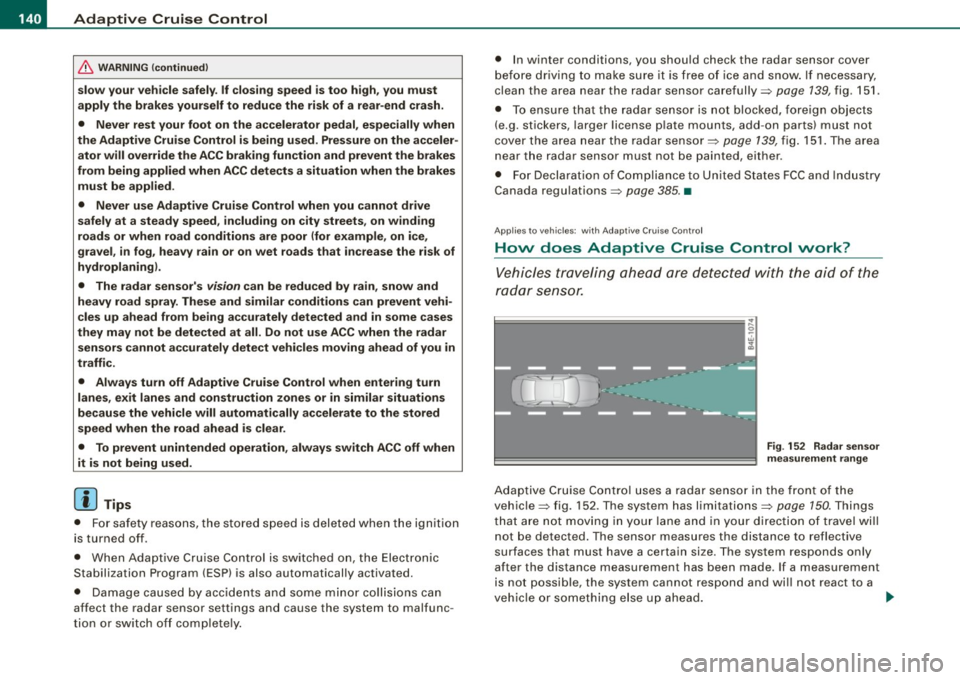
How does Adaptive Cruise Control work?
Vehicles tr aveling ahead are detected with t he aid of the
ra da r se nsor.
Fig . 152 R adar sen sor
mea suremen t range
Adaptive Cr uise C ontr ol us es a radar senso r in the fron t of th e
vehic le=:> fig. 152 . The system has limitations=:>
page 150. Things
th at are n ot moving in yo ur l ane and i n you r direc tio n of travel wi ll
n ot be detected. The sensor measures the distance to reflective
surfaces that must have a certain size. The system responds only
after t he distance measurement has been made. If a measurement
is not possible, the system cannot respond and wi ll not react to a
v e hic le or so met hing else up ahe ad .
~
Page 151 of 408
_____________________________________________ A_ d_a ...: pc.. t _i_ v _e_ C_ ru_ is_ e_ C_ o_n_ t_ r_ o _ l __ fflJI
A CC no t avai la bl e
The text message ACC n ot av aila bl e appears, for examp le, if the
temperature of the brakes is excessive. Adaptive Cruise Contro l is
temporari ly not available . A warning tone sounds as a reminder.
A CC no t avai lable!
The text message ACC not avai la ble! appears in the event of a
malfunction. Adaptive Cruise Control is turned off. A warning tone
sounds as a rem inder. Have the system inspected by a qua lified
dea lership.
A CC sen sor bloc ked
The text message AC C se nsor b lo cked appears when the ACC
System does not detect any objects over an extended time period .
For the time being, the distance to vehicles up ahead is not being
controlled. The ACC system is not switched off, so increased a lert
ness is required. The following may be reasons for the text message
ACC sensor blocked:
• The ACC sensor is d irty. The ACC system is not reacting, or is not
reacting correctly, to vehicles trave ling ahead .
• It is possible that you are dr iving on a road with very light traffic
without anything at the side of the road (e.g. guard rai ls, traffic
s igns, trees) . As soon as a vehicle is detected by the system aga in,
it returns to its control range and the text message disappears .
The ACC sensor is located in the area under the front license plate .
If there is a loss of operation due to heavy contamination, this area
should cleaned to restore proper operation.
A CC se nso r blo cked !
The text message ACC sen sor blocked! appears when the ACC
System can no longer accurately detect vehic les moving up ahead
in your lane of travel. Adapt ive Cruise Cont rol is tu rned off . A
warning tone a lso sounds as a reminder.
T o decide whether it is necessary to switch off the ACC (ACC sensor
b locked!) o r if it is on ly a temporary condition (ACC sensor blocked),
Controls and equip
ment
the system will also takes into consideration the outside tempera
t ure and/or the windshield wiper operation.
The ACC sensor is dirty or blocked (e.g. leaves, snow).
The ACC sensor is located in the area under the front license plate .
I f the ACC sensor is d irty or blocked, clean the area to restore system
operation .
EPB acti vation
The text message EPB a cti vation appears if emergency braking was
initiated with the Electromechan ical Parking Brake (EPB) . Adaptive
Cruise Control is turned off. A gong sounds as a reminder.
ESP activ at ion
The text message E S P activ ation appears if the Electronic Stabiliza
tion Program (ESP) has intervened to take control in a critica l driving
situation. In this case Adaptive Cruise Control is automatically
turned o ff. A gong sounds as a reminder .
Speed r ange
The text message Sp eed r ange appea rs if the current speed is too
low
to set or to hold the requested speed.
When se tting a desired speed, it must be a t leas t 20 m ph (30 km/h).
At speeds below 17 mph (25 km/h), the cruise control is turned off.
Shift le ver po sition!
The text message Shift lever po sition! appears when the shift se lect
leve r is m oved to position
N. In this position, Adaptive Cruise
Control is not avai lable .•
I • •
Page 158 of 408
• ..__A_ u_ d_ i _s _i_d _e_ a_ s_ s _ is_ t __________________________________________________ _
Audi side assist
Lane Change Assistant
Applies to vehicles: with side ass ist
Description
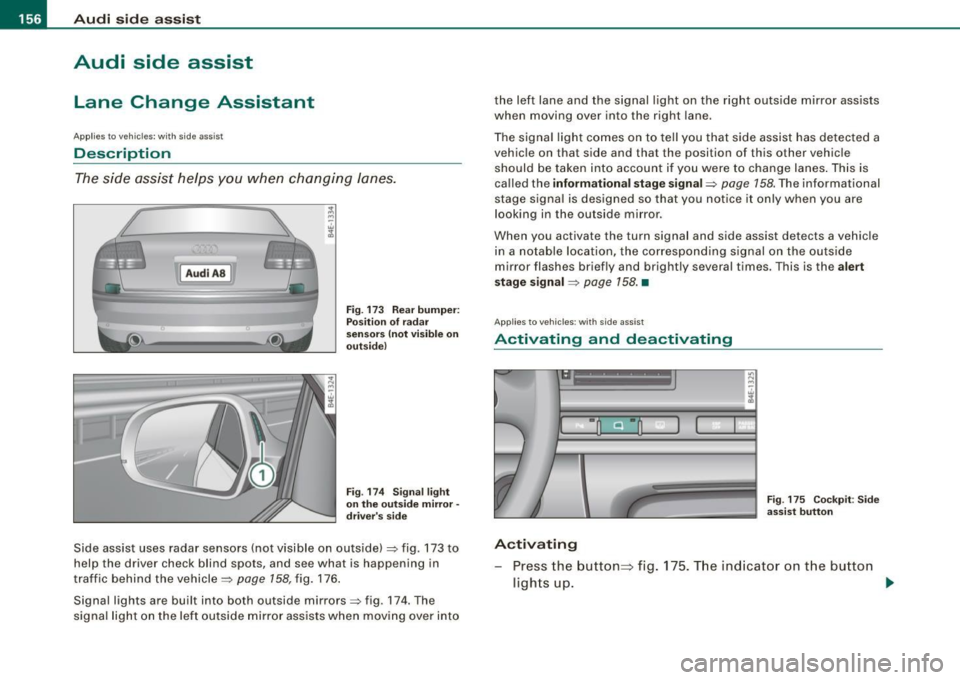
The side assist helps you when changing lanes.
[ Audi AS J
Fig. 173 Rear bumper:
Position of radar
sensors (not visible on
outside)
Fig . 174 Signal light
on the outside mirror -
driver's side
Side assist uses radar sensors (not visible on outside) => fig. 173 to
help the driver check blind spots, and see what is happening in
traffic behind the vehicle =>
page 158, fig. 176.
Signal lights are built into both outside mirrors=> fig. 174. The
signal light on the left outside mirror assists when moving over into the left lane and the signal light on the right outside mirror assists
when moving over into the right
lane.
The signal light comes on to tell you that side assist has detected a
vehicle on that side and that the position of this other vehicle
should be taken into account if you were to change lanes. This is
called the
informational stage signal=> page 158. The informational
stage signal is designed so that you notice it only when you are
looking in the outside mirror .
When you activate the turn signal and side assist detects a vehicle in a notable location, the corresponding signal on the outside
mirror flashes briefly and brightly several times. This is the
alert
stage signal
=> page 158. •
App lies to vehicles : with side ass ist
Activating and deactivating
-
Activating
Fig . 175 Cockpit : Side
assist button
Press the button=> fig. 175. The indicator on the button
lights up. ..,
Page 159 of 408
_________________________________________________ A_u_ d _ i _s ... i __ d _e:....: a.:..: s:.. s:.. i:..: s :..:t;___!II
Deactivating
- Press t he button again . T he ind icato r light on the butto n
goes out.
T he system works at speeds faster than 19 mph (30 km/h) .
& WARNING
• Improper reliance on the side assist system can cause colli
sions and seriou s per sonal injury:
- Never rely only on side assist when changing lanes .
- Always check rear view mirrors to make sure that it is safe to c hange lanes.
• Side assist cannot detect all vehicles under all conditions
danger of accident!
• Side assist cannot detect vehicles in time to alert you when
they approach from behind at very high speed , or fall drop back
very quickly.
• The radar sensor's
vision can be reduced or entirely blocked by
rain , snow, and heavy spray . This can result in side assist not
adequately detecting veh icles or , in some cases, not detecting
them at all . Always keep an eye on the direction you are traveling
and the relevant area around the vehicle.
• Please note that side assi st indicates there are approaching
vehicles, or vehicles in your bl ind spot , only after your vehicle has
reached a driving speed of at lea st 19 mph (30 km /h).
• S ide assist signal does not work around tight corners (turning
radiu s less than 328 feet or 100 m ).
• Side assist is no replacement for the driver's full attention . The
d river alone is responsible for lane changes and similar driv ing
maneuvers. Always keep an eye on the d ire ction you are travel ing
and the relevant area around the vehicle .
Controls and equip
ment
0 Note
• To e nsu re t hat you do not adverse ly a ffect s ide assist, do not
b lock the area on the rear bumper where the radar sensors are
located w it h f oreign objects (s uch as st ickers or bicycle rac ks).
• M ake su re that the signal light on the o utside mi rror is not
b loc ked by st ic ke rs or ot her items.
[ i ] Tips
• Side ass ist automaticall y deact ivates i f it detects t hat t he ra dar
sensors are blocked=> page
163. The indicator light on the button
goes out.
• The area on the bumper whe re the rada r sen so rs a re loca ted
must cons iste ntly re mai n fr ee o f snow, ice, and heavy so iling so t hat
side assist can function properly. Follow the additiona l notes on
=> page
164.
• Additiona l tinting on the front side windows can make it ha rder
t o see and co rrect ly unde rsta nd the s ignal light o n the outs ide
mirror.
• For Declaratio n of Comp liance to Un ited Sta tes FCC a nd I ndus try
Canada regulations => page
385. •
I • •
Page 160 of 408
• .___A_ u_ d_ i_s_ i_ d _e_ a_ s_ s_i s_ t __________________________________________________ _
Applies to vehicles: with side ass ist
Sensor detection area
Fig. 176 Sc hem ati c
illu str ati on : Sens or
d etec tio n area
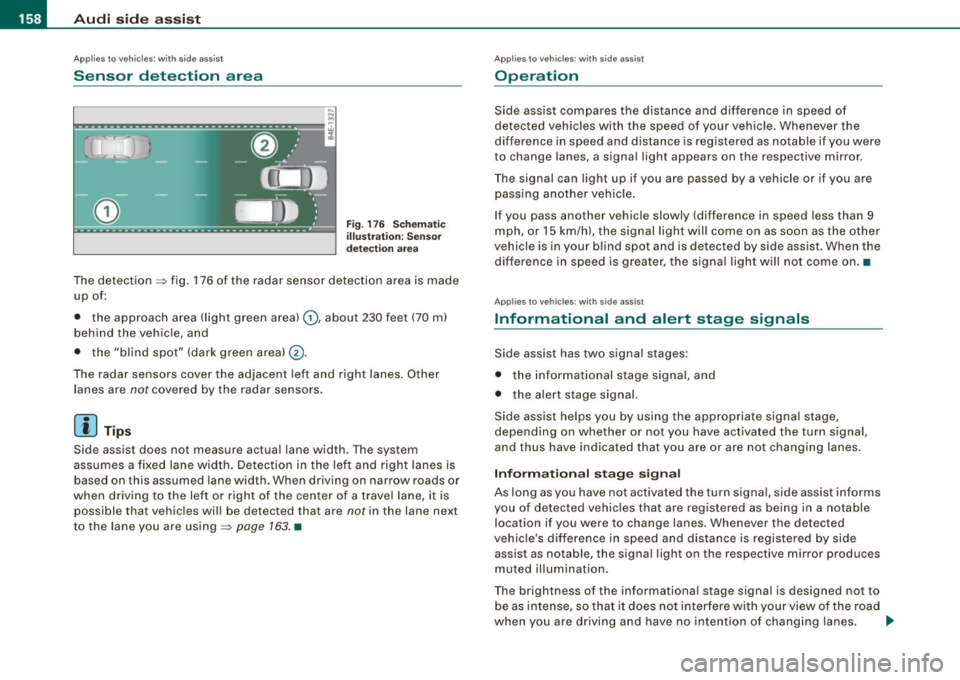
The detection ~ fig. 176 of the radar sensor detection area is made
up of:
• the approach area !light green area)
0, about 230 feet (70 ml
behind the veh icle, and
• the "blind spot" (dark green areal@.
The radar sensors cover the adjacent left and right lanes. Other
lanes are
not covered by the radar sensors .
[ i ] Tip s
Side assist does not measure actual lane width . The system
assumes a fixed lane width. Detection in the left and right lanes is based on this assumed lane width. When driving on narrow roads or
when driving to the left or right of the center of a travel lane, it is
possible that vehicles will be detected that are
not in the lane next
to the lane you are using~
page 163. •
Applies to vehicl es: with side assist
Operation
Side ass ist compares the distance and difference in speed of
detected vehicles with the speed of your vehicle. Whenever the
difference in speed and distance is registered as notab le if you were
to change lanes, a signal light appears on the respective mirror.
The signal can light up if you are passed by a vehicle or if you are
passing another vehicle.
If you pass another vehicle slowly (difference in speed less than 9 mph, or
15 km/h), the signal light will come on as soon as the other
vehicle is in your blind spot and is detected by side assist. When the
difference in speed is greater, the signa l light will not come on .•
Applies to vehic les : w ith side assist
Informational and alert stage signals
Side assist has two signal stages:
• the informational stage signal, and
• the alert stage signal.
Side assist helps you by using the appropriate signa l stage,
depend ing on whether or not you have act ivated the turn signal,
and thus have indicated that you are or are not changing lanes.
In fo rm ati onal stag e signal
As long as you have not activated the turn signa l, side assist informs
you of detected vehicles that are registered as being in a notable location if you were to change lanes. Whenever the detected
vehic le's difference in speed and distance is registered by side
assist as notable, the signa l light on the respective mirror produces
muted il luminatio n.
The brightness of the informationa l stage signal is designed not to
be as intense, so that it does not interfere with your view of the road
when you are driving and have no intention of changing lanes. .,,,
Page 165 of 408
___________________________________________________ A_u_ d_i_ s_ id_e_ a_ s_s _i_s _t _ __.ffllll
Ap plies to vehicle s: with side assist
General information
Side assist has lim its and cannot detect vehic les under all road and
weather conditions. P lease remember system limitations and
never
rely on the system, especially when:
• driving through curves=>
page 763,
• lanes are of different widths=> page 163. •
Applie s to vehicles: with side ass ist
When dr iving through curves
Side assist cannot detect vehicles in curves with a turning radius of
less than 328 feet (100 m).
When driving through a curve , it is possible that side assist may
register a vehicle two lanes
over, and the signal on the outside
m irror will ligh t up .•
A pplies to vehicle s: with side ass is t
Lane width
Con tro ls and eq uip
ment
-
Fi g. 183 Lanes o f a
n orm al w idth are in
d etec tion a rea
Fig . 18 4 Narrow l anes:
Si de ass is t m ay d etec t
v ehicle s tw o la ne s
a w ay
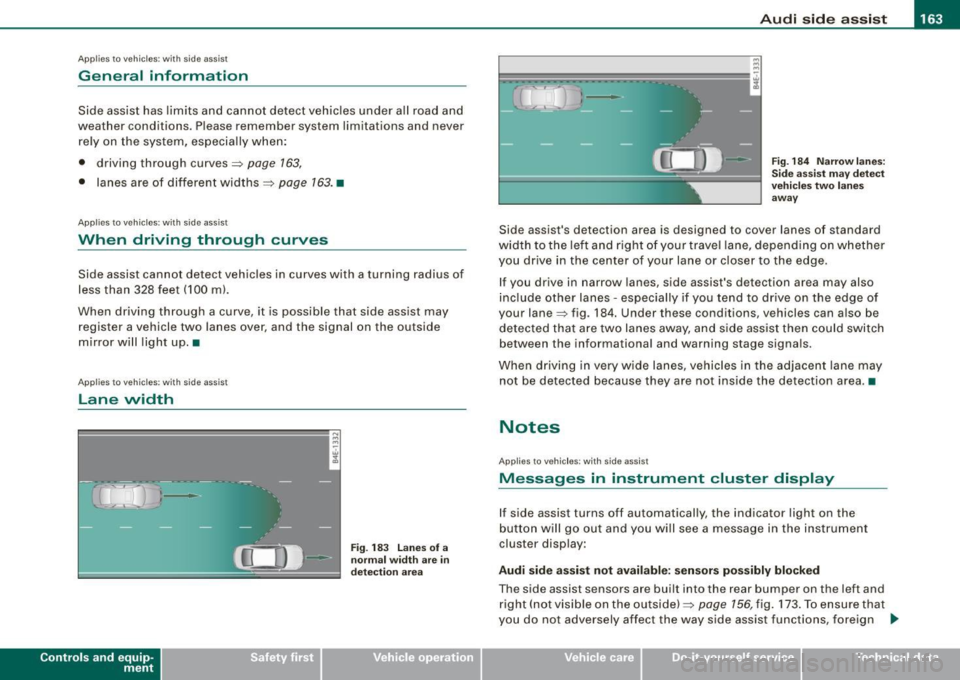
Side assist's detection area is designed to cover lanes of standard
width to the le ft and right o f your trave l lane, depending on whethe r
you drive in the center of your lane or c loser to the edge.
If you drive in narrow lanes, side assist's detection area may also
inc lude other lanes -especially if you tend to dr ive on the edge o f
your lane=> fig . 184. Under these conditions, vehicles can also be
de tected tha t are two lanes away, and s ide assist then could switch
between the informational and warning stage signa ls.
When d riving in
very wide lanes, vehicles in the adjacent lane may
not be detected because they are not inside the detection area. •
Notes
Applies to veh ic les : with s ide ass ist
Messages in instrument cluster display
If side assist turns off automatically, the indicator light on the
button will go out and you will see a message in the instr ument
cluster display:
Audi side a ssist not available : sensors po ssibly blocked
The side assist sensors are built into the rear bumper on the left and
right ( not visible on the outside) =>
page 156, fig. 173 . To ensure that
you do not adversely affect the way side assist functions, foreign .,_
Vehicle care I I irechnical data
Page 166 of 408
• .___A_ u_ d_ i_s_ i_ d _e_ a_ s_ s_is _ t __________________________________________________ _
objects (such as stic kers o r bicyc le rac ks) shou ld no t be attach ed to
th e ar ea on the rea r bump er where t he sen so rs ar e loca ted. I f side
assist functions are adve rsely aff ect ed, you will see this m essage in
th e ins trum ent clu ster dis pla y. Remove an ything that may be
blocking the sensors.
If no veh ic le is detected for a longer period of time while d riving,
s id e ass ist w ill a lso sw itc h off aut omat ica lly.
Audi side assist currently not available
If th ere is a tem porary prob le m (such as the veh ic le 's battery char ge
being low), side ass ist cannot be activated tem porar ily .
Audi side assist: system fault
Have the sys te m chec ked by an a uthorize d A udi dea ler o r qua lified
wor ks h op. •
App lies to veh icles : wi th side ass is t
Safety tips
The side ass is t de tect io n m ay be limi ted whe n driving a round
narrow s treet corners, on hilly streets, and under poor w eat he r
condit ions.
It is possibl e that the r ad ar sen so rs may also d etect oth er obje cts,
such as high or staggered guardrails.
Sid e assis t does no t measure ac tual lane w idth. The sys te m
assu mes a fixed lane widt h. D etect ion in the left and right lanes is
based on thi s assumed lane width . When driving on na rrow roads or
when driv ing to th e left or right of the c enter o f a trav el lane, it is
possible that veh ic les wi ll be detected that are
not in the lane next
to the l ane y ou are us ing .
& WARNING
• Improper reliance on the side assist system can cause colli
sions and serious personal injury:
& WARNING (continued)
- Never rely only on side assist when changing lanes .
- Always check rear view mirrors to make sure that it is safe to
change lanes .
• Side assist cannot detect all vehicles under all conditions
danger of accident !
• Side assist cannot detect vehicles
in time to alert you when
they approach from behind at very high speed , or fall drop back
very quickly.
• The radar sensor's
vision can be reduced or entirely blocked by
rain , snow , and heavy spray. This can result in side assist not
adequately detecting vehicles or, in some cases, not detecting
them at all . Always keep an eye on the direction you are traveling
and the relevant area around the vehicle .
• Please note that side assist indicates there are approaching
vehicles , or vehicles in your blind spot , only after your vehicle has
reached a driving speed of at least 19 mph (30 km /h) .
• Side assist signal does not work around tight corners (turning
radius less than 328 feet , or 100
ml.
• Side assist is no replacement for the driver's full attention. The
driver alone is responsible for lane changes and similar driving
maneuvers . Always keep an eye on the direction you are traveling
and the relevant area around the vehicle .
0 Note
To ensure that s ide assist is not adversely affected , you s hou ld not
block the area on the rea r bumper where the radar sensors a re
l ocated with fo rei gn ob jec ts (such as w ith sti ckers or b icycl e rac ks!. .,,_
Page 178 of 408
• ..__A_ d_v _ a_ n_c _e _ d_ P_ a_r _k _in ---== g'-- S...:y _ s_ t_ e_ m ___________________________________________ _
• Keep the sensors in the rear bumper and the rear-view camera
lens clean and free of snow and ice, so that the Audi parking system
can work properly. P lease follow the additional notes on
=>
page 186 . •
Ap plie s to v ehic les: wit h Advance d Par kin g Syst em w it h re ar v ie w c am era
Rear -view camera (Rear View)
The rear -vie w camera picture, appearing in the MM/
Dis play, sh ows the area behind the vehicle .
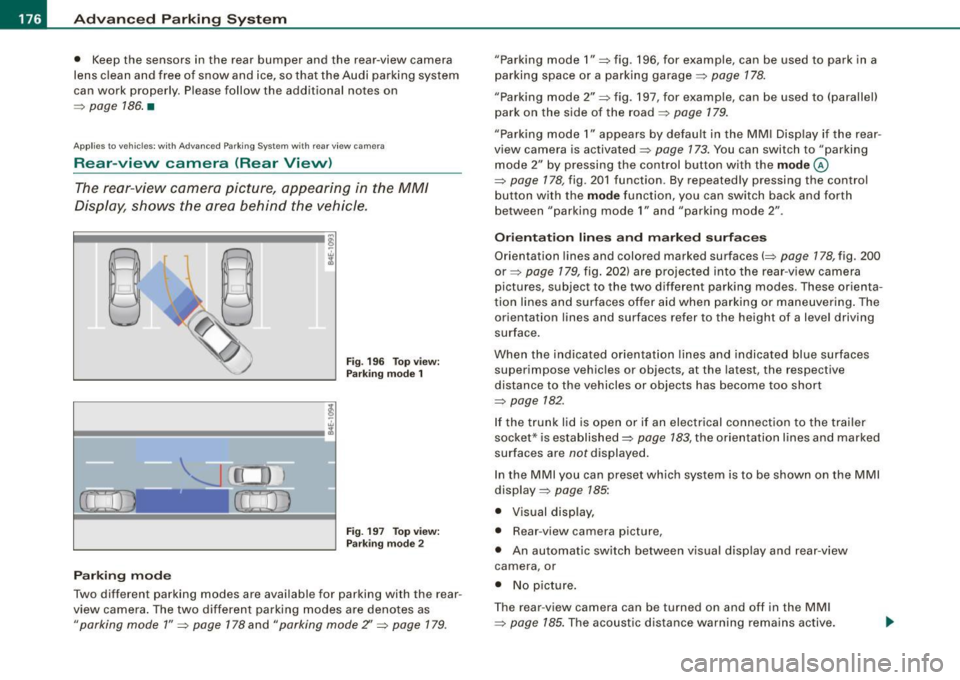
Fig . 19 6 Top view:
Par king mode 1
Fig. 19 7 To p view:
P arki ng m od e 2
Parking m od e
Two different parking modes are available for parking with the rear
view camera . The two different parking modes are denotes as
"parking mode 1 " => page 178 and "parking mode Z' => page 179.
"Parking mode 1 " => fig . 196, for example, can be used to park in a
parking space or a parking garage=>
page 178.
"Parking mode 2" => fig . 197, for example, can be used to (parallel)
park on the side of the road =>
page 179.
"Parking mode 1" appears by default in the MM I Disp lay if the rear
view camera is activated=>
page 173. You can switch to "parking
mode
2" by pressing the control button with the mode ©
=> page 178, fig . 201 function. By repeated ly pressing the control
bu tton with the
mode function, you can switch back and forth
between "parking mode
1" and "parking mode 2" .
Or ientat ion lines and marked surface s
Orientation lines and colored marked surfaces(=> page 178, fig. 200
or=> page 179 , fig. 202) are projected into the rear -view camera
pictures , subject to the two different parking modes . These orienta
t ion lines and surfaces offer aid when parking or maneuvering . The
orientation lines and surfaces refer to the height of a level driving
surface.
When the indicated orientat ion lines and indicated blue surfaces
superimpose vehicles or objects, at the latest, the respective
distance to the vehicles or objects has become too short
=>
page 782 .
If the t runk lid is open or if an electrical connection to the trailer
socket* is established=>
page 783, the orientation lines and marked
surfaces are notdisplayed .
In the MMI you can preset wh ich sys tem is to be shown on the MMI
display =>
page 785:
• Visual disp lay,
• Rear -view camera picture,
• An automatic sw itch between v isual disp lay and rear -view
camera , or
• No p icture .
T he rear -view camera can be turned on and off in the MM I
=>
page 185. The acoustic distance warni ng remains active.