lock AUDI S8 2009 Workshop Manual
[x] Cancel search | Manufacturer: AUDI, Model Year: 2009, Model line: S8, Model: AUDI S8 2009Pages: 408, PDF Size: 91.63 MB
Page 132 of 408
• ..__O_ n_ t_h _ e_ r_ o_ a_ d ____________________________________________________ _
[ i J Tip s
• If you release the ignition key in positions G) , @ or G), the key
automat ically returns to pos ition @.
• If you open the driver 's door when the ignition is switched on , a
buzzer sounds and the message
Ignition i s on appears in the instru
ment cluster display. Please switch the ignition off .•
Ignition key safety lock
The igni tion key can only be remove d when the selector
lever is in the "P" (Park) posi tion.
After turning off the ignition , the igni tion key can only be removed
from the ignition lock when the selector lever is in the "P" (Park)
position . Af ter you have removed the key, the selector lever is locked
and cannot be moved .•
Starting and stopping the engine
Starting the engine
The engine ca n only be started with your original Audi
key.
Fig. 145 Ignitio n ke y
po sitions
Ste p on the brake.
- Move t he selector lever into P or N
~ &.
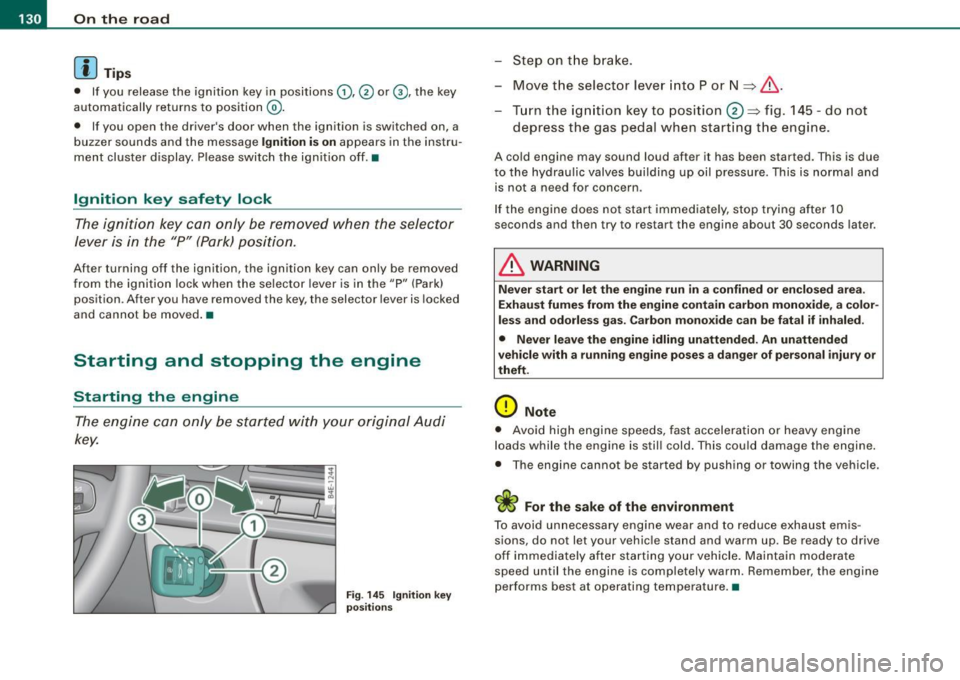
Turn the ign ition key to position 0 ~ fig . 145 -do not
depress the gas pedal when s tarting the engine .
A cold engine may sound loud after it has been started . This is due
to the hydrau lic valves building up oil pressure. This is normal and
is not a need fo r concern .
I f the engine does not start immediately, stop t rying after 10
seconds and then try to restart the engine about 30 seconds later .
& WARNING
Never sta rt or let the engine run in a confined or en clo sed are a.
Exhaust fumes from the engine contain carbon monoxide, a color
less and odorle ss gas. Carbon mono xide can be fatal if inhaled.
• Never leave the engine idling unattended. An unattended
vehicle with a running engine po ses a d ange r of person al injury or
theft.
0 Note
• Avoid high e ngine speeds, fast acceleration or heavy eng ine
loads while the engine is still cold. This could damage the engine.
• The eng ine cannot be s tarted by push ing or towi ng the vehicle.
c£> For the sake of the environment
To avoid unnecessary engine wear and to reduce exhaust emis
sions, do not let your vehic le stand and warm up. Be ready to drive
off im mediately after starting your vehicle . Maintain moderate
speed until the engine is completely warm . Remember , the engine
performs best at operating temperature. •
Page 134 of 408

-On th
e roa d --------------------
When s tarting a cold engine, the engine may be a bit noisy for a
s h or t while. This is because the hydraulic valves are working to
bring up the oil pressure. This is norma l and no cause for concern .
If the engine does not start immediately, stop cranking the engine
af ter 10 seconds . Wa it 30 seconds, then try to restart the eng ine .
& WARNING
Ne ver sta rt the en gine in an en clos ed area su ch a s in your gar age
with th e garage door clo sed . The exhau st fum es are poisonous!
0 Note
• Avoid high engine speeds, full gas or heavy engine loads if the
eng ine has not warmed up to its operating temperature. You cou ld
damage the engine.
• Do not try to start the engine by pulling or pushing .
<£> For the sake of the environment
Do not let your veh ic le stand and warm up . Be ready to drive off
right away. This way, you prevent unnecessary exhaust emissions .
[ i J Tip s
If you open th e driver 's door when the ignition is switched on , a
buzzer sounds and the message
Ignition i s on appears in the instru
ment clust er display. Pl eas e switch the ign ition off .•
Ap plies to vehicles: w it h C onve nience key
Stopping the engine using the [STOP] button
0
0
- Bring t he vehicle to a complete stop.
Fi g. 14 7 Co nve nie nce
key: S TOP butt on
Move t he s elect or in to the P or N posi tion .
Press the [STO P) button ~ fig. 147 .
Pressing the [ STOP) but ton once sw itches off the engine and the
ignition . If you press the [
STOP] button again for approximately 2
seco nds, the steering wi ll be locked, provided that the selector lever
is in the P position
=> & .
Emergen cy OFF fun cti on
I f necessary , th e engine can be switched off with the selector lever
in the R, Dor S pos it ions . To do so, step on the foot brake and press
and hold the [
ST OP] button (vehicle speed must be be low 6 mph/
10 km/h) .
& WARNING
• Never stop the engine until the vehi cle h as c ome to a c omplete
stop .
• The bra ke booster and the se rv otronic only work when the
engine i s running .
If you turn off the engine , more force will be
Page 135 of 408

On the road -
----------------
& WARN IN G ( continu ed )
required to steer or bra ke the vehicle . If you are not prepa red , th is
c ould re sult in a collision and serious per sonal in jur y.
• For your safet y, move the sele ctor lever t o the P po sition , then
turn off the engine . Otherwise the veh icle could inadvertently roll
away .
• After t urning off th e engine , the r adi ator f an c an come on and
run for up to 10 mi nute s -even if the i gnition i s switc hed off . Like
wise , the fan could come on if the temperature in the engin e
c omp artment r ais e s due to heat build up or if you le ave the vehi cle
s tandin g in direct sunlight .
0 Note
After driving at high engine load, heat can build up in the engine
compartment after you have turned off the engine. This can damage
t he engine . Let the veh icle stand and run in idle for about 2 minutes
before turning off the engine .•
Ap plies to ve hicles : w ith Conve nie nce key
Driver's messages in the instrument cluster
Messages appear in the instrument cluster to let the
driver know if something is missing or if some thing must
be done.
No ke y identified
This message appears when you press the [ START ] button, but
there is no remote control key insi de the vehicle or if the system
does not recogni ze the key . For example, if your key is
shielded by
an object or
encased, i.e . inside an a lum inum briefcase, the signal
from the key cannot be detected. Electronic devices such as cell
phones can also interfere with the radio signal.
Controls and equip
ment P
re ss br ake pedal to start engine
This message appears when you press the I S TART] button when
starting the engine but you have not depressed the brake pedal.
En gage N or P to start e ngine
This message appears when you start the engine but the selector
lever is not in the P or N position. The e ngine can be sta rted o nly if
the selector lever is in one of these two positions.
.!., Key not in vehicle
This message appears together with the ..Z. symbol when the
remote control key is removed from t he vehicle whi le the eng ine is
running . This is to remind you that you should not continue your trip
without you r key .
If the key is no longer inside the veh ic le when you turn off the
engine, you will not be able to switch on the ignition or restart the
engine. Also, you will not be ab le to lock the vehicle from the
outside.
S hift to P, othe rwis e vehi cle ca n roll a way. Door s do not lo ck i f lev er
is not in P.
This message appears for your safety together wit h an aud ib le
warning signa l when you press the [S TO P] button but the selector
lever is not in the P position and you open the driver 's door . Move
the selector lever into P, otherwise the vehic le could roll away. In
addition, you w ill not be able to lock the vehicle with either the lock
button located on the door handle or the remote control.
T o engage steering lo ck, press a nd hold STOP button
This message appears for your personal safety if you switch off the
eng ine and the ignition by pressing the
I S TOP ] button and then
open the driver's door . In this case, the steering will still not be
locked . The stee ring wheel wi ll lock :
• I f you press the
I STOP ] button for longer than 1 second.
• I f you lock the vehicle from the outside .•
I • •
Page 137 of 408
On the road -
----------------
Parking
To prevent a parked vehicle from rolling away, there are a
few things you should do.
When you park your vehicle , do the following
- Stop the vehicle using the brake peda l.
- Pull the switch to app ly th e electromechanical park ing
brake .
- Move t he selector lever into the
P positio n ~ &-
- Switch off the engine and remove the ignitio n key f rom
the ignition loc k.
When you park your vehicle on hills , do the
following
- Stop the vehicle using the brake peda l.
- Pull the switch to app ly th e electromechanical par king
brake.
- If you are parkin g headed
downhill , turn t he fro nt whee ls
toward the curb.
- If you are parking headed
uphill , turn t he front w heels
awayfrom the curb.
- Move the se lector lever into the
P position.
- Sw itch off the engine and rem ove the ignitio n key f rom
the ign ition lock.
& WARNING
Thi s is how you can reduce the r isk of injury when l eav ing your
v ehicle.
Controls and equip
ment
& WARN ING (c ontinued )
• Neve r p ark the vehi cle wh ere it c an come in cont act with dry
gra ss, s pilled fuel or any oth er fl amm able m ater ials.
• Wh en p arking on hill s, always turn the w hee ls s o that the front
wheel s will fir st roll into the cu rb , if the veh icle should start to roll.
• Never allo w anyone -e spe ciall y small ch ildren -to r em ain in the
vehi cle when it i s lo cked . Lo cked doors make it more diffi cult fo r
r e s cuers to acce ss the pa ssenger compartment in the event of an
emergen cy. Danger t o life!
• Never le ave chi ldren un supervi sed in the vehicle . Children
c ould release the p arking brake or mo ve the gear shift le ve r o ut of
g ear. The vehicle could start to roll away and cau se an a ccident.
• No matt er w hat the se a son i s, the temper atu re in a pa rked
vehicle can rea ch d angerou s levels.
0 Note
• Please exe rcise care when you park your vehicle in pa rking areas
with parking barriers or curbs . Parking barriers and curbs vary in
height and cou ld damage your bumper and re lated components as
the front of your vehicle moves over a barrier or curb that is too high, as you park or as you back out of a parking spot . In order to be
sure that no such damage can occur , you may w ish to stop short of
having the front tires of your car touch the parking barrier or curb.
• Please also exercise exceptional care when you drive up or down
steep ramps or drive over curbs or other obstacles, for which the
vehicle is not designed, because components of the vehicle close to
the ground, such as bumper covers, spoilers and suspension and exhaust system components, may become damaged. •
I • •
Page 138 of 408
• .___O_ n_ t_h _e _ r_o _a_ d __________________________________________________ _
Starting off with a trailer
T o prevent rolling back unintentionally on an incline, do
the following:
- Keep the switch pulled and depress the accelerator. The
parking brake stays applied and preve nts the vehicle
f rom rolling backward .
- You can release the switch o nce you are sure t hat you are
deve lop ing enough forward momentum at the whee ls as
you depress the accelerator.
Depending on the weight of the rig (vehicle and trailer) and the
severity of the incline, you may roll backwards as you start. You can
prevent rol ling backwards by holding the parki ng brake sw itch
pul led out and acce lerating -just as you would when starting on a
h ill with a conventional hand brake. •
Emergency braking
In the event that the conventi on al b rake system fails or
locks.
- Pull th e swi tch and continu e to pull it to slow you r veh icle
with t he par king brake in an emergency .
- As soon as you r elease the switch or acc elerate, the
braking pro cess s tops .
If you pull the swi tch and hold it above a speed of about 5 mph (8
km/h), the emergency braking function is initiated . T he vehicle is
braked at all fou r whee ls by activating the hydraulic brake system .
Brake performance is similar to making an emergency stop~&.
So that emergency braking is not activated by mistake, an audib le
warning tone (buzzer) sounds when the switch is pulled . As soon as the switch is released, or the accelerator pedal is depressed, emer
gency b raking stops .
& WARNING
Emergency braking should only be u sed in an emergen cy, when
the normal foot br ake has f ailed or the br ake ped al i s obstructed .
U sing the parking brake to perform emergen cy brakin g will slow
yo ur vehicle a s if yo u had made a full brake app lication . The law s
of phy sic s cannot be su spe nded even with E SP and it s asso ciated
c ompon ents ( AB S, ASR, EDS ). In corner s and whe n ro ad or
w eather conditions are bad , a full brak e application can cau se the
vehi cle to skid or the r ear end to break a way -ri sking an
ac cident .•
Driver messages in the instrument cluster
Caution: Vehicle parked too steep
T his message appears when the parking brake is applied on an
incline that exceeds about 30%.
I n this case the b raking power of the park ing brake may
not be
adequ ate
to prevent the vehicle from rol ling unintentionally.
Plea se relea se parking br ake
This message appears, when a gear is selected and the acce lerator
pedal is depressed -release the parking brake.
Pre ss brake peda l to release parking brake
T his driver message appears when the switch to release the parking
brake was pressed. The parking brake can only be released if you
press the brake or accelerator peda l and press the switch at the
same time .
Parking brake malfun ction !
This d river message appears together with the yellow
when there is a parking brake malfunction. symbol
Page 151 of 408
_____________________________________________ A_ d_a ...: pc.. t _i_ v _e_ C_ ru_ is_ e_ C_ o_n_ t_ r_ o _ l __ fflJI
A CC no t avai la bl e
The text message ACC n ot av aila bl e appears, for examp le, if the
temperature of the brakes is excessive. Adaptive Cruise Contro l is
temporari ly not available . A warning tone sounds as a reminder.
A CC no t avai lable!
The text message ACC not avai la ble! appears in the event of a
malfunction. Adaptive Cruise Control is turned off. A warning tone
sounds as a rem inder. Have the system inspected by a qua lified
dea lership.
A CC sen sor bloc ked
The text message AC C se nsor b lo cked appears when the ACC
System does not detect any objects over an extended time period .
For the time being, the distance to vehicles up ahead is not being
controlled. The ACC system is not switched off, so increased a lert
ness is required. The following may be reasons for the text message
ACC sensor blocked:
• The ACC sensor is d irty. The ACC system is not reacting, or is not
reacting correctly, to vehicles trave ling ahead .
• It is possible that you are dr iving on a road with very light traffic
without anything at the side of the road (e.g. guard rai ls, traffic
s igns, trees) . As soon as a vehicle is detected by the system aga in,
it returns to its control range and the text message disappears .
The ACC sensor is located in the area under the front license plate .
If there is a loss of operation due to heavy contamination, this area
should cleaned to restore proper operation.
A CC se nso r blo cked !
The text message ACC sen sor blocked! appears when the ACC
System can no longer accurately detect vehic les moving up ahead
in your lane of travel. Adapt ive Cruise Cont rol is tu rned off . A
warning tone a lso sounds as a reminder.
T o decide whether it is necessary to switch off the ACC (ACC sensor
b locked!) o r if it is on ly a temporary condition (ACC sensor blocked),
Controls and equip
ment
the system will also takes into consideration the outside tempera
t ure and/or the windshield wiper operation.
The ACC sensor is dirty or blocked (e.g. leaves, snow).
The ACC sensor is located in the area under the front license plate .
I f the ACC sensor is d irty or blocked, clean the area to restore system
operation .
EPB acti vation
The text message EPB a cti vation appears if emergency braking was
initiated with the Electromechan ical Parking Brake (EPB) . Adaptive
Cruise Control is turned off. A gong sounds as a reminder.
ESP activ at ion
The text message E S P activ ation appears if the Electronic Stabiliza
tion Program (ESP) has intervened to take control in a critica l driving
situation. In this case Adaptive Cruise Control is automatically
turned o ff. A gong sounds as a reminder .
Speed r ange
The text message Sp eed r ange appea rs if the current speed is too
low
to set or to hold the requested speed.
When se tting a desired speed, it must be a t leas t 20 m ph (30 km/h).
At speeds below 17 mph (25 km/h), the cruise control is turned off.
Shift le ver po sition!
The text message Shift lever po sition! appears when the shift se lect
leve r is m oved to position
N. In this position, Adaptive Cruise
Control is not avai lable .•
I • •
Page 159 of 408
_________________________________________________ A_u_ d _ i _s ... i __ d _e:....: a.:..: s:.. s:.. i:..: s :..:t;___!II
Deactivating
- Press t he button again . T he ind icato r light on the butto n
goes out.
T he system works at speeds faster than 19 mph (30 km/h) .
& WARNING
• Improper reliance on the side assist system can cause colli
sions and seriou s per sonal injury:
- Never rely only on side assist when changing lanes .
- Always check rear view mirrors to make sure that it is safe to c hange lanes.
• Side assist cannot detect all vehicles under all conditions
danger of accident!
• Side assist cannot detect vehicles in time to alert you when
they approach from behind at very high speed , or fall drop back
very quickly.
• The radar sensor's
vision can be reduced or entirely blocked by
rain , snow, and heavy spray . This can result in side assist not
adequately detecting veh icles or , in some cases, not detecting
them at all . Always keep an eye on the direction you are traveling
and the relevant area around the vehicle.
• Please note that side assi st indicates there are approaching
vehicles, or vehicles in your bl ind spot , only after your vehicle has
reached a driving speed of at lea st 19 mph (30 km /h).
• S ide assist signal does not work around tight corners (turning
radiu s less than 328 feet or 100 m ).
• Side assist is no replacement for the driver's full attention . The
d river alone is responsible for lane changes and similar driv ing
maneuvers. Always keep an eye on the d ire ction you are travel ing
and the relevant area around the vehicle .
Controls and equip
ment
0 Note
• To e nsu re t hat you do not adverse ly a ffect s ide assist, do not
b lock the area on the rear bumper where the radar sensors are
located w it h f oreign objects (s uch as st ickers or bicycle rac ks).
• M ake su re that the signal light on the o utside mi rror is not
b loc ked by st ic ke rs or ot her items.
[ i ] Tips
• Side ass ist automaticall y deact ivates i f it detects t hat t he ra dar
sensors are blocked=> page
163. The indicator light on the button
goes out.
• The area on the bumper whe re the rada r sen so rs a re loca ted
must cons iste ntly re mai n fr ee o f snow, ice, and heavy so iling so t hat
side assist can function properly. Follow the additiona l notes on
=> page
164.
• Additiona l tinting on the front side windows can make it ha rder
t o see and co rrect ly unde rsta nd the s ignal light o n the outs ide
mirror.
• For Declaratio n of Comp liance to Un ited Sta tes FCC a nd I ndus try
Canada regulations => page
385. •
I • •
Page 165 of 408
___________________________________________________ A_u_ d_i_ s_ id_e_ a_ s_s _i_s _t _ __.ffllll
Ap plies to vehicle s: with side assist
General information
Side assist has lim its and cannot detect vehic les under all road and
weather conditions. P lease remember system limitations and
never
rely on the system, especially when:
• driving through curves=>
page 763,
• lanes are of different widths=> page 163. •
Applie s to vehicles: with side ass ist
When dr iving through curves
Side assist cannot detect vehicles in curves with a turning radius of
less than 328 feet (100 m).
When driving through a curve , it is possible that side assist may
register a vehicle two lanes
over, and the signal on the outside
m irror will ligh t up .•
A pplies to vehicle s: with side ass is t
Lane width
Con tro ls and eq uip
ment
-
Fi g. 183 Lanes o f a
n orm al w idth are in
d etec tion a rea
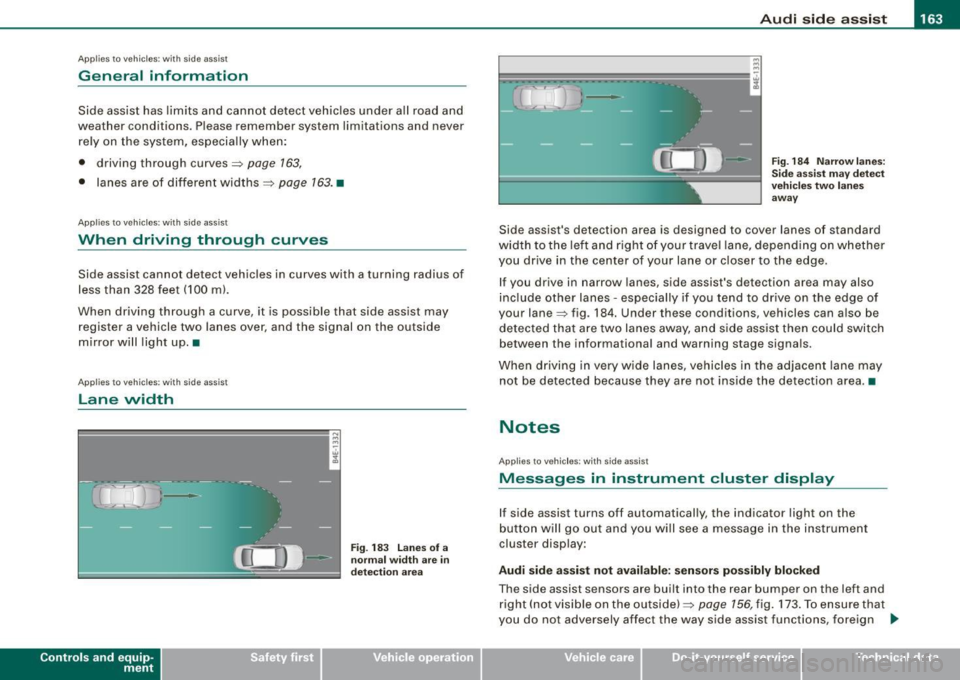
Fig . 18 4 Narrow l anes:
Si de ass is t m ay d etec t
v ehicle s tw o la ne s
a w ay
Side assist's detection area is designed to cover lanes of standard
width to the le ft and right o f your trave l lane, depending on whethe r
you drive in the center of your lane or c loser to the edge.
If you drive in narrow lanes, side assist's detection area may also
inc lude other lanes -especially if you tend to dr ive on the edge o f
your lane=> fig . 184. Under these conditions, vehicles can also be
de tected tha t are two lanes away, and s ide assist then could switch
between the informational and warning stage signa ls.
When d riving in
very wide lanes, vehicles in the adjacent lane may
not be detected because they are not inside the detection area. •
Notes
Applies to veh ic les : with s ide ass ist
Messages in instrument cluster display
If side assist turns off automatically, the indicator light on the
button will go out and you will see a message in the instr ument
cluster display:
Audi side a ssist not available : sensors po ssibly blocked
The side assist sensors are built into the rear bumper on the left and
right ( not visible on the outside) =>
page 156, fig. 173 . To ensure that
you do not adversely affect the way side assist functions, foreign .,_
Vehicle care I I irechnical data
Page 166 of 408
• .___A_ u_ d_ i_s_ i_ d _e_ a_ s_ s_is _ t __________________________________________________ _
objects (such as stic kers o r bicyc le rac ks) shou ld no t be attach ed to
th e ar ea on the rea r bump er where t he sen so rs ar e loca ted. I f side
assist functions are adve rsely aff ect ed, you will see this m essage in
th e ins trum ent clu ster dis pla y. Remove an ything that may be
blocking the sensors.
If no veh ic le is detected for a longer period of time while d riving,
s id e ass ist w ill a lso sw itc h off aut omat ica lly.
Audi side assist currently not available
If th ere is a tem porary prob le m (such as the veh ic le 's battery char ge
being low), side ass ist cannot be activated tem porar ily .
Audi side assist: system fault
Have the sys te m chec ked by an a uthorize d A udi dea ler o r qua lified
wor ks h op. •
App lies to veh icles : wi th side ass is t
Safety tips
The side ass is t de tect io n m ay be limi ted whe n driving a round
narrow s treet corners, on hilly streets, and under poor w eat he r
condit ions.
It is possibl e that the r ad ar sen so rs may also d etect oth er obje cts,
such as high or staggered guardrails.
Sid e assis t does no t measure ac tual lane w idth. The sys te m
assu mes a fixed lane widt h. D etect ion in the left and right lanes is
based on thi s assumed lane width . When driving on na rrow roads or
when driv ing to th e left or right of the c enter o f a trav el lane, it is
possible that veh ic les wi ll be detected that are
not in the lane next
to the l ane y ou are us ing .
& WARNING
• Improper reliance on the side assist system can cause colli
sions and serious personal injury:
& WARNING (continued)
- Never rely only on side assist when changing lanes .
- Always check rear view mirrors to make sure that it is safe to
change lanes .
• Side assist cannot detect all vehicles under all conditions
danger of accident !
• Side assist cannot detect vehicles
in time to alert you when
they approach from behind at very high speed , or fall drop back
very quickly.
• The radar sensor's
vision can be reduced or entirely blocked by
rain , snow , and heavy spray. This can result in side assist not
adequately detecting vehicles or, in some cases, not detecting
them at all . Always keep an eye on the direction you are traveling
and the relevant area around the vehicle .
• Please note that side assist indicates there are approaching
vehicles , or vehicles in your blind spot , only after your vehicle has
reached a driving speed of at least 19 mph (30 km /h) .
• Side assist signal does not work around tight corners (turning
radius less than 328 feet , or 100
ml.
• Side assist is no replacement for the driver's full attention. The
driver alone is responsible for lane changes and similar driving
maneuvers . Always keep an eye on the direction you are traveling
and the relevant area around the vehicle .
0 Note
To ensure that s ide assist is not adversely affected , you s hou ld not
block the area on the rea r bumper where the radar sensors a re
l ocated with fo rei gn ob jec ts (such as w ith sti ckers or b icycl e rac ks!. .,,_
Page 169 of 408

_______________________________________________ A_ u_t _o _ m_ a_ t _i_ c_ t_r _a _n _ s_ m __ is_s_ i _o _ n __ !II
T he selector lever must be in Nor P. If one of the driving positions
is engaged a safety switch w ill preven t the eng ine from being
started. See also=>
page 130.
Before you move the selector lever from the P position, you must
a lways apply the brake pedal before and while depressing the
button in the hand le of the se lector lever .
_& WARNING
• Unintended v ehicle movement c an cause serious injury .
- When the selector lever i s in a driving po sition , the vehicle
may creep, even at idle speed . Therefore do not release the
parking brake or foot brake until you are ready to move ,
be cau se power is tran smitted to the wheel s as soon as a
driving po sition i s engaged.
- Do not accelerate while selecting a driving pos ition . At this
time the engine must be at idle speed so that undue stress is
not placed on the clut che s in the t ransmission .
-Remember : - even when stopped briefly with the automatic
transmi ssion in "D" or "R ", engine po wer is being tr ansmitted
to the wheels. Your vehicle could "creep " forward or ba ckward .
When stopped , keep the brake pedal fully depres sed and u se
the parking brake if ne ces sary to keep the vehicle from rolling.
• If the selecto r leve r is unintentionally mo ved into N whi le you
are dr iving, take your foot off the accelerator pedal and wait for
the eng ine to return to idle speed before sele cting a dr iving posi
tion .
• Never shift into "R " or "P " when the ve hicle is in motion .
• Never get out of the driver 's seat when the eng ine i s running .
• If you must get out of the vehicle , move the selector lever
s ecurely into the P po sition and apply the park ing brake firmly.
• If the engine must remain running , never have any driving po si
tion engaged when che cking under the hood . Make sure the
selector lever has securely engaged and is locked in "P" with the
p ark ing br ake firmly set =>
page 301 , "E n gine compart ment ".
Controls and equip
ment
& W ARNING (continued )
Otherwise , any in crease in engine speed may set the vehi cle in
motion , even with the parking brake applied. •
Selector lever positions
This section describes the selector lever positi ons and
drivi ng ra nges .
Fig . 18 6 D ispl ay in the
in strument cluste r:
s elec tor lev er in po si
tion D
The selector leve r posi tion engaged appears next to the selec tor
lever as wel l as in the instrument c luster display . A lso, the current
gear engaged is sh own in positi ons D and S .
P -Park
In this selector leve r pos it ion the transmission is mechanica lly
locked . Engage
P on ly when the vehicle is completely stopped=> &
in "Driving the automatic transm ission" on page 166 .
To shift in or out of position P, you must first press and hold the
brake peda l
and then press the re lease bu tton in t he se lecto r leve r
handle while moving the selector lever to or from
P . You can shift
out of this position only with the ignit ion on.
R -Re ver se
The transmission wi ll au tomatically select the lowest gear ratio
when you shift into reverse .
I • •