light AUDI S8 2009 Manual PDF
[x] Cancel search | Manufacturer: AUDI, Model Year: 2009, Model line: S8, Model: AUDI S8 2009Pages: 408, PDF Size: 91.63 MB
Page 136 of 408
• ..__O_ n_ t_ h _e _ ro_ a_d __________________________________________________ _
Electromechanical parking brake
Operation
The electromechanical parking brake replaces the hand
brake.
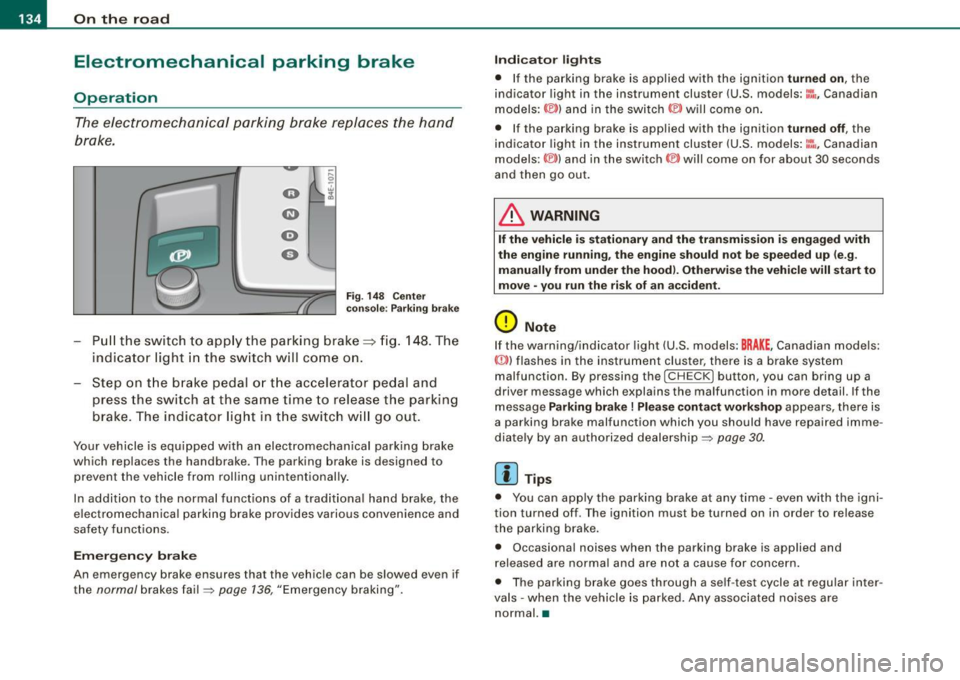
F ig. 148 Cen ter
co nso le: P arki ng br ake
Pu ll the switch to app ly the parking brake==> fig. 148 . The
indicator light in the sw itch will com e on.
Step on t he brake ped al o r th e accelerat or pedal and
press the switch at the s am e time to rel eas e the parking
brake . The indicator light in t he switch w ill go out .
Your vehicle is equipped w ith an electromechanical parking brake
which replaces the handbrake . The parking brake is designed to
prevent the vehicle from rolling unintentionally .
In addition to the norma l functions of a trad itiona l hand brake, the
e lectromechanical parking brake provides various convenience and
safety functions.
Em erg en cy brake
An emergency brake ensures that the vehicle can be slowed even if
the
normal brakes fa il=> page 136, "Emergency braking".
Indi ca to r light s
• If the pa rking brake is app lied with the ignition turned on, the
indicator light in the instrument cluster (U.S. models:~-Canadian
models: ©) and in the switch © will come on .
• If the parking brake is applied with the ignition
turned off , the
indicator light in the instrument cluster (U .S . models :~~ , Canadian
models :(®) ) and in the switch(®) will come on for about 30 seconds
and then go out.
& WARNING
If the vehicle i s stationary and the transmis sio n i s e ngag ed with
the eng ine running , th e engine should n ot b e speeded up (e .g .
manu ally from under the ho od). Oth erw ise th e vehi cle will start t o
mo ve • you r un the ris k of an acc ident .
0 Note
If the warning/indicator light (U .S . models: BRAKE , Canadian models:
{(j))) flashes in the instrument cluster, there is a brake system
malfunction . By pressing the
I C HE CK] button , you can bring up a
driver message which explains the malfunction in more detail. If the
message
Parking brake ! Plea se conta ct w ork shop appears, there is
a parking brake malfunction which you should have repaired imme
diate ly by an authorized dealership=:>
page 30.
[ i ] Tips
• You can app ly the parking brake at any time -even with the igni
tion turned off . T he ignition mus t be turned on in order to release
the parking brake.
• Occasional noises when the parking brake is applied and
released are norma l and are not a cause for concern .
• The parking brake goes through a se lf -test cycle at regular inter
va ls - when the vehicle is parked. Any associated no ises are
normal. •
Page 139 of 408

_________________________________________________ O_ n_ t_h _e _ ro_ a_d _ __._
0 Not e
If the warning/indicator light (U.S. models : BRAKE, Canadian models:
CCD) ) flashes in the instrument cluster, there is a brake system
malfunction. By pressing the
I CHECK] button, you can bring up a
driver m essage which explains the malfunction in more detail. If the
message
P arking br ake ! Plea se contact work shop appears, there is
a parking brake malfunction which you should have repaired imme
diate ly by an au thorized dealership ~
page 30. •
Cruise control
Switching the system on
The cruise control system makes it possible to drive at a
constant speed starting at 20 mph (30 km/h).
Con tro ls and eq uip
ment
F ig . 149 Contro l le v er
w ith set butt on F
ig . 150 D ispla y:
Se lecte d sp ee d
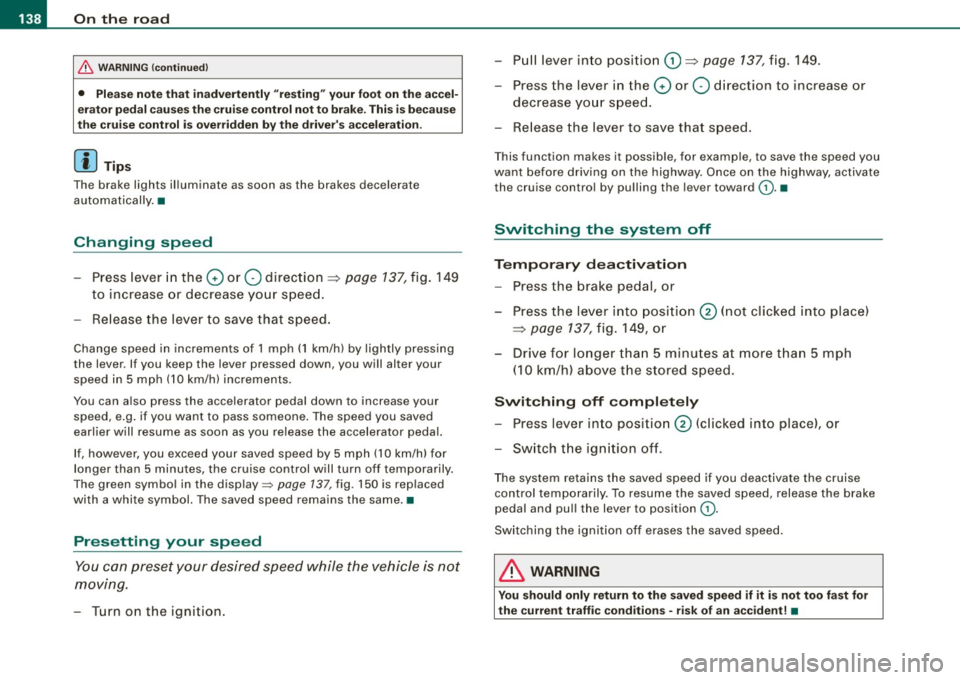
Pull the lever to positi on G) => fig. 149 to swi tc h the
system on .
Drive a t th e speed yo u w ish to set .
Press button
© to set that speed.
The display ~ fig. 150 will show the set speed. The display may vary
depe nding on the type of display in your vehic le. The indicator light
CRUISE (US model)/ 0" (Canadian model) will a lso light up in the
instrument cluster.
The speed is kept constant via an engine output adjustment or active brake intervention .
& WARNING
• Alway s pa y attention to traffic even when the crui se control is
s w itched o n. You are alwa ys respo nsible f or your speed and the
d is tan ce bet ween your vehicl e and other vehi cle s.
• For safety reason s, the cruise con trol s hould not be used in the
c ity , in stop -and -go tra ffi c, o n twi sting road s and when road condi
tion s are po or (s uch a s ice, fog, gr avel , he avy rain and h ydro
pl anin g) -ris k of a ccident.
• Turn off the crui se co ntro l te mpo rarily whe n ente rin g turn
lan es, highwa y exit la ne s or in con stru ction zon es.
Vehicle care
I I irechnical data
Page 140 of 408
• .___O_ n_ t_h _e _ r_o _a_ d __________________________________________________ _
& WARNING (continued)
• Please note that inadvertently "resting" your foot on the accel
erator pedal causes the cruise control not to brake . This is because
the cruise control is overridden by the driver's acceleration.
[ i J Tips
The brake lights illuminate as soon as the brakes decelerate
automatically. •
Changing speed
-Press lever in the 0 or O direction => page 137, fig. 149
to increase or decrease your speed.
- Release the lever to save that speed.
Change speed in increments of 1 mph (1 km/h) by lightly pressing
the lever . If you keep the lever pressed down, you will alter your
speed in 5 mph (10 km/h) increments.
You can also press the accelerator pedal down to increase your
speed, e.g . if you want to pass someone. The speed you saved
earlier will resume as soon as you release the accelerator pedal.
If, however, you exceed your saved speed by 5 mph (10 km/h) for
longer than 5 minutes, the cruise control will turn off temporarily.
The green symbol in the display=>
page 137, fig. 150 is rep laced
with a white symbol. The saved speed remains the same. •
Presetting your speed
You can preset your desired speed while the vehicle is not
moving.
- Turn on the ignition. -
Pull lever into position
G) => page 137, fig. 149.
- Press the lever in the
0 or O direction to increase or
decrease your speed.
- Release the lever to save that speed.
This function makes it possible, for example, to save the speed you
want before driving on the highway. Once on the highway, activate
the cruise control by pulling the lever toward
(D. •
Switching the system off
Temporary deactivation
- Press the brake pedal, or
- Press the lever into position
0 (not clicked into place)
=> page 137 , fig. 149, or
- Drive for longer than 5 minutes at more than 5 mph
(10 km/h) above the stored speed.
Switching off completely
-Press lever into position 0 (clicked into place), or
- Switch the ignition off.
The system retains the saved speed if you deactivate the cruise
control temporarily . To resume the saved speed, release the brake
pedal and pull the lever to position
(D .
Switching the ignition off erases the saved speed.
& WARNING
You should only return to the saved speed if it is not too fast for
the current traffic conditions -risk of an accident! •
Page 144 of 408
• ..__A_ d_a...: p:,..._ ti_v _ e_ C_ ru_ is_ e_ C_ o_n_ t_ r_ o _ l ___________________________________________ _
Switching the system off
-Press the lever to position @(latched). •
Applies to veh icles: with Adapt ive Cruise Cont rol
Hovv is the speed stored ?
'° "' M
Fig. 154 Control lever:
Storing speed
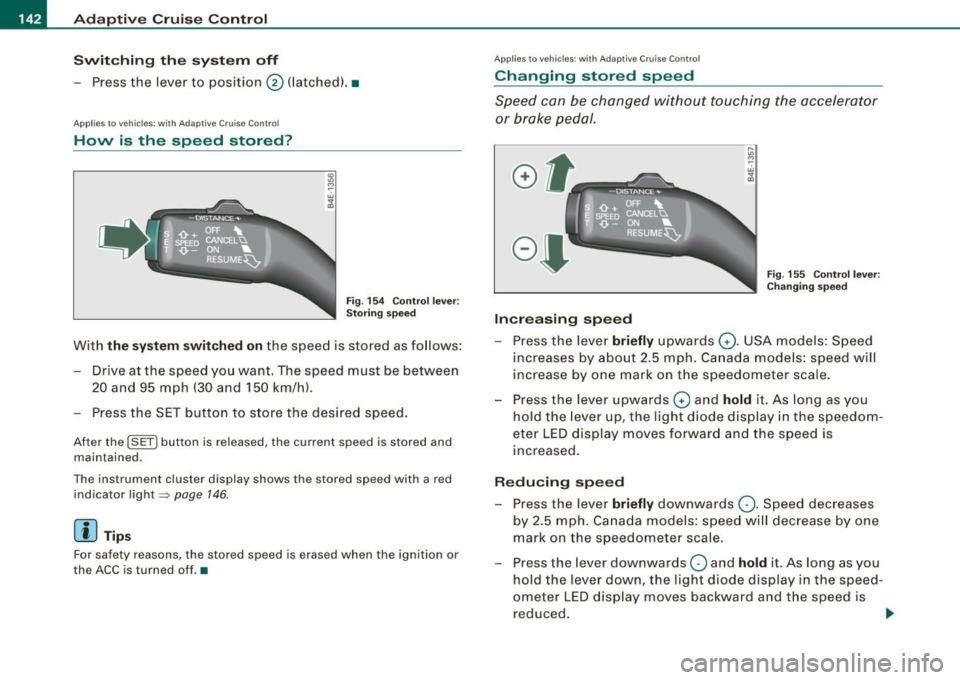
With the system switched on the speed is stored as follows:
- Drive at the speed you want. The speed must be between 20 and 95 mph (30 and 150 km/h).
- Press the SET button to store the desired speed.
After the (SETI button is released, the current speed is stored and
maintained.
The instrument cluster display shows the stored speed with a red
indicator light~
page 146.
[ i ] Tips
For safety reasons, the stored speed is erased when the ignition or
the ACC is turned off.•
App lies to vehic les: w it h Adapt ive Cruise Contro l
Changing stored speed
Speed can be changed without touching the accelerator
or brake pedal.
Increasing speed
....
"' M ~ w .,
"'
Fig . 155 Control lever:
Changing speed
- Press the lever briefly upwards Q. USA models: Speed
increases by about 2.5 mph. Canada models: speed will
increase by one mark on the speedometer scale.
- Press the lever upwards
Q and hold it. As long as you
hold the lever up, the light diode display in the speedom
eter LED display moves forward and the speed is
increased.
Reducing speed
- Press the lever briefly downwards Q. Speed decreases
by 2.5 mph. Canada models: speed will decrease by one
mark on the speedometer scale.
- Press the lever downwards
O and hold it. As long as you
hold the lever down, the light diode display in the speed
ometer LED display moves backward and the speed is reduced. ._
Page 147 of 408
_____________________________________________ A_ d_a ...: pc.. t _i_ v _e_ C_ ru_ is_ e_ C_ o_n_ t_ r_ o _ l __ llll
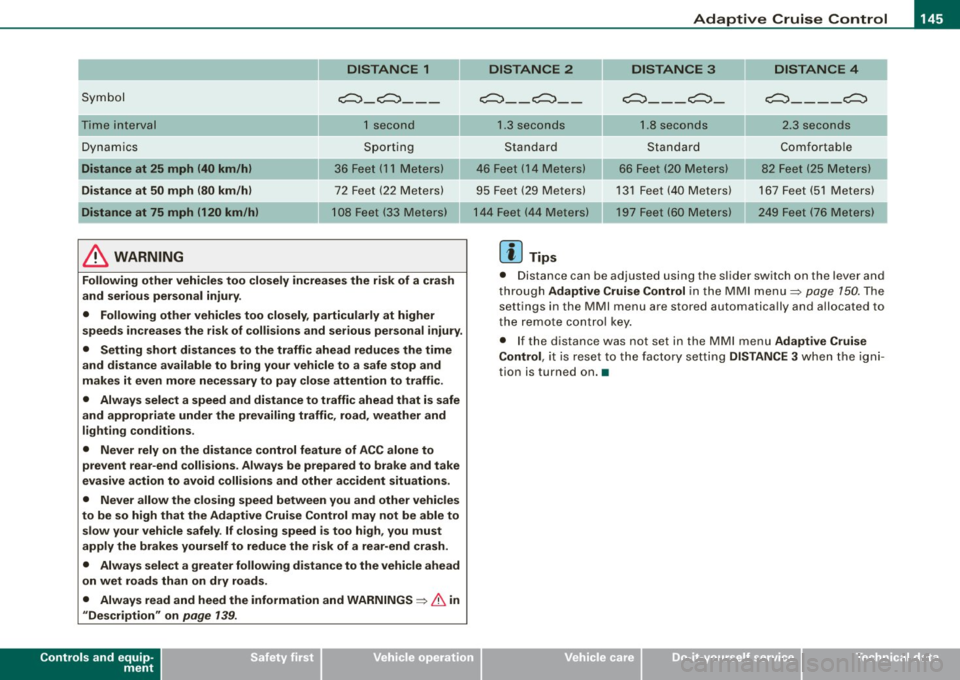
DISTANCE 1
Symbol c:::, _ c:::,_ --
Time interval 1 second
Dynamics Sporting
Distance at 25 mph (40 km/h) 36 Feet (11 Meters)
Distance at
50 mph (80 km/h) 72 Feet (22 Meters)
Distance at 75 mph (120 km/h) 108 Feet (33 Meters)
& WARNING
Following other vehicles too closely increases the risk of a crash
and serious personal injury .
• Following other vehicles too closely, particularly at higher
speeds increases the risk of collisions and serious personal injury .
• Setting short distances to the traffic ahead reduces the time
and distance available to bring your vehicle to a safe stop and
makes it even more necessary to pay close attention to traffic.
• Always select a speed and distance to traffic ahead that is safe
and appropriate under the prevailing traffic, road, weather and
lighting conditions.
• Never rely on the distance control feature of ACC alone to
prevent rear-end collisions. Always be prepared to brake and take
evasive action to avoid collisions and other accident situations.
• Never allow the closing speed between you and other vehicles
to be so high that the Adaptive Cruise Control may not be able to slow your vehicle safely .
If closing speed is too high, you must
apply the brakes yourself to reduce the risk of a rear-end crash.
• Always select a greater following distance to the vehicle ahead
on wet roads than on dry roads.
• Always read and heed the information and
WARNINGS ~ & in
"Description" on page 139.
Controls and equip
ment
DISTANCE 2 DISTANCE 3 DISTANCE 4
~ __ c:::, __ c:::,
___ c:::,_
c:::, ____ c:::,
1.3 seconds 1.8 seconds 2.3 seconds
Standard Standard Comfortable
46 Feet ( 14 Meters)
66 Feet (20 Meters) 82 Feet (25
Meters)
95 Feet (29 Meters) 131 Feet (40 Meters) 167 Feet (51 Meters)
197 Feet (60 Meters) 249 Feet (76 Meters)
[ i] Tips
• Distance can be adjusted using the slider switch on the lever and
through Adaptive Cruise Control in the MMI menu~ page
150. The
settings in the MMI menu are stored automatically and allocated to
the remote control key.
• If the distance was not set in the MMI menu Adaptive Cruise
Control , it is reset to the factory setting DISTANCE 3 when the igni
tion is turned on. •
I • •
Page 148 of 408

-Adaptive Crui se Control .._ _ ______,:,...._ _________________________________________ _
Driver information
App lies to veh icles: with Adapt ive Cruise Cont ro l
Displays in the instrument cluster
Depending on the driving situation, driver information is
displayed in the instrument cluster.
@ Primary display in the speedometer.
Fig. 158 Ove rv iew
instrument clu ste r
@ Supplementary display in the instrument c luster.
© Message in the instrument cluster display.
@ Prim ary display
Important information concerning vehic le operation with Adaptive
Cruise Control is shown in disp lay area @. T he desired speed yo u
set is highlighted in the speedometer and the warning lights show
whether adjustments are being made fo r an object ahead .
This information is always disp layed. Display area @is therefore
called the
primary display.
@ Supplementary disp lay
In display area@ infor mation fro m the navigation sys te m and the
trip computer is displayed in addition to information about Adaptive
Cruise Control. You can select among
the different information by repeated brief
t aps on the RESET b utto n on the w indshield wiper lever ~
page 40,
"Operation" .
P articularly on your first trips with Adaptive Cruise Control, the
supplementary display should be turned on.
@ Message
The information in area © is not d isp layed permanently. Informa
tion is displayed on ly if you change the time interva l, if there is a
malfunction or if the Adaptive Cruise Contro l is turned off. •
Applies to veh icles : w ith Adaptive Cruise Contro l
Primary display in the speedometer
Desir ed sp eed
Fig . 159 Primary
d is play in th e speed
omete r
The desired speed set by the driver is disp layed wi th a red LED .
The system al lows only speeds from 20 to 95 mph (30 to 150 km/h)
to be se t. This s peed range is fain tly i lluminated in the spee dometer.
Warning lights (symbols )
• ""c:::, Open road : Th e war ning lig ht ""c:::, sh ows that ACC is active
and that no moving vehicle has been detected with in range of the
ra dar senso r up ahead in yo ur l ane of travel. The se t speed is main -
tained. .,
Page 149 of 408
_____________________________________________ A_ d_a ...: p_ t_ i_ v _e_ C_ ru_ is_ e_ C_ o_n _ t_ r_o _ l _ __._
• "°" ""° D riv ing in traffi c: The warning light "°"""° shows that a
vehic le moving in your lane of travel has been de tected up front in
your lane of travel. Your speed is adjusted according to the speed of
the vehicle up front. ACC accelerates and brakes automatical ly
within the system's capabilities.
• "°" ""°
Reque st f or driver to a ssume control: The red flashing
warning light
G'.'.::> 1,.,<:Q means R equ est fo r d riv er to assume control.
You as the driver must slow the vehicle with the foot brake. The
symbo l "°""G'.'.::l tells you that the Adaptive Cruise Control is not able
to slow the vehicle down enough to keep a enough distance to the
vehicle in front of you . A warning tone signal wi ll also sound when
the symbol appears .
& WARNING
Improper use of the Adaptive Cruis e Control f eatures and inatten
ti on c an lead to an cra sh a nd s erio us per sonal injury .
• Never allo w the c losing speed between you and other v ehicles
to be so high t hat th e Adap tive Cru is e Control ma y not be abl e to
slow your vehi cle safel y. If closing speed i s too high , you must
apply the brake s yourself to r ed uc e the ri sk of a r ear-end cra sh .
• Alway s sele ct a greater follow ing di stance to th e vehi cle up
a he ad on w et ro ad s th an on dr y roa ds.
• Alway s read and he ed the inf ormation and WARNINGS~
& in
" De scription " on
pag e 139 .
[ i J Tips
• If the Adaptive Cruise Control initiates braking, the hydraulic
brake system is under pressure . Therefore, the brake peda l distance
is shorter and the pedal feels "harder".
• If you use the accelerator to go faster than the speed of the
vehicle ahead of you, the driver intervention prompt wi ll not be
accompanied by a warning tone.
• If the speed you previously set is exceeded, the indicator light in
the speedometer wi ll switch o ff.•
Con tro ls and eq uip
ment
Ap plies to vehi cle s: wi th Ad apt ive Crui se Co ntro l
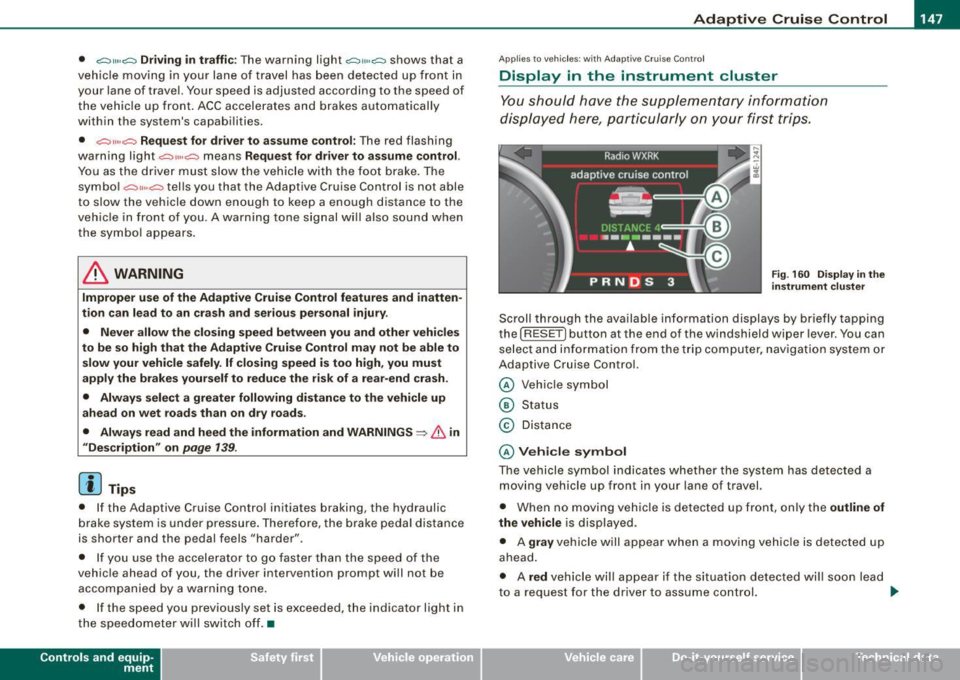
Display in the instrument cluster
You should hove the supplementary information
displayed here, p articularly on your first trips.
Fig. 160 D ispla y in th e
i n strum ent cl uste r
Scroll th rough the available information displays by briefly tapping
the ( RESET] button at the end of the windshield wiper lever . You can
se lect and information from the trip computer, naviga tion syste m or
Adaptive Cruise Control.
@ Veh icle symbol
@ Status
© Distance
@ V ehi cle sym bol
The vehicle symbol indicates whether the system has detected a
moving vehicle up front in your lane of travel.
• When no moving vehic le is detected up front, on ly the
outline of
the vehicle
is displayed.
• A
gra y vehicle will appear when a moving vehic le is detected up
ahead.
• A
red vehicle will appear i f the situation detected will soon lead
to a request for the driver to assume control. .,,_
Vehicle care I I irechnical data
Page 151 of 408
_____________________________________________ A_ d_a ...: pc.. t _i_ v _e_ C_ ru_ is_ e_ C_ o_n_ t_ r_ o _ l __ fflJI
A CC no t avai la bl e
The text message ACC n ot av aila bl e appears, for examp le, if the
temperature of the brakes is excessive. Adaptive Cruise Contro l is
temporari ly not available . A warning tone sounds as a reminder.
A CC no t avai lable!
The text message ACC not avai la ble! appears in the event of a
malfunction. Adaptive Cruise Control is turned off. A warning tone
sounds as a rem inder. Have the system inspected by a qua lified
dea lership.
A CC sen sor bloc ked
The text message AC C se nsor b lo cked appears when the ACC
System does not detect any objects over an extended time period .
For the time being, the distance to vehicles up ahead is not being
controlled. The ACC system is not switched off, so increased a lert
ness is required. The following may be reasons for the text message
ACC sensor blocked:
• The ACC sensor is d irty. The ACC system is not reacting, or is not
reacting correctly, to vehicles trave ling ahead .
• It is possible that you are dr iving on a road with very light traffic
without anything at the side of the road (e.g. guard rai ls, traffic
s igns, trees) . As soon as a vehicle is detected by the system aga in,
it returns to its control range and the text message disappears .
The ACC sensor is located in the area under the front license plate .
If there is a loss of operation due to heavy contamination, this area
should cleaned to restore proper operation.
A CC se nso r blo cked !
The text message ACC sen sor blocked! appears when the ACC
System can no longer accurately detect vehic les moving up ahead
in your lane of travel. Adapt ive Cruise Cont rol is tu rned off . A
warning tone a lso sounds as a reminder.
T o decide whether it is necessary to switch off the ACC (ACC sensor
b locked!) o r if it is on ly a temporary condition (ACC sensor blocked),
Controls and equip
ment
the system will also takes into consideration the outside tempera
t ure and/or the windshield wiper operation.
The ACC sensor is dirty or blocked (e.g. leaves, snow).
The ACC sensor is located in the area under the front license plate .
I f the ACC sensor is d irty or blocked, clean the area to restore system
operation .
EPB acti vation
The text message EPB a cti vation appears if emergency braking was
initiated with the Electromechan ical Parking Brake (EPB) . Adaptive
Cruise Control is turned off. A gong sounds as a reminder.
ESP activ at ion
The text message E S P activ ation appears if the Electronic Stabiliza
tion Program (ESP) has intervened to take control in a critica l driving
situation. In this case Adaptive Cruise Control is automatically
turned o ff. A gong sounds as a reminder .
Speed r ange
The text message Sp eed r ange appea rs if the current speed is too
low
to set or to hold the requested speed.
When se tting a desired speed, it must be a t leas t 20 m ph (30 km/h).
At speeds below 17 mph (25 km/h), the cruise control is turned off.
Shift le ver po sition!
The text message Shift lever po sition! appears when the shift se lect
leve r is m oved to position
N. In this position, Adaptive Cruise
Control is not avai lable .•
I • •
Page 155 of 408
Audi lane ass is t -
-------------------------
Audi lane assist
Lane assist
Applies to veh icles : with lane assist
Description
Lane a ssist helps you keep y our vehicle in your lane .
Lane assist uses a camera to detect lane boundary lines. If the
system detects that your vehicle is about to leave a lane boundary
line, the steering wheel
vibrates to alert the driver. If lane assist
detects boundary lines on both sides of the vehicle's lane, the
system enters active standby mode, which is indicated by the green
indica tor light /: on the instrument cluster .
I f the system is in active standby mode and the turn signal is acti
vated before driving ov er the boundary line, the warning does not
occur since the sys tem allows for intenti onal lane changes.
The system is designed for driving on freeways and expanded high
ways and t hus works on ly at speeds of 40 mph (65 km/h) or mo re .
& WARNING
• Lane ass ist will not k eep your vehicle in your lane. The sy stem
only warns the d riv er w hen t he vehicle i s le av ing the lan e. The
driv er is alway s re spon sible for keeping the vehicle in the lane.
• The camera is not able to d ete ct all lane boundary lines and in
s o me cases might al so dete ct lane str ucture s or objects as
boundary lines . This c an le ad to in corre ct wa rning s or warnings
that fa il to go off at all .
• The camer a's visibili ty ca n be i mpaired by vehi cle s ahe ad of
you , for instan ce, or by rain , snow , h eavy spray or li ght shining into
th e cam era lens . Thi s can ca use lane as sis t to f ail to d ete ct
boundary line s. •
Con tro ls and eq uip
ment
Ap plies to vehi cles : wi th la ne assi st
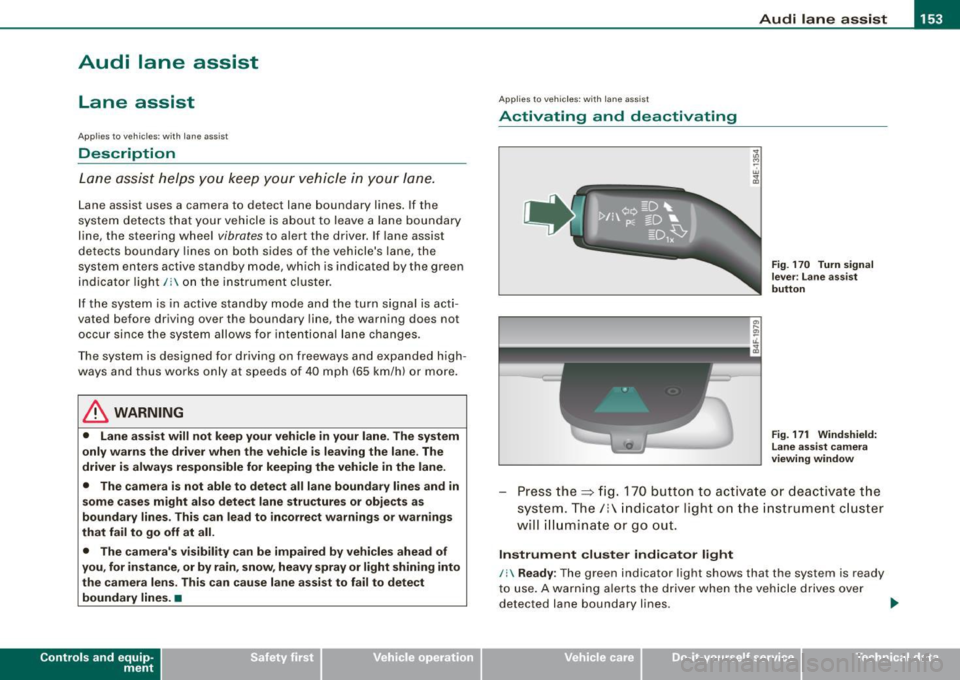
Activating and deactivating
Fig . 1 70 Turn signal
l ev er: La ne assis t
butt on
F ig . 1 7 1 Win dshie ld:
L ane assist ca mera
v iewing win dow
Press the :::> fig. 170 button to activa te or deactivate the
syst em . T he/ : in dica tor ligh t on t he i nstrument c luster
will illuminate or go out.
Instrument c lu ster indi ca tor light
/: Ready:
The green indicator light shows that the system is ready
to use . A warning a lerts the drive r when the veh icle drives over
dete cted lane boundary l ines. .,.
Vehicle care I I irechnical data
Page 156 of 408
• .___A_ u_ d _ i_l_a _n _ e_ a_ s_s _is _ t _________________________________________________ _
I Not ready: The yellow indicator light shows that the system is
turned on but unable to send a warn ing. This can be due to the
following:
• There are no boundary lines, or there is on ly one boundary line
present .
• The boundary lines are not detected (e.g. due to snow, dirt, wet
conditions or light shining into the camera lens).
• More than two boundary lines (such as at construction sites) are
located in the vehicle's lane.
• The vehicle's speed is below the speed needed to activate it,
which is about 40 mph (65 km/h).
• The lane is narrower than about 8 ft . (2.5 ml, or wider than about
16 ft. (5 ml.
• The curve is too sharp.
Notes on the instrument cluster display
When the lane assist turns off automatically, the instrument cluster
indicator goes out and one of the following messages appears on
the display:
Audi lane assist not available: Currently no sensor vision
This message appears when the camera can no longer function
because it cannot detect the boundary lines. This may be due to the
following :
• The exterior s ide of the camera viewing window=>
page 153,
fig. 171 is covered with dirt or ice. Clean this part of the windshield.
• The camera v iewing window is fogged up on the inside. In this
case, wait until the fog disappears before turning lane assist on
again.
• The system was unable to detect boundary lines over an
extended period of time due to road conditions (such as snow
covered lanes). Do not turn lane assist on again until the lines can
be more easily detected.
Audi lane assist not available
A temporary malfunction is preventing lane assist from operating .
Try turning on lane assist again a t a later time.
Audi lane assist: system fault
The system should be checked by an authorized Audi dealer or other
qualified workshop .
[ i ] Tips
• Make sure that the camera viewing window:::> page 153, fig. 171
is not covered by stickers or similar objects .
• Always keep the camera viewing window clean. This can usually
be done by operating the windshield wipers. •
Applies to vehicles: with lane assist
MMI settings
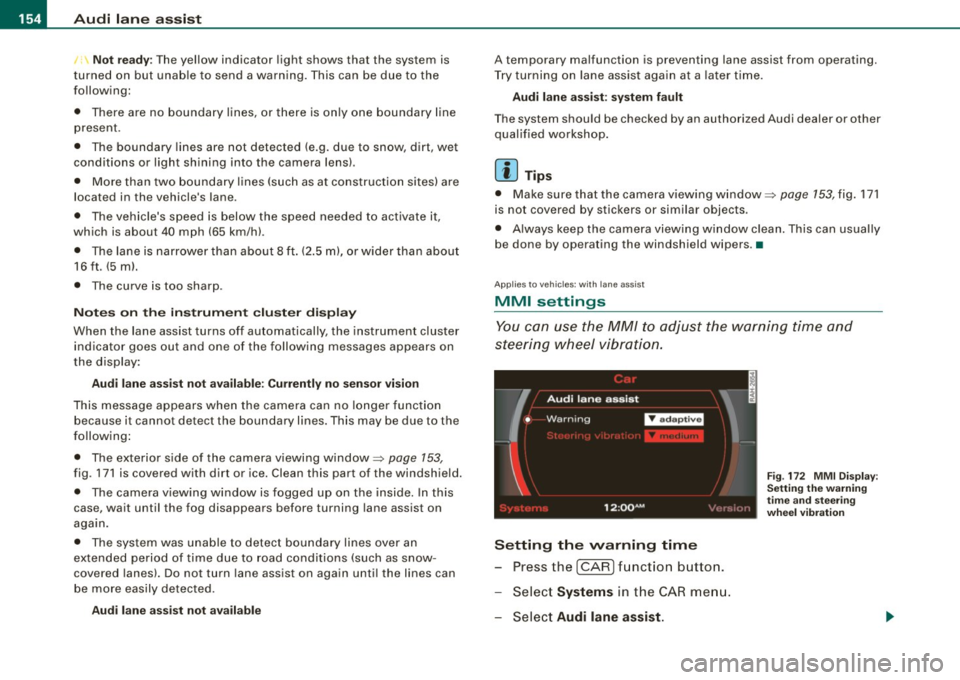
You can use the MM/ to adjust the warning time and
steering wheel vibration.
Setting the warning time
Press the I CAR] function button.
- Select
Systems in the CAR menu.
- Select
Audi lane assist.
Fig. 172 MMI Display :
Setting the warning
time and stee ring
wheel vibration