turn signal AUDI S8 2009 Owners Manual
[x] Cancel search | Manufacturer: AUDI, Model Year: 2009, Model line: S8, Model: AUDI S8 2009Pages: 408, PDF Size: 91.63 MB
Page 13 of 408
Instruments and controls
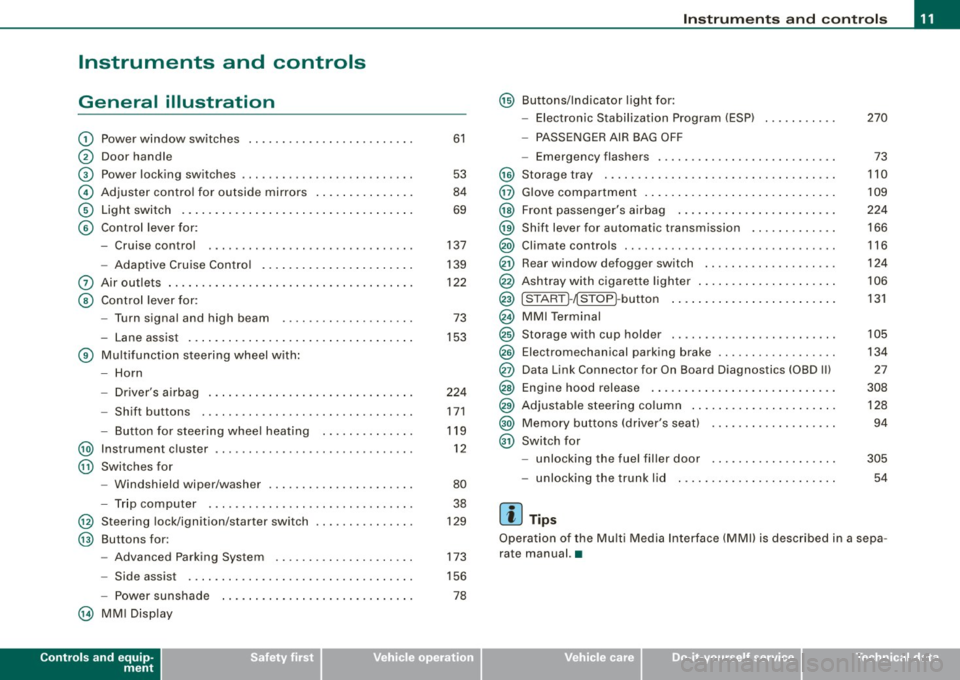
General illustration
G) Power window switches .. ...... .... ... .. ....... .
0 Door handle
G) Pow er locking switches ... .... .... .... ... ....... .
© Adjuster control for outside mirrors ............. . .
© Light switch .... .... ....... ... ... .. .... .. ..... .
© Control lever for:
- Cruise control .... .... ... .... .... .... ... .... .
- Adaptive Cruise Control .. ... ....... .......... .
0 Air outlets ...... .............................. .
@ Control lever for:
- Turn signal and high beam ....... ... .... ..... .
- Lane assist .. .... ..................... ... ... .
® Multifunction steering wheel with :
- Horn
- Driver's airbag .. ...... ...... ....... ...... ... .
- Shift buttons ........... .... ... .. .... .... ... .
Button for steering wheel heating ..... .. .. .... .
@ Instrument cluster .................... .... ..... .
@ Swi tches for
- Windshield wip er/ washer ............. ... .. ... .
- Trip computer ..... ... ... .... .... ... ... ... .. .
@ Steering lock/ignition /starter switch
@ Buttons for :
- Advanced Parking System .. .... .... .... .... .. .
- Side assist ..... .. .. ... ..... .... ... .. .... ... .
- Power sunshade
@ MMI Display
Controls and equip
ment
61
53
84
69
137
139
122 73
153
224 171
119 12
80 38
129
173
156
78
Instruments and controls
@ Buttons/Indicator light for:
- Electronic Stabilization Program (ESP) 270
- PASSENGER AIR BAG OFF
- Emergency flashers . . . . . . . . . . . . . . . . . . . . . . . . . . . 73
@ Storage tray . . . . . . . . . . . . . . . . . . . . . . . . . . . . . . . . . . . 110
@ Glove compartment . . . . . . . . . . . . . . . . . . . . . . . . . . . . . 109
@ Front passenger's airbag . . . . . . . . . . . . . . . . . . . . . . . . 224
@) Shift lever for automatic transmission . . . . . . . . . . . . . 166
@ Climate controls . . . . . . . . . . . . . . . . . . . . . . . . . . . . . . . . 116
@ Rear window d efogger switch . . . . . . . . . . . . . . . . . . . . 124
@ Ashtray with cigarette lighter . . . . . . . . . . . . . . . . . . . . . 106
@ ISTART ]-~STOP ~button . . . . . . . . . . . . . . . . . . . . . . . . . 131
@ MMI Terminal
@ Storage w ith cup holder . . . . . . . . . . . . . . . . . . . . . . . . . 105
@ Electromechanical parking brake . . . . . . . . . . . . . . . . . . 134
@ Data Link Connector for On Board Diagnostics (OBD Ill 27
@ Engine hood release . . . . . . . . . . . . . . . . . . . . . . . . . . . . 308
@ Adjustable steering column . . . . . . . . . . . . . . . . . . . . . . 128
@) Memory buttons (driver's seat) . . . . . . . . . . . . . . . . . . . 94
@ Switch for
- unlocking the fuel filler door . . . . . . . . . . . . . . . . . . . 305
- unlocking the trunk lid 54
[ i ] Tips
Operation of the Multi Media Interface (MMI) is described in a sepa
rate manual. •
I • •
Page 19 of 408
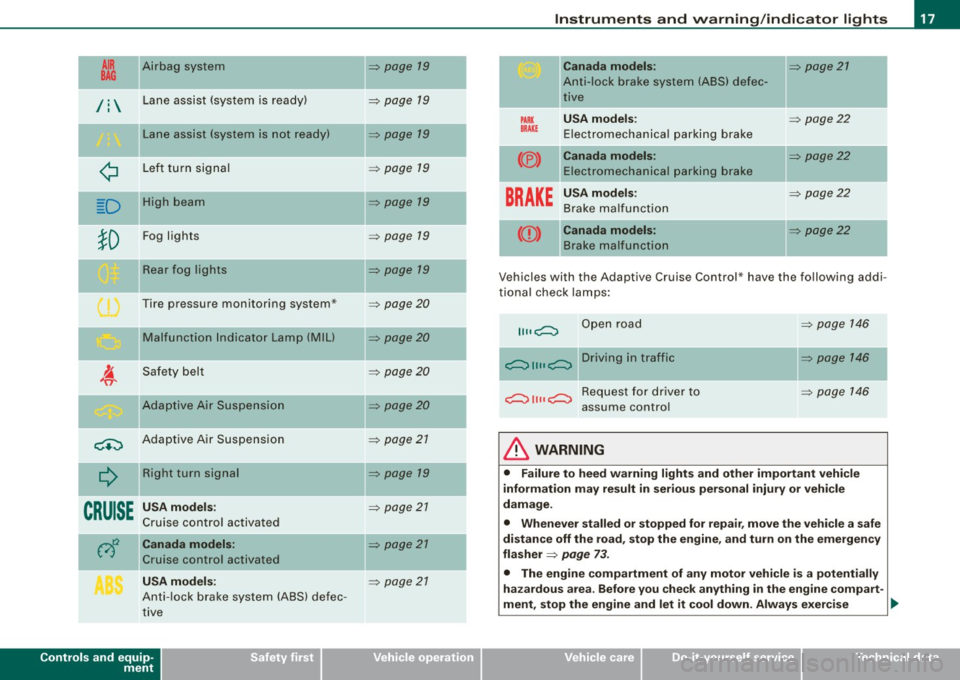
tl~ Airbag system
--
/: Lane assist (system is ready)
Lane assist (system is not ready)
¢
D
-
Left turn signal
High beam
Fog lights
Rear fog lights
Tire pressure monitoring system*
Malfunction Indicator Lamp (MIU
Safety belt
Adaptive Air Suspension
~ Adaptive Air Suspension
--
CRUISE
Right turn signal
USA models :
Cruise control activated
Canada models:
Cruise control activated
USA models:
Anti-lock brake system (ABS) defec
tive
Controls and equip
ment
=> page 19
=> page 19
=> page 19
=> page 19
=> page 19
=> page 19
=> page 19
=> page 20
=> page20
=> page20
=> page20
=> page 21
=> page 19
=> page 21
=> page 21
=> page 21
-
-
-
-
Instruments and warning/indicator lights
PARX
BRAKE
(® )
-
Canada models:
Anti-lock brake system (ABS) defec
tive
USA models :
Electromechanical parking brake
Canada models: Electromechanical parking brake
BRAKE USA models:
Brake malfunction
--((D) Canada models:
Brake malfunction
=> page 21
=> page22
=> page 22
-
=> page 22
=> page22
Vehicles with the Adaptive Cruise Control* have the follow ing addi
tional check lamps:
II II c;:;:::::::, Open road
c;:;:::::::, 11 11 c;:;:::::::, D r i vi n g i n t raff i c
c;:;:::::::, 11 11 c;:;:::::::, R e q u e st f o r d r i v e r to
assume control
& WARNING
=> page 146
=> page 146
=> page 146
• Failure to heed warning lights and other important vehicle
information may result in serious personal injury or vehicle
damage.
• Whenever stalled or stopped for repair, move the vehicle a safe
distance off the road, stop the engine, and turn on the emergency
flasher
=> page 73 .
• The engine compartment of any motor vehicle is a potentially
hazardous area. Before you check anything in the engine compart-
ment, stop the engine and let it cool down. Always exercise _..
I • •
Page 21 of 408
warning/indicator light should go out to show that the system is
fully functional again. For more information about the ESP~
page 270. •
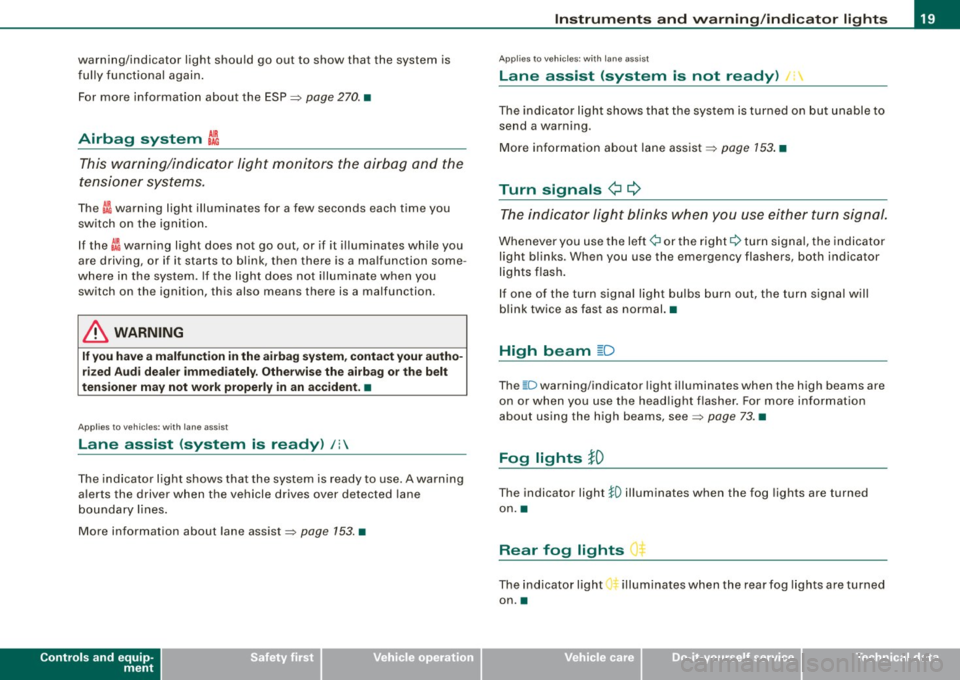
Airbag system ~
This warning/indicator light monitors the airbag and the
tensioner systems.
The ffi warning light illuminates for a few seconds each time you
switch on the ignition.
If the ~ warning light does not go out, or if it i lluminates whi le you
are driving, or if it starts to blink, then there is a malfunction some
where in the system. If the light does not illuminate when you
switch on the ignition, this also means there is a malfunction.
& WARNING
If you have a malfunction in the airbag system, contact your autho
rized Audi dealer immediately. Otherwise the airbag or the belt
tensioner may not work properly in an accident. •
Applies t o vehicles: with lane ass ist
Lane assist (system is ready) /:
The indicator light shows that the system is ready to use . A warning
alerts the driver when the vehicle drives over detected lane
boundary lines.
More information about lane assist~
page 153. •
Controls and equip
ment
Instruments and warning /indi cator lights
Applies to vehic les: with lane ass ist
Lane assist (system is not ready) •,
The indicator light shows that the system is turned on but unable to
send a warning .
More information about lane assist ~
page 153. •
Turn signals ¢ ¢
The indicator light blinks when you use either turn signal.
Whenever you use the left ¢i or the right Q turn signal, the indicator
light blinks . When you use the emergency flashers, both indicator
lights f lash.
If one of the turn signal light bulbs burn out, the turn signal will
blink twice as fast as normal. •
High beam ~D
Th e ~D warning/indicator light illuminates when the high beams are
on or when you use the headlight flasher. For more information
about using the high beams, see~
page 73. •
Fog lights }D
Th e indicator light io illuminates when the fog lights are turned
on. •
Rear fog lights ") .
The indicator light illuminates when the rear fog light s are turned
on .•
I • •
Page 26 of 408

Driver informati on displ ay
Driver information display
Introduction
General notes
The driver information display inside the instrument
cluster provides you, the driver, with much useful infor
mation.
Fig . 8 Inst rum ent
c lu ster : cente r dis pl ay
Information from the Driver Information System is shown in the
display in the cen ter of the instrument clust er.
When you turn on the ignition and while you are driving, some func
tions and vehicle components are scanned for their operating status. Malfunctions or required service procedures are signalled
audibly and shown by red and yellow ligh ted symbols and
reminders to the driver in the display.
The driver is also shown information about radio and CD operation and directions fo r the navigation system . You can find additional
information on these subjects in the MMI manual.
The Driver Information System provides the fol lowing functions : Sound system display
~ page25
Outside air temperature ~ page25
Digital speedometer ~ page25
Door open indicator ~ page26
Defective light bulb ~ page26
Service interval display ~ page27
Au
to Check syst em ~ page28
Driver information ~ page29
Speed limiter ~ page28
Trip computer ~ page38
Tire pressure monito ring* ~ page 41
Selector lever pos ition ~ page 167
[ i ] Tips
In the event of a malfunction either a red or yellow icon appears in
the display. Red symbols indicat e
Danger ~ page 30. Yellow
symbols ind icate a
Warning ~ page 34. •
Page 28 of 408
Driver information display
The current speed appears on the display. The speed is displayed in
1 mph (US model) or 1 km/h (Canadian model) increments.
You can switch the display from miles to kilometers and vice versa
via the MMI. •
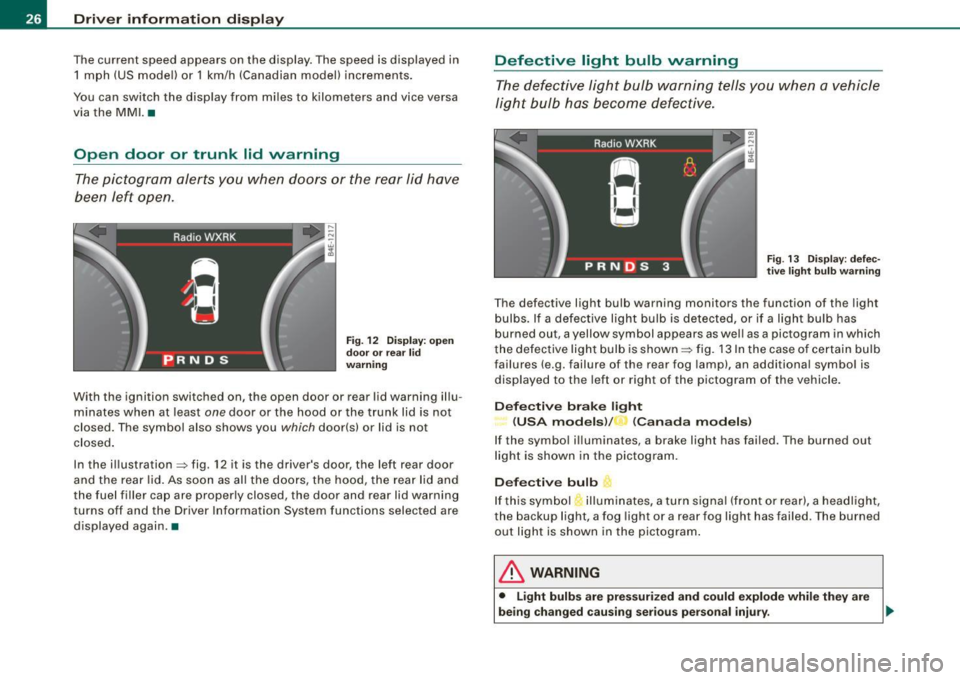
Open door or trunk lid warning
The pictogram alerts you when doors or the rear lid have
been left open.
Fig. 12 Dis play: open
door or rear lid
warning
With the ignition switched on, the open door or rear lid warning illu
minates when at least
one door or the hood or the trunk lid is not
closed. The symbol also shows you
which door(s) or lid is not
closed.
In the illustration=:> fig. 12 it is the driver's door, the left rear door
and the rear lid. As soon as al l the doors, the hood, the rear lid and
the fuel filler cap are properly closed, the door and rear lid warning
turns off and the Driver Information System functions selected are
displayed again .•
Defective light bulb warning
The defective light bulb warning tells you when a vehicle
light bulb has become defective.
Fig. 13 Display: defec
t ive l ight bulb warning
The defective light bulb warning monitors the function of the light
bulbs. If a defective light bulb is detected, or if a light bulb has
burned out, a yellow symbol appears as wel l as a pictogram in which
th e defective light bulb is shown =:> fig. 13 In the case of certain bulb
failures (e.g. failure of the rear fog lamp), an additiona l symbol is
displayed to the left or right of the pictogram of the vehicle.
Defective brake light
(USA models) / (Canada models)
If the symbol illuminates, a brake light has failed. The burned out
light is shown in the pictogram.
Defective bulb
If this symbol illuminates, a turn signal (front or rear), a headlight,
the backup light, a fog light or a rear fog light has failed. The burned
out light is shown in the pictogram .
& WARNING
• Light bulbs are pressurized and could explode while they are
being changed causing serious personal injury. .,_
Page 30 of 408
Driver information display
If the light illuminates, the electronic speed limiter may also be
malfunctioning. For more information~
page 28, "Electronic speed
limiter".
An improperly closed fuel filler cap may also cause the MIL light to
illuminate
~ page 305. •
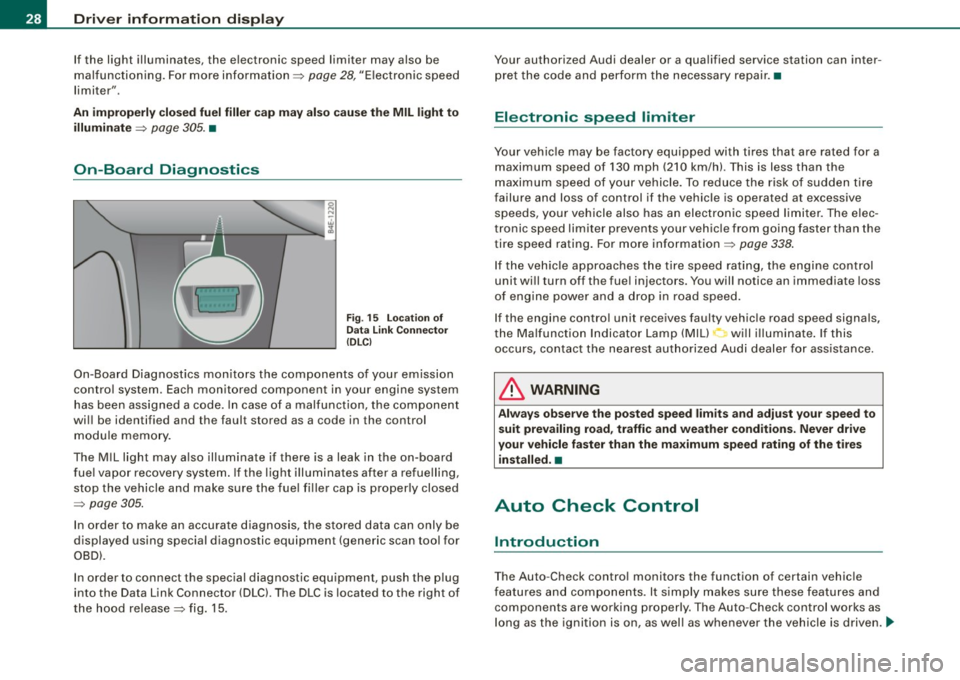
On-Board Diagnostics
Fig. 15 Location of
Data Link Connector
(DLCl
On-Board Diagnostics monitors the components of your emission
control system . Each monitored component in your engine system
has been assigned a code. In case of a malfunction, the component
will be identified and the fault stored as a code in the control
module memory.
The MIL light may also illuminate if there is a leak in the on-board
fuel vapor recovery system. If the light illuminates after a refuelling,
stop the vehicle and make sure the fuel filler cap is properly closed
~ page 305.
In order to make an accurate diagnosis, the stored data can only be
displayed using special diagnostic equipment (generic scan tool for
OBD).
In order to connect the special diagnostic equipment, push the plug
into the Data Link Connector (DLC). The DLC is located to the right of
the hood release
~ fig. 15. Your authorized Audi dealer or a qualified service station can inter
pret the code and perform the necessary repair. •
Electronic speed limiter
Your vehicle may be factory equipped with tires that are rated for a
maximum speed of 130 mph (210 km/h). This is less than the
maximum speed of your vehicle. To reduce the risk of sudden tire
failure and loss of control if the vehicle is operated at excessive
speeds, your vehicle also has an electronic speed limiter. The elec
tronic speed limiter prevents your vehicle from going faster than the
tire speed rating. For more information ~
page 338.
If the vehicle approaches the tire speed rating, the engine control
unit will turn off the fuel injectors. You will notice an immediate loss
of engine power and a drop in road speed.
If the engine control unit receives faulty vehicle road speed signals ,
the Malfunction Indicator Lamp (MIU will illuminate. If this
occurs , contact the nearest authorized Audi dealer for assistance.
& WARNING
Always observe the posted speed limits and adjust your speed to
suit prevailing road, traffic and weather conditions. Never drive
your vehicle faster than the maximum speed rating of the tires installed. •
Auto Check Control
Introduction
The Auto -Check control monitors the function of certain vehicle
features and components. It simply makes sure these features and
components are working properly . The Auto -Check control works as
long as the ignition is on, as well as whenever the vehicle is driven .....
Page 43 of 408
-Select System s in the CAR menu .
- Selec t
Instrument cluster .
-Select Trip computer 1 or Trip computer 2 .
-Select, for examp le, Fuel range On to turn on the display
or
Off to turn the disp lay off.
All values in the single -trip or the total -trip memory can be reset to
zero simultaneously in MMI. In addition you can determine what
driving information from the trip computer should be shown in the
instrument cluster display. If one of the pieces of driver information
is turned off, that driver information will not be shown in the display .
The information will continue to be calcu lated by the trip computer
and can be turned back
on at any time. •
Tire pressure monitoring system
Applies t o vehi cle s: with n re pre ss ure moni toring sys te m
General notes I)
Each tire, including the spare (if provided}, should be checked
month ly when cold and inflated to the inflation pressure recom
mended by the vehicle manufacturer on the vehicle placard or tire
inflation pressure label. (If your vehicle has tires of a different size
than the size indicated on the vehicle placard or tire inflation pres
sure label, you should determine the proper tire inflation pressure
for those tires.}
As an added safety feature, your vehicle has been equipped with a
tire pressure monitoring system (TPMSl that illuminates a low tire pressure tellta le when one or more of your tires is significantly
under-inflated . Accordingly, when the low tire pressure te lltale i llu
minates, you should stop and check your tires as soon as possible,
and inflate them to the proper pressure. Driving on a significantly
under -inflated tire causes the tire to overheat and can lead to tire
Controls and equip
ment
Dr ive r informat ion di spl ay
failure . Under -inflation also reduces fuel efficiency and tire tread
life, and may affect the vehicle's handling and s topping ability.
Please note that the TPMS is not a substitute for proper tire mainte
nance, and it is the driver 's responsibility to maintain correct tire
pressure, even if under-inflation has not reached the leve l to trigger
illumination of the TPMS low tire pressure te lltale.
Your vehic le has a lso been equipped with a TPMS malfunction indi
cator to indicate when the system is not operating proper ly. The
TPMS ma lfunction indicator is combined w ith the low ti re p ressure
tel ltale . When the system detects a malfunction , the telltale wil l
flash for approximately one minute and then remain continuously
il luminated . This sequence will cont inue upon subsequent vehicle
start -ups as long as the malfunction exists.
When the ma lfunction indicator is illuminated, the system may not
be able to detect or signal low tire pressure as intended . TPMS
mal functions may occur for a variety of reasons, including the
insta llation of replacement or alternate tires or wheels on the
vehic le that prevent the TPMS from funct ioning properly. A lways
check the TPMS malfunction tellta le after replacing one or more
tires or whee ls on your vehicle to ensure that the replacement or
alternate tires and wheels allow the TPMS to continue to function
properly. •
Applies t o vehic les : w ith Tire press ure mon itoring sy stem
Introduction
The tire pressure monitoring system moni tors air pressure
in all four roa d wheels and the spare tire* while the
vehicle is moving.
As soon as the tire pressure monitoring system senses a significant loss of air pressure in one o r severa l tires, text messages and yellow
symbo ls appear in the instrument cluster display to alert the driver.
The L warni ng light in the instrument cluster comes on when the
tire is significantly underinflated
=> page 20. _,,
I • •
Page 51 of 408
Battery operation in the master key is monitored by a check light .
The check light flashes when one of the buttons on the master key
is pressed . If the check light does not flash, the battery is dead and
has to be replaced .
In addition, when the battery is dead the symbol appears in the
instrument cluster display as well as the message :
Please ch ange key battery
We recommend having the battery changed by an Audi Dealer .•
Electronic immobilizer
T he immob ili z er helps to prevent unauthorized use of
y o ur vehicle.
A computer chip inside your key automatically deactivates the e lec
tr onic im mob ilizer when you insert the key in the ign iti on lock, or on
vehic les with Convenience key*, when the key is inside the vehicle .
When you remove the key from the ignition lock, or on vehicles with
Convenience key, when you remove the key from the vehicle, the
e lectronic immobilizer is automatica lly activated once again.
If an unauthor ized key was used,
SAFE is disp layed continuously in
the odometer disp lay field.
& WARNING
Always take the key w ith you when you leave the vehicle. The key
c an disarm the electronic engine immob ilizer and permit an unau
thori zed person to start the engine and enable oper atio n of the
vehicle sy stem s such a s power window or power sunroof leading
to s eriou s personal injury .
[ i ] Tip s
• Your engine can on ly be started using the factory-equipped key.
Controls and equip
ment
Opening and clo sing
• You may not be ab le to start your vehic le if an ignition key of a
different ve hicle make is a lso l oca ted on your set of keys .
• F or Dec laration of Comp liance to United States FCC and Industry
Canada regulations =>
page 385 . •
Power locking system
General description
T he power locking system locks or unlocks all doors and
the rear lid simultaneousl y.
The power loc kin g system in your veh ic le incorporates the following
functions:
• Central locking function
• Selective unlock feature=>
page 52
• Remo te contro l fea ture => page 48
• Convenience key*=> page 58
• Ant i-theft a larm system => page 60
All the doors and the rear lid are locked by the central locking
system when you lock the v ehicle. You can set whether general ly
only the driver's door or all doors and the rear lid should be
unlocked when you open t he vehic le in the MM I menu
Central
loc king
to suit your individua l desires=> page 52.
Unlocking the vehicle
You can un lock the vehic le from outside either by using the remote
co ntrol
or by tur ning the key i nside the driver's door lock. When you
unlo ck your vehic le:
• The anti -theft ala rm system is deactivated briefly .
• The vehicle interior lights i lluminate for approximately 30
sec ond s.
• All turn signal lights wi ll flash twice when the car is unlocked. .,,_
I • •
Page 52 of 408
Openin g a nd clo sin g
• After un locking the vehicle, you have 60 seconds to open a door
or the rear lid. After 60 seconds, the vehicle automatically locks and
the anti-theft a larm system activates again .
The rear lid can be locked or unlocked either by using the remote
control
or by turning the key ins ide the driver's door lock. Unlocking
the vehicle with the remote control will on ly
unlock the rear lid, to
open it, the lid handle needs to be pressed .
Lock ing t he ve hicle
You can lock the vehicle from outside either by using the remote
control
o r by turning the key inside the drivers's door lock . When
you
l o ck the vehic le :
• All doors and the rear lid are locked .
• All turn signal lights will flash once when the car is locked.
• The anti -theft alarm system is activated. The horn of the anti
t heft alarm system wi ll sound and the anti-theft alarm system readi
ness light, located in the upper part of the driver's door panel, will
start to blink.
• The vehicle interior lights turn off.
Unlo ck ing and lo ckin g th e ve hicle using th e
C onven ien ce key *
The Con ve nie n ce key* feature is a keyless system which al lows you
to unlock the vehicle via sensors in the door handle . Lock ing is like
wise
keyless using a lock button. Each door is equipped with a
sensor and lock button.
P ower s ide door clo ser*
The vehicle is equipped with a power side door closer . When closing
a door, you simply need to gently push on the door. The door wil l
then automatically close by itself ~
page 53 .
Autom atic lockin g
The automatic locking feature locks a ll the veh ic le doors and the
rear lid when you drive faster than 9 mph (15 km/h). This function can be turned on and off in the
MMI C
entral lo cking Menu
~ page 52.
You can unlock the vehicle from the inside by:
• removing the key from the ignition switch (the vehicle wi ll auto
matically unlock itself) or
• pressing the unlock part of the power lock switch
ffi or
pulling the door handle (once to open the door).
& WARNING
• When you lock your veh icle from o utside, nobod y -espec iall y
c h ildr en -should rem ain in sid e the vehicle . R emember , when you
lo ck the vehicle from the out side the window s ca nnot be opened
from t he in side .
• When you l eav e the vehi cle , al ways remove th e ign ition key and
take it with you . Thi s w ill prevent pa ssenger s (childr en , for
exampl e) from acciden tally being locked in the vehicle should they
a cc ident ally p re ss th e p ower lo cking s witch in the door s.
• Do not lea ve children in side the vehi cle un supe rvis ed. In an
e merg ency i t would be impos sible t o ope n th e door s from the
out side wi thou t the key.
[ i ] T ips
• In the event of a crash with a irbag deployment all locked doors
wi ll be automatically un locked to give access to the vehic le occu
pants from the outside .
• If the power locking system should malfunction, you can lock
each door individually using the vehicle key~
page 54.
• If the power locking system should fail, you can still open the
fue l tank flap in an emergency ~
page 307.
• You are well advised not to keep valuables inside an unattended
vehic le, visib le or not. Even a properly locked vehic le cannot provide
the security of a safe .•
Page 53 of 408
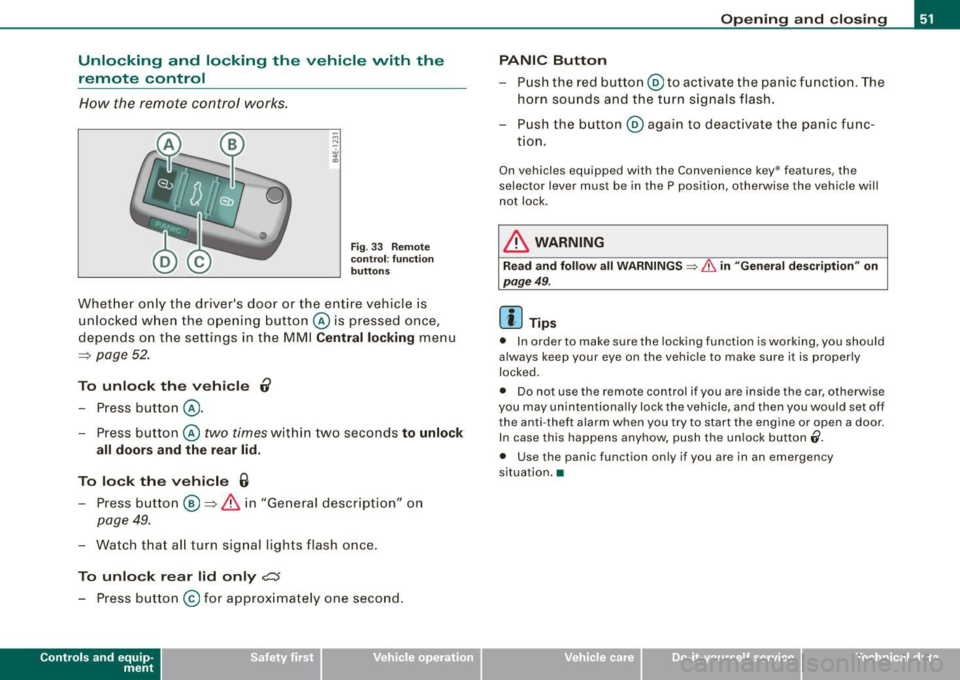
Unlocking and locking the vehicle with the remote control
How the remote control works .
Fig . 33 Re mote
co ntr ol: fu nctio n
bu tton s
Whet her o nly the driver's door or the entire vehicle is
unlocked w hen the opening butt on @ is pressed once,
depends on the settings in the MMI
Centr al locking menu
=:> page 52 .
To unlo ck th e ve hicle 0
- Press button @.
- Press button @
two times within two seconds to unlock
all doors and the r ear lid .
To lock th e vehi cle 6
- Press button @ =:> & i n "General description" on
page 49.
- Watch that a ll turn sig nal lights flash once.
To unlo ck r ear lid only
c:s
- Press button @for approximately one second.
Con tro ls and eq uip
ment
Op ening and clo sing
PANIC Button
- Push the red button @to ac tivate the panic function . The
horn sounds and the turn signals flash.
- P ush the button @again to deact ivate the panic func-
t ion.
On vehicles equ ipped with the Convenience key* features, the
selector lever must be in the P position, otherwise the vehicle will
not lock .
& WARNING
Rea d and foll ow all WARNINGS => & in "Gene ral de scription " on
pag e 49 .
[ i ] Tips
• In order to make sure the locking function is working, you should
always keep your eye on the vehicle to make sure it is proper ly
locked.
• Do not use the remote control if you are inside the car, otherwise
you may unintent iona lly lock the vehicle , and then you would set off
the anti -theft alarm when you try to start the engine or open a door.
In case this happens anyhow, push the un lock button
(i .
• Use the panic function only if you are in an emergency
s ituation .•
Vehicle care I I irechnical data