tow AUDI S8 2010 User Guide
[x] Cancel search | Manufacturer: AUDI, Model Year: 2010, Model line: S8, Model: AUDI S8 2010Pages: 384, PDF Size: 90.95 MB
Page 94 of 384
Seats and storage
Load the ski sack from the luggage compartment .
Loading
-Open the luggage compartment lid and clear a space in
the center .
- Press the release button for the sk i sack hatch in the
luggage compartment and pull down the hatch
~ page 91, fig . 96.
- Fo ld out center armrest in the rear seat backrest .
- Press th e re le ase button on the lid from inside the v ehicle,
and then lower the lid .
- Pull out and unfold the ski sack.
- Load s kis or simi lar objects through t he luggage compart-
ment into the interior of the vehicle~& .
Securing
- Insert the ski sack strap © ~ page 91, fig. 97 in the
center buck le
@ .
- Pull t he sa fety belt taut on the free end of the belt@.
Securing in vehicles with power individual
rear seats*
- Loop the sk i sac k safety belt around the center armrest.
- Pu ll the safety bel t ta ut on the free end of the be lt.
Stowing
- In t he luggage compartme nt, close the ski sack hatch.
- F old the ski sack carefully and stow away.
- Close and engage the inne r hatch .
& WARNING
• The ski s ack is intended only for the transportation of skis and
other light object s. To redu ce the ri sk of serious per sonal injury ,
never transport heavy or pointed objects in the ski sack.
• When braking rapidly or during an accident, the load could be
d isplaced and cause injury to occupants .
• Sharp edg es on the load must be covered for prot ection .
Alw ays f aste n the belt t ightly a round the s ack and its contents
=> page 91 , fig . 97.
[ i ] Tips
N ever stow the ski sack aw ay when it is still we t or damp ( for ex ample ,
snow melt ing from skis). Allow it to dry completely before stow ing it
away .•
Roof rack
First things first
A roof rack can be fitted to carry additional luggage on
the roof.
- A lways read a nd follow the instruct ions provided by the
roof rack manufacturer when the roof rack system must
be ins ta lled.
If a roof rack or simila r luggage carrying equipment is to be installed,
please note the following :
• T o enh ance the vehi cle's st ream lined des ign, rain gu tters have
been molded into the roof. It is not possible to use normal roof racks.
On ly insta ll a roo f rack specifica lly designed fo r your model A 8.
Contact the nearest Audi dea ler for information on approved modular
roof rac ks for your vehicle. .,
Page 103 of 384

_______________________________________________ S_ e_ a_t _s_ a_n_ d_ s_ t_ o _ r_a """g::;. e _ __._
Fig. 112 Inserting
storage compartment
The storage compartment is suitable for holding small
objects, such as eye glasses.
Opening
- To open, touch the compartment at the front edge
=>
page 100, fig. 111.
Removing and inserting storage
compartment
- Open the storage compartment.
- Grasp the sides of the storage compartment with both
hands and pull it straight out toward you.
- To insert the storage compartment again, hold it at a
slight angle and push the lower part into the retainer until
it latches=> fig. 112.
- Close the storage compartment. •
Contro ls a nd e quip
m en t Vehicle
OP-eration
Coat hooks
if. 0 '7 w iii
Fig. 113 Coat hook
above left rear seat
There are fold-out coat hooks over each rear door.
- To open, touch the top of the coat hook=> fig. 113.
& WARNING
• Hang clothes in such a way that they do not impair the driver's
vision.
• The coat hooks must only be used for lightweight clothing. Do
not leave any heavy or sharp edged objects in the pockets which
may interfere with the side curtain airbag deployment and can
cause personal injury in a crash.
• Do not use coat hangers for hanging clothing on the coat hooks
as this can interfere with proper deployment of the side curtain
airbags in an accident .
• Do not hang heavy objects on the coat hooks, as they could
cause personal injury in a sudden stop.•
Vehicle care Do-it-yourselt service iTechnical data
Page 121 of 384
![AUDI S8 2010 User Guide _________________________________________________ O_ n_ t_ h_ e_ r _o_ a_d _ __.lftI
(]] Tips
• If you release the ignition key in posit ions G) , @ or@, the key
automatically returns t](/img/6/57617/w960_57617-120.png "AUDI S8 2010 User Guide _________________________________________________ O_ n_ t_ h_ e_ r _o_ a_d _ __.lftI
(]] Tips
• If you release the ignition key in posit ions G) , @ or@, the key
automatically returns t")
_________________________________________________ O_ n_ t_ h_ e_ r _o_ a_d _ __.lft'I
(]] Tips
• If you release the ignition key in posit ions G) , @ or@, the key
automatically returns to position @.
• If you open the driver's door when the ignition is switched on, a
buzzer sounds and the message
Ignition is on appears in the instru
ment cluster display. Please switch the ignition off.•
Ignition key safety lock
The ignition key can only be removed when the selector
lever is in the "P" (Park) position.
After turning off the ignition, the ign ition key can only be removed
from the ignition lock when the se lector lever is in the "P" (Park) posi
tion . After you have removed the key, the selector lever is locked and
cannot be moved. •
Starting and stopping the engine
Starting the engine
The engine can only be started with your original Audi
key.
Con tro ls a nd e quip
m en t
Fig. 132 Ignition key
positions
Vehicle OP-eration
-Step on the brake.
- Move the selector lever into P or N
~ &.
- Turn the ignition key to position @~ fig. 132 -do not
depress the gas pedal when starting the engine.
A cold engine may sound loud after it has been started. This is due to
the hydraulic valves building up oil pressure. This is normal and is not
a need for concern.
If the engine does not start immediately, stop trying after 10 seconds
and then try to restart the engine about 30 seconds later .
& WARNING
Never start or let the engine run in a confined or enclosed area.
Exhaust fumes from the engine contain carbon monoxide , a color
less and odorless gas. Carbon monoxide can be fatal if inhaled.
• Never leave the engine idling unattended. An unattended
vehicle with a running engine poses a danger of personal injury or
theft .
0 Note
• Avoid high eng ine speeds, fast accelerat io n or heavy engine loads
wh ile the engine is still cold. This could damage the engine.
• The engine cannot be started by push ing or towing the vehicle.
~ For the sake of the environment
To avoid unnecessary engine wear and to reduce exhaust emissions,
do not let your vehicle stand and warm up. Be ready to drive off imme
diately after starting your vehicle. Maintain moderate speed unti l the
engine is completely warm. Remember, the engine performs best at
operating temperature .•
Vehicle care Do-it-yourselt service iTechnical data
Page 126 of 384

1111....__0_ n_ t_h_ e_ r_ o_ a _ d _________________________________________________ _
Parking
To p revent a parked vehicle from rolling away, there are
a fe w things you should do.
When you park your vehicle , do the following
- Stop t he veh icle us ing the bra ke pedal.
- Pull the switch to apply t he electromechanica l parking
brake .
- Move th e se lector lev er in to the
P position ~& .
- Switch off the e ngine and remove the ignition key from
the ignition lock.
When you park your vehicle on hills, do the
following
- Stop the veh icle us ing the bra ke pedal.
- Pull the switch to apply t he e lectromechanica l parking
brake .
- I f you a re parkin g h eaded
downhill , turn the front w heels
toward th e curb .
- I f you are parking headed
uphill , turn t he fro nt wh eels
away from t he curb.
- M ove the selector lever into the
P position.
- Switch off the e ngine and remove the ign it ion key from
the ignition lock.
& WARNING
Thi s is how you can reduce the risk of injury when lea ving your
vehicle.
& W ARNING (continued )
• Never park the vehicle where it can come in contact with dry
grass , spilled fuel or any other flammable material s.
• When parking on hills, always turn the wheel s so that the front
wheel s will fir st roll into the curb, if the vehicle should start to
roll.
• Never allow anyone · especially small children· to remain in
the vehicle when it i s locked. Locked door s make it more difficult
fo r rescu ers to acce ss the passenger compartment in the event of
an emergency. Danger to life!
• Never leave children unsuperv ised in the vehicle. Ch ildren
could relea se the parking brake or move the gear shift lever out of
gear. The vehicle could start to roll away and cau se an accident .
• No matter what the season i s, the temperature
in a parked
v ehicle can reach dangero us le vels .
0 Note
• Please exercise care when you pa rk your veh icle in parking areas
w ith park ing barriers o r cur bs. Parking barriers and curbs vary in
he ight and could damage your bumpe r and related components as
the front of your vehicle moves over a ba rrier or curb that is too high,
as you park or as you back out of a pa rking spot. In order to be sure
that no such damage can occur, yo u may wish to stop short of having
t he fro nt t ires of you r car touch t he p arking bar rie r or curb.
• Please a lso exerc ise except iona l care when you drive up or down
steep ramps or drive over curbs or o ther obstacles, for which the
vehicle is not des igned, because components of the vehicle close to
t he ground, s uch as bumpe r covers, spoilers and suspension and
exhaust system components, may become damaged. •
Page 129 of 384

_________________________________________________ O_ n_t_ h _ e_ ro_ a_d __ ffllll
& WARNING (continued)
• Please note that inadvertently "resting" your foot on the accel
erator pedal causes the cruise control not to brake. This is because
the cruise control is overridden by the driver's acceleration.
[ i] Tips
The brake lights illuminate as soon as the brakes decelerate automatically. •
Changing speed
-Press lever in the
0 or O direction=> page 126, fig. 136
to increase or decrease your speed.
- Release the lever to save that speed.
Change speed in increments of 1 mph (1 km/h) by lightly pressing the
lever. If you keep the lever pressed down, you will alter your speed in
S mph (10 km/h) increments.
You can also press the accelerator pedal down to increase your speed,
e.g. if you want to pass someone. The speed you saved earlier will
resume as soon as you release the accelerator pedal.
If, however, you exceed your saved speed by S mph (10 km/h) for
longer than S minutes, the cruise control will turn off temporarily .
The green symbol in the display~
page 126, fig. 13 7 is replaced with
a white symbol. The saved speed remains the same.•
Presetting your speed
You can preset your desired speed while the vehicle is not
moving .
-Turn on the ignition.
Controls and equip
ment Safety first
- Pull lever
into position ©=> page 126, fig. 136.
- Press the lever in the
0 or O direction to increase or
decrease your speed.
- Release the lever to save that speed .
This function makes it possible, for example, to save the speed you
want before driving on the highway. Once on the highway, activate
the cruise control by pulling the lever toward
(D . •
Switching the system off
Temporary deactivation
- Press the brake pedal, or
- Press the lever into position@ (not clicked into place)
=> page 126, fig. 136, or
- Drive for longer than 5 minutes at more than 5 mph
(10 km/h) above the stored speed.
Switching off completely
- Press lever into position @ (clicked into place), or
- Switch the ignition off .
The system retains the saved speed if you deactivate the cruise
control temporarily. To resume the saved speed, release the brake
pedal and pull the lever to position
(D.
Switching the ignition off erases the saved speed.
& WARNING
You should only return to the saved speed if it is not too fast for
the current traffic conditions -risk of an accident! •
Vehicle care Technical data
Page 130 of 384
"" Adaptive Cruise Control .._ _ ____:.. ___ __::_....::...:;..:...:....:.:-=...:.. ____________________________ _
Adaptive Cruise Control
Speed and distance control system
Applies to veh icles : w it h Adap tive Cru ise Cont ro l
Description
Th e Adaptiv e Cruis e Control driver a ssistanc e program is
a co mbine d speed and d istan ce contr ol s ys tem.
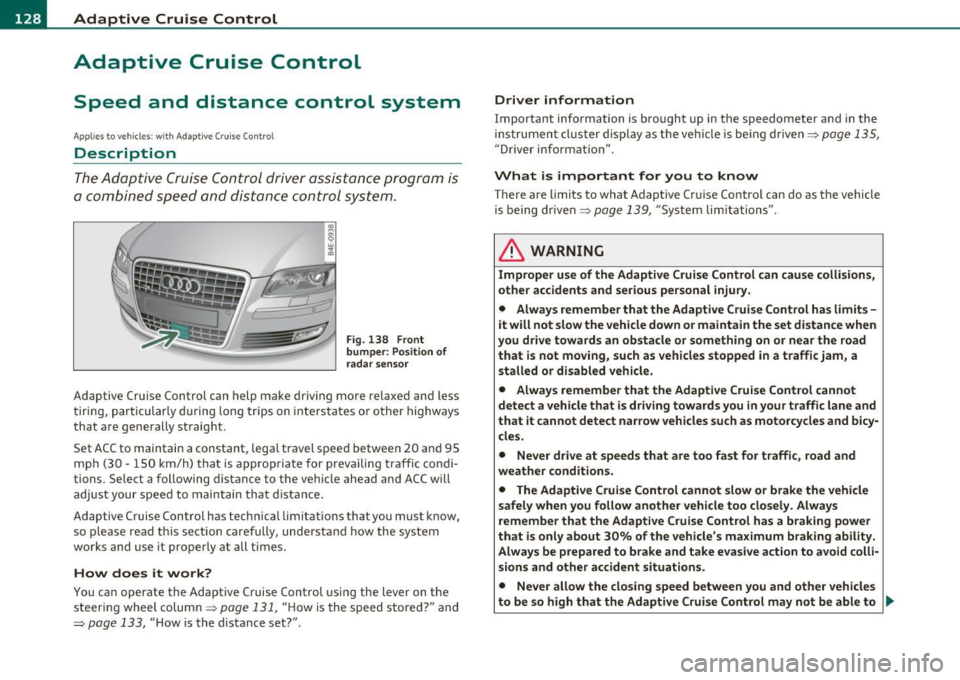
Fig . 138 Front
bumper: Po sition of
rada r sensor
Adaptive Cru ise Cont rol can h elp ma ke driving mo re relaxed and less
t iri ng , par ticularly d uring lon g trips on i nte rs t a tes o r oth er hig hways
that a re generally st raig ht.
Set ACC to maintain a constan t, lega l travel spee d between 20 and 95
m ph (3 0 · 150 k m/h) t hat is approp riat e f or preva iling traf fic co ndi
tions. Select a following distance to t he ve hicle ahead and ACC w ill
adjus t your speed to maintai n that d istance.
Adaptive Cruise Control has technica l limitations that you must k now,
so p le a se read this sectio n carefully, understa nd how the sy stem
works and use it p ro p erly at all ti mes.
How does it work?
You ca n op erate the Adaptive Cruise Control usi ng the lever on the
s teer ing wheel column ~
page 13 1, " H ow is the speed sto red?" and
~ page 133, " H ow is the distance set?" .
Driver information
Important information is bro ught up in the s peedometer and in the
i nst rumen t clust er displa y as the ve hicl e is be ing drive n~
pa ge 135,
"Driver informat io n".
What is important for you to know
T here are limits to what Adaptive Cr uise Contro l can do as the vehicle
is being drive n~
page 139 , "Sys tem lim itations".
& WARNING
Improper use of the Adaptive Cruise Control can cause collisions,
other accidents and serious personal injury.
• Always remember that the Adaptive Cruise Control has limits -
it will not slow the vehicle down or maintain the set distance when
you drive towards an obstacle or something on or near the road
that is not moving, such as vehicles stopped in a traffic jam , a
stalled or disabled vehicle.
• Always remember that the Adaptive Cruise Control cannot
detect a vehicle that is driving towards you in your traffic lane and
that it cannot detect nar row vehicles such as motorcycles and bicy
cles.
• Never drive at speeds that are too fast for traffic, road and
weather conditions.
• The Adaptive Cruise Control cannot slow
or brake the vehicle
safely when you follow another vehicle too closely. Always
remember that the Adaptive Cruise Control has a braking power
that is only about 30% of the vehicle 's maximum braking ability .
Always be prepared to brake and take ev asive action to avoid colli·
sions and other accident situations.
• Never allow the closing speed between you and other vehicles
to be so high that the Adaptive Crui se Control may not be able to .,
Page 162 of 384
ffl..__A_ u_t_ o_ m_ a_t _i _c _t_ r_ a_ n_s _m _ i_ s _s _ i_o _n ___________________________________________ _
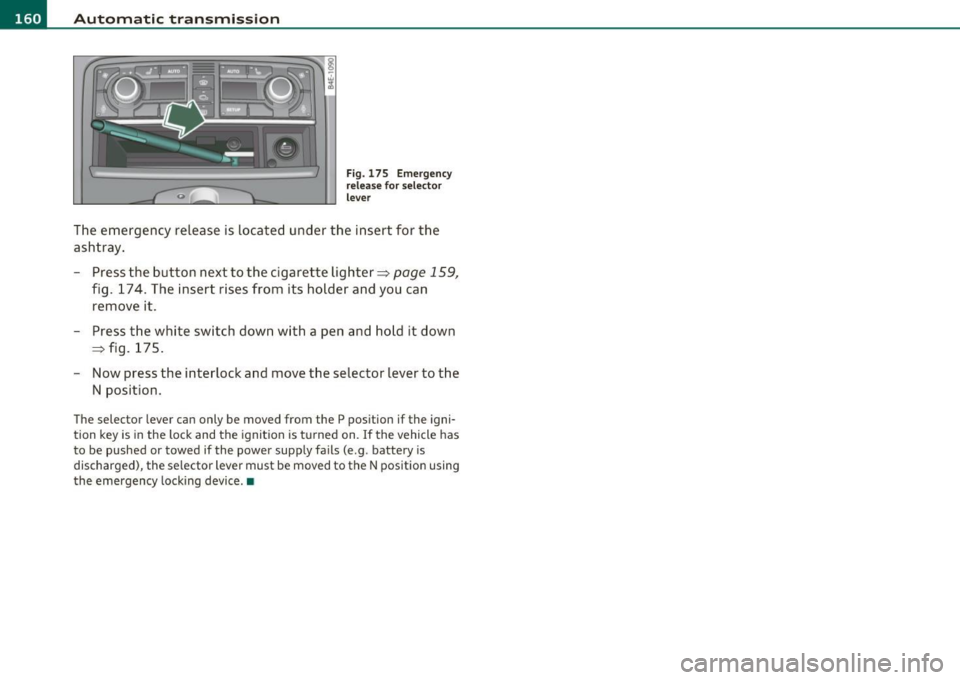
Fig. 175 Emergency
release for selector
lever
The emergency release is located under the insert for the
ashtray.
- Press the button next to the cigarette lighter~
page 159,
fig. 174. The insert rises from its holder and you can
remove it.
- Press the white switch down with a pen and hold it down
~ fig. 175.
- Now press the interlock and move the selector lever to the
N position.
The selec tor lever can only be moved from the P position if the igni
tion key is in the lock and the ignition is turned on. If the vehicle has
to be pushed or towed if the power supply fails (e .g . battery is
discharged), the selector lever must be moved to the N position using
the emergency locking device.•
Page 167 of 384

_________________________________________ A_ d_v _a_ n_ c_e _d _ P_ a_ r _k_ , _· n_ g=- S-=- y_s _t _e _m __ ....JIJII
& WARNING
• The rear-view cam era has blind spots, in which objects cannot
be detected. Be especiall y carefu l to check for small children and
animal s before backing up . Small childr en and animals will not
always be detected by the sensor s.
• The Audi parking system is not a subst itute for being careful
and alert when ba cking up. Be e specially careful dur ing parking
and similar maneuvers . Always watch where you are driving and
make sure that nothing is in the way.
• Remember that low obstacles which have already been
s ignaled may pass below the system 's sensing zone when the
vehicle is back ing up . Th e fact that the signal stop s does not mean
that you have cleared the obstacle . When the signal stops , impact
is imminent . Objects su ch as trailer hitches, chains, narrow posts
or fences covered by a thin la yer of paint may not always be
detected by the system. They c an still damage your vehicle
without warning.
• Alway s make sure that the volume and frequency of the chimes
is adjusted so th at you can eas ily hear the acoustic distance s ignal
even if the radio is playing, the air-conditioner blower is on High
or there is a high level of outside noise .
- Che ck the setting s whenever someone el se has driven the
vehicle befo re you.
• Improper reliance on the Aud i parking system can caus e colli
sions and seriou s per sonal injury.
- Never rely only on parking assist when changing ba cking up.
- Alway s check re ar view mirrors to make sure it is safe to back
up.
[ i ) Tips
• Before parking with the rear-view camera, the Adaptive A ir
S uspension stan dard or au tomatic mo de must be swit ched on
=> page 18.
Cont rols a nd e quip
m en t
Vehicle OP-eration
• The rear-view camera pict ure is avai lab le as soon as the MMI
Display or the MMI is sw itched on , or the sta rt-u p ph ase is completed .
• In or der for the rear-view camera to function p roper ly, the came ra
lens =>
page 16 1, fig. 176 mus t be kept clean , a nd free o f snow and
ice . Please follow t he addit ional notes on =>
page 174 .
• The c ame ra cover age angle change s when the t runk lid is o pen.
The refore, the rear-v iew camera pict ure is displayed without orienta
t ion lines and w ithout blu e surfaces.
• Obse rve and fo llow the notes on towing mode on=>
page 171. •
Applies to ve hicles: w it h Advanced Pa rking System w ith rear view camera
Rear -view camera coverage area
0
Vehicle care
I)
Fig. 18 1 Top vie w:
R ear-v iew came ra
c o ve rage a re a
Fi g. 182 Side view :
Cov ered ar ea @ and
u nc overed are a@ of
th e re ar -vi ew c am era ..
Do-it-yourselt service iTechnical data
Page 172 of 384

ffl..__A_ d _ v_a_ n_ c_e _d _ P_ a_ r_ k_ i _n_ g:- S_,,_ y_s _t _e _m ________________________________________ _
& WARN ING (con tin ue d)
• The Audi pa rkin g system is not a substitute for being careful
and alert when backing up. Be especially careful during parking
and similar maneuve rs. Always watch where you are driving and
make sure that nothing i s in the way.
• When maneuvering or parking, do not only use the MMI
Display for or ientation. Certain object s - depending on the screen
resolution - may not , o r not entirely , be displ ayed ; for e xample
trailer hitches, chains , narrow post s, or fences.
• Improper rel iance on the Audi parking sy stem can cau se colli
sions and seriou s personal injury.
- Ne ver rely only on par king assi st when ch anging ba cking up .
- Always check rear view mirrors to make sure it is safe to back
up .•
Applies to vehicles: w it h Advanced Parking System with r ear view camera
Notes on distance information
Fig. 1 88 MMI Di splay:
displayed re d li ne
to uches the bumpe r
Fig. 18 9 Actual
di stanc e from bumpe r
The red line in the MMI Disp lay~ fig. 188 indicates the d ista nce you
should maintain from an obstacle, when park ing. If an obstacle is
located at road level, you can ap proach the obstacle unti l the red line
touches the obstacle ( 1.3
ft, or 40 cm, distance). On the other hand,
if a n obstacle is not located at road level (t he b umper of a vehi cle, for
example), you should not approach this obstacle unti l the red line
to uch es the obsta cle.
For instance, if you back up toward another vehicle , it will appear as
t hough t he guide hel p lines and s urf aces are bein g pushed over the
vehicle behind you~ fig. 188. I n this example, it can be recogn ized
in th e MM I Display that the red line exactly touches the bumpe r of t he
vehicle be hind you. Indeed, however, t he red line @ ~ fig. 189 does
not touch the bumper, but has rather been pushed underneath the
bu mper. The actual d istance (dashed line@) to t he ve hicle beh ind
you is meanwhile less than 1.3 ft (40 cm). Your veh icle b umper must
a lso be taken into con siderat ion fo r the distance ~& .
& WARNING
• Please note that objects not touching the ground can appear to
be further away than they really are (for example , the bumper of
a parked vehicle, a trailer hitch , or the rear of a truck ). In thi s case,
you should not use the guide help lines to measure distance -
danger of accident! .,
Page 173 of 384

Advanced Parking System -
---------------=---:.--
& WARNING (co ntinued )
• Maintain plenty of di stance from an obstacle , so that your
outside mirror or a corner of your vehicle does not collide with any
obstacle s -danger of accident!
• The Audi parking system is not a substitute for being careful
and alert when backing up. Be e specially careful during parking
and similar maneuvers . Always watch where you are driving and
make sure that nothing is in the
w ay.
• When maneuvering or parking, do not only u se the MMI
Di splay for orientation. Certain obje cts -depending on the s creen
resolution -may not , or not entirely, be di splayed; for e xample
trailer hitches , chains , na rrow posts, or fences. •
Applies to vehicles: with Advanced Park ing System w ith rear view camera and a trailer h itch
i nstalled acco rding to fact ory spec ificat ion s
Towing hitch
For vehicles with a tra ile r hitc h installed according to factory spec ifi
cat ions, the rear acoust ic parking senso rs are not activated when the
vehicle is pu t in r everse gear while an e lec trica l connec tion to t he
trai ler socket* is established. No distance ale rt occurs in the rear
~ page 161. T he re ar-view camera picture ~ page 164 is di splayed
without o rientation lines and without blue surfaces .•
Controls and equip
ment Safety first
Settings in the MMI
App
lies to vehicles: w ith Advanced Parking System w ith rear view camera
Adjusting the chimes -option 1
The volume and the pitch (frequency) of the chimes can
be adjusted in th e MM I.
Fig. 190 MM I di sp lay :
Selec tion menu
-Press th e [ C A R] fu nctio n bu tto n.
- Selec t
Systems in th e CAR me nu.
- Select
Audi parking system .
-Select Front volume to c hange t he volu me of t he fro nt
aud ible signal generator , or
Rear volume to change t he
volume of t he rea r aud ible s ignal genera tor.
- Selec t
Front frequency to change the freq uen cy of th e
front audib le s ignal gener ato r or
Rear frequency if you
wa nt to c hange t he freque ncy of t he rear a udible s ig nal
generato r.
When you adjust the vol ume and freq uency, the new setti ng will
so und for app roxim ate ly 2 s econds from the s ignal generator
affected.
Vehicle care Technical data