service AUDI S8 2010 Service Manual
[x] Cancel search | Manufacturer: AUDI, Model Year: 2010, Model line: S8, Model: AUDI S8 2010Pages: 384, PDF Size: 90.95 MB
Page 113 of 384
Warm and cold ------------------J
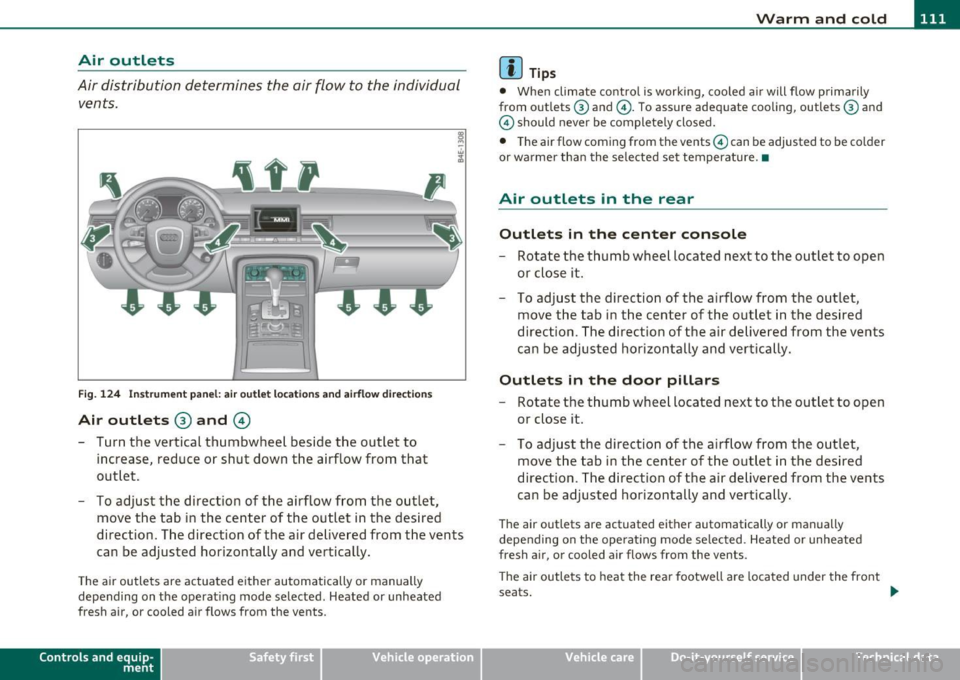
Air outlets
Air distribution determines the air flow to the individual
vents.
Fi g. 1 24 In str um ent pan el: a ir outl et locatio ns and a irflo w dir ections
Air outlets ® and ©
- Turn the vertical thumbwheel beside the ou tlet to
increase , reduce or shut down t he airflow from that
outlet .
- To adjust the direction of the airflow from the outlet,
move the tab in the center of the outlet in the des ired
direction. The direction of the air de livered from t he vents
ca n be adjusted horizontally and vertically.
The air outlets are actuated e ither automatically or manually
depending on t he operat ing mode selected . Heated or unheated
fresh air, or cooled air flows from the vents .
Contro ls a nd e quip
m en t Vehicle
OP-eration
(I) Tips
• Whe n climate contro l is working, coo led a ir will flow p rimarily
from outlets @ and @. To assure adequate cooling, outlets@ and
@ should never be completely closed.
• T he airflow com ing from the vents@ can be adjusted to be colder
or wa rmer than the sele cted set temperatu re. •
Air outlets in the rear
Outlets in the center console
- Rotate the thumb whee l located nex t to the outlet to open
o r close it.
- To adjust the direction of the a irflow f rom the outlet,
move t he tab in t he cen ter o f th e outlet in the des ired
direction . T he direction of the a ir delive red from the vents
can be adjusted horizontally and ver tica lly.
Outlets in the door pillars
- R otate the t humb whee l located next to the outlet to open
o r close it.
- To adjust the direction of the a irf low f rom the o utlet ,
move t he tab in t he center o f the out let in the des ired
direction. The d irection of the air delivered from the vents
can be adjusted horizontally and vertica lly.
Th e air outlets are actuated either automatically or manually
depend ing on the ope rat ing mode se lected . Heated or unheated
fresh a ir, or cooled air flows from the vents .
Th e ai r outle ts to heat the rea r footwell are loca ted under the fro nt
seats.
tJl>
Vehicle care Do-it-yourselt service iTechnical data
Page 115 of 384
Warm and cold -_______________ __.
When selecting the program setting®, the windshield
defogger/defroster is switched on automatically at outside tempera
tures below 41
°F (+5 °(). Depending on outside temperature, the
windshield is heated from 2 up to a maximum of 4 minutes .
Th e windshield defogger is deactivated in ECON mode.
(I] Tips
• If a crack forms in the windshie ld due to a foreign object (e.g. a
stone chip), the defogger/defroster is not turned on. This prevents
the crack from spreading.
• We recommend that you locate an Audi dealership immediately to
have the windshie ld replaced. •
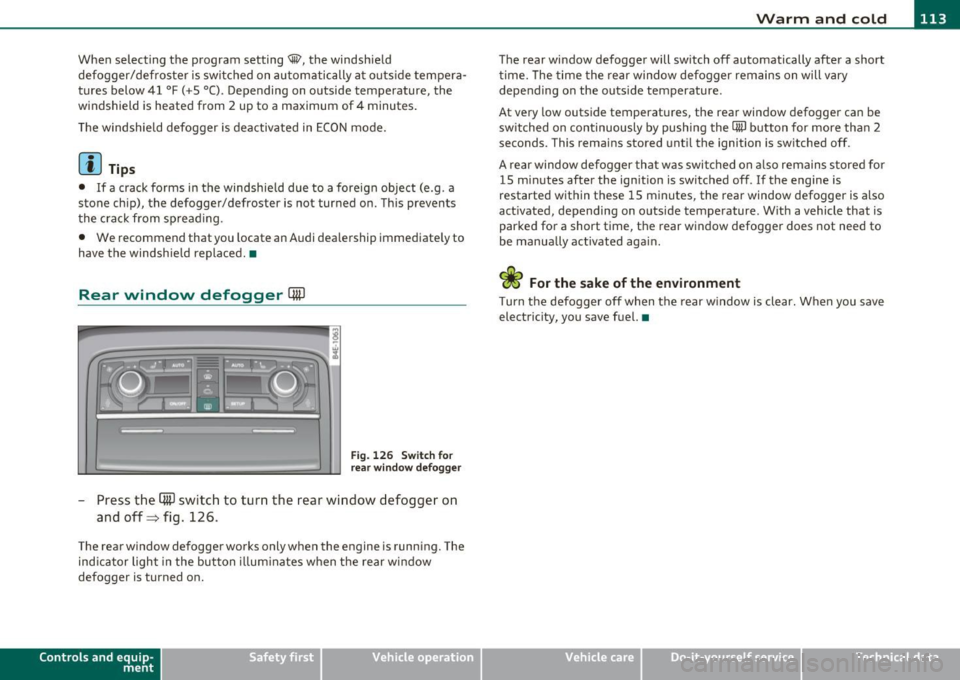
Rear window defogger QuJ
Fig. 126 Switch for
rear window defogger
- Press the (ffi) switch to turn the rear window defogger on
and off=> fig. 126 .
The rear window defogger works only when the engine is running. The
ind icator light in the button illum inates when the rear w indow
defogger is turned on.
Con tro ls a nd e quip
m en t Vehicle
OP-eration
The rear window defogger will switch off automatically after a short
time. The time the rear window defogger remains on will vary
depending on the outs ide temperature.
At very low outside temperatures, the rear window defogger can be
switched on continuously by push ing the
CiiiJ button for more than 2
seconds. This rema ins stored until the ignition is switched off.
A rear window defogger that was switched on also remains stored for
15 m inutes after the ignition is switched off . If the engine is
restarted within these 15 minutes, the rear window defogger is a lso
act ivated, depending on outside temperature . W ith a vehicle that is
parked for a short time, the rear window defogger does not need to
be manually activated again.
<£> For the sake of the environment
T urn the defogger off when the rear w indow is clear. When you save
electricity, you save fuel. •
Vehicle care Do-it-yourselt service iTechnical data
Page 119 of 384
_________________________________________________ O_ n_ t_ h_ e_ r _o_ a_d _ __.fflll
On the road
Steering
Adjusting steering wheel position
The steering wheel position can be adjusted for height
and reach.
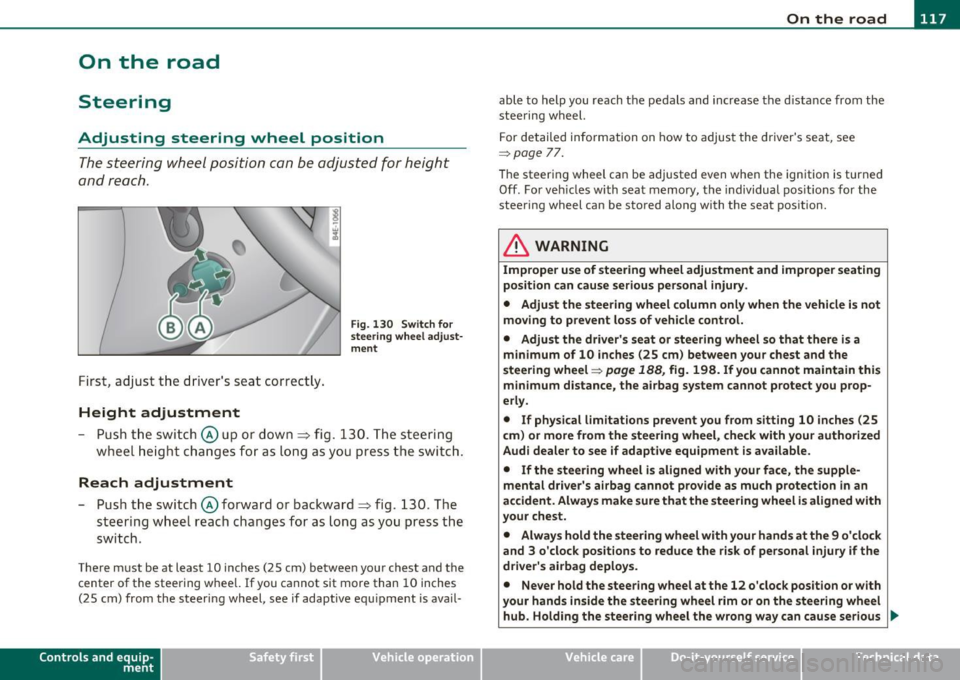
First, adjust t he driver's se at correct ly.
Height adjustment
Fig . 13 0 Swit ch f or
steering whee l adjust
m ent
- P ush t he swi tch © up or down ~ fig. 130. The st e e ring
whe el h eig ht chang es f or as l ong as y ou press t he swi tch .
Reach adjustment
- Push the switc h@ forward or backward~ fig. 130 . T he
steering w heel reach changes for as long as you press the
switch .
There m ust be at least 10 inches (25 cm) between your chest and the
center of the steering whee l.
If you cannot sit more than 10 inches
(25 cm) from the steer ing wheel, see if adaptive equ ipment is ava il-
Cont rols a nd e quip
m en t Vehicle
OP-eration
able to help you reach the pedals and increase the d istanc e from the
stee ring wheel.
F or detailed info rmation on how to adjus t the d river' s se at, see
~ page 77.
Th e stee ring wheel ca n be adjusted even when the ign ition is turned
Off . For veh icles with seat memory, the individual pos it io ns for the
steering wheel can be stored along with the seat pos ition.
& WARNING
Improper use of steering wheel adjustment and improper seating
position can cause serious personal injury .
• Adjust the steering wheel column only when the vehicle is not
moving to prevent loss of vehicle control. • Adjust the driver 's seat or steering wheel so that th ere is a
minimum of 10 inches (25 cm ) between your chest and the
steering wheel~
page 188, fig. 198. If you cannot maintain this
m inimum distance, the airbag system cannot protect you prop
erly.
• If physical l imitations p revent you from sitting 10 inches (25
c m ) or more from the steering wheel, che ck with your authorized
Audi dealer to see if adapt ive equipment is a vailable.
• If the steering wheel is aligned with your face, the supp le
mental dri ver 's ai rbag cannot prov ide as much protection in an
accident . Always make sure that the steering wheel i s aligned with
your chest.
• Always hold the steering wheel with your hands at the 9 o 'clock
and 3 o 'clock posit ions to reduce the risk of personal injury if the
driver's airbag deploys .
• Never hold the steering wheel at the 12 o'clock position or with
your hands inside the steering wheel rim or on the steering wheel
hub. Holding the stee ring wheel the wrong way can cause serious
~
Vehicle care Do-it-yourselt service iTechnical data
Page 121 of 384
![AUDI S8 2010 Service Manual _________________________________________________ O_ n_ t_ h_ e_ r _o_ a_d _ __.lftI
(]] Tips
• If you release the ignition key in posit ions G) , @ or@, the key
automatically returns t](/img/6/57617/w960_57617-120.png "AUDI S8 2010 Service Manual _________________________________________________ O_ n_ t_ h_ e_ r _o_ a_d _ __.lftI
(]] Tips
• If you release the ignition key in posit ions G) , @ or@, the key
automatically returns t")
_________________________________________________ O_ n_ t_ h_ e_ r _o_ a_d _ __.lft'I
(]] Tips
• If you release the ignition key in posit ions G) , @ or@, the key
automatically returns to position @.
• If you open the driver's door when the ignition is switched on, a
buzzer sounds and the message
Ignition is on appears in the instru
ment cluster display. Please switch the ignition off.•
Ignition key safety lock
The ignition key can only be removed when the selector
lever is in the "P" (Park) position.
After turning off the ignition, the ign ition key can only be removed
from the ignition lock when the se lector lever is in the "P" (Park) posi
tion . After you have removed the key, the selector lever is locked and
cannot be moved. •
Starting and stopping the engine
Starting the engine
The engine can only be started with your original Audi
key.
Con tro ls a nd e quip
m en t
Fig. 132 Ignition key
positions
Vehicle OP-eration
-Step on the brake.
- Move the selector lever into P or N
~ &.
- Turn the ignition key to position @~ fig. 132 -do not
depress the gas pedal when starting the engine.
A cold engine may sound loud after it has been started. This is due to
the hydraulic valves building up oil pressure. This is normal and is not
a need for concern.
If the engine does not start immediately, stop trying after 10 seconds
and then try to restart the engine about 30 seconds later .
& WARNING
Never start or let the engine run in a confined or enclosed area.
Exhaust fumes from the engine contain carbon monoxide , a color
less and odorless gas. Carbon monoxide can be fatal if inhaled.
• Never leave the engine idling unattended. An unattended
vehicle with a running engine poses a danger of personal injury or
theft .
0 Note
• Avoid high eng ine speeds, fast accelerat io n or heavy engine loads
wh ile the engine is still cold. This could damage the engine.
• The engine cannot be started by push ing or towing the vehicle.
~ For the sake of the environment
To avoid unnecessary engine wear and to reduce exhaust emissions,
do not let your vehicle stand and warm up. Be ready to drive off imme
diately after starting your vehicle. Maintain moderate speed unti l the
engine is completely warm. Remember, the engine performs best at
operating temperature .•
Vehicle care Do-it-yourselt service iTechnical data
Page 133 of 384

Adaptive Cruise Control -____________ ___,__ __ ____.
Switching the system off
-Press the lever to position@ (latched). •
Applies to v ehi cle s: w ith Ad ap tiv e Cruis e Cont ro l
How is the speed stored?
Fig . 141 Control
leve r: Stor in g spee d
With the system sw itched on the speed is stored as follows:
- Drive at the speed you want. The speed must be between
20 and 95 mph (30 and 150 km/h) .
- Press the SET button to store the desired speed .
After the [SE TI button is released, the current speed is stored and
ma intained .
The ins trument clus ter displ ay show s the stored speed wi th a red
ind icator light~
page 135.
(I] Tips
For safety reasons, the stored speed is erased when the ig nit ion or
the ACC is turned off .•
Con tro ls a nd e quip
m en t Vehicle
OP-eration
Applies to vehicles : w ith A dapt ive Cruise Cont rol
Changing stored speed
Speed can be changed without touching the accelerator
or brake pedal .
Increasing speed
...
"' M
w .., a,
Fig. 142 Con tro l
lever: Chan ging spee d
-Press the lever briefl y upwards G). USA models: Speed
increases by about 2.5 mph. Canada models: speed will
increase by one mark on the speedometer scale.
- Press the lever upwards
0 and hold it. As long as you hold
the lever up, the light diode display in the speedometer
LED display moves forward and the speed is increased .
Reducing speed
-Press the lever briefly downwards Q. Speed decreases by
2.5 mph. Canada models: speed will decrease by one mark
on the speedometer scale.
- Press the lever downwards
O and hold it. As long as you
hold the lever down, the light diode display in the speed
ometer LED display moves backward and the speed is reduced .
~
Vehicle care Do-it-yourselt service iTechnical data
Page 135 of 384
![AUDI S8 2010 Service Manual Adaptive Cruise Control IJI ____________ ___,__ __ ____.
(]] Tips
When the system is turned off temporari ly, the speed set at that time
is stored. •
Applies to vehicles : with Ada](/img/6/57617/w960_57617-134.png "AUDI S8 2010 Service Manual Adaptive Cruise Control IJI ____________ ___,__ __ ____.
(]] Tips
When the system is turned off temporari ly, the speed set at that time
is stored. •
Applies to vehicles : with Ada")
Adaptive Cruise Control IJI ____________ ___,__ __ ____.
(]] Tips
When the system is turned off temporari ly, the speed set at that time
is stored. •
Applies to vehicles : with Adaptive Cruise Control
How is the distance set ?
Distance can be set in four stages.
Increasing distance
Fig. 144 Control
l ever: Sett ing d ist ance
- Push the slider switch once to the right G):::> fig . 144 . The
distance currently set is shown for 3 seconds in the instru
me nt cluster display .
- Push the slider switc h
again to the right G), to increase
the d is tance by one step.
Reducing distance
- Push t he s lider switch once to the left Q . The distance
current ly set is shown for 3 seconds in the in strument
cl uster display.
- Push the slider switch
again to the left 0, to decrease the
distance by one step .
Contro ls a nd e quip
m en t Vehicle
OP-eration
The distance a t which Adaptive C ruise Co ntro l fo llows a vehi cle in
front is determ ined by
time intervals. A time interva l to a vehicle in
front is established and main tained. This produces a speed-depen
den t interval. The higher the speed, the greater the safety interval in
feet (meters) .
For example, if the interval
DISTANCE 3 i s set, a vehicle in front is
followed at a
time interval of 1.8 seconds.
For a speed of
50 mph (80 km /h ) this woul d be eq uivalent to a
distance of
131 feet (40 meters ) to the vehicle in front.
The distances given here are nominal va lues. The vehicle speed may
exceed o r fall short of these target speeds, depending on the driving
situation and the driving style of the vehicle ahead . .,
Vehicle care Do-it-yourselt service iTechnical data
Page 137 of 384

--------------------------------------------=A~ d:..: a=. p !::...: t~iv .:.. e =-- C=-=- r=u :.:.is =-:: e_C=.:: o:.:n..:. t.:: r:..: o:::.:. L _..J_
Driver information
Applies to veh icles: with A daptive C ruise Cont ro l
Displays in the instrument cluster
Depending on the driving situation, driver information is
displayed in the instrument cluster .
@ Primary d isp lay in the speedometer .
Fig. 145 O vervi ew
in strume nt clu ster
@ Supplementary display in the instrument cluster .
© Message in the instrument cluster d isp lay.
@ Primary display
Important information concerning vehicle operation with Adaptive
C rui se Con trol i s shown in display area @ . T he desired speed you set
is highlighted in the speedometer and the warning lights show
whet her adjustments are being made for an object ahe ad.
T hi s information is always displayed. Display area@ is the refore
called the
primary di splay.
@ Supplementary display
In d isp lay area @ information from the navigation system a nd the
trip computer is displayed in addit ion to information about Adapt ive
Cru ise Control.
Con tro ls a nd e quip ·
m en t Vehicle
OP-eration
You can select among the different information by repeated brief
ta ps o n the R ES ET button on the windshield wiper lever =>
page 38,
"Operatio n".
Particularly on your first trips with Adaptive Cruise Control, the
s upplementar y display should be tur ned on .
© Message
The information in a rea © is not displayed permanently . Informat ion
is displayed on ly if you c hange the time interval, if there is a malfunc
tion or if the Adapt ive Cru ise Contro l is turned off .•
A p plies to v ehicles : wi th Adaptive C ru ise Cont ro l
Primary display in the speedometer
Desired speed
Fi g. 14 6 Pr im ary
d is p lay
i n the spe ed ·
o m et er
Th e desi red speed set by the d river is displayed wi th a red L ED .
T he system a llows only speeds from 20 to 95 mph (30 to 150 km/h)
to be set . This speed range is faint ly illumina ted in the speedometer.
Warning lights (symbols)
• ""c::;, Open road: T he wa rning lig ht ""c::;, shows that AC C is active
and that no moving vehicle has been detected with in range of the
ra dar senso r up ahead in your lane of travel. The set speed is main-
tained . _,,,
Vehicle care Do-it-yourselt service iTechnical data
Page 139 of 384

__________________________________________ A_ d_a""" p:....- t_iv _ e_ C_ r_ u _is _ e_C_ o_n_ t_ r_ o_ L_....Jfflll
If Adaptive Cruise Control is turned off or no speed is set, no vehicle
is shown.
@ Status
• Th e text OFF appears in white letters when Adaptive Cruise
Control is turned off .
• The text
AVAILABLE appears in white lett ers when the system is
turned on but no requested speed has been set .
• The text
OVERRIDE appears in white letters when you exceed the
requested speed by accelerating.
• The text
DISTANCE! appears in red letters when the interval to a
vehicle traveling ahead is too short and you also have to slow your
vehicle with the foot brake .
• Th e text messages
DISTANCE 1, DISTANCE 2, DISTANCE 3 or
DISTANCE 4
appear in green letters to indicate the time interva l
(distance) you have set and ACC is active.
© Distance
A pointer (arrow) is shown in this area. When slowly approaching a
moving vehicle detected ahead in your lane of travel, th is pointer
represents the distance to that vehicle . When approaching that
vehicle rapidly, it serves as early warning of an impending request for
the driver to assume full veh icle control. The pointer moves on a scale
from right to left.
Open road: With an open road and no moving vehicle detected up
ahead, no pointer is shown.
Driving in traffic: If a vehicle t raveling up ahead in your lane of travel
is detected, the pointer moves to the center area of the scale. This
area represents the time interval (distance) set.
It is shown in green
to make it easier to see .
Driver intervention prompt: Whenever the selected time interval
(distance) to the vehicle moving up ahead in your lane of travel is less
than the time inte rval (distance) set, the poin ter moves into the
red
area of the display . When the pointer reaches the farthest position on
the left, the driver in te rvention prompt is displayed to indicate that
Contro ls a nd e quip
m en t Vehicle
OP-eration
the driver must now assume full vehicle control in order to prevent a
collision .•
App lies to ve hicle s: w ith Adapti ve Cru ise Cont rol
Messages
The text messages and symbols shown in this area of the
display are not displayed permanently.
Time intervals
Fig. 148 Information
line
Th e different symbols for the time interva ls (distance) appear if you
change the settings::::> fig. 148. In addition, there is a display if the
gong (audible warning signal) is turned off.
Three white dots ... appear if a setting cannot be made w ith the oper
ating lever . The following are possible reasons
• If you pull the control lever forward to resume speed but no
requested speed was set.
• If you push the lever up to increase (or down to reduce) speed
when no speed has been set previously.
• If you push the lever up to increase (or down to reduce) speed and
this speed is outside the 20 to 95 mph (30 to 150 km/h) speed range . ..,
Vehicle care Do-it-yourselt service Technical data
Page 141 of 384
![AUDI S8 2010 Service Manual __________________________________________ A_ d_a""" p:....- t_iv _ e_ C_ r_ u _is _ e_C_ o_n_ t_ r_ o_ L_....J_
- Select: Function button I CAR]> Systems > Adaptive
Cruise Control
> Default se](/img/6/57617/w960_57617-140.png "AUDI S8 2010 Service Manual __________________________________________ A_ d_a\"\"\" p:....- t_iv _ e_ C_ r_ u _is _ e_C_ o_n_ t_ r_ o_ L_....J_
- Select: Function button I CAR]> Systems > Adaptive
Cruise Control
> Default se")
__________________________________________ A_ d_a""" p:....- t_iv _ e_ C_ r_ u _is _ e_C_ o_n_ t_ r_ o_ L_....J_
- Select: Function button I CAR]> Systems > Adaptive
Cruise Control
> Default setting > distance.
Setting Distance
In the Basic setting menu you can set the distance (time interval)
using
distance 1 , distance 2 , distance 3 or distance 4 that Adap tive
Cruise Control is to maintain to a preceding vehicle when in manage
ment mode .
Storing settings
Your individua l settings are automatically stored and allocated to the
remote control key being used (remote key perso nalizat io n). •
System Limitations
Applies to veh icles: with Adaptive C ruise Cont ro l
General information
The radar sensor has limits that the driver must know to
be able to use ACC properly.
The Adaptive Cruise Control works within limits that are also related
to radar sensor range and sight distance. In some situations ACC may
react unusually or late from the driver's point of v iew. Therefore,
always be attentive to what is happe ning around you and always be
ready to intervene, if necessary:
• when driving around curves=>
page 139.
• when vehicles up front are not in line with your vehicle
=>
page 140 .
• when other vehicles are changing lanes=> page 140.
• when other vehicles are difficult to detect=> page 140 .
• when vehicles up ahead are no t moving or obstacles are in your
travel lane=>
page 141.
Con tro ls a nd e quip
m en t Vehicle
OP-eration
& WARNING
The radar sensor's function and range can be reduced by rain, snow
and heavy spray. Moving vehicles up ahead may not be promptly
detected or may not be detected at all .
• Alway s pay careful attention to the traffic situation and be
ready to intervene and be ready to take complete control when
ever necessary .•
A pp lies to ve hicle s: with Ad aptive Cru is e Con tro l
When driving around curves
k::==;:;;:.::: ======== =,~
~
Fig. 149 Vehicle
entering a curve
Fig. 150 Vehicle
leaving a curve
Vehicle care Do-it-yourselt service iTechnical data
Page 143 of 384

__________________________________________ A_ d_a""" p:....- t_iv _ e_ C_ r_ u _is _ e_C_ o_n_ t_ r_ o_ L_....J_
A pp lies to vehicles : with Adaptive Cruise C ont rol
Stationary vehicles
\,__.,,,.---~~ ~i'"lla
=Jt"~-~ ;;;d.i.'..Jt~
Fig . 154 T urning and
stationary vehicle
Fig . 155 Sheering out
and stationary vehicle
If a vehicle that has been detected by ACC exits the highway or sheers
out into the neighboring travel lane, and there is a stationary vehicle
ahead of that vehicle, ACC will not detect o r react to that stationary
vehicle => fig . 154 and=> fig. 155. •
Contro ls a nd e quip
m en t Vehicle
OP-eration Vehicle care Do-it-yourselt service iTechnical data