service AUDI S8 2010 User Guide
[x] Cancel search | Manufacturer: AUDI, Model Year: 2010, Model line: S8, Model: AUDI S8 2010Pages: 384, PDF Size: 90.95 MB
Page 39 of 384
Current fuel mileage
T he instantaneous fuel consumption in miles per ga llon (l/100 km) is
show n in this disp lay. You can use this d isp lay to adjust you r driv ing
technique to achieve a desired m ileage .
Fuel consumption is recalculated at inte rvals of 33 ya rds (30 metres).
When the vehicle is stat ionary, the most recent fuel consumption is
displ ayed.
Average speed
Th e average speed in mph (km/h) since the last time the display w as
reset appears in the display.
Elapsed time
The length of time that you have been driving since you last reset the
memory appea rs in t his display.
rn Tips
• Fuel consumptions (average and cu rrent), ra nge a nd speed are
displayed in metr ic units on Canadian models.
• All s tored values will be lost if the vehicle battery is
disconnected. •
Contro ls a nd e quip
m en t Vehicle
OP-eration
Driver information display
Memories
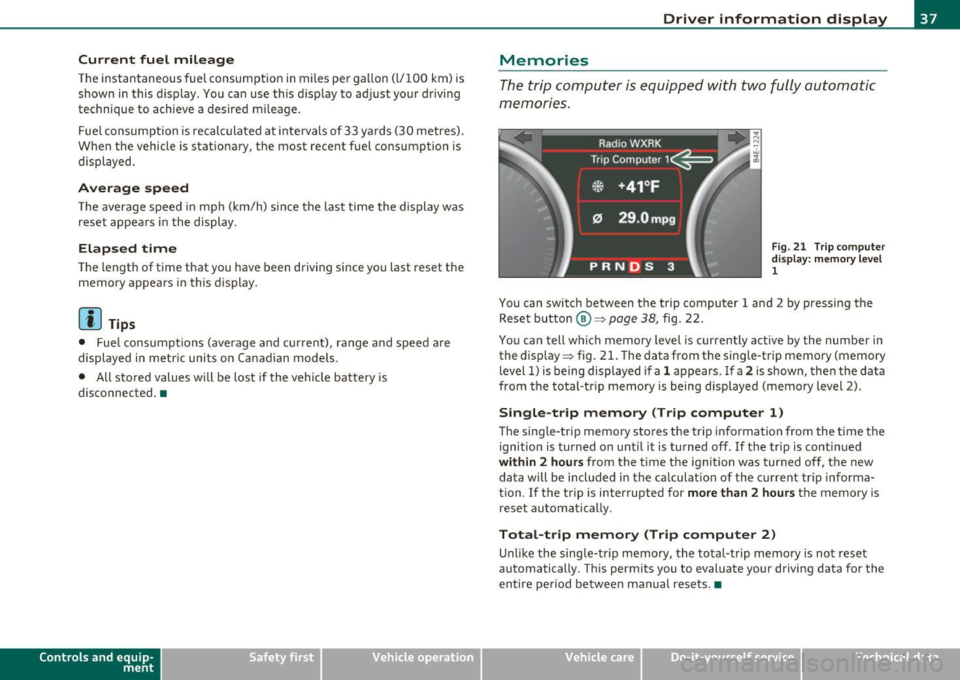
The trip comp uter is equ ippe d wi th two fully auto matic
memones.
Fig . 2 1 Trip co mpute r
di sp lay: m emory l ev e l
1
You can switch between the t rip computer 1 and 2 by pressing the
Rese t button
® ~page 38, fig. 22.
You ca n tell which memory level is curren tly active by the number in
the disp lay ~ fig. 21. The data from the sing le -trip memory (memory
level 1) is being displayed if a
1 appears . If a 2 is shown, the n the data
from t he total-tr ip memory is being displayed (memory level 2).
Single-trip memory (Trip computer 1)
Th e sing le -t rip memory sto res t he tri p inf ormation from the ti me the
ignitio n is turned on unti l it is t urned off . If th e tr ip is contin ued
within 2 hours from the t ime the ignit ion was turned off, the new
data will be included in the ca lculat ion of the c urrent tr ip informa
tion. If the trip is interrupted for
more than 2 hours the memory is
reset au toma tic ally.
Total-trip memory (Trip computer 2)
Unli ke the single -t rip m emo ry, th e total-trip memo ry is not rese t
automatically. Th is permits you to evaluate your driving data for the
entire pe riod be twee n man ual rese ts. •
Vehicle care Do-it-yourselt service iTechnical data
Page 45 of 384

Unlocking and locking the vehicle with the
remote control
How the remote control works.
Fig. 26 Remot e
con trol: fu ncti on
butt ons
Whether only th e driver's door or the entire vehicle is
unlocked when the opening button @ is pr essed once,
de pends on the settings in the MMI
Central locking menu
=:> page 44 .
To unlock the vehicle 0
- Press button @.
- Press button @
two times within two seconds to unlock
all doors and the rear lid .
To lock the vehicle 6
- Press button@=:> & in "Ge neral descr ipt ion" on
page 41 .
- Watch that all turn signal lights flash once .
To unlock rear lid only c:5
-Press button @for approximately one second.
Con tro ls a nd e quip
m en t Vehicle
OP-eration
Opening and closing
PANIC Button
- Push the red button @to activate the panic function. The
horn sounds and the turn signa ls flash .
- Push the button @ again to deactivate t he panic f unction.
On vehicles equipped with the Conven ience key* features, the
selector leve r must be in the P position, othe rwise the vehicle will not
lock .
& WARNING
Read and follow all WARNINGS=> & in "General de sc ription " on
page 41.
(I] Tips
• In orde r to make sure the locking func tion is wor king , you shou ld
always keep your eye on the vehicle to ma ke sure it is properly locked .
• Do not use the remote control if you are ins ide the car, otherwise
you may unintentionally lock the vehicle, and then yo u would set off
the ant i-theft alarm when you try to start the eng ine or open a door.
I n case this happens any how, push the unlock button
0.
• Use the panic function o nly if you are in an emergency situat ion. •
Vehicle care Do-it-yourselt service iTechnical data
Page 47 of 384
![AUDI S8 2010 User Guide (]] Tips
When locking, all doors and the trunk lid are locked automatically. •
Applies to veh icles: with power side doo r closer
Doors with power side door closer
Th e ve hicl](/img/6/57617/w960_57617-46.png "AUDI S8 2010 User Guide (]] Tips
When locking, all doors and the trunk lid are locked automatically. •
Applies to veh icles: with power side doo r closer
Doors with power side door closer
Th e ve hicl")
(]] Tips
When locking, all doors and the trunk lid are locked automatically. •
Applies to veh icles: with power side doo r closer
Doors with power side door closer
Th e ve hicle doors are equipped with a power door closer. When you
wa nt t o close an open door, gently push on the door. The door will
automatically close by itself.
& WARNING
When closing a door, make sure nothing can interfere with the
door. This could cause serious personal injury.
• You can stop the door from closing at any time by pulling on
the inside or outside door handle. •
Locking and unlocking the vehicle from
inside
The vehicle can be locked or unlocked from the inside
using the power locking switches.
Con tro ls a nd e quip
m en t
Fig. 29 Drive r's door:
power locking switch
Vehicle OP-eration
Opening and closing
Fig. 30 Rear power
locking switch
How to lock all doors and the rear lid
simultaneously
- Press upper part of the power locking switch t'.D ~ &.
How to unlock all doors and the rear lid
simultaneously
- P ress the lower part of the switc h@.
How to unlock each door separately using the
door handle
- Pull the handle to open the door.
You will find a power locking switch in each door. You can lock and
unlock
the vehicle using the switches in the driver's or passenger's
door=> fig. 29. You can only
lock the vehicle using the switches in the
rear doors => fig. 30. If you lock the vehicle using the
power locking
switch,
please note the following:
• You cannot open the doors or the rear lid from the
outside
(increased security, for examp le when you are stopped at a red light).
• The diodes in the power locking switch illuminate when all the
doors and the rear lid are closed and locked .
• All diodes turn dark as soon as one of the doors has been
unlocked .
Vehicle care Do-it-yourselt service iTechnical data
Page 49 of 384

Opening the Rear lid/Trunk lid
Fig. 33 P ositio n of
lo ck and h andle
in the
rea r lid
- Press t he center button c:5 on t he master ke y or t he
r e lease but ton
c:5 in t he driver's door=> page 46, fig. 32.
Th e rear lid is u nlock ed and ope ns.
Closing the Rear lid/Trunk lid
- P ull the rear li d dow n and allow itto drop gent ly. The l id is
then closed automatic ally =>& .
& WARNING
• After closing the rear lid, always pull up on it to make sure that
it i s properly closed . Otherwise it could open suddenly when the
vehicle is moving.
• To help prevent poisonous exhaust gas from being drawn into
the veh icle , always keep the rear lid closed while driving. Ne ver
tran sport objects larger than those whi ch fit completely into the
luggage area, bec ause then the rear lid cannot be fully closed.
• Never leave your vehicle unattended e specially with the rear lid
left open . A child could c rawl into the car th rough the luggage
c ompartment and pull the lid shut , be coming trapped and unable
to get out . To reduce the r is k of personal injury, never let children
play in or around your vehicle . Alway s keep the rear lid a s well a s
the vehicle doo rs clo sed when not in u se .
Con tro ls a nd e quip
m en t Vehicle
OP-eration
Opening and closing
(I) Tips
• If the rea r lid is open o r not properly locked whe n the ignition is
turned on, the door and rear lid warning
~ page 24 appears in t he
in st rumen t cluste r display.
• T he following appl ies to vehicles equipped with the Conven ie nce
key* feat ure: if t he re mote co ntrol key is left i n the l uggage compar t
ment, l uggage compartment will automatically un lock itself after
you lock the vehicle. This p revents yo u from unin tentionally lock ing
your key in the luggage compartment. •
Opening and closing rear Lid manually
If the centr al l ock ing s ystem fails (po wer su pply ), you can
also open the rear lid using the m echanical key.
© ®
Fig
. 34 Rear lid : lock
posit ions
As a g eneral ru le, the rea r lid sh ould only b e opera ted us ing
t he re lease b utt on i n t he mast er key, t he release switc h in t he
driver's door and th e handle on the rear lid. Unlocking t he
r ear lid by inserting and t urning the key inside the rear lid
locki ng cylind er wi ll activate t he optical a nd aco ust ic alar m . .,
Vehicle care Do-it-yourselt service iTechnical data
Page 55 of 384

How is the anti-theft alarm system switched off?
The anti-theft alarm system is switched off only when you unlock your
vehicle .
If you do not open a door within 60 seconds after you have
unlocked with the remote control, the vehicle will lock itself again
automatically.
When will the anti-theft alarm system be
triggered?
When the vehicle is locked, the alarm system monitors and protects
the following parts of the veh icle:
• engine compartment
• luggage compartment
• doors
• ignition
When the system is activated, the alarm will be triggered if one of the
doors, the engine hood or the rear lid are opened, or if the ignit ion is
turned on. The anti-theft alarm system will also go off when the
battery is disconnected.
Unlocking the rear lid by inserting and turning the key inside the rear
lid locking cylinder will trigger the optical and acoustic alarm.
You can also trigger the alarm by pressing the PANIC button on your remote control. This will alert other peop le in case of emergency.
Press the PANIC button again to turn off the alarm.
How is the anti-theft alarm switched off when
tr igg ered?
The alarm system is switched off when you un lock the vehicle or when
the ignition is switched on . The alarm will also switch itself off when
it comes to the end of its cycle .
Emergency flasher and horn
The emergency flasher will blink br iefly and the horn sounds when
the doors, engine hood and rear lid are properly closed .
If the emergency flashers do not blink, or the horn does not sound,
check the doors, engine hood and rear lid to make sure they are prop-
Con tro ls a nd e quip
m en t Vehicle
OP-eration
Opening and closing
erly closed. If you close a door, the hood or the rear lid with the anti
theft alarm switched on, the emergency flashers will blink and the
horn w ill sound only after you have closed the door or lid .
(I] Tips
For the anti-theft alarm system to function properly, make sure all
vehicle doors and windows are closed before leaving the vehicle. •
Power windows
Controls
Fig. 41 Driver's door:
power window
switches
Fig.
42 Driver's door:
Switches (vehicles
with power child safety
lock) ..
Vehicle care Do-it-yourselt service iTechnical data
Page 59 of 384

Sliding/tilting power sunroof
How the power sunroof works
Fig. 45 Sect ion of the
h ea dli ner: s unroof
sw itch positions
The roof will slide open or t ilt up at the rear as requ ired. When the
ignition is on, you can slide the roof open or close it to the desired
position by turning the rota ry control sw itch located ove rhead next to
the interior light. The roof is tilted open or closed by pressing or
pulling the contro l switch at position@~ fig. 45.
You can still close or open the sunroof for up to ten minutes after you
have switched off the ignition with the key remaining in the ignition
lock. If either door is opened, powered operation of the sunroof will
be deactivated.
S olar roof*
The solar cells in the roof provide energy to operate the ventilation
system for the climate control. It is activated automatically after the
vehicle is parked. Depending on solar irradiation, the interior temper
ature of the vehicle is lowered in the summer, in the winter the inte
r ior is dehumidif ied.
Sola r prot ection with sliding gl ass sun roof
The sliding glass sun roof is equipped with an adjustab le sunshade to
reduce the effects of strong sunlight. The solar protection can be
moved at the recessed handle to open and close it. To prevent the
Con tro ls a nd e quip
m en t Vehicle
OP-eration
Opening and closing
vehicle interior from heat ing up, you shou ld close the solar protection
when you park your vehicle in the s un .
When the roof is
s lid open , the sunshade is opened a utomat ically .
When the roof is closed, the sunshade can be closed manually.
When the roof is
t ilte d op en , the closed s unshade is also ra ised at the
rear edge . But it can still be slid open or closed.
0 Note
You should always closed the sliding/t ilting sunroof when you leave
your vehicle. Sudde n rain can drench the interior equipment a nd
damage the electronic conven ience features in your vehicle.
(I] Tips
If you park your vehicle in the sun, we recommend that you close the
s u nshade .•
Sliding/tilting the power sunroof open
Tilting the roof open
- Turn the rotary switch to position ®·
- In position @, briefly
press th e control to tilt the roof up
completely.
- To tilt the roof open to any intermediate position
press
and hold the sw itch until the roof reaches the desired
position .
Sliding the roof open
-Turn the switch to position © to open the roof all the way.
- Turn the switch to any other position to open the roof to
any intermediate position . ._
Vehicle care Do-it-yourselt service iTechnical data
Page 61 of 384

& WARNING (continued)
• Never leave children or persons requiring assistance alone in
the vehicle, especially when they could access the vehicle keys.
Unsupervised use of the keys can result in the engine being started
or use of vehicle systems such as the power windows, etc. which
could result in serious injury. The doors could be locked with the
remote key, delaying help in an emergency.
• The power sunroof will continue to operate until the ignition
key has been removed and one of the front doors has been
opened. a
Emergency closing by hand
The sunroof can be closed by hand in case of a power
failure.
Con tro ls a nd e quip
m en t
Fig. 46 Section from
headliner: Where to
place the screwdriver
Vehicle OP-eration
Removing the cover
Opening and closing
Fig. 47 Section from
headliner: Crank for
emergency operation
- Insert the flat side of the screwdriver (found in the vehicle
tool kit) at the rear edge of the lens as indicated by the
-arrows- ::::> fig. 46.
- Carefully pry the clear lens cover open and remove it.
Retrieving the crank for emergency closing
-Use the ignition key or a screwdriver to carefully pry the
cover off the left end of the instrument panel
=> page 342, fig. 276. The crank is stored next to the fuse
carrier.
Closing the roof
- Push the crank ©::::> fig. 47 into the hex socket@ until
you can feel the crank engage. Start turning, maintaining
a steady pressure on the crank to keep it from slipping off.
- After you have closed the sunroof, remove the crank and
replace the dome light lens.
[ i] Tips
If you are unable to close the roof manually, contact the nearest
authorized Audi dealer for assistance. •
Vehicle care Do-it-yourselt service iTechnical data
Page 65 of 384

Appli es to veh icles: w ith Adap tive Ligh t
Adaptive Light
When making a turn or driving around tight corners, the
relevant area of the rood is better illuminated .
Adaptive Light (making turns)
Fig. 51 Ada ptive Li ght
when turnin g and
dr iv ing th roug h cu rv es
An additional bulb in the headlight prov ides a corner ing light @ in
addition to the low beam ©~ fig. 51. Adapt ive Light is switched on
and off automatically depending on dr iv ing cond itions.
When you activate the turn signal lever, the Adaptive Light for the
same s ide is sw itched on. Please note that the t urn signal lever must
engage.
Adaptive Light is not switched on if you on ly move the turn signal
lever to the point of resistance to s ignal a lane change~
page 64,
"Turn signal ¢i c:> and high beam ~o lever".
When d riving arou nd bends, Adaptive Light is con tro lled according to
steering wheel angle.
• It is switched on in tight corners.
• It is not switched on in long, open bends .
Adaptive Light (in curves )
When driving through curves, the low beams © are automatica lly
cont rolled depending on driving speed and the steer ing w heel angle.
Con tro ls a nd e quip
m en t Vehicle
OP-eration
Clear vision
The two main beams p ivot at d ifferent angles so that there is no unil
l u mi nated area in front of the vehicle .
[ i ] Tips
• T he system works up to a speed of abo ut 4 3 mph (70 km/h). If the
speed is higher, it is not activated .
• Adaptive Light ( in curves) func tions at a speed of abo ut 6 mph
(10 km/h) and is deactivated at speeds below abo ut 4 mph
(6 km/h). •
Emergency flasher ~
The emergency flasher makes other motorists aware that
you or your vehicle ore in on emergency situation.
7A I
Fi g. 52 Cen ter
c on sol e: e mergen cy
f la sh er swit ch
-Press the switch ~~ fig. 52 to turn the emergency
flashers on or off.
When the emergency flasher is on, all four turn signals blink at the
same time. The t urn signal indicator ligh ts
¢i Q in the instr ument
cluster, as well as the light in the emergency flas her switch ~ blink
likewise .
Th e eme rgency flashers wi ll turn on automat ically if yo u are in a n
acc ident where the airbag has deployed.
Vehicle care Do-it-yourselt service iTechnical data
Page 67 of 384

0 Note
Do not use the high beam or headlight flasher if you know that these
could blind oncoming traffic. •
Interior lights
Front interior Lights
The interior lights include reading lights for both the
driver and the front passenger.
11111111
I
\ 10
1
111111111
0
Con trol s and equ ip
m ent
111 i -~ -
--
•l l i'1~
rol ,
l I
111111111
i8 M
-w
"' a,
' '
111111111
0 Fig. 54 Rooflining:
Front interior lights
Fig. 55 Rooflining:
Front reading lights:
Vehicle OP-eration
Clear vision
Interior lights
- Press the@) button to turn off the interior lights
~ fig. 54. If you press the button a second time, the inte
rior lights in the rear are also turned off.
- Press the
(ID button to turn on the door contact circuit.
Press the button a second time to turn on the door contact
circuit for the rear doors .
- Press the
(I) button to turn on the interior lights. If you
press the button a second time, the interior lights in the
rear are also turned on .
Reading lights '-<~
-Press the switch to turn the right or left reading light on
or off ~ fig. 55.
With the door contact circuit, (ID the interior lights turn on as soon as
you unlock the vehicle or open the doors. The in terior lights are also
turned on when the ignition key is removed. The light goes out about
2 minutes after the doors are closed . When the vehicle is locked or
when the ignition is turned on, the interior lights are turned off .
When a door is open, the interior lights are turned off after about 10
minutes to preven t draining the battery.
[ i] Tips
The interior lights can be dimmed by holding the(!) swit ch pressed
down. If the interior lights in the rear were turned on by pressing the
switch twice, the rear interior lights are also dimmed .•
Vehicle care Do-it-yourselt service iTechnical data
Page 69 of 384

Applies to vehicles: with background lighting
Background lighting
Four different lighting profiles for the interior lighting
con be selected and dimme d through the
MMI.
111111111
0
{m\ \1-=---.=J
~ "'"""
~o
Fig. 58 MMI di splay:
B ac kg round lighting
Fig . 59 Roo f mod ule
c ut out: Ligh t prof ile
s wit ch
-Press the Systems control but ton in the car menu .
- Selec t
Background lighting .
-Select a lighti ng profile => fig . 58 or select Off to deact i-
vate the lighting profile.
- Press the co ntrol knob to activate the des ired lig hting
profile.
Con tro ls a nd e quip
m en t Vehicle
OP-eration
Clear vision
- Rotate the control knob clockwise to increas e the bright
ness, and
- Rotate the control knob
counterclockwise to reduce the
brigh tness.
Whe n the vehicle is unlocked, the sta ndard lighting turns on a uto
matically and dims after approx. 2 minutes, and when the ignition is
turned on i t sw itches off immediate ly.
A background lighting prof ile can be switched on manually us ing the
ligh t profile switch => fig. 59. This w ill turn off a utomat ica lly aft er 30
m inutes when the ig nitio n is off . To reactivate, press the lighting
profile sw itch .
L ighting profi les that were selected while driving rema in act ive
dur ing the course of travel.
The following lighting profil es can be adjusted and
dimmed in the MMI:
Lighting profile Highway City Cockpit Rear
Drive r's side footwell X
Passenger's side foot-X X well
Rear footwell
X X
Front door trim panel X X X
Rear door trim panel X X X X
F ront int erior lighting X X
Rear interior light ing X X
II) Tips
Lighting profiles are stored on the remote control key being used .•
Vehicle care Do-it-yourselt service iTechnical data