service AUDI S8 2010 Owner's Guide
[x] Cancel search | Manufacturer: AUDI, Model Year: 2010, Model line: S8, Model: AUDI S8 2010Pages: 384, PDF Size: 90.95 MB
Page 93 of 384

Fig. 95 luggage
compartme nt cargo
net attached to
mou nting hooks
Securing objects to the luggage
compartm ent floor with the net
- Lay out the cargo net in the luggage compartment.
- Engage all four hooks into the fastening eyelets
~ page 90, fig . 94.
- Place objects to be secured under the net .
Configuring the net to restrain small objects
- Lay out the cargo net in the luggag e co mpartment.
- Engage all four hooks into the fastening eyelets
~ page 90, fig . 94.
- Pull down the mounting hooks © located below the base
of the rear w indow .
- Connect each loop on the net to the corresponding hook as
illustrated~ fig. 95.
- Place items inside the net .
Mounting ho oks
There are two mounting hook s under the base of the rear window
inside the l uggage compartment. You can attach the ca rgo net as well
as
light objects to these hooks.
Con trol s and equ ip
m ent Vehicle
OP-eration
Seats and storage
The mounting hooks are spring-loaded and will return to their normal
posit ion when not i n use .
& WARNING
For str ength-re lated r eason s, the m ounting h ooks c an only be
used to s ecur e object s weighing up to 1 0 lb . (5 kg). Heavier
obj ects w ill not be adequatel y secured -there i s a ri sk of injur y.•
App lies to ve hicl es : wit h sk i sac k
Ski sack
Use the ski sack to transport and protect skis and other
long, light items in the passenger compartment.
Vehicle care
0
Fig . 96 Lu ggage
compa rtment sk i sack
h atch
Fig. 97 Sk i sa ck :
s ecu rin g
Do-it-yourselt service iTechnical data
Page 95 of 384

• These approved roof racks are the basis for a complete roof rack
system . Additional attachments for the basic roof rack are necessary
to safely transport luggage, bicycles, surf boards, skis or small boats .
All necessary hardware for these systems is ava ilable at your autho
rized Audi dealer .
• We recommend tha t you keep the installation instructions for
your roof rack system together with your Owner's literature in the
vehicle.
When should the roof rack be removed?
• Before going through an automat ic car wash (it is best to ask the
car wash operator fo r advice)
• When not in use, to reduce fuel consumpt ion, wind nois e and to
guard against theft.
& WARNING
• Use of an unapproved roof rack or incorrect mounting of an
approved roof rack can cause the roof rack or the items attached
to it to fall off the roof onto the road.
• Objects falling from the roof of a vehicle can cause a crash and
personal injury.
• Only mount the system between the markings shown in
=> fig. 98.
• The roof rack system must be installed exactly according to the
instructions provided.
0 Note
• Your vehicle warranty does not cover any damages to the vehicle
caused by using roof racks or mounting structures not approved by
Audi for your vehicle . The same applies to damage resulting from
incorrect roof rack installat ion .
• Always check the roof rack mountings and hardware before each
trip and dur ing a trip to make sure everything is sec urely tightened . If
Con tro ls a nd e quip
m en t Vehicle
OP-eration
Seats and storage
necessary, ret ighten the mountings and check the entire system from
time to time.
• After mounting a roof rack system, or when you transport objects
on the roof of your veh icle, the height of the vehicle is naturally
increased. Be careful when driving under low bridges or in parking
garages for example. This could cause damage to the load and even
the vehicle itself . •
Mounting Locations
Safe installation of a roof rack requires that the rack
supports are mounted between the small arrows marked
inside the door frames on all four doors.
Mounting
Fig. 98 Front and rear
markin gs
The roof rack system must be installed exactly according to the
instructions provided.
Mount th e roof racks supports in the side roof mo ldings . Make sure
to position the suppo rts on all four doors between the points marked
by small arrows=> fig. 98 . The markings can only be seen when the
doors are open. •
Vehicle care Do-it-yourselt service iTechnical data
Page 97 of 384

& WARNING
Spilled hot liquid can cause an accident and p ers onal injury .
• N ever c arry any bev erage containers with hot liquid s, such a s
hot coffee or hot tea, in the vehicle wh ile it is moving. In case of
an accident, sudden braking or other vehicle movement, hot liquid
could sp ill, causing scalding burns. Spilled hot liqu id can also
cause an accident and personal injury .
• Use only soft cups in the cupholder . Hard cups and glasses can
c au se injury in an accident .
0 Note
Only drin k conta iners with lids shou ld be c arr ied in the c upholder.
Liquid could spill out and damage your vehicle's e lectronic equipment
or sta in t he upho lstery, etc .•
Cupholder in the rear center armrest
The cuphold er is locat ed in the c enter consol e.
Opening the cupholder
Fig . 100 Rear center
armrest : cuph old er
e xte nd ed
- Press bo th spots mar ked wit h 'i@ ~ &. Th e holder
extends ~ fig . 10 0.
Cont rols a nd e quip
m en t Vehicle
OP-eration
Seats and storage
Adjusting the cupholder individually
Press an d hold the retainer arm@ inward a nd ad just itto
fi t the c up size.
T he retainer arm s hould fit snugly around the cup or can. The
c up holder is designed to hold no more than two cups o r cans .
& WARNING
Spilled hot liquid can cau se an accident and p ers onal injury .
• Never carry any beverage containers w ith hot liquids, such a s
hot coffee or hot tea, in the vehicle while it i s moving . In case of
an accident, sudden braking or other vehicle mo vement , hot liquid
c ould spill, causing scalding burn s. Spilled hot liquid can also
cause an accident and pe rsonal injury .
• Use only soft cups in the cupholder. Hard cups and glasses can
cause injury in an accident .
0 Note
Only drink conta iners with lids should be carr ied in the c upholder.
L iq uid could spill ou t an d dam age yo ur vehicle 's elec tron ic eq uipment
or sta in the upholstery, etc. •
Vehicle care Do-it-yourselt service iTechnical data
Page 99 of 384

Cigarette lighter/socket
Cigarette lighter
Using the cigarette lighter
-Push the knob in .
Fig. 103 Open ashtray
with cigarette lighter
Fig . 104 Center
console rear: Cigarette
lighter
- Wait until the cigarette lighter knob pops out.
- Remove the cigarette lighter immediately and use it.
- Reinsert cigarette lighter into the socket after use.
Connecting an appliance
-Remove cigarette lighter.
Contro ls a nd e quip
m en t Vehicle
OP-eration
Seats and storage
-Plug in app liance to be used.
The socket of the cigarette lighter may be used for 12-volt appliances
with maximum consumption of up to 100 watts, such as a flash light,
small vacuum cleaner, etc.
Before you purchase any accessories, always read and follow the
information in~
page 363 , "Additional accessories and parts
rep lacement" .
& WARNING
Improper use of the cigarette lighter can cause serious injury or
start a fire.
• Be careful when using the cigarette lighter. If you do not pay
attention to what you are doing when you are using the cigarette
lighter you can burn yourself.
• The cigarette lighter and socket remain functional even if the
ignition is switched off or the ignition key is removed . Never leave
children inside the vehicle without supervision.
0 Note
• To avoid damag ing the socket, only use plugs that fi t properly.
• Only use the cigarette lighter socket as a power source for e lec
trical accessories for short durations. Use the sockets in the vehicle
when a power source is needed for longer durations .
[ i ] Tips
Whe n the engine is off and accessories are still plugged in and are on,
the vehicle battery can still be drained.•
Vehicle care Do-it-yourselt service iTechnical data
Page 101 of 384

& WARNING (continued)
when accelerating or when applying the brakes or when driving
around a corner.
• When you are driving make sure that anything you may have
placed in the center console or other storage locations cannot fall
out into the footwells. In case of sudden braking you would not be
able to brake or accelerate.
• Any articles of clothing that you have hung up must not inter
fere with the driver's view. The coat hooks are designed only for
lightweight clothing. Never hang any clothing with hard, pointed
or heavy objects in the pockets on the coat hooks. During sudden
braking or in an accident -especially if the airbag is deployed -
these objects could injure any passengers inside the vehicle. •
Glove compartment
Your Owner's Literature and the media player are stored
in the lockable glove compartment.
i-----..,--------- l
i
Contro ls a nd e quip
m en t
Fig . 106 Glove
compartment
Vehicle OP-eration
Seats and storage
-- -- ·· - - -J
-
-
To open glove compartment
Fig. 107 Glove
compartment: CD
changer
- Pull the handle in the direction of the arrow and swing the
cover down to open =:> fig. 106.
To close glove compartment
-Push the glove compartment lid up until the lock engages.
In the glove compartment lid you will find a place to store a pen and
a pad of paper.
& WARNING
To reduce the risk of personal injury in an accident or sudden stop,
always keep the glove compartment closed while driving. •
Vehicle care Do-it-yourselt service iTechnical data
Page 103 of 384

_______________________________________________ S_ e_ a_t _s_ a_n_ d_ s_ t_ o _ r_a """g::;. e _ __._
Fig. 112 Inserting
storage compartment
The storage compartment is suitable for holding small
objects, such as eye glasses.
Opening
- To open, touch the compartment at the front edge
=>
page 100, fig. 111.
Removing and inserting storage
compartment
- Open the storage compartment.
- Grasp the sides of the storage compartment with both
hands and pull it straight out toward you.
- To insert the storage compartment again, hold it at a
slight angle and push the lower part into the retainer until
it latches=> fig. 112.
- Close the storage compartment. •
Contro ls a nd e quip
m en t Vehicle
OP-eration
Coat hooks
if. 0 '7 w iii
Fig. 113 Coat hook
above left rear seat
There are fold-out coat hooks over each rear door.
- To open, touch the top of the coat hook=> fig. 113.
& WARNING
• Hang clothes in such a way that they do not impair the driver's
vision.
• The coat hooks must only be used for lightweight clothing. Do
not leave any heavy or sharp edged objects in the pockets which
may interfere with the side curtain airbag deployment and can
cause personal injury in a crash.
• Do not use coat hangers for hanging clothing on the coat hooks
as this can interfere with proper deployment of the side curtain
airbags in an accident .
• Do not hang heavy objects on the coat hooks, as they could
cause personal injury in a sudden stop.•
Vehicle care Do-it-yourselt service iTechnical data
Page 105 of 384
_________________________________________________ W_.;,. a_r _m __ a_n .;,. d:.;__ c::.. o.::..:. ld.:.:..._fflll
Warm and cold
Climate controls
Description
The air conditioner is fully automatic and is designed to
maintain a comfortable and uniform climate inside the
vehicle.
We recommend the following settings:
- Set the temperature to 75
°F (+23 °C).
- Press the
[AUTO] button.
With this setting, you attain maximum comfort in the least amount
of time. Change this setting , as desired , to meet your personal needs.
The climate controls are a combination of heating, ventilation and cooling systems, which automatically reduce humidity and cool the
air inside your vehicle .
The air temperature, air flow and air distribution are automatically regulated to achieve and maintain the desired passenger compart
ment temperature as quickly as possible.
The system automatically compensates for changes in outside
temperature and for the intensity of the sunlight entering the
vehicle. We recommend you use the
Automatic mode ~ page 106
for year-round comfort .
Please note the following:
Turn on the air conditioner to reduce humidity in the vehicle. This also
prevents the windows from fogging up.
When the outside temperature is high and the air is very humid,
condensation from the evaporator may drip under the vehicle . This is
normal and does not indicate a leak.
Controls and equip
ment Safety first
If the outside temperature is
low, the fan normally only switches to a
higher speed once the engine coolant has warmed up sufficiently .
The air conditioner temporarily switches off when you drive off from
a standstill using full throttle to save engine power.
The compressor also switches off if the coolant temperature is too
high, so that the engine can be adequately cooled under extreme
loads.
Air pollutants filter
The air pollutants filter (a combined particle filter and activated char
coal filter) reduces or prevents outside air pollution (dust, or pollen)
from entering the vehicle.
The air pollutants filter must be changed at the intervals specified in
your Warranty
& Maintenance booklet, so that the air conditioner can
properly work.
If you drive your vehicle in an area with high air pollution , the filter
may need to be changed more frequently than specified in your Audi
Warranty
& Maintenance booklet. If in doubt, ask your authorized
Audi Service Advisor for advice.
Key coded settings
The air conditioner settings selected are automatically stored and
assigned to the key being used. When the vehicle is started, the air
conditioner automatically selects the settings assigned to that key.
This way every driver will maintain his/her own personal settings and
does not have to reset them manually.
If a different driver uses your key and changes the air conditioner
settings, the latest adjustments will erase and replace the settings
you have stored.
Energy management
To prevent the battery from being discharged and to restore the
balance of energy, components which require large amounts of
Vehicle care Technical data
Page 107 of 384

_________________________________________________ W_ a_ r_m _ a_ n_d_ c_ o_ ld _ ___.llfflll
Controls
This overview will help you to familiarize yourself with the
air conditioning controls.
Fi g. 11 8 Air cond itioning con tro l ele m en ts
T he left display indicates the tempe rat ure sele cted fo r the driver 's
side, the r ight d isplay ind icates the temperature se lected for the
passenger's side .
T he sett ings you make are show n in the MMI display fo r a few se conds
when MMI is turned on.
Each func tion is turned on or off by briefly press ing the corresponding
button. The indicato r light in the button illuminates when the func
tion is act ive.
Con tro ls a nd e quip
m en t Vehicle
OP-eration
But- Function Page
ton(s)
ION/O FF) Tur ning on and off => page 106
!AUTO) Automatic mode => page 106
Cont rol Temperatu re selection => page 106
knob
Heated seats*
(W Ventilated sea ts * => page 107
ffi Air distribution => page 109
~ D efrost => page 109
=> page 112
@ Fan => page 109
~ Manual rec irculat io n => page 109
~ Heated rear window => page 113
!SETU P] Basi c settings => page 115
(I) Tips
• Residual heat: With the ignition turned off, you can activate the
resid ua l heat f unct ion by p ressing the
I ON/OFF) bu tto n. T he resid ua l
heat from the coolant can be used to heat the vehicle interior. The
resid ual he at func tion is tu rned off automat ica lly a fter 30 m inutes.
• Synchron izing climate control: By press ing and hold ing the
cont rol knob on the driver's side, the temperatu re setting on the
dr iver's side can be sw itched to the passenger's side, and v ice versa.
In the case of veh icles wi th rear a ir condition ing *, the se lec ted
temperature set ting is also app lied to the outer rear seats. The new
temperature is shown in the disp lay. •
Vehicle care Do-it-yourselt service iTechnical data
Page 109 of 384
_______________________________________________ W_ a _r_m _ a_ n_d _ c_o _l_ d _ __.ffl'I
A pp lies to vehicl es: wi th ele ctr ically heated s eats
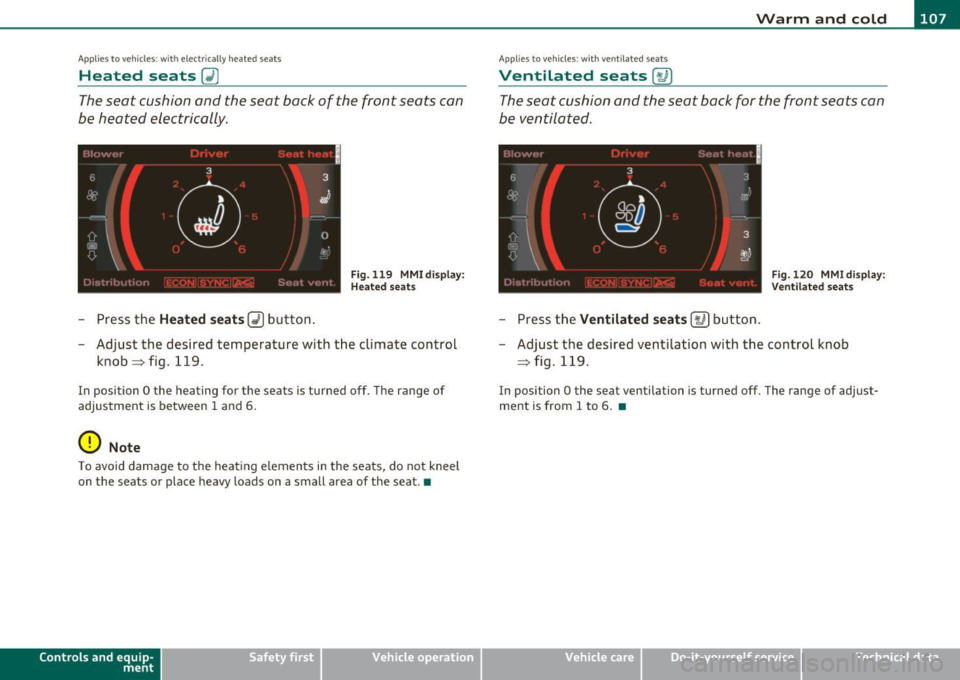
Heated seats~
The seat cushion and the seat back of the front seats can
be heated electrically.
Fig. 119 MMI dis p lay :
H ea ted s eats
- Press the Heated seats~ button .
- Adjust the desired temperature with the climate control
knob~fig .119 .
In position O the heating for the seats is turned off. The range of
adjustment is between 1 and 6.
0 Note
To avoid damage to the heating elements in the seats, do not kneel
on the seats or place heavy loads on a small area of the seat.•
Controls and equip
ment Vehicle
OP-eration
Ap plie s to vehicl es: wi th ve ntil at ed seats
Ventilated seats [,u ]
The seat cushion and the seat back for the front seats can
be ventilated.
'' I
6 3
-t'
I oa
iJ
m
~·-~.
OD
c::::::i
.,
3 .
(.,? a,J
= Fig. 120 MMI di splay: : j ' ''' '. V en til ated seats
- Press the Ventilated seats [t.6 ] button .
- Adjust the desired ventilation with the control knob
~ fig . 119.
In position O the seat ventilation is turned off . The range of adjust
ment is from 1 to 6 . •
Vehicle care Do-it-yourselt service iTechnical data
Page 111 of 384

_______________________________________________ W_ a _r_m _ a_ n_d _ c_o _l_ d _ __.ffl'I
Air distribution 00
The automatically controlled air distribution can be
changed manually .
Fig. 123 MMI display:
A ir dis tri bu tion
- Press the Distribution (!) button.
- Rotate the cont rol knob to the desired setting==> fig. 123.
You can adj ust the a ir c irculation so that air flows from spec ific vents .
In position
-0 air flows only to the windows, in pos ition @ID to the
dr iver or passenger and in position{} to the footwell. There are addi
tional comb inations available to adjust air distribution as needed .
To reg ulate air dist ribution automatically, switch to
[AUTO]. •
Defrosting !@]
The windshield and side windows are rapidly defrosted or
defogged.
- To turn o n the defogger/defroster, p ress the [@ I button
==> page 105, fig. 118.
Press
I ® I again or press [A UTO ] to turn off the
defogger/defroster .
Contro ls a nd e quip
m en t Vehicle
OP-eration
The temperature is automat ically controlled . Ma ximum airflow is
pr imar ily blown in through outlets
(D and @=> page 111 .
By press ing !@], both a ir recirculation and ECON are switc hed off .
(I) Tips
When the ou ts ide temperature is low, p ressing the [@I button tur ns
on the windshield defroster* automatically =>
page 112. •
Fan ~
The automatically preset fan speed can be reduced or
increased .
- Press the Fan (~] button.
Rotate the c limate contro l knob to the desired fan speed .
The climate cont rol system automatica lly reg ulates fan speed
depending o n interio r temperatu re. You can adjust the volume of air
pro duced by the fan to your own req uirements .•
Manual air circulation I~]
Air recirculation prevents e xhaust fumes or other pollu
tion from entering the vehicle.
Turning on air recirculation
- Press [G,I==> page 105 , fig. 118 => &
Turning off air recirculation
- Press~ again, or
press
I AUTO], or
- press(@) .
Vehicle care Do-it-yourselt service iTechnical data