ESP AUDI S8 2010 Workshop Manual
[x] Cancel search | Manufacturer: AUDI, Model Year: 2010, Model line: S8, Model: AUDI S8 2010Pages: 384, PDF Size: 90.95 MB
Page 168 of 384

llffl..__A_ d _ v_a_ n_ c_e _d _ P_ a_ r_ k_ i _n_ g:- S_,,_ y_s _t _e _m ________________________________________ _
The rear-view camera section appearing in the MMI Display is approx
imately the same as the coverage area represented in=>
page 165,
fig. 181 or© in=> page 165, fig. 182. Objects located in the rear
view camera's uncovered area@=>
page 165, fig. 182 or in the close
vicinity of the bumper are not recognized .
& WARNING
Please note that objects not touching the ground can appear to be
further away than they really are (for example, the bumper of a
parked vehicle, a trailer hitch, or the rear of a truck). In this case,
you should not use the guide help lines to measure distance -
danger of accident! •
Applies to veh ic les : w ith Advan ced Parking System with rear v iew camera
Parking mode 1
"Parking mode 1" can aid when parking in a garage or
parking space, for example.
Fig. 183 MMI Display:
Aiming at the parking
spot by adjusting the
steering wheel angle Fig. 184 MMI Display:
Orienting the vehicle
with aid of the blue
surface
- Before parking , switch on the Adaptive Air Suspension
=> page 18 standard or automatic mode .
- Activate the Audi parking system=>
page 161. "Parking
mode 1"
=;, fig. 183 is displayed by default. Dynamic
orange orientation lines ® and a blue static surface ©
are projected into the rear-view camera picture.
- With the vehicle stationary, select the proper steering
wheel angle for the parking spot with the aid of the orange orientation lines.
- While driving in reverse gear, adjust the steering wheel
angle to fit the parking space with the aid of the orange
orientation lines =>
0.
- Align your vehicle corresponding to the blue surface. The
blue surface should be parallel to the parking spot lines
=> fig.
184.
© Blue surface
The surface behind the vehicle, identified by various shades of blue,
represents an extens ion of th e outer vehicle outline by approximately
16
ft (5 m) to the rear . The transitions of the blue surfa ces are
distanced approximately 3
ft (1 m), 6 ft (2 m), and 16 ft (5 m) away
from the vehicle. .,
Page 171 of 384

_________________________________________ A_ d_v _ a_ n_ c_e _d _ P_ a_ rk_ in_ g =- S -.:.y_s _t _e _ m ___ _
& WARNING (co ntinued )
you should not use the guide help lines to measure distance -
danger of accident!
0 Note
I n the MM I Dis p lay, the direction o f travel o f the ve hicle re ar is rep re
sented depend ing on the steeri ng wheel angle. The vehicle front
swi ngs ou t mo re than t he ve hicle re ar.
[ i ] Tips
• In or der f or the rear -v iew camera to function prope rly, the camera
lens~
page 161, fig. 176 must be kept clean, and free of snow and
ice. Please follow the ad ditiona l notes on~
page 174 .
• The positions of the orientatio n lines/ surfaces are displaced up
or down if the par king process is carr ie d out wi th t he rear -view
camera in Adapt ive A ir Suspension=> page 18 dynamic or lift mode.
Th erefo re, t he acc uracy is reduced. •
Controls and equip
ment Safety first
Special parking situations
App
lies to vehicles: w ith Advanced Parking System w ith rear v iew camera
Parking next to obstacles
W hen parking next to an obstacle, en ough distance must
left on th e side.
Fig. 187 Top view:
P a rk ing ne xt t o a br ic k
wall
With "pa rking mode 2", yo u can park very close ly to a sidewa lk cur b
with your vehicle~
page 164, fig. 180.
However, whe n pa rking next to an obstacle, s uch as a brick wa ll, a
large r side dis ta nce mus t be se lec ted in order to pr even t collision
damage to the ve hicle. Pos ition the lo ng side of the marked b lue
su rfa ce so th a t there is eno ugh dis ta nce from the cu rb; the surface
must not touc h the curb~ fig. 187 .
Also, the turning process has to occur considerab ly sooner. Th is
me ans th at t he cor respond ing blue curve d line~
p age 168, fig . 186
must not to uch the c urb, but should rather be at a distance far
en ough fr om the cur b~ & .
& WARNING
• Keep plenty of distance from an obstacle, so that your outside
mi rror or a corner of your vehicle does not collide with any obsta-
cle s -danger of accident!
~
Vehicle care Technical data
Page 172 of 384

ffl..__A_ d _ v_a_ n_ c_e _d _ P_ a_ r_ k_ i _n_ g:- S_,,_ y_s _t _e _m ________________________________________ _
& WARN ING (con tin ue d)
• The Audi pa rkin g system is not a substitute for being careful
and alert when backing up. Be especially careful during parking
and similar maneuve rs. Always watch where you are driving and
make sure that nothing i s in the way.
• When maneuvering or parking, do not only use the MMI
Display for or ientation. Certain object s - depending on the screen
resolution - may not , o r not entirely , be displ ayed ; for e xample
trailer hitches, chains , narrow post s, or fences.
• Improper rel iance on the Audi parking sy stem can cau se colli
sions and seriou s personal injury.
- Ne ver rely only on par king assi st when ch anging ba cking up .
- Always check rear view mirrors to make sure it is safe to back
up .•
Applies to vehicles: w it h Advanced Parking System with r ear view camera
Notes on distance information
Fig. 1 88 MMI Di splay:
displayed re d li ne
to uches the bumpe r
Fig. 18 9 Actual
di stanc e from bumpe r
The red line in the MMI Disp lay~ fig. 188 indicates the d ista nce you
should maintain from an obstacle, when park ing. If an obstacle is
located at road level, you can ap proach the obstacle unti l the red line
touches the obstacle ( 1.3
ft, or 40 cm, distance). On the other hand,
if a n obstacle is not located at road level (t he b umper of a vehi cle, for
example), you should not approach this obstacle unti l the red line
to uch es the obsta cle.
For instance, if you back up toward another vehicle , it will appear as
t hough t he guide hel p lines and s urf aces are bein g pushed over the
vehicle behind you~ fig. 188. I n this example, it can be recogn ized
in th e MM I Display that the red line exactly touches the bumpe r of t he
vehicle be hind you. Indeed, however, t he red line @ ~ fig. 189 does
not touch the bumper, but has rather been pushed underneath the
bu mper. The actual d istance (dashed line@) to t he ve hicle beh ind
you is meanwhile less than 1.3 ft (40 cm). Your veh icle b umper must
a lso be taken into con siderat ion fo r the distance ~& .
& WARNING
• Please note that objects not touching the ground can appear to
be further away than they really are (for example , the bumper of
a parked vehicle, a trailer hitch , or the rear of a truck ). In thi s case,
you should not use the guide help lines to measure distance -
danger of accident! .,
Page 176 of 384

IIII.___A_ d_v_ a_ n _ c_e _d _ P_ a_ rk_ in--= g'-S -=- y_s_t_ e_ m _________________________________________ _
switch PwA flashes when you engage the reverse gear, there is a
ma lf u nct ion in the acous tic p arking ass ist.
T hi s system error is immediately output after:
• Every manua l activat ion via the switch
P '".li => page 161,
• Reverse gear is engaged for the first time duri ng an ignition cycle,
or
• An error is detected during operation .
(I] Tips
If the system reports an error, have an Audi dealer o r an authorized
dea lership correct this system error .•
A pplies to veh icles : wit h Adva nced Park in g S ystem with rear view c amera
Rear-view camera tips
We recommend that you practice parking w ith the rear-v iew camera
in a traffic -free location, o r parking lot, to become familiar with the
system, the or ient atio n lines , and the ir fun ct ion. W hen do ing t his,
there should be good light and weather cond itions.
In the MM I Display, objec ts or vehicles appe ar close r or f urther aw ay
if:
• you are driving in reverse gear from a level surface onto an incline,
or a downwa rd slope,
• you are driv ing in reverse gear towar d prot ruding objects,
• the vehicle is carry ing too much load in the rear .
T he accuracy of the orientatio n lines and blue su rfaces diminishes if :
• t he Ad aptive Air S uspension is defective, o r th e dynamic o r lift
mode is switched on,
• the rear-v iew camera does not provide a reliable image, for
example, in poor visib ility conditions or if the lens is dirty, •
the image on the screen is not v is ib le due to sun glare and reflec
tion .
Caring for the rear-view camera lens:
• Dampen the lens with a household alcoho l-based glass cleaner,
a nd clean the lens wi th
a d ry cl oth.
• Remove snow w ith a hand br ush .
• Remove ice, preferab ly with de-icing spray=>
0 .
& WARNING
• The rea r-view camera does not replace the view to the rear and
the rear view mirror s.
• The rear-view camera -because of technical limitations -does
not show the entire area behind the vehicle=> page
165, fig. 182.
Be especially careful to check for small children and animals
before ba cking up . Small children and animals will not always be
shown in the r ear-view display.
• The Audi parking sys tem is not a sub stitute for being careful
and alert when backing up. Be especially careful during park ing
and similar maneuvers . Always watch where you are driving and
make sure that nothing is in the way.
• Do not allow your self to be distracted from traffi c by the rear
view camera pictures.
• When maneuvering or parking, do not only u se the MMI
Display for orientat ion. Certa in objects -depending on the sc reen
resolution -may not, or not entirely, be di splayed ; for example
trailer hitches , chains, na rrow posts, or fences.
• Only use the rear-view camera for aid if it shows a good, clear
picture. The image may be obscured , for e xample, by the sun
shining into the len s, dirt on the len s, or a s the re sult of a defect -
danger of accident!
• If the imag e is hazy when the MMI Display is swit ched on or the
area behind the vehicle is not vis ible (for example , as the result of .,_
Page 188 of 384
• ....__D_ r_iv _i_ n_, g=-- S_ a _ f_e _,Ly _ ______________________________________________ _
Driving Safely
General notes
Safe driving habits
Please remember -safety first!
Th is chapter contains important information, t ips, instructions and
warnings that you need to read an d observe fo r you r own safe ty, the
safety of you r passengers and others . We have summarized here
w hat you need to know about sa fety belts, airbags, child restra ints as
we ll as child safety . You r safety is for us
priority number 1. Always
observe the information and warnings in this section -for your own
safety as well as t hat of your passengers.
The informat ion in this section applies to all mode l versions of yo ur
veh icle . Some of the fe atures des cribed in this se ctions m ay be st an
dard equ ipment on some models, or may be optional eq uipment on
others. If you a re not sure, ask your a uth o rized Audi dealer.
& WARNING
• Always make sure that you follow the instructions and heed
the WARNINGS in th is Manual. It is in your interest and in the
intere st of your passengers.
• Always keep the complete Owner's Literatu re in your Audi
when you lend or sell your vehicle so that this important informa
tion will always be available to the driver and passengers .
• Always keep the Owner's literature handy so that you can find
it easily if you have questions . •
Safety equipment
The safety features are part of the occupant restraint
s y stem and wor k together to he lp reduce the ris k of injury
in a wide variety of accident situations.
Your sa fety and t he safety o f yo ur passenge rs shou ld no t be left to
chance . Adva nces in technology have made a variety of features avai l
a b le to help re duce the risk of injury in an a cc ident . The fo llow ing is a
list of jus t a few of the safety features in your Audi:
• sophisticated safety belts for driver and a ll passenger seating
p osi tion s,
• safety belt pretensioners,
• safety belt fo rce lim iters for the fro nt sea ts,
• safety belt he igh t adju stmen t sys tems for the fro nt sea ts,
• front airbags,
• knee airbags fo r th e fron t seats
• side airbags in the fro nt sea ts an d ou ter rea r seats,
• side curtain airbags,
• special LATCH an chorages fo r ch ild restra in ts,
• head restraints fo r eac h seating position,
• adjustable steering co lumn .
These individual safety feat ures, can work together as a system to
he lp protect you and yo ur passengers in a wide range of accide nts .
T hese feat ures ca nnot work as a system if they are not a lways
c o rrect ly adju ste d and correctl y u sed.
Safety is everybody's responsibility! •
Page 189 of 384

______________________________________________ D_ ri_v _ i_n _,,g ,c.._ S_a_ f_ e_ l..:: y __ __
Important things to do before driving
Safety is everybody's job! Vehicle and occupant safety always depends on the informed and careful driver.
For your safety and the safety of your passengers, before
driving always:
- Make sure that all lights and signals are operating
correctly.
- Make sure that the tire pressure is correct.
- Make sure that all windows are clean and afford good visi-
bility to the outside.
- Secure all luggage and other items carefully::::>
page 98.
-Make sure that nothing can interfere with the pedals.
- Adjust front seat, head restraint and mirrors correctly for your height .
- Instruct passengers to adjust the head restraints according to their height.
- Make sure to use the right child restraint correctly to
protect children ::::,
page 231, "Child Safety".
- Sit properly in your seat and make sure that your passen gers do the same::::,
page 76, "General recommenda
tions".
- Fasten your safety belt and wear it properly. Also instruct
your passengers to fasten their safety belts properly
=:> page 197. •
Controls and equip
ment Safety first Vehicle operation
What impairs driving safety?
Safe driving is directly related to the condition of the
vehicle, the driver as well as the driver's ability to concen
trate on the road without being distracted .
The driver is responsible for the safety of the vehicle and all
of its occupants. If your ability to drive is impaired, safety
risks for everybody in the vehicle increase and you also
become a hazard to everyone else on the road::::,,& . There
fore:
Do not let yourself be distracted by passengers or by using
a cellular telephone.
NEVER drive when your driving ability is impaired (by
medications, alcohol, drugs, etc.).
- Observe all traffic laws, rules of the road and speed limits
and plain common sense .
- ALWAYS adjust your speed to road, traffic and weather
conditions.
- Take frequent breaks on long trips. Do not drive for more than two hours at a stretch.
- Do NOT drive when you are tired, under pressure or when
you are stressed .
& WARNING
Impaired driving safety increases the risk of serious personal
injury and death whenever a vehicle is being used.•
Vehicle care Do-it-yourself service Technical data
Page 193 of 384

________________________________________________ D_ r_ i_ v _i_n _,,,g ~ S_a_ f_ e_ l _,,y'-- __
Proper adjustment of head restraints
Correctly adjusted head restraints are an important part
of your vehicle 's occupant restraint system and can help
to reduce the risk of injuries in accident situations .
Fig. 200 Correctly
adjusted head
restraint viewed from
the side
The head restra ints must be correctly adjusted to achieve the
best protection.
- Adjust the head restraint so that the upper edge of the
restraint is level with the top of your head, but no lower
than eye level and so it is as close to the back of your head
as possible ~ fig. 200.
Adjusting head restraints=> page 81.
& WARNING
Driving without head restraints or with improperly adjusted head
restraints increases the risk of serious injuries in a collision. To
help reduce the risk of injury:
• Always drive with the head restraints in place and properly
adjusted.
• Every person in the vehicle must have a properly adjusted head
restraint.
Controls and equip ment Safety first Vehicle operation
& WARNING (continued)
•
Always make sure each person in the vehicle properly adjusts
their head restraint. Each head restraint must be adjusted
according to occupants' size so that the upper edge is as even with
the top of the person's head, but no lower than eye level and so it
is as close to the back of to the head as possible.
• Never attempt to adjust head restraint while driving. If you
have driven off and must adjust the driver headrest for any reason,
first stop the vehicle safely before attempting to adjust the head
restraint.
• Children must always be properly restrained in a child restraint
that is appropriate for their age and size =>
page 231. •
Examples of improper seating positions
The occupant restraint system can only reduce the risk of
injury if vehicle occupants are properly seated.
Improper seat ing positions can cause serious injury or death.
Safety belts can only work when they are properly positioned
on the body . Improper seating positions reduce the effective
ness of safety belts and will even increase the risk of injury
and death by moving the safety belt to critical areas of the body. Improper seating positions also increase the risk of
serious injury and death when an airbag deploys and strikes
an occupant who is not in the proper seating position. A
driver is responsible for the safety of all vehicle occupants
and especially for children. Therefore:
- Never allow anyone to assume an incorrect seating posi
tion when the vehicle is being used~& .
The following bulletins list only some sample positions that will
i ncrease the risk of ser iou s injury and death . Our hope is that these .,_
Vehicle care Do-it-yourself service Technical data
Page 196 of 384
111....__D_ r_iv _i_ n_, g=-- S_ a _ f_e _,Ly _ ______________________________________________ _
in. WARNING
Improperly stored luggage or other items can fly through the
vehicle causing serious personal injury in the event of hard braking
or an accident. To help reduce the risk of serious personal injury:
• Always put objects, for example, luggage or other heavy items
in the luggage compartment.
• Always secure objects in the luggage compartment using the
tie-down hooks and suitable straps.
& WARNING
Heavy loads will influence the way your vehicle handles. To help
reduce the risk of a loss of control leading to serious personal
injury:
• Always keep in mind when transporting heavy objects, that a
change in the center of gravity can also cause changes in vehicle
handling:
-Always distribute the load as evenly as possible.
- Place heavy objects as far forward in the luggage compart-
ment as possible.
• Never exceed the Gross Axle Weight Rating or the Gross Vehicle
Weight Rating specified on the safety compliance sticker on the
left door jamb. Exceeding permissible weight standards can cause
the vehicle to slide and handle differently.
• Please observe information on safe driving
=> page 186.
in. WARNING
To help prevent poisonous exhaust gas from being drawn into the
vehicle, always keep the rear lid closed while driving.
• Never transport objects larger than those fitting completely
into the luggage area because the rear lid cannot be fully closed.
& WARNING (continued)
• If you absolutely must drive with the rear lid open, observe the
following notes to reduce the risk of poisoning:
-Close all windows,
- Close the power roof,
- Open all air outlets in the instrument panel,
- Switch off the air recirculation,
- Set the fresh air fan to the highest speed.
in. WARNING
Always make sure that the doors, all windows, the power roof and
the rear lid are securely closed and locked to reduce the risk of
injury when the vehicle is not being used.
• After closing the rear lid, always make sure that it is properly
closed and locked.
• Never leave your vehicle unattended especially with the rear lid
left open. A child could crawl into the vehicle through the luggage
compartment and close the rear lid becoming trapped and unable
to get out. Being trapped in a vehicle can lead to serious personal
injury.
• Never let children play in or around the vehicle.
• Never let passengers ride in the luggage compartment. Vehicle
occupants must always be properly restrained in one of the
vehicle's seating positions.
(I) Tips
Air circulation helps to reduce window fogging. Stale air escapes to
the outside through vents in the trim panel, on the left side of the
luggage compartment . Be sure to keep these slots free and open.•
Page 199 of 384

_____________________________________________ S_a _f _e _t _y _b_ e_lt _ s __ l!'II
Safety belts
General notes
Always wear safety belts!
Wearing safety belts correctly saves lives!
This chapter explains why safety belts are necessary, how
they work and how to adjust and wear them correctly.
- Read all the information that follows and heed all of the
instructions and WARNINGS.
& WARNING
Not wearing safety belts or wearing them improperly increases
the risk of serious personal injury and death.
• Safety belts are the single most effective means available to
reduce the risk of serious injury and death in automobile acci
dents. For your protection and that of your passengers, always
correctly wear safety belts when the vehicle is moving.
• Pregnant women, injured, or physically impaired persons must
also use safety belts. Like all vehicle occupants, they are more
likely to be seriously injured if they do not wear safety belts. The
best way to protect a fetus is to protect the mother - throughout
the entire pregnancy. •
Number of seats
Your Audi has a total of five seating positions: two in the front and
three in the rear . Vehicles with power individual rear seats* have
seating for four: two in the front and two in the rear. Each seating
position has a safety belt.
Controls and equip
ment Safety first Vehicle operation
& WARNING
Not wearing
safety belts or wearing them improperly increases
the risk of serious personal injury and death.
• Never strap more than one person, including small children,
into any belt. It is especially dangerous to place a safety belt over
a child sitting on your lap.
• Never let more people ride in the vehicle than there are safety
belts available.
• Be sure everyone riding in the vehicle is properly restrained
with a separate safety belt or child restraint. •
Safety belt warning light t
Your vehicle has a warning system for the driver and front
seat passenger to remind you about the importance of
buckling-up.
Before driving off, always:
Fig. 201 Safety belt
warning light in the
instrument cluster -
enlarged
- Fasten your safety belt and make sure you are wearing it
properly .
IJ,,
Vehicle care Do-it-yourself service Technical data
Page 206 of 384
Ill Safety belts
---=-------------------------------
Adjusting safety belt height
Use the safety belt height adjustment to change belt
position on the shoulder.
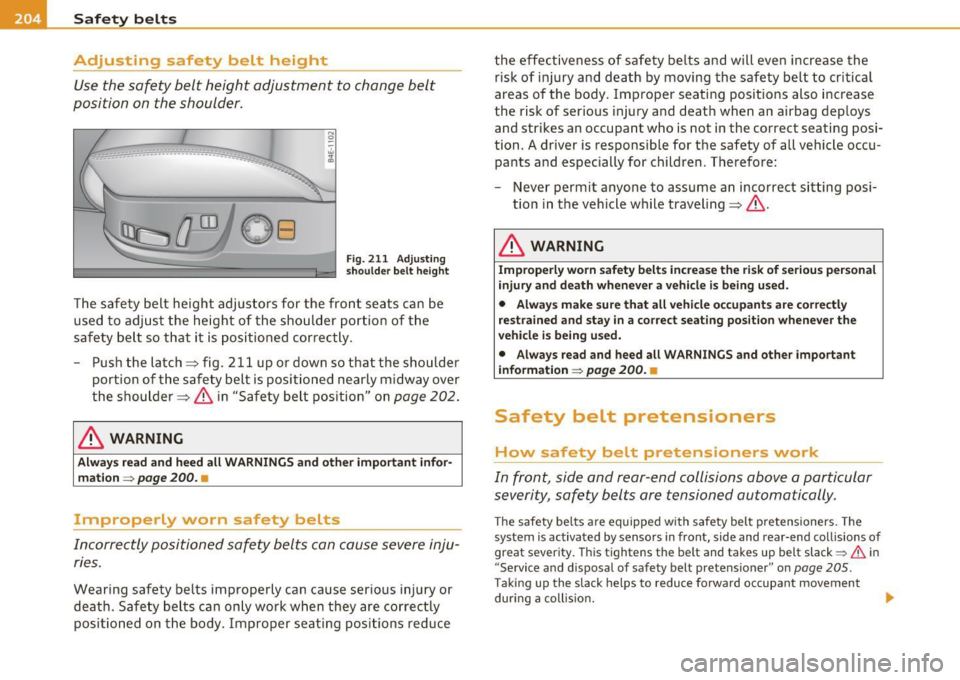
Fig. 211 Adjusting
shoulder belt height
The safety belt height adjustors for the front seats can be
used to adjust the height of the shoulder portion of the
safety belt so that it is positioned correctly.
- Push the latch=> fig. 211 up or down so that the shoulder
portion of the safety belt is positioned nearly midway over
the shoulder => & in "Safety belt position" on
page 202.
& WARNING
Always read and heed all WARNINGS and other important infor
mation =>
page 200. •
Improperly worn safety belts
Incorrectly positioned safety belts can cause severe inju
ries.
Wearing safety belts improperly can cause serious injury or
death. Safety belts can only work when they are correctly
positioned on the body . Improper seating positions reduce the effectiveness of safety belts and will even increase
the
risk of injury and death by moving the safety belt to critical
areas of the body. Improper seating positions also increase
the risk of serious injury and death when an airbag deploys and strikes an occupant who is not in the correct seating posi
tion. A driver is responsible for the safety of all vehicle occu pants and especially for children . Therefore:
- Never permit anyone to assume an incorrect sitting posi
tion in the vehicle while traveling=>& .
& WARNING
Improperly worn safety belts increase the risk of serious personal
injury and death whenever a vehicle is being used.
• Always make sure that all vehicle occupants are correctly
restrained and stay in a correct seating position whenever the
vehicle is being used.
• Always read and heed all WARNINGS and other important
information =>
page 200. •
Safety belt pretensioners
How safety belt pretensioners work
In front, side and rear-end collisions above a particular
severity, safety belts are tensioned automatically.
The safety belts are equipped with safety belt pretensioners. The
system is activated by sensors in front, side and rear-end collisions of
great severity. This tightens the belt and takes up belt slack~
& in
" Service and disposal of safety belt pretensioner" on
page 205 .
Taking up the slack helps to reduce forward occupant movement
during a collision. ..