driver seat adjustment AUDI S8 2010 Owners Manual
[x] Cancel search | Manufacturer: AUDI, Model Year: 2010, Model line: S8, Model: AUDI S8 2010Pages: 384, PDF Size: 90.95 MB
Page 78 of 384
Seats and storage
Seats and storage
General recommendations
Why is your seat adjustment so important?
The safety belts and the airbag system can only provide
maximum protection if the front seats are correctly
adjusted.
Th ere a re va rious ways of ad justing t he fro nt seats to provide safe and
comfor ta ble suppo rt for th e dr iver and the front passenger . Ad just
your sea t properly so that :
• you can eas ily and quickly reach all the switches and controls in t he
in st rumen t pa nel
• your body is prope rly s upported th us reducing phys ica l stress and
f a tigue
• the safety be lts and airbag system can offe r maxim um protection
:::;, pag e 206.
In the following sect ions, you will see exactly how you can best ad just
your sea ts .
Th ere a re sp ecial regulations and instr uct io ns for installing a ch ild
sea t on the front passenge r's sea t. Always follow t he informat ion
r e gar ding ch ild safety provided in ::;,
pag e 231, "C hi ld Safety ".
L1}. WARNING
Incor rect seat ing position of the driver and all othe r passengers
can result in serious personal injury .
• Always keep your feet on the floor when the vehicle is in
motion -never put your feet on top of the instrument panel , out
of the window or on top of the seat cushion . This applies especially
to the passengers. If your seating position is incorrect, you
increase the risk of injury in the case of sudden braking or an acci-
& WARNING ( continued )
dent. If the airbag inflates and the seating position is incorrect,
this could result in personal injury or even death.
• It is important for both the driver and front passenger to keep
a distance of at least 10 inches (25 cm) between themselves and
the steering wheel and /or instrument panel. If you 're sitting any
closer than this , the airbag system cannot protect you properly. In
addition, the front seats and head restraints must be adjusted to
your body height so that they can give you maximum protection.
• Always try to keep as much distance as possible between your
self and the steering wheel or instrument panel.
• Do not adjust the dr iver's or front passenger's seat while the
vehicle i s moving. Your seat may move unexpectedly , causing
sudden loss of vehicle control and personal injury. If you adjust
your seat while the vehicle is moving , you are out of position.•
Driver's seat
Th e correct seat p osition is important for safe and
re lax ed driving.
W e recomme nd that you a djust t he dr ive r's sea t in t he
follow ing ma nne r:
- Adjust t he seat i n fore and aft d irect ion so t hat you can
easily p ush t he peda ls to the floor whi le keep ing your
k n ees sli ghtly bent =>
& in " Why is yo ur seat adjust men t
so impo rtan t?".
- Adjust t he seatback so t hat wh en you s it with you r bac k
agai nst t he seatbac k, you can st ill g rasp t he top of t he
steer ing wheel. ..,_
Page 79 of 384

-Position the head restraint according to the occupant's
height ~
page 81. For maximum protection, the top of
the head restraint should be at least at eye level, prefer
ably higher and ideally level with the top of the head
~ page 191, fig. 200.
& WARNING
Never place any objects in the driver's footwell. An object could
get into the pedal area and interfere with pedal function. In case
of sudden braking or an accident, you would not be able to brake
or accelerate. •
Front passenger's seat
Always move the front passenger seat into the rearmost
position.
To avoid contact with the airbag while it is deploying, do not
sit any closer to the instrument panel than necessary and
always wear the three-point safety belt provided adjusted
correctly. We recommend that you adjust the passenger 's
seat in the following manner:
- Move the front passenger seat into the rearmost position
of the fore and aft adjustment range~
& in "Why is your
seat adjustment so important?" on
page 76.
- Bring the backrest up to an (almost) upright position.
Do
not ride with the seat reclined.
- The ideal position for the head restraint is with the upper
edge of the restraint level with the top of your head
~ page 81. You should not lower the top of the restraint
below the level of your eyes.
Con tro ls a nd e quip
m en t Vehicle
OP-eration
Seats and storage
-Place your feet on the floor in front of the passenger's
seat. •
Power seat
Controls
The operating logic for the switches corresponds to the
construction and function of the seat.
Fig. 71 Power seat:
Controls for seat
adjustment
The switches to adjust the seats correspond to the layout, the design
and the function of the seat. The seats are adjusted by moving the
switches following this logic.
© Upper thigh support~ page 78
@ Seat adjustment ~ page 78
© Massage funct ion* ~ page 79
@ Seatback angle~ page 79 and head restraint~ page 81 adjust-
ment
© Separa te adjustmen t of upper sea tback section ~ page 79
© Adjusting the lumbar support~ page 80
© Safety belt height adjustment~ page 204 ..,
Vehicle care Do-it-yourselt service iTechnical data
Page 80 of 384
Seats and storage
& WARNING
• Never adjust the driver's or front passenger's seat while the
vehicle is moving. If you do this while the vehicle is moving, you
will be out of position. Always adjust the driver's or front passenger's seat when the vehicle is not moving.
• Be careful when adjusting the seat height. Check to see that no
one is in the way, or serious injury could result!
• Because the seats can be electrically adjusted with the ignition
key removed, never leave children unattended in the vehicle.
Unsupervised use of the electric seat adjustments may cause
serious injury. •
Upper thigh support
The adjustable upper thigh support provides optimal
support for the upper thigh when driving.
___ .. _:_·_-_.-_--·-·------·---.... _-_ ---.. ·-:.-_
Fig. 72 Power seat:
Switch for upper thigh
support
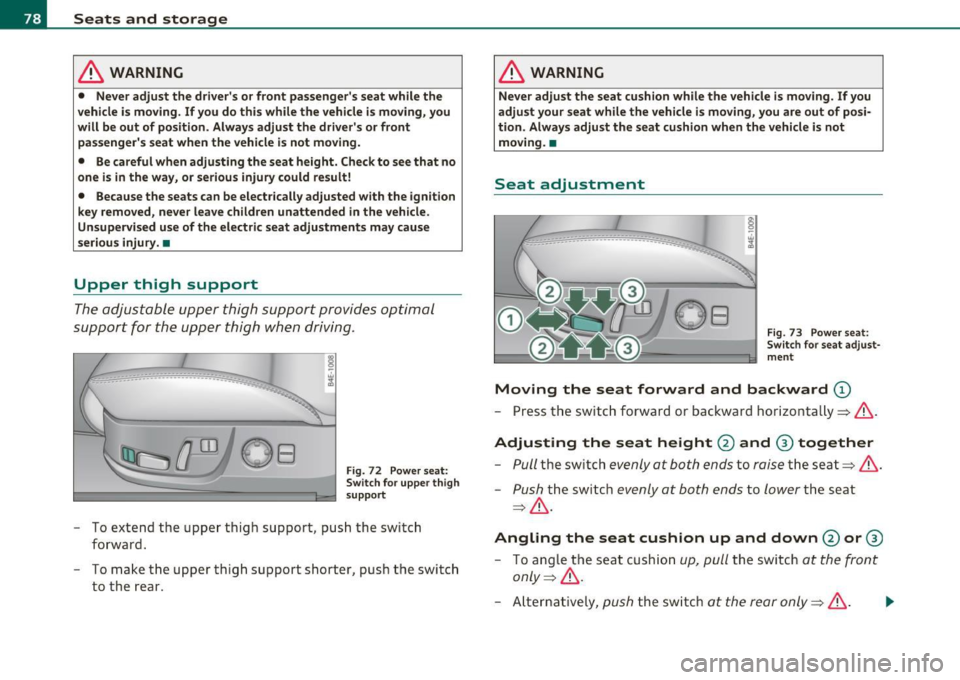
- To extend the upper thigh support , push the switch
forward.
- To make the upper thigh support shorter, push the switch
to the rear.
& WARNING
Never adjust the seat cushion while the vehicle is moving. If you
adjust your seat while the vehicle is moving, you are out of posi
tion. Always adjust the seat cushion when the vehicle is not
moving. •
Seat adjustment
Fig. 73 Power seat:
Switch for seat adjust
ment
Moving the seat forward and backward (D
- Press the switch forward or backward horizontally=>&.
Adjusting the seat height 0 and ® together
-Pull the switch evenly at both ends to raise the seat =:>& .
-Push the switch evenly at both ends to lower the seat
=> & .
Angling the seat cushion up and down@ or®
-To angle the seat cushion up, pull the switch at the front
only =>& .
-Alternatively, push the switch at the rear only=>& . .,_
Page 81 of 384

-To angle th e s eat c ush io n down, push the sw itc h at the
front only:::::, &.
-Alt ernatively, pull the switc h at the rear only:::::,&.
& WARNING
• Never adjust the driver's or front passenger's seat while the
v ehicle is moving . If you do this while the veh icle is moving , you
will be out of po sition. Alway s adjust the driver's or front
pa ssenge r's seat when the vehicle is not mo ving.
• Be careful when adjusting the seat height. Check to see that no
one is in the way , or serious injury could result!
• Becau se the seat s can be el ectrically adjusted with the ignition
key removed, never leave children unattended in the vehicle.
Unsupervis ed use of the electri c seat adjustments may cau se
seriou s inju ry. •
Applie s to ve hicl es: with ma ssag e funct ion
Massage function
0 0
i
Fig . 74 P ow er s eat:
M assa g e f unc tion
- Press the sw itc h to turn on the massage function .
The mass age funct ion r uns fo r abo ut 10 m inutes . The passenger's
back is massaged by contin uous adjustment of the lumbar support .
Contro ls a nd e quip
m en t Vehicle
OP-eration
Seats and storage
The curvature of the lumbar support can also be adjusted during the
Massage to m ake it more or less aggressive. This v aries the intens ity
of t he
Massage to the leve l desired by the occupa nt.
Once the massage f unctio n stops after abo ut 10 min utes, the lumbar
s u pport a utomat ically retu rns to the posi tion i n wh ich it wa s last set.
[ i ] Tips
Th e massage f unct io n can be interrupte d at any time by pressing the
switch . The lumbar support remains in its current position. •
Adjusting the seatback
-0
i
Fig. 75 Power se at:
S w itch f or seat bac k
ang le
F ig. 76 Pow er se at:
S witch f or a dju st ing
uppe r seatba ck se ction ...
Vehicle care Do-it-yourselt service iTechnical data
Page 86 of 384
Seats and storage
Seat memory
Driver's seat memory
The seat adjustment settings for four drivers can be
stored using the memory buttons in the driver's door .
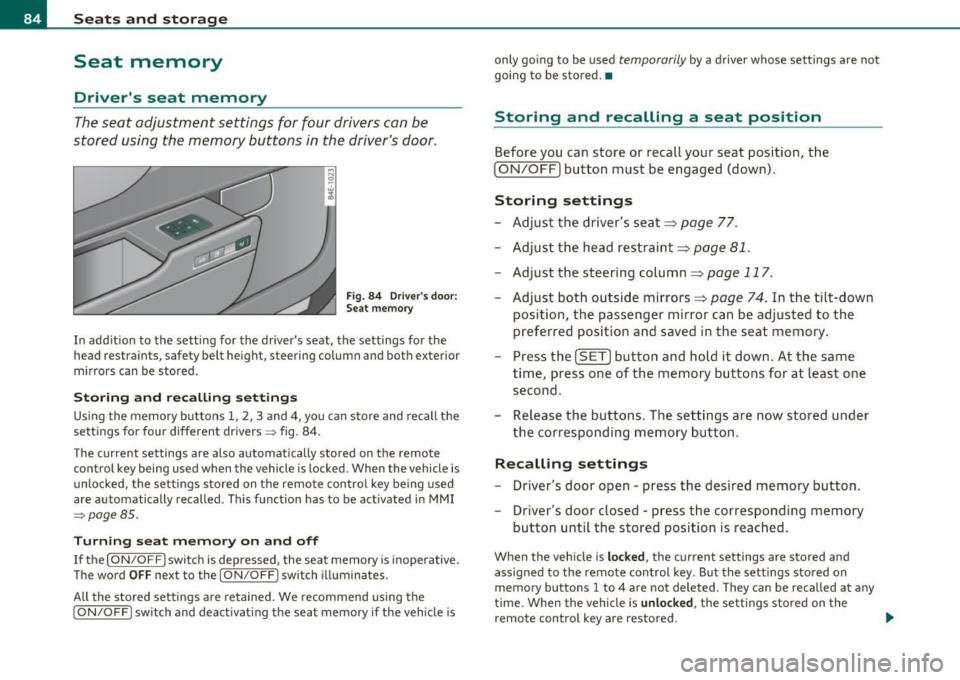
Fig. 8 4 Driv er's do or:
S ea t memory
In addition to the setting for the driver's seat, the settings for the
head restraints, safety belt height, steering column and both exterior
mirrors can be stored .
Storing and rec all ing settings
Using the memory buttons 1, 2, 3 and 4 , you can store and recall the
settings for four different drivers~ fig. 84.
T he current settings are also automatically stored on the remote
control key being used when the vehicle is locked. When the vehicle is
unlocked, the settings s tored on the remote control key be ing used
are automatically recalled. This function has to be activated in MMI
~pogeBS .
Turning se at m em ory on and off
If the [ ON/OFF] switch is depressed, the seat memo ry is inope rative.
The word
OFF next to the [ ON/OFF] switch illuminates.
All the sto red settings are retained. We recommend using the
[ ON/OFF ] switch and deact ivat ing the seat memory if the vehicle is only going to be used
temporarily by a driver whose settings are not
going to be stored. •
Storing and recalling a seat position
Before you can store or recall your seat position, the
[ ON/OFF) button must be engaged (down).
Storing settings
- Adjust the driver's seat==>
page 77.
- Adjust the head restraint==>
page 81.
-Adjust the steering column==> page 117 .
-Adjust both outside mirrors==> page 74. In the tilt-down
position, the passenger m irror can be adjusted to the
preferred position and saved in the seat memory .
- Press the
[SET) button and hold it down. At the same
time , press one of the memory buttons for at least one
second .
- Release the bu ttons. The settings are now stored under
the corresponding memory button .
Recalling settings
- Driver's door open - press the desired memory button.
- Driver's door closed - press the corresponding memory
button until the stored position is reached.
When the vehicle is lock ed, the current settings are stored and
assigned to the remote control key. But the settings stored on
memory buttons 1 to 4 are not deleted. They can be recalled at any
time. Whe n the vehicle is
unlock ed , the sett ings stored on the
remote control key are restored . .,_
Page 87 of 384

If your vehicle is driven by other persons using your remote control
key, you should save your individual seat position on one of the
memory buttons . You can recall your settings again simply and
conveniently by pressing the corresponding memory button. When
the vehicle is locked, these settings are automatically re-assigned to
the remote control key and stored.
& WARNING
• For safety reasons, the seat setting can only be recalled when
the vehicle is stationary -otherwise you risk having an accident.
• In an emergency, the recall operation can be stopped by
pressing the [
ON/OFF] button or by briefly pressing any given
memory button. •
Activating remote control key memory
To be able to recall the stored settings with the remote
control key, the function has to be activated in MMI.
- Select: Function button (CAR]> Systems > Seat
adjustment > Driver's seat> Remote control key > on .
Con tro ls a nd e quip
m en t Vehicle
OP-eration
Seats and storage
Passenger's seat memory
Using the memory buttons in the passenger's door, you
can store and recall four seat settings.
Fig. 85 Passe nger's
door: seat memory
Storing and recalling settings
Using the memory buttons 1, 2, 3 and 4, you can store and recall the
sett ings for four different passengers::::;, fig. 85.
Turning seat memory on and off
If the [ ON/OFF] switch is depressed, the seat memory is inoperative.
The word
OFF next to the [ ON/OFF ] switch illuminates.
All the stored settings are retained. Now the seat can only be
adjusted electrically in the normal way. •
Rear seats
General information
Safe transportation of passengers on the rear seats
requires proper safety precautions.
All passengers on the rear seats must be seated in compliance with
the safety guidelines explained in::::;,
page 197 and ::::;, page 206. The .,
Vehicle care Do-it-yourselt service iTechnical data
Page 88 of 384
Seats and storage
correct seating position is crit ica l for the safety of front and rear seat
passenge rs alike =>
page 190 .
& WARNING
• Occupant s in the front and rear seat s must alway s be properly
restr ained .
• Do not let anyone ride in the v ehicle without the h ead
re st ra ints pro vided. He ad restraints help to reduce injuries .
• Loo se item s in sid e the pas senger compartment can fly forward
in a crash or sudden maneu ve r and injure o ccupa nts . Alway s store
articles in th e lugg age compartment and u se the tie-down eyelet s.
• Read and h eed all WARNINGS =>
page 190, "P roper seating
po sition s for pa ssengers in r ear seat s". •
Applie s to v eh icles: wit h rear lum bar suppo rt
Rear seat lumbar support
The outer rear seats have a lumbar support.
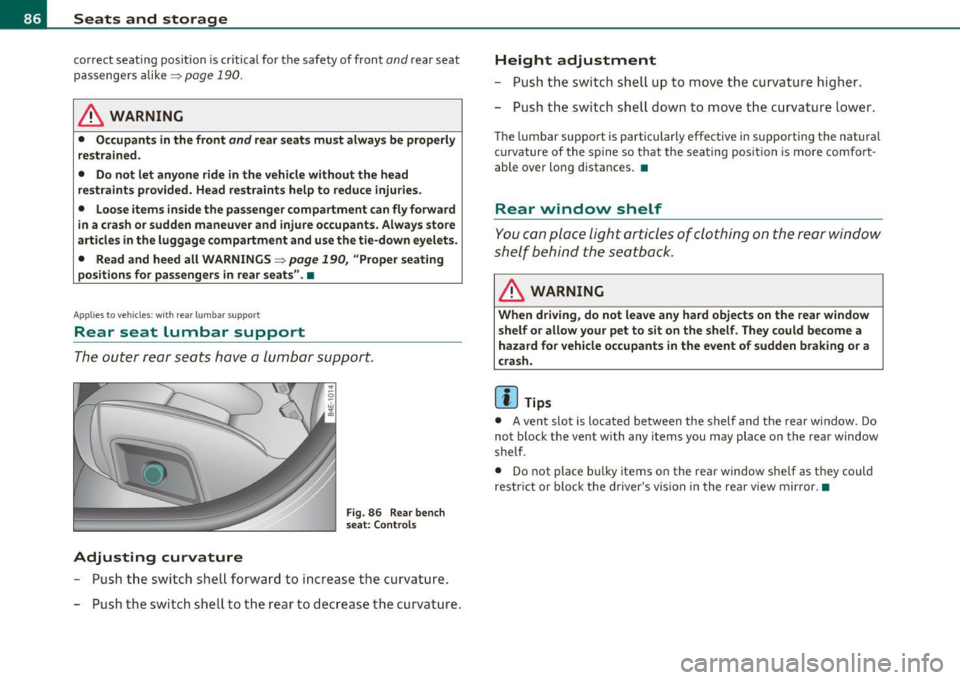
Adjusting curvature
F ig. 86 Rear bench
s eat: Contro ls
- Push the switch shell forward to increase t he curvature.
- Push the switch shell to the rear to decrease the curvature .
Height adjustment
- Push the switch shell up to move the curvature higher.
- Push the switch shell down to move the curvature lower .
The lumbar support is particularly effective in supporting the nat ural
curvature of the spine so that the sea ting position is more comfort
ab le over long distances. •
Rear window shelf
You can place light articles of clothing on the rear window
shelf behind the seatback.
& WARNING
When driving , do n ot leave any hard objects on the rear window
s helf or a llow y our pet to sit on the shelf . They c ould be come a
haza rd for vehicle occup ants in the event of sudden b raking or a
c rash .
[ i ] Tips
• A vent slot is located between the shelf and the rear window. Do
not block the vent with any items you may place on the rear window
shelf.
• Do not place bu lky items on the rear window shelf as they could
restr ict or block the driver's vis ion in the rear view mirror. •
Page 91 of 384

Applies to vehicles : w ith individua l rear seats
Lumbar support
The lumbar support can be adjusted to the natural curva
ture of the spine .
0
Adjusting curvature
Fig. 9 1 Ind ividual rear
seats: Lumba r support
- Push the switch shell forward to increase the curvature .
- Push the switch shell to the rear to decrease the curvature .
Height adjustment
-Push the switch shell up to move the curvature higher .
- Push the switch shell down to move the curvature lower .
The lumbar support is pa rticularly effective in supporting the natural
curvature of the spine so that the seating position is more comfort
able over long distances.•
Contro ls and eq uip
m ent Vehicle
OP-eration
Seats and storage
Applies to vehicles : w ith ind ividual rear seats
Settings in the MMI
The easy entry function can be turned on and off in the
MMI.
: I·
I
'
Seat adjust ment
• Driver ·s seat ..
I
12 :00 ""' Fig. 92 MMI Display:
Seat adjustment
-Press the [ CAR] function button.
Select
Systems in the CAR menu.
Select
Seat adjustment . The Seat adjustment menu
appears => fig. 92 .
- Select
Left rear seat or Right rear seat .
-Select Easy entry on to turn on the easy entry function for
the corresponding seat or
off to turn off the function for
this seat .
Easy entry makes it more convenient to enter and leave the rear of the
vehicle . When the function is turned on, the seat au toma tically
moves to the rearmost position when the corresponding door is
opened. a
Vehicle care Do-it-yourselt service iTechnical data
Page 116 of 384

llffl..__w __ a _r _m __ a_n _ d_ c_ o_ ld ________________________________________________ _
Rear climate controls
Applies to vehicle s: with rear a ir conditioning
Controls
This overview is to assist you in familiarizing yourself with
the air conditioning controls.
F ig . 127 Air condi
t io nin g cont rols
The left side of the display shows the temperature selected for the
rear passenger on the left, the right side shows the temperature
selected for the rear passenger on the right .
If the air conditioning
sett ings are changed, th is appea rs briefly in the cor respond ing a rea
of the display.
Functions a re t urned on and off by touching the buttons. The LED in
the switch illuminates when the function is turned on .
By pressing the
safety s wit ch ® in the driver's door~ page 54 the
climate contro ls in the rear are deactivated. The message
PASSIVE
appears in the display. In this mode the rear climate control can only
be operated by the driver th rough the controls in the front compa rt
ment.
ION/OFF I Tu rning on and off
The air conditioning can be turned on and off by pressing the
I ON/OFF I button. W it h the ignition Off, the residua l heat funct ion
can be activated by pressing the button. The residual heat from the coolant can
be used to heat the vehicle interior. The residual heat
function is turned off a utomatically after 30 minu tes.
Set ting the temperature
Temperat ure c an be adjusted over a range from 64 ° F (+18 °C) to 80
Of (+ 26 °()
® Air distribution
You can adjust the air circulation so that air flows from specific vents.
• In the
I !setting, all the air flows from the vents in the center
conso le and the out lets in the door pillars.
• In the
-0 setti ng, a ir f lows from the ou tlets u nder the front seats.
• In the~ setting, air flows from outlets in the center console and
t he door pilla rs as we ll as from the outlets under the front seats.
To regulate air distribution automatically, switc h to
[AUTO] .
~ Heated se a ts *
In position O the heating for the seats is turned off. The range of
adjustment is from 1 to 6.
The seats can be pre-heated for about 10 minutes using the heat ing .
However, the heating is turned off if the seat sensors do not detect
the weight of an occupant during th is period .
l'tJ] Ventilated sea ts*
The seat cushion and the seat back surfaces of the front seats can be
ventila ted. In pos it ion O the sea t ventilation is t urned off . The range
of adjustment is from 1 to 6.
!AU TO I Automatic operation
Air temperature, volume of air and air distribution are automatically
reg ulated to ach ieve or ma inta in t he desired temperatures as qu ickly
as possible . •
Page 119 of 384
_________________________________________________ O_ n_ t_ h_ e_ r _o_ a_d _ __.fflll
On the road
Steering
Adjusting steering wheel position
The steering wheel position can be adjusted for height
and reach.
First, adjust t he driver's se at correct ly.
Height adjustment
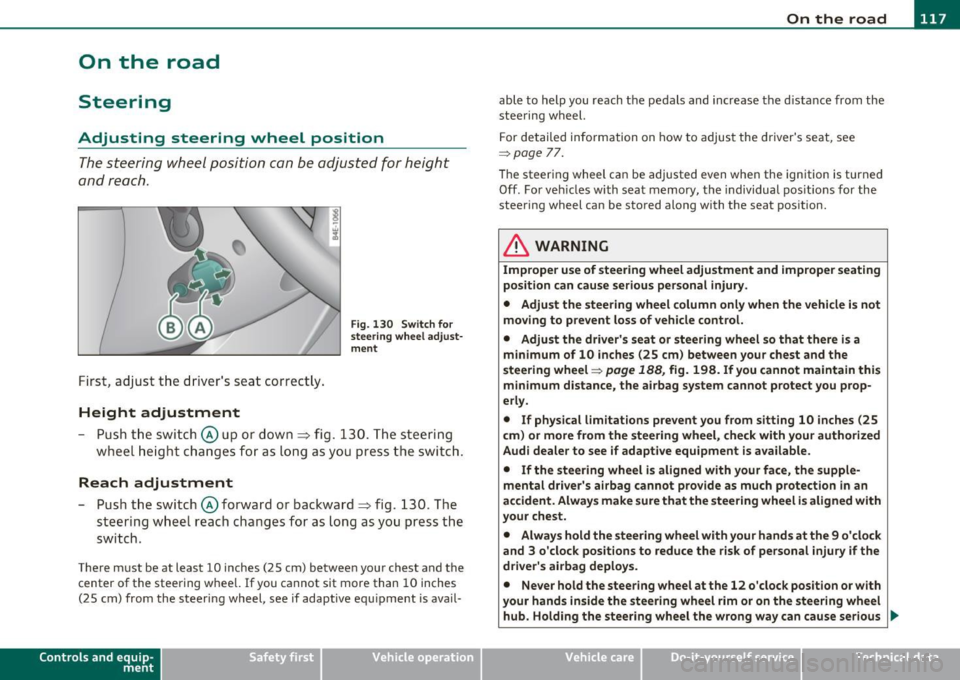
Fig . 13 0 Swit ch f or
steering whee l adjust
m ent
- P ush t he swi tch © up or down ~ fig. 130. The st e e ring
whe el h eig ht chang es f or as l ong as y ou press t he swi tch .
Reach adjustment
- Push the switc h@ forward or backward~ fig. 130 . T he
steering w heel reach changes for as long as you press the
switch .
There m ust be at least 10 inches (25 cm) between your chest and the
center of the steering whee l.
If you cannot sit more than 10 inches
(25 cm) from the steer ing wheel, see if adaptive equ ipment is ava il-
Cont rols a nd e quip
m en t Vehicle
OP-eration
able to help you reach the pedals and increase the d istanc e from the
stee ring wheel.
F or detailed info rmation on how to adjus t the d river' s se at, see
~ page 77.
Th e stee ring wheel ca n be adjusted even when the ign ition is turned
Off . For veh icles with seat memory, the individual pos it io ns for the
steering wheel can be stored along with the seat pos ition.
& WARNING
Improper use of steering wheel adjustment and improper seating
position can cause serious personal injury .
• Adjust the steering wheel column only when the vehicle is not
moving to prevent loss of vehicle control. • Adjust the driver 's seat or steering wheel so that th ere is a
minimum of 10 inches (25 cm ) between your chest and the
steering wheel~
page 188, fig. 198. If you cannot maintain this
m inimum distance, the airbag system cannot protect you prop
erly.
• If physical l imitations p revent you from sitting 10 inches (25
c m ) or more from the steering wheel, che ck with your authorized
Audi dealer to see if adapt ive equipment is a vailable.
• If the steering wheel is aligned with your face, the supp le
mental dri ver 's ai rbag cannot prov ide as much protection in an
accident . Always make sure that the steering wheel i s aligned with
your chest.
• Always hold the steering wheel with your hands at the 9 o 'clock
and 3 o 'clock posit ions to reduce the risk of personal injury if the
driver's airbag deploys .
• Never hold the steering wheel at the 12 o'clock position or with
your hands inside the steering wheel rim or on the steering wheel
hub. Holding the stee ring wheel the wrong way can cause serious
~
Vehicle care Do-it-yourselt service iTechnical data