park assist AUDI S8 2010 Owners Manual
[x] Cancel search | Manufacturer: AUDI, Model Year: 2010, Model line: S8, Model: AUDI S8 2010Pages: 384, PDF Size: 90.95 MB
Page 4 of 384
Table of contents
Table of contents
Vehicle literature
About this Owner's Manual ............. ...... .
Controls and
equipment .............. .
Instruments and controls ... .
General illustration ........... .
Instruments and
warning/indicator Lights ..... .
Instruments ................ .
Warning/indicator ligh ts ...... .
Driver information display ... .
Introduction ............ ... . .
On-Board Diagno stic system
(OBD) ....................... .
Auto Ch eck Control ........... .
Speed warning system ........ .
Tr ip computer ............... .
Opening and closing ......... .
Keys ........................ .
Power locking system ........ .
Rear lid/Trunk lid ......... ... .
Child safety Lock ............. .
Convenience key ............. .
Anti-theft alarm system ...... .
Power windows .............. .
Sliding/tilting power sunroof .. .
Clear vision .. ................ .
Lights ....... ......... ...... .
Interior ligh ts ........ ....... .
5
6
8
9
9
10
10
14
22
22
25
26
35
36
39
39
41
46
49
so
52
53
57
60
60
65 Vi
sion
Wiper and washer system
Mirrors
Seats and storage ........... .
General recommendations .... .
Power seat ....... ........... .
Head restraint s .... .......... .
Armr est ................. ... .
Seat memory ................ .
Rear seats ............. ..... .
Indiv idual rear seats ......... .
Luggage compartment .. ..... .
Roof rack ................... .
Cupho lder .................. .
Ashtray ..................... .
Cigarette Lighter/socket ...... .
Long cente r console .... ...... .
Storage ............. ....... .
Warm and cold ........... ... .
Climat e controls ...... ... .. .. .
W ind shield defogging/defrosting
Rear climate controls ........ .
Basic settin gs ............... .
On the road ................. .
s . teenng .................... .
I gn ition lock and ign ition switch
S tarti ng and stopping the en gine
Starting and stopping the engine
us ing the Convenience ke y .....
Electromechanical park ing brake
C ru ise control ............... . 68
70
7
4
76
76
77
81
83
8 4
85
87
90
92
9 4
96
97
98
98
103
103
112
114
115
11 7
11 7
118
119
120
123
126
Adaptive Cruise Control ....... 128
Speed and distance control
system
Driver information .......... .. .
System Limitation s ........... .
A d' l . u I ane assist ............. . .
128
135
139
142
Lane assist . . . . . . . . . . . . . . . . . . . 142
Audi side assist ............... 145
Lane Change Assistan t . . . . . . . . . 145
No tes ..... ......... .......... 152
Automatic transmission 154
tiptronic ® (6-speed automatic
transmission ) . . . . . . . . . . . . . . . . . 1 54
Advanced Parking System ..... 161
Advanced Parking System with
rear view camera .............. 161
Specia l park ing situat ions . . . . . . 169
Tow ing hitch ........... ....... 1 71
Settings in the MMI ......... ... 171
Saf ety tips .... ................ 173
Adaptive Air Suspension 176
Adaptiv e Air Suspens ion and
Damp ing . . . . . . . . . . . . . . . . . . . . . 176
Homelink ® ............. ...... 181
Universal remote control
181
Safety first ............... 186
Driving Safely ................. 186
General notes . . . . . . . . . . . . . . . . . 186
Proper occupan t seating
positions . . . . . . . . . . . . . . . . . . . . . 188
Driver and passenger side
footwell . . . . . . . . . . . . . . . . . . . . . . 192
Page 11 of 384
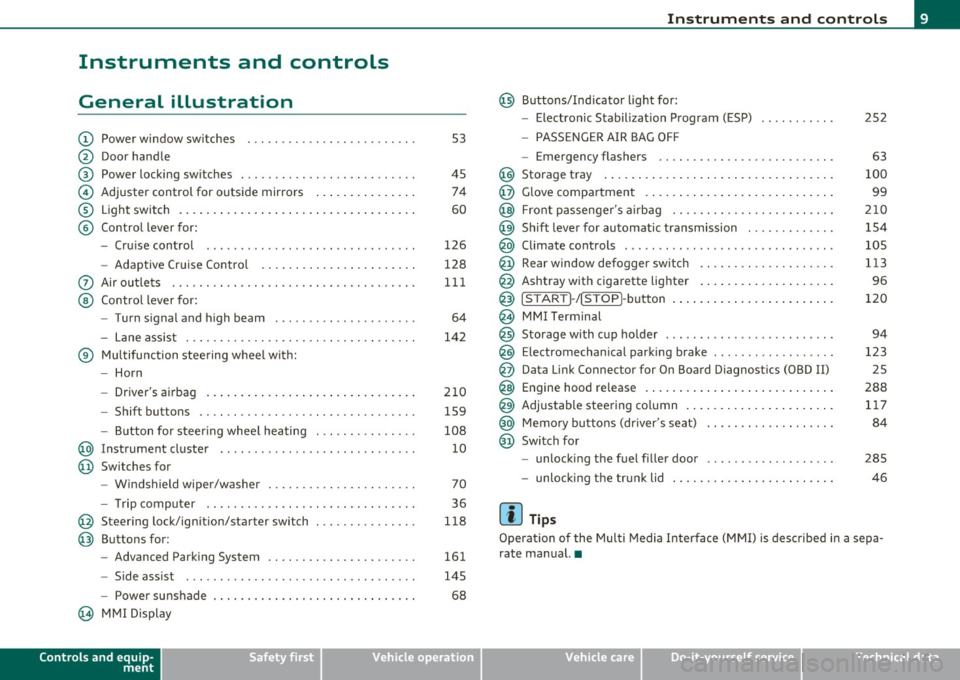
Instruments and controls
General illustration
(D Power window switches . .. .. .. ... .. ... .. ... ... . .
@ Door handle
@ Power locking switches . .. .. ......... .. .. .... ... .
© Adjuster control for outside mirrors .............. .
® Light switch ............... . ... ..... ....... ... .
© Control lever for:
- Cruise contro l ............ .... ... . ... ....... .
- Adaptive Cruise Control . ................... .. .
0 Air outlets .... .... .. .. .. ... ... ............. .. .
@ Control lever for:
- Turn signal and high beam .................... .
- Lane assist ................ ...... .. .. .. .. ... .
® Multifunction steering wheel with:
- Horn
- Driver's airbag ....................... ....... .
- Shift buttons .... .. .. .. .. .... ............... .
- Button for steer ing whee l heating . .. .. ... ...... .
@ Instrument cluster .................. .... ... ... .
@ Switches for
- Windshield wiper/washer ................ .. ... .
- Tr ip computer .. .......... . .. .... .. .. .... ... .
@ Steering lock/ignition/starter switch .............. .
@ Buttons for:
- Advanced Parking System .... .. .... .. ...... ... .
- Side ass ist ........... ........ ... ..... ... ... .
- Power sunshade
@ MMI Display
Controls and equip
ment Safety first
53
45 74
60
126
128
111
64
142
210 159
108 10
70
36
118
161
145
68
Instruments and controls
@ Buttons/Indicator light for:
- Electronic Stabilization Program (ESP)
- PASSENGER AIR BAG OFF
- Emergency flashers .. .. .. .. .. .... .. ......... .
@ Storage tray .................. .. .. .. ......... .
@ Glove compartment .... .... .. .. .... ........... .
@ Front passenger 's airbag .................... .. . .
@ Sh ift lever for automatic transmission ........... . .
@ Climate controls . .. .................... .... ... .
@ Rear window defogger switch .. .. .. .. .. .... ..... .
@ Ashtray with cigarette lighter ................... .
@ IS TART ]-/IS TOP]-button . ... ................ ... .
@ MMI Terminal
@ Storage with cup holder ..... .. .. .. ............. .
@ Electromechanical parking brake ... .. ...... ..... . .
@ Da ta Link Connector for On Board Diagnostics (OBD II)
@ Engine hood release ........................... .
@ Adjustable steering column ..................... .
@ Memory buttons (driver's seat) .................. .
@ Switch for
- unlock ing the fuel filler door ....... ....... .... .
- unlock ing the trunk lid
[ i ] Tips
252
63
100
99
210
154
105
113
96
120
94
123 25
288 117
84
285
46
Operation of the Multi Media Interface (MMI) is described in a sepa
rate manual. •
Vehicle care Technical data
Page 17 of 384
AIR Airbag system
BAG ~
/ : Lane assist (system is ready)
L ane assist (system is not ready)
¢ Left t urn signal
D High beam
!D
Fog lights
Rear fog lights
Tire pressure monitoring system*
M alfunction Indicator Lamp (MI L)
I. "fi'
Safety bel t
-Adaptive Air Suspension
~ Adaptive A ir Suspension
Q
Right turn signal
--
CRUISE
USA models:
Cruise contro l act ivate d
c;)~ Canada models :
Cruise control activated
USA models:
Ant i-lock brake system (ABS) defective
Controls and equip
ment Safety first
=:>page
17
-
=> page 17
=> page 17
=> page 1 7
=> page 17
=> page 17
=> page 17
=> page 17
=> page 18
=> page 18
-=>page 18
=> page 18
=>page 17
-
=> page 19
=>page 19
=> page 19
Instruments and warning /indicator lights
Canada models: => page 19
Anti-lock brake system (ABS) defective
PARK USA m odel s: =:>page20
BRAK E Electromechan ica l parking brake
(®) Canada models: =:> page 20
Electromechanical parking brake
BRAKE
USA models: =:> page20
Bra ke ma lf u ncti on
Canada models: =:>page20
B rake malfunction
-
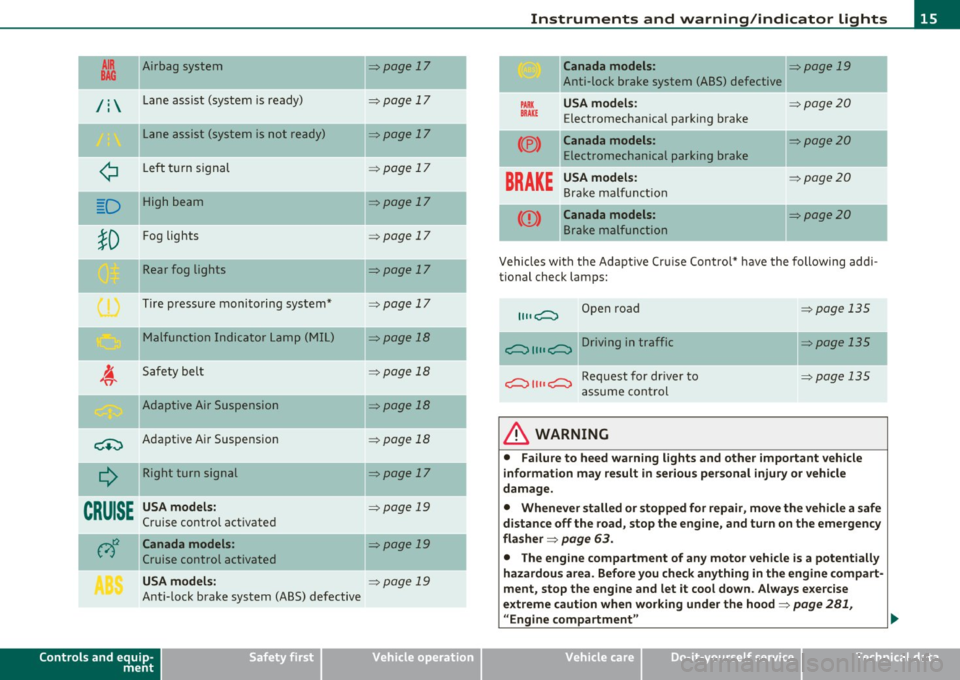
Vehicles wi th the Adapt ive Cr uise Control* have the following add i-
tional check lamps:
II II c;::::::::, Open road => page 135
c;::::::::, II II c;::::::::, Driving in traffic => page 135
c;::::::::, II II c;::::::::, Request for dr iver to =>page 135
assume cont rol
& WARNING
• Failure to heed warning lights and other important veh icle
information may result in serious personal injury or vehicle
damage.
• Whenever stalled or stopped for repair , move the vehicle a safe
distance off the road, stop the engine, and turn on the emergency
fla sher =>
page 63.
• The engine compartment of any motor vehicle is a potentially
hazardous area. Before you check anything in the engine com part -
ment, stop the eng ine and let it cool down . Always e xercise
extreme caution when working under the hood=>
page 281,
"Engine compartment " ..
Vehicle care Technical data
Page 31 of 384
you can bring up a driver message which explains the malfunction in more detail.
Stop vehicle and check brake fluid Level
- Pull off the road .
- Stop the vehicle.
- Turn off the engine.
- Check the brake fluid level~
page 299.
-Contact your nearest authorized repair facility if neces-
sary.
Brake fault ! Drive carefully to nearest
workshop
- Drive carefully to the nearest authorized repair facility and
have the malfunction corrected~& .
Parking brake ! Please contact workshop
- If the warning/indicator light flashes when the vehicle is
stationary or after the ignition is turned on , check to see if
the parking brake can be released . Drive to an authorized
repair facility as soon as possible and have the malfunc
tion corrected. If the parking brake cannot be released,
contact your nearest authorized repair facility.
- If the warning/indicator light flashes while you are driving, it is possible that the traction control or the emer
gency brake has malfunctioned. It is possible that the parking brake cannot be applied . It is also possible that
the parking brake cannot be released after it has been
applied. Drive to an authorized Audi dealer to have the malfunction corrected.
Controls and equip
ment Safety first
Driver information display
I
f the ABS , ESP and the brake for ce distribution fail, the ABS
warning/indicator light and the ESP warning/indicator light come on
along with the brake system malfunction warning/indicator light
~ & -
& WARNING
• Always observe the warnings in ::::> page 281, "Engine compart
ment", before opening the hood and checking the brake fluid.
• Driving with low brake fluid is a safety hazard. Stop the car and
get professional assistance.
• USA models: If the BRAKE warning light, the ~ warning light
and the warning light come on together, the rear wheels
could lock up first under hard braking. Rear wheel lock-up can
cause loss of vehicle control and an accident. Have your vehicle
repaired immediately by your authorized Audi dealer or a qualified
workshop. Drive slowly and avoid sudden, hard brake applica
tions.
• Canada models: If the brake warning light(())), the r-warning
light and the ABS warning light come on together, the rear
wheels could lock up first under hard braking. Rear wheel lock-up
can cause loss of vehicle control and an accident. Have your vehicle
repaired immediately by your authorized Audi dealer or a qualified
workshop. Drive slowly and avoid sudden, hard brake
applications. •
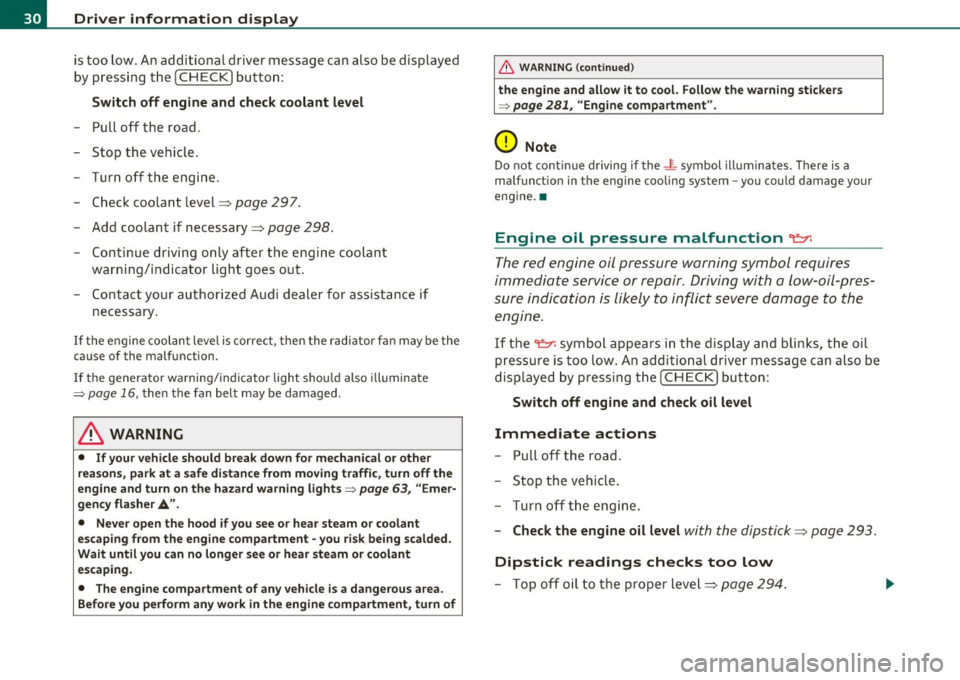
Engine cooling system malfunction -1-
A malfunction in the engine cooling system must be
repaired as soon as possible.
When the - L symbol in the display blinks, then either the
engine coolant
temperature is too high, or the coolant level ~
Vehicle care Technical data
Page 32 of 384
Driver information display
is too low. An additional driver message can also be displayed
by pressing the [CHECK) button:
Switch off engine and check coolant level
-Pull off the road .
- Stop the vehicle.
- Turn off the engine.
- Check coolant level=>
page 297.
-Add coolant if necessary=> page 298.
-Continue driving only after the engine coolant
warning/indicator light goes out.
- Contact your authorized Audi dealer for assistance if
necessary.
If the engine coolant level is correct, then the radiator fan may be the
cause of the malfunction.
If the generator warning/indicator light should also illuminate
=>
page 16, then the fan belt may be damaged .
& WARNING
• If your vehicle should break down for mechanical or other
reasons, park at a safe distance from moving traffic, turn off the
engine and turn on the hazard warning lights=>
page 63, "Emer
gency flasher A".
• Never open the hood if you see or hear steam or coolant
escaping from the engine compartment -you risk being scalded.
Wait until you can no longer see or hear steam or coolant
escaping.
• The engine compartment of any vehicle is a dangerous area.
Before you perform any work in the engine compartment, turn of
& WARNING (continued)
the engine and allow it to cool. Follow the warning stickers
=> page 281, "Engine compartment".
0 Note
Do not continue driving if the -~-symbol illuminates. There is a
malfunction in the engine cooling system -you could damage your
engine. •
Engine oil pressure malfunction "t':::7':
The red engine oil pressure warning symbol requires
immediate service or repair. Driving with a low-oil-pres
sure indication is likely to inflict severe damage to the
engine.
If the ~ symbol appears in the display and blinks, the oil
pressure is too low. An additional driver message can also be
displayed by pressing the [CHECK] button:
Switch off engine and check oil level
Immediate actions
-Pull off the road .
- Stop the vehicle.
- Turn off the engine .
-Check the engine oil level with the dipstick=> page 293.
Dipstick readings checks too low
- Top off oil to the proper level=> page 294.
Page 42 of 384

Opening and closing Master key with remote control
The remote control allows you to lock or unlock the
vehicle electronically.
Fig. 24 Fold-up
master key with
remote control
- To fold the key out and back in place, press the release
button~ fig. 24.
The transmitter and battery are located in the head of the remote
control. The receiver is located inside the vehicle. The maximum
effective range depends on several things. Remember, if the battery
is weak, the effective range decreases.
If you need to replace the remote contro l, or if you need to have it
repaired, you must see you r author ized Aud i dealer. Only then can you
use the key again.
Personalizing the master key
When the ignition is turned off or when the vehicle is locked, vario us
convenience sett ings are stored automatically and assigned to the
key that was used. The sett ings assigned to the key are automatically
recalled w ith you unlock the vehicle or when you open a door or when
you switch on the ignition .
• Climate control
• Centra l locking
• Windows and rear window sun blind •
Background lighting*
• Seat memory
• Adaptive Cru ise Contro l*
• Audi lane and s ide assist*
• Adva nced Parking System*
The
Remote control key f un ction must be activated in MMI
=> page 85, so that the settings for the driver's seat (including the
sett ings for the head restraint, steering column, safety belt height
and exterior mirrors) are saved on the master key through the seat
memory when the vehicle is locked, and are set automat ica lly when
the vehicle is unlocked.
[ i ] Tips
• If the ign it ion is switched on, the remote control system is deacti
va ted .
• The remote control system can be affected by other systems oper
ating in the same frequency range close to the vehicle, such as mobile
telephones, te lev ision broadcasting stations, etc.
• For Declaration of Compliance to United States FCC and Industry
Canada regulations =>
page 364. •
Battery replacement, master key
. w ',!
Fig. 25 Check light in
the master key ..
Page 163 of 384
_________________________________________ A_ d_v _a_ n_ c_e _d _ P_ a_ r _k_ , _·n _g=- S-=- y_s _t _e _m __ ....J_
Advanced Parking System
Advanced Parking System with rear
view camera
Ap plies to veh icles : wit h Adv anced Par kin g S yste m wit h rear view camera
General information
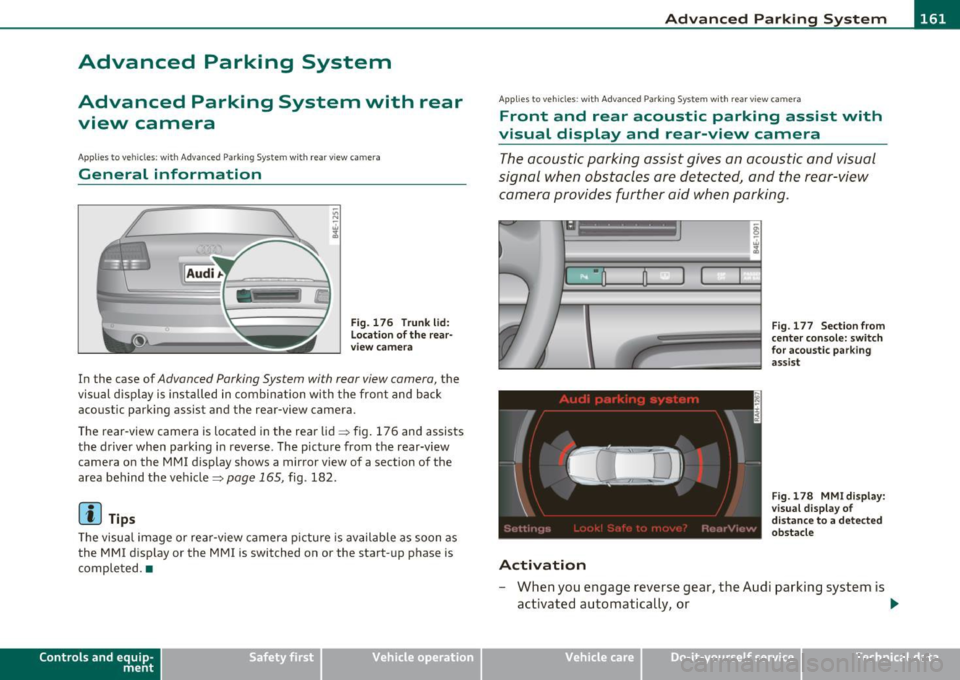
Fig. 176 Trunk l id:
location of the rear·
view camera
In the case of Advan ced Parking Sys tem with rear view camera, the
visual display is installed in combination with the front and back
acoustic parking assist and the re ar-view camera .
The rear-vi ew camera is located in the rear lid=> fig. 176 and assists
the driver when parking in reverse . The picture from the rear-view
camera on the MMI display shows a m irror v iew of a sect ion of the
area behind the vehicle=>
page 165, fig . 182.
(I) Tips
The visual image or rear-view camera picture is available as soon as
the MM I display o r the MMI is switched on or the start-up phase is
completed .•
Con tro ls a nd e quip
m en t Vehicle
OP-eration
Applies to ve hicles : w ith A dva nced Pa rk in g Syste m with rea r vie w c am era
Front and rear acoustic parking assist with
visual display and rear-view camera
The acoustic parking assist gives an acoustic and visual
signal when obstacles are detected, and the rear-view camera provides further aid when parking .
•
Activation
Fig. 177 Section from
center console: switch
for acoustic parking
assist
Fig.178 MMidisplay:
visual display of
distance to a detected
obstacle
- When you engage reverse gear , the Audi parking system is
activated automatically, or .,.
Vehicle care Do-it-yourselt service iTechnical data
Page 164 of 384

IIII.___A_ d_v_ a_ n _ c_e _d _ P_ a_ rk_ in--= g'-S -=- y_s_t_ e_ m _________________________________________ _
- Press the switch P1JJ! in the center console=:, page 161,
fig. 177 to activate the Audi parking system manually.
Activation of the acoustic parking system is confirmed by
a brief acknowledgement sound. The indicator light in the
switch lights up.
Deactivation
- If you drive forwards faster than approx. 6 mph (10 km/h), or
- if you switch the ignition off, the entire acoustic parking
assist is automatically deactivated, or
- you can press the switch
Pw! in the center console
=:, page 161, fig. 177 to deactivate the Audi parking
system. The indicator light in the switch goes out.
You have to turn on the acoustic parking assist manually if you wish
to park the vehicle forwards or if you wish to approach an obstacle
forwards and want a distance warning.
The range at which the sensors start to measure is
about :
Front
Rear
Warning tones
side
center
side
center 3 ft (0.90 m)
4 ft (1.20 m)
2 ft (0.60 m)
5.2 ft (1.60 m)
Distance warning is given by chimes which are generated by a signal
generator . The volume and the pitch of the chimes can be adjusted in
the MMI =>
page 171.
Mute
In the case of vehicles with automatic transmission, an acoustic
distance warning is discontinued when the transmission selector lever is moved to the P position
. However, the system remains active.
As soon as the selector lever is moved from the
P position and the
vehicle approaches an obstacle, the acoustic distance warning
resumes.
Driving forward/backward
Distance warning when driving forward/backward is based on detec
tion of an obstacle in the range of the parking assist . As the distance
decreases, the time interval between the audible tones becomes
shorter.
When the distance is less than approx. 1 ft (0.30 m), the tone
becomes continuous. At this point you should stop backing up or
driving forward .
If the distance to an obstacle remains the same, the volume of the
distance warning is gradually reduced after about
4 seconds (does
not apply to the zone for the continuous tone). If you start to
approach the detected obstacle again, the distance warning will
sound at the normal volume again.
Parking
When you select another gear when parking (e.g. reverse/forward),
the warning tones are temporarily suppressed, but the visual display
remains on the MMI display. If you start approaching a detected
obstacle again, the distance warning will sound at the normal volume
again.
Visual display
The segments on the MMI display indicate a change in the distance
between the vehicle and an obstacle . The number of segments
displayed depends on the obstacles in front of or behind the vehicle.
The closer the vehicle comes to the obstacle, the closer the segments
approach the vehicle=>
page 161, fig. 178. When the segment
before last is displayed, the vehicle has reached the collision zone. At
this point you should stop backing up or driving forward=>& .
The image in the visual display can be switched off on the MMI display
=>
page 173 . The acoustic distance warning remains active. .,,
Page 165 of 384

_________________________________________ A_ d_v _ a_ n_ c_e _d _ P_ a_ rk_ in_ g =- S -.:.y_s _t _e _ m ___ _
If you press a fu nction bu tto n on t he M MI termina l, the v is u a l display
dis appea rs. Manu ally sw itchin g th e par king assist on ag ain via the
p,qA
switch s hows th e visual image on the MMI display again . Further
info rmation regarding the MMI term inal is in cl uded in the MMI user's
ma nual.
Rear-view camera (rear view)
The rear-view camera picture~ page 166, fig . 183 appears on the
MM I d is play as a mir ror im age. The re ar-view came ra pic ture has
or ientat ion lines and mar ked surfaces projected into i t as an a id to
the par king process ~
page 164. The red line in the picture
~ pag e 164, fig. 179 or~ page 164, fig. 1 80 indicates the coll is ion
area . You s houl d sto p bac kin g up, prefera bly befo re yo u reac h this
poin t~ & -
lf your vehicle is close to an obstacle , th e visual d istance d isplay also
appe ars in th e pic t ur e fr om t he re ar -view camera. This s uperim posed
display is intended to help d isplay the re levant cr itical ve hicle area .
If the visual dis play is shown on the MMI display and you press the
co ntr ol bu tton wi th the
Rear view funct ion ~ page 161 , fig. 178, the
pict ure from t he rear -view came ra is disp laye d.
If the pic ture from t he re ar-view camera is sh own and yo u pre ss the
cont rol button with the
Graphic f unction~ page 166 , fig. 183, t he
visual displ ay is s hown.
Th e p icture from th e re ar-v iew ca mera can b e sw itche d off o n the
MM I dis play ~
page 173 . The acoust ic distance warning remains
a cti ve.
If you press a function b utton on the MMI term ina l, the rear-v iew
c amera picture d is app ears. The rear -view came ra pictur e re a ppears
the next time you pa rk . But the picture from the rear-view camera can
also be show n ag a in on the MMI display by manua lly switc hing off
and on wi th t he
p,,1 A swi tch. Fu rther in fo rm ation r egard ing the M MI
terminal is incl uded i n th e MM I user 's manual.
Controls and equip
ment Safety first
& WARNING
•
Sensors have dead spaces in which objects cannot be detected .
Be especially careful to check for small children and animals
before backing up. Small children and animals will not always be
detected by the sensors .
• The Audi parking system is not a substitute for being careful
and alert when backing up. Be especially careful during parking
and similar maneuvers . Always watch where you are driving and
make sure that nothing is in the way.
• Remember that low obstacles which have already been
signaled may pass below the system's sensing zone when the
vehicle is backing up. The fact that the signal stops does not mean
that you have cleared the obstacle. When the signal stops, impact is imminent . Objects such as trailer hitches, chains, narrow posts
or fences covered by a thin layer of paint may not always be
detected by the sy stem. They can still damage your vehicle
without warning.
• Always make sure that the volume and frequency of the chimes
is adjusted so that you can easily hear the acoustic distance signal
even if the radio is playing, the air-conditioner blower is on High
or there is a high level of outside no ise.
- Check the settings whenever someone else has driven the
vehicle before you.
• Improper reliance on the Audi parking system can cause colli
sions and serious personal injury.
-Never rely only on parking assist when backing up.
- Always che ck rear view mirrors to make sure it i s safe to back
up.
[ i ] Tips
• The rear -view came ra pict ure is avai lab le as soon as the M MI
D ispl ay or the MMI i s swi tched o n, or the s tart -up ph ase is comple ted. _,.
Vehicle care Technical data
Page 167 of 384

_________________________________________ A_ d_v _a_ n_ c_e _d _ P_ a_ r _k_ , _· n_ g=- S-=- y_s _t _e _m __ ....JIJII
& WARNING
• The rear-view cam era has blind spots, in which objects cannot
be detected. Be especiall y carefu l to check for small children and
animal s before backing up . Small childr en and animals will not
always be detected by the sensor s.
• The Audi parking system is not a subst itute for being careful
and alert when ba cking up. Be e specially careful dur ing parking
and similar maneuvers . Always watch where you are driving and
make sure that nothing is in the way.
• Remember that low obstacles which have already been
s ignaled may pass below the system 's sensing zone when the
vehicle is back ing up . Th e fact that the signal stop s does not mean
that you have cleared the obstacle . When the signal stops , impact
is imminent . Objects su ch as trailer hitches, chains, narrow posts
or fences covered by a thin la yer of paint may not always be
detected by the system. They c an still damage your vehicle
without warning.
• Alway s make sure that the volume and frequency of the chimes
is adjusted so th at you can eas ily hear the acoustic distance s ignal
even if the radio is playing, the air-conditioner blower is on High
or there is a high level of outside noise .
- Che ck the setting s whenever someone el se has driven the
vehicle befo re you.
• Improper reliance on the Aud i parking system can caus e colli
sions and seriou s per sonal injury.
- Never rely only on parking assist when changing ba cking up.
- Alway s check re ar view mirrors to make sure it is safe to back
up.
[ i ) Tips
• Before parking with the rear-view camera, the Adaptive A ir
S uspension stan dard or au tomatic mo de must be swit ched on
=> page 18.
Cont rols a nd e quip
m en t
Vehicle OP-eration
• The rear-view camera pict ure is avai lab le as soon as the MMI
Display or the MMI is sw itched on , or the sta rt-u p ph ase is completed .
• In or der for the rear-view camera to function p roper ly, the came ra
lens =>
page 16 1, fig. 176 mus t be kept clean , a nd free o f snow and
ice . Please follow t he addit ional notes on =>
page 174 .
• The c ame ra cover age angle change s when the t runk lid is o pen.
The refore, the rear-v iew camera pict ure is displayed without orienta
t ion lines and w ithout blu e surfaces.
• Obse rve and fo llow the notes on towing mode on=>
page 171. •
Applies to ve hicles: w it h Advanced Pa rking System w ith rear view camera
Rear -view camera coverage area
0
Vehicle care
I)
Fig. 18 1 Top vie w:
R ear-v iew came ra
c o ve rage a re a
Fi g. 182 Side view :
Cov ered ar ea @ and
u nc overed are a@ of
th e re ar -vi ew c am era ..
Do-it-yourselt service iTechnical data